1
e
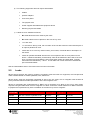
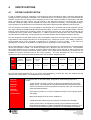
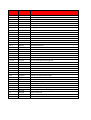
Device extension; see below for allowed values
FPD = Flat Panel Display
PRJ = Projector
LCC = Lecture Capture Camera
LCA = Lecture Capture Appliance
AXC = AMX Controller
AXP = Touch Panel
WXP = Wireless Touch Panel
DMM = Digital Media Matrix (Creston, Extron, AMX)
DMR = Digital Media Receiver (Creston, Extron, AMX Receiver)
WMC = Wireless Media Controller (Wireless Media Controller)
AMP = Mixer Amplifier
MIC = Wireless Microphone
VCC = Video Conferencing Codec
DSP = Digital Sound Processor
PCI = Lighting interface
MPS = Motorised Projection Surface
PDU = Power Distribution Unit
PIR = Motion Sensor
MOC = Blind Motor Controller
z
Device number, 2 digits, required
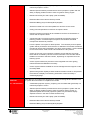
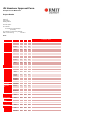
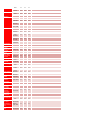
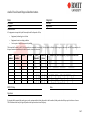
Device type
Example name
Notes
Flat Panel Display
Bwwwxxyyy-FPD01
01 stands for first display on left hand side as you enter a
room through its main door. All others are sequentially
numbered clockwise from the first.
Projector
Bwwwxxyyy-PRJ01
01 stands for first projector as you enter a room through
its main door. All others are sequentially numbered
clockwise from the first.
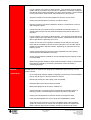
Lecture Capture Camera
Bwwwxxyyy-LCC01
01 stands for first camera as you enter a room through its
main door. All others are sequentially numbered
clockwise from the first.
Lecture Capture Appliance
Bwwwxxyyy-LCA01
01 stands for first lecture capture appliance as you enter a
room through its main door. All others are sequentially
numbered clockwise from the first.
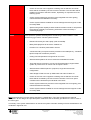
AMX Controller
Bwwwxxyyy-AXC01
Control Touch Panel
Bwwwxxyyy-AXP01
Digital Media Matrix (Creston Controller)
Bwwwxxyyy-DMM01
Digital Media Receiver (Creston Fibre
Receiver)
Bwwwxxyyy-DMR01
Wireless Media Controller (Creston
Wireless Media Controller)
Bwwwxxyyy-WMC01
Mixer Amplifier
Bwwwxxyyy-AMP01
Wireless Microphone
Bwwwxxyyy-MIC01
3.7.4
01 stands for first digital media receiver as you enter a
room through its main door. All others are sequentially
numbered clockwise from the first.
IT Data Switches & Cabling
IT data network switches must not be installed by the AV Integrator. All IT network connectivity will be provided
by RMIT ITS. Local AV network switches must not be used. Connectivity for AV systems must be via provided
Status: Released
Version:2.2
Document: ITS-AVS Audio Visual Standards
V2.2Issued.docx
Author: Dean McFadden
Save Date: 25/08/2014
Page 41 of 63