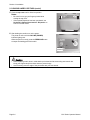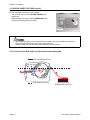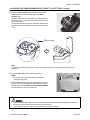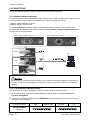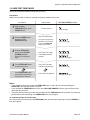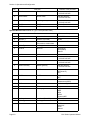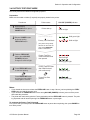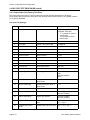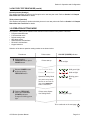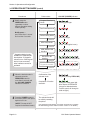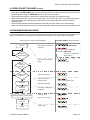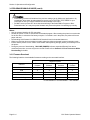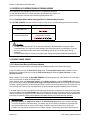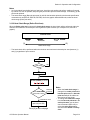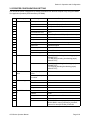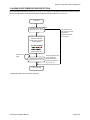
1
Operator Manual For printer model: CG2 Series CG208DT CG212DT CG208TT CG212TT Direct Thermal Type 203 dpi/ 305 dpi Thermal Transfer Type 203 dpi/ 305 dpi PN: 9001211B Read this Operator Manual before and during usage of the above product. Keep this document handy for future reference. www.satoamerica.com Copyrights The contents of this document are proprietary information of SATO Corporation and/or its subsidiaries in Japan, the U.S and other countries. No part of this document may be reproduced, copied, translated or incorporated in any other material in any form or by any means, whether manual, graphic, electronic, mechanical or otherwise, without the prior written consent of SATO Corporation. FCC Statement The printer complies with the requirements in Part 15 of FCC Rules for a Class B Computing Device. Operating the printer in a residential area may cause unacceptable interference to radio and TV reception. If the interference is unaccepatble, you can reposition the equipment, which may improve reception. Limitation of Liability SATO Corporation and/or its subsidiaries in Japan, the U.S. and other countries, makes no representations or warranties of any kind regarding this material, including, but not limited to, implied warranties of merchantability and fitness for a particular purpose. SATO Corporation shall not be held responsible for errors contained herein or any omissions from the materials or for any damages, whether direct, indirect, incidental or consequential, in connection with the furnishing, distribution, performance, or use of this material. SATO Corporation reserves the right to change or improve this product and document without notice. Trademarks SATO is a registered trademark of SATO Corporation and/or its subsidiaries in Japan, the U.S and other countries. SATO America, Inc. 10350 Nations Ford Road Charlotte, NC 28273 Main Phone: (704) 644.1650 Technical Support: (704) 644.1660 Technical Support Fax: (704) 644.1661 E-Mail: [email protected] www.satoamerica.com © Copyright 2010 SATO America, Inc. All rights reserved. Safety Precautions Safety Precautions Please read the following information carefully before installing and using the printer. Pictographic Symbols This instruction manual and the printer labels use a variety of pictographic symbols to facilitate safe and correct use of the printer and to prevent injury to others and property damage. The symbols and meanings for them are given below. Be sure to understand these symbols well before reading the main text. Warning Caution Ignoring the instructions marked by this symbol and erroneously operating the printer could result in death or serious injury. Ignoring the instructions marked by this symbol and erroneously operating the printer could result in injury or property damage. Example Pictographs The pictograph means “Caution is required.” A specific warning symbol is contained inside this pictograph (The symbol at left is for electric shock). The pictograph means “Should not be done.” What is specifically prohibited is contained in or near the pictograph (The symbol at left means “Disassembly prohibited”). The pictograph means “Must be done.” What is specifically to be done is contained in the pictograph (The symbol at left means “Unplug the power cord from the outlet”). Warning Do not set on an unstable area • Do not set on an unstable area, such as a wobbly table or slanted area or an area subject to strong vibration. If the printer falls off or topples over, it could injure someone. Do not place containers full of water or other liquid on the printer • Do not place flower vases, cups, or other containers holding liquids, such as water or chemicals, or small metal objects near the printer. If they are spilled and get inside the printer, immediately turn off the power switch, unplug the power cord from the outlet, and contact the dealer, or Support Center. Using the printer in this condition could cause a fire or electric shock. Do not put objects inside the printer • Do not insert or drop in metal or burnable objects inside the printer’s openings (cable outlets, etc.). If foreign objects do get inside the printer, immediately turn off the power switch, unplug the power cord from the outlet, and contact the dealer, or Support Center. Using the printer in this condition could cause a fire or electric shock. Do not use other than the specified voltage • Do not use other than the specified voltage. Doing so could result in fire or electric shock. CG2 Series Operator Manual Always ground the connections • Always connect the printer’s ground wire to a ground. Not grounding the ground wire could result in electric shock. Handling of the power cord • Do not damage, break, or modify the power cord. Also, do not place heavy objects on the power cord, heat it, or pull it because doing so could damage the power cord and cause a fire or electric shock. • If the power cord becomes damaged (core is exposed, wires broken, etc.), contact the dealer, or Support Center. Using the power cord in this condition could cause a fire or electric shock. • Do not modify, excessively bend, twist, or pull the power cord. Using the power cord in such a condition could cause a fire or electric shock. When the printer has been dropped or broken • If the printer is dropped or broken, immediately turn off the power switch, unplug the power cord from the outlet, and contact the dealer, or Support Center. Using the printer in this condition could cause a fire or electric shock. Do not use the printer when something is abnormal about it • Continuing to use the printer in the event something is abnormal about it, such as smoke or unusual smells coming from it, could result in fire or electric shock. Immediately turn off the power switch, unplug the power cord from the outlet, and contact the dealer, or Support Center for repairs. It is dangerous for the customer to try to repair it, so absolutely do not attempt repairs on your own. Do not disassemble the printer • Do not disassemble or modify the printer. Doing so could result in fire or electric shock. Ask the store, dealer, or Support Center to conduct internal inspections, adjustments, and repairs. Regarding the cutter • Do not touch the cutter with your hands or do not put something into the cutter. Doing so could result in an injury. Using the head cleaning fluid • Use of flame or heat around the head cleaning fluid is prohibited. Absolutely do not heat it or subject it to flames. • Keep the fluid out of reach of children to prevent them from accidentally drinking it. If the fluid is drunk, immediately consult with a physician. Page i Safety Precautions Caution Power cord Do not place in areas with high • Keep the power cord away from humidity hot devices. Getting the power • Do not place the printer in areas cord close to hot devices could with high humidity or where concause the cord’s covering to densation forms. If condensamelt and cause a fire or electrition forms, immediately turn off cal shock. the power switch and do not use • When unplugging the power the printer until it dries. Using cord from the outlet, be sure to the printer while condensation is hold it by the plug. Pulling it by on it could result in electric the cord could expose or break shock. the core wires and cause a fire Carrying the Printer or electric shock. • When moving the printer, • The power cord set that comes always unplug the power cord with the printer is especially from the outlet and check to made for this printer. Do not use make sure all external wires are it with any other electrical disconnected before moving it. devices. Moving the printer with the wires Top cover still connected could damage • Be careful not to get your finthe cords or connecting wires gers pinched when opening or and result in a fire or electrical closing the top cover. Also be shock. careful the top cover does not • Do not carry the printer with slip off and drop. paper loaded in it. The paper Print head could fall out and cause an • The print head is hot after printinjury. ing. Be careful not to get burned • When setting the printer on the when replacing paper or cleanfloor or a stand, make sure not ing immediately after printing. to get your fingers or hands • Touching the edge of the print pinched under the printer feet. head with bare hands could Power supply result in injury. Be careful not to • Do not operate the power become injured when replacing switch or plug in/unplug the paper or cleaning. power cord with wet hands. Doing so could result in electric shock. Page ii Loading paper • When loading roll paper, be careful not to get your fingers pinched between the paper roll and the supply unit. When not using the printer for a long time • When not using the printer for a long time, unplug the power cord from the outlet to maintain safety. During maintenance and cleaning • When maintaining and cleaning the printer, unplug the power cord from the outlet to maintain safety CG2 Series Operator Manual Safety Precautions Precautions for Installation and Handling Printer operation can be affected by the printer environment. Refer to the following instructions for installation and handling of CG2 Series printer. Select a Safe Location Place the printer on a surface that is flat and level. If the surface is not flat and level, this may result in poor print quality. This may also cause malfunction and shorten the life span of the printer. Do not place the printer on a location that produces vibration. Do not carry the printer when the roll label is set. Giving serious vibration or shock to the printer may cause malfunction and shorten the life span of the printer. Do not place the printer near crane or pressing machine. Machinery, such as cranes and pressing machines requires large amount of power. Being near this machinery may cause electrical noise or voltage reduction. Avoid such locations to reduce the risk of malfunction or damage to the printer. Keep the printer out of high temperature and humidity. Avoid locations subject to extreme or rapid changes in temperature or humidity. Exposure to these conditions may cause electrical problems within the printer. Do not place the printer in a location subject to water or oil. Do not place the printer in a location where it will be splashed with water or oil. Water or oil entering inside the printer may cause a fire, electric shock, or malfunction. Avoid dust. Dust build up may result in poor print quality. This may cause not only malfunction but also shorten the life span of the printer. Keep out of direct sunlight. This printer has a built-in optical sensor. Exposure to direct sunlight will make the sensor less responsive and may cause the label to be sensed incorrectly. Close the top cover when printing. Power Supply This printer requires an AC power supply. printer. Be sure to connect the printer to an AC power supply via the supplied AC adapter. Failure to do so may result in malfunction. Do not share the power outlets with other appliances such as a heater and refrigerator requiring a measurable amount of power. Also, avoid using the power outlet near where such appliances are plugged into. This may cause voltage reduction and malfunction. Connect the power cord to a grounded power outlet. Make sure that the printer is plugged into a grounded power outlet. Provide a stable source of electricity to the CG2 Series Operator Manual Page iii Safety Precautions Page iv CG2 Series Operator Manual Table of Contents TABLE OF CONTENTS Introduction ............................................................................................................... 1 - 1 1.1 Features of the Printer.................................................................................................. 1 - 1 1.2 Unpacking .................................................................................................................... 1 - 2 1.3 Parts Identification........................................................................................................ 1 - 3 Installation ................................................................................................................. 2 - 1 2.1 Site Location ................................................................................................................ 2 - 2 2.2 Media Selection............................................................................................................ 2 - 2 2.3 Loading Labels or Tags................................................................................................ 2 - 3 2.4 Loading the Carbon Ribbon (For CG208TT, CG212TT only) ...................................... 2 - 7 2.5 Connections ............................................................................................................... 2 - 10 Operation and Configuration ................................................................................... 3 - 1 3.1 Operator Panel ............................................................................................................. 3 - 2 3.2 Operating Modes.......................................................................................................... 3 - 3 3.3 User Test Print Mode ................................................................................................... 3 - 5 3.4 Factory Test Print Mode ............................................................................................... 3 - 9 3.5 Operation Setting Mode ............................................................................................. 3 - 11 3.6 Program Download Mode........................................................................................... 3 - 13 3.7 Font Download Mode ................................................................................................. 3 - 15 3.8 Default Setting Mode.................................................................................................. 3 - 16 3.9 HEX Dump Mode ....................................................................................................... 3 - 17 3.10 Print Mode of Wireless LAN Setting ......................................................................... 3 - 17 3.11 Error Occurrence While Downloading ...................................................................... 3 - 20 3.12 Print Head Check ..................................................................................................... 3 - 20 3.13 Printer Configurations Setting .................................................................................. 3 - 23 3.14 Head Over-Temperature Protection ......................................................................... 3 - 25 3.15 Protection Function when Using AC Adapter ........................................................... 3 - 26 3.16 Measures for RFID error (Optional).......................................................................... 3 - 27 Troubleshooting........................................................................................................ 4 - 1 4.1 Error signal troubleshooting ......................................................................................... 4.2 Troubleshooting table................................................................................................... 4.3 Interface troubleshooting.............................................................................................. 4.4 Test print troubleshooting............................................................................................. 4-2 4-4 4-6 4-7 Cleaning and Maintenance....................................................................................... 5 - 1 5.1 Cleaning The Print Head, Platen and Rollers............................................................... 5.2 How To Clean The Printer (Cleaning Kit) ..................................................................... 5.3 How To Clean The Printer (Cleaning Sheet)................................................................ 5.4 Easy Replacement of Parts.......................................................................................... 5.5 Adjusting Print Quality .................................................................................................. 5-2 5-2 5-3 5-4 5-6 General Specifications ............................................................................................. 6 - 1 6.1 Printer Basic Specifications.......................................................................................... 6 - 1 6.2 Optional Accessories Specifications ............................................................................ 6 - 7 Interface Specifications............................................................................................ 7 - 1 CG2 Series Operator Manual Page v Table of Contents 7.1 Interface types.............................................................................................................. 7.2 RS232C Serial Interface............................................................................................... 7.3 Universal Serial Bus (USB) Interface ........................................................................... 7.4 Local Area Network (LAN) Ethernet and Wireless LAN ............................................... 7-1 7-2 7-6 7-8 Appendix.................................................................................................................... 8 - 1 8.1 Optional Accessories - Cutter....................................................................................... 8 - 2 8.2 Optional Accessories - Dispenser ................................................................................ 8 - 4 8.3 Positions of sensors and options.................................................................................. 8 - 6 8.4 15mm (0.6”) Wide Wristband ....................................................................................... 8 - 7 8.5 Operation Mode Selection............................................................................................ 8 - 8 8.6 Base Reference Point .................................................................................................. 8 - 9 8.7 Offset position Adjustment ......................................................................................... 8 - 12 8.8 Paper End .................................................................................................................. 8 - 13 8.9 Ribbon End ................................................................................................................ 8 - 14 SATO Group of Companies ..................................................................................... 9 - 1 SATO Group of Companies ............................................................................................... 9 - 2 Page vi CG2 Series Operator Manual Section 1: Introduction INTRODUCTION Thank you for your investment in this SATO printer product. This Operators Manual contains the basic information about the installation, setup, configuration, operation and maintenance of the printer. A total of eight topics are covered herein, and they are organized as follows: Section 1: Introduction Section 2: Installation Section 3: Operation and Configuration Section 4: Troubleshooting Section 5: Cleaning and Maintenance Section 6: General Specifications Section 7: Interface Specifications Section 8: Appendix It is recommended that you read carefully and become familiar with each section before installing and maintaining the printer. Refer to the Table Of Contents at the front of this manual to search for the relevant information needed. All page numbers in this manual consist of a section number followed by the page number within the stated section. This section assists you in unpacking the printer from the shipping container. You will also be guided through a familiarization tour of the main parts and controls. The following information is provided herein: • • • Features of the printer Unpacking Parts Identification 1.1 FEATURES OF THE PRINTER The CG2 Series is 2 inch Compact Desktop printer (Thermal Transfer or Direct Thermal). With a 32-bit RISC CPU, 4 ips print speed, and 4MB Flash Memory, the CG2 Series is an economical printer with numerous features making it suitable for a wide range of applications. The key features of the CG2 Series are: • • • • • • • • • • • High Print Resolution with crisp printing quality (203dpi or 305dpi) Flexible Interface Cutter and Dispenser Printer Options HF RFID Option Easy Media Loading Standalone Capability using Keypad Tool-less changing of print head and platen roller for easier maintenance Codepage Support and Emulations Anti-Microbial casing is ideally suited for clinical environments or food processing industry Safety Top Cover Latch Distinctive Chassis color CG2 Series Operator Manual Page 1-1 Section 1: Introduction 1.2 UNPACKING When unpacking the printer, take note of the following: 1. The box should stay right-side up. Lift the printer out of the box carefully. 2. Remove all the packaging from the printer. 3. Remove the accessory items from their protective containers. 4. Set the printer on a solid, flat surface. Inspect the shipping container and printer for any sign of damage that may have occurred during shipping. Please note that SATO shall hold no liability of any damage of any kind sustained during shipping of the product. Notes • • If the printer has been stored in the cold, allow it to reach room temperature before turning it on. Please do not discard the original packaging box and cushioning material after installing the printer. They may be needed in future, if the printer needs to be shipped for repairs. 1.2.1 Included Accessories After unpacking the printer, verify that you have the following materials: User Documents (Quick Guide, Warranty, etc) Power plug* AC adapter The shape of the power plug may vary, depending on the location where it was purchased. Page 1-2 CG2 Series Operator Manual Section 1: Introduction 1.3 PARTS IDENTIFICATION Front view 1 6 2 7 3 8 4 5 1 Operator panel 6 It consists of two contact buttons and one two-color (red and green) LED indicator. 2 Top cover Press this button to turn the power on or off. 7 Cover open/close latch Pull these latches on both sides of the printer forward to open the Top cover of the printer. 4 FEED/LINE button Press this button to select the printer status (online/ offline) or to feed the paper. Open this cover to load the media and ribbon. 3 POWER button 8 ON LINE (POWER) LED indicator The LED lights green when the printer is online and blinks green when the printer is offline. Media ejection slot Opening for media output. 5 VR3 potentiometer (Offset/ Pitch) This potentiometer adjusts the option (Cutter, Dispenser, Tear-off) stop position (offset position). Pitch position adjustment is also available in the Pitch adjustment VR mode of Factory Adjustment mode. CG2 Series Operator Manual Page 1-3 Section 1: Introduction 1.3 PARTS IDENTIFICATION (cont’d) Back view Type1: USB and RS232C on-board 11 12 9 13 14 15 10 Type2: USB and LAN on-board 11 12 13 16 15 9 Top cover 10 Media inlet 14 To connect printer to the host computer using RS-232C interface. An opening for Fan-folded media or media from unwinder to feed in to the printer. 11 VR1 potentiometer (Gap) This potentiometer is used to adjust the sensing level for the gap sensor. 12 USB interface terminal To connect printer to the host computer using the USB interface. Or, to connect the optional wireless LAN interface unit to the printer (This applies only to the Type 1 board). 13 RS-232C interface terminal Or, to connect the optional Keypad to the printer. 15 DC input power terminal Supplies power to the printer by inserting the power cable via the AC adapter. 16 LAN interface terminal To connect printer to the host computer using LAN interface. VR2 potentiometer (I-Mark) This potentiometer is used to adjust the sensing level of the I-Mark sensor. Page 1-4 CG2 Series Operator Manual Section 1: Introduction 1.2 PARTS IDENTIFICATION (cont’d) Internal view when Top cover is opened 17 17 18 19 19 20 22 21 20 22 21 23 23 24 24 25 25 CG208TT/ CG212TT 17 Print head This component is used to print on the paper. Perform maintenance at regular intervals. 18 Ribbon unit Used to load the ribbon and wind up the used ribbon. 19 Upper Gap sensor Detects the gap of the label or center-hole in the tag stock. 20 Roll media holder CG208DT/ CG212DT 22 Supplied yellow microdriver Used to adjust the potentiometers. 23 Lower Gap sensor Detects the gap of the label or center-hole in the tag stock. 24 I-Mark (Paper) sensor Detects the I-Mark on the media. 25 Platen roller This roller feeds the paper. Perform maintenance at regular intervals. To hold the roll media. 21 Media guide slide lever Set to meet the size of the media used. CG2 Series Operator Manual Page 1-5 Section 1: Introduction This page is intentionally left blank Page 1-6 CG2 Series Operator Manual Section 2: Installation INSTALLATION This section assists you in installing consumable media in the printer, as well as adjustment instructions and installing other optional attachment units. The following information is provided: • • • • • 2.1 Site Location 2.2 Media Selection 2.3 Loading Labels or Tags 2.4 Loading the Carbon Ribbon (For CG208TT, CG212TT only) 2.5 Connections CG2 Series Operator Manual Page 2-1 Section 2: Installation 2.1 SITE LOCATION Consider the following when setting up the printer: • Place the printer on a solid flat surface with adequate space. Make sure there is enough space above the printer to provide clearance for the top cover to swing open. • Place it away from hazardous materials or dusty environments. • Place it within operational distance of the host computer, within interface cable specifications. 2.2 MEDIA SELECTION The size and type of the labels or tags to be printed should have been taken into consideration before printer purchase. Ideally, the media width will be equal to, or just narrower than, the print head. Using media that does not cover the print head will allow the platen roller to tread on it and wear it out. The media edge will also wear a groove in the platen roller, which can affect print quality. Note: For optimal print performance and durability, please use SATO-certified label and ribbon supplies on this printer. Using supplies not tested and approved for use by SATO can result in unnecessary wear and damage to vital parts of the printer, and may void the warranty. This printer can print on roll media or fan-folded media. The methods used for loading roll media and fanfolded media differ. The printer uses sensors to detect I-Marks, gap or center hole on the media in order to precisely position the print content. Fan-fold media Roll media Front side Front side 1.5 mm Paper feed direction Label gap/ I-Mark Reverse side Center-hole tag Label gap/ I-Mark 3 mm Gap (spacing) I-Mark 3 mm Gap (spacing) Fold perforation Reverse side Front side Paper feed direction 1.5 mm Paper feed direction I-Mark Front side Hole Paper feed direction Tag Reverse side Fold perforation Front side Paper feed direction l-Mark tag Reverse side Page 2-2 I-Mark CG2 Series Operator Manual Section 2: Installation 2.3 LOADING LABELS OR TAGS 2.3.1 Loading Roll media 1. With the power supply off, pull the cover open/close latches 1 on both sides of the printer toward you to unlock the top cover, and then open the top cover 2 . Note: 1 Make sure that the cover rests firmly so that it will not fall forward and injure your hands. 2 1 2. While holding the media guide slide lever, adjust the width of the media holder 1 to match the media size. 1 Media guide slide lever 3. Load the media onto the media holder. 4. After pulling out the media, pass the media through the media guides and place the leading edge of the media on top of the platen roller. Note: Media guides Make sure the printed side of the media is facing upwards. Printed side should face upwards CG2 Series Operator Manual Page 2-3 Section 2: Installation 2.3 LOADING LABELS OR TAGS (cont’d) 5. Close the top cover until it clicks into position. Notes: • • Be careful not to get your fingers pinched while closing the top cover. If the optional dispenser has been purchased, see Section 8.2 Optional Accessories - Dispenser on how to route the media. 6. After loading the media, turn on the power. The printer is online and the ON LINE (POWER) indicator lights green. When the printer is ready, press the FEED/LINE button to output the leading part of the media. ON LINE (POWER) • • Caution When replacing media, bear in mind that the print head and its surrounding area remain hot. Keep your fingers away from these areas to prevent injury. Avoid touching even the edge of the print head with your bare hands. Page 2-4 CG2 Series Operator Manual Section 2: Installation 2.3 LOADING LABELS OR TAGS (cont’d) 2.3.2 Loading Fan-folded media 1. With the power supply off, pull the cover open/close latches on both sides of the printer toward you to unlock the top cover, and then open the top cover. 1 Note: 2 Make sure that the cover rests firmly so that it will not fall forward and injure your hands. 1 2. Pass the fan-folded media through the opened window at the rear of the unit. Note: Make sure the printed side of the media is facing upwards. 3. While holding the media guide slide lever, adjust the width of the media holder 1 to match the media size. After pulling out the media, pass the media through the media guides and place the leading edge of the media on top of the platen roller. 1 Media guides Media holder slide lever 4. Close the top cover until it clicks into position. Notes: • • Be careful not to get your fingers pinched while closing the top cover. If the optional cutter or dispenser has been purchased, see Section 8.1 Optional Accessories Cutter and Section 8.2 Optional Accessories Dispenser on how to route the media. CG2 Series Operator Manual Page 2-5 Section 2: Installation 2.3 LOADING LABELS OR TAGS (cont’d) 5. After loading the media, turn on the power. The printer is online and the ON LINE (POWER) LED lights green. When the printer is ready, press the FEED/LINE button to output the leading part of the media. ON LINE (POWER) • • Caution When replacing media, bear in mind that the print head and its surrounding area remain hot. Keep your fingers away from these areas to prevent injury. Avoid touching even the edge of the print head with your bare hands. 2.3.3 Overview of the Roll media and Fan-folded media loading path Roll media (Face-out) Roll media (Face-in) Page 2-6 Fan-fold media (Printed side face up) CG2 Series Operator Manual Section 2: Installation 2.4 LOADING THE CARBON RIBBON (FOR CG208TT, CG212TT ONLY) The CG208TT and CG212TT printers enable two types of printing, Thermal transfer and Direct thermal. Thermal transfer paper media requires the use of carbon ribbon for print application. In such a scenario, it is the carbon ribbon that contains the ink that will be transferred to the media. Direct thermal paper media has a coating on the surface that is made visible through the application of heat from the print head. In this case, there is no need of loading the carbon ribbon. 1. With the power supply off, pull the cover open/close latches on both sides of the printer toward you to unlock the top cover, and then open the top cover. Note: 1 Make sure that the cover rests firmly so that it will not fall forward and injure your hands. 2 1 2. Pull the lever on the middle of the ribbon unit downward to pull out the ribbon unit. Then simply let down the ribbon unit. There is a stopper midway through its movement range that will prevent the ribbon unit from snapping down. Lever Ribbon unit CG2 Series Operator Manual Page 2-7 Section 2: Installation 2.4 LOADING THE CARBON RIBBON (FOR CG208TT, CG212TT ONLY) (cont’d) 3. Open the carbon ribbon package, and then load the ribbon in the ribbon supply unit. With the ribbon winding in clockwise direction, push in the ribbon roll to the right side of the ribbon supply unit 1 . Then fix the other side of the ribbon roll to the left of 1 2 the ribbon supply unit 2 . Turn the ribbon roll until the core snaps on the protrusion of the left ribbon supply unit. Note: Use only genuine SATO carbon ribbons for maximum print quality and printer durability. groove protrusion 4. In Mount the empty ribbon core on the ribbon wind-up unit the same manner as in step 3 above. When loading the carbon ribbon for the first time, use the empty ribbon core supplied with the printer. However, the subsequent ribbon core can be obtained from the last used up ribbon roll. 2 1 groove protrusion Page 2-8 CG2 Series Operator Manual Section 2: Installation 2.4 LOADING THE CARBON RIBBON (FOR CG208TT, CG212TT ONLY) (cont’d) 5. From the ribbon supply unit, pass the carbon ribbon underneath the print head assembly to the ribbon wind-up unit. Affix the carbon ribbon to the ribbon core using adhesive tape, and wind it up several times in the direction shown by the turn arrow. Confirm that the ribbon has been loaded as shown in the figure below or as illustrated on the inner side of the top cover. tape Ribbon route Note: The dull side (ink side) of the ribbon should be facing outward as it travels through the print head assembly. 6. Close the top cover until it clicks into position. Note: • Be careful not to get your fingers pinched while closing the top cover. 7. After loading the media and the carbon ribbon, do a test print to check that the media roll and ribbon have been loaded properly. See Section 3.3 User Test Print Mode for instructions on how to run test print. • • Caution When replacing carbon ribbon, bear in mind that the print head and its surrounding area remain hot. Keep your fingers away from these areas to prevent injury. Avoid touching even the edge of the print head with your bare hands. CG2 Series Operator Manual Page 2-9 Section 2: Installation 2.5 CONNECTIONS This section explains the power cable and interface cable connection procedures. 2.5.1 Standard interface connection CG2 Series printers have two types of Main PCBs, and each type of PCB is equipped with a different type of interface to perform data communication with the host. These are described as follows. 1) Type 1: USB and RS232C on-board 2) Type 2: USB and LAN on-board Connect only one type of interface cable from the printer to the host computer. Use the cable that is compatible with the standard of the interface board as stated in Section 7: Interface Specifications. Make sure the cable is correctly oriented. Type1: USB and RS232C on-board Type2: USB and LAN on-board RS232C Host LAN USB Caution Never connect or disconnect interface cables (or use a switch box) with power applied to either the host or printer. This may caused damage to the interface circuitry in the printer/ host and is not covered by warranty. 2.5.2 To activate the connected interface After connection, you need to configure the printer to operate on the connected interface. 1. Please perform the procedures to set the appropriate interface mode as describe in Section 3.5 Operation Setting Mode. 2. In step 4 of this procedure, briefly press the FEED/LINE button repeatedly to select the interface mode according to your connection. Connected Interface ON LINE (POWER) indications Page 2-10 USB Wireless LAN Green –> Red (Blinks in turn) RS-232C LAN flashes green in a long interval CG2 Series Operator Manual Section 2: Installation 2.5 CONNECTIONS (cont’d) 2.5.2 Connecting the optional keypad The optional keypad can be connected to the RS-232C terminal of the Type 1, CG2 Series printer, thus providing a stand-alone feature. This feature enables users to enter simple commands flashes in red in long intervals for the printer, by the connected keypad, without connecting to a host computer. 1. Make sure that power cable is not connected to the printer. 2. Connect the cable from the optional keypad to the RS232C terminal at the back of the printer. Note: Make sure the connector is correctly oriented. Secure the printer with one hand, and insert the connector firmly. 3. Set the printer for use with the keypad. Refer to Section 3.5 Operation Setting Mode and perform the procedures to set the printer to Keypad mode. In step 4 of this procedure, briefly press of the FEED/ LINE button repeatedly until the ON LINE (POWER) indicator has changed to display red in long intervals. flashes red in a long interval Note: If Keypad is selected, even if the keypad device is not connected, other interfaces cannot be activated. 2.5.3 Connecting the Power Cable • • Warning Be sure to connect the ground wire. Failure to do so may cause an electric shock. Do not operate the power switch or insert/remove the power cable while your hands are wet. Doing so may cause an electric shock. Caution The power cable and the AC adapter provided with this printer are for use with this printer only. They cannot be used with other electrical devices. 1. Connect the AC power cable to the AC adapter. AC adapter AC power plug CG2 Series Operator Manual Page 2-11 Section 2: Installation 2.5 CONNECTIONS (cont’d) 2. Connect the DC power plug from the AC adapter to the DC input power terminal on the back of the printer. Make sure the flat side of the DC power plug is facing upward. Secure the printer with one hand, and insert the cable firmly. Flat side faces up DC input power terminal 3. Insert the AC power plug into a AC power outlet. Make sure that the AC voltage of your region is within the range of AC 100 to 240V, 50/60 Hz. A 3-pin plug is attached to the power cord provided with your printer. One of these pins is the ground wire. You must use a 3-pin power outlet. The plug will not work with a 2-pin power outlet. * The shape of the power plug may vary depending on the location where the printer was purchased. 2.5.4 Turning On the Power Warning Do not operate the power switch or insert/remove the power cable while your hands are wet. Doing so may cause an electric shock. Press the POWER on the operation panel of the unit. The ON LINE (POWER) indicator displays red, then green. ON LINE (POWER) 2.5.5 Turning Off the Power When you have completed the printing job, turn the printer off. Be sure to confirm that the printer is in the offline status. Press and hold the POWER button until the ON LINE (POWER) indicator displays red and then turns off. If there is any printed paper remaining in the printer, cut it off. Page 2-12 ON LINE (POWER) CG2 Series Operator Manual Section 3: Operation and Configuration OPERATION AND CONFIGURATION Before using the printer, it is best to read this manual thoroughly. Otherwise, you may disturb default settings on which the instructional procedures in this manual are based. Most of the printer’s settings are controlled via standard SBPL commands or by using the provided SATO Utilities Tool application. Some printer settings may be manually configured via the POWER and FEED/LINE buttons with the ON LINE (POWER) indicator on the front of printer and/or via the potentiometers located on the printer’s front and back. All of the printer’s buttons, and potentiometers are used either singularly, or together, to perform configuration activities. The instructions to these operations are described in this section. CG2 Series Operator Manual Page 3-1 Section 3: Operation and Configuration 3.1 OPERATOR PANEL The operator panel located on the top front, consists of two buttons and one two-color (red and green) LED indicator. • POWER button Press POWER button to turn on or off the printer. Press POWER button together with FEED/LINE button to enter various operating modes. • FEED/LINE button • Press FEED/LINE button during normal print operation to pause the printing and set the printer to offline mode. Press again to toggle the printer between the online and offline mode. • When printer idles in online mode, press the FEED/ LINE button to feed a blank label. • During label feed, press the FEED/LINE button to pause label feed and go offline • The printer will go offline after opening and closing the top cover. Press the FEED/LINE button to make the printer go online. • POWER ON LINE FEED/ (POWER) LINE ON LINE (POWER) indicator When the printer is in normal mode, this two-color indicator notifies the user of various status conditions: Green - Illuminates when printer is ready to receive data or is in printing mode (Online). Blinks when the printer is in offline mode. Red - Illuminates or blinks when there is a system fault, for example, paper end. Off When the printer is turned off. During different operation modes, the ON LINE (POWER) indicator turns on and flashes differently. In this section, the combination of the following symbols has been used to describe the indicator lighting sequence. Refer to the example listed below for lighting sequences. Indicator symbol Status Off Solid red light Solid green light The repeating patterns are as shown in the below examples. The sequences are indicated as from left to right. One LED Indication flash is approximately 200ms, and two indication flashes in a row are for about 400ms Example 1 Indicator: Solid red light. Example 2 Indicator: Solid green light. Example 3 Indicator: Blinking red light. Example 4 Indicator: Blinking green light. Example 5 Indicator: Blinking red & green light in turn Example 6 Indicator: off Page 3-2 CG2 Series Operator Manual Section 3: Operation and Configuration 3.1 OPERATOR PANEL (cont’d) The CG2 Series printer has three potentiometers to change the printer settings. VR1 and VR2 potentiometers are located at the bottom back panel of the printer, while VR3 potentiometer is located at the bottom right of the front side. • VR1 (Gap) potentiometer This potentiometer is used to adjust the sensing level for the gap sensor. This adjustment should be done in the Factory Adjustment Mode. Please refer to SATO authorized servicing personnel for details. • VR2 (I-Mark) potentiometer This potentiometer is used to adjust the sensing level of the I-Mark sensor. This adjustment should be done in the Factory Adjustment Mode. Please refer to SATO authorized servicing personnel for details. • VR3 (Offset/ Pitch position) potentiometer This potentiometer adjusts the option (Cutter, Dispenser, Tear-off) stop position (offset position). Offset adjustment with VR3: ±3.75mm, ±0.15” (that is ±45dot for 305dpi printer) Offset adjustment with command: ±99dot Total adjustment can be done for this printer: ±144dot (for 305dpi printer) Pitch position adjustment is available only in the Factory Adjustment mode. Please refer to SATO authorized servicing personnel for details. The setting value can be cleared with factory clear (All clear). VR2 VR1 VR3 3.2 OPERATING MODES You can set the printer in any of the following modes: 1. Normal mode (including Online/Offline modes) 2. User Test print mode 3. Factory Test print mode 4. Operation Setting mode: • • • • • • • Program download mode Font download mode Default setting mode HEX Dump mode USB/ Wireless LAN interface RS-232C/ LAN interface Keypad selection 5. Print mode of Wireless LAN setting (Applicable only when the optional Wireless LAN is installed.). You can access the modes by pressing and releasing the POWER button and the FEED/LINE button at particular points during the ON LINE (POWER) indicator's lighting sequence. CG2 Series Operator Manual Page 3-3 Section 3: Operation and Configuration 3.2 OPERATING MODES (cont’d) The following flow chart provides a clear summary of each of the modes and its access method. Procedures Printer start-up and ON LINE (POWER) indicator responses Operating Mode and ON LINE (POWER) indicator responses Power off Press POWER button Solid red light Normal Mode (Online) Solid green light Release POWER button and keep holding FEED/LINE button until the desired mode lighting pattern is shown. While pressing FEED/LINE button, press POWER button Solid red light User Test Print Mode Solid green light Holding FEED/LINE button Factory Test Print Mode Solid red light Holding FEED/LINE button Operation setting Mode Blinking green light Holding FEED/LINE button Wireless LAN Setting Print Mode* Holding FEED/LINE button Blinking red light * Available only when connected to Wireless LAN interface. ON LINE (POWER) indicator : Off : Red light : Green light Page 3-4 CG2 Series Operator Manual Section 3: Operation and Configuration 3.3 USER TEST PRINT MODE This mode produces test labels for diagnostic purposes. Preparation: Make sure the media or ribbon (if required) are properly loaded in the printer. Procedures 1 2 3 4 While pressing FEED/LINE button, press POWER button. Release POWER button and keep holding FEED/LINE button. Printer status Printer start-up ON LINE (POWER) indicator Solid red light User Test Print Mode. (The printer will cyclically advance to next mode as long as the FEED/LINE button is held down.) Release FEED/LINE button when ON LINE (POWER) indicator changes to solid green light. User Test Print mode is activated and then paused. Press FEED/LINE button to start test printing. User Test Print start and print continuously. Press FEED/LINE button to pause the test printing. Press again to resume. User Test Print paused. Solid green light Solid green light Blinking green light Solid green light Blinking green light Notes: • • • If you missed the chance to release the FEED/LINE button in step 3 above, just keep holding the FEED/LINE button and wait for the next cycle. If you released the FEED/LINE button at the wrong ON LINE (POWER) indicator, just turn off the power and restart the procedure. The printer will continuously print the user test labels until the FEED/LINE button is pressed. The printing is paused and will resume printing if the FEED/LINE button is press again. To terminate the User Test Print mode First, ensure that you have pressed the FEED/LINE button to pause the test printing, then press POWER to turn off the printer. CG2 Series Operator Manual Page 3-5 Section 3: Operation and Configuration 3.3 USER TEST PRINT MODE (cont’d) 3.3.1 Output Data of the User Test Print The output data of the User Test Print shows the current settings of the printer. These output data are printed in three parts, each with the printing area of 60mm [2.36”] (Width) x 80mm [3.15”] (Pitch), Standard. First print-out (Settings) No. Print Item Contents of the print data 1 Model Printer model name CG208TT(*), CG212TT(*) CG208DT, CG212DT *: “T” is printed for thermal transfer print. “D” is printed for direct thermal print. 2 Offset Offset value (Vertical and horizontal directions) (H)±396 (V)±396 DOT 3 Pitch Offset Pitch offset value ±099 DOT 4 Cut Offset Cut position offset value ±099 DOT 5 Peel Offset Peel off position offset value ±099 DOT 6 Tear Off Offset Tear off position offset value ±099 DOT 7 Label Size Label size (Pitch/Width) (P)**** x (W)*** DOT 8 Print Speed Print speed 50mm/s 75mm/s 100mm/s 9 Print Darkness Print darkness 1A~5A 1B~5B 1C~5C 10 Sensor Type Sensor type I-Mark Gap Gap (Wrist Band) None 11 Paper End Search Paper end detection method ROLL / TAG 12 Zero Slash Zero slash ON/ OFF 13 Proportional Pitch Proportional pitch ON/ OFF 14 Initial Feed Initial feed ON/ OFF 15 Option waiting time Option waiting time ****ms 16 Proto-codes Protocol code setting value (Standard / Nonstandard) Standard / Nonstandard 17 Operation mode Operation mode CONTINUOUS TEAR OFF CUT DISPENSER 18 Head Check Head Check ON/ OFF Page 3-6 CG2 Series Operator Manual Section 3: Operation and Configuration 3.3 USER TEST PRINT MODE (cont’d) Second print-out (Protocol code setting values) No. Print Item 1 STX 2 ETX 3 ESC 4 ENQ 5 CAN 6 NULL 7 OFFLINE 8 AUTO ONLINE 9 ZERO SLASH Zero slash 10 EURO Euro code Third print-out (Interface) Type 1: USB and RS-232C on board No. Print Item Contents of the print data 1 Selected Interface In-use interface USB / RS-232C / Keypad 2 Interface 1 Interface 1(USB) USB 3 Buffer Type Buffer type Multi 4 Protocol Protocol Driver 5 Interface 2 Interface 2(RS-232C) RS-232C 6 Buffer Type Buffer type 1 item / Multi 7 Protocol Protocol ER/RS XON/XOF Driver Status3 Type 2: USB and LAN on board No. Print Item Contents of the print data 1 Selected Interface In-use interface USB / LAN 2 Interface 1 Interface 1(USB) USB 3 Buffer Type Buffer type Multi 4 Protocol Protocol Driver 5 Interface 2 Interface 2(LAN) LAN 6 LAN Ver/Date LAN module F/W version, creation date **.** / YY.MM.DD 7 Buffer Type Buffer type Multi 8 Protocol Protocol Driver(CYC) Driver(ENQ) Status3 9 MAC Address MAC address **:**:**:**:**:** CG2 Series Operator Manual Page 3-7 Section 3: Operation and Configuration No. Print Item Contents of the print data 10 IP Address IP address 000.000.000.000 ~ 255.255.255.255 11 Subnet Mask Subnet mask 000.000.000.000 ~ 255.255.255.255 12 Default Gateway Default gateway 000.000.000.000 ~ 255.255.255.255 13 DHCP DHCP Enable / Disable 14 RARP RARP Enable / Disable Optional Wireless LAN installed on Type 1 board (with RS-232C) No. Print Item Contents of the print data 1 Selected Interface In-use interface WIRELESS LAN 2 Interface 1 Interface 1(W-LAN) WLAN 3 LAN Ver/Date LAN module F/W version, creation date **.** / YY.MM.DD 4 Buffer Type Buffer type Multi 5 Protocol Protocol Driver(CYC) Driver(ENQ) Status3 6 MAC Address MAC address **:**:**:**:**:** 7 IP Address IP address 000.000.000.000 ~ 255.255.255.255 8 Subnet Mask Subnet mask 000.000.000.000 ~ 255.255.255.255 9 Default Gateway Default gateway 000.000.000.000 ~ 255.255.255.255 10 DHCP DHCP ON OFF(Auto-IP) OFF 11 RARP RARP ON OFF 12 W-LAN Mode Wireless LAN mode Ad hoc Infrastructure(SSID) 13 SSID SSID 1~32-chr string 14 Channel Channel 1~11 15 Security Mode Security type OFF WEP WPA WPA2 DynamicWEP 16 Interface 2 Interface 2(RS-232C) RS-232C 17 Buffer Type Buffer type 1 item / Multi 18 Protocol Protocol ER/RS XON/XOF Driver Status3 Page 3-8 CG2 Series Operator Manual Section 3: Operation and Configuration 3.4 FACTORY TEST PRINT MODE This mode produces test labels for diagnostic purposes. Preparation: Make sure the media or ribbon (if required) are properly loaded in the printer. Procedures 1 While pressing FEED/LINE button, press POWER button POWER button 2 Release and keep holding FEED/LINE button. Printer status Printer start-up ON LINE (POWER) indicator Solid red light User Test Print Mode. Solid green light Factory Test Print Mode Solid red light (The printer will cyclically advance to next mode as long as the FEED/LINE button is held down.) 3 4 Release FEED/LINE button when ON LINE (POWER) indicator changes to solid red light. Factory Test Print mode is activated and then paused. Press FEED/LINE button to start test printing. Factory Test Print start after initial feed and print continuously. Solid green light Press FEED/LINE button to pause the test printing. Press again to resume. FactoryTest Print paused. Blinking green light Solid red light Blinking green light Notes: • • • If you missed the chance to release the FEED/LINE button in step 3 above, just keep holding the FEED/ LINE button and wait for the next cycle. If you released the FEED/LINE button at the wrong ON LINE (POWER) indicator, just turn off the power and restart the procedure. The printer will continuously print the Factory test labels until the FEED/LINE button is pressed. The printing is paused and will resume printing if the FEED/LINE button is press again. To terminate the Factory Test Print mode First, ensure that you have pressed the FEED/LINE button to pause the test printing, then press POWER to turn off the printer. CG2 Series Operator Manual Page 3-9 Section 3: Operation and Configuration 3.4 FACTORY TEST PRINT MODE (cont’d) 3.4.1 Output Data of the Factory Test Print The output data of the Factory Test Print shows the internal operating parameters of the printer. These output data are printed in three parts, each with the printing area of 60mm [2.36”] (Width) x 80mm [3.15”] (Pitch), Standard. First print-out (Settings) No. Print Item Contents of the print data 1 Model Printer model name CG208TT(*), CG212TT(*) CG208DT, CG212DT *: “T” is printed for thermal transfer print. “D” is printed for direct thermal print. 2 Firm Ver Printer F/W version 32.**.**.** 3 Firm Date Printer F/W creation date YY.MM.DD 4 Font Version Font version **.**(R) 5 CONT/USB Serial USB serial No. ******** 6 Life Counter Life counter *.* Km 7 Head Counter1 Head counter 1 *.* Km 8 Head Counter2 Head counter 2 *.* Km 9 Head Counter3 Head counter 3 *.* Km 10 Cutter Counter Cutter counter ******* 11 Head Check Head check result OK / NG 12 Thermistor Print head temperature *** 13 Sensor Type Sensor type I-Mark Gap Gap (Wrist Band) None 14 Sensor Level Low Average minimum value of pitch sensor *.* V 15 Sensor Level High Average maximum value of pitch sensor *.* V 16 Sensor Slice Level Pitch sensor slice level *.* V 17 Pitch Offset[VR3] Print start position ±30 DOT [203dpi] ±45 DOT [305dpi] 18 Option Offset[VR3] Option stop position ±30 DOT [203dpi] ±45 DOT [305dpi] 19 FROM1 CHECK SUM Printer F/W: Font: Check sum (B)**** (P)**** (F)**** (A)**** 20 LAN(WLAN) CHECK SUM LAN(WLAN) F/W check sum (B)**** (P)**** (A)**** Page 3-10 CG2 Series Operator Manual Section 3: Operation and Configuration 3.4 FACTORY TEST PRINT MODE (cont’d) Second print-out (Settings) This setting information is similar to the first print-out in user test print mode. Refer to Section 3.3.1 Output Data of the User Test Print for details. Third print-out (Interface) This interface information is similar to the third print-out in user test print mode. Refer to Section 3.3.1 Output Data of the User Test Print for details. 3.5 OPERATION SETTING MODE The operation setting mode enables further selection of the functions of the printer. These are: • Program download mode • Font download mode • Default setting mode • HEX dump mode • USB/ Wireless LAN interface • RS-232C/ LAN interface • Keypad selection Selection of the above operation setting modes are as shown below. Procedures 1 While pressing FEED/LINE button, press POWER button POWER button 2 Release and keep holding FEED/LINE button. Printer status Printer start-up ON LINE (POWER) indicator Solid red light User Test Print Mode. Solid green light Factory Test Print Mode Solid red light Operation Setting Mode Blinking green light (The printer will cyclically advance to next mode as long as the FEED/LINE button is held down.) 3 Release FEED/LINE button when ON LINE (POWER) indicator changes to blinking green light. Printer enters Operation Setting Mode. Blinking green light To be continued on the next page. CG2 Series Operator Manual Page 3-11 Section 3: Operation and Configuration 3.5 OPERATION SETTING MODE (cont’d) Procedures 4 Briefly press the FEED/LINE button repeatedly to select different operation setting mode cyclically. Briefly press = press more than 1 second but less than 3 seconds Printer status Program Download Mode ON LINE (POWER) indicator Blinking green light FEED/LINE Font Download Mode Solid red light FEED/LINE Default setting Mode Blinking red light FEED/LINE HEX Dump Mode Green→Red (Lights in turn) FEED/LINE USB/ Wirless LAN interface * Keypad selection is only available for USB/RS-232C board printer. If Keypad is selected, even if the keypad device is not connected, other interfaces cannot be activated. Green→Red (Blinks in turn) FEED/LINE RS-232C/ LAN interface Flashes green in a long interval FEED/LINE Keypad is selected* Flashes red in a long interval FEED/LINE 5 6 Confirmation of the selected mode. When the desired mode is selected, press the FEED/LINE button for more than 3 seconds until the ON LINE (POWER) indicator is turned off. Completion of function execution. Press the POWER button to turn off the printer, then press again to turn it on. The selected mode will be valid by restarting the printer. (NOTE: This step is NOT required for download mode.) Page 3-12 Off (while pressing FEED/LINE) Changes to solid green light after release of FEED/LINE (except for download mode, in which case it will change to solid red light.). (For download mode selection, the printer will continue to complete the downloading process. Refer to section 3.6 and 3.7 for details.) CG2 Series Operator Manual Section 3: Operation and Configuration 3.5 OPERATION SETTING MODE (cont’d) Notes: • • • • • • Briefly press the FEED/LINE button to select the desired function, and then execute the selected function by pressing and holding the FEED/LINE button for more than 3 seconds. When the desired interface is selected, this setting will be valid after you restart the printer. When HEX dump mode is selected, the printer will be set to this mode only once by restarting the printer. When download mode is selected, the printer will be reset automatically and it enters the desired download mode. When the default setting mode is selected and executed, the printer will be set to default setting. Make sure that the function execution is complete (indicator: Solid green light) before turning off the printer. 3.6 PROGRAM DOWNLOAD MODE In this mode, the printer is set to receive an application program from the host computer to download into its memory. Remember to set the printer to the correct active interface to be used for the data transfer. Status of printer in Program Download Mode Activation via operation setting mode or download command. Start-up ON LINE (POWER) indicator responses Off (while pressing FEED/LINE) Change to solid red light after release of FEED/LINE No (From step 5 of Operation Setting Mode. ) Reception from interface? Yes Reboot command reception? At the start of download mode Blinking green light Yes No No Program data reception? Wait to receive data Yes Start receiving data/ Receiving data Download Writing to flash ROM Blinking red light Green→Red (Lights in turn) Solid green light Download completion At the time of download completion Blinking green light Printer turns off No light Reboot and start in normal mode Printer turns on again Solid red light Test print Solid green light Online CG2 Series Operator Manual Test printing Solid green light Page 3-13 Section 3: Operation and Configuration 3.6 PROGRAM DOWNLOAD MODE (cont’d) • • Caution Downloading firmware will initialize all the previous settings (set by Utilities tool application or by commands). Write down its setting details or keep a copy of FACTORY TEST PRINT for your information in case you wish to maintain the same settings in the future. DO NOT turn the printer OFF when data is transferring to the flash ROM in Program or Boot Download mode, as it may corrupt the firmware and prevent the printer from starting up correctly. Notes: • • • • • • Use the selected interface for PC connection. Restart the printer in order to activate the Downloaded program. When starting the printer in normal mode for the first time, it makes the first factory test print. If no media is set in the printer, the printer will have a paper end error. Downloading LAN firmware for USB+RS-232C board will result in download data error. When not receiving reboot command, manually reboot the printer and restart in normal operation mode. Ensure that the printer is in the “Wait to receive data” status (blinking red light) before you manually turn off the printer. During the process of downloading, if ON LINE (POWER) indicator responds differently from above mentioned procedure, an error may have occurred. Please refer to Section 3.11 Error Occurrence While Downloading for details. 3.6.1 Firmware Download The following listed the downloadable firmware according to the connected interface. Targeted firmware Interface Printer firmware Onboard LAN firmware Wireless LAN firmware Keypad firmware RS-232C – x – USB – Onboard LAN – – Wireless LAN – x SD card for Keypad x – x : Downloadable x: Undownloadable –: Not available Page 3-14 CG2 Series Operator Manual Section 3: Operation and Configuration 3.7 FONT DOWNLOAD MODE In this mode, the printer is set to download fonts from the host computer. Remember to set the printer to the correct active interface to be used for the data transfer. Status of printer in Font Download Mode Activation via operation setting mode or download command. Start-up ON LINE (POWER) indicator responses Off (while pressing FEED/LINE) Change to solid red light after release of FEED/LINE No (From step 5 of Operation Setting Mode. ) Reception from interface? Yes Reboot command reception? At the start of download mode Solid red light Yes No No Font data reception? Wait to receive data Yes Start receiving data/ Receiving data Download Writing to flash ROM Blinking red light Green→Red (Lights in turn) Solid green light Download completion At the time of download completion Blinking green light Printer turns off No light Reboot and start in normal mode Printer turns on again Solid red light Solid green light Online Online mode Solid green light Notes: • • • • • Use the selected interface for PC connection. The downloaded font goes into effect when you restart the printer. When not receiving reboot command, manually reboot the printer and restart in normal operation mode. Ensure that the printer is in the “Wait to receive data” status (blinking red light) before you manually turn off the printer. During the process of downloading, if ON LINE (POWER) indicator responds differently from above mentioned procedure, an error may have occurred. Please refer to Section 3.11 Error Occurrence While Downloading for details. CG2 Series Operator Manual Page 3-15 Section 3: Operation and Configuration 3.8 DEFAULT SETTING MODE When default setting mode is selected and executed in Operation Setting mode (refer to Section 3.5 Operation Setting Mode), the printer will reset to the default setting (factory preset) as listed below. No. Items to be reset Default value 1 Offset (V, H) Vertical = 0 dot, Horizontal = 0 dot 2 Pitch Offset 0 dot 3 Cut Offset 0 dot 4 Dispensing Offset 0 dot 5 Tear-Off Offset 0 dot 6 Label Size Pitch 4800 dot x Width 448 dot [203 dpi] Pitch 4800 dot x Width 672 dot [305 dpi] 7 Print Speed 75 mm/sec (3 Inches/sec) 8 Print Darkness 5A 9 Sensor Type Gap 10 Kanji Code JIS 11 Paper End Search Roll 12 Zero Slash Enabled 13 Proportional Pitch Enabled 14 Initial Feed Disabled 15 Auto Feed Disabled 16 Operation mode 17 Interface Continuous - (No setting) Tear Off - (No setting) Cutter Mode 1 (Head position) Dispenser Mode 1 (Head position) RS-232C Baud rate=19200 bps, Data bit=8 bit, Parity=None, Stop bit=1 bit, Protocol=Protocol for driver LAN Protocol for driver (ENQ response mode) *1 USB - (No initial setting) 18 Tear Off Waiting Time 1000ms 19 Head Check Range Normal range (Entire print area) 20 RFID Mode Disabled *1. To be connected by Port1024 and Port1025 (2 port connections) or Port 9100 (1 port connection) Note: LAN and Wireless LAN setting items cannot be reset to factory default even with the default setting mode. Page 3-16 CG2 Series Operator Manual Section 3: Operation and Configuration 3.9 HEX DUMP MODE HEX Dump Mode allows you to print the contents of the receive buffer in a hexadecimal format. This feature allows the data stream to be examined for errors and troubleshooting. After selecting the HEX Dump Mode in Operation Setting Mode, restart the printer (refer to Section 3.5 Operation Setting Mode). The printer then awaits data feeds and when data arrives, it prints out the HEX data continuously. To exit the HEX Dump Mode, restart the printer by turning off the printer and then on again. 3.10 PRINT MODE OF WIRELESS LAN SETTING This mode produces print-out for wireless LAN setting. This is only available when the optional wireless LAN interface unit is connected to the printer. Preparation: Make sure the media or ribbon (if required) are properly loaded in the printer. Procedures 1 While pressing FEED/LINE button, press POWER button. POWER button 2 Release and keep holding FEED/LINE button. (The printer will cyclically advance to next mode as long as the FEED/LINE button is held down.) 3 4 Release FEED/LINE button when ON LINE (POWER) indicator changes to blinking red light. Printer status Printer start-up ON LINE (POWER) indicator Solid red light User Test Print Mode. Solid green light Factory Test Print Mode Solid red light Operation Setting Mode. Blinking green light Wireless LAN Setting Print Mode. Blinking red light Wireless LAN Setting Print mode is activated and then paused. Blinking red light Blinking green light Press FEED/LINE button to start printing. Wireless LAN Setting Print start after initial feed and print continuously. Solid green light Press FEED/LINE button to pause the test printing. Press again to resume. Wireless LAN Setting Print paused. Blinking green light CG2 Series Operator Manual Page 3-17 Section 3: Operation and Configuration 3.10 PRINT MODE OF WIRELESS LAN SETTING (cont’d) Notes: • • • If you missed the chance to release the FEED/LINE button in step 3 above, just keep holding the FEED/ LINE button and wait for the next cycle. If you released the FEED/LINE button at the wrong ON LINE (POWER) indicator, just turn off the power and restart the procedure. The printer will continuously print the wireless LAN setting information until the FEED/LINE button is pressed. The printing is paused and will resume printing if the FEED/LINE button is press again. To terminate the Wireless LAN Setting Print mode First, ensure that you have pressed the FEED/LINE button to pause the test printing, then press POWER to turn off the printer. 3.10.1 Output Data of the Wireless LAN Settings The output data of the Wireless LAN Settings shows the current settings of the printer. These output data are printed in two parts, each with the printing area of 60mm [2.36”] (Width) x 80mm [3.15”] (Pitch), Standard. First print-out (Basic settings) No. Print Item Contents of the print data 1 Interface 1 Interface 1(W-LAN) WIRELESS LAN 2 WLAN Ver/Date WLAN module F/W version, Creation date **.** / YY.MM.DD 3 Buffer Type Buffer type Multi 4 Protocol Protocol Driver(CYC) Driver(ENQ) Status3 5 MAC Address MAC address **:**:**:**:**:** 6 IP Address IP address 000.000.000.000 ~ 255.255.255.255 7 Subnet Mask Subnet mask 000.000.000.000 ~ 255.255.255.255 8 Default Gateway Default gateway 000.000.000.000 ~ 255.255.255.255 9 DHCP DHCP ON OFF(Auto-IP) OFF 10 RARP RARP OFF ON 11 W-LAN Mode Wireless LAN mode Ad hoc Infrastructure(SSID) 12 SSID SSID 1 to 32-chr string 13 Channel Channel 1 to 11 14 Security Mode Security type OFF WEP WPA WPA2 DynamicWEP Page 3-18 CG2 Series Operator Manual Section 3: Operation and Configuration Second print-out (Detailed settings) No. Print Item Contents of the print data 1 WLANAuthentication Wireless LAN authentication function OpenSystem SharedKey 2 WEPKey1 WEP key 1 (*1) 3 WEPKey2 WEP key 2 (*1) 4 WEPKey3 WEP key 3 (*1) 5 WEPKey4 WEP key 4 (*1) 6 WEPKeyIndex WEP key index 1 to 4 7 WPAAuthentication WPA/WPA2 authentication function PSK EAP(IEEE802.1X) 8 WPAPSKMode WPA/WPA2 encryption method TKIP AES 9 WPAPSK Pre-shared key (*1) 10 EAPMode EAP authentication function EAP-LEAP EAP-TLS EAP-PEAP EAP-TTLS NONE 11 EAPUserName EAP authentication user name (*1) 12 EAPPassword EAP authentication password (*1) 13 EAPCertKeyPassword EAP secret key password (*1) 14 FtpDiscTimeout FTP time-out duration 30 to 500 s 15 RawDiscTimeout Socket connection time-out duration 0 to 3600 s 16 LpdDiscTimeout LPD time-out duration 30 to 500 s (*1) “####” will be printed on a label when passwords are set. CG2 Series Operator Manual Page 3-19 Section 3: Operation and Configuration 3.11 ERROR OCCURRENCE WHILE DOWNLOADING The following are the possible causes of errors in program/font download. (1) The flash ROM may be in a state that fails to permit data being written to it. (2) Incorrect data are received while transferring downloaded data. 3.11.1 Operation Status when having an Error in Downloading Process The ON LINE (POWER) indicator responses when having an error in downloading process are as follows. Operation status Flash ROM error Download data error • • • ON LINE (POWER) indicator Solid red Red x 4 times --> off (Longest blink interval) Caution DO NOT turn the printer OFF when data is transferring to the flash ROM in Program or Boot Download mode, as it may corrupt the firmware and prevent the printer from starting up correctly. Ensure to check the printer status when downloading, and do not turn off the printer during download. Ensure that the printer is running on a stable power supply during flash ROM writing operations. 3.12 PRINT HEAD CHECK 3.12.1 About Head Error and Release Method The head check function detects the integrity of the heating elements in the thermal print head. In the CG2 Series printer, the head check range is set as normal (Entire print area) at default. Use the head check command (ESC+HC) to set the head check range to either the entire print area or to the barcode print area. When a head error occurred, the ON LINE (POWER) indicator displayed red. After detection of a print head error, use a scanner to check all affected labels. At this moment, when the head check range is set as Entire print area, press the FEED/LINE button more than five seconds to change the head check range to barcode print area and see if printing can be resumed normally. If printing resumes, the print head fault does not fall on the barcode area for the current print job. As such, printing may continue, but with degraded print quality and with degraded readability of the barcode. If the head check error still occurs and the current print job has not been completed, the printing can be forced to resume by holding down the FEED/LINE button for more than five seconds. The printer goes into an offline state when the head error is released. Once the head error is released, the head check function will be disabled until the printer is turned off. Please read the Attention text below before you proceed with this operation. ATTENTION: Although restricting the head check range to the barcode print area allows you to continue printing, or to force the printer to resume printing, you should only do so in order to complete an urgent print job. Check the printed labels to make sure the output is usable in spite of the head error. As soon as possible, stop using the print head to prevent further damage. If necessary, get the print head replaced. Page 3-20 CG2 Series Operator Manual Section 3: Operation and Configuration Notes • • As for the labels issued after having a head error, check the print quality and perform reading of barcode by scanner. As soon as possible, stop using the print head to prevent further damage. If necessary, get the print head replaced. The head check range (Barcode print area) is valid for the barcodes printed by the barcode specification command such as (ESC+B, ESC+D, ESC+BD). As for the graphic data with barcode, select the head check range (Entire print area). 3.12.2 Head Check Range (Entire Print Area) When the Entire print area is selected for head check range, the head check will be performed within the minimum and maximum horizontal print area regardless of print contents (For example: font, barcode or graphic). Thermal head Font Font Barcode (1) Font (2) Head check range * The head check will be performed within the minimum and maximum horizontal print area (between (1) and (2)) regardless of print contents. Print Head check OK NG Head error Head error state ON LINE (POWER): Solid red Notes Press FEED/LINE (5 seconds or more) Less than 5 seconds 5 seconds or more Head check range (Barcode print area) Go to (A) on the next page CG2 Series Operator Manual • When the head check range is changed from entire print area to barcode print area, the barcode print area will still be valid even after turning off the printer. • To change the head check range from the barcode print area to the entire print area, use the head check command (ESC+HC) to select the entire print area or execute either default or factory clear. Page 3-21 Section 3: Operation and Configuration 3.12.3 Head Check Range (Barcode Print Area) When the Barcode print area is selected for the head check range, the head check will be performed in the area which barcode is printed. Thermal head Font Font Barcode (1) Font (2) Head check range * The head check will be performed in the barcode print area between (1) and (2) only. Print (A) Head check OK NG Head error Head error state ON LINE (POWER): Solid red Press FEED/LINE (5 seconds or more) Less than 5 seconds 5 seconds or more Indicator lights red and green in turn. Head error will be released and the printer will enter offline state (Head check function is disabled until turning off the printer) Page 3-22 CG2 Series Operator Manual Section 3: Operation and Configuration 3.13 PRINTER CONFIGURATIONS SETTING You can set the printer configuration by sending commands from the host computer or by using the Utilities Tool application provided (SATO Accessory CD-ROM). No. 1 Category Setting contents Print speed 50mm/s to 100mm/s 2 Cutter mode Head position/Cut position/No backfeed 3 Dispenser mode Head position/Peel off position 4 Print darkness A to C 5 Print darkness level 1 to 5 6 Sensor type I-Mark/Gap/Sensor-off/Gap 2 (for wrist band) 7 Zero slash Yes/No 8 Kanji code JIS code/SJIS code 9 Label type Adhesive label/Non-adhesive tag 10 Initial feed Enabled/Disabled 11 Character pitch Proportional/Fixed 12 Head check Normal/Barcode 13 Option Waiting time 5 to 200 (×100ms) Pitch 1 to 4800 dots (including liner/backing paper) [CG208TT/DT] 1 to 4800 dots (including liner/backing paper) [CG212TT/DT] Width 1 to 448 dots (including liner/backing paper) [CG208TT/DT] 1 to 672 dots (including liner/backing paper) [CG212TT/DT] Vertical print position offset ±396dot Horizontal print position offset ±396dot Continuous mode ±99dot 19 Tear Off mode -60dot to +99dot 20 Cutter mode ±99dot 21 Dispenser mode ±99dot Baud rate 9600/19200/38400/57600/115200bps Data bit 7/8 bit 24 Parity No parity/Odd number/Even number 25 Stop bit 1/2 bit 26 Control READY/BUSY control (single item buffer), READY/BUSY control (multi buffer), Xon/Xoff, Protocol for driver(STATUS4), STATUS3 14 Operation mode Setting item Media size 15 16 Base reference point 17 18 22 23 Offset setting RS-232C interface *1 CG2 Series Operator Manual Page 3-23 Section 3: Operation and Configuration No. Category Setting item Setting contents 27 LAN interface *2 LAN mode Protocol for driver(STATUS4)Cyclic response *3 Protocol for driver(STATUS4)ENQ response *3 1 port connection/ENQ response(STATUS3) 28 Non-standard code Nonstandard code switching Standard code/Nonstandard code Nonstandard code setting Nonstandard code settings for STX, ETX, ESC, ENQ, CAN, NULL, OFFLINE Firmware download Download firmware from the host computer. Reboot mode *4 (1) Start up in program download mode (Available in normal operation mode only) (2) Start up in normal operation mode (Available in program download mode only) 29 30 31 Download *1. Available for USB+RS-232C specification only. *2. Available for USB+LAN specification only. *3. Use SATO port or Port 9100 when sending print request from the printer driver. *4. The printer will restart in specified mode. Page 3-24 CG2 Series Operator Manual Section 3: Operation and Configuration 3.14 HEAD OVER-TEMPERATURE PROTECTION When the head temperature exceeds 70 ºC (158 ºF), the head over-temperature protection will be activated and the print operation will be paused until the temperature drops down to 55 ºC (131 ºF). Print start Head temperature check (Higher than 70 ºC, 158 ºF?) No Print operation will occur when the head temperature becomes lower than 70 ºC (158 ºF). Yes Head over-temperature protection activated Ongoing print operation will be paused ON LINE (POWER) Green→Red→Off Recheck per label No Recheck head temperature (Lower than 55 ºC, 131 ºF?) Yes No print operation will occur unless the head temperature becomes lower than 50 ºC (131 ºF). Print processing * Head temperature will be checked per label. CG2 Series Operator Manual Page 3-25 Section 3: Operation and Configuration 3.15 PROTECTION FUNCTION WHEN USING AC ADAPTER When the print ratio per label exceeds the ratio shown in the table below, print job is paused temporarily because of the protective pause function. Print start Print ratio check (exceed the print ratio limits?) No Yes Protection function activated Print is paused ON LINE (POWER) Red→Green→Off Print restart • The protection function (pause function) will be activated when the print ratio exceeds the ratio listed in the table below. Print speed Model • 2 inch/sec 3 inch/sec 4 inch/sec CG208DT/TT 44% 35% 31% CG212DT/TT 43% 38% 36% Print pause duration differs depending on print ratio, print speed and pitch size. The table below shows the pause duration when the print speed is 3 inch/sec and the pitch size is 80mm. Model Page 3-26 Print ratio 40% 50% 60% 70% 80% CG208DT/TT 120 ms 417 ms 713 ms 1010 ms 1307 ms CG212DT/TT 55 ms 335 ms 615 ms 896 ms 1176 ms CG2 Series Operator Manual Section 3: Operation and Configuration 3.16 MEASURES FOR RFID ERROR (OPTIONAL) The printer equipped with this feature only if the optional RFID kit is installed. If the number of tag write/read failures exceeds the maximum retry counts specified in [RFID tag error ignore counts] or [Retry counts], the printer will indicate an error with ON LINE (POWER) indicator blinking and it will pause to wait for key entry. To restart the print, refer to the following operations. RFID error detected ON LINE (POWER) indicator Blinks red in the longest interval Briefly pressing the FEED/LINE button will cause printer to cycle through the following operations. ON LINE (POWER) indicator Pauses and waits for key entry Blinks red in the longest interval Reprint (1) Open cover Select function Cover open error detected ON LINE (POWER) indicator Blinks red Cancel 1 item print request (2) lights red Blinks red in long interval JOB cancel (Cancel print request of all items) (3) Close cover Enters Offline mode ON LINE (POWER) indicator Blinks green. Briefly press the FEED/LINE button.*1 Press and hold the FEED/LINE button for more than 3 seconds to determine function (1) Reprint (2) Cancellation of 1 item print request (3) JOB cancel (Cancel all items) ON LINE (POWER) indicator Lights green. Printer enters Online mode and starts reprint. ON LINE (POWER) indicator turns off ON LINE (POWER) indicator turns off ON LINE (POWER) indicator turns off ON LINE (POWER) indicator lights green. ON LINE (POWER) indicator lights green. ON LINE (POWER) indicator blinks green. Printer enters Online mode and starts reprint. Printer enters Online mode and print the next item. Printer enters Offline mode after canceling JOB. Notes: • • If an “RFID tag error” is detected, the tag will be voided and marked as a defected tag. After performing the initial feed by the FEED/LINE button, the reprint will be performed.*1 CG2 Series Operator Manual Page 3-27 Section 3: Operation and Configuration This page is intentionally left blank Page 3-28 CG2 Series Operator Manual Section 4: Troubleshooting TROUBLESHOOTING If you are unable to produce printouts on the CG2 Series printer, use this section to make sure the basics have been checked, before deciding you are unable to proceed any further. This section is divided into four parts: • 4.1 Error signal troubleshooting • 4.2 Troubleshooting table • 4.3 Interface troubleshooting • 4.4 Test print troubleshooting CG2 Series Operator Manual Page 4-1 Section 4: Troubleshooting 4.1 ERROR SIGNAL TROUBLESHOOTING The ON LINE (POWER) indicator lights or flashes in different colors and patterns listed below to alert user that an error has occurred on the printer. [Indicator sequence (as shown from left to right): Off, Solid red light, Solid green light] Item Hardware error Contents FLASH ROM error ON LINE (POWER) LED Solid red Causes Corrective Actions 1), 2) Board replacement 1) FLASH ROM read/ write error. 2) Exceeded the FLASH ROM write count limits. Setting information (FROM) error 1) FLASH ROM read/write error. Kanji data (FROM) error 1) FLASH ROM read/write error. 1), 2) Board replacement 2) Exceeded the FLASH ROM write count limits. 1), 2) Board replacement 2) Exceeded the FLASH ROM write count limits. Program error Communication error Machine error 1) Board defect 1) Board replacement Head error 1) Print head is damaged (Print head burnout). 1) Replace print head or disable head check function. Incorrect program error 1) Download did not complete successfully. 1) Download again Communication error by kit [Red->Off] x twice ->Red x twice->Off Buffer over (blinks with changing interval) Error contents may vary depending on the kit installed. 1) Correct the software on the host side. 1) Received the amount of data exceeding the limit of receive buffer. 2) Set the correct protocol. 2) Wrong protocol. RFID error Download error Download error Minor error Cover open Sensor error Red x 4 times ->Off (blinks in the longest interval) Blinking red 1) RFID write error. 1) Reset the paper. 2) Wrong protocol for RFID. 2) Set the correct protocol. 1) Downloaded wrong data. 1) Download again. 2) Downloaded LAN firmware to USB+RS-232C board. 2) No need to download LAN firmware to USB+RS-232C board. 1) Cover is not closed properly. 1) Close the cover. 1) Wrong sensor level. 1) Level adjustment. 2) Wrong sensor type. 2) Sensor type adjustment. 3) Label meandering. Paper end 1) Out of paper. 1) Set the paper properly. Ribbon end 1) Out of ribbon or ripped ribbon. 1) & 2) Set the ribbon properly. 2) Ribbon is not set properly. Page 4-2 CG2 Series Operator Manual Section 4: Troubleshooting Item Option Warning Contents Cutter Buffer near full ON LINE (POWER) LED Causes Corrective Actions Red x twice ->Off 1) Cutter is not connected. 1) Connect the cutter unit. (blinks in long interval) 2) Cut operation was not performed successfully. 2) Set and feed the paper again. Green -> Red 1) Free space for receive buffer is low. 1) Pause the data transmission on the host side and wait to have enough buffer space. 1) Remaining amount of ribbon is little. 1) Ribbon replacement. (Lights in turn) Ribbon near end Green-> Red ->Off (Blinks in turn) Head over-heat protection Green -> Red -> Off 1) Goes over the limit of print head temperature. 1) Automatically recovers when print head temperature drops down to 55ºC (131ºF) and below. AC adapter protect Red-> Green -> Off 1) Going over the maximum print ratio. 1) Automatically recovers after pausing a certain period of time. CG2 Series Operator Manual Page 4-3 Section 4: Troubleshooting 4.2 TROUBLESHOOTING TABLE TROUBLESHOOTING TABLE NO POWER Printer does not turn on. Power connector or AC adapter is not properly connected. NO LABEL MOVEMENT Media is not set properly. Set media and media guide correctly Incorrect label sensor selected. Set the sensor correctly by printer setting tool. Dirty platen roller. Clean the platen roller. Damaged platen gear. Replace platen roller and gear. INCORRECT LABEL POSITIONING Incorrect label sensor selection. Set the sensor correctly by printer setting tool. Improper sensor adjustment. Adjust sensor sensitivity as required. Data input error. Ensure correct data stream. Incorrect offset settings. Adjust settings as required. NO PRINT MOTION The interface cable is not properly connected. Connect the interface cable. Interface problems. Troubleshoot interface - refer to the next section. Data input error. Ensure correct data stream. Defective main circuit board. Have SATO authorized servicing personnel replace main board. PRINTER CREATES A BLANK LABEL Data input error. Ensure correct data stream. Incorrect label sensor selection. Set the sensor correctly by printer setting tool. Print head is disconnected. Power off the printer and ensure a proper connection. Defective print head. Replace print head as required. Defective main circuit board. Have SATO authorized servicing personnel replace main board. IMAGE VOIDS Dirty print head. Clean print head. Defective print head. Replace print head. Defective main circuit board. Have SATO authorized servicing personnel replace main board. Damaged or worn platen roller. Replace platen roller. Poor label quality. Use higher quality media. Use only SATO-certified media. Ribbon stock and media are mismatched. *1 Consult with media supplier. Use only SATO-certified media. RIBBON WRINKLING *1 Damaged or worn platen roller. Replace platen roller. Foreign material on print head and/or platen roller. Clean as required. Foreign material on labels. Use higher quality media. Use only SATO-certified media. Defective print head. Replace print head as required. *1 Ribbon stock conditions are only applicable to CG208TT and CG212TT printer. Page 4-4 CG2 Series Operator Manual Section 4: Troubleshooting TROUBLESHOOTING TABLE LIGHT PRINT IMAGES Low print head darkness. Adjust darkness level setting. Foreign material on print head. Clean print head and platen roller. Excessive print speed. Reduce print speed setting. UNEVEN PRINT DARKNESS Damaged or worn platen roller. Replace platen roller. Dirty print head. Clean print head. Defective print head. Replace print head as required. SMEARED PRINT IMAGES Poor media quality Use higher quality media. Use only SATO-certified media. Foreign material on print head and platen roller Clean print head and platen roller. Foreign material on labels Use higher quality media. Use only SATO-certified media. Excessive print head energy Adjust darkness level setting. Excessive print speed Adjust print speed as required. MEANDERING MEDIA Incorrectly loaded media. Ensure correct loading. Media is not set properly. Set media and media guide correctly. Damaged or worn platen roller. Replace platen roller. CG2 Series Operator Manual Page 4-5 Section 4: Troubleshooting 4.3 INTERFACE TROUBLESHOOTING This chapter provides a checklist for the various interface types. Locate the checklist relative to the interface used and perform each of the troubleshooting tasks until the problem has been isolated. UNIVERSAL SERIAL BUS (USB) INTERFACE If nothing prints during a test print, verify the device drivers have been successively installed by performing the following: CHK TROUBLESHOOTING STEP Click on Start, Settings, and then Control Panel. Click on System within the new window. Click on the Device Manager tab. Ensure that the View Device By Type is checked. Scroll to SATO-USB Device and ensure that errors do not exist. Reinstall as required. Reboot the PC and the printer. RS232 SERIAL INTERFACE CHK TROUBLESHOOTING STEP Ensure the correct interface module is correctly installed. Run self-test to verify. Ensure the serial cable (Null Modem) meets specifications and is correctly connected at each end. Ensure the serial cable is not defective. Ensure the communication parameters for the baud rate, parity, data bits and stop bits are consistent with those being sent from the host computer. Ensure the printer is receiving information from the computer using the Receive Buffer Hex Dump mode. Refer to that procedure within this manual for instructions. The command stream should be continuous and possess 0Dhex and/or 0Ahex (carriage return and line feed) characters throughout. However, there should not be either located between the start (<ESC>A) and the stop (<ESC>Z) commands. Try another port to isolate the problem. Replace the main circuit board if determined to be the problem. LAN ETHERNET INTERFACE CHK TROUBLESHOOTING STEP Ensure the interface has been correctly configured. Wait two minutes and run self-test to verify. If a test label does not print, there may be a hardware problem. Ensure the cable and its ports are not defective. Ensure that a faulty print server or other protocol related scenarios are not creating a queue setup issue. Systematically perform checks and tests to isolate the cause. If using TCP/IP, ensure that a valid IP address is specified and that all parameters are correct (subnet mask, gateway, etc.). Attempt to PING the IP address assigned to the network interface. If using a repeater or hub, ensure the SQE is turned off. Also ensure the repeater port is not defective by trying the print server on another port. Install the IPX/SPX protocol on a workstation to determine if the network device can be discovered via the MAC address. If able, configure the appropriate protocols and retest connectivity. Use a crossover cable to isolate the printer from the network by connecting from the interface and workstation. Verify that the parameters match on each. Test connectivity. Page 4-6 CG2 Series Operator Manual Section 4: Troubleshooting WIRELESS LAN INTERFACE (OPTIONAL) CHK TROUBLESHOOTING STEP Ensure the antenna is properly and completely installed. Ensure the wireless LAN unit is properly installed. Ensure the green connection lights on the back of the interface board are illuminated. If not obtaining an IP address, check the SSID or encryption and ensure those were properly entered. 4.4 TEST PRINT TROUBLESHOOTING This chapter provides instruction on special printing to identify and resolve specific print problems. 4.4.1 Hex Dump Allows the operator to determine if there were problems in the downloading of data. The contents of the print buffer can be examined using the Hex Dump Mode. In the left column, each line of data received is numbered. The center column provides the data in hexadecimal format. And in the right column, the same data are provided in the ASC ll format. Refer to Section 3.9 HEX Dump Mode for more details to perform this activity. 4.4.2 Test label printing Allows the operator to identify specific problems regarding mechanical performance and setup. The test label is designed to assist in the identification of print problems. Refer to Section 3.3 User Test Print Mode for more details to perform this activity. CG2 Series Operator Manual Page 4-7 Section 4: Troubleshooting This page is intentionally left blank Page 4-8 CG2 Series Operator Manual Section 5: Cleaning and Maintenance CLEANING AND MAINTENANCE This section provides information on user maintenance for the CG2 Series printer. The following information is covered here: • 5.1 Cleaning The Print Head, Platen and Rollers • 5.2 How To Clean The Printer (Cleaning Kit) • 5.3 How To Clean The Printer (Cleaning Sheet) • 5.4 Easy Replacement of Parts • 5.5 Adjusting Print Quality • • • • • Caution When cleaning the print head, bear in mind that the print head and its surroundings may be hot. Wait until the printer cools down before proceeding to clean the printer. Be sure to turn off the power before cleaning. The suggested cleaning schedules here are just guidelines. If necessary, clean as appropriate, depending on the degree of contamination. Use a cleaning pen, cotton swab or cotton cloth, from an approved cleaning kit, to clean the printer units. Use only soft, lint-free materials for cleaning. Avoid using hard objects for the cleaning process, as they will damage the components. CG2 Series Operator Manual Page 5-1 Section 5: Cleaning and Maintenance 5.1 CLEANING THE PRINT HEAD, PLATEN AND ROLLERS The print head not only generates printouts of barcodes, but also graphics and text. To produce optimal printing, it must be kept clean in spite of the dirt and adhesive that constantly accumulates on its print surface. Furthermore, dirt can accumulated along the label path, affecting parts like sensors and guides, and reducing their performance. Therefore, it is important to clean these important components periodically. The printer cleaning kit and cleaning sheets can be purchased from your authorized SATO representative. When to clean with a cleaning kit ♦ For the print head, platen roller, paper sensor, and label guide: clean after using up every other roll of media. ♦ For other parts: clean after finishing every six rolls of media. When to clean with the cleaning sheet ♦ For print head: clean after using every six rolls of media, or when you find any burned glaze on the surface of the print head. 5.2 HOW TO CLEAN THE PRINTER (CLEANING KIT) If you are using a carbon ribbon, be sure to remove it before cleaning. Follow the instructions supplied with the cleaning kit. Use the items to clean the following parts. 1. Before starting, get ready an approved cleaning kit from your SATO representative. Make sure the printer is powered off, and remove the power cable. 2. Lift the Top Cover. 3. Remove the media and the ribbon. Cleaning the Print Head 4. Apply Thermal Print Head Cleaner to a cotton swab. 5. Locate the Print Head Assembly which is mounted under the Top cover. The Print Head faces downward along the front edge of the assembly. Press the end of the dampened swab along the entire width of the Print Head. 6. Check for any black coloring or adhesive on the swab after cleaning. Discard the dirty swabs. 7. Repeat, if necessary, until the swab is clean after it is pressed over the print head. Cleaning the platen roller, sensor and label guide 8. The platen roller is the black rubber roller near the front panel. Wet some cotton swabs or cotton cloth with cleaning solution. While rotating the platen roller with your fingers (see arrow), clean the entire length of the roller using one or more cotton swabs. Wipe any dirt or accumulated adhesive off the platen roller. Page 5-2 CG2 Series Operator Manual Section 5: Cleaning and Maintenance 5.2 HOW TO CLEAN THE PRINTER (CLEANING KIT) (cont’d) 9. Locate the I-Mark sensor on the left Media guide, and the Gap sensor in the middle of media path and near the print head. (See figures on the right). I-Mark sensor is underneath the media guide Gap sensor Media guide 10.Dab a cotton cloth with the same cleaning solution. Clean any foreign matter from the exposed surface of the media guides and sensor. Insert the cotton cloth in the slot of the media guide and briskly clean it with a back and forth motion. 11.Repeat the whole cleaning process when it is necessary. The platen roller should be cleaned whenever foreign matter, such as dust or adhesive, is present. Gap sensor 5.3 HOW TO CLEAN THE PRINTER (CLEANING SHEET) If certain stains on the print head cannot be removed easily with cotton swabs dabbed in cleaning solution, the cleaning sheet is used for clearing such stubborn debris on the print head. 1. Make sure the printer is powered off and remove the power cable. 2. Lift the Top Cover. 3. Remove the media and the ribbon. 4. Place the head cleaning sheet between the print head and the platen roller. The coarse side of the cleaning sheet should face the surface of the print head elements. 5. Close the top cover with approximately 25mm (1 inch) of the cleaning sheet extended out of the printer. 6. Using both hands, slowly pull the exposed cleaning sheet outwards. This will remove any dirt stuck to the print head. 7. When the cleaning sheet has been removed, perform steps 2 to 6 to repeat the cleaning procedure one or two more times. 8. When no more additional dirt appears on the cleaning sheet after it has been pulled out, you can stop cleaning with the sheet. 9. Use the cleaning pen from the cleaning kit or use a cotton swab moistened with head cleaner to gently remove any remaining dirt from the print head. CG2 Series Operator Manual Page 5-3 Section 5: Cleaning and Maintenance 5.4 EASY REPLACEMENT OF PARTS It is easy to replace the print head and platen roller of the CG2 Series printer. The one-touch, tool-less print head release mechanism enables the print head to be quickly and easily replaced. The platen roller can be replaced without the need to use any tools. 5.4.1 Releasing/ Replacing the Print Head The print head on the printer is a user-replaceable item. If it becomes damaged for any reason, it can be easily removed and replaced. Contact your local SATO representative for information on obtaining a new print head. For CG212 DT and CG218 DT Direct Thermal printer 1. Make sure the printer is turned off, and remove the power cable. 2. Lift the Top Cover. 3. Locate the side tab (see arrow 1 ) to the left of the print 1 head. Press and hold down this tab. At the same time, pull the whole print head assembly downward. 2 Print head assembly 4. The cable connector (circled) at the rear of the print head is now exposed. Pull the print head downward, then gently disconnect the print head from the cable connector. 5. Carefully attach a replacement print head to the cable connector. The connector is keyed so that it can only be inserted in the correct orientation. Caution: While handling the print head, be careful not to scratch the printing surface of the print head. Scratching the surface will cause permanent and irreparable damage that is not covered by the warranty! 6. Reinsert the new print head assembly into the printer, making sure that the slots at the two sides of the print head fit on the round pivots of the printer (see circled area). 7. Press and hold down the side tab (see arrow 1 ) which was previously used to release the print head. Push the print head upwards so that it snaps into place. 8. Release the side tab and close the Top Cover. 2 1 9. Restore power, reload media, reset the head counter and perform a test print to ensure that the print head is connected properly. Page 5-4 CG2 Series Operator Manual Section 5: Cleaning and Maintenance 5.4 EASY REPLACEMENT OF PARTS (cont’d) For CG212 TT and CG218 TT Thermal transfer printer 1. Make sure the printer is turned off, and remove the power cable. 2. Lift the Top Cover. 3. Pull the lever on the middle of the ribbon unit downward to pull out the ribbon unit. Then, simply let down the ribbon unit. There is a stopper midway through its movement range that will prevent the ribbon unit from snapping down. Lever 4. On the right side of the ribbon unit, press the catches at both top and bottom to remove the side cover. Move the whole print head assembly downward. 1 2 3 1 5. The cable connector (circled) at the rear of the print head is now exposed. Pull the print head downward, then gently disconnect the print head from the cable connector. 6. Carefully attach a replacement print head to the cable connector. The connector is keyed so that it can only be inserted in the correct orientation. Caution: While handling the print head, be careful not to scratch the printing surface of the print head. Scratching the surface will cause permanent and irreparable damage that is not covered by the warranty! 7. Reinsert the new print head assembly into the printer, making sure that the pivot at the left side of the print head assembly fits the holes on the ribbon unit. 2 8. Replace the side cover to the ribbon unit to fix and hold the new print head in position. 9. Restore power, reload media and ribbon, reset the head counter and perform a test print to ensure that the print head is connected properly. CG2 Series Operator Manual 1 3 2 Page 5-5 Section 5: Cleaning and Maintenance 5.4 EASY REPLACEMENT OF PARTS (cont’d) 5.4.2 Releasing/ Replacing the Platen roller 1. Make sure the printer is powered off and remove the power cable. 2. Lift the Top Cover. 3. Locate the two platen bearings on each side of the platen roller, and turn the handles in the direction as shown. 4. Lift up the defective platen roller assembly with the handles and replace it with a new one. 5. Follow the above steps, in reverse sequence, to reassemble the parts. Make sure that the platen bearing snaps back in position. Perform a label feed to ensure the platen roller is assembled correctly. 5.5 ADJUSTING PRINT QUALITY Print quality can be optimized with regular cleaning and maintenance of the print head and components along the label path. Additionally, you can fine-tune print quality by adjusting print darkness and print speed settings. When adjusting the printer for optimum print quality, a barcode verifier system is highly recommended for evaluating the printouts. The human eye is a poor judge of the relative widths of the bars in a symbol, a characteristic that is extremely important for good barcode quality. Print Darkness This adjustment allows the user to control (within a specified range) the amount of power that is used to activate the print head heating elements. It is important to find a proper print darkness level based on your particular label. The printed images should not be too light nor should the edges of text or graphics be smudged. Instead, the edges of each image should be crisp and well defined. The adjustment can be made via standard SBPL commands or by the Utilities Tool application. For more information refer to the SBPL Programming Reference. Print Speed The other method of controlling print quality is by controlling the speed at which the label is printed. It is especially critical when printing “ladder” barcodes (barcodes printed with the bars parallel to the print line). When printing a “ladder” barcode, it is important to allow the head to cool sufficiently before stepping to the next position. If it does not have sufficient time to cool, the bar will be “smeared” on the trailing edge. The adjustment can be made via standard SBPL commands or by the Utilities Tool application. For more information refer to the SBPL Programming Reference. Page 5-6 CG2 Series Operator Manual Section 6: General Specifications GENERAL SPECIFICATIONS 6.1 PRINTER BASIC SPECIFICATIONS MODEL NAME CG208 DT CG212 DT CG208 TT CG212 TT PHYSICAL CHARACTERISTICS Width 128 mm (5.04”) Depth 235 mm (9.25”) Height 173 mm (6.81”) Weight 1.5 kg (3.3 lbs.) 1.6 kg (3.5 lbs.) POWER SUPPLY (AC ADAPTER) Input Voltage 100-240 V AC, +/-10%, 50/60 Hz (Full range) Output Voltage 19 V DC, +/-5%, 3A Power Consumption At peak times: 40 Watts / 60 VA (at 30% printing ratio) During standby: 2.5 Watts / 5.3 VA * With input power voltage conditions: AC 100 V ENVIRONMENTAL (EXCLUDING MEDIA) Operating Temperature 0° to 35°C (32 to 95°F) Storage Temperature -10° to 60°C (14 to 140°F) Operating Humidity 30 to 80% RH, Non-condensing Storage Humidity 15 to 85% RH, Non-condensing PRINT Method Maximum Speed (selectable) Resolution DT models: Direct Thermal only TT models: Thermal Transfer and Direct Thermal 50, 75 or 100 mm/second 2, 3 or 4 Inches/second (Setting: 2, 3, 4) *Print speed varies depending on the of media used. 8 dots/mm (203 Dots Per Inch) 12 dots/mm (305 Dots Per Inch) 8 dots/mm (203 Dots Per Inch) 12 dots/mm (305 Dots Per Inch) Maximum Print Width 56 mm (2.2”) 56 mm (2.2”) 56 mm (2.2”) 56 mm (2.2”) Maximum Print Length 600 mm (23.6”) 400 mm (15.75”) 600 mm (23.6”) 400 mm (15.75”) CG2 Series Operator Manual Page 6-1 Section 6: General Specifications MODEL NAME CG208 DT/ CG208TT CG212 DT/ CG212TT MEDIA (Be sure to use media manufactured or certified by SATO) Direct Thermal / Thermal Transfer depending on print model (DT or TT) Roll stock or Fan-fold Type Wind Direction Roll stock: Face In or Face out Maximum outer diameter: 130 mm (5.12”) with Inner core diameter: 40 mm (1.5”) Maximum outer diameter: 115 mm (4.5”) with Inner core diameter: 26.9 mm (1”) Roll and Core Diameter * Use the paper roll and roll core based on the above sizes to fit inside the printer. * Use an optional external label unwinder for the paper roll which outer diameter is 130mm and above. Fanfold Max. stack height 100 mm (3.94”) (external supply) Label Continuous Label Continuous Pitch: 6 to 400 mm (0.23” to 15.75”) Pitch including liner: 9 to 403 mm (0.35” to 15.87”) Width: 12 to 60 mm (0.47” to 2.36”) Width including liner: 15 to 63 mm (0.59” to 2.48”) Cutter Pitch: 22 to 600 mm (0.87” to 23.62”) Pitch including liner: 25 to 603 mm (0.98” to 23.74”) Width: 12 to 60 mm (0.47” to 2.36”) Width including liner: 15 to 63 mm (0.59” to 2.48”) Cutter Pitch: 22 to 400 mm (0.87” to 15.75”) Pitch including liner: 25 to 403 mm (0.98” to 15.87”) Width: 12 to 60 mm (0.47” to 2.36”) Width including liner: 15 to 63 mm (0.59” to 2.48”) Tear-off Pitch: 12 to 600 mm (0.47” to 23.62”) Pitch including liner: 15 to 603 mm (0.59” to 23.74”) Width: 12 to 60 mm (0.47” to 2.36”) Width including liner: 15 to 63 mm (0.59” to 2.48”) Tear-off Pitch: 12 to 400 mm (0.47” to 15.75”) Pitch including liner: 15 to 403 mm (0.59” to 15.87”) Width: 12 to 60 mm (0.47” to 2.36”) Width including liner: 15 to 63 mm (0.59” to 2.48”) Dispenser Pitch: 22 to 100 mm (0.87” to 3.94”) Pitch including liner: 25 to 103 mm (0.98” to 4.06”) Width: 12 to 60 mm (0.47” to 2.36”) Width including liner: 15 to 63 mm (0.59” to 2.48”) Dispenser Pitch: 22 to 100 mm (0.87” to 3.94”) Pitch including liner: 25 to 103 mm (0.98” to 4.06”) Width: 12 to 60 mm (0.47” to 2.36”) Width including liner: 15 to 63 mm (0.59” to 2.48”) Size Page 6-2 Pitch: 6 to 600 mm (0.23” to 23.62”) Pitch including liner: 9 to 603 mm (0.35” to 23.74”) Width: 12 to 60 mm (0.47” to 2.36”) Width including liner: 15 to 63 mm (0.59” to 2.48”) CG2 Series Operator Manual Section 6: General Specifications MODEL NAME CG208 DT CG212 DT CG208 TT CG212 TT MEDIA (Be sure to use media manufactured or certified by SATO) Non-adhesive paper/ Tag Non-adhesive paper/ Tag Continuous Continuous Cutter Size Tear-off Pitch: 9 to 603 mm (0.35” to 23.74”) Width: 15 to 63 mm (0.59” to 2.48”) Pitch: 25 to 603 mm (0.98” to 23.74”) Width: 15 to 63 mm (0.59” to 2.48”) Pitch: 15 to 603 mm (0.59” to 23.74”) Width: 15 to 63 mm (0.59” to 2.48”) Pitch: 9 to 403 mm (0.35” to 15.87”) Width: 15 to 63 mm (0.59” to 2.48”) Pitch: 25 to 403 mm (0.98” to 15.87”) Width: 15 to 63 mm (0.59” to 2.48”) Pitch: 15 to 403 mm (0.59” to 15.87”) Width: 15 to 63 mm (0.59” to 2.48”) Cutter Tear-off * The above size may be limited by use conditions, such as type of paper, usage environment, and application. * When using the dispenser mode, restrictions apply to the maximum paper length according to paper installation conditions. Thickness 0.06 to 0.19 mm (0.0024” to 0.0075”) * The specification for wrist-band has to be confirmed individually. RIBBON (Be sure to use ribbon manufactured or certified by SATO) Wind Direction Face Out Winding Method Paper core Roll Diameter __ Maximum outer diameter: 38 mm (1.5”) Core Diameter Inner core diameter: 12.7 mm (0.5”) Width Max. 59mm (2.32”) PROCESSING CPU 32 Bit RISC-CPU 133MHz Flash ROM 4 Megabytes RAM 8 Megabytes PRINTER LANGUAGE Standard SATO Barcode Printer Language (SBPL) INTERFACES Standard Configurations User installable Optional Interface Board CG2 Series Operator Manual Select one of the following. (The factory will provide the unit with the selected interface.) 1) USB 2.0(Type B) with RS-232C(D-sub 9-pin type) or 2) USB 2.0(Type B) with LAN(10BASE-T/100BASE-TX Automatic Switching) *The RS-232C connector can be used to connect the printer to a computer or the Keypad. Wireless LAN (802.11b/g Auto-switching) interface kit (External) *Applicable to USB with RS232C model only Page 6-3 Section 6: General Specifications MODEL NAME CG208 DT CG212 DT CG208 TT CG212 TT SENSING Gap/Tag-hole (Transmissive) Sensitivity Adjustable I-Mark (Reflective) Sensitivity Adjustable Cover Open Fixed Ribbon End Fixed Dispenser Only available if installed LABEL ISSUING MODES Standard: Continuous mode, Tear -off mode, Sensor off mode Optional mode: Dispenser mode, Cutter mode SELF-DIAGNOSIS Print Head Check Cover Open Detection Paper End Detection Test Print Print Head Check Cover Open Detection Paper Detection Test Print Ribbon end Detection Ribbon near end Detection CHARACTER FONT CAPABILITIES BITMAP FONTS XU 5 dots W x 9 dots H (Alphanumeric characters and symbols) XS 17 dots W x 17 dots H (Alphanumeric characters and symbols) XM 24 dots W x 24 dots H (Alphanumeric characters and symbols) XB 48 dots W x 48 dots H (Alphanumeric characters and symbols) XL 48 dots W x 48 dots H (Alphanumeric characters and symbols) OA Font (OCR-A) 15 dots x 22 dots (Alphanumeric characters and symbols) 22 dots x 33 dots (Alphanumeric characters and symbols) 15 dots x 22 dots (Alphanumeric characters and symbols) 22 dots x 33 dots (Alphanumeric characters and symbols) OB Font (OCR-B) 20 dots x 24 dots (Alphanumeric characters and symbols) 30 dots x 36 dots (Alphanumeric characters and symbols) 20 dots x 24 dots (Alphanumeric characters and symbols) 30 dots x 36 dots (Alphanumeric characters and symbols) KANJI FONTS Supported by downloading one of the following kanji fonts. 1) Japanese (16 x 16, 22 x 22, 24 x 24/ Kaku Gothic (JIS X 208)) 2) Chinese (24 x24 GB2312) 3) Korean (24 x 24 KSX1001) RASTER FONTS CG Times (Alphanumeric characters and symbols) CG Triumvirate (Alphanumeric characters and symbols) OUTLINE FONTS Alphanumeric characters and symbols Page 6-4 CG2 Series Operator Manual Section 6: General Specifications MODEL NAME CG208 DT CG212 DT CG208 TT CG212 TT CHARACTER FONT CAPABILITIES CHARACTER CONTROL Magnification Expansion up to 12 x in either the vertical or horizontal BARCODE CAPABILITIES Linear Bar Codes UPC-A/UPC-E, JAN/EAN, CODE39, CODE93, CODE128, GS1-128 (UCC/EAN128), CODABAR(NW-7), ITF, Industrial 2 of 5, Matrix 2 of 5, BOOKLAND, MSI, POSTNET, GS1 DataBar (RSS) * GS1 DataBar is new version of RSS-14. Two Dimensional codes QR code, Micro QR, PDF417, Micro PDF, MAXI code, GS1 DataMatrix (ECC200) Composite Symbols EAN-13 Composite (CC-A/CC-B) EAN-8 Composite (CC-A/CC-B) UPC-A Composite (CC-A/CC-B) UPC-E Composite (CC-A/CC-B) GS1 DataBar Composite (CC-A/CC-B) GS1 DataBar Truncated Composite (CC-A/CC-B) GS1 DataBar Stacked Composite (CC-A/CC-B) GS1 DataBar Stacked Omni-Directional Composite (CC-A/CC-B) GS1 DataBar Limited Composite (CC-A/CC-B) GS1 DataBar Expanded Composite (CC-A/CC-B) GS1 DataBar Expanded Stacked Composite (CC-A/CC-B) GS1-128 Composite (CC-A/CC-B/CC-C) * GS1 DataBar is new version of RSS-14. Ratios 1:2, 1:3, 2:5, User definable bar widths Magnification 1 x to 12 x Rotation Parallel 1 (0°), Parallel 2 (180°), Serial 1 (90°) and Serial 2 (270°) STANDARD FUNCTIONS 1) Status return function 2) Graphic function 3) Sequential number function 4) Form overlay function 5) Custom character registration function 6) Black/white inversion function 7) Ruled line function 8) Format registration function 9) Zero slash switching function 10) JIS/Shift JIS switching function CG2 Series Operator Manual Page 6-5 Section 6: General Specifications MODEL NAME CG208 DT CG212 DT CG208 TT CG212 TT HARDWARE AND RELATED Operation keys POWER and FEED/LINE buttons Indicators ON LINE (POWER): One (lights or flashes in two colors: green or red). Potentiometer for adjustment VR1 - Label Gap sensor adjustment/ Center tag hole sensor adjustment (Adjusts the sensor slice level.) VR2 - I-mark sensor adjustment (Adjusts the sensor slice level.) VR3 - Cut position adjustment (Only applicable when cutter unit is installed.) Label dispenser stop position adjustment (Only applicable when dispenser unit is installed.) Surface Treatment Antibacterial finishing for external cover and operative parts. Tested according to JIS Z 2801 standard OPTIONS 1) Cutter Unit 2) Dispenser Unit 3) RFID kit (13.56 MHz) 4) External Unwinder Unit 5) Keypad *Applicable to USB with RS232C model only. Connect to RS232C terminal. 6) Wireless LAN (802.11b/g Auto switch) interface kit (External) *Applicable to USB with RS232C model only. Connect to USB terminal. REGULATORY COMPLIANCE Safety regulation CCC (GB4943-2001) EMC regulation FCC15B Class B (USA/Canada) CE (EN55022, EN55024) (Europe) CISPR22, CISPR24 (reference standard, Singapore) GB9254-1998, GB17625.1(2003) (China) KN22, KN24 (Korea) Wireless regulation Wireless LAN (2.45 GHz) FCC15B/ FCC15C (USA/Canada) R&TTE (EN300 328 V1.4:2003-04), (EN301 489 V1.4.1:2002-08) (Europe) IDA TS SRD:2004 (Singapore) SRRC (China) MIC (Korea) RFID (HF) FCC15B/ FCC15C (USA/Canada) R&TTE (EN300-330) (Europe) IDA TS 10 (Singapore) MIC (Korea) Packing Drop Standard ISTA-2A Environmental (RoHS) Chromium: below 0.1% Lead: below 0.1% Mercury: below 0.1% Cadmium: below 0.01% Polybrominated Bipheny (PBB): below 0.1% Polybrominated Diphenyl Ether (PBDE): below 0.1% Page 6-6 CG2 Series Operator Manual Section 6: General Specifications 6.2 OPTIONAL ACCESSORIES SPECIFICATIONS CUTTER SPECIFICATIONS Media Type Media Size Non-adhesive paper and Label Pitch including liner: 25 to 603 mm (0.98” to 23.74”) (For CG208TT/ CG208DT) Pitch including liner: 25 to 403 mm (0.98” to 15.87”) (For CG212TT/ CG212DT) Width including liner: 15 to 63 mm (0.59” to 2.48”) Thickness 0.06 to 0.16 mm (0.002 to 0.006 in.) Dimensions W 108 X D 50 X H 98 mm (W 4.25” X D 1.97” X H 3.86”) Weight 0.3 kg (0.66 lbs) DISPENSER SPECIFICATIONS Label only Media Type * Some restrictions may apply to some label types depending on the substrate, adhesive, paper size, and environment. Refer to SATO representative on the labels to be used. * Split liner cannot be used for this model. * Perforated liner cannot be used for this model. Media Size Width: 12 to 60 mm (0.47” to 2.36”) Width including liner: 15 to 63 mm (0.59” to 2.48”) Pitch: 22 to 100 mm (0.87” to 3.94”) Pitch including liner: 25 to 103 mm (0.98” to 4.06”) Thickness 0.06 to 0.19 mm (0.0024” to 0.0075”) Sensor Type Dispenser sensor (Reflective) Dimensions W 108 X D 35 X H 95 mm (W 4.25” X D 1.38” X H 3.74”) Weight 0.12 kg (0.26 lbs) CG2 Series Operator Manual Page 6-7 Section 6: General Specifications This page is intentionally left blank Page 6-8 CG2 Series Operator Manual Section 7: Interface Specifications INTERFACE SPECIFICATIONS This section presents the interface types and their specifications for the CG2 Series printers. These specifications include detailed information to assist in the selection of the most appropriate method for the printer to interface with the host. The following information is presented in this section: • 7.1 Interface types • 7.2 RS232C Serial Interface • 7.3 Universal Serial Bus (USB) Interface • 7.4 Local Area Network (LAN) Ethernet and Wireless LAN 7.1 INTERFACE TYPES The CG2 Series has two types of Main PCBs. Each type of PCB is equipped with different interface types in order to perform data communication with the host. These are described as follows. 1) Type 1: USB and RS232C on-board 2) Type 2: USB and LAN on-board Note: Wireless LAN interface is also available as an option, and can only be installed to printer with Type 1 board. Model Interface Types USB RS232C LAN Wireless LAN (Option) CG2 series (Type 1) Yes*1 Yes*1 - Yes*2 CG2 series (Type 2) Yes*1 - Yes*1 - *1: On-board interface *2: Uses USB port for installation Caution Never connect or disconnect interface cables (or use a switch box) with power applied to either the host or printer. This may caused damage to the interface circuitry in the printer/ host and is not covered by warranty. CG2 Series Operator Manual Page 7-1 Section 7: Interface Specifications 7.2 RS232C SERIAL INTERFACE 7.2.1 Basic Specifications of RS-232C Serial Interface This interface complies with the RS-232C standard. It is available with Type 1 board. Interface connector DB-9S or equivalent (Male) Cable length: 5m or less Communication settings Use Printer configuration tool or <I2> command to setup. <I2>abcde Parameter a b c d e Page 7-2 Item Baud rate Data bit length Parity bits Stop bits Protocol Value Description 4 115200bps 3 57600bps 2 38400bps 1 19200bps [Default] 0 9600bps 1 7 bits 0 8 bits [Default] 2 EVEN 1 ODD 0 NONE [Default] 1 2 bits 0 1 bit [Default] 4 STATUS 3 3 Protocol for driver (STATUS 4) [Default] 2 XON/XOFF 1 READY/BUSY (Multi reception) 0 READY/BUSY (Single item reception) CG2 Series Operator Manual Section 7: Interface Specifications 7.2 RS232C SERIAL INTERFACE (cont’d) Function descriptions Function Description Baud rate setting Select the data rate (bps) for the RS232 port. Data bit length Sets the printer to receive either 7 or 8 bits of data for each byte transmitted. Parity setting Selects the type of parity used for error detection. Stop bit setting Selects the number of stop bits to end each byte transmission. Protocol setting Selects the flow control and status reporting protocols Synchro system Asynchronous method Maximum receive buffer capacity 1MB 1MB 0MB Near full occurred Remaining 0.25MB Near full released Remaining 0.5MB Code Transmission form ASCII (7 bits), Graphic (8 bits) Start b1 b2 b3 b4 b5 b6 b7 b8 Stop [Note] If using 7 bits, b8 will be omitted. Signal level High level Low level : +5 to +12V : -5 to -12V Interface type Use Printer configuration tool or <DI> command. <DI>a Parameter a CG2 Series Operator Manual Item Interface Value Description 0 USB/W-LAN [Default] 1 RS-232C 2 Keypad Page 7-3 Section 7: Interface Specifications 7.2 RS232C HIGH SPEED SERIAL INTERFACE (cont’d) 7.2.2 Ready/Busy This protocol controls the reception of print data only by the control of hardware signal. Use the command <I2> to toggle between single item buffer and multi item buffer. When the print data (STX ESC+”A”~ ESC+”Z” ETX) is sent from the host in the conditions below, received data may be incorrect. 1) When the printer is Offline 2) When an error has occurred in the printer Pin Assignments 1)Host with DB-25P terminal Printer CD 1 RD 2 SD 3 ER 4 SG 5 DR 6 RS 7 CS 8 RI 9 2)Host with DB-9P terminal Printer CD 1 RD 2 SD 3 ER 4 SG 5 DR 6 RS 7 CS 8 RI 9 Host 1 2 3 6 7 20 5 4 FG SD RD DR SG ER CS RS Host 1 3 2 6 5 4 8 7 9 CD SD RD DR SG ER CS RS RI Interface Signals Pin no. Signal Type Direction Description 2 RD Input Data transferred from the host to the printer 3 SD Output Data transferred from the printer to the host 4 ER Output Data terminal READY 5 SG - 6 DR Input 7 RS Output Transmission request 8 CS Input Transmission READY 9 RI Input Call Signal ground Data set READY Notes: Follow the procedures below when executing READY/BUSY control. 1) When the host sends the data for printing labels, make sure that the printer is on. 2) Turning the printer on after the printer receives a request from the host to print labels may cause the printer not to print the first print data (approximately 120 bytes). To avoid this problem, it is necessary to attach approximate 120 bytes of dummy data by application software that enables the host to send the data for printing labels. For example: When sending [STX+<A>+<V>20+<H>20+<P>2+<L>0202+<X20>, 1234+<Q>2+<Z>+ETX], transfer the appropriate 120 bytes of dummy data shown below. [00H+00H+ ~ +00H+00H+00H+00H] + [STX ~ ETX] Page 7-4 CG2 Series Operator Manual Section 7: Interface Specifications 7.2 RS232C HIGH SPEED SERIAL INTERFACE (cont’d) 7.2.3 X-ON/X-OFF This transmission protocol informs the host if the printer is ready to receive data, by sending the “XON” (Hex 11H) or “XOFF” (Hex 13H) code. When the print data (STX ESC+”A”~ ESC+”Z” ETX) is sent from the host in the conditions below, received data may be incorrect. 1) When the printer is Offline 2) When an error has occurred in the printer Pin Assignments 1) Host with DB-25P terminal Printer RD 2 SD 3 SG 5 Host 2 3 7 SD RD SG 2) Host with DB-9P terminal Printer RD 2 SD 3 SG 5 Host 3 2 5 SD RD SG Note: Depending on the host used, it may need to loop CS and RS (maintaining at “High” level) on the host side. Therefore, make sure to re-check the host before use. Input/Output Signals Pin no. Signal Type Direction Description 2 RD Input Data transferred from the host to the printer 3 SD Output Data transferred from the printer to the host 5 SG - Signal ground 7.2.4 Return Status (STATUS 3 and Protocol for Driver (STATUS 4)) The purpose of these protocols is to control printer status on the host side. With the request command from the host, the status is returned from the printer. After receiving the request command, the status is returned immediately. In these communication protocols, receive mode is set to multi item buffer. When the print data (STX ESC+”A”~ ESC+”Z” ETX) is sent from the host in the conditions below, received data may be incorrect. 1) When the printer is Offline 2) When an error has occurred in the printer CG2 Series Operator Manual Page 7-5 Section 7: Interface Specifications 7.3 UNIVERSAL SERIAL BUS (USB) INTERFACE This printer supports the USB 2.0-compliant interface and the transfer rate at 12.5 Mbits/second. The Universal Serial Bus (USB) interface requires a driver (shipped with each printer) that must be loaded on your PC and the PC must be configured to support USB peripherals using Windows2000/XP/Server2003/Vista. Details for loading the USB driver are contained in the CD-ROM that is shipped with each printer. Up to 127 devices may be connected to a USB port using powered hubs. 7.3.1 Basic Specifications of USB interface The USB interface is available with both Type 1 and Type 2 boards. Interface connector Series B plug Cable length: 5m or less (Twisted Pair Shielded) Version USB 2.0 Maximum receive buffer capacity 1MB 1MB 0MB Near full occurred Remaining 0.25MB Near full released Remaining 0.5MB Interface type Use Printer configuration tool or <DI> command. <DI>a For Type 1 board, Parameter a Item Interface Value Description 0 USB/W-LAN [Default] 1 RS-232C 2 Keypad Value Description 0 USB [Default] 1 LAN 2 Keypad For Type 2 board, Parameter a Page 7-6 Item Interface CG2 Series Operator Manual Section 7: Interface Specifications 7.3 UNIVERSAL SERIAL BUS (USB) INTERFACE (cont’d) 7.3.2 Pin Assignments Pin No. Description 1 VBus 2 -Data(D-) 3 +Data(D+) 4 GND Notes • • • • USB interface is supported only by Windows2000/XP/Server2003/Vista/Server2008. USB connection might fail on some “Windows2000/XP/Server2003/Vista/Server2008” hosts. Be sure to use the instruction manual of your PC, or consult with the PC (host) manufacturer. Recommended length for USB cable is 1m. Connect USB type B plug (square form factor) to the printer. Device name of USB port should be "Serial number". For example: CRGY0032 CG2 Series Operator Manual Page 7-7 Section 7: Interface Specifications 7.4 LOCAL AREA NETWORK (LAN) ETHERNET AND WIRELESS LAN 7.4.1 Basic Specifications of LAN A Local Area Network (LAN) interface requires a driver shipped with each printer that has the interface installed. The driver must be loaded on the host computer and configured to run one of the supported network protocols using a 10/100BaseT LAN connection. Details for loading the LAN driver are contained in the LAN Interface Manual that is shipped with each printer with a LAN Optional interface installed. LAN interface is available with Type 2 board. Interface connector Cable type: For 10BASE-T and 100BASE-TX Cable length: 100m or less Link/Status LED Status LED lights up when establishing the LINK with Ethernet equipment. The LINK is established by Auto Negotiation. LED Color Conditions LINK Green Lights up when establishing the LINK SPEED Yellow Lights off when recognizing the destination 10BASE-T Lights up when recognizing the destination 100BASE-TX Maintenance function [Printing LAN configuration information] LAN configuration information will be printed on the third sheet of user test print and factory test print. [Initializing LAN configuration information] LAN configuration information will be initialized through [All Clear] of Factory Clear Mode. For more details, refer to the authorized SATO servicing personnel. Interface type Use Printer configuration tool or <DI> command. <DI>a Parameter a Page 7-8 Item Interface Value Decription 0 USB [Default] 1 LAN 2 Keypad CG2 Series Operator Manual Section 7: Interface Specifications Communication configuration The following settings can be configured via the Printer configuration tool or commands. Command Setting range LAN mode <I3> IP address <W1> 0.0.0.0 ~ 255.255.255.255 Subnet mask <W2> 0.0.0.0 ~ 255.255.255.255 Gateway address <W3> 0.0.0.0 ~ 255.255.255.255 IP address setup <WI> Manual DHCP RARP <WM> RARP disabled RARP enabled Protocol for driver (STATUS4) cyclic response mode *1 Protocol for driver (STATUS4) ENQ response mode *1 STATUS3 *2 2-port connection by Port1024 and Port1025 or 1 port connection by Port9100. 1 port connection by Port1024 or Port9100. *1 *2 Maximum receive buffer capacity Item 1MB 0MB 1MB Near full occurred Remaining 0.25MB Near full released Remaining 0.5MB CG2 Series Operator Manual Page 7-9 Section 7: Interface Specifications 7.4 LOCAL AREA NETWORK (LAN) ETHERNET AND WIRELESS LAN (cont’d) 7.4.2 Basic Specifications of Wireless LAN (Optional) The optional Wireless LAN interface can be installed to a Type 1 board via USB port. Interface board Link/Status LED Interface type LED Color SIGNAL LEVEL Green [Radio field strength] - Lights up: Strong (75% ~ 100%) - Blinking: Medium (50% ~ 74%) - Off: Weak (0% ~ 49%) LINK Green [Link] - Blinking: Waiting for Link detection - Lights up: Linked ACT Orange [Status] - Blinking: Blinks for a certain period when receiving the packet WLAN MODE Green [Mode] - Blinking: Ad hoc mode - Lights up: Infrastructure mode Use Printer configuration tool or <DI> command. <DI>a Parameter a Page 7-10 Conditions Item Interface Value Decription 0 USB/WLAN [Default] 1 RS-232C 2 Keypad CG2 Series Operator Manual Section 7: Interface Specifications Communication configuration Wi-Fi The following settings can be configured via Printer configuration tool or commands. Item Command LAN mode <I3> Wireless LAN <WZ> Setting range Protocol for driver (STATUS4) cyclic response mode *1 Protocol for driver (STATUS4) ENQ response mode *1 STATUS3 *2 Wireless LAN setup *3 *1 2-port connection by Port1024 and Port1025 or 1 port connection by Port9100. *2 *3 1 port connection by Port1024 or Port9100. Refer to Command specifications for more information. 1) Standard IEEE802.11b/g 2) Frequency 2.4GHz 3) Transfer rate Max. 11Mbps (IEEE802.11b) Max. 54Mbps (IEEE802.11g) 4) W-LAN communication mode Infrastructure mode Ad hoc mode 5) Channel 1 to 11 ch 6) SSID Alphanumeric up to 32 characters (except for ',' (comma) and '"' (double quotation) 7) Authentication method None IEEE802.11 (authenticaion with access points) WEP (Open System / Shared Key) IEEE802.11 (authentication between W-LAN devices) WPA (PSK (Pre-Shared Key) or IEEE 802.1x authentication) WPA2 (PSK (Pre-Shared Key) or IEEE 802.1x authentication) IEEE 802.1x (EAP-LEAP, EAP-TLS, EAP-PEAP, or EAP-TTLS) (Hereafter called “EAP”) 8) Encryption method None WEP key TKIP AES CG2 Series Operator Manual Page 7-11 Section 7: Interface Specifications 7.4 LOCAL AREA NETWORK (LAN) ETHERNET AND WIRELESS LAN (cont’d) 9) Security (Combination of authentication and encryption) Ad hoc mode Security IEEE 802.11 IEEE 802.11i Encryption None None None None WEP Open System None WEP key Shared Key Infrastructure mode Security IEEE 802.11 IEEE 802.11i None None None None WEP Open System None WEP key Shared Key None None PSK WPA Encryption TKIP EAP WPA2 None PSK AES EAP Dynamic WEP None EAP WEP key [Notes] Consult your system administrator about the interference from radio waves when using the printer near medical equipment and facilities. Maximum receive buffer capacity 1MB 1MB 0MB Near full occurred Remaining 0.25MB Near full released Remaining 0.5MB 7.4.3 Software Specifications Protocol Network layer Session layer Application layer TCP/IP ARP, RARP, IP, ICMP TCP, UDP LPR, FTP, TELNET, BOOTP, DHCP, HTTP Notes • • Send the print data by LPR and FTP of TCP/IP and dedicated socket protocol. Use socket connection to get the printer status. Page 7-12 CG2 Series Operator Manual Section 7: Interface Specifications 7.4 LOCAL AREA NETWORK (LAN) ETHERNET AND WIRELESS LAN (cont’d) 7.4.4 TCP/IP Specifications In TCP/IP protocol environment, LPD and FTP are provided for printing. TELNET is provided for the setup of various variables, and ARP, RARP and BOOTP/DHCP for the setup of IP address are available. In socket connection, the printing operation and the status are monitored. In this case, multiple connections cannot be established at the same time. WindowsNT and Windows2000/XP/Server2003/Vista/Sever2008 support LPD of TCP/IP that enables you to print; however, Windows98/Me is not configured with LPD. In order to perform printing operation, off-the-shelf printing software is required. IP address and variables can be set using the utility [Network Setting Tool] through Windows2000(excluding Advanced Server)/XP/Server2003(R2 untested)/Vista/Server2008. 7.4.5 LPD Specifications LPD protocol complies with RFC1179 and handles the list of logical printer name as queue name such as lp, sjis and euc. Queue name Kanji filter applied Input Kanji code lp Not available N/A sjis Available Shift JIS euc Available EUC When sending a job by LPR, the transmission order of data file/control file within the job does not affect the printing operation. Notes • • • • A job deletion by LPR is not supported. LPD is available only for Protocol for Driver. If executing a large quantity of printing by LPD, some parts of the data may be missing due to the Windows specification. It does not support Banner page printing. 7.4.6 FTP Specifications FTP protocol complies with RFC959 and handles the list of logical printer name as transfer directory. File transfer to this directory executes printing operation. Note that it is possible to specify ASCII(A), BINARY(I), and TENEX(L8) as transfer modes although mode difference is dependent on the client side. There are three directory names such as lp, sjis and euc. Queue name Kanji filter applied Input Kanji code lp Not available N/A sjis Available Shift JIS euc Available EUC Note It does not support Banner page printing. CG2 Series Operator Manual Page 7-13 Section 7: Interface Specifications 7.4 LOCAL AREA NETWORK (LAN) ETHERNET AND WIRELESS LAN (cont’d) 7.4.7 TELNET Specifications TELNET complies with RFC854. This consists of an interactive menu form, and it enables you to change and refer internal setup and to display status. To change the setting details, enter 'root' user name and password at the time of login. Default ROOT password is set to null (line feed only). <TELNET command example> In MS-DOS command prompt, type in [TELNET xxx.xxx.xxx.xxx (IP address)] and enter user name and password to advance to the display below. SATO PRINTER ModelName TELNET server. Copyright 2006(C) SATO Corporation. login: root ‘root’ user needs password to login password: User ‘root’ logged in No. Item Value ---------------------------------------------------------1 : Setup TCP/IP 2 : Display status 99 : Exit setup Please select(1-99)? (level.1) Each printer model name will appear in [Model Name]. For the detailed settings of [1:Setup TCP/IP], refer to [7.4.8 Setting/Displayed Items]. 7.4.8 Setting/Displayed Items The following table shows the settings and referable sections as well as various variables. TCP/IP related settings Variable identifier Default (Factory setting) Setting range IP address 0.0.0.0 (Externally obtained) 0.0.0.0 ~ 255.255.255.255 Subnet mask 0.0.0.0 (Derived from IP address) 0.0.0.0 ~ 255.255.255.255 Gateway address 0.0.0.0 (Invalid) 0.0.0.0 ~ 255.255.255.255 RARP protocol ENABLE ENABLE/DISABLE DHCP protocol ENABLE ENABLE/DISABLE Keep alive time 180(sec) 30 ~ 300 Socket cancel Normal Normal / compatible ROOT password NULL (No password) Up to 16 alphanumeric characters Page 7-14 CG2 Series Operator Manual Section 7: Interface Specifications 7.4 LOCAL AREA NETWORK (LAN) ETHERNET AND WIRELESS LAN (cont’d) 7.4.9 Wireless LAN Setting Item Default Setting range WLAN 1 0: Infrastructure (use SSID) 1: Ad hoc SSID “SATO” 1 ~ 32 characters (*4) Channel 11 1 ~ 11 (*2) WLAN Authentication 0 0: Open System 1: Shared Key Security Mode 0 0: Not used 1: WEP 2: WPA 3: WPA2 4: DynamicWEP WEP Key1 “”(NULL) WEP Key2 “”(NULL) WEP Key3 “”(NULL) WEP Key4 “”(NULL) 40 bit WEP: 5 characters 10-digit HEX code 104 bit WEP: 13 characters 26-digit HEX code WEP Key Index 1 1~4 WPA Authentication 0 0: PSK 1: EAP(IEEE802.1X) WPA PSK Mode 0 0: TKIP 1: AES WPA PSK “”(NULL) 8 ~ 63 characters EAPMode 0 0: EAP not used 1: Reserved 2: EAP-TLS 3: EAP-PEAP 4: Reserved 5: EAP-LEAP 6: EAP-TTLS EAP User Name “”(NULL) 1 ~ 63 characters (*4) EAP Password “”(NULL) 0 ~ 32 characters (*4) EAP Cert Key Password “”(NULL) 0 ~ 32 characters (*4) Configure WEP Key (Set this item when encrypting with WEP key) Configure WPA (Set this item when using WPA/WPA2) Configure 802.1x (Set this item when using 802.1x authentication) CG2 Series Operator Manual (*1) (*4) Page 7-15 Section 7: Interface Specifications 7.4 LOCAL AREA NETWORK (LAN) ETHERNET AND WIRELESS LAN (cont’d) Other Wireless LAN settings Item Network Default Setting range IP Setup Method 0 0: DHCP/BOOTP disabled 1:DHCP/BOOTP enabled Rarp 0 0: RARP disabled 1: RARP enabled Local IP address 192 168 001 001 000 000 000 000 ~ 255 255 255 255 Subnet Mask 255 255 255 000 000 000 000 000 ~ 255 255 255 255 Gateway Address 000 000 000 000 000 000 000 000 ~ 255 255 255 255 FTP Ftp Disc Time-out 030 30 ~ 500 (sec) RAWTCPServer Raw Disc Timeout 0300 0 ~ 3600 (sec) LDP Lpd Disc Time-out 030 30 ~ 500 (sec) *1 Acceptable HEX or ASCII code to input. Case-sensitive for ASCII code, on the other hand, HEX code is not. *2 Regarding Channel, the setting range varies depending on the destination of the printer. *3 AironetExtension (Setting to send KEY continuously from AP) is not supported. *4 Alphanumeric and symbols excluding [,] (comma) and [“] (double quotation). [Certification] Certificate is required for 802.1x authentication. There are two types of certificate such as Client Certificate and Root Certificate, and each of them is downloadable from its own website only. Time-out at the time of import is 10 seconds. [Corresponding certification format] • CA root certificate : X.509(cer, DER, PEM) • Client certificate : PKCS#12(pfx, p12), X.509(cer, DER, PEM) • Secret key : Key * When the client certificate file is in PKCS#12 format, leave [secret key file name] blank. Page 7-16 CG2 Series Operator Manual Section 7: Interface Specifications 7.4 LOCAL AREA NETWORK (LAN) ETHERNET AND WIRELESS LAN (cont’d) [Connectable combination] Security IEEE 802.11 IEEE 802.11i Encryption None None None None WEP Open System None WEP key Shared Key None None PSK WPA TKIP EAP-LEAP EAP-TLS EAP-PEAP EAP-TTLS WPA2 None *1 PSK AES EAP-LEAP EAP-TLS EAP-PEAP EAP-TTLS Dynamic WEP Open System EAP-LEAP *2 WEP key EAP-TLS EAP-PEAP EAP-TTLS Shared Key EAP-LEAP EAP-TLS EAP-PEAP EAP-TTLS *1 The following items should be specified for WPA-IEEE802.1x (TKIP). Security Mode : WPA WPA Authentication : EAP(IEEE802.1x) WPA PSK Mode : TKIP EAP Mode : EAP-LEAP / EAP-TLS / EAP-PEAP / EAP-TTLS EAP User Name : (user name) EAP Password : (password) *2 The following items should be specified for WPA2-IEEE802.1x (AES). Security Mode : WPA2 WPA Authentication : EAP(IEEE802.1x) WPA PSK Mode : AES EAP Mode : EAP-LEAP / EAP-TLS / EAP-PEAP / EAP-TTLS EAP User Name : (user name) EAP Password : (password) For WPA-802.1x authentication, it is not necessary to set [WPA-PSK Setting]. Pre-Shared Key setting of [WPA-PSK Setting] must be configured when WPA mode is set to “PSK”. Match “Data encryption: AES / TKIP” of [WPA Setting] with data encryption setting of access point. You cannot establish the connection to the access point if data encryption setting is set to “AUTO”(TKIP / AES Autodetect). CG2 Series Operator Manual Page 7-17 Section 7: Interface Specifications 7.4 LOCAL AREA NETWORK (LAN) ETHERNET AND WIRELESS LAN (cont’d) [Restrictions] 1) Not supporting Atheros SuperG and XR. 2) Extended Aironet is not supported. 3) When AdHoc is in use, baud rate will be based on IEEE802.11b. 4) When AES is in use, the connection to AP by Broadcom will be unstable. This is because Broadcom is equipped with AES based on 802.11Draft. 5) There is no guarantee of proper operation for DSA authentication of EAP-TLS. Notes For Both On-board LAN and Wireless LAN Interface 1) For the detailed On-board LAN/Wireless LAN interface settings, refer to the included [Setup Guide] and the Network Utility of [SATO Accessory CD-ROM]. 2) To open/close Print data port (Port1024), Status port (Port1025) or Sending/Receiving port (Port9100), make sure to close and open the port at intervals of approximately 150ms to 200ms. If you don't have enough time from closing to opening the port, it may result in double connection. If the host requests the connection to the port already connected (Port1024, Port1025 or Port9100), the printer accepts the request (establishing double connection); however, the printer disconnects the second connection immediately. For Wireless LAN Interface 1) Communication range and transmission rates between the host computer and the printer (Wireless LAN board) may change depending on the operating environment and conditions of radio waves. 2) In Infrastructure mode, the best operating environment and conditions of the radio field strength is Medium level (50 to 75%) or higher. 3) Communication data may be lost under the inappropriate circumstances for radio waves such as the mobile computing type of environment and actual operating conditions. 4) When multiple wireless network groups are nearby, the frequency for the channel of each group has to be 5 or higher. For example: When the channel of Group1 is [1], set the channel of Group2 to [6] or higher. 5) In 802.11 Ad hoc mode for wireless LAN board, LED will light constantly once the connection to PC is established. If the wireless LAN board is reset and the connection to PC is not established, LED will not light. For On-board LAN Interface 1) Do not connect and disconnect the LAN cable while starting up the printer. Restart the printer with which you are having a communication error due to connection/disconnection of the LAN cable. Page 7-18 CG2 Series Operator Manual Section 8: Appendix APPENDIX The following information is provided: • 8.1 Optional Accessories - Cutter • 8.2 Optional Accessories - Dispenser • 8.3 Positions of sensors and options • 8.4 15mm (0.6”) Wide Wristband • 8.5 Operation Mode Selection • 8.6 Base Reference Point • 8.7 Offset position Adjustment • 8.8 Paper End • 8.9 Ribbon End CG2 Series Operator Manual Page 8-1 Section 8: Appendix 8.1 OPTIONAL ACCESSORIES - CUTTER The cutter should only be installed by SATO qualified servicing personnel. 8.1.1 To route the media when the cutter is installed Loading of the media for cutter unit is similar to the usual procedure as explained in Section 2.3 Loading Labels or Tags. 8.1.2 Cut position Adjustment • Cutting of Labels The correct cutting position is at the label gap. Cutting onto the label must be avoided because the label adhesive that accumulates on the blade will affect cutter sharpness. Cut Position Label Backing paper Cut Position Label • Cutting Media with Perforation As for media with perforation, cutting on or in front of the perforated lines is prohibited. Cutting in those locations could cause the media to jam and the printer to malfunction. The perforated line +1 mm (+0.04”) is the cut prohibited zone (see Figure 1). The folded perforated line +4 to +25 mm (+0.15” to +0.98”) of fan-folded paper is the cut prohibited zone (see Figure 2). Cut prohibited zone (1mm, 0.04”) Perforated line Figure 1 25 mm, 0.98” 4 mm, 0.15” Fold perforation Figure 2 Page 8-2 CG2 Series Operator Manual Section 8: Appendix 8.1 OPTIONAL ACCESSORIES - CUTTER (cont’d) 8.1.2 Cut position Adjustment (cont’d) If the cutting position is not at the regular position as mentioned, use the Phillips tip of the yellow microdriver attached to the side of the media holder to adjust the potentiometer VR3 located at the bottom right of the front panel for the cut position. Yellow microdriver Turn left: Turn right: The cut position moves in the opposite direction of the printing direction. The cut position moves in the same direction as the printing direction. For cut position adjustment 8.1.3 Cutter replacement Over time, the cutter loses its cutting ability and begins to show signs of wear. Replace the cutter unit when the blade becomes blunt and cut edges are rough. (Please contact an authorized SATO Representative for replacement.) 1 2 3 —4 5 6 1 2 3 —456 CG2 Series Operator Manual Page 8-3 Section 8: Appendix 8.2 OPTIONAL ACCESSORIES - DISPENSER Dispenser should only be installed by SATO qualified servicing personnel. 8.2.1 To route the label when the dispenser is installed 1. With the power supply off, pull the cover open/close latches on both sides of the printer toward you to unlock the top cover, and then open the top cover. Make sure that the cover rests firmly so that it will not fall forward and injure your hands. 2. With your thumbs positioned on the two corners of the pressure bracket, push the pressure bracket up and pull it forward to open the pressure bracket. Pressure bracket 2 1 1 Dispenser bar Dispenser unit 3. Peel off the first two leading labels from the liner (backing paper) and then load the label roll on the media holder. After pulling out the leading liner (backing paper), pass the liner (backing paper) through the media guides and then pass over the dispenser bar so as to cover it. Then pass the liner (backing paper) under the pressure bracket as shown. Media guides Dispenser bar 4. If the paper is not taut, roll the paper on the media holder so that the paper is taut. Next, tightly close the pressure bracket with the liner (backing paper) passing through it. Page 8-4 CG2 Series Operator Manual Section 8: Appendix 8.2 OPTIONAL ACCESSORIES - DISPENSER (cont’d) 5. Close the top cover until it clicks into position. 6. After turning on the label, turn on the power. The printer is online and the ON LINE (POWER) indicator lights green. Output label When the printer is ready, press the FEED/LINE button to output an empty label and stop at the dispenser. This procedure is to ensure that the label is loaded correctly. Output backing paper 8.2.2 Stop position Adjustment Normally, the label is dispensed to the point where 2 or 3mm (0.08” or 0.1”) of the label remain on the liner (backing paper). If the label is not dispensed at the regular position, use the Phillips tip of the yellow microdriver attached to the side of the media holder to adjust the potentiometer VR3 located at the bottom right of the front panel for the label dispensing stop position. After adjusting the stop position, dispense two or three labels to fix the stop position. Turn left: Turn right: Yellow microdriver The stop position moves in the opposite direction of the printing direction. The stop position moves in the same direction as the printing direction. Notes: • • • There may be cases when the dispenser does not function properly due to the thickness of the labels used. The Dispenser unit is effective for label pitch 22 to 100 mm (0.86” to 3.9”). However, the label size limitation may vary with application conditions. Labels over 100mm (3.9”) may curl at dispenser due to the nature of the material. There is no remedy for this. CG2 Series Operator Manual For label dispensing stop position adjustment Page 8-5 Section 8: Appendix 8.3 POSITIONS OF SENSORS AND OPTIONS Only Center hole sensor and Gap sensor are in common use. No sensors interfere with one another. 7.5mm~31.5mm (0.29”~1.24”) Gap sensor (Center hole) 5.5mm (0.22”) 47.8mm (1.88”) I-Mark sensor (paper end) 32.3mm (1.27”) Print head 18.0mm (0.71”) 12.9mm (0.51”) 21.4mm (0.84”) Tear-off Dispenser Cutter Page 8-6 CG2 Series Operator Manual Section 8: Appendix 8.4 15MM (0.6”) WIDE WRISTBAND To distinguish the fastening hole of wristband (1) and tag hole (2), the length of tag hole (2) is designed to be 6mm (0.23”). The top of tag hole (2) becomes the print reference position. When using this type of wristband, please set the Sensor Type to Transmissive sensor 2 (for Wrist band, no die cutting). The usage of this wristband is similar to the one with I-Mark (Die cutting). Print area 292.1mm [11.5”] (2) (1) 126mm [4.9”] 6mm [0.23”] 3mm [0.12”] 4-R 0.5~1 Tag hole 123mm [4.8”] 9mm [0.35”] 7.5mm [0.3”] 䊶 䊶 䊶 䊶 䊶 䊶 Perforation 4mm [0.16”] Wristband 15mm [0.6”] CG2 Series Operator Manual Page 8-7 Section 8: Appendix 8.5 OPERATION MODE SELECTION There are four modes of printer operation: Continuous, Tear-off, Cutter and Dispense mode. The differences are the ways in which the label and paper backing are ejected. Before printer configuration, one must determine which mode will be used. This section identifies the functional differences among the four. CONTINUOUS MODE With this mode of operation, the media remains in position for printing at all times. To do so, means that the previous printed label is only available for removal when one to four additional labels have been printed (quantity depends on label size). This mode of operation is specifically suited for printing bulk quantities to be applied later on. TEAR-OFF MODE With this mode of operation, after printing, the printer feeds the first (outermost) label so that it is fully extended out of the printer’s front for removal. Printing of the next label will not begin until the prior printed label has been removed. This mode of operation is specifically suited for immediate application at the time of print. Upon removal of the prior printed label, the printer retracts the media so that the next label in line may be printed, then the printer feeds it. This cycle repeats for each consecutive label. CUTTER MODE With the optional cutter unit installed and enabled, this mode of operation will cut individual printed labels or in multiples. The media will be advanced to the cutter blade, the label cut will occur, and the unprinted media will retract for positioning of the next print. DISPENSE MODE When the optional dispenser is installed and enabled, this mode of operation will peel the liner (paper backing) from the printed label as it is advanced to the printer’s front. Once the printed label has been removed from the printer for application, the unprinted media will retract and position itself so the next label may be printed. This operational mode is specifically applicable to print operations where the label is to be immediately adhered. Page 8-8 CG2 Series Operator Manual Section 8: Appendix 8.6 BASE REFERENCE POINT The base reference point is the point at which one determines the print and cut positions. The base reference position differs, depending on the print mode or the label pitch sensor to be used. Continuous Mode Label I-Mark Gap (Print reference position) Gap end Print reference position Gap start Tag Center-hole • When using the center hole tag, the top of the tag hole becomes the print reference position. When the head density is 8 dots/mm, specify <A3>V+048H0. When the head density is 12 dots/mm, specify <A3>V+072H0 to correct 6mm in the print reference position. Print reference position (before correction) <A3>V0H0 6mm (0.23”) <A3>V+048H0 Print reference position (after correction) Tear off Mode I-Mark Label 1.5mm (0.06”) Print reference position Tear off reference position CG2 Series Operator Manual Gap 1.5mm (0.06”) Print reference position Tear off reference position Page 8-9 Section 8: Appendix 8.6 BASE REFERENCE POINT (cont’d) Cutter Mode I-Mark Gap Label 1mm (0.04”) 1mm (0.04”) Print reference position Print reference position Cut reference position Cut reference position Tag Center-hole • When using the center hole tag, the top of the tag hole becomes the print reference position, and <A3>V0H0 1mm (0.04”) before this point becomes the cut reference position. When the head density is 8 dots/mm, specify <A3>V+048H0 <A3>V+048H0. When the head density is 12 dots/mm, specify <A3>V+072H0 to correct 6mm (0.23") in the print reference position. 1mm (0.04”) Print reference position (before correction) Cut reference position (before correction) 6mm (0.23”) Print reference position (after correction) Cut reference position (after correction) 1mm (0.04”) Dispensing Mode I-Mark Label 1.5mm (0.06”) Print reference position Peel off reference position Page 8-10 Gap 1.5mm (0.06”) Print reference position Peel off reference position CG2 Series Operator Manual Section 8: Appendix 8.6 BASE REFERENCE POINT (cont’d) 8.6.1 Base Reference point Adjustment The Base Reference point can be adjusted by using the Printer Utilities Tool application or by sending the <A3> command from the host. The V setting is for the Vertical print offset. A positive (+) offset means the printing is shifted towards the print head; a negative (-) offset means shifting away from the print head. If the PITCH setting has been used to offset the vertical start position, then all Vertical offset adjustments are made relative to that start position. The H setting is for the Horizontal print offset. The + or - prefix determines whether the offset is to the left or to the right of the reference point. The default value of both positions is +000 dot. The maximum values that can be set for each is +/-396 dot. Print head direction of label motion Print Position Offset refers to the vertical and horizontal shifting of the entire print area, relative to the start position of printing (V=0, H=0), defined by default to be the bottom right hand corner of the label. H+ H- ref point 0,0 V+ Print offset V- You may wish to make a test print after completing the adjustments to ensure they are correct. Refer to Section 3.3 User Test Print Mode for details. CG2 Series Operator Manual Page 8-11 Section 8: Appendix 8.7 OFFSET POSITION ADJUSTMENT This setting adjusts the option (Cutter, Dispenser, Tear off) stop position after a print out. By using VR3 potentiometer, the stop position can be adjusted within the range of ±3.75mm (±0.15”). A positive value moves the leading edge of the label forward (away from the print head) while a negative value moves the leading edge of the label back toward the mechanism. Adjustment of Offset setting Label feed direction Stop position for cutting,dispense or tear-off Reference position for printing + Adjustment (Turn VR3 to the right) zero Adjustment - Adjustment (Turn VR3 to the left) +3.75mm (+0.15”) -3.75mm (-0.15”) In addition to the above setting, the Offset position can also be adjusted by using SATO Utilities Tool application or by sending command <PO> from the host. The setting range is within ±99 dots.(One exception is for the Tear off mode; for the Tear off mode, the range is -60 dots to +99 dots). This setting is normally not necessary. Use VR3 potentiometer on the printer for permanent setting. Page 8-12 CG2 Series Operator Manual Section 8: Appendix 8.8 PAPER END 8.8.1 Roll Label End When the Label End is less than 10mm (0.4”) from I-Mark (2) (1) I-Mark Less than 10mm (0.4”) Paper feed direction The printer behavior when paper end is detected is as follows: • After completing the print of label (1), “Paper end error” will occur. • In cutter mode, “Paper end error” will occur after cutting the label. • After releasing the error, Label (1) will not be printed again. When the Label End is More Than 10mm (0.4”) from I-Mark (2) (1) I-Mark More than 10mm (0.4”) Paper feed direction The printer behavior when paper end is detected is as follows: • When the print of label (2) is in progress, “Paper end error” will occur. • If an error occurs while printing, label (2) will be printed again after releasing the error. If the print job is completed at the time of error occurrence, label (2) will not be printed again. • In cutter mode, cutting motion will not occur when the printer has a “Paper end error.” CG2 Series Operator Manual Page 8-13 Section 8: Appendix 8.8.2 Fanfold Label End (2) (1) I-Mark Feeds 50mm (2”) Paper feed direction The printer behavior paper end is detected is as follows: • After printing and feeding label (2) 50mm (2”), “Paper end error” will occur. • If an error occurs while printing, label (2) will be printed again after releasing the error. If the print job is completed at the time of error occurrence, label (2) will not be printed again. (Also, when the print job is completed while feeding the label 50mm (2”), the label will not be reprinted.) • In cutter mode, cutting motion will not occur when the printer has a “Paper end error.” Note: Paper end error is detected using the I-Mark sensor. Therefore, using a tag with dark colored liner (dark colored tag) may result in paper end error. Before using this type of tag, check whether the tag is suitable for printing. 8.9 RIBBON END Printer behavior when ribbon near end is detected: • Ribbon near end can be detected by setting printing method to thermal transfer. • When the ribbon remaining becomes 5 to 10m (0.2” to 0.4”), “Ribbon near end” will be detected. The status of ribbon near end will be returned if status request (ENQ) is made. Printer behavior when ribbon end is detected: • Ribbon end can be detected by setting printing method to thermal transfer. • If the print job is completed at the time of “Ribbon end error”, the label will not be printed again after releasing the error. • If “Ribbon end error” occurs while printing, the label will be printed again after releasing the error. Page 8-14 CG2 Series Operator Manual Section 9: SATO Group of Companies SATO GROUP OF COMPANIES CG2 Series Operator Manual Page 9-1 Section 9: SATO Group of Companies SATO GROUP OF COMPANIES Asia Pacific & Oceania Region SATO ASIA PACIFIC PTE. LTD. 438A Alexandra Road #05-01/04, Alexandra Technopark, Singapore 119967 Tel: +65-6271-5300 Fax: +65-6273-6011 Email: [email protected] www.satoasiapacific.com SATO AUTO-ID MALAYSIA SDN. BHD. SATO NEW ZEALAND LTD. 30 Apollo Drive, Mairangi Bay Auckland, New Zealand Tel: +64 9-477-2222 Fax: +64-9-477-2228 Email: [email protected] www.satonewzealand.com European Region No.25, Jalan Pemberita U1/49, Temasya Industrial Park, Section U1, 40150 Shah Alam, Selangor Darul Ehsan, Malaysia Tel: +60-3-7620-8901 Fax: +60-3-5569-4977 Email: [email protected] www.satoasiapacific.com SATO LABELLING SOLUTIONS EUROPE GmbH (BELGIUM) SATO AUTO-ID (THAILAND) CO., LTD. SATO LABELLING SOLUTIONS EUROPE GmbH (GERMANY) 292/1 Moo 1 Theparak Road, Tumbol Theparak, Amphur Muang, Samutprakarn 10270, Thailand Tel: +66-2-736-4460 Fax: +66-2-736-4461 Email: [email protected] www.satothailand.co.th SATO SHANGHAI CO., LTD. 307 Haining Road, ACE Bldg, 10th Floor, Hongkou Area, Shanghai, China 200080 Tel: +86-21-6306-8899 Fax: +86-21-6309-1318 Email: [email protected] www.satochina.com SATO ASIA PACIFIC PTE. LTD. Korea Representative Office 6F, Korea Housing Center, Yeouido-dong 45-11, Yeongdeungpo-gu, Seoul, Korea 150-736 Tel: +82-2-761-5072 Fax: +82-2-761-5073 Email: [email protected] www.satoasiapacific.com SATO ASIA PACIFIC PTE. LTD. India Representative Office Regus Level 2, Connaugh Place, Bund Garden Road, Pune. 411001, India Tel: +91-20-4014-7747 Fax: +91-20-4014-7576 Email: [email protected] www.satoasiapacific.com SATO AUSTRALIA PTY LTD. 1/1 Nursery Avenue, Clayton Business Park, Clayton, VIC 3168 Australia Tel: +61-3-8814-5330 Fax: +61-3-8814-5335 Email: [email protected] www.satoaustralia.com Leuvensesteenweg 369, 1932 Sint-Stevens-Woluwe, Belgium Tel: +32-2-788-80-00 Fax: +32-2-788-80-80 Email: [email protected] www.satoeurope.com Ersheimer Straße 71, 69434 Hirschhorn, Germany Tel: +49-6272-9201-160 Fax: +49-6272-9201-347 Email: [email protected] www.satoeurope.com SATO LABELLING SOLUTIONS EUROPE GmbH (NORWAY) Hovfaret 4 0275 Oslo, Norway Tel.: +47-225-106-70 Fax: +47-225-106-71 Email: [email protected] www.satoeurope.com SATO LABELLING SOLUTIONS EUROPE GmbH (NETHERLANDS) Techniekweg 1b, 3481 MK Harmelen, Netherlands Tel.: +31-348-444437 Fax: +31-348-446403 Email: [email protected] www.satoeurope.com SATO LABELLING SOLUTIONS EUROPE GmbH (ITALY) Viale Europa 39/1, 20090 Cusago, Milano, Italy Tel.: +39-2-903-944-64 Fax: +39-2-903-940-35 Email: [email protected] www.satoeurope.com SATO LABELLING SOLUTIONS EUROPE GmbH (SWITZERLAND) Allmendstraße 19, 8320 Fehraltorf, Switzerland Tel: +41-44-954-84-00 Fax: +41-44-954-84-09 Email: [email protected] www.satoeurope.com • Extensive contact information of worldwide SATO operations can be found on the Internet at www.satoworldwide.com Page 9-2 SATO LABELLING SOLUTIONS EUROPE GmbH (AUSTRIA) Niederlassing Austria Jochen-Rindt-Straße 13 1230 Wien, Austria Tel: +43-2762-52690 Fax: +43-2762-52018 Email: [email protected] www.satoeurope.com SATO LABELLING SOLUTIONS EUROPE GmbH (DENMARK) Naverland 29A DK-2600 Glostrup, Denmark Tel.: +45-43204700 Fax: +45-43204709 Email: [email protected] www.satoeurope.com SATO POLSKA SP. Z O.O. ul. Wrocławska 123, Radwanice, 55-015 Św. Katarzyna, Poland Tel: +48-71-381-03-60 Fax: +48-71-381-03-68 Email: [email protected] www.sato.pl SATO IBERIA S.A. Dels Corrals Nous, 35-39 Pol. Can Roqueta, 08202 - Sabadell Barcelona, Spain Tel: +34-902-333-341 Fax: +34-902-333-349 Email: [email protected] www.satoeurope.com SATO FRANCE S.A.S. Parc d'Activités, Rue Jacques Messager, 59 175 Templemars, France Tel: +33-3-20-62-96-40 Fax: +33-3-20-62-96-55 www.satoeurope.com SATO UK LTD. Valley Road, Harwich, Essex CO12 4RR, United Kingdom Tel: +44-1255-240000 Fax: +44-1255-240111 Email: [email protected] www.satouk.com American Region SATO AMERICA, INC. 10350-A Nations Ford Road, Charlotte, NC 28273, U.S.A. Tel: +1-704-644-1650 Fax: +1-704-644-1662 www.satoamerica.com SATO LABELING SOLUTIONS AMERICA, INC. 1140 Windham Parkway, Romeoville, Illinois 60446, U.S.A. Tel: +1-800-645-3290 Fax: +1-630-771-4210 www.satolabeling.com CG2 Series Operator Manual