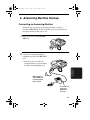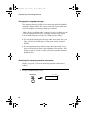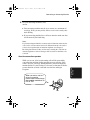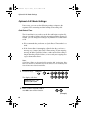
1
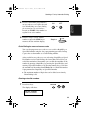
FO-2970M
MODEL
FO-2970M
FACSIMILE
FACSIMILE
OPERATION MANUAL
1. Installation
2. Sending Documents
3. Receiving Documents
4. Making Copies
5. Making Telephone Calls
6. Answering Machine Hookup
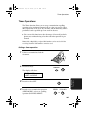
7. Special Functions
8. Printing Lists
9. Maintenance
10. Troubleshooting
FCC1.fm
Page 1
Monday, July 24, 2000
7:44 AM
WARNING - FCC Regulations state that any unauthorized changes or modifications to this equipment not
expressly approved by the manufacturer could void the user’s authority to operate this equipment.
Note: This equipment has been tested and found to comply with the limits for a Class B digital
device, pursuant to Part 15 of the FCC Rules.These limits are designed to provide reasonable
protection against harmful interference in a residential installation.This equipment generates, uses
and can radiate radio frequency energy and, if not installed and used in accordance with the
instructions, may cause harmful interference to radio communications. However, there is no
guarantee that interference will not occur in a particular installation. If this equipment does cause
harmful interference to radio or television reception, which can be determined by turning the
equipment off and on, the user is encouraged to try to correct the interference by one or more of the
following measures:
- Reorient or relocate the receiving antenna.
- Increase the separation between the equipment and the receiver.
- Connect the equipment into an outlet on a circuit different from that to which the receiver is
connected.
- Consult the dealer or an experienced radio/TV technician for help.
ABOUT THE TELEPHONE CONSUMER PROTECTION ACT OF 1991
"The Telephone Consumer Protection Act of 1991 makes it unlawful for any person to use a
computer or other electronic device to send any message via a telephone facsimile machine unless
such message clearly contains in a margin at the top or bottom of each transmitted page or on the
first page of the transmission the following information:
(1) The date and time of transmission.
(2) Identification of either the business, business entity or individual sending the message.
(3) Telephone number of either the sending machine, business, business entity or individual.
In order to program this information into your facsimile machine, please refer to the appropriate
instructions in the operation manual."
As an ENERGY STAR partner, SHARP has determined
that this product meets the ENERGY STAR guidelines
for energy efficiency.
Declaration of Conformity
SHARP LASER FACSIMILE, FO-2970M
This device complies with Part 15 of the FCC rules. Operation is subject to the following two conditions:
(1) This device may not cause harmful interference, and (2) this device must accept any interference received,
including interference that may cause undesired operation.
Responsible Party:
SHARP ELECTRONICS CORPORATION Sharp Plaza,
Mahwah, New Jersey 07430-2135 TEL: 800-237-4277
all-fo2970.book
Page 1
Monday, July 24, 2000
7:45 AM
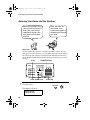
Introduction
Welcome, and thank you for
choosing a Sharp facsimile!
The features and
specifications of your new
Sharp fax are shown below.
Automatic dialing
Rapid Key Dialing: 20 numbers
Speed Dialing: 100 numbers
Memory size*
4 MB (approx. 300 pages)
Modem speed
33,600 bps (max.)
Automatic fallback to lower speeds.
Transmission time*
Approx. 3 seconds
Toner cartridge yield
Initial starter cartridge (included with fax
(4% page coverage, letter machine): Approx. 1,875 pages
Replacement cartridge (FO-29ND):
paper)
Approx. 3,750 pages
Drum cartridge yield
Initial starter cartridge (included with fax
machine): 20,000 pages (ave.)
Replacement cartridge (FO-29DR): 20,000
pages (ave.)
Scanning resolution
Fax/copy:
Horizontal: 203 pels/inch (8 pels/mm)
Vertical:
Standard: 98 lines/inch (3.85 lines/mm)
Fine /Halftone: 196 lines/inch
(7.7 lines/mm)
Super fine: 391 lines/inch
(15.4 lines/mm)
PC: Enhanced 600 dpi
*Based on ITU-T Test Chart #1 at standard resolution in Sharp special mode,
excluding time for protocol signals (i.e., ITU-T phase C time only).
1
all-fo2970.book
Page 2
Monday, July 24, 2000
7:45 AM
Automatic document
feeder
20 pages max. (20-lb. letter paper)
Halftone (grayscale)
64 levels (PC scan: 256 levels)
Paper tray capacity
200 sheets (20-lb. letter paper)
Compression scheme
MMR, MR, MH, Sharp (H2)
Applicable telephone line Public switched telephone network
Compatibility
ITU-T (CCITT) G3 mode
Printing resolution
Horizontal: 406 lines/inch (16 lines/mm)
Vertical: 391 lines/inch (15.4 lines/mm)
PC Printing: 600 dpi (enhanced 1,800 dpi)
Input document size
Automatic feeding:
Width: 5.8 to 8.5" (148 to 216 mm)
Length: 5.5 to 11" (140 to 279 mm)
Manual feeding:
Width: 5.8 to 8.5" (148 to 216 mm)
Length: 5.5 to 39.4" (140 to 1,000 mm)
Effective Scanning width 8.3" (210 mm) max.
2
Effective Printing width
8.2" (208 mm) max.
Reception modes
Fax/Tel/A.M.
Scanning speed
8 ppm (letter paper)
Full Dual Access
Yes
Copy function
Single/Multi/Sort (99 copies/page)
Power requirements
120 V AC, 60 Hz
Operating temperature
50 - 86°F (10 - 30°C)
Humidity
20 to 85% RH
Power consumption
Standby: 8.7 W
Maximum: 650 W
all-fo2970.book
Page 3
Monday, July 24, 2000
7:45 AM
Dimensions
Width: 15.2" (386 mm)
Depth: 15.7" (398 mm)
Height: 6.7" (169 mm)
Weight
Approx. 13.8 lbs. (6.3 kg)
As a part of our policy of continuous improvement, SHARP reserves the right to
make design and specification changes for product improvement without prior notice.
The performance specification figures indicated are nominal values of production
units. There may be some deviations from these values in individual units.
Important safety information
Be sure to save these instructions!
When using your facsimile equipment, basic safety precautions
should always be followed to reduce the risk of fire, electric shock
and injury to persons, including the following:
• Do not disassemble this machine or attempt any procedures not
described in this manual. Refer all servicing to qualified service
personnel.
• This machine must only be connected to a 120 V, 60 Hz, grounded
(3-prong) outlet. Connecting it to any other kind of outlet will
damage the machine and invalidate the warranty.
• Do not install or use the machine near water, or when you are wet.
For example, do not use the machine near a bath tub, wash bowl,
kitchen sink or laundry tub, in a wet basement, or near a swimming
pool. Take care not to spill any liquids on the machine.
• Unplug the machine from the telephone jack and then the power
outlet and consult a qualified service representative if any of the
following situations occur:
3
all-fo2970.book
Page 4
Monday, July 24, 2000
7:45 AM
- Liquid has been spilled into the machine or the machine has been
exposed to rain or water.
- The machine produces odors, smoke, or unusual noises.
- The power cord is frayed or damaged.
- The machine has been dropped or the housing damaged.
• Do not allow anything to rest on the power cord, and do not install
the machine where people may walk on the power cord.
• Never insert objects of any kind into slots or openings on the
machine. This could create a risk of fire or electric shock. If an
object falls into the machine that you cannot safely remove, unplug
the machine and consult a qualified service representative.
• Do not place this machine on an unstable cart, stand or table. The
machine could be seriously damaged if it falls.
• Avoid using a telephone (other than a cordless type) during an
electrical storm. There may be a remote risk of electric shock from
lightning.
• Do not use a telephone to report a gas leak in the vicinity of the
leak.
• The power outlet must be installed near the equipment and must be
easily accessible.
Important:
• This facsimile machine is not designed for use on a line which has
call waiting, call forwarding, or certain other special services
offered by your telephone company. If you attempt to use the fax
machine in conjunction with any of these services, you may
experience errors during transmission and reception of facsimile
messages.
• This facsimile machine is not compatible with digital telephone
systems.
4
all-fo2970.book
Page 5
Monday, July 24, 2000
7:45 AM
Table of Contents
Introduction
1
Important safety information . . . . . . . . . . . . . . . . . . . . . . . . . . . . . . . . 3
Table of Contents
5
A Look at the Operation Panel
7
1. Installation
Unpacking Checklist . . . . . . . . . . . . . . . . . . . . . . . . . . . . . . . . . . . . .
Connections . . . . . . . . . . . . . . . . . . . . . . . . . . . . . . . . . . . . . . . . . . .
Installing the Toner Cartridge . . . . . . . . . . . . . . . . . . . . . . . . . . . . . .
Loading Printing Paper . . . . . . . . . . . . . . . . . . . . . . . . . . . . . . . . . . .
Setting Up the Multifunction Interface. . . . . . . . . . . . . . . . . . . . . . . .
Entering Your Name and Fax Number . . . . . . . . . . . . . . . . . . . . . . .
Setting the Date and Time . . . . . . . . . . . . . . . . . . . . . . . . . . . . . . . .
Setting the Reception Mode . . . . . . . . . . . . . . . . . . . . . . . . . . . . . . .
Volume Adjustment . . . . . . . . . . . . . . . . . . . . . . . . . . . . . . . . . . . . .
2. Sending Documents
Transmittable Documents. . . . . . . . . . . . . . . . . . . . . . . . . . . . . . . . .
Loading the Document . . . . . . . . . . . . . . . . . . . . . . . . . . . . . . . . . . .
Adjusting the Resolution and Contrast . . . . . . . . . . . . . . . . . . . . . . .
Sending a Fax by Normal Dialing . . . . . . . . . . . . . . . . . . . . . . . . . . .
Sending a Fax by Automatic Dialing. . . . . . . . . . . . . . . . . . . . . . . . .
3. Receiving Documents
10
10
11
17
21
24
28
32
35
38
42
42
44
47
50
52
67
Using FAX Mode . . . . . . . . . . . . . . . . . . . . . . . . . . . . . . . . . . . . . . . 67
Using TEL Reception Mode . . . . . . . . . . . . . . . . . . . . . . . . . . . . . . . 69
Substitute Reception to Memory . . . . . . . . . . . . . . . . . . . . . . . . . . . 75
4. Making Copies
76
5. Making Telephone Calls
79
5
all-fo2970.book
Page 6
Monday, July 24, 2000
7:45 AM
Table of Contents
6. Answering Machine Hookup
81
Connecting an Answering Machine . . . . . . . . . . . . . . . . . . . . . . . . . 81
Optional A.M. Mode Settings . . . . . . . . . . . . . . . . . . . . . . . . . . . . . . 84
7. Special Functions
86
Broadcasting . . . . . . . . . . . . . . . . . . . . . . . . . . . . . . . . . . . . . . . . . . . 86
Distinctive Ring (Requires Subscription to Service) . . . . . . . . . . . . . 91
Cover Sheet . . . . . . . . . . . . . . . . . . . . . . . . . . . . . . . . . . . . . . . . . . . 94
Batch Page Numbering . . . . . . . . . . . . . . . . . . . . . . . . . . . . . . . . . . . 97
Blocking Reception of Unwanted Faxes . . . . . . . . . . . . . . . . . . . . . . 99
Polling (Requesting a Fax Transmission) . . . . . . . . . . . . . . . . . . . . 101
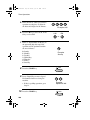
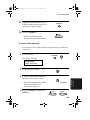
Timer Operations . . . . . . . . . . . . . . . . . . . . . . . . . . . . . . . . . . . . . . 107
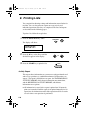
8. Printing Lists
110
9. Maintenance
117
Scanning glass and rollers . . . . . . . . . . . . . . . . . . . . . . . . . . . . . . . 117
The housing . . . . . . . . . . . . . . . . . . . . . . . . . . . . . . . . . . . . . . . . . . 117
Replacing the toner cartridge . . . . . . . . . . . . . . . . . . . . . . . . . . . . . 118
Replacing the drum cartridge . . . . . . . . . . . . . . . . . . . . . . . . . . . . . 119
Cleaning the drum cartridge . . . . . . . . . . . . . . . . . . . . . . . . . . . . . . 122
10. Troubleshooting
124
Problems and Solutions . . . . . . . . . . . . . . . . . . . . . . . . . . . . . . . . . 124
Messages and Signals . . . . . . . . . . . . . . . . . . . . . . . . . . . . . . . . . . 130
Clearing Paper Jams . . . . . . . . . . . . . . . . . . . . . . . . . . . . . . . . . . . 133
FCC Regulatory Information . . . . . . . . . . . . . . . . . . . . . . . . . . . . . . 137
Quick Reference Guide
140
Guía de referencia rápida
142
Index
144
6
all-fo2970.book
Page 7
Monday, July 24, 2000
7:45 AM
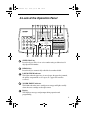
A Look at the Operation Panel
1
2
3
4
5
6
7
8
9
10 11
12
13
TEL FAX
A.M.
FUNCTION
VOLUME
DOWN
ABC
1
GHI
2
JKL
4
PQRS
5
PC
IN USE
LINE
IN USE
6
HOLD/
SEARCH
9
SPEAKER
0
22
TONER
EMPTY
01
02
03
04
05
06
07
08
09
10
11
12
13
14
15
16/POLL
17/G1
18/G2
19/G3
20/G4
REDIAL
WXYZ
8
PAPER
CHECK
3
MNO
TUV
7
SPEED
DIAL
DEF
UP
RECEPTION
RESOLUTION BROADCAST
MODE
21
20 19
COPY/HELP
REDUCTION/
ENLARGEMENT
START
STOP
18
17
16 15
14
1
SPEED DIAL key
Press this key to dial a fax or voice number using an abbreviated 2digit Speed Dial number.
2
REDIAL key
Press this key to automatically redial the last number dialed.
3
PAPER CHECK indicator
This lights when the paper tray is out of paper, the paper has jammed,
the printer compartment cover is open, or a paper size error has
occurred.
4
TONER EMPTY indicator
This blinks when the toner cartridge nears empty and lights steadily
when the toner cartridge needs replacement.
5
Display
This displays messages and prompts during operation and
programming.
7
all-fo2970.book
Page 8
Monday, July 24, 2000
7:45 AM
6
Panel release
Grasp this release and pull toward you to open the operation panel.
7
PC IN USE light
This blinks when data is being sent to or from the computer connected
to the fax machine.
8
LINE IN USE light
This lights when the fax machine is using the telephone line.
9
RECEPTION MODE key
Press this key to select the reception mode. An arrow in the display
will point to the currently selected reception mode.
10
FUNCTION key
Press this key to select special functions and settings.
11
RESOLUTION key
Press this key to adjust the resolution for faxing or copying.
12
VOLUME (UP/DOWN) keys
Press these keys to adjust the volume of the speaker when the
SPEAKER key has been pressed, the volume of the handset when the
handset is lifted, or the volume of the ringer at all other times. The
keys can also be used to scroll through FUNCTION key settings.
13
BROADCAST key
Press this key to send a document to a group of receiving fax
machines.
14
Rapid Dial Keys
Press one of these keys to dial a fax number automatically, or send a
document as an E-mail attachment to a preset E-mail address.
15
E-MAIL key
Press this key to send a document as an E-mail attachment. After you
press the key, your specified E-mail program will open to let you enter
the E-mail address, a subject, and a message if desired.
8
Page 9
Monday, July 24, 2000
7:45 AM
16
REDUCTION/ENLARGEMENT key
Press this key to select an enlargement or reduction setting when
making a copy of a document.
17
STOP key
Press this key to cancel an operation before it is completed.
18
START key
Press this key to begin transmission when using Speed Dialing, Direct
Keypad Dialing, or Normal Dialing.
19
COPY/HELP key
When a document is in the feeder, press this key to make a copy of a
document. At any other time, press this key to print out the Help List,
a quick reference guide to the operation of your fax machine.
20
HOLD/SEARCH key
When dialing, press this key to search for an auto-dial fax number.
During a phone conversation, press this key to put the other party on
hold.
21
SPEAKER key
Press this key to listen to the line and fax tones through the speaker
when faxing a document.
Note: This is not a speakerphone. You must pick up the handset to
talk with the other party.
22
Number keys
Use these keys to dial numbers, and enter numbers and letters when
storing auto-dial numbers.
1. Installation
all-fo2970.book
9
all-fo2970.book
Page 10 Monday, July 24, 2000
7:45 AM
1. Installation
Unpacking Checklist
Before setting up,
make sure you
have all of the
following items.
Original
document
support
Handset
If any are missing,
contact your dealer
or retailer.
Rapid Key
labels
Received
document tray
Operation
manual
Handset
cord
Toner
cartridge
Telephone
line cord
Paper tray
Drum cartridge
(comes pre-installed
in machine)
10
Sharp Laser
Multifunction
CD-ROM
Page 11 Monday, July 24, 2000
7:45 AM
Connections
Connections
Points to keep in mind when setting up
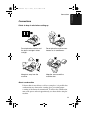
Do not place the machine and
the drum cartridge in direct
sunlight.
Do not place the machine near
heaters or air conditioners.
Keep dust away from the
machine.
Keep the area around the
machine clear.
About condensation
If the machine is moved from a cold to a warm place, it is possible that
condensation may form on the scanning glass, preventing proper
scanning of documents for transmission. To remove the condensation,
turn on the power and wait approximately two hours before using the
machine.
11
1. Installation
all-fo2970.book
all-fo2970.book
Page 12 Monday, July 24, 2000
7:45 AM
Connections
Connecting the Handset
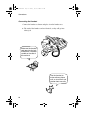
Connect the handset as shown and place it on the handset rest.
♦ The ends of the handset cord are identical, so they will go into
either jack.
Make sure the handset
cord goes into the jack
marked with a handset
symbol on the side of
the machine!
Use the handset to
make ordinary phone
calls, or to transmit and
receive faxes manually.
12
Page 13 Monday, July 24, 2000
7:45 AM
Connections
Connecting the power cord
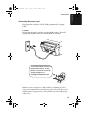
Plug the power cord into a 120 V, 60 Hz, grounded AC (3-prong)
outlet.
Caution!
Do not plug the power cord into any other kind of outlet. This will
damage the machine and is not covered under the warranty.
The machine does not have a
power on/off switch, so the
power is turned on and off by
simply plugging in or
unplugging the power cord.
Note: If your area experiences a high incidence of lightning or power
surges, we recommend that you install surge protectors for the power and
telephone lines. Surge protectors can be purchased at most telephone specialty stores.
13
1. Installation
all-fo2970.book
all-fo2970.book
Page 14 Monday, July 24, 2000
7:45 AM
Connections
Connecting the telephone line cord
Insert one end of the line cord into the jack on the left of the machine
marked TEL. LINE. Insert the other end into a standard (RJ11C)
single-line wall telephone jack.
Be sure to insert
the line into the
TEL. LINE jack.
Do not insert it into
the TEL. SET jack.
Note: Your fax is set for tone dialing. If you are on a pulse dial line,
you must set your fax for pulse dialing. Press the keys on the
operation panel as follows:
1
Press these keys:
FUNCTION
4
The display will show:
DIAL MODE
1=TONE, 2=PULSE
2
3
14
Press 1 to select tone dialing, or 2 to
select pulse dialing.
Press the STOP key to return to the
date and time display.
TONE
1
PULSE
or
STOP
2
Page 15 Monday, July 24, 2000
7:45 AM
Connections
Attaching the paper tray and document supports
Attach the paper tray.
Attach the received document tray.
Attach the original document support.
♦ Make sure the front side of the support faces you (the support
should curve slightly toward you).
15
1. Installation
all-fo2970.book
all-fo2970.book
Page 16 Monday, July 24, 2000
7:45 AM
Connections
Extension phone (optional)
If desired, you can connect an extension phone to the TEL. SET jack
on the fax.
♦ To connect an answering machine to your fax, see Chapter 6,
Answering Machine Hookup.
16
1
Remove the seal covering the TEL.
SET jack.
2
Connect the extension phone line to
the TEL. SET jack.
Page 17 Monday, July 24, 2000
7:45 AM
Installing the Toner Cartridge
Installing the Toner Cartridge
The laser printer in your fax machine uses a toner cartridge and a
drum cartridge. The drum cartridge comes pre-installed, and the toner
cartridge must be installed.
The starter toner cartridge
included with your fax can
print approximately 1,875
letter-size pages at 4%
page coverage.
When replacing the toner
cartridge, use a Sharp
FO-29ND toner cartridge.
One cartridge can print about
3,750 letter-size pages.
♦ The drum cartridge can print approximately 20,000 letter-size
pages. When replacing the drum cartridge, use a Sharp FO-29DR
drum cartridge.
Follow the steps below to install the toner cartridge and prepare the
drum cartridge.
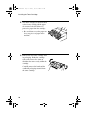
1
Grasp the print compartment cover at
both sides as shown, and pull up to
open the cover.
• Caution!
The fusing unit inside the print
compartment becomes very hot
during operation. Do not touch the
inside of the compartment or the
paper guide on the underside of the
print compartment cover.
17
1. Installation
all-fo2970.book
all-fo2970.book
Page 18 Monday, July 24, 2000
7:45 AM
Installing the Toner Cartridge
2
The drum cartridge has been installed
at the factory. Gently pull the paper
tab to remove the black sheet of
protective paper from the cartridge.
• Be careful not to tear the paper nor
leave any pieces of paper in the
machine.
3
Remove the new toner cartridge from
its packaging. Shake the cartridge
side to side four or five times to
distribute the toner evenly within the
cartridge.
Carefully remove the band and the
cardboard packaging material from
the toner cartridge.
18
Page 19 Monday, July 24, 2000
7:45 AM
Installing the Toner Cartridge
4
Hold the toner cartridge by the handle
with the stamped markings on the
cartridge facing upwards, and insert
the cartridge into the print
compartment.
5
Place your thumb on the center of the
handle where it is marked PUSH, and
push the handle down and in so that
the cartridge fits into place.
6
Close the print compartment cover,
pressing down firmly on each side to
make sure it is completely closed.
19
1. Installation
all-fo2970.book
all-fo2970.book
Page 20 Monday, July 24, 2000
7:45 AM
Installing the Toner Cartridge
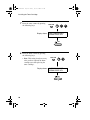
7
Reset the toner counter by pressing
the following keys:
Display shows:
FUNCTION
9
CLR TONER COUNT
PRESS START KEY
START
8
Reset the drum counter by pressing
the following keys:
• Note: This setting is only necessary
after you have replaced the drum
cartridge (not after replacing the
toner cartridge).
FUNCTION
9
Display shows: CLR DRUM COUNT
PRESS START KEY
START
20
Page 21 Monday, July 24, 2000
7:45 AM
Loading Printing Paper
Loading Printing Paper
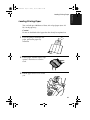
You can load up to 200 sheets of letter, A4 or legal paper (max. 20
lbs.) in the paper tray.
Caution!
Do not use the blank side of paper that has already been printed on.
1
If you are going to load legal size
paper, pull out the paper tray
extension.
2
Fan the paper, and then tap the edge
against a flat surface to even the
stack.
3
Pull the paper release lever toward
you.
21
1. Installation
all-fo2970.book
all-fo2970.book
Page 22 Monday, July 24, 2000
7:45 AM
Loading Printing Paper
4
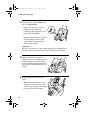
Insert the stack of paper firmly into
the tray, print side up.
• Make sure that the stack is not
higher than the marked line.
Loading too much paper may cause
paper jams and misfeeds.
• If paper remains in the tray, take it
out and combine it into a single
stack with the new paper before
adding the new paper.
Important:
Be sure to load the paper so that printing takes place on the print side of
the paper. Printing on the reverse side may result in poor print quality.
5
Make sure the stack of paper is
aligned against the right paper guide,
and then gently move the left paper
guide to the 8 1/2 position for letter or
legal paper, or the A4 position for A4
paper.
6
Push the paper release lever back
down.
• Note: If the paper does not feed
correctly, remove the entire stack
from the tray and repeat the loading
procedure from the beginning.
22
Page 23 Monday, July 24, 2000
7:45 AM
Loading Printing Paper
7
The fax has been set at the factory to
scale the size of received faxes to
letter size paper. If you have loaded
legal paper, you must change the
paper size setting to legal. Press these
keys:
FUNCTION
4
The display will show:
PAPER SIZE SET
1=LETTER, 2=LEGAL
PAPER SIZE SET
3=A4
Press 1 to select LETTER or 2 to
select LEGAL. (You can also press 3
to select A4.)
LETTER
1
LEGAL
or
2
The display will briefly show your
selection and then show:
FINE PRIORITY
1=YES, 2=NO
Press the STOP key to return to the
date and time display.
STOP
23
1. Installation
all-fo2970.book
all-fo2970.book
Page 24 Monday, July 24, 2000
7:45 AM
Setting Up the Multifunction Interface
Setting Up the Multifunction Interface
To enable the multifunction
features of your fax,
connect it to your computer
and install the Multifunction
software.
Connecting the parallel cable
Connect the fax machine to your computer with a parallel cable.
♦ If you do not already have a parallel cable, you can purchase one
from your dealer or any computer store.
♦ Make sure the cable is IEEE 1284-compliant. We recommend a
shielded cable no longer than 6 feet.
1
24
Make sure your computer is turned
off and the fax machine is unplugged.
Page 25 Monday, July 24, 2000
7:45 AM
Setting Up the Multifunction Interface
2
Connect one end of the cable to the
port on the Sharp Laser
Multifunction. Snap the clips on each
side of the port onto the cable
connector to secure it.
3
Connect the other end of the cable to
the parallel port on the back of your
computer.
Note: There is normally no need to change the parallel port setting in
your computer's setup (BIOS) program. However, if you find that the
Sharp Laser Multifunction fax does not operate well when scanning or
printing, you may need to change the setting. In this case select ECP,
PS2, Bi-directional, or an equivalent parallel port mode.
25
1. Installation
all-fo2970.book
all-fo2970.book
Page 26 Monday, July 24, 2000
7:45 AM
Setting Up the Multifunction Interface
Installing the Multifunction software
Minimum system requirements
Processor:
Pentium 90 MHz or higher
Operating system:
Windows 95/98, Windows NT 4.0
(Service Pack 3 or later), English version
Physical RAM:
Windows 95/98: 16 MB
Windows NT 4.0: 32 MB
Free hard-disk space:
Windows 95/98: 30 MB
Windows NT 4.0: 35MB
♦ The Sharp Laser Multifunction software cannot be installed by Plug
and Play. If the New Hardware Found box appears when you turn
on your computer, click the Cancel button to exit the dialog box.
♦ If you have other multifunction device software installed in your
computer, uninstall that software before installing the Sharp Laser
Multifunction software. Otherwise, the Sharp Laser Multifunction
software may not function correctly.
1. Insert the Sharp Laser Multifunction CD into your computer’s CDROM drive.
2. If the Sharp Laser Multifunction Setup window appears, click Next
in the window and go to step 4. If the window doesn’t appear, click
the Start button on the Windows taskbar and select the Run...
command.
3. Type e:\setup in the Open text box, where e is the letter of your CDROM drive, and then click OK.
4. Follow the instructions that appear on the screen.
5. When installation is completed, restart your computer.
26
Page 27 Monday, July 24, 2000
7:45 AM
Setting Up the Multifunction Interface
Online Operation Guide
Detailed instructions for using the Sharp Laser Multifunction software
can be found in the Online Guide on the CD. To open the guide,
follow these steps:
1. Insert the Sharp Laser Multifunction CD into your CD-ROM drive. (If
the Sharp Laser Multifunction Setup window appears, click Cancel
and then Exit Setup to close the window.)
2. Click the Start button on the Windows taskbar, point to Programs,
and then point to Sharp Laser Multifunction. Click Online Guide.
27
1. Installation
all-fo2970.book
all-fo2970.book
Page 28 Monday, July 24, 2000
7:45 AM
Entering Your Name and Fax Number
Entering Your Name and Fax Number
Before you can begin using
your fax machine, you must
enter your name and fax
(telephone) number. You
also need to set the date
and time.
Once you enter this
information, it will
automatically appear at
the top of each fax page
you send.
Important!
The law requires that your name, telephone/fax number, and the date and
time appear on each fax message you send. Enter your name and fax number
here and set the date and time as explained in the following section to have
the fax machine include this information automatically at the top of your fax
messages.
3 key
FUNCTION key
1
2
3
4
5
6
7
8
9
0
# key START key
1
Press these keys:
The display will show:
ENTRY MODE
PRESS * OR #
28
STOP key
FUNCTION
3
Page 29 Monday, July 24, 2000
7:45 AM
Entering Your Name and Fax Number
2
Press the # key twice.
(Or the UP key twice.)
The display will show:
OWN NUMBER SET
PRESS START KEY
3
Note: When scrolling through the
settings, you can press the UP key
in place of the # key, and the
DOWN key in place of the * key.
Press the START key.
START
The display will show:
ENTER FAX #
4
Enter your fax number by pressing
the number keys (max. of 20 digits).
3
1
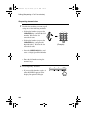
2
• To insert a space between digits,
press the # key.
4
4
2
4
4
• If you make a mistake, press the
SPEED DIAL key to backspace and
clear the mistake.
5
Press the START key to enter the fax
number in memory.
1
1
(Example)
START
The display will show:
ENTER YOUR NAME
29
1. Installation
all-fo2970.book
all-fo2970.book
Page 30 Monday, July 24, 2000
7:45 AM
Entering Your Name and Fax Number
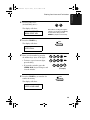
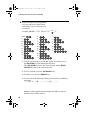
6
Enter your name by pressing number
keys for each letter as shown in the
chart below. Up to 24 characters can
be entered.
Example: SHARP = 77777 444 22 7777
SPEAKER
SPACE =
J=
T=
A=
K=
U=
B=
C=
D=
E=
F=
G=
L=
V=
M=
W=
N=
X=
O=
Y=
P=
Z=
77
Q=
H=
R=
I=
S=
♦ To enter two letters in succession that require the same key, press
the SPEAKER key after entering the first letter.
(The SPEAKER key moves the cursor forward, and the HOLD/
SEARCH key moves the cursor backward.)
♦ To clear a mistake, press the SPEED DIAL key.
♦ To change case, press the REDIAL key.
♦ To select one of the following symbols, press the # key or the * key
repeatedly:
./!"#$%&’()++,-:;<=>?@[]^_'{|}
Cursor: A dark square mark in the display that indicates where a
number or letter will be entered.
30
Page 31 Monday, July 24, 2000
7:45 AM
Entering Your Name and Fax Number
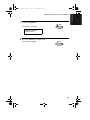
7
Press the START key.
START
The display will show:
SECURITY SELECT
1=ON, 2=OFF
8
Press the STOP key to return to the
date and time display.
STOP
31
1. Installation
all-fo2970.book
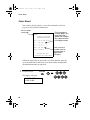
all-fo2970.book
Page 32 Monday, July 24, 2000
7:45 AM
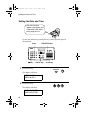
Setting the Date and Time
Setting the Date and Time
The date and time
appear in the display and
are printed at the top of
every page you fax.
Set the date and time by pressing the keys on the operation panel as
shown below.
3 key
FUNCTION key
1
2
3
4
5
6
7
8
9
0
* key
1
START key
Press these keys:
The display will show:
ENTRY MODE
PRESS * OR #
2
Press these keys:
The display will show:
DATE & TIME SET
PRESS START KEY
32
STOP key
FUNCTION
3
Page 33 Monday, July 24, 2000
7:45 AM
Setting the Date and Time
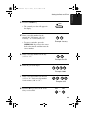
3
Press the START key.
START
• The currently set date will appear in
the display.
4
Enter a two-digit number for the
month (“01” for January, “02” for
February, “12” for December, etc.).
0
Example: January
• To correct a mistake, press the
SPEED DIAL key to move the cursor
back to the mistake and then enter the
correct number.
5
1
Enter a two-digit number for the day
(“01” to “31”).
5
0
Example: the 5th
6
Enter the year (four digits).
2
0
0
0
Example: 2000
7
8
Enter a two-digit number for the hour
(“01” to “12”) and a two-digit number
for the minute (“00” to “59”).
Press the * key to select A.M. or the
# key to select P.M.
0
2
9
5
Example: 9:25
A.M.
P.M
or
33
1. Installation
all-fo2970.book
all-fo2970.book
Page 34 Monday, July 24, 2000
7:45 AM
Setting the Date and Time
9
Press the START key to start the
clock.
START
The display will show:
DAY LIGHT SAVING
1=YES, 2=NO
10
Press the STOP key to return to the
date and time display.
STOP
Daylight Saving Time
If desired, you can set the clock to move forward and backward
automatically at the beginning and end of Daylight Saving Time. To
turn on this function, press the panel keys as follows:
1
Press these keys:
FUNCTION
The display will show:
3
DAY LIGHT SAVING
1:YES, 2=NO
2
3
34
Press 1 to turn on the Daylight Saving
Time function, or 2 to turn it off.
Press the STOP key to return to the
date and time display.
YES
1
NO
or
STOP
2
Page 35 Monday, July 24, 2000
7:45 AM
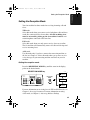
Setting the Reception Mode
Setting the Reception Mode
Your fax machine has three modes for receiving incoming calls and
faxes:
TEL mode:
Select this mode when you want to receive both phone calls and faxes
on the line connected to the fax machine. All calls, including faxes,
must be answered by picking up the fax machine's handset or an
extension phone connected to the same line.
FAX mode:
Select this mode when you only want to receive faxes on your line.
The fax machine will automatically answer all calls on four rings and
receive incoming faxes.
A.M. mode:
Use this mode only if you have connected an answering machine to
the fax (see Chapter 6). Select this mode when you go out to receive
voice messages in your answering machine and faxes on your fax
machine.
Setting the reception mode
Press the RECEPTION MODE key until the arrow in the display
points to the desired mode.
RECEPTION MODE key
TEL FAX
FEB 01 10:30
M:00% STAND-BY
1
2
3
4
5
6
7
8
9
0
RECEPTION
MODE
A.M.
TEL FAX
FEB 01 10:30
M:00% STAND-BY
A.M.
TEL FAX
FEB 01 10:30
M:00% STAND-BY
A.M.
For more information on receiving faxes in TEL and FAX modes, see
Chapter 3, Receiving Documents. For more information on using
A.M. mode, see Chapter 6, Answering Machine Hookup.
35
1. Installation
all-fo2970.book
all-fo2970.book
Page 36 Monday, July 24, 2000
7:45 AM
Setting the Reception Mode
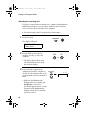
Selecting the receiving unit
If you have connected the fax machine to a computer and installed the
Multifunction software, you can choose whether to have incoming
faxes received to the fax machine or the computer.
♦ The initial setting is FAX (reception to the fax machine).
1
Press these keys:
FUNCTION
The display will show:
RECEIVE UNIT
1=FAX, 2=PC
2
Press 1 (FAX) to select the fax
machine, or 2 (PC) to select the
computer.
FAX
1
PC
or
2
• The display briefly shows your
selection and then reverts to the
date and time display.
3
If you selected reception to the
computer and want the computer to
answer all calls automatically, set the
reception mode of the fax machine to
FAX.
• Make sure the Multifunction
Desktop software is running and
Fax Receive is selected (a
checkmark appears next to it) in the
Fax menu of the Multifunction
Desktop. (If not, the fax machine
will receive faxes.)
36
RECEPTION
MODE
TEL FAX
A.M.
Page 37 Monday, July 24, 2000
7:45 AM
Setting the Reception Mode
4
If you selected reception to the
computer but also want to receive
voice calls, set the reception mode of
the fax machine to TEL.
RECEPTION
MODE
TEL FAX
A.M.
• You must answer all calls using
the fax’s handset. The
Multifunction Desktop will receive
a fax only if the sending machine
issues a fax tone. (Make sure that
Fax Receive is selected in the Fax
menu of the Multifunction
Desktop.) To receive the fax to your
fax machine, press the START key.
5
If you selected reception to the
RECEPTION
MODE
computer but also want to receive
voice messages in an answering
machine connected to the fax machine
as explained in Chapter 6, set the
reception mode of the fax machine to
A.M.
TEL FAX
A.M.
37
1. Installation
all-fo2970.book
all-fo2970.book
Page 38 Monday, July 24, 2000
7:45 AM
Volume Adjustment
Volume Adjustment
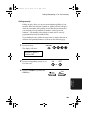
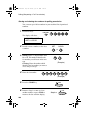
You can adjust the volume of the speaker, handset, and ringer using
the UP and DOWN keys.
DOWN key
1
2
3
4
5
6
7
8
9
UP key
0
Speaker
1
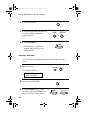
Press the SPEAKER key.
2
Press the UP or DOWN key.
Display:
JAN-29 01:44
SPEAKER : HIGH
JAN-29 01:44
SPEAKER : MIDDLE
JAN-29 01:44
SPEAKER : LOW
38
SPEAKER
UP
DOWN
or
Page 39 Monday, July 24, 2000
7:45 AM
Volume Adjustment
3
When the display shows the desired
volume level, press the SPEAKER
key to turn off the speaker.
SPEAKER
Handset
1
Lift the handset.
2
Press the UP or DOWN key.
Display:
UP
DOWN
or
JAN-29 01:44
RECEIVER : HIGH
JAN-29 01:44
RECEIVER : MIDDLE
JAN-29 01:44
RECEIVER : LOW
3
When the display shows the desired
volume level, replace the handset.
• Note: The handset volume reverts
to medium each time you hang up.
39
1. Installation
all-fo2970.book
all-fo2970.book
Page 40 Monday, July 24, 2000
7:45 AM
Volume Adjustment
Ringer
1
Press the UP or DOWN key. (Make
sure the SPEAKER key has not been
pressed.)
UP
DOWN
or
• The ringer will ring once at the
selected level, and then the date and
time will reappear in the display.
Display:
JAN-29 01:44
RINGER : HIGH
JAN-29 01:44
RINGER : MIDDLE
JAN-29 01:44
RINGER : LOW
RINGER : OFF OK ?
OK:PRESS START
2
40
If you selected RINGER : OFF OK?,
press the START key.
START
Page 41 Monday, July 24, 2000
7:45 AM
Volume Adjustment
Beep length
Your fax machine normally signals the end of transmission, reception,
or copying with a 3-second beep. If desired, you can change the
duration of the beep to 1 second or turn the beep off.
1
Press these keys:
FUNCTION
4
The display will alternately show:
BEEP LENGTH
1=3 SEC, 2=1 SEC
BEEP LENGTH
3=NO BEEP
2
Press 1 for 3 seconds, 2 for 1 second,
or 3 for no beep.
3
Example:
No beep
3
Press the STOP key to return to the
date and time display.
STOP
41
1. Installation
all-fo2970.book
all-fo2970.book
Page 42 Monday, July 24, 2000
7:45 AM
2. Sending Documents
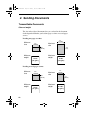
Transmittable Documents
Size and weight
The size and weight of documents that you can load in the document
feeder depend on whether you load one page at a time or several pages
at once.
Loading one page at a time:
Minimum
size
8.5"
(216 mm)
5.8"
(148 mm)
Maximum
size
5.5"
(140 mm)
Minimum
weight
39.4"
(1.0 m)
Maximum
weight
14 lbs.
(52 g/m² )
42 lbs.
(157 g/m²)
Loading several pages at once:
Minimum
size
5.8"
(148 mm)
Maximum
size
8.5"
(216 mm)
5.5"
(140 mm)
Minimum
weight
42
14 lbs.
(52 g/m² )
11"
(279 mm)
Maximum
weight
21.5 lbs.
(80 g/m²)
all-fo2970.book
Page 43 Monday, July 24, 2000
7:45 AM
Transmittable Documents
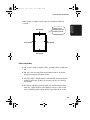
0.2"(5 mm)
0.16"(4 mm)
2. Sending
Documents
Note: Letters or graphics on the edges of a document will not be
scanned.
Letters in the
shaded area will
not be scanned.
0.16"(4 mm)
0.2"(5 mm)
Other restrictions
♦ The scanner cannot recognize yellow, greenish yellow, or light blue
ink.
♦ Ink, glue, and correcting fluid on documents must be dry before
they pass through the document feeder.
♦ All clips, staples, and pins must be removed from documents before
loading in the feeder. If these are not removed, they may damage
the machine.
♦ Documents which are patched, taped, torn, smaller than the minimum size, carbon backed, easily smudged, or have a slick coated
surface should be photocopied, and the copy loaded in the feeder.
43
all-fo2970.book
Page 44 Monday, July 24, 2000
7:45 AM
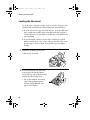
Loading the Document
Loading the Document
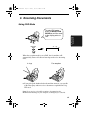
Up to 20 pages can be placed in the feeder at one time. The pages will
automatically feed into the machine starting from the bottom page.
♦ If you need to send or copy more than 20 pages, place the additional
pages gently and carefully in the feeder just before the last page is
scanned. Do not try to force them in, as this may cause double-feeding or jamming.
♦ If your document consists of several large or thick pages which
must be loaded one at a time, insert each page into the feeder as the
previous page is being scanned. Insert gently to prevent doublefeeding.
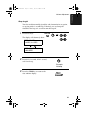
1
Adjust the document guides to the
width of your document.
2
Place the document face down and
push it gently into the document
feeder. The top edge of the document
should enter the machine first.
• The feeder will draw the leading
edge of the document into the
machine. SEND READY will
appear in the display.
44
all-fo2970.book
Page 45 Monday, July 24, 2000
7:45 AM
Loading the Document
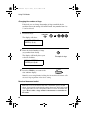
Adjust the resolution and/or contrast
settings (if desired) as explained in
the section Resolution and Contrast
on the following pages, then dial the
receiving machine as explained in
Sending a Fax by Normal Dialing
which appears later in this section.
RESOLUTION
2. Sending
Documents
3
Removing a document from the feeder
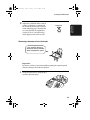
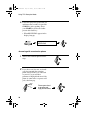
If you need to remove a
document from the feeder,
open the operation panel.
Important!
Do not try to remove a document without opening the operation panel.
This may damage the feeder mechanism.
1
Grasp the panel release and pull up to
open the operation panel.
45
all-fo2970.book
Page 46 Monday, July 24, 2000
7:45 AM
Loading the Document
46
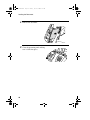
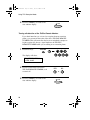
2
Remove the document.
3
Close the operation panel, making
sure it clicks into place.
all-fo2970.book
Page 47 Monday, July 24, 2000
7:45 AM
Adjusting the Resolution and Contrast
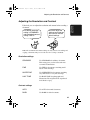
If desired, you can adjust the resolution and contrast before sending a
document.
The default resolution
setting is STANDARD
and the default contrast
setting is AUTO.
You must adjust the
settings each time you
don’t want to use the
default settings.
Note: The resolution and contrast settings are only effective for sending and
copying a document. They are not effective for receiving a document.
Resolution settings
STANDARD
Use STANDARD for ordinary documents.
This setting gives you the fastest and most
economical transmission.
FINE
Use FINE for documents containing small
letters or fine drawings.
SUPER FINE
Use SUPER FINE for documents containing
very small letters or very fine drawings.
HALF TONE
Use HALF TONE for photographs and
illustrations. The original will be reproduced
in 64 shades of gray.
Contrast settings
AUTO
Use AUTO for normal documents.
DARK
Use DARK for faint documents.
47
2. Sending
Documents
Adjusting the Resolution and Contrast
all-fo2970.book
Page 48 Monday, July 24, 2000
7:45 AM
Adjusting the Resolution and Contrast
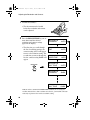
1
Load the document(s).
• The document must be loaded
before the resolution and contrast
can be adjusted.
2
Press the RESOLUTION key one or
more times until the desired
resolution and contrast settings
appear in the display.
• The first time you scroll through
the list of resolution settings, the
contrast setting AUTO will appear
next to each resolution setting. The
second time you move through the
list, the contrast setting DARK will
appear.
RESOLUTION
JAN-29 01:44
STANDARD
:AUTO
JAN-29 01:44
FINE
:AUTO
JAN-29 01:44
SUPER FINE
:AUTO
JAN-29 01:44
HALF TONE
:AUTO
JAN-29 01:44
STANDARD
:DARK
JAN-29 01:44
HALF TONE
:DARK
Note: In order to transmit in SUPER FINE resolution, the receiving fax
machine must also have that resolution. If it doesn’t, your machine will automatically step down to the next best available setting.
48
all-fo2970.book
Page 49 Monday, July 24, 2000
7:45 AM
Adjusting the Resolution and Contrast
If desired, you can change the default resolution for faxing documents
to FINE. Follow the steps below.
1
Press these keys:
FUNCTION
The display will show:
4
FINE PRIORITY
1=YES, 2=NO
2
3
Press 1 (YES) to set the default
resolution to FINE, or 2 (NO) to set it
to STANDARD.
Press the STOP key to return to the
date and time display.
YES
1
NO
or
2
STOP
49
2. Sending
Documents
Changing the default resolution
all-fo2970.book
Page 50 Monday, July 24, 2000
7:45 AM
Sending a Fax by Normal Dialing
Sending a Fax by Normal Dialing
With Normal Dialing, you pick up the handset (or press the
SPEAKER key) and dial by pressing the number keys.
♦ If a person answers, you can talk with them through the handset
before sending the fax. (If you pressed the SPEAKER key, you
must pick up the handset to talk.)
♦ Normal Dialing allows you to listen to the line and make sure the
other fax machine is responding.
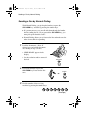
1
Load the document(s). (Note: If
desired, you can load the document
after dialing in Step 3, below.)
• SEND READY appears in the
display.
• Set the resolution and/or contrast if
desired.
2
3
RESOLUTION
Pick up the handset or press the
SPEAKER key. Listen for the dial
tone.
SPEAKER
or
Dial the number of the receiving
machine by pressing the number keys.
2
3
2
4
5
6
7
(Example)
50
all-fo2970.book
Page 51 Monday, July 24, 2000
7:45 AM
4
Wait for the connection. Depending
on the setting of the receiving
machine, you will either hear a
facsimile reception tone or the other
person will answer.
2. Sending
Documents
Sending a Fax by Normal Dialing
Beep
• If the other party answers, ask them
to press their Start key (if you
pressed the SPEAKER key, pick
up the handset to speak with them).
This causes the receiving machine
to issue a reception tone.
5
When you hear the reception tone,
press the START key. Replace the
handset if you used it.
START
• When transmission is completed,
the fax will beep once.
Using the REDIAL key
You can press the REDIAL key to redial the last number dialed. To
send a document, press the START key when you hear the fax tone
after the connection is established. Note that the speaker is
automatically activated when you press the REDIAL key.
51
all-fo2970.book
Page 52 Monday, July 24, 2000
7:45 AM
Sending a Fax by Automatic Dialing
Sending a Fax by Automatic Dialing
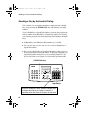
You can dial a fax or telephone number by simply pressing a Rapid
Key, or by pressing the SPEED DIAL key and entering a two-digit
number.
To use a Rapid Key or Speed Dial number, you must first program the
full fax number in the Rapid Key or Speed Dial number. It is usually
convenient to program your most frequently dialed numbers in Rapid
Keys.
♦ 20 Rapid Keys and 100 Speed Dial numbers are available.
♦ You can also store an area code or access code in a Rapid Key or
Speed Dial number.
♦ You can use a Rapid Key or Speed Dial number to send a fax as an
E-mail attachment to an E-mail address. To program a Rapid Key or
Speed Dial number for E-mail, see Programming Rapid Key and
Speed Dial Numbers in Chapter 5 of your online operation guide.
SPEED DIAL key
1
2
3
4
5
6
7
8
9
0
Rapid Keys
Attach the Rapid Key labels above the Rapid Keys
as shown here. When you store a number in a
Rapid Key, write the name of the party on the label.
52
all-fo2970.book
Page 53 Monday, July 24, 2000
7:45 AM
Sending a Fax by Automatic Dialing
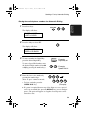
1
Press these keys:
FUNCTION
2. Sending
Documents
Storing fax and telephone numbers for Automatic Dialing
3
The display will show:
FAX/TEL # MODE
1=SET,2=CLEAR
2
Press the 1 key to select SET.
1
The display will show:
FAX/TEL # SET
SPEED # OR RAPID
3
To store a number in a Rapid Key,
press the desired Rapid Key.
01
To store a Speed Dial number, enter
the desired 2-digit number (from 00
to 99) by pressing the number keys.
4
Enter the fax or voice number by
pressing the number keys.
(Note: A space cannot be entered.)
• To clear a mistake, press the
SPEED DIAL key.
Example:
Rapid Key 01
0
2
1
Example:
Speed Dial 01
3
2
4
5
6
7
(Example)
♦ If a pause is required between any of the digits to access a special
service or an outside line, press the REDIAL key (two seconds per
pause). The pause will appear as a hyphen. Several pauses can be
entered in a row.
53
all-fo2970.book
Page 54 Monday, July 24, 2000
7:45 AM
Sending a Fax by Automatic Dialing
5
Press the START key.
6
Enter the name of the party by
pressing the number keys as shown
below. (If you don’t want to enter a
name, go directly to Step 7.)
START
SPACE =
J=
T=
A=
K=
U=
B=
C=
D=
E=
F=
G=
L=
V=
M=
W=
N=
X=
O=
Y=
P=
Z=
Q=
H=
R=
I=
S=
Example: SHARP = 77777 444 22 7777
SPEAKER
77
♦ To clear a mistake, press the SPEED DIAL key.
♦ To enter two letters in succession that require the same key, press
the SPEAKER key after entering the first letter.
♦ To select one of the following symbols, press the # key or the * key
repeatedly:
./!"#$%&’()++,-:;<=>?@[]^_'{|}
7
54
Press the START key.
START
all-fo2970.book
Page 55 Monday, July 24, 2000
7:45 AM
Sending a Fax by Automatic Dialing
9
Press 1 if the number programmed is
an area code or access code to be used
for Chain Dialing (see Chain Dialing
for area and access codes below).
Press 2 (or START) if the number is a
regular fax or voice number.
Return to Step 3 to store another
number, or press the STOP key to
return to the date and time display.
ON
1
OFF
2. Sending
Documents
8
2
or
STOP
Step 3 or
Chain Dialing for area and access codes
You can also program an area code or access code in a Rapid Key or
Speed Dial number using the above programming procedure. In Step
8, press 1 to set the number as a Chain Dialing number.
After you dial an area code or access code using a Rapid Key or Speed
Dial number set for Chain Dialing, the fax machine will wait for you
to dial the remainder of the number (you can dial the remainder of the
number by pressing a Rapid Key, by pressing the Speed Dial key and
entering a Speed Dial number, or by pressing numeric keys). Note that
the remainder of the number should not be set as a Chain Dial number
if programmed in a Rapid Key or Speed Dial number.
♦ The maximum number of digits that can be dialed at one time by
Chain Dialing is 50.
Clearing auto-dial numbers
1
Press these keys:
The display will show:
FUNCTION
3
FAX/TEL # MODE
1=SET,2=CLEAR
55
all-fo2970.book
Page 56 Monday, July 24, 2000
7:45 AM
Sending a Fax by Automatic Dialing
2
Press 2 to select CLEAR.
3
Press the Rapid Key or enter the
Speed Dial number (press the number
keys) that you want to clear.
4
Press the START key.
5
Return to Step 3 to clear another
number, or press the STOP key to
return to the date and time display.
2
0
1
Example:
Speed Dial 01
START
Step 3 or
STOP
Note: You cannot clear a number if it is used in a timer operation or is
included in a Group Key. First clear the number from the operation or
group, then clear the Rapid Key or Speed Dial number. To check where
the number is used, print out the Group List or the Timer List as
explained in Chapter 8.
Making changes
To make changes in a number previously stored, repeat the
programming procedure. Select the Rapid Key or Speed Dial number
for which you want to make changes in Step 3, and then change the
number and/or name when they appear in the display in Steps 4 and 6.
Note: The fax machine uses a lithium battery to keep automatic dialing
numbers and other programmed data in memory when the power is
turned off. Battery power is consumed primarily when the power is off.
With the power kept continuously off, the life of the battery is about 5
years. If the battery dies, have your dealer or retailer replace it. Do not try
to replace it yourself.
56
all-fo2970.book
Page 57 Monday, July 24, 2000
7:45 AM
Sending a Fax by Automatic Dialing
Dual Access
2. Sending
Documents
The fax machine features full dual access, which means that you can
load a document and dial by automatic dialing even when the fax
machine is occupied with another operation. After you dial, your
document will be immediately scanned into memory and then
transmitted once all previously set operations have been completed.
If more than one document has been scanned into memory for
transmission, the documents will be transmitted in the order in which
they were scanned.
♦ The fax machine can hold approximately 280 pages of average
content in memory. Less pages can be held if any pages are scanned
using fine or halftone resolution.
♦ The maximum number of transmission jobs that can be held at once
is 30.
♦ The amount of memory currently occupied appears as a percentage
(M:00%) in the display.
If the memory becomes full...
If the memory becomes full while a document is being scanned,
MEMORY FULL will appear in the display. Press the START key or
the STOP key as follows:
♦ Press the START key if you want to transmit the pages which have
been stored up to that point in memory. The remaining pages will be
ejected from the feeder. After transmission, the memory will be
cleared and you can transmit the remaining pages. You will also
need to transmit the page which was being scanned when the
memory filled up.
♦ Press the STOP key if you want to cancel the entire transmission.
57
all-fo2970.book
Page 58 Monday, July 24, 2000
7:45 AM
Sending a Fax by Automatic Dialing
If you do not press the START key or the STOP key within one
minute, the transmission will be canceled and the pages already
scanned cleared from memory. You will need to retransmit all pages
of the document.
Rapid Key Dialing
If the number you want to dial has been programmed in a Rapid Key,
you can dial it by pressing the Rapid Key.
1
Load the document(s).
• SEND READY appears in the
display.
• Set the resolution and/or contrast if
desired.
RESOLUTION
2
Press the appropriate Rapid Key.
• The document is automatically
transmitted once the connection is
established.
01
02
03
(Example)
58
all-fo2970.book
Page 59 Monday, July 24, 2000
7:45 AM
Sending a Fax by Automatic Dialing
If the number you want to dial has been programmed in a Speed Dial
number, you can dial it by pressing the SPEED DIAL key and then
entering the Speed Dial number.
1
Load the document(s).
• SEND READY appears in the
display.
• Set the resolution and/or contrast if
desired.
RESOLUTION
2
Press the SPEED DIAL key and then
enter the Speed Dial number by
pressing the numeric keys.
• To enter numbers 1 through 9, first
enter 0 and then the number.
3
Check the display. If the name or
number shown is correct, press the
START key. (If not, press the STOP
key and then repeat Step 2.)
SPEED
DIAL
0
9
(Example)
START
59
2. Sending
Documents
Speed Dialing
all-fo2970.book
Page 60 Monday, July 24, 2000
7:45 AM
Sending a Fax by Automatic Dialing
Direct Keypad Dialing
You can also enter a full number with the number keys and then press
the START key to begin dialing. You can use this method to dial a full
number when you don’t need to speak to the other party before faxing.
1
Load the document(s). (Note: If
desired, you can load the document
after dialing in Step 2, below.)
• SEND READY will appear in the
display.
• Set the resolution and/or contrast if
desired.
2
Enter the number of the receiving
machine by pressing the numeric
keys.
• If a pause is required between any
of the digits to access a special
service or an outside line, press the
REDIAL key (two seconds per
pause). The pause will appear as a
hyphen. Several pauses can be
entered in a row.
3
Check the display. If the number of
the receiving machine shown is
correct, press the START key.
• If it is not correct, press the STOP
key to backspace and clear one
digit at a time, and then re-enter the
correct digit(s).
60
RESOLUTION
2
3
2
4
5
6
7
(Example)
START
all-fo2970.book
Page 61 Monday, July 24, 2000
7:45 AM
Sending a Fax by Automatic Dialing
If you don’t remember the Rapid Key or Speed Dial number in which
you have programmed a particular fax number or E-mail recipient,
you can search for the number by following the steps below. Once you
have found the number, you can dial and transmit the loaded
document by simply pressing the START key. (Note: To search for an
E-mail recipient, your fax must be connected to your computer.)
1
Load the document(s).
• SEND READY will appear in the
display.
RESOLUTION
• Set the resolution and/or contrast if
desired.
2
Press the HOLD/SEARCH key.
3
Press 1 to search for an auto-dial
number, or 2 to search for an E-mail
recipient.
4
HOLD/
SEARCH
AUTO-DIAL
1
1
GHI
DEF
2
JKL
4
PQRS
3
MNO
5
TUV
7
2
or
ABC
Enter the first letter of the stored
name by pressing the appropriate
number key (the key below the
marked letter) one or more times until
the letter appears in the display. If the
name begins with a special character
or number, press 1 (only for auto-dial
numbers).
E-MAIL
6
WXYZ
8
9
0
♦ If you don’t remember the first letter, go to Step 5 (you will scroll
through the list from the beginning).
♦ If a name wasn’t stored (for an auto-dial number), press 0. This will
cause numbers, not names, to appear when you scroll.
61
2. Sending
Documents
Searching for an auto-dial number
all-fo2970.book
Page 62 Monday, July 24, 2000
7:45 AM
Sending a Fax by Automatic Dialing
5
Press the # key or the * key to scroll
through the names (numbers if you
pressed 0). Stop when the desired
name appears in the display.
or
• If no names have been stored that
begin with the entered letter, you
will scroll from the next name, in
alphabetical order, in the list. If no
names/numbers have been stored at
all, NO DATA will appear.
6
Press the START key.
START
• The document is transmitted.
Automatic redialing
If you use automatic dialing (including Direct Keypad Dialing) and
the line is busy, the fax machine will automatically redial the number.
The fax machine will make up to two redialing attempts at an interval
of five minutes.
♦ To stop automatic dialing, cancel the job as explained in Checking
and cancelling transmission jobs in Chapter 2.
Recall Interval for automatic redialing
If desired, you can change the interval at which the fax machine
makes automatic redialing attempts.
1
Press these keys:
The display will show:
RECALL INTERVAL
ENTER (01-15) 05
62
FUNCTION
4
all-fo2970.book
Page 63 Monday, July 24, 2000
7:45 AM
Sending a Fax by Automatic Dialing
Enter a 2-digit number from 01 to 15
for the number of minutes of the
interval.
0
3
2. Sending
Documents
2
Example:
3 minutes
3
Press the STOP key to return to the
date and time display.
STOP
Recall times for automatic dialing
If desired, you can change the maximum number of automatic
redialing attemps made when the line is busy.
♦ Under certain conditions (for example if a person answers the call
on a telephone), automatic redialing may stop before the set number
of redialing attempts are made.
1
Press these keys:
FUNCTION
4
The display will show:
RECALL TIMES
ENTER (00-10) (02)
2
Enter a 2-digit number from 00 to 10
for the maximum number of redial
attempts.
0
5
Example:
5 attempts
3
Press the STOP key to return to the
date and time display.
STOP
63
all-fo2970.book
Page 64 Monday, July 24, 2000
7:45 AM
Sending a Fax by Automatic Dialing
Checking and cancelling transmission jobs
To display information on currently set transmission (and polling)
jobs, follow the steps below. You can also cancel a job with this
procedure.
1
Press these keys.
• The display will show ACTION
STATUS and the number of
transmission jobs, and then
information on the first job.
2
Press the UP key or the DOWN key
to scroll through the list of jobs.
(Note: You can also scroll with the *
or # key.)
• The display will show the 2-digit
memory number assigned to the
transmission, the time the
transmission was set, and status of
the job alternating with the name
(or number) of the receiving party.
FUNCTION
0
UP
DOWN
or
• To cancel a job, press the START
key twice while the job appears in
the display.
3
64
When you have finished viewing the
list, press the STOP key to return to
the date and time display.
STOP
all-fo2970.book
Page 65 Monday, July 24, 2000
7:45 AM
Sending a Fax by Automatic Dialing
Error Correction Mode
1
Press these keys:
FUNCTION
2. Sending
Documents
The fax machine is set to automatically correct any distortions in a
transmission due to noise on the telephone line before printing at the
receiving end. This function is called Error Correction Mode (ECM).
ECM is effective for both transmissions and receptions, and is only
effective when the other fax machine also has ECM.
4
The display will show:
ECM MODE
1=YES, 2=NO
2
Press 1 to turn on ECM or 2 to turn it
off.
YES
1
3
Press the STOP key to return to the
date and time display.
NO
or
2
STOP
65
all-fo2970.book
Page 66 Monday, July 24, 2000
7:45 AM
Sending a Fax by Automatic Dialing
Quick Online
When you transmit a document, the fax machine normally dials the
receiving party and begins transmitting while scanning is still in
progress. This function is called Quick Online. If desired, you can
turn off Quick Online and have the fax machine wait until all pages
have been scanned before dialing.
1
Press these keys:
FUNCTION
4
The display will show:
QUICK ON-LINE
1=YES, 2=NO
2
Press 1 to turn on Quick Online or 2
to turn it off.
YES
1
3
66
Press the STOP key to return to the
date and time display.
NO
or
STOP
2
all-fo2970.book
Page 67 Monday, July 24, 2000
7:45 AM
3. Receiving Documents
Using FAX Mode
RECEPTION
MODE
TEL
3. Receiving
Documents
To select FAX mode,
press the RECEPTION
MODE key until the arrow
in the display points to
FAX.
FAX
A.M.
When the reception mode is set to FAX, the fax machine will
automatically answer all calls on four rings and receive incoming
faxes.
4 rings
Fax reception
♦ If you pick up the handset before the machine answers, you can talk
to the other party and/or receive a document as explained in Using
TEL mode.
Note: If you receive a fax while scanning a document into the
Multifunction Desktop on your computer, scanning may be canceled.
67
all-fo2970.book
Page 68 Monday, July 24, 2000
7:45 AM
Using FAX Mode
Changing the number of rings
If desired, you can change the number of rings on which the fax
machine answers incoming calls in FAX mode. Any number from 1 to
5 can be selected.
1
Press these keys:
FUNCTION
4
The display will show:
NUMBER OF RINGS
ENTER (1-5) (4)
2
Enter the desired number of rings
(any number from 1 to 5).
The display will briefly show your
selection, and then:
3
Example: 3 rings
RECALL INTERVAL
ENTER (01-15) 05
3
Press the STOP key to return to the
date and time display.
STOP
Note: If you are using Distinctive Ring, the fax machine will answer calls
after two rings regardless of the above setting.
Received document outlet
Note: The received document outlet has a maximum capacity of 100
sheets. To prevent the outlet from becoming obstructed, which will in turn
cause paper jams, be sure to frequently remove received documents and
copies. Do not allow a large number of documents to accumulate in
the outlet.
68
all-fo2970.book
Page 69 Monday, July 24, 2000
7:45 AM
Using TEL Reception Mode
Using TEL Reception Mode
RECEPTION
MODE
TEL
3. Receiving
Documents
To select TEL mode,
press the RECEPTION
MODE key until the arrow
in the display points to
TEL.
FAX
A.M.
When the reception mode is set to TEL, you must answer all calls by
picking up the fax machine’s handset or an extension phone connected
to the same line.
Answering with the fax’s handset
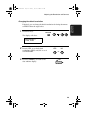
1
When the fax machine rings, pick up
the handset.
2
If you hear a fax tone, wait until the
display shows RECEIVING and then
replace the handset.
Beep
RECEIVING
Note: If you have set the Fax Signal
Receive setting to NO, press the START
key to begin reception.
69
all-fo2970.book
Page 70 Monday, July 24, 2000
7:45 AM
Using TEL Reception Mode
3
If the other party first speaks with you
and then wants to send a fax, press the
START key after speaking. (Press
your START key before the sender
presses their Start key.)
• When RECEIVING appears in the
display, hang up.
START
RECEIVING
Answering with an extension phone
1
Answer the extension phone when it
rings.
2
If you hear a soft fax tone, wait until
your fax responds (the extension
phone will go dead if it is connected
to your fax, or you will hear
pronounced, high-pitched tones if the
phone is connected to a separate wall
jack), then hang up.
Beep
70
Phone goes dead
or pronounced,
high-pitched tones
all-fo2970.book
Page 71 Monday, July 24, 2000
7:45 AM
Using TEL Reception Mode
3
If the fax doesn't respond, or if the
other party first talks to you and then
wants to send a fax, press 5, *, and *
on the extension phone (only on a
tone dial phone). This signals the fax
to begin reception. Hang up.
3. Receiving
Documents
5
Comments:
♦ Your fax will not accept the signal to begin reception (5**) if a
document is loaded in its feeder.
♦ If you have set the Fax Signal Receive setting to NO, press 5, *,
and * on the extension phone to begin reception.
Changing the number for remote fax activation
If desired, you can use a number other than 5 to activate fax reception
from an extension telephone. You can select any number from 0 to 9.
1
Press these keys:
FUNCTION
4
The display will show:
TEL/FAX REMOTE #
ENTER (0-9) (5)
2
Enter a number from 0 to 9.
1
(Example)
71
all-fo2970.book
Page 72 Monday, July 24, 2000
7:45 AM
Using TEL Reception Mode
3
Press the STOP key to return to the
date and time display.
STOP
Turning off detection of the Tel/Fax Remote Number
If you don't intend to ever activate fax reception from an extension
phone, you can turn off detection of the above TEL/FAX REMOTE
NUMBER. This will ensure that the fax never mistakenly attempts to
begin reception if it detects a signal similar to the TEL/FAX
REMOTE NUMBER while you are talking on an extension phone.
1
Press these keys:
FUNCTION
4
The display will show:
REMOTE RECEPTION
1=YES, 2=NO
2
3
72
Press 1 to turn on detection of the
TEL/FAX REMOTE NUMBER, or 2
to turn it off.
Press the STOP key to return to the
date and time display.
YES
1
NO
or
STOP
2
all-fo2970.book
Page 73 Monday, July 24, 2000
7:45 AM
Using TEL Reception Mode
Fax Signal Receive
1
Press these keys:
FUNCTION
3. Receiving
Documents
Your fax will automatically begin reception if you hear a soft fax tone
after answering a call on your fax or an extension phone. If you use a
computer fax modem to send documents on the same line, you must
turn this function off in order to prevent your fax from mistakenly
attempting to receive documents from the computer fax modem.
Follow the steps below to change the setting.
4
The display will show:
FAX SIGNAL RX
1=YES, 2=NO
2
3
Press 1 to turn on the function, or 2 to
turn it off.
Press the STOP key to return to the
date and time display.
YES
1
NO
or
2
STOP
73
all-fo2970.book
Page 74 Monday, July 24, 2000
7:45 AM
Using TEL Reception Mode
Reception Ratio
The fax has been set at the factory to automatically reduce the size of
received documents to fit the size of the printing paper. This ensures
that data on the edges of the document are not cut off. If desired, you
can turn this function off and have received documents printed at full
size.
♦ If a document is too long to fit on the printing paper, the remainder
will be printed on a second page. In this case, the cut-off point may
occur in the middle of a line.
♦ Automatic reduction may not be possible if the received document
is too large, contains too many fine graphics or images, or is sent at
high resolution. In this case, the remainder of the document will be
printed on a second page.
1
Press these keys:
FUNCTION
The display will show:
4
RECEPTION RATIO
1=AUTO, 2=100%
2
Press 1 to turn on automatic
reduction, or 2 to turn it off.
AUTO
1
3
74
Press the STOP key to return to the
date and time display.
100%
or
STOP
2
all-fo2970.book
Page 75 Monday, July 24, 2000
7:45 AM
Substitute Reception to Memory
Substitute Reception to Memory
When you have received a document in memory, CAN’T PRINT
DATA will appear in the display, alternating with a message indicating
the problem. When you correct the problem, the stored documents
will automatically print out.
If you received documents in memory because the fax ran out of
paper, be sure to add paper which is the same size as the paper
previously used. If not, the document print-out size may not match the
size of the printing paper.
Caution!
♦ When documents are stored in memory, do not turn the power off.
This will erase all of the contents.
♦ If documents received in memory are lost due to a power failure or
other interruption in the power supply, a CLEAR REPORT will be
printed out when the power is restored. This gives information
about the receptions lost, including the fax numbers of the transmitting machines if they are available.
75
3. Receiving
Documents
In situations where printing is not possible, such as when your fax
runs out of paper, the toner cartridge needs replacement, or the paper
jams, incoming faxes will be received to memory.
all-fo2970.book
Page 76 Monday, July 24, 2000
7:45 AM
4. Making Copies
Your fax can also be used to make copies. Single and multiple copies
(up to 99 per original) can be made, enabling your fax to double as a
convenience office copier.
1
Load the document(s) face down.
(Maximum of 20 pages.)
• SEND READY appears in the
display.
2
If desired, select one or more of the
following optional copy settings:
• SORT COPY:
If you are making multiple copies
of more than one original and want
the copies sorted, press the
FUNCTION key and 6, and then
enter the number of copies per
original. (If the number of copies is
less than ten, enter a “0” before the
number.)
A
76
B C
0
Originals
Not sorted
Sorted
A
B C
FUNCTION
A
B C
A
B C
A
A A
• MULTIPLE COPIES
(Not sorted):
If you want to make multiple copies
of the original (or each original),
enter a 2-digit number for the
number of copies per original. (If
the number is less than 10, do not
enter a 0 before the number.)
B
B B
C
C C
6
Example:
3 copies
per original
3
Example of
sorted/not-sorted
copies (three
each) of three
originals
9
Example: Nine
copies per original
all-fo2970.book
Page 77 Monday, July 24, 2000
7:45 AM
Making Copies
REDUCTION/
ENLARGEMENT
4. Making
Copies
• REDUCE/ENLARGE:
If you want to reduce or enlarge the
copy, press the REDUCTION/
ENLARGEMENT key until the
desired percentage appears in the
display (you can also scroll through
the percentages with the UP and
DOWN keys). The selections are as
follows:
100% (no reduction/enlargement)
AUTO (auto reduction to fit the
size of the printing paper.)
94%
88%
73%
50%
200%
150%
125%
Note: The enlargement/reduction setting is effective for one time only.
• RESOLUTION:
If desired, set the resolution and/or
contrast. (The default setting for
copying is FINE.)
3
RESOLUTION
Press the COPY/HELP key.
COPY/HELP
• Copying begins.
Note:
If you place a large number of originals in the feeder, the memory may
become full before all of them can be scanned (MEMORY IS FULL will
appear in the display). If this happens, press the START key to copy the
originals which have been scanned, and then repeat the copy procedure
for the remaining originals, including the original which was being
scanned when the memory became full.
77
all-fo2970.book
Page 78 Monday, July 24, 2000
7:45 AM
Making Copies
Copy Cut-off
When making a copy of a document that is longer than the printing
paper, use the copy cut-off setting to select whether the remaining part
of the document will be cut off or printed on a second page. The initial
setting is YES (cut off the remainder). To change the setting, follow
the steps below.
1
Press these keys:
FUNCTION
The display will show:
4
COPY CUT-OFF
1=YES, 2=NO
2
Press 1 to set copy cut-off to YES (the
remaining part of the document will
not be printed), or 2 to set copy cutoff to NO (the remaining part will be
printed on a second page).
YES
1
NO
or
The display briefly shows your
selection, and then:
PAPER SIZE
1=LETTER, 2=LEGAL
3
78
Press the STOP key to return to the
date and time display.
STOP
2
all-fo2970.book
Page 79 Monday, July 24, 2000
7:45 AM
5. Making Telephone Calls
Your fax machine can be used like a regular telephone to make and
receive voice calls.
♦ To make or receive a voice call, the power must be on.
2
Pick up the handset or press the
SPEAKER key. Listen for the dial
tone.
SPEAKER
or
Dial the number using one of the
following methods:
• Normal Dialing: Enter the full
telephone number with the numeric
keys.
• Rapid Key Dialing: Press the
appropriate Rapid Key.
01
02
03
5. Making
Phone Calls
1
Example: Press
Rapid Key 01
• Speed Dialing: Press the SPEED
DIAL key, and enter the 2-digit
Speed Dial number with the
numeric keys.
3
Speak with the other party when they
answer.
• If you pressed the SPEAKER key,
pick up the handset to talk.
79
all-fo2970.book
Page 80 Monday, July 24, 2000
7:45 AM
Making Telephone Calls
Comments:
♦ While the handset of the fax is lifted (off hook), an extension phone
connected directly to the fax cannot be used to speak with the other
party.
♦ The fax may interrupt a voice call received on an extension phone if
the reception mode is set to A.M. and there is a period of silence
during the conversation. If you are on a touch-tone phone, you can
prevent this by pressing any three keys on the phone immediately
after you answer. (Note: Do not enter the code to activate fax reception: 5, *, *.)
Searching for an auto-dial number
You can use the HOLD/SEARCH key to search for a Rapid Key or
Speed Dial number. First search for the number as described in
Searching for an auto-dial number in Sending a Fax by Automatic
Dialing in Chapter 2, then pick up the handset or press the
SPEAKER key. The number will be dialed automatically (do not
press the START key).
Redial
The last number dialed can be redialed by pressing the REDIAL key
(it is not necessary to pick up the handset or press the SPEAKER
key). When the other party answers, pick up the handset to talk.
Hold
You can put the other party on hold during a conversation by pressing
the HOLD/SEARCH key. When this is done, they cannot hear you.
You can put the handset back in the cradle without breaking the
connection. When you are ready to speak with them again, pick up the
handset. If you did not put the handset back in the cradle, press the
HOLD/SEARCH key again to resume conversation.
80
all-fo2970.book
Page 81 Monday, July 24, 2000
7:45 AM
6. Answering Machine Hookup
Connecting an Answering Machine
If desired, you can connect an answering machine to your fax
machine's TEL. SET jack. This will allow you to receive both voice
messages and faxes when you are out.
1
Remove the seal covering the TEL.
SET jack.
2
Connect the answering machine's
telephone line jack to the TEL. SET
jack.
6. Answering
Machine
• If desired, you can connect an
extension phone to your answering
machine's extension phone jack.
Make sure the
TEL. LINE jack
is connected to
the wall jack.
To answering
machine's
telephone
line jack.
81
all-fo2970.book
Page 82 Monday, July 24, 2000
7:45 AM
Connecting an Answering Machine
Changing the outgoing message
The outgoing message (OGM) of your answering machine should be
changed to inform callers who want to send a fax to press their Start
key. For example, your message might go as follows:
“Hello. You've reached the ABC company. No one is available to take
your call right now. Please leave a message after the beep or press
your facsimile Start key to send a fax. Thank you for calling.”
♦ Try to keep the length of the message under 10 seconds. If it is too
long, you may have difficulty receiving faxes sent by automatic
dialing.
♦ If your outgoing message must be longer than 10 seconds, leave a
pause of about four seconds at the beginning of the message. This
will give your fax a chance to detect fax tones sent when automatic
dialing is used.
Activating the answering machine connection
Before you go out, activate the answering machine connection as
follows:
1
Set the reception mode to A.M.
RECEPTION
MODE
82
TEL
FAX
A.M.
all-fo2970.book
Page 83 Monday, July 24, 2000
7:45 AM
Connecting an Answering Machine
2
Set your answering machine to auto
answer.
♦ Your answering machine must be set to answer on a maximum of
two rings. If not, you may not be able to receive faxes sent by automatic dialing.
♦ If your answering machine has a toll saver function, make sure that
it will answer by the fourth ring.
Note:
If your answering machine has a remote retrieval function, make sure the
code used to activate remote retrieval is different from the code used to
activate fax reception with an extension telephone (see Chapter 3,
Receiving Documents). If they are the same, entering the code from an
outside telephone to retrieve messages will cause the fax machine to be
activated.
How the connection operates
6. Answering
Machine
While you are out, all of your incoming calls will be answered by
your answering machine and its outgoing message will play. Voice
callers can leave a message. During this time, your fax will quietly
monitor the line. If your fax detects a fax tone or a duration of silence
greater than four seconds, it will take over the line and begin
reception.
When you return and turn
off your answering
machine, be sure to change
the reception mode back to
FAX or TEL!
83
all-fo2970.book
Page 84 Monday, July 24, 2000
7:45 AM
Optional A.M. Mode Settings
Optional A.M. Mode Settings
If necessary, you can use the following settings to improve the
response of the answering machine hookup to incoming calls.
Quiet Detect Time
The fax machine is set to take over the line and begin reception if it
detects 4 seconds of silence after the answering machine answers. If
needed, you can change this setting to any number of seconds from 1
to 10.
♦ We recommend that you do not set Quiet Detect Time under 3 seconds.
♦ If the fax machine is interrupting callers before they can leave a
message, try a longer Quiet Detect Time setting. If your outgoing
message includes a period of silence, make sure that the setting is
longer than that period of silence, or re-record your outgoing message to shorten the silence.
Note:
Quiet Detect Time can be turned off by entering “00” for the time. Note,
however, that the fax machine may not be able to receive manually-sent
faxes from some older fax machines.
1
Press these keys:
FUNCTION
4
The display will show:
QUIET DETECT TM.
ENTER (00-10) 04
2
Enter a number from 01 to 10, or
enter 00 to turn off the function.
0
4
(Example)
84
all-fo2970.book
Page 85 Monday, July 24, 2000
7:45 AM
Optional A.M. Mode Settings
3
Press the STOP key to return to the
date and time display.
STOP
Fax when Answering machine Fails
When this function is turned on, your fax will answer the call after 5
rings if the answering machine for some reason fails to answer before
that time. This ensures that you will receive fax messages even if the
answering machine’s tape fills up or the answering machine is not
turned on.
This function has been turned off at the factory. If you want to turn it
on, follow the steps below:
Note:
When this function is turned on, make sure that the answering machine is
set to answer on 4 rings or less. If it isn’t, the fax will always answer first,
preventing callers from leaving voice messages.
Press these keys:
FUNCTION
4
6. Answering
Machine
1
The display will show:
TAD FAILS
1=YES, 2=NO
2
3
Press 1 to turn on the function, or 2 to
turn it off.
Press the STOP key to return to the
date and time display.
YES
1
NO
or
2
STOP
85
all-fo2970.book
Page 86 Monday, July 24, 2000
7:45 AM
7. Special Functions
Broadcasting
The Broadcasting function allows you to send the same document to
as many as 30 different locations with just one operation. First load
the document, then enter the numbers of the receiving machines. The
document will be automatically transmitted to each location.
♦ You can only use Rapid Keys or Speed Dial numbers to dial the
numbers of the receiving machines.
1
Load the document (s).
• SEND READY will appear in the
display.
2
Press the BROADCAST key.
BROADCAST
The display will show:
BROADCAST MODE
SPEED # OR RAPID
3
Dial the receiving machines using one
or more of the following methods:
02
01
03
• Press one or more Rapid Keys.
• Enter one or more Speed Dial
numbers with the numeric keys.
0
1
2
(Example)
86
3
all-fo2970.book
Page 87 Monday, July 24, 2000
7:45 AM
Broadcasting
4
Press the START key.
START
The display will show:
SET RESOLUTION
PRESS RESO. KEY
• If desired, adjust the resolution and/
or contrast.
Press the START key. Transmission
begins.
START
• A Transaction Report is
automatically printed out after
Broadcasting is completed. Check
the “Note” column of the report to
see if any of the locations are
marked “Busy” or have a
communication error code. If so,
send the document to those
locations again.
7. Special
Functions
5
RESOLUTION
87
all-fo2970.book
Page 88 Monday, July 24, 2000
7:45 AM
Broadcasting
Broadcasting using a Group Key
If the fax machines to which you want to broadcast have all been
programmed into one Group Key (see Storing numbers in Group Keys
which follows), you can perform the broadcasting operation using the
following simplified procedure:
1
Load the document(s).
• SEND READY will appear in the
display.
• If desired, adjust the resolution and/
or contrast.
RESOLUTION
2
Press the appropriate Group Key.
Transmission will begin.
17/G1
18/G2
19/G3
(Example)
88
all-fo2970.book
Page 89 Monday, July 24, 2000
7:45 AM
Broadcasting
Storing numbers in Group Keys
Group Keys allow you to dial a group of fax numbers by simply
pressing the appropriate Group Key once. To store a group of numbers
in a Group Key, follow the steps below.
Rapid Keys 17/G1 through 20/G4 can be used as Group Keys. Note
that one key cannot be simultaneously programmed as both a Group
Key and a Rapid Key.
♦ Up to 30 numbers can be stored in one Group Key.
♦ Only Rapid Key and Speed Dial numbers (excluding numbers set
for Chain Dialing) can be stored in a Group Key. Full numbers cannot be stored.
1
Press these keys.
FUNCTION
7
The display will show:
GROUP ENTRY MODE
1=SET, 2=CLEAR
3
Press 1 (SET) to program a Group
Key, or 2 (CLEAR) to clear a Group
Key.
To program a Group Key, press the
key you want to program (one of
Rapid Keys 17/G1 to 20/G4).
To clear a Group Key, press the key
you want to clear and go to Step 5.
SET
CLEAR
1
or
17/G1
18/G2
2
7. Special
Functions
2
19/G3
(Example)
89
all-fo2970.book
Page 90 Monday, July 24, 2000
7:45 AM
Broadcasting
4
Enter fax numbers using one or both
of the following methods:
• Press one or more Rapid Keys.
02
01
03
• Enter one or more Speed Dial
numbers with the numeric keys.
0
1
2
4
(Example)
90
5
Press the START key.
6
Return to Step 3 to program another
Group Key, or press the STOP key
repeatedly until you return to the date
and time display.
START
Step 3 or
STOP
all-fo2970.book
Page 91 Monday, July 24, 2000
7:45 AM
Distinctive Ring
Distinctive Ring (Requires Subscription to
Service)
Important:
♦ To use distinctive ring, you must subscribe to a distinctive ring
service from your local phone company.
♦ Your fax machine may not be compatible with some distinctive ring
services.
Distinctive ring is a service offered by some local telephone
companies whereby they assign an additional second number to your
regular single line. The second number rings differently from your
normal number.
If you subscribe to a distinctive ring service, you can set the fax
machine to automatically answer when your second number is called.
This allows you to use the second number as an exclusive fax number.
To have your fax automatically answer when your second number is
called, follow the steps below:
1
Press these keys:
The display will show:
FUNCTION
4
2
7. Special
Functions
OPTION SETTING
PRESS * OR #
Press the * key 11 times.
The display will show:
DISTINCTIVE RING
1:RING PATTERN 1
The ring pattern selections
alternately appear here.
91
all-fo2970.book
Page 92 Monday, July 24, 2000
7:45 AM
Distinctive Ring
3
Press a number from 1 to 3 to select
the ring pattern below that matches
your second number’s ring pattern.
Or, press 4 to have your fax
automatically answer your normal
telephone number. Press 5 to turn off
the distinctive ring function.
1
RING PATTERN 1
Two short rings
2
RING PATTERN 2
One short, one long, and one
short ring
3
RING PATTERN 3
Two short rings and one long ring
4
STANDARD RING
Your standard (normal) ring
pattern
5
OFF SETTING
Turn distinctive ring off
The display will briefly show your
selection, and then:
FAX SIGNAL RX
1=YES, 2=NO
92
4
Press the STOP key to return to the
date and time display.
5
Set the reception mode to FAX.
STOP
RECEPTION
MODE
TEL FAX
A.M.
all-fo2970.book
Page 93 Monday, July 24, 2000
7:45 AM
Distinctive Ring
7. Special
Functions
♦ When using distinctive ring, you must set the reception mode of
your fax machine to FAX. When your designated fax number is
dialed, your fax will automatically answer and begin reception after
two rings. Note that other devices on the same line will also ring
until your fax answers. If one of your other numbers is dialed, the
fax will ring; however, it will not answer.
93
all-fo2970.book
Page 94 Monday, July 24, 2000
7:45 AM
Cover Sheet
Cover Sheet
You can have the fax generate a cover sheet and send it as the last
page of each of your fax transmissions.
You can select
a message.
For the recipient's
name to appear, you
must dial using a
Speed Dial or Rapid
Key number with the
name programmed.
Your name and
number must be
programmed as
explained in
Chapter 1.
Follow the steps below to turn on the cover sheet function. Once the
cover sheet function is turned on, cover sheets will be included with
all transmissions until you turn it off.
1
Press these keys:
The display will show:
COVER SHEET
1=YES, 2=NO
94
FUNCTION
4
all-fo2970.book
Page 95 Monday, July 24, 2000
7:45 AM
Cover Sheet
2
Press 1 (YES) to turn on the cover
sheet function, or 2 (NO) to turn it off.
YES
1
The display will briefly show your
selection, and then:
NO
or
2
AUTO PRINT OUT
1=YES, 2=NO
3
Press the STOP key to return to the
date and time display.
STOP
Selecting a header message (optional)
When the cover sheet function is turned on, you can also select a
message which will appear as a header at the top of the cover sheet.
Note that the message selection is only effective for one transmission.
1
Load the document(s).
• The document must be loaded
before a message can be selected.
2
Press these keys:
FUNCTION
7. Special
Functions
• The cover sheet function must be
turned on.
5
The display will show:
COVER SHEET HEAD
1=URGENT
The message selections
alternately appear here.
95
all-fo2970.book
Page 96 Monday, July 24, 2000
7:45 AM
Cover Sheet
3
Select a message by entering a
number from 1 to 4:
1: URGENT
2: IMPORTANT
3: CONFIDENTIAL
4: PLS. DISTRIBUTE
4
1
(Example)
Dial the receiving machine and
transmit the document.
Note:
To cancel a header message selection, press the STOP key or remove the
document from the feeder.
96
all-fo2970.book
Page 97 Monday, July 24, 2000
7:45 AM
Batch Page Numbering
Batch Page Numbering
You can change the page numbering of the fax from simple
numbering (“P.01”, “P.02”, etc.) to batch numbering, which means
that a slash and the total number of pages are added after each page
number (for example, “P. 01/05”, “P.02/05”, etc.). This allows the
recipient to check for missing pages.
1
Load the document(s).
• The document must be loaded
before batch page numbering can
be set.
2
Press these keys:
FUNCTION
The display will show:
PAGE COUNTER SET
ENTER # (01-99)
Enter the total number of pages (“01”
to “99”) by pressing the number keys.
(If the number is less than 10, enter a
“0” before the number.)
• If you are sending a cover sheet, do
not include it in the total number of
pages (the number will be adjusted
automatically).
0
8
Example:
Eight pages
7. Special
Functions
3
97
all-fo2970.book
Page 98 Monday, July 24, 2000
7:45 AM
Batch Page Numbering
4
Dial the receiving machine and
transmit the document.
Comments:
♦ If you need to cancel a batch number entry, remove the document
from the feeder or press the STOP key.
♦ If the number of pages actually transmitted does not coincide with
the batch number entered, the alarm will sound and PAGE COUNT
ERROR will appear in the display. PAGE E. will also appear in the
NOTE column of the Transaction Report if it has been set to print
out.
98
all-fo2970.book
Page 99 Monday, July 24, 2000
7:45 AM
Blocking Reception of Unwanted Faxes
Blocking Reception of Unwanted Faxes
The Anti Junk Fax function allows you to block reception of faxes
from parties which you specify. This saves paper by not printing out
unwanted “junk” faxes.
To use this function, follow the steps below to turn it on, and then
enter the fax numbers from which you do not want to receive faxes as
indicated in the procedure that follows.
1
Press these keys:
FUNCTION
4
The display will show:
JUNK FAX # CHECK
1=YES, 2=NO
2
Press 1 to turn on the Anti Junk
function, or 2 to turn it off.
YES
1
3
Press the STOP key to return to the
date and time display.
NO
or
2
STOP
Enter (or clear) a number in the Anti Junk List as shown below. Up to
five numbers can be entered.
♦ To clear a number from the Anti Junk Number List, you need to
know the 1-digit number which identifies it. If you have forgotten
this number, print out the Anti Junk Number List as explained in
Chapter 8.
99
7. Special
Functions
Entering Anti Junk numbers
all-fo2970.book
Page 100 Monday, July 24, 2000
7:45 AM
Blocking Reception of Unwanted Faxes
1
Press these keys:
FUNCTION
3
The display will show:
STORE JUNK FAX #
1=SET, 2=CLEAR
2
3
Press 1 to enter a number in the Anti
Junk Number List, or 2 to clear a
number from the list.
SET
1
Entering: Enter a 1-digit number
from 1 to 5 with the numeric keys.
This number identifies the fax
number that you will enter in the next
step.
CLEAR
2
or
1
(Example)
Clearing: Enter the 1-digit number
that identifies the fax number you
want to clear, and go to Step 5.
4
Enter the fax number.
2
3
2
4
5
6
7
(Example)
5
Press the START key.
6
Return to Step 3 to enter (or clear)
another fax number, or press the
STOP key to return to the date and
time display.
100
START
Step 3 or
STOP
all-fo2970.book
Page 101 Monday, July 24, 2000
7:45 AM
Polling (Requesting a Fax Transmission)
Polling (Requesting a Fax Transmission)
Polling allows you to call another fax machine and have it send a
document to your machine without operator assistance. In other
words, the receiving fax machine, not the transmitting fax machine,
initiates the transmission. You can use your fax machine to both poll
and be polled by others.
To use the polling function, you must first set Rapid Key 16/POLL for
use as a polling key.
1
Press these keys:
FUNCTION
4
The display will show:
POLLING
1=YES, 2=NO
3
Press 1 to turn on the function, or 2 to
turn it off.
Press the STOP key to return to the
date and time display.
YES
1
NO
or
2
STOP
Note: When Rapid Key 16/POLL is set as a polling key, it cannot be used
for Rapid Key dialing.
101
7 Special
Functions
2
all-fo2970.book
Page 102 Monday, July 24, 2000
7:45 AM
Polling (Requesting a Fax Transmission)
Requesting transmission
1
Dial the fax machine you want to poll
using one of the following methods:
• Pick up the handset (or press the
SPEAKER key) and dial the full
number. Wait for the fax
answerback tone.
ABC
1
GHI
DEF
2
3
JKL
4
PQRS
MNO
5
TUV
7
6
WXYZ
8
0
• Pick up the handset (or press the
SPEAKER key) and press the
Rapid Dial Key. Wait for the fax
answerback tone.
(Example)
• Press the SPEED DIAL key and
enter a 2-digit Speed Dial number.
• Enter the full number using the
numeric keys.
2
Press Rapid Key 16/POLL.
13
• If you used the handset, replace it
when POLLING appears in the
display. Reception will begin.
102
14
15
16/POLL
9
all-fo2970.book
Page 103 Monday, July 24, 2000
7:45 AM
Polling (Requesting a Fax Transmission)
Being polled (Memory polling)
To let another fax machine poll your fax machine, you must first store
the document in memory using the following procedure. Transmission
will take place when the other fax machine calls your fax machine and
activates polling. You can choose whether to allow polling only once,
or an unlimited number of times. In the latter case, your fax machine
can be used as an electronic "bulletin board".
♦ Only one document can be stored at a time for memory polling.
♦ If you allow polling only once, the document will be automatically
cleared from memory after polling. If you allow polling an unlimited number of times, the document will remain in memory until
you clear it as explained in the following section, Clearing a document.
Load the document.
2
Press the RECEPTION MODE key
to set the reception mode to FAX.
3
Press these keys:
The display will show:
RECEPTION
MODE
FUNCTION
TEL FAX
A.M.
7 Special
Functions
1
8
MEMORY POLL MODE
1=SET, 2=CLEAR
103
all-fo2970.book
Page 104 Monday, July 24, 2000
7:45 AM
Polling (Requesting a Fax Transmission)
4
Press 1 to select SET.
5
Press 1 to allow polling only once, or
2 to allow polling an unlimited
number of times.
6
1
ONCE
1
REPEAT
2
or
Press the START key.
START
• The document is scanned into
memory and your fax goes on
polling standby.
Clearing a document
To clear a memory poll document from memory, follow the steps
below:
1
Press these keys:
FUNCTION
The display will show:
8
MEMORY POLL MODE
1=SET, 2=CLEAR
2
Press 2 to select CLEAR.
2
3
104
Press the START key to clear the
document, and then the STOP key to
return to the date and time display.
START
STOP
all-fo2970.book
Page 105 Monday, July 24, 2000
7:45 AM
Polling (Requesting a Fax Transmission)
Polling security
Polling Security allows you to prevent unauthorized polling of your
machine. When this function is turned on, polling will only take place
when the fax number of the polling fax machine has been entered in
your machine's list of permitted fax numbers (called "passcode
numbers"). The number of the polling fax must also be correctly
programmed into itself for identification.
To use Polling Security, follow the steps below to turn the function on,
and then enter permitted numbers as shown on the following page.
1
Press these keys:
FUNCTION
3
The display will show:
SECURITY SELECT
1=ON, 2=OFF
3
Press 1 to turn polling security on, or
2 to turn it off.
Press the START key and then the
STOP key.
ON
1
START
OFF
or
2
STOP
7 Special
Functions
2
105
all-fo2970.book
Page 106 Monday, July 24, 2000
7:45 AM
Polling (Requesting a Fax Transmission)
Storing and clearing fax numbers for polling permission
You can store up to 10 fax numbers in your machine's list of permitted
numbers.
1
Press these keys:
FUNCTION
3
The display will show:
PASSCODE # MODE
1=SET, 2=CLEAR
2
3
4
Press 1 to store a number, or 2 to clear
a number.
SET
1
Storing: Enter a 2-digit number from
01 to 10. This number identifies the
fax number you will store in the next
step.
Clearing: Enter the number which
identifies the fax number you want to
clear, and go to Step 5.
Enter the fax number.
2
3
CLEAR
2
or
0
1
(Example)
2
4
5
6
(Example)
5
Press the START key.
6
Return to Step 3 to enter (or clear)
another number, or press STOP to
return to the date and time display.
106
START
STOP
Step 3 or
7
all-fo2970.book
Page 107 Monday, July 24, 2000
7:45 AM
Timer Operations
Timer Operations
The Timer function allows you to set up a transmission or polling
operation to be performed automatically at a time you specify. Up to
three operations can be set at any one time, and the times they will be
performed can be specified up to one week in advance.
♦ You can use this function to take advantage of lower off-peak telephone rates without having to be there when the operation is performed.
Note: Only a Rapid Key or Speed Dial number can be used to dial the
receiving machine. Full numbers cannot be used.
Setting a timer operation
1
If this is a transmission, load the
document.
2
Press these keys:
FUNCTION
1
The display will show:
3
Press 1 to select SET.
4
Press 1 to set a transmission operation
(SEND MODE), or 2 to set a polling
operation (POLLING MODE).
7. Special
Functions
TIMER MODE
1=SET, 2=CLEAR
1
SEND
1
POLLING
or
2
107
all-fo2970.book
Page 108 Monday, July 24, 2000
7:45 AM
Timer Operations
5
6
7
Enter the time at which you want the
operation to take place (2 digits for
the hour and 2 digits for the minute).
Press the * key to select A.M. or the
# key to select P.M.
0
A.M.
9
Press a Rapid Key or enter a Speed
Dial number for the receiving fax
machine.
• If this is a polling operation, go to
Step 12.
10
108
Press the START key.
P.M.
or
0
0: Sunday
1: Monday
2: Tuesday
3: Wednesday
4: Thursday
5: Friday
6: Saturday
Press the START key.
5
Example: 9:25
Enter a 1-digit number for the day of
the operation (skip this step if the
operation will be performed within
the next 24 hours):
8
2
9
Example:
Sunday
START
0
1
Example:
Speed Dial #01
START
all-fo2970.book
Page 109 Monday, July 24, 2000
7:45 AM
Timer Operations
11
Adjust the resolution and/or contrast
if desired (skip to the next step if you
don't want to change settings).
12
Press the START key.
RESOLUTION
START
• If this is a transmission, the
document is scanned into memory.
To cancel a timer operation
If you need to cancel a timer operation after it has been set, follow the
steps below.
1
Press these keys:
FUNCTION
The display will show:
1
TIMER MODE
1=SET, 2=CLEAR
Press 2 to select CLEAR.
3
Enter the 1-digit number assigned to
the timer job you want to cancel.
2
1
• If you don’t remember the number,
print out the Timer List as
explained in Chapter 8.
4
Press the START key and then the
STOP key.
(Example)
START
STOP
109
7. Special
Functions
2
all-fo2970.book
Page 110 Monday, July 24, 2000
7:45 AM
8. Printing Lists
You can print lists showing settings and information entered in the fax
machine. You can also print out reports on recent activity and
individual operations after they are completed. The lists and reports
are described on the following pages.
To print a list, follow the steps below.
1
Press the FUNCTION key and 2.
FUNCTION
2
The display will show:
LISTING MODE
PRESS * OR #
2
Press the * key or the # key until the
desired list appears in the display.
3
Press the START key to print the list.
or
START
Activity Report
This report shows information on your most recently performed send
and receive operations (a combined maximum of 30 operations can
appear). The report is divided into two parts: the TRANSMISSIONS
ACTIVITY REPORT, which shows information on transmissions,
and the RECEPTIONS ACTIVITY REPORT, which shows
information on receptions.
♦ All information is erased after a report is printed out. If automatic
print-out is turned off and the report is not printed manually for 30
operations, the information on the oldest operation will be overwritten each time a new operation is performed.
110
all-fo2970.book
Page 111 Monday, July 24, 2000
7:45 AM
8. Printing
Lists
Printing Lists
Explanation of headings
SENDER/
RECEIVER
The name or fax number of the other machine involved in
the transaction. If that machine does not have an ID
function, the communication mode will appear (for
example, “G3”).
START
The time at which transmission/reception started.
TX/RX TIME Total time taken for transmission/reception.
PAGES
Number of pages transmitted/received.
NOTE
(One of the following notes will appear under NOTE in the
report to indicate whether the transaction was successful,
and if not, the reason for the failure.)
OK - Transmission/reception was successful.
P.FAIL - A power failure prevented the transaction.
JAM - The printing paper or document jammed, preventing
the transaction.
NO PAPER - You ran out of paper during reception.
BUSY - The fax was not sent because the line was busy.
COM.E-0 to COM.E-13 - A telephone line error prevented
the transaction. See Line Error in Problems and Solutions in
Chapter 10.
111
all-fo2970.book
Page 112 Monday, July 24, 2000
7:45 AM
Printing Lists
CANCEL - The transaction was cancelled because the
STOP key was pressed, no document was in the feeder, or
the other machine requested transmission using a function
which your fax machine does not have. If you were
attempting to fax, make sure a document is in the feeder. If
you were receiving, contact the faxing party to see how they
are trying to send to you.
If desired, you can set the Activity Report to automatically print out
whenever information on 30 operations has accumulated. (A report
can still be printed on demand at any time.) Follow the steps below:
1
Press these keys:
FUNCTION
4
The display will show:
AUTO PRINT OUT
1=YES, 2=NO
2
3
112
Press 1 to turn on automatic print-out,
or 2 to turn it off.
Press the STOP key to return to the
date and time display.
YES
1
NO
or
STOP
2
all-fo2970.book
Page 113 Monday, July 24, 2000
7:45 AM
8. Printing
Lists
Printing Lists
Timer List
This list shows the timer operations that are currently set, and whether
the Memory Polling function is turned on.
Telephone Number List
This list shows the fax numbers that have been programmed for
automatic dialing.
Passcode List
This list shows settings made for polling security, your name and fax/
telephone number as entered in the machine, and a sample of the header
printed at the top of every page you transmit (HEADER PRINT).
113
all-fo2970.book
Page 114 Monday, July 24, 2000
7:45 AM
Printing Lists
Option Setting List
This list shows the current status of the option settings.
Junk Fax Number List
This list shows the numbers that are blocked by the Anti Junk
function.
114
all-fo2970.book
Page 115 Monday, July 24, 2000
7:45 AM
8. Printing
Lists
Printing Lists
Group List
This list shows the fax numbers that have been programmed into each
Group Key.
Transaction Report
This report is printed out automatically after an operation is
completed to allow you to check the result. Your fax machine is set at
the factory to print out the report only when an error occurs.
♦ The same headings appear in the Transaction Report as in the
Activity Report. See Activity Report in this chapter for an explanation of the headings.
♦ The Transaction report cannot be printed on demand.
If desired, you can change the condition under which a report is
printed out. Follow the steps below.
1
Press these keys:
FUNCTION
4
The display will show:
TRANSACTION LIST
1:ALWAYS PRINT
The selections alternately
appear here.
115
all-fo2970.book
Page 116 Monday, July 24, 2000
7:45 AM
Printing Lists
2
3
116
Press a number from 1 to 5 to select
the condition for printing.
1
ALWAYS PRINT
A report will be printed after each
transmission, reception, or error.
2
ERR/TIMER/MEM A report will be printed after an error,
timer operation, or memory
transmission.
3
SEND ONLY
A report will be printed after each
transmission.
4
NEVER PRINT
A report will never be printed.
5
ERROR ONLY
A report will be printed only when an
error occurs.
Press the STOP key to return to the
date and time display.
STOP
all-fo2970.book
Page 117 Monday, July 24, 2000
7:45 AM
Scanning glass and rollers
Clean the scanning glass and rollers frequently to ensure that your
transmitted images and copies are of the highest quality.
Open the operation panel (grasp the panel release and pull up), and
wipe the scanning glass, rollers and white backplate with a soft cloth.
♦ Make sure that all dirt and stains (such as correcting fluid) are
removed, as dirts and stains will cause vertical lines on transmitted
images and copies.
Document rollers
White
backplate
Scanning glass
The housing
Wipe the external parts and surface of the machine with a dry cloth.
Caution!
♦ Do not use benzene or thinner. These solvents may damage or discolor the machine.
117
9. Maintenance
9. Maintenance
all-fo2970.book
Page 118 Monday, July 24, 2000
7:45 AM
Maintenance
Replacing the toner cartridge
When the toner cartridge nears empty (about 100 pages can still be
printed), the TONER EMPTY indicator on the operation panel will
blink. When the toner cartridge is empty, the toner cartridge indicator
will light steadily and REPLACE TONER will appear in the display.
Printing will no longer be possible.
Replace the toner cartridge with the following cartridge:
Sharp FO-29ND toner cartridge
1
Grasp the print compartment cover at
both sides as shown, and pull up to
open the cover.
• Caution!
The fusing unit inside the print
compartment becomes very hot
during operation. Do not touch the
inside of the compartment or the
paper guide on the underside of the
print compartment cover.
2
Grasp the finger hold on the toner
cartridge handle where it is marked
PUSH, and pull the handle out.
Rehold the handle and pull the toner
cartridge out of the compartment.
• Dispose of the old toner cartridge
according to local regulations. If in
doubt, contact your local waste
disposal agency.
118
all-fo2970.book
Page 119 Monday, July 24, 2000
7:45 AM
Maintenance
Install the new toner cartridge and
reset the toner counter. (Refer to
Installing the Toner Cartridge in
Chapter 1.)
9. Maintenance
3
Replacing the drum cartridge
To maintain excellent printing quality, we recommend that you
replace the drum cartridge about 20,000 pages have been printed. You
can view the number of pages printed in the display by pressing the
following sequence of keys:
FUNCTION
START
9
When finished, press the STOP key to return to the date and time
display.
Replace the drum cartridge with the following cartridge:
Sharp FO-29DR drum cartridge
1
Grasp the print compartment cover at
both sides as shown, and pull up to
open the cover.
• Caution!
The fusing unit inside the print
compartment becomes very hot
during operation. Do not touch the
inside of the compartment or the
paper guide on the underside of the
print compartment cover.
119
all-fo2970.book
Page 120 Monday, July 24, 2000
7:45 AM
Maintenance
2
Grasp the finger hold on the toner
cartridge handle where it is marked
PUSH, and pull the handle out.
Rehold the handle and pull the toner
cartridge out of the compartment.
• Place the toner cartridge on a sheet
of paper on a level surface.
3
Grasp the tabs on the drum cartridge
handle and gently pull the cartridge
out of the machine.
4
Remove the new drum cartridge from
its packaging.
120
all-fo2970.book
Page 121 Monday, July 24, 2000
7:45 AM
5
Insert the drum cartridge into the print
compartment, aligning the guides on
the cartridge with the runners on the
sides of the compartment.
6
Gently pull the paper tab to remove
the black sheet of protective paper
from the drum cartridge.
9. Maintenance
Maintenance
• Be careful not the tear the paper or
leave any pieces of paper in the
machine.
7
Replace the toner cartridge and reset
the drum counter. (Refer to Installing
the Toner Cartridge in Chapter 1.)
121
all-fo2970.book
Page 122 Monday, July 24, 2000
7:45 AM
Maintenance
Cleaning the drum cartridge
If you find that characters or parts of an image are missing from your
printed pages, the drum in the drum cartridge may need cleaning.
Follow the steps below to clean the drum.
1
Grasp the print compartment cover at
both sides as shown, and pull up to
open the cover.
• Caution!
The fusing unit inside the print
compartment becomes very hot
during operation. Do not touch the
inside of the compartment or the
paper guide on the underside of the
print compartment cover.
2
Grasp the finger hold on the toner
cartridge handle where it is marked
PUSH, and pull the handle out.
Rehold the handle and pull the toner
cartridge out of the compartment.
• Place the toner cartridge on a sheet
of paper on a level surface.
3
122
Grasp the tabs on the drum cartridge
handle and gently pull the cartridge
out of the machine.
all-fo2970.book
Page 123 Monday, July 24, 2000
7:45 AM
4
Take a sheet of clean paper and roll it
into a tube. Roll it tightly so that the
diameter of the holes at each end is
less than the thickness of your little
finger.
5
Gently wipe the surface of the drum
with the rolled-up paper to remove
any particles of toner caked on the
drum.
9. Maintenance
Maintenance
• Do not let the drum surface come
into contact with anything other
than the rolled-up paper.
Fingerprints, water, alcohol, and
other solvents will damage the
drum surface.
• Do not touch the drum surface with
the edges of the rolled-up paper.
6
Replace the drum cartridge.
• To insert the cartridge, align the
guides on the cartridge with the
runners on the sides of the
compartment.
7
Replace the toner cartridge and close
the print compartment cover. (Refer
to Installing the Toner Cartridge in
Chapter 1.)
123
all-fo2970.book
Page 124 Monday, July 24, 2000
7:45 AM
10. Troubleshooting
Problems and Solutions
Line error
Problem
LINE ERROR appears in
the display.
Solution
Try the transaction again. If the error persists, check
the following:
• Check the connection. The cord from the TEL.
LINE jack to the wall jack should be no longer than
six feet.
• Make sure there are no modem devices sharing the
same telephone line.
• Check with the other party to make sure their fax
machine is functioning properly.
• Have your telephone line checked for line noise.
• Try connecting the fax machine to a different
telephone line.
• If the problem still occurs, your fax machine may
need service.
124
all-fo2970.book
Page 125 Monday, July 24, 2000
7:45 AM
Problems and Solutions
Dialing and transmission problems
Solution
No dial tone when you
pick up the handset or
press the SPEAKER key.
• Make sure the handset cord is connected to the
correct jack. See Connecting the handset in
Connections in Chapter 1.
Dialing is not possible.
• Make sure the power cord is properly plugged into
a power outlet.
• Make sure that the telephone line is properly
connected to both the TEL. LINE jack and the wall
jack.
• Make sure that the fax machine is set to the correct
dialing mode for your telephone line. See
Connecting the telephone line cord in
Connnections in Chapter 1.
The power is on, but no
transmission takes place.
• Make sure that the receiving machine has paper.
• Make sure that the telephone line cord is plugged
into the TEL. LINE jack, and not the TEL. SET jack.
• If the receiving machine is in manual mode with no
attendant, reception will not be possible.
• Check the display for error messages.
• Pick up the handset and check for a dial tone.
Nothing is printed at the
receiving end.
• Make sure that the document for transmission is
placed face down in the feeder.
A distorted image is
received at the other end.
• If Error Correction Mode is turned off (see Error
Correction Mode in Chapter 2), noise on the
telephone line may cause distortion. Try sending
the document again.
• Make a copy of the document on your fax machine.
If the copy is also distorted, your fax machine may
need service.
125
10. Troubleshooting
Problem
all-fo2970.book
Page 126 Monday, July 24, 2000
7:45 AM
Problems and Solutions
Reception and copying problems
Problem
Solution
The fax machine doesn't
receive documents
automatically.
• Make sure that the reception mode is set to FAX. If
you subscribe to a distinctive ring service, make
sure that the Distinctive Ring function is set to the
correct ring pattern. If you do not subscribe to a
distinctive ring service, make sure that Distinctive
Ring is set to OFF SETTING. (See Distinctive Ring
in Chapter 7.)
The power is on, but no
reception takes place.
• Make sure that the telephone line cord is plugged
into the TEL. LINE jack, and not the TEL. SET jack.
The printing paper comes
out blank when you try to
receive a document.
• Make sure that the document is loaded properly in
the feeder of the transmitting machine. Make a
copy or print a report to confirm the printing ability
of your machine.
The received document is
faint.
• Ask the other party to send higher contrast
documents. If the contrast is still too low, your fax
machine may need service. Make a copy or print a
report to check your machine’s printing ability.
• The toner cartridge may need replacement.
Received images are
distorted.
• If the sending machine has Error Correction Mode,
make sure this feature is turned on in both fax
machines (see Error Correction Mode in Chapter
2).
• If Error Correction Mode is turned off, noise on the
telephone line may cause distortion. Have the other
party try sending the document again.
• The drum cartridge may be damaged. Try a new
drum cartridge.
• Make a copy or print a report on your fax machine.
If the copy or report is also distorted, your fax
machine may need service.
126
all-fo2970.book
Page 127 Monday, July 24, 2000
7:45 AM
Problems and Solutions
• Any dirt or material on the scanning glass will
cause spots to appear on copies and transmitted
faxes. Clean the scanning glass as explained in
Chapter 9.
Dots appear at regular
intervals on received
documents and copies.
• The drum cartridge may be damaged. Replace the
drum cartridge.
10. Troubleshooting
The quality of copies is
poor and/or black spots
appear.
Answering machine connection
Problem
The answering machine
connection does not
operate properly.
Solution
• Make sure your fax machine's reception mode is
set to A.M.
• Make sure your fax machine's TEL. LINE jack is
connected to the wall jack. Make sure your fax
machine's TEL. SET jack is connected to your
answering machine's telephone line jack (not the
answering machine's extension phone jack).
• Make sure your answering machine's outgoing
message is under 10 seconds.
• Make sure that the Quiet Detect Time setting is set
to three or four seconds (see Chapter 6).
• Make sure that the Distinctive Ring function is set
to OFF SETTING (see Distinctive Ring in Chapter
7).
• If you have checked all of the above and the
hookup still doesn't operate properly, call the
Customer Assistance Center.
127
all-fo2970.book
Page 128 Monday, July 24, 2000
7:45 AM
General problems
Problem
Nothing appears in the
display.
Solution
• Make sure the power cord is properly plugged into
a power outlet.
• Connect another electrical appliance to the outlet to
see if it has power.
The machine does not
respond when you press
any of its keys.
• If a beep sound is not made when you press the
keys, open the printer compartment cover and use
pencil or pen to press the RESET button. (See the
following page.)
Automatic document
feeding does not work for
transmission or copying.
• Check the size and weight of the document (see
Transmittable Documents in Chapter 2.
Voice calls taken on an
extension phone are
interrupted by the fax.
• The fax may interrupt during a voice call if the
reception mode is set to A.M. To prevent
interruption on a tone dial extension phone, press
any three keys on the extension phone after
answering. (Note: Do not enter the code to activate
fax reception.)
No reception occurs when
polling is attempted.
• Make sure you have not run out of paper.
• Make sure the transmitting machine is in automatic
reception mode.
• If the transmitting machine has polling security,
make sure that your fax number has been entered
both in your machine and in the transmitting
machine.
128
all-fo2970.book
Page 129 Monday, July 24, 2000
7:45 AM
Problems and Solutions
Using the RESET key
If the fax machine stops responding when you press any of the
operation panel keys, you must reset it. This can be done as follows:
Grasp the print compartment cover at
both sides as shown, and pull up to
open the cover.
10. Troubleshooting
1
• Caution!
The fusing unit inside the print
compartment becomes very hot
during operation. Do not touch the
inside of the compartment or the
paper guide on the underside of the
print compartment cover.
2
Use a ballpoint pen to press the
RESET button.
• Note: Pressing the RESET button
clears any documents that are stored
in memory.
3
Close the print compartment cover,
pressing down firmly on each side to
make sure it is completely closed.
129
all-fo2970.book
Page 130 Monday, July 24, 2000
7:45 AM
Messages and Signals
Messages and Signals
Display messages
CAN’T PRINT DATA
A fax has been received to memory because printing
is not possible. This message will alternate with a
message that indicates the problem. The fax will print
out automatically when the problem is resolved.
CHECK PAPER SIZE
The paper size setting is incorrect. Change the paper
size setting as described in Loading Printing Paper in
Chapter 1.
CHECK PC
This appears if you press the E-MAIL key and your
computer is not turned on or is not correctly
connected to the fax machine.
COVER OPEN
The print compartment cover is open. Press down
firmly on both sides of the print compartment cover to
close it.
DOCUMENT JAMMED
The original document is jammed. See the following
section, Clearing Paper Jams.
FUNCTION MODE
The FUNCTION key has been pressed.
GRP. SPACE FULL
This appears if you attempt to program a Group Key
when all Group Keys have already been
programmed.
HOLD
The HOLD/SEARCH key has been pressed to put the
other party on hold during a phone conversation.
Press the HOLD/SEARCH again to take the other
party off hold.
LINE ERROR
Transmission or reception was not successful. Press
the STOP key to clear the message and then try
again. If the error persists, see Line Error in Problems
and Solutions in this chapter.
LINE IS IN USE
An extension phone connected to the fax is being
used. Do not lift the fax's handset or attempt
transmission at this time, as this will interrupt the
conversation on the extension phone.
130
all-fo2970.book
Page 131 Monday, July 24, 2000
7:45 AM
Messages and Signals
The memory is full. This may occur during fax
reception if too much data is received before the
pages can be printed out. If faxes have been received
to memory because printing is not possible (an
additional message will indicate the problem), resolve
the problem so that printing can continue (see
Substitue Reception to Memory in Chapter 3). If you
are attempting to transmit by automatic dialing, see If
the memory becomes full in Chapter 2.
MEMORY PRINTING
The fax is preparing to or printing out a document
from memory.
NO DATA
This appears if you attempt to search for an
automatic dialing number when none have been
stored.
NO # STORED
You have tried to dial or clear a Rapid Key or Speed
Dial number that hasn’t been programmed (a full
number hasn’t been assigned to it).
OFF HOOK
This appears if you forgot to replace the handset after
using it to dial and send a fax. Replace the handset or
press the STOP key to clear the message.
ON HOOK DIAL
The SPEAKER key has been pressed and the fax
machine is waiting for you to dial.
OUT OF PAPER
You are out of printing paper (or the paper release
lever is open). Load paper as explained in Loading
Printing Paper in Chapter 1.
PAPER JAMMED
The printing paper is jammed. See the following
section, Clearing Paper Jams.
SEND READY
A document has been loaded and the fax machine is
waiting for you to begin faxing or copying.
REPLACE TONER
The toner cartridge must be replaced.
SEARCH DIAL
The HOLD/SEARCH key has been pressed. Press #
or * to search for an automatic dialing number, or
press the STOP key to return to the date and time
display. (See Searching for an auto-dial number in
Sending a Fax by Automatic Dialing in Chapter 2.)
10. Troubleshooting
MEMORY IS FULL
131
all-fo2970.book
Page 132 Monday, July 24, 2000
7:45 AM
Messages and Signals
SIZE ERROR
The paper size setting is longer than the paper
loaded in the tray. Change the paper size setting as
explained in Loading Printing Paper in Chapter 1.
This message also appears if paper smaller than
letter size has been loaded. In this case, change the
paper to letter, legal, or A4 size paper.
TOTAL PAGE(S) 1
Number of pages transmitted, received, or copied.
TX MEMORY FULL
This message appears if you insert a document into
the document feeder when 30 transmission jobs are
already waiting in memory for transmission. You can
continue setting up the transmission job after the job
currently being sent is completed.
This message may also appear if faxes have been
received to memory due to a printing problem. In this
case, resolve the problem so that printing can take
place and free memory.
Audible signals
Continuous tone
3 seconds
Indicates the end of transmission,
reception, or copying.
Intermittent tone
(3 beeps)
5 seconds
(1 second on, 1
second off)
Indicates incomplete transmission,
reception, or copying.
Rapid intermittent
tone
Continuous
(0.7 seconds on,
0.3 seconds off)
Indicates that the handset is off hook.
132
all-fo2970.book
Page 133 Monday, July 24, 2000
7:45 AM
Clearing Paper Jams
Clearing Paper Jams
Clearing a jammed document
Important:
Do not try to remove a document without opening the operation panel.
This may damage the feeder mechanism.
1
Open the operation panel by grasping
the panel release and pulling up.
2
Remove the document.
3
Close the operation panel, making
sure it clicks into place.
133
10. Troubleshooting
If the original document doesn’t feed properly during transmission or
copying, or DOCUMENT JAMMED appears in the display, first try
pressing the START key. If the document doesn't feed out, open the
operation panel and remove it.
all-fo2970.book
Page 134 Monday, July 24, 2000
7:45 AM
Clearing Paper Jams
Clearing jammed printing paper
1
If most of the jammed page is
protruding from the back of the fax,
pull the paper release lever toward
you and try pulling the page out.
2
If the jammed page comes out, take
out the rest of the paper in the tray,
straighten the stack, put it back in the
paper tray, and push down the paper
release lever.
• If you are unable to clear the jam in
this way, continue with the
following steps.
3
Grasp the print compartment cover at
both sides as shown, and pull up to
open the cover.
• Caution!
The fusing unit inside the print
compartment becomes very hot
during operation. Be careful not to
touch the inside of the
compartment.
134
all-fo2970.book
Page 135 Monday, July 24, 2000
7:45 AM
Clearing Paper Jams
4
Grasp the finger hold on the toner
cartridge handle where it is marked
PUSH, and pull the handle out.
Rehold the handle and pull the toner
cartridge out of the compartment.
5
Grasp the tabs on the drum cartridge
handle and gently pull the cartridge
out of the machine.
6
Wrap the drum cartridge in a large
sheet of paper as shown at right so
that the green drum section is
shielded from light, and place it
gently on a level surface.
10. Troubleshooting
• Place the toner cartridge on a sheet
of paper on a level surface.
• Do not touch the green drum in the
drum cartridge. This will damage
the drum surface.
• Do not expose the drum to direct
light. This will damage the drum.
135
all-fo2970.book
Page 136 Monday, July 24, 2000
7:45 AM
Clearing Paper Jams
7
Gently pull the jammed paper out of
the machine.
• If needed, turn the wheel on the
right side of the fusing unit to eject
the paper from the machine.
• Caution!
Do not use excessive force to pull
the jammed paper out. If the paper
tears and a piece remains inside the
machine, a service call may be
necessary to remove the remaining
piece.
Fusing unit
Wheel
8
Replace the drum cartridge.
• To insert the cartridge, align the
guides on the cartridge with the
runners on the sides of the
compartment.
9
136
Replace the toner cartridge and close
the print compartment cover. (Refer
to Installing the Toner Cartridge in
Chapter 1.)
all-fo2970.book
Page 137 Monday, July 24, 2000
7:45 AM
FCC Regulatory Information
FCC Regulatory Information
This equipment complies with FCC rules, Part 68. On this equipment is a label
that contains, among other information, the FCC Registration Number and
Ringer Equivalence Number (REN) for this equipment. If requested, this
information must be provided to your telephone company.
An FCC compliant telephone cord and modular plug is provided with this
equipment. This equipment is designed to be connected to the telephone network
or premises wiring using a compatible modular jack which is Part 68 compliant.
This equipment connects to the telephone network through a standard USOC RJ11C network interface jack.
The REN is used to determine the quantity of devices which may be connected to
your telephone line and still have all of those devices ring when your number is
called. Too many devices on one line may result in the devices not ringing in
response to an incoming call. In most, but not all, areas as the sum of the RENs of
all devices should not exceed five (5.0). To be certain of the number of devices
that may be connected to your line, as determined by the total REN, contact your
local telephone company.
If this equipment causes harm to the telephone network, your telephone company
may disconnect your service temporarily. If possible, they will notify you in
advance. If advance notice is not practical, you will be notified as soon as
possible. You will also be advised of your right to file a complaint with the FCC.
Your telephone company may make changes in its facilities, equipment,
operations, or procedures that could affect the operation of your equipment. If
this happens, the telephone company will provide advance notice in order for you
to make necessary modifications to maintain uninterrupted service.If the
equipment is causing harm to the telephone network, your telephone company
may ask you to disconnect the equipment until the problem resolved.
If you have any questions or problems which cannot be solved by reading this
manual, please contact Sharp Electronics Corporation at Sharp Plaza, Mahwah,
NJ 07430-2135. The customer number is 800-237-4277.
This equipment may not be used on coin service provided by the telephone
company. Connection to party lines is subject to state tariffs. Contact your state’s
public utility commission, public service commission, or corporation
commission for more information.
When programming and/or making test calls to emergency numbers:
♦ Remain on the line and briefly explain to the dispatcher the reason for the call.
♦ Perform such activities in the off-peak hours, such as early morning or late
evening.
137
all-fo2970.book
Page 138 Monday, July 24, 2000
7:45 AM
S H A R P
Date Revised :
Date Issued
:
July. 16. 1999
MATERIAL SAFETY DATA SHEET (1/2)
MSDS No. P-00102
Section 1.
Product Identification
Product: FO-2970/FO29ND,FO-29DC,FO-29DCCN (Black Toner)
Section 2.
Supplier’s Name and Address
Sharp Corporation
22-22 Nagaike-cho, Abeno-ku, Osaka, Japan
Local suppliers are listed below. Please contact the nearest supplier for additional information.
(Country)
U.S.A
Canada
United
Kingdom
Section 3.
Ingredients
Ingredients
Carbon black
Styrene-Acrylate copolymer
Iron oxide
Silica
Section 4.
(Name and Telephone Number)
Sharp Document Network System of America
Telephone number for information : 1-800-237-4277
Emergency telephone number
: 1-800-255-3924
Sharp Electronics of Canada Ltd.
Telephone number for information : 905-890-2100
Emergency telephone number
: 1-800-255-3924
Sharp Electronics (U.K.) Ltd.
Telephone number for information : 01923-474013
CAS No.
1333-86-4
25036-16-2
1317-61-9
68909-20-6
Proportion
> 5%
> 90%
< 2%
< 2%
OSHA PEL
3.5m /m3
Not listed
Not listed
0.8m /m3
ACGIH TLV
3.5m /m3
Not listed
Not listed
10m /m3
Other Limits
None
None
None
None
Hazardous Identification (Emergency Overview)
Toner is a fine, black powder possessing no immediate hazard. There are no anticipated carcinogenic
effects from exposure based on animal tests performed using toner. When used as intended according to
instructions, studies do not indicate any symptoms of fibrosis will occur.
Section 5.
Health Hazard Data
Route(s) of Entry
: Inhalation?
Skin?
Ingestion?
Yes
No
Possible but very unusual.
: Acute oral toxicity—LD50 of this toner is over 2,000m /k .
Mutagenicity—The result of Ames test is negative.
Carcinogenicity
: In 1996 the IARC reevaluated carbon black as a Group 2B carcinogen (possible human carcinogen). This classification is given to chemicals for which there is inadequate
human evidence, but sufficient animal evidence on which to base an opinion of carcinogenicity. The classification is based upon the development of lung tumors in rats receiving chronic
inhalation exposures to free carbon black at levels that induce particle overload of the lung.
Studies performed in animal models other than rats did not show any association between
carbon black and lung tumors. Moreover, a two-year cancer bioassay using a typical toner
preparation containing carbon black demonstrated no association between toner exposure
and tumor development in rats.
Chronic Effect
: In a study in rats of chronic inhalation exposure to a typical toner, a mild to
moderate degree of lung fibrosis was observed in 92% of the rats in the high concentration
(16m /m3) exposure group, and a minimal to mild degree of fibrosis was noted in 22% of the
animals in the middle (4m /m3) exposure group, but no pulmonary change was reported in
the lowest (1m /m3) exposure group, the most relevant level to potential human exposures.
Signs and Symptoms of Exposure
: Minimal irritation to respiratory tract may occur as with exposure
to any non-toxic dust.
Medical Conditions Generally Aggravated by Exposure : None
Health Hazards
138
all-fo2970.book
Page 139 Monday, July 24, 2000
7:45 AM
S H A R P
Date Revised :
Date Issued
:
July. 16. 1999
MATERIAL SAFETY DATA SHEET (2/2)
MSDS No. P-00102
Section 5.
Health Hazard Data
Emergency and First Aid Procedures :
Inhalation
; Remove to fresh air. If effects occur, consult medical personnel.
Eye
; In case of contact, immediately flush eyes with water for 15 minutes.
Section 6.
Physical Chemical Characteristics
Boiling/Melting Point
Vapor Pressure
Vapor Density
Evaporation Rate
Appearance
Odor
Section 7.
: Not applicable
: Not applicable
: Not applicable
: Not applicable
: Fine powder
: Odorless
1.1
Negligible
Not applicable
Not applicable
Black
: Not applicable
: No data available
(UEL); Not applicable
: (LEL); Not applicable
: CO2, dry chemical, foam or water
: None
: This material has no unusual fire or explosion hazards.
: None
: None
Reactivity Data
Stability
Incompatibility (Material to Avoid)
Hazardous Decomposition
Hazardous Polymerization
Section 9.
:
:
:
:
:
Fire and Explosion Data
Flash Point (Method Used)
Ignition Temperature
Flammable Limits
Extinguishing Media
Special Fire Fighting Procedure
Unusual Fire and Explosion Hazard
Sensitivity to Mechanical Impact
Sensitivity to Static Charge
Section 8.
Specific Gravity
Solubility in Water
PH
Viscosity
Color
: Stable
: None
: CO
: Will not occur.
Precautions for Safe Handling and Use
Personal Protection Information (Respiratory, Eye Protection and Protective Glove):
Use of a dust mask is recommended when handling a large quantity of toner or during long
term exposure, as with any non-toxic dust.
Engineering Control/Ventilation
: Not required.
Work/Hygienic Practice
: Inhalation should be minimized as with any non-toxic dust.
Steps to be taken in case of Spill or Leak : Sweep up or clean up with vacuum cleaner.
Waste Disposal Method
: Waste material may be dumped or incinerated under conditions which meet all federal, state and local environmental
regulations.
Section 10.
Regulatory Information
NFPA Rating (U.S.A)
WHMIS Legislation (Canada)
Transport Information
UN No.
Section 11.
References
Flammability = 1
Reactivity = 0
: Health = 1
: This product is not a controlled product.
: This product is not a hazardous material.
: None allocated.
Other Information
: IARC (1996) Monographs on the Evaluation of the Carcinogenic Risk of Chemicals to
Humans, Vol. 65, Printing Process and Printing inks, Carbon Black and Some Nitro Compounds, Lyon, pp-149-261
H. Muhle, B. Bellmann, O. Creutzenberg, C. Dasenbrock, H. Ernst, R. Kilpper, J. C. Mackenzie, P. Morrow, U. Mohr, S. Takenaka, and R. Mermelstein (1991) Pulmonary Response to
Toner upon Chronic Inhalation Exposure in Rats. Fundamental and Applied Toxicology 17, pp.
280-299
139
all-fo2970.book
Page 140 Monday, July 24, 2000
7:45 AM
Quick Reference Guide
Entering Your Name and
Number
Setting the Date and Time
1. Press:
1. Press:
FUNCTION
3
3
Display shows: DATE & TIME SET
PRESS START KEY
Display shows: OWN NUMBER SET
PRESS START KEY
2. Press:
FUNCTION
2. Press:
START
START
3. Enter two digits for the month (01 to 12).
3. Enter your fax number (max. of 20 digits)
by pressing the number keys.
4. Enter two digits for the day (01 to 31).
• To insert
5. Enter four digits for the year (Ex: 2000)
a space between digits, press
the # key.
• If you make a mistake, press the SPEED
DIAL key to backspace and clear the mistake.
4. Press:
• To enter two letters in succession that
require the same key, press the
SPEAKER key after entering the first letter.
SPACE =
J=
T=
A=
K=
U=
C=
D=
E=
F=
G=
7. Press * for A.M. or # for P.M.
START
8. When finished, press:
STOP
START
5. Enter your name by pressing the appropriate number keys as shown below.
B=
6. Enter two digits for the hour (01 to 12)
and two digits for the minute (00 to 59).
L=
V=
M=
W=
N=
X=
O=
Y=
P=
Z=
R=
I=
S=
1. Press:
FUNCTION
3
Display shows: FAX/TEL # MODE
1=SET, 2=CLEAR
2. Press 1 to store a number or 2 to clear a
number.
3. Press a Rapid Key or enter a 2-digit
Speed Dial number (from 00 to 99). (If
you are clearing a number, go to Step 7.)
Q=
H=
Storing and Clearing Auto
Dial Numbers
4. Enter the full fax/telephone number.
5. Press:
START
• To change case, press the REDIAL key.
Press # or * to scroll through symbols
and special characters.
6. When finished, press:
START
STOP
6. Enter the name of the location by pressing number keys. (Refer to the letter entry
table in Entering Your Name and Number.)
7. Press:
140
START
STOP
all-fo2970.book
Page 141 Monday, July 24, 2000
7:45 AM
Quick Reference Guide
Sending Faxes
Receiving Faxes
Press the RECEPTION MODE key until the
arrow in the display points to the desired
reception mode.
Place your document
(up to 20 pages) face
down in the document
feeder.
TEL FAX
FEB 01 10:30
M:00% STAND-BY
RECEPTION
MODE
A.M.
TEL FAX
Normal Dialing
1. Lift the handset or press
FEB 01 10:30
M:00% STAND-BY
SPEAKER
TEL FAX
FEB 01 10:30
M:00% STAND-BY
2. Dial the fax number.
3. Wait for the reception tone (if a person
answers, ask them to press their Start
key).
4. Press:
A.M.
START
A.M.
FAX mode: The fax machine automatically
answers on four rings and receives the
incoming document.
TEL mode:
Beep
START
Rapid Key Dialing
Press the appropriate Rapid Key.
Transmission will begin automatically.
RECEIVING
Speed Dialing
1. Press:
SPEED
DIAL
2. Enter the 2-digit Speed Dial number.
3. Press:
A.M. mode: Select this mode when an
answering machine is connected to the fax
and the answering machine is turned on.
START
141
all-fo2970.book
Page 142 Monday, July 24, 2000
7:45 AM
Guía de referencia rápida
Introducción de su nombre y
número
Ajuste de la fecha y hora
1. Pulse:
1. Pulse:
FUNCTION
El visor muestra:
3
FUNCTION
El visor muestra:
OWN NUMBER SET
PRESS START KEY
2. Pulse:
3
DATE & TIME SET
PRESS START KEY
START
START
2. Pulse:
3. Introduzca su número de telefax (20 dígitos como máx.) mediante pulsación de las
teclas numéricas.
• Pulse la tecla # para introducir un espacio
libre.
• Si cometiera un error, pulse la tecla
4. Introduzca dos dígitos para el día
(01 hasta 31).
5. Introduzca cuatro dígitos para el año
(Ej.: 2000).
6. Introduzca dos dígitos para la hora
(01 hasta 12) y dos dígitos para los minutos (00 hasta 59).
SPEED DIAL (marcación rápida) para
volver un puesto y corregirlo.
4. Pulse:
3. Introduzca dos dígitos para el mes
(01 hasta 12).
7. Pulse * para A.M. o # para P.M.
START
8. Una vez finalizado pulse:
5. Introduzca su nombre mediante pulsación
de las teclas numéricas adecuadas como
se muestra a continuación.
• Para introducir dos letras sucesivas que
requieran el mismo código, pulse la tecla
SPEAKER (altavoz) después de introducir la primera letra.
J=
T=
A=
K=
U=
B=
L=
V=
M=
W=
N=
X=
O=
Y=
P=
Z=
C=
D=
E=
F=
G=
STOP
Memorización y borrado de
números de marcación
automática
FUNCTION
1. Pulse:
El visor muestra:
SPACE =
START
3
FAX/TEL # MODE
1=SET, 2=CLEAR
2. Pulse 1 para guardar un número ó 2 para
borrarlo.
3. Pulse Usted una tecla rápida o entre un
número de 2 dígitos de discado rápido
(entre 00 y 99), (si Usted está borrando
un número, siga con el paso 7.)
Q=
H=
R=
I=
S=
• Para cambiar de mayúscula a minúscula
y viceversa, pulse la tecla REDIAL
(repetición de llamada). Pulse la tecla # o
* para hojear por los símbolos y caracteres especiales.
START
6. Una vez finalizado pulse:
142
STOP
4. Introduzca el número de telefax/teléfono
completo.
5. Pulse:
START
6. Introduzca el número del puesto mediante pulsación de las teclas numéricas.
(Consulte la tabla para introducción de
letras en la Introducción de su nombre y
número).
7. Pulse:
START
STOP
all-fo2970.book
Page 143 Monday, July 24, 2000
7:45 AM
Guía de referencia rápida
Transmisión de mensajes
telefax
Coloque el original
(hasta 20 páginas)
cara abajo en el
alimentador de
documentos.
Recepción de mensajes
telefax
Pulse Usted la tecla RECEPTION MODE
hasta que la flecha en el display indique el
modo de recepción deseado.
TEL FAX
FEB 01 10:30
M:00% STAND-BY
RECEPTION
MODE
Marcación normal
TEL FAX
FEB 01 10:30
M:00% STAND-BY
SPEAKER
1. Levante el auricular o pulse:
3. Espere hasta escuchar el tono de
recepción (si contestara una persona,
pídale pulsar su tecla Start).
START
A.M.
TEL FAX
2. Marque el número de telefax.
4. Pulse:
A.M.
FEB 01 10:30
M:00% STAND-BY
A.M.
Modo FAX: El aparato telefax contesta
automáticamente tras cuatro llamadas del
timbre y recibe el documento entrante.
Modo TEL:
Marcación rápida
Beep
START
Pulse la tecla de marcación rápida
adecuada.
La transmisión se inicia automáticamente.
RECEIVING
Marcación abreviada
1. Pulse:
SPEED
DIAL
2. Introduzca el número de dos dígitos de
marcación abreviada.
3. Pulse:
Modo A.M. Seleccione este modo si se
encuentra conectado un contestador
automático al aparato de fax y el
contestador automático está encendido.
START
143
all-fo2970.book
Page 144 Monday, July 24, 2000
7:45 AM
Index
A
A.M. reception mode, 35, 82
Activity Report, 110
Auto print-out, 112
Answering machine hookup
Activating, 82
Connecting, 81
Fax reception when TAD fails, 85
Quiet Detect Time, 84
Troubleshooting, 127
Anti Junk Fax, 99 - 100
Anti Junk Number List, 114
Audible signals, 132
Auto-dial numbers, storing, 53
B
Batch page numbering, 97
Beep length, 41
Broadcasting, 86 - 88
C
Chain Dialing, 55
Contrast, 47
Copies, 76 - 78
Copy cut off setting, 78
Cover sheet, 94 - 96
D
Date, setting, 32
Daylight Saving Time, 34
Dial mode, 14
Dialing
Chain, 55
Direct Keypad, 60
Normal, 50, 79
Rapid Key, 58, 79
144
Speed, 59, 79
Direct Keypad Dialing, 60
Display messages, 130 - 132
Distinctive ring, 91
Document feeder, 44
Document guides, 44
Document restrictions, 43
Document sizes, 42
Document, maximum scanning size, 43
Drum cartridge
Cleaning, 122 - 123
Preparing, 17 - 18
Replacing, 119 - 121
E
ECM (Error Correction Mode), 65
E-MAIL, 8
Extension telephone
Connecting, 16
Using, 70
F
FAX reception mode, 35, 67
Fax Signal Receive, 73
Fine resolution priority, 49
G
Group Keys, 89
Group List, 115
- 90
H
Halftone setting, 47
Handset, 12
Handset receiver volume, 39
Hold, 80
Housing, cleaning, 117
all-fo2970.book
Page 145 Monday, July 24, 2000
7:45 AM
Index
J
Jams, clearing, 133
R
- 136
L
Letters, entering, 30
Line error, 124
LINE IN USE light, 8
Loading printing paper, 21
Loading the document, 44
- 23
M
Memory
Checking documents in, 64
Sending faxes from, 57
Substitute reception to, 75
N
Normal Dialing, 50, 79
Number of rings in FAX reception mode,
68
O
Option Setting List, 114
Original document support, 15
P
Paper jams, clearing, 133 - 136
Paper size setting, 23
Paper, loading, 21 - 23
Parallel cable, connecting, 24
Passcode List, 113
Pauses in automatic dialing, 53
Polling, 101 - 106
Power cord, 13
Q
Quick Online, 66
Rapid Key Dialing, 58, 79
Recall interval, 62
Recall times, 63
Receive unit setting, 36
Reception mode
A.M. mode, 35, 82
FAX mode, 35, 67
Setting, 35
TEL mode, 35, 69
Reception Ratio setting, 74
Redialing, 51, 62, 80
Remote reception setting, 72
Removing original document, 45
Resolution, 47
Ringer volume, 40
S
Scanning glass, cleaning, 117
Search Dial, 61, 80
Sender’s name and number, entering, 28
- 31
Sharp Laser Multifunction software, installing, 26
Speaker volume, 38
Speed Dialing, 59, 79
T
TEL reception mode, 35, 69
TEL. LINE jack, 14
TEL. SET jack, 16, 81
Tel/Fax Remote Number, 71, 72
Telephone line cord, 14
Telephone Number List, 113
Time, setting, 32
Timer List, 113
Timer operations, 107 - 109
Toner cartridge
Installing, 17 - 20
Replacing, 118
145
all-fo2970.book
Page 146 Monday, July 24, 2000
7:45 AM
Index
Transaction Report, 115
146
Setting print-out condition, 115
all-fo2970.book
Page 147 Monday, July 24, 2000
7:45 AM
Index
147
all-fo2970.book
Index
148
Page 148 Monday, July 24, 2000
7:45 AM
Warranty.fm Page 27 Monday, July 24, 2000
7:50 AM
NOTICE
BE SURE TO ASK YOUR AUTHORIZED SHARP DEALER
ABOUT THE WARRANTY THAT YOUR SELLING DEALER
EXTENDS TO YOU. In order to assure you, the end-user, of
warranty protection, Sharp extends a limited warranty to each
of its authorized dealers and, in turn, requires each of its
authorized dealers to extend its own warranty to you on terms
that are no less favorable than those given to the dealer by
Sharp. You should be aware, however, that Sharp does not
itself extend any warranties, either express or implied, directly
to you, the end-user, and no one is authorized to make any
representations or warranties on behalf of Sharp. Specifically,
SHARP DOES NOT EXTEND TO YOU, THE END-USER,
ANY EXPRESS WARRANTY OR ANY IMPLIED WARRANTY
OF MERCHANTABILITY, FITNESS FOR USE OR FITNESS
FOR ANY PARTICULAR PURPOSE IN CONNECTION WITH
THE HARDWARE, SOFTWARE OR FIRMWARE EMBODIED IN, OR USED IN CONJUNCTION WITH THIS PRODUCT. Sharp is not responsible for any damages or loss, either
direct, incidental or consequential, which you, the end-user,
may experience as a result of your purchase or use of the
hardware, software or firmware embodied in or used in conjunction with this Product. Your sole remedy, in the event that
you encounter any difficulties with the Product, is against the
authorized dealer from which you purchased the Product.In
the event that this authorized dealer does not honor its warranty commitments, please contact the Vice President, Sharp
Document Network System of America, Business Product
Group, Sharp Plaza, Mahwah, NJ 07430-2135, so that Sharp
can try to help assure complete satisfaction of all the warranty
rights to which you are entitled from the authorized dealer.
back.fm
Page 27 Monday, July 24, 2000
7:51 AM
SHARP DOCUMENT NETWORK SYSTEM OF
AMERICA
Sharp Plaza, Mahwah, New Jersey 07430-2135
SHARP CORPORATION
FOR YOUR RECORDS
Please record the model number and serial number below, for easy
reference, in case of loss or theft. These numbers are located on the
rear side of the unit.Space is also provided for other relevant
information.
Model Number
Serial Number
Date of Purchase
Place of Purchase
PRINTED IN CHINA
(TINSE4147SCZZ)