1
Acer E200
User Guide
1
© 2009 All Rights Reserved
Acer E200 Smartphone User Guide
First issue: 08/2009
Acer E200 Smartphone
Model number: __________________________________
Serial number: ___________________________________
Date of purchase: ________________________________
Place of purchase: ________________________________
2
Acer E200 Smartphone User Guide
Table of Contents
Getting to know your smartphone
Features and functions . . . . . . . . . . . . . . . . . . . . . . . . 5
Other sources of help . . . . . . . . . . . . . . . . . . . . . . . . . 6
Product registration . . . . . . . . . . . . . . . . . . . . . . . . . . . 7
Chapter 1: Setting Up
Unpacking your smartphone . . . . . . . . . . . . . . . . . . . 9
Getting to know your smartphone . . . . . . . . . . . . . . 10
Installing or removing the battery . . . . . . . . . . . . . . 12
Installing a SIM or microSD card . . . . . . . . . . . . . . . . 14
Turning on for the first time . . . . . . . . . . . . . . . . . . . 15
Chapter 2: Making Calls
Before making a call . . . . . . . . . . . . . . . . . . . . . . . . .
Making a call . . . . . . . . . . . . . . . . . . . . . . . . . . . . . . .
The onscreen number pad . . . . . . . . . . . . . . . . . . . .
Using the numeric keypad . . . . . . . . . . . . . . . . . . . .
The voice call screen . . . . . . . . . . . . . . . . . . . . . . . . .
Onscreen call options . . . . . . . . . . . . . . . . . . . . . . . .
19
19
20
20
22
22
Chapter 3: Input Devices
The stylus . . . . . . . . . . . . . . . . . . . . . . . . . . . . . . . . . . 27
The navigation buttons . . . . . . . . . . . . . . . . . . . . . . . 27
The onscreen keyboard . . . . . . . . . . . . . . . . . . . . . . . 28
Chapter 4: Messaging
The messaging screen . . . . . . . . . . . . . . . . . . . . . . . .
Text (SMS) messages . . . . . . . . . . . . . . . . . . . . . . . . .
MMS messages . . . . . . . . . . . . . . . . . . . . . . . . . . . . . .
E-mail . . . . . . . . . . . . . . . . . . . . . . . . . . . . . . . . . . . . .
31
32
33
36
Chapter 5: Using the Camera
Camera icons and indicators . . . . . . . . . . . . . . . . . . . 38
3
Taking a photo . . . . . . . . . . . . . . . . . . . . . . . . . . . . . . 39
Shooting a video . . . . . . . . . . . . . . . . . . . . . . . . . . . . 40
Photo and video options . . . . . . . . . . . . . . . . . . . . . . 41
Chapter 6: Advanced Settings
Putting your smartphone in flight mode . . . . . . . . .
Comm. Manager . . . . . . . . . . . . . . . . . . . . . . . . . . . .
Adjusting connection settings . . . . . . . . . . . . . . . . .
Phone settings . . . . . . . . . . . . . . . . . . . . . . . . . . . . . .
Managing your phonebook . . . . . . . . . . . . . . . . . . .
SIM Manager . . . . . . . . . . . . . . . . . . . . . . . . . . . . . . .
Connecting to a PC and installing software . . . . . . .
Other functions . . . . . . . . . . . . . . . . . . . . . . . . . . . . .
Multimedia playback . . . . . . . . . . . . . . . . . . . . . . . . .
Satellite Data Update . . . . . . . . . . . . . . . . . . . . . . . .
Personalizing your smartphone . . . . . . . . . . . . . . . .
Updating your smartphone . . . . . . . . . . . . . . . . . . . .
Setting a schedule . . . . . . . . . . . . . . . . . . . . . . . . . . .
Resetting your smartphone . . . . . . . . . . . . . . . . . . . .
43
44
45
48
50
52
53
54
56
57
58
63
64
64
Chapter 7: Accessories and Tips
Using the headset . . . . . . . . . . . . . . . . . . . . . . . . . . .
Using a Bluetooth headset . . . . . . . . . . . . . . . . . . . .
Using your smartphone as a modem . . . . . . . . . . . .
Inserting a microSD card . . . . . . . . . . . . . . . . . . . . . .
67
67
68
70
Appendix
FAQ, troubleshooting and error messages . . . . . . .
Specifications . . . . . . . . . . . . . . . . . . . . . . . . . . . . . . .
Warnings and precautions . . . . . . . . . . . . . . . . . . . .
Emergency calls . . . . . . . . . . . . . . . . . . . . . . . . . . . . .
Disposal and recycling information . . . . . . . . . . . . .
Taking care of your smartphone . . . . . . . . . . . . . . .
Safety regulations . . . . . . . . . . . . . . . . . . . . . . . . . . .
4
Acer E200 Smartphone User Guide
71
73
75
81
82
82
84
Getting to know your
smartphone
Features and functions
Your new smartphone is a multi-functional tool packed with
intuitive features and powerful applications that make
organizing your information and synchronizing it with your
personal activities an easy, efficient task. Your smartphone lets
you:
• Access your email while on the move.
• Make voice calls when connected to a 3G/EDGE/GPRS/
HSUPA/HSDPA network.
• Connect wirelessly to your local cellular network to
access the Internet and other network features.
• Exchange information between devices that have
Bluetooth capabilities.
• Easily manage your contacts and social networking
interaction.
Product features
•
•
•
•
•
Qualcomm MSM 7225 528 MHz processor
512 MB of ROM, 256 MB of RAM
3.0” 400 x 240-pixel TFT-LCD touchscreen
MicroSD memory card slot with SDHC support
High-density, rechargeable 1140 mAh Lithium Polymer
battery (replaceable)
• Windows Mobile 6.5 Professional
• Easy-to-use Acer features: Phonebook, Agenda,
AcerSync, Phone Dialer with Favorites and Call History,
Features and functions
5
Social Networking, Notification Manager, and
Preferences.
Other sources of help
To help you use your smartphone, we have designed a set of
guides:
For information on:
Refer to:
Programs on your smartphone and additional programs that can be installed on
your smartphone
This User Guide. Included on the smartphone Companion CD, it provides online
reference for using your smartphone.
Up-to-date information
regarding your smartphone
www.acer.com/
Service enquiries
www.acer.com/support/
Accessing the help menus
Your smartphone features detailed help menus to aid you in
making connections and using the embedded applications.
1. Tap Start > Utilities > Help to access the Help menus.
2. Tap Contents to view all help topics or Search to find help
on specific topics.
6
Acer E200 Smartphone User Guide
Product registration
When using your product for the first time, it is recommended
that you immediately register it. This will give you access to
some useful benefits, such as:
• Faster service from our trained representatives
• Membership in the Acer community: receive
promotions and participate in customer surveys
• The latest news from Acer
Hurry and register, as other advantages await you!
How to register
To register your Acer product, visit our website at
registration.acer.com. Choose your country and follow the
simple instructions.
You can also click Start > Registration to register using your
smartphone.
After we receive your product registration, we will send you a
confirmation email with important data that you should keep
in a safe place.
Product registration
7
8
Acer E200 Smartphone User Guide
Chapter 1: Setting Up
Unpacking your smartphone
Your smartphone comes packed in a protective box. Carefully
unpack the box and remove the contents. If any of the
following items is missing or damaged, contact your dealer
immediately:
•
•
•
•
•
•
•
•
•
Acer E200 Smartphone
Stylus
Battery
Quick Guide
Companion CD
USB cable
AC adapter
Headset
Screen protective film
Unpacking your smartphone
9
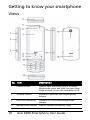
Getting to know your smartphone
Views
No. Item
Description
1
Power button
Press to turn the screen on/off or enter
sleep mode; press and hold for more than
three seconds to turn the smartphone off.
2
Volume control
Increase or decrease the ringer/system
volume.
3
Mini USB connector
Connect to a USB cable/headphones/
charger.
4
Battery cover release Press to release the battery cover.
10
Acer E200 Smartphone User Guide
No. Item
Description
5
Indicator LED
Indicates battery charge status, phone
connection status and any unread
messages.
6
Phone speaker
Suitable for normal phone use.
7
Touchscreen
400 x 240 pixel screen to display data,
phone content and enter information.
8
Navigation buttons/
selection button
4-way navigation control to move the
cursor. Press the center button to activate
the selected item.
9
Call button
Activate phone/dial/view recently dialed
numbers/answer a call.
10
End button
Press to end a call; press and hold to apply
End Key settings. See page 49.
11
Embedded numeric
keypad
Enter numbers or text using XT9 character
recognition.
12
Microphone
Internal microphone.
13
Stylus / reset button
Use to enter information or select items on
the touch screen.
* The reset button is located within the
stylus holder.
14
Camera button
Activate the camera or take a picture.
15
Camera
A 3.2-megapixel camera for taking highresolution images.
16
Handsfree speaker
Emits audio from your smartphone;
Suitable for handsfree use.
Getting to know your smartphone
11
LED indicators
Color
State
Description
Red
Steady
Battery is charging.
Slow flashing Battery charge is low.
Flashes twice Battery charge is critically low.
rapidly
Flashes
rapidly
Battery level is too low to start the phone.
Orange
Slow flashing New event (missed call, new message, etc.)
Green
Steady
Battery is fully charged; you should unplug
the charger.
Installing or removing the battery
Your smartphone uses a replaceable battery to provide power.
It is packed seperately from your smartphone and needs to be
inserted and charged before you can use the smartphone.
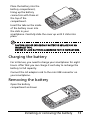
Installing the battery
Press the battery cover
release inwards. Lift
off the cover.
2
1
12
Acer E200 Smartphone User Guide
Place the battery into the
battery compartment,
lining up the battery
connectors with those at
the top of the
compartment.
Insert the tabs on the inside
of the battery cover into
the slots in your
smartphone. Carefully slide the cover up until it clicks into
place.
CAUTION: RISK OF EXPLOSION IF BATTERY IS REPLACED BY AN
INCORRECT TYPE.
DISPOSE OF USED BATTERIES ACCORDING TO THE INSTRUCTIONS.
Charging the battery
For initial use, you need to charge your smartphone for eight
hours. After that you can charge it each day to recharge the
battery to full capacity.
Connect the AC adapter cord to the mini USB connector on
your smartphone.
Removing the battery
Open the battery
compartment as shown
Installing or removing the battery
13
in “Installing the battery“ on page 12. Lift the battery out of
the compartment using the tabs on each side of the battery.
Replace the battery cover as described above.
Installing a SIM or microSD card
To take full advantage of your smartphone’s telephony
capabilities, you must install a SIM card. The SIM card holder is
located at the bottom of the battery bay.
Additionally, you may wish to increase your smartphone’s
storage by inserting a microSD card into the slot provided. This
is next to the SIM card slot.
1. Turn off the smartphone by pressing and holding the
power button.
2. Open the cover and
remove the battery as
described in
“Installing or
removing the
battery“ on page 12.
3. Insert the SIM or
microSD card as
shown.
4. Replace the battery and battery cover.
NOTE: Ensure that the microSD card is inserted all the way into the
card slot.
14
Acer E200 Smartphone User Guide
SIM card lock
Your smartphone may come with a SIM card lock, i.e., you will
only be able to use the SIM card provided by your network
operator.
To cancel the SIM lock, contact your network provider.
Turning on for the first time
To turn on your smartphone for the first time, press and hold
the power button until the system bootup screen appears.
Follow the setup screens to set up your phone.
Entering your PIN
When you install a SIM card for the first time, you may need to
enter a PIN using the onscreen number pad.
Important: Depending on your settings, you may be required to
enter your PIN each time you switch on the phone function.
If the PIN you enter is incorrect, a warning message appears.
Activating a new SIM card
If you are using your SIM card for the first time, it may require
activation. Contact your network operator for details on how
to do this.
Turning on for the first time
15
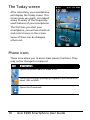
The Today screen
After rebooting, your smartphone
will display the Today screen. This
screen gives you quick, icon-based
access to many of the frequentlyused features of your smartphone.
The first time you start your
smartphone, you will see shortcuts
and control icons on the screen.
Some of them can be changed,
others not.
Phone icons
These icons allow you to access basic phone functions. They
may not be changed or removed.
Icon
Description
Opens the phone dialer to make a call.
Opens the Windows Messaging program so you can send an
email, SMS or MMS.
Opens the Phonebook.
16
Acer E200 Smartphone User Guide
Shortcut icons
You can display up to six shortcut icons on the Today screen.
Icon
Description
Opens Internet Explorer so you can surf the Internet.
Opens Windows Media Player so that you can enjoy audio
or video files.
Opens the Facebook application so that you can interact
with other people on this popular Social Networking site.
Control icons
These icons allow you to lock the screen, access the Windows
Home screen, and change or remove the shortcut icons. They
may not be removed.
Icon
Description
Locks the screen: Swipe the Lock icon to the left or right to
unlock the screen.
Opens the Windows Home screen.
Allows you to change or add icons (you can add three more
icons) to the Today screen.
Turning on for the first time
17
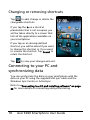
Changing or removing shortcuts
Tap
to add, change or delete the
changeable shortcuts.
If you tap the + on a shortcut
placeholder that is not occupied, you
will be taken directly to a screen that
lists all the applications available on
your smartphone.
If you tap on an already-defined
shortcut, you will be asked if you want
to change the shortcut or if you want
to remove the shortcut. Tap Cancel to
retain the shortcut.
Tap
to save your changes and exit.
Connecting to your PC and
synchronizing data
You can synchronize the data on your smartphone with the
data on your PC using the supplied USB sync cable and the
Windows Sync Center or ActiveSync.
Refer to “Connecting to a PC and installing software“ on page
53 for more details on connecting and synchronizing.
18
Acer E200 Smartphone User Guide
Chapter 2: Making Calls
This chapter shows you how to make phone calls, and the various options available to you during your call.
Before making a call
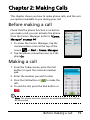
Check that the phone function is on before
you make a call; you can activate the phone
from the Comm. Manager (refer to “Comm.
Manager” on page 44).
1. To access the Comm. Manager, tap the
communication icons at the top of the
screen
or Start > Comm. Manager.
2. Tap the phone connection icon so it displays On.
Making a call
1. From the Today screen, press the Call
button to open the onscreen number
pad.
2. Enter the number you wish to dial.
3. Press the Call button or
to make the
call.
4. To end the call, press the End button or
.
Note: The phone function needs to be enabled before the call can
be connected.
Before making a call
19
The onscreen number pad
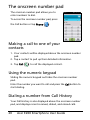
The onscreen number pad allows you to
enter numbers to dial.
To access the onscreen number pad, press
the Call button or tap Phone (
).
Making a call to one of your
contacts
1. Your contacts will be displayed above the onscreen number
pad.
2. Tap a contact to pull up their detailed information.
3. Tap Call (
), to call the displayed contact.
Using the numeric keypad
Sliding the numeric keypad out hides the onscreen number
pad.
Enter the number you want to call and press the Call button to
start dialing.
Dialing a number from Call History
Your Call History is also displayed above the onscreen number
pad, and displays recent received, dialed, and missed calls.
20
Acer E200 Smartphone User Guide
Tap a number to view the call details. To redial any number in
the call history, select the number and tap
.
Missed calls will be displayed in the telephone icon on the
Today screen as well as at the top of the screen using the
icon.
Dialing from other applications
You can dial numbers quickly and easily even when using
other applications.
1. Press Start > Phone.
2. Make your call.
3. When you have finished your call, tap X in the top right corner of the screen, to return to the application you were
using before you made the call.
Dialing an international number
When dialing international numbers, there is no need to enter
the international direct dialing prefix (‘00’ etc.) before the
country code. Simply tap and hold +0 on the onscreen number
pad until + appears onscreen.
Warning: International call rates can vary greatly depending on the
country you are calling and your network provider. We suggest you
check all call rates with your network provider, to avoid excessive
phone bills. If you are using your smartphone abroad, roaming
charges will apply. Consult your network provider for roaming
rates specific to the country you are visiting before you leave.
Using the numeric keypad
21
The voice call screen
Once you have dialed your number the voice call screen
appears, where several options are available.
Item
Description
Record the call.
Mute the call.
Put the current call on hold.
Add a note.
Enter the Phonebook.
Turn the speaker phone on.
End the call.
Display the keypad.
Note: Certain options are only available during a call. These menu
items are grayed out when not in a call.
Onscreen call options
Answering a call
Press
to answer a call.
Rejecting a call
Press the End button or
22
to reject a call.
Acer E200 Smartphone User Guide
Ending a call
To end a call, press
.
Recording a call
To record a call, press
.
Putting a call on hold
To put a call on hold, tap Hold (
Tap again to resume the call.
) on the voice call screen.
Swapping between calls
When you receive a second call while already on a call, the
number of the second caller will appear.
1. Press Swap (
) to answer the incoming call and the first
call will be put on hold.
2. Tap Swap (
calls.
) on the voice call screen to switch between
Conference calls
If you have one or more calls on hold and another online, you
can combine all calls to create a conference call.
1. Tap Merge Call (
2. Tap End (
). All calls are combined.
) and all participants will be disconnected.
Using the speakerphone
The speakerphone function allows you to make calls without
having to hold your smartphone. This handsfree function is
especially useful for multitasking.
Onscreen call options
23
To activate the speakerphone, tap Speaker On (
voice call screen. Tap Speaker Off (
erphone.
) on the
) to disable the speak-
Adding notes
You can write or type notes during a call to record important
information and view it at a later date.
1. Tap Note ( ), on the voice call screen.
2. Use the onscreen keyboard to enter letters and characters
or the stylus to write handwritten notes.
3. Tap OK when you have finished to save the note.
To view the notes at a later date, tap Start > Notes. Tap the
note you want to open and view.
Muting a call
To mute a call, tap Mute (
) on the voice call screen to switch
off the microphone. Tap Unmute (
phone back on.
) to switch the micro-
Saving a dialed number to contacts
You can save a number you have dialed to your contacts for
future use.
1. Select the number from the Call History list, and tap Save to
contacts.
2. Select to save it in the SIM or Phone.
3. Enter the contact’s information and tap Save.
24
Acer E200 Smartphone User Guide
Redialing a missed call
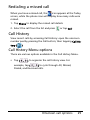
When you have a missed call, the
icon appears at the Today
screen, while the phone icon will display how many calls were
missed.
1. Tap Phone to display the missed call details.
2. Select the call from the list and press
or tap Call.
Call History
View recent calls by accessing Call History: open the onscreen
number pad by pressing the Call button; then tapping Call History (
).
Call History Menu options
There are various options available in the Call History Menu.
• Tap (
,
) to organize the call history view. For
example, tap ( , ) to cycle through All, Missed,
Dialed, and Received calls.
Onscreen call options
25
26
Acer E200 Smartphone User Guide
Chapter 3: Input
Devices
This section will take you through the various input methods
available to you on your smartphone.
The stylus
The stylus is used to select items and enter information. Carefully remove the stylus from its holder to use.
Tap: Touch the screen once with the stylus to open items and
select options.
Drag: Hold the stylus on the screen and drag across the screen
to select text and images. Drag on a scroll bar to scroll up and
down the screen.
Tap and hold: Tap and hold the stylus on an item to see a list
of actions available for that item. On the pop-up menu that
appears, tap the action you want to perform.
The stylus is also used for handwritten input. Refer to “The
onscreen keyboard” on page 28 for more details.
The navigation buttons
The navigation buttons feature a 4-way
directional pad and a selection button.
Either press firmly on the left, right, top or
bottom of the navigation buttons to move
the selection in that direction.
Use the central button to select the highlighted item.
The stylus
27
The onscreen keyboard
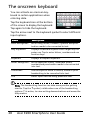
You can activate an onscreen keyboard in certain applications when
entering data.
Tap the keyboard icon at the bottom
of the screen to display the keyboard.
Tap again to hide the keyboard.
Tap the arrow next to the keyboard symbol to select different
input options.
Mode
Description
Block Recognizer*
Write using letters, numbers, symbols and punctuation marks to be converted to text.
Easy Keyboard
Displays a standard keyboard with larger keys for
easier use. Tap to enter letters, numbers and use
function keys.
Keyboard
Displays a compact keyboard.
Letter Recognizer* Write uppercase letters, lowercase letters,
numbers and punctuation marks to be converted
into text.
Transcriber*
Use the stylus to write in cursive, mixed or print
handwriting to be converted into text.
XT9
Smart input method using predictive text.
Note: The handwriting function can take some practice getting
used to. Tap the ? symbol, visible when one of the handwriting
options (*) is active, to view writing demonstrations and access the
Help menus.
28
Acer E200 Smartphone User Guide
Enabling word completion
Your smartphone makes writing emails, messages and documents more efficient with the help of the word completion
feature. This feature suggests words as you type.
1. Tap Start > Settings > Personal > Input > Word Completion
tab.
2. Select the options you want to activate.
3. Tap OK to confirm and save.
XT9 predictive text
You can key in any letter with a single keypress using XT9 predictive text input through the numeric keypad.
1. Write the desired word by pressing the 2 to 9 keys. Press
each key only once for one letter. The word changes after
every key press.
2. When you have finished the word, check that it is correct.
3. Confirm the word by pressing the selection button or by
pressing to insert a space.
NOTE:
XT9 and XT9 logo are registered trademarks of Nuance
Communications, Inc. or its subsidiaries in the United States of
America and/or other countries.
Other input options
You can also configure voice recording options, zoom levels
and grammar rules on the Input Settings screen.
1. Tap Start > Settings > Personal > Input > Options tab.
2. Select and configure the settings as appropriate.
3. Tap OK to confirm and save.
The onscreen keyboard
29
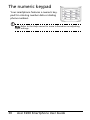
The numeric keypad
Your smartphone features a numeric keypad for entering number data or dialing
phone numbers.
Note: Refer to the Help menus for more information on adjusting
input settings.
30
Acer E200 Smartphone User Guide
Chapter 4: Messaging
This chapter shows you how to set up and use the SMS, MMS
and email functions of your smartphone.
The messaging screen
All SMS, MMS, and email messages are accessed via the messaging screen.
To access the messaging screen, tap
). Then tap the drop-down
Text (
menu in the top left corner of the messaging screen to view the folder list.
All email accounts, SMS and MMS folders are displayed here. Tap on the plus
sign next to each folder to view the sub
folder list. Each folder features the following subfolders:
• Deleted Items: Displays all messages
you have selected to delete.
Note: To completely erase messages, you will need to delete them
from the Deleted Items folders as well. Tap Menu > Tools > Empty
Deleted Items to accomplish this.
• Drafts: Displays all draft messages.
• Inbox: Displays all received messages.
• Outbox: Displays messages waiting to be sent.
• Sent Items: Displays all sent messages.
Tap a subfolder to open it. Tap Inbox to return to the main
messaging screen. Tap Menu for a list of options appropriate
to the selected folder.
The messaging screen
31
Managing your folders
You can select synchronization, download and other settings
for certain folders. To manage your folders, tap Menu, or tap
and hold on the folder name to open a menu of action items.
Text (SMS) messages
You can use your smartphone to send and receive text messages to other mobile phones. Each text message can contain
up to 160 characters.
Creating and sending text messages
1. Tap Text (
). Then tap the drop-down menu in the top
left corner of the messaging screen.
2. Tap the Messages folder and the Inbox appears.
3. Tap Menu > New >. Choose Text Message. The message
composition window appears.
4. Select a recipient; enter your message then tap Send.
Replying to text messages
When a new text message arrives a message icon appears at
the top of the screen and a notification message is displayed.
1. Tap Text (
) to view your inbox.
2. Tap a message to open it.
3. Tap Reply to reply to the message and the message composition window appears.
4. Enter your text message and tap Send.
Sorting text messages
You can sort your text messages by message type, sender,
received messages and message subject.
32
Acer E200 Smartphone User Guide
Tap the Sort by drop-down menu in the top-right of the messaging screen, and select an option from the list.
MMS messages
MMS messages are similar to text messages but also allow you
to attach multimedia files such as pictures, audio or video clips.
Each MMS message can be up to 300 kB in size.
Setting up MMS messaging
Before you can send MMS messages, you have to set up a connection and profile. Ask your network provider for the information required to complete the setup procedure.
1. Tap Start > Settings > Connections > Connections.
2. You can choose to Add a new modem connection either in
the Internet Settings or WAP Settings section.
3. The Make New Connection screen appears.
4. Enter a name for the connection.
5. Select Cellular Line (GPRS) from the Select a modem list and
tap Next.
6. Enter the access point name provided by your network
provider.
7. Enter your user name, password and domain.
8. Tap Finish to save and complete setup.
Setting up MMS profiles
You can select and configure several MMS messaging profiles
for different networks and environments.
Tap Text (
) from the Today screen, or
1. Tap Start > Text > Messages, then tap the drop-down menu
in the top left corner of the messaging screen.
2. Tap the Messages folder and the Inbox appears.
MMS messages
33
3. Tap Menu > MMS Settings > MMS Profiles tab.
4. Tap a profile from the list. Tap Edit to view the selected
profile settings.
5. Tap each field to adjust its setting. These fields should be
automatically configured by your network provider. If so,
we recommend you leave them as they are.
6. Tap Done once you have finished editing the profile.
7. Tap Select to select the profile from the list and tap OK.
Note: For further information on options available to you when
editing or creating MMS profiles, refer to the Help menus.
Creating MMS messages
1. Tap Text (
). Then tap the drop-down menu in the top
left corner of the messaging screen.
2. Tap the Messages folder and the Inbox appears.
3. Tap Menu > New > Multimedia Message and the message
composition window appears.
4. Enter the recipient (along with other recipients in the Cc
and Bcc fields if necessary) and subject of the MMS.
5. To attach a picture or video clip, tap Insert Picture/Video
(
) and select the file you want to attach.
6. To attach an audio file, tap Insert Audio and select the file
you want to attach. The audio file will be displayed in the
message.
7. To insert text, tap Insert Text and enter your message.
All attachments and text will now be displayed in the message window.
8. Tap Send.
34
Acer E200 Smartphone User Guide
Replying to MMS messages
When a new MMS message arrives, a message icon appears at
the top of the screen and a notification message is displayed.
1. Tap Text (
). Then tap the drop-down menu in the top
left corner of the messaging screen.
2. Tap the Messages folder and the Inbox appears.
3. Tap a message to open it.
4. Tap Menu > Reply to reply to the message. The message
window will appear.
5. Follow the steps described in “Creating MMS messages” on
page 34 to compose your reply.
6. Tap Send.
Sorting MMS messages
You can sort your MMS messages by message type, sender,
received messages and message subject.
Tap the Sort by drop-down menu in the top-right of the messaging screen, and select an option from the list.
Note: For further information on options available to you when
creating, replying to and sorting SMS and MMS messages, refer to
the Help menus.
MMS messages
35
E-mail
Your smartphone uses Outlook
Mobile to manage email accounts.
Tap Start > E-mail to access the
account setup. Tap Setup E-mail to set
up your email account.
Enter your email address and password to set up the account. Select if
you want to save your password or
not.
When you’ve finished entering the
information, tap Next. Your smartphone has pre-set definitions for a
variety of popular ISPs and will recommend settings if your email address is
recognized. Otherwise your smartphone will try to connect to the Internet to find the settings.
36
Acer E200 Smartphone User Guide
Chapter 5: Using the
Camera
Your smartphone features a 3.2-megapixel digital camera
mounted on the rear. This section will take you through all the
steps in taking photos and videos with your smartphone.
To activate the camera, press the camera button or go to Start
> Multimedia > Camera.
37
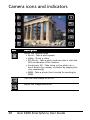
Camera icons and indicators
Icon
Description
Adjust the camera mode.
• Photo - Take a photograph.
• Video - Shoot a video.
• POI Photo - Take a photo and associate it with the
GPS coordinates of the location.
• Continuous 3/5 - Take three or five photos in a
burst (select the number of photos by tapping the
icon repeatedly).
• MMS - Take a photo that is suited for sending by
MMS.
Turn the time stamp on or off.
Adjust the image resolution.
38
Acer E200 Smartphone User Guide
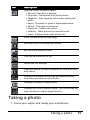
Icon
Description
Apply an effect to photos taken:
• Normal - No effect is applied.
• Greyscale - Takes black and white photos.
• Negative - Uses negative colors when taking the
photo.
• Sepia - The photo is given a Sepia appearance.
• Mirror - The object is mirrored.
• Posterize - Flattens the colors.
• Solarize - Takes pictures in reversed tones.
• Aqua - Takes pictures with a blue tint.
Enter the advanced settings page.
Exit and return to the previous screen.
Set the white-balance mode.
Turn the self-timer on or off.
Adjust the ISO settings.
Open the album to view thumbnails of stored pictures
and videos.
Displays the storage being used and approximately
how many photos you can still take.
Displays the battery charge status.
Displays the current magnification. Use the volume up/
down buttons to adjust magnification.
Taking a photo
1. Frame your subject and steady your smartphone.
Taking a photo
39
2. Adjust any settings you require, such as brightness and
scene mode. To zoom in or out, press the (+/-) volume keys.
3. Press the camera button down fully to take the photo.
Shooting a video
1. Frame your subject and steady your smartphone.
2. Press the camera button down fully to begin recording.
3. Press the camera button down fully to stop recording.
Supported formats
The following file formats are supported:
Type
Formats
Image
JPEG
Video
3GP
Saving photos and videos to a microSD
card
Tap Start > File Explorer > My Documents > My Pictures (or My
Videos). Tap and hold on the file you want to save to your
microSD card, select Copy or Cut from the pop-up menu.
Navigate to your microSD card in File Explorer, tap and hold in
the folder you want to save the image/video to, and select
Paste from the pop-up menu.
40
Acer E200 Smartphone User Guide
Photo and video options
After you have taken your photo or video, it is automatically
saved.
Note: The default locations for saving photos and videos are My
Documents/My Pictures and My Documents/My Videos respectively.
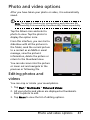
Tap the Album icon and select a
photo to view. Tap the photo to
display the option icons.
From this interface, you can start a
slideshow with all the pictures in
the folder, send the current picture
to a contact as an MMS or email
message, view the picture’s
information, delete the picture or
return to the thumbnail view.
You can also zoom into the picture
or zoom out and navigate to the
previous or following file.
Editing photos and
videos
You can crop or rotate your saved photos.
1. Tap Start > Multimedia > Pictures & Videos.
2. All your photos and videos are displayed as thumbnails.
Select a photo to edit.
3. Tap Menu to view the list of editing options.
Photo and video options
41
42
Acer E200 Smartphone User Guide
Chapter 6: Advanced
Settings
Putting your smartphone in flight
mode
You can enter flight mode to turn off telephone, Bluetooth
and data connection and use your smartphone as a handheld
device during a flight. Check with your airline to make sure
this is permitted onboard.
Switch your smartphone off during takeoff and landing as it
may interfere with aircraft electronic systems.
Entering flight mode
1. Access the Comm. Manager (refer to “Comm. Manager” on
page 44).
Putting your smartphone in flight mode
43
2. Tap Flight Mode ON to turn off all phone, Bluetooth and
data connection functions.
Comm. Manager
Your smartphone features phone, Bluetooth and data connection functions. This section will explain how to activate and set
basic phone, Bluetooth and data connection settings through
the Comm. Manager screen.
Tip: Tap and hold the name of any communication type to open its
associated Settings page.
Using the Comm. Manager
To access the Comm. Manager, tap:
1. The communication icons at the top of the screen, or
2. Start > Comm. Manager, or
3. Start > Settings > Connections > Comm. Manager.
44
Acer E200 Smartphone User Guide
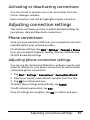
Activating or deactivating connections
You can choose to activate one or all connections from the
Comm. Manager window.
Each connection icon will be highlighted when turned on.
Adjusting connection settings
This section will show you how to adjust detailed settings for
your phone, data and Bluetooth connections.
Phone connections
Once you have inserted a SIM card, your smartphone will automatically detect your network provider.
For all phone settings, tap Start > Settings > Personal > Phone.
Here you can adjust ringtone, security, services, network and
CB (Cell Broadcast) settings.
Adjusting phone connection settings
You can use the Connection Wizard to configure country and
network settings for your phone connection, as well as create
customized phone connections.
1. Tap Start > Settings > Connections > Connection Wizard.
2. Select your country and network operator from the lists.
3. Tap OK to confirm and save.
To detect these settings automatically, tap Search.
To edit network parameters, tap Edit.
Once all settings are complete, tap OK to confirm and save.
Adjusting connection settings
45
Creating and editing new phone
connections
If your country is not listed, or you want to create a customized
GPRS connection, refer to ‘Creating a new connection’ in the
Phone Data Manager Help menus for detailed information on
how to do this.
Selecting a network
You can set the smartphone to detect your network automatically or set it manually.
Detecting a network automatically
1. Tap Start > Settings > Personal > Phone > Network tab.
2. Select Automatic from the Network Selection list.
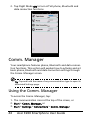
3. Tap Find Network. Your network will be automatically
detected.
Selecting a network manually
1. Tap Start > Settings > Personal > Phone > Network tab.
2. Select Manual from the Network Selection list. A list of
available networks will appear.
3. Select a network from the list and tap OK.
When your current network is unavailable, tap Select to select
another network to use.
Note: Contact your service provider should you have any problems
obtaining voice mail and the text message service center numbers.
Adjusting Bluetooth settings
You can use Bluetooth to exchange information between your
smartphone and other mobile devices.
46
Acer E200 Smartphone User Guide
Bluetooth connections
For all Bluetooth settings, tap Start > Settings > Bluetooth.
Here you can adjust Bluetooth profiles, status, accessibility,
and services settings. You can also view version information.
Creating new Bluetooth connections
The simplest way to set up and configure a new Bluetooth
connection is through the Bluetooth Manager.
1. Tap Start > Settings > Bluetooth. You will be asked to turn
on Bluetooth, then tap Settings > Add a device.
2. Alternatively, tap Start > Settings > Bluetooth > My Devices
> Add.
3. Your smartphone will search for devices in range.
4. Select the device you want to connect to.
5. Tap Select and follow all onscreen instructions to set up the
connection.
Adjusting Bluetooth settings
1. Tap Start > Settings > Bluetooth > Settings.
2. Select whether to enable or disable the Bluetooth function
and whether the device should be discoverable or not.
3. Tap Done to confirm and save.
4. You can also define a Name for your smartphone.
5. Tap Advanced... to change additional Connectivity, Serial
Ports, File Transfer, Audio, Object Exchange, Synchronization and SIM Access settings.
Setting up COM ports
1. Tap Start > Settings > Bluetooth > Settings tab.
2. Tap Serial Ports.
3. Follow the onscreen instructions to register the connected
Bluetooth devices as an effective COM port.
Adjusting connection settings
47
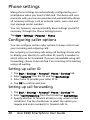
Phone settings
Many phone settings are automatically configured by your
smartphone when you insert a SIM card. The device will communicate with your service provider and automatically obtain
all necessary settings, such as network name, voice mail and
text message center numbers.
You can, however, view and modify these settings yourself if
necessary, through the Phone Settings screen.
Tap Start > Settings > Personal > Phone.
Configuring caller options
You can configure certain caller options to keep control over
your incoming and outgoing calls.
Bar outgoing or incoming calls using call barring; choose who
to display your identity to with caller ID; specify a number to
which calls can be forwarded if you are unavailable using call
forwarding; choose to be notified if an incoming call is waiting
using call waiting.
Setting up caller ID
1.
2.
3.
4.
Tap Start > Settings > Personal > Phone > Services tab.
Select Caller ID from the list and tap Get Settings.
Select who to provide your caller ID to.
Tap OK to confirm and save.
Setting up call forwarding
1. Tap Start > Settings > Personal > Phone > Services tab.
2. Select Call Forwarding from the list and tap Get Settings.
3. Specify whether to forward all calls or only under certain
conditions. Tap the checkboxes to select the option you
require and enter number(s) to forward calls to.
48
Acer E200 Smartphone User Guide
4. Tap OK to confirm and save.
Setting up call waiting
1.
2.
3.
4.
Tap Start > Settings > Personal > Phone > Services tab.
Select Call Waiting from the list and tap Get Settings.
Select whether to be notified or not when a call is waiting.
Tap OK to confirm and save.
Note: Refer to the Help menus for more detailed information on
adjusting phone settings.
Choosing a ringtone
A profile contains settings for alert notification, device volume, ring type and tone.
1. Tap Start > Preferences > Sounds.
2. Select your preferred ringtone.
3. Tap OK to confirm and save.
Configuring End button functions
You can shut down your smartphone, end current program,
launch Task Manager, launch Comm. Manager or lock device
and suspend when you press the End button.
1. Tap Start > Preferences > End Key.
2. Set the function you want to perform.
3. Tap OK to confirm and save.
Phone settings
49
Managing your phonebook
Your smartphone features an address book that allows you to
save contacts to either the internal memory or onto your SIM
card.
Adding a contact
1. Enter the telephone number on the phone screen.
2. The phone will recognize a new number. Select Save as a
new contact.
3. Select whether this is a SIM Contact or Phone Contact.
4. Enter the required information.
5. Tap Save.
You can choose to save contacts directly to your SIM card. This
is useful if you use your SIM card with multiple phones and you
always need your address book at hand.
Note: You can only enter a contact name, telephone number and email when creating a new SIM contact. If more information is
required, create a regular phone contact.
Editing a contact
1. Tap Phonebook from the Today screen or Start > Phonebook.
2. Select and open the contact you want to edit.
3. Tap Menu > Edit this contact.
4. Edit the contact information and tap Save.
Copying contacts
You can copy contacts stored in internal memory to your SIM
card, and vice versa.
50
Acer E200 Smartphone User Guide
Copying a contact from internal memory
to the SIM card
Note: Copying a contact from internal memory to your SIM will only
copy the contact’s name and phone number. Names longer than 14
characters will be truncated.
1. Tap Phonebook from the Today screen or Start > Phonebook.
2. Select the contact you want to copy by using the up and
down navigation buttons.
3. Tap Menu > Copy to SIM.
Copying a contact from the SIM card to
internal memory
1. Tap Phonebook from the Today screen or Start > Phonebook.
2. Select the contact you want to copy by using the up and
down navigation buttons.
3. Tap Menu > Copy to Phone.
Deleting contacts
To free up space on either the internal memory or on your SIM
card, you can delete contacts from your address book.
1. Tap Phonebook from the Today screen or Start > Phonebook.
2. Select the contact you want to delete by using the up and
down navigation buttons.
3. Tap Menu > Delete.
4. Tap Yes to permanently delete the contact.
Managing your phonebook
51
Assigning a ringtone and picture to
specific contacts
You can assign a specific ringtone and picture to a particular
Phone contact so they are easily identifiable when they call.
1. Tap Phonebook from the Today screen or Start > Phonebook.
2. Select the contact you want to edit by using the up and
down navigation buttons.
3. Tap Menu > Edit this contact.
4. Tap New picture to open My Pictures. Tap the desired picture to assign a picture to the contact.
5. Tap More to view more options.
6. Tap Ringtone and select a ringtone from the list.
SIM Manager
SIM Manager allows you to manage your SIM phonebook and
to copy the phonebook entries to Contacts. To start SIM Manager, tap Start > Utilities > SIM Manager.
The standard display mode is to show your SIM contacts and
Contacts entries at the same time. You may change this by tapping SIM, Contact or Standard at the bottom of the screen.
You can sort your contacts by tapping Name or Pos (only for
SIM contacts) at the top of the list of contacts.
In the SIM phonebook, tap and hold on a contact to Dial that
contact’s number, Send SMS, Edit, Delete or Copy to Contact.
In the contact list, tap and hold on a contact to Dial that contact’s number or Copy to SIM.
Tap Menu at the bottom of the screen to reveal:
New SIM Contact: Add a new phonebook entry to the SIM
card.
52
Acer E200 Smartphone User Guide
Refresh: Refresh the contact lists.
SIM Information: View your SIM card information.
My Phone Numbers: Displays the information of the inserted
SIM card
About: View the version and copyright information of SIM
Manager.
Copying contact information
You can copy contact information to/from the Contacts list
from/to the SIM card. You may copy individual contacts, multiple contacts or all contacts.
• To copy all contacts, tap the box alongside Name: Tap
and hold any contact and select Copy to Contact/SIM.
• To copy multiple contacts, tap the box alongside each
contact: Tap and hold any contact and select Copy to
Contact/SIM.
• To copy a single contact, tap and hold any contact, and
select Copy to Contact/SIM.
Connecting to a PC and installing
software
You can use Microsoft ActiveSync (on Windows XP) or the Windows Mobile Device Center (on Windows Vista or Windows 7)
to synchronize the information on your computer with the
information on your smartphone, comparing and updating
data on both locations. This serves as backup data in case
something happens to your smartphone.
Connecting to a PC and installing software
53
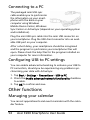
Connecting to a PC
The packaged mini USB sync
cable enables you to synchronize
the information on your smartphone with the data on your
computer using Windows
Mobile Device Center, Windows
Sync Center or ActiveSync (depends on your operating system
and installation).
Plug the mini USB sync cable into the mini USB connector on
your smartphone. Plug the USB client connector into an available USB port on your computer.
After a short delay, your smartphone should be recognised
and the program to synchronize your smartphone files will
open. Please check the help files for the program installed on
your computer for more information.
Configuring USB to PC settings
You can enable advanced networking to enhance your USB to
PC connection, should you be experiencing any problems synchronizing your data with ActiveSync.
1. Tap Start > Settings > Connections > USB to PC.
2. Check the Enable advanced network functionality checkbox
to enable.
3. Tap OK to confirm and save.
Other functions
Managing your calendar
You can set appointments and event reminders with the calendar feature.
54
Acer E200 Smartphone User Guide
Setting a new appointment
1. Tap Start > Agenda.
2. Tap Add an agenda.
3. Enter appointment information and reminder frequency.
4. Tap OK to confirm and save.
To edit an appointment, tap the date and tap the entry to
open the edit page.
Creating tasks
Tasks can be set to remind you of specific things you must do
and the completion deadlines.
Creating a new task
1. Tap Start > Tasks.
2. Tap Menu > New Task.
3. Enter all task information, start and due dates and how
often to be reminded.
4. Tap OK to confirm and save.
To edit a task, tap the entry and then tap Menu > Edit to open
the task entry screen.
Note: For more information on other options available in the calendar and task screens, refer to the Help menus.
Browsing the Internet
In order to browse the Internet with your smartphone, you
must be connected to a 3G network or to a computer with an
Internet connection via ActiveSync.
Tap Start > Internet Explorer to open the browser.
To adjust your browser settings, tap
>
> Tools.
Other functions
55
Starting Windows Live
1. Tap Start > Windows Live.
2. Sign in with your email address and password and your contacts list appears.
Multimedia playback
Your smartphone comes supplied with a variety of programs
that you can use to enjoy multimedia content.
Media Player
Tap the Media player icon on the Today screen, or Start > Multimedia > Windows Media page. The Media Player will search
for all supported media files on your smartphone. Tap the Play
icon to start playback immediately.
Tap Sort By to sort your media files according to Album, Artist,
Genre, Folder or Favorites.
Using Windows Media Player
You can use Windows Media Player to play videos you have
taken with your smartphone as well as other media files, such
as MP3 music files.
The following formats are supported:
Type
Formats
Audio
WMA, MP3, WAV, AAC
Video
WMV, 3GP
Playing video or audio files
1. Tap Start > File Explorer.
2. Locate the file to playback, and tap once to play it in Windows Media Player.
56
Acer E200 Smartphone User Guide
Streaming Media
Note: This application may not be available in your region or for
your language.
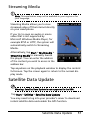
Steaming Media allows you to view
streamed video off the Internet directly
on your smartphone.
If you try to open an audio or movie
video that is not supported by
Microsoft Windows Media Player, for
example RTSP or HTTP, the system will
automatically switch to Streaming
Media.
Alternatively, tap Start > Multimedia >
Streaming Media to manually launch
the player. You can enter the address
of the content you wish to access in the
address bar.
Tap anywhere on the playback window to display the content
full-screen. Tap the screen again to return to the normal display mode.
Satellite Data Update
Warning: Satellite Data Update is not supported in the USA.
Tap Start > Utilities > Satellite Data Update.
You may need to log into your provider’s server to download
instant satellite data and enable the GPS function.
Satellite Data Update
57
Note: All the following connections allow your smartphone to
download the latest GPS data. If there is more than one connection
available, the system will automatically select the best connection,
in the following order: Sync connection to PC; GPRS (not supported
when roaming).
The system will update GPS data automatically based on a
schedule.
Check the automatic update checkbox.
Set the date and time.
You will see the expiration date of the GPS data. On the due
date, a warning message will appear to remind you.
Alternatively, tap Download to update the GPS data manually.
Important: You may be charged additional fees when connecting
over GPRS.
Personalizing your smartphone
You can enter your personal information to easily identify your smartphone.
This is especially useful if it should ever
be lost or stolen. To enter owner information, tap Start > Settings > Personal
> Owner Information.
Enter your name along with any other
information you want to store.
Tap the Notes tab to add any
additional notes.
Tap the Options tab to configure how
this information is displayed.
58
Acer E200 Smartphone User Guide
Tap OK to confirm and save.
Naming your smartphone
Your smartphone uses a name to identify itself when connected to other
computers. To specify a name, tap Start
> Settings > System > About > Device ID
tab.
Enter a name for your device. Add a
description if necessary.
Tap OK to confirm and save.
Adjusting the volume
To adjust the volume, tap
volume control appears.
at the top of the screen. The
• Use the right slider to adjust the ring volume.
• Use the left slider to adjust system volume.
• Use the icons at the top of the screen to turn all sounds
on, set to vibrate only or mute all sounds.
• If you adjust the volume during a call, the speaker volume will be adjusted.
Configuring Today screen programs
You can select the programs you most frequently use and put
them in the Today screen as shortcuts.
1. Tap (
) to bring up the edit screen.
Personalizing your smartphone
59
2. Select the programs that you want to appear in the Today
screen from the list.
3. Tap Save (
) to confirm and save.
Configuring sounds and notifications
You can specify sounds to play for certain events or when certain actions are performed.
1. Tap Start > Settings > Sounds & Notifications > Sounds tab.
2. Select to enable sounds for events or programs. You can
also specify to enable sounds when tapping the screen or
pressing buttons.
3. Tap the Notifications tab.
4. Select an event from the list and the notification options
for that event are displayed.
5. Adjust the settings.
6. Repeat steps 4 and 5 to adjust notification options for other
events.
7. Tap OK to confirm and save.
Configuring backlight settings
You can specify the appearance and conditions under which
the screen backlight will be on or off.
1. Tap Start > Settings > System > Backlight > Battery Power
tab.
2. Select the timing for the backlight to turn on and off when
your smartphone is running on battery power.
3. Tap the External Power tab. Select the timing of the backlight to turn on or off when your smartphone is running on
external power.
4. Tap the Backlight Level tab. Adjust the backlight brightness
level and automatic level selection options.
5. Tap OK to confirm and save.
60
Acer E200 Smartphone User Guide
Tip: Backlight settings greatly affect battery life. Configure these
settings carefully to ensure that you get the most out of your
battery.
Managing system certificates
System certificates are used to positively identify your smartphone to other systems.
Tap Start > Settings > System > Certificates to view all
certificates.
Setting the date and time
To set the date and time, tap Start >
Settings > Clock & Alarms > Time tab.
Select your time zone from the dropdown menu. Set the time by tapping
the up and down arrows. Select the
date from the drop-down calendar.
Tap OK when you have finished.
Setting alarms
1. Tap Start > Settings > Clock &
Alarms > Alarms tab.
2. Tap the checkbox to activate an
alarm.
3. Tap Description and enter a name for the alarm.
4. Select the day and time for the alarm.
5. Tap OK to confirm and save.
Adjusting microphone volume
You can adjust the microphone volume level and activate the
Automatic Gain Control (AGC) feature.
Personalizing your smartphone
61
1. Tap Start > Settings > System > Microphone.
2. Move the slider to adjust the microphone volume.
3. Tap OK to confirm and save.
Configuring regional settings
You can adjust regional settings for number, currency, date
and time formats to match those used in your country.
1. Tap Start > Settings > System > Regional Settings.
2. Tap the Region, Number, Currency, Date and Time tabs to
view information for your region. Adjust any if necessary.
3. Tap OK to confirm and save.
Power saving options
1. Tap Start > Settings > System > Power > Advanced tab.
2. Select the interval after which your smartphone will turn
off if not in use. You can specify two intervals: one for
when on battery power, and one for when on external
power.
Viewing power status
Tap Start > Settings > System > Power > Battery tab to view
battery power status.
Removing programs
You can remove programs you have installed on your smartphone to free up extra storage memory.
Note: You can only remove programs you have installed, you cannot remove programs installed during manufacture.
1. Tap Start > Settings > System > Remove Programs.
2. Tap the program you want to remove from the list.
3. Tap Remove and the program will be uninstalled.
62
Acer E200 Smartphone User Guide
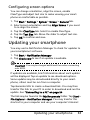
Configuring screen options
You can change orientation, align the screen, enable
ClearType and adjust text size to make viewing your smartphone as comfortable as possible.
1. Tap Start > Settings > System > Screen > General tab.
2. Select screen orientation and tap Align Screen if you need
to re-align the screen.
3. Tap the ClearType tab. Select to enable ClearType.
4. Tap the Text Size tab. Move the slider to adjust text size.
5. Tap OK to confirm and save.
Updating your smartphone
You may use he Notification Manager to check for updates to
your smartphone’s software.
1. Tap Start > Notification Manager.
2. Tap Check now to see if an update is available.
Important: You may be charged additional fees when connecting
over GPRS.
If updates are available, brief information about each update
will be displayed. Tap an update to see download options.
Some updates may be donwloaded directly to your smartphone, others must be run from a computer.
Tap Generate URL to create a download link. You may then
transfer this link to your PC in order to download and run the
update. See “Connecting to a PC” on page 54.
The link may be found in the My Documents folder. Tap Start >
File Explorer > Notification Manager. You may transfer this
shortcut to your computer and use your computer’s Internet
Updating your smartphone
63
connection to download the update. Install this update correctly by following the instructions provided with the files.
Setting a schedule
It is also possible to set schedule to check for updates.
1. Tap Start > Notification Manager.
2. Tap Menu, then Settings.
3. Enable the scheduled notification update and set either a
daily or weekly check.
4. Tap OK to confirm and save.
Note: Before performing a reset, ensure that your smartphone is
not locked. Press any key or tap the screen to see if the phone
responds.
Resetting your smartphone
You may have to perform a reset if your smartphone fails to
respond when buttons are pressed or the screen is tapped.
Note: Before performing a reset, ensure that your smartphone is
not locked. Press any key or tap the screen to see if the phone
responds.
Reset
A reser will clear the RAM of your smartphone. It is similar to
turning a computer off and then turning it back on.
Important: To reduce risking damage to your smartphone, only use
the supplied stylus to reset the device.
64
Acer E200 Smartphone User Guide
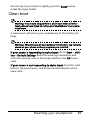
Use the tip of your stylus to lightly press the Reset button
inside the stylus holder.
Clean boot
Warning! You should only perform a clean boot when all other
reset options have failed to restore your smartphone to an operational state.
A clean boot will restore your smartphone to the factory settings.
Warning! This will erase all your personal information, any contacts
stored on your phone and any programs you installed.
If your screen is responding to stylus input: Go to Start > Utilities > Default Settings. Read the warning information and
enter the security code in the empty textbox. Tap OK to proceed.
If your screen is not responding to stylus input: Press the reset
button, the press Power, Call button and End button at the
same time.
Resetting your smartphone
65
66
Acer E200 Smartphone User Guide
Chapter 7: Accessories
and Tips
This chapter shows you how to use accessories with your smartphone, as well as provide useful tips for when you are using
your smartphone.
Using the headset
Your smartphone comes packaged with a headset with built-in
microphone for handsfree use when making calls.
To use the headset, plug it into the mini USB port on the left
side of the unit.
When the headset is plugged in, all audio is routed to the
headset, and the speakers are turned off.
• To answer an incoming call, press the button on the
microphone.
• Adjust the volume using the volume up/down button
on the smartphone.
• End the call by pressing the button again.
Using a Bluetooth headset
Your smartphone’s Bluetooth functions make it fully compatible with all Bluetooth headsets. This allows you to use the unit
handsfree when making calls, without the inconvenience of
wires.
To set up your Bluetooth headset
1. Turn on Bluetooth using the Comm. Manager (please see
“Comm. Manager“ on page 44).
Using the headset
67
2. Connect to the headset as described in “Creating new Bluetooth connections“ on page 47.
3. Tap the icon for your Bluetooth headset.
4. Enter your headset passkey and tap OK or press the OK
button.
5. Tap Finish to complete setup.
When you want to answer an incoming call, press the
“answer” button on your Bluetooth headset. Press
end the call.
to
Tip: As well as being essential for handsfree operation when driving, you can also use your Bluetooth headset when at home or in
the office, to avoid carrying your smartphone around with you at
all times. In ideal conditions, Bluetooth range is up to 10 metres, or
30 feet.
Using your smartphone as a
modem
When connected to your PC, your smartphone can function as
a modem via GPRS, HSDPA or UMTS.
You can also use a USB connection or the Bluetooth function
of your smartphone to connect to your PC or laptop and act as
a modem.
To set up an ISP connection on your PC or laptop.
1.
2.
3.
4.
5.
6.
68
Click Start > Settings > Control Panel.
Click Network Connections > Create a new connection.
Click Next to begin the New Connection Wizard.
Select Connect to the Internet and click Next.
Select Set up my connection manually and click Next.
Select Connect using a dial-up modem and click Next.
Acer E200 Smartphone User Guide
7. Enter the name of your ISP (Internet Service Provider) and
click Next.
8. Enter your ISP’s phone number. The number must begin
with ‘*99#’. Click Next.
9. Select one option from the Connection Availability screen
and click Next.
10.Enter your username and password and click Next.
11.Click Finish to complete the setup.
You can now establish a Bluetooth connection between your
PC and your smartphone. When you attempt to access the
Internet on your PC, your smartphone will dial the ISP number
specified to establish a connection.
Important: Some providers and countries do not allow the use of a
smartphone as a modem over HSDPA. Please check with your provider before attempting to do so.
Using a USB connection
1. Close ActiveSync if it is running. This helps Internet sharing
to function properly.
2. Tap Start > Utilities > Internet Sharing.
3. Select USB from the PC connection drop-down menu.
4. Select your network connection type from the network connection drop-down menu.
5. Tap Connect.
Your smartphone will now act as a modem.
Using a Bluetooth connection
You can also use Bluetooth to link your PC to your smartphone
to connect to the Internet. Ensure that Bluetooth is enabled
from the Comm. Manager (refer to “Comm. Manager” on
page 44), and that other devices can discover your smart-
Using your smartphone as a modem
69
phone. To do this, open the Comm. Manager, tap Settings >
Bluetooth. From the options listed, change your device’s visibility status to Discoverable.
Ensure that your computer’s Bluetooth adapter is switched on.
• Click Add a device, then follow the steps of the Add
Bluetooth Device Wizard.
• Double click on your smartphone device name.
• Type the password when requested.
• Your smartphone will ask to allow pairing, and for the
Passkey. Enter the same code you entered above and
tap OK.
• Windows will automatically connect to your
smartphone and detect what services are available.
Inserting a microSD card
Your smartphone features a memory expansion slot that
accepts a microSD card to expand memory and storage capacity.
Please refer to “Installing a SIM or microSD card” on page 14
for proper instructions on installing a microSD card.
70
Acer E200 Smartphone User Guide
Appendix
FAQ, troubleshooting and error
messages
This section lists frequently asked questions that may arise during the use of your smartphone, and gives easy answers and
solutions to these questions.
Aspect
Question
Answer
Audio
Why is there no
sound coming
from the device?
If the headset is plugged into the
device, the speaker is automatically shut off. Disconnect the
headset.
Check that the device volume setting is not muted. Tap thecommunication icons at the top of the
screen.
Check that the volume control is
not at its lowest setting.
Touch screen
Why is the touch
screen not
responding to my
stylus taps?
The screen may have lost its alignment. Go to Start > Settings > System > Screen to re-align the
screen.
Multimedia
files
Why can’t I view
my picture files?
You may be trying to view an
image that is not supported. Refer
to “Multimedia” on page 73 for
more information.
Why can’t I view
my video files?
You may be trying to view a video
that is not supported. Refer to
“Multimedia” on page 73 for
more information.
FAQ, troubleshooting and error messages
71
Aspect
Question
Answer
Why can’t I play
my music files?
You may be trying to play a file
that is not supported. Refer to
“Multimedia” on page 73 for
more information.
System information and
performance
How do I check
Tap Start > Settings > System >
the OS version of System Information to check the
my device?
OS version and other hardware
and software information.
Power
I couldn’t turn on The battery power may be
the device.
depleted. Recharge the device.
Refer to “Charging the battery”
on page 13 for more information.
Even when fully
recharged, the
battery seems to
run down very
quickly.
Check power saving options. Tap
Start > Settings > System > Power
to configure power saving
options.
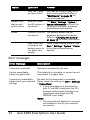
Error messages
Error message
Description
Connection canceled
Operation canceled by the user.
Service unavailable please try again later
The network is not stable, or server has not
responded. Try again later.
Connection unavailable please check your network
settings
No path to the destination is available.
Please check the settings in Start > Settings
> Connections.
1. If your Smartphone is connected to
your PC via USB, check both the PC's
network settings and ActiveSync settings (when connected via USB,
GPRS/3G is not used).
Notes:
1. Try using Internet Explorer to connect
to a website to verify your network
connection.
72
Acer E200 Smartphone User Guide
Specifications
Performance
• Qualcomm MSM 7225, 528 MHz
• System memory:
• 256 MB of SDRAM
• 512 MB of Flash ROM
• Microsoft Windows Mobile 6.5 Professional Edition
Display
•
•
•
•
3.0” TFT-LCD touchscreen
400 x 240 resolution
65K color support
Microsoft ClearType technology for clearer, crisper
font display
Multimedia
• CD-quality stereo output
• Mini USB handsfree microphone support
• Mono speaker 0.5 W (max)
• Omni-directional microphone
• Formats supported
Type
Formats
Audio
playback
WMA, MP3, WAV, AAC, AMR
Ringtone
SP-MIDI, MIDI, AMR, MP3, AAC
Video
recording
3GP, MPEG-4, H.263
Video
playback
3GP, MPEG-4, WMV, H.263, H.264
Specifications
73
USB connector
• 10-pin mini USB connector
• USB Client
• DC power-in (5 V, 1 A)
Connectivity
•
•
•
•
Bluetooth 2.1+EDR
GSM 850 / 900 / 1800 / 1900
UMTS 900 / 2100
HSDPA / HSUPA / EDGE / GPRS
Camera
• 3.2 megapixel auto-focus
Expansion
• MicroSD memory card slot; supports microSD and
microSDHC cards up to 16 GB
GPS
• Built-in GPS
• Supports AGPS
Battery
• High density, rechargeable 1140 mAh Lithium Polymer
battery (changeable)
Note: Length of battery operation will depend on power consumption which is based on system resource use. For example, constantly
using the backlight or using power-demanding applications will
shorten battery life between charges.
74
Acer E200 Smartphone User Guide
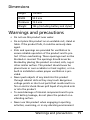
Dimensions
Height
110 mm
Width
53.5 mm
Thickness
15.5 mm
Weight
146 g (including battery and stylus)
Warnings and precautions
• Do not use this product near water.
• Do not place this product on an unstable cart, stand or
table. If the product falls, it could be seriously damaged.
• Slots and openings are provided for ventilation to
ensure reliable operation of the product and to protect it from overheating. These openings must not be
blocked or covered. The openings should never be
blocked by placing the product on a bed, sofa, rug or
other similar surface. This product should never be
placed near or over a radiator or heat register, or in a
built-in installation unless proper ventilation is provided.
• Never push objects of any kind into this product
through cabinet slots as they may touch dangerous
voltage points or short-out parts that could result in a
fire or electric shock. Never spill liquid of any kind onto
or into the product.
• To avoid damage of internal components and to prevent battery leakage, do not place the product on a
vibrating surface.
• Never use this product when engaging in sporting
activities, exercising, or in any vibrating environment
Warnings and precautions
75
which may cause a short circuit or damage, and even a
risk of explosion from the battery pack.
CAUTION when listening to music
To protect your hearing, follow these instructions.
• Increase the volume gradually until you can hear
clearly and comfortably.
• Do not increase the volume level after your ears have
adjusted.
• Do not listen to music at high volumes for extended
periods.
• Do not increase the volume to block out noisy surroundings.
• Decrease the volume if you can’t hear people speaking
near you.
Battery information
This product uses a Lithium Polymer battery. Do not use it in a
humid, wet and/or corrosive environment. Do not put, store or
leave your product in or near a heat source, in a high temperature location, in strong direct sunlight, in a microwave oven or
in a pressurized container, and do not expose it to temperatures over 60 °C (140 °F). Failure to follow these guidelines may
cause the battery to leak acid, become hot, explode or ignite
and cause injury and/or damage. Do not pierce, open or disassemble the battery. If the battery leaks and you come into contact with the leaked fluids, rinse thoroughly with water and
seek medical attention immediately. For safety reasons, and to
prolong the lifetime of the battery, charging will not occur at
low (below 0 °C/32 °F) or high (over 45 °C/113 °F) temperatures.
The full performance of a new battery is achieved only after
two or three complete charge and discharge cycles. The battery can be charged and discharged hundreds of times, but it
will eventually wear out. When the talk and standby times are
76
Acer E200 Smartphone User Guide
noticeably shorter than normal, buy a new battery. Use only
Acer approved batteries, and recharge your battery only with
Acer approved chargers designated for this device.
Unplug the charger from the electrical plug and the device
when not in use. Do not leave a fully charged battery connected to the AC adapter, since overcharging may shorten its
lifetime. If left unused, a fully charged battery will lose its
charge over time. If the battery is completely discharged, it
may take a few minutes before the charging indicator appears
on the display or before any calls can be made.
Use the battery only for its intended purpose. Never use any
charger or battery that is damaged.
Do not short-circuit the battery. Accidental short-circuiting can
occur when a metallic object such as a coin, clip, or pen causes
direct connection of the positive (+) and negative (-) terminals
of the battery. (These look like metal strips on the battery.)
This might happen, for example, when you carry a spare battery in your pocket or purse. Short-circuiting the terminals may
damage the battery or the connecting object.
Leaving the battery in hot or cold places, such as in a closed car
in summer or winter conditions, will reduce the capacity and
lifetime of the battery. Always try to keep the battery between
15 °C and 25 °C (59 °F and 77 °F). A device with a hot or cold
battery may not work temporarily, even when the battery is
fully charged. Battery performance is particularly limited in
temperatures well below freezing.
Do not dispose of batteries in a fire as they may explode. Batteries may also explode if damaged. Dispose of batteries
according to local regulations. Please recycle when possible.
Do not dispose as household waste.
Replacing the battery pack
Your smartphone uses lithium batteries. Replace the battery
with the same type as that which came bundled with your
Warnings and precautions
77
product. Use of another battery may present a risk of fire or
explosion.
Warning! Batteries may explode if not handled properly. Do not
disassemble or dispose of them in fire. Keep them away from children. Follow local regulations when disposing of used batteries.
Additional safety information
Your device and its enhancements may contain small parts.
Keep them out of the reach of small children.
Operating environment
Warning! For safety reasons, turn off all wireless or radio transmitting devices when using your smartphone under the following conditions. These devices may include, but are not limited to: wireless
LAN (WLAN), Bluetooth and/or 3G.
Remember to follow any special regulations in force in any
area, and always switch off your device when its use is prohibited or when it may cause interference or danger. Use the
device only in its normal operating positions. This device meets
RF exposure guidelines when used normally, and it and its
antenna are positioned at least 1.5 cm (5/8") away from your
body. Do not cover the antenna with metal and you should
position the device at the above-stated distance from your
body. To successfully transmit data files or messages, this
device requires a good quality connection to the network. In
some cases, transmission of data files or messages may be
delayed until such a connection is available. Ensure that the
above separation distance instructions are followed until the
transmission is completed. Parts of the device are magnetic.
Metallic materials may be attracted to the device, and persons
with hearing aids should not hold the device to the ear with
78
Acer E200 Smartphone User Guide
the hearing aid. Do not place credit cards or other magnetic
storage media near the device, because information stored on
them may be erased.
Medical devices
Operation of any radio transmitting equipment, including
wireless phones, may interfere with the functionality of inadequately protected medical devices. Consult a physician or the
manufacturer of the medical device to determine if they are
adequately shielded from external RF energy or if you have
any questions. Switch off your device in health care facilities
when any regulations posted in these areas instruct you to do
so. Hospitals or health care facilities may be using equipment
that could be sensitive to external RF transmissions.
Pacemakers. Pacemaker manufacturers recommend that a minimum separation of 15.3 cm (6") be maintained between wireless devices and a pacemaker to avoid potential interference
with the pacemaker. These recommendations are consistent
with the independent research by and recommendations of
Wireless Technology Research. Persons with pacemakers
should do the following:
• Always keep the device more than 15.3 cm (6") from
the pacemaker.
• Not carry the device near your pacemaker when the
device is switched on. If you suspect interference,
switch off your device, and move it.
Hearing aids. Some digital wireless devices may interfere with
some hearing aids. If interference occurs, consult your service
provider.
Vehicles
RF signals may affect improperly installed or inadequately
shielded electronic systems in motor vehicles such as electronic
fuel injection systems, electronic antiskid (antilock) braking
Warnings and precautions
79
systems, electronic speed control systems, and air bag systems.
For more information, check with the manufacturer, or its representative, of your vehicle or any equipment that has been
added. Only qualified personnel should service the device, or
install the device in a vehicle. Faulty installation or service may
be dangerous and may invalidate any warranty that may apply
to the device. Check regularly that all wireless equipment in
your vehicle is mounted and operating properly. Do not store
or carry flammable liquids, gases, or explosive materials in the
same compartment as the device, its parts, or enhancements.
For vehicles equipped with an air bag, remember that air bags
inflate with great force. Do not place objects, including
installed or portable wireless equipment in the area over the
air bag or in the air bag deployment area. If in-vehicle wireless
equipment is improperly installed, and the air bag inflates,
serious injury could result. Using your device while flying in aircraft is prohibited. Switch off your device before boarding an
aircraft. The use of wireless teledevices in an aircraft may be
dangerous to the operation of the aircraft, disrupt the wireless
telephone network, and may be illegal.
Potentially explosive environments
Switch off your device when in any area with a potentially
explosive atmosphere and obey all signs and instructions.
Potentially explosive atmospheres include areas where you
would normally be advised to turn off your vehicle engine.
Sparks in such areas could cause an explosion or fire resulting
in bodily injury or even death. Switch off the device at refueling points such as near gas pumps at service stations. Observe
restrictions on the use of radio equipment in fuel depots, storage, and distribution areas; chemical plants; or where blasting
operations are in progress. Areas with a potentially explosive
atmospheres are often, but not always, clearly marked. They
include below deck on boats, chemical transfer or storage
facilities, vehicles using liquefied petroleum gas (such as pro-
80
Acer E200 Smartphone User Guide
pane or butane), and areas where the air contains chemicals or
particles such as grain, dust or metal powders.
Follow any restrictions. Do not use the device where blasting is
in progress.
Emergency calls
Important: Wireless phones, including this device, operate
using radio signals, wireless networks, landline networks, and
user-programmed functions. Because of this, connections in all
conditions cannot be guaranteed. You should never rely solely
on any wireless device for essential communications like medical emergencies.
To make an emergency call:
1. If the device is not on, switch it on. Check for adequate signal strength. Some networks may require that a valid SIM
card is properly inserted in the device.
2. Press the End button as many times as needed to clear the
display and ready the device for calls.
3. Enter the official emergency number for your present location. Emergency numbers vary by location.
4. Press the Call button.
If certain features are in use, you may first need to turn those
features off before you can make an emergency call. Consult
this guide or your service provider for more information.
When making an emergency call, give all the necessary information as accurately as possible. Your wireless device may be
the only means of communication at the scene of an accident.
Do not end the call until given permission to do so.
Emergency calls
81
Disposal and recycling
information
Do not throw this electronic device into the trash when
discarding.
To minimize pollution and ensure utmost protection of the
global environment, please recycle. For more information on
the Waste from Electrical and Electronics Equipment (WEEE)
regulations, visit
www.acer-group.com/public/Sustainability/
sustainability01.htm
Mercury advisory
For projectors or electronic products containing an LCD/CRT
monitor or display:
Lamp(s) inside this product contain mercury and must be recycled or disposed of according to local, state or federal laws. For
more information, contact the Electronic Industries Alliance at
www.eiae.org. For lamp-specific disposal information, check
www.lamprecycle.org.
Taking care of your smartphone
1. DO take care not to scratch the screen of your smartphone.
Keep the screen clean. When working with your smartphone, use the supplied stylus or plastic-tipped pens
intended for use with touch-sensitive screens. Never use an
82
Acer E200 Smartphone User Guide
2.
3.
4.
5.
6.
7.
actual pen or pencil or other sharp object on the screen surface.
DO NOT expose your smartphone to rain or moisture. Do
not let water enter the circuitry through the front panel
buttons or expansion slots. In general, treat your smartphone as you would a mobile phone or other small electronic device.
DO be careful not to drop your smartphone or subject it to
any strong impact. Do not place your smartphone in your
back pocket.
DO NOT expose your smartphone to extreme temperatures.
For example, do not leave your smartphone on the dashboard of a car on a hot day or when temperatures are
below freezing point. Also, keep it away from heaters and
other sources of heat.
DO NOT use or store your smartphone in any location that
is dusty, damp or wet.
DO use a soft, damp cloth to clean your smartphone. If the
surface of the screen becomes soiled, clean it with a soft
cloth moistened with diluted window-cleaning solution.
DO NOT press down on the screen with force, otherwise
you may crack the screen.
Taking care of your smartphone
83
Safety regulations
Compliant with Russian regulatory
certification
LCD pixel statement
The LCD unit is produced with high-precision manufacturing
techniques. Nevertheless, some pixels may occasionally misfire
or appear as black or red dots. This has no effect on the
recorded image and does not constitute a malfunction.
Radio device regulatory notice
Note: Regulatory information below is for models with wireless
LAN and/or Bluetooth only.
General
This product complies with the radio frequency and safety
standards of any country or region in which it has been
approved for wireless use. Depending on configuration, this
product may or may not contain wireless radio devices (such as
wireless LAN and/or Bluetooth modules). Information below is
for products with such devices.
Certificate Information (SAR)
This device meets the EU requirements (1999/519/EU) on the
limitation of exposure of the general public to electromagnetic fields by way of health protection.
84
Acer E200 Smartphone User Guide
The limits are part of extensive recommendations for the protection of the general public. These recommendations have
been developed and checked by independent scientific organizations through regular and thorough evaluations of scientific
studies. To guarantee the safety of all persons, regardless of
age and health, the limits include a significant safety buffer.
Before radio devices can be put in circulation, their agreement
with European laws or limits must be confirmed; only then
may the CE symbol be applied.
The unit of measurement for the European Council's recommended limit for mobile telephones is the "Specific Absorption
Rate" (SAR). This SAR limit is 2.0 W/kg, averaged over 10 g of
body tissue. It meets the requirements of the International
Commission on Non-Ionizing Radiation Protection (ICNIRP) and
was included in the European Standard EN 50360 for mobile
radio devices. The SAR regulation for mobile telephones is in
line with European Standard EN 62209-1.The maximum SAR
value is calculated at the highest output level in all frequency
bands of the mobile telephone. During use, the actual SAR
level is usually much lower than the maximum value, because
the mobile telephone works in different output levels. It only
transmits with as much output as is required to reach the network. In general the following applies: The closer you are to a
base station, the lower the transmission output of your mobile
telephone. The tested SAR of this device is as follows:
CE
NCC
Head (W/kg 10g)
Body (W/kg 10g)
Head (W/kg 10g)
Body (W/kg 10g)
0.656
1.85 (1.5 cm)
0.656
NA
Safety regulations
85
NCC warning
Lithium-ion battery warning
ATTENZIONE! Rischio di esplosione della batteria se sostituita in
modo errato. Sostituire la batteria con un una di tipo uguale o
equivalente consigliata dalla fabbrica. Non disperdere le batterie
nell’ambiente.
VORSICHT! Explosionsgefahr bei unsachgemäßen Austausch der
Batterie. Ersatz nur durch denselben oder einem vom Hersteller
empfohlenem ähnlichen Typ. Entsorgung gebrauchter Batterien
nach Angaben des Herstellers.
ADVARSELI! Lithiumbatteri - Eksplosionsfare ved fejlagtig
håndtering. Udskiftning må kun ske med batteri af samme
fabrikat og type. Levér det brugte batteri tilbage til leverandøren.
VARNING! Explosionsfara vid felaktigt batteribyte. Använd samma
batterityp eller en ekvivalent typ som rekommenderas av
apparattillverkaren. Kassera använt batteri enligt fabrikantens
instruktion.
VAROITUS! Paristo voi räjähtää, jos se on virheellisesti asennettu.
Vaihda paristo ainoastaan laitevalmistajan sousittelemaan
tyyppiin. Hävitä käytetty paristo valmistagan ohjeiden mukaisesti.
ATTENTION ! Il y a danger d’explosion s’il y a remplacement
incorrect de la batterie. Remplacer uniquement avec une batterie
du mêre type ou d’ un type équivalent recommandé par le
constructeur. Mettre au rebut les batteries usagées conformément
aux instructions du fabricant.
ADVARSEL! Eksplosjonsfare ved feilaktig skifte av batteri. Benytt
samme batteritype eller en tilsvarende type anbefalt av
apparatfabrikanten. Brukte batterier kasseres i henhold til
fabrikantens instruksjoner.
86
Acer E200 Smartphone User Guide
Acer Incorporated
Date: August 14, 2009
Declaration of Conformity
We, Acer Incorporated,
of 8F., No. 88, Sec. 1, Hsin Tai Wu Rd. Hsichih Taipei Hsien 221, Taiwan
Declare under sole responsibility that the product:
Model: E200
Description: Smart HandHeld
To which this declaration relates, is in conformity with the following standards and/or
other normative documents:
zEN 301 511 V9.0.2
zEN 300 328 V1.7.1
zEN 301 908-1/ -2 V3.2.1
zEN 300 440-1 V1.4.1/ EN300 440-2 V1.2.1
zEN 301 489-1 V1.8.1/ -3 V1.4.1/ -7 V1.3.1/ -17 V1.3.2/ -24 V.1.4.1
zEN 55022:2006+ A1:2007 Class B; EN 55024:1998/A1:2001/A2:2003
zEN 60950-1:2006
zEN 50332-1:2000/ -2: 2003
zEN 50360:2001/ EN 62209-1:2006/ EN62311:2008/ OET65C
We hereby declare that the above named product is in conformance with all the
essential requirements of the R&TTE Directive (99/5/EC) issued by the Commission
of the European Community.
The conformity assessment procedure referred to in Article 10 and detailed in Annex
[IV] of directive 1999/5/EC has been followed related to Articles
z R&TTE Article 3.1 (a) Health and Safety
z R&TTE Article 3.1 (b) EMC
z R&TTE Article 3.2 Spectrum Usage
with the involvement of the following Notified Body:
CETECOM, Untertuerkheimer Str. 6 – 10 66117 Saarbruecken
Identification mark: 0682 (Notified Body) CE
The technical documentation relevant to the above equipment will be held at:
Acer Incorporated
8F., No. 88, Sec. 1, Hsin Tai Wu Rd. Hsichih Taipei Hsien 221, Taiwan
Authorized Person:
Name: Harriot Lee
Safety regulations
87
88
Acer E200 Smartphone User Guide
A
agenda .................................. 54
B
backlight settings ................... 60
battery
charging ............................ 13
information ....................... 74
Bluetooth
connections ....................... 46
headset ............................. 67
C
call forwarding ...................... 48
call history ............................. 20
dialing a call history number 20
options .............................. 25
call waiting ............................ 49
caller ID ................................. 48
calls
answering .......................... 22
ending ............................... 23
from other applications ...... 21
onscreen options ................ 22
putting on hold .................. 23
swapping between ............. 23
camera
editing photos and videos ... 41
icons and indicators ............ 38
information ....................... 74
shooting a video ................ 40
supported formats .............. 40
taking a photo ................... 39
connecting to a PC ................. 54
connectivity ........................... 74
contacts
adding and editing ............. 50
making calls to a contact ..... 20
D
display ................................... 73
E
e-mail .................................... 36
end button ............................ 49
error messages ....................... 71
F
FAQs ......................................71
features ...................................5
flight mode ............................43
G
GPRS ................................46, 68
H
help
menus ..................................6
sources .................................6
I
input options ..........................29
international numbers .............21
L
LED indicators .........................12
M
microphone volume ................61
MMS messages .......................33
N
naming ..................................59
navigation buttons .................27
network
selecting .............................46
numeric keypad ......................30
O
onscreen keyboard ..................28
onscreen number pad .............20
P
performance ..........................73
personalizing ..........................58
phone
connections ........................45
settings ..............................48
photos & videos
editing ...............................41
R
ringtones ...............................49
S
safety regulations ...................75
screen options ........................63
SD card ..................................70
89
information ....................... 74
SIM Manager ......................... 52
software
removing ........................... 62
sounds and notifications ......... 60
speakerphone ........................ 23
specifications ......................... 73
stylus ..................................... 27
system certificates .................. 61
T
tasks ...................................... 55
Today screen .......................... 59
troubleshooting ..................... 71
turning on ............................. 15
90
U
unpacking ................................9
USB connector ........................74
V
views .....................................10
voice calls
the voice call screen ............22
volume
adjusting ............................59
W
Windows Media Player ............56
word completion ....................29
X
XT9 ........................................29
Acer E200 Smartphone