1
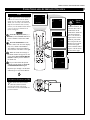
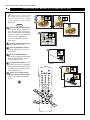
Features Menu • The AutoLock Control
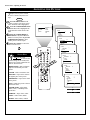
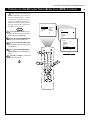
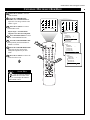
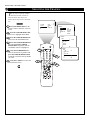
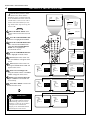
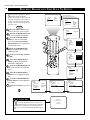
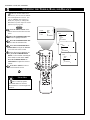
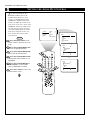
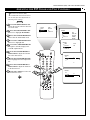
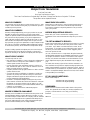
BLOCKING BY MOVIE RATING
A
fter you have set your personal
access code (see page 20), you
can block programs by specific movie
ratings.
TIMER
AUTOLOCK
PIP
CLOSED CAP
PICTURE
SOUND
FEATURES
INSTALL
BEGIN
FEATURES
TIMER
AUTOLOCK
PIP
CLOSED CAP
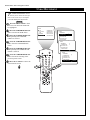
Press the MENU button on the
remote control to show the on-screen
menu.
Press the CURSOR DOWN button twice to highlight FEATURES.
FEATURES
TIMER
AUTOLOCK
PIP
CLOSED CAP
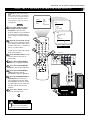
Press the CURSOR RIGHT button to enter the FEATURES menu.
Then press the CURSOR DOWN
button once to highlight the
AUTOLOCK control.
Press the CURSOR RIGHT button to highlight ACCESS CODE.
AV
i+
SAP
TV
VCR
5
1
2
3
4
5
6
ACC
8
7
9
SMART
1
0
MENU
SURF
3
8
7
4
CH
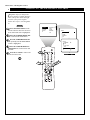
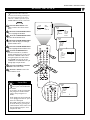
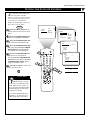
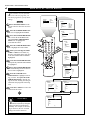
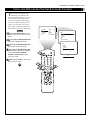
Press the CURSOR DOWN button repeatedly until MOVIE RATING
is highlighted.
ACCESS CODE
----
9
SMART
Enter your four-digit ACCESS
CODE. CORRECT will flash very
briefly in red and the menu will move
to the left with BLOCK CHANNEL
highlighted.
TIME
START TIME
STOP TIME
CHANNEL
ACTIVATE
8
3
INCR. SURR.
6
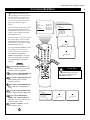
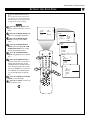
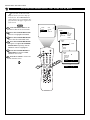
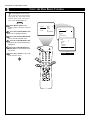
Press the CURSOR RIGHT button and the Rating menu will shift to
the left with G highlighted.
2
PIP
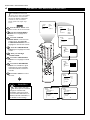
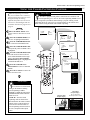
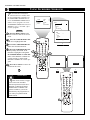
Press the CURSOR UP or
DOWN button to highlight each rating you want. Then press the CURSOR RIGHT button to turn the rating ON or OFF. Turning the rating on
will block such programs from being
seen.
Press the i+ button to remove the
menu from the screen.
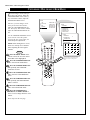
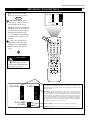
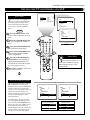
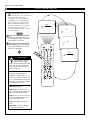
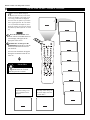
SMART HELP
When a rating is set to be
turned on (blocked), all higher
ratings will also be blocked automatically. For example, if the R rating is turned on, the NC-17 and X
ratings also will be turned on.
22
ACCESS CODE
----
FEATURES
TIMER
AUTOLOCK
PIP
CLOSED CAP
ACCESS CODE
XXXX
A/CH
PIP CH
UP
FEATURES
TIMER
AUTOLOCK
PIP
CLOSED CAP
DN
FEATURES
AUTOLOCK
BLOCK CHANNEL
SETUP CODE
CLEAR ALL
MOVIE RATING
TV RATING
G
PG
PG-13
R
NC-17
AUTOLOCK
MOVIE RATING
G
PG
PG-13
R
NC-17
ON
AV3
ALL
1
2
FEATURES
AUTOLOCK
BLOCK CHANNEL
SETUP CODE
CLEAR ALL
MOVIE RATING
TV RATING
AV2
AV3
ALL
1
2
AUTOLOCK
MOVIE RATING
G
PG
PG-13
R
NC-17
OFF
AV3
ALL
1
2