1
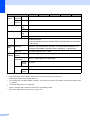
General information
0.Initial Setup
1
1
0.Initial Setup
Level 2
Level 3
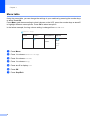
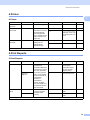
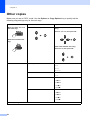
Descriptions 1
Options
Descriptions 2
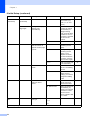
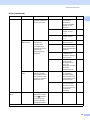
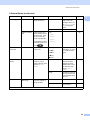
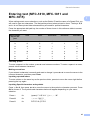
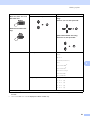
1.Receive
Mode
—
You can choose the
receive mode that
best suits your
needs.
Fax Only*
Your machine
automatically
answers every call as
a fax. Fax Only is
displayed on the LCD
when set.
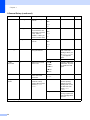
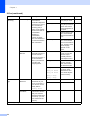
Fax/Tel
Your machine
controls the line and
automatically
answers every call. If
the call is not a fax,
the phone will ring for
you to pick up the
call. Fax/Tel is
displayed on the LCD
when set.
External TAD
(MFC-1810 and
MFC-1811)
Your external
telephone answering
device (TAD)
automatically
answers every call.
Voice messages are
stored on the
external TAD. Fax
messages are
automatically
printed. External
TAD is displayed on
the LCD when set.
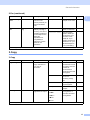
Manual
You control the
phone line and must
answer every call
yourself. Manual is
displayed on the LCD
when set.
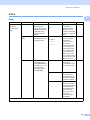
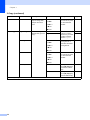
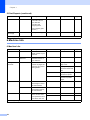
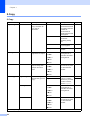
Year:
Enter the last two
digits of the year.
(e.g. Enter 1, 3 for
2013.)
Month:
Enter the two digits
for the month. (e.g.
Enter 0, 1 for
January.)
Day:
Enter the two digits
for the day. (e.g.
Enter 0, 1 for 1st.)
2.Date&Time
1.Date&Time
Puts the date and
time on the LCD and
in headings of faxes
you send if you set up
the station ID.
Page
36
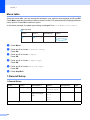
The factory settings are shown in Bold with an asterisk.
9