1
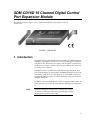
SDM-CD16D 16 Channel Digital Control Port Expansion Module
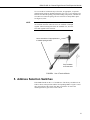
Use a screwdriver in either the top or front slot, as appropriate, to open the
terminal spring. Strip any insulation from the wire to give 7 to 9 mm bare wire.
Push the wire into the opening, and, while holding it in position, withdraw the
screwdriver to release the spring. The wire will now be firmly held in place.
See Figure 4, below.
NOTE
You cannot reliably insert more than one solid-core wire into
one terminal connector unless the wires are soldered or clamped
together. When inserting more than one stranded wire, twist the
bare ends together before insertion.
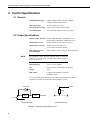
Use a screwdriver in appropriate slot
to release spring tension
Strip insulation
and insert wire
FIGURE 4. Use of Terminal Blocks
5. Address Selection Switches
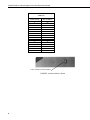
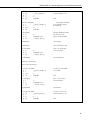
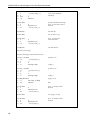
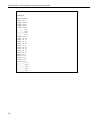
Each SDM-CD16D can have 1 of 16 addresses. The factory-set address is 00.
Table 2 shows switch position and the corresponding address. Figures 1 and 5
show the position of the switch. Note that you will have to remove the
mounting bracket to gain access to this switch.
5