1
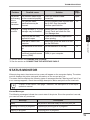
STATUS MONITOR
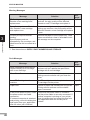
Warning Messages
Message
Solution
TD Cartridge is near Empty.
Reorder a new cartridge and
replace soon.
Running out of toner. While printing can
continue, the print quality will be affected.
Reorder a new TD cartridge and replace it.
Drum Cartridge is near End of
Life. Reorder a new cartridge
and replace soon.
The drum cartridge is nearly spent. While
Copier*1
printing can continue, the print quality will be
affected. Reorder a new cartridge and replace
it soon.
Current job requires manual
Remove the paper from the paper tray. Feed
feeding.
paper one sheet at a time in accordance with
Special papers such as
the message on the computer.
transparency film, envelope, and
labels must be fed one sheet at a
time.
3
See
page:
Copier*1
–
Printer trouble?
*1: See the section on SUPPLY PART NUMBERS AND STORAGE.
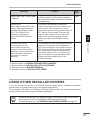
Fault Messages
Message
20
Solution
See
page:
Drum Cartridge is at End of Life.
Replace empty Drum Cartridge
with a new cartridge.
The drum cartridge is spent. Printing cannot
continue until you replace the spent drum
cartridge with a new cartridge.
Copier*2
Close Front Cover
The front cover on the printer is open.
Printing cannot continue until you close the
cover.
–
Insert TD Cartridge into the
machine
The TD cartridge is not in the printer. Insert a
TD cartridge into the printer.
Paper Jam
A piece of paper has misfed within the printer. Copier*4
Printing cannot continue until the misfed
paper is removed.
If the printer does not print, check
the power switch and cable
connection.
If a second computer is attached
and printing, close this dialog box
and reprint from your application
after the other job is finished.
Ensure that the power switch is turned on
and the printer cable is securely connected. If
another computer is printing on your printer,
close this dialog box and restart printing from
your application after the current job is
finished.
Copier*3
–