1
i
Preface
Copyright
This publication, including all photographs, illustrations and software, is protected under
international copyright laws, with all rights reserved. Neither this manual, nor any of the
material contained herein, may be reproduced without written consent of the author.
Version 1.0
Disclaimer
The information in this document is subject to change without notice. The manufacturer
makes no representations or warranties with respect to the contents hereof and specifically
disclaims any implied warranties of merchantability or fitness for any particular purpose.
The manufacturer reserves the right to revise this publication and to make changes from
time to time in the content hereof without obligation of the manufacturer to notify any
person of such revision or changes.
Trademark Recognition
Microsoft, MS-DOS and Windows are registered trademarks of Microsoft Corp.
AMD, Athlon, Sempron, and Duron are registered trademarks of AMD Corporation.
Other product names used in this manual are the properties of their respective owners and
are acknowledged.
Federal Communications Commission (FCC)
This equipment has been tested and found to comply with the limits for a Class B digital
device, pursuant to Part 15 of the FCC Rules. These limits are designed to provide reasonable protection against harmful interference in a residential installation. This equipment
generates, uses, and can radiate radio frequency energy and, if not installed and used in
accordance with the instructions, may cause harmful interference to radio communications.
However, there is no guarantee that interference will not occur in a particular installation.
If this equipment does cause harmful interference to radio or television reception, which
can be determined by turning the equipment off and on, the user is encouraged to try to
correct the interference by one or more of the following measures:
•
•
•
•
Reorient or relocate the receiving antenna.
Increase the separation between the equipment and the receiver.
Connect the equipment onto an outlet on a circuit different from that to which
the receiver is connected.
Consult the dealer or an experienced radio/TV technician for help.
Shielded interconnect cables and a shielded AC power cable must be employed with this
equipment to ensure compliance with the pertinent RF emission limits governing this
device. Changes or modifications not expressly approved by the system’s manufacturer
could void the user’s authority to operate the equipment.
Preface
ii
Declaration of Conformity
This device complies with part 15 of the FCC rules. Operation is subject to the following
conditions:
•
•
This device may not cause harmful interference, and
This device must accept any interference received, including interference
that may cause undesired operation.
Canadian Department of Communications
This class B digital apparatus meets all requirements of the Canadian Interference-causing
Equipment Regulations.
Cet appareil numérique de la classe B respecte toutes les exigences du Réglement sur le
matériel brouilieur du Canada.
About the Manual
The manual consists of the following:
Chapter 1
Describes features of the motherboard.
Introducing the Motherboard
Go to
H
page 1
Describes installation of motherboard
components.
Chapter 2
Installing the Motherboard
Go to
H
page 7
Provides information on using the BIOS
Setup Utility.
Chapter 3
Using BIOS
Go to
H
page 27
Chapter 4
Describes the motherboard software
Using the Motherboard Software
Go to
Chapter 5
Provides information about SATA RAID
Setup
VIA VT8237 SATA RAID Setup Guide
Go to
Preface
H
H
page 41
page 45
iii
TABLE OF CONTENTS
Preface
i
Chapter 1
1
Introducing the Motherboard
1
Introduction................................................................................................1
Features.......................................................................................................2
Motherboard Components.......................................................................4
Chapter 2
7
Installing the Motherboard
7
Safety Precautions......................................................................................7
Choosing a Computer Case.......................................................................7
Installing the Motherboard in a Case......................................................7
Checking Jumper Settings.........................................................................8
Setting Jumpers..............................................................................8
Checking Jumper Settings..............................................................9
Jumper Settings..............................................................................9
Connecting Case Components...............................................................10
Front Panel Header.....................................................................12
Installing Hardware...................................................................................13
Installing the Processor...............................................................13
Installing Memory Modules.........................................................14
Installing a Hard Disk Drive/CD-ROM/SATA Hard Drive........18
Installing a Floppy Diskette Drive...............................................20
Installing Add-on Cards..............................................................21
Connecting Optional Devices......................................................24
Connecting I/O Devices..........................................................................26
Chapter 3
27
Using BIOS
27
About the Setup Utility............................................................................27
The Standard Configuration........................................................27
Entering the Setup Utility..............................................................27
Updating the BIOS.......................................................................29
Using BIOS................................................................................................29
Standard CMOS Setup................................................................30
Advanced Setup...........................................................................31
Features Setup.............................................................................33
iv
Power Management Setup...........................................................34
PCI/Plug and Play Setup..............................................................36
BIOS Security Features................................................................37
CPU PnP Setup............................................................................38
Hardware Monitor.......................................................................39
Load Optimal Defaults................................................................40
Save Changes and Exit................................................................40
Discard Changes and Exit...........................................................40
41
Chapter 4
Using the Motherboard Software
41
About the Software CD-ROM................................................................41
Auto-installing under Windows 98/ME/2000/XP................................41
Running Setup..............................................................................42
Manual Installation..................................................................................44
Utility Software Reference.......................................................................44
Chapter 5
45
VIA VT8237 SATA RAID Setup Guide
45
VIA RAID Configurations.......................................................................45
Installing RAID Software & Drives.......................................................52
Using VIA RAID Tool.............................................................................54
Multi-Language Translation
1
Chapter 1
Introducing the Motherboard
Introduction
Thank you for choosing K8T890-A motherboard of great performance and with enhanced
function. The K8T890-A is designed to fit the AMD K8 processors in the 939-pin package.
Based on the ATX form factor, measuring 305 mm x 211 mm, this motherboard incorporates the following chipsets: K8T890 Northbridge and VT8237 Southbridge chipsets.
The K8T890 Northbridge features the HyperTransport Technology to transfer of 2000MT/
s, 1600 MT/s, 1200 MT/s, 800 MT/s or 400 MT/s each direction simultaneously, providing
a total maximum data transfer bandwidth of 8 GB/sec. Two 184 pin unbuffered DDR
SDRAM DIMM sockets support up to 2 GB in total memory. Aside from the onboard AGP
Express slot, one PCI Express x16 slot, intended for Graphics interface, is fully compliant
to the PCI Express Base Specification revision 1.0a. The K8T890 Northbridge interconnects to the South Bridge through the high speed 8x 66 MHz (533 MB/sec) V-Link interface.
The VT8237 Southbridge is a highly integrated peripheral controller, it includes an integrated keyboard controller with PS2 mouse support, two-channel Serial ATA/RAID hard
disk controller, master mode enhanced Parallel IDE controller with full scatter/gather
capability and extension to UltraDMA-133/100/66 for 133/100/66 MB/sec transfer rate,
integrated USB 2.0 interface supporting up to 8 USB 2.0 ports. The VT8237 features
outstanding expansion capibility such as, five PCI slots with PCI v2.2 compliant. The
VT8237 integrated Fast Ethernet controller with standard MII interface to an external
PHY for 10/100Mb Base-T Ethernet, as well as AC’97 audio codec compliant.
There is an advanced full set of I/O ports in the rear panel, including PS/2 mouse and
keyboard connectors, COM1, LPT1, four USB ports at the rear I/O, one LAN port (optional), and audio jacks for microphone, line-in, and line-out.
Introducing the Motherboard
2
Feature
Processor
K8T890-A uses a 939-pin socket that carries the following features:
•
•
Supports AMD K8 processors with HyperTransport Technology
Transfer rate of 2000/1600/1200/800/400 MT/s
HyperTransport Technology is a point-to-point link between two devices, it enables
integrated circuits to exchange information at much higher speeds than currently available interconnect technologies.
Chipset
The VIA K8T890 Northbridge (NB) and VIA VT8237 Southbridge (SB) chipset is based
on an innovative and scalable architecture with proven reliability and performance.
K8T890
(NB)
•
•
•
•
VT8237
(SB)
•
•
•
•
•
1000/800/600/400/200 MHz clock rates with Double Data
Rate-style operation for 2000/1600/1200/800/400 MT/s in
both directions simultaneously
Supports 66 MHz, 8x/4x transfer modes, Ultra V-Link Host
interface with 1 GB/s total bandwidth
Supports asynchronous interface between HyperTransport
and PCI Express
Compliant with advanced high bandwidth PCI Express 1.0a
Supports 16-bit 66 MHz V-Link Host interface with total
bandwidth of 1066 MB/s
Compliant with PCI 2.2 specification at 33 MHz, supporting
up to 6 PCI masters
Integrated Dual channel UltraDMA 133/100/66 Master Mode
EIDE Controller
USB 2.0 Controller, supporting for 8 USB 2.0 ports
Integrated keyboard Controller with PS2 mouse support
Memory
•
•
•
Supports DDR400/333/266 memory types with Dual-channel architecture
Accommodates two unbuffered 2.5V 184-pin DDR SDRAM DIMM sockets
A total maximum capacity 2 GB
Audio CODEC
•
•
•
•
•
Meets Microsoft WHQL/WLP 2.0 audio requirements
Compliant with AC’97 v2.3 specification
High quality differential CD input
Supports double sampling rate (96KHz) of DVD audio playback
Direct Sound 3DTM compatible
Introducing the Motherboard
3
Onboard LAN (optional)
The onboard LAN provides the following features:
•
Dual speed -- 100/10 Mbps
•
MII interface to ethernet controller
•
Auto negotiation: 10/100, Full/Half Duplex
•
Meet all applicable IEEE 802.3, 10Base-T and 100Base-Tx standards
Expansion Options
The motherboard comes with the following expansion options:
•
•
•
•
•
•
•
•
One PCI Express x16 slot
Two PCI Express x1 slots
Two 32-bit PCI slots
One AGP Express slot
Two IDE connectors which support four IDE devices
One floppy disk drive interface
Two 7-pin SATA connectors
One Communications Networking Riser (CNR) slot
This motherboard supports Ultra DMA bus mastering with transfer rates of 133/100/66
MB/s.
Integrated I/O
The motherboard has a full set of I/O ports and connectors:
•
•
•
•
•
•
Two PS/2 ports for mouse and keyboard
One serial port
One parallel port
Eight USB ports (rear panel x 4, header x 4)
One LAN port (optional)
Audio jacks for microphone, line-in and line-out
BIOS Firmware
The motherboard uses AMI BIOS that enables users to configure many system features
including the following:
•
•
•
•
Power management
Wake-up alarms
CPU parameters
CPU and memory timing
The firmware can also be used to set parameters for different processor clock speeds.
Some hardware specifications and software items are subject to change
without prior notice.
Introducing the Motherboard
4
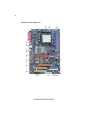
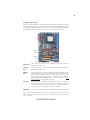
Motherboard Components
Introducing the Motherboard
5
Table of Motherboard Components
LABEL
1 CPU Socket
COMPONENT
Socket 939 for AMD K8 processor
2
3
4
5
6
7
8
9
10
11
12
13
14
15
16
17
CPU_FAN1
DIMM1~2
USB2~3
SATA1~SATA2
IDE1
IDE2
SYS_FAN1
JCMOS1
SPK1
PANEL1
SIR1
FDD1
CNR1
PCI1~2
AGPRO1
PCI-E2~3
CPU cooling fan connector
184-pin DDR SDRAM slots
Front Panel USB headers
Serial ATA connectors
Primary IDE connector
Secondary IDE connector
System cooling fan connector
Clear CMOS jumper
Speaker header
Front panel switch/LED header
Infrared header
Floppy disk drive connector
Communications Networking Riser slot
32-bit add-on card slots
AGP Express graphics card slot
PCI Express x1 Slots
18
19
20
21
22
23
CD1
PCI-E1
AUDIO2
PWR1
NB_FAN*
PWR2
CD-in header
PCI Express x16 Slot
Front panel audio header
Standard 24-pin ATX power connector
Northbridge cooling fan connector
4-pin +12V power connector
“*” stands for optional components and may not exist onboard.
This concludes Chapter 1. The next chapter explains how to install the motherboard.
Introducing the Motherboard
6
Memo
Introducing the Motherboard
7
Chapter 2
Installing the Motherboard
Safety Precautions
•
•
•
•
•
Follow these safety precautions when installing the motherboard
Wear a grounding strap attached to a grounded device to avoid damage from
static electricity
Discharge static electricity by touching the metal case of a safely grounded
object before working on the motherboard
Leave components in the static-proof bags they came in
Hold all circuit boards by the edges. Do not bend circuit boards
Choosing a Computer Case
There are many types of computer cases on the market. The motherboard complies with
the specifications for the ATX system case. First, some features on the motherboard are
implemented by cabling connectors on the motherboard to indicators and switches on the
system case. Make sure that your case supports all the features required. Secondly, K8T890A supports one or two floppy diskette drives and four enhanced IDE drives. Make sure that
your case has sufficient power and space for all drives that you intend to install.
Most cases have a choice of I/O templates in the rear panel. Make sure that the I/O
template in the case matches the I/O ports installed on the rear edge of the motherboard.
This motherboard carries an ATX form factor of 305 X 211 mm. Choose a case that
accommodates this form factor.
Installing the Motherboard in a Case
Refer to the following illustration and instructions for installing the motherboard in a case.
Most system cases have mounting brackets installed in the case, which correspond the holes
in the motherboard. Place the motherboard over the mounting brackets and secure the
motherboard onto the mounting brackets with screws.
Ensure that your case has an I/O template that supports the I/O ports and expansion slots
on your motherboard.
Installing the Motherboard
8
Do not over-tighten the screws as this can stress the motherboard.
Checking Jumper Settings
This section explains how to set jumpers for correct configuration of the motherboard.
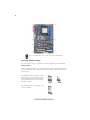
Setting Jumpers
Use the motherboard jumpers to set system configuration options. Jumpers with more than
one pin are numbered. When setting the jumpers, ensure that the jumper caps are placed on
the correct pins.
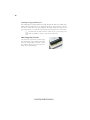
The illustrations show a 2-pin jumper. When
the jumper cap is placed on both pins, the
jumper is SHORT. If you remove the jumper
cap, or place the jumper cap on just one pin,
the jumper is OPEN.
SHORT
This illustration shows a 3-pin jumper. Pins
1 and 2 are SHORT
Installing the Motherboard
OPEN
9
Checking Jumper Settings
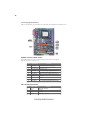
The following illustration shows the location of the motherboard jumpers. Pin 1 is labeled.
Jumper Settings
Jumper Type
JCMOS1 3-pin
Description
CLEAR CMOS
Setting (default)
1-2: NORMAL
2-3: CLEAR
JCMOS1
Before clearing the CMOS,
make sure to turn the system off.
1
Installing the Motherboard
10
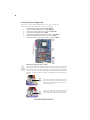
Connecting Case Components
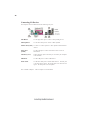
After you have installed the motherboard into a case, you can begin connecting the motherboard components. Refer to the following:
1
2
3
4
5
6
7
Connect the CPU cooling fan cable to CPU_FAN1.
Connect the Northbridge cooling fan cable NB_FAN.
Connect the system cooling fan connector to SYS_FAN1.
Connect the case speaker cable to SPK1.
Connect the case switches and indicator LEDs to the PANEL1.
Connect the standard power supply connector to PWR1.
Connect the auxiliary case power supply connector to PWR2.
Connecting 20/24-pin power cable
Users please note that the 20-pin and 24-pin power cables can both be connected
to the ATX1 connector. With the 20-pin power cable, just align the 20-pin power
cable with the pin 1 of the ATX1 connector. However, using 20-pin power cable
may cause the system to become unbootable or unstable because of insufficient
electricity. A minimum power of 300W is recommended for a fully-configured
system.
Users please note that when installing 20-pin
power cable, the latche of power cable falls on
the left side of the PWR1 connector latch, just
as the picture shows.
20-pin power cable
Users please note that when installing 24-pin
power cable, the latches of power cable falls
ont the right side of PWR1 connector latch.
24-pin power cable
Installing the Motherboard
11
CPU_FAN1/SYS_FAN1/NB_FAN: FAN Power Connectors
Pin
Signal Name
Function
1
GND
System Ground
2
3
+12V
Power +12V
Sensor
Sense
PWR1: ATX 24-pin Power Connector
Pin
Signal Name
1
2
3
4
5
6
7
8
9
+3.3V
10
11
12
+12V
Pin
13
14
15
16
17
18
19
20
21
+3.3V
Ground
+5V
Ground
+5V
Ground
PWRGD
+5VSB
22
23
24
+12V
+3.3V
Signal Name
+3.3V
-12V
COM
PS_ON
COM
COM
COM
-5V
+5V
+5V
+5V
COM
PWR2: ATX 12V Power Connector
Pin
1
2
3
4
Signal Name
Ground
Ground
+12V
+12V
SPK1: Internal speaker
Pin
1
2
3
4
Signal Name
VCC
Key
GND
Signal
Installing the Motherboard
12
Front Panel Header
The front panel connector (PANEL1) provides a standard set of switch and LED header
commonly found on ATX or micro-ATX cases. Refer to the table below for information:
Pin Signal Name
Function
Pin Signal Name
Function
1
HD_LED_P
Hard disk LED(+) 2
FP PWR/SLP
3
HD_LED_N
Hard disk LED(-)
4
FP PWR/SLP
*MSG LED(+)
*MSG LED(-)
5
RST_SW_N
Reset Switch(-)
6
PWR_SW_P
Power Switch(+)
7
RST_SW_P
Reset Switch(+)
8
PWR_SW_N
Power Switch(-)
9
RSVD
Reserved
10 Key
No pin
* MSG LED (dual color or single color)
Hard Drive Activity LED
Connecting pins 1 and 3 to a front panel mounted LED provides visual indication that data
is being read from or written to the hard drive. For the LED to function properly, an IDE
drive should be connected to the onboard IDE interface. The LED will also show activity
for devices connected to the SCSI (hard drive activity LED) connector.
Power/Sleep/Message waiting LED
Connecting pins 2 and 4 to a single or dual-color, front panel mounted LED provides power
on/off, sleep, and message waiting indication.
Reset Switch
Supporting the reset function requires connecting pin 5 and 7 to a momentary-contact
switch that is normally open. When the switch is closed, the board resets and runs POST.
Power Switch
Supporting the power on/off function requires connecting pins 6 and 8 to a momentarycontact switch that is normally open. The switch should maintain contact for at least 50 ms
to signal the power supply to switch on or off. The time requirement is due to internal debounce circuitry. After receiving a power on/off signal, at least two seconds elapses before
the power supply recognizes another on/off signal.
Installing the Motherboard
13
Installing Hardware
Installing the Processor
Caution: When installing a CPU heatsink and cooling fan make sure that
you DO NOT scratch the motherboard or any of the surface-mount
resistors with the clip of the cooling fan. If the clip of the cooling fan
scrapes across the motherboard, you may cause serious damage to the
motherboard or its components.
On most motherboards, there are small surface-mount resistors near the
processor socket, which may be damaged if the cooling fan is carelessly
installed.
Avoid using cooling fans with sharp edges on the fan casing and the clips.
Also, install the cooling fan in a well-lit work area so that you can clearly
see the motherboard and processor socket.
Before installing the Processor
This motherboard automatically determines the CPU clock frequency and system bus
frequency for the processor. You may be able to change these settings by changing the
settings in the system Setup Utility. We strongly recommend that you do not over-clock
processors or other components to run faster than their rated speed.
Warning: Over-clocking components can adversely affect the reliability of
the system and introduce errors into your system. Over-clocking can
permanently damage the motherboard by generating excess heat in
components that are run beyond the rated limits.
This motherboard has a Socket 939 processor socket. When choosing a processor, consider
the performance requirements of the system. Performance is based on the processor design,
the clock speed and system bus frequency of the processor, and the quantity of internal
cache memory and external cache memory.
Installing the Motherboard
14
CPU Installation Procedure
The following illustration shows CPU installation components.
1
2
3
4
5
Install your CPU. Pull up the lever away from the
socket and lift up to 90-degree angle.
Locate the CPU cut edge (the corner with the pin
hold noticeably missing). Align and insert the CPU
correctly.
Press the lever down and apply thermal grease on
top of the CPU.
Put the CPU Fan down on the retention module and
snap the four retention legs of the cooling fan into
place.
Flip the levers over to lock the heat sink in place and
connect the CPU cooling Fan power cable to the
CPUFAN connector. This completes the installation.
To achieve better airflow rates and heat dissipation, we suggest that you use
a high quality fan with 4800 rpm at least. CPU fan and heatsink installation procedures may vary with the type of CPU fan/heatsink supplied. The
form and size of fan/heatsink may also vary.
Installing Memory Modules
K8T890-A accommodates two 184-pin 2.5V unbuffered Double Data Rate (DDR) SDRAM
(Synchronous Dynamic Random Access Memory) memory modules. K8T890-A can support DDR400/333/266 memory types and its total maximum memory size is 2 GB.
DDR SDRAM memory module table
Memory module
DDR266
DDR333
DDR400
Memory Bus
133MHz
166MHz
200MHz
Do not remove any memory module from its antistatic packaging until you
are ready to install it on the motherboard. Handle the modules only by
their edges. Do not touch the components or metal parts. Always wear a
grounding strap when you handle the modules.
Notes:
1. When running dual channel mode, install only same (same density, DRAM
technology and DRAM bus width) module for each deal channel.
2. Please note that those types not in the Table B (p.16) will not boot up.
Installing the Motherboard
15
Installation Procedure
Refer to the following to install the memory modules.
1
2
3
4
5
This motherboard supports unbuffered DDR SDRAM only.
Push the latches on each side of the DIMM slot down.
Align the memory module with the slot. The DIMM slots are keyed with
notches and the DIMMs are keyed with cutouts so that they can only be
installed correctly.
Check that the cutouts on the DIMM module edge connector match the notches
in the DIMM slot.
Install the DIMM module into the slot and press it firmly down until it seats
correctly. The slot latches are levered upwards and latch on to the edges of
the DIMM.
Installing the Motherboard
16
Table A: DDR (memory module) QVL (Qualified Vendor List)
The following DDR400 memory modules have been tested and qualified for use with
this motherboard.
Size
256MB
512MB
1GB
Vendor
Model Name
A-DATA
ADD8608A8A-4.5B
A-DATA
ADD8608A8A-5B
Apacer
AM3A568ACT-5A
GEIL
G208L364D1TG5NKT3C
GEIL
GE08L3264D1WL5NKT3H71
GEIL
GE08L3264DIWL5NKT3H710902
Hynix
HY5DU5656822BT-D43
Hynix
HY5DU56822BT-D43
KingMax
KDL388P4EA-50A
Kingston
D3208DL2T-5 0323PT01
Ramaxel
MT-46V32M8 TG-5BC
SAMSUNG
K4H560838D-TCC4
SAMSUNG
K4H560838D-TCCC
TwinMOS
TMD7608F8E50D
Winbond
W942508BH-5
CORSAIR
CMX512-3200C2PT
CORSAIR
CMX512-3500C2PT
CORSAIR
CMX512-4400PT
Hynix
HY5DU56822DT-D5
Infineon
HYB25D256800BT-5
Kingston
D3208DL1T-5
Kingston
KHX3500AK2
Mushkin
PC3500 level ONE
PSC
A2S56D30BTP
SAMSUNG
K4H560838E-TCCC
SAMSUNG
K4H560838D-TCC4
Transcend
V58C2256804SAT5B
UNIFOSA
USI 64M8B8-WB200-0431
ValueSelect
VS32MB-5 2B0402
CORSAIR
CMX1024-3200PT
Installing the Motherboard
17
Table B: Unbuffered DIMM Support for 939-pin
Maximum
DRAM Speed
Chip Selects
Data
Bus
MEMCS_1L_L* MEMCS_2H_L* MEMCS_2L_L* MEMCS_2H_L*
64bits
128bits
1T
2T
Single rank
N/A
N/A
N/A
DDR400 DDR400
Double rank
N/A
N/A
N/A
DDR400 DDR400
N/A
N/A
Single rank
N/A
DDR400 DDR400
N/A
N/A
Double rank
N/A
DDR400 DDR400
Single rank
N/A
Single rank
N/A
DDR333 DDR400
Single rank
N/A
Double rank
N/A
DDR200 DDR400
Double rank
N/A
Single rank
N/A
DDR200 DDR400
Double rank
N/A
Double rank
N/A
DDR200 DDR333
DDR400 DDR400
Single rank
Single rank
N/A
N/A
Double rank
Double rank
N/A
N/A
DDR400 DDR400
N/A
N/A
Single rank
Single rank
DDR400 DDR400
N/A
N/A
Double rank
Double rank
DDR400 DDR400
Single rank
Single rank
Single rank
Single rank
DDR333 DDR400
Single rank
Single rank
Double rank
Double rank
DDR200 DDR400
Double rank
Double rank
Single rank
Single rank
DDR200 DDR400
Double rank
Double rank
Double rank
Double rank
DDR200 DDR333
Note for “*”: Memory types must be set to values consistent with system hardware.
Installing the Motherboard
18
Installing a Hard Disk Drive/CD-ROM/SATA Hard Drive
This section describes how to install IDE devices such as a hard disk drive and a CD-ROM
drive.
About IDE Devices
Your motherboard has a primary and secondary IDE channel interface (IDE1 and IDE2).
An IDE ribbon cable supporting two IDE devices is bundled with the motherboard.
You must orient the cable connector so that the pin1 (color) edge of the
cable correspoinds to the pin 1 of the I/O port connector.
IDE1: Primary IDE Connector
The first hard drive should always be connected to IDE1.
IDE2: Secondary IDE Connector
The second drive on this controller must be set to slave mode. The cinfiguration is the same
as IDE1.
IDE devices enclose jumpers or switches used to set the IDE device as MASTER or SLAVE.
Refer to the IDE device user’s manual. Installing two IDE devices on one cable, ensure that
one device is set to MASTER and the other device is set to SLAVE. The documentation of
your IDE device explains how to do this.
About UltraDMA
This motherboard supports UltraDMA 133/100/66. UDMA is a technology that accelerates the performance of devices in the IDE channel. To maximize performance, install IDE
devices that support UDMA and use 80-pin IDE cables that support UDMA 133/100/66.
Installing the Motherboard
19
About SATA Connectors
Your motherboard features two SATA connectors supporting a total of two drives. SATA
refers to Serial ATA (Advanced Technology Attachment) is the standard interface for the
IDE hard drives which are currently used in most PCs. These connectors are well designed
and will only fit in one orientation. Locate the SATA connectors on the motherboard (see
page 21) and follow the illustration below to install the SATA hard drives.
Installing Serial ATA Hard Drives
To install the Serial ATA (SATA) hard drives, use the SATA cable that supports the Serial
ATA protocol. This SATA cable comes with an SATA power cable. You can connect either
end of the SATA cable to the SATA hard drive or the connector on the motherboard.
SATA cable
(optional)
SATA power cable
(optional)
Refer to the illustration below for proper installation:
1
2
3
Attach either cable end to the connector on the motherboard.
Attach the other cable end to the SATA hard drive.
Attach the SATA power cable to the SATA hard drive and connect the other
end to the power supply.
This motherboard does not support the “Hot-Plug” function.
Installing the Motherboard
20
Installing a Floppy Diskette Drive
The motherboard has a floppy diskette drive (FDD) interface and ships with a diskette drive
ribbon cable that supports one or two floppy diskette drives. You can install a 5.25-inch
drive and a 3.5-inch drive with various capacities. The floppy diskette drive cable has one
type of connector for a 5.25-inch drive and another type of connector for a 3.5-inch drive.
You must orient the cable connector so that the pin 1 (color) edge of the
cable corresponds to the pin 1 of the I/O port connector.
FDD1: Floppy Disk Connector
This connector supports the provided floppy
drive ribbon cable. After connecting the single
end to the onboard floppy connector, connect
the remaining plugs on the other end to the
floppy drives correspondingly.
Installing the Motherboard
21
Installing Add-on Cards
The slots on this motherboard are designed to hold expansion cards and connect them to the
system bus. Expansion slots are a means of adding or enhancing the motherboard’s features
and capabilities. With these efficient facilities, you can increase the motherboard’s capabilities by adding hardware that performs tasks that are not part of the basic system.
PCI-E1 Slot
The PCI Express x16 slot is fully compliant to the PCI Express Base
Specification revision 1.0a.
PCI-E2~3
Slots
The two PCI Express x1 slots are fully compliant to the PCI Express Base
Specification revision 1.0a.
AGPRO1
Slot
The AGP Express slot is used to install an AGP graphics card that emulates
the AGP function. To get better performance and compatibility on our
special designed AGPRO slot, we recommend users use one of the AGP
graphics cards that have been tested by our company. See the “AGP Express Graphics Cards Support List” or visit our website at “http://
www.ecs.com.tw” for the updated support list.
PCI Slots
This motherboard is equipped with two standard PCI slots. PCI stands for
Peripheral Component Interconnect and is a bus standard for expansion
cards, which for the most part, is a supplement of the older ISA bus standard. The PCI slots on this board are PCI v2.2 compliant.
CNR Slots
This slot is used to insert CNR card with Modem and Audio functionality.
Before installing an add-on card, check the documentation for the card carefully. If
the card is not Plug and Play, you may have to manually configure the card before
installation.
Installing the Motherboard
22
Follow these instructions to install an add-on card:
1
2
3
Remove a blanking plate from the system case corresponding to the slot you
are going to use.
Install the edge connector of the add-on card into the expansion slot. Ensure
that the edge connector is correctly seated in the slot.
Secure the metal bracket of the card to the system case with a screw.
For some add-on cards, for example graphics adapters and network adapters, you have to install drivers and software before you can begin using the
add-on card.
Installing the Motherboard
23
Table A: AGP Express Graphics Cards Support List
VGA Chip
Model name
AGP
ASUS AGP-V7100
ASUS V8200
ASUS V8170DDR
ELSA GLADIAC GTS DDR PRO/64M
ELSA GLADIAC MX
ELSA GLADIAC 725DVI
4X
ELSA GLADIAC 925ViVo
GIGABYTE GV-GF2010D
nVIDIA
WINFAST S325 TNT M64
WINFAST GeForce 2 Ultra
WINFAST A250TD/64M
ASUS V9280TD
ELSA GLADIAC FX935
ELSA GLADIAC FX938Ultra
ELSA GLADIAC FX 736
8X
MSI Geforce4 Titanium4200
MSI FX5900U-VTD256
WINFAST A350TDH
ATI RADEON 8500 DDR
ECS R9200LE- 64M
ATI
4X
ECS R9200LE- 128M
ECS R9250-128T
GIGABYET GV-R9000PRO
8X
Power Color Radeon9500
ECS AG200E4-D32
SIS
ECS AG200T8_D64
8X
ECS AG400T8_D64
ECS-MM AG400T8_D64
For the latest updates of the supported AGP VGA cards list, please visit
ECS ELITEGROUP website for details.
ECS ELITEGROUP website: http://www.ecs.com.tw
Installing the Motherboard
24
Connecting Optional Devices
Refer to the following for information on connecting the motherboard’s optional devices:
AUDIO2: Front Panel Audio header
This header allows the user to install auxiliary front-oriented microphone
and line-out ports for easier access.
Pin
Pin
Signal Name
Signal Name
Function
1
2
3
4
5
6
7
AUD_MIC
Front Panel Microphone input signal
AUD_GND
Ground used by Analog Audio Circuits
8
9
10
Key
No Pin
AUD_F_L
Left Channel Audio signal to Front Panel
AUD_RET_L
Left Channel Audio signal to Return from Front Panel
AUD_MIC_BIAS Microphone Power
AUD_VCC
Filtered +5V used by Analog Audio Circuits
AUD_F_R
Right Channel audio signal to Front Panel
AUD_RET_R
RightChannelAudiosignaltoReturnfromFrontPanel
REVD
Reserved
CD1: CD Audio Input header
Pin
1
2
3
4
Signal Name
Function
CD in_L
CD In left channel
GND
Ground
GND
CD in_R
Ground
CD In right channel
Installing the Motherboard
25
USB2~3: Front Panel USB headers
The motherboard has four USB ports installed on the rear edge I/O port array. Additionally,
some computer cases have USB ports at the front of the case. If you have this kind of case,
use auxiliary USB connector to connect the front-mounted ports to the motherboard.
Pin
Signal Name
Function
1
2
3
4
5
6
7
USBPWR
Front Panel USB Power
USBPWR
Front Panel USB Power
USB_FP_P0-
USB Port 0 Negative Signal
USB_FP_P1-
USB Port 1 Negative Signal
USB_FP_P0+
USB Port 0 Positive Signal
USB_FP_P1+
USB Port 1 Positive Signal
GND
Ground
8
9
10
GND
Ground
Key
No pin
USB_FP_OC0
Overcurrent signal
Please make sure that the USB cable has the same pin assignment as indicated above. A different pin assignment may cause damage or system hangup.
SATA1~2: Serial ATA connectors
These connectors are use to support the new Serial ATA devices for the highest date transfer
rates (150 MB/s), simpler disk drive cabling and easier PC assembly. It eliminates limitations
of the current Parallel ATA interface. But maintains register compatibility and software
compatibility with Parallel ATA.
Pin
Pin
1
3
5
7
Signal Name
Signal Name
Ground
Pin
2
Signal Name
Function
TX+
4
6
-
TXRXGround
Ground
RX+
-
SIR1: Infrared header
The mainboard supports an Infrared (SIR1) data port. Infrared port allows the wireless
exchange of information between your computer and similarly equipped devices such as
printers, laptops, Personal Digital Assistants (PDAs), cell phones, and other computers.
Pin
Signal Name
Function
1
Not Assigned
2
Key
No pin
3
+5V
IR Power
4
GND
Ground
5
IRTX
IrDA serial output
6
IRTX
IrDA serial input
Not assigned
Installing the Motherboard
26
Connecting I/O Devices
The backplane of the motherboard has the following I/O ports:
PS2 Mouse
Use the upper PS/2 port to connect a PS/2 pointing device.
PS2 Keyboard
Use the lower PS/2 port to connect a PS/2 keyboard.
Parallel Port (LPT1) Use LPT1 to connect printers or other parallel communications
devices.
Serial Port
(COM1)
Use the COM port to connect serial devices such as mice or
fax/modems.
LAN Port
Connect an RJ-45 jack to the LAN port to connect your computer
to the Network.
(optional)
USB Ports
Use the USB ports to connect USB devices.
Audio Ports
Use the three audio ports to connect audio devices. The first jack
is for stereo line-in signal. The second jack is for stereo line-out
signal. The third jack is for microphone.
This concludes Chapter 2. The next chapter covers the BIOS.
Installing the Motherboard
27
Chapter 3
Using BIOS
About the Setup Utility
The computer uses the latest American Megatrends BIOS with support for Windows Plug
and Play. The CMOS chip on the motherboard contains the ROM setup instructions for
configuring the motherboard BIOS.
The BIOS (Basic Input and Output System) Setup Utility displays the system’s configuration status and provides you with options to set system parameters. The parameters are
stored in battery-backed-up CMOS RAM that saves this information when the power is
turned off. When the system is turned back on, the system is configured with the values you
stored in CMOS.
The BIOS Setup Utility enables you to configure:
•
Hard drives, diskette drives and peripherals
•
Video display type and display options
•
Password protection from unauthorized use
•
Power Management features
The settings made in the Setup Utility affect how the computer performs. Before using the
Setup Utility, ensure that you understand the Setup Utility options.
This chapter provides explanations for Setup Utility options.
The Standard Configuration
A standard configuration has already been set in the Setup Utility. However, we recommend
that you read this chapter in case you need to make any changes in the future.
This Setup Utility should be used:
•
when changing the system configuration
•
when a configuration error is detected and you are prompted to make changes
to the Setup Utility
•
when trying to resolve IRQ conflicts
•
when making changes to the Power Management configuration
•
when changing the password or making other changes to the Security Setup
Entering the Setup Utility
When you power on the system, BIOS enters the Power-On Self Test (POST) routines.
POST is a series of built-in diagnostics performed by the BIOS. After the POST routines are
completed, the following message appears:
Using BIOS
28
Press DEL/F1 to enter SETUP
Press the delete key or F1 to access the BIOS Setup Utility.
CMOS Setup Utility -- Copyright (C) 1985-2004, American Megatrends, Inc.
f Standard CMOS Setup
f Advanced Setup
f Features Setup
f Power Management Setup
f PCI / Plug and Play Setup
f BIOS Security Features
fCPU PnP Setup
fHardware Monitor
Load Optimal Defaults
Save Changes and Exit
Discard Changes and Exit
mnkl
: Move +/-/: Value Enter : Select F1: General Help ESC: Exit
F10: Save
F8:Best Performance Settings
F9: Optimized Defaults
Standard CMOS setup for changing time, date, hard disk type, etc.
v02.56 (C)Copyright 1985-2004, American Mega trends, Inc.
BIOS Navigation Keys
The BIOS navigation keys are listed below:
KEY
ESC
oqrt
+/-/PU/PD
F1
FUNCTION
Exits the current menu
Scrolls through the items on a menu
Modifies the selected field’s values
Displays a screen that describes all key functions
F9
Loads the optimized default setting for better performance
F10
Saves the current configuration and exits setup
Using BIOS
29
Updating the BIOS
You can download and install updated BIOS for this motherboard from the manufacturer’s
Web site. New BIOS provides support for new peripherals, improvements in performance,
or fixes for known bugs. Install new BIOS as follows:
1
If your motherboard has a BIOS protection jumper, change the setting to allow
BIOS flashing.
2
If your motherboard has an item called Firmware Write Protect in Advanced
BIOS features, disable it. (Firmware Write Protect prevents BIOS from being
overwritten.
3
Create a bootable system disk. (Refer to Windows online help for information
on creating a bootable system disk.)
4
Download the Flash Utility and new BIOS file from the manufacturer’s Web
site. Copy these files to the system diskette you created in Step 3.
5
Turn off your computer and insert the system diskette in your computer’s
diskette drive. (You might need to run the Setup Utility and change the boot
priority items on the Advanced Setup page, to force your computer to boot
from the floppy diskette drive first.)
6
At the A:\ prompt, type the Flash Utility program name and the filename of the
new bios and then press <Enter>. Example: AMINF340.EXE 040706.ROM
7
When the installation is complete, remove the floppy diskette from the diskette
drive and restart your computer. If your motherboard has a Flash BIOS jumper,
reset the jumper to protect the newly installed BIOS from being overwritten.
The computer will restart automatically.
Using BIOS
When you start the Setup Utility, the main menu appears. The main menu of the Setup
Utility displays a list of the options that are available. A highlight indicates which option is
currently selected. Use the cursor arrow keys to move the highlight to other options. When
an option is highlighted, execute the option by pressing <Enter>.
Some options lead to pop-up dialog boxes that prompt you to verify that you wish to
execute that option. Other options lead to dialog boxes that prompt you for information.
Some options (marked with a triangle f ) lead to submenus that enable you to change the
values for the option. Use the cursor arrow keys to scroll through the items in the submenu.
In this manual, default values are enclosed in parenthesis. Submenu items are denoted by a
triangle f .
Using BIOS
30
Standard CMOS Setup
This option displays basic information about your system.
CMOS Setup Utility - Copyright (C) 1985-2004, American Megatrends, Inc.
Standard CMOS Setup
System Time
System Date
14: 02: 44
Wed 05/05/2004
Primary IDE Master
Hard Disk
f Primary
IDE Slave
Not Detected
f Secondary
IDE Master
Not Detected
f Secondary IDE
Slave
CD/DVD ROM
f
f Third IDE Master (SATA1) Not Detected
f Fourth IDE Master (SATA2) Not Detected
Help Menu
Use [ENTER], [TAB]
or [SHIFT-TAB] TO
select a field.
Use [+] or [-] to
configure system Time.
1.44 MB 31/2”
Disabled
Floppy A
Floppy B
mnkl
: Move Enter : Select +/-/: Value
F10: Save
F1: General help
F9: Optimized Defaults
ESC: Exit
Date and Time
The Date and Time items show the current date and time on the computer. If
you are running a Windows OS, these items are automatically updated whenever you make
changes to the Windows Date and Time Properties utility.
f Primary/Secondary/Third IDE Master/Slave
Your computer has one IDE channel and each channel can be installed with one or two
devices (Master and Slave). In addition, this motherboard supports four SATA channels and
each channel allows one SATA device to be installed. Use these items to configure each
device on the IDE channel.
CMOS Setup Utility - Copyright (C) 1985-2004, American Megatrends, Inc.
Primary IDE Master
Primary IDE Master
_________________________________________________
Device:
Hard Disk
Vendor:
ST36421A
Size:
6.4GB
LBA Mode: Supported
Block Mode: 16Sectors
PIO Mode:
4
Async DMA: MultiWord DMA-2
Ultra DMA: Ultra DMA-2
S.M.A.R.T.: Supported
_________________________________________________
Type
LBA/Large Mode
Block (Multi-Sector Transfer)
PIO Mode
DMA Mode
S.M.A.R.T.
32Bit Data Transfer
Help Menu
Select the type of device
connected to the system.
Auto
Auto
Auto
Auto
Auto
Auto
Enabled
mnkl
: Move Enter : Select +/-/: Value
F10: Save
F1: General help
F9: Optimized Defaults
Using BIOS
ESC: Exit
31
Type (Auto)
This item enables users to select the type of device connected to the system.
LBA/Large Mode (Auto)
Use this item to select the LBA/Large mode for a hard disk > 512 MB under DOS and
Windows. For Netware and UNIX users, select [Disabled] to disable the LBA/Large Mode.
Block (Multi-Sector Transfer) (Auto)
Enable this item to enhance hard disk performance by reading or writing more data during
each transfer. This default setting is Auto.
PIO/DMA Mode (Auto)
This item enables users to select PIO/DMA Mode.
S.M.A.R.T. (Auto)
The S.M.A.R.T (Self-Monitoring, Analysis, and Reporting Technology) system is a diagnostics technology that monitors and predicts device performance. S.M.A.R.T. software
resides on both the disk drive and the host computer.
32Bit Data Transfer (Enabled)
Use this item to enable 32-bit access to maximize the IDE hard disk data transfer rate.
Press <Esc> to return to the IDE Configuration page.
Floppy A/B
These items set up size and capacity of the floppy diskette drive(s) installed in the
system.
Press <Esc> to return to the main menu setting page.
Advanced Setup
This page sets up more advanced information about your system. Handle this page with
caution. Any changes can affect the operation of your computer.
CMOS Setup Utility - Copyright (C) 1985-2004, American Megatrends, Inc.
Advanced Setup
Quick Boot
1st Boot Device
2nd Boot Device
3rd Boot Device
Try Other Boot Device
Bootup num-Luck
Boot To OS/2 > 64MB
DRAM CAS# Latency
AGP Aperture Size
Auto Detect DIMM/PCI Clk
Spread Spectrum
Cool ‘N’ Quiet
Enabled
ST36421A
CD-540E
1st Floppy Drive
Yes
On
No
SPD
64MB
Enabled
Disabled
Enabled
mnkl
: Move Enter : Select +/-/: Value
F10: Save
F1: General help
F9: Optimized Defaults
Help Menu
Allows BIOS to skip
certain tests while
booting. This will
decrease the time
needed to boot the
system.
ESC: Exit
Quick Boot (Enabled)
If you enable this item, the system starts up more quickly because of the elimination of
some of the power-on test rutines.
Using BIOS
32
1st/2nd/3rd Boot Device
Use this item to determine the device order the computer used to look for an operating
system to load at start-up time. The devices showed here will be different depending on the
exact devices installed on your motherboard.
Try Other Boot Device (Yes)
If you enable this item, the system will also search for other boot devices if it fails to find
an operating system from the first boot device.
BootUp Num-Lock (On)
This item determines if the Num Lock key is active or inactive at system start-up time.
Boot To OS/2 > 64MB (No)
This BIOS feature determines how systems with more than 64MB of memory are
managed. If you are using an older version of the IBM OS/2 operating system, you
should select Yes.
DRAM CAS# Latency (SPD)
This item allows you to set the DRAM timing defined by the Serial Presence Detect
electrical.
AGP Aperture Size (64MB)
This item defines the size of aperture if you use an AGP graphics adaper. The AGP aperture
refers to a section of the PCI memory address range used for graphics memory. We recommend that you leave this item at the default value.
Auto Detect DIMM/PCI Clk (Enabled)
When this item is enabled, BIOS will disable the clock signal of free DIMM/PCI slots.
Spread Spectrum (Disabled)
If you enable spread spertrum, it can significantly reduce the EMI (Electro-Magnetic
interface) generated by the system.
Cool N’Quiet (Enabled)
This item helps the system lower the frequency when CPU idles. When the frequency
decreases, the temperature will drop automatically as well.
Press <Esc> to return to the main menu setting page.
Using BIOS
33
Features Setup
This page sets up some parameters for peripheral devices connected to the system.
CMOS Setup Utility - Copyright (C) 1985-2004, American Megatrends, Inc.
Features Setup
OnBoard Floppy Controller
Serial Port1 Address
Onboard IR Port
Parallel Port Address
Parallel Port Mode
ECP Mode DMA Channel
Parallel Port IRQ
OnBoard PCI IDE Controller
Onboard SATA-IDE
Audio Device
Modem Device
Ethernet Device
Onboard USB Function
USB Function For DOS
Enabled
3F8/IRQ4
Disabled
378
ECP
DMA3
IRQ7
Both
RAID
Enabled
Auto
Enabled
Enabled
Disabled
mnkl
: Move Enter : Select +/-/: Value
F10: Save
F1: General help
F9: Optimized Defaults
Help Menu
Allow BIOS to Enable or
Disable Floppy Controller.
ESC: Exit
OnBoard Floppy Controller (Enabled)
Use this item to enable or disable the onboard floppy disk drive interface.
Serial Port1 Address (3F8/IRQ4)
Use this item to enable or disable the onboard COM1 serial port, and to assign a port address.
Onboard IR Port (Disabled)
Use this item to enable or disable the onboard IR port function.
Parallel Port Address (378)
Use this item to enable or disable the onboard Parallel port, and to assign a port address.
Parallel Port Mode (ECP)
Use this item to select the parallel port mode. You can select Normal (Standard Parallel
Port), ECP (Extended Capabilities Port), EPP (Enhanced Parallel Port), or EPP & ECP.
ECP Mode DMA Channel (DMA3)
Use this item to assign the DMA Channel under ECP Mode function.
Parallel Port IRQ (IRQ7)
Use this item to assign IRQ to the parallel port.
OnBoard PCI IDE Controller (Both)
Use this item to enable or disable either or both of the onboard Primary and Secondary IDE
channels.
Using BIOS
34
OnBoard SATA-IDE (RAID)
Use this item to set the SATA-IDE function mode.
Audio Device (Enabled)
Use this item to enable or disalbe the onboard audio device.
Modem Device (Enabled)
Use this item to enable or disalbe the onboard modem device.
Ethernet Device (Enabled)
Use this item to enable or disable the onboard Ethernet.
Onboard USB Function (Enabled)
Enable this item if you plan to use the USB ports on this motherboard.
USB Function For DOS (Disabled)
Enable this item if you plan to use the USB ports on this motherboard in a DOS environment.
Press <Esc> to return to the main menu setting page.
Power Mangement Setup
This page sets up some parameters for system power management operation.
CMOS Setup Utility - Copyright (C) 1985-2004, American Megatrends, Inc.
Power Management Setup
ACPI Aware O/S
Yes
Power Management
Enabled
Suspend mode
S1
Suspend Time Out
Disabled
Resume on RTC Alarm
Disabled
LAN/Ring Power On
Disabled
Keyborad Power On
Disabled
Wake-Up Key
Any Key
S3 USB Device Wakeup Function Disabled
Help Menu
Yes / No
ACPI support for
Operating System.
YES: If OS
supports ACPI.
NO: If OS
does not support
ACPI.
mnkl
: Move Enter : Select +/-/: Value
F10: Save
F1: General help
F9: Optimized Defaults
ESC: Exit
ACPI Aware O/S (Yes)
This itme supports ACPI (Advanced Configuraion and Power Management Interface). Use
this item to enable or disable the ACPI feature.
Power Management (Enabled)
Use this item to enable or disable a power management scheme. If you enable power
management, you can use this item below to set the power management operation. Both
APM and ACPI are supported.
Using BIOS
35
Suspend Mode (S1)
Use this item to define how your system suspends. In the default, S1, the suspend mode
is equivalent to a software power down. If you select S3, the suspend mode is a suspend
to RAM, i.e., the system shuts down with the exception of a refresh current to the
system memory.
Suspend Time Out (Disabled)
This item sets up the timeout for Suspend mode in minutes. If the time selected passes
without any system activity, the computer will enter power-saving Suspend mode.
Resume on RTC Alarm (Disabled)
The system can be turned off with a software command. If you enable this item, the system
can automatically resume at a fixed time based on the system’s RTC (realtime clock). Use
the items below this one to set the date and time of the wake-up alarm. You must use an ATX
power supply in order to use this feature.
LAN/Ring Power On (Disabled)
The system can be turned off with a software command. If you enable this item, the system
can automatically resume if there is an incoming call on the Modem/Ring, or traffic on the
network adapter. You must use an ATX power supply in order to use this feature.
Keyboard Power On (Disabled)
If you enable this item, system can automatically resume by pressing any keys or power key
or typing in the password on the keyboard. You must use an ATX power supply in order to
usethis feature.
Wake-Up Key (Any Key)
This item set the wake-up key to wake up the system.
S3 USB Device Wakeup Function (Disabled)
This item enables or disables the wake-up function of USB device.
Press <Esc> to return to the main menu setting page.
Using BIOS
36
PCI / Plug and Play Setup
This page sets up some parameters for devices installed on the PCI bus and those utilizing
the system plug and play capability.
CMOS Setup Utility - Copyright (C) 1985-2004, American Megatrends, Inc.
PCI / Plug and Play Setup
Primary Graphics Adapter
Allocate IRQ to PCI VGA
PCI IDE BusMaster
PCI-E VGA
Yes
Disabled
Help Menu
Options
PCI VGA
PCI-E VGA
AGP Express
mnkl
: Move Enter : Select +/-/: Value
F10: Save
F1: General help
F9: Optimized Defaults
ESC: Exit
Primary Graphics Adapter (PCI-E VGA)
This itme indicates if the primary graphics adapter uses the PCI-E VGA, PCI VGA, or AGP
Express.
Allocate IRQ to PCI VGA (Yes)
If this item is enabled, an IRQ will be assigned to the PCI VGA graphics system. You set this
value to No to free up an IRQ.
PCI IDE BusMaster (Disabled)
This item enables or disabled the DMA under DOS mode. We recommend you to leave this
item at the default value.
Press <Esc> to return to the main menu setting page.
Using BIOS
37
BIOS Security Features
This page helps you install or change a password.
CMOS Setup Utility - Copyright (C) 1985-2004, American Megatrends, Inc.
BIOS Security Features
Security Settings
_____________________________________________________
Supervisor Password : Not Installed
Change Supervisor Password
Press Enter
mnkl
: Move Enter : Select +/-/: Value
F10: Save
F1: General help
F9: Optimized Defaults
Help Menu
Install or Change the
password.
ESC: Exit
Supervisor Password (Not Installed)
This item indicates whether a supervisor password has been set. If the password has benn
installed, Installed displays. If not, Not Installed displays.
Change Supervisor Password (Press Enter)
You can select this option and press <Enter> to access the sub menu. You can use the sub
menu to change the supervisor password.
Press <Esc> to return to the main menu setting page.
Using BIOS
38
CPU PnP Setup
This page helps you manually configure the CPU of this motherborad. The system will
automatically detect the type of installed CPU and make the appropriate adjustments to
these items on this page.
CMOS Setup Utility - Copyright (C) 1985-2004, American Megatrends, Inc.
CPU PnP Setup
CPU Type
: AMD Athlon (tm)
CPU Over-clocking Func. :
CPU Frequency
:
DRAM Frequency
:
Memory Voltage
:
64 Processor 3000+
Disabled
200MHz
SPD
Auto
mnkl
Help Menu
Options
.
Disabled
Enabled
: Move Enter : Select +/-/: Value
F10: Save
F1: General help
F9: Optimized Defaults
ESC: Exit
CPU Type
This item indicates the information of the CPU installed in your system. The information
varies according to the CPU installed onboard.
CPU Over-clocking Func. (Disabled)
This item decides the CPU over-clocking function/frequency installed in your system. If the
over-clocking fails, please turn off the system power. And then, hold the PageUp key
(similar to theClear CMOS function) and turn on the power, the BIOS will recover the safe
default.
CPU Frequency
This item indicates the current CPU frequency. Users can not make any change to this item.
Please noted that the frequency will be varied with different CPU.
DRAM Frequency (SPD)
This item enables users to adjust the DRAM frequency. The default setting is SPD and we
recommend users leave the setting unchanged. Modify it at will may cause the system to be
unstable.
Memory Voltage (Auto)
This item enables users to adjust the DRAM voltage. The default setting is Auto and we
recommend users leave the setting unchanged. Modify it at will may cause the system to be
unstable.
Press <Esc> to return to the main menu setting page.
Using BIOS
39
Hardware Monitor
This page helps you set up some parameters for the hardware monitoring function of this
motherboard.
CMOS Setup Utility - Copyright (C) 1985-2004, American Megatrends, Inc.
Hardware Monitor
-=- System Hardware Monitor -=Vcore
VIvdd
Vdimm
Vcc5V
SB3V
CPU FAN1 Speed
SYSTEM FAN1 Speed
CPU Temperature
System Temperature
Help Menu
:
:
:
:
:
:
:
:
:
1.392 V
1.472 V
2.512V
5.053V
3.216V
2463 RPM
0 RPM
36oC/96oF
37oC/98oF
mnkl
: Move Enter : Select +/-/: Value
F10: Save
F1: General help
F9: Optimized Defaults
Enables hardware
health monitoring
Device.
ESC: Exit
System Hardware Monitor
These items display the monitoring of the overall onboard hardware health events, such as
CPU voltage, DRAM voltage, CPU temperature, system temperature, CPU fan, and system
fan,...etc.
Press <Esc> to return to the main menu setting page.
Using BIOS
40
Load Optimal Defaults
This option opens a dialog box that lets you install stability-oriendted defaults for all
appropriate items in the Setup Utility. Select [OK] and then press <Enter> to install the
defaults. Select [Cancel] and then press <Enter> to not install the defaults.
Users are highly recommended to “Load Optimal Defaults” after clearing
CMOS is done.
Save Changes and Exit
Highlight this item and press <Enter> to save the changes that you have made in the Setup
Utility and exit the Setup Utility. When the Save and Exit dialog box appears, select [OK]
to save and exit, or select [Cancel] to return to the main menu.
Discard Changes and Exit
Highlight this item and press <Enter> to discard any changes that you have made in the
Setup Utility and exit the Setup Utility. When the Exit Without Saving dialog box appears,
select [OK] to discard changes and exit, or select [Cancel] to return to the main menu.
If you have made settings that you do not want to save, use the “Discard
Changes and Exit” item and select [OK] to discard any changes you have
made.
Using BIOS
41
Chapter 4
Using the Motherboard Software
About the Software CD-ROM
The support software CD-ROM that is included in the motherboard package contains all the
drivers and utility programs needed to properly run the bundled products. Below you can find
a brief description of each software program, and the location for your motherboard
version. More information on some programs is available in a README file, located in the
same directory as the software.
Never try to install all software from folfer that is not specified for use with your
motherboard.
Before installing any software, always inspect the folder for files named README.TXT,
INSTALL.TXT, or something similar. These files may contain important information that
is not included in this manual.
Auto-installing under Windows 98/ME/2000/XP
The Auto-install CD-ROM makes it easy for you to install the drivers and software for your
motherboard.
If the Auto-install CD-ROM does not work on your system, you can still install
drivers through the file manager for your OS (for example, Windows Explorer). Refer to the Utility Folder Installation Notes later in this chapter.
The support software CD-ROM disc loads automatically under Windows 98/ME/2000/XP.
When you insert the CD-ROM disc in the CD-ROM drive, the autorun feature will automatically bring up the install screen. The screen has three buttons on it, Setup, Browse CD and
Exit.
If the opening screen does not appear; double-click the file “setup.exe” in the
root directory.
Using the Motherboard Software
42
Setup Tab
Setup
Click the Setup button to run the software installation program. Select
from the menu which software you want to install.
Browse CD The Browse CD button is the standard Windows command that allows
you to open Windows Explorer and show the contents of the support
CD.
Before installing the software from Windows Explorer, look for a file
named README.TXT, INSTALL.TXT or something similar. This file
may contain important information to help you install the software
correctly.
Some software is installed in separate folders for different operating
systems, such as DOS, WIN NT, or WIN98/95. Always go to the correct
folder for the kind of OS you are using.
In install the software, execute a file named SETUP.EXE or INSTALL.EXE
by double-clicking the file and then following the instructions on the
screen.
Exit
The EXIT button closes the Auto Setup window.
Application Tab
Lists the software utilities that are available on the CD.
Read Me Tab
Displays the path for all software and drivers available on the CD.
Running Setup
Follow these instructions to install device drivers and software for the motherboard:
1.
Click Setup. The installation program begins:
The following screens are examples only. The screens and driver lists will
be different according to the motherboard you are installing.
The motherboard identification is located in the upper left-hand corner.
Using the Motherboard Software
43
2.
Click Next. The following screen appears:
3.
Check the box next to the items you want to install. The default options are recommended.
4.
Click Next run the Installation Wizard. An item installation screen appears:
5.
Follow the instructions on the screen to install the items.
Drivers and software are automatically installed in sequence. Follow the onscreen instructions, confirm commands and allow the computer to restart a few times to complete the
installation.
Using the Motherboard Software
44
Manual Installation
Insert the CD in the CD-ROM drive and locate the PATH.DOC file in the root directory.
This file contains the information needed to locate the drivers for your motherboard.
Look for the chipset and motherboard model; then browse to the directory and path to
begin installing the drivers. Most drivers have a setup program (SETUP.EXE) that automatically detects your operating system before installation. Other drivers have the setup
program located in the operating system subfolder.
If the driver you want to install does not have a setup program, browse to the operating
system subfolder and locate the readme text file (README.TXT or README.DOC) for
information on installing the driver or software for your operating system.
Utility Software Reference
All the utility software available from this page is Windows compliant. They are provided
only for the convenience of the customer. The following software is furnished under license
and may only be used or copied in accordance with the terms of the license.
These software(s) are subject to change at anytime without prior notice.
Please refer to the support CD for available software.
AMI/AWARD Flash Memory Utility
This utility lets you erase the system BIOS stored on a Flash Memory chip on the motherboard,
and lets you copy an updated version of the BIOS to the chip. Proceed with caution when
using this program. If you erase the current BIOS and fail to write a new BIOS, or write a
new BIOS that is incorrect, your system will malfunction. Refer to Chapter 3, Using BIOS for
more information.
WinFlash Utility
The Award WinFlash utility is a Windows version of the DOS Award BIOS flash writer utility.
The utility enables you to flash the system BIOS stored on a Flash Memory chip on the
motherboard while in a Windows environment. This utility is currently available for
WINXP\ME\2000\98SE. To install the WinFlash utility, run WINFLASH.EXE from the
following directory: \UTILITY\WINFLASH 1.51
This concludes Chapter 4. Refer to the next chapter for information about SATA RAID
Setup.
Using the Motherboard Software
45
Chapter 5
VIA VT8237 SATA RAID Setup Guide
VIA RAID Configurations
The motherboard includes a high performance Serial ATA RAID controller integrated in the
VIA VT8237 Southbridge chipset. It supports RAID 0, RAID 1 and JBOD with two independent Serial ATA channels.
RAID: (Redundant Array of Independent Disk Drives) use jointly several hard drives to
increase data transfer rates and data security. It depends on the number of drives present and
RAID function you select to fulfill the seurity or performance pruposes or both.
RAID 0 (called data striping) optimizes two identical hard disk drives to read and write data
in parallel, interleaved stacks. Two hard disks perform the same work as a single drive but at
a sustained data transfer rate, double that of a single disk alone, thus improving data access
and storage.
RAID 1 (called data mirroring) copies and maintains an identical image of data from one
drive to a second drive. If one drive fails, the disk array management software directs all
applications to the surviving drive as it contains a complete copy of the data in the other
drive. This RAID configuration provides data protection and increases fault tolerance to
the entire system.
JBOD: (Just a Bunch of Drives) Also known as “Spanning”. Two or more hard drives are
required. Several hard disk types configured as a single hard disk. The hard drives are simply
hooked up in series. This expands the capacity of your drive and results in a useable total
capacity. However, JBOD will not increase any performance or data security.
Install the Serial ATA (SATA) hard disks
The VIA VT8237 Southbridge chipset supports Serial ATA hard disk drives. For optimal
performance, install identical drives of the same model and capacity when creating a RAID
set.
•
If you are creating a RAID 0 (striping) array of performance, use two new
drives.
•
If you are creating a RAID 1 (mirroring) array for protection, you can use two
new drives or use an existing drive and a new drive (the new drive must be
of the same size or larger than the existing drive). If you use two drives of
different sizes, the smaller capacity hard disk will be the base storage size.
For example, one hard disk has an 80GB storage capacity and the other hard
disk has 60GB storage capacity, the maximum storage capacity for the RAID
1 set is 60GB.
Follow these steps to install the SATA hard disks for RAID configuration.
i
ii
iii
Before setting up your new RAID array, verify the status of your hard disks.
Make sure the Master/Slave jumpers are configured properly.
Both the data and power SATA cables are new cables. You cannot use older 40-pin
80-conductor IDE or regular IDE power cables with Serial ATA drives. Installing
Serial ATA (SATA) hard disks require the use of new Serial ATA cable (4-conductor) which supports the Serial ATA protocol and a Serial ATA power cable.
Either end of the Serial ATA data cable can be connected to the SATA hard disk or
the SATA connector on the motherboard.
VIA VT8237 SATA RAID Setup Guide
46
1
2
3
4
5
6
7
Install the Serial ATA hard disks into the drive bays.
Connect one end of the Serial ATA cable to the motherboard’s primary Serial
ATA connector (SATA1).
Connect the other end of Serial ATA cable to the master Serial ATA hard disk.
Connect one end of the second Serial ATA cable to the motherboard’s secondary Serial ATA connector (SATA2).
Connect the other end of Serial ATA cable to the secondary Serial ATA hard
disk.
Connect the Serial ATA power cable to the power connector on each drive.
Proceed to section “Entering VIA Tech RAID BIOS Utility” for the next procedure.
Entering VIA Tech RAID BIOS Utility
1
2
Boot-up your computer.
During POST, press <TAB> to enter VIA RAID configuration utility. The following menu options will appear.
The RAID BIOS information on the setup screen shown is for reference
only. What you see on your screen may not by exactly the same as shown.
On the upper-right side of the screen is the message and legend box. The keys on the legend
box allow you to navigate through the setup menu options. The message describes the
function of each menu item. The following lists the keys found in the legend box with their
corresponding functions.
F1
View Array
mn
Move to the next item
Enter
Confirm the selection
ESC
Exit
VIA VT8237 SATA RAID Setup Guide
47
Create Array
1
In the VIA RAID BIOS utility main menu, select Create Array then press the
<Enter> key. The main menu items on the upper-left corner of the screen are
replaced with create array menu options.
RAID 0 for performance
1
Select the second option item Array Mode, then press the <Enter> key. The
RAID system setting pop-up menu appears.
2
Select RAID 0 for performance from the menu and press <Enter>. From this
point, you may choose to auto-configure the RAID array by selecting Auto
Setup for Performance or manually configure the RAID array for stripped
sets. If you want to manually configure the RAID array continue with next
step, otherwise, proceed to step #5.
Select Select Disk Drives, then press <Enter>. Use arrow keys to select
disk drive/s, then press <Enter> to mark selected drive. An asterisk is placed
before the selected drive.
Select Block Size, then press <Enter> to set array block size. Lists of valid
array block sizes are displayed on a pop-up menu.
3
4
Tip
For server systems, it is recommended to use a lower
array block size. For multimedia computer systems used
mainly for audio and video editing, a higher array block
size is recommended for optimum performance.
Use arrow keys to move selection bar on items and press <Enter> to select.
VIA VT8237 SATA RAID Setup Guide
48
5
Select Start Create Process and press <Enter> to setup hard disk for RAID
system. The following confirmation appears:
The same confirmation message appears when the
Auto Setup for Performance option is selected.
Press “Y” to confirm or “N” to return to the configuration options.
RAID 1 for data protection
1
Select the second option item Array Mode, then press the <Enter> key. The
RAID system setting pop-up menu appears.
2
Select RAID 1 for data protection from the menu and press <Enter>. Select
next task from pop-up menu. The task Create only creates the mirrored set
without creating a backup. Create and duplicate creates both mirrored set
and backup.
3
Select task and press <Enter>. The screen returns to Create Array menu
items. From this point, you may choose to auto-configure the RAID array by
selecting Auto Setup for Data Security or manually configure the RAID array
for mirrored sets. If you want to manually configure the RAID array continue
with next step, otherwise, proceed to step #5.
Select Select Disk Drives, then press <Enter>. Use arrow keys to select disk
drive/s, then press <Enter> to mark selected drive. (An asterisk is placed
before a selected drve.)
Select Start Create Process and press <Enter> to setup hard disk for RAID
system. The following confirmation message appears:
4
5
The same confirmation message appears when the
Auto Setup for Performance option is selected.
Press “Y” to confirm or “N” to return to the configuration options.
VIA VT8237 SATA RAID Setup Guide
49
Delete Array
1
2
In the VIA RAID BIOS utility main menu, select Delete Array then press the
<Enter> key. The focus is directed to the list of channel used for IDE RAID
arrays.
Press the <Enter> key to select a RAID array to delete. The following confirmation message appears.
Press “Y” to confirm or “N” to return to the configuration options.
Select Boot Array
1
2
In the VIA RAID BIOS utility main menu, select Select Boot Array then press the
<Enter> key. The focus is directed to the list of channel used for IDE RAID
arrays.
Press the <Enter> key to select a RAID array for boot. The Status of the
selected array will change to Boot. Press <ESC> key to go return to menu
items. Follow the same procedure to deselect the boot array.
Serial Number View
1
In the VIA RAID BIOS utility main menu, select Serial Number View then press
the <Enter> key. The focus is directed to the list of channel used for IDE RAID
arrays. Move the selection bar on each item and the serial number is displayed at the bottom of the screen. This option is useful for identifying same
model disks.
VIA VT8237 SATA RAID Setup Guide
50
Duplicate Critical RAID 1 Array
When booting up the system, BIOS will detect if the RAID 1 array has any inconsistencies
between user data and backup data. If BIOS detects any inconsistencies, the status of the
disk array will be marked as critical, and BIOS will prompt the user to duplicate the RAID 1
in order to ensure the backup data consistency with the user data.
If user selects Continue to boot, it will enable duplicating the array after booting into OS.
Rebuild Broken RAID 1 Array
When booting up the system, BIOS will detect if any member disk drives of RAID has failed
or is absent. If BIOS detects any disk drive failures or missing disk drives, the status of the
array will be marked as broken.
If BIOS detects a broken RAID 1 array but there is a spare hard drive available for rebuilding
the broken array, the spare hard drive will automatically become the mirroring drive. BIOS
will show a main interface just like a duplicated RAID 1. Selecting Continue to boot
enables the user to duplicate the array after booting into operating system.
If BIOS detects a broken RAID 1 array but there is no spare hard drive available for
rebuilding the array, BIOS will provide several operations to solve such problems.
VIA VT8237 SATA RAID Setup Guide
51
1. Power off and Check the Failed Drive:
This item turns off the computer and replaces the failed hard drive with a good one. If your
computer does not support APM, you must turn off your computer manually. After
replacing the hard drive, boot into BIOS and select Choose replacement drive and
rebuild to rebuild the broken array.
2. Destroy the Mirroring Relationship:
This item cancels the data mirroring relationship of the broken array. For broken RAID 1
arrays, the data on the surviving disk will remain after the destroy operation. However,
Destroy the Mirroring Relationship is not recommended because the data on the
remaining disk will be lost when the hard drive is used to create another RAID 1 array.
3. Choose Replacement Drive and Rebuild:
This item enables users to select an already-connected hard drive to rebuild the broken array.
After choosing a hard drive, the channel column will be activated.
Highlight the target hard drive and press <Enter>, a warning message will appear. Press Y to
use that hard drive to rebuild, or press N to cancel. Please note selecting option Y will
destroy all the data on the selected hard drive.
4. Continue to boot:
This item enables BIOS to skip the problem and continue booting into OS.
VIA VT8237 SATA RAID Setup Guide
52
Installing RAID Software & Drivers
Install Driver in Windows OS
New Windows OS (2000/XP/NT4) Installation
The following details the installation of the drivers while installing Windows XP.
1
2
3
4
5
6
Start the installation:
Boot from the CD-ROM. Press F6 when the message “Press F6 if you need to
install third party SCSI or RAID driver’ appears.
When the Windows Setup window is generated, press S to specify an
Additional Device(s).
Insert the driver diskette VIA VT8237 Disk Driver into drive A: and press
<Enter>.
Depending on your operation system, choose VIA Serial ATA RAID Controller (Windows XP), VIA Serial ATA RAID Controller (Windows 2000)
or VIA Serial ATA RAID Controller (Windows NT4) from the list that
appears on Windows XP Setup screen, press the <Enter> key.
Press <Enter> to continue with installation or if you need to specify any
additional devices to be installed, do so at this time. Once all devices are
specified, press <Enter> to continue with installation.
From the Windows XP Setup screen press the <Enter> key. Setup will now
load all device files and the continue the Windows XP installation.
Existing Windows XP Driver Installation
1
2
3
4
Insert the ECS CD into the CD-ROM drive.
The CD will auto-run and the setup screen will appear.
Under the Driver tab, click on VIA SATA RAID Utility.
The drivers will be automatically installed.
Confirming Windows XP Driver Installation
1
2
3
From Windows XP, open the Control Panel from My Computer followed
by the System icon.
Choose the Hardware tab, then click the Device manager tab.
Click the “+” in front of the SCSI and RAID Controllers hardware type. The
driver VIA IDE RAID Host Controller should appear.
VIA VT8237 SATA RAID Setup Guide
53
Installation of VIA SATA RAID Utility
The VIA SATA RAID Utility is the software package that enables high-performance RAID
0 arrays in the Windows*XP operating system. This version of VIA SATA RAID Utility
contains the following key features:
•
•
•
Insert the
Serial ATA RAID driver for Windows XP
VIA SATA RAID utility
RAID0 and RAID1 functions
ECS CD and click on the Setup to install the software.
The InstallShield Wizard will begin automatically for installation. Click on the Next
button to proceed the installation in the welcoming window.
VIA VT8237 SATA RAID Setup Guide
54
Put a check mark in the check box to install the feature you want. Then click Next button
to proceed the installation.
Using VIA RAID Tool
Once the installation is complete, go to Start---> Programs---> VIA---> raid_tool.exe to
enable VIA RAID Tool.
After the software is finished installation, it will automatically started every time Windows is initiated. You may
double-click on the
icon shown in the system tray
of the tool bar to launch the VIA RAID Tool utility.
VIA VT8237 SATA RAID Setup Guide
55
The main interface is divided into two windows and the toolbar above contain the main
functions. Click on these toolbar buttons to execute their specific functions. The left
windowpane displays the controller and disk drives and the right windowpane displays the
details of the controller or disk drives. The available features are as following:
View by Controller
View by Devices
View Event log
Help Topics
It means that VT8237 SATA RAID only has the feature of monitoring the statuses of RAID
0 and RAID 1.
Click on
or
button to determine the viewing type of left windowpane. There
are two viewing types: By controllers and by device. Click on the object in the left
windowpane to display the status of the object in the right windowpane. The following
screen shows the status of Array 0-RAID 0.
VIA VT8237 SATA RAID Setup Guide
56
Click on the plus (+) symbol next to Array 0--RAID 0 to see the details of each disk.
You may also use the same
or
button to view the statuses of Array 0--
RAID 1.
VIA VT8237 SATA RAID Setup Guide
57
Click on the plus (+) symbol next to Array 0; RAID 1 to see the details of each disk.
VIA VT8237 SATA RAID Setup Guide
Processeur
K8T890-A utilise un socket 939broches présentant les caractéristiques suivantes:
•
Prend en charge les processeurs AMD K8 avec la Technologie Hyper
Transport
Vitesse de transfert de 2000/1600/1200/800/400 MT/s
•
La Technologie HyperTransport est une liaison point à point entre deux matériels, elle permet
à des circuits intégrés d’échanger des informations à des vitesses bien plus élevées que ne le
permettent les technologies à interconnexions actuellement disponibles.
Chipset
Le chipset VIA K8T890 Northbridge (NB) Chipset et VIA VT8237 Southbridge (SB) se base sur
une architecture innovante et évolutive avec des performances et une fiabilité éprouvées.
•
Vitesses d’horloge de 1000/800/600/400/200 MHz avec
K8T890
opération de style «Double Débit de Données» pour
(NB)
2000/1600/1200/800/400 MT/s dans les deux directions
simultanément
•
Prend en charge les modes de transfert 66 MHz, 8x/4x,
interface d’hôte Ultra V-Link avec bande passante totale de
1Go/s
•
Prend en charge l’interface asynchrone entre HyperTransport
et PCI Express
•
Conforme à la bande passante élevée avancée PCI Express
1.0a
•
VT8237
(SB)
•
•
•
•
Supporte une interface Hôte V-Link 66 MHz 16 bits avec
une bande passante totale de 1066 Mo/sec.
Conforme aux spécifications PCI 2.2 en 33 MHz, supportant
jusqu’à 6 maîtres PCI
Contrôleur EIDE de Mode Maître UltraDMA 133/100/66 à
Canaldouble intégré
Contrôleur USB 2.0, supportant 8 ports USB 2.0
Contrôleur clavier intégré avec support de souris PS2
Mémoire
•
•
•
Prend en charge les types de mémoire DDR400/333/266 avec architecture à double canal
Reçoit deux sockets DIMM SDRAM DDR de 184 broches 2,5V sans
mémoire tampon
Capacité maximum totale de 2 Go
CODEC audio
•
•
•
•
•
Conforme aux exigences audio de Microsoft WHQL/WLP 2.0
Conforme aux spécifications AC’97 v2.3
Entrée CD différentielle de haute qualité
Prend en charge la vitesse d’échantillonnage double (96KHz) de la lecture
audio DVD
Compatible Direct Sound 3DTM
Multi-Language Translation
Français
Caractéristiques
Français
LAN sur carte (optionnel)
Le LAN sur carte possède les caractéristiques suivantes :
•
•
•
•
Double Vitesse – 100/10 Mbps
Interface MII vers Contrôleur Ethernet
Négociation automatique : 10/100, Full/Half Duplex
Conforme à tous les Standards IEEE802.3, 10Base-T et 100Base-TX
Applicables
Options d’extension
La carte mère comporte les options d’extension suivantes :
•
Un PCI Express x16
•
Deux PCI Express x1
•
Deux emplacements PCI 32-bits
•
Un logement AGP Express
•
Deux en-tetes demi-hauteur supportant quatre canaux IDE
•
Une interface lecteur de disquettes
•
Deux connecteurs SATA à 7 broches
•
Un logement Communications Network Riser (CNR)
La carte mère prend en charge la maîtrise de bus Ultra DMA avec des débits de 133/100/
66Mo/s.
E/S intégrées
La carte mère comporte un ensemble complet de connecteurs et de ports E/S :
•
•
•
•
•
•
Deux ports PS/2 pour souris et clavier
Un port série
Un port parallèle
Huit ports USB (panneau arrière x 4, embase x 4)
Un port LAN (optionnel)
Prise audio pour micro, entrée de ligne et sortie de ligne
Microprogramme BIOS
La carte mère utilise AMI BIOS qui permet à l’utilisateur de configurer bon nombre de fonctions du système, dont :
•
•
•
•
Gestion d’alimentation
Alertes de réveil
Paramètres de CPU
Synchronisation de CPU et de mémoire
Le micro-programme peut également être utilisé pour définir les paramètres pour différentes
vitesses d’horloge de processeur.
Certaines spécifications matérielles et certains éléments logiciels sont susceptibles
de modification sans préavis.
Multi-Language Translation
Feature
K8T890-A verwendet einen 939-Pin Sockel mit den folgenden Eigenschaften:
•
Unterstützt AMD K8-Prozessoren mit HyperTransport-Technologie
•
Transferraten von 2000/1600/1200/800/400 MT/s
HyperTransport Technologie ist ein Punkt-zu-Punkt Link zwischen zwei Geräten. Es ermöglicht
integrierten Schaltkreisen einen Informationsaustausch mit wesentlich höherer Geschwindigkeit
als bei gängigen Interconnect-Technologien.
Chipsatz
Der VIA K8T890 Northbridge (NB)- sowie VIA VT8237 Southbridge (SB)-Chipsatz basiert sich
auf eine innovative und skalierbare Architektur mit bewiesenr Zuverlässigkeit und Leistung.
K8T890
•
1000 /800/600/400/200 MHz Taktraten mit Betrieb im doppelten Datendurchsatz bei 2000/1600/1200/800/400 MT/s
(NB)
in beide Richtungen gleichzeitig
•
Unterstützt 66 MHz, 8x/4x Transfermodi, Ultra V-Link
Host-Interface mit einer totalen Bandbreite von 1 GB/s
•
Unterstützt asynchrones Interface zwischen HyperTransport und PCI Express
•
Entspricht der fortschrittlichen hohen Bandbreite PCI
Express 1.0a
VT8237
(SB)
•
Unterstützt 16-Bit 66 MHz V-Link Host-Interface mit einer
totalen Bandbreite von 1066 MB/Sek.
Entspricht den Richtlinien der PCI 2.2- spezifika tionen
von 33 MHz, mit einer Unterstützung von bis zu 6 PCI
Master
Eingebauter Doppel-Kanal UltraDMA 133/100/66 Master
Modus EIDE-Controller
USB 2.0 Controller, mit einer Unterst tzung für 8 USB 2.0
Steckvorrichtungen
Eingebauter Tastatur-Controller mit einer PS2-Maus-Unterstützung
•
•
•
•
Arbeitsspeicher
•
•
•
Unterstützt DDR400/333/266 Speichertypen mit Dualkanal-Architektur
Nimmt zwei ungepufferte 2.5V 184-Pin DDR SDRAM DIMM-Sockel
Unterstützt eine Gesamtkapazität von bis zu 2 GB
Audio CODEC
•
•
•
•
•
Entspricht den Anforderungen von Microsoft WHQL/WLP 2.0
Entspricht AC’97 v2.3 Spezifikation
Qualitativ hochwertiger Differential-CD-Eingang
Unterstützt bei der DVD-Audiowiedergabe die doppelte Samplingrate
(96KHz)
Kompatibel mit Direct Sound 3DTM
Multi-Language Translation
Deutsch
Prozessor
Onboard LAN (optional)
Das Onboard-LAN hat die folgenden Leistungsmerkmale:
Deutsch
•
•
•
•
Duale Geschwindigkeit – 100/10 Mbps.
MII Interface-zu-Ethernet Controller
Auto-Negotiation: 10/100 , Voll/Halfduplex
Entspricht allen anwendbaren Standards: IEEE802.3, 10Base-T und
100Base-TX
Erweiterungsmöglichkeiten
Das Motherboard ist mit den folgenden Erweiterungsmöglichkeiten ausgestattet:
Ein PCI-Express x16
Zwei PCI Express x1
Zwei 32-bit PCI -Steckplätze
Ein AGP-Express-Schlitz
Zwei IDE-Stecker, die vier IDE-Kanäle unterst tzen
Ein Diskettenlaufwerkanschluss
Zwei 7-Pin SATA Anschlüsse
Ein Communications Networking Riser (CNR)-Steckplatz
Das Motherboard unterstützt Ultra DMA-Busmaster mit Transferraten von 133/100/66 MB/s.
•
•
•
•
•
•
•
•
Integrierte I/O
Das Motherboard hat einen vollständigen Satz von E/A-Schnittstellen bzw. -Anschlüssen:
•
•
•
•
•
•
Zwei PS/2-Anschlüsse für Maus und Tastatur
Eine serielle Schnittstelle
Eine parallele Schnittstelle
Acht USB-Anschlüsse (Rückseite x 4, Header x 4)
Ein LAN-Anschluss (optional)
Audiobuchse für Mikrofon, Line-In und Line-Out
BIOS-Firmware
Das Motherboard verwendet AMI BIOS, das es Benutzern gestattet, viele Systemfunktionen
inkl. der Folgenden zu konfigurieren:
•
•
•
•
Energieverwaltung
Aufweckfunktionen
CPU-Parameter
CPU- und Arbeitsspeicherfrequenz
Die Firmware kann auch zur Einstellung von Parametern für verschiedene Prozessortaktgeschwindigkeiten verwendet werden.
Manche Hardwarespezifikationen und Softwareelemente können ohne Ankündigung geändert werden.
Multi-Language Translation
Caratteristiche
Processore
K8T890-A utilizza un Socket a 939 pin che supporta le seguenti caratteristiche:
Supporto processore AMD K8 con tecnologia di HyperTransport
Velocità di trasferimento di 2000/1600/1200/800/400 MT/s
La tecnologia HyperTransport rappresenta un collegamento Point-to-point tra due periferiche
tramite l’utilizzo di circuiti integrati ad una velocità di molto superiore a quelle delle
tecnologie attuali.
Chipset
I Chipset VIA K8T890 Northbridge (NB) e VIA VT8237 Southbridge (SB) si basano su di una
architettura innovativa e scalabile con affidabilità e prestazioni provate.
•
Velocità di clock di 1000/800/600/400/200 MHz con
K8T890
funzionamento di tipo DDR (Double Data Rate) a
(NB)
2000/1600/1200/800/400 MT/s in entrambe le direzioni
simultaneamente
•
Supporto di interfaccia per Host Ultra V-Link a 66 MHz,
modalità di trasferimento 8x/4x, con larghezza di banda
totale di 1 GB/s
•
Supporto di interfaccia asincrona tra HyperTransport e PCI
Express
•
Conforme a PCI Express 1.0a a elevata larghezza di
banda avanzata
VT8237
•
Supporto Dell’interfaccia Client V-Link a 16bit 66 MHz con
larghezza di banda totale pari a 1066 MB/sec.
(SB)
•
Conforme alle specifiche PCI 2.2 a 33 MHz, in grado di
supportare fino a 6 master PCI.
•
Controller Master integrato UltraDMA a due canali 133/
100/66 Master Mode EIDE Controller
•
Controller USB 2.0, in grado di supportare sino a 8 porte
USB 2.0.
•
Controller integrato per la Tastiera e supporto mouse PS2
Memoria
•
•
•
Supporto di memorie DDR 400/333/266 con architettura Dual-channel
Compatibile con due prese DIMM per DDR SDRAM da 2,5 V a 184 pin
prive di buffer
Una capacità massima totale di 2 GB
Audio CODEC
•
•
•
•
•
Compatibile con i requisiti per audio WHQL/WLP 2. di Microsoft
Conforme alla specifica AC’97 v2.3
Ingresso CD differenziale di qualità superiore
Supporto di velocità di campionamento doppia (96 KHz) per la
riproduzione audio di DVD
Compatibile con Direct Sound 3DTM
Multi-Language Translation
Italiano
•
•
LAN su scheda (opzionale)
La LAN su scheda fornisce le seguenti caratteristiche:
•
•
•
•
Italiano
Doppia velocità – 100/10 Mbps
Interfaccia MII su Ethernet Controller
Negoziazione Automatica: 10/100, Full/Half Duplex
Supporto di tutti gli standard esistenti IEEE802.3, 10Base-T e 100BaseTx
Opzioni d’espansione
La scheda madre è dotata delle seguenti opzioni d’espansione:
•
•
•
•
•
•
•
•
Un slot PCI Express x16
Due slot PCI Express x1
Due alloggiamenti PCI 32 bit
Uno slot AGP Express
Due collettori IDE che supportano quattro dispositivi IDE
Una interfaccia unità dischetti floppy
Due connettori SATA a 7 pin.
Una slot Communications e Network Riser (CNR)
Questa scheda madre supporta masterizzazione bus Ultra DMA con velocità di trasferimento
di 133/100/66 MB/s.
I/O integrato
La scheda madre ha una serie completa di porte e connettori I/O:
•
•
•
•
•
•
Due porte PS/2 per mouse e tastiera
Una porta seriale
Una porta parallela
Otto porte USB (posteriorex4, intestazione x4)
Una porta LAN (opzionale)
Connettori audio per microfono, ingresso linea ed uscita linea
Firmware BIOS
La scheda madre impiega il software AMI BIOS che abilita gli utenti a configurare molte caratteristiche de sistema, tra cui sono incluse le seguenti:
•
•
•
•
Risparmio energetico
Allarmi di riattivazione
Parametri CPU
Temporizzazione di CPU e memoria
Il Firmware può anche essere utilizzato per impostare i parametri di diverse velocità di temporizzazione del processore.
Alcune specifiche hardware ed elementi software sono soggetti a modifica senza
preavviso.
Multi-Language Translation
Características
Procesador
K8T890-A utiliza un receptáculo de 939 pins que tiene las características siguientes:
Soporta procesadores AMD K8 con HyperTransport Technology
Índice de transferencia de 2000/1600/1200/800/400 MT/s
La Tecnología HyperTransport es un vínculo punto a punto entre dos dispositivos, habilita
circuitos integrados para intercambiar la información en velocidades más rápidas que las
tecnologías de interconexión disponibles actualmente.
Chipset
El chipset VIA K8T890 Northbridge (NB) y VIA VT8237 Southbridge (SB) se basan de una
arquitectura innovadora y escalable con fiabilidad y rendimiento comprobados.
K8T890
(NB)
•
•
•
•
VT8237
(SB)
•
•
•
•
•
Índices de reloj 1000/800/600/400/200 MHz con operación a estilo de Índice de Datos Dobles para
2000/1600/1200/800/400 MT/s en ambas direcciones simultáneamente
Soporta los modos de transferencia 8x/4x de 66 MHz, interfaz de Anfitrión Ultra V-Link con ancha de banda total de 1
GB/s
Soporta interfaz asincrónica entre HyperTransport y PCI
Express
Conformidad con ancha de banda alta PCI Express 1.0a
avanzada
Soporta la interfaz 16-bit 66 MHz V-Link Host con ancha de
banda total de 1066 MB/seg.
Conforme con la especificación PCI 2.2 en 33 MHz, que
soporta hasta 6 másters de PCI
Controlador EIDE del Modo Máster UltraDMA 133/100/66 de
Canal Dual integrado
Controlador USB 2.0, con soporte para 8 puertos USB 2.0
Controlador de teclado integrado con soporte de ratón PS2
Memoria
• Soporta tipos de memoria DDR400/333/266 con arquitectura Canal Dual
• Acomoda dos zócalos DIMM SDRAM DDR de 184-pin de 2.5V sin buffer
• Una capacidad máxima total de 2 GB
CODEC de audio
•
•
•
•
•
Satisface los requisitos de audio de Microsoft WHQL/WLP 2.0
Conformidad con la especificación AC’97 v2.3
Entrada CD diferencial de alta calidad
Soporta índice de muestreo doble (96KHz) de la reproducción de audio
DVD
Compatible con Direct Sound 3DTM
Multi-Language Translation
Español
•
•
LAN Abordo (optativo)
La LAN en placa proporciona las características siguientes:
•
•
•
•
Velocidad Dual – 100/10 Mbps
Interfaz MII para el Controlador de Ethernet
Autonegociación: 10/100, Duplex Completo/Medio
Satisface Todas las Normas Aplicables IEEE802.3, 10Base-T y 100Base-TX
Español
Opciones de expansión
La placa principal viene con las sigtes. opciones de expansión:
•
Un PCI Express x16
•
Dos PCI Express x1
•
Dos ranuras PCI de 32-bit
•
Una ranura AGP Express
•
Dos conectores IDE que soporta hasta cuatro dispositivos IDE
•
Una interfaz de la unidad de disco floppy
•
Dos conectores SATA de 7-pin
•
Una ranura de Communications Network Riser (CNR)
Esta placa base admite ultra DMA bus mastering con velocidades de transferencia de 133/100/66
MB/s.
I/O integrado
La placa base tiene un conjunto completo de puertos I/O y conectores:
•
•
•
•
•
•
Dos puertos PS/2 para ratón y de teclado
Un puerto serie
Un puerto paralelo
Ocho puertos USB (panel trasero x 4, cabecera x 4)
Un puerto LAN (optativo)
Clavijas de audio para micrófono, entrada de línea y salida de línea
BIOS Firmware
La placa principal usa Award BIOS que habilita usuarios para configurar muchas características de sistema que incluyen las sigtes:
•
Administración de Alimentación
•
Alarmas para despertar
•
Parámetros de CPU
•
Cronometraje de CPU y de memoria
También se lo puede usar el firmware para configurar los parámetros para diferentes velocidades
de reloj de procesador.
Algunas especificaciones de hardware y elementos de software están sujetos a
cambios sin previo aviso.
Multi-Language Translation
Características
Processador
K8T890-A usa uma ficha de 939 pin que possui as seguintes características:
•
Suporta processador AMD K8 com tecnologia de HyperTransport
•
Taxa de transferência de 2000/1600/1200/800/400 MT/s
Tecnologia de HyperTransport Té um link ponto-a-ponto entre dois dispositivos, permite
circuitos integrados para trocar informação a velocidades muito mais elevadas que as
disponíveis actualmente em tecnologias de interconexão.
O conjunto de chips VIA K8T890 Northbridge (NB) e VIA VT8237 Southbridge (SB) é baseado numa arquitectura inovadora e escalável com fiabilidade e performance provadas.
K8T890
•
1000/800/600/400/200 MHz taxas de temporização
com Taxa de Dados Dupla-operação de estilo para
(NB)
2000/1600/1200/800/400 MT/s em ambas as direcções
simultaneamente
•
Suporta modos de transferência 8x/4x, 66 MHz, interface
Host V-Link Ultra com um total de largura de banda de 1
GB/seg.
•
Suporta interface assíncrono entre Hiper-Transporte e PCI
Express
•
Compatível com PCI Express 1.0 a de largura de banda
elevada e avançada
VT8237
(SB)
•
•
•
•
•
Suporta interface Host V-Link de 16bit 66 MHz com largura de banda de pico de 1066 MB/s
Compatível com especificação PCI 2.2 a 33 MHz, suportando mais de 6 PCI mestres
Canal Duplo Integrado UltraDMA 133/100/66 Modo Mestre EIDE Controlador
Controlador USB 2.0, suportando portes para 8 USB 2.0
Controlador de teclado integrado com suporte para
mouse PS2
Memória
•
•
•
Suporta tipos de memória DDR400/333/266 com arquitectura bicanal
Acomoda duas fichas DDR SDRAM DIMM de 184 pinos de 2.5V sem buffers
Capacidade total máxima de 2 GB
Codec áudio
•
•
•
•
•
Cumpre com os requisitos áudio WHQL/WLP 2.0 da Microsoft
Cumpre com especificação AC’97 v2.3
Entrada para CD com diferencial de alta qualidade
Suporta taxa de amostragem dupla (96KHz) de reprodução áudio de DVD
Compatível com Direct Sound 3DTM
Multi-Language Translation
Português
Conjunto de Chips
Onboard LAN (opcional)
O onboard LAN fornece as seguintes características:
•
Velocidade Dupla – 100/10 Mbps
•
Suporta interface MII para controlador Ethernet
•
Auto Negociação: 10/100, Full/Half Duplex
•
Satisfaz todos os Padrões IEEE802.3, 10Base-T e 100Base-TX Aplicáveis
Opções de Expansão
Português
A motherboard é fornecida com as seguintes opções de expansão:
•
Um PCI Express x16
•
Dois PCI Express x1
•
Dois ranhuras PCI de 32 bit
•
Uma abertura AGP Express
•
Dois conectores IDE que suportam até quatro dispositivos IDE
•
Um interface com drive de disco flexível
•
Dois conectores SATA de 7 pin
•
Uma ranhura de Aumento da Rede de Comunicações (CNR)
Esta motherboard suporta mastering bus Ultra DMA com taxas de transferência de 133/100/
66MB/s.
I/O Integrado
A motherboard possui um conjunto completo de portas I/O e conectores:
•
Duas portas PS/2 para o rato e o teclado
•
Uma porta de série
•
Uma porta paralela
•
Oito portas USB (Painel traseiro x4,header x4)
•
Uma porta LAN (opcional)
•
Fichas áudio para microfone, entrada de linha e saída de linha
Microprogramação BIOS
Esta motherboard usa AMI BIOS que permitem aos utilizadores configurar muitas características
do sistema incluindo as seguintes:
•
Gestão de corrente
•
Alarmes de despertar
•
Parâmetros CPU
•
Temporização de memória e CPU
A microprogramação poderá ser também usada para estabelecer parâmetros para diferentes
velocidades de relógio do processador.
Algumas especificações de hardware e itens de software poderão ser sujeitos a
alteraçõessem aviso prévio.
Multi-Language Translation
機能
プロセッサ
K8T890-A には、次の特徴を持つ939ピンソケットが搭載されています:
• HyperTransport技術を導入したAMD K8プロセッサに対応します。
• 転送率が2000/1600/1200/800/400 MT/秒
HyperTransport技術とは、二つのデバイスを1対1( point-to-point)で接続する技術
であり、従来のインターコネクト技術に比較して、集積回路同士の情報交換を高速化しま
す。
チップセット
K8T890
•
(NB)
•
•
•
VT8237
(SB)
•
•
•
•
•
1000/800/600/400/200 MHz のクロック率でのダブルデータ
ーレート動作が可能で、双方向の 2000/1600/1200/800/400
MT/秒の転送率を実現
66 MHz 8x/4x 転送モード可能ののUltra V-Link Hostインターフェ
ースを 1 GB/秒の帯域幅でサポート
HyperTransport とPCI Expressとの間の非同期インターフェース
をサポート
先進型高帯域幅のPCI Express 1.0aに準拠
16ビットの 66 MHz V-Link クライアントインターフェースをサポート
し、トータル帯域幅 1066 MB/秒まで可能。
33MHZでのPCI2.2規格に準拠することで、最大6つまでのPCIマスタ
ー設備の取り付けを可能。
デュアルチャネルUltraDMA133/100/66マスターモードEIDEコントロ
ーラを内蔵。
USB2.0仕様コントローラ(8つのUSB2.0ポートに対応可能)。
PS2マウス対応のキーボードコントローラを内蔵。
メモリ
• デュアルチャネル構成のDDR400/333/266メモリタイプに対応
• 2つの非バッファー2.5V 184ピンDDR SDRAM DIMM ソケットを搭載
• 合計で最大2GBまでの容量に対応可能
Audio CODEC
•
•
•
•
•
Microsoft WHQL/WLP 2.0 オーディオ基準に準拠
AC’97 v2.3仕様に準拠
高品質の差動式CD入力をサポート
DVDオーディオ信号再生のダブルサンプリングレート(96KHz) をサポート
Direct Sound 3DTM に対応
Multi-Language Translation
日本語
VIA K8T890 Northbridge (NB)とVIA VT8237 Southbridge (SB)チップセットは、実
証された信頼性と性能を持つ革新的で拡張性のあるアーキテクチャに基づいています。
オンボードLAN (オプション)
オンボードLANは、次の機能を提供します。
•
•
•
•
2速対応 -- 100/10 Mbps
イーサーネットコントローラのMII インターフェース対応
自動折衝:10/100, 全/半二重
適用可能のIEEE 802.3、10Base-T、および100Base-Tx 基準にすべて対応
済み
拡張オプション
本マザーボードでは、次の拡張機能が利用できます。
日本語
•
PCI Express x16 インターフェースが1つ
•
PCI Express x1が2つ
•
32ビットPCIスロット が2つ
•
AGP Expressスロットが1つ
•
IDEコネクタ が2つ (計4つのIDEチャネルをサポート)
•
フロッピーディスク ドライブ インターフェイス が1つ
•
7ピンSATAコネクタ が2つ
•
CNR(Communication Networking Riser)スロット が1つ
このマザーボードは、133/100/66 MB/秒の転送速度でのUltra DMAバスマスタリング
をサポートします。
統合I/O
マザーボードには、次のI/Oポートやコネクタを揃えています。
•
•
•
•
•
•
マウスとキーボード用のPS/2ポート が2つ
シリアルポート が1つ
パラレルポート が1つ
USBポート が8つ(背面パネルに4つ、ヘッダーが4つ)
LANポート が1つ(オプション)
マイク、ラインイン、ラインアウト用オーディオジャック
BIOSファームウェア
本マザーボードはAMI BIOSを採用し、次の機能を含めた多様なシステム構成を行えま
す。
•
•
•
•
電源管理
ウェークアップアラーム
CPUパラメータ
CPUおよびメモリのタイミング
さらに、所定のパラメータを設定することによって、プロセッサのクロック速度を変更す
ることもできます。
一部のハードウェア仕様とソフトウェアアイテムは、予告なしに変更すること
があります。
Multi-Language Translation
특징
프로세서
K8T890-A 는 다음과 같은 특징을 지닌939 핀 소켓을 사용한다:
•
HyperTransport 기술의 AMD K8 프로세서 지원
•
전송 속도 2000/1600/1200/800/400 MT/s
HyperTransport 기술은 두 장치 사이의 point-to-point 링크로, 집적 회로가
기존의 인터커넥트 기술보다 훨신 빠른 속도로 정보를 교환할 수 있게 한다.
칩셋
K8T890
(NB)
•
•
•
•
VT8237
(SB)
동시 양방향 2000/1600/1200/800/400 MT/s을 위한
Double Data Rate-style 작동의 1000/800/600/400/200
MHz 클록 속도
66 MHz, 8x/4x 전송 모드 및 총 대역폭 1GB/s의 Ultra VLink 호스트 인터페이스 지원
HyperTransport 와 PCI Express 간에 비동기 인터페이스
지원
고급의 고 대역폭 PCI Express 1.0a 부합
•
총 대역폭 1066 MB/sec의 16 비트 66 MHz V-Link 클라이
언트 인터페이스 지원
•
33 MHz에서 PCI 2.2 사양 호환, 최대 6 PCI 마스터 지원
•
통합 듀얼 채널 UltraDMA 133/100/66 마스터 모드 EIDE
컨트롤러
•
USB 2.0 컨트롤러, 8 USB 2.0 포트 지원
•
PS2 마우스 지원 통합 키보드 컨트롤러
메모리
•
•
•
듀얼 채널 아키텍처와 함께 DDR400/333/266 메모리 타입 지원
2 개의 unbuffered 2.5V 184 핀 DDR SDRAM DIMM 소켓 사용
최대 용량 2 GB
오디오 코덱
•
•
•
•
•
Microsoft WHQL/WLP 2.0 오디오 요구 조건에 부합
AC’97 v2.3 사양 부합
고품질 차동 CD 입력
DVD 오디오 재생에 더블 샘플링 속도 (96KHz) 지원
Direct Sound 3DTM 호환
Multi-Language Translation
한국어
VIA K8T890 칩셋 패밀리 노스브리지(NB)와 VIA VT8237 사우스브리지(SB) 칩셋은
증명된 신뢰도와 성능을 지닌 혁신적이고 확장가능한 아키텍처에 기반합니다.
온보드 LAN(선택 품목)
온보드 LAN에는 다음과 같은 특징이 있습니다.
•
•
•
•
듀얼 스피드 -- 100/10 Mbps
이더넷 컨트롤러를 위한 MII 인터페이스
자동 선택: 10/100, Full/Half 듀플렉스
IEEE 802.3, 10Base-T 및 100Base-Tx 표준 모두 부합
확장 옵션
마더보드에는 다음과 같은 확장 옵션이 있습니다.
•
•
•
•
•
•
•
•
PCI 익스프레스 x16 1 개
PCI 익스프레스 x1 2 개
32비트 PCI 슬롯 2개
AGP 익스프레스 슬롯 1 개
최대 4개의 IDE 장치를 지원하는 IDE 커넥터 2 개
플로피 디스크 드라이브 인터페이스 1개
7 핀 SATA 커넥터 2 개
Communications Network Riser (CNR) 슬롯 1 개
한 국 어
본 마더보드는 전송 속도 133/100/66MB/s 로 Ultra DMA 버스 마스터링을 지원한다.
통합 I/O
마더보드에는 충분한 수의 I/O 포트 및 커넥터가 있습니다.
•
•
•
•
•
•
마우스 및 키보드용 PS/2 포트 2개
시리얼 포트 1개
병렬 포트 1개
USB 포트 8개(뒷 패널 x 4, 해더 x 4)
LAN 포트 1개(선택 품목)
마이크, 라인 인 및 라인 아웃용 오디오 단자
BIOS 펌웨어
본 마더보드는 다음과 같은 시스템 특성을 구성할 수 있는 AMI BIOS 를 사용한다:
•
전원 관리
•
Wake-up 알람
•
CPU 파라미터
•
CPU 및 메모리 타이밍
펌웨어로 다른 프로세서 클록 속도의 파라미터를 설정할 수도 있다.
일부 하드웨어 사양 및 소프트웨어 항목은 사전 통보 없이 변경될 수 있습
니다.
Multi-Language Translation
功能
處理器
K8T890-A設置有一個939針插座,該插座具有如下功能:
• 支援採用HyperTransport 技術之AMD K8處理器
• 傳輸速度2000/1600/1200/800/400 MT/秒
HyperTransport技術為以點對點方式連接兩台設備的技術,藉此,積體電路間能夠以
後高於現有各種內部連接技術(interconnect technology)技術的速度來交換資訊。
晶片組
K8T890
(NB)
• 1000/800/600/400/200 MHz 時脈速度加上雙倍資料速率型作
業,實現同步雙向的2000/1600/1200/800/400 MT/秒之速率
• 以高達1 GB/秒的總頻寬來支援 66 MHz 8x/4x 傳輸模式的
Ultra V-Link Host 介面
• 支援HyperTransport 及PCI Express間的非同步介面
• 相容於先進型高頻寬 PCI Express 1.0a
VT8237
(SB)
•支援16bit 66 MHz V-Link主控介面,最高頻寬 1066 MB/秒
•相容於 PCI 2.2規格(33 MHz),支援6個PCI主控器
•內建有雙通道Ultra 133/100/66主控模式EIDE控制器
• USB2.0控制器(支援8個USB2.0埠)
•內建有支援PS2滑鼠之鍵盤控制器
記憶體
•
•
•
支援雙通道架構之DDR400/333/266 記憶體
配備有2個非緩衝2.5V 184針DDR SDRAM DIMM 插槽
最大容量 2 GB
音頻編碼器
•
•
•
•
•
符合Microsoft WHQL/WLP 2.0 音訊規格
相容於AC'97 v2.3規格
高品質差動CD輸入
支援DVD音訊播放時的雙採樣率 (96KHz)
Direct Sound 3DTM 相容
Multi-Language Translation
繁體中文
VIA K8T890 北橋(NB)及VIA VT8237南橋(SB)晶片組在研發設計上採用了創新且具擴充
性之架構,具備優良的可靠性及性能。
機載區域網路 (選購)
機載區域網路提供下列功能:
•
•
•
•
雙速率 -- 100/10 Mbps
乙太網路控制器之MII介面
自動協商:10/100 全/半雙工
符合所有適用之IEEE 802.3, 10Base-T 及100Base-Tx 規格
擴充選項
本主機板包括下列擴充選項:
•
1 個 PCI Express x16 插槽
•
2 個PCI Express x1 插槽
•
2 個 32-bit PCI 插槽
•
1 個AGP Express槽
•
2 個 IDE 接頭,支援 4個 IDE 裝置
•
1 個軟碟機介面
•
2 個7針SATA接頭
•
1 個通訊網路附加卡(Communications Network Riser, CNR)插槽
本主機板支援傳輸率133/100/66 MB/秒下的Ultra DMA 匯流排主控功能。
整合 I/O
繁體中文
主機板具有一組齊全的 I/O 連接埠及連接頭:
•
•
•
•
•
•
2 個 PS/2 埠,供滑鼠與鍵盤使用
1 個串列埠
1 個平行埠
8 個USB埠(背面面板x 4,接頭x 4)
1 個區域網路埠(選購)
麥克風音頻插座、線級輸入及線級輸出
BIOS 韌體
本主機板使用AMI BIOS,使用者可以組態設定許多系統功能,包括如下:
• 電源管理
• 喚醒警鈴
• CPU參數
• CPU及記憶體的時脈定時
此外,也可藉由參數的設定,調整處理器的時脈速度。
部份硬體規格和軟體內容可能會在未經通知的情況下更動,敬請見諒。
Multi-Language Translation
功能
处理器
K8T890-A使用一个 939-pin 插座,此插座具有以下特点:
•
支持AMD K8 处理器以HyperTransport 技术
•
传输速率 2000/1600/1200/800/400 MT/s
HyperTransport 技术是一种在两台设备间进行点到点连接的技术,它可以让集成电路
使用比当前互连技术更高的速度进行信息交换。
芯片组
K8T890
(NB)
VT8237
(SB)
•
•
•
1000/800/600/400/200 MHz 时钟频率,双数据速率工作,双向
并发传输速率可达 2000/1600/1200/800/400 MT/s
支持 66 MHz,8x/4x 传输模式、Ultra V-Link 主机接口,1
GB/s 总带宽
支持 HyperTransport 和 PCI Express 之间的同步接口
符合增强高带宽 PCI Express 1.0a 规格
•
•
•
•
•
支持总带宽为1066MB/sec的16位66MHz V-Link 主机接口
符合33 MHz下的PCI 2.2规格,最大支持6个PCI主控
集成双通道 UltraDMA 133/100/66 主控模式 EIDE 控制器
USB 2.0 控制器,支持 8个 USB 2.0 端口
集成支持 PS2 鼠标的键盘控制器
•
内存
•
•
•
支持双通道架构 DDR400/333/266 内存类型
支持 2 个非缓冲 2.5V 184-pin DDR SDRAM DIMM 插槽
总共最大可支持 2 GB
音频编解码器
•
•
•
•
•
符合 Microsoft WHQL/WLP 2.0 音频要求
兼容 AC’97 v2.3 规格
高质量差分 CD 输入
支持 DVD 音频播放的双采样速率 (96KHz)
符合 Direct Sound 3DTM 规格
Multi-Language Translation
简体中文
VIA K8T890 北桥 (NB) 和 VIA VT8237 南桥 (SB) 芯片组是基于一种新型的、可扩
展的架构,能提供已经证明的可靠性和高性能。
Onboard LAN(可选)
板上集成的 LAN 提供以下功能:
•
•
•
•
双速-100/10 Mbps
以太网控制器的 MII 接口
自动协商:10/100,全双工/半双工
符合所有相应的 IEEE 802.3、10Base-T 和 100Base-Tx 标准
扩展选项
此主板提供如下扩展选项:
•
•
•
•
•
•
•
•
1
2
2
1
2
1
2
1
个 PCI Express x16 插槽
个 PCI Express x1 插槽
个 32 位 PCI 扩展插槽
个 AGP Express 插槽
个 IDE 接口,可支持 4 个 IDE 设备
个软驱接口
个 7-pin SATA 接口
个通信网络转接 (CNR) 插槽
主板支持 Ultra DMA 总线控制,传输速率可达 133/100/66 MB/sec。
集成 I/O
此主板具有完整的 I/O 端口和插孔:
简体中文
•
•
•
•
•
•
2 个用于连接鼠标和键盘的 PS/2 端口
1 个串口
1 个并口
8 个 USB 端口(后面板x4, 接头x4)
1 个 LAN 端口(可选)
麦克风、线入和线出声音插孔
BIOS
此主板使用 AMI BIOS,可以让用户自己配置以下系统功能:
•
•
•
•
电源管理
唤醒报警
CPU 参数
CPU 和记忆定时
还可用于设置不同处理器时钟速度的参数。
某些硬件规格和软件项目若有更改恕不另行通知。
Multi-Language Translation
Характеристики
Процессор
K8T890-A обладает 939-штырьковым сокетом со следующими характеристиками:
•
Поддерживает процессоры AMD K8 с технологией HyperTransport
Technology
•
Скорость передачи данных 2000/1600/1200/800/400 MT/с
Технология HyperTransport обеспечивает связь двух устройств по протоколу point-topoint, позволяя гораздо более быстрый обмен информацией между интегральными
микросхемами, чем тот, который обеспечивается существующими технологиями.
Чипсет
Чипсеты VIA K8T890 «Северный мост» (Northbridge, NB) и VIA VT8237 «Южный
мост» (Southbridge, SB) построены с использованием инновационной масштабируемой
архитектуры, обеспечивающей высокую надежность и производительность.
•
1000/800/600/400/200 MГц; в режиме Double Data Rate
- 2000/1600/1200/800/400 MT/s одновременно в двух
направлениях
Поддерживает режимы передачи 66 MГц, 8x/4x,
интерфейс хоста Ultra V-Link с общей скоростью
трансфера 1 GБ/с
Поддерживает асинхронный интерфейс между
HyperTransport и PCI Express
Совместима с технологией PCI Express 1.0a
•
•
•
VT8237
(SB)
•
Поддерживает интерфейс хоста 16-бит 66 MГц V-Link
с общей скоростью передачи 1066 MB/s
Совместима со спецификацией PCI 2.2 33 MHz,
поддерживает до 6 PCI устройств типа master
Интегрированная технология двухканального UltraDMA
133/100/66 в режиме master и контроллер EIDE
Контроллер USB 2.0, поддержка до портов 8 USB 2.0
Интегрированный контроллер клавиатуры с
поддержкой мыши PS2
•
•
•
•
Память
•
•
•
Поддерживает типы памяти DDR400/333/266 с двухканальной
архитектурой
Размещает два 184-пиновых сокета небуферируемой памяти 2.5V
DDR SDRAM DI
Общий объем памяти 2 GB
Аудио CODEC
•
•
•
•
•
Соответствует требованиям Microsoft WHQL/WLP 2.0 аудио
Совместим со спецификацией AC’97 v2.3
Высококачественный дифференциальный вход с CD
Поддержка режима двойного сэмплирования (96KHz) при
прослушивании аудио-DVD
Совместимость с Direct Sound 3DTM
Multi-Language Translation
Русский
K8T890
(NB)
Встроенный сетевой адаптер LAN (опционально)
Встроенный сетевой адаптер LAN обладает следующими характеристиками:
•
•
•
•
Две скорости-- 100/10 Mbps
Интерфейс MII для Еthernet-контроллера
Автопереговоры: 10/100, полный/половинный дуплекс
Соответствует всем требованиям стандартов IEEE 802.3, 10Base-T и
100Base-Tx
Возможности расширения
Существуют следуюшие опции расширения данной материнской платы:
•
Один разъем PCI Express x16
•
Два разъема PCI Express x1
•
Два32-битовых слота PCI
•
Один слот AGP Express
•
Два разъема IDE с поддержкой до четырех устройств IDE
•
Один разъем для накопителя на гибких дисках
•
Два разъема 7-pin SATA
•
Oдин слот CNR
Плата поддерживает захват управления шиной Ultra DMA со скоростью передачи 133/
100/66MБ/с.
Интегрированный вход/выход
Русский
Плата снабжена полным набором портов входа/выхода и разъемов:
•
Два порта PS/2 для подключения мыши и клавиатуры
•
Один серийный порт
•
Один параллельный порт
•
Восемь портов USB (4 на задней панели, 4 в корпусе)
•
Один порт LAN (опционально)
•
Гнездо для подключения микрофона, гнезда аудио-входа и выхода
BIOS
Плата работает под AMI BIOS, который позволяет пользователю конфигурировать
различные характеристики системы:
•
Управление питанием
•
Сигналы пробуждения системы
•
Параметры CPU
•
Время доступа для CPU и памяти
BIOS допускает также установку параметров для различных частот процессора.
Некоторые параметры платы и характеристики ее программного
обеспечения могут быть изменены без предварительного уведомления.
Multi-Language Translation
Cechy
Procesor
Na płycie głównej K8T890-A użyto 939-nóżkowe gniazdo procesora dzięki czemu posiada
ona następujące właściwości:
•
Obsłguje procesory K8 firmy AMD oparte na technologii HT
•
Zapewnia szybkości transmisji 2000/1600/1200/800/400 MT/s
Technologia HiperTransportu jest protokołem komunikacji między dwoma urządzeniami,
który umożliwia układom zcalonym wymieniać informację z dużo większymi szybkościami
niż dotychczas stosowane technologie wzajemnych połączeń.
Chipset
Mostek północny (NB) VIA K8T890 i mostek południowy (SB) VIA VT8237 chipsetu
oparty jest na nowatorskiej i skalowalnej architekturze o sprawdzonej niezawodności i
funkcjonalnoœci.
•
•
•
•
VT8237
(SB)
•
•
•
•
•
Dwukierunkowe jednoczesne operacje przesyłu danych
z szybkościami 2000/1600/1200/800/400 MT/s przy
zastosowaniu szybkości zegara 1000/800/600/400/200
MHz.
Obsługuje szybkość transferu danych 66 MHz, 8x/4x,
złącze hosta Ultra V-Link 1 GB/s
Obsługuje asynchroniczne złącze pomiędzy
HyperTransport i PCI Express
Zgodna z technologią PCI Express 1.0a
Obsługuje złącze 16 bitowy 66 MHz V-Link Host z całkowitą
szybkością 1066 MB/s.
Zgodny ze standardem PCI w wersji 2.2 o częstotliwości
33 MHz, obsługuje do 6 urządzeń PCI typu master.
Zintegrowany dwukanałowy Master Mode EIDE kontroler
UltraDMA 133/100/66.
Kontroler USB 2.0, obsługujący do 8 gniazd USB 2.0
Zintegrowany kontroler klawiatury z obsługą myszy PS2
Pamięć
•
•
•
Obsługuje dwukanałowe pamięci typu DDR400/333/266
Zaopatrzona w dwa 184-nóżkowe złącza niebuforowanej pamięci 2.5V DDR
SDRAM DIMM
Maksymalnie obsługuje 2GB pamięci
Audio CODEC
•
•
•
•
•
Zgodna ze specyfikacją Microsoft WHQL/WLP 2.0 audio
Zgodny z AC’97 w wersji 2.3
Wysokiej jakości różniczkowe wejscie CD
Obsługuje podwójne próbkowanie (96KHz) DVD audio playback
Zgodny z Direct Sound 3DTM
Multi-Language Translation
Polski
K8T890
(NB)
Zintegrowana obsługa sieci LAN (opcjonalnie)
Zintegrowana obsługa sieci LAN posiada następujące właściwości:
•
•
•
•
Dwa zakresy prędkości -- 100/10 Mbps
Interfejs MII w kontrolerze ethernetu
Wybierana automatycznie podwójna szybkość przesyłu – 10/100 Mbps w
trybachFull/Half Duplex
Zgodność ze wszystkimi standardami IEEE 802.3, 10Base-T i 100Base-Tx
Możliwości rozbudowy
Płyta głwna wyposażona jest w następujące gniazda:
•
Jedno gniazdo PCI Express x16
•
Dwa gniazda PCI Express x1
•
Dwa 32-bitowe gniazda PCI
•
Jedno gniazdo AGP Express
•
Dwa złącza IDE mogące obsłużyć do czterech urządzeń IDE
•
Jedno złącze obsługujące stacje dyskietek
•
Dwa 7-nóżkowe złącza SATA
•
Jedno gniazdo CNR opcjonalnie
Płyta głwna obsługuje magistralę Ultra DMA o szybkościach przesyłu 133/100/66MB/s.
Zintegrowane We/Wy
Polski
Płyta głwna wyposażona jest w pełny zestaw gniazd i złączy We/Wy:
•
Dwa gniazda PS/2 dla myszy i klawiatury
•
Jedno gniazdo szeregowe
•
Jedno gniazdo równoległe
•
Osiem portów USB (4 na panelu tylnym, 4 w obudowie)
•
Jedno gniazdo LAN (opcjonalnie)
•
Gniazdo wejściowe mikrofonowe, gniazdo wejściowe i wyjściowe dzwięku
(audio)
Firmowy BIOS
Płyta głwna wyposażona jest w BIOS firmy AMI, który pozwala użytkownikowi
konfigurować wiele cech systemu włączając w to następujące właściwości:
•
Zarządzanie poborem mocy
•
Alarmy typu Wake-up
•
Parametry pracy procesora
•
Ustalenia szybkoœci pracy procesora i pamiêci
BIOS może być używany do ustalania parametrów wpływających na szybkości pracy zegara
procesora.
Niektóre parametry dotyczące płyty i jej oprogramowania mogą ulec zmianie
bez uprzedniego powiadomienia.
Multi-Language Translation
Vlastnosti
Procesor
K8T890-A využívá 939kolíkovou patici, která se vyznačuje následujícími vlastnostmi:
•
Podporuje procesory AMD K8 s technologií HyperTransport
•
Přenosové rychlosti 2000/1600/1200/800/400 MT/s
Technologie HyperTransport je přímým spojením mezi dvěma zařízeními, umožňující
integrovaným obvodům výměnu informací vyššími rychlostmi, než jaké nabízejí současné
technologie.
Čipová sada
Čipy northbridge (NB) VIA K8T890 a southbridge (SB) VIA VT8237 jsou založeny na inovativní
a škálovatelné architektuře s ověřenou spolehlivostí a výkonností.
•
•
•
•
VT8237
(SB)
•
•
•
•
•
Taktovací frekvence 1000/800/600/400/200 MHz s provozem
s dvojnásobnou rychlostí přenosu znamená dosažení 2000
/1600/1200/800/400 MT/s v obou směrech současně
Podpora hostitelského rozhraní 66 MHz, přenosové
režimy 8x/4x, Ultra V-Link s celkovou šířkou pásma 1 GB/
s
Podpora asynchronního rozhraní mezi HyperTransport a
PCI Express
Splňuje požadavky s rozšířenou šířkou pásma PCI
Express 1.0a
Podporuje 16bitové 66 MHz hostitelské rozraní V-Link Host
interface s celkovou šířkou pásma 1066 MB/s
Splňuje specifikace standardu PCI 2.2 s frekvencí 33
MHz, podporující až 6 hlavních kanálů PCI
Integrovaný dvoukanálový řadič UltraDMA 133/100/66
Master Mode EIDE
Řadič USB 2.0, podporujíc 8 portů USB 2.0
Integrovaný řadič klávesnice s podporou myši PS2
Paměť
•
•
•
Podpora typů paměti DDR400/333/266 s dvoukanálovou architekturou
K dispozici jsou dvě patice 2,5 V, 184 kolíků DDR SDRAM DIMM bez
vyrovnávací paměti
Celková maximální kapacita paměti 2 GB
Zvukový kodek
•
•
•
•
•
Splňuje požadavky na audio zařízení Microsoft WHQL/WLP 2.0
Splňuje požadavky standardu AC’97 v2.3
Vysoce kvalitní diferenční vstup CD
Podpora dvojnásobné vzorkovací frekvence (96 kHz) pro přehrávání DVD
audio
Kompatibilita s Direct Sound 3DTM
Multi-Language Translation
Česky
K8T890
(NB)
Vestavění síťové rozhraní LAN (volitelně)
Vestavěné síťové rozhraní LAN nabízí následující možnosti:
•
Dvounásobná přenosová rychlost -- 100/10 Mbps
•
Rozhranní MII s řadičem Ethernet
•
Automatické vyjednávání: 10/100, poloviční/plný duplex
•
Splňuje všechny příslušné standardy IEEE 802.3, 10BASE-T a 100BASETx
Možnosti rozšíření
Základní deska je dodávána s následujícími možnostmi rozšíření
•
Jedna patice PCI Express x16
•
Dvì patice PCI Express x1
•
Dvì 32bitové patice PCI
•
Jedna patice AGP Express
•
Dva konektor IDE podporující až čtyři zařízení IDE
•
Jedno rozraní pro disketovou mechaniku
•
Dva 7kolíkové konektor SATA
•
Jedna patice CNR
Tato základní deska podporuje řízení sběrnice Ultra DMA s přenosovými rychlostmi 133/
100/66 MB/s.
Integrovaný vstup/výstup
Základní deska je vybavena kompletní sadou vstupních portů a konektorů I/O:
•
Dva porty PS/2 pro myš a klávesnici
•
Jeden sériový port
•
Jeden paralelní port
•
Osm USB portů (4x zadní panel, 4x přední panel)
•
Jeden port LAN (volitelně)
•
Zvukové konektory pro mikrofon, zvukový vstup a výstup
Firmware BIOS
Česky
Základní deska využívá BIOS formy AMI, který uživateli umožňuje nakonfigurovat mnoho
systémových parametrů, včetně následujících:
•
Řízení spotřeby
•
Alarmy při spouštění systému
•
Parametry CPU
•
Časování CPU a paměti
Firmware může být rovněž použit k nastavení parametrů pro různé taktovací frekvence
procesoru.
Některé technické parametry hardware a software se mohou měnit bez
předchozího upozornění.
Multi-Language Translation
Caracteristici
Procesorul
K8T890-A utilizează un soclu cu 939 ace, având următoarele proprietăţi:
•
Suportă procesoare AMD K8 care utilizează tehnologia HyperTransport
•
Viteză de transfer de 2000/1600/1200/800/400 MT/s
Tehnologia HyperTransport este o legătură punct-la-punct între două aparate, care permite
viteze mult mai mari de schimb al informaţiilor între circuitele integrate, decât cel asigurat de
tehnologiile de interconectare actuale.
Setul de chipuri
Seturile de chipuri VIA K8T890 Northbridge (NB) şi VIA VT8237 Southbridge (SB)
se bazează pe o arhitectură inovatoare şi scalabilă, care s-a impus deja prin fiabilitate şi
performanţă.
K8T890
(NB)
•
•
•
•
VT8237
(SB)
•
•
•
•
•
Clock rate de 1000/800/600/400/200 MHz cu funcţionare
Double Data Rate (viteză dublă de transfer date) pentru
2000/1600/1200/800/400 MT/s, simultan în ambele direcţii
Suportă modurile de transfer la 66 MHz, 8x/4x, interfaţă
Ultra V-Link Host cu lăţime totală de bandă de 1 GB/s
Suportă interfaţă asincronă între HyperTransport şi PCI
Express
Compatibilă cu PCI Express 1.0a evoluată cu lăţime de
bandă mare
Suportă interfaţă V-Link Host de 16 biţi şi 66 MHz, având o
lăţime de bandă totală de 1066 MB/s
Compatibilă cu specificaţia PCI, versiunea 2.2, care
suportă cel mult 6 module PCI master
Controler EIDE integrat, cu canal dual UltraDMA 133/100/
66 Master Mode
Controler USB 2.0 care suportă 8 porturi USB 2.0
Controler de tastatură cu suport pentru mouse PS/2
•
•
•
Suportă tipuri de memorie DDR400/333/266 cu arhitectură cu canal dual
Dispune de două socluri pentru module fără zonă tampon DDR SDRAM
DIMM de 2,5 V, cu 184 ace
Capacitatea maximă este de 2 GB
Audio CODEC
•
•
•
•
•
Compatibilă cu specificaţiile audio Microsoft WHQL/WLP 2.0
Compatibil cu specificaţia AC’97, versiunea 2.3
Intrare CD diferenţială de înaltă calitate
Suportă frecvenţă de comutare dublă (96 kHz) pentru redarea audio de pe
DVD
Compatibil cu Direct Sound 3DTM
Multi-Language Translation
Română
Memoria
Onboard LAN (opţional)
Onboard LAN are următoarele caracteristici:
•
Viteză duală -- 100/10 Mbps
•
Interfaţă MII pentru controler ethernet
•
Autonegociere: 10/100, semi-duplex şi duplex complet
•
Corespunde tuturor standardelor IEEE 802.3, 10Base-T and 100Base-Tx
Opţiuni de extindere
Placa de bază este dotată următoarele posibilităţi de extindere:
•
Un PCI Express de 16x
•
Două PCI Express de 1x
•
Două sloturi PCI de 32 biţi
•
Un slot AGP Express
•
Două conectoare IDE care suport cel mult 4 instrumente IDE
•
O interfaţă pentru unitate floppy
•
Două conectoare SATA 7
•
Un slot CNR
Această placă de bază suportă Ultra DMA bus mastering cu viteza de transfer de 133/100/
66MB/s.
I/O integrată
Placa de bază este dotată cu un set complet de porturi şi conectoare I/O:
•
Două porturi PS/2, pentru mouse şi tastatură
•
Un port serial
•
Un port paralel
•
Opt porturi USB (4 în spate, 4 în faţă)
•
Un port LAN (opţional)
•
Mufe audio pentru microfon, intrare şi ieşire audio
Firmware BIOS
Română
Placa de bază utilizează AMI BIOS, care permite utilizatorului să configureze mai mulţi
parametri ai sistemului, cum ar fi:
•
Gestionarea energiei
•
Alarme de trezire
•
Parametri CPU
•
Temporizare CPU şi memorie
Acest firmware poate fi utilizat şi pentru a seta parametrii diferitelor frecvenţe de comandă
ale procesorului.
Anumite specificaţii hardware şi elemente de software pot fi modificate fără
înştiinţare prealabilă.
Multi-Language Translation
Спецификация
Процесор
K8T890-A използва 939-pin сокет със следните спецификации:
•
Поддръжка на процесори AMD K8 с технологията HyperTransport
•
Скорост на трансфер 2000/1600/1200/800/400 MT/s
Технологията HyperTransport е връзка точка-до-точка (point-to-point) между две
устройства, която предоставя възможност интегрираните вериги да обменят
информация на много по-висока скорост от досегашно съществуващите технологии.
Чипсет
Чипсетът със северен мост VIA K8T890 (NB) и южен мост VIA VT8237 (SB) е
изграден на базата на оригинална архитектура с възможност за надстройка с доказана
надеждност и производителност.
K8T890
(NB)
•
•
•
•
VT8237
(SB)
•
•
•
•
•
Основни честоти 1000/800/600/400/200 MHz с
действие като при Double Data Rate за постигане на
скорост 2000/1600/1200/800/400 MT/s в двете посоки
едновременно
поддръжка на скорости на трансфер 66 MHz, 8x/4x,
Ultra V-Link Host интерфейс с обща честотна лента 1
GB/s
поддръжка на асинхронен интерфейс между
HyperTransport и PCI Express
съвместимост със спецификацията PCI Express 1.0a
Поддръжка на 16-bit 66 MHz V-Link Host интерфейс с
обща скорост 1066 MB/s
Съвместимост със спецификацията PCI 2.2 при 33
MHz, с поддръжка на до 6 PCI master устройства
Интегриран дву-канален EIDE контролер UltraDMA
133/100/66 Master Mode
Контролер USB 2.0 с поддръжка на 8 порта USB 2.0
Интегриран контролер за клавиатура с поддръжка на
PS2 за мишка
•
•
•
двуканална архитектура на паметта с поддръжка на модули
DDR400/333/266
два небуферирани 184-pin слота DDR SDRAM DIMM с напрежение
2.5V
общ максимален капацитет 2 GB
Audio CODEC
•
•
•
•
•
аудио - съвместимо с спецификацията Microsoft WHQL/WLP 2.0
съвместимост със спецификацията AC’97 v2.3
висококачествен диференциален CD вход
едновременно възпроизвеждане на 2 звукови потока (96KHz) на DVD
аудио
съвместимост с Direct Sound 3DTM
Multi-Language Translation
Български
Памет
Интегриран мрежов контролер (опция)
Спецификация на интегрирания мрежов контролер:
•
две скорости -- 100/10 Mbps
•
Интерфейс MII към ethernet контролера
•
Автоматично разпознаване: 10/100, Full/Half Duplex
•
Съвместимост с всички приложими стандарти IEEE 802.3, 10Base-T и
100Base-Tx
Възможности за разширяване
Дънната платка има следните разширителни възможности:
•
един слот PCI Express x16
•
два слота PCI Express x1
•
два слота 32-bit PCI
•
един AGP Express слот
•
два IDE конектора с поддръжка до четири IDE устройства
•
един конектор за флопидисково устройство
•
два 7-щифтови SATA конектораs
•
един слот CNR
Дънната платка поддържа шина Ultra DMA 133/100/66MB/s.
Интегриран Вход/Изход контролер
Дънната платка има пълен набор от I/O портове и конектори:
•
два PS/2 порта за мишка и клавиатура
•
един сериен порт
•
един паралелен порт
•
Осем USB порта (4 на задния панел и 4 колектора)
•
един LAN порт (опция)
•
Аудио жакове за микрофон, линеен вход и линеен изход
BIOS Firmware
Дънната платка използва AMI BIOS с възможност за различни системни настройки,
включително
•
управление на захранването
•
Wake-up аларми
•
параметри на процесора
•
синхронизиране на процесора и паметта
настройка на скоростта на часовника на процесора
Български
Хардуерните и софтуерни спецификации и параметри могат да бъдат
изменени без предупреждение.
Multi-Language Translation
Jellemző
Processzor
A K8T890-A 939 tűs foglalattal rendelkezik, amelynek jellemzői:
•
HyperTransport technológiával rendelkező AMD K8 processzorokkal
működik
•
Átviteli sebessége 2000/1600/1200/800/400 MT/s
A HyperTransport technológia egy ponttól pontig való kapcsolat két készülék között, és
segítségével az integrált áramkörök közötti információcsere sebessége sokkal nagyobb, mint a
jelenleg rendelkezésre álló összekapcsolási technológiák esetében.
Lapkakészlet
A VIA K8T890 Northbridge (NB) és VIA VT8237 Southbridge (SB) lapkakészletek egy új és
méretezhető, nagy megbízhatóságú és teljesítőképességű architektúrára épülnek.
K8T890
(NB)
•
•
•
•
VT8237
(SB)
•
•
•
•
•
1000/800/600/400/200 MHz ütemfrekvencia, Double Data
Rate (dupla adatsebesség) üzemmóddal 2000/1600/1200
/800/400 MT/s esetén, mindkét irányban, egyidőben
66 MHz-es, 8-szoros/4-szeres átviteli üzemmódot
támogat, 1 GB/s-os össz-sávszélességű Ultra V-Link Host
interfésszel
Aszinkron interfészt támogat a HyperTransport és PCI
Express között
Kompatibilis a fejlett nagy sávszélességű PCI Express
1.0a verziójával
16 bites, 66 MHz-es, 1066 MB/s össz-sávszélességű V-Link
Host interfészt támogat
A PCI 2.2 specifikációval kompatibilis 33 MHz-en,
maximum 6 PCI mastert támogat
Beépített duál csatornás UltraDMA 133/100/66 Master
módú EIDE vezérlő
USB 2.0 vezérlő, 8 USB 2.0 portot támogat
Beépített billentyűzet-vezérlő, PS/2 egér támogatása
Memória
•
•
•
Duál csatornás architektúrájú DDR400/333/266 memóriamodulokat
támogat
Két puffermentes, 2,5 V-os, 184 tűs DDR SDRAM DIMM foglalattal
rendelkezik
Maximális kapacitása 2 GB
•
•
•
•
•
Megfelel a Microsoft WHQL/WLP 2.0 audio követelményeinek
Kompatibilis az AC”97 2.3-as változatának szabványával
kiváló minőségű differenciált Cd bemenet
DVD audio lejátszás dupla mintavételezési arányú (96 kHz)
kompatibilis a Direct Sound 3DTM technológiával
Multi-Language Translation
Magyar
Audio CODEC
Alaplapon levő LAN (választható)
Az alaplapon levő LAN jellemzői:
•
Duál sebesség -- 100/10 Mbps
•
MII interfész ethernet vezérlőnek
•
Automatikus beállítás: 10/100, Teljes/fél duplex
•
Megfelel az összes vonatkozó IEEE 802.3, 10Base-T és 100Base-Tx
szabványnak
Bővítési lehetőségek
Az alaplap a következő bővítési lehetőségekkel rendelkezik:
•
Egy 16-szoros PCI Express
•
Két 1-szeres PCI Express
•
Két 32 bites PCI foglalat
•
Egy AGP Express foglalat
•
Két IDE csatlakozó, amely összesen négy IDE eszközt támogat
•
Egy hajlékonylemez meghajtó interfész
•
Két 7 tűs SATA csatlakozó
•
Egy CNR foglalat
Ez az alaplap a 133/100/66MB/s átviteli sebességű Ultra DMA ’bus mastering’ megoldást is
támogatja.
Beépített I/O
Az alaplapot az I/O portok és csatlakozók teljes készletével szerelték fel:
•
Két PS/2 port az egér és a billentyűzet számára
•
Egy soros port
•
Egy párhuzamos port
•
Nyolc USB port (4 a hátsó panelen, 4 elöl)
•
Egy LAN port (választható)
•
Audio csatlakozók mikrofon, bemenet és kimenet számára
BIOS Firmware
Az alaplapon levő AMI BIOS segítségével a felhasználó a rendszer sok paraméterét állíthatja
be, például:
•
Energiagazdálkodás
•
Ébresztési riasztások
•
CPU paraméterek
•
CPU és memória időzítés
A firmware segítségével a processzor órajel-frekvenciáinak paramétereit is beállíthatják.
Magyar
Bizonyos hardverjellemzők és szoftverelemek előzetes bejelentés nélkül
módosulhatnak.
Multi-Language Translation