1
Chapter 9
Optional Settings
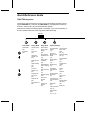
Setting 3: RECALL INTERVAL
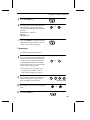
This sets the amount of time your fax will wait between automatic redials
when the line is busy. Enter "01" for 1 minute, "02" for 2 minutes, etc., up to a
maximum of 15 minutes.
• Initial setting: "05"
Setting 4: RECALL TIMES
This sets the maximum number of times your fax will automatically redial if
the line is busy. Enter any number from "00" to "15".
• Initial setting: "02"
Setting 5: TEL/FAX REMOTE NUMBER
This sets the 1-digit number for activating fax reception from an extension
telephone. Enter any number from "0" to "9".
• Initial setting: "5"
Setting 6: REMOTE RECEPTION SELECT
This turns detection of the code for activating fax reception from an extension
phone on or off. Press "1" to turn detection on, or "2" to turn detection off.
• Initial setting: "1"
Setting 7: TRANSACTION REPORT PRINT SELECT
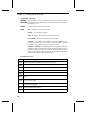
This sets the condition for printing out a Transaction Report. Enter a number
from "1" to "5" as follows:
"1" (ALWAYS PRINT): A report will be printed after each transmission,
reception, or error.
"2" (ERR/TIMER/MEM): A report will be printed after an error, timer
operation, or memory operation.
"3" (SEND ONLY):
A report will be printed only after a transmission.
"4" (NEVER PRINT):
A report will never be printed.
"5" (ERROR ONLY):
A report will be printed only after an error occurs.
• Initial setting: "5"
Setting 8: DIAL MODE
This sets the mode of dialing. Press "1" if you are on a touch-tone line, or "2" if
you are on a pulse dial line. (If you don’t know which type of line you have,
try making phone calls with both settings and see which one works.)
• Initial setting: "1"
74