1
REAR FLASH SYNC
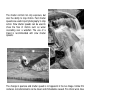
Rear flash sync is used with long exposures to make
trailing lights or blurring appear to follow rather than
proceed the subject. The effect is not apparent if the
shutter speed is too fast and stops the subject’s
motion.
When the shutter is released, a pre-flash will fire. This
pre-flash does not exposure the subject, but is used in
the calculation of the flash exposure. The flash will fire
again just before the shutter closes.
Camera Notes
Slow shutter sync can be set in P and A exposure modes. This flash mode controls the shutter
and aperture to balance the ambient and flash illumination. When photographing a subject
outside at night, the ambient-light exposure will be balanced to bring out the details in the
background with the flash exposure for the subject. Because shutter speeds can be longer than
usual, the use of a tripod is recommended.
1. Set the camera to the P or A exposure mode (p. 50).
2. Frame the subject on the monitors.
3. Press and hold the AE lock button to lock the exposure.
4. Press the shutter-release button partway down to lock the focus. Compose the
image on the monitors.
5. Press the shutter-release button all the way down to take the picture.
The operation of the AE lock button can be changed in section 1 of the recording menu.
System Accessories
The Close-up Diffuser CD-1000 is used directly on the camera with the built-in flash to provide
soft lighting for close-up photography. Contact your local Minolta dealer for more information.
87
WIRELESS / REMOTE FLASH
On-camera
flash
Wireless/Remote flash allows the camera to control
an off-camera Minolta 5600HS(D) and 3600HS(D)
flash unit without the need of a cable. Single or
multiple flash units can be placed around the subject
to create different lighting effects.
The camera’s built-in flash fires to control the offcamera flash units rather than to illuminate the
subject. See your local camera dealer about Minolta
lighting accessories.
Wireless/
Remote
flash
Slide the cap off the accessory shoe (p. 75).
Slide the Minolta 5600HS(D) or 3600HS(D) flash on
the accessory shoe until the safety lock engages.
Turn on the camera and flash unit.
Image size
Quality
Flash mode
Flash control
AEL button
Reset
88
RECORDING
Fill-flash
Red eye
Rear sync.
Wireless
MENU
Set the camera to the wireless flash mode in section
1 of the recording menu (p. 80). This will
simultaneously set the flash to the wireless mode
and set the camera to the flash’s wireless channel.
1
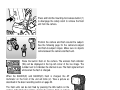
Press and hold the mounting-foot-release button (1)
to disengage the safety catch to remove the flash
unit from the camera.
Position the camera and flash around the subject.
See the following page for the camera-to-subject
and flash-to-subject ranges. Make sure no objects
come between the camera and flash unit.
Raise the built-in flash on the camera. The wireless flash indicator
(WL) will be displayed in the top left corner of the live image. The
number next to it indicates the channel in use. The flash signal will turn
white when the flash is charged.
When the 5600HS(D) and 3600HS(D) flash is charged, the AF
illuminator on the front of the unit will blink (2). Take a picture as
described in the basic recording section on page 33.
The flash units can be test fired by pressing the AEL button on the
camera. If the flash does not fire, change the camera, flash, or subject
position. The slow-shutter-sync function will be active in P and A
exposure modes (p. 87).
2
89
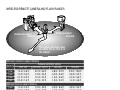
WIRELESS/REMOTE CAMERA AND FLASH RANGES
Camera-to-subject
distance
Flash-to-subject
distance
The camera and flash must
be within 5m or 16.4 ft of
the subject.
Minimum camera-to-subject distance
Camera sensitivity setting
Aperture
ISO 100
ISO 200 / AUTO
ISO 400
2.0 m / 6.6 ft
2.8 m / 9.2
1.4 m / 4.6 ft
ƒ/2.8
1.0 m / 3.2 ft
1.4 m / 4.6 ft
2.0 m / 6.6
ƒ/4.0
0.7 m / 2.3 ft
1.0 m / 3.2 ft
1.4 m / 4.6
ƒ/5.6
ƒ/8.0
0.5 m / 1.6 ft
0.7 m / 2.3 ft
1.0 m / 3.2
Minimum flash-to-subject distance
1.0 m / 3.2 ft
1.4 m / 4.6 ft
2.0 m / 6.6
ƒ/2.8
0.7 m / 2.3 ft
1.0 m / 3.2 ft
1.4 m / 4.6
ƒ/4.0
0.5 m / 1.6 ft1
0.7 m / 2.3 ft
1.0 m / 3.2
ƒ/5.6
0.7 m / 2.3
0.5 m / 1.6 ft1
ƒ/8.0
0.4 m / 1.3 ft2
ft
ft
ft
ft
ISO 800
3.9 m / 12.8 ft
2.8 m / 9.2 ft
2.0 m / 6.6 ft
1.4 m / 4.6 ft
ft
ft
ft
ft
2.8
2.0
1.4
1.0
m
m
m
m
/
/
/
/
9.2
6.6
4.6
3.2
ft
ft
ft
ft
1 Maximum flash-to-subject distance for the 3600HS(D) for these conditions is 3.5 m / 11.5 ft.
2 Maximum flash-to-subject distance for the 3600HS(D) for these conditions is 2.5 m / 8.2 ft.
90
RECORDING
MENU
NOTES ON WIRELESS/REMOTE FLASH
Wireless/Remote flash performs best under subdued light or interior lighting. Under bright
light sources, the flash may not be able to detect the control signals from the camera’s
built-in flash.
The wireless/remote system has four channels so that multiple lighting systems can be
used in the same area without affecting each other. Once the camera and flash are
separated, the wireless channel can be changed. Refer to the flash’s instruction manual
on how the set the wireless channel. The flash and the camera must be set to the same
channel.
When not using off-camera flash units, always turn off the wireless flash mode in section
1 of the recording menu, or inaccurate flash exposures will result. The 5600HS(D) and
3600HS(D) flash units can be reset simultaneously with the camera. Simply mount the
flash unit in the accessory shoe and change the wireless flash mode setting on the menu
to another flash mode.
This camera does not have a preset flash sync speed. In program (P) or aperture-priority
(A) exposure mode, the shutter speed will not fall below the camera-shake limit unless
the slow-sync function is activated (p. 87). When using shutter-priority (S) or manual (M)
exposure mode, any shutter speed can be used in the exposure.
The flash can synchronize with the camera at any shutter speed, the 5600HS(D) and
3600HS(D) high-speed sync function is unnecessary. When using flash, the shutter
speed should be set to the flash duration of flash unit to prevent underexposure. A
maximum shutter speed of 1/250s is recommended when using a compatible Minolta
flash unit. The Wireless/Remote Flash Controller is not compatible with this camera.
91
FLASH CONTROL
ADI, pre-flash TTL, and manual flash controls are available. Flash control is changed in
section 1 of the recording menu (p. 80).
ADI (Advanced Distance Integration) flash metering - combines distance information
from the autofocusing system with information from a pre-flash exposure. Unlike
conventional TTL flash metering, ADI is not influenced by the reflectance of the subject
or background ensuring optimum flash exposures.
Pre-flash TTL - calculates flash exposure with a pre-flash only. This mode must be used
when using close-up filters or filters that reduce the amount of light entering the camera
such as neutral density filters. Pre-flash TTL must be used when a diffuser is attached to
the built-in flash or an external flash unit.
The camera will automatically switch from ADI metering to pre-flash TTL when a lowcontrast subject is preventing the autofocus system from focusing. If the autofocus
system cannot lock on the subject, use manual focus; the ADI metering will remain in
effect.
Manual flash control - fires the flash at full power, 1/2, 1/4, 1/8, or 1/16 power. Because
no pre-flash is used, it can be used to fire slave flash units. Manual flash cannot be used
with red-eye reduction or wireless.
1
2
Power ratio
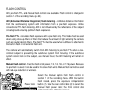
Select the manual option from flash control in
section 1 of the recording menu. With the built-in
flash raised, press the exposure compensation
button (1). Use the rear control dial (2) to select the
manual flash power ratio; the front control dial
compensates the ambient exposure.
Press the shutter-release button partway down or
press the exposure-compensation button to to
complete the operation. The power ratio and the
manual flash indicator is displayed on the monitors
when the flash is raised.
92
RECORDING
MENU
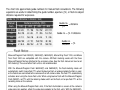
The chart lists approximate guide numbers for manual flash calculations. The following
equations are useful in determining the guide number, aperture (ƒn), or flash-to-subject
distance required for exposures.
Guide no. (for distance in meters / feet)
Camera sensitivity (ISO)
Manual
flash
100
200
400
800
8 / 26
11 / 36
16 / 52 22 / 72
1/1 (Full)
1/2
5.6 / 18
8 / 26
11 / 36
16 / 52
5.6 / 18
8 / 26
11 / 36
1/4
4 / 13
4 / 13
1/8
2.8 / 9.2
5.6 / 18
8 / 26
1/16
2 / 6.6
2.8 / 9.2
4 / 13
5.6 / 18
Guide no.
= distance
ƒn.
Guide no. = ƒn. X distance
Guide no.
= ƒn.
distance
Flash Notes
Maxxum/Program Flash 2500(D), 3600HS(D), 5600HS(D), Macro Ring Flash 1200, and Macro
Twin Flash 2400 are compatible with this camera. ADI flash metering works with the three
Maxxum/Program flashes attached to the accessory shoe. See the flash manual on how to set
ADI metering. The use of other flash units is not recommended.
With the Maxxum/Program Flash 5600HS(D) and 3600HS(D), the flash-metering mode will
automatically switch to pre-flash TTL when the bounce-flash or wireless/remote function is used,
or the flashes are connected to the camera with an off-camera cable. Pre-flash TTL automatically
activates when using the macro flash units. When using bounce flash with the Maxxum/Program
Flash 2500(D), set TTL with the metering mode switch on the flash unit or pre-flash TTL on the
recording menu on the camera.
When using the Maxxum/Program flash units, if the flash illumination is uneven at the camera’s
wide-angle lens position, attach the wide-angle adapter to the flash units. With the 3600HS(D),
also change the flash metering mode to pre-flash TTL. When the auto-zoom function is used with
the Maxxum/Program 3600HS(D) and 5600HS(D) flash units, the flash’s zoom setting will be
wider than the lens setting.
When using the Macro Ring Flash 1200 or Macro Twin Flash 2400 in macro mode (p. 49), light
fall off toward the edges of the frame may be noticeable at the wide-angle macro lens position.
93
AEL BUTTON
When the AEL button is pressed and held, the exposure is locked.
The exposure remains locked after an image has been captured
until the AEL button has been released (hold setting) or pressed
again (toggle setting). How the button operates can be changed in
section 1 of the recording menu (p. 80).
Menu option
AE hold
The default setting. Press and hold the AEL button to lock the
exposure. The exposure remains locked until the AEL button is
released.
AE toggle
Press and release the AEL button to lock the exposure. To cancel the
exposure lock, press the AEL button again.
AE hold
Exposure is determined with the spot metering area. Press and hold
the AEL button to lock the exposure; the spot circle is displayed. The
exposure remains locked until the AEL button is released.
AE toggle
Exposure is determined with the spot metering area. Press and
release the AEL button to lock the exposure; the spot circle is
displayed. To cancel the exposure lock, press the AEL button again.
These menu options do not affect the operation of the manual shift function (p. 56).
94
RECORDING
MENU
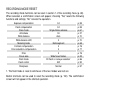
RECORDING MODE RESET
The recording mode functions can be reset in section 1 of the recording menu (p. 80).
When selected, a confirmation screen will appear; choosing “Yes” resets the following
functions and settings, “No” cancels the operation.
Exposure compensation
Flash compensation
Drive mode
Anti-shake
White balance
White-balance shift
Metering mode
Contrast compensation
Color-saturation compensation
Filter
Focus area
Flash mode
Flash control
Sharpness
0.0
0.0
Single-frame advance
On
Auto
0
Multi-segment
0
0
0
Wide focus frames
Fill flash or red-eye reduction1
ADI
Normal
p.
p.
p.
p.
p.
p.
p.
p.
p.
p.
p.
p.
p.
p.
59
59
61
37
70
70
69
78
77
78
33
86
92
97
1. The flash mode is reset to whichever of the two modes was last set.
Button shortcuts can be used to reset the recording mode (p. 132). The confirmation
screen will not appear in the shortcut operation.
95
INTERVAL SETUP
The parameters for the interval drive mode (p. 66) are set in section 2 of the recording
menu (p. 80).
Int. set
Bracket set
Select “Enter” in the interval-set option in section 2
of the recording menu. Press the center of the
controller to open the setup screen.
Enter
Int. set
Interval
No.of frames
Start time
On the setup screen, use the up/down controller
keys to highlight the parameter to be changed
and then press the right controller key. Use the
up/down keys to change the parameter. Use the
left controller key to return to the parameters.
Continue until the parameters are set.
1 min
2
No delay
:enter
press the center of the controller to complete the operation. The menu button
closes the screen and cancels any changes.
BRACKETING SETUP
When making an exposure bracket (p. 62), the exposure difference among frames can
be set to 0.3EV or 0.5Ev. This is set in section 2 of the recording menu (p. 80).
Normal
Under
Over
0.3 Ev
bracket
96
RECORDING
MENU
0.5 Ev
bracket
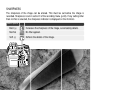
SHARPNESS
The sharpness of the image can be altered. This must be set before the image is
recorded. Sharpness is set in section 3 of the recording menu (p. 80). If any setting other
than normal is selected, the sharpness indicator is displayed on the monitors.
Menu options
Hard (+)
Increases the sharpness of the image, accentuating details.
Normal
No filter applied.
Soft (–)
Softens the details of the image.
Soft
Normal
Hard
97
DATA IMPRINTING
Data can be printed on a still image and saved to the file’s Exif data. The function must
be activated before the image is taken. Once activated, data will continue to be imprinted
until the function is reset; a yellow bar is displayed behind the frame counter on the
monitors to indicate the function is active. Data imprinting is selected in section 2 of the
recording menu (p. 80). Data imprinting cannot be used with TIFF or RAW images. Only
one imprinting format can be used with each image.
Menu option
Off
YYYY/MM/DD
MM/DD/hr:min
Text
Text + ID#
Data imprinting function disabled.
Prints the year, month, and day the image was taken. The date
format can be changed with Date/Time set option in section 2 of the
setup menu (p. 30).
Prints the date and time the image was taken.
To imprint alphanumeric characters. When this option is selected,
the electronic keyboard opens (p. 99).
To imprint text with a serial number. As each successive image is
captured, the ID number will increase by one. When this option is
selected, the electronic keyboard opens (p. 99). The serial number is
reset every time this option is selected.
The data can be imprinted in the lower right corner of the
image when viewed horizontally as well as to the file’s Exif
data, or to the Exif data only. The Exif data can be seen with
the DiMAGE Viewer software. The imprinting location is
selected with the imprint-to option in section 2 of the menu.
Int. set
Bracket set
Data imprint
Imprint to
Inst.playback
Voice memo
98
RECORDING
MENU
–
0.3Ev
Text
Image + Exif
Off
Off
Imprinting
indicator
ELECTRONIC KEYBOARD
The electronic keyboard is used to enter text for imprinting data or for naming new
folders. The keyboard automatically appears when text needs to be entered.
To enter text, simply use the four-way
keys of the controller to highlight the
desired character and then press the
central button of the controller to enter it.
Highlight the case key and press the
center of the controller to switch between
upper case, lower case, and Japanese;
the change is immediately displayed on
the keyboard.
Text block
Case key
:move
:del
To enter the text and complete the
operation, highlight the enter key and
press the controller. To cancel the
operation, press the menu button.
:sel.
QV/delete
button
Enter key
To delete text, move the cursor into the text block at the top of the screen. Use the cursor
to highlight the character to be deleted. Press the QV/delete button to delete the
character.
To replace a character, highlight the character in the text block then highlight the new
character on the keyboard. Press the center button of the controller to replace the
character.
Camera Notes
While the Japanese character set can be imprinted directly on the image, the Exif data may not
be correctly displayed with the DiMAGE Viewer because of the limits of the computer’s operating
system.
99
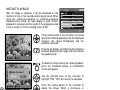
INSTANT PLAYBACK
After an image is captured, it can be displayed on the
monitors for two or ten seconds before being saved. When
using the continuous-advance or continuous-advance
bracketing drive mode, an index display is used. Instantplayback is activated and the length of the playback period
is set in section 2 of the recording menu (P. 80).
Int. set
Bracket set
Data imprint
Imprint to
Inst.playback
Voice memo
–
Off
Off
Image + Exif
10 sec.
Off
If the central button of the controller is pressed
during the instant playback period, the displayed
image(s) are saved immediately and the
playback canceled.
Pressing the display-information button switches
between displaying the image with and without
the guidance bar.
:delete
:store
/
To delete an image during the instant playback,
press the QV/delete button. A confirmation
screen will appear.
Delete this frame?
No
Yes
:delete
Press the central button of the controller to
delete the image. When a continuous or
bracketed series of images is captured, the
entire series will be erased.
:store
/
100
RECORDING
Use the left/right keys of the controller to
highlight “YES.” “NO” will cancel the operation.
MENU
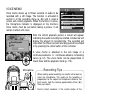
VOICE MEMO
Voice memo allows up to fifteen seconds of audio to be
recorded with a still image. The function is activated in
section 2 of the recording menu (p. 80) and is used in
unison with instant playback. When the function is active,
the microphone indicator is displayed on the monitors.
Voice memo must be set before taking a picture. It will
remain in effect until reset.
Recording audio.
:stop
Int. set
Bracket set
Data imprint
Imprint to
Inst.playback
Voice memo
–
Off
Off
Image + Exif
10 sec.
On
After the instant playback period, a screen will appear
indicating the audio recording has started. A status bar will
display the amount of recorded time. The recording will
stop when the fifteen second recording period has ended
or by pressing the center button of the controller.
A voice memo is attached to the last image of a
continuous-advance or continuous-advance bracketing
series (p. 61). The voice memo can be played back in
Quick View and the playback mode (p. 115).
Microphone
Recording Tips
When making audio recordings, be careful not to touch or
cover the microphone. The quality of the recording is
proportional to the subject to microphone distance. For
best results, hold the camera approximately 20cm (8in)
from your mouth.
During instant playback, if the central button of the
controller is pressed, the image is saved and the voicememo recording starts. If the shutter-release button is
pressed partway down, the image is saved and the voicememo recording is canceled.
101
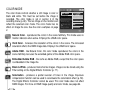
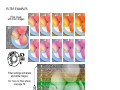
COLOR MODE
The color mode controls whether a still image is color or
black and white. This must be set before the image is
recorded. The color mode is set in section 2 of the
recording menu (p. 80). The live image on the monitors will
reflect the selected color mode. The color mode has no
effect on image file size. See the color examples on page
2.
Color mode
Sharpness
Noise reductn
Monitor amp.
Manual exp.
Mag. button
Vivid (sRGB)
Nat. (sRGB)
Adobe RGB
EmbedAdobeRGB
B&W
Solarization
Natural Color - reproduces the colors in the scene faithfully. This mode uses no
monitor indicator when active. Employs the sRGB color space.
Vivid Color - increases the saturation of the colors in the scene. The increased
saturation affects the RAW image data. Employs the sRGB color space.
Adobe RGB - like Natural Color, this color mode reproduces the colors in the
scene faithfully, but uses the extended gamut of the Adobe RGB color space.
Embedded Adobe RGB - the same as Adobe RGB, except that the color space
is embedded in the image file.
Black & White - produces monochrome images. Images can be toned using the
Filter setting on the Digital Effects Controller (p. 77).
Solarization - produces a partial reversal of tones in the image. Exposure
compensation function can be used to accentuate the solarization effect (p. 59).
The Digital Effects Controller cannot be used. This color mode does not affect
RAW images. For more on RAW image quality and color mode, see page 84.
102
RECORDING
MENU
ABOUT ADOBE RGB
Adobe RGB has a larger color gamut than the more common sRGB. The size of the
gamut limits the colors that can be reproduced; the larger the gamut, the more colors. If
the image will be printed out with a high-quality printer, the use of the Adobe RGB color
mode is recommended over the sRGB color modes of Natural and Vivid Color.
Color matching must be used when opening Adobe-RGB image files. The use of
embedded Adobe RGB is recommended. When using the DiMAGE Viewer, the color
matching function must be active and the color space set to Original Color Space (Adobe
RGB) in the color preferences window, see color matching in the advanced setup section
in the DiMAGE Viewer manual. DiMAGE Viewer version 2.2 or later is required to open
Adobe RGB images taken with this camera.
NOISE REDUCTION
This function reduces the affect of dark noise caused by
long exposures. Noise reduction is only applied to
exposures of one second or longer. Processing is applied to
each image after it is captured. The monitor remains blank
during processing for a maximum of 30 seconds. Noise
reduction uses dark-frame subtraction.
Color mode
Sharpness
Noise reductn On
Monitor amp. Off
Manual exp.
Mag. button
103
MONITOR AMPLIFICATION
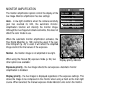
The monitor amplification options control the display of the
live image. Monitor amplification has two settings:
Auto - in low-light conditions when the camera-sensitivity
gain has reached its limit, the automatic monitoramplification function will intensify the monitor image.
Although the live image turns black and white, this does not
affect the color mode in use.
Color mode
Sharpness
Noise reductn
Monitor amp.
Manual exp.
Mag. button
Nat. (sRGB)
Normal
On
Auto
Exp.priority
Digital zoom
When the automatic monitor amplification activates, the
Flex Digital Magnifier (p. 105) cannot be used. If the realtime histogram (p. 45) is used, it will reflect the amplified
image and not the final values of the exposure.
Normal - the monitor image is not amplified in low light.
When using the manual (M) exposure mode (p. 56), two
other options are available:
Display-priority indicator
Exposure priority - the live image reflects the set exposure. Automatic monitor
amplification is disabled.
Display priority - the live images is displayed regardless of the exposure settings. This
allows the image to be composed on the monitor when using a flash as the main light
source. When selected, the manual exposure mode indicator turns red on the monitor.
104
RECORDING
MENU
MAGNIFICATION BUTTON
The function assigned to the magnification button can be
changed between the digital zoom (p. 47) and the Flex
Digital Magnifier in section 3 of the recording menu (p. 80).
The Flex Digital Magnifier can only be used during manual
focus. Button shortcuts can be used to switch between the
digital zoom and Flex Digital Magnifier (p. 132).
Color mode
Sharpness
Noise reductn
Monitor amp.
Manual exp.
Mag. button
Nat. (sRGB)
Normal
On
Auto
Exp.priority
Digital zoom
FLEX DIGITAL MAGNIFIER
2
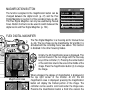
The Flex Digital Magnifier is a focusing aid for manual focus
(p. 46). The live image can be magnified by X2 and X8. It is
activated with the recording menu, see above. This function
is disabled in the other focusing modes.
1
Magnification area
Initially, the 2X magnification area is displayed. This
can be moved in the live image with the four-way
keys of the controller (1). Pressing the center button
of the controller returns the area to the middle of the
image. Press the magnification button (2) to enlarge
the image.
When enlarged, the degree of magnification is displayed in
the top right corner of the monitor. At 2X, the 8X
magnification area is displayed; pressing the magnification
button will display the framed portion of the image. The
controller can be used to scroll and center the image area.
Pressing the magnification button a third time cancels the
function.
The locator indicator shows which portion of the image is
displayed. When the shutter-release button is pressed
partway down, the entire image area is displayed.
Locator indicator
105
DSP (DIGITAL SUBJECT PROGRAM) SETUP
The memory registers used for camera settings can be
assigned to the Digital Subject Program positions on the
exposure-mode dial. This is set in section 4 of the recording
menu (p. 80). Two options are available:
DSP set
Tracking AF
AE lock
Spot AE area
Direct MF
DSP
On
On
Center spot
Off
DSP - the Digital Subject Programs are active on the
exposure-mode dial.
Memory recall - the memory register are assigned to the
Digital Subject Program positions as indicated in the
illustration.
For more about Digital Subject Programs, see page 58. To
save camera settings turn to page 72.
TRACKING AF
Subject Tracking AF used in the continuous AF focus mode (p. 46) can be turned off in
section 4 of the recording menu (p. 80). When off, the position of the focus area can still
be changed with the four-way keys of the controller.
AE LOCK
AE (autoexposure) lock can be turned off and on in section
4 of the recording menu (p. 80). When AE lock is on, the
exposure is locked when the shutter-release button is
pressed partway down; the shutter speed and aperture
displays turn black to confirm the exposure lock. When AE
lock is off, the exposure continues to change with the
lighting conditions when the shutter-release button is
pressed partway down. This has no affect on the operation
of the AEL button (p. 50). When using single-shot AF with
multi-segment metering, AE lock is always active Exposure locked
regardless of the menu setting.
106
RECORDING
MENU
SPOT AE AREA
When using spot metering (p.
69) with the Flex Focus Point
(p. 48), the position of the spot
metering area can be specified
at the center of the live image
or linked to the Flex Focus
Point; the spot moves after the
position of the FFP is set. This
is set in section 4 of the
Center spot
recording menu (p. 80).
With Flex Focus Point
DIRECT MANUAL FOCUS
Direct manual focus allows manual adjustments to be made after the AF system has
locked onto the subject. Direct manual focus is activated in section 4 of the recording
menu (p. 80). Direct manual focus is canceled when continuous AF or manual focus (p.
46) is in use.
As described in the basic recording operation
section (p. 33), press the shutter-release button
partway down to lock the focus (1); the focus
signal will turn white. “DMF” will be displayed next
to the drive-mode indicator.
1
While holding the shutter-release button partway
down, the camera can be manually focused with
the focusing ring (2). Always use the monitor
image to confirm focus. The approximate focusing
distance is displayed next to the frame counter. If
active, the Flex Digital Magnifier (p. 105) can be
used.
2
107
A SHORT GUIDE TO PHOTOGRAPHY
Photography can be a rewarding pursuit. It is a broad and disciplined field that can take
years to master. But the pleasure in making photographs and the joy of capturing a
magical moment cannot be compared. The guide is an introduction to some basic
photographic principles.
The lens aperture controls not only exposure, but also depth of field; the area between
the closest object in focus and the furthest object in focus. The larger the aperture value,
the greater the depth of field and the longer the shutter speed needed to make the
exposure. The smaller the aperture value, the shallower the depth of field and the faster
the shutter speed needed to make
the exposure. Usually landscape
photographs use a large depth of
field (large aperture value) to keep
the foreground and background in
focus, and portraits use a shallow
depth of field (small aperture value)
to separate the subject from the
background.
Depth of field also changes with focal
length. The smaller the focal length,
the greater the depth of field; the
longer the focal length, the shallower
the depth of field.
108
A SHORT
GUIDE TO PHOTOGRAPHY
The shutter controls not only exposure, but
also the ability to stop motion. Fast shutter
speeds are used in sport photography to stop
action. Slow shutter speeds can be used to
show the flow of motion such as water
cascading over a waterfall. The use of a
tripod is recommended with slow shutter
speeds.
The change in aperture and shutter speed is not apparent in the live image. Unlike film
cameras, test photographs can be taken and immediately viewed. For critical work, take
a test photograph at the set aperture or shutter speed and view the result in Quick View
(p. 40). The image can be deleted if not acceptable and another test image can be taken
at a different setting.
109
ABOUT EXPOSURE AND FLASH COMPENSATION
Sometimes the camera’s exposure meter is deceived by certain conditions. Exposure
compensation can be used in these situations. For example, a very bright scene, such
as a snowy landscape or a white sandy beach, can appear too dark in the captured
image. Before taking the picture, adjusting the exposure by +1 or +2 EV will result in an
image with normal tonal values.
Calculated camera exposure
–1.0Ev
–2.0Ev
In the example above, the dark water caused the camera to overexpose the image
making it bright and washed-out. By compensating the exposure, detail is brought out in
the leaves, and the stones and water appear richer.
When using fill-flash to reduce harsh shadows caused by bright illumination or direct
sunlight, flash compensation can change the ratio between the highlights and shadows.
The fill-flash will affect the darkness of the shadows without affecting the area illuminated
by the main light source. By decreasing the flash output with a negative Ev setting, the
shadows receive less light and are harder, but subtle details in the shadows that would
not appear without the flash are apparent. Increasing the flash output by using a positive
Ev setting softens and nearly eliminate shadows.
Positive compensation
110
A SHORT
No compensation
GUIDE TO PHOTOGRAPHY
Negative compensation
No flash
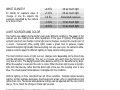
WHAT IS AN EV?
Ev stands for exposure value. A
change of one Ev adjusts the
exposure calculated by the camera
by a factor of two.
+2.0 Ev
+1.0 Ev
0.0 Ev
–1.0 Ev
–2.0 Ev
4X as much light
2X as much light
Calculated exposure
1/2 as much light
1/4 as much light
LIGHT SOURCES AND COLOR
The human eye adapts itself extremely well under different conditions. The paper of this
manual you are reading looks white regardless of the type of lighting. Photographic
systems are much less flexible. As the light source changes, so does the overall color of
a scene - fluorescent office ceiling lights create a green cast to pictures, regular
household tungsten light bulbs make everything red. Like your eyes, the camera’s whitebalance controls adjust for different lighting to make natural looking pictures.
The most common source of light, our sun, changes color depending on the time of day
and the atmospheric conditions. The sun is of course very warm near the horizon and
very blue at noon. The daylight preset white-balance setting is for beautiful sunny days.
When the weather is overcast, the color is cooler. When the main light source is skylight,
light from the blue sky rather than the direct light of the sun, the resulting color is very
blue. The shade preset white-balance is designed for this condition.
Artificial lighting is more consistent but will show variations. Tungsten lamps become
warmer as their wattage decreases. And fluorescent lamps come in classifications that
define their color. The preset white balance settings can be adjusted with the rear control
dial (p. 70) to match the change in these light sources.
Some artificial lighting have a discontinuous spectrum that create very unnatural color in
a photograph. White balance cannot correct high-energy vapor lighting: sodium-vapor
(yellow highway lights), or mercury vapor. For portraits under these lighting conditions,
the flash can be used to overpower the ambient light. With landscapes containing these
types of lights, set the white balance to the preset daylight setting.
111
MOVIE MENU
In movie mode, press the menu button to activate the menu. The menu button also
closes the menu after making settings. The four-way key of the controller is used to move
the cursor in the menu. Pressing the central button of the controller will enter a setting.
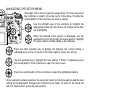
NAVIGATING THE MOVIE MENU
Activate the recording menu with the menu button. Tab 1
at the top of the menu will be highlighted.
Use the up/down key to scroll through the menu options.
Highlight the option whose setting needs to be changed.
Press the right controller key to display the settings; the
current setting is indicated by an arrow. To return to the
menu options, press the left key.
Use the up/down key to highlight the new setting. If “Enter” is displayed, press
the central button of the controller to continue.
Press the central button of the controller to select the highlighted setting.
Movie mode
Reset
112
MOVIE
Auto select
–
MENU
Once a setting has been selected, the cursor will return to
the menu options and the new setting will be displayed.
Changes can continue to be made. To return to the movie
mode, press the menu button.
MOVIE MODE
The movie mode option selects the type of movie recorded. Three options are available
on the movie menu:
Standard movie - to record a color movie under normal lighting conditions.
Night Movie - to record under low light levels. Night Movies are black and white. While
Night Movies can be recorded under normal conditions, bright outdoor lighting may be
beyond the exposure control range.
Auto select - automatically switch between standard and Night Movie modes depending
on the lighting conditions. When recording, the mode is fixed.
MOVIE RESET
This menu function resets the movie mode. When selected, a confirmation screen will
appear; choosing “Yes” resets the following functions and settings, “No” cancels the
operation.
Exposure compensation
Contrast compensation
Color-saturation compensation
Filter
White balance
Movie mode
Anti-shake
0.0
0
0
0
Auto
Auto select
On
p. 59
p. 78
p. 77
p. 78
p. 70
p. 113
p. 37
Button shortcuts can be used to reset the recording mode (p. 132). The confirmation
screen will not appear in the shortcut operation.
113
NOTES ON MOVIE RECORDING
The list below indicates which functions can be set in the movie mode:
Available recording functions
Exposure compensation (p. 59)
Anti-shake (p. 37)
Contrast compensation (p. 77)
Display information button (p. 45)
Color-saturation compensation (p. 77)
Manual focus (p. 46)
Filter (disabled with Night Movies)(p. 77)
Macro mode (p. 49)
White balance (p. 70)
To make custom white-balance calibrations can only be made in the recording mode.
Once made, the setting are available for movie recording.
The movie mode’s motion JPEG image is 320 X 240 pixels (QVGA). The effective image
area is 316 X 240 pixels; two thin lines appear to the left and right of the image when
played back.
114
MOVIE
MENU
ADVANCED PLAYBACK
This section covers how to playback voice memos as well as the playback mode’s menu
functions. The menu navigation section covers basic menu operation. It is followed by
detailed descriptions of the menu settings.
PLAYING BACK VOICE MEMOS
Voice memos can be played back in Quick View and the playback mode. See page 101
on how to record voice memos.
Voice memos are indicated by the voice-memo
indicator displayed at the bottom of the monitor
image.
Play
Press the central button of the controller to start
the audio playback.
During playback, use the up/down keys of the
controller to adjust the volume.
Press the menu button to cancel audio
playback.
Stop
Vol
Playback time
115
NAVIGATING THE PLAYBACK MENU
In playback mode, press the menu button to activate the menu. The
menu button also closes the menu after making settings. The fourway key of the controller is used to move the cursor in the menu.
Pressing the central button of the controller will enter a setting.
Activate the playback menu with the menu button. Tab 1
at the top of the menu will be highlighted.
Use the left/right keys of the controller to highlight the
appropriate menu tab; the menus will change as the tabs
are highlighted.
When the desired menu section is displayed, use the up/down key to scroll
through the menu options. Highlight the option whose setting needs to be
changed.
Press the right controller key to display the settings; the current setting is
indicated by an arrow. To return to the menu options, press the left key.
Use the up/down key to highlight the new setting. If “Enter” is displayed, press
the central button of the controller to open the next screen.
Press the central button of the controller to select the highlighted setting.
Once a setting has been selected, the cursor will return to the menu options and the new
setting will be displayed. Changes can continue to be made. To return to the playback
mode, press the menu button.
116
ADVANCED
PLAYBACK
To delete images on the memory card (p. 119).
Delete
Format
View folder
Lock
Copy
Index format
–
–
100MLT16
–
–
9 frames
To format the memory card (p. 120).
To select the folder to view in playback mode (p. 120).
To protect images from deletion (p. 121).
To copy images from one memory card to another (p. 122).
To specify the index playback format (p. 121).
To play back images automatically (p. 124)
Slide show
Playback
Duration
Repeat
–
All frames
5 sec.
No
To select the images for the Slide Show (p. 124).
To specify how long each image is played back (p. 124)
To repeat the Slide Show presentation automatically (p. 124).
To select images for DPOF printing (p. 126).
DPOF set
–
Index print Off
Cancel print –
To create an index print with the DPOF order (p. 127)
To cancel DPOF print orders on the memory card (p. 127).
117
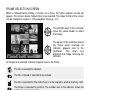
FRAME-SELECTION SCREEN
When a marked-frames setting is chosen on a menu, the frame selection screen will
appear. This screen allows multiple files to be selected. The index format of the screen
can be changed in section 1 of the playback menu (p. 121).
The left/right keys of the controller
move the yellow border to select
the image.
:move
:sel.
:enter
The up key of the controller selects
the frame; when selected, an
indicator appears next to the
thumbnail.
The
down
key
deselects the image removing the
indicator.
As images are selected, indicators appear next to the frame:
The file is selected for deletion.
The file is locked or selected to be locked.
The file is selected for the slide show or to be copied to another memory card.
The image is selected for printing. The number next to the indicator shows the
number of copies requested.
Press the center button of the controller to complete the operation.
The menu button closes the screen and any operation made.
118
ADVANCED
PLAYBACK
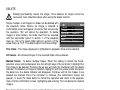
DELETE
Deleting permanently erases the image. Once deleted, an image cannot be
recovered. Care should be taken when using the delete function.
Single, multiple, or all images in a folder can be deleted with
the playback menu. Before an image is deleted, a
confirmation screen will appear; choosing “Yes” will execute
the operation, “No” will cancel the operation. To delete
images in other folders, the folder must first be selected
with the view-folder option in section 1 of the playback
menu (p. 116) or the select-folder option in section 2 of the
setup menu (p. 137). The delete option has three settings:
Delete
Format
View folder
Lock
Copy
Index format
–
–
100MLT16
–
–
9 frames
This frame - The image displayed or highlighted in playback mode will be deleted.
All frames - All unlocked images in the selected folder will be deleted.
Marked frames - To delete multiple images. When this setting is chosen, the frameselection screen will be displayed. Use the left/right keys of the controller to highlight the
first image to be deleted. Pressing the up key will mark the thumbnail with the delete
indicator. To deselect an image for deletion, highlight it with the yellow border and press
the down key; the delete indicator will disappear. Continue until all the images to be
deleted are marked. Press the controller to continue (the confirmation screen will
appear), or press the menu button to cancel the operation and return to the playback
menu. On the confirmation screen, highlighting and entering “Yes” will delete the marked
images.
The delete function will only erase unlocked images. If an image is locked, it must be
unlocked before it can be deleted.
119
FORMAT
When a memory card is formatted, all data on the card is erased.
The formatting function is used to erase all data on a memory card. Before formatting a
card, copy the data to a computer or storage device. Locking files will not protect them
from being deleted when the card is formatted. Always format the memory card using the
camera; never use a computer to format a card.
When the format option is selected and entered, a confirmation screen will appear.
Choosing “Yes” will format the card, choosing “No” will cancel the formatting operation.
never remove the card while it is being formatted. A screen will appear to indicate the
card has been formatted; press the central button of the controller to return to the
playback menu.
Although it is recommended to format a CompactFlash card with the camera, a card can
be formatted with a computer. The card must be formatted on a Windows system using
a FAT or FAT32 file system.
VIEW FOLDER
Recorded images are stored in folders on the memory card.
To view or edit these images, the folder they are contained
in can be selected temporarily with the view-folder option in
section 1 of the playback menu (p. 116). The view-folder
option is reset to the folder selected in the select-folder
option in section 2 of the setup menu (p. 137) each time the
the camera is turned off or switched to the recording or
movie modes.
Delete
Format
View folder
Lock
Copy
Index format
–
–
100MLT16
–
–
9 frames
For more on memory card organization, see page 152. Folders can be created and
selected in section 2 of the setup menu (p. 129).
120
ADVANCED
PLAYBACK
LOCK
Single, multiple, or all images in a folder can be locked. A locked image cannot be deleted
by either the playback menu functions or the QV/delete button. Important images should
be locked. To lock images in other folders, the folder must first be selected with the viewfolder option in section 1 of the playback menu (p. 116) or the select-folder option in
section 2 of the setup menu (p. 137). The lock option has four settings:
This frame - The image displayed or highlighted in playback mode will be locked.
All frames - All images in the folder will be locked.
Marked frames - To lock or unlock multiple images. When this setting is chosen, the
frame-selection screen (p. 118) will be displayed. Use the left/right keys of the controller
to highlight the image to be locked. Pressing the up key will mark the thumbnail with the
lock indicator. To unlock an image, highlight it with the yellow border and press the down
key; the lock indicator will disappear. Continue until all the images are marked. Press the
controller to lock the marked frames, or press the menu button to cancel the operation
and return to the playback menu.
Unlock frames - All images in the folder will be unlocked. A confirmation screen appears.
Locking an image will protect it from a delete function. However, the formatting function
will erase all files on a memory card whether locked or not.
INDEX PLAYBACK FORMAT
The index format option
allows the index playback to
be displayed with four or nine
images. This affects all index
displays.
121
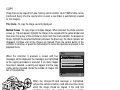
COPY
Image files can be copied from one memory card to another. Up to 15MB of data can be
transferred. Every time the copy function is used, a new folder is automatically created
for the image(s).
This frame - To copy the image currently displayed.
Marked frames - To copy single or multiple images. When selected, the frame-selection
screen (p. 118) will appear; highlight the images to be copied with the yellow border and
then press the up key of the controller to mark it with the check indicator. To deselect an
image, highlight the selected thumbnail and press the down key; the check indicator will
disappear. Continue until all the images are marked. Press the central button of the
controller to continue, or press the menu button to cancel the operation and return to the
playback menu.
When the controller is pressed, a screen with four
messages will be displayed; the messages are highlighted
as the copying procedure is executed. If too many images
have been selected, a warning will appear and the copy
routine will be canceled. Divide the number of images into
two or three batches.
Copy
Copying to camera memory.
Change CF card.
Copying to CF card.
Copying completed.
Enter
When the change-CF-card message is highlighted,
remove the camera’s memory card and insert the card to
which the image should be copied. If the card has
insufficient space, the card-full warning is briefly
displayed; insert a different card or press the menu button
to cancel the routine. Press the central button of the
controller to continue.
122
ADVANCED
PLAYBACK
Wait until the copy-completed message is highlighted. A
new screen will appear to indicate the name of the new
folder containing the copied images; press the central
button of the controller to return to the playback menu.
Copied to
101MLTCP.
OK
If the images were copied to a new card, the no-images message will be displayed when
viewed on the camera. Select the copy folder with the view-folder option in section 1 of
the playback menu (p. 116).
Minolta History
Innovation and creativity has always been a
driving force behind Minolta products. The
Electro-zoom X was purely an exercise in
camera design. It was unveiled at Photokina
in Germany in 1966.
The Electro-zoom X was an electronically
controlled aperture-priority mechanical SLR
with a built-in 30 - 120mm f/3.5 zoom lens
giving twenty 12 X 17mm images on a roll of
16mm film. The shutter-release button and
battery chamber are located in the grip. Only
a few prototypes were built making it one of
Minolta’s rarest cameras.
123
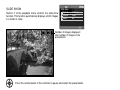
SLIDE SHOW
Section 2 of the playback menu controls the slide-show
function. This function automatically displays all still images
in a folder in order.
Slide show
Playback
Duration
Repeat
–
All frames
5 sec.
No
Number of images displayed /
total number of images in the
presentation.
Press the central button of the controller to pause and restart the presentation.
Use the left/right keys of the controller to advance to the next image or return
to the previous one.
To cancel the presentation, press the menu button or the down key of
the controller.
124
ADVANCED
PLAYBACK
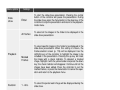
Menu options
Slide
show
Settings
Enter
To start the slide-show presentation. Pressing the central
button of the controller will pause the presentation. During
the slide show, press the menu button or the down key of the
controller to stop the presentation and return to the playbackmode menu.
All frames
To select all the images in the folder to be displayed in the
slide-show presentation.
Marked
Frames
To select specific images in the folder to be displayed in the
slide-show presentation. When this setting is chosen, the
frame-selection screen (p. 118) will be displayed. Use the
left/right keys of the controller to highlight the image to be
included in the presentation. Pressing the up key will mark
the image with a check indicator. To deselect a marked
image, highlight it with the yellow border and press the down
key; the check indicator will disappear. Continue until all the
images have been edited. Press the controller to set the
marked frames, or press the menu button to cancel the operation and return to the playback menu.
1 - 60s.
To select the period each image will be displayed during the
slide show.
Yes / No
Selecting “Yes” will cause the slide show to repeat until it is
canceled using the menu button or the down key of the controller. “No” will end the slide show presentation and return to
the playback-mode menu when all the images have been
displayed once.
Playback
Duration
Repeat
125
ABOUT DPOF
This camera is supported by DPOF™ version 1.1. The DPOF (Digital Print Order Format)
allows direct printing of still images from digital cameras. After the DPOF file is created,
the memory card is simply taken to a photofinishing service or inserted into the memory
-card slot of DPOF compatible printers. When a DPOF file is created, a misc. folder is
automatically made on the memory card to store it (p. 152). DPOF print files cannot be
made for RAW images or images with embedded color profiles (p. 102).
DPOF SETUP
The print menu option is used to set an order for standard
prints from images in a specific folder. Single, multiple, or all
images can be printed. If a memory card has multiple
folders, a printing file must be created for each folder.
Folders are selected with the view-folder option in section 1
of the playback menu (p. 116) or the select-folder option in
section 2 of the setup menu (p. 137).
DPOF set
–
Index print Off
Cancel print –
This-frame - To create a DPOF file for the image displayed or highlighted in playback
mode.
All-frames - To create a DPOF file for all images in the folder specified in section 1 of the
playback menu.
Marked frames - To choose a group of images to be printed or when the number of
copies for each image varies. When selected, the frame-selection screen will appear (p.
118). Use the left/right keys of the controller to highlight an image to be printed. Pressing
the up key will mark the image with the printer indicator. The number next to the indicator
indicates the number of copies of that image will be printed. Pressing the up key will
increase the number of copies, pressing the down key will decrease the number. A
maximum of nine copies can be ordered. To deselect an image for printing, press the
down key until the the number of copies reaches zero and the printer indicator
disappears. Continue until all the images to be printed are marked. Press the controller
to create the DPOF file, or press the menu button to cancel the operation and return to
the playback menu.
126
ADVANCED
PLAYBACK
When the this-frame or all-frames setting is chosen, a screen will appear requesting the
number of copies of each image; a maximum of nine copies can be ordered. Use the
up/down keys of the controller to set the number of copies desired. If the all-frames
setting was used to create a print order, any additional images saved afterwards in the
folder will not be included in the order.
DPOF files created with another cameras will be canceled.
INDEX PRINT
To create an index print of all the images in the folder, select
the Yes option. To cancel an index print, simply change the
setting to “No.” If an index-print order is created, any
additional images saved afterwards in the folder will not be
included in the index print. The number of images printed
per sheet differs between printers. The information printed
with the thumbnails can vary.
CANCEL PRINT
After the pictures have been printed, the DPOF file will still remain on the memory card
and must be canceled manually. The cancel-print option deletes the DPOF files. When
the setting is selected, a confirmation screen will appear; choosing and entering “Yes” will
execute the operation and cancel the print and index-print order.
All frames C - To cancel all printing files on the memory card.
All frames F - To cancel the printing file in the folder.
127
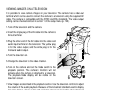
VIEWING IMAGES ON A TELEVISION
It is possible to view camera images on your television. The camera has a video-out
terminal which can be used to connect the camera to a television using the supplied AV
cable. The camera is compatible with the NTSC and PAL standards. The video-output
setting can be checked and set in section 1 of the setup menu (p. 129).
1.Turn off the television and the camera.
2.Insert the single plug of the AV cable into the camera’s
AV-out terminal.
3.Plug the other end of the AV cable into the video and
audio input terminal on the television. The yellow plug
is for the video output, and the white plug is for the
monaural audio output.
4.Turn the television on.
2
3
5.Change the television to the video channel.
6.Turn on the camera and set the mode switch to the
playback position. The camera’s monitors will not
activate when the camera is attached to a television.
The playback-mode display will be visible on the
television screen.
6
7.View images as described in the playback section. Use the television controls to adjust
the volume of the audio playback. Because of the broadcast standard used to display
television images, image quality and resolution will appear lower than when displayed
on a computer monitor.
128
ADVANCED
PLAYBACK
SETUP MENU
The setup menu controls camera operations. The menu
navigation section covers basic menu operation. It is
followed by detailed descriptions of the menu settings.
LCDbrightness –
Shortcut help –
Transfer mode Data storage
EVF auto swtch Auto EVF/LCD
Video output NTSC
Language
English
OPENING THE SETUP MENU
1
The setup menu can be opened two ways.
To access the menu directly, hold down the function
button (1) and press the menu button (2) to open the
setup menu.
2
Image size
Quality
Flash mode
Flash control
AEL button
Reset
2560x1920
Fine
Fill-flash
ADI flash
AE hold
–
The setup menu can be accessed from the
recording, movie, or playback menus.
Use the left/right keys of the controller to highlight
the setup tab. Press the central button of the
controller to open the setup menu.
Setup tab
129
NAVIGATING THE SETUP MENU
See page 129 on how to open the setup menu. The four-way key of
the controller is used to move the cursor in the menu. Pressing the
central button of the controller will enter a setting.
Use the left/right keys of the controller to highlight the
appropriate menu tab; the menus will change as the tabs
are highlighted.
When the desired menu section is displayed, use the
up/down key to scroll through the menu options. Highlight
the option whose setting needs to be changed.
Press the right controller key to display the settings; the current setting is
indicated by an arrow. To return to the menu options, press the left key.
Use the up/down key to highlight the new setting. If “Enter” is displayed, press
the central button of the controller to open the next screen.
Press the central button of the controller to select the highlighted setting.
Once a setting has been selected, the cursor will return to the menu options and the new
setting will be displayed. Changes can continue to be made. To return to the mode set
with the mode switch, press the menu button.
130
SETUP MENU
To set monitor brightness (p. 132).
LCDbrightness –
Shortcut help –
Transfer mode Data storage
EVF auto swtch Auto EVF/LCD
Video output NTSC
Language
English
To display button shortcut information (p. 132).
To specify camera operation with a computer (p. 134).
To set the automatic display function (p. 135).
To switch video output between NTSC and PAL (p. 135).
To set the menu language (p. 135).
To allocate a custom function to the function dial (p. 136)
Custom set
File # memory
Folder Name
Select folder
New folder
Date/Time set
Color mode
Off
Std. form
100MLT16
–
–
To activate file number memory (p. 136).
To select the folder name format (p. 137).
To select the destination folder for recorded images (p. 137).
To create a new folder (p. 138).
To set the camera’s clock and calendar (p. 138).
To reset camera functions (p. 139).
Reset default
Audio signals
Focus signal
Shutter FX
Volume
Power save
–
1
1
1
2
3 min.
To change or turn off audio signals (p. 141).
To change or turn off focus signals (p. 141).
To change or turn off the shutter sound effect (p. 142).
To adjust or turn off the volume of camera signals (p. 142).
To set the auto power save period (p. 142).
To specify when Anti-shake is applied (p. 143).
Anti-shake
Full-time AF
Grip sensor
Ctrl dial set
Manual exp.
Delete conf.
Display + Exp
On
On
SS F/no.
SS F/no.
“No”
To activate Full-time AF (p. 143).
To activate the grip sensor (p. 143).
To customize control dial operation (p. 144).
To customize manual exposure operation (p. 145).
To change the confirmation screen’s default setting (p. 145).
131
LCD BRIGHTNESS
The brightness of the EVF and LCD monitor is set
independently of each other. Select the display to adjust
using section 1 of the setup menu; the corresponding
monitor activates automatically and the brightness screen
is displayed.
Brightness is controlled in eleven levels. Use the
left/right controller keys to adjust the brightness,
the monitor will adjust accordingly. Press the
central button of the controller to set the level and
complete the operation. Press the menu button
to close the screen without applying any
changes.
SHORTCUT HELP
The shortcut help shows button commands to open the
LCD brightness screen, change the focusing screens,
switch between the digital zoom and Flex Digital Magnifier,
open the setup menu, or reset the camera. To close the
help screen, press the menu button.
LCDbrightness Monitor
Shortcut help EVF
Transfer mode
EVF auto swtch
Video output
Language
Set LCD brightness
High
Low
:select
:enter
Shortcut help
i button
Func+i button
Func+ button
Func+Menu butt
Func+QV button
LCDbrightness
Focus screens
Digi.zoom<>
Setup menu
Reset camera
The following shortcuts can be used:
Set LCD brightness
High
Low
Press and hold the display
information button to open the
LCD brightness screen.
:select
132
SETUP MENU
:enter
To display a grid or scale over the
display formats, press and hold the
function button (1) and press the
display-information button (2) to cycle
through the options: grid, scale, and
off. For more on the displays modes,
see page 45.
2
1
Scale
Grid
When using manual focus, a shortcut allows switching
between the digital zoom (p. 47) and the Flex Digital
Magnifier (p. 105). The shortcut is different depending
on which function is selected in the mag. button option
in section 3 of the recording menu.
2
1
Digital zoom selected on the menu
If the digital zoom is not activated, press and hold the
function button (1) then press the magnification button
(2) to cycle the Flex Digital Magnifier among X2.0, X8.0,
and off. The magnification area is not displayed, but the image can be scrolled using the
four-way keys of the controller when magnified. If the digital zoom is active, the display
switches between the digital zoom and the X8.0 magnifier display.
Flex Digital Magnifier selected on the menu
Without the live image magnified, press and hold the function button (1) then press the
magnification button (2) to activate the digital zoom. Press the magnification button to
switch between the digital zoom and the X8.0 magnifier display.
(Continued on the next page.)
133
1
LCDbrightness –
Shortcut help –
Transfer mode Data storage
EVF auto swtch Auto EVF/LCD
Video output NTSC
Language
English
Hold down the function button (1) and press the
menu button (2) to open the setup menu.
2
Hold down the function button (1) and press the
QV/delete button (2) to reset the camera. This shortcut
only resets the recording mode or movie mode
depending on the position of the mode switch. Refer to
page 95 to see which functions reset in the recording
mode, and page 113 for the movie mode.
1
2
TRANSFER MODE
The data-transfer mode specifies whether the camera will act as a mass storage device
or a remote camera when connected to a computer. To download images from the
memory card to the computer, the data storage option should be selected. To capture
images from a computer with a Windows operating system using the DiMAGE Capture
software, the computer-control option should be selected.
DiMAGE Capture software is sold separately. See your local Minolta dealer for
information on this product.
134
SETUP MENU
EVF AUTO SWITCH
This option controls the auto-display function in the recording
and movie mode (p. 39). Two setting are available:
Auto EVF/LCD - the EVF’s eye sensors switch between the
EVF and LCD monitor automatically.
EVF auto on - the LCD monitor is turned off and the eye and
grip sensors activate the EVF when in use. This setting will
help conserve battery power. The grip sensor can be disabled
in section 4 of the setup menu.
VIDEO OUTPUT
Camera images can be displayed on a television (p. 128). The video output can be
changed between NTSC and PAL. North America uses the NTSC standard and Europe
uses the PAL standard. Check which standard is used in your region to play back images
on your television set.
LANGUAGE
The language used in the menus can be changed.
135
CUSTOM SETUP
The one frequently used function can be allocated to the
custom position on the function dial. The function is
selected in section 2 of the setup menu (p. 130). The
following recording functions are available:
Image size (p. 82)
Image quality (p. 82)
Flash mode (p. 86)
Flash control (p. 92)
Sharpness (p. 97)
Color mode (p. 102)
Custom set
File # memory
Folder name
Select folder
New folder
Date/Time set
Image size
Quality
Flash mode
Flash control
Sharpness
Color mode
In the recording mode, the function specified in
the menu is set with the function dial.
1
3
2
3
Turn the function dial to the custom position (1).
Press the function button in the center of the dial
(2). Turn the front or rear control dials to select the
setting (3). Press the shutter-release button
partway down or press the function button to
complete the operation. Also see camera notes
on page 65.
FILE NUMBER (#) MEMORY
When file number memory is selected, if a new folder is created, the first file stored in the
folder will have a number one greater than the last file saved. This allows multiple folders
to be created to store images by category, place, or date, but the image file numbers will
be in the order in which they were shot. If the file number memory is disabled, the image
file name will have a number one greater than the last image saved in the folder.
If file number memory is active and the memory card is changed, the first file saved to
the new card will have a number one greater than the last file saved on the previous card
if the new card does not contain an image with a greater file number. If it does, the file
number of the new image will be one greater than the greatest on the card.
136
SETUP MENU
FOLDER NAME
All recorded images are stored in folders on the memory card. Folder
names come in two formats: standard and date.
Standard folders have an eight character name. The initial folder is
named 100MLT16. The first three digits are the folder’s serial number,
which will increase by one each time a new folder is created. The next
three letters refer to Minolta, and the last two numbers indicate the
camera used; 16 indicates a DiMAGE A1.
A date folder name also starts with the three digit serial number and is
followed by one register for the year, two register for the month, and two
registers for the day: 100YMMDD. The folder 10130723 was created in
2003 on July 23rd.
100MLT16
(Standard)
10130723
(Date)
With the date folder format selected, when an image is recorded a new folder with the
day’s date will be created. All images recorded that day will be placed in that folder.
Images recorded on a different day will placed in a new folder with the corresponding
date. When a new folder is created, the serial number in the image-file name is reset to
0001 unless file number memory is active. For more information on folder organization
and file names, see page 152.
SELECT FOLDER
This option allows the selection of existing folders. In quick view or playback mode, the
images in the selected folder can be viewed or edited. In recording mode, the foldername option on in section 2 of the setup menu must be set to standard form in order to
select the folder in which to place the subsequent recorded images.
Except for the all-frames-C cancel-print options in section 3 of the playback menu,
changes made with menus only affect the images in the selected folder. To make
changes to all images in multiple folders, each folder must be selected and the menu
operation repeated for each folder. Folders can be selected temporarily with the viewfolder option in section 1 of the playback menu (p. 120). Formatting a memory card in
section 1 of the playback menu, erases all folders regardless if they are selected or not.
137
NEW FOLDER
This allows the creation of new folders. The folder-name
option on in section 2 of the setup menu must be set to
standard form in order to use the new-folder function. When
selected, the electronic keyboard (p. 99) automatically
appears so the folder name can be entered. Once the name
is typed in and the enter button on the keyboard is
highlighted and entered, the folder will be created and the
name will be listed in the select-folder option.
Custom set
File # memory
Folder Name
Select folder
New folder
Date/Time set
Color mode
Off
Std. form
100MLT16
–
–
Every folder name begins with a three digit index number. When the electronic keyboard
activates, three digits will be displayed in the register. This number cannot be changed.
Every time a new folder is created, the folder number will increase automatically by one
greater than the highest folder number on the memory card. A five-character folder name
must be entered after the number; only capital letters, numbers, and the underbar can be
used. To cancel the electronic-keyboard display without creating a new folder, press the
menu button.
DATE AND TIME SETUP
It is important to accurately set the clock. When a still image or a movie clip is recorded,
the date and time of the recording are saved with the image and are displayed during
playback or can be read with the DiMAGE Viewer software included on the CD-ROM.
The camera’s clock is also used with data imprinting.
When the Date/Time-set option is selected and
entered, the date/time screen will be displayed.
The left/right keys of the controller are used to
select the item to be changed and the up/down
keys are used to change the value. When the
date and time have been adjusted, set the clock
by pressing the central button of the controller.
138
SETUP MENU
Date/Time set
2003 . 10 . 23
13 : 14
YYYY/MM/DD
:move
:sel
:enter
RESET DEFAULT
This option resets all camera modes: recording, movie, playback, and setup. To reset the
recording or movie modes, see pages 95 and 113. When selected, a confirmation screen
will appear; choosing “Yes” resets the following functions and settings, “No” cancels the
operation.
Recording mode
Display mode
Exposure compensation
Flash compensation
Digital zoom
Anti-shake
Drive mode
White balance
Custom-white balance registers
Camera sensitivity (ISO)
Metering mode
Memory
Contrast compensation
Color-saturation compensation
Filter
Focus area
Standard
0.0
0.0
Canceled
Active
Single-frame advance
Auto
Settings deleted (Daylight)
Auto
Multi-segment
Reset to default settings
0
0
0
Wide focus frames
p.
p.
p.
p.
p.
p.
p.
p.
p.
p.
p.
p.
p.
p.
p.
45
59
59
47
37
61
70
70
74
69
72
78
77
78
33
p.
p.
p.
p.
p.
p.
p.
82
82
86
92
94
96
96
Recording menu
Image size
Image quality
Flash mode
Flash control
AEL button
Interval setup
Bracket setup
2560 X 1920
Fine
Fill-flash
ADI
AE hold
1 min. interval, 2 frames, no delay
0.3Ev
(Continued on the next page.)
139
Data imprinting
Imprint to
Instant playback
Voice memo
Color mode
Sharpness
Noise reduction
Monitor amplification
Monitor amplification (Manual exposure)
Magnification button
DSP setup
Subject Tracking AF
AE lock
Spot AE area
Direct Manual Focus (DMF)
Off
Image + Exif
Off
Off
Natural (sRGB)
Normal
On
Auto
Exposure priority
Digital zoom
DSP
On
Off
Center spot
On
p. 98
p. 98
p. 100
p. 101
p. 102
p. 97
p. 103
p. 104
p. 104
p. 105
p. 106
p. 106
p. 106
p. 107
p. 107
Auto select
p. 113
Movie menu
Movie mode
Display mode
Index format
Playback (Slide Show)
Duration (Slide Show)
Repeat (Slide Show)
LCD brightness
Transfer mode
EVF auto switch
Custom setup
File number memory
140
SETUP MENU
Playback menu
Single-frame playback
9 frames
All frames
5 seconds
No
Setup menu
Monitor and EVF reset
Data storage
Auto EVF/LCD
Color mode
Off
p. 40
p. 121
p. 124
p. 124
p. 124
p.
p.
p.
p.
p.
132
134
135
136
136
Folder name
Audio signals
Focus signal
Shutter FX
Volume
Auto power save
Anti-shake
Full-time AF
Grip sensor
Control dial setup
Control dial setup (Manual exposure)
Delete confirmation
Standard
1
1
1
2
3 minutes
Display + exposure
On
On
Front: shutter speed, Rear: aperture
Front: shutter speed, Rear: aperture
“No”
p.
p.
p.
p.
p.
p.
p.
p.
p.
p.
p.
p.
137
141
142
142
142
142
143
143
143
144
145
145
AUDIO SIGNALS
Every time a button is pressed, an audio signal gives a
positive confirmation of the operation. The audio signals
can be turned off in section 3 of the setup menu (p. 130).
The tone of the signal can also be changed; signal 1 is
electrical and signal 2 is mechanical.
Reset default
Audio signals
Focus signal
Shutter FX
Volume
Power save
–
1
1
1
2
3 min.
FOCUS SIGNALS
When the shutter-release button is pressed partway down, an audio signal gives a
positive confirmation the AF system has focused. The focus signals can be changed or
turned off in section 3 of the setup menu (p. 130). Two tones are available.
141
SHUTTER FX
A shutter sound effect gives positive audio
confirmation when the shutter is released. The sound
effects can be turned off in section 3 of the setup
menu (p. 130). Two shutter effects are available.
Signal 1 uses the shutter sound from the
Dynax/Maxxum 9 SLR. Signal 2 uses a mechanical
shutter sound taken from the legendary Minolta CLE.
VOLUME
The volume of the audio signals and sound effects can be
increased or decreased in section 3 of the setup menu (p.
130). If the volume is turned off, the audio signals, focus
signal, and shutter FX are disabled.
Reset default
Audio signals
Focus signal
Shutter FX
Volume
Power save
–
1
1
1
2
3 min.
AUTO POWER SAVE
The camera will turn off the monitors to conserve battery power if no operation is made
within a certain period. The length of this period can be changed to 1, 3, 5, or 10 minutes.
To restore power, press the shutter-release button partway down or press the main
switch. When the camera is connected to the computer, the auto-power-save period is
set to ten minutes. This period cannot be changed.
If an operation is not made within thirty minutes, the camera will shut down. Press the
main switch to restore power.
142
SETUP MENU
ANTI-SHAKE
When the Anti-shake system activates can be changed in
section 4 of the setup menu. Two options are available:
Display + Exp. - when the shutter-release button is
pressed partway down, the anti-shake function will activate
if on. The affect of the Anti-shake system can be seen in the
live image.
Anti-shake
Full-time AF
Grip sensor
Ctrl dial set
Manual exp.
Delete conf.
Display + Exp
On
On
SS F/no.
SS F/no.
“No”
Exposure - Anti-shake is only applied during the exposure and is not apparent in the live
image. When the shutter-release button is pressed partway down, wait a moment before
taking the picture for the Anti-shake system to stabilize the image.
FULL-TIME AF
Full-time AF continually focuses the camera so the monitor image is always sharp. When
the grip sensor is on, full-time AF is activated when the camera is held; the eye sensor is
also employed when using the EVF. With the grip sensor off, full-time AF is always active
when using the LCD monitor and activated by the eye sensors when using the EVF. This
function can be turned off to conserve power.
GRIP SENSOR
The grip sensor conserves power by only activating the fulltime AF function when the camera is held. The grip sensor
also works with the eye sensors when the EVF auto on
option is used, see page 135.
The grip sensor can be turned off when the camera is
mounted on a tripod so that full-time AF and the EVF auto
on function can be used. Wearing gloves may prevent the
grip sensor from working. The sensor is controlled in
section 4 of the setup menu.
Grip sensor
143
CONTROL DIAL SETUP
The control dial setup option in section 4 of the setup menu
changes the front and rear control dial operation in the P, A,
and S exposure modes. Exposure compensation (p. 59)
can also be assigned to one of the control dials. Refer to the
sections on the exposure modes for more information.
P (Program exposure)
Front dial Rear dial
SS
PS shift
F/no.
SS
PS shift
F/no.
PA shift
F/no.
SS
F/no.
144
PA shift
SS
Exposure
comp.
Exposure
comp.
SETUP MENU
PA shift
Exposure
comp.
Exposure
comp.
PS shift
PS shift
PA shift
A (Aperture priority)
Front dial Rear dial
Aperture
Aperture
Aperture
Aperture
Exposure
comp.
Exposure
comp.
Aperture
Exposure
comp.
Exposure
comp.
Aperture
Aperture
Aperture
Anti-shake
Full-time AF
Grip sensor
Ctrl dial set
Manual exp.
Delete conf.
SS F/no.
SS
F/no.
F/no. SS
SS
F/no.
S (Shutter priority)
Front dial Rear dial
Shutter
Shutter
speed
speed
Shutter
Exposure
speed
comp.
Shutter
Exposure
speed
comp.
Shutter
Shutter
speed
speed
Exposure
Shutter
comp.
speed
Exposure
Shutter
comp.
speed
CONTROL DIAL SETUP - MANUAL EXPOSURE
The manual-exposure option in section 4 of the setup menu changes the front and rear
control dial operation in the manual (M) exposure mode. Three options are available:
Front dial
Rear dial
SS
F/no.
F/no.
SS
Program manual
Shutter speed
Aperture
Aperture
Shutter speed
Programmed manual - both shutter speed and aperture are used to
change the exposure following the camera’s program line.
DELETE CONFIRMATION
Each time a delete command is used a confirmation
screen appears confirming the action to erase the image
data. When this screen opens, the no button is
highlighted. This function allows the yes button to be
initially highlighted to make deleting images easier. Care
should be taken when deleting images as the data cannot
be retrieved once erased.
Delete this frame?
Yes
No
145
DATA-TRANSFER MODE
Read this section carefully before connecting the camera to a computer. Details on using
and installing the DiMAGE Viewer software are found in the supplied software manual.
The DiMAGE manuals do not cover the basic operation of computers or their operating
systems; please refer to the manual supplied with your computer.
SYSTEM REQUIREMENTS
For the camera to be connected directly to the computer and used as a mass-storage
device, the computer must be equipped with a USB port as a standard interface. The
computer and the operating system must be guaranteed by their manufacturers to
support USB interface. The following operating systems are compatible with the camera:
Windows 98, 98SE, Me, 2000 Professional, and XP
Macintosh OS 9.0 ~ 9.2.2 and Mac OS X 10.13 ~ 10.1.5 and 10.2.1 ~ 10.2.5
Compatibility with Windows XP is with the home or professional editions only. Check the
Minolta web site for the latest compatibility information:
North America: http://www.minoltausa.com
Europe: http://www.minoltaeurope.com/pe/digital/languages_stage.html
Users with Windows 98 or 98 second edition will need to install the driver software on the
included DiMAGE software CD-ROM (p. 148). No special driver software is required for
other Windows or Macintosh operating systems.
Customers who have bought a previous DiMAGE digital camera and have installed the
Windows 98 driver software must repeat the installation procedure. The updated version
of the driver software included on the supplied DiMAGE software CD-ROM is required for
the operation of the DiMAGE A1 with a computer. The new software will have no affect
on the performance of older DiMAGE cameras.
A remote camera driver is supplied in the Windows edition of the DiMAGE Viewer CDROM. This driver is not compatible with this camera. When using the DiMAGE Capture
software (sold separately), the supplied ferrite core should be attached to the USB cable,
see page 161.
146
DATA-TRANSFER
MODE
CONNECTING THE CAMERA TO A COMPUTER
A fully charged battery should be used when the camera is connected to a computer. The
AC adapter (sold separately) is recommended over the use of batteries. For users with
Windows 98, read the section on how to install the necessary driver before connecting
the camera to a computer.
1.Start up the computer. The computer must be on before
connecting the camera.
2.Open the AV out / USB port cover. Attach the smaller plug of the
USB cable to the camera. The plug should be firmly attached.
2
3.Attach the other end of the USB cable to the computer’s USB port.
The plug should be firmly attached. The camera should be
connected directly to the computer’s USB port. Attaching the
camera to a USB hub may prevent proper operation.
4.With a memory card inserted, turn on the camera. A screen will
appear to indicate the start of the connection process. When the
connection is made, the camera’s monitors turn off. To change the
card while the camera is connected to a computer, see page 156.
With the camera properly connected to Windows XP or Mac OS X,
a window opens to download the image data; follow the instructions
in the window. A drive icon, or volume, appears with other operating
systems; the volume name varies with memory card and operating
system. If the computer does not recognize the camera, disconnect
the camera, restart the computer, and repeat the procedure.
4
Initializing USB
connection.
Windows XP
Windows
Mac OSX
Mac OS
147
CONNECTING TO WINDOWS 98 / 98 SECOND EDITION
The driver needs only to be installed once. If the driver cannot be installed automatically,
it can be installed manually with the operating system’s add-new-hardware wizard; see
the instructions on the following page. During installation, if the operating system
requests the Windows 98 CD-ROM, inset it into the CD-ROM drive and follow the
accompanying instructions on the screen. No special driver software is required for other
Windows operating systems.
AUTOMATIC INSTALLATION
Before connecting the camera to the
computer, place the DiMAGE Viewer
CD-ROM in the CD-ROM drive. The
DiMAGE installer menu should
automatically
activate.
To
automatically install the Windows 98
USB driver, click on the starting-upthe-USB-device-driver-installer
button. A window will appear to
confirm that the driver should be
installed; click “Yes” to continue.
When the driver has been
successfully installed, a window will
appear. Click “OK.” Restart the
computer before connecting the
camera (p. 147).
148
DATA-TRANSFER
MODE
Manual installation
To install the Windows 98 driver manually, follow the instructions in the connecting-thecamera-to-a-computer section on page 147.
When the camera is plugged into the computer,
the operating system will detect the new device
and the add-new-hardware-wizard window will
open. Place the DiMAGE Viewer CD-ROM in the
CD-ROM drive. Click “Next.”
Choose the recommended search for a
suitable driver. Click “Next.”
Choose to specify the location of the driver.
The browse window can be used to indicate
the driver location. The driver should be
located in the CD-ROM drive at
:\Win98\USB. When the location is shown in
the window, click “Next.”
149
The add new hardware wizard will confirm
the location of the driver. One of three
drivers may be located: MNLVENUM.inf,
USBPDR.inf, or USBSTRG.inf. The letter
designating the CD-ROM drive will vary
between computers. Click “Next” to install
the driver in the system.
The last window will confirm the driver has
been installed. Click “Finish” to close the
add new hardware wizard. Restart the
computer.
When the my-computer window is opened, a
new removable-disk icon will be displayed.
Double click on the icon to access the camera’s
memory card; see page 152.
150
DATA-TRANSFER
MODE
QUICKTIME SYSTEM REQUIREMENTS
To install QuickTime, follow the
instructions in the installer. Macintosh
users can download the latest version
of QuickTime free of charge from the
Apple Computer web site at
http://www.apple.com.
IBM PC / AT compatible
Pentium-based computer
Windows 95, 98, 98SE, NT, Me,
2000 Professional, or XP.
32MB or more of RAM
Sound Blaster or compatible sound card
DirectX 3.0 or later recommended
AUTO POWER SAVE (DATA-TRANSFER MODE)
If the camera does not receive a read or write command within ten minutes, it will shut
down to save power. When the camera shuts down, an unsafe-removal-of-device
warning may appear on the computer monitor. Click “OK.” Neither the camera or
computer will be damaged in this operation.
Unplug the USB cable and turn off the camera. Remake the USB connection by
reattaching the cable and turning the camera on.
151
MEMORY CARD FOLDER ORGANIZATION
Drive Icon
Dcim
Once the camera is connected to the computer, image and audio
files can be accessed by double clicking on icons. Image folders are
located in the DCIM folder. To copying images and audio
recordings, simply drag and drop the file icon into a location in the
computer.
Misc
The misc. folder
contains DPOF
print files (p. 126).
Files and folders on the memory card can
be deleted using the computer. Changing
file names or adding other types of data to
the card with a computer may cause the
camera to malfunction.
From left to right: standard folder, date
folder (p. 137), and copy folder (p. 122).
100MLT16 10130801 102MLTCP
PICT0001.TIF
PICT0002.MRW
PICT0003.JPG
PICT0004.JPE
PICT0005.MOV
Extra fine, fine,
or standard
image
PICT0001.THM
PICT0002.THM
PICT0004.THM
PICT0005.THM
TIFF image
RAW image
Extra fine, fine, or
standard image
when using
embedded
Adobe RGB.
Movie clip
PICT0003.WAV
PICT0003’s
voice-memo file
152
DATA-TRANSFER
MODE
Image and audio file names begin with “PICT” followed by a four-digit file number and a
tif, mrw, jpg, jpe, mov, or thm extension. Voice-memo files have a wav extension and the
file name corresponds to its image file. The thumbnail images (thm) are used in camera
and DiMAGE Viewer operation.
When a new folder is created, the first three digits in the folder name will be one greater
than the largest folder number on the card. When the file number in the image file name
exceeds 9,999, a new folder will be created with a number one greater than the greatest
folder number on the memory card: e.g. from 100MLT16 to 101MLT16.
The file number on the image file may not correspond to its frame number on the camera.
As images are deleted in the camera, the frame counter will adjust itself to show the
number of images on the card and reassign the frame numbers accordingly. The file
numbers on the image files will not change when an image is deleted. When a new image
is recorded, it will be assigned a number one greater than the largest file number in the
folder. File numbers can be controlled with the file-number-memory function in section 2
of the setup menu (p. 136).
Camera Notes
Image files contain exif tag data. This data includes the time and date the image was recorded as
well as the camera settings used. This data can be viewed with the camera or the DiMAGE
Viewer software.
If a camera image is opened in an image-processing application that does not support Exif tags,
and then the image is saved overwriting the original data, the Exif tag information is erased. Some
Exif compatible applications rewrite the Exif data preventing the DiMAGE Viewer from reading it.
When using software other than the DiMAGE Viewer, always rename the image file to protect the
exif tag data.
To view images correctly on your computer, the monitor’s color space may need to be adjusted.
Refer to your computer manual on how to calibrate the display to the following requirements:
sRGB, with a color temperature of 6500K, and a gamma of 2.2.
Although it is recommended to format a CompactFlash card with the camera, a card can be
formatted with a computer. The card must be formatted on a Windows system using a FAT or
FAT32 file system.
153
DISCONNECTING THE CAMERA FROM THE COMPUTER
Never disconnect the camera when the access lamp is lit - the
data or memory card may permanently be damaged.
WINDOWS 98 / 98 SECOND EDITION
Confirm that the access lamp is not lit. Turn off the camera and then disconnect the USB
cable.
WINDOWS ME, 2000 PROFESSIONAL, AND XP
To disconnect the camera, click once on the unplug-or-eject-hardware icon
located on the task bar. A small window will open indicating the device to be
stopped.
Click on the small window to stop
the device. The safe-to-removehardware window will open. Turn
off the camera and then disconnect
the USB cable.
When more than one external device are connected to the computer, repeat the
procedure above except right click on the unplug-or-eject-hardware icon. This will open
the unplug-or-eject-hardware window after clicking on the small window indicating the
unplug-or-eject-hardware routine.
154
DATA-TRANSFER
MODE
The hardware devices to be stopped will be
displayed. Highlight the device by clicking on it
then click “Stop.”
A confirmation screen will appear to
indicate the devices to be stopped.
Clicking “OK” will stop the device.
A third and final screen will appear
to indicate the camera can be safely
disconnected from the computer;
click OK. Turn off the camera and
then disconnect the USB cable.
MACINTOSH
Confirm that the access lamp is not lit and then drag
the mass-storage device icon and drop it into the
trash. Disconnect the USB cable.
155
CHANGING THE MEMORY CARD (DATA-TRANSFER MODE)
Care should be taken when changing memory cards while the
camera is attached to the computer. Data could be lost or
damaged if the camera is not properly disconnected. Always
confirm the access lamp is out before removing the memory card.
WINDOWS 98 / 98 SECOND EDITION
1. Turn off the camera.
2. Change the memory card.
3. Turn on the camera to remake the USB connection.
WINDOWS ME, 2000 PROFESSIONAL, AND XP
1. Stop the USB connection using the unplug-or-eject-hardware routine (p. 154).
2. Turn off the camera.
3. Change the memory card.
4. Turn on the camera to remake the USB connection.
MACINTOSH
1. Stop the USB connection by dragging the drive icon into the trash (p. 155).
2. Turn off the camera.
3. Change the memory card.
4. Turn on the camera to remake the USB connection.
156
DATA-TRANSFER
MODE
REMOVING THE DRIVER SOFTWARE - WINDOWS
1.Insert a memory card in the camera and connect it to the computer with the USB cable.
Other devices must not be connected to the computer during this procedure.
2.Right click on the My-computer icon. Select “properties” from the drop-down menu.
Windows XP: from the start menu go to the control panel. Click on the performance and
maintenance category. Click “System” to open the system properties window.
3.Windows 2000 and XP: select the hardware tab in the properties window and click the
device-manager button.
Windows 98 and Me: click the device-manager tab in the properties window.
4.The driver file will be located in the universal-serial-bus-controller or other-devices
location of the device manager. Click on the locations to display the files. The driver
should be indicated with the camera name. Under certain conditions, the driver name
may not contain the camera name. However, the driver will be indicated by either a
question mark or exclamation point.
5.Click on the driver to select it.
6.Windows 2000 and XP: click on the action button to display the drop-down menu.
Select “uninstall.” A confirmation screen will appear. Clicking “Yes” will remove the
driver from the system.
Windows 98 and Me: click the remove button. A confirmation screen will appear.
Clicking “Yes” will remove the driver from the system.
7.Disconnect the USB cable and turn off the camera. Restart the computer.
157
TROUBLESHOOTING
The section covers minor problems with basic camera operation. For major problems or
damage to the camera or charger, or if a problem continues to reoccur frequently, contact
a Minolta service facility listed on the back cover of this manual.
Problem
Symptom
Cause
Solution
The batteries are dead.
Recharge battery (p. 22).
Nothing displayed on the
data panel or
the monitors.
The AC adapter is not
connected properly.
Check that the adapter is connected to the camera and a
live electrical outlet (p. 25).
“Err” displayed
on the data
panel.
The camera is hot or it
has been left in a very hot
environment.
Turn off the camera and allow
it to cool. If “Err” is still displayed on the camera after it
cools, remove and replace the
battery or power cord.
“000” is displayed on the
frame counter.
Memory card is full and
unable to store an image
at the image-quality or
image-size setting on the
camera.
Insert a new memory card (p.
26), delete some images (p.
41), or change the image-quality or image-size setting (p. 82).
No-card warning appears on
the monitors.
No memory card in the
camera.
Insert a memory card (p. 26).
The camera
will not work.
Shutter will
not release.
158
TROUBLESHOOTING
Problem
Symptom
Cause
Solution
Subject is too close.
Make sure the subject is within
the autofocus range (0.5m - ∞
/ 1.6 ft - ∞) or use the macro
mode (p. 49).
The camera is in macro
mode.
Cancel the macro mode setting
(p. 49).
A special situation is preventing the autofocus
system from focusing (p.
35)
Use the focus-lock function to
focus on an object at the same
distance as the subject (p. 34)
or use manual focus (p. 46).
Slow shutter speeds
result in blurred images
when the camera is
hand-held.
Use Anti-shake or a tripod,
change the camera sensitivity
to a higher setting (p. 74), or
use the flash (p. 36).
While using
flash, the pictures are too
dark.
The subject is beyond the flash range (p.
75).
Move closer to the subject or
change the camera sensitivity
to a higher setting (p. 74).
A shadow
appears on
the bottom of
the image.
Lens hood
mounted when
using flash.
Always remove the lens hood
when using the built-in flash.
Focus signal is
red.
Pictures are
not sharp.
Pictures are
taken indoors
or in low-light
situations without flash.
The lens hood blocks the
light from the built-in
flash.
159
Problem
Symptom
Cause
Solution
Shooting data
is displayed,
but live image
is entirely
black or
white.
Camera set to
manualexposure
mode (M).
Shutter speed and
aperture combination is
extremely under or overexposing the live image.
Change the shutter speed or
aperture value until an image
appears on the monitor (p. 56).
Live image
turns black
and white.
Camera used
under low-light
conditions.
With still images, automatic monitor amplification activates
under low-light conditions (p. 34). Although the live image is
black and white, the recorded still image will be color. In
movie recording, the Night Movie mode will record black
and white images.
Inaccurate
exposures
with very
bright or dark
scenes.
Metering-mode Subject or scene is outindicator is
side the metering range
red.
of the camera.
Change the camera sensitivity
(p. 74) or the light levels.
If the camera does not function normally, turn it off, remove and reinsert the battery, or
unplug and reconnect the AC adapter. Always turn the camera off using the main switch
otherwise the memory card may be damaged and camera settings reset.
The camera temperature rises with extended periods of use. Care should be taken to
avoid burns when handling the camera, batteries, or memory card.
WHEN USING FILTERS
Polarizing filters and close-up lenses may cause vignetting at the wide-angle range of the
lens (below the 50mm mark on the zooming ring). With very powerful close-up lenses,
such as a +3 or Minolta No. 2, vignetting may be noticeable below 100mm. Most step-up
rings will cause vignetting. The Minolta Step-up Adapter 49mm to 62mm can be used.
160
TROUBLESHOOTING
ABOUT THE LITHIUM-ION BATTERY CHARGER CORD
The included AC cord is designed for the current of the sales region. Only use the cord
in the region it was purchased.
Region
Continental Europe, China, Korea, Singapore (220-240V)
Great Britain, Hong Kong (220V-240V)
United States, Canada, Taiwan (110V-120V)
Japan (100V)
Product code
APC-110
APC-120
APC-130
APC-140
ATTACHING THE FERRITE CORE FRC-100
When using an optional remote cord (RC-1000S or RC-1000L), or when
operating the camera with the optional DiMAGE Capture software, the cord and
USB cable must have the supplied ferrite core (FRC-100) attached. The ferrite
core reduces harmful interference.
Slide a thin blunt object under the two latches on
the core to open it.
The core must be placed on the end of the cable
that is connected to the camera as shown on the
right.
Place the core around the cable and close. Confirm
the latches on the core have caught.
Remote
cord
USB
cable
161
CARE AND STORAGE
Read this section in its entirety to get the best results from your camera. With proper
care, your camera will provide years of service.
CAMERA CARE
• Do not subject the camera to shock or impact.
• Turn off the camera when transporting.
• This camera is neither waterproof nor splashproof. Inserting or removing batteries or
the memory card, or operating the camera with wet hands may damage the camera.
• When at the beach or near water, take care not to expose the camera to water or sand.
Water, sand, dust, or salt can damage the camera.
• Do not leave the camera under direct sunlight. Do not point the lens directly at the sun;
the CCD may be damaged.
CLEANING
• If the camera or the outside of the lens is dirty, gently wipe it with a soft, clean, dry cloth.
If the camera or lens comes in contact with sand, gently blow away loose particles.
Wiping may scratch the surface.
• To clean the lens surface, first blow away any dust or sand, then gently wipe the lens
with a cloth or tissue designed for optics. Use lens-cleaning fluid if necessary.
• Never use organic solvents to clean the camera.
• Never touch the lens surface with your fingers.
STORAGE
• Store in a cool, dry, well-ventilated area away from dust and chemicals. For long
periods of disuse, store the camera in an airtight container with a silica-gel drying
agent.
• Remove the batteries and memory card from the camera when not in use for extended
periods.
• Do not store the camera in an area with naphthalene or mothballs.
• During long periods of storage, operate the camera occasionally. When taking the
camera out of storage, check that the camera is functioning properly before using.
162
CARE AND
STORAGE
OPERATING TEMPERATURES AND CONDITIONS
• This camera has been designed for use in temperatures from 0°C to 40°C (32°F to
104°F).
• Never leave the camera exposed to extreme high temperatures, such as in a car
parked in the sun, or to extreme humidity.
• When taking the camera from a cold to a warm environment, place it in a sealed plastic
bag to prevent condensation from forming. Allow the camera to come to room
temperature before removing it from the bag.
MEMORY CARD CARE AND HANDLING
Memory Cards are manufactured with precision electronic components. The following
may cause data loss or damage:
• Improper use of the card.
• Bending, dropping, or subjecting the card to impact.
• Heat, moisture, and direct sunlight.
• Static electrical discharge or electromagnetic fields near the card.
• Removing the card or interrupting the power supply while the camera or a computer is
accessing the card (reading, writing, formatting, etc.).
• Touching the electrical contacts of the card with your fingers or metal objects.
• Using the card beyond its life. Purchasing a new card periodically may be necessary.
• When using an IBM Microdrive, do not subject the camera to vibrations.
Minolta has no responsibility for any loss or damage to data. It is recommended that a
copy of the card data be made.
163
BATTERIES
• Battery performance decreases with temperature. In cold environments, we
recommend keeping spare batteries in a warm place, such as the inside of a coat.
Batteries can recover their power when they warm up.
• Do not store the battery when it is fully charged.
• When storing the battery for extended periods, recharge it for five minutes every six
months. The battery may not be able to be charged if completely exhausted.
• A special built-in, long-life battery supplies power to the clock and memory when the
camera is turned off. If the camera resets each time it is turned off, the battery is
exhausted. It must be replaced at a Minolta service facility.
• Keep battery and camera charger contacts clean. Dirty contacts can prevent charging.
If the contacts become dirty, wipe them with a cotton swab.
LCD MONITOR CARE
• Although the LCD monitor is manufactured using high precision technology, there may
occasionally be a lack of color or bright points on the LCD monitor.
• Do not apply pressure to the surface of the LCD monitor; it may be permanently
damaged.
• In a cold environment, the LCD monitor may become temporarily dark. When the
camera warms up, the display will function normally.
• The LCD monitor may be slow to react in low temperatures or may turn dark in a hot
environment. When the camera reaches normal operating temperature, the display will
function normally.
• If fingerprints are on the LCD monitor surface, gently wipe with a soft, clean, dry cloth.
COPYRIGHT
• TV program, films, video tapes, photographs, and other materials may be copyrighted.
Unauthorized recording or duplication of such material may be contrary to copyright
laws. Taking pictures or images of performances, exhibitions, etc. is prohibited without
approval and can infringe on copyright. Images protected by copyright can only be used
under the provisions within the copyright laws.
164
CARE AND
STORAGE
BEFORE IMPORTANT EVENTS OR JOURNEYS
• Check the camera’s operation; take test pictures and purchase spare batteries.
• Minolta has no responsibility for any damage or loss incurred by equipment
malfunction.
QUESTIONS AND SERVICE
• If you have questions about your camera or charger, contact your local camera dealer
or write to the Minolta distributor in your area.
• Before shipping your camera or charger for repair, please contact a Minolta Service
Facility.
165
INDEX
AC adapter, 25, 67, 147
Adobe RGB, 2, 102, 103, 152
Auto focus
Continuous, 46
Flex Focus Point (FFP), 48, 49, 107
Full-time, 143
Single-shot, 46
Subject Tracking, 46, 106
Signals, 35, 46
Anti-shake, 37, 143
Auto power save, 24, 142, 151
Battery
Care and storage, 4, 164
Changing, 23
Charging, 4, 5, 22
Condition, 24
Camera
Body, 14
Strap, 20
Camera sensitivity (ISO), 56, 74, 75
Color mode, 2, 102, 103, 136
Color saturation compensation, 62, 77
Continuous advance
Bracketing, 62
High speed, 64
Standard, 64
Contrast compensation, 62, 78
Copy, 122, 152
Data panel, 17
Data imprinting, 98
Date and time
Displayed, 19, 153
Setup, 20, 138
Delete, 41, 100, 119
166
INDEX
Digital Effects
Bracket, 62
Controller, 77-78, 171
Diopter adjustment, 29
Display
Enlarged, 43
Formats, 42, 45
Histogram, 19, 40, 41
Index, 42, 121
Playback, 19
Recording, 18, 45
DMF (Direct Manual Focus), 105, 107
DPOF print, 126-127, 152
Electronic keyboard, 98, 99, 138
Ev, 59, 111
Exposure
Bulb, 57
Compensation, 59, 110
Lock, 50, 94, 106
Metering, 69, 107
Exposure modes
Aperture priority, 54, 144
Auto, 32, 52
Digital Subject Programs, 58, 106
Manual, 56, 57, 104, 145
Program, 51, 144
Shutter priority, 55, 144
Program manual, 145
Program shift, 56
External power supplies, 25, 169, 170
File organization, 152
Filter, 62, 78, 171
Flash
Attaching, 75, 76, 88
Compatible flash units, 75, 93
Compensation, 59, 110
Metering, 92-93
Range, 36, 75
Signals, 36
Terminal, 76
Flash modes
Fill-flash, 86
Manual, 92-93
Rear sync, 87
Red-eye reduction, 86
Remote, 88-91
Slow shutter sync., 87
Wireless, 88-91
Flex Digital Magnifier, 105, 133
Flex Focus Point (FFP), 48, 49, 107, 133
Focus lock, 34, 35
Focus signals, 35, 46
Focusing situations, 35
Folder
Create, 138
Name, 19, 137, 152-153
New, 138
Organization, 152-153
Format memory cards, 27, 120, 153
Frame-selection screen, 118
Image
File name, 152-153
Size, 82-83, 85
Quality, 82-84
Interval
Drive mode, 66
Setup, 96
Time-lapse movie, 66
Lock, 121
Macro, 37, 49
Manual focus, 47
Memory, 72-73, 106
Memory card
Changing, 26-27
Format, 27, 120, 153
Monitor
Amplification, 34, 104
Display, 18-19
Playback
Enlarged, 43
Index, 42, 121
Instant, 100
Movie, 44
Single frame, 40-41
Voice memo, 115
Quick View, 40
Recording
Basic operation, 33
Movie, 38, 111-114
Voice memo, 101
Reset
Camera, 139-141
Movie mode, 113
Recording mode, 95
Self-timer, 68
Sharpness, 97
Shortcuts, 65, 132-134
Slide Show, 124-125
Time-lapse movie, 66
White balance
Auto, 70
Calibration, 71, 76
Custom, 70, 76
Light sources, 70, 111
Preset, 70
167
TECHNICAL SPECIFICATIONS
Number of effective pixels:
CCD:
5.0 million
2/3-type progressive primary-color CCD with a total of
5.3 million pixels
Camera sensitivity (ISO):
Auto and 100, 200, 400, and 800 ISO equivalents
Aspect ratio:
4:3
Lens construction:
16 elements in 13 groups
Maximum aperture:
f/2.8 (wide-angle position), f/3.5 (telephoto position)
Focal length:
7.2 - 50.8 mm (35mm equivalent: 28 - 200mm)
Focusing range (from the CCD): 0.5 m - infinity (1.6 ft - infinity)
0.25 - 0.6 m (11.8 - 23.6 in) macro mode: telephoto
0.3 - 0.6 m (9.8 - 23.6 in) macro mode: wide-angle
Filter diameter:
49 mm
Autofocusing system:
Video AF
Shutter:
CCD electronic shutter plus mechanical shutter
Built-in flash recycling time:
5s (approx)
Viewfinder LCD:
11 mm (0.44 in.) TFT liquid-crystal microdisplay.
Monitor LCD:
46 mm (1.8 inch) low-temperature polysilicon TFT
Field of view:
Approximately 100%
A/D conversion:
14 bits
Recording media:
Type I and II CompactFlash cards, 170MB, 340MB,
512MB, and 1GB IBM Microdrives.
File formats:
JPEG, TIFF, Motion JPEG (mov), WAV, and RAW.
DCF 1.0, DPOF, and Exif 2.2 compliant.
PRINT Image Matching II:
Yes
Menu languages:
English, German, French, and Spanish
AV output:
NTSC and PAL
168
TECHNICAL SPECIFICATIONS
Battery:
One NP-400 lithium-ion battery
Battery performance (recording): Approx. number of recorded images: 330 frames with
a NP-400 lithium-ion battery, full-size images (2560 X
1920), standard image quality, EVF on, LCD monitor
off, flash used with 50% of the frames, no instant
playback, no voice memo.
Battery performance (playback): Approx. continuous playback time: 300 min. with a
NP-400 lithium-ion battery, LCD monitor on, EVF off.
External power source:
AC adapter (AC-1L or AC-11)
External High-Power Battery Pack Kit EBP-100
Battery Pack BP-400
Dimensions:
117.0 (W) X 85.0 (H) X 113.5 (D) mm
4.61 (W) X 3.35 (H) X 4.47 (D) in
Weight:
Approximately 560g (19.8 oz)
(without batteries or memory card)
Operating temperature:
0° - 40°C (32° - 104°F)
Operating humidity:
5 - 85% (noncondensing)
Lithium-ion Battery Charger BC-400
Input voltage:
AC 100-240V, 50-60Hz
Weight:
86g (3.0 oz.)
Dimensions:
65 (W) X 90 (H) X 30 (D) mm
2.56 (W) X 3.54 (H) X 1.18 (D) in
Lithium-ion Battery NP-400
Voltage:
Weight:
Dimensions:
7.4V, 1500mAh
85g (3.0 oz.)
56.0 (W) X 39.5 (H) X 21.0 (D) mm
2.20 (W) X 1.56 (H) X 0.83 (D) in
Specifications are based on the latest information available at the time of printing and are
subject to change without notice.
169
BATTERY PACK BP-400
The Battery Pack BP-400 is a portable power source for the
camera. This accessory uses two NP-400 lithium-ion batteries
or six Ni-MH or alkaline batteries to power the camera. For
more details on the Battery Pack BP-400 or other accessories
listed in this manual, contact your local Minolta dealer.
Approximate recording performance
With two NP-400 lithium-ion batteries
With six 2100mAh Ni-MH batteries
660 frames
350 frames
Based on the following test conditions: full-size images, standard image quality, EVF on,
LCD monitor off, flash used with 50 % of frames, no instant playback, no voice memo
Approximate continuous playback performance
With two NP-400 lithium-ion batteries
600 minutes
With six 2100mAh Ni-MH batteries
320 minutes
Based on the following test conditions: LCD monitor on, EVF off.
170
BATTERY PACK
FILTER EXAMPLES
Filter levels
with color images
+1
+2
+3
+4
+5
–1
–2
–3
–4
–5
±0
Filter settings with black
and white images.
For more on Filter effects,
see page 78.
171
© 2003 Konica Minolta Camera, Inc. under the Berne Convention
and the Universal Copyright Convention.
1AG6P1P1613-9222-2782-11 SY-C309
Printed in Japan