1
Chapter 3: FastBuild™ Utility
Creating a RAID 1 Array
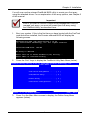
In the Define Array Definition Menu section, press the Spacebar to cycle through
array types and select RAID 1 for RAID Level. RAID 1 arrays use two disk drives.
The capacity of the array will be half that of the smaller drive in the array. No
stripe block size option is available when mirroring two drives.
Creating a Mirroring Array with Two New Drives
As described above, if you select a mirroring array and wish to use two new
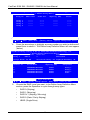
drives, follow the directions here. Under the Drive Assignments section, assign
both new drives to the array and save the information by pressing Ctrl-Y.
Once the process is complete, you will be returned to the Define Array Menu
where the array will be shown as defined.
Note
You may choose to attach an unassigned third drive to the
FastTrak Controller to act as a “hot spare” replacement (see
Page 26).
Changing the Stripe Block Size
For RAID 1 arrays, FastTrak does not permit you to change the Stripe Block size.
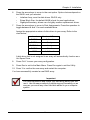
Setting the Gigabyte Boundary
For RAID 1 arrays, FastTrak allows you to toggle the Gigabyte Boundary ON or
OFF. The default is OFF. To toggle Gigabyte Boundary, use the Arrow keys to
highlight the field and the Spacebar to toggle between ON and OFF.
Save Array Information
Press Ctrl-Y to save the Disk Array Information.
23