1
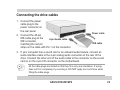
Connecting the drive cables
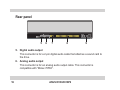
1. Connect the power
cable plug to the
power connector on
the rear panel.
2. Connect the 40-pin
IDE cable plug to the
4-pin Audio cable
IDE connector,
matching the red pin
stripe on the cable with Pin 1 on the connector.
Power cable
IDE cable
3. If your computer has a sound card or an onboard audio feature, connect an
audio interface cable to the 4-pin analog audio connector on the rear of the
drive. Connect the other end of the audio cable to the connector on the sound
card or on the 4-pin CD connector on the motherboard.
All the cable plugs are slotted so that they fit in only one orientation. If a plug
does not fit in completely, try reversing it. DO NOT apply too much force when
fitting the cable plugs.
ASUS DVD-E616P2
23