1
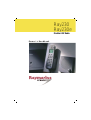
Ray230
Ray230e
Modular VHF Radio
Owner's Handbook
RAY230 & RAY230E
Modular
VHF Radio
Owner’s
Handbook
Document number: R49006_2
Date: December 2001
iii
Purpose
This handbook contains very important information on the installation,
operation, and maintenance of your RAY230 US version or RAY230E
European version VHF radio. To get the best results in operation and
performance, please take the time to read this handbook thoroughly.
RAY230 US Version
Raymarine radios comply with the Federal Communications Commission
(FCC) and Industry Canada requirements that regulate marine VHF radio
usage for the US and Canada, respectively.
Marine VHF radio users in the US must comply with all applicable FCC
rules and regulations, some of which are described here and in Section 5.
This information was current at the time this handbook was printed. Upto-date information, including licensing requirements, can be obtained on
the FCC website at:
www.fcc.gov/wtb/marine
Official FCC forms can be obtained on the FCC website at:
www.fcc.gov/formpage.html
FCC NO
TICE
NOTICE
This device complies with Parts 15 and 80 of the FCC Rules. Operation is
subject to the conditions that this device does not cause harmful
interference. Changes or modifications to this equipment not expressly
approved in writing by Raymarine, Incorporated could violate compliance
with FCC rules and void the operator’s authority to operate the equipment.
Station License
An FCC Ship Radio Station License and Call Sign are not required for most
recreational vessels travelling in US waters. Examples of radio equipment
that do not require a license include: marine VHF radios, any type of
Emergency Position Indicating Radio Beacon (EPIRB), any type of radar,
GPS or LORAN receivers, depth finders, CB radio, or amateur radio (an
amateur license is required). However, you must obtain a license if: (1) you
are required by law or treaty to carry a radio on your vessel; (2) your vessel
travels to foreign ports; (3) you use marine radio equipment on board your
vessel other than the devices listed above. Ships that use MF/HF single
side-band radio, satellite communications, or telegraphy must be licensed
by the FCC. If necessary, you can obtain a Station License by filing FCC
Form 605, which is available from the FCC website listed above.
iv
Operator License
An Operator License is not required to operate a VHF Marine Radio within
US territorial waters. However, a license is required to operate the radio if
you dock in a foreign port (including Canada and Mexico) or leave a foreign
port to dock in a U.S. port. You can request a Restricted Radiotelephone
Operator Permit from the FCC by filing Form 753.
Maritime Mobile Service Identity (MMSI)
A nine-digit Maritime Mobile Service Identity (MMSI) number is required
to operate the DSC equipment in this radio. You can request an MMSI
number from the FCC when you apply for a Station License. If your vessel
does not require a license, you may obtain an MMSI by contacting either
BoatUS (www.boatus.com) or MariTEL (www.maritelusa.com).
Once obtained, you can program the MMSI number into your RAY230
using the Menu Operation described in this handbook.
INDUSTRY CANADA
You do not need a license to operate this radio within sovereign waters of
Canada or the US. You will need a license to operate this radio outside of
Canada or the US. To obtain Industry Canada licensing information, contact
the nearest field or regional office, or write:
Industry Canada
Radio Regulatory Branch
Attention: DOSP
300 Slater Street
Ottawa, Ontario
Canada, KIA OC8
The following information about the radio is required to complete the
license application:
Industry Canada Certification Number
FCC Type Number
FCC Type Accepted
Output Power
Modulation
Frequency Range
4069823227AD
PJ5RAY230
Parts 15 and 80
1 watt (low) & 25 watts (high)
16FE (FM)
156.025-157.425
v
RAY230E European Version
The RAY230E is a VHF radiotelephone that includes equipment for Class
“D” Digital Selective Calling. It is intended for general communication
within the Maritime Mobile Service worldwide and is for use on nonSOLAS vessels.
License
Regulations in some areas require that you obtain an operator license
before operating VHF radio equipment. It is your responsibility to determine
whether a license is required in your area before operating this equipment.
Maritime Mobile Service Identity (MMSI)
An MMSI number is required to operate the Digital Selective Calling (DSC)
equipment in this radio. In some areas, a radio operator license is required
before an MMSI number will be issued. You can request an MMSI number
from the same agency that issues radio operator licenses in your area. You
can then program the MMSI number into your RAY230E using the Menu
Operation described in this handbook. If regulations in your area do not
permit you to program the MMSI number yourself, your Raymarine dealer
can program the number for you.
Automatic Transmission Identification System (A
TIS)
(ATIS)
Your RAY230E can activate the ATIS feature, if needed. You can request
an ATIS number from the same agency that issues radio operator licenses
in your area. You can then program the ATIS number into your RAY230E
using the Menu Operation described in this handbook. If regulations in
your area do not permit you to program the ATIS number yourself, you can
have your dealer program the number for you. You must only enable this
feature when operating the radio in the inland waterways of European
countries that require automatic identification transmission.
SAFETY NOTICE
This device is only an aid to navigation. Its performance can affected by
many factors including equipment failure or defects, environmental
conditions, and improper handling or use. It is the user's responsibility to
exercise common prudence and navigational judgement, and this device
should not be relied upon as a substitute for such prudence and judgement.
vi
Your Raymarine VHF radio generates and radiates radio frequency (RF)
electromagnetic energy (EME). This equipment must be installed and
operated in accordance with the instructions contained in this handbook.
Failure to do so can result in personal injury and/or product malfunction.
Antenna Mounting and EME Exposure
For optimal radio performance and minimal human exposure to radio
frequency electromagnetic energy, make sure the antenna is:
• connected to the radio before transmitting
• properly mounted
• located where it will be away from people
• located at least three feet (91 cm) from the Base Station transceiver
and Handsets
Adjustments or Repair
Adjustments require specialized service procedures and tools only available
to qualified service technicians – there are no user serviceable parts or
adjustments. The operator should never remove the cover or attempt to
service the equipment.
Raymarine products are supported by a network of Authorized Service
Representatives. For product information you may contact the following
regional centers:
United States
Raymarine, Inc.
22 Cotton Road, Unit D
Nashua, NH 03063-4219
USA
Telephone: 603-881-5200
800-539-5539
Fax:
603-864-4756
Europe
Raymarine Ltd
Anchorage Park
Portsmouth, Hampshire
England PO3 5TD
Telephone: +44 (0) 23 9269 3611
Fax:
+44 (0) 23 9269 4642
© Raymarine, Inc. 2001
vii
Certificate No.
RT008
We
Raymarine Limited
Anchorage Park
Portsmouth
Hampshire
England P03 5TD
declare, under our sole responsibility, that the products identified in this declaration, and to which this
declaration relates, are in conformity with the essential requirements of European Parliament and Council
Directive:
1999/5/EC on radio equipment and telecommunication terminal equipment and the mutual
recognition of their conformity.
Product Name:
Raymarine RAY 230E VHF Radio
with Class "D" DSC
Product Number(s):
E43008 (Telular Interface Version)
E43014 (Without Telular Interface Version)
The products have been assessed to Conformity Procedure Annex IV of the Directive and by application of the
following standard(s):
EMC
Safety
Technical characteristics
EN 60945 : 1997
EN 60945 : 1997
EN 301 025 Part 2 and Part 3
EN 300 698 Part 2 and Part 3
The assessment is consistent with a Technical Construction File showing conformity with the essential
requirements of the Directive and has been reviewed by Notified Body No. 0191.
The product is labelled with the CE conformity marking, the identification number of the Notified Body and
class identifier.
Signatory:
Name
Title
Company Name
Company Address
Adil Abbas
EMC Manager
Raymarine Limited
Anchorage Park
Portsmouth, Hampshire
England PO3 5TD
Signature
________________________
Date
24 July 2001
viii
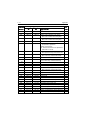
Table of Contents
Section 1
General Description
1.1 Introduction ............................................................................. 1-1
1.2 Equipment Features ................................................................. 1-1
Section 2
Installation
2.1 Unpacking and Inspection ...................................................... 2-1
2.2 Equipment Supplied ................................................................. 2-1
2.2.1 Optional Accessories .................................................. 2-1
2.3 Planning the Installation .......................................................... 2-2
2.4 Electrical Connections ............................................................. 2-4
2.4.1 DC Power and Hailer/NMEA Cable Connections ........ 2-4
2.4.2 Hailer Cable Connections ............................................ 2-5
2.4.3 NMEA Data ................................................................. 2-6
2.4.4 Using the SeaTalk Auxiliary Junction Box ................... 2-6
2.4.5 Antenna Connections ................................................. 2-7
2.4.6 Antenna Mounting Suggestions ................................ 2-8
2.4.7 Grounding ................................................................... 2-8
Section 3
Operations
3.1 Introduction ............................................................................. 3-1
3.2 Control and LCD Display ........................................................ 3-2
3.2.1 Controls ...................................................................... 3-2
3.2.2 LCD Display ................................................................ 3-6
3.3 Radio Functions ...................................................................... 3-8
3.3.1 RAY230 US Version ..................................................... 3-8
3.3.2 RAY230E European Version ........................................ 3-9
3.4 Equipment Connections ........................................................ 3-12
3.5 Operating Procedures ............................................................ 3-13
3.5.1 Turning ON/OFF the power supply .......................... 3-13
3.5.2 Setting the Volume .................................................... 3-14
3.5.3 Setting the Squelch ................................................... 3-14
3.5.4 Using the Function Key ............................................ 3-14
3.5.5 Setting the Frequency Mode (RAY230) .................... 3-15
3.5.6 Setting the Frequency Mode (RAY230E) .................. 3-16
3.5.7 Receiving the Weather Channels .............................. 3-16
3.5.8 Selecting the Channel ............................................... 3-17
3.5.9 Selecting the Private Channel (RAY230E only) ......... 3-17
3.5.10 Priority Channel (RAY230) ........................................ 3-18
3.5.11 Priority Channel (RAY230E) ...................................... 3-18
ix
3.5.12 Multi-Call Operation (RAY230E only) ....................... 3-19
3.5.13 Channel Memory ....................................................... 3-19
3.5.14 Setting the Transmission Power Output ................... 3-20
3.5.15 Desensitized Reception (Local Mode) ...................... 3-20
3.5.16 LCD Backlight Function ............................................ 3-20
3.5.17 Hailer Mode .............................................................. 3-21
3.5.18 Fog Alert/Siren Mode ............................................... 3-21
3.5.19 DTMF Interface Operation ........................................ 3-23
3.5.20 Intercom Mode .......................................................... 3-23
3.5.21 Scan Mode ................................................................ 3-25
3.5.22 Monitor Mode .......................................................... 3-26
3.5.23 Priority using Multiple Handsets .............................. 3-27
3.5.24 NMEA Operation ...................................................... 3-30
3.5.25 Sea Talk Operation .................................................... 3-32
3.5.26 Digital Selective Calling (DSC) .................................. 3-32
3.5.26.1 Individual Call to Ship (Ship-to-Ship) ............... 3-33
3.5.26.2 Individual Call to Shore (Ship-to-Shore) ........... 3-36
3.5.26.3 Receiving an Individual Call .............................. 3-38
3.5.26.4 Transmitting a Group Call ................................. 3-39
3.5.26.5 Receiving a Group Call ...................................... 3-40
3.5.26.6 Transmitting an All Ships Call ........................... 3-41
3.5.26.7 Receiving an All Ships Call ............................... 3-42
3.5.26.8 Transmitting a Distress Call .............................. 3-43
3.5.26.9 Receiving a Distress Call ................................... 3-47
3.5.26.10 Receiving a Distress Relay Call ......................... 3-48
3.5.27 ATIS Operation (RAY230E only) ............................... 3-49
3.5.28 Alert Operation ......................................................... 3-49
3.5.30 Menu Operation ........................................................ 3-52
3.5.30.1 Selecting the Menu Operation .......................... 3-52
3.5.30.2 NAVSTAT Operation ......................................... 3-53
3.5.30.3 DSC Operation .................................................. 3-54
3.5.30.3.1 Selecting Distress Call Type (NATURE) ........... 3-55
3.5.30.3.2 Manual Entry of Latitude/Longitude
(L/L ENT) .......................................................... 3-56
3.5.30.3.3 Modifying the MMSI Number List
(PHNBOOK) ...................................................... 3-58
3.5.30.3.4 Modifying the MMSI Group Number List
(GROUP) ............................................................ 3-63
3.5.30.4 Setting Operation (RAY230) .............................. 3-65
3.5.30.4.1 Intercom Set Up ................................................ 3-65
x
3.5.30.4.2
3.5.30.4.3
3.5.30.5
3.5.30.5.1
3.5.30.5.2
3.5.30.5.3
3.5.30.5.4
3.5.30.5.5
3.5.30.5.6
MMSI Number Set Up ....................................... 3-67
Siren Set Up ...................................................... 3-69
Setting Operation (RAY230E) ............................ 3-71
Intercom Set Up ................................................ 3-72
ATIS Number Set Up ......................................... 3-72
MMSI Number Set Up ....................................... 3-74
Tri-Watch Set Up .............................................. 3-75
ATIS On/Off Set Up .......................................... 3-76
Siren Set Up ...................................................... 3-76
Section 4
Maintenance
4.1 How to Contact Raymarine ...................................................... 4-1
4.2 Preventative Maintenance ....................................................... 4-3
4.3 Specifications .......................................................................... 4-3
4.4 Drawings ................................................................................. 4-7
Section 5
Appendix
5.1 FCC Licensing Requirements .................................................. 5-1
5.2 Marine VHF Channel Usage Guide .......................................... 5-3
5.3 Marine VHF Channel Frequency Tables ................................ 5-12
xi
Glossary of Terms
All Scan ........................... Scans all channels
ATIS ................................ Automatic Transmission Identification
System; used for inland waterways in some
European countries
Canadian Channels ......... Channel designator as defined by Industry
Canada
Carrier Wave ................... A Radio Frequency on which intelligence is
superimposed.
DSC ................................. Digital Selective Calling
Dual Watch ..................... Monitor channel 16 while working on another
channel
Duplex ............................. Transmit and receive on different frequencies
ETSI ................................ European Telecommunications Standards
Institute
FM .................................. Frequency Modulation
International Channels .... Channel designator as defined by the ITU
ITU .................................. International Telecommunications Union
LCD ................................. Liquid Crystal Display
Memory Scan .................. Scans only user selected memory channels
MMSI .............................. Maritime Mobile Service Identity; a number
issued by each country to identify maritime
stations.
NOAA ............................. National Oceanographic and Atmospheric
Administration
PTT switch ...................... Microphone push-to-talk switch
RF .................................... Radio Frequency
RTCM .............................. Radio Technical Commission for Maritime
Services
RX ................................... Receiver
Simplex ............................ Transmit and receive on the same frequency
Squelch ........................... A circuit that sets the threshold for cutting off
the receiver when the signal is too weak for
reception of anything but noise
TX ................................... Transmit
US Channels ................... Channel designations as defined by the FCC
VHF ................................. Very High Frequency 30MHz to 300MHz
Weather Channels ........... Channels for routine and emergency weather
information broadcast by NOAA
xii
1-1
General Description
Section 1
1.1
General Description
Introduction
Congratulations on your purchase of Raymarine’s RAY230 US version or
RAY230E European version fixed-mount marine radiotelephone. In this
document, the terms “RAY230/E” and “RAY230/RAY230E” refer to both
versions of the radiotelephone.
The RAY230/RAY230E is a microprocessor controlled, digitally
synthesized, compact transceiver that provides reliable simplex and semiduplex (two-frequency) communications. The RAY230/E provides twoway communications on Marine channels and the US version provides
reception on 10 separate weather channels. More importantly, the RAY230/
RAY230E has built-in Digital Selective Calling (DSC) for sending and
receiving DSC Distress, Routine, Safety, and Urgency calls.
1.2
Equipment Features
The RAY230/RAY230E is designed and manufactured to provide ease of
operation with excellent reliability. The important built-in features of the
equipment are listed below.
• Independent, dedicated receiver for the DSC channel (Channel 70)
• Oversized LCD on the Handset
• Waterproof to U.S.C.G. standard CFR-46 for Base Station Transceiver,
Cradle, and External Speaker
• Waterproof to JIS-7 standard for Handset
• Dedicated DISTRESS key on back of Handset
• All solid-state circuitry for low current drain and maximum reliability
• Series relay protection on input power circuits to prevent reverse polarity
damage
• High-performance receiver section with optimum selectivity
• Multi-handset (up to 3) operation
• All Scan and Memory Scan features
• Dual/Tri-Watch Monitor modes
• Hailer function
• Intercom operation between handsets
• Distant/local mode
• Optional DTMF interface
1-2
General Description
Exclusive Features of the RAY230 US Version
• Built-in DSC in accordance with standard SC-101
• Exclusive circuit that automatically selects 16 or 9 as the Priority Channel
when the radio is turned on
• Dedicated key for changing the Priority Channel (16/9)
• Exclusive weather alert feature (when in monitor mode)
Exclusive Features of the RAY230E European Version
• ETSI compliant full Class D DSC
• ATIS
• Up to 10 Private Channels
• Multi-call operation
2-1
Installation
Section 2
2.1
Installation
Unpacking and Inspection
Use care when unpacking the unit from the shipping carton to prevent
damage to the contents. It is also good practice to save the carton and the
interior packing material. The original packing material should be used in
the unlikely event it is necessary to return the unit to the factory.
2.2
Equipment Supplied
The following is a list of materials supplied with the RAY230 and RAY230E:
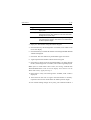
Description
Base Station Transceiver:
Without DTMF Interface
With DTMF Interface
Handset with Cradle:
RAY230 Full Function Handset
RAY230E Full Function Handset
RAY230 External Speaker
Power/Hailer/NMEA Cable
Connection Cable, 7m
RAY230 & RAY230E Handbook
Part No
No..
R49001
R49008
E46009
E46010
R49003
R49004
R490051
R49006
1
In most shipments, the R49005 Connection Cable is 7 meters in length and attaches to a 3mlong cable on the handset cradle. Some shipments, however, include a 10m Connection Cable
attaching to a 0.35m cable on the handset cradle. The overall length for both cable configurations
is approximately 10m.
2.2.1
Optional Accessories
Description
Part No
No..
RAY230 Second Station (includes
Handset, Cradle and Speaker)
RAY230E Second Station
Handset Extension Cable, 5m
Handset Extension Cable, 10m
External Speaker Extension, 3m
Hailer Horn Speaker
E46021
E46022
E46018
E46017
E46015
M95435
2-2
2.3
Installation
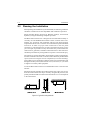
Planning the Installation
When planning the installation of your RAY230/E, the following conditions
should be considered to ensure dependable and trouble-free operation.
Mount the Base Station Transceiver, Handset cradle(s), and External
Speaker(s) using the Mounting Templates provided.
The Base Station Transceiver is designed to be mounted horizontally or
vertically on a flat bulkhead below decks. Select a location that is nonmetallic, dry, protected, well-ventilated, and free from high operating
temperatures and excessive vibration. Provide sufficient space behind the
transceiver to allow for proper cable connections to the rear panel
connectors. Locate the transceiver as near as possible to the power source
yet as far apart as possible from any devices that may cause interference
such as motors, generators, and other on board electronics. The transceiver
should be protected from prolonged direct exposure to rain and salt spray.
The transceiver is NOT designed to be mounted in engine compartments.
Do NOT install the transceiver in a location where there may be flammable
vapors (such as in an engine room or compartment, or in a fuel tank bay),
water splash or spray from bilges or hatches, where it is at risk from physical
damage from heavy items (such as hatch covers, tool boxes, etc.), or where
it might be covered by other equipment.
Locate the Base Station transceiver and Handset at least 3 feet from the
antenna.
Mount the primary handset and cradle such that they allow easy access
from the location where the ship is normally navigated. By FCC law, the
primary handset should be located in the wheel house or in a room adjacent
to the wheel house.
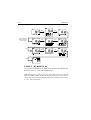
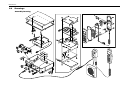
Figure 2-1 Typical Mounting Methods
2-3
Installation
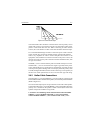
Base Station Transceiver
1.78 (7.04)
197 (7.76)
200 (7.87)
67 (2.63)
228 (8.98)
External Speaker Unit
Cradle Unit
84 (3.31)
65 (2.56)
110 (4.33)
70 (2.76)
25 (.98)
114 (4.49)
Figure 2-2 Outline and Mounting Dimensions
All dimensions are shown in millimeters and (inches)
2-4
2.4
Installation
Electrical Connections
2.4.1
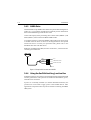
DC Power and Hailer/NMEA Cable Connections
The 6-foot-long power cable is a multipurpose assembly containing three
wire-pairs for connections to DC power, NMEA input, and the Hailer Horn
speaker. Connections to the 6-pin connector are as follows:
Wire Color Function
Connects to
RED
Power +
Ship's 13.2 VDC power
BLACK
Power –
YELLOW
Hailer +
Hailer Horn speaker
GREEN
Hailer –
WHITE
NMEA +
Input from position source (GPS)
BLACK
NMEA –
The RED (+) power wire contains a 10 amp in-line fuse.
Figure 2-3 Power/Hailer/NMEA Cable and 6-pin Connector
In most cases the length of the power cable should be adequate enough to
reach the DC power source. If additional wire length is required, the cable
can be extended by adding more cable as necessary. However, for power
cable runs longer than 15 feet, larger wire diameter size should be used to
prevent voltage line loss.
2-5
Installation
Figure 2-4 Power Cable Length
Your RAY230/E radio should be connected to the nearest primary source
of ship's DC power. A typical source may be a circuit breaker on the power
panel or a fuse block near the unit. When connecting to either of these
sources, the circuit breaker or other in-line fuse should be rated at 10 amps.
It is recommended that lugs be used to connect the power cable to the DC
supply and the lug connections should be both crimped and soldered.
This is very important in order to ensure adequate current draw to the
equipment. If an insufficient connection is made to the power source, the
unit may not work properly. The connection terminal should be clean, with
no sign of corrosion.
The RED (+) wire is connected to the positive terminal of the power source.
The BLACK (–) wire is connected to the negative (ground) of the power
source. Should the power connections be inadvertently reversed, the unit
will not power up but no damage will occur. Simply check the polarity with
a VOM (Voltage/Ohm Meter) and reconnect observing correct polarity. If
the fuse ever needs replacement, be sure to use the same type and rating.
2.4.2
Hailer Cable Connections
The YELLOW (+) wire and GREEN (–) wire are used for connecting the
RAY230/RAY230E to a Hailer Horn speaker, such as the Raymarine M95435
(Refer to Figure 2-3).
10 watts of audio output power are provided for an external 4 ohm speaker.
Connect the YELLOW (+) wire and GREEN (-) wire to the speaker observing
polarity as it is marked on the speaker. When connected, the hailer horn
speaker will operate in Hailer or Fog modes.
CAUTION: To avoid damage to the radio, DO NOT connect the Hailer
GREEN (–) wire to the Hailer YELLOW (+) wire. Also, DO NOT
connect the Hailer GREEN (–) wire to the Power BLACK (–) wire.
2-6
Installation
2.4.3
NMEA Data
The RAY230/E accepts NMEA 0183 data from a position determining device
(GPS, etc.) to provide the Latitude and Longitude position information
that is transmitted during a DSC Distress Call.
Connect the input(s) of the positioning device to the white (NMEA+) and
black (NMEA-) wires in the Power/Hailer/NMEA cable.
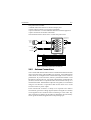
An example of how to connect the NMEA cables and power supply using
a suitable connector block is shown in the diagram below. For specific
instructions how to connect your particular GPS, please refer to the
handbook that came with that device.
Note: For non-differential GPS, all return connections (-) must be tied to a
common ground reference.
Red
Yellow
Black
+12 V
+ NMEA Data (white)
-- NMEA Data (black)
0V
Figure 2-5 Sample GPS Connections to NMEA
2.4.4
Using the SeaTalk Auxiliary Junction Box
If installed, it may be convenient to connect the RAY230/E using the SeaTalk
auxiliary junction box. This junction box enables the SeaTalk bus, power,
and GPS to be connected.
If power is not already available (via another SeaTalk instrument), the
junction box can be used to apply power to the SeaTalk bus for other
applications. The junction box may also be used for connecting an NMEA
GPS system.
2-7
Installation
The junction box includes:
• SeaTalk cable and connector to attach to display unit
• Power cable to connect to 12 V power (if required)
• Input connections to connect SeaTalk cable from external equipment
• Spare connections for another instrument
The illustration below shows how to connect the junction box.
To GPS
Power Out: 1 & 2
Power In: 1 & 3
To Radio’s
SeaTalk
Socket
0 VDC (return)
To Ship’s
Power Supply
Spare
Input
+VDC (fused)
Cable
SeaTalk
Power
GPS
Core
Black (screen)
Red
Yellow
Black (screen)
Red
Black (screen)
Red
Yellow
Terminal
1
2
3
1
2
1
2
3
Function
0V
+12v
SeaTalk
0V
+12V
0V
+12V
SeaTalk
Figure 2-6 SeaTalk Junction Box Connections
2.4.5
Antenna Connections
Your coaxial VHF antenna cable connects to the RAY230/E antenna cable
on the rear panel using a PL259 VHF type connector. Your VHF antenna
cable can be cut to length but the overall cable length can be critical to
performance. If you are uncertain, contact a professional installer or call
Raymarine Customer Service. If a longer cable length is required, RG-58
(50 ohm) coaxial cable or equivalent cable can be used for runs up to a
maximum of 50 feet. If the distance required is even greater, we recommend
using low loss RG-213 or equivalent cable for the entire run to avoid
excessive losses in power output.
If the antenna RF connector is likely to be exposed to the marine
environment, a protective coating of grease (Dow Corning DC-4 or similar)
can be applied to the connector before connecting it to the radio. Any
other extensions or adapters in the cable run should also be protected by
silicon grease and then wrapped with a waterproofing tape.
2-8
Installation
2.4.6
Antenna Mounting Suggestions
The best radio in the world is useless without a quality antenna and good
location. Mounting the VHF antenna properly is very important because it
will directly affect the performance of your VHF radio. A VHF antenna
designed for marine vessels should be used.
• Since VHF transmission is essentially line-of-sight, mount the antenna at
the highest possible location on the vessel and free of obstruction to
obtain maximum range.
• If you must extend the length of the coaxial cable between the antenna
and the radio, use a coaxial cable designed for the least amount of power
loss over the entire cable length.
2.4.7
Grounding
It is good marine practice to properly ground your VHF radiotelephone, as
well as all other electronic equipment, to the ship's ground system.
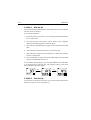
One of the mounting tabs on the edge of the base station transceiver has
been designated for this purpose. See Figure 2-7 below. After the base
station has been mounted, you should ground the unit by attaching a wire
to the screw inserted through the tab labeled “GND”. Then connect this
wire to the nearest ship's ground connection point. The recommended
wire to be used for such grounding is #10 AWG.
GND
Mounting Tab
Figure 2-7 Typical Grounding Method
Mounting Tab
3-1
Operations
Section 3
3.1
Operations
Introduction
The RAY230 has the capability to transmit and receive on all available US,
Canadian, and International Marine VHF radiotelephone channels. The
RAY230E can transmit and receive on all available International and US
Marine VHF radiotelephone channels. There are channels that are FCC
approved but may only be used by authorized stations for specific
purposes, depending on the type of vessel (commercial or non-commercial.)
Refer to Section 5.3, which lists all marine VHF channels available in your
RAY230/RAY230E for US, International and Canadian radiotelephone use.
You should familiarize yourself with these tables to ensure you use the
proper channels.
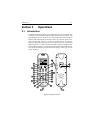
Figure 3-1 Layout of Controls
3-2
3.2
Operations
Controls and LCD Display
3.2.1
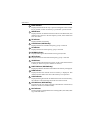
Controls
INDV key
Switches to the DSC Individual Ships Call mode for initiating ship-toship or ship-to-shore calls using a specific MMSI number. Descriptions
of these operations appear below in sections 3.5.26.1 and 3.5.26.2.
Note: An MMSI number is required to operate the DSC equipment in
this radio. You can program the MMSI number yourself one time
only using the Menu Operation described in section 3.5.30.4.2 or
you can have your Raymarine dealer program the number for you.
ALL SHIP key
Switches to the All Ships Call mode for Safety and Urgency
transmissions. Descriptions of subsequent operations appear below
in section 3.5.26.5 Transmitting All Ships Call.
!
"
SQ UP/DOWN (SCROLL) key
Increases or decreases the squelch sensitivity. Pressing the UP ∧
key increases the squelch, while the DOWN ∨ key decreases it. The
number of segments in the SQ bar graph on the LCD display will
increase or decrease accordingly. This key is also used as a scroll key
for selecting menu items and other settings, as described below.
VOL UP/DOWN key
Changes the sound volume of the handset. Pressing the UP ∧ key
increases the volume, while the DOWN ∨ key causes it to decrease.
The number of segments in the VOL bar graph on the LCD display
will increase or decrease accordingly.
16/9/POWER key (RAY230 US version only)
Switches between the Working Channel and the Priority Channel.
Pressing and holding the key for 2 seconds alternates the Priority
Channel between channel 9 and channel 16. When the transceiver’s
main power switch is turned on, this key is also used to power the
system ON or OFF.
#
$
16/POWER key (RAY230E European version only)
Switches between the Working Channel and Channel 16 (the Priority
Channel). When the transceiver’s main power switch is turned on,
this key is also used to power the system ON or OFF.
3-3
Operations
MON/TRI key
Starts the Dual-Watch monitor mode. Pressing the FUNC key followed
by the MON/TRI key initiates the Tri-Watch monitor mode.
%
1/MEM key
This key inputs the number 1. When an alphanumeric response is
appropriate, this key alternates between entering a 1 and a space. If
the channel number indicated on the LCD display is not currently
stored in memory, pressing the FUNC key followed by the 1/MEM
key enters that channel number into memory. If the currently indicated
channel has already been stored, pressing the FUNC key followed by
the 1/MEM key deletes that channel from memory.
&
'
2/SCAN key
This key inputs the number 2. When an alphanumeric response is
appropriate, each press of this key alternately inputs the characters 2,
A, B, then C. Pressing the FUNC key followed by the 2/SCAN key
toggles Scan mode ON or OFF. Scan mode is described below in
Section 3.5.21.
3/CELL key
This key inputs the number 3. When an alphanumeric response is
appropriate, each press of this key alternately inputs the characters 3,
D, E, then F. Pressing the FUNC key followed by the 3/CELL key
connects the handset with any auxiliary communication equipment
with DTMF interface (RAYCOM Cellular, Mini-M, etc.) connected to
the AUX port at the rear of the transceiver. See section 3.5.19.
4/INT key (RAY230 only)
This key inputs the number 4. When an alphanumeric response is
appropriate, each press of this key alternately inputs the characters 4,
G, H, then I. Pressing the FUNC key followed by the 4/INT key alternates
the frequency groups from US mode to International mode to Canadian
mode.
4/US key (RAY230E only)
This key inputs the number 4. When an alphanumeric response is
appropriate, each press of this key alternately inputs the characters 4,
G, H, then I. Pressing the FUNC key followed by the 4/US key alternates
the frequency groups between US mode and International mode.
Note: Access to the US frequency group is only available with a
software upgrade from your dealer. Otherwise this feature is disabled.
3-4
Operations
!
5 key (RAY230 only)
This key inputs the number 5. When an alphanumeric response is
appropriate, each press of this key alternately inputs the characters 5,
J, K, then L.
"
5/PRIV key (RAY230E only)
This key inputs the number 5. When an alphanumeric response is
appropriate, each press of this key alternately inputs the characters 5,
J, K, then L. Pressing the FUNC key followed by the 5/PRIV key
switches to the Private Channel mode. To select the desired Private
Channel, press the FUNC key followed by the 5/PRIV key, then input
the number key(s) corresponding to the desired channel number and
press ENT.
#
6/WX key
This key inputs the number 6. When an alphanumeric response is
appropriate, each press of this key alternately inputs the characters 6,
M, N, then O. Pressing the FUNC key followed by the 6/WX key
alternates between the Working Channel and the Weather Channel.
For the RAY230E European model, this operation is valid only in US
frequency mode.
$
7/ D/L key
This key inputs the number 7. When an alphanumeric response is
appropriate, each press of this key alternately inputs the characters 7,
P, Q, R, then S. Pressing the FUNC key followed by the 7/D/L key
toggles between full receiver sensitivity (distant mode) and attenuated
receiver sensitivity (local mode). Local mode is used in high traffic
areas to decrease unwanted reception. While in local mode (receiver
is desensitized), the DESENS indicator appears in the LCD display.
%
8 key (RAY230 only)
This key inputs the number 8. When an alphanumeric response is
appropriate, each press of this key alternately inputs the characters 8,
T, U, then V.
&
8/ M-CALL key (RAY230E only)
This key inputs the number 8. When an alphanumeric response is
appropriate, each press of this key alternately inputs the characters 8,
T, U, then V. Pressing the FUNC key followed by the 8/M-CALL key
starts Multi-Call mode. If the key is pressed during Multi-Call mode,
the operation returns to normal mode.
3-5
Operations
9/ 1/25 key
This key inputs the number 9. When an alphanumeric response is
appropriate, each press of this key alternately inputs the characters 9,
W, X, Y, and then Z. Pressing the FUNC key followed by the 9/1/25
key alternates the transmission power between 1W and 25W.
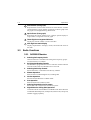
'
*/HAIL key
This key inputs an asterisk (*). Pressing the FUNC key followed by
the */HAIL key initiates the Hailer mode, which enables a Hailer Horn
speaker to be used as a loud speaker or a directional microphone.
Pressing the FUNC key followed by this key during Hailer mode returns
operation to normal mode.
0/IC key
This key inputs the number 0. Pressing the FUNC key followed by the
0/IC key starts Intercom mode, which enables conversation between
handsets. Pressing the FUNC key followed by this key during
Intercom mode returns operation to normal mode.
#/FOG key
This key inputs the # character. Pressing the FUNC key followed by
the #/FOG key initiates the Fog Alert mode, which enables a Hailer
Horn speaker to sound several types of automatic or manual alert
tones. Pressing the FUNC key followed by this key during Fog mode
returns operation to normal mode.
!
#
"
ENT/MENU key
This key performs the Enter function. It is used to confirm and
implement an input action. Pressing the FUNC key followed by the
ENT/MENU key initiates the Menu mode.
CLR/LOG key
Depending on when it is used, this key exits the current mode and
reverts to the last used mode or normal operation. This key also can
be used to clear any alphanumeric inputs one at a time in the order
that they were entered. Pressing the FUNC key followed by CLR/LOG
key initiates the Digital Selective Calling (DSC) Log. Pressing the key
during logging returns operation to normal mode.
FUNC/DIM key
Initiates the Function mode and activates the FUNC indicator in the
LCD display. The next key pressed determines the function selected.
(See above key descriptions.) Pressing this key twice starts Dimmer
mode, which reduces the brightness of LCD's backlight.
3-6
Operations
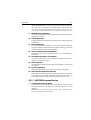
Channel UP/ DOWN switch
Pressing this switch during normal operation changes the channel
number UP or DOWN.
$
%
&
PTT (Press-to-Talk) switch
Pressing this switch during normal operation places the radio in
Transmit mode and displays the TX indicator in the LCD. When the
switch is pressed in various function modes, the assigned operation
is initiated.
Note: After 5 minutes of continuously holding the PTT switch, the
radio will automatically stop transmitting. To begin transmitting
again, release the PTT and depress again.
DISTRESS switch
This switch is located under the small door labeled DISTRESS on the
back of the handset. Pressing and holding this switch for 4 seconds
selects Distress Signal Call mode. Subsequent operations are
described in section 3.5.26.7.
3.2.2
LCD Display
The following describes the functional characters on the RAY230/RAY230E
Handset's LCD.
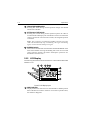
Figure 3-2 LCD Display Layout
NMEA indicator
Displayed when the radio receives valid SeaTalk or NMEA position
data. If the data is invalid or no data is received for a period of time,
the indicator disappears.
3-7
Operations
FUNC indicator
Displayed when the FUNC key is pressed. Disappears when another
key is pressed, or after no other key is pressed for a period of time.
!
WX indicator
Displayed while in Weather Channel mode. For the RAY230E, this
indicator only appears in the US frequency mode, if this feature has
been activated.
TX indicator
Displayed while transmitting.
"
CAN indicator (RAY230 only)
Displayed when the Canadian frequency group is selected.
#
US indicator
Displayed when the US frequency group is selected.
$
DESENS indicator
Displayed during the desensitized receiving (local) mode.
%
INT indicator
Displayed when the International frequency group is selected.
&
'
1W indicator
Displayed when the transmission power of 1W is selected with the 9/
1/25 key or when a low power channel is selected.
MULTI indicator (RAY230E only)
Displayed while the channel stored in Multi-Call memory is displayed.
MEM indicator
Displayed while the channel stored in memory is displayed. This
indicator flashes before the start of the memory scan operation.
SCAN indicator
Displayed during Scan mode. If channels have been stored in memory,
this indicator will be flashing before the start of Scan mode.
!
ATIS indicator (RAY230E only)
Displayed when the ATIS (automatic identification transmission)
feature is turned on (via Menu mode).
"
DSC indicator
Displayed when in a Digital Selective Calling (DSC) call mode, DSC
log, or the DSC menu.
3-8
3.3
Operations
#
VOL indicator (in bar graph)
Represents the current sound volume level of the handset. A louder
volume displays a larger number of segments in the bar graph. This
bar graph is not displayed during Menu mode.
$
SQL indicator (in bar graph)
Represents the current squelch level. A deeper squelch displays a
larger number of segments in the bar graph.
%
Three-digit, Seven-segment indicators
Display the channel number or state of the radio.
&
Nine-digit Dot-matrix display
Displays alphanumeric messages, modes, and functional status of
the radio.
Radio Functions
3.3.1
1.
2.
3.
4.
5.
6.
7.
8.
RAY230 US Version
Selecting the Frequency Mode
Channel selection is available from among three frequency groups:
US, International, or Canadian.
Receiving the Weather Channels
The RAY230 is programmed to receive 10 NOAA weather channels
and will sound an alarm if a Weather Alert is received.
Selecting the Priority Channel
Select Channel 16 or Channel 9 as the Priority Channel.
Dimmer Operation
Select from four LCD backlight levels, including OFF.
Monitor Operation
Select from Dual-Watch or Tri-Watch mode.
Scan Operation
Select from All Scan or Memory Scan.
Selecting Transmission Power Output
Select either 1W or 25W for the transmission power.
Digital Selective Calling (DSC) Operation
Conforms to the SC-101standard for a VHF DSC radio. These functions
include Individual Ships Call, All Ships Call, Distress Call, Group Call,
and DSC logging capability.
3-9
Operations
9.
10.
11.
12.
13.
14.
15.
16.
Note: An MMSI number is required to operate the DSC equipment in
this radio. You can program the MMSI number yourself one time
only using the Menu Operation described in section 3.5.30.4.2 or
you can have your Raymarine dealer program the number for you.
NMEA Receiving Operation
Positional information from external equipment is obtained using the
NMEA 0183 interface.
SeaTalk Operation
Position data from other Raymarine equipment is obtained using the
SeaTalk line.
Remote Operation
Up to three full function handsets can be connected to the RAY230.
Auxiliary handsets can be housed in the cradle, enabling you to listen
to radio reception from the external speaker.
Intercom Function between Handsets
The Intercom function is available when two or more handsets are
connected.
Desensitized Reception (Local Mode)
This function decreases receiver sensitivity in high traffic areas to
decrease unwanted reception.
Hailer Operation
The Hailer Horn speaker can be used as a loud speaker or a directional
microphone.
Fog Horn Operation
The Hailer Horn speaker can sound several types of fog alerts.
DTMF Interface Operation (Optional)
If this optional feature has been installed, the handset can be used as
an interface to any DTMF formatted communications device by
connecting that device to the AUX terminal. See section 3.5.19.
3.3.2
1.
RAY230E European Version
Selecting the Frequency Mode
Channel selection is available from two frequency groups: US and
International. In the US mode, the radio only has access to US
channels.
Note: Access to the US frequency group is only available with a
software upgrade from your dealer.
3-10
Operations
2.
Private Channel Operation
If you are licensed to do so, you can program up to ten Private
Channels.
3. Multi-call Operation
The Multi-Call function stores your favorite channels in memory for
quick access.
4. Weather Channel Access Operation
The RAY230E is programmed to receive 10 NOAA weather channels
and sounds an alarm if a Weather Alert is received. This operation is
available only in US frequency mode, if this mode has been activated
in your unit.
5. Channel Memory Operation
Channels that are stored in memory in the same frequency group can
be scanned using the Memory Channel Scan function.
6. Priority Channel Operation
Channel 16 is designated as the Priority Channel.
7. Dimmer Operation
Select from four LCD backlight levels, including OFF.
8. Monitor Operation
Select from Dual-Watch or Tri-Watch mode.
9. Scan Operation
Select from All Scan or Memory Scan.
10. Selecting Transmission Power Output
Select either 1W or 25W for the transmission power.
11. Digital Selective Calling (DSC) Operation
This operation conforms to EN 301 025 Parts 2 and 3 and EN 301 698
Parts 2 and 3, in accordance with ITU-RM493. These functions include
Individual Ships Call, All Ships Call, Distress Call, Group Call, and
DSC logging capability.
Note: An MMSI number is required to operate the DSC equipment in
this radio. You can program the MMSI number yourself one time
only using the Menu Operation described in section 3.5.30.4.2 or
you can have your Raymarine dealer program the number for you.
12. NMEA Receiving Operation
Positional information from external equipment is obtained using the
NMEA 0183 interface.
Operations
3-11
13. ATIS Operation
When operating in inland waterways, many European countries require
automatic identification transmission, in accordance with ETS300 698.
The RAY230E has the capability of activating this ATIS function.
This radio is also equipped with “ATIS Killer” to squelch unwanted
electrical noise associated with ATIS transmissions.
14. SeaTalk Operation
Position data from other Raymarine equipment is obtained using the
SeaTalk line.
15. Remote Operation
Up to three full function handsets can be connected to the RAY230E.
Auxiliary handsets can be housed in the cradle, enabling you to listen
to radio reception from the external speaker.
16. Intercom Function between Handsets
The Intercom function is available when two or more handsets are
connected.
17. Desensitized Reception (Local Mode)
This function decreases receiver sensitivity in high traffic areas to
decrease unwanted reception.
18. Hailer Operation
The Hailer Horn can be used as a loud speaker or a directional
microphone.
19. Fog Horn Operation
The Hailer Horn speaker can sound several types of manual and auto
fog alerts.
20. DTMF Interface Operation (Optional)
If this optional feature has been installed, the handset can be used as
an interface to any DTMF formatted communications device by
connecting that device to the AUX terminal. See section 3.5.19.
3-12
3.4
Operations
Equipment Connections
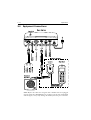
Note: Before the radio can recognize that a handset has been plugged
into any of the three HANDSET ports, you must cycle the base station OFF
and ON again, even if only moving the handset from one port to another.
3-13
Operations
3.5
Operating Procedures
With the RAY230 and RAY230E, all operations are made on the Handset
except turning ON/OFF the main power supply and adjusting the sound
volume of the External Speaker.
3.5.1
Turning ON/ OFF the Power Supply
To power on the RAY230/E:
1. Press the POWER switch on the base station transceiver (main unit). A
light illuminates the button when power is ON. The main unit and the
handset(s) are placed in a standby power condition, drawing about
150 mA. The radio circuitry does not yet have power.
2. Press the 16/9/POWER key (RAY230) or 16/POWER key (RAY230E) on
any handset. The full system is then powered ON.
You must press POWER on the base station and the 16/9/POWER or
16/POWER button on the handset to fully power on the radio.
Notes:
• If the main power supply switch is OFF, the handsets cannot power the
system ON.
• If the main power supply switch is ON and multiple handsets are
connected, pressing the FUNC and 16/9/POWER key (16/POWER key
for the RAY230E) from one handset will fully power ON the system and
all handsets.
To power off the RAY230/E:
1. Press the FUNC key followed by the 16/9/POWER key (RAY230) or 16/
POWER key (RAY230E) on any handset. The main unit and all
handset(s) return to the standby condition.
2. Press the POWER switch on the base station transceiver. The light
illuminating the button goes out. Full system power is OFF.
Note: If multiple handsets are connected, initiating power OFF from one
handset will cause all the handsets (and main unit) to enter the standby
condition.
When ship’s power is removed then returned to the base station, the
unit returns to its last state. For example, if the POWER switch was left
in the ON position, the base station will be ON when power is restored.
You must still press the 16/ POWER or 16/9/POWER button to power
on the handsets.
3-14
Operations
3.5.2
Setting the Volume
Setting the Volume on the Handset
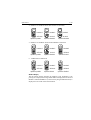
The sound volume adjustment for the handset has 11 settings. Pressing
and releasing the VOL UP ∧ key increases the volume by one level; pressing
and releasing the VOL DOWN ∨ key reduces the volume by one level.
The number of segments in the VOL bar graph on the LCD display will
increase or decrease accordingly. If the VOL UP/DOWN keys are pressed
and held, the volume levels will automatically change every half-second.
Setting the Volume on the External Speaker
The volume knob on the External Speaker controls its sound volume.
Turning the knob clockwise increases the volume; turning it
counterclockwise reduces the volume. Turning the knob fully
counterclockwise until you hear a "click" switches off the speaker
completely.
The external speaker sounds alert tones, such as Distress calls, at maximum
volume regardless of the volume set with the knob, even when the knob is
set to the OFF position.
3.5.3
Setting the Squelch
The squelch adjustment enables you to "quiet" the receiver when no
signal is being received. The squelch adjustment for the handset has 11
settings. Pressing and releasing the SQ UP ∧ key increases the squelch
by one level; pressing and releasing the SQ DOWN ∨ key decreases it by
one level. The number of segments in the SQ bar graph on the LCD display
will increase or decrease accordingly. If the SQ UP/DOWN keys are pressed
and held, the squelch levels will automatically change every half-second.
3.5.4
Using the Function Key
Most of the keys on the handset control multiple operations. Pressing one
of these keys after pressing the FUNC key initiates the operation marked
on the label above that key. When the FUNC key is pressed, the FUNC
indicator is displayed on the LCD display. If no other key is pressed for 5
seconds, the Function operation is cancelled and the FUNC indicator
disappears.
3-15
Operations
3.5.5
Setting the Frequency Mode (RAY230)
Select the channel frequency group to be used: US, International, or
Canadian. Indicators displayed in the LCD identify the active frequency
group: US for the US frequency group, INT for the International group,
and CAN for the Canadian group.
Changing the Frequency Group
Pressing the FUNC key followed by the INT key alternates the frequency
groups from US mode to International mode to Canadian mode then back
to US mode. When the power supply is turned on, the radio is initiated on
the last selected Priority Channel (9 or 16) in the frequency group last
selected.
When the frequency group is changed, the channel number remains the
same as was selected in the previous group, as long as that number is
present in the new group. If a channel number is absent in the destination
group, the new channel will be the previous number plus 1. When returning
to the previous frequency group, the channel returns to its original number
if the channel has not been changed. If the channel has been changed,
that number is retained when the frequency group is changed.
Example 1
CH15 US ⇒ CH15 INT ⇒ CH15 CAN ⇒ CH15 US
When shifting the frequency group, the channel remains the same because
the corresponding channel number exists in the new frequency group.
Example 2
CH2 CAN ⇒ CH3 US ⇒ CH2 INT ⇒ CH2 CAN
No corresponding channel exists in the new frequency group, so the
channel is incremented by 1. As long as the channel is not changed further,
it returns to its previous number if the frequency group is again changed.
Example 3
CH2 CAN ⇒ CH3 US, then changed to CH5 ⇒ CH5 INT ⇒ CH5 CAN
However, if the channel is changed in the new frequency group, this new
number is retained when the frequency group is changed.
3-16
Operations
3.5.6
Setting the Frequency Mode (RAY 230E)
Select the channel frequency group to be used from either US or
International. Indicators displayed in the LCD identify the active frequency
group: US for the US frequency group or INT for the International group.
Note: Access to the US frequency group is only available with a software
upgrade from your dealer. You may also need to obtain an Operator
License from the FCC, which is required for operating a VHF marine
radio within US territorial waters if you dock in a foreign (non-US) port
or leave a foreign port to dock in a US port.
Changing the Frequency Group
Pressing the FUNC key followed by the US key alternates the frequency
groups from US mode to International mode then back to US mode. When
the power supply is turned on, the radio initially operates on Channel 16 in
the frequency group last selected.
When the frequency group is changed, the channel number remains the
same as was selected in the previous group, as long as that number is
present in the new group. If a channel number is absent in the destination
group, the new channel will be the previous number plus 1. When returning
to the previous frequency group, the channel returns to its original number
if the channel has not been changed. If the channel has been changed,
that number is retained when the frequency group is changed.
Refer to the examples in section 3.5.5 above, ignoring the references to the
Canadian frequency group.
3.5.7
Receiving the Weather Channels
The Weather Channels consist of Channel 0 through Channel 9. To switch
between the Working Channel and the current Weather Channel, press the
FUNC key followed by the 6/WX key. While the Weather Channel is active,
the WX indicator appears in the LCD display and the frequency group
indicator disappears.
If the channel number is changed while in the Weather mode, the new
channel number is stored in memory upon exiting Weather mode. To exit
Weather Mode, press CLR, or FUNC followed by 6/WX.
Note: On the RAY230E, this feature requires separate software upgrades
for access to the US frequency group and to the weather channels.
3-17
Operations
3.5.8 Selecting the Channel
Two methods are available for selecting the channel: inputting the channel
with the numeric keypad then pressing the ENT key or using the Channel
UP/DOWN switch on the side of the handset. Both methods are applicable
to the three frequency groups on the Working Channel.
Using the Channel UP/DOWN Switch
Pressing the Channel UP ∧ switch increments the current channel number
by one for each key-click. When the highest channel number is reached,
the channel scrolls to the lowest number and increments from there.
Pressing the Channel DOWN ∨ switch decrements the current channel
number by one for each key-click. When the lowest channel number is
reached, the channel scrolls to the highest number and decrements from
there. Channel numbers not available in a particular frequency group are
skipped.
If the Channel UP/DOWN switch is pressed and held for at least a half
second, channels automatically change every 100 milliseconds.
Using the Numeric Keypad
To select a channel, input the desired number on the keypad. For 5 seconds
the channel number flashes on the LCD display. If the ENT key is pressed
during this 5 second interval, the channel change is implemented. If the 5
seconds elapse without pressing another key, the channel change is
implemented anyway. If the CLR key is pressed while the number is flashing,
the channel returns to the previous number.
Note: A leading zero is required for single digit channel numbers.
3.5.9 Selecting the Private Channel (RAY230E only)
To select the Private Channel, press the FUNC key, followed by the 5/PRIV
key, then input the channel number on the keypad. For 5 seconds the
channel number flashes on the LCD display. If the ENT key is pressed
during this flashing phase, the channel change is implemented. If the 5
seconds elapse without pressing another key, the channel change is
implemented. If the CLR key is pressed during the flashing phase, the
channel returns to the previous number.
Note: While using the Private Channel, selecting a new Working Channel
or pressing the CLR key returns operation to the Working Channel.
3-18
Operations
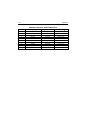
The RAY230E has ten Private Channels (P1–P10) available. However, only
certain Private Channels can be used within each country. The following
table lists which channels have been allocated for use within your country.
Country
UK
Denmark
Finland,
Norway &
Sweden
Netherlands
Belgium
Denmark,
Finland,
Norway &
Sweden
Priv
ate
Private
No..
CH No
P1
P2
P3
P4
P3
P4
P5
P6
P6
P8
P9
P10
Channel
Designator
M1/37C
M2
L1
L2
L1
L2
L3
31A
31A
F1
F2
F3
FFrequency
requency
TX/RX (MHz)
157.850/157.850
157.850/157.850
155.500/155.500
155.525/155.525
155.500/155.500
155.525/155.525
155.650/155.650
157.550/162.150
157.550/162.150
155.625/155.625
155.775/155.775
155.825/155.825
Channel
Use
Pleasure Boat
Pleasure Boat
Pleasure Boat
Pleasure Boat
Pleasure Boat
Pleasure Boat
Pleasure Boat
Fishing Boat
Fishing Boat
Fishing Boat
Note: It is your responsibility to obtain the proper license to operate the
radio on these frequencies.
3.5.10 Priority Channel for RAY230
In the RAY230 US version, the Priority Channel operates on either Channel
16 or Channel 9. Pressing the 16/9 key during any operation except the
Distress Call switches to the Priority Channel. Pressing and holding the
16/9 key for 2 seconds alternates the Priority Channel between Channel 16
and Channel 9.
While using the Priority Channel, pressing the 16/9 key or the CLR key
returns operation to the Working Channel.
3.5.11 Priority Channel for RAY230E
In the RAY230E European version, the Priority Channel operates on
Channel 16. Pressing the 16 key at any state except the Distress Call shifts
operation to the Priority Channel. While using the Priority Channel, pressing
the 16 key or the CLR key returns operation to the Working Channel.
3-19
Operations
3.5.12 Multi-Call Operation (RAY230E only)
The Multi-Call function stores your favorite channels in memory for quick
access. If you have had optional access to the US frequency group
installed, separate Multi-Call channels are available for both the US and
International frequency groups. When the frequency group is changed,
the radio operates the channels registered in the previous Multi-Call.
Using Multi-Call
To start the Multi-Call operation, press the FUNC key followed by the 8/
M-CALL key. The Multi-Call channel used in the previous operation is
displayed. Use the Channel UP/DOWN key to increment/decrement
through the Multi-Call channels in memory. When exiting Multi-Call, the
last-used channel is stored to be used the next time Multi-Call starts.
Changing from the Multi-Call Channel to the Working Channel
During the Multi-Call operation you can return to the Working Channel by
again pressing FUNC followed by 8/M-CALL, by pressing the CLR key, or
by entering the channel number directly with the ENT key.
Storing the Multi-Call Channel
From the Working Channel mode, select the channel to be stored. Press
and release the FUNC key then press and hold the 8/M-CALL key for 3
seconds. The MULTI indicator appears when the registration is complete.
If you attempt to store either a Weather Channel or a Private Channel as a
Multi-Call channel, the registration is terminated and an error alert tone
sounds.
Deleting a Channel from Multi-Call
From the Working Channel mode, select the channel to be deleted. Press
and release the FUNC key then press and hold the 8/M-CALL key for 3
seconds. The MULTI indicator disappears when the channel has been
deleted.
3.5.13 Channel Memory
Channels that are stored in memory in the same group can be scanned
using the Memory Channel Scan function. Channels can be stored in
memory for each frequency group; when the frequency group is changed,
the radio operates according to the channels stored in memory for that
group.
3-20
Operations
Storage in memory of Weather Channels or the Private Channels is disabled.
When storage of these channels is attempted, the registration is terminated
and an error alert tone sounds.
Storing Channels in Memory
From the Working Channel mode, select the channel to be stored. Press
the FUNC key followed by the 1/MEM key. The MEM indicator appears
when the registration is complete.
Deleting Channels from Memory
From the Working Channel mode, select the channel to be deleted. Press
the FUNC key followed by the 1/MEM key. The MEM indicator disappears
when the channel is deleted.
3.5.14 Setting the Transmission Power Output
The transmission output can be set at either 1W or 25W. When the power
supply is switched on, the output is 25W. Pressing the FUNC key followed
by the 9/1/25 key alternates the transmission between 25W and 1W.
When 1W is selected, the 1W indicator is displayed on the LCD. When
25W is selected the 1W indicator disappears.
3.5.15 Desensitized Reception (Local Mode)
You can set the RAY230/E to reduce the receiving sensitivity in high traffic
areas to decrease unwanted reception. This is also known as local mode.
To start Sensitivity Reduction, press the FUNC key followed by the 7/D/L
key. While the desensitize function (local mode) is active, the DESENS
indicator appears in the LCD display. To return to full receiver sensitivity
(distant mode), again press the FUNC 7/D/L key combination.
3.5.16 LCD Backlight Function
LCD backlight brightness can be set at four different levels. Press the
FUNC/DIM key two times to enter Dimmer mode. Each successive click of
the FUNC/DIM key alternates the brightness from Off, to Low, to Medium,
to High, then back to Off. As the backlight setting is changed, the dot
matrix indicator displays the following messages: DIM OFF for the Off
setting, DIM LOW for Low, DIM MID for Medium, and DIM HI for High.
When the ENT or CLR keys are pressed or when no other key operation is
made for 5 seconds, the current state is accepted and stored in memory,
and the backlight setting operation is complete.
3-21
Operations
The next time the radio is powered on, the backlight state of the handset is
recalled and applied. Separate backlight settings are retained for each
handset.
When selecting the DIM OFF setting or pressing any key while in DIM
OFF mode, the display is lit at the DIM LOW setting for 5 seconds and
then turned off. This is so that you can view the display in low light
conditions.
3.5.17 Hailer Mode
The Hailer operation enables the unit to use a Hailer Horn as a loudspeaker.
To start the Hailer operation, press the FUNC key followed by the */HAIL
key. During Hailer mode, LdH appears on the 7-segment display.
Press and hold PTT to place the unit in Hailer mode. The message HAILING
appears in the dot matrix display. Anything spoken into the handset is
amplified and broadcast from the Hailer Horn (but not transmitted over the
radio). To adjust the Hailer Horn broadcast volume, use the VOL UP/
DOWN keys while pressing and holding PTT. Each handset retains its
own volume setting for the next time the unit is powered on.
Release PTT to switch to Listen mode. LISTEN appears in the dot matrix
display and the Hailer Horn then acts as a directional microphone. Sounds
picked up by the Hailer Horn can be heard on the handset speaker when
off the cradle. Press the VOL UP/DOWN keys to adjust the handset speaker
volume. Each handset has its own volume setting. When the handset is on
the cradle, sounds picked up by the Hailer Horn can be heard on the
External Speaker. Adjust the External Speaker volume by rotating the knob
on the speaker itself.
To cancel the Hailer operation, again press FUNC followed by */HAIL or
press the CLR key.
3.5.18 Fog Alert/Siren Mode
The Fog Alert / Siren operation enables the radio to emit various fog horn
and siren alerts over a Hailer Horn speaker. To start the Fog Alert operation,
press the FUNC key followed by the #/FOG key. During Fog Alert mode,
FOG appears on the 7-segment display.
Use the SQ UP ∧ and SQ DOWN ∨ keys to select one of the following
modes, then press the ENT key to enable the selection:
3-22
Operations
Manu. Fog Pressing the PTT switch sounds a 500 Hz tone.
Auto Fog Every 115 seconds, the unit sounds a 500 Hz tone for 5
seconds duration.
Siren
Pressing the PTT switch sounds one of 4 siren sounds that
are set up in the Menu mode (see section 3.5.30.4.3).
The following table lists the four siren sounds and the procedure for
emitting them from the Hailer Horn speaker.
CAUTION: The siren sounds available in this radio are for recreational
purposes only. It is your responsibility to exercise caution and common
prudence when emitting these siren sounds.
Number
Sound
How to Operate the Siren
1
“Hi-Lo”
2
Siren
3
Whelp
4
Air Horn
Press and hold PTT switch to emit sound.
Release PTT to stop.
Press and hold PTT switch to emit sound.
Release PTT to stop.
Press and hold PTT switch to emit sound.
Release PTT to stop.
Press and hold PTT switch to emit sound.
Release PTT to stop.
A message appears on the right side of the dot matrix display depending
on the mode selected: MANU for Manual Fog, AUTO for Auto Fog, and
SIREN for Siren sounds.
To activate the tone, press and hold the PTT switch. ACT is displayed on
the left side of the display and the selected fog alert or siren is sounded
from the Hailer Horn. To adjust the Hailer Horn broadcast volume, use the
VOL UP/DOWN keys while pressing and holding PTT. Each handset has
its own volume setting, which is retained the next time radio is powered on.
Release PTT to switch off the tone. LIS is displayed on the left side of the
dot matrix display as the radio enters Listen mode. The Hailer Horn then
acts as a directional microphone. Sounds picked up by the Hailer Horn are
heard on the handset speaker when off the cradle. Press the VOL UP/
DOWN keys to adjust the handset speaker volume. Each handset has its
own volume setting. When the handset is on the cradle, sounds picked up
by the Hailer Horn can be heard on the External Speaker. Adjust the External
Speaker volume by rotating the knob on the speaker itself.
To cancel the Fog Alert operation, again press FUNC followed by #/FOG
or press the CLR key.
3-23
Operations
3.5.19 DTMF Interface Operation (Optional)
A cellular fixed wireless terminal (such as the RAYCOM Fixed Cellular
Wireless Terminal) or other radio communications device with a Dual Tone
Multi-Frequency (DTMF) interface (such as some Inmarsat Mini-M’s) can
be connected to the RAY230 or RAY230E, using an optional interface to
the AUX terminal.
One handset is used for DTMF phone operation while the other handset(s)
monitor(s) transmissions on the last selected working or weather channel.
The other handset(s) can only make a radio call by pressing and holding
CLR for three seconds. This terminates the phone call and gives your
handset priority over the handset making the phone call. Also, when any
DSC call is received or a distress call is transmitted, phone operation is
interrupted and radio operation is given priority. Channel 70 is always
monitored for incoming DSC calls.
Making a call
To make a phone call, remove the handset from the cradle hook and press
the FUNC key followed by the 3/CELL key. CEL appears on the 7-segment
display. Enter the telephone number to be called with the numeric keypad.
The number you just input appears on the dot matrix display. If the phone
number exceed 9 digits, the number scrolls and only the last 9 digits are
visible.
Press the ENT key to verify the number on the dot matrix display is correct.
Then press ENT again to send the call. Make your phone call as usual.
When the call is complete, hang the handset on the cradle hook or again
press FUNC followed by 3/CELL. The unit returns to normal operation.
Receiving a call
When a phone call is received, an alert tone is sounded and INCOMING
CELL CALL is indicated on the dot matrix display. To answer the call, press
the FUNC key followed by the 3/CELL key. Any handset can be used to
answer an incoming call but when the call is answered, only this handset
can be used for cellular phone operation. Other handsets can only be used
for radio signal receiving.
3.5.20 Intercom Mode
When more than one handset is installed, Intercom operation enables
talking among the stations (handsets). To start Intercom mode, press the
FUNC key followed by the 0/IC key. If only one handset is installed, the
operation is cancelled and an error alert sounds.
3-24
Operations
Notes:
• The station number can be changed to any name up to a length of 9
letters using the Menu operation. For the details, refer to Section 3.5.30
Menu Operation.
• Intercom operation is a duplex operation (much like the telephone in
your house), so communication can be performed without pressing the
PTT switch.
• Although any of the handsets can initiate an intercom call, only one
handset can perform this function at a time.
Making a Call
Press the FUNC key followed by the 0/IC key to enter Intercom mode. Use
the SQ UP ∧ and SQ DOWN ∨ keys to choose the station (handset) to
be called: HANDSET 1, HANDSET 2 or HANDSET 3. Then press the ENT
key to enter your selection. While calling, CALLING and the Handset
being called appear on the dot matrix display. When the other station is on
the line, the message CALLING turns to CONNECT. If the other station
does not respond within one minute, the unit exits Intercom mode.
To exit Intercom mode, hang the handset on the cradle, press the CLR key,
or again press FUNC followed by 0/IC.
Receiving a Call When the Handset is on the Cradle
When an Intercom call is received, the external speaker emits a calling tone
and CALL FROM with the name of the calling station appear on the dot
matrix display once every second. To answer the call, press the FUNC key
followed by the 0/IC key. The calling tone ceases and the message
CONNECT appears in the dot matrix display.
Note: If the handset is not taken out of the cradle within 1 minute after
being called, the call terminates and the dot matrix display returns to its
previous state.
To exit Intercom mode, hang the handset on the cradle, press the CLR key,
or again press FUNC followed by 0/IC.
Receiving a Call When the Handset is Off the Cradle
When an Intercom call is received, the handset speaker emits a calling
tone and CALL FROM with the name of the calling station appear on the
dot matrix display once every second. To answer the call, press the FUNC
key followed by the 0/IC key. The calling tone ceases and the message
CONNECT appears in the dot matrix display.
3-25
Operations
Note: If the call is not answered within 1 minute, the call is terminated
and the dot matrix display is returned to its previous state.
To exit Intercom mode, hang the handset on the cradle, press the CLR key,
or again press FUNC followed by 0/IC.
3.5.21 Scan Mode
During Scan mode, the RAY230/RAY230E searches through the channels,
stops when radio traffic is detected, then resumes scanning after the traffic
ceases. Two scan functions are available: All Channel Scan and Memory
Channel Scan. The All Channel Scan function searches all channels (except
Weather Channels, Private Channels, or Channel 70) within the same
frequency group. The Memory Channel Scan searches only the channels
stored in memory in the same group.
The scan begins from the channel following the one currently indicated
and is suspended when a carrier is detected. Five seconds after the carrier
ceases, the scan resumes with the next channel. If the carrier is detected
again before 5 seconds elapse, the timer is re-initialized. Press the 2/SCAN
key to resume the scan from the next channel. Press and hold 2/SCAN for
3 seconds to cancel the scan.
Upon reaching Channel 88, the radio scrolls back to Channel 1 and
continues the scan. If the scan stops on a channel with traffic and you
wish to communicate with the other party, press the PTT switch to cancel
the scan and remain on that channel.
Note: Both Scan functions exclude Channel 70, which is used exclusively
for receiving and transmitting Digital Selective Calling (DSC) functions.
Using Memory Scan
This function is available only when at least one channel has been stored
in memory. Press the FUNC key followed by the 2/SCAN key. The messages
MEM and SCAN flash for 3 seconds on the LCD. A scan of only the
channels in memory is initiated when the 3 seconds elapse or when you
press the ENT key before the 3 seconds elapse.
Pressing the 2/SCAN key or the CLR key during the scan cancels Memory
Scan.
Note: No key functions are accepted while transmitting, Multi-calling,
or operating on the Weather or Private channels.
3-26
Operations
Using All Scan
Press the FUNC key followed by the 2/SCAN key The messages MEM
and SCAN flash for 3 seconds on the LCD. Before the 3 seconds elapse,
press the 2/SCAN key again to begin All Scan. If the 3 seconds elapse
before you press the 2/SCAN key, the radio will enter Memory Scan.
Pressing the 2/SCAN key or the CLR key during the scan cancels All Scan.
Note: No key functions are accepted while transmitting, Multi-calling,
or operating on the Weather or Private channels.
3.5.22 Monitor Mode
Monitor operation can be implemented in one of two modes: Dual-Watch
or Tri-Watch.
Dual-Watch
In Dual-Watch Mode, the RAY230/RAY230E operates on the Working
Channel while constantly monitoring the Priority Channel. The radio locks
onto the Priority Channel or the Working Channel whenever it becomes
active, then returns to Dual-Watch when there is no activity.
To start Dual-Watch Mode, select the desired Working Channel then press
the MON key. The Working Channel is displayed on the 7-segment display
and the Priority Channel appears on the right side of the dot matrix display.
To end Dual-Watch mode at the current channel, press the MON key or
the CLR key. If Dual-Watch mode is initiated at Channel 70, the operation
is cancelled and an error alert sounds.
Tri-Watch for US Model RAY230
In Tri-Watch Mode, the RAY230 operates on the Working Channel while
constantly monitoring the Priority Channel then the previously selected
Weather Channel for severe weather alert broadcasts. When a signal is
detected on the Working Channel or Priority Channel, that channel becomes
active. When there is no longer any activity on the Working Channel or
Priority Channel, the RAY230 returns to Tri-Watch.
If a weather alert broadcast is detected, the RAY230 emits an alert tone and
the WX indicator blinks. Tri-Watch mode terminates and the radio switches
to the WX channel to monitor the severe weather broadcast.
Operations
3-27
To start Tri-Watch mode, select the Working Channel then press the FUNC
key followed by the MON/TRI key. The Working Channel appears on the
7-segment display, the Priority Channel appears on the right-most portion
of the dot matrix display, and the Weather Channel appears on the leftmost portion of the dot matrix display.
To end Tri-Watch mode at the current channel, press the MON key or the
CLR key. If Tri-Watch mode is initiated at Channel 70, the operation is
cancelled and an error alert tone sounds.
Tri-Watch for European Model RAY230E
In Tri-Watch Mode, the RAY230E operates on the Working Channel while
constantly monitoring Channel 16. Then, a third user-selectable channel is
monitored: either the previously selected Weather Channel (in US mode)
or the last used Multi-Call Channel (in International mode). When a signal
is detected on one of the other channels, that channel becomes active.
When there is no longer any activity on the active channel, the RAY230E
returns to Tri-Watch.
To start Tri-Watch mode, select the Working Channel then press the FUNC
key followed by the MON/TRI key. The Working Channel appears on the
7-segment display, Channel 16 appears on the right-most portion of the
dot matrix display, and the Weather Channel or Multi-Call Channel appears
on the left-most portion of the dot matrix display.
To end Tri-Watch mode at the current channel, press the MON key, the
CLR key, or the PTT switch. If Tri-Watch mode is initiated at Channel 70,
the operation is cancelled and an error alert tone sounds.
3.5.23 Priority Using Multiple Handsets
If more than one handset has been installed, the station with the highest
priority has control of the radio’s operation when it is taken off the cradle
hook. A handset’s priority ranking is determined by its station number,
with Handset One having the highest rank and Handset Three having the
lowest. Handset One should be located where the ship is normally navigated
from (such as the wheel house), so in the event of an emergency, this
handset can take immediate control of the transceiver. The handset name
as shown in the dot matrix display can be changed to any name up to a
length of 9 letters using the Menu operation described in section 3.5.30.4.1
Intercom Set Up.
3-28
Operations
Note: Normally, when Handset 1 is removed from the cradle, it
automatically takes priority from either of the other two Handsets. In
some instances, though, it may be necessary to press and hold the CLR
key for 3 seconds before Handset 1 regains priority.
Operation States
Since it has highest priority, key operation is always possible from Handset
1 even while On-Hook. Operation of the other two handsets depends on
their On/Off-Hook status.
In these examples, disabled operation means a handset can only be used
to make a Distress Call. Limited operation means a handset can be used to
talk on the Intercom, adjust the sound volume, and make a Distress Call.
1. All Handsets On-Hook
Handset 1
Handset 2
Handset 3
On-Hook
On-Hook
On-Hook
Operation possible
Operation disabled
Operation disabled
2. All Higher-ranked Handsets On-Hook
Handset 1
Handset 2
Handset 3
On-Hook
On-Hook
OFF-Hook
Operation disabled
Operation disabled
Operation possible
3. Higher-ranked Handset is taken Off-Hook while a lower-ranked Handset
is Off-Hook
Handset 1
Handset 2
Handset 3
On-Hook
OFF-Hook
OFF-Hook
Operation disabled
Operation possible
Operation disabled
3-29
Operations
4. Handset 1 is Off-Hook while other stations are On-Hook
Handset 1
Handset 2
Handset 3
OFF-Hook
On-Hook
On-Hook
Operation possible
Operation disabled
Operation disabled
5. Handset 1 is Off-Hook while another Handset is Off-Hook
Handset 1
Handset 2
Handset 3
OFF-Hook
On-Hook
OFF-Hook
Operation possible
Operation disabled
Operation limited
6. All Handsets are Off-Hook
Handset 1
Handset 2
Handset 3
OFF-Hook
OFF-Hook
OFF-Hook
Operation possible
Operation limited
Operation disabled
Handset Display
The dot matrix display indicates the handset's rank. If Handset 1 has
priority, for example, the message AVAILABLE is displayed on the LCD of
Handset 1 while HANDSET 1 (or the currently assigned handset name) is
displayed on the LCD of the other handsets.
3-30
Operations
1. If all Handsets are On-Hook
Handset1
Handset 2
Handset 3
2. If only Handset 1 is Off-Hook
Handset 1
Handset 2
Handset 3
3. If only Handset 2 is Off-Hook.
Handset 1
Handset 2
Handset 3
3.5.24 NMEA Operation
The RAY230/RAY230E can receive valid position and time information,
which are transmitted during a DSC Distress call. This data can be
communicated via SeaTalk or NMEA 0183 from a GPS, fishfinder, radar, or
any device that outputs or repeats GPS sentences. If the radio does not
detect the positional data, it provides different alerts urging you to find
and correct the fault or manually input the data using the radio’s L/L ENT
function, as described in section 3.5.30.3.2. Current valid positional data,
whether from external device or manually input, can be viewed using the
NAVSTAT Operation described in section 3.5.30.2.
If a GPS device is not connected via SeaTalk or NMEA, the radio emits a
5-second-long staccato alert tone and flashes the NMEA indicator 2
minutes after power up. This occurs every time the unit is turned on. The
alarm is required by safety regulations and cannot be disabled.
Operations
3-31
Operation at Power Up
At power up, the SeaTalk line is monitored for 1 minute. If a signal is
detected, the radio determines whether the data is valid. If valid, the data is
input, the NMEA indicator is displayed on the LCD of all handsets, and
the radio enters normal operation mode. The radio assumes all future data
is to be received on SeaTalk, so will not again monitor the NMEA line (until
the next time the handset goes through the power up sequence).
If no signal is detected on SeaTalk, the radio next monitors the NMEA line
for 1 minute. If a signal is detected on NMEA, the radio determines whether
the data is valid. If valid, the data is input, the NMEA indicator is displayed
on handsets, and the radio enters normal operation mode. The radio
assumes future data is to be received on NMEA, so will not again monitor
the SeaTalk line (until the next time the handset goes through the power up
sequence).
If no GPS signal is detected on either SeaTalk or NMEA after the 2 minute
polling period, a 5-second-long staccato alert tone is emitted and the NMEA
indicator flashes. All the position fields are set to 9’s and the time and date
fields are set to 8’s. The message NO GPS appears in the NAVSTAT screen,
although no positional data is displayed.
If at a later time valid data is received on NMEA, the data is input, the
NMEA indicator is displayed solid (no longer flashing), and the radio
enters normal operation mode. However, because the radio does not poll
for SeaTalk data after finding none within the first minute of powering on,
SeaTalk data would not be detected, even if valid, until the next time the
handset goes through the power up sequence.
Note: If SeaTalk positional data is not input within the first minute of
power up, you must cycle the handset OFF and ON again before a restored
signal can be detected.
Operation When the Signal is Lost or Becomes Invalid
If positional data that was previously detected becomes invalid or is no
longer detected, the radio polls the last detected line (SeaTalk or NMEA)
for 1 minute for it to be restored. The radio will not search for a signal on
SeaTalk if the signal was last seen on NMEA, or vice-versa.
Note: Because the radio only polls for the last detected input (SeaTalk or
NMEA) when a signal is lost, you must cycle the handset OFF and ON
again to properly detect positional data if the source is switched from
SeaTalk to NMEA or vice-versa.
3-32
Operations
If a signal is restored on the last detected line (SeaTalk or NMEA) and the
radio determines the data is valid, the data is input, the NMEA indicator
remains illuminated, and the radio re-enters normal operation mode.
However, if no signal is detected, the NMEA indicator flashes and a 5second-long staccato alert tone is emitted. The last received positional
data is retained in memory and can be viewed in the NAVSTAT screen. The
message NO GPS appears in NAVSTAT in the position where the type of
device used to be. The NMEA indicator continues to flash until valid
positional data is received. If valid positional data (from the same source)
is later restored, the NMEA indicator is again displayed solid.
Operation When No Signal Detected for 4 Hours
If no valid positional data is received or input manually within 4 hours of
the previous alert, the NMEA indicator continues to flash and the staccato
alert tone is again emitted. This pattern is repeated every 4 hours if no
positional data has been detected. If no manual input was made during the
previous 23.5 hours, all the position fields are set to 9’s and the time and
date fields are set to 8’s.
3.5.25 SeaTalk Operation
The RAY230/RAY230E can receive SeaTalk position and time information
from any SeaTalk capable device. As with NMEA data, if the position
information becomes invalid or is not present, you will be prompted to
manually input position data.
3.5.26 Digital Selective Calling (DSC)
The Digital Selective Calling (DSC) protocol is a globally applied system
used to send and receive digital Distress calls as well as Individual and
All-Ships calls on channel 70, the dedicated DSC channel for Marine VHF.
DSC operation includes the following:
1. Transmitting/Receiving an Individual Call
2. Transmitting/Receiving a Group Call
3. Transmitting/Receiving an All Ships Call
4. Transmitting/Receiving a Distress Call
5. Receiving a Distress Relay Call
Actually, the RAY230/E has a separate receiver exclusively for Channel
70 so that even if receiving under normal operation, the unit can quickly
switch over to Channel 70 upon receiving a DSC signal. When the DSC
signal is received, the unit performs the corresponding operation. If the
radio is transmitting, however, receiving on Channel 70 is disabled.
3-33
Operations
Note: An MMSI number is required to operate the Digital Selective Calling
(DSC) equipment in this radio. You can program the MMSI number
yourself one time only using the Menu Operation described in section
3.5.30.4.2. Otherwise, your Raymarine dealer can program or change
the number for you.
3.5.26.1 Individual Call to Another Ship (Ship-to-Ship)
An Individual Ship's Call is a DSC call made to a specific ship identified by
its MMSI number. There are three types: ROUTINE for normal calls,
SAFETY for advisory alerts, and URGENCY for assistance when life is not
in immediate danger.
The RAY230/230E can receive all three types of Individual calls but can
only transmit ROUTINE Individual calls. As with any DSC operation, the
call is made on channel 70.
Transmitting an Individual Call
To call another ship, you must select the Working Channel and a specific
MMSI number. The MMSI number is selected either manually or from a
Phonebook list of preprogrammed numbers specified using the MENU
function described in section 3.5.30.3.3. To cancel the call, press and hold
the CLR key for 3 seconds.
Press the INDV key to initiate the call data setup operation. After setting
the call data, press the PTT switch to send the call. The following describes
the two types of calling operations: Individual Ship's (ship-to-ship) Call
and Shore station (ship-to-shore) Call.
To Make an Individual Call to Ship (ship-to-ship):
1. Press the INDV key. Ind appears on the 7-segment display and the DSC
indicator is displayed.
Pressing the SQ UP/DOWN key alternates between SHIP and SHORE.
INDV
Alternates with each click
of the SQ UP/DOWN key
2. Select SHIP and press the ENT key.
3. Scroll with the SQ UP/DOWN keys to select the method for inputting
the MMSI number, either from the Phonebook or manually. Press ENT.
3-34
Operations
ENT
Alternates with each click
of the SQ UP/DOWN key
4. Select the MMSI number.
BY PHONEBOOK:
Scroll with the SQ UP/DOWN keys, select the name associated with
the desired MMSI number, and press the ENT key. If the MMSI number
is not listed in phonebook, the display reverts to manual input.
ENT
Use SQ UP/DOWN key
to scroll through list of
MMSI nos./nicknames
OR
BY MANUAL INPUT:
Input the 9-digit MMSI number with the numeric keypad, then press
the ENT key.
numeric
keypad
ENT
Flashing
Flashing
5. Specify the Working Channel with the SQ UP/DOWN keys and press
the ENT key.
ENT
SQ UP/
DOWN
6. Press the ENT key again. A prompt appears on the display instructing
you to press the PTT switch.
7. Press PTT to transmit.
3-35
Operations
ENT
ENT
MMSI number or
nickname is displayed
Note: Only simplex channels (those channels that transmit and receive
on the same frequency) can be selected for ship to ship Individual Calls.
Pressing the SQ UP/DOWN will scroll you through the simplex channels
usable for this operation.
Response
If a response is received after pressing the PTT switch, a receiveconfirmation message is displayed. After 5 seconds have elapsed, the
channel is changed to a communication channel and the Individual Ships
Call is completed.
ACK
5 sec
If no response is received for 3 minutes after pressing the PTT switch, a
prompt to press the PTT switch appears once more. After 15 seconds
elapses without pressing the PTT switch following the prompt, operation
returns to the state before the call.
PTT
3 min
NO ACK
Scrolls every second
PTT
3-36
Operations
3.5.26.2 Individual Call to Shore Station (Ship-to-Shore)
To call a shore station, you must select the specific MMSI number. The
MMSI number can be entered manually or selected from a Phonebook list
of preprogrammed numbers specified using the MENU function described
in section 3.5.30.3.3. Channel 16 is automatically assigned for
communications. To cancel the call, press and hold the CLR key for 3
seconds.
To make an Individual Call to Shore Station (ship-to-shore):
1. Select the Shore Station channel.
2. Press the INDV key. Ind appears on the 7-segment display and the DSC
indicator is displayed.
Pressing the SQ UP/DOWN key alternates between SHIP and SHORE.
INDV
ENT
After pressing ENT, the
indication switches to:
PHNBOOK, MANUAL
Alternates with each
click of SQ UP/DOWN
3. Select SHORE and press the ENT key.
4. Scroll with the SQ UP/DOWN keys to select the method for inputting
the MMSI number, either from the phonebook or manually. Press ENT
to input your selection.
5. Select the name by MMSI number from the phonebook by scrolling
with the SQ UP/DOWN keys, and pressing the ENT key.
ENT
SQ UP/
DOWN
Use SQ UP/DOWN key to scroll through
list of MMSI nicknames. Press ENT when
desired selection is displayed.
ENT
3-37
Operations
OR
Manually input the MMSI number with the numeric keypad, then press
the ENT key.
numeric
keypad
ENT
Flashing
Flashing
6. Press ENT again. A prompt appears on the display instructing you to
press the PTT switch.
7. Press PTT to transmit.
ENT
With manual input, MMSI
number would be displayed
Response
If a response is received after pressing the PTT switch, a receiveconfirmation message is displayed. After 5 seconds have elapsed, the
channel is switched to a communication channel and the Individual Call is
completed.
ACK
5 sec
If no response is received for 3 minutes after pressing the PTT switch, a
prompt to press PTT appears once more. If the PTT switch is not pressed
within 15 seconds after the prompt appears, operation returns to the state
before the call.
PTT
3 min
NO ACK
Scrolls every second
PTT
3-38
Operations
3.5.26.3 Receiving an Individual Call
When an Individual Call is received, the DSC indicator flashes, Ind appears
on the 7-segment display, and the DSC Received Alert is sounded. On the
dot matrix display appears the message RECEIVED IND CALL along with
the type of call. There are three types of Individual calls: ROUTINE for
normal calls, SAFETY for advisory alerts, and URGENCY for assistance
when life is not in immediate danger. If the MMSI number exists in the
Phonebook list, the associated name is also displayed. If no match is
found, the actual numeric value of the MMSI is displayed. Lastly appears
a prompt to press ENT to accept or CLR to log the call. This sequence
scrolls every second.
Until either the ENT key or the CLR key are pressed, the prompt is flashed
at 1-second intervals and is accompanied by an alarm for up to 3 minutes.
If neither ENT nor CLR are pressed during these 3 minutes, the radio
reverts to the operation mode before receiving the Individual Call. The
DSC indicator continues to be flashed on the LCD display until the contents
of the log files can be confirmed.
If ENT is pressed, the alarm is turned off, and a new prompt appears on the
display, instructing you to press the PTT switch. Press PTT to transmit an
acknowledgment (ACK). If PTT is not pressed within 5 seconds of the
prompt appearing, the transmission is done automatically. Pressing PTT
switches the radio to the communication channel.
Receiving
ENT
After no operation
for 5 seconds
Scrolls
every
second
MMSI number is displayed
if the nickname is not
registered in the list.
If the CLR key is pressed
If the CLR key is pressed, the alarm is turned off, the displays are cleared,
and the received contents are stored in the Log File. The radio then reverts
to the operation mode before receiving the Individual Call.
3-39
Operations
3.5.26.4 Transmitting a Group Call
You can send and receive DSC calls from groups of stations that share the
same MMSI number. There are three types: ROUTINE for normal calls,
SAFETY for advisory alerts, and URGENCY for assistance when life is not
in immediate danger.
The RAY230/230E can receive all three types of Group calls but can only
transmit ROUTINE Group calls. As with any DSC operation, the call is
made on channel 70.
To make a Group Call:
1. Set up the Group MMSI number as outlined in Section 3.5.30.3.4.
2. Press the INDV key. Ind appears on the 7-segment display, the DSC
indicator is illuminated, and SHIP appears on the dot matrix display.
3. Press the SQ UP/DOWN key to alternate between SHIP, SHORE, and
GROUP. Stop on GROUP. The GROUP message only appears if you
have set up the Group MMSI number as outlined in Section 3.5.30.3.4.
4. When GROUP appears, press the ENT key. GrP appears on the 7segment display and the registered Group MMSI number appears on
the dot matrix display.
INDV
ENT
Group MMSI number
Only appears if Group
MMSI number is set up
via DSC Operation in
Menu Mode
Note: Since only one group MMSI number can be registered at a time,
only one MMSI number can be displayed when GROUP is selected. To
change the group MMSI number, see Section 3.5.30.3.4.
5. Press ENT to accept the MMSI number.
6. Use the SQ UP/DOWN key to select the Working Channel for
communication.
7. When the desired channel number appears, press ENT. The dot matrix
display scrolls between the Working Channel and the Group MMSI
number.
3-40
Operations
8. If this information is correct, press ENT to accept. A new message
appears, prompting you to press the PTT switch.
9. Press PTT. The radio changes over to the selected Working Channel
without waiting for acknowledgment.
ENT
MMSI number
ENT
Select Working Chanel
with SQ UP/DOWN key
ENT
Scrolls between
Working Chanel and
MMSI number
PTT
3.5.26.5 Receiving a Group Call
When a Group Call is received, the DSC indicator flashes, Grp appears on
the 7-segment display, and the DSC Received Alert is sounded. On the dot
matrix display appears the message RECEIVED GRP CALL, along with the
type of call: ROUTINE, SAFETY, or URGENCY. If the MMSI number exists
in the list, the associated name is displayed. If no match is found, the
actual numeric value of the MMSI is displayed. You are then prompted to
press ENT to accept or CLR to log the call.
Until either the ENT key or the CLR key are pressed, the prompt is flashed
at 1-second intervals and is accompanied by an alarm for up to 3 minutes.
If neither ENT nor CLR are pressed during these 3 minutes, the radio
reverts to the operation mode before receiving the Group Call. The DSC
indicator continues to be flashed on the LCD display until the contents of
the log files can be confirmed.
If ENT is pressed, the alarm is turned off, and a new prompt appears on the
display, instructing you to press the PTT switch. Press PTT to transmit. If
PTT is not pressed within 5 seconds of the prompt appearing, the
transmission is done automatically. Pressing the PTT switch causes the
channel to change to the communication channel.
If the CLR key is pressed, the alarm is turned off, the displays are cleared,
and the received contents are stored in the Log File. The radio then reverts
to the operation mode before receiving the Group Call.
3-41
Operations
Receiving
Scrolls
every
second
ENT
MMSI number is displayed
if the nickname is not
registered in the list.
3.5.26.6 Transmitting an All Ships Call
The All Ships Call is used to send out a message to all ships in range that
you need assistance but the situation is not serious enough for a Distress
Call. This call should only be used if hailing for assistance on channel 16
fails. There are three types of All Ships Calls: ROUTINE for normal calls,
SAFETY for advisory alerts, and URGENCY for assistance when life is not
in immediate danger. The RAY230/230E can receive all three types of these
calls but call only transmit SAFETY and URGENCY. As with any DSC
operation, the call is made on channel 70. Then, after the All Ships Call is
sent or received, the radio automatically selects channel 16.
To send an All Ships Call
1. Press the ALL SHIP key. The message SAFETY appears on the dot
matrix display and the DSC indicator illuminates.
2. Press the SQ UP/DOWN key. The message URGENCY now appears on
the dot matrix display.
3. Make your selection between SAFETY or URGENCY and press the
ENT key to submit. The prompt RECONFIRM is displayed.
4. Press the ENT key to confirm. A prompt appears on the display,
instructing you to press the PTT switch.
5. Press PTT to transmit the call.
The All Ships Call is made on Channel 70. After the All Ships Call is sent,
the radio automatically switches to channel 16.
ENT
Alternate by pressing the
SQ UP/DOWN key
ENT
3-42
Operations
3.5.26.7 Receiving an All Ships Call
When receiving an All Ships Call, the unit's manner of response depends
on the type of call received.
When an URGENCY call is received, the DSC Distress alert is sounded.
The LCD displays a message that an URGENCY call is being received,
along with the sender's MMSI number, and a prompt to press ENT to
accept or CLR to log the call. The DSC Distress alert and the displayed
message continue until either ENT or CLR is pressed. If ENT is pressed,
the radio switches to Channel 16 and the contents of the communication
are stored in memory. If CLR is pressed, the radio reverts to the mode
before receiving the URGENCY Call and the contents are stored in memory.
ENT
CLR
If CLR is pressed, the radio
reverts to the mode before
receiving Urgency Call
When a SAFETY call is received, the DSC Received alert is sounded. The
LCD displays a message that an SAFETY call is being received, along with
the sender's MMSI number, and a prompt to press ENT to accept or CLR to
log the call. The DSC Received alert and the displayed message continue
until either ENT or CLR is pressed. If ENT is pressed, the radio switches to
Channel 16 in mode and the contents of the communication are stored in
the log. If CLR is pressed, the radio reverts to the mode before receiving
the SAFETY Call and the contents are stored in the log.
ENT
CLR
If CLR is pressed, the radio
reverts to the mode before
receiving Safety Call
3-43
Operations
3.5.26.8 Transmitting a Distress Call
Two types of Distress Calls can be made: one that specifies the type of
distress and one that does not.
Unspecified Distress Call
To make a Distress Call without specifying type of distress:
1. Open the door labeled DISTRESS on the back of the handset and press
and hold the DISTRESS button. After one second, dSr flashes on the
7-segment display and the DSC indicator appears. On the dot matrix
display, countdown message appears prompting you to hold the
DISTRESS key for 4 more seconds.
2. Continue to hold the DISTRESS button for the duration of the
countdown. An alert tone is sounded at one-second intervals.
press
DISTRESS
Countdown starts 1 second after pressing
DISTRESS key. The types of DISTRESS
can be selected by releasing the key
before the Countdown is completed.
Note: If you fail to hold the button for the full 4 seconds, the DISTRESS
call will be cancelled.
3. After the countdown has completed, the message RELEASE appears
on the dot matrix display. Release the DISTRESS button.
The unit switches to channel 16, displays the message AWAIT ACK,
and monitors channel 70 for an acknowledgment.
release
DISTRESS
The unit retransmits the DISTRESS call at random intervals of 3.5 to 4.5
minutes, until a response is received or the call is manually cancelled.
To cancel the DISTRESS call, press the CLR key and hold for 3 seconds.
The call is cancelled and the unit returns to the state before the call.
3-44
Operations
press and hold
CLR for 3 secs
When a response is received, the DSC indicator flashes and the DSC
Distress alert is sounded. The LCD scrolls a message that the DISTRESS
has been acknowledged, along with the sending station's MMSI number
or nickname. The message and alert are repeated until the CLR key is
pressed.
CLR
Flashing
When the CLR key is pressed, the unit exits the DSC mode continues
monitoring Channel 16 on high power.
Regardless of the handset state, the DSC Distress alert is sounded at
maximum volume on the external speaker, even if the volume knob has
been rotated all the way OFF.
You can mute the alert tone by pressing the CLR key for one second.
Pressing CLR only turns off the alert sound; it does not interrupt the
Distress call.
Specified Distress Call
You can assign one of eleven distress types to the call to provide the
potential rescuing station additional information if time and circumstances
permit. The Nature of the distress call can be selected using the DISTRESS
key as outlined below or in the system MENU as outlined in Section
3.5.30.3.1. Below are the messages and their meanings:
3-45
Operations
Message
FIRE
FLOODNG
COLLISN
AGROUND
LISTING
SINKING
Meaning
fire
flooding
collision
run aground
listing
sinking
Message
ADRIFT
UNDESIG
ABNDSHP
PIRACY
MANONBD
Meaning
drifting
undesignated
abandoning ship
piracy
man overboard
To make a Distress Call specifying the type of distress:
1. Open the door labeled DISTRESS on the back of the handset and press
and release the DISTRESS key on the back of the handset. dSr appears
on the 7-segment display and the DSC indicator illuminates. On the dot
matrix display, the message FIRE appears.
press and
release
DISTRESS
SQ UP/
DOWN
2. If FIRE is the message you wish to attach, press the ENT key.
OR
If FIRE is not the message you wish to attach, scroll through the list
with the SQ UP/DOWN keys. When the appropriate message is
displayed, press the ENT key.
On the dot matrix display, appears the distress type plus a message
prompting you to press and hold the DISTRESS key.
3. To send the distress signal, press and hold the DISTRESS key. After
one second, dSr flashes and a countdown message appears on the dot
matrix display, prompting you to hold the DISTRESS key for 4 more
seconds.
4. Continue to hold the DISTRESS key for the duration of the countdown.
A tone sounds every second.
3-46
Operations
hold
DISTRESS
Note: If you fail to hold the button for the full 5 seconds, the DISTRESS
call will be cancelled.
After the 5 seconds have elapsed, the message RELEASE appears,
prompting you to release the key.
5. When this prompt appears, release the DISTRESS key. The unit is
switched to Channel 16, displays the message AWAIT ACK, and
monitors channel 70 for an acknowledgment.
release
DISTRESS
dSr stops flashing and the distress alarm sounds continuously. You can
mute the alert tone by pressing the CLR key for one second. Pressing
CLR only turns off the alert sound; it does not interrupt the Distress call.
The unit retransmits the DISTRESS call at random intervals of 3.5 to 4.5
minutes, until a response is received or the call is manually cancelled.
To cancel the DISTRESS call, press the CLR key and hold for 3 seconds.
The call is cancelled and the unit returns to the state before the call.
press and hold
CLR for 3 secs
When a response is received, the DSC indicator flashes and the DSC
Distress alert is sounded. The LCD scrolls a message that the DISTRESS
has been acknowledged, along with the sending station's MMSI number.
The message and alert are repeated until the CLR key is pressed.
3-47
Operations
When the CLR key is pressed, the unit exits the DSC mode continues
monitoring Channel 16 on high power. Regardless of the handset state, the
DSC Distress alert is sounded at maximum volume on the external speaker.
3.5.26.9 Receiving a Distress Call
When a Distress call is received, the DSC indicator flashes, dSr appears
on the 7-segment display, and the DSC Distress alert is sounded. On the
dot matrix display are scrolled RECEIVED, DISTRESS, the type of distress,
the MMSI number, the transmitting time, the latitude, and longitude of the
transmitting station.
The DSC Distress Alert and the displayed message continue until either
ENT or CLR are pressed. Pressing ENT stores the contents of the call in
the log and switches the radio to Channel 16. Pressing CLR also logs the
call but then reverts the radio to the mode before receiving the Distress
call.
ENT
CLR
If CLR is pressed, the radio
reverts to the mode before
receiving Distress Call
3-48
Operations
3.5.26.10
Receiving a Distress Relay Call
Sometimes a ship’s distress call can be relayed from another ship or a
shore station. The RAY230 can only receive a Relayed Distress call that
has been addressed to All Ships.
When a Relayed Distress call is received, the DSC indicator flashes, dSr
appears on the 7-segment display, and the DSC Distress alert is sounded.
On the dot matrix display are scrolled RECEIVED, RELAY, the MMSI number
of the station making the call, DISTRESS, the type of distress, the MMSI
number of the ship in distress, the latitude and longitude of that ship, and
the time of transmission.
ENT or CLR
MMSI number of transmitting station. If registered
in the list, the nickname appears instead.
MMSI number of ship in distress. If not
known, UNKNOWN appears here instead.
The displayed message continues until either ENT or CLR is pressed. At
that time, the radio switches to Channel 16 in high power and the contents
of the communication are stored in the Log File.
3-49
Operations
3.5.27 ATIS Operation (RAY230E only)
The RAY230E comes equipped with Automatic Transmission Identification
System (ATIS) capability for inland waterway requirements in Europe.
With ATIS enabled, each time the PTT switch is pressed your station ID is
sent at the end of the transmission. Before utilizing this feature, you must
obtain an ID number, program it into the RAY230E’s system Menu, and
activate the ATIS feature. Once activated, ATIS can be enabled or disabled
in the system Menu so that the RAY230E can be used in open water or
inland waterways.
3.5.28 Alert Operation
This function emits various sounds to attract the operator's attention for
confirming a key operation, warning of an erroneous key operation, or
informing of a specific state. The different types of alert sounds are
described below.
1. Key Click
This sound is made when a handset key is pressed. In the On-Hook
state the sound emits from the external speaker; in the Off-Hook state
the sound emits from the handset speaker. The key click volume level
is determined by the sound volume setting.
2. Operation Error Alert
This alert sounds when an erroneous key is pressed. In the On-Hook
state the sound emits from the external speaker; in the Off-Hook state
the sound emits from the handset speaker. The alert tone volume level
is determined by the sound volume setting.
3. DSC Distress Alert
This sound is made when receiving a distress call in the DSC receiving
mode, receiving an acknowledgment to a transmitted distress signal,
or an Urgency signal to All Ships. The alert is output from the external
speaker at the maximum sound volume, regardless of the handset volume
setting.
4. DSC Received Alert
This sound is made when receiving an Individual Ships Call in DSC
receiving mode, a Group Ships Call, or a Safety call to All Ships. In this
case the sound is made from the external speaker. The alert is sounded
at maximum volume regardless of the volume setting.
3-50
Operations
5. DSC Transmission Alert
This sound is emitted from the external speaker to notify that the DSC
code is being sent after transmission is completed. The alert is sounded
at maximum volume regardless of the volume setting.
6. Weather Alert
This sound is made at the detection of a NOAA Weather Alert. The
alert is sounded from the external speaker at maximum volume regardless
of the volume setting or handset state.
7. DTMF Phone Call Sound
This sound is emitted from the external speaker when a phone call is
received by the optional DTMF interface, if installed. The call volume
level is determined by the sound volume setting.
8. Intercom Call Sound 1
This sound is made upon receiving a call using the Intercom function,
when selected through the Menu operation. If Off-Hook, the sound
emits from the handset; if On-Hook, the sound emits from the external
speaker at a low volume. The call volume level is determined by the
sound volume setting.
9. Intercom Call Sound 2
This sound is made upon receiving a call using the Intercom function,
when selected through the Menu operation. If Off-Hook, the sound
emits from the handset; if On-Hook, the sound emits from the external
speaker at a low volume. The call volume level is determined by the
sound volume setting.
10. Intercom Call Sound 3
This sound is made upon receiving a call using the Intercom function,
when selected through the Menu operation. If Off-Hook, the sound
emits from the handset; if On-Hook, the sound emits from the external
speaker at a low volume. The call volume level is determined by the
sound volume setting.
11. Intercom Call Sound 4
This sound is made upon receiving a call using the Intercom function,
when selected through the Menu operation. If Off-Hook, the sound
emits from the handset; if On-Hook, the sound emits from the external
speaker at a low volume. The call volume level is determined by the
sound volume setting.
Operations
3-51
12. Siren 1 ("Hi-Lo" Sound)
Select this sound option under Siren in the Menu operation. While in
Fog/Siren mode, pressing and holding the PTT switch emits a
continuous "Hi-Lo" sound from the Hailer Horn speaker at the selected
volume. Releasing PTT, the Hi-Lo sound stops.
13. Siren 2 (Siren Sound)
Select this sound option under Siren in the Menu operation. While in
Fog/Siren mode, pressing and holding the PTT switch emits a
continuous siren sound from the Hailer Horn speaker at the selected
volume. Releasing PTT, the siren sound stops.
14. Siren 3 (Whelp Sound)
Select this sound option under Fog Siren 1 in the Menu operation.
While in Fog/Siren mode, pressing and holding the PTT switch emits a
whooping or “whelp” sound from the Hailer Horn speaker at the selected
volume. When PTT is released, the whooping sound stops.
15. Siren 4 (Air Horn)
Select this sound option under Fog Siren 1 in the Menu operation.
While in Fog/Siren mode, pressing and holding the PTT switch emits
an air horn sound from the Hailer Horn speaker at the selected volume.
When PTT is released, the air horn stops.
3-52
Operations
3.5.30 Menu Operation
The menu operation is used for making various settings and confirming
the current state. The operation is roughly divided in three functions as
follows:
Function
1. NAVSTA
2. DSC
3. SETTING
Purpose
Indicates the information input from NMEA or SeaTalk.
To enter/modify various settings related to DSC.
To register the names of stations for Intercom mode, to set
the tone of the Fog Siren, to program the MMSI number, to
program the ATIS ID number (RAY230E only) and to set the
operation mode of ATIS (RAY230E only).
3.5.30.1 Selecting the Menu Operation
To initiate the Menu function:
1. Press the FUNC key followed by the MENU key. Mn appears on the 7segment display and NAVSTAT is shown on the dot matrix display.
2. To scroll through these first level menu items, press the SQ UP/DOWN
key. The indicators alternate between NAVSTAT, DSC, and SETTING.
3. Select the desired operation and press the ENT key to enter that
particular menu item.
To exit the Menu operation, press and hold the CLR key for 3 seconds.
FUNC + MENU
3-53
Operations
3.5.30.2
NAVSTAT Operation
This operation indicates on the LCD display the position information that
has been input via NMEA or SeaTalk or has been manually input using the
LL/ENT function.
To view current position information:
1. Press the FUNC key followed by the MENU key to initiate the Menu
operation.
2. Select NAVSTAT and press the ENT key. The following five items are
automatically displayed at 3-second intervals in the following order:
1. Latitude
2. Longitude
3. UTC Time
4. UTC Date (Y/M/D)
5. Position source (GPS, DIFF GPS, NO GPS)
This data is for viewing only and can not be altered. Manual position entry
is done in the DSC menu as outlined in Section 3.5.30.3.2
after 3 seconds elapse
3 secs
3 secs
3 secs
3 secs
To return to the main menu screen, again press FUNC followed by MENU.
To exit the Menu operation, press and hold the CLR key for 3 seconds.
3-54
Operations
3.5.30.3 DSC Operation
DSC operation includes the manual entry of latitude/longitude, listing of
other ship’s MMSI numbers for ship-to-ship and ship-to-shore
communications, and listing of Group MMSI number.
To initiate the DSC operation:
1. Press the FUNC key followed by the MENU key to initiate the Menu
operation.
2. Select DSC and press the ENT key. The 7-segment display shows dSC
and the dot matrix display shows L/L ENT.
The DSC Main Menu is made up of NATURE, L/L ENT, PHNBOOK, and
GROUP submenus.
SQ UP/DOWN
3. Press the SQ UP/DOWN key until the desired operation is
displayed:
NATURE
L/L ENT
PHNBOOK
GROUP
Select type of Distress Call
Manual entry of latitude/longitude
Listing of MMSI numbers
Listing of Group MMSI numbers
Note: The GROUP selection only appears if a Group MMSI number
has been entered.
4. Press the ENT key to submit.
3-55
Operations
3.5.30.3.1
Selecting Distress Call Type (NATURE)
This menu item is used to select the nature of a distress call before the call
is sent. The selected information will be sent along with the distress call.
To select the nature of the distress that will be included with the call:
1. As described in section 3.5.30.3 DSC Operation above, select the DSC
operation NATURE.
2. Press the ENT key to initiate the process. The 7-segment display shows
nAt and the dot matrix display shows FIRE.
3. Use the SQ UP/DOWN key to select the type of distress.
ENT
ENT
Select
with
SQ UP/
DOWN
4. After selecting the desired distress type, press ENT. You are prompted
to press the DISTRESS key.
5. To send the distress call at this time, press and hold the DISTRESS
button. Follow the instructions on the display or the steps described
in Section 3.5.26.7.
6. To cancel the distress call, press and hold CLR for 3 seconds.
3-56
Operations
3.5.30.3.2
Manual Entry of Latitude/Longitude (L/L ENT)
This operation is used to manually enter the latitude/longitude and UTC
time when normal SeaTalk or NMEA input of the position information is
not available. The radio will sound a 5-second-long alert tone every four
hours to remind you to update your position.
1. As described in section 3.5.30.3 DSC Operation above, select the DSC
operation L/L ENT. The 7-segment display shows L L, while the dot
matrix display shows the latest latitude data.
2. Press one of the following keys to initiate the corresponding
operation:
Keys
0 - 9 keys
ENT key
CLR key
SQ UP/
DOWN key
Action
Changes the flashing numeric value (see step 3), then
advances to the next digit's place.
Advances from Latitude, to Longitude, to UTC.
Returns to the previous subject item.
For Latitude, alternates between N and S.
For Longitude, alternates between E and W.
For UTC, no effect.
3. The subject items can be changed in the following order. Numeric values
that can be changed are flashing:
1.
2.
3.
4.
5.
6.
7.
Degrees of lat at ten’s place
8.
Degrees of lat at unit's place
9.
Minutes of lat at ten’s place
10.
Minutes of lat at unit's place
11.
Degrees of lon at hundred’s place 12.
Degrees of lon at ten’s place
13.
Degrees of lon at unit's place
Minutes of lon at ten’s place
Minutes of lon at unit's place
Hours of UTC at ten’s place
Hours of UTC at unit's place
Minutes of UTC at ten’s place
Minutes of UTC at unit’s place
4. After changing the subject item, the display scrolls from latitude to
longitude to UTC. To submit the change of the position data as shown
in the display, press the ENT key. The unit exits Menu mode and returns
to normal operation.
To exit the Menu operation, press and hold the CLR key for 3 seconds.
The following illustration shows an example of the operation:
3-57
Operations
press ENT
press 1
press 5
Flashing
press ENT
Flashing
Flashing
press 7
press ENT
press 0
press ENT
Flashing
press ENT
Flashing
Flashing
Flashing
press ENT
Flashing
press 7
press ENT
press 0
press ENT
Flashing
press 2
Flashing
Flashing
press ENT
Flashing
press ENT
Flashing
press ENT
3-58
Operations
3.5.30.3.3 Modifying the MMSI Number List (PHNBOOK)
This operation is used to modify the "phonebook" lists of MMSI numbers
used for DSC Individual Calls. Two lists are available: one for Ship stations
and one for Shore stations. Each list allows you to register the MMSI
number and nickname for up to 20 Ship and 20 Shore stations.
1. As described in section 3.5.30.3 DSC Operation above, select the DSC
operation PHNBOOK.
2. Press the ENT key to initiate the process. The 7-segment display shows
Phb and the dot matrix display shows SHIP.
ENT
3. Use the SQ UP/DOWN key to select between SHIP or SHORE.
4. Press the ENT key to turn to submit your selection.
Modifying the List of Ship Stations
In this operation, a ship is added to or deleted from the phonebook list for
ship stations.
1. When SHIP is displayed, press the ENT key. The 7-segment display
shows SHP, while on the dot matrix display shows ENTRY.
2. The ENTRY selection is used to add an item to the list. Press the ENT
key to accept.
The list can hold a maximum of 20 entries. If a list is already full or if the
list becomes full during this process, operation returns to the EDIT
mode and the message PHNBOOK IS FULL HOLD DOWN CLR KEY is
scrolled.
3. To delete an item from the list, use the SQ UP/DOWN key to select
DELETE and press the ENT key. If no station has yet been registered,
the message PHNBOOK IS EMPTY HOLD DOWN CLR KEY is scrolled.
3-59
Operations
ENT
Note: Pressing and holding the CLR key for 3 seconds during either
ENTRY or DELETE returns operation to the mode before the Menu
operation began.
Adding Ship Stations to the List
To add to the phonebook list for ship stations, input the MMSI number
and nickname of the station.
1. To enter the MMSI number, press the corresponding numeric keys (0
through 9). The currently selected location is indicated by a flashing
"–" character. Pressing a numeric key enters that value then advances
to the next digit's place. To go back by 1 digit, press the CLR key.
2. To enter the nickname, use the numeric keys (0 through 9) to input the
associated alpha or numeric value (refer to section 3.2 Controls and
LCD Display). The currently selected location is indicated by the
flashing "–" character. After inputting the desired letter or numeral,
press the ENT key to submit the entry and proceed to the next place.
To go back by 1 digit, press the CLR key.
If no nickname is to be registered, press the ENT key for all characters
so that they all display a "–".
3. When the message CONT? Y appears, press the ENT key to submit.
Note: The 0 key will enter only the numeral "0", while the 1 key will
alternately enter "1" and "space". The 0 and 1 keys do not have associated
alpha characters.
3-60
Operations
ENT
0
Flashing
Input remainder
of MMSI number
This display is shown only if the list already
has the maximum 20 stations registered
ENT
ENT
7/PQRS
Flashing
2/ABC
ENT
Flashing
ENT
Input remainder
of MMSI name
Flashing
Flashing
Flashing
ENT
Pressing ENT while "Y" is displayed
registers the station and exits Menu
mode.
Pressing ENT while "N" is displayed
exits Menu mode without registering
the station.
Deleting Ship Stations from the List
When the ship station phonebook is selected, the oldest MMSI number or
nickname flashes on the dot matrix display.
1. Press the SQ UP/DOWN key to scroll through the registered stations
until the station to be deleted is displayed.
2. Press the ENT key; the message DEL? Y is displayed.
3. Press the ENT key to process the deletion and exit the Menu operation.
To exit without deleting, press the SQ UP/DOWN key until DEL? N is
displayed. If the list has no stations entered, the message PHNBOOK
IS EMPTY HOLD DOWN CLR KEY is displayed. Press and hold the
CLR key for 3 seconds to exit Menu mode.
ENT
ENT
3-61
Operations
Modifying the List of Shore Stations
In this operation, a shore (coast) station is added to or deleted from the
phonebook list.
1. When SHORE is displayed, press the ENT key. SHO appears on the 7segment display, while on the dot matrix display shows ENTRY.
2. The ENTRY selection is used to add an item to the list. Press the ENT
key to accept.
The list can hold a maximum of 20 entries. If a list is already full or if the
list becomes full during this process, operation returns to the EDIT
mode and the indicator PHNBOOK IS FULL is displayed.
3. To delete an item from the list, use the SQ UP/DOWN key to select
DELETE and press the ENT key. If no station has yet been registered,
the message PHNBOOK IS EMPTY is displayed.
ENT
Note: Pressing and holding the CLR key for 3 seconds during either
ENTRY or DELETE returns operation to the mode before the Menu
operation began.
Adding Shore Stations to the List
To add to the phonebook list for shore stations, input the MMSI number
and nickname of the station.
1. To enter the MMSI number, press the corresponding numeric keys
(0 through 9). The currently selected location is indicated by a flashing
"–" character. Pressing a numeric key enters that value then advances
to the next digit's place. To go back by 1 digit, press the CLR key.
2. To enter the nickname, use the numeric keys (0 through 9) to input their
associated alpha or numeric value (refer to section 3.2 Controls and
LCD Display). The currently selected location is indicated by a flashing
"–" character. After inputting the desired letter or numeral, press the
ENT key to submit the entry and proceed to the next place.
3. When the message CONT? Y appears, press the ENT key to submit the
registration.
3-62
Operations
To go back by 1 digit, press the CLR key. If no nickname is to be registered,
press the ENT key for all characters so that they all display a "–".
1-8
ENT
0
Flashing
If the maximum 20 stations are already
registered, this display is shown and the
radio shifts to Delete mode
Input remainder
of MMSI number
To DELETE mode
ENT
ENT
7/PQRS
Flashing
2/ABC
ENT
Flashing
ENT
Input remainder
of MMSI name
Flashing
Flashing
ENT
Flashing
ENT
Pressing ENT while "Y" is displayed
registers the station and exits Menu
mode.
Pressing ENT while "N" is displayed
exits Menu mode without registering
the station.
Note: The 0 key will enter only the numeral "0", while the 1 key will
alternately enter "1" and "space". The 0 and 1 keys do not have associated
alpha characters.
Deleting Shore Stations from the List
When the shore station phonebook is selected, the oldest MMSI number
or nickname flashes on the dot matrix display.
1. Press the SQ UP/DOWN key to scroll through the registered stations
until the station to be deleted is displayed.
2. Press the ENT key; the message DEL? Y is displayed.
3. Press the ENT key to process the deletion and exit the Menu operation.
3-63
Operations
To exit without deleting, press the SQ UP/DOWN key until DEL? N is
displayed. If the list has no stations entered, the message PHNBOOK
IS EMPTY HOLD DOWN CLR KEY is displayed. Press and hold the
CLR key for 3 seconds to exit Menu mode.
ENT
3.5.30.3.4
ENT
Modifying the MMSI Group Number (GROUP)
This operation modifies the MMSI number to be used in receiving a Group
Digital Selective Call.
1. As described in section 3.5.30.3 DSC Operation above, select the DSC
operation GROUP.
2. Press the ENT key to initiate the process. The 7-segment display shows
GrP and the dot matrix display shows ENTRY.
3. Use the SQ UP/DOWN key to alternate between ENTRY or DELETE.
4. Press the ENT key to turn to submit the desired selection.
ENT
Adding a Group to the List
To add a group to the list, select ENTRY then press the ENT key. Use the
numeric keys (0 through 9) to input desired group number. The currently
selected location is indicated by a flashing "–" character. Pressing a numeric
key enters that value then advances to the next place. To go back by 1
digit, press the CLR key.
After the last position has been filled, the message CONT? Y appears.
3-64
Operations
Press ENT to register the group and exit the Menu operation. To exit
without registering, press SQ UP/DOWN until DEL? N is displayed. Press
the ENT key and operation returns to mode before the Menu operation.
ENT
numeric
keypad
ENT
Deleting a Group from the List
Use the SQ UP/DOWN key to select DELETE. To delete the contents
indicated, press the ENT key and the message DEL? Y is displayed. Press
the ENT key to process the deletion and exit the Menu operation. To exit
without deleting, press the SQ UP/DOWN key until DEL? N is displayed.
Press the ENT key and operation returns to the mode before the Menu
operation began.
ENT
ENT
3-65
Operations
3.5.30.4
Setting Operation (RAY230)
This operation sets the function features of the unit, the name of the
Intercom station, the unit’s MMSI number, and the call tone/type of the
siren.
1. Press the FUNC key followed by the MENU key to initiate the Menu
mode. Mn appears on the 7-segment display and NAVSTAT appears
on the dot matrix display.
2. Press the SQ UP/DOWN key to select SETTING.
3. Press the ENT key. The message SET appears on the 7-segment display
and INTERCM appears on the dot matrix display. Pressing the SQ UP/
DOWN key alternates between the following:
INTRCM
selects the Intercom setting
MYMMSI selects the MMSI number for this unit
SIREN
selects the Fog Alert siren setting
4. Select the desired operation and press the ENT key to submit your
selection.
ENT
To exit the Setting operation, press and hold he CLR key for 3 seconds.
3.5.30.4.1
Intercom Set Up
During an Intercom call, the name of the handset being called (or the name
of the handset initiating the call) appears in the dot matrix display. Initially,
this name is HANDSET 1, HANDSET 2, or HANDSET 3. This identifier
name and the alert tone sounded when receiving an Intercom call can be
chosen from among four types.
To change the Station name or Intercom tone:
1. Select the INTRCM operation as described above in section 3.5.30.4
Setting Operation (RAY230).
2. Press the ENT key. The 7-segment display shows IC1 and the dot
matrix display indicates STATN 1.
3-66
Operations
3. Press the SQ UP/DOWN key scroll to STATN 2 and STATN 3. The
indication on the 7-segment display changes to IC2 or IC3, respectively.
ENT
4. When the desired station name is displayed, press the ENT key to
submit.
5. To enter the new station name, use the numeric keys (0 through 9) to
input the associated alpha or numeric value (refer to section 3.2 Controls
and LCD Display). The currently selected location is indicated by the
flashing "–" character. After inputting the desired letter or numeral,
press the ENT key to submit the entry and proceed to the next place.
To go back by 1 digit, press the CLR key.
6. After entering all the desired characters, press the ENT key. The
message RING 1 is now displayed, prompting you to setup the ring
tone.
7. To change the tone, press the SQ UP/DOWN key to alternate between
RING 2, RING 3, and RING 4. As you scroll, the corresponding call tone
sounds from the handset.
8. When you hear the desired call tone, press the ENT key. The contents
of your changes are scrolled across the LCD.
9. If the contents are acceptable, press the ENT key to confirm. The
message CONT? Y is displayed.
10. Press the ENT key to register the changes.
To exit without making the changes, press the SQ UP/DOWN key until
DEL? N is displayed. Press the ENT key and operation returns to the mode
before the Menu operation began.
3-67
Operations
ENT
Keypad
ENT
NAME
ENT
Select with SQ UP/DOWN
3.5.30.4.2
To register setup changes, press ENT
when "Y" is displayed. To exit without
saving, press ENT when "N" is displayed.
MMSI Number Set Up
This operation stores the MMSI number required for DSC communications,
including distress calls. You can request an MMSI number when you
apply for a radio license. If your vessel does not require a license, you may
obtain an MMSI by contacting either BoatUS (www.boatus.com) or
MariTEL (www.maritelusa.com).
Notes:
• This is a one time operation. Once the MMSI number has been
programmed, you will not be able to change it.
• Until the MMSI number is programmed, all DSC functionality is disabled.
Pressing the INDV, ALL SHIP, and DISTRESS buttons will only sound
an error alert.
To register the MMSI Number into memory:
1. Select the MY MMSI function as described above in Section 3.5.30.4
Setting Operation (RAY230).
2. Press the ENT key. MS appears on the 7-segment display and the dot
matrix display scrolls PLEASE PROGRAM MMSI NO.
3. Press ENT. Nine underscore characters appear, which are placeholders
for the 9 digits of the MMSI number. The first character place to be
input is flashing.
3-68
Operations
Pressing the following keys initiate the corresponding operation:
4. Input your MMSI number using the numeric keypad.
5. Press the ENT key. The message ENT - ACCEPT, CLR - EXIT scrolls
across the display.
Keys
0 - 9 keys
ENT key
CLR key
Action
Changes the flashing numeric value, then advances to the next
digit's place.
Advances the (flashing) subject item to the next one without
changing the numeric value. Advances to the next screen after
entering the last (ninth) digit.
Returns to the previous subject item. Pressing and holding for
3 seconds exits the operation and returns to the mode before
the Menu Operation began.
6. Press the ENT key to submit the number. The message ENTER MMSI
NO. AGAIN is displayed.
7. Press ENT. The nine underscore placeholders appear once more.
8. Again input the MMSI number with the numeric keypad.
9. Press ENT to submit. If the second MMSI number you input matches
the first, the message ENT - ACCEPT, CLR - EXIT is again displayed.
Note: If the two MMSI numbers don’t match, the message MMSI NO. NOT
MATCH PRESS ENT scrolls across the display. Press ENT to exit the
Menu mode and try again from step 1.
10. Press ENT to verify. The message ENT - STORE, CLR - EXIT is
displayed.
11. Press ENT one last time to register the MMSI number in memory.
Operation returns to the mode before the Menu mode began.
To exit without making changes at any time, press and hold CLR for 3
seconds.
3-69
Operations
ENT
ENT
Flashing
Input MMSI
number using
numeric keypad
ENT
ENT
Flashing
re-enter
MMSI No.
ENT
ENT
Flashing
ENT
3.5.30.4.3
Siren Set Up
This operation changes the tone of the siren that sounds from the Hailer
Horn speaker when the SIREN option is selected in Fog/Siren mode, as
described in Section 3.5.18.
CAUTION:
The siren sounds available in this radio are for recreational purposes
only. It is your responsibility to exercise caution and common prudence
when emitting these siren sounds.
To select the siren tone:
1. Select the SIREN function as described above in Section 3.5.30.4 Setting
Operation (RAY230).
2. Press the ENT key. Sir appears on the 7-segment display, the dot
matrix display indicates CADENC1, and the corresponding call tone
sounds from the handset.
3. To change the tone, press the SQ UP/DOWN key to alternate between
CADENC2, CADENC3, and CADENC4. As you scroll, the
corresponding siren tone sounds from the handset. The table that
follows describes the type of tone emitted and the procedure for
sounding the siren while in Fog/Siren mode. Mn is shown on the 7segment display and NAVSTAT appears on the dot matrix display.
3-70
Operations
Name
CADENC1
Sound
“Hi-Lo”
CADENC2
Siren
CADENC3
Whelp
CADENC4
Air Horn
Operating Siren in Fog/Siren Mode
Press and hold PTT switch to emit sound.
Release PTT to stop.
Press and hold PTT switch to emit sound.
Release PTT to stop.
Press and hold PTT switch to emit sound.
Release PTT to stop.
Press and hold PTT switch to emit sound.
Release PTT to stop.
4. When the desired call tone is heard, press the ENT key to accept. The
message CONT? Y is displayed.
5. Press the ENT key to register the changes.
To exit without making the changes, press the SQ UP/DOWN key until
DEL? N is displayed. Press the ENT key and operation returns to the mode
before the Menu operation began.
ENT
SQ UP/
DOWN
Pressing SQ UP/
DOWN changes
the siren sound
ENT
ENT
Pressing ENT while "Y" is displayed stores
the selected siren and exits Menu mode.
Pressing ENT while "N" is displayed exits
Menu mode without changing the siren.
Note: If your RAY230/E cannot emit siren sounds, this feature may have
been disabled in your radio.
3-71
Operations
3.5.30.5
Setting Operation (RAY230E)
This operation sets the function features of the RAY230E: the name of the
Intercom station, the ATIS ID number and on/off state, the MMSI number,
the Tri-Watch function, and the call tone type of the siren.
1. Press the FUNC key followed by the MENU key to initiate the Menu
mode. Mn is shown on the 7-segment display and NAVSTAT appears
on the dot matrix display.
2. Press the SQ UP/DOWN key to select SETTING.
3. Press the ENT key. The message SET appears on the 7-segment display
and INTERCM appears on the dot matrix display. Pressing the SQ UP/
DOWN key alternates between the following:
INTRCM
MYATIS
MYMMSI
TRI
ATIS
SIREN
selects the Intercom setting
registers the ATIS ID number
registers the MMSI number
selects the Tri-Watch operation
turns the ATIS function ON or OFF
selects the siren setting
Note: The ATIS selection only appears if this option has been enabled
by the dealer.
4. Select the desired operation and press the ENT key to submit your
selection.
ENT
3-72
Operations
3.5.30.5.1 Intercom Set Up
The operation is identical to the Intercom operation described for the
RAY230 in section 3.5.30.4.1.
3.5.30.5.2 MY ATIS Set Up
This operation stores the ATIS number required for the Automatic
Transmission Identification System used in inland waterways of some
European countries. You can request an ATIS number when you apply for
a radio license.
Regulations in some regions may not allow end users to program their own
ATIS number. If this unit was purchased to be used in such a region, this
function will be disabled and the programming must be done by your
Raymarine distributor.
Notes:
• This is a one time operation. Once the ATIS number has been
programmed, you will not be able to change it.
• The ATIS ID number is a ten digit number, beginning with a “9”. The
MY ATIS set up process has you input only the last 9 digits. The leading
“9” is automatically input for you.
To register the ATIS Number into memory:
1. Select the MY ATIS function as described above in Section 3.5.30.5
Setting Operation (RAY230E).
2. Press the ENT key. The 7-segment display shows AId and the dot
matrix display scrolls PLEASE PROGRAM ATIS ID.
3. Press ENT. Nine underscore characters appear, which are placeholders
for the last 9 digits of the ATIS number. The first character place to be
input is flashing.
Pressing the following keys initiate the corresponding operation:
3-73
Operations
Keys
0 - 9 keys
ENT key
CLR key
Action
Changes the flashing numeric value, then advances to the next
digit's place.
Advances the (flashing) subject item to the next one without
changing the numeric value. Advances to the next screen after
entering the last (ninth) digit.
Returns to the previous subject item. Pressing and holding for
3 seconds exits the operation and returns to the mode before
the Menu Operation began.
4. Input your ATIS number using the numeric keypad.
5. Press the ENT key. The message ENT - ACCEPT, CLR - EXIT scrolls
across the display.
6. Press the ENT key to submit the number. The message ENTER ATIS ID
AGAIN is displayed.
7. Press ENT. The nine underscore placeholders appear once more.
8. Again input the ATIS number with the numeric keypad.
9. Press ENT to submit. If the second ATIS number you input matches
the first, the message ENT - ACCEPT, CLR - EXIT is again displayed.
Note: If the two ATIS numbers don’t match, the message ATIS ID NOT
MATCH PRESS ENT scrolls across the display. Press ENT to exit the
Menu mode and try again from step 1.
10. Press ENT to verify. The message ENT - STORE, CLR - EXIT is
displayed.
11. Press ENT one last time to register the ATIS number in memory.
Operation returns to the mode before the Menu operation began.
To exit without making changes at any time, press and hold CLR for 3
3-74
Operations
ENT
ENT
Flashing
Input last 9 digits of
ATIS number using
numeric keypad
ENT
ENT
Flashing
re-enter
ATIS No.
ENT
ENT
Flashing
ENT
3.5.30.5.3
MY MMSI Set Up
The operation is identical to the MMSI set up operation described for the
RAY230 in section 3.5.30.4.2 MY MMSI Set Up.
Note: Regulations in some regions may not permit end users to program
their own MMSI number. If this unit was purchased to be used in such a
region, this function will be disabled and the programming must be done
by your dealer/distributor.
3-75
Operations
3.5.30.5.4
Tri-Watch Set Up
This operation selects whether the Weather Channel is monitored during
Tri-Watch state in the US mode or the Multi-Call Channel is monitored
during Tri-Watch state in the INT mode.
Note: Access to the US frequency group is only available with a software
upgrade from your dealer. Otherwise this feature is disabled.
To change the monitored channel:
1. Per the description in section 3.5.30.8 Setting Operation above, select
TRI.
2. Press the ENT key. TrI appears on the 7-segment display and TRI WX
appears on the dot matrix.
3. Press the SQ UP/DOWN key to toggle between TRI MUL for MultiCall and TRI WX for Weather Channel.
4. After selecting the desired operation, press the ENT key.
5. If the setting is acceptable, press the ENT key to confirm. The message
CONT? Y is displayed.
6. Press the ENT key to register the setting.
To exit without making changes, press the SQ UP/DOWN key until DEL?
N is displayed. Press the ENT key and operation returns to the mode
before the Menu operation began.
ENT
ENT
3-76
Operations
3.5.30.5.5
ATIS Set Up
This operation determines whether to effect ID transmission of ATIS after
the PTT switch is released.
To set the ATIS function:
1. Per the description in Section 3.5.30.5 Setting Operation (RAY230E)
above, select ATIS.
2. Press the ENT key. The message ATS is shown on the 7-segment
display and ATIS OFF appears on the dot matrix.
3. Press the SQ UP/DOWN key to toggle between ATIS ON and ATIS
OFF.
4. After selecting the desired operation, press the ENT key.
5. If the setting is acceptable, press the ENT key to confirm. The message
CONT? Y is displayed.
6. Press the ENT key to register the setting. When ATIS is ON, the ATIS
indicator is illuminated on the LCD.
To exit without making changes, press the SQ UP/DOWN key until DEL?
N is displayed. Press the ENT key and operation returns to the mode
before the Menu operation began.
ENT
3.5.30.5.6
ENT
Siren Set Up
The operation is identical to the Siren set up operation described for the
RAY230 in section 3.5.30.4.3 Siren Set Up.
4-1
Maintenance
Section 4
4.1
Maintenance
How to Contact Raymarine
The RAY230/RAY320E is designed to provide long periods of trouble-free
operation. It is recognized, however, that environmental and other factors
may result in a need for occasional service.
In the US
Technical Support
1-800-539-5539 ext. 2444, or
1-603-881-5200 ext. 2444
You can reach our Technical Support Department Monday to Friday 4:00
AM to 6:00 PM Eastern Standard Time. Our Technical Support Specialists
are available to answer installation, operation, and troubleshooting
questions about your Raymarine unit.
Accessories and Parts
1-800-539-5539 ext. 2333, or
1-603-881-5200 ext. 2333
Many Raymarine accessory items and parts are available through your
authorized Raymarine dealer. However if you are in need of an item not
available through your retailer feel free to contact our Customer Service
department Monday to Friday 8:15 AM to 5:00 PM Eastern Standard Time.
If you are uncertain about what item to choose for your Raymarine unit
please contact our Technical Support Department Prior to placing your
order at 1-800-539-5539 ext. 2065.
In the unlikely event your Raymarine unit should develop a problem please
contact the Raymarine dealer from where the unit was purchased. Your
Raymarine dealer is best equipped to handle your service needs.
Service may also obtained by returning your unit to Raymarine's Product
Repair Center at the address below.
Raymarine, Inc.
Product Repair Center
22 Cotton Road, Unit D
Nashua, NH 03063-4219
In Europe
In Europe, Raymarine support, service and accessories may be obtained
from your authorized dealer, or contact:
4-2
Maintenance
Raymarine Limited
Anchorage Park
Portsmouth, Hampshire
England PO3 5TD
Tel +44 (0) 23 9269 3611
Fax +44 (0) 23 9269 4642
Technical Support Tel +44 (0) 23 9269 3611
Fax +44 (0) 23 9269 4642
The Technical Services Department handles inquiries concerning
installation, operation, fault diagnosis and repair.
Accessories and Parts
Raymarine accessory items and parts are available through your authorized
Raymarine dealer. Please refer to the lists of component part numbers and
optional accessories in Section 2.2 of this handbook and have the
Raymarine part number ready when speaking with your dealer. If you are
uncertain about what item to choose for your Raymarine unit, please contact
our Customer Services Department prior to placing your order.
Worldwide Support
Please contact the authorized distributor in your country. A list of worldwide
distributors is supplied with your unit and on the Raymarine website.
On the Internet
You can also reach us on the Raymarine World Wide Web site:
www.raymarine.com
Navigate to the Customer Support page, which provides links for:
•
•
•
•
•
Finding Factory Service locations and Authorized Dealers near you
Accessing handbooks in Adobe Acrobat format
Searching questions and answers in our solution database by product,
category, keywords, or phrases
Submitting a question to our technical support staff, who reply to you
by e-mail
Logging in to check the status of your questions, modify your answer
update notifications, or update your personal profile
Questions can be sent directly to our Technical Support Department on
the Customer Support page by clicking Ask Raymarine.
4-3
Maintenance
4.2
Preventative Maintenance
The RAY230/230E has been constructed to be virtually maintenance free.
Your attention to a few basic points should assure many years of service.
1. Although the unit is waterproof, always keep the unit as dry as possible.
2. Clean the exterior of the unit with a tissue or soft non-abrasive cloth.
CAUTION
Do not use solvents or other chemicals for cleaning this equipment.
3. Inspect the radio case and antenna for any physical damage.
4.3
Specifications
4.3.1
Transmitter
All available US, International, and Canadian VHF
Marine Band
Frequency Stability
+/- 10 PPM (+/- 0.001%)
(-20°C to +50°C)
Frequency Range
156.025 to 157.425 MHz
Channel Spacing
25 kHz increments
Power Output
25 W switchable to 1W into 50 ohms at 13.6 VDC
Modulation
Frequency modulated 16F3
(+/-4.5 kHz at 1000 Hz)
Mod. Audio Response Shall not vary +1/-3dB from true 6dB pre-emphasis
from 300 to 2500 Hz, reference 1000 Hz. Audio
frequencies 3-20 kHz shall be attenuated (at 1 kHz
by 60 log f/3 dB. Above 20 kHz by 50 dB)
FM Hum & Noise level Less than -40 dB below audio
Audio Distortion
Less than 10 % at 1 kHz for 3 kHz deviation
Spurious & Harmonic Attenuated at least 43+10 log Po (below rated
radiated carrier Emissions power) per FCC Rules
Part 2 & 80
Antenna Impedance
50 ohms
Transmitter Protection Shall survive open or short circuit of antenna
system without damage (10 min. test)
Channels
4-4
Maintenance
4.3.2
Receiver
All available US, International, and Canadian VHF
Marine Band
Frequency Range
156.025 to 163.275 MHz in 25 kHz increments
Frequency Stability
+/- 10 PPM (+/- 0.001%) from -20°C to +50°C
Usable Sensitivity
0.25 µV for 12 dB (SINAD)
Squelch Sensitivity
0.2 µV or better
Threshold
1.0 µ full squelch
Adjacent CH Rejection 70 dB
Spurious Image Rejection 70 dB
Intermodulation Rejection 70 dB
Audio Output
3.5 watts or more at 10% or less distortion into 4
ohm load (internal)
Hum & Noise in Audio Less than -40 dB
Channels
4.3.3
Operating Requirements
Input Voltage
Current Required
Transmit
Temperature Range
Duty Cycle
Relative Humidity
Water Protection
4.3.4
13.6 VDC +/- 15% (11.6 to 15.6 VDC)
Less than 6 amps at 25 watts
Less than 2 amps at 1 watt
-4°F to +122°F (-20°C to +50°C)
Continuous, 80% receive, 20% transmit (max 10
min, @25°C)
80%
To CFR-46 for Base Station and External Speaker.
To JIS-7 for Full Function Handset (submersible
to 1m for at least 30 minutes)
Radio Dimensions
Base Station Transceiver
Height
2.63 inches (67 mm)
Width
8.98 inches (228 mm)
Depth
7.04 inches (179 mm)
Weight
Approx. 4 lbs (1.87 kg)
4-5
Maintenance
Handset
Height
Width
Depth
Weight
6.81 inches (173 mm)
2.2 inches (56 mm)
1.1 inches (28 mm)
Approx. 0.30 lbs (138 g)
Cradle
Height
Width
Length
Weight
1.97 inches (50 mm)
2.52 inches (64 mm)
4.02 inches (102.1 mm)
Approx. 0.15 lbs (70 g) (without cables)
External Speaker
Height
Width
Depth
Weight
4.53 inches (115 mm)
4.33 inches (110 mm)
1.57 inches (40 mm)
Approx. 0.75 lbs (340 g)
4-6
Maintenance
Maintenance
4.4
Drawings
Assembly Drawing
4-7
4-8
Maintenance
Block Diagram - RF PCB
SQ ADJ
RF AMP
1st MIX
FILTER
1st IF AMP
Q21
Q22
16.9MHz
F3
Q23
2nd IF MIX AMP DET
DE-EMPHASIS
IC10
IC9
70cH
AF OUT
BUSY 2
RF AMP
D/L SW
Q16
BUFF AMP
OSC
Q25
MULT
Q24
DIVIDER
D11 Q17
L37
16.445MHz
FILTER
F4
FREQ ADJ
455kHz
TONE DET
49.54MHz
IC11
1050Hz
DET
ANT
DISC OUT
D/L
LPF ANT SW
RF AMP
1st MIX
FILTER
1st IF AMP
Q18
D12-D16
Q19
21.6MHz
F1
Q20
2nd IF MIX AMP DET
IC7
DE-EMPHASIS
IC8
( 1/2 )
ALLcH
AF OUT
SQ INP
D1 D2
DC AMP
VCP
BUFF AMP
IC8
( 2/2 )
21.545MHz
DRIVE
Q1
IC1
BUSY 1
455kHz
D9 Q14
RIPPLE
FILTER
Q8
POWER AMP
FILTER
F2
BUFF AMP
SW
Q2
D7 D8
LOCK DET
VCO T/R SW
Q9
VCO T/R
LOOP FILTER
IC5 D10
CLOCK
PLL
VCO
IC3 Q10-Q12
UNLOCK
DATA
IC4
LE1
LOOP SW
APC
IC2 D4-D6
Q3 Q5-Q7
MIC/DSC
IDC
BUFF AMP
IC6
Q13
12.8MHz
DSC MOD
MOD ADJ
RF DET
Q4
EXT +B OUT
MOD ADJ
HIGH LOW
POWER ADJ
POW LOW
6V
6V REG
8V REG
SW
IC14
IC12
Q28 Q29
POWER ON/OFF
RL1
Q26
D17 D18
Q27
BATT +
BATT -
RF DET
RY ON/OFF
8V
T8V
R8V
RF ON/OFF
SW
R5V
D19 Q30-Q32
5V
PTT
SW
5V REG
Q33 Q34
IC13
4-9
Maintenance
Control PCB
DATA LINE SELECT
CK DATA LE2
CPU
FSK MODEEM-2
70cH AF
FSK
IC309
VARISTOR
ALLcH AF
IC322
LINE SELECT
SIREN OSC
FSK MODEEM-1
IC308
VARISTOR
EEPROM
ROM
AF SELECT
CK
WRITE
IC301-IC304
IC305
NMEA
SIREN
OUT1
AF MUTE
Q322-Q330
IC323 IC324
OUT2
RX DATA
SELECT
IC317
RXD
DSC OUT
ADJ
SEATALK I/O
FOG 2.13kHz
RF I/O
LINE SELECT
IC310
IC310
TXD
PC302 PC303
IC318 D306
Q309-Q315
TX DATA
RING DET
HOOK OFF
DATA
HANDSET
HS I/O
BUSY 1
I/O - 1
IC319 D307 D308
Q316 Q319 PC304 PC305
RESET
SP SELECT
LINE SELECT
SEATALK
RING DET
HOOK OFF
PA MUTE
BUSY 2
AF SELECT
NMEA
BEEP/ALERT
3.58MHz
AF SELECT
I/O
PC301 D305 Q308
HANDSET-1
IDC
18.423MHz
AF MUTE-1
DATA
CK LE3
HANDSET
Q302
VARISTOR
MIC OUT
TEL LINE DRIVE/RECEIVE
DTMF OSC
AUDIO
I/O - 2
IC320 D309 D310
Q317 Q320 PC306 PC307
AF I/O
CROSS POINT SW
AF MUTE
TEL
BEEP/ALERT
AF MUTE-2
HANDSET
LINE
RX OUT
Q303
VARISTOR
I/O - 3
IC321 D311 D312
Q318 Q321 PC308 PC309
D303 IC315 Q305
L2"
3.58MHz
DC AMP
HAIL-R AMP
IC314
( 2/2 )
IC314
( 2/2 )
2.5V
Vref
2.5V Vref
Q304
ANALOG
DISC OUT
SQ OUT
HANDSET-3
L1"
BUSY 2
BUSY 1
HANDSET-2
VOLUME
AF PA
SP SELECT
IC312 IC313
IC316
RL301
Q306 D304
HAIL +
RESET
HAIL -
IC307
(EXT SP)
CK DATA LE2
CPU,DATA I/O
PA MUTE
Q307
Vdet
REG/SW
5V
IC306
Vdet
D302
Q331
+B
PHONECELL
SX3
L2
L1
J601
Q601
RELAY ON/OFF
PC602
HOOK ON/OFF
NETWORK
IC601
TRANSFORMER
T601
PC601
RING DET
J602
GND
B+
HOOK OFF
L2"
L1"
RING OUT
4-10
Maintenance
DTMF Interface PCB
Wiring Diagram
5-1
Appendix
Section 5
5.1
Appendix
FCC Licensing Requirements
Raymarine radios comply with the Federal Communications Commission
(FCC) requirements that regulate marine VHF radio usage for the US.
Marine VHF radio users in the US must comply with all applicable FCC
rules and regulations, some of which are described here. This information
was current at the time this handbook was printed. Up-to-date information,
including licensing requirements, can be obtained on the FCC website at:
www.fcc.gov/wtb/marine
Official FCC forms can be obtained on the FCC website at:
www.fcc.gov/formpage.html
Station License
An FCC Ship Radio Station License and Call Sign are not required for most
recreational vessels travelling in US waters. Examples of radio equipment
that do not require a license include: marine VHF radios, any type of
Emergency Position Indicating Radio Beacon (EPIRB), any type of radar,
GPS or LORAN receivers, depth finders, CB radio, or amateur radio (an
amateur license is required). However, you must obtain a license if: (1) you
are required by law or treaty to carry a radio on your vessel; (2) your vessel
travels to foreign ports; (3) you use marine radio equipment on board your
vessel other than the devices listed above. Ships that use MF/HF single
side-band radio, satellite communications, or telegraphy must be licensed
by the FCC.
If required, you can obtain a Station License by completing FCC Form 605
(available from the FCC website). If no fees are required, mail the completed
form to:
Federal Communications Commission
1270 Fairfield Road
Gettysburg, PA 17325-7245
If fees are required, send Form 605 and the required fees to:
Federal Communications Commission
Wireless Bureau Applications
P. O. Box 358130
Pittsburgh, PA 15251-5130
5-2
Appendix
Operator License
An Operator License is not required to operate a VHF Marine Radio within
US territorial waters. However, a license is required to operate the radio if
you dock in a foreign port (including Canada and Mexico) or leave a foreign
port to dock in a U.S. port. You can request a Restricted Radiotelephone
Operator Permit from the FCC by filing Form 753.
Remember:
• Maintain a radio watch on Channel 16. Channel 16 is used for distress
and safety purposes only.
• VHF Channel 70 is used only for Digital Selective Calling (DSC). It can
not be used for general-purpose calling.
• Your VHF transceiver has a high low power switch. Use low power
whenever feasible. Unnecessary high-power operations can interfere with
other important communications.
• Always use your radio call sign at the beginning and end of each
transmission.
• Be sure only qualified persons operate your radio. You are responsible
for control of your radio. Know the rules.
• Limit calls to other vessels to 30 seconds. If you receive no reply, wait 2
minutes; then try again. Keep communications brief and avoid chit-chat.
• Never transmit false distress messages, and never use profanity on the
air.
Other Reminders:
• You can obtain a station license and call sign by completing FCC Form
605 and mailing it with the required fee (if required) to the FCC.
• You need a radio operator license to operate a VHF Marine Radio only if
you plan to dock in a foreign port or leave a foreign port to dock in a U.S.
port.
• Your radio license is not transferable. If you sell your boat, request the
FCC to cancel your station license.
• If you replace your radio, you do not need to change your license unless
the new radio operates on another frequency band. If you install
equipment to operate on another frequency band, apply for modification
of your license.
5-3
Appendix
5.2
Marine VHF Channel Usage Guide
Emergency
Calling
Monitoring
Intership Safety
U.S. Coast Guard
Navigation
Port Operation
Noncommercial
Commercial
Marine Operator
State Control
Environmental
Weather
5-4
Appendix
Emergency
Calling
Channel 16
Channel 16, 9, and Working Channel
If:
If
• Your ship is sinking, or on fire
• Someone has been lost overboard
• There exists grave and imminent
danger
Use this distress procedure:
• Select Channel 16
• Say "Mayday, Mayday, Mayday."
• Give call sign and boat name
• Give location of boat
• Describe emergency
• If no answer, repeat; then try another
channel
And
Then
If
And
Then
Caution
Every ship at sea is to obliged to give
absolute priority to radio
communications relating to ships in
distress - it is vital that false distress
calls or messages not be broadcast.
Note:
- you wish to establish
communications with
another station
- you know which working
channel the station is
monitoring
- initiate the call directly on
that working channel
- you wish to establish
communications with
another station
- you do not know what
working channel the
station may be monitoring
- initiate the call on channel
16. After contact is made
switch to a working
channel.
Due to congestion on channel
16 caused by frequent hailing
of other vessels, the FCC has
approved channel 9 as a second
hailing channel.
Avoid excessive calling and radio
checks
Always monitor before transmitting
Never interrupt emergency
communications
5-5
Appendix
Monitoring
Intership Safety
Channel 16 and Working Channel
Channel:
6
When
Vessels:
Any
Use:
Communicating
navigational and weather
warnings to other ships
- your VHF station is turned
on and it is not being used
to exchange
communications
You Must - monitor channel 16
As an operating convenience, many
stations employ a second receiver so
that they can monitor a working
channel and channel 16 simultaneously.
Communicating with U.S. Coast Guard
stations or other vessels during search
and rescue operations
Between:
Ship-to-ship only
Comments: Do not use for routine
communications. This is a
safety channel.
5-6
Appendix
U.S. Coast Guard
Navigation
Channel:
22A
Channel:
13
Vessels:
Any
Vessels:
Any
Use:
Working channel for
exchange of
communications with
stations of the U.S. Coast
Guard.
Use:
Safety Communications
pertaining to the
maneuvering of vessels or
the directing of vessel
movements
Between:
Ship to U.S. Coast Guard
ship, coast to aircraft
stations
Ship-to ship and secondarily ship-tocoast
Comments: U.S. Coast Guard does not
regularly monitor this
channel. Establish contact
on channel 16 and shift to
channel 22A as directed.
This is commonly called the Bridge-toBridge channel. Large vessels and
towboats depend on this channel for
their safe navigation. Railway or
highway bridges which open for ship
navigation often operate on this
channel.
Bridge-to-Bridge stations must reduce
power to one watt for routine
operations.
5-7
Appendix
Port Operations
Non commercial (Boat Operations)
Channels:
1A, 5A, 12, 14, 20, 65A,
66A, 73, 74, 77
Channels:
9, 68, 69, 71, 72, 78A
Vessels:
Any
Vessels:
Recreational boats and any
others not used primarily
for commercial transport.
Use:
Messages relating to the
operational handling,
movement and safety of
vessels in or near ports,
locks and waterways.
Use:
Communications
pertaining to the needs of
the vessel (i.e., fishing,
rendezvous, maneuvers,
berthing, scheduling of
repairs, provisioning, etc.)
Between:
Ship-to ship or ship-tocoast
Between:
Ship-to-ship or ship to
limited coast stations
Comments: Channel 77 is limited to
communications to and
from commercial pilots
concerning the movement
and docking of vessels.
Comments: Channel 72 may not be
used for ship to coast
communications. Channel
9 is shared with
Commercial users.
Note:
If you regularly monitor one of these
channels with a second receiver, please
notify frequently-called stations of this
practice. Help reduce congestion on
channel 16.
Channels 11, 12, 13 and 14
are used for vessels traffic
service on the Great Lakes,
St. Lawrence Seaway and
designated major ports.
5-8
Appendix
Commercial
Marine Operator
Channels:
7A, 8, 9, 10, 11, 18A, 19A,
67, 79A, 80A, 88A
Channels:
24, 25, 26, 27, 28, 84, 85, 86,
87A
Vessels:
Those used primarily for
commercial transport of
persons or goods, or
engaged in servicing other
vessels
Vessels:
Any
Use:
Communications
pertaining to the purpose
for which the vessel is
used
Use:
To place a telephone call to
any location in the world
or to a vessel outside of
your transmitting range
Between:
Between:
Commercial transport
vessels (ship-to-ship) or
between commercial
transport vessels and
limited coast stations
Vessels and public coast
stations
Channel 8, 67 and 88A may not be used
for ship-to-coast communications
Recreational boats are not permitted to
use these channels
Comments: Contact the marine
operator on the channel
assigned to your
navigating area. If unable
to determine this channel,
use channel 16.
Be patient. Do not interrupt calls in
progress. Avoid excessive calling if the
operator does not answer - give the
operator a chance to reply.
5-9
Appendix
State Control
Environmental
Channel:
17
Channel:
15
Vessels:
State and local government
Vessels:
Any (receive only)
Use:
Coordination, regulation
and control of boating
activities and the rendering
of assistance to vessels.
Use:
Broadcast of information
concerning the
environmental conditions
in which vessels operate weather, sea conditions,
time signals, notices to
mariner, hazards to
navigation
Between:
Ship and coast stations
associated with state and
local governments.
Between:
One-way broadcast from
coast to ship stations
Note:
Currently used for Class C
EPIRB emergency signals.
5-10
Appendix
Weather
Channels:
WX0—WX9
Vessels:
Any
Use:
Continuous weather
information from NOAA
(National Oceanic and
Atmospheric
Administration)
Between:
One-way broadcast from
NOAA to any interested
parties
Comments: Receive only. You are not
permitted to transmit on
these frequencies.
5-11
Appendix
PHONETIC ALPHABET:
To help make call letters more clearly understood, and to assist in spelling
out similar sounding or unfamiliar words, radiotelephone users employ the
international phonetic alphabet.
Phonetic Alphabet:
A - ALPHA
B - BRAVO
C - CHARLIE
D - DELTA
E - ECHO
F - FOX-TROT
G - GOLF
H - HOTEL
I - INDIA
J - JULIET
K - KILO
L - LIMA
M - MIKE
N - NOVEMBER
O - OSCAR
P - PAPA
Q - QUEBEC
R - ROMEO
S - SIERRA
T - TANGO
U - UNIFORM
V - VICTOR
W - WHISKEY
X - X-RAY
Y - YANKEE
Z - ZULU
5-12
5.3
Appendix
VHF Marine Channels Frequency Tables
International Mode
Note: International VHF frequency usage varies from country to country. Ensure you
are familiar with the channel requirements of the country where you are boating
before using any VHF transceiver.
International Mode
Frequency (MHz)
Channel
Number
TX
RX
01
02
03
04
05
156.050
156.100
156.150
156.200
156.250
160.650
160.700
160.750
160.800
160.850
06
07
156.300
156.350
156.300
160.950
08
09
10
11
12
13
14
15 1
16
17 1
18
156.400
156.450
156.500
156.550
156.600
156.650
156.700
156.750
156.800
156.850
156.900
156.400
156.450
156.500
156.550
156.600
156.650
156.700
156.750
156.800
156.850
161.500
19
156.950
161.550
20
157.000
161.600
21
157.050
161.650
22
157.100
161.700
Type of Traffic
Public Correspondence (Marine Operator)
Public Correspondence (Marine Operator)
Public Correspondence (Marine Operator)
Public Correspondence (Marine Operator)
Public Correspondence (Marine Operator),
Port Operations, Ship Movement
Intership Safety
Public Correspondence (Marine Operator),
Port Operations, Ship Movement
Intership
Intership, Port Operations, Ship Movement
Intership
Port Operations, Ship Movement
Port Operations, Ship Movement
Intership Navigation, Safety
Port Operations, Ship Movement
On Board Communications, Intership
International Distress, Safety
On Board Communications, Intership
Public Correspondence (Marine Operator),
Port Operations, Ship Movement
Public Correspondence (Marine Operator),
Port Operations, Ship Movement
Public Correspondence (Marine Operator),
Port Operations, Ship Movement
Public Correspondence (Marine Operator),
Port Operations, Ship Movement
Public Correspondence (Marine Operator),
Port Operations, Ship Movement
TX
Power
Hi, Lo
Hi, Lo
Hi, Lo
Hi, Lo
Hi, Lo
Hi, Lo
Hi, Lo
Hi, Lo
Hi, Lo
Hi, Lo
Hi, Lo
Hi, Lo
Hi, Lo
Hi, Lo
Lo Only
Hi, Lo
Lo Only
Hi, Lo
Hi, Lo
Hi, Lo
Hi, Lo
Hi, Lo
5-13
Appendix
Frequency (MHz)
Channel
Number
TX
RX
23
24
25
26
27
28
60
157.150
157.200
157.250
157.300
157.350
157.400
156.025
161.750
161.800
161.850
161.900
161.950
162.000
160.625
61
156.075
160.675
62
156.125
160.725
63
156.175
160.775
64
156.225
160.825
65
156.275
160.875
66
156.325
160.925
67
68
69
70 2
71
72
73
74
77
78
79
80
81
82
83
84
85
86
156.375
156.425
156.475
—
156.575
156.625
156.675
156.725
156.875
156.925
156.975
157.025
157.075
157.125
157.175
157.225
157.275
157.325
156.375
156.425
156.475
—
156.575
156.625
156.675
156.725
156.875
161.525
161.575
161.625
161.675
161.725
161.775
161.825
161.875
161.925
Type of Traffic
Public Correspondence (Marine Operator)
Public Correspondence (Marine Operator)
Public Correspondence (Marine Operator)
Public Correspondence (Marine Operator)
Public Correspondence (Marine Operator)
Public Correspondence (Marine Operator)
Public Correspondence (Marine Operator)
Port Operations, Ship Movement
Public Correspondence (Marine Operator)
Port Operations, Ship Movement
Public Correspondence (Marine Operator)
Port Operations, Ship Movement
Public Correspondence (Marine Operator)
Port Operations, Ship Movement
Public Correspondence (Marine Operator)
Port Operations, Ship Movement
Public Correspondence (Marine Operator)
Port Operations, Ship Movement
Public Correspondence (Marine Operator)
Port Operations, Ship Movement
Intership, Port Operations
Port Operations, Ship Movement
Intership, Port Operations, Ship Movement
DSC Communications Only
Port Operations, Ship Movement
Intership, Port Operations, Ship Movement
Intership, Port Operations, Ship Movement
Port Operations, Ship Movement
Intership
Public Correspondence, Port Operations
Public Correspondence, Port Operations
Public Correspondence, Port Operations
Public Correspondence, Port Operations
Public Correspondence, Port Operations
Public Correspondence, Port Operations
Public Correspondence, Port Operations
Public Correspondence, Port Operations
Public Correspondence, Port Operations
TX
Power
Hi, Lo
Hi, Lo
Hi, Lo
Hi, Lo
Hi, Lo
Hi, Lo
Hi, Lo
Hi, Lo
Hi, Lo
Hi, Lo
Hi, Lo
Hi, Lo
Hi, Lo
Hi, Lo
Hi, Lo
Hi, Lo
—
Hi, Lo
Hi, Lo
Hi, Lo
Hi, Lo
Hi, Lo
Hi, Lo
Hi, Lo
Hi, Lo
Hi, Lo
Hi, Lo
Hi, Lo
Hi, Lo
Hi, Lo
Hi, Lo
5-14
Appendix
Frequency (MHz)
Channe
Channel
Number
TX
RX
87A
88A
157.375
157.425
157.375
157.425
Type of Traffic
TX
Power
Public Correspondence, Port Operations
Public Correspondence, Port Operations
Hi, Lo
Hi, Lo
Notes:
1. For channels 15 and 17, output power is fixed at 1 watt only. Transmission at
high power is not permitted.
2. Channel 70 is used for Digital Selective Calling (DSC) only and is not available
for voice transmissions. Channel 70 does not appear on the display.
Important Notice
The International frequency mode is not legal for use while operating in U.S. waters.
The TX/RX frequencies available in International frequency mode were agreed upon
by the attending countries at the 1968 ITU-International Telecommunication Union
meeting in Geneva, and are legal for use in International waters only.
5-15
Appendix
Canadian Mode Frequency Table
Canadian Mode
Frequency (MHz)
Channel
Number
TX
RX
01
02
03
04A
156.050
156.100
156.150
156.200
160.650
160.700
160.750
156.200
05A
06
07A
08
09
156.250
156.300
156.350
156.400
156.450
156.250
156.300
156.350
156.400
156.450
10
156.500
156.500
11
12
13 1
14
15 2
16
17 2
18A
19A
20
21A
22A
156.550
156.600
156.650
156.700
156.750
156.800
156.850
156.900
156.950
157.000
157.050
157.100
156.550
156.600
156.650
156.700
156.750
156.800
156.850
156.900
156.950
161.600
157.050
157.100
23
157.150
161.750
24
25
157.200
157.250
161.800
161.850
26
27
157.300
157.350
161.900
161.950
Type of Traffic
TX
Power
Public Correspondence (Marine Operator) Hi, Lo
Public Correspondence (Marine Operator) Hi, Lo
Public Correspondence (Marine Operator) Hi, Lo
Pacific Coast: Canadian Coast Guard
Hi, Lo
East Coast: Commercial Fishing Only
Ship Movement
Hi, Lo
Intership Safety
Hi, Lo
Commercial
Hi, Lo
Commercial (Intership Safety)
Hi, Lo
Boater Calling Channel, Commercial and Hi, Lo
Non-Commercial
Ship Movement, Commercial and
Hi, Lo
Non-Commercial (Intership Safety)
Port Operations, Ship Movement
Hi, Lo
Port Operations, Ship Movement
Hi, Lo
Intership Navigation (Bridge to Bridge)
Lo
Port Operations, Ship Movement
Hi, Lo
On Board Communications
Lo Only
International Distress, Safety, and Calling Hi, Lo
On Board Communications
Lo Only
Commercial, Towing on Pacific Coast
Hi, Lo
Canadian Coast Guard Only
Hi, Lo
Port Operation with 1 watt max. power
Hi, Lo
Canadian Coast Guard Only
Hi, Lo
Communication between Canadian Coast Hi, Lo
Guard and non-Canadian Coast Guard
Public Correspondence on Pacific Coast
Hi, Lo
and Inland Waters of BC and the Yukon
Public Correspondence in all areas
Hi, Lo
Public Correspondence on Pacific Coast
Hi, Lo
and Lake Winnipeg
Public Correspondence, Safety
Hi, Lo
Public Correspondence on Pacific Coast,
Hi, Lo
Atlantic Coast, and Great Lakes
5-16
Appendix
FFrequency
requency (MHz)
Channel
Number
TX
28
60
61A
157.400
156.025
156.075
162.000
160.625
156.075
62A
156.125
156.125
64A
65A
156.225
156.275
156.225
156.275
66A
156.325
156.325
67
156.375
156.375
68
69
156.425
156.475
156.425
156.475
70 3
71
72
73
—
156.575
156.625
156.675
—
156.575
156.625
156.675
74
77 2
78A
79A
80A
81A
82A
83A
84
85
86
87
88
156.725
156.875
156.925
156.975
157.025
157.075
157.125
157.175
157.225
157.275
157.325
157.375
157.425
156.725
156.875
156.925
156.975
157.025
157.075
157.125
157.175
161.825
161.875
161.925
161.975
162.025
RX
Type of Traffic
Public Correspondence on Pacific Coast
Public Correspondence
Pacific Coast: Canadian Coast Guard
East Coast: Commercial Fishing Only
Pacific Coast: Canadian Coast Guard
East Coast: Commercial Fishing Only
East Coast: Commercial Fishing
Great Lakes: Search & Rescue
Antipollution Operations
Pacific Coast: Towing
St. Lawrence River Area: Port Operations
(restricted to 1 watt)
St. Lawrence River / Great Lakes Areas:
Port Operations Only (restricted to 1W)
Search & Rescue, Antipollution Operations
East Coast Only: Commercial Fishing
Non-Commercial, Marinas & Yacht Clubs
Commercial and Non-Commercial
East Coast Only: Commercial Fishing
DSC Communications Only
Commercial and Non-commercial
Maritime Support Operation
Search & Rescue, Antipollution Operations
East Coast Only: Commercial Fishing
Ship Movement
Ship Movement, Intership Safety
Commercial
Commercial
Commercial
Canadian Coast Guard Only
Canadian Coast Guard Only
Canadian Coast Guard Only
Public Correspondence (Marine Operator)
Public Correspondence (Marine Operator)
Public Correspondence (Marine Operator)
Public Correspondence (Marine Operator)
Public Correspondence (Marine Operator)
TX
Power
Hi, Lo
Hi, Lo
Hi, Lo
Hi, Lo
Hi, Lo
Hi, Lo
Hi, Lo
Hi, Lo
Hi, Lo
Hi, Lo
—
Hi, Lo
Hi, Lo
Hi, Lo
Hi, Lo
Lo Only
Hi, Lo
Hi, Lo
Hi, Lo
Hi, Lo
Hi, Lo
Hi, Lo
Hi, Lo
Hi, Lo
Hi, Lo
Hi, Lo
Hi, Lo
Appendix
5-17
Important Notice
The Canadian frequency mode is not legal for use while operating in U.S. waters.
Notes:
1. For channel 13, output power is fixed at 1 watt (low power) by regulation. In
an emergency, you can override to high power by pressing and holding PTT and
then pressing the MON/ 1/25 key on the base station. Output power is increased
to 25 watts while both keys are pressed. After MON/1/25 is released, power returns
to 1 watt.
2. For channels 15, 17, and 77, output power is fixed at 1 watt only. Transmission at
high power is not permitted.
3. Channel 70 is used for Digital Selective Calling (DSC) only and is not available
for voice transmissions. Channel 70 does not appear on the display.
5-18
Appendix
US Mode Frequency Table
US MODE
Frequency (MHz)
Channel
Number
TX
RX
01A
156.050
156.050
03A
05A
06
07A
08
09
156.150
156.250
156.300
156.350
156.400
156.450
156.150
156.250
156.300
156.350
156.400
156.450
10
11
12
13 1
156.500
156.550
156.600
156.650
156.500
156.550
156.600
156.650
14
15 2
16
17 3
18A
19A
20A
21A
22A
156.700
—
156.800
156.850
156.900
156.950
157.000
157.050
157.100
156.700
156.750
156.800
156.850
156.900
156.950
157.000
157.050
157.100
23A
24
25
26
27
28
61A
63A
157.150
157.200
157.250
157.300
157.350
157.400
156.075
156.175
157.150
161.800
161.850
161.900
161.950
162.000
156.075
156.175
64A
65A
156.225
156.275
156.225
156.275
Type of Traffic
TX
Power
Port Operations and Commercial,
Hi, Lo
VTS in selected areas
US Government and Coast Guard
Hi, Lo
Port Operations, VTS in selected areas
Hi, Lo
Intership Safety
Hi, Lo
Commercial
Hi, Lo
Commercial (Intership only)
Hi, Lo
Boater Calling, Commercial and nonHi, Lo
Commercial
Commercial
Hi, Lo
Commercial, VTS in selected areas
Hi, Lo
Port Operations, VTS in selected areas
Hi, Lo
Intership Navigational Safety (Bridge to
Lo
Bridge)
Port Operations, VTS in selected areas
Hi, Lo
Environmental (Receive only)
—
International Distress, Safety, and Calling Hi, Lo
State Controlled
Lo only
Commercial
Hi, Lo
Commercial
Hi, Lo
Port Operations
Hi, Lo
Coast Guard only
Hi, Lo
Coast Guard Liason and Maritime Safety Hi, Lo
Info. Broadcasts announced on CH 16.
Coast Guard only
Hi, Lo
Public Correspondence (Marine Operator) Hi, Lo
Public Correspondence (Marine Operator) Hi, Lo
Public Correspondence (Marine Operator) Hi, Lo
Public Correspondence (Marine Operator) Hi, Lo
Public Correspondence (Marine Operator) Hi, Lo
US Government and Canadian Coast Guard Hi, Lo
Port Operations and Commercial.
Hi, Lo
VTS in selected areas.
US Government
Hi, Lo
Port Operations
Hi, Lo
5-19
Appendix
Frequency (MHz)
Channel
Number
TX
RX
66A
67 1
68
69
70 4
71
72
73
74
77 3
78A
79A
80A
81A
156.325
156.375
156.425
156.475
—
156.575
156.625
156.675
156.725
156.875
156.925
156.975
157.025
157.075
156.325
156.375
156.425
156.475
—
156.575
156.625
156.675
156.725
156.875
156.925
156.975
157.025
157.075
82A
83A
84
85
86
87
88A
157.125
157.175
157.225
157.275
157.325
157.375
157.425
157.125
157.175
161.825
161.875
161.925
161.975
157.425
Type of Traffic
Port Operations
Commercial, Bridge-to-Bridge (Intership)
Non-Commercial
Non-Commercial
DSC Communications Only
Non-Commercial
Non-Commercial (Intership Only)
Port Operations
Port Operations
Port Operations (Intership Only)
Non-Commercial
Commercial
Commercial
US Government Only: Environmental
Protection Operations
US Government Only
US Coast Guard Only
Public Correspondence (Marine Operator)
Public Correspondence (Marine Operator)
Public Correspondence (Marine Operator)
Public Correspondence (Marine Operator)
Commercial (Intership Only)
TX
Power
Hi, Lo
Lo only
Hi, Lo
Hi, Lo
—
Hi, Lo
Hi, Lo
Hi, Lo
Hi, Lo
Lo only
Hi, Lo
Hi, Lo
Hi, Lo
Hi, Lo
Hi, Lo
Hi, Lo
Hi, Lo
Hi, Lo
Hi, Lo
Hi, Lo
Hi, Lo
Notes:
1. For channels 13 and 67, output power is fixed at 1 watt (low power) by regulation.
In an emergency, you can override to high power by pressing and holding PTT
and then pressing the MON/ 1/25 key on the base station. Output power is
increased to 25 watts while both keys are pressed. After MON/1/25 is released,
power returns to 1 watt.
2. Channel 15 is receive only. Transmission is not permitted.
3. For channels 17 and 77, output power is fixed at 1 watt only. Transmission at
high power is not permitted.
4. Channel 70 is used for Digital Selective Calling (DSC) only and is not available
for voice transmissions. Channel 70 does not appear on the display.
Important Notice
Channels 3A, 21A, 23A, 61A, 64A, 81A, 82A, and 83A (shaded) are not for use by the
general public in U.S. waters. These frequencies may be used only under authorization
by the U.S. Coast Guard or under private land mobile license.
5-20
Appendix
Weather Channels and Frequencies
CH
1
2
3
4
5
6
7
8
9
0
RX FFrequency
requency
162.550
162.400
162.475
162.425
162.450
162.500
162.525
161.650
161.775
163.275
Type of Traffic
Weather
Weather
Weather
Weather
Weather
Weather
Weather
Weather
Weather
Weather
Transmission Type
Receive only
Receive only
Receive only
Receive only
Receive only
Receive only
Receive only
Receive only
Receive only
Receive only
Ray230
Ray230e
Document Number: R49006
Raymarine Ltd.
Anchorage Park
Portsmouth, Hampshire
England PO3 5TD
+44 (0)23 9269 3611
+44 (0)23 9269 4642 fax
www .raymarine.com
Raymarine Inc.
22 Cotton Road, Unit D
Nashua, NH 03063-4219
USA
603-881-5200
603-864-4756 fax
www .raymarine.com