1
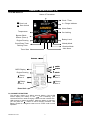
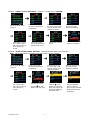
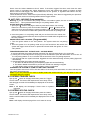
For 2-way OLED Remote Control Transceiver:
A maximum of
four vehicle’s
security
systems can be
controlled by
this transceiver.
TX1 Red Vehicle
TX2 Blue Vehicle
TX3 Yellow Vehicle
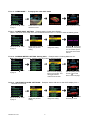
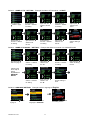
The four transmitters will
screen, you can chose
Now you can press
button to remote control
The “TX 3” yellow
one of the four
vehicle’s security
be display on the OLED
transmitters to control
Spin up the
To page 6
switch
TX4 Green Vehicle
system.
your vehicle security
Pressing button 3 will set
system.
the remote. . “TX 3” will
be displayed on the
OLED screen
V. OUT OF RANGE AND TEMPERATURE INDICATION:
If this feature is selected, the system will automatically check the range and update
the temperature every 33 minutes.
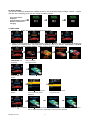
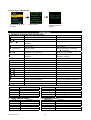
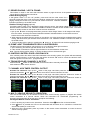
1. If the user is within the range, the
icon will display on the OLED screen.
2. If the user is out of range, the remote will have five short “bi” sounds and the “Out
Of Range” icon will appear on the OLED screen.
Note: Programming “Out Of Range and Temperature Indication” will decrease the life
expectancy of battery.
W. POWER ON MEMONRY:
This security system is equipped with circuitry that will allow the unit to remember its alarm state if the
power is lost and then reconnected.
REMOTE START OPERATION:
A. TO REMOTE START THE VEHICLE:
1. Press the
button on the transmitter. Twice if safety start has been programmed.
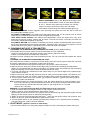
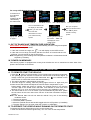
2. The parking light will activate to indicate the remote start received the signal. (A
melody sound from your Remote OLED transceiver and “ ” icon will flash on the
OLED screen to confirm the remote start was activated.)
3. The engine will start in approximately 5 seconds.
4. Once the engine is running, after the parking lights will turn on again and your
climate controls will activate and adjust the vehicles interior temperature to your
Preset setting. (While the vehicle is running, the “Engine Running” icon and the
“minutes” digit on the OLED screen will flash. It will indicate a count down timer
based on the 5, 10, 20 or 30 minute run time set up by your installation center.)
5. The vehicle will run for a 5 to 30 minute cycle and automatically shut down. (When
the unit shuts off the count down timer will turn off and the transmitter will play a
melody.)
Note: The Remote Start Unit will not start the vehicle if any one of the following
conditions exists:
1. The hood is opened.
2. The brake pedal is pressed.
3. Move the optional remote start enable toggle switch to OFF position. (If installed)
4. The gear selector is in any gear other then “PARK” or “NEUTRAL”
B. TO OPERATE THE VEHICLE WHILE RUNNING ON THE REMOTE START:
To operate the vehicle while engine running on the remote start.
1. Enter the vehicle and insert the ignition key. Turn it to “ON” not the start position.
RS1000 OP 1/07
18