1
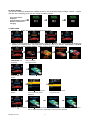
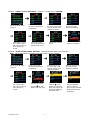
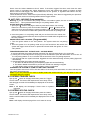
E- P1- 4. “DEMO MODE”:
Spin down the
switch
To display the units demo mode
Demo movie playing.
Press button 4 to start
Press any Button to exit.
the Demo movie.
to page 1.
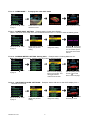
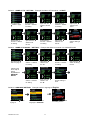
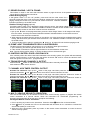
E- P2- 1. “POWER SAVE” SETTING: Example set the “Power Save Enable”.
While in the power save mode, the LCD remote transceiver uses “0” current to save the battery power.
Spin down the
switch
to page 2.
Press button 1 to
change the setting.
Press button 1 and it will
display the previous
setting.
Press the
button and
the setting is completed.
You can disable power
save mode in the same
manner.
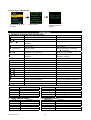
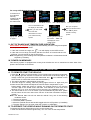
E- P2- 2. “PARKING METER” SETTING: Parking timer: Example set the “Parking Meter 30 min..
Note: When the “parking meter” expires, press any button to stop the beeper.
Spin down the
switch
Press button 1 three
times to set the parking
timer to 30 minutes. This
will toggle between
10/20 and 30 minutes.
Press button 2.
to page 2.
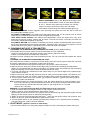
D- P2- 3. “LIGHTING FOR OLED” SETTINGS:
seconds to 3 seconds.
Spin down the
to page 2.
RS1000 OP 1/07
switch
Press the
button to
start the parking meter
and the
icon will
flash on the main page.
Example: Set the ON time for the OLED display from 2
Press button 4 and it will
display the previous
setting.
Press button 2 to
change the setting.
8
Press the
button and
the setting is done.