1
Introduction
Contents
This installation guide provides the instructions needed to install and
use your new SCSI host adapter. Once you have performed the simple
installation steps listed on pages 2 through 6, your host adapter and
SCSI devices are ready for operation.
We recommend that you keep this installation guide with your important computer documents. One of the benefits of SCSI is that you can
connect as many as seven peripherals to your host adapter. If you are
not connecting the full complement of seven peripherals during your
initial installation, when the time comes to add another peripheral,
this guide will help with that installation.
Installation and Setup
Installation Steps . . . . . . . 2 - 6
Helpful Hints
Using Your Host Adapter . 6
Modifying PCI Parameters
7
Connecting to the LED
Connector . . . . . . . . . . . . . 7
AAAA
AAAA
AA
AA
AA
AAAA
AAAAAAAA
AAAAAAAA
AAAAAAAA
AAAAAAAA
AAAA
AA
AA
AA
AA
AA
AA
AA
AA
AA
AA
AA
AA
AA
AA
AA
AA
AA
AA
AA
AA
AA
AA
AA
AA
AA
AA
AA
AA
AA
AA
AA
AA
AA
AA
AA
AA
AA
AA
AA
AA
AA
AA
AA
AA
AA
AA
AA
AA
AA
AA
AA
AA
AA
AA
AA
AA
AA
AA
AA
AA
AA
AA
AA
AA
AA
AA
AA
AA
AA
AA
AA
AA
AA
AA
AA
AA
AA
AA
AA
AA
AA
AA
AA
AA
AA
AA
AA
AA
AA
AA
AA
AA
AA
AA
AA
AA
AA
AA
AAAA
AAAA
AAAA
AAAA
AAAA
AAAA
AA
AA AAAAAAAAAAAAAAAAAAAA
AAAA
AA
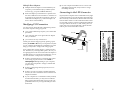
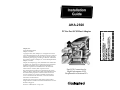
Internal SCSI-2 Connector
Uses a 50-pin internal SCSI ribbon
cable to connect up to seven internal
SCSI devices.
Host Adapter BIOS
Provides booting capabilities from up
to seven SCSI hard disk drives
(under DOS 5.0 and above).
Need Assistance?
LED Connector
Connects to the computer's
LED cable to display activity
on the SCSI bus.
Troubleshooting Checklist . 8
Common Problems and
Solutions . . . . . . . . . . . . . . 8
External SCSI-2 Connector
Uses 50-pin high-density external SCSI cables
to daisy-chain up to seven external devices.
AHA-2920 Host Adapter
1