1
CAUTION
• Risk of electric shock. This charger is for dry use only and should only be connected to
the same power as shown on the rating label at the base of the charger.
• Do not operate the charger with a damaged cord or if the housing shows visible signs of
•
•
•
•
•
•
•
•
•
•
•
•
damage.
Do not drop the battery or subject it to strong impacts.
The charger must be stored where weather conditions cannot affect it. The appliance
must not be subjected to humidity, heat sources or immersion in water.
Do not charge the batteries under intense direct sunlight, in a car when it is unattended.
Charge 2 or 4 pieces of AAA/AA sized batteries of type NiCd or NiMH only. Other type
may explode or burst causing personal injury and damage.
It is normal that the batteries may become hot during charge or regular operation.
When using the charger as a power pack, unplug it from the electronic device
immediately after use. These devices will continue to draw a small current from your
power pack even if they are turned off.
The batteries stored inside the charger will naturally discharge over time even if they are
not in use. It is not recommended to store the batteries for more than two months
without recharging. For best performance please recharge them before using.
Do not remove any service covers from the charger. There are no user serviceable parts
inside. Any repair should only be carried out by a trained technician.
If the charger is wrongly operated for a purpose other than that for which it is intended,
no liability can be accepted for any possible damage.
The charger is not intended for use by young children or infirm persons without
supervision
Turn the power off and remove the plug when the charger is not in use and before
cleaning.
If your charger has a fault, please contact your retailer or directly to Digital Works
service centre.
WARRANTY & SUPPORT
The ReZAP USB iPower, Model RBC886 is supplied with a 12 month parts and labour, return to base
warranty. We will repair or replace the product at our option if defective in workmanship or material
in normal domestic use for one year from date of purchase. Any customer feedback and/or support
queries should be directed to:
[email protected]
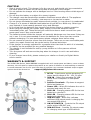
1. DC-IN – Input power socket accepting DC
power having range of 6V - 12V, 1A max.
2. USB-IN – Input port accepting 5V USB
power from a computer or USB power
supply.
3. Positive Terminals - Flip down to support
AAA-sized batteries.
4. Power LED – When ON indicates the unit is
powered and ready for use.
5. CH2 LED - Charging status LED for the two
batteries in channel 2.
6. CH1 LED - Charging status LED for the two
batteries in channel 1.
7. USB-OUT LED - When ON, indicates
sufficient USB output power is charging the
connected USB device.
8. ON/OFF SWITCH - Controls the 5V output
power at the USB-OUT port.
9. USB-OUT Port - Provides 5V output power
for charging most type of USB devices.
2