1
��������������������
�������������
�������
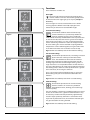
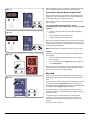
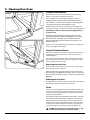
Select function key
This controls the selection of 10 of the oven functions. To
select a function, press the key and scroll through to the
required setting.
�����
�������������
����������
�����������
When selecting a function, the fan, element settings and the
suggested temperature will show on the display. After a few
seconds the oven will start automatically and will begin to
heat up to the preset temperature.
�����
Fig.2-3
ArtNo.3
�����
ArtNo.325-
�����
����������
������������
����
When the oven is in preheat the ‘°C’ will flash intermittently
until the oven is up to temperature.
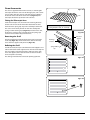
Special functions command key
This key controls the auxiliary controls for the ‘Clean’ and
‘Boost’ functions.
������������
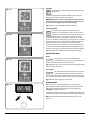
Temperature adjustment keys
These keys are to adjust the temperature setting in 5°C steps.
To increase the temperature press the ‘+’ key; and to decrease
the temperature press the ‘–‘ key.
Fig.2-4
���������������
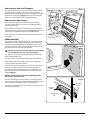
To display the actual oven temperature at any instance, press
both the ‘+’ and ‘–‘ keys.
������������
���������������
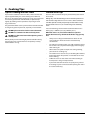
On-Off Clock Section
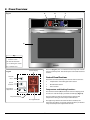
The central section (B) of the touch-sensitive display panel
consists of the Power On/Off key and the 24-hour LCD clock
with 2 control keys (Fig.2-3).
�����
�����
�����
�����
Power On/Off key
Press the key to switch on or switch off the oven. If no further
operation is selected within 8 seconds of being turned on the
oven will switch off automatically, signalled by a double beep.
Note: The Power On/Off key overrides the default ‘display’
mode (see P6, ‘Display mode’). To override, press and hold the
On/Off key for at least 5 seconds until the oven beeps and the
displays go out.
��������������
������������
��������������
��������������
�����������������
��������������
�����������������
�����������������
�����������������
IMPORTANT: Turning off the oven, either manually or
automatically, will cancel any programs for timer cooking.
Clock adjustment keys
These are the controls for setting and adjusting the digital
clock.
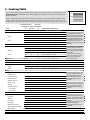
Timer Section
The right-hand section (C) of the touch-sensitive display
panel consists of a blue LCD display and four control keys
(Fig.2-4).
The upper pair of keys control the ‘stop time’, the time at
which the oven is to stop cooking, while the lower pair of
keys control the ‘cook time’, the period of time you want the
oven to cook.
The LCD display shows the cooking times (‘stop’ and ‘cook’),
the alarm and key lock symbols.
3