1
INTERFACE CONTROLLER MODULE
ETHCX1
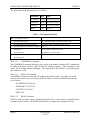
The valid range for the IP parameters is as follows:
Parameter Min
Max
IP Address
0.0.0.0 255.255.255.255
Net Mask
0.0.0.0 255.255.255.255
Gateway
0.0.0.0 255.255.255.255
Port
1501
65535
Table 3 - Set Command Format
SET – Sets parameter values
Command Entry Format
SET <Parameter Name>=<Parameter Value><CR>
System Response for Valid Command
<Parameter Name> <Parameter Value><CR>>
System Response for an Invalid Command
<CR>?
Sample Entry
SET IP Address=192.168.0.10<CR>
System Response-
IP Address 192.168.0.10<CR>>
Sample Invalid Entry
SET IP Address=192.168.010045<CR>
System Response
?
2020.3.3.3
CONFIRM IP Command
The CONFIRM IP command loads the values given to the module using the SET command for
IP Address, Netmask, Gateway and Port into the working registers. If this command is not
issued, the IP settings remain unchanged. The connection to the ETHCX1 is disconnected by
this command as well.
2020.3.3.4
RESET IP Command
The RESET IP command restores the IP settings to the default values. The values set are the
same as if the module was powered-up with the IP Address switch in the RESET position and
are as follows:
IP ADDRESS 192.168.0.10
NETMASK 255.255.255.0
GATEWAY 192.168.0.1
PORT 1501
2020.3.3.5
READ Command
READ is used to confirm values of programmed fields and to collect status associated with the
currently selected module. The READ command has one argument to designate the field.
2020-6
AL4300Series
5.25.04
APOGEE LABS, Inc.