1
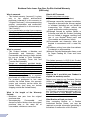
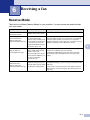
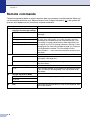
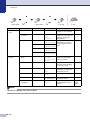
Menu and Features
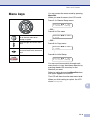
Select & Set
Select & Set
to accept
to exit
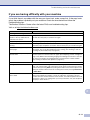
Main Menu
Submenu
Menu Selections Options
Descriptions
Page
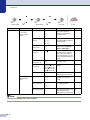
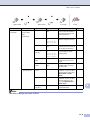
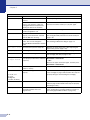
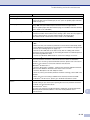
6. LAN
1. Setup
TCP/IP
1. BOOT Method
Auto
Static
RARP
BOOTP
DHCP
You can choose the
BOOT method that best
suits your needs.
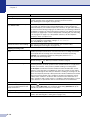
2. IP Address
[000-255].
[000-255].
[000-255].
[000-255]
Enter the IP address.
See
Network
User’s
Guide
on the
CD-ROM
3. Subnet Mask
[000-255].
[000-255].
[000-255].
[000-255]
Enter the Subnet mask.
4. Gateway
[000-255].
[000-255].
[000-255].
[000-255]
Enter the Gateway
address.
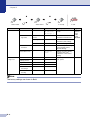
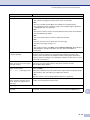
5. Node Name
BRN_XXXXXX
Enter the Node name.
6. WINS Config
Auto
Static
You can choose the WINS
configuration mode.
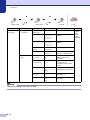
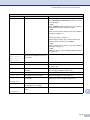
7. WINS Server
(Primary)
[000-255].
[000-255].
[000-255].
[000-255]
(Secondary)
[000-255].
[000-255].
[000-255].
[000-255]
Specifies the IP address of
the primary or secondary
WINS server.
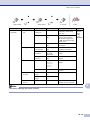
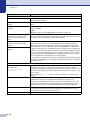
8. DNS Server
(Primary)
[000-255].
[000-255].
[000-255].
[000-255]
(Secondary)
[000-255].
[000-255].
[000-255].
[000-255]
Specifies the IP address of
the primary or secondary
DNS server.
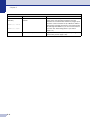
On
Off
Automatically allocates
the IP address from the
link-local address range.
9. APIPA
B
Note
The factory settings are shown in Bold.
B - 10