1
Video Mode
Video Mode (GREEN LED)
Video Mode Settings
While the camera is powered on and in Video Mode—with a micro SD card
inserted with enough free memory—it will record video when ACTION is pressed
on the camera or the remote control.
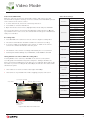
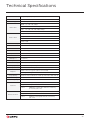
1080P
Resolution
1. To enter Video Mode, ensure the camera is powered on.
960P
720P
WVGA
25 (1080/960/720/WVGA)
2. Press MENU to enter the Main Menu.
30 (1080/960/720/WVGA)
3. Open the Mode Selection menu, highlight Video Mode and press ACTION.
The screen will return to Live Preview and display the Video Mode icon @ in the
top-lefthand corner of the screen, the camera LED will turn green—the camera is
ready to record video.
48 (960)
50 (1080/960 / 720 / WVGA)
Frame Rate
60 (1080/960 720 / WVGA)
100 (720/WVGA)
120 (720/WVGA)
200 (WVGA)
Recording Video
240 (WVGA)
1. Press ACTION on the camera or remote control to begin recording video.
2. The camera LED indicator will blink red while the camera is recording.
160° (1080/960/720/WVGA)
Field Of View
3. To stop recording, press ACTION on the camera, or STOP on the remote
control—the camera LED indicator will turn green.
127° (1080)
90° (1080)
-2
-1
! The duration of the current recording is indicated by the on-screen timer.
Exposure
0
+1
! For best performance always use, at minimum, a class 10 Micro SD card.
+2
Off
Taking Simultaneous Photos While Recording Video
Pressing MENU on the camera (or ACTION on the remote control) while
recording video will simultaneously take a still photo. Taking a simultaneous
photo will result in an 8MP photo if the Ghost-S is recording at 30 or 25fps in any
resolution. If you are recording in 48, 50 or 60fps, the Ghost-S will create a 2MP
simultaneous photo.
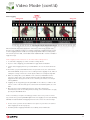
Self Timer
10s
Video Tagging
On
Off
10s
Video Tagging
! This feature is not active for frame rates higher than 60fps.
3s
5s
Interval
30s
1m
2m
5m
! This feature is only available when Video Tagging (see p8) is turned off.
On
Car DVR Mode
Manual
Off
1m
Scene Mode / Bit Rate
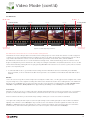
Video Mode
SD Card / Battery Indicator
Car DVR Interval
HB
3m
5m
10m
Bit Rate
Normal
High
Normal
Scene Mode
Vivid
Low Light
Default Settings
Yes
Cancel
00:00:00
Video Resolution
Frame Rate
Field Of View
Exposure
Record Timer
Figure 14: Video Mode Live Preview Screen
7