1
Video I/O Setup for Workstations Using the NVIDIA Quadro SDI
Board
The following video components are included with your shipment if your workstation uses a NVIDIA Quadro
FX 5600 graphics board and a NVIDIA Quadro SDI board.
NVIDIA Quadro FX 5600 graphics board The NVIDIA Quadro FX 5600 graphics board provides output to
your computer monitor directly, and to the broadcast monitor via the NVIDIA Quadro SDI board.
NVIDIA Quadro SDI board The NVIDIA Quadro SDI board provides 2K, HD, or SD video output to a
broadcast monitor, VTR, or SDI projector. The board features a BNC genlock connector that connects to
your sync generator.
AJA OEM-2K board and breakout box The AJA OEM-2K board provides video I/O, audio, and VTR control.
The AJA breakout box connects to the AJA OEM-2K board and handles SD (NTSC, PAL), and HD at a depth
of 8 and 10 bits.
LCD graphics monitor The LCD graphics monitor features a wide screen with a 16:9 aspect ratio, and a
maximum resolution of 1920x1200.
AJA HD10DA Distribution Amplifier The AJA distribution amplifier receives its signal from the NVIDIA
SDI board and provides output to a VTR and broadcast monitor. The distribution amplifier is necessary in
order to use the Real-Time Deliverables feature.
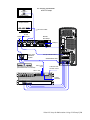
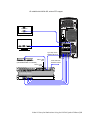
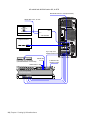
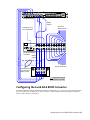
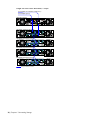
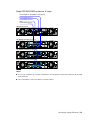
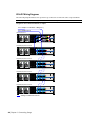
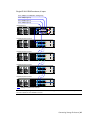
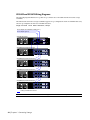
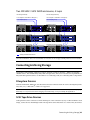
Refer to the following diagrams to connect the video I/O components to an HP xw9400 workstation equipped
with a NVIDIA Quadro SDI board.
Note the following about the wiring diagrams:
■
The output port and, if Real-Time Deliverables are not used, input port of the VTR connect to the SDI
In A and SDI Out A ports of the AJA breakout box. You can use the SDI In B and SDI Out B ports for dual
link video I/O.
■
For Real-Time Deliverables, input port A of the VTR connects to the AJA HD10DA distribution amplifier
(for 4:2:2 signal), and input port B connects to the appropriate connector on the NVIDIA SDI board (for
dual link 4:4:4 signal).
■
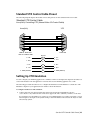
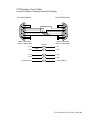
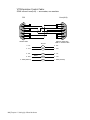
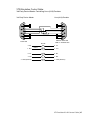
VTR control is provided through the RS-422 port on the AJA breakout box. See Standard VTR Control
Cable Pinout on page 23.
WARNING It is critical to connect the sync source to the appropriate connector on the SDI board, exactly as
shown in the diagrams.
20 | Chapter 4 Setting Up Video Hardware