1
Connecting
5.2 Connecting the device to power
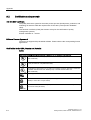
Localized information
Outside of the USA and Canada, operation on a 230 V power supply:
This device is equipped with a safety-tested power cord which may only be connected to
grounded shockproof power outlet. If you choose not to use this cable, you must use a
flexible cable of the following type: min. 18 AWG conductor cross-section and 15-A / 250-V
shockproof connector. The cable set must be compliant with the safety regulations and
stipulated IDs of the country where the system is to be installed.
For the USA and Canada:
For the United States and Canada, a CSA or UL-listed power cord must be used.
The connector must be compliant with NEMA 5-15.
120 V AC power supply
To be used is a flexible power cord approved to UL and with CSA label, and which has the
following features: Type SJT with three leads, min. 18 AWG conductor cross-section, max.
4.5 m long and tandem ground contact connector 15 A, min. 125 V.
240 V supply voltage
Use a flexible power cord with UL approval and with CSA label, and with the following
features: Type SJT with three leads, min. 18 AWG conductor cross-section, max. 4.5 m long
and tandem ground contact connector 15 A, min. 250 V.
Connecting
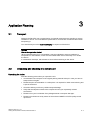
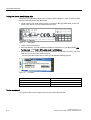
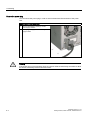
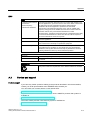
Steps for connecting the device to mains
1
Connect the IEC connector.
2
Connect the power cord to the mains outlet,
then switch on the mains isolation switch (if
this exists).
The yellow power LED (standby) on the front
panel of the PC lights up.
SIMATIC Rack PC IL 43
Getting Started, Edition 09/2005, A5E00432882-01
5-3