1
MODEL 1054B DC
5.
SECTION 4.0
CONFIGURATION
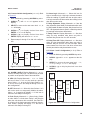
If OFF is selected, display will show oFF to
acknowledge. Press ENTER key to return to AL1 or
AL2, concluding routine. Skip to Step 11.
If 1 CEL or 2 CEL is selected, display will show on to
acknowledge, then display H-L. Proceed to Step 6.
If FLt is selected, display will show Flt to acknowledge. Press ENTER key to return to AL2.
6.
SELECT H-L. Hi or Lo will display (flashing).
7.
SCROLL (é ) to the desired item and ENTER it
into memory. Display will return to H-L. If changes
to relay activation logic are desired, proceed to
Step 8, otherwise Step 12.
8.
SCROLL ( é ) to display HYS, don or doF then
SELECT desired item. Numerical display will
flash to indicate that a value is required.
9.
Use SCROLL (é) and SHIFT (ç) to display the
desired value.
10. ENTER value into memory. The analyzer will
acknowledge and return to display of last item
selected. Repeat Step 8 if further changes are
desired, otherwise Step 12.
11. Repeat Step 3 for the other Alarm 2 settings as
required.
12. To return to the first level of the Set Mode, press
the ACCESS key.
4.3.2 Alarm 3. Display Mnemonic AL3. Used to set alarm
relay logic for relay 3 based on process
temperature from cell I or 2.
NOTE
If alarm 3 is activated, the negative sign
will flash on the display
F. Delay Time On. See Section 4.3F
G. Delay Time Off. See Section 4.3G
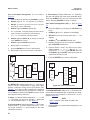
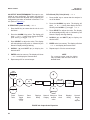
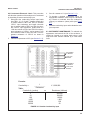
4.3.3 Alarm 3 Configuration (AL3). Refer to Figure 4-3.
1 . Enter Set Mode by pressing ACCESS key twice.
2. SCROLL (é) until AL3 appears on display.
3. SELECT to move to the next menu level. It, 2t or
OFF will display.
4. SCROLL (é) to display desired item then SELECT.
5. If OFF is selected, display will show OFF to acknowledge. Press ENTER key to return to AL3, concluding
routine. Proceed to Step 13.
If 1 t or 2 t is selected, display will go to next menu
level. SP3 will display.
6. To change alarm set point, SELECT SP3. Current temperature setpoint will display with last digit flashing.
SCROLL and SHIFT to display the desired value.
Note: to change temperature display (°F or °C), refer
to Section 4.4 (Temperature).
7. ENTER value into memory. The analyzer will
acknowledge and return to display SP3.
8. SCROLL (é) to display H-L, then SELECT. HI or Lo
will display (flashing).
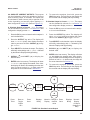
SEt
A. Cell Selection. Display Mnemonic It or 2t. Select
this item to use the process temperature relay. Select
1t for input from cell one's RTD, 2t for input from cell
two's RTD.
B. Off. Mnemonic OFF. Select this item if relay 3 will not
be used.
C. Set Point. Mnemonic SP3. Select this item to enter the
alarm setpoint.
D. Alarm Logic. See Section 4.3D
E. Relay Hysteresis. See Section 4.3E
20
AL3
SP3
Hi
1 t
H-L
Lo
2 t
HYS
OFF
don
doF
Figure 4-3 Alarm 3 Configuration