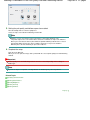
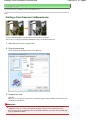
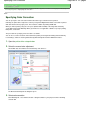
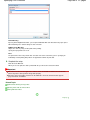
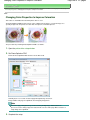
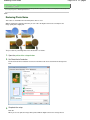
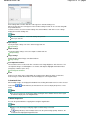
1
Canon MP280 series On-screen Manual
Page 1 of 707 pages
How to Use This Manual
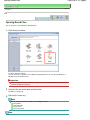
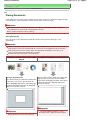
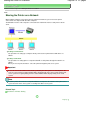
Printing This Manual
MC-4700-V1.00
Basic Guide
Advanced Guide
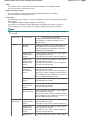
Describes the summary of
this product.
Describes the detailed
function of this product.
Troubleshooting
MP280 series Basic Guide
Page 2 of 707 pages
How to Use This Manual
Printing This Manual
MP-4500-V1.00
Advanced Guide
Contents
Overview of the Machine
Loading Paper / Originals
Main Components
Loading Paper
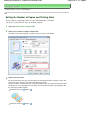
LED Display and Basic Operations
Loading Originals
Copying
Routine Maintenance
Copying Documents
Copying Photos
When Printing Becomes Faint or Colors Are
Incorrect
Fit-to-Page Copying
Replacing a FINE Cartridge
Cleaning the Machine
Scanning
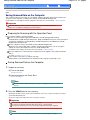
Saving Scanned Data on the Computer
Appendix
Legal Limitations on Use of Your Product and
Use of Images
Printing from Your Computer
Printing Photos (Easy-PhotoPrint EX)
Printing Documents
Printing Web Pages (Easy-WebPrint EX)
Starting Various Software Applications
Tips on How to Use Your Machine
Overview of the Machine
Page 3 of 707 pages
Advanced Guide
Troubleshooting
Contents > Overview of the Machine
Overview of the Machine
This section shows the component names of the machine and describes the basic operations you need
to know before using it.
Main Components
Front View
Rear View
Inside View
Operation Panel
LED Display and Basic Operations
Page top
Main Components
Page 4 of 707 pages
Advanced Guide
Troubleshooting
Contents > Overview of the Machine > Main Components
C001
Main Components
Front View
Rear View
Inside View
Operation Panel
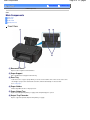
Front View
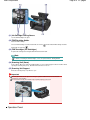
(1) Document Cover
Open to load an original on the Platen Glass.
(2) Paper Support
Raise and tip back to load paper in the Rear Tray.
(3) Rear Tray
Load various sizes or types of paper which you can use on the machine. Two or more sheets of the same
size and type of paper can be loaded at the same time, and fed automatically one sheet at a time.
See Loading Paper .
(4) Paper Guides
Slide to align with both sides of the paper stack.
(5) Paper Output Tray
Opens automatically when printing or copying starts and printed paper is ejected.
(6) Output Tray Extension
Open to support the printouts. Open it when printing or copying.
Main Components
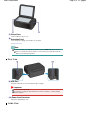
(7) Platen Glass
Load an original to copy or scan.
(8) Operation Panel
Use to change the settings of the machine or to operate it.
See Operation Panel .
Note
The LED and lamps on the Operation Panel other than the POWER lamp will go out if the
machine is not operated for about 5 minutes. To restore them, press any button except the
ON button or perform the print operation.
Rear View
(9) USB Port
Plug in the USB cable to connect the machine with a computer.
Important
Do not touch the metal casing.
Do not plug in or unplug the USB cable while the machine is printing or scanning originals
with the computer.
(10) Power Cord Connector
Plug in the supplied power cord.
Inside View
Page 5 of 707 pages
Main Components
Page 6 of 707 pages
(11) Ink Cartridge Locking Covers
Lock the FINE Cartridges into place.
(12) FINE Cartridge Holder
Install the FINE Cartridges.
The Color FINE Cartridge should be installed into the left slot (
installed into the right slot (
) and the Black FINE Cartridge should be
).
(13) FINE Cartridges (Ink Cartridges)
A replaceable cartridge that is integrated with Print Head and ink tank.
Note
For details on installing the FINE Cartridges, refer to the printed manual: Getting Started .
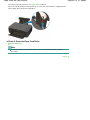
(14) Scanning Unit (Cover)
Scans originals. Open it to replace the FINE Cartridges or remove jammed paper inside the machine. When
opening the Scanning Unit (Cover), lift it with the Document Cover closed.
(15) Scanning Unit Support
Holds the Scanning Unit (Cover) while it is open.
Important
The area (A) indicated in the figure below may be splattered with ink. It does not affect the
performance of the machine.
Do not touch the area (A). The machine may not print properly if you touch it.
Operation Panel
Main Components
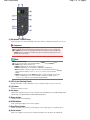
(1) ON button / POWER lamp
Turns the power on or off. Before turning on the power, make sure that the Document Cover is closed.
Important
Disconnecting the power plug
When disconnecting the power plug after turning off the power, be sure to confirm that
the POWER lamp is not lit. If the power plug is disconnected from the wall outlet while the
POWER lamp is lit or flashing, the machine may become unable to print properly since the
Print Head is not protected.
Note
POWER and Alarm lamps
You can check the status of the machine with the POWER lamp and Alarm lamp.
- POWER lamp is off: The power is off.
- POWER lamp lights green: The machine is ready to print.
- POWER lamp flashes green: The machine is initializing or shutting down.
- Alarm lamp lights or flashes orange: An error has occurred and the machine is not
ready to print. For details, refer to " Troubleshooting" in the on-screen manual: Advanced
Guide.
- POWER lamp flashes green and Alarm lamp flashes orange alternately: An error that
requires contacting the service center may have occurred. For details, refer to "
Troubleshooting" in the on-screen manual: Advanced Guide .
(2) LED (Light Emitting Diode)
Displays the number of copies, Maintenance code, or operational status such as an error code.
(3) [+] button
Specifies the number of copies.
(4) Ink lamps
Light or flash orange when ink runs out, etc. The lamp on the left indicates the Color FINE Cartridge status
and the lamp on the right indicates the Black FINE Cartridge status.
(5) Paper button
Selects the page size and media type.
(6) SCAN button
Starts scanning the original to save it on the computer.
(7) Stop/Reset button
Cancels operations. You can also press this button to cancel a print, copy, or scan job in progress.
(8) Color button *
Starts color copying. You can also press this button to finalize your selection for the setting item.
Page 7 of 707 pages
Main Components
Page 8 of 707 pages
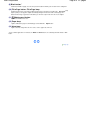
(9) Black button *
Starts black & white copying. You can also press this button to finalize your selection for the setting item.
(10) Fit to Page button / Fit to Page lamp
Enables the Fit-to-Page copy function. When the Fit-to-Page copy function is enabled, the Fit to Page lamp
lights up and you can copy the original automatically enlarged or reduced to fit the selected page size.
When the Fit-to-Page copy function is disabled, you can make copies in the same size as the original.
(11)
(Maintenance) button
Specifies the Maintenance code.
(12) Paper lamp
Lights to indicate the page size and media type selected with the
Paper button.
(13) Alarm lamp
Lights or flashes orange when an error occurs, such as paper-out or ink-out.
* In the software applications or manuals, the Black and Color buttons are collectively called the "Start" or "OK"
button.
Page top
LED Display and Basic Operations
Page 9 of 707 pages
Advanced Guide
Troubleshooting
Contents > Overview of the Machine > LED Display and Basic Operations
C002
LED Display and Basic Operations
You can use the machine to make copies or perform maintenance operations without a computer.
This section describes the LED display and basic operations on the Operation Panel.
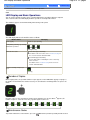
The number 1 appears on the LED normally when turning on the power.
The LED display indicates the machine status as follows.
LED Display
Machine Status
While copying
Number of copies (flashing)
While printing, scanning, or performing
maintenance operations
(flashing in order)
When an error occurs
E and number appear alternately.
For details on the error codes, refer to " Troubleshooting " in
the on-screen manual: Advanced Guide .
P and number appear alternately.
An error that requires contacting the service center may
have occurred.
For details, refer to "Troubleshooting " in the on-screen
manual: Advanced Guide .
While the Scanning Unit (Cover) is
open
(flashing)
Number of Copies
When copying starts, the specified number of copies appears on the LED. While copying is in progress,
the number on the LED flashes and decreases by one to indicate the remaining number of copies to be
made.
Each time you press the [ +] button, the number on the LED increases by one. When F appears, the
number of copies is set to "20". Press the [ +] button again to return to "1".
Maintenance Codes
To perform maintenance of the machine, press the
(Maintenance) button repeatedly until the desired
LED Display and Basic Operations
Page 10 of 707 pages
code appears on the LED, and then press the Black or Color button.
Maintenance
Code
See
Operation
Prints the nozzle check pattern.
Printing the Nozzle Check Pattern
Cleans the Print Head.
Cleaning the Print Head
Cleans the Print Head deeply.
Cleaning the Print Head Deeply
Prints the print head alignment
sheet.
Aligning the Print Head
Scans the print head alignment
sheet to align the Print Head
automatically.
Aligning the Print Head
Prints the current head position
adjustment values.
Aligning the Print Head
Cleans the Paper Feed Roller.
Cleaning the Paper Feed Roller
Cleans the inside of the machine.
Cleaning the Inside of the Machine (Bottom Plate
Cleaning)
Switches the size of paper loaded
in the Rear Tray between A4 and
8.5" x 11" (Letter).
Switching the Page Size between A4 and 8.5" x
11" (Letter)
(This setting is used for making
copies.)
Sets the machine to prevent paper
abrasion.
Refer to "Paper Is Smudged/Printed Surface Is
Scratched" in " Troubleshooting " of the onscreen manual: Advanced Guide .
Error Codes
When an error occurs, E and number appear alternately on the LED to indicate the error code.
e.g. "E, 1, 6"
(flashing in order)
Note
For details on the error codes, refer to " Troubleshooting" in the on-screen manual: Advanced
Guide.
If an error code with P appears, an error that requires contacting the service center may have
occurred.
For details, refer to "Troubleshooting" in the on-screen manual: Advanced Guide .
Page top
Copying
Page 11 of 707 pages
Advanced Guide
Troubleshooting
Contents > Copying
Copying
You can make enlarged or reduced copies of the original to fit the page size, and borderless copies of a
printed photo, besides standard copies.
Copying Documents
Switching the Page Size between A4 and 8.5" x 11" (Letter)
Copying Photos
Fit-to-Page Copying
Page top
Copying Documents
Page 12 of 707 pages
Advanced Guide
Troubleshooting
Contents > Copying > Copying Documents
C021
Copying Documents
This section describes the procedure to copy a document of A4 or Letter size on plain paper.
For the operation, see the notes and operation procedure described in the reference page.
You need to prepare:
Originals to copy. See Originals You Can Load .
Paper for printing. See Media Types You Can Use .
1.
Prepare for copying.
(1) Turn on the power.
See Operation Panel .
(2) Load paper.
See Loading Plain Paper / Photo Paper .
Here we load A4 or Letter-sized plain paper in the Rear Tray.
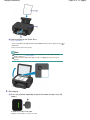
(3) Open the Paper Output Tray gently, and open the Output Tray Extension.
Copying Documents
Page 13 of 707 pages
(4) Load an original on the Platen Glass.
See Loading Originals.
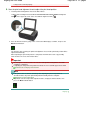
Load the original WITH THE SIDE TO COPY FACING DOWN and align it with the alignment mark
shown below.
Then close the Document Cover gently.
Note
For details on the types and conditions of the original which can be copied, and how to
load the original, see Loading Originals.
Characters and lines written with a light colored pen or highlight pen may not be copied
properly.
2.
Start copying.
(1) Press the [ +] button repeatedly to specify the number of copies (max. 20
copies).
To make 1 to 9 copies or 20 copies
Display the desired number of copies on the LED.
as
Copying Documents
Each time you press the [ +] button, the number on the LED increases by one. When F appears, the number
of copies is set to "20". Press the [ +] button again to return to "1".
To make 10 to 19 copies
(1) Display F on the LED.
(2) Load only the desired number of sheets to copy.
(2) Press the Paper button repeatedly to select the page size and media type.
The Paper lamp indicates the selected page size and media type.
Here we select A4 or 8.5" x 11" Plain Paper.
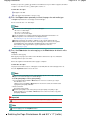
Note
You can select the following page sizes and media types.
- A4 or 8.5" x 11" Plain Paper
- A4 or 8.5" x 11" Photo Paper
- 10 x 15 cm or 4" x 6" Photo Paper
You can switch the size of paper loaded in the Rear Tray between A4 and 8.5" x 11"
(Letter) regardless of the size indicated on the Operation Panel.
See Switching the Page Size between A4 and 8.5" x 11" (Letter) .
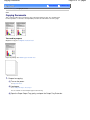
When the Fit-to-Page copy function is enabled, you can copy the original in the size
automatically enlarged or reduced to fit the selected page size. In this case, the original is
copied with borders on the plain paper and without borders on the photo paper.
Cancel the Fit-to-Page copy function to copy the original in the same size.
See Fit-to-Page Copying.
(3) Press the Color button for color copying, or the Black button for black & white
copying.
The machine starts copying.
While copying is in progress, the number on the LED flashes and decreases by one to indicate the
remaining number of copies to be made.
Remove the original on the Platen Glass after copying is completed.
To make 10 to 19 copies
The paper-out error will occur ("E, 0, 2" will appear on the LED) when all of the loaded paper runs out.
Press the Stop/Reset button to release the error.
Note
You can set the print quality to "Fast" (speed priority) only when A4 or Letter-sized plain
paper is selected for the page size and media type.
To set the print quality to "Fast" (speed priority)
1. Press and hold down the Color or Black button for 2 or more seconds in (3) of step 2.
The LED flashes once.
* When you press the Color or Black button for less than 2 seconds, the machine starts
copying in the print quality "Standard".
2. Release the button.
The machine starts copying.
When the print quality is set to "Fast", print speed is given priority over quality. To give
priority to quality, press the Color or Black button for less than 2 seconds to copy in the
print quality "Standard".
Important
Do not open the Document Cover or move the loaded original until copying is completed.
Note
To cancel copying, press the Stop/Reset button.
Switching the Page Size between A4 and 8.5" x 11" (Letter)
Page 14 of 707 pages
Copying Documents
Page 15 of 707 pages
You can switch the size of paper loaded in the Rear Tray between A4 and 8.5" x 11" (Letter).
This setting is useful if you usually load Letter-sized paper in the Rear Tray regardless of the page size
indication "A4" on the Operation Panel, or vice versa.
1.
Press the
2.
Press the Black button to select A4, or the Color button to select 8.5" x 11" (Letter).
(Maintenance) button repeatedly until d appears.
Note
When you switch the page size to A4 or 8.5" x 11" (Letter), load paper of the selected size
regardless of the size indicated on the Operation Panel.
- When the page size is set to A4, load A4 plain paper or photo paper.
- When the page size is set to 8.5" x 11" (Letter), load Letter-sized plain paper or photo paper.
Page top
Copying Photos
Page 16 of 707 pages
Advanced Guide
Troubleshooting
Contents > Copying > Copying Photos
C023
Copying Photos
This section describes the procedure to copy a printed photo on 4" x 6" / 10 x 15 cm photo paper.
You need to prepare:
Printed photos.
Photo paper for printing. See Media Types You Can Use .
1.
Prepare for copying a photo.
(1) Turn on the power.
See Operation Panel .
(2) Load paper.
See Loading Plain Paper / Photo Paper .
Here we load 4" x 6" / 10 x 15 cm photo paper in the Rear Tray.
(3) Open the Paper Output Tray gently, and open the Output Tray Extension.
(4) Load a photo on the Platen Glass.
See Loading Originals.
2.
Start copying.
(1) Press the [ +] button repeatedly to specify the number of copies.
See step 2 in Copying Documents.
(2) Press the Paper button repeatedly to select the page size and media type.
The Paper lamp indicates the selected page size and media type.
Here we select 10 x 15 cm or 4" x 6" Photo Paper.
Note
You can select the following page sizes and media types.
- A4 or 8.5" x 11" Plain Paper
- A4 or 8.5" x 11" Photo Paper
- 10 x 15 cm or 4" x 6" Photo Paper
You can switch the size of paper loaded in the Rear Tray between A4 and 8.5" x 11"
(Letter) regardless of the size indicated on the Operation Panel.
See Switching the Page Size between A4 and 8.5" x 11" (Letter) .
Copying Photos
Page 17 of 707 pages
When the Fit-to-Page copy function is enabled, you can copy the original in the size
automatically enlarged or reduced to fit the selected page size. In this case, the original is
copied with borders on the plain paper and without borders on the photo paper.
Cancel the Fit-to-Page copy function to copy the original in the same size.
See Fit-to-Page Copying.
(3) Press the Color button for color copying, or the Black button for black & white
copying.
The machine starts copying.
Remove the photo on the Platen Glass after copying is completed.
Important
Do not open the Document Cover or move the loaded photo until copying is completed.
Note
To cancel copying, press the Stop/Reset button.
Page top
Fit-to-Page Copying
Page 18 of 707 pages
Advanced Guide
Troubleshooting
Contents > Copying > Fit-to-Page Copying
C024
Fit-to-Page Copying
The Fit-to-Page copy function enables you to copy the original automatically enlarged or reduced to fit the
selected page size.
1.
Prepare for copying.
See step 1 in Copying Documents.
2.
Press the [ +] button repeatedly to specify the number of copies.
See step 2 in Copying Documents.
3.
Press the Paper button repeatedly to select the page size and media type.
Note
When the plain paper is selected for the media type, the original is copied with borders.
When the photo paper is selected for the media type, the original is copied without borders
and fills the entire page.
In borderless copying, slight cropping may occur at the edges since the copied image is
enlarged to fill the whole page.
4.
Press the Fit to Page button.
The Fit to Page lamp lights up and the Fit-to-Page copy function is enabled. The original is copied in the size
automatically enlarged or reduced to fit the selected page size.
Note
Press the Fit to Page button again to cancel the Fit-to-Page copy function and copy the
original in the same size.
5.
Press the Color button for color copying, or the Black button for black & white
copying.
The machine starts Fit-to-Page copying.
Remove the original on the Platen Glass after copying is completed.
Important
Do not open the Document Cover or move the loaded original until copying is completed.
Note
You can set the print quality to "Fast" (speed priority) only when A4 or Letter-sized plain paper
is selected for the page size and media type. To set the print quality to "Fast", press and hold
down the Color or Black button for 2 or more seconds in step 5.
See To set the print quality to "Fast" (speed priority) .
To cancel copying, press the Stop/Reset button.
Fit-to-Page Copying
Page 19 of 707 pages
Page top
Scanning
Page 20 of 707 pages
Advanced Guide
Troubleshooting
Contents > Scanning
Scanning
You can save scanned data on your computer, and edit or process them with the supplied software
application.
Saving Scanned Data on the Computer
Preparing for Scanning with the Operation Panel
Saving Scanned Data on the Computer
Page top
Saving Scanned Data on the Computer
Page 21 of 707 pages
Advanced Guide
Troubleshooting
Contents > Scanning > Saving Scanned Data on the Computer
C041
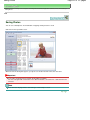
Saving Scanned Data on the Computer
This section describes the procedure to scan originals using the Operation Panel on the machine and
save them on the computer, according to the settings specified with MP Navigator EX.
For operations to scan originals from the computer, refer to the on-screen manual: Advanced Guide .
Important
Please note that Canon shall not be liable for any damage or loss of the data for any reason
whatsoever, even within the warranty period of the machine.
Preparing for Scanning with the Operation Panel
Before scanning originals, check the following.
Are the necessary software applications (MP Drivers and MP Navigator EX) installed?
Install MP Drivers and MP Navigator EX from the Setup CD-ROM when they have not been installed
or have been uninstalled. To install MP Drivers and MP Navigator EX, select MP Drivers and MP
Navigator EX in Custom Install.
Are the settings for saving scanned data specified with MP Navigator EX?
When you save scanned data on the computer using the Operation Panel, you can specify the
settings for saving scanned data in Preferences of MP Navigator EX.
For details on the settings, refer to the on-screen manual: Advanced Guide .
Does the original to be scanned meet the requirements for the original to be loaded on the Platen
Glass?
For details, see Originals You Can Load .
Is the machine connected to a computer correctly?
Confirm that the connection between the machine and the computer is physically secure.
Saving Scanned Data on the Computer
1.
Prepare for scanning.
(1) Turn on the power.
See Operation Panel .
(2) Load an original on the Platen Glass.
See Loading Originals.
Note
Characters and lines written with a light colored pen or highlight pen may not be scanned
properly.
2.
Press the SCAN button to start scanning.
MP Navigator EX will be started, and the scanned data will be saved on the computer according to the settings
specified with MP Navigator EX.
Remove the original on the Platen Glass after scanning is completed.
Important
Do not turn off the power while the machine is operating.
Do not plug in or unplug the USB cable while the machine is scanning originals.
Do not open the Document Cover or move the loaded original until scanning is completed.
Note
The position or size of the original may not be scanned correctly depending on the type of
Saving Scanned Data on the Computer
Page 22 of 707 pages
original.
In this case, refer to the on-screen manual: Advanced Guide to change the settings in
Document Type and Document Size of MP Navigator EX to match the original and scan it.
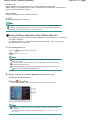
When the program selection screen appears:
The program selection screen may appear after performing step 2.
If the program selection screen appears, select MP Navigator EX Ver4.0 and click OK.
To start MP Navigator EX automatically without displaying the program selection screen, follow
the procedure below.
- For Windows 7 or Windows Vista users, refer to "For Windows Users" in " Troubleshooting "
of the on-screen manual: Advanced Guide .
- For Windows XP users, select MP Navigator EX Ver4.0 as the software application to be
used in the program selection screen, select Always use this program for this action, then
click OK.
Page top
Printing from Your Computer
Page 23 of 707 pages
Advanced Guide
Troubleshooting
Contents > Printing from Your Computer
Printing from Your Computer
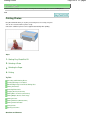
This section describes the procedure to print documents or photos with a computer.
You can easily print photos taken with your digital camera by using Easy-PhotoPrint EX supplied with the
machine.
Printing Photos (Easy-PhotoPrint EX)
Using Various Functions of Easy-PhotoPrint EX
Printing Documents
Printing Web Pages (Easy-WebPrint EX)
Starting Various Software Applications
Solution Menu EX
Easy-WebPrint EX
Page top
Printing Photos (Easy-PhotoPrint EX)
Page 24 of 707 pages
Advanced Guide
Troubleshooting
Contents > Printing from Your Computer > Printing Photos (Easy-PhotoPrint EX)
C051
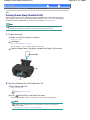
Printing Photos (Easy-PhotoPrint EX)
Print image data saved on your computer by using Easy-PhotoPrint EX supplied with the machine.
This section describes the procedure to print borderless photos on 4" x 6" / 10 x 15 cm photo paper.
For details on Easy-PhotoPrint EX, refer to the on-screen manual: Advanced Guide .
Note
Install Easy-PhotoPrint EX from the Setup CD-ROM when it has not been installed or has been
uninstalled. To install Easy-PhotoPrint EX, select Easy-PhotoPrint EX in Custom Install.
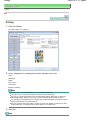
1.
Prepare for printing.
(1) Make sure that the machine is turned on.
See Operation Panel .
(2) Load paper.
See Loading Plain Paper / Photo Paper .
Here we load 4" x 6" / 10 x 15 cm photo paper in the Rear Tray.
(3) Open the Paper Output Tray gently, and open the Output Tray Extension.
2.
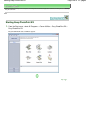
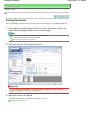
Start Easy-PhotoPrint EX from Solution Menu EX.
(1) Start Solution Menu EX.
See Solution Menu EX.
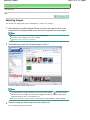
Click Here: Solution Menu EX
(Photo Print) in the Photo Print menu.
(2) Click
Easy-PhotoPrint EX will be started, and the operation screen of Photo Print will appear.
Note
In addition to photo printing, functions for creating albums, calendars, and other photo
items are available.
See Using Various Functions of Easy-PhotoPrint EX.
Printing Photos (Easy-PhotoPrint EX)
3.
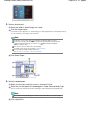
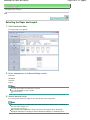
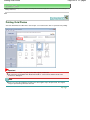
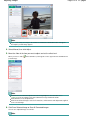
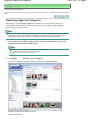
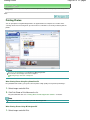
Select a photo to print.
(1) Select the folder in which images are saved.
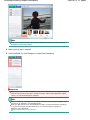
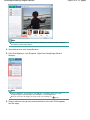
(2) Click the image to print.
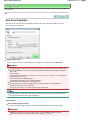
The number of copies appears as "1", and the image you selected appears in the selected image area (A).
You can select two or more images at the same time.
Note
To print two or more copies, click
(Up arrow) to change the number of copies.
To cancel the selection, click the image to cancel in the selected image area (A) and click
(Delete Imported Image) (B). You can also use
(Down arrow) to change the
number of copies to zero.
You can also correct or enhance the selected image.
For details, refer to the on-screen manual: Advanced Guide .
You can capture and print an image from a video.
See Using Various Functions of Easy-PhotoPrint EX.
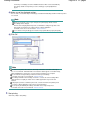
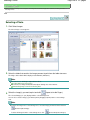
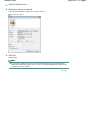
(3) Click Select Paper.
4.
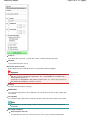
Select the loaded paper.
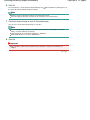
(1) Make sure that your machine's name is selected in Printer.
(2) Select the size and type of the loaded paper in Paper Size and Media Type.
Here we select 4"x6" 10x15cm in Paper Size and the type of the loaded photo paper in Media Type.
Note
If you select the wrong media type, the machine may not print with the proper print quality.
(3) Click Layout/Print.
Page 25 of 707 pages
Printing Photos (Easy-PhotoPrint EX)
5.
Page 26 of 707 pages
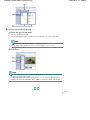
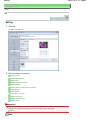
Select a layout and start printing.
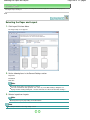
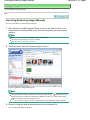
(1) Select the layout of the photo.
Here we select Borderless (full).
The preview will appear in the selected layout for confirmation of the required print result.
Note
You can change the direction of photo or crop photos to print.
For details on the operation, refer to the on-screen manual: Advanced Guide .
(2) Click Print.
Note
To cancel a print job in progress, press the Stop/Reset button on the machine or click Cancel
Printing on the printer status monitor.
To display the printer status monitor, click the printer icon on the taskbar. In Windows Vista or
Windows XP, click Canon XXX Printer (where " XXX" is your machine's name) on the taskbar.
Page top
Using Various Functions of Easy-PhotoPrint EX
Page 27 of 707 pages
Advanced Guide
Troubleshooting
Contents > Printing from Your Computer > Printing Photos (Easy-PhotoPrint EX) > Using Various Functions of EasyPhotoPrint EX
C052
Using Various Functions of Easy-PhotoPrint EX
This section introduces a few of the useful functions of Easy-PhotoPrint EX.
For details, refer to the on-screen manual: Advanced Guide.
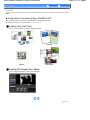
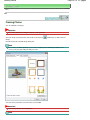
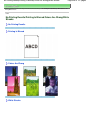
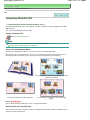
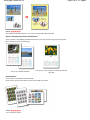
Creating Your Own Prints
You can create an album or calendar using your photos.
Album
Calendar
Stickers
Layout Print
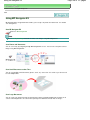
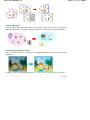
Creating Still Images from Videos
You can capture video frames and create still images.
Page top
Printing Documents
Page 28 of 707 pages
Advanced Guide
Troubleshooting
Contents > Printing from Your Computer > Printing Documents
C053
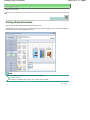
Printing Documents
This section describes the procedure to print a document of A4 size on plain paper.
For details, refer to the on-screen manual: Advanced Guide.
Note
Operations may vary depending on your software application. For details on the operation, refer to
the instruction manual of your application.
The screens used in this section are for printing with Windows 7 operating system Home Premium
(hereafter referred to as "Windows 7").
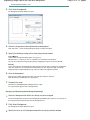
1.
Make sure that the machine is turned on.
See Operation Panel .
2.
Load paper.
See Loading Plain Paper / Photo Paper .
Here we load A4 plain paper in the Rear Tray.
3.
Open the Paper Output Tray gently, and open the Output Tray Extension.
4.
Create (or open) a document to print using an appropriate software application.
5.
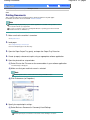
Open the printer driver setup window.
(1) Select Print on the File menu or the command bar in your software application.
The Print dialog box will appear.
(2) Make sure that your machine's name is selected.
Note
If another printer's name is selected, click and select your machine's name.
(3) Click Preferences (or Properties).
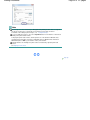
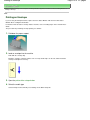
6.
Specify the required print settings.
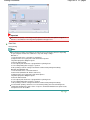
(1) Select Business Document in Commonly Used Settings.
Note
When the print object such as Business Document or Photo Printing is selected in
Printing Documents
Commonly Used Settings, the items in Additional Features will be selected automatically.
The settings suitable for the print object such as media type or print quality will also
appear.
(2) Make sure of the displayed settings.
Here we make sure that Plain Paper in Media Type, Standard in Print Quality, and A4 in Printer Paper Size
are selected.
Note
When you specify two or more copies in Copies, the printed pages will be collated.
The settings can be changed.
However, after changing Printer Paper Size, confirm that the setting for Page Size on the
Page Setup sheet matches the setting set in the software application.
For details, refer to the on-screen manual: Advanced Guide .
If you select the wrong media type, the machine may not print with the proper print quality.
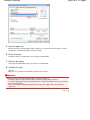
(3) Click OK.
Note
For details on the printer driver functions, click Help or Instructions to view the online help or
the on-screen manual: Advanced Guide . The Instructions button appears on the Quick Setup,
Main and Maintenance sheets if the on-screen manual is installed on your computer.
You can name the changed settings and add to Commonly Used Settings.
For details, refer to the on-screen manual: Advanced Guide .
If the Always Print with Current Settings check box is selected, the current settings will be
applied from the next print job onward. Some software applications may not have this
function.
To display the preview to confirm the print result, select the Preview before printing check
box. Some software applications may not have a preview function.
You can specify the detailed print settings on the Main sheet or Page Setup sheet.
For details, refer to the on-screen manual: Advanced Guide .
7.
Start printing.
Click Print (or OK) to start printing.
Page 29 of 707 pages
Printing Documents
Page 30 of 707 pages
Note
The message on how to load envelopes will appear when printing on them. This message will
not appear next time if you select the Do not show this message again. check box.
For details on the settings to print envelopes, see Loading Envelopes.
To cancel a print job in progress, press the Stop/Reset button on the machine or click Cancel
Printing on the printer status monitor.
To display the printer status monitor, click the printer icon on the taskbar. In Windows Vista
operating system (hereafter referred to as "Windows Vista") or Windows XP, click Canon
XXX Printer (where " XXX" is your machine's name) on the taskbar.
If printed ruled lines are misaligned or print results are unsatisfactory, adjust the print head
position.
See Aligning the Print Head .
Page top
Printing Web Pages (Easy-WebPrint EX)
Page 31 of 707 pages
Advanced Guide
Troubleshooting
Contents > Printing from Your Computer > Printing Web Pages (Easy-WebPrint EX)
C054
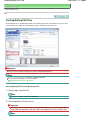
Printing Web Pages (Easy-WebPrint EX)
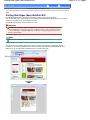
Easy-WebPrint EX provides quick and easy printing of web pages for Internet Explorer.
You can print web pages automatically resized to fit the paper width without cutting off the sides of pages,
or preview and select the desired web pages to print.
Easy-WebPrint EX requires Internet Explorer 7 or later.
Important
It is unlawful to reproduce or edit the copyrighted work of another person without permission from
the copyright holder, except for personal use, use within the home, or other use within the limited
scope as defined by the copyright. Additionally, reproducing or editing photographs of people may
infringe on portrait rights.
Note
For information on installing or starting Easy-WebPrint EX, see Easy-WebPrint EX .
The clip function, for example, allows you to clip desired parts of web pages and edit them to print.
For details on operating Easy-WebPrint EX, refer to the online help. Click Easy-WebPrint EX (A) on the
toolbar, then select Help from the pull-down menu to view the online help.
Printing Web Pages (Easy-WebPrint EX)
Page 32 of 707 pages
Page top
Starting Various Software Applications
Page 33 of 707 pages
Advanced Guide
Troubleshooting
Contents > Printing from Your Computer > Starting Various Software Applications
C055
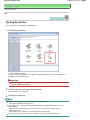
Starting Various Software Applications
This section describes Solution Menu EX, which is used to start the software applications supplied with
the machine. The information on Easy-WebPrint EX, a software application for printing web pages, is
also included.
Solution Menu EX
Solution Menu EX is a software application that provides quick access to other software applications
supplied with the machine, manuals, and online product information.
Note
Install Solution Menu EX, the on-screen manual, or other supplied software applications you want to
use from the Setup CD-ROM when they have not been installed or have been uninstalled. To install
them, select them in Custom Install.
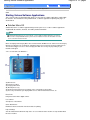
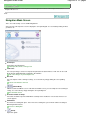
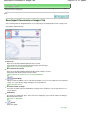
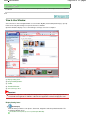
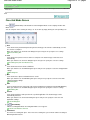
Menus are displayed in Category Menu Area of Solution Menu EX Main Screen. Click a menu in Category
Menu Area to display icons for functions available in that menu, in Function Icon Area of Main Screen.
The number and types of icons or menus displayed in Main Screen may vary depending on your
machine and region.
* The screen below is for Windows 7.
(A) Main Screen
(B) Function Icon Area
(C) Category Menu Area
(D) Desktop Accessory
(E) Shortcut menu to which you can add the icons of frequently used functions
(F) Accessory Icon that lets you display Main Screen, show or hide Shortcut menu, etc.
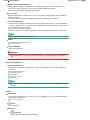
Photo Print
Print photos taken with a digital camera.
Use Scanner
Scan photos or documents.
Canon Web Service
Download content or materials from the website for printing.
Help & Settings
View the Solution Menu EX online help or the on-screen manual of the machine. Set up Solution Menu
EX or the machine.
Starting Various Software Applications
Start Application
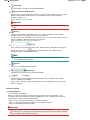
Start the supplied software applications such as Easy-PhotoPrint EX and My Printer.
With My Printer, you can display the printer driver setup window, and get information on what action to
take if you have trouble with the operation.
Online Shopping
Purchase consumables such as ink from the website.
Information
Find useful information on the machine.
Note
The computer must be connected to the Internet to access the website for useful information, etc.
For details on operating Solution Menu EX, refer to the online help. Select the Help & Settings menu,
(Solution Menu EX's Help) to view the online help.
then click
Starting Software Applications from Solution Menu EX
From Solution Menu EX, you can start a software application, and also directly access a function of
the software application.
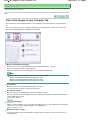
The following procedure is to start Solution Menu EX and, for example, select one of the EasyPhotoPrint EX functions, Photo Print.
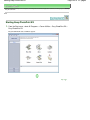
1.
Start Solution Menu EX.
Double-click
(Solution Menu EX) on the desktop.
Click Here: Solution Menu EX
Note
Unless the default setting has been changed, Solution Menu EX starts automatically when you
start up the computer.
To start Solution Menu EX from the Start menu, select All Programs, Canon Utilities, Solution
Menu EX, then Solution Menu EX.
If Solution Menu EX Main Screen does not appear after starting Solution Menu EX, right-click
(Accessory Icon) and select Show Main Screen.
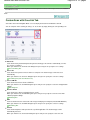
2.
Select the function of a software application that you want to start.
(1) Click the Photo Print menu.
(2) Click
(Photo Print).
Easy-PhotoPrint EX will be started, and the operation screen of Photo Print will appear.
Note
In addition to photo printing, functions for creating albums, calendars, and other photo items
are available.
For details on operations and functions of Easy-PhotoPrint EX, see Printing Photos (EasyPhotoPrint EX).
Page 34 of 707 pages
Starting Various Software Applications
Page 35 of 707 pages
Easy-WebPrint EX
When Easy-WebPrint EX is installed, it adds a toolbar to your Internet Explorer screen. The toolbar is
available whenever Internet Explorer is running.
Note
Installing Easy-WebPrint EX
If Easy-WebPrint EX is not installed, the guidance for installation of Easy-WebPrint EX may appear in
the notification area of the taskbar.
To install Easy-WebPrint EX, click the displayed guidance and follow the instructions on the screen.
You can also install Easy-WebPrint EX from the Setup CD-ROM .
To install Easy-WebPrint EX, select Easy-WebPrint EX in Custom Install.
To install Easy-WebPrint EX on your computer, Internet Explorer 7 or later is required and the
computer must be connected to the Internet.
Page top
Loading Paper / Originals
Page 36 of 707 pages
Advanced Guide
Troubleshooting
Contents > Loading Paper / Originals
Loading Paper / Originals
This section describes types of paper or originals you can load, how to load printing paper in the Rear
Tray, and how to load originals to copy or scan.
Loading Paper
Loading Plain Paper / Photo Paper
Loading Envelopes
Media Types You Can Use
Media Types You Cannot Use
Loading Originals
Loading Originals
Originals You Can Load
Page top
Loading Paper
Page 37 of 707 pages
Advanced Guide
Troubleshooting
Contents > Loading Paper / Originals > Loading Paper
C073
Loading Paper
Loading Plain Paper / Photo Paper
Loading Envelopes
Media Types You Can Use
Media Types You Cannot Use
Loading Plain Paper / Photo Paper
Important
If you cut plain paper into small size such as 4" x 6" / 10 x 15 cm, 4" x 8" / 101.6 x 203.2 mm, 5" x 7"
/ 13 x 18 cm, or 2.16" x 3.58" / 55.0 x 91.0 mm (Card size) to perform trial print, it can cause paper
jams.
Note
We recommend Canon genuine photo paper for printing photos.
For details on the Canon genuine paper, see Media Types You Can Use .
You can use general copy paper.
For the page size and paper weight you can use for this machine, see Media Types You Can Use .
1.
Prepare paper.
Align the edges of paper. If paper is curled, flatten it.
Note
Align the edges of paper neatly before loading. Loading paper without aligning the edges may
cause paper jams.
If paper is curled, hold the curled corners and gently bend them in the opposite direction until
the paper becomes completely flat.
For details on how to flatten curled paper, refer to " Troubleshooting" in the on-screen manual:
Advanced Guide .
2.
Load paper.
(1) Open the Paper Support, raise it, then tip it back.
(2) Open the Paper Output Tray gently, and open the Output Tray Extension.
Loading Paper
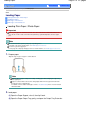
(3) Slide the Paper Guides (A) to open them, and load the paper in the center of the
Rear Tray WITH THE PRINT SIDE FACING YOU.
(4) Slide the Paper Guides (A) to align them with both sides of the paper stack.
Do not slide the Paper Guides too hard. The paper may not be fed properly.
Important
Always load paper in the portrait orientation (B). Loading paper in the landscape
orientation (C) can cause paper jams.
Page 38 of 707 pages
Loading Paper
Page 39 of 707 pages
Note
Do not load sheets of paper higher than the Load Limit Mark (D).
Note
The machine may make operating noise when feeding paper.
After loading paper
When copying, select the size and type of the loaded paper using the Operation Panel on the
machine.
See Copying.
When printing with a computer, select the size and type of the loaded paper in Printer Paper
Size and Media Type in the printer driver.
See Printing Documents .
Page top
Loading Envelopes
Page 40 of 707 pages
Advanced Guide
Troubleshooting
Contents > Loading Paper / Originals > Loading Paper > Loading Envelopes
C074
Loading Envelopes
You can print on European DL and US #10 envelopes.
The address is automatically rotated and printed according to the envelope's direction by specifying with
the printer driver properly.
Important
You can only print on envelopes with the computer.
Do not use the following envelopes. They could jam in the machine or cause the machine to
malfunction.
- Envelopes with an embossed or treated surface
- Envelopes with a double flap (or sticker flaps)
- Envelopes whose gummed flaps are already moistened and adhesive
Note
The message on how to load envelopes will appear when printing on them. This message will not
appear next time if you select the Do not show this message again. check box.
1.
Prepare envelopes.
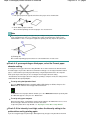
Press down on all four corners and edges of the envelopes to flatten them.
If the envelopes are curled, hold the opposite corners and gently twist them in the
opposite direction.
If the corner of the envelope flap is folded, flatten it.
Use a pen to press the leading edge in the inserting direction flat and sharpen the
crease.
The figures above show a side view of the leading edge of the envelope.
Important
The envelopes may jam in the machine if they are not flat or the edges are not aligned. Make
sure that no curl or puff exceeds 0.1 inches / 3 mm.
2.
Load envelopes.
(1) Open the Paper Support.
Loading Envelopes
Do not raise the Paper Support.
(2) Open the Paper Output Tray gently, and open the Output Tray Extension.
(3) Slide the Paper Guides (A) to open them, and load the envelopes in the center of
the Rear Tray WITH THE ADDRESS SIDE FACING YOU.
The folded flap of the envelope will be faced down on the left side.
Up to 10 envelopes can be loaded at once.
(4) Slide the Paper Guides (A) to align them with both sides of the envelopes.
Do not slide the Paper Guides too hard. The envelopes may not be fed properly.
(B) Rear side
(C) Address side
Note
Do not load envelopes higher than the Load Limit Mark (D).
3.
Specify the settings with the printer driver.
Page 41 of 707 pages
Loading Envelopes
Page 42 of 707 pages
(1) Select Envelope in Commonly Used Settings on the Quick Setup sheet.
(2) Select DL Env. or Comm. Env. #10 in the Envelope Size Setting window.
(3) Select Landscape in Orientation.
Important
If you do not specify the envelope size or orientation properly, the address will be printed
upside down or will be turned to 90 degrees.
Note
The machine may make operating noise when feeding envelopes.
If the print result is upside down, open the printer driver setup window, select Envelope in
Commonly Used Settings, then select the Rotate 180 degrees check box in Additional
Features.
For details on the printer driver settings, see Printing Documents .
Page top
Media Types You Can Use
Page 43 of 707 pages
Advanced Guide
Troubleshooting
Contents > Loading Paper / Originals > Loading Paper > Media Types You Can Use
C075
Media Types You Can Use
Choose paper suitable for printing, for the best print results. Canon provides you various types of paper
to enhance the fun of printing, such as stickers as well as papers for photo or document. We
recommend the use of Canon genuine paper for printing your important photos.
Media Types
Commercially available papers
Plain Paper (including recycled paper)
- Media type settings Printer driver: Plain Paper
- Paper load limit Rear Tray: Approx. 100 sheets
- Paper Output Tray load limit Approx. 50 sheets
Note
Proper feeding of paper may not be possible at the maximum capacity depending on the
type of paper or environmental conditions (either very high or low temperature or
humidity). In such cases, reduce the number of paper you load at a time to less than half
(100% recycled paper can be used).
This paper can be used for making copies when selecting the media type with the Paper
button on the Operation Panel. You can only select A4 or Letter-sized plain paper.
Envelopes
- Media type settings Printer driver: Envelope
- Paper load limit Rear Tray: 10 envelopes
- Paper Output Tray load limit We recommend that you remove the previously printed envelope from the Paper Output Tray
before continuously printing to avoid blurs and discoloration.
Canon genuine papers
Refer to the instruction manual supplied with the paper for detailed information on the printable side and
notes on handling paper. For information on the page sizes available for each Canon genuine paper,
visit our website.
Note
The Model Number of Canon genuine paper is shown in brackets.
You may not be able to purchase some Canon genuine papers depending on the country or region
of purchase. Paper is not sold in the US by Model Number. Purchase paper by name.
For printing photos:
Photo Paper Pro Platinum <PT-101>
- Media type settings Printer driver: Photo Paper Pro Platinum
Glossy Photo Paper "Everyday Use" <GP-501> *1
Media Types You Can Use
- Media type settings Printer driver: Glossy Photo Paper
Photo Paper Glossy <GP-502> *1
- Media type settings Printer driver: Glossy Photo Paper
Photo Paper Plus Glossy II <PP-201>*1
- Media type settings Printer driver: Photo Paper Plus Glossy II
Photo Paper Plus Semi-gloss <SG-201> *1
- Media type settings Printer driver: Photo Paper Plus Semi-gloss
Matte Photo Paper <MP-101>
- Media type settings Printer driver: Matte Photo Paper
- Paper load limit Rear Tray:
10 sheets for A4, Letter / 8.5" x 11", 5" x 7" / 13 x 18 cm, and 8" x 10" / 20 x 25 cm
20 sheets for 4" x 6" / 10 x 15 cm
- Paper Output Tray load limit We recommend that you remove the previously printed sheet from the Paper Output Tray before
continuously printing to avoid blurs and discoloration.
*1
This paper can be used for making copies when selecting the media type with the Paper
button on the Operation Panel. You can only select A4 or Letter-sized photo paper, and 4" x 6" /
10 x 15 cm photo paper.
Note
When loading paper in stacks, the print side may become marked as it is fed or paper may
not feed properly. In this case, load one sheet at a time (except for Matte Photo Paper <MP
-101>).
For printing business documents:
High Resolution Paper <HR-101N>
- Media type settings Printer driver: High Resolution Paper
- Paper load limit Rear Tray: 80 sheets
- Paper Output Tray load limit 50 sheets
For creating your own prints:
T-Shirt Transfers <TR-301>
- Media type settings Printer driver: T-Shirt Transfers
Photo Stickers <PS-101>
- Media type settings Printer driver: Glossy Photo Paper
- Paper load limit -
Page 44 of 707 pages
Media Types You Can Use
Rear Tray: 1 sheet
- Paper Output Tray load limit We recommend that you remove the previously printed sheet from the Paper Output Tray before
continuously printing to avoid blurs and discoloration.
Note
You can easily specify print settings with Easy-PhotoPrint EX provided on the Setup CDROM. Install it on your computer.
Page Sizes
You can use the following page sizes.
Standard sizes:
Letter (8.50 x 11.00 inches / 215.9 x 279.4 mm)
Legal (8.50 x 14.00 inches / 215.9 x 355.6 mm)
A5 (5.83 x 8.27 inches / 148.0 x 210.0 mm)
A4 (8.27 x 11.69 inches / 210.0 x 297.0 mm)
B5 (7.17 x 10.12 inches / 182.0 x 257.0 mm)
4" x 6" (4.00 x 6.00 inches / 10 x 15 cm)
4" x 8" (4.00 x 8.00 inches / 101.6 x 203.2 mm)
5" x 7" (5.00 x 7.00 inches / 13 x 18 cm)
8" x 10" (8.00 x 10.00 inches / 20 x 25 cm)
L (3.50 x 5.00 inches / 89.0 x 127.0 mm)
2L (5.00 x 7.01 inches / 127.0 x 178.0 mm)
Hagaki (3.94 x 5.83 inches / 100.0 x 148.0 mm)
Hagaki 2 (7.87 x 5.83 inches / 200.0 x 148.0 mm)
Comm. Env. #10 (4.12 x 9.50 inches / 104.6 x 241.3 mm)
DL Env. (4.33 x 8.66 inches / 110.0 x 220.0 mm)
Choukei 3 (4.72 x 9.25 inches / 120.0 x 235.0 mm)
Choukei 4 (3.54 x 8.07 inches / 90.0 x 205.0 mm)
Youkei 4 (4.13 x 9.25 inches / 105.0 x 235.0 mm)
Youkei 6 (3.86 x 7.48 inches / 98.0 x 190.0 mm)
Card (2.16 x 3.58 inches / 55.0 x 91.0 mm)
Wide (4.00 x 7.10 inches / 101.6 x 180.6 mm)
Non-standard sizes:
You can also specify a custom size within the following range.
Minimum size: 2.17 x 3.58 inches / 55.0 x 91.0 mm
Maximum size: 8.50 x 26.61 inches / 215.9 x 676.0 mm
Paper Weight
17 to 28 lb / 64 to 105 g/m 2 (except for Canon genuine paper)
Do not use heavier or lighter paper (except for Canon genuine paper), as it could jam in the machine.
Notes on Storing Paper
Take out only the necessary number of paper from the package, just before printing.
To avoid curling, when you do not print, put unused paper back into the package and keep it on a
level surface. And also, store it avoiding heat, humidity, and direct sunlight.
Notes on Paper for Full-page Borderless Printing
Duplex printing is not available for full-page borderless printing.
You cannot use A5, B5, and Legal-sized paper, and envelopes for full-page borderless printing.
You can use plain paper for full-page borderless printing only when printing from a computer.
However, this may result in lower print quality. We recommend using plain paper for a trial print.
Page 45 of 707 pages
Media Types You Can Use
Page 46 of 707 pages
Page top
Media Types You Cannot Use
Page 47 of 707 pages
Advanced Guide
Troubleshooting
Contents > Loading Paper / Originals > Loading Paper > Media Types You Cannot Use
C076
Media Types You Cannot Use
Do not use the following types of paper. Using such paper will cause not only unsatisfactory results, but
also the machine to jam or malfunction.
Folded, curled, or wrinkled paper
Damp paper
Paper that is too thin (weighing less than 17 lb / 64 g/m 2)
Paper that is too thick (weighing more than 28 lb / 105 g/m 2, except for Canon genuine paper)
Paper thinner than a postcard, including plain paper or notepad paper cut to a small size (when
printing on paper smaller than A5)
Picture postcards
Postcards affixed with photos or stickers
Envelopes with a double flap (or sticker flaps)
Envelopes with an embossed or treated surface
Envelopes whose gummed flaps are already moistened and adhesive
Any type of paper with holes
Paper that is not rectangular
Paper bound with staples or glue
Paper with adhesives
Paper decorated with glitter, etc.
Page top
Loading Originals
Page 48 of 707 pages
Advanced Guide
Troubleshooting
Contents > Loading Paper / Originals > Loading Originals
C077
Loading Originals
Loading Originals
Originals You Can Load
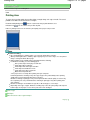
Loading Originals
Load originals to copy or scan on the Platen Glass.
Important
After loading the original, be sure to close the Document Cover before starting to copy or scan.
When scanning from a computer using a software application, you need to load the original in a
different way.
For details, refer to the on-screen manual: Advanced Guide .
1.
Load an original on the Platen Glass.
(1) Open the Document Cover.
Important
Do not place any object on the Document Cover. It will fall into the Rear Tray when the
Document Cover is opened and cause the machine to malfunction.
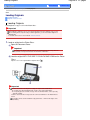
(2) Load the original WITH THE SIDE TO SCAN FACING DOWN on the Platen
Glass.
Align the corner of the original with the alignment mark
.
Important
Be sure to observe the following when loading the original on the Platen Glass.
- Do not place any objects weighing 4.4 lb / 2.0 kg or more on the Platen Glass.
- Do not put any pressure of 4.4 lb / 2.0 kg or more on the Platen Glass, such as pressing
down the original.
Failure to observe the above may cause the scanner to malfunction or the Platen Glass to
break.
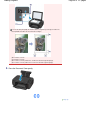
The machine cannot scan the shaded area (A) (0.04 inches / 1 mm from the edges of the
Platen Glass).
Loading Originals
Page 49 of 707 pages
To ensure the best print quality, the machine allows a margin along each edge of media. The
actual printable area will be the area inside these margins.
(B) 0.12 inches / 3.0 mm
(C) 0.20 inches / 5.0 mm
(D) 0.13 inches / 3.4 mm (0.25 inches / 6.4 mm for Letter and Legal-sized paper)
(E) 0.13 inches / 3.4 mm (0.25 inches / 6.3 mm for Letter and Legal-sized paper)
2.
Close the Document Cover gently.
Page top
Originals You Can Load
Page 50 of 707 pages
Advanced Guide
Troubleshooting
Contents > Loading Paper / Originals > Loading Originals > Originals You Can Load
C079
Originals You Can Load
You can copy or scan the following originals.
Types of originals: Text document, magazine, or newspaper
Printed photo, picture card, business card, or disc (BD/DVD/CD,
etc.)
Size (W x L):
Max. 8.5 x 11.7 inches / 216 x 297 mm
Note
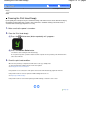
When loading a thick original such as a book on the Platen Glass, you can load it by removing the
Document Cover from the machine.
For details on how to remove or attach the Document Cover, refer to the on-screen manual:
Advanced Guide .
Page top
Routine Maintenance
Page 51 of 707 pages
Advanced Guide
Troubleshooting
Contents > Routine Maintenance
Routine Maintenance
This section describes how to clean the machine when the print result is faint, to replace FINE
Cartridges when they run out of ink, or to take an action when paper does not feed properly.
When Printing Becomes Faint or Colors Are Incorrect
Printing the Nozzle Check Pattern
Examining the Nozzle Check Pattern
Cleaning the Print Head
Cleaning the Print Head Deeply
Aligning the Print Head
Replacing a FINE Cartridge
Replacing Procedure
Checking the Ink Status
Cleaning the Machine
Cleaning the Paper Feed Roller
Cleaning the Inside of the Machine (Bottom Plate Cleaning)
Cleaning the Protrusions inside the Machine
Page top
When Printing Becomes Faint or Colors Are Incorrect
Page 52 of 707 pages
Advanced Guide
Troubleshooting
Contents > Routine Maintenance > When Printing Becomes Faint or Colors Are Incorrect
C093
When Printing Becomes Faint or Colors Are Incorrect
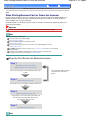
If print results are blurred or colors are not printed correctly, the print head nozzles (FINE Cartridges) are
probably clogged. Follow the procedure below to print the nozzle check pattern, check the print head
nozzle condition, then clean the Print Head.
If printed ruled lines are misaligned or print results are otherwise unsatisfactory, aligning the Print Head
may improve print quality.
Important
Do not rinse or wipe the FINE Cartridges. This can cause trouble with the FINE Cartridges.
Note
Before performing maintenance
Check if ink remains in the FINE Cartridge.
See Checking the Ink Status .
Check if the FINE Cartridges are installed correctly.
See Replacing Procedure .
Check if the orange protective tape on the bottom of the FINE Cartridge is removed.
See Replacing Procedure .
If the Alarm lamp lights or flashes orange, refer to " Troubleshooting" in the on-screen manual:
Advanced Guide .
Increasing the print quality in the printer driver settings may improve the print result.
For details, refer to the on-screen manual: Advanced Guide .
When the Print Results Are Blurred or Uneven:
Step 1
See Printing the Nozzle Check Pattern .
See Examining the Nozzle Check Pattern.
If there are missing lines or horizontal white streaks in the
pattern:
Step 2
See Cleaning the Print Head .
If the problem is not resolved after cleaning the Print Head
twice:
Step 3
See Cleaning the Print Head Deeply .
If the problem is not resolved, turn off the power and
clean the Print Head deeply again after 24 hours.
If the problem is still not resolved:
Step 4
See Replacing a FINE Cartridge.
Note
After cleaning the Print Head, print
and examine the nozzle check
pattern.
When Printing Becomes Faint or Colors Are Incorrect
Page 53 of 707 pages
If the problem is still not resolved after replacing the FINE Cartridge, contact the service center.
When the Print Results Are Not Even such as the Ruled Lines
Are Misaligned:
See Aligning the Print Head .
Note
You can also perform the maintenance operations from your computer.
For details, refer to the on-screen manual: Advanced Guide .
Page top
Printing the Nozzle Check Pattern
Page 54 of 707 pages
Advanced Guide
Troubleshooting
Contents > Routine Maintenance > When Printing Becomes Faint or Colors Are Incorrect > Printing the Nozzle Check
Pattern
C094
Printing the Nozzle Check Pattern
Print the nozzle check pattern to determine whether the ink ejects properly from the print head nozzles.
Note
If the remaining ink level is low, the nozzle check pattern will not be printed correctly. Replace the
FINE Cartridge whose ink is low.
See Replacing a FINE Cartridge.
You need to prepare: a sheet of A4 or Letter-sized plain paper
1.
Make sure that the power is turned on.
2.
Load a sheet of A4 or Letter-sized plain paper in the Rear Tray.
3.
Open the Paper Output Tray gently, and open the Output Tray Extension.
4.
Print the nozzle check pattern.
(1) Press the
(Maintenance) button to display A.
(2) Press the Black or Color button.
The nozzle check pattern will be printed.
5.
Examine the nozzle check pattern.
See Examining the Nozzle Check Pattern.
Page top
Examining the Nozzle Check Pattern
Page 55 of 707 pages
Advanced Guide
Troubleshooting
Contents > Routine Maintenance > When Printing Becomes Faint or Colors Are Incorrect > Examining the Nozzle Check
Pattern
C095
Examining the Nozzle Check Pattern
Examine the nozzle check pattern, and clean the Print Head if necessary.
1.
Check if there are missing lines in the pattern (1) or horizontal white streaks in the
pattern (2).
(1) Check if lines are missing in this pattern.
If yes, the cleaning is required.
See Cleaning the Print Head .
(A) Good
(B) Bad (lines are missing)
(2) Check if horizontal white streaks are present in this pattern.
If yes, the cleaning is required.
See Cleaning the Print Head .
(A) Good
(B) Bad (horizontal white streaks are present)
Page top
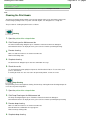
Cleaning the Print Head
Page 56 of 707 pages
Advanced Guide
Troubleshooting
Contents > Routine Maintenance > When Printing Becomes Faint or Colors Are Incorrect > Cleaning the Print Head
C096
Cleaning the Print Head
Clean the Print Head if lines are missing or if horizontal white streaks are present in the printed nozzle
check pattern. Cleaning unclogs the nozzles and restores the print head condition. Cleaning the Print
Head consumes ink, so clean the Print Head only when necessary.
1.
Make sure that the power is turned on.
2.
Clean the Print Head.
(1) Press the
(Maintenance) button repeatedly until H appears.
(2) Press the Black or Color button.
The machine starts cleaning the Print Head.
Do not perform any other operations until the machine completes the cleaning of the Print Head. This takes
about 1 to 2 minutes.
3.
Check the print head condition.
When the cleaning is completed, the LED returns to the copy standby mode.
To check the print head condition, print the nozzle check pattern.
See Printing the Nozzle Check Pattern .
Note
If the problem is not resolved after cleaning the Print Head twice, clean the Print Head deeply.
See Cleaning the Print Head Deeply .
Page top
Cleaning the Print Head Deeply
Page 57 of 707 pages
Advanced Guide
Troubleshooting
Contents > Routine Maintenance > When Printing Becomes Faint or Colors Are Incorrect > Cleaning the Print Head
Deeply
C097
Cleaning the Print Head Deeply
If print quality does not improve by the standard cleaning of the Print Head, clean the Print Head deeply.
Cleaning the Print Head deeply consumes more ink than the standard cleaning of the Print Head, so
clean the Print Head deeply only when necessary.
1.
Make sure that the power is turned on.
2.
Clean the Print Head deeply.
(1) Press the
(Maintenance) button repeatedly until y appears.
(2) Press the Black or Color button.
The machine starts cleaning the Print Head deeply.
Do not perform any other operations until the machine completes the deep cleaning of the Print Head. This
takes about 2 minutes.
3.
Check the print head condition.
When the deep cleaning is completed, the LED returns to the copy standby mode.
To check the print head condition, print the nozzle check pattern.
See Printing the Nozzle Check Pattern .
If the problem is not resolved, turn off the power and clean the Print Head deeply again after 24 hours.
If the problem is still not resolved, replace the FINE Cartridge with a new one.
See Replacing a FINE Cartridge.
If the problem is still not resolved after replacing the FINE Cartridge, contact the service center.
Page top
Aligning the Print Head
Page 58 of 707 pages
Advanced Guide
Troubleshooting
Contents > Routine Maintenance > When Printing Becomes Faint or Colors Are Incorrect > Aligning the Print Head
C098
Aligning the Print Head
If printed ruled lines are misaligned or print results are otherwise unsatisfactory, adjust the print head
position.
Note
If the remaining ink level is low, the print head alignment sheet will not be printed correctly. Replace
the FINE Cartridge whose ink is low.
See Replacing a FINE Cartridge.
You need to prepare: a sheet of A4 or Letter-sized plain paper (including
recycled paper)*
* Be sure to use paper that is white and clean on both sides.
1.
Make sure that the power is turned on.
2.
Load a sheet of A4 or Letter-sized plain paper in the Rear Tray.
3.
Open the Paper Output Tray gently, and open the Output Tray Extension.
4.
Print the print head alignment sheet.
(1) Press the
(Maintenance) button repeatedly until u (lowercase "u") appears.
(2) Press the Black or Color button.
The print head alignment sheet will be printed.
Aligning the Print Head
Page 59 of 707 pages
Important
Do not touch any printed part on the print head alignment sheet.
Be careful not to get the print head alignment sheet dirty. If the sheet is stained or
wrinkled, it may not be scanned properly.
5.
Scan the print head alignment sheet to adjust the print head position.
(1) Load the print head alignment sheet on the Platen Glass.
Load the print head alignment sheet WITH THE PRINTED SIDE FACING DOWN and align the mark
upper left corner of the sheet with the alignment mark
on the
.
(2) Close the Document Cover gently, make sure that U (uppercase "U") appears
on the LED, then press the Black or Color button.
Aligning the Print Head
Page 60 of 707 pages
The machine starts scanning the print head alignment sheet, and the print head position will be adjusted
automatically.
When adjusting the print head position is completed, the LED returns to the copy standby mode. Remove the
print head alignment sheet on the Platen Glass.
Important
Do not open the Document Cover or move the loaded print head alignment sheet until adjusting
the print head position is completed.
If adjusting the print head position has failed, the error code will appear on the LED.
Press the Stop/Reset button to release the error, then refer to " Troubleshooting" in the onscreen manual: Advanced Guide .
Note
If the print results are still not satisfactory after adjusting the print head position as described
above, adjust the print head position manually from the computer.
For details, refer to the on-screen manual: Advanced Guide .
To print and check the current head position adjustment values, display L on the LED, then
press the Black or Color button.
Page top
Replacing a FINE Cartridge
Page 61 of 707 pages
Advanced Guide
Troubleshooting
Contents > Routine Maintenance > Replacing a FINE Cartridge
C091
Replacing a FINE Cartridge
When remaining ink cautions or errors occur, the error code will appear on the LED to inform you of the
error.
Refer to "An Error Code Is Displayed on the LED" in " Troubleshooting " of the on-screen manual:
Advanced Guide , and take an appropriate action.
Note
For information on the compatible FINE Cartridges, refer to the printed manual: Getting Started .
Replacing Procedure
When you need to replace FINE Cartridges, follow the procedure below.
Important
Handling FINE Cartridges
Do not touch the electrical contacts (A) or print head nozzles (B) on the FINE Cartridge. The
machine may not print properly if you touch it.
If you remove a FINE Cartridge, replace it immediately. Do not leave the machine with FINE
Cartridges removed.
Use new FINE Cartridges for replacement. Installing used FINE Cartridges may cause the nozzles to
clog.
Furthermore, with such cartridges, the machine will not be able to inform you when to replace the
cartridges properly.
Once a FINE Cartridge has been installed, do not remove it from the machine and leave it out in the
open. This will cause the FINE Cartridge to dry out, and the machine may not operate properly when
it is reinstalled. To maintain optimal printing quality, use a FINE Cartridge within six months of first
use.
Note
If a FINE Cartridge runs out of ink, you can print with either Color or Black FINE Cartridge, in
whichever ink remains, only for a while. However the print quality may be reduced compared to
when printing with both cartridges. We recommend to use new FINE Cartridges in order to obtain
optimum qualities.
Even when printing with one ink only, print with leaving the empty FINE Cartridge installed. If either
of the Color FINE Cartridge or Black FINE Cartridge is not installed, an error occurs and the machine
cannot print.
For information on how to configure this setting, refer to the on-screen manual: Advanced Guide .
Color ink may be consumed even when printing a black-and-white document or when black-andwhite printing is specified.
Both color ink and black ink are also consumed in the standard cleaning and deep cleaning of the
Print Head, which may be necessary to maintain the machine's performance. When ink runs out,
replace the FINE Cartridge immediately with a new one.
For details, see Tips on How to Use Your Machine .
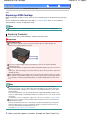
1.
Make sure that the power is turned on, and open the Paper Output Tray.
Replacing a FINE Cartridge
2.
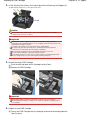
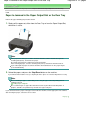
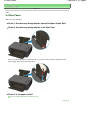
Lift the Scanning Unit (Cover), then hold it open with the Scanning Unit Support (C).
The FINE Cartridge Holder moves to the replacement position.
Caution
Do not hold the FINE Cartridge Holder to stop or move it forcibly. Do not touch the FINE
Cartridge Holder until it stops completely.
Important
The inside of the machine may be stained with ink. Be careful not to stain your hands or
clothing when replacing FINE Cartridges. You can easily wipe off the ink from the inside of the
machine with tissue paper or the like.
For details on the cleaning, refer to the printed manual: Getting Started .
Do not place any object on the Document Cover. It will fall into the Rear Tray when the
Document Cover is opened and cause the machine to malfunction.
When opening the Scanning Unit (Cover), lift it with the Document Cover closed.
Do not touch the metallic parts or other parts inside the machine.
If the Scanning Unit (Cover) is left open for more than 10 minutes, the FINE Cartridge Holder
moves to the right. In this case, close and reopen the Scanning Unit (Cover).
3.
Remove the empty FINE Cartridge.
(1) Pinch the tabs and open the Ink Cartridge Locking Cover.
(2) Remove the FINE Cartridge.
Important
Handle FINE Cartridges carefully to avoid staining of clothing or the surrounding area.
Discard empty FINE Cartridges according to the local laws and regulations regarding disposal
of consumables.
4.
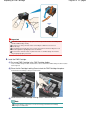
Prepare the new FINE Cartridge.
(1) Take a new FINE Cartridge out of its package and remove the orange protective
tape (D) gently.
Page 62 of 707 pages
Replacing a FINE Cartridge
Important
If you shake a FINE Cartridge, ink may spill out and stain your hands and the surrounding area.
Handle a FINE Cartridge carefully.
Be careful not to stain your hands and the surrounding area with ink on the removed
protective tape.
Do not reattach the protective tape once you have removed it. Discard it according to the local
laws and regulations regarding disposal of consumables.
Do not touch the electrical contacts or print head nozzles on a FINE Cartridge. The machine
may not print properly if you touch it.
5.
Install the FINE Cartridge.
(1) Put a new FINE Cartridge in the FINE Cartridge Holder.
The Color FINE Cartridge should be installed into the left slot and the Black FINE Cartridge should be installed
into the right slot.
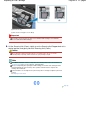
(2) Close the Ink Cartridge Locking Cover to lock the FINE Cartridge into place.
Push down the Ink Cartridge Locking Cover until it clicks.
(3) Confirm that the Ink Cartridge Locking Cover is closed correctly.
Note
If the Ink Cartridge Locking Cover is not closed correctly, push down the Ink Cartridge
Locking Cover until it clicks.
Page 63 of 707 pages
Replacing a FINE Cartridge
Page 64 of 707 pages
(E) Closed correctly
(F) Not closed correctly (the cover is tilted)
Important
The machine cannot print unless both the Color and Black FINE Cartridges are installed. Be
sure to install both the FINE Cartridges.
6.
Lift the Scanning Unit (Cover) slightly to set the Scanning Unit Support back to its
original position, and gently close the Scanning Unit (Cover).
Caution
When setting the Scanning Unit Support back to its original position, be sure to hold the
Scanning Unit (Cover) firmly, and be careful not to get your fingers caught.
Note
If the Alarm lamp lights or flashes orange after the Scanning Unit (Cover) is closed, refer to "
Troubleshooting" in the on-screen manual: Advanced Guide .
When you start printing after replacing the FINE Cartridge, the machine starts cleaning the Print
Head automatically. Do not perform any other operations until the machine completes the
cleaning of the Print Head.
If printed ruled lines are misaligned or the print head position is misaligned, adjust the print head
position.
See Aligning the Print Head .
Page top
Checking the Ink Status
Page 65 of 707 pages
Advanced Guide
Troubleshooting
Contents > Routine Maintenance > Replacing a FINE Cartridge > Checking the Ink Status
C092
Checking the Ink Status
You can check the ink status with the Ink lamps on the Operation Panel or with the computer screen.
Note
The ink level detector is mounted on the machine to detect the remaining ink level. The machine
considers as ink is full when a new FINE Cartridge is installed, and then starts to detect a remaining
ink level. If you install a used FINE Cartridge, the indicated ink level of it may not be correct. In such
case, refer to the ink level information only as a guide.
When remaining ink cautions or errors occur, the error code will appear on the LED to inform you of
the error.
Refer to "An Error Code Is Displayed on the LED" in " Troubleshooting " of the on-screen manual:
Advanced Guide , and take an appropriate action.
With the Ink Lamps on the Operation Panel
Make sure that the LED is in the copy standby mode. You can confirm the ink status with the Ink
lamps.
(1) Alarm lamp
(2) Color Ink lamp
(3) Black Ink lamp
Color Ink lamp or Black Ink lamp lights
The ink is running low. Prepare a new ink cartridge.
Color Ink lamp or Black Ink lamp flashes, while Alarm lamp lights
An error has occurred.
For details, refer to " Troubleshooting " in the on-screen manual: Advanced Guide .
* For some types of errors, the Alarm lamp may not light.
With the Computer Screen
You can confirm the ink status with the printer status monitor.
A symbol appears in the area (A) if there is any information about the remaining ink level.
Example:
The ink is running low. Prepare a new ink cartridge.
Note
An error message may appear while printing. Confirm the message and take an appropriate
Checking the Ink Status
Page 66 of 707 pages
action.
Follow the procedure below to open the confirmation screen.
1.
Open the printer driver setup window.
Refer to the on-screen manual: Advanced Guide .
2.
Click View Printer Status on the Maintenance sheet.
To confirm the FINE Cartridge information, click the Ink Details menu.
Note
While printing, you can also display the printer status monitor by clicking the printer icon on the
taskbar. In Windows Vista or Windows XP, click Canon XXX Printer (where " XXX" is your
machine's name) on the taskbar.
Page top
Cleaning the Machine
Page 67 of 707 pages
Advanced Guide
Troubleshooting
Contents > Routine Maintenance > Cleaning the Machine
Cleaning the Machine
This section describes how to clean the inside of the machine.
Cleaning the Paper Feed Roller
Cleaning the Inside of the Machine (Bottom Plate Cleaning)
Cleaning the Protrusions inside the Machine
Page top
Cleaning the Paper Feed Roller
Page 68 of 707 pages
Advanced Guide
Troubleshooting
Contents > Routine Maintenance > Cleaning the Machine > Cleaning the Paper Feed Roller
C099
Cleaning the Paper Feed Roller
If the Paper Feed Roller is dirty or paper powder is attached to it, paper may not be fed properly.
In this case, clean the Paper Feed Roller. Cleaning will wear out the Paper Feed Roller, so perform this
only when necessary.
You need to prepare: three sheets of A4 or Letter-sized plain paper
1.
Make sure that the power is turned on, and remove any paper from the Rear Tray.
2.
Open the Paper Output Tray gently, and open the Output Tray Extension.
3.
Clean the Paper Feed Roller without paper.
(1) Press the
(Maintenance) button repeatedly until b appears.
(2) Press the Black or Color button.
The Paper Feed Roller will rotate as it is cleaned.
4.
Clean the Paper Feed Roller with paper.
(1) Make sure that the Paper Feed Roller has stopped rotating, and load three
sheets of A4 or Letter-sized plain paper in the Rear Tray.
(2) Make sure that b appears on the LED, then press the Black or Color button.
The machine starts cleaning. The cleaning will be completed after the paper is ejected.
Note
After the cleaning is completed, press the Stop/Reset button to return the LED to the copy
standby mode.
If the problem is not resolved after cleaning the Paper Feed Roller, contact the service center.
Page top
Cleaning the Inside of the Machine (Bottom Plate Cleaning)
Advanced Guide
Page 69 of 707 pages
Troubleshooting
Contents > Routine Maintenance > Cleaning the Machine > Cleaning the Inside of the Machine (Bottom Plate Cleaning)
C101
Cleaning the Inside of the Machine (Bottom Plate Cleaning)
Remove stains from the inside of the machine. If the inside of the machine becomes dirty, printed paper
may get dirty, so we recommend performing cleaning regularly.
Important
Do not perform any other operations while performing the Bottom Plate Cleaning.
You need to prepare: a sheet of A4 or Letter-sized plain paper*
* Be sure to use a new piece of paper.
1.
Make sure that the power is turned on, and remove any paper from the Rear Tray.
2.
Open the Paper Output Tray gently, and open the Output Tray Extension.
3.
Fold a single sheet of A4 or Letter-sized plain paper in half widthwise, and unfold the
paper.
4.
Load only this sheet of paper in the Rear Tray with the open side facing you.
5.
Clean the inside of the machine.
(1) Press the
(Maintenance) button repeatedly until J appears.
(2) Press the Black or Color button.
The paper cleans the inside of the machine as it feeds through the machine.
Check the folded area of the ejected paper. If it is smudged with ink, perform the Bottom Plate Cleaning
again.
Note
When performing the Bottom Plate Cleaning again, make sure to use a new piece of paper.
Cleaning the Inside of the Machine (Bottom Plate Cleaning)
Page 70 of 707 pages
If the problem is not resolved after performing the Bottom Plate Cleaning twice, the protrusions inside the
machine may be stained.
See Cleaning the Protrusions inside the Machine to clean them.
Page top
Cleaning the Protrusions inside the Machine
Page 71 of 707 pages
Advanced Guide
Troubleshooting
Contents > Routine Maintenance > Cleaning the Machine > Cleaning the Protrusions inside the Machine
C102
Cleaning the Protrusions inside the Machine
Caution
Be sure to turn off the power and disconnect the power plug before cleaning the machine.
If the protrusions inside the machine are stained, wipe off any ink from the protrusions using a cotton
swab or the like.
Page top
Appendix
Page 72 of 707 pages
Advanced Guide
Troubleshooting
Contents > Appendix
Appendix
Legal Limitations on Use of Your Product and Use of Images
Tips on How to Use Your Machine
Page top
Legal Limitations on Use of Your Product and Use of Images
Advanced Guide
Page 73 of 707 pages
Troubleshooting
Contents > Appendix > Legal Limitations on Use of Your Product and Use of Images
Legal Limitations on Use of Your Product and Use of Images
It may be unlawful to make copies of, scan, print, or use reproductions of the following documents.
The list provided is non-exhaustive. When in doubt, check with a legal representative in your jurisdiction.
Paper money
Money orders
Certificates of deposit
Postage stamps (canceled or
uncanceled)
Identifying badges or insignias
Selective service or draft papers
Checks or drafts issued by
governmental agencies
Motor vehicle licenses and
certificates of title
Traveler's checks
Food stamps
Passports
Immigration papers
Internal revenue stamps (canceled or
uncanceled)
Bonds or other certificates of indebtedness
Stock certificates
Copyrighted works/works of art without
permission of copyright owner
Page top
Tips on How to Use Your Machine
Page 74 of 707 pages
Advanced Guide
Troubleshooting
Contents > Appendix > Tips on How to Use Your Machine
C112
Tips on How to Use Your Machine
This section introduces the tips on how to use your machine and for printing with optimal quality.
Ink is used for various purposes.
How is ink used for various purposes other than printing?
Ink may be used for purposes other than printing. Ink is not only used for printing, but also for
cleaning the Print Head to maintain the optimal printing quality.
The machine has the function to automatically clean the ink jet nozzles to prevent clogging. In the
cleaning procedure, ink is pumped out from the nozzles. Used ink for nozzle cleaning is limited to a
small amount.
Does black-and-white printing use color ink?
Black-and-white printing may use ink other than black ink depending on the type of printing paper or
the settings of the printer driver. So, color ink is consumed even when printing in black-and-white.
Printing on special paper: How to print with optimal quality!?
Tip!: Check the machine status before printing!
Is the Print Head OK?
If print head nozzles are clogged, print will be faint and papers will be wasted. Print the nozzle
check pattern to check the Print Head.
See When Printing Becomes Faint or Colors Are Incorrect .
Is the inside of the machine smeared with ink?
After printing large quantities of paper or performing borderless printing, the area where papers
go through may get smeared with ink. Clean the inside of your machine with the Bottom Plate
Cleaning.
See Cleaning the Inside of the Machine (Bottom Plate Cleaning) .
Tip!: Check how to load the paper correctly!
Is the paper loaded in the correct orientation?
Load paper in the Rear Tray with the printing side facing you.
Is the paper curled?
The curled paper causes paper jam. Flatten the curled paper, then reload it.
Refer to "Troubleshooting " in the on-screen manual: Advanced Guide .
Tip!: After loading paper, be sure to specify the paper settings!
Tips on How to Use Your Machine
After loading paper, be sure to select the loaded paper in Media Type of the printer driver or with the
Paper button on the Operation Panel. If the type of paper is not selected, you may not be able to get
the satisfactory print result.
See Copying, Printing from Your Computer , and Media Types You Can Use .
There are various types of paper: paper with special coating on the surface for printing photos with
optimal quality and paper suitable for documents. Media Type of the printer driver has different
settings for each type of paper in advance (such as using ink, ejecting ink, or distance from nozzles)
so that you can print on each paper with the optimal image quality. The Paper button on the
Operation Panel, which is used for making copies, also has some settings similar to Media Type of
the printer driver. You can print with different settings in Media Type of the printer driver or with the
Paper button on the Operation Panel, suitable for each type of loaded paper.
Use the Stop/Reset button to cancel printing!
Tip!: Never press the ON button!
If you press the ON button while printing is in progress, the print data sent from the computer
queues in the machine and you may not be able to continue to print.
Press the Stop/Reset button to cancel printing.
Note
If you cannot cancel printing by pressing the Stop/Reset button while printing from a
computer, open the printer driver setup window to delete the unnecessary print jobs from the
printer status monitor.
Does the machine need to be handled with care when using or
transporting?
Tip!: Do not use or transport the machine vertically or slanted!
If the machine is used or transported vertically or slanted, the machine may become damaged or
ink may leak from the machine.
Be sure not to use or transport the machine vertically or slanted.
Tip!: Do not place any object on the Document Cover!
Do not place any object on the Document Cover. It will fall into the Rear Tray when the Document
Cover is opened and cause the machine to malfunction.
Also, place the machine where objects will not fall on it.
Page 75 of 707 pages
Tips on How to Use Your Machine
Tip!: Carefully choose the area to place the machine!
Place the machine at least 5.91 inches / 15 cm away from other electrical appliances such as
fluorescent lamps. If the machine is placed closer to those, it may not be able to work properly due
to fluorescent noises.
How to maintain the optimal printing quality?
The key to printing with the optimal printing quality is to prevent the Print Head from drying or clogging.
Always follow the following steps for optimal printing quality.
Follow the procedure below to disconnect the power plug.
1. Press the ON button on the machine to turn it off.
2. Make sure that the POWER lamp is not lit.
3. Disconnect the power plug from the wall outlet.
If you press the ON button to turn off the power, the machine caps the Print Head (nozzles)
automatically to prevent from drying. If you disconnect the power plug from the wall outlet before
the POWER lamp is turned off, the Print Head will not be capped properly and this will cause
drying or clogging.
To disconnect the power plug, be sure to follow this procedure.
Print periodically!
Just as the tip of a felt pen becomes dry and unusable if it has not been used for a long time,
even if it is capped, the Print Head too, may become dried or clogged if the machine has not
been used for a long time.
We recommend you to use the machine at least once a month.
Note
Depending on the type of paper, ink may blur if you trace the printed area with a highlight pen or
paint-stick, or bleed if water or sweat comes in contact with the printed area.
Colors are uneven, and print results are blurred.
Tip!: Print the nozzle check pattern to check if the nozzles are
clogged.
If the print head nozzles are clogged, colors may become uneven or the print results may be blurred.
Page 76 of 707 pages
Tips on How to Use Your Machine
Page 77 of 707 pages
In this case
Print the nozzle check pattern
Check the printed check pattern to see if the nozzles are clogged.
See When Printing Becomes Faint or Colors Are Incorrect .
Page top
MP280 series Advanced Guide
Page 78 of 707 pages
MC-4740-V1.00
Basic Guide
Printing
Scanning
Copying
Printing
Printing from a Computer
Printing with the Bundled Application Software
What Is Easy-PhotoPrint EX?
Troubleshooting
Printing Photos
Starting Easy-PhotoPrint EX
How to Use This Manual
Selecting a Photo
Printing This Manual
Selecting the Paper
Maintenance
Printing
Changing the Machine Settings
Appendix
When you display this on-screen
manual in a language
environment other than English,
some English descriptions may
be displayed.
Creating an Album
Starting Easy-PhotoPrint EX
Selecting the Paper and Layout
Selecting a Photo
Editing
Printing
Printing Calendars
Starting Easy-PhotoPrint EX
Selecting the Paper and Layout
Selecting a Photo
Editing
Printing
Printing Stickers
Starting Easy-PhotoPrint EX
Selecting the Paper and Layout
Selecting a Photo
Editing
Printing
Printing Layout
Starting Easy-PhotoPrint EX
Selecting the Paper and Layout
Selecting a Photo
Editing
Printing
Correcting and Enhancing Photos
Using the Auto Photo Fix Function
Using the Red-Eye Correction Function
Using the Face Brightener Function
MP280 series Advanced Guide
Page 79 of 707 pages
Using the Face Sharpener Function
Using the Digital Face Smoothing Function
Using the Blemish Remover Function
Adjusting Images
Correct/Enhance Images Window
Creating Still Images from Videos
Video Frame Capture/Movie Print Window
Downloading Images from Photo Sharing Sites
Import Photos from Photo Sharing Sites Window
Questions and Answers
How Can I Move (or Copy) the Saved File?
Which Side of the Displayed Image Does the Printing
Start from?
How Do I Print with Even Margins?
What Is "C1" or "C4"?
Photo Print Settings
Printing Vivid Photos
Reducing Photo Noise
Cropping Photos (Photo Print)
Printing Dates on Photos (Photo Print)
Printing Multiple Photos on One Page
Printing an Index
Printing ID Photos (ID Photo Print)
Printing Photo Information
Saving Photos
Opening Saved Files
Other Settings
Changing Layout
Changing Background
Adding Photos
Swapping Positions of Photos
Replacing Photos
Changing Position, Angle and Size of Photos
Cropping Photos
Framing Photos
Printing Dates on Photos
Attaching Comments to Photos
Adding Text to Photos
Saving
Setting Holidays
Setting Calendar Display
Opening Saved Files
Printing with Other Application Software
Various Printing Methods
Printing with Easy Setup
Setting a Page Size and Orientation
Setting the Number of Copies and Printing Order
MP280 series Advanced Guide
Page 80 of 707 pages
Setting the Stapling Margin
Execute Borderless Printing
Fit-to-Page Printing
Scaled Printing
Page Layout Printing
Poster Printing
Booklet Printing
Duplex Printing
Stamp/Background Printing
Registering a Stamp
Registering Image Data to be Used as a Background
Printing an Envelope
Displaying the Print Results before Printing
Setting Paper Dimensions (Custom Size)
Changing the Print Quality and Correcting Image Data
Selecting a Combination of the Print Quality Level
and a Halftoning Method
Printing a Color Document in Monochrome
Specifying Color Correction
Optimal Photo Printing of Image Data
Adjusting Colors with the Printer Driver
Printing with ICC Profiles
Adjusting Color Balance
Adjusting Brightness
Adjusting Intensity
Adjusting Contrast
Simulating an Illustration
Representing Image Data with a Single Color
Presenting Image Data with Vivid Colors
Smoothing Jagged Outlines
Changing Color Properties to Improve Coloration
Reducing Photo Noise
Overview of the Printer Driver
Printer Driver Operations
Canon IJ Printer Driver
XPS Printer Driver
How to Open the Printer Driver Setup Window
Maintenance Tab
Canon IJ Status Monitor
Canon IJ Preview
Scanning
Scanning
Scanning Images
Scanning Images
Before Scanning
Placing Documents
MP280 series Advanced Guide
Page 81 of 707 pages
Scanning with Using the Operation Panel of the Machine
Forwarding Scanned Data to the Computer Using the
Operation Panel of the Machine
Appendix: Various Scan Settings
Selecting a Response to Commands from the
Operation Panel Using MP Navigator EX
Scanning with the Bundled Application Software
What Is MP Navigator EX (Supplied Scanner Software)?
Let's Try Scanning
Starting MP Navigator EX
Easy Scanning with Auto Scan
Scanning Photos and Documents
Scanning Multiple Documents at One Time
Scanning Images Larger than the Platen (Stitch
Assist)
Easy Scanning with One-click
Useful MP Navigator EX Functions
Correcting/Enhancing Images Automatically
Correcting/Enhancing Images Manually
Adjusting Images
Searching Images
Classifying Images into Categories
Utilizing Images in MP Navigator EX
Saving
Saving as PDF Files
Creating/Editing PDF Files
Printing Documents
Printing Photos
Sending via E-mail
Editing Files
Setting Passwords for PDF Files
Opening/Editing Password-protected PDF Files
MP Navigator EX Screens
Navigation Mode Screen
Scan/Import Documents or Images Tab
View & Use Images on your Computer Tab
Custom Scan with One-click Tab
Auto Scan Screen (Scan/Import Window)
Scan Settings Dialog Box (Auto Scan)
Photos/Documents (Platen) Screen (Scan/Import
Window)
Scan Settings Dialog Box (Photos/Documents)
Save Dialog Box
Save as PDF file Dialog Box
PDF Settings Dialog Box
View & Use Window
Create/Edit PDF file Window
Print Document Dialog Box
MP280 series Advanced Guide
Page 82 of 707 pages
Print Photo Dialog Box
Send via E-mail Dialog Box
Correct/Enhance Images Window
One-click Mode Screen
Auto Scan Dialog Box
Save Dialog Box (One-click Mode Screen)
Scan Settings Dialog Box (One-click Mode Screen)
Save Dialog Box
Exif Settings Dialog Box
PDF Dialog Box
Save as PDF file Dialog Box
Mail Dialog Box
OCR Dialog Box
Custom Dialog Box
Preferences Dialog Box
General Tab
Scanner Button Settings Tab (Save to PC)
Scan Settings Dialog Box (Scanner Button Settings)
Appendix: Opening Files Other than Scanned Images
Opening Images Saved on a Computer
Scanning with Other Application Software
What Is ScanGear (Scanner Driver)?
Scanning with Advanced Settings Using ScanGear
(Scanner Driver)
Starting ScanGear (Scanner Driver)
Scanning in Basic Mode
Scanning in Advanced Mode
Scanning in Auto Scan Mode
Scanning Multiple Documents at One Time with
ScanGear (Scanner Driver)
Correcting Images and Adjusting Colors with ScanGear
(Scanner Driver)
Correcting Images (Unsharp Mask, Reduce Dust
and Scratches, Fading Correction, etc.)
Adjusting Colors Using a Color Pattern
Adjusting Saturation and Color Balance
Adjusting Brightness and Contrast
Adjusting Histogram
Adjusting Tone Curve
Setting Threshold
ScanGear (Scanner Driver) Screens
Basic Mode Tab
Advanced Mode Tab
Input Settings
Output Settings
Image Settings
Color Adjustment Buttons
Auto Scan Mode Tab
MP280 series Advanced Guide
Page 83 of 707 pages
Preferences Dialog Box
Scanner Tab
Preview Tab
Scan Tab
Color Settings Tab
Appendix: Useful Information on Scanning
Adjusting Cropping Frames
Resolution
File Formats
Color Matching
Other Scanning Methods
Scanning with WIA Driver
Scanning Using the Control Panel (Windows XP Only)
Copying
Printing Using the Operation Panel of the Machine
Copying
Making Copies
Reducing or Enlarging a Copy
Using Useful Copy Functions
Switching the Page Size between A4 and Letter
Copying without Borders (Borderless Copy)
Troubleshooting
Troubleshooting
If an Error Occurs
The Machine Cannot Be Powered On
An Error Code Is Displayed on the LED
Alarm Lamp Is Lit Orange
POWER Lamp Flashes Green and Alarm Lamp Flashes
Orange Alternately
LED Cannot Be Seen At All
Cannot Install the MP Drivers
Cannot Install the Application Program
Easy-WebPrint EX Does Not Start up or Easy-WebPrint
EX Menu Does Not Appear
Cannot Connect to Computer with a USB Cable Properly
Printing or Scanning Speed Is Slow/Hi-Speed USB
Connection Does Not Work/"This device can perform
faster" Message Is Displayed
Print Results Not Satisfactory
Cannot Print to End of Job
No Printing Results/Printing Is Blurred/Colors Are Wrong/
White Streaks
Colors Are Unclear
Lines Are Misaligned
Printed Paper Curls or Has Ink Blots
MP280 series Advanced Guide
Page 84 of 707 pages
Paper Is Smudged/Printed Surface Is Scratched
Back of the Paper Is Smudged
Vertical Lines Are Printed on the Sides of the Printout
Colors Are Uneven or Streaked
Printing Does Not Start
Copying/Printing Stops Before It Is Completed
Machine Moves But Ink Is Not Ejected
Printing Speed Is Not as Fast as Expected
FINE Cartridge Holder Does Not Move to the Position for
Replacing
Paper Does Not Feed Properly
Paper Jams
Paper Is Jammed in the Paper Output Slot or the Rear
Tray
In Other Cases
Message Appears on the Computer Screen
Error Number: B200 A printer error has occurred. Turn the
printer off and unplug the power cord of the printer from
the power supply. Then contact the service center. Is
Displayed
Error Number: **** A printer error has occurred. Turn the
printer off and then on again. If this doesn't clear the error,
see the user's guide for more detail. Is Displayed
Error Regarding the Power Cord Being Unplugged Is
Displayed
Writing Error/Output Error/Communication Error
Other Error Messages
The Inkjet Printer/Scanner/Fax Extended Survey Program
Screen Is Displayed
For Windows Users
Printer Status Monitor Is Not Displayed
Launching MP Navigator EX Whenever Pressing the
SCAN Button on the Machine
Problems with Scanning
Scanner Does Not Work
ScanGear (Scanner Driver) Does Not Start
Error Message Appears and the ScanGear (Scanner
Driver) Screen Does Not Appear
Scan Quality (Image Displayed on the Monitor) Is Poor
Scanned Image Is Surrounded by Extra White Areas
Cannot Scan Multiple Documents at One Time
Cannot Scan Properly in Auto Scan Mode
Slow Scanning Speed
"There is not enough memory." Message Is Displayed
Computer Stops Operating during Scanning
Scanner Does Not Work After Upgrading Windows
Software Problems
E-mail Software Program You Want to Use Does Not
Appear in the Screen for Selecting an E-mail Software
Program
MP280 series Advanced Guide
Page 85 of 707 pages
Scanned Image Is Printed Enlarged (Reduced)
Scanned Image Is Enlarged (Reduced) on the Computer
Monitor
Scanned Image Does Not Open
MP Navigator EX Problems
Cannot Scan at the Correct Size
Position or Size of the Image Cannot be Detected
Correctly When Scanning Using the Operation Panel
Document Is Placed Correctly, but the Scanned Image Is
Slanted
Document Is Placed Correctly, but the Orientation
Changes in the Scanned Image
If You Cannot Resolve the Problem
FAQs
Instructions for Use (Printer Driver)
General Notes (Scanner Driver)
Using Easy-PhotoPrint EX
Using MP Navigator EX
How to Use This Manual
Page 86 of 707 pages
Advanced Guide > How to Use This Manual
How to Use This Manual
Operating the Contents Pane
Operating the Explanation Window
Printing This Manual
Using Keywords to Find a Document
Registering Documents to My Manual
Symbols Used in This Document
Trademarks and Licenses
Page top
Operating the Contents Pane
Page 87 of 707 pages
Advanced Guide > How to Use This Manual > Operating the Contents Pane
Operating the Contents Pane
When you click a document title displayed in the contents pane found to the left of the on-screen manual,
the documents of that title are displayed in the explanation window on the right side.
When you click
found to the left of
, the document titles found in the lower hierarchies are displayed.
Note
Click
to close or display the contents pane.
Page top
Operating the Explanation Window
Page 88 of 707 pages
Advanced Guide > How to Use This Manual > Operating the Explanation Window
Operating the Explanation Window
Explanation Window
(1) Click the green characters to jump to the corresponding document.
(2) The cursor jumps to the top of this document.
Window Used in Operation Explanation
This on-screen manual describes with a window displayed when the Windows 7 operating system
Home Premium (called Windows 7 below) is used.
Page top
Printing This Manual
Advanced Guide > How to Use This Manual > Printing This Manual
Printing This Manual
Click
to display the print pane to the left of the on-screen manual.
Note
Click
to close or display the print pane.
When you click and then click Page Setup, the Page Setup dialog box appears. You can then
easily set up the paper to be used for printing.
Click , and then click Print Settings to display the Print dialog box. When the dialog box is
displayed, select the printer to be used for printing. The Print Setup tab also allows you to select the
printer to be used.
After selecting the printer to be used, click Properties... to specify the print settings.
Click , and then click Option Settings to display the Option Settings dialog box. You can then set up
the printing operation.
Print document title and page number
When this check box is checked, the manual name and the page number are printed in the
header (top of the document).
Print background color and images
When this check box is checked, the background color and the image are printed. Some
images are printed regardless of whether this check box is checked or not.
Check number of pages to be printed before printing
When this check box is checked, the Print Page Count Confirmation dialog box is displayed
before printing starts. This dialog box allows you to check how many pages will be printed.
On the Document Selection tab, select the method for printing the document. The following four methods
of printing are available:
Print Current Document
Print Selected Documents
Print My Manual
Page 89 of 707 pages
Printing This Manual
Print All Documents
Note
You can select the type to be printed, and then easily specify print settings on the Print Setup tab.
Print Current Document
You can print the currently displayed document.
1. From Select Target, select Current Document
The title of the currently displayed document is displayed in the Documents to Be Printed list.
Note
By selecting Print linked documents, you can also print documents that are linked to the current
document. The linked documents are added to the Documents to Be Printed list.
Click Print Preview to display and check what the print results will look like before you actually
print the document.
2. Click Print Setup tab
On the Page Setup tab, select the printer to be used and specify simple print settings, as necessary.
3. Click Start Printing
A message confirming the number of print pages is displayed.
4. Execute print
Confirm the number of pages to be printed, and then click Yes.
The documents that are currently displayed are printed.
Print Selected Documents
You can select and print the documents that you want to print.
1. From Select Target, select Selected Documents
The titles of all documents are displayed in the Documents to Be Printed list.
2. Select the documents to be printed
From the Documents to Be Printed list, select and check the title check boxes of the documents to
be printed.
Note
When you select the Automatically select documents in lower hierarchies check box, the check
boxes of all document titles found in the lower hierarchies are selected.
Click Select All to select the check boxes of all document titles.
Click Clear All to clear the check boxes of all document titles.
Click Print Preview to display and check what the print results will look like before you actually
print the document.
3. Click Print Setup tab
On the Page Setup tab, select the printer to be used and specify simple print settings, as necessary.
4. Click Start Printing
A message confirming the number of print pages is displayed.
5. Execute print
Page 90 of 707 pages
Printing This Manual
Confirm the number of pages to be printed, and then click Yes.
All documents with selected check boxes are printed.
Print My Manual
You can select and print documents registered in My Manual.
For details about My Manual, see " Registering Documents to My Manual ."
1. From Select Target, select My Manual
The titles of the documents that have been registered to My Manual are displayed in the Documents
to Be Printed list.
2. Select the documents to be printed
From the Documents to Be Printed list, select and check the title check boxes of the documents to
be printed.
Note
Click Select All to select the check boxes of all document titles.
Click Clear All to clear the check boxes of all document titles.
Click Print Preview to display and check what the print results will look like before you actually
print the document.
3. Click Print Setup tab
On the Page Setup tab, select the printer to be used and specify simple print settings, as necessary.
4. Click Start Printing
A message confirming the number of print pages is displayed.
5. Execute print
Confirm the number of pages to be printed, and then click Yes.
All documents with selected check boxes are printed.
Print All Documents
You can print all documents of the on-screen manual.
1. From Select Target, select All Documents
The titles of all documents are displayed in the Documents to Be Printed list, and the check boxes
are automatically selected.
Note
When you uncheck the check box of a document title, that document is not printed.
Click Select All to select the check boxes of all document titles.
Click Clear All to clear the check boxes of all document titles.
Click Print Preview to display and check what the print results will look like before you actually
print the document.
2. Click Print Setup tab
On the Page Setup tab, select the printer to be used and specify simple print settings, as necessary.
3. Click Start Printing
A message confirming the number of print pages is displayed.
4. Execute print
Page 91 of 707 pages
Printing This Manual
Page 92 of 707 pages
Confirm the number of pages to be printed, and then click Yes.
All documents are printed.
Important
A large amount of paper is necessary to print all documents. Before printing, be sure to check
the number of print pages displayed in the Print Page Count Confirmation dialog box.
The Print Preview dialog box allows you to scale the printing to the paper width or to set the
zoom rate. However, if the print data extends outside the paper because of the new zoom rate,
that portion of the document will not be printed on the paper.
Page top
Using Keywords to Find a Document
Advanced Guide > How to Use This Manual > Using Keywords to Find a Document
Using Keywords to Find a Document
You can enter a keyword to search for a target document.
All documents in the currently displayed on-screen manual are searched.
1. Click
The search pane is displayed to the left of the on-screen manual.
Note
Click
to close or display the search pane.
2. Enter a keyword
In Keyword, enter a keyword for the item to be checked.
When you want to enter multiple keywords, insert a space between the keywords.
Note
You can enter up to 10 search keywords or up to 255 characters.
Uppercase and lowercase are not distinguished.
The program can also search for keywords that contain spaces.
A convenient way of quickly finding a document to be read is to enter keywords as described
below.
To learn how to operate a function you are using:
Enter the menu name displayed on the operation panel of this machine or on the computer
(for example, frame erase copy).
To find an explanation of the operation for a specific purpose:
Enter function + item to be printed (for example, print calendar).
3. Click Start Searching
Page 93 of 707 pages
Using Keywords to Find a Document
Page 94 of 707 pages
The search is started, and the titles of documents containing the keyword are displayed in the
search results list.
When you execute a search by entering multiple keywords, the search results are displayed as
shown below.
[Documents Containing Perfect Match]
Documents containing the entire search character string (including spaces) exactly as entered
(perfect match)
[Documents Containing All Keywords]
Documents containing all keywords that were entered
[Documents Containing Any Keyword]
Documents containing at least one of the keywords that were entered
4. Display the document that you want to read
From the search results list, double-click (or select and press Enter key) the title of the document
you want to read.
When the documents of that title are displayed, the keywords found on those documents are
highlighted.
Note
The search history remains when you modify the keyword entry and perform search multiple times.
To delete the search history, click
located at the right of Keyword, and select Clear History, which
is displayed.
Page top
Registering Documents to My Manual
Advanced Guide > How to Use This Manual > Registering Documents to My Manual
Registering Documents to My Manual
Register frequently read documents as My Manual documents so that you can refer to those documents
easily at any time.
1. Display the document
Display the document to be added to My Manual.
2. Click
The My Manual pane is displayed to the left of the on-screen manual.
Note
Click
to close or display the My Manual pane.
3. Register the document to My Manual
Click Add.
The title of the currently displayed document is added to List of My Manual.
Note
You can also add documents to My Manual by the following methods. If you add a document to
My Manual, a
mark is displayed in the document icons in the contents pane.
From the Recently Displayed Documents list, double-click the document title that you want
to add to My Manual (or select the document and press Enter key) to display the title, and
then click Add.
Right-click the document title displayed in the contents pane or right-click the explanation
window, and then select Add to My Manual from the right-click menu.
In the contents pane, select the document title that you want to add to My Manual, and then
click Add to My Manual at the bottom right of the pane.
Page 95 of 707 pages
Registering Documents to My Manual
Page 96 of 707 pages
4. Display My Manual
When you double-click (or select and press Enter key) a document title displayed in List of My
Manual, that document is displayed in the explanation window.
Note
To delete a document from List of My Manual, select that document title from the list, and then
click Delete (or press Delete key).
Page top
Symbols Used in This Document
Page 97 of 707 pages
Advanced Guide > How to Use This Manual > Symbols Used in This Document
Symbols Used in This Document
Warning
Instructions that, if ignored, could result in death or serious personal injury caused by incorrect operation
of the equipment. These must be observed for safe operation.
Caution
Instructions that, if ignored, could result in personal injury or material damage caused by incorrect
operation of the equipment. These must be observed for safe operation.
Important
Instructions including important information. Be sure to read these indications.
Note
Instructions include notes for operation and additional explanations.
Page top
Trademarks and Licenses
Page 98 of 707 pages
Advanced Guide > How to Use This Manual > Trademarks and Licenses
Trademarks and Licenses
Microsoft is a registered trademark of Microsoft Corporation.
Windows is a trademark or registered trademark of Microsoft Corporation in the U.S. and/or other
countries.
Windows Vista is a trademark or registered trademark of Microsoft Corporation in the U.S. and/or
other countries.
Internet Explorer is a trademark or registered trademark of Microsoft Corporation in the U.S. and/or
other countries.
Macintosh and Mac are trademarks of Apple Inc., registered in the U.S. and other countries.
Bonjour is a trademark of Apple Inc., registered in the U.S. and other countries.
Adobe, Adobe Photoshop, Adobe RGB and Adobe RGB (1998) are either registered trademarks or
trademarks of Adobe Systems Incorporated in the United States and/or other countries.
Note
The formal name of Windows Vista is Microsoft Windows Vista operating system.
Exif Print
This machine supports Exif Print.
Exif Print is a standard for enhancing the communication between digital cameras and printers. By
connecting to an Exif Print-compliant digital camera, the camera's image data at the time of shooting is
used and optimized, yielding extremely high quality prints.
Page top
Printing from a Computer
Page 99 of 707 pages
Advanced Guide > Printing from a Computer
Printing from a Computer
Printing with the Bundled Application Software
Printing with Other Application Software
Page top
Printing with the Bundled Application Software
Page 100 of 707 pages
Advanced Guide > Printing from a Computer > Printing with the Bundled Application Software
Printing with the Bundled Application Software
What Is Easy-PhotoPrint EX?
Printing Photos
Creating an Album
Printing Calendars
Printing Stickers
Printing Layout
Correcting and Enhancing Photos
Creating Still Images from Videos
Downloading Images from Photo Sharing Sites
Questions and Answers
Photo Print Settings
Other Settings
Page top
What Is Easy-PhotoPrint EX?
Page 101 of 707 pages
Advanced Guide > Printing from a Computer > Printing with the Bundled Application Software > What Is Easy-PhotoPrint
EX?
A000
What Is Easy-PhotoPrint EX?
Easy-PhotoPrint EX allows you to create albums, calendars and stickers easily using photos taken with
digital cameras.
You can also print borderless photos easily.
Important
Easy-PhotoPrint EX can only be used with Canon inkjet printers. It does not support some Canon
compact photo printers, including SELPHY CP series.
If a printer that supports Easy-PhotoPrint EX is not installed, you cannot print items you create.
If Easy-PhotoPrint EX is installed on a computer that already has Easy-LayoutPrint installed, EasyLayoutPrint will be replaced by Easy-PhotoPrint EX.
Note
See Help of Easy-PhotoPrint EX for descriptions of Easy-PhotoPrint EX screens.
Click Help in a screen or dialog box, or select Easy-PhotoPrint EX Help... from the Help menu. Help
appears.
About Exif Print
Easy-PhotoPrint EX supports "Exif Print." Exif Print is a standard for enhancing the communication
between digital cameras and printers.
By connecting to an Exif Print-compliant digital camera, the image data at the time of shooting is used
and optimized, yielding extremely high quality prints.
Starting Easy-PhotoPrint EX from Other Applications
Easy-PhotoPrint EX can be started from other applications.
See the application's manual for details on the procedure for starting.
What Is Easy-PhotoPrint EX?
MP Navigator EX Ver.1.00 or later supports the following functions.
- Photo Print
- Album
ZoomBrowser EX Ver.6.0 or later supports the following functions.
- Photo Print
- Album
ZoomBrowser EX Ver.5.8 or later supports the following function.
- Album
Digital Photo Professional Ver.3.2 or later supports the following function.
- Photo Print
Important
Easy-PhotoPrint EX is subject to the following restrictions when started from Digital Photo
Professional:
Menu and Open do not appear in the step button area on the left side of the screen.
Images cannot be corrected/enhanced.
Image display order cannot be changed.
Edited images cannot be saved.
Options other than Enable ICC Profile cannot be selected for Color correction for printing on
the Advanced tab of the Preferences dialog box. Therefore, you cannot use the Vivid Photo
and Photo Noise Reduction functions.
Solution Menu EX Ver.1.0.0 or later supports the following functions.
- Photo Print
- Album
- Calendar
- Layout Print
Important
When Easy-PhotoPrint EX is started by selecting a function from Solution Menu EX, Menu does
not appear in the step button area on the left side of the screen.
Supported Image/Video Data Formats (Extensions)
BMP (.bmp)
JPEG (.jpg, .jpeg)
TIFF (.tif, .tiff)
PICT (.pict, .pct)
Easy-PhotoPrint image files (.epp)
MOV ( .mov)
Important
Only MOV format videos recorded with Canon digital cameras are supported.
When selecting an image, if there is a TIFF file in the selected folder, the image may not be
displayed correctly or Easy-PhotoPrint EX may shut down depending on the TIFF format. In such
cases, move the TIFF file to another folder or recreate the file in a different data format, and then
select the folder again.
Note
(Question Mark).
The thumbnails of files in unsupported formats are displayed as
When Easy-PhotoPrint EX is started from Digital Photo Professional, all image files supported by
Digital Photo Professional will be displayed.
Page 102 of 707 pages
What Is Easy-PhotoPrint EX?
Page 103 of 707 pages
File Formats (Extensions) Supported by Easy-PhotoPrint EX
Easy-PhotoPrint EX Photo Print file (.el6)
Easy-PhotoPrint EX Album file (.el1)
Easy-PhotoPrint EX Stickers file (.el2)
Easy-PhotoPrint EX Calendar file (.el4)
Easy-PhotoPrint EX Layout file (.el5)
Page top
Printing Photos
Advanced Guide > Printing from a Computer > Printing with the Bundled Application Software > Printing Photos
A010
Printing Photos
Easy-PhotoPrint EX allows you to print your favorite photos in a variety of layouts.
You can also create borderless photos easily.
Corrections suitable for photos can be applied automatically when printing.
Steps
1. Starting Easy-PhotoPrint EX
2. Selecting a Photo
3. Selecting the Paper
4. Printing
Try This
Correcting and Enhancing Photos
Creating Still Images from Videos
Downloading Images from Photo Sharing Sites
Printing Vivid Photos
Reducing Photo Noise
Cropping Photos (Photo Print)
Printing Dates on Photos (Photo Print)
Printing Multiple Photos on One Page
Printing an Index
Printing ID Photos (ID Photo Print)
Printing Photo Information
Saving Photos
Opening Saved Files
Questions and Answers
Page 104 of 707 pages
Printing Photos
Page 105 of 707 pages
How Can I Move (or Copy) the Saved File?
Which Side of the Displayed Image Does the Printing Start from?
How Do I Print with Even Margins?
Page top
Starting Easy-PhotoPrint EX
Page 106 of 707 pages
Advanced Guide > Printing from a Computer > Printing with the Bundled Application Software > Printing Photos > Starting
Easy-PhotoPrint EX
A011
Starting Easy-PhotoPrint EX
1. From the Start menu, select All Programs > Canon Utilities > Easy-PhotoPrint EX >
Easy-PhotoPrint EX.
Easy-PhotoPrint EX starts and Menu appears.
Page top
Selecting a Photo
Advanced Guide > Printing from a Computer > Printing with the Bundled Application Software > Printing Photos >
Selecting a Photo
A012
Selecting a Photo
1. Click Photo Print from Menu.
The Select Images screen appears.
Important
The thumbnails (reduced images) displayed in the screen may appear as follows:
- A black line appears along an edge of the image.
- An edge of the image appears cropped.
However, such images will be displayed normally when enlarged or previewed, and print
results will not be affected.
2. Select the folder that contains the image you want to print from the folder tree area.
The images in the folder will be displayed as thumbnails (miniatures).
Important
If Easy-PhotoPrint EX is started from another application (MP Navigator EX, ZoomBrowser EX
or Digital Photo Professional), the folder tree area will not be displayed.
The images selected in the application will be displayed as thumbnails.
Note
You can also use still images captured from videos.
Creating Still Images from Videos
You can also use images downloaded from photo sharing sites on the Internet.
Downloading Images from Photo Sharing Sites
Page 107 of 707 pages
Selecting a Photo
Page 108 of 707 pages
3. Click the image you want to print.
The number of copies appears as "1" below the clicked image, while the selected image itself will
appear in the selected image area.
Note
To delete an image in the selected image area, select the image you want to delete and click
(Delete Imported Image).
To delete all images from the selected image area, click
To print two or more copies of an image, click
(Delete All Imported Images).
(Up arrow) until the number of copies you
want is reached. To reduce the number of copies shown in the box, click
(Down arrow).
You can change the order of photos using the list located at the top right corner of the screen.
You can select the printing order from Sort by Date and Sort by Name.
Note
You can correct or enhance the selected image before printing.
Correcting and Enhancing Photos
See Help for details on the Select Images screen.
Page top
Selecting the Paper
Page 109 of 707 pages
Advanced Guide > Printing from a Computer > Printing with the Bundled Application Software > Printing Photos >
Selecting the Paper
A013
Selecting the Paper
1. Click Select Paper.
The Select Paper screen appears.
2. Set the following items according to the printer and paper to be used:
Printer
Paper Source
Paper Size
Media Type
Note
The paper sizes and media types may vary depending on the printer. See Help for details.
The paper sources may vary depending on the printer and the media type.
Note
You can print photos with more vivid colors or you can reduce the photo noise.
Printing Vivid Photos
Reducing Photo Noise
See Help for details on the Select Paper screen.
Page top
Printing
Page 110 of 707 pages
Advanced Guide > Printing from a Computer > Printing with the Bundled Application Software > Printing Photos > Printing
A014
Printing
1. Click Layout/Print.
The Layout/Print screen appears.
Important
The thumbnails (reduced images) displayed in the screen may appear as follows:
- A black line appears along an edge of the image.
- An edge of the image appears cropped.
However, such images will be displayed normally when enlarged or previewed, and print
results will not be affected.
2. Select a layout you want to use.
Click a borderless layout to print borderless photos.
Note
The layouts that can be selected may vary depending on the printer, paper size, and media
type.
3. Click Print.
Important
The photo print settings will be discarded if you exit Easy-PhotoPrint EX without saving the settings.
It is recommended that you save the printed image if you want to print it again.
Saving Photos
When you print on a bordered layout, the margins on the left and right or the top and bottom may
become wider than the other.
Printing
Page 111 of 707 pages
How Do I Print with Even Margins?
Note
You can crop images or print dates on photos.
Cropping Photos (Photo Print)
Printing Dates on Photos (Photo Print)
You can correct or enhance the selected image before printing.
Correcting and Enhancing Photos
You can specify advanced Photo Print settings (number of copies, print quality, etc.) in the
Preferences dialog box.
To display the Preferences dialog box, click
(Settings) or select Preferences... from the File
menu.
See Help for details on the Layout/Print screen.
Page top
Creating an Album
Advanced Guide > Printing from a Computer > Printing with the Bundled Application Software > Creating an Album
A020
Creating an Album
Easy-PhotoPrint EX allows you to create your own personalized photo album.
Steps
1. Starting Easy-PhotoPrint EX
2. Selecting the Paper and Layout
3. Selecting a Photo
4. Editing
5. Printing
Try This
Correcting and Enhancing Photos
Creating Still Images from Videos
Downloading Images from Photo Sharing Sites
Changing Layout
Changing Background
Adding Photos
Swapping Positions of Photos
Replacing Photos
Changing Position, Angle and Size of Photos
Cropping Photos
Framing Photos
Printing Dates on Photos
Attaching Comments to Photos
Adding Text to Photos
Saving
Opening Saved Files
Page 112 of 707 pages
Creating an Album
Page 113 of 707 pages
Questions and Answers
How Can I Move (or Copy) the Saved File?
What Is "C1" or "C4"?
Page top
Starting Easy-PhotoPrint EX
Page 114 of 707 pages
Advanced Guide > Printing from a Computer > Printing with the Bundled Application Software > Creating an Album >
Starting Easy-PhotoPrint EX
A021
Starting Easy-PhotoPrint EX
1. From the Start menu, select All Programs > Canon Utilities > Easy-PhotoPrint EX >
Easy-PhotoPrint EX.
Easy-PhotoPrint EX starts and Menu appears.
Page top
Selecting the Paper and Layout
Advanced Guide > Printing from a Computer > Printing with the Bundled Application Software > Creating an Album >
Selecting the Paper and Layout
A022
Selecting the Paper and Layout
1. Click Album from Menu.
The Page Setup screen appears.
2. Set the following items in the General Settings section:
Paper Size
Orientation
Cover
Double page album
Page number
Note
See Help on the paper size that can be selected.
You can select whether to display images on the inside of the front and back covers in the
Cover Options dialog box. To display the Cover Options dialog box, select Front or Front & Back
for Cover and click Options....
Select the Double page album checkbox to enable the spread page layout (consisting of twopage master). In a double-page album, you can arrange an image across the left and right
pages.
You can customize the page numbers (position, font size, etc.) in the Page Number Settings
dialog box. To display the Page Number Settings dialog box, select the Page number checkbox
and click Settings....
You can customize the margins of the front cover, inside pages and back cover in the Margin
Settings dialog box. To display the Margin Settings dialog box, click Margins....
3. Select the theme you want to use from Theme in Sample Layout.
Page 115 of 707 pages
Selecting the Paper and Layout
Page 116 of 707 pages
4. If you want to change the layout, click Layout....
The Change Layout dialog box appears.
In the Change Layout dialog box, you can change the layout or select whether to print the date (on
which the picture was taken) on the photo.
Note
The layouts that can be selected may vary depending on the Paper Size, Orientation, Double
page album, or the type of page selected (front cover, inside pages or back cover).
You can customize the date (position, size, color, etc.) in the Date Settings dialog box. To
display the Date Settings dialog box, select the Print date checkbox in the Change Layout
dialog box and click Date Settings....
5. If you want to change the background, click Background....
The Change Background dialog box appears.
In the Change Background dialog box, you can paint the background in a single color or paste an
image file to it.
Note
See Help for details on the Page Setup screen.
Page top
Selecting a Photo
Page 117 of 707 pages
Advanced Guide > Printing from a Computer > Printing with the Bundled Application Software > Creating an Album >
Selecting a Photo
A023
Selecting a Photo
1. Click Select Images.
The Select Images screen appears.
2. Select the folder that contains the image you want to print from the folder tree area.
The images in the folder will be displayed as thumbnails (miniatures).
Important
If Easy-PhotoPrint EX is started from another application (MP Navigator EX or ZoomBrowser
EX), the folder tree area will not be displayed.
The images selected in the application will be displayed as thumbnails.
Note
You can also use still images captured from videos.
Creating Still Images from Videos
You can also use images downloaded from photo sharing sites on the Internet.
Downloading Images from Photo Sharing Sites
3. Select the image(s) you want to print, and click one of the buttons below.
To print on the front cover, click
To print on the inside pages, click
To print on the back cover, click
(Import to Front Cover).
(Import to Inside Pages).
(Import to Back Cover).
Selecting a Photo
Page 118 of 707 pages
The selected image(s) is (are) displayed in the selected image area.
You can also select the image(s) you want to print by dragging it (them) into the selected image
area.
Note
To delete an image in the selected image area, select the image you want to delete and click
(Delete Imported Image).
To delete all images from the selected image area, click
(Delete All Imported Images).
Note
You can correct or enhance the selected image before printing.
Correcting and Enhancing Photos
See Help for details on the Select Images screen.
Page top
Editing
Page 119 of 707 pages
Advanced Guide > Printing from a Computer > Printing with the Bundled Application Software > Creating an Album >
Editing
A024
Editing
1. Click Edit.
The Edit screen appears.
2. Edit your album if necessary.
Changing Layout
Changing Background
Adding Photos
Swapping Positions of Photos
Replacing Photos
Changing Position, Angle and Size of Photos
Cropping Photos
Framing Photos
Printing Dates on Photos
Attaching Comments to Photos
Adding Text to Photos
Important
The edit information will be discarded if you exit Easy-PhotoPrint EX without saving the edited
album. It is recommended that you save the item if you want to edit it again.
The page numbers on the front and back covers of the album are displayed as follows:
C1: Front cover
C2: Inside the front cover
Editing
Page 120 of 707 pages
C3: Inside the back cover
C4: Back cover
"C2"/"C3" appears only when the Leave the inside of front cover blank/Leave the inside of back
cover blank checkbox is selected in the Cover Options dialog box.
Saving
Note
See Help for details on the Edit screen.
Page top
Printing
Page 121 of 707 pages
Advanced Guide > Printing from a Computer > Printing with the Bundled Application Software > Creating an Album >
Printing
A025
Printing
1. Click Print Settings.
The Print Settings screen appears.
2. Set the following items according to the printer and paper to be used:
Printer
Media Type
Copies
Paper Source
Print Quality
Borderless Printing
Note
The media types may vary depending on the printer and the paper size.
Duplex Printing appears if the selected printer and media type support duplex printing. Select
this checkbox to print on both sides of the paper.
Automatic appears if you select the Duplex Printing checkbox after selecting a printer that
supports automatic duplex printing and media type that supports duplex printing. Select this
checkbox to print on both sides of the paper automatically.
The paper sources may vary depending on the printer and the media type.
You can set a custom print quality level in the Print Quality Settings dialog box. To display the
Print Quality Settings dialog box, select Custom for Print Quality and click Quality Settings....
Select the Borderless Printing checkbox to print each page of the album on a full page without
borders.
You can specify the print range and the amount of extension for borderless printing in the Print
Settings dialog box. To display the Print Settings dialog box, click Advanced....
Printing
Page 122 of 707 pages
3. Click Print.
Note
See Help for details on the Print Settings screen.
Page top
Printing Calendars
Advanced Guide > Printing from a Computer > Printing with the Bundled Application Software > Printing Calendars
A040
Printing Calendars
Easy-PhotoPrint EX allows you to create your own calendar using your favorite photos.
Steps
1. Starting Easy-PhotoPrint EX
2. Selecting the Paper and Layout
3. Selecting a Photo
4. Editing
5. Printing
Try This
Correcting and Enhancing Photos
Creating Still Images from Videos
Downloading Images from Photo Sharing Sites
Changing Layout
Changing Background
Adding Photos
Swapping Positions of Photos
Replacing Photos
Changing Position, Angle and Size of Photos
Cropping Photos
Framing Photos
Printing Dates on Photos
Adding Text to Photos
Setting Calendar Display
Setting Holidays
Saving
Page 123 of 707 pages
Printing Calendars
Page 124 of 707 pages
Opening Saved Files
Questions and Answers
How Can I Move (or Copy) the Saved File?
Page top
Starting Easy-PhotoPrint EX
Page 125 of 707 pages
Advanced Guide > Printing from a Computer > Printing with the Bundled Application Software > Printing Calendars >
Starting Easy-PhotoPrint EX
A041
Starting Easy-PhotoPrint EX
1. From the Start menu, select All Programs > Canon Utilities > Easy-PhotoPrint EX >
Easy-PhotoPrint EX.
Easy-PhotoPrint EX starts and Menu appears.
Page top
Selecting the Paper and Layout
Advanced Guide > Printing from a Computer > Printing with the Bundled Application Software > Printing Calendars >
Selecting the Paper and Layout
A042
Selecting the Paper and Layout
1. Click Calendar from Menu.
The Page Setup screen appears.
2. Set the following items in the General Settings section:
Paper Size
Orientation
Start from
Period
Note
See Help on the paper size that can be selected.
You can add holidays to your calendar.
Setting Holidays
3. Select a layout for Design.
If necessary, make advanced settings on the calendar and set the background.
Note
You can customize the calendar display (font colors of the dates and days of the week, position
and size of the calendar, etc.).
Setting Calendar Display
You can paint the background in a single color or paste an image file to it in the Change
Background dialog box. To display the Change Background dialog box, click Background....
Page 126 of 707 pages
Selecting the Paper and Layout
Page 127 of 707 pages
Note
See Help for details on the Page Setup screen.
Page top
Selecting a Photo
Page 128 of 707 pages
Advanced Guide > Printing from a Computer > Printing with the Bundled Application Software > Printing Calendars >
Selecting a Photo
A043
Selecting a Photo
1. Click Select Images.
The Select Images screen appears.
2. Select the folder that contains the image you want to print from the folder tree area.
The images in the folder will be displayed as thumbnails (miniatures).
Note
You can also use still images captured from videos.
Creating Still Images from Videos
You can also use images downloaded from photo sharing sites on the Internet.
Downloading Images from Photo Sharing Sites
3. Select the image(s) you want to print and click
(Import to Inside Pages).
The selected image(s) is (are) displayed in the selected image area.
You can also select the image(s) you want to print by dragging it (them) into the selected image
area.
Note
To delete an image in the selected image area, select the image you want to delete and click
(Delete Imported Image).
To delete all images from the selected image area, click
(Delete All Imported Images).
Selecting a Photo
Page 129 of 707 pages
Note
You can correct or enhance the selected image before printing.
Correcting and Enhancing Photos
See Help for details on the Select Images screen.
Page top
Editing
Page 130 of 707 pages
Advanced Guide > Printing from a Computer > Printing with the Bundled Application Software > Printing Calendars >
Editing
A044
Editing
1. Click Edit.
The Edit screen appears.
2. Edit the calendar if necessary.
Changing Layout
Changing Background
Adding Photos
Swapping Positions of Photos
Replacing Photos
Changing Position, Angle and Size of Photos
Cropping Photos
Framing Photos
Printing Dates on Photos
Adding Text to Photos
Setting Calendar Display
Setting Holidays
Important
The edit information will be discarded if you exit Easy-PhotoPrint EX without saving the edited
calendar. It is recommended that you save the item if you want to edit it again.
Saving
Note
Editing
Page 131 of 707 pages
See Help for details on the Edit screen.
Page top
Printing
Page 132 of 707 pages
Advanced Guide > Printing from a Computer > Printing with the Bundled Application Software > Printing Calendars >
Printing
A045
Printing
1. Click Print Settings.
The Print Settings screen appears.
2. Set the following items according to the printer and paper to be used:
Printer
Media Type
Copies
Paper Source
Print Quality
Borderless Printing
Note
The media types may vary depending on the printer and the paper size.
Duplex Printing appears if the selected printer and media type support duplex printing. Select
this checkbox to print on both sides of the paper.
Automatic appears if you select the Duplex Printing checkbox after selecting a printer that
supports automatic duplex printing and media type that supports duplex printing. Select this
checkbox to print on both sides of the paper automatically.
The paper sources may vary depending on the printer and the media type.
You can set a custom print quality level in the Print Quality Settings dialog box. To display the
Print Quality Settings dialog box, select Custom for Print Quality and click Quality Settings....
You can specify the print range and the amount of extension for borderless printing in the Print
Settings dialog box. To display the Print Settings dialog box, click Advanced....
Printing
Page 133 of 707 pages
3. Click Print.
Note
See Help for details on the Print Settings screen.
Page top
Printing Stickers
Advanced Guide > Printing from a Computer > Printing with the Bundled Application Software > Printing Stickers
A050
Printing Stickers
You can print your favorite photos on compatible sticker sheets.
Steps
1. Starting Easy-PhotoPrint EX
2. Selecting the Paper and Layout
3. Selecting a Photo
4. Editing
5. Printing
Try This
Correcting and Enhancing Photos
Creating Still Images from Videos
Downloading Images from Photo Sharing Sites
Adding Photos
Swapping Positions of Photos
Replacing Photos
Changing Position, Angle and Size of Photos
Cropping Photos
Printing Dates on Photos
Adding Text to Photos
Saving
Opening Saved Files
Questions and Answers
How Can I Move (or Copy) the Saved File?
Page 134 of 707 pages
Printing Stickers
Page 135 of 707 pages
Page top
Starting Easy-PhotoPrint EX
Page 136 of 707 pages
Advanced Guide > Printing from a Computer > Printing with the Bundled Application Software > Printing Stickers >
Starting Easy-PhotoPrint EX
A051
Starting Easy-PhotoPrint EX
1. From the Start menu, select All Programs > Canon Utilities > Easy-PhotoPrint EX >
Easy-PhotoPrint EX.
Easy-PhotoPrint EX starts and Menu appears.
Page top
Selecting the Paper and Layout
Page 137 of 707 pages
Advanced Guide > Printing from a Computer > Printing with the Bundled Application Software > Printing Stickers >
Selecting the Paper and Layout
A052
Selecting the Paper and Layout
1. Click Stickers from Menu.
The Page Setup screen appears.
2. Set the following items in the General Settings section:
Paper Size
Orientation
Print date
Use the same image in all frames
Note
Paper sizes other than Photo Stickers cannot be selected.
You can customize the date (position, size, color, etc.) in the Date Settings dialog box. To
display the Date Settings dialog box, select the Print date checkbox and click Date Settings....
Select the Use the same image in all frames checkbox to use the same image in all the
frames on the page.
Note
See Help for details on the Page Setup screen.
Page top
Selecting a Photo
Page 138 of 707 pages
Advanced Guide > Printing from a Computer > Printing with the Bundled Application Software > Printing Stickers >
Selecting a Photo
A053
Selecting a Photo
1. Click Select Images.
The Select Images screen appears.
2. Select the folder that contains the image you want to print from the folder tree area.
The images in the folder will be displayed as thumbnails (miniatures).
Note
You can also use still images captured from videos.
Creating Still Images from Videos
You can also use images downloaded from photo sharing sites on the Internet.
Downloading Images from Photo Sharing Sites
3. Select the image(s) you want to print and click
(Import to Inside Pages).
The selected image(s) is (are) displayed in the selected image area.
You can also select the image(s) you want to print by dragging it (them) into the selected image
area.
Note
To delete an image in the selected image area, select the image you want to delete and click
(Delete Imported Image).
To delete all images from the selected image area, click
(Delete All Imported Images).
Selecting a Photo
Page 139 of 707 pages
Note
You can correct or enhance the selected image before printing.
Correcting and Enhancing Photos
See Help for details on the Select Images screen.
Page top
Editing
Page 140 of 707 pages
Advanced Guide > Printing from a Computer > Printing with the Bundled Application Software > Printing Stickers > Editing
A054
Editing
1. Click Edit.
The Edit screen appears.
2. Edit the stickers if necessary.
Adding Photos
Swapping Positions of Photos
Replacing Photos
Changing Position, Angle and Size of Photos
Cropping Photos
Printing Dates on Photos
Adding Text to Photos
Important
The edit information will be discarded if you exit Easy-PhotoPrint EX without saving the edited
stickers. It is recommended that you save the item if you want to edit it again.
Saving
Note
See Help for details on the Edit screen.
Page top
Printing
Page 141 of 707 pages
Advanced Guide > Printing from a Computer > Printing with the Bundled Application Software > Printing Stickers >
Printing
A055
Printing
1. Click Print Settings.
The Print Settings screen appears.
2. Set the following items according to the printer and paper to be used:
Printer
Media Type
Copies
Paper Source
Print Quality
Borderless Printing
Note
The media types may vary depending on the printer and the paper size.
The paper sources may vary depending on the printer and the media type.
You can set a custom print quality level in the Print Quality Settings dialog box. To display the
Print Quality Settings dialog box, select Custom for Print Quality and click Quality Settings....
You can adjust the printing position in the Adjust Print Position dialog box. To display the Adjust
Print Position dialog box, click Print Position....
You can specify the print range and the amount of extension for borderless printing in the Print
Settings dialog box. To display the Print Settings dialog box, click Advanced....
3. Click Print.
Note
Printing
Page 142 of 707 pages
See Help for details on the Print Settings screen.
Page top
Printing Layout
Advanced Guide > Printing from a Computer > Printing with the Bundled Application Software > Printing Layout
A150
Printing Layout
You can add text to your favorite photos and print them in a variety of layouts.
Steps
1. Starting Easy-PhotoPrint EX
2. Selecting the Paper and Layout
3. Selecting a Photo
4. Editing
5. Printing
Try This
Correcting and Enhancing Photos
Creating Still Images from Videos
Downloading Images from Photo Sharing Sites
Changing Layout
Adding Photos
Swapping Positions of Photos
Replacing Photos
Changing Position, Angle and Size of Photos
Cropping Photos
Printing Dates on Photos
Adding Text to Photos
Saving
Opening Saved Files
Questions and Answers
Page 143 of 707 pages
Printing Layout
Page 144 of 707 pages
How Can I Move (or Copy) the Saved File?
Page top
Starting Easy-PhotoPrint EX
Page 145 of 707 pages
Advanced Guide > Printing from a Computer > Printing with the Bundled Application Software > Printing Layout > Starting
Easy-PhotoPrint EX
A151
Starting Easy-PhotoPrint EX
1. From the Start menu, select All Programs > Canon Utilities > Easy-PhotoPrint EX >
Easy-PhotoPrint EX.
Easy-PhotoPrint EX starts and Menu appears.
Page top
Selecting the Paper and Layout
Advanced Guide > Printing from a Computer > Printing with the Bundled Application Software > Printing Layout >
Selecting the Paper and Layout
A152
Selecting the Paper and Layout
1. Click Layout Print from Menu.
The Page Setup screen appears.
2. Set the following items in the General Settings section:
Paper Size
Orientation
Print date
Note
See Help on the paper size that can be selected.
You can customize the date (position, size, color, etc.) in the Date Settings dialog box. To
display the Date Settings dialog box, select the Print date checkbox and click Date Settings....
3. Select a layout from Layouts.
Note
The layouts may vary depending on the Orientation.
Note
See Help for details on the Page Setup screen.
Page 146 of 707 pages
Selecting the Paper and Layout
Page 147 of 707 pages
Page top
Selecting a Photo
Page 148 of 707 pages
Advanced Guide > Printing from a Computer > Printing with the Bundled Application Software > Printing Layout >
Selecting a Photo
A153
Selecting a Photo
1. Click Select Images.
The Select Images screen appears.
2. Select the folder that contains the image you want to print from the folder tree area.
The images in the folder will be displayed as thumbnails (miniatures).
Note
You can also use still images captured from videos.
Creating Still Images from Videos
You can also use images downloaded from photo sharing sites on the Internet.
Downloading Images from Photo Sharing Sites
3. Select the image(s) you want to print and click
(Import to Inside Pages).
The selected image(s) is (are) displayed in the selected image area.
You can also select the image(s) you want to print by dragging it (them) into the selected image
area.
Note
To delete an image in the selected image area, select the image you want to delete and click
(Delete Imported Image).
To delete all images from the selected image area, click
(Delete All Imported Images).
Selecting a Photo
Page 149 of 707 pages
Note
You can correct or enhance the selected image before printing.
Correcting and Enhancing Photos
See Help for details on the Select Images screen.
Page top
Editing
Page 150 of 707 pages
Advanced Guide > Printing from a Computer > Printing with the Bundled Application Software > Printing Layout > Editing
A154
Editing
1. Click Edit.
The Edit screen appears.
2. Edit the layout if necessary.
Changing Layout
Adding Photos
Swapping Positions of Photos
Replacing Photos
Changing Position, Angle and Size of Photos
Cropping Photos
Printing Dates on Photos
Adding Text to Photos
Important
The edit information will be discarded if you exit Easy-PhotoPrint EX without saving the edited layout.
It is recommended that you save the item if you want to edit it again.
Saving
Note
See Help for details on the Edit screen.
Editing
Page 151 of 707 pages
Page top
Printing
Page 152 of 707 pages
Advanced Guide > Printing from a Computer > Printing with the Bundled Application Software > Printing Layout > Printing
A155
Printing
1. Click Print Settings.
The Print Settings screen appears.
2. Set the following items according to the printer and paper to be used:
Printer
Media Type
Copies
Paper Source
Print Quality
Borderless Printing
Note
The media types may vary depending on the printer and the paper size.
Duplex Printing appears if the selected printer and media type support duplex printing. Select
this checkbox to print on both sides of the paper.
Automatic appears if you select the Duplex Printing checkbox after selecting a printer that
supports automatic duplex printing and media type that supports duplex printing. Select this
checkbox to print on both sides of the paper automatically.
The paper sources may vary depending on the printer and the media type.
You can set a custom print quality level in the Print Quality Settings dialog box. To display the
Print Quality Settings dialog box, select Custom for Print Quality and click Quality Settings....
Select the Borderless Printing checkbox to print borderless photos.
You can specify the print range and the amount of extension for borderless printing in the Print
Settings dialog box. To display the Print Settings dialog box, click Advanced....
Printing
Page 153 of 707 pages
3. Click Print.
Note
See Help for details on the Print Settings screen.
Page top
Correcting and Enhancing Photos
Advanced Guide > Printing from a Computer > Printing with the Bundled Application Software > Correcting and
Enhancing Photos
A060
Correcting and Enhancing Photos
You can correct and enhance images.
(Correct/Enhance Images) in the Select Images or Edit screen, or in the Layout/Print screen of
Click
Photo Print. You can make the following corrections and enhancements in the Correct/Enhance Images
window.
Important
For Photo Print, if you select Enable ICC Profile in the Advanced tab of the Preferences dialog box,
you cannot correct/enhance images.
Note
See "Correct/Enhance Images Window " for details on the Correct/Enhance Images window.
Auto Photo Fix
This function will automatically analyze the captured scene and apply suitable corrections.
Using the Auto Photo Fix Function
Red-Eye Correction Function
You can correct red eyes caused by a camera flash.
Using the Red-Eye Correction Function
Face Brightener Function
You can brighten dark faces caused by bright background.
Using the Face Brightener Function
Face Sharpener Function
You can sharpen out-of-focus faces in a photo.
Using the Face Sharpener Function
Digital Face Smoothing Function
You can enhance skin beautifully by removing blemishes and wrinkles.
Using the Digital Face Smoothing Function
Blemish Remover Function
You can remove moles.
Using the Blemish Remover Function
Image Adjustment
You can adjust brightness and contrast or sharpen the entire image.
Page 154 of 707 pages
Correcting and Enhancing Photos
Page 155 of 707 pages
You can also blur the outline of the subjects or remove the base color.
Adjusting Images
Page top
Using the Auto Photo Fix Function
Page 156 of 707 pages
Advanced Guide > Printing from a Computer > Printing with the Bundled Application Software > Correcting and
Enhancing Photos > Using the Auto Photo Fix Function
A066
Using the Auto Photo Fix Function
This function will automatically analyze the captured scene and apply suitable corrections.
Important
The Auto Photo Fix function is not available for Photo Print. Photo Print allows you to automatically
apply suitable corrections to all photos when printing, by selecting Enable Auto Photo Fix in Color
correction for printing on the Advanced tab of the Preferences dialog box.
(Settings) in the Layout/Print screen or select
To display the Preferences dialog box, click
Preferences... from the File menu.
Once image is corrected with Auto Photo Fix and saved, it cannot be corrected again with Auto
Photo Fix.
Also, Auto Photo Fix may not be available for images edited using an application, digital camera,
etc. manufactured by other companies.
1. Select photos in the Select Images screen, then click
(Correct/Enhance
Images).
The Correct/Enhance Images window appears.
Note
You can also display the Correct/Enhance Images window by clicking
(Correct/Enhance
Images) in the Layout/Print or Edit screen. In that case, only the image displayed in Preview
can be corrected/enhanced.
See " Correct/Enhance Images Window " for details on the Correct/Enhance Images window.
2. Select the image you want to correct from the thumbnail list in the Correct/Enhance
Images window.
Using the Auto Photo Fix Function
Page 157 of 707 pages
The image appears in Preview.
Note
If only one image is selected, the thumbnail list does not appear below Preview.
3. Make sure that Auto is selected.
4. Click Auto Photo Fix, then click OK.
The entire photo is corrected automatically and the
the upper left of the image.
(Correction/Enhancement) mark appears on
Note
(Compare) to display the images before and after the correction side by side so that
Click
you can compare and check the result.
Click Reset Selected Image to undo the correction operation.
If you want to apply the correction to all the selected images at once, select the Apply to all
images checkbox.
Select the Prioritize Exif Info checkbox to apply corrections primarily based on the settings
made at the time of shooting.
Deselect this checkbox to apply corrections based on the image analysis results. It is
recommended that you normally select this setting.
5. Click Save Selected Image or Save All Corrected Images.
You can save corrected images as new files.
Note
To save only the image you like, click Save Selected Image. To save all images, click Save All
Corrected Images.
Only JPEG/Exif data format is available for corrected images.
6. Click Exit.
Important
The corrections will be lost if you exit before saving corrected images.
Page top
Using the Red-Eye Correction Function
Page 158 of 707 pages
Advanced Guide > Printing from a Computer > Printing with the Bundled Application Software > Correcting and
Enhancing Photos > Using the Red-Eye Correction Function
A061
Using the Red-Eye Correction Function
You can correct red eyes caused by a camera flash.
You can perform the Red-Eye Correction function either automatically or manually.
Note
Photo Print allows you to automatically correct red eyes when printing. To correct automatically,
select Enable Auto Photo Fix in Color correction for printing on the Advanced tab of the Preferences
dialog box and select the Enable Red-Eye Correction checkbox.
1. Select photos in the Select Images screen, then click
(Correct/Enhance
Images).
The Correct/Enhance Images window appears.
Note
You can also display the Correct/Enhance Images window by clicking
(Correct/Enhance
Images) in the Layout/Print or Edit screen. In that case, only the image displayed in Preview
can be corrected/enhanced.
See " Correct/Enhance Images Window " for details on the Correct/Enhance Images window.
2. Select the image you want to correct from the thumbnail list in the Correct/Enhance
Images window.
The image appears in Preview.
Note
If only one image is selected, the thumbnail list does not appear below Preview.
Using the Red-Eye Correction Function
Page 159 of 707 pages
Auto Correction
3. Make sure that Auto is selected.
4. Click Red-Eye Correction.
5. Click OK.
Red eyes are corrected and the
the image.
(Correction/Enhancement) mark appears on the upper left of
Important
Areas other than the eyes may be corrected depending on the image.
Note
(Compare) to display the images before and after the correction side by side so that
Click
you can compare and check the result.
Click Reset Selected Image to undo the correction operation.
If you want to apply the correction to all the selected images at once, select the Apply to all
images checkbox.
Manual Correction
3. Click Manual, then click Correct/Enhance.
4. Click Red-Eye Correction.
Note
Effect levels can be changed using the slider below Red-Eye Correction.
Move the cursor over the image. The shape of the cursor changes to
(Paintbrush).
5. Drag to select the red area you want to correct, then click OK that appears over the
image.
Using the Red-Eye Correction Function
Red eye is corrected and the
Page 160 of 707 pages
(Correction/Enhancement) mark appears on the upper left of the
image.
Note
(Compare) to display the images before and after the correction side by side so that
Click
you can compare and check the result.
Click Undo to undo the preceding correction operation.
6. Click Save Selected Image or Save All Corrected Images.
You can save corrected images as new files.
Note
To save only the image you like, click Save Selected Image. To save all images, click Save All
Corrected Images.
Only JPEG/Exif data format is available for corrected images.
7. Click Exit.
Important
The corrections will be lost if you exit before saving corrected images.
Page top
Using the Face Brightener Function
Page 161 of 707 pages
Advanced Guide > Printing from a Computer > Printing with the Bundled Application Software > Correcting and
Enhancing Photos > Using the Face Brightener Function
A062
Using the Face Brightener Function
You can brighten dark faces caused by bright background.
Note
You can brighten dark photos caused by bright background automatically by selecting Auto Photo
Fix.
If the correction had not been made sufficiently, applying Face Brightener function is recommended.
Using the Auto Photo Fix Function
1. Select photos in the Select Images screen, then click
(Correct/Enhance
Images).
The Correct/Enhance Images window appears.
Note
You can also display the Correct/Enhance Images window by clicking
(Correct/Enhance
Images) in the Layout/Print or Edit screen. In that case, only the image displayed in Preview
can be corrected/enhanced.
See " Correct/Enhance Images Window " for details on the Correct/Enhance Images window.
2. Select the image you want to correct from the thumbnail list in the Correct/Enhance
Images window.
The image appears in Preview.
Note
If only one image is selected, the thumbnail list does not appear below Preview.
Using the Face Brightener Function
Page 162 of 707 pages
3. Click Manual, then click Correct/Enhance.
4. Click Face Brightener.
Note
Effect levels can be changed using the slider below Face Brightener.
Move the cursor over the image. The shape of the cursor changes to
(Cross).
5. Drag to select the area you want to correct, then click OK that appears over the
image.
The entire image is corrected so that the selected area containing the face becomes brighter, and
the
(Correction/Enhancement) mark appears on the upper left of the image.
Note
You can also drag to rotate the selected area.
(Compare) to display the images before and after the correction side by side so that
Click
you can compare and check the result.
Click Undo to undo the preceding correction operation.
6. Click Save Selected Image or Save All Corrected Images.
You can save corrected images as new files.
Note
To save only the image you like, click Save Selected Image. To save all images, click Save All
Corrected Images.
Only JPEG/Exif data format is available for corrected images.
7. Click Exit.
Using the Face Brightener Function
Page 163 of 707 pages
Important
The corrections will be lost if you exit before saving corrected images.
Page top
Using the Face Sharpener Function
Page 164 of 707 pages
Advanced Guide > Printing from a Computer > Printing with the Bundled Application Software > Correcting and
Enhancing Photos > Using the Face Sharpener Function
A063
Using the Face Sharpener Function
You can sharpen out-of-focus faces in a photo.
You can perform the Face Sharpener function either automatically or manually.
1. Select photos in the Select Images screen, then click
(Correct/Enhance
Images).
The Correct/Enhance Images window appears.
Note
You can also display the Correct/Enhance Images window by clicking
(Correct/Enhance
Images) in the Layout/Print or Edit screen. In that case, only the image displayed in Preview
can be corrected/enhanced.
See " Correct/Enhance Images Window " for details on the Correct/Enhance Images window.
2. Select the image you want to correct from the thumbnail list in the Correct/Enhance
Images window.
The image appears in Preview.
Note
If only one image is selected, the thumbnail list does not appear below Preview.
Auto Correction
3. Make sure that Auto is selected.
Using the Face Sharpener Function
Page 165 of 707 pages
4. Click Face Sharpener.
Note
Effect levels can be changed using the slider below Face Sharpener.
5. Click OK.
The face is sharpened and the
(Correction/Enhancement) mark appears on the upper left of the
image.
Note
(Compare) to display the images before and after the correction side by side so that
Click
you can compare and check the result.
Click Reset Selected Image to undo the correction operation.
If you want to apply the correction to all the selected images at once, select the Apply to all
images checkbox.
Manual Correction
3. Click Manual, then click Correct/Enhance.
4. Click Face Sharpener.
Note
Effect levels can be changed using the slider below Face Sharpener.
Move the cursor over the image. The shape of the cursor changes to
(Cross).
5. Drag to select the area you want to correct, then click OK that appears over the
image.
Using the Face Sharpener Function
The facial area in and around the selected area is sharpened and the
Enhancement) mark appears on the upper left of the image.
Page 166 of 707 pages
(Correction/
Note
You can also drag to rotate the selected area.
(Compare) to display the images before and after the correction side by side so that
Click
you can compare and check the result.
Click Undo to undo the preceding correction operation.
6. Click Save Selected Image or Save All Corrected Images.
You can save corrected images as new files.
Note
To save only the image you like, click Save Selected Image. To save all images, click Save All
Corrected Images.
Only JPEG/Exif data format is available for corrected images.
7. Click Exit.
Important
The corrections will be lost if you exit before saving corrected images.
Page top
Using the Digital Face Smoothing Function
Page 167 of 707 pages
Advanced Guide > Printing from a Computer > Printing with the Bundled Application Software > Correcting and
Enhancing Photos > Using the Digital Face Smoothing Function
A064
Using the Digital Face Smoothing Function
You can enhance skin beautifully by removing blemishes and wrinkles.
You can perform the Digital Face Smoothing function either automatically or manually.
1. Select photos in the Select Images screen, then click
(Correct/Enhance
Images).
The Correct/Enhance Images window appears.
Note
You can also display the Correct/Enhance Images window by clicking
(Correct/Enhance
Images) in the Layout/Print or Edit screen. In that case, only the image displayed in Preview
can be corrected/enhanced.
See " Correct/Enhance Images Window " for details on the Correct/Enhance Images window.
2. Select the image you want to enhance from the thumbnail list in the Correct/
Enhance Images window.
The image appears in Preview.
Note
If only one image is selected, the thumbnail list does not appear below Preview.
Auto Enhancement
3. Make sure that Auto is selected.
Using the Digital Face Smoothing Function
Page 168 of 707 pages
4. Click Digital Face Smoothing.
Note
Effect levels can be changed using the slider below Digital Face Smoothing.
5. Click OK.
Skin is enhanced beautifully and the
of the image.
(Correction/Enhancement) mark appears on the upper left
Note
(Compare) to display the images before and after the enhancement side by side so
Click
that you can compare and check the result.
Click Reset Selected Image to undo the enhancement operation.
If you want to apply the enhancement to all the selected images at once, select the Apply to all
images checkbox.
Manual Enhancement
3. Click Manual, then click Correct/Enhance.
4. Click Digital Face Smoothing.
Note
Effect levels can be changed using the slider below Digital Face Smoothing.
Move the cursor over the image. The shape of the cursor changes to
(Cross).
5. Drag to select the area you want to enhance, then click OK that appears over the
image.
Using the Digital Face Smoothing Function
Skin in and around the selected area is enhanced beautifully and the
mark appears on the upper left of the image.
Page 169 of 707 pages
(Correction/Enhancement)
Note
You can also drag to rotate the selected area.
(Compare) to display the images before and after the enhancement side by side so
Click
that you can compare and check the result.
Click Undo to undo the preceding enhancement operation.
6. Click Save Selected Image or Save All Corrected Images.
You can save enhanced images as new files.
Note
To save only the image you like, click Save Selected Image. To save all images, click Save All
Corrected Images.
Only JPEG/Exif data format is available for enhanced images.
7. Click Exit.
Important
The enhancements will be lost if you exit before saving enhanced images.
Page top
Using the Blemish Remover Function
Page 170 of 707 pages
Advanced Guide > Printing from a Computer > Printing with the Bundled Application Software > Correcting and
Enhancing Photos > Using the Blemish Remover Function
A065
Using the Blemish Remover Function
You can remove moles.
1. Select photos in the Select Images screen, then click
(Correct/Enhance
Images).
The Correct/Enhance Images window appears.
Note
You can also display the Correct/Enhance Images window by clicking
(Correct/Enhance
Images) in the Layout/Print or Edit screen. In that case, only the image displayed in Preview
can be corrected/enhanced.
See " Correct/Enhance Images Window " for details on the Correct/Enhance Images window.
2. Select the image you want to enhance from the thumbnail list in the Correct/
Enhance Images window.
The image appears in Preview.
Note
If only one image is selected, the thumbnail list does not appear below Preview.
3. Click Manual, then click Correct/Enhance.
4. Click Blemish Remover.
Using the Blemish Remover Function
Page 171 of 707 pages
Note
Move the cursor over the image. The shape of the cursor changes to
(Cross).
5. Drag to select the area you want to enhance, then click OK that appears over the
image.
Moles in and around the selected area are removed and the
appears on the upper left of the image.
(Correction/Enhancement) mark
Note
(Compare) to display the images before and after the enhancement side by side so
Click
that you can compare and check the result.
Click Undo to undo the preceding enhancement operation.
6. Click Save Selected Image or Save All Corrected Images.
You can save enhanced images as new files.
Note
To save only the image you like, click Save Selected Image. To save all images, click Save All
Corrected Images.
Only JPEG/Exif data format is available for enhanced images.
7. Click Exit.
Important
The enhancements will be lost if you exit before saving enhanced images.
Page top
Adjusting Images
Page 172 of 707 pages
Advanced Guide > Printing from a Computer > Printing with the Bundled Application Software > Correcting and
Enhancing Photos > Adjusting Images
A067
Adjusting Images
You can make fine adjustments to the overall brightness, contrast, etc. of images.
1. Select photos in the Select Images screen, then click
(Correct/Enhance
Images).
The Correct/Enhance Images window appears.
Note
You can also display the Correct/Enhance Images window by clicking
(Correct/Enhance
Images) in the Layout/Print or Edit screen. In that case, only the image displayed in Preview
can be adjusted.
See " Correct/Enhance Images Window " for details on the Correct/Enhance Images window.
2. Select the image you want to adjust from the thumbnail list in the Correct/Enhance
Images window.
The image appears in Preview.
Note
If only one image is selected, the thumbnail list does not appear below Preview.
3. Click Manual, then click Adjust.
4. Move the slider of the item you want to adjust and set the effect level.
The following adjustments are available:
Brightness
Adjusting Images
Page 173 of 707 pages
Contrast
Sharpness
Blur
Show-through Removal
Note
(Compare) to display the images before and after the adjustment side by side so that
Click
you can compare and check the result.
Click Advanced to make fine adjustments to the image brightness and color tone. See "
Advanced " in the descriptions of the Correct/Enhance Images window for details.
Click Defaults to reset all adjustments.
5. Click Save Selected Image or Save All Corrected Images.
You can save adjusted images as new files.
Note
To save only the image you like, click Save Selected Image. To save all images, click Save All
Corrected Images.
Only JPEG/Exif data format is available for adjusted images.
6. Click Exit.
Important
The adjustments will be lost if you exit before saving adjusted images.
Page top
Correct/Enhance Images Window
Advanced Guide > Printing from a Computer > Printing with the Bundled Application Software > Correcting and
Enhancing Photos > Correct/Enhance Images Window
A068
Correct/Enhance Images Window
You can correct/enhance images in this window.
(Correct/Enhance Images) in the Select
To display the Correct/Enhance Images window, click
Images or Edit screen, or in the Layout/Print screen of Photo Print.
(1) Task Area
(2) Toolbar
(1) Task Area
Available tasks and settings may vary between the Auto and Manual tabs.
Click the Auto or Manual tab to display the corresponding tab.
Auto Tab
Use the functions in the Auto tab to apply corrections and enhancements to the entire image.
Page 174 of 707 pages
Correct/Enhance Images Window
Page 175 of 707 pages
Auto Photo Fix
Applies automatic corrections suitable for photos.
Important
The Auto Photo Fix function is not available for Photo Print. Photo Print allows you to
automatically apply suitable corrections to all photos when printing, by selecting Enable Auto
Photo Fix in Color correction for printing on the Advanced tab of the Preferences dialog box.
To display the Preferences dialog box, click
Preferences... from the File menu.
(Settings) in the Layout/Print screen or select
Prioritize Exif Info
Select this checkbox to apply corrections primarily based on the settings made at the time of
shooting.
Deselect this checkbox to apply corrections based on the image analysis results. It is
recommended that you normally select this setting.
Note
Exif is a standard format for embedding various shooting data in digital camera images
(JPEG).
For Photo Print, you can apply suitable corrections based on Exif information automatically
by selecting Enable Auto Photo Fix in Color correction for printing on the Advanced tab of the
Preferences dialog box and selecting the Prioritize Exif Info checkbox.
Red-Eye Correction
Corrects red eyes.
Note
For Photo Print, you can also automatically correct red eyes by selecting Enable Auto Photo Fix
in Color correction for printing on the Advanced tab of the Preferences dialog box and selecting
the Enable Red-Eye Correction checkbox.
Face Sharpener
Sharpens out-of-focus faces.
You can adjust the effect level using the slider.
Digital Face Smoothing
Enhances skin beautifully by removing blemishes and wrinkles.
You can adjust the effect level using the slider.
Apply to all images
Correct/Enhance Images Window
Automatically corrects/enhances all images displayed in the thumbnail list.
OK
Applies the selected effect to the selected image or all images.
Reset Selected Image
Cancels all corrections and enhancements applied to the selected image.
Save Selected Image
Saves the corrected/enhanced image (the selected one).
Save All Corrected Images
Saves all the corrected/enhanced images displayed in the thumbnail list.
Exit
Click to close the Correct/Enhance Images window.
Manual Tab
There are two menus on the Manual tab: Adjust and Correct/Enhance.
Use Adjust to adjust brightness and contrast, or to sharpen the entire image.
Use Correct/Enhance to correct/enhance specific areas.
Adjust
Brightness
Adjusts the overall image brightness.
Move the slider to the left to darken and right to brighten the image.
Contrast
Adjusts the contrast of the image. Adjust the contrast when the image is flat due to lack of contrast.
Move the slider to the left to decrease and right to increase the contrast of the image.
Sharpness
Emphasizes the outline of the subjects to sharpen the image. Adjust the sharpness when the photo
is out of focus or text is blurred.
Move the slider to the right to sharpen the image.
Blur
Blurs the outline of the subjects to soften the image.
Move the slider to the right to soften the image.
Show-through Removal
Page 176 of 707 pages
Correct/Enhance Images Window
Removes show-through of text from the reverse side or removes the base color. Adjust the showthrough level to prevent text on the reverse side of thin document or the base color of the document
from appearing on the image.
Move the slider to the right to increase the show-through removal effect.
Advanced
Opens the Advanced Adjustment dialog box in which you can make fine adjustments to the image
brightness and color tone.
For Brightness/Contrast and Tone, select a color in Channel to adjust either Red, Green or Blue, or
select Master to adjust three colors together.
Brightness/Contrast
Adjust the brightness and contrast of the image.
Move the Brightness slider to the left to darken and right to brighten the image.
Move the Contrast slider to the left to decrease and right to increase the contrast of the image.
Tone
Adjust the brightness balance by specifying Highlight (the brightest level), Shadow (the darkest
level) and Midtone (the color in the middle of Highlight and Shadow).
Move the Highlight slider to the left to brighten the image.
Move the Midtone slider to the left to brighten and right to darken the image.
Move the Shadow slider to the right to darken the image.
Color Balance
Adjust the vividness and color tone of the image.
Move the Color Balance slider to the left or right to emphasize the corresponding color.
Note
These are complementary color pairs (each pair produces a shade of gray when mixed).
You can reproduce the natural colors of the scene by reducing the cast color and
increasing the complementary color. Colorcast is a phenomenon where a specific color
affects the entire picture due to the weather or ambient strong colors.
It is usually difficult to correct the image completely by adjusting only one color pair. It is
recommended that you find a portion in the image where it should be white, and adjust all
three color pairs so that the portion turns white.
Defaults
Resets all adjustments.
Close
Closes the Advanced Adjustment dialog box.
Note
The Brightness and Contrast values set in Adjust do not change even if the brightness and
Page 177 of 707 pages
Correct/Enhance Images Window
color tone are adjusted in the Advanced Adjustment dialog box.
Defaults
Resets each adjustment (brightness, contrast, sharpness, blur, and show-through removal).
Reset Selected Image
Cancels all corrections, enhancements and adjustments applied to the selected image.
Save Selected Image
Saves the corrected/enhanced/adjusted image (the selected one).
Save All Corrected Images
Saves all the corrected/enhanced/adjusted images displayed in the thumbnail list.
Exit
Click to close the Correct/Enhance Images window.
Correct/Enhance
Red-Eye Correction
Corrects red eyes in the selected area.
You can adjust the effect level using the slider.
Note
For Photo Print, red eyes are automatically corrected when printing by selecting Enable Auto
Photo Fix in Color correction for printing on the Advanced tab of the Preferences dialog box and
selecting the Enable Red-Eye Correction checkbox. To correct manually, deselect the
checkbox.
Face Brightener
Corrects the entire image to brighten the facial area in and around the selected area.
You can adjust the effect level using the slider.
Face Sharpener
Corrects the entire image to sharpen the facial area in and around the selected area.
You can adjust the effect level using the slider.
Digital Face Smoothing
Enhances skin beautifully by removing blemishes and wrinkles in the selected area.
You can adjust the effect level using the slider.
Blemish Remover
Page 178 of 707 pages
Correct/Enhance Images Window
Page 179 of 707 pages
Removes moles in the selected area.
OK
Applies the selected effect to the specified area.
Undo
Cancels the latest correction/enhancement.
Reset Selected Image
Cancels all corrections, enhancements and adjustments applied to the selected image.
Save Selected Image
Saves the corrected/enhanced/adjusted image (the selected one).
Save All Corrected Images
Saves all the corrected/enhanced/adjusted images displayed in the thumbnail list.
Exit
Click to close the Correct/Enhance Images window.
(2) Toolbar
Toolbar
(Zoom In/Zoom Out)
Displays the enlarged or reduced preview of the image.
(Full Screen)
Displays the entire image in Preview.
(Compare)
Displays the Compare Images window. You can compare the images before and after the correction/
enhancement/adjustment side by side.
The image before the correction/enhancement/adjustment is displayed on the left, and the image
after the correction/enhancement/adjustment is displayed on the right.
Page top
Creating Still Images from Videos
Page 180 of 707 pages
Advanced Guide > Printing from a Computer > Printing with the Bundled Application Software > Creating Still Images from
Videos
A160
Creating Still Images from Videos
You can capture video frames and create still images.
Important
This function is supported under Windows XP or later. However, it is not supported under the 64-bit
editions of Windows XP.
This function is not available when ZoomBrowser EX Ver.6.5 or later (supplied with Canon digital
cameras supporting MOV format video recording) is not installed.
Videos may not play smoothly depending on your environment.
When the color tone of a video is changed via the settings of the graphic driver (video card) or its
utility, such a change is not reflected in still images captured from the video. Therefore, color tones
may differ between videos and captured still images.
1. In the Select Images screen, click
(Capture frames from video).
The Video Frame Capture window and Select Video dialog box appear.
Note
You can also display the Video Frame Capture window by clicking
(Capture frames from
video) in the Add Image dialog box. To display the Add Image dialog box, select the page you
(Add Image).
want to add images to in the Edit screen, then click
See " Video Frame Capture/Movie Print Window " for details on the Video Frame Capture
window.
2. In the Select Video dialog box, select the folder containing the video from which you
want to capture still images.
The videos in the folder will be displayed as thumbnails (miniatures).
Creating Still Images from Videos
Page 181 of 707 pages
Note
Only MOV format videos recorded with Canon digital cameras are displayed.
The selected video plays.
3. Select the video from which you want to capture still images and click OK.
The selected video plays in Preview of the Video Frame Capture window.
Note
(Pause) appears while a video plays, and
video is stopped.
(Pause) and
Use
the frame you want to capture.
(Playback) appears while a
(Frame backward/Frame advance) to display
4. Display the frame you want to capture and click
(Capture).
The captured still image is displayed in the Captured frame(s) area.
Important
You can capture up to 150 frames from one video.
5. Select the image(s) you want to save and click Save.
When the Save dialog box appears, specify the save location and file name, then click Save.
Note
Only JPEG/Exif data format is available for saving created still images.
6. Click Exit.
Important
The captured still images will be deleted if you exit before saving them.
Note
You can automatically capture multiple still images from a video.
Creating Still Images from Videos
Page 182 of 707 pages
Display the Auto Frame Capture Settings area, then use
(Set start time/Set end time) in
the Preview area to specify the time range. In the Auto Frame Capture Settings area, select a
capture method and click Capture.
You can correct the captured still images in the Correct Captured Frames window. To display the
Correct Captured Frames window, select the image(s) you want to correct in the Captured frame(s)
area, then click
(Correct image).
When the Movie Print window is displayed via Solution Menu EX, you can print the captured still
images.
To print, specify the printer and media in the Print area, then click Print.
When you print from the Movie Print window, images are automatically cropped. Therefore,
images will be printed with the left and right sides cut off.
If you want to adjust the cropping area before printing, save the captured still image and print it
from a function of Easy-PhotoPrint EX.
The saved still images can be used along with other images to create albums, calendars, etc. in
Easy-PhotoPrint EX.
Page top
Video Frame Capture/Movie Print Window
Page 183 of 707 pages
Advanced Guide > Printing from a Computer > Printing with the Bundled Application Software > Creating Still Images from
Videos > Video Frame Capture/Movie Print Window
A161
Video Frame Capture/Movie Print Window
You can capture video frames and create still images in these windows.
In the Movie Print window, you can print the captured still images.
Important
This function is supported under Windows XP or later. However, it is not supported under the 64-bit
editions of Windows XP.
This function is not available when ZoomBrowser EX Ver.6.5 or later (supplied with Canon digital
cameras supporting MOV format video recording) is not installed.
When the color tone of a video is changed via the settings of the graphic driver (video card) or its
utility, such a change is not reflected in still images captured from the video. Therefore, color tones
may differ between videos and captured still images.
To display the Video Frame Capture window, click
(Capture frames from video) in the Select Images
screen or Add Image dialog box. To display the Add Image dialog box, select the page you want to add
images to in the Edit screen, then click
(Add Image).
To display the Movie Print window, select Photo Print in Solution Menu EX and click the Movie Print icon.
Note
The Movie Print window displayed via Solution Menu EX is used as an example in the following
descriptions. The window displayed varies depending on how Easy-PhotoPrint EX is started.
(1) Settings and Operation Buttons Area
(2) Preview Area
(3) Captured Frame(s) Area
(1) Settings and Operation Buttons Area
Video Frame Capture/Movie Print Window
Print Area
You can print the captured still images.
Note
This function is available only when the Movie Print window is displayed via Solution Menu EX.
Media Type
Displays the media type specified in the Print Settings dialog box.
Page Size
Displays the paper size specified in the Print Settings dialog box.
Print Settings
Displays the Print Settings dialog box in which you can make the basic print settings (select printer/
media, etc.).
Print
Starts printing the still images selected in the Captured frame(s) area.
Auto Frame Capture Settings Area
You can capture multiple still images according to the settings.
Note
Use
(Down arrow/Up arrow) to show/hide the Auto Frame Capture Settings area.
Start time/End time
Displays the start/end time of the time range from which to capture still images.
Total captures
Displays the number of still images to be captured.
Capture Method
Select from All frames, frame(s), sec. int. and frame int..
Capture
Captures still images according to the settings.
You can capture up to 150 frames at a time from one video.
Page 184 of 707 pages
Video Frame Capture/Movie Print Window
Page 185 of 707 pages
Select Video
Displays the Select Video dialog box.
Select a folder, then select the video from which you want to capture still images.
Save
Saves the still images selected in the Captured frame(s) area.
Exit
Click to close the Video Frame Capture/Movie Print window.
(2) Preview Area
The video selected in the Select Video dialog box appears in Preview.
(Frame backward/Frame advance)
Click to reverse/advance one frame and pause.
You can also click during playback to reverse/advance one frame and pause.
(Playback/Pause)
Plays or pauses the video.
(Pause) appears while a video plays, and
(Playback) appears while a video
is stopped.
(Stop)
Stops the video.
(Capture)
Captures the current frame and displays the still image in the Captured frame(s) area.
You can also capture during playback.
(Mute/Clear mute)
Switches audio OFF/ON.
Playback Slider
Displays the video playback progress.
Current playback time is displayed to the left of the slider.
(Set start time/Set end time)
Set the start/end time of the time range from which to capture still images automatically.
Note
These buttons are displayed only when the Auto Frame Capture Settings area is displayed.
Time Range Slider
(Set start time/Set end time).
Displays the time range set with
You can also set the start/end time by moving
(Start/End point) located below the slider.
Note
This slider is displayed only when the Auto Frame Capture Settings area is displayed.
(3) Captured Frame(s) Area
Displays the thumbnails of the captured still images.
Double-click a thumbnail image to display the Zoom In window in which you can check the details of the
image.
(Select all frames)
Selects all the images displayed in the Captured frame(s) area.
Video Frame Capture/Movie Print Window
When you select an image, a checkmark appears in its checkbox.
(Clear all check-marks)
Cancels all image selections in the Captured frame(s) area.
(Correct image)
Displays the Correct Captured Frames window in which you can correct all the images selected in
the Captured frame(s) area.
Note
When a frame in which the subject or camera has moved significantly is captured, the image
may not be corrected properly.
(1) Task Area
Noise Reduction
Reduces noise (tonal variation that may appear in images taken in dark locations such as night
scenes using a digital camera).
Enhance resolutions
Select this checkbox to reduce the jaggies (roughness) in images.
Apply to all frames
Select this checkbox to correct all the images displayed in the thumbnail list.
OK
Applies Noise Reduction to the selected images or all images. Noise will be reduced to make
the images more vivid.
Note
Correction may take time depending on your environment.
When the Enhance resolutions checkbox is selected, Noise Reduction and Enhance
resolutions are applied simultaneously.
Reset Selected Frames
Cancels all corrections applied to the selected images.
Exit
Closes the Correct Captured Frames window and returns to the Video Frame Capture or Movie
Print window.
Source images will be overwritten by the corrected ones.
Page 186 of 707 pages
Video Frame Capture/Movie Print Window
Page 187 of 707 pages
(2) Toolbar
(Reduce/Enlarge frame)
Reduces or enlarges the displayed image.
(Whole frame)
Displays the entire image in Preview.
(Compare)
Displays the Compare Captured Frames window. You can compare the images before and after
the correction side by side.
The image before the correction is displayed on the left, and the image after the correction is
displayed on the right of the window.
Sort by Time
Displays the captured still images in the order of the time code.
Note
See "Creating Still Images from Videos " for details on how to create still images from videos.
Page top
Downloading Images from Photo Sharing Sites
Advanced Guide > Printing from a Computer > Printing with the Bundled Application Software > Downloading Images
from Photo Sharing Sites
A170
Downloading Images from Photo Sharing Sites
You can search for images on photo sharing sites on the Internet and download the images you want to
print.
Important
Internet connection is required to use this function. Internet connection fees apply.
For the purpose of using this function, your product name, OS information, regional information and
(Import photos from photo sharing sites) will be collected and
information that you have clicked
sent to Canon.
This function may not be available in some regions.
It is unlawful to reproduce or edit the copyrighted work of another person without permission from
the copyright holder, except for personal use, use within the home, or other use within the limited
scope as defined by the copyright.
Additionally, reproducing or editing photographs of people may infringe on portrait rights.
You may be required permission of way to use the work from copyright holder when using the work
of others except for personal use, use within the home, or other use within the limited scope as
defined by the copyright. Please check the details carefully of the web page of work in the photo
sharing site.
Please also check terms of service in the photo sharing site before using the work of others.
Canon is not responsible for the any copyright problems by using this function.
This function is supported under Windows XP or later.
This product uses the Flickr API but is not endorsed or certified by Flickr.
1. In the Select Images screen, click
(Import photos from photo sharing sites).
The Import Photos from Photo Sharing Sites window appears.
Note
You can also display the Import Photos from Photo Sharing Sites window by clicking
(Import photos from photo sharing sites) in the Add Image dialog box. To display the Add
Image dialog box, select the page you want to add images to in the Edit screen, then click
Page 188 of 707 pages
Downloading Images from Photo Sharing Sites
Page 189 of 707 pages
(Add Image).
When you click
(Import photos from photo sharing sites), a message about created works
and personality rights appear.
To hide the message, select the Do not show this message again checkbox.
See " Import Photos from Photo Sharing Sites Window " for details on the Import Photos from
Photo Sharing Sites window.
2. Enter the search text in Search.
3. Set Sort by, Number of Results per Page and License Type.
4. Click Start Search.
Search starts, then the images that match the search text appear in the Thumbnail window.
Important
Some images, such as images in formats other than JPEG, do not appear.
Note
(Go to the next page)
(Back to the previous page) to display the previous page. Click
Click
to display the next page.
Alternatively, enter a page number in the page number entry box and click View to display the
page.
The number of search results (images) may be small depending on the language of the
search text. In that case, entering English search text may increase search results.
5. Select the image(s) you want to download.
The selected image(s) is (are) displayed in the Selections area.
Note
You can select up to 300 images.
Click
(Cancel all image selections) to cancel all image selections in the Selections area.
(Cancel image selection) to cancel the selection of images selected in the
Click
Selections area.
6. Click Save Selected Image or Save Selected Images.
When the Save Selected Image/Save Selected Images dialog box appears, specify the save location
and file name, then click Save.
The selected images are saved.
Note
To save only the images you like, select them in the Selections area and click Save Selected
Image. To save all images, click Save Selected Images.
Only JPEG/Exif data format is available for saving downloaded images.
7. Click Exit.
Important
The search results (images) will be deleted if you exit before saving them.
Page top
Import Photos from Photo Sharing Sites Window
Page 190 of 707 pages
Advanced Guide > Printing from a Computer > Printing with the Bundled Application Software > Downloading Images
from Photo Sharing Sites > Import Photos from Photo Sharing Sites Window
A171
Import Photos from Photo Sharing Sites Window
In this window, you can search for images on photo sharing sites on the Internet and download the
images you want to print.
Important
Internet connection is required to use this function. Internet connection fees apply.
This function is supported under Windows XP or later.
This product uses the Flickr API but is not endorsed or certified by Flickr.
To display the Import Photos from Photo Sharing Sites window, click
(Import photos from photo
sharing sites) in the Select Images screen or Add Image dialog box. To display the Add Image dialog
box, select the page you want to add images to in the Edit screen, then click
(Add Image).
(1) Settings and Operation Buttons Area
(2) Toolbar
(3) Thumbnail Window
(4) Selections Area
(1) Settings and Operation Buttons Area
Photo Sharing Sites
Displays the name of the photo sharing site.
Search
Enter the search text.
Note
Alternatively, click
(Down arrow) to display up to 20 search history records and select
among them.
When you want to enter multiple keywords, insert a space between the keywords.
Import Photos from Photo Sharing Sites Window
Sort by
Select how to sort the search results in the Thumbnail window. Select Popularity or Date.
You cannot change the setting after a search.
Number of Results per Page
Select the number of images displayed in the Thumbnail window, from 10, 20 and 30.
You cannot change the setting after a search.
License Type
Select the license type of images to search for, from All types, CC license (Non-Commercial) and CC
license (Others).
Select All types to display all images regardless of license type.
Select CC license (Non-Commercial) to display CC licensed images that can be used for noncommercial purposes only. Select CC license (Others) to display other CC licensed images.
Note
License type varies by image. Point to an image to display a tooltip in which you can check the
license type.
License Type
All types
License Type
All Rights
Reserved
Unauthorized copying of images is illegal except for
personal/home use or for use within such limited
scope. Copying portraits (photographs of persons)
may infringe personality rights.
Attribution NonCommercial (CC
- You must show the title and licensor of the original
work along with your creation.
- You may not use the work for commercial purposes.
license)
Attribution Non-
Commercial No
Derivatives (CC
license)
Attribution Non-
Commercial
Share Alike (CC
license)
Attribution (CC
license)
Attribution No
Derivatives (CC
license)
CC license (Non
-Commercial)
Usage Precautions/Conditions
(Comply with the following conditions when using CC
licensed images except for personal use or use
within the home.)
- You must show the title and licensor of the original
work along with your creation.
- You may not use the work for commercial purposes.
- You may not modify the work.
- You must show the title and licensor of the original
work along with your creation.
- You may not use the work for commercial purposes.
- Even if your creation is built upon the work of others,
you must apply the same conditions to it as those set
out for the original work by the licensor.
- You must show the title and licensor of the original
work along with your creation.
- You must show the title and licensor of the original
work along with your creation.
- You may not modify the work.
Attribution Share
Alike (CC license)
- You must show the title and licensor of the original
work along with your creation.
- Even if your creation is built upon the work of others,
you must apply the same conditions to it as those set
out for the original work by the licensor.
Attribution NonCommercial (CC
- You must show the title and licensor of the original
work along with your creation.
- You may not use the work for commercial purposes.
license)
license)
- You must show the title and licensor of the original
work along with your creation.
- You may not use the work for commercial purposes.
- You may not modify the work.
Attribution Non-
- You must show the title and licensor of the original
Attribution Non-
Commercial No
Derivatives (CC
Page 191 of 707 pages
Import Photos from Photo Sharing Sites Window
Commercial
work along with your creation.
- You may not use the work for commercial purposes.
- Even if your creation is built upon the work of others,
you must apply the same conditions to it as those set
out for the original work by the licensor.
Share Alike (CC
license)
Attribution (CC
CC license
(Others)
- You must show the title and licensor of the original
work along with your creation.
license)
Attribution No
Derivatives (CC
- You must show the title and licensor of the original
work along with your creation.
- You may not modify the work.
license)
Attribution Share
Alike (CC license)
- You must show the title and licensor of the original
work along with your creation.
- Even if your creation is built upon the work of others,
you must apply the same conditions to it as those set
out for the original work by the licensor.
Start Search
Starts searching for images, and displays the images that match the search text in the Thumbnail
window.
Important
Some images, such as images in formats other than JPEG, do not appear.
Save Selected Image
Saves the image selected in the Selections area.
Save Selected Images
Saves all the images displayed in the Selections area.
Exit
Click to close the Import Photos from Photo Sharing Sites window.
(2) Toolbar
(Select all images)
Selects all the images in the page displayed in the Thumbnail window.
When you select an image, a checkmark appears in its checkbox.
Note
You can select up to 300 images.
(Clear all check-marks)
Cancels all image selections in the page displayed in the Thumbnail window.
(Back to the previous page/Go to the next page)
Displays the previous/next page.
Page number entry box/Total pages/View
Enter a page number and click View to display the page.
Thumbnail Size Slider
Resizes the images in the Thumbnail window.
Move the slider to the right to enlarge and left to reduce the images.
(3) Thumbnail Window
Displays the thumbnails (miniatures) of the search results (images). The title is displayed under each
Page 192 of 707 pages
Import Photos from Photo Sharing Sites Window
Page 193 of 707 pages
thumbnail.
To select an image, click the thumbnail or checkbox.
Important
Due to limitations of photo sharing sites, if the search results exceed 4,000 images, the same
images as those displayed in the page containing the 4,001st image will be displayed in all the
subsequent pages.
For example, when Number of Results per Page is set to 20, the images displayed in page 201 are
the same as those displayed in page 202 and subsequent pages.
Note
Point to a thumbnail to display its title, license type and other information.
Right-click a thumbnail and select Open web page of work from the displayed menu to start a
browser and display the page of a photo sharing site on which the image is posted.
(4) Selections Area
Thumbnails of the images selected in the Thumbnail window are displayed, along with the number of
images (number of selected images/number of search results).
(Cancel all image selections)
Cancels all image selections in the Selections area.
(Cancel image selection)
Cancels the selection of images selected in the Selections area.
Note
See "Downloading Images from Photo Sharing Sites" for details on how to download images from
photo sharing sites.
Page top
Questions and Answers
Page 194 of 707 pages
Advanced Guide > Printing from a Computer > Printing with the Bundled Application Software > Questions and Answers
A200
Questions and Answers
How Can I Move (or Copy) the Saved File?
Which Side of the Displayed Image Does the Printing Start from?
How Do I Print with Even Margins?
What Is "C1" or "C4"?
Page top
How Can I Move (or Copy) the Saved File?
Page 195 of 707 pages
Advanced Guide > Printing from a Computer > Printing with the Bundled Application Software > Questions and Answers
> How Can I Move (or Copy) the Saved File?
A095
How Can I Move (or Copy) the Saved File?
If you want to move (or copy) a file created and saved with Easy-PhotoPrint EX from one folder to another,
you need to move (or copy) the folder that was automatically created when originally saving that file as
well.
For example, when you save a file named "MyAlbum.el1," a folder named "MyAlbum.el1.Data" is
automatically created in the same folder that contains the "MyAlbum.el1" file. If you want to move (or copy)
the "MyAlbum.el1" file to another folder, move (or copy) the "MyAlbum.el1.Data" folder as well. The
"MyAlbum.el1.Data" folder contains the photos used in the album.
Note
The icons may vary depending on the items.
Important
Do not change the Data folder name; otherwise you will not be able to display the photos you edited
with Easy-PhotoPrint EX.
Page top
Which Side of the Displayed Image Does the Printing Start from?
Page 196 of 707 pages
Advanced Guide > Printing from a Computer > Printing with the Bundled Application Software > Questions and Answers
> Which Side of the Displayed Image Does the Printing Start from?
A096
Which Side of the Displayed Image Does the Printing Start
from?
As shown below, printing starts from the left side of the image displayed in the Layout/Print screen.
Outputs the paper in the direction as the arrow indicates.
See your printer manual for details on how to load paper (to print on the front/back, etc.).
Page top
How Do I Print with Even Margins?
Page 197 of 707 pages
Advanced Guide > Printing from a Computer > Printing with the Bundled Application Software > Questions and Answers
> How Do I Print with Even Margins?
A097
How Do I Print with Even Margins?
When you print on a bordered layout, the margins on the left and right or the top and bottom may become
wider than the other, depending on the image and printer.
To always print with even margins, select the Always crop images when selecting a layout with margins
checkbox on the Advanced tab of the Preferences dialog box.
To display the Preferences dialog box, click
Preferences... from the File menu.
(Settings) in the Layout/Print screen or select
Crop the photo to apply even margins individually.
Cropping Photos (Photo Print)
Note
This setting is available only when Photo Print is selected.
Page top
What Is "C1" or "C4"?
Page 198 of 707 pages
Advanced Guide > Printing from a Computer > Printing with the Bundled Application Software > Questions and Answers
> What Is "C1" or "C4"?
A098
What Is "C1" or "C4"?
When an album is printed, labels such as "C1" and "C4" are printed as page numbers.
The "C1" and "C4" represent the front cover and back cover, respectively.
C1: Front cover
C2: Inside the front cover
C3: Inside the back cover
C4: Back cover
Note
"C2"/"C3" appears only when the Leave the inside of front cover blank/Leave the inside of back
cover blank checkbox is selected in the Cover Options dialog box.
Page top
Photo Print Settings
Page 199 of 707 pages
Advanced Guide > Printing from a Computer > Printing with the Bundled Application Software > Photo Print Settings
A101
Photo Print Settings
Printing Vivid Photos
Reducing Photo Noise
Cropping Photos (Photo Print)
Printing Dates on Photos (Photo Print)
Printing Multiple Photos on One Page
Printing an Index
Printing ID Photos (ID Photo Print)
Printing Photo Information
Saving Photos
Opening Saved Files
Page top
Printing Vivid Photos
Page 200 of 707 pages
Advanced Guide > Printing from a Computer > Printing with the Bundled Application Software > Photo Print Settings >
Printing Vivid Photos
A071
Printing Vivid Photos
Select the Vivid Photo checkbox in the Select Paper screen to boost the colors in a photo before printing.
Important
This function is available only with a printer that supports Vivid Photo.
This function is not available when Enable ICC Profile is selected on the Advanced tab of the
Preferences dialog box.
Note
Even if you select the Vivid Photo checkbox, this effect applies only to the print result. The original
image or preview image will not be affected.
Page top
Reducing Photo Noise
Page 201 of 707 pages
Advanced Guide > Printing from a Computer > Printing with the Bundled Application Software > Photo Print Settings >
Reducing Photo Noise
A072
Reducing Photo Noise
When a photo is taken in a dark location such as night scene using digital camera, noise may appear in
the image.
Select the Photo Noise Reduction checkbox in the Select Paper screen to reduce noise in the image and
make the printed photos more vivid.
Important
This function is not available when Enable ICC Profile is selected on the Advanced tab of the
Preferences dialog box.
Note
When the noise is severe, change Normal to Strong.
The noise reduction effect applies only to the print result. The original image or preview image will
not be affected.
Page top
Cropping Photos (Photo Print)
Advanced Guide > Printing from a Computer > Printing with the Bundled Application Software > Photo Print Settings >
Cropping Photos (Photo Print)
A073
Cropping Photos (Photo Print)
Cropping a photo is the act of removing the unnecessary portions of the photo by selecting the
necessary portions.
Click
(Crop Image) in the Layout/Print screen or double-click the preview image.
Drag the white squares on the image to adjust the area to be cropped and click OK.
Note
To move the cropping area, place the cursor within the white frame and drag it. Drag the white lines
to enlarge/reduce the cropping area.
Select the The Rule of Thirds checkbox to display white broken lines. To create a balanced
composition, drag any of the intersecting points (white squares) or white broken lines over the main
subject of the photo.
The cropping effect applies only to the print result. The original image will not be cropped.
See Help for details on the Crop window.
Page 202 of 707 pages
Cropping Photos (Photo Print)
Page 203 of 707 pages
Page top
Printing Dates on Photos (Photo Print)
Page 204 of 707 pages
Advanced Guide > Printing from a Computer > Printing with the Bundled Application Software > Photo Print Settings >
Printing Dates on Photos (Photo Print)
A074
Printing Dates on Photos (Photo Print)
To print the date the photo was taken on the photo, click
(Date Settings) in the Layout/Print screen,
then select the Print date checkbox in the Date Settings dialog box.
Note
The date is displayed in the short date format (mm/dd/yyyy, etc.) specified in your operating system.
See Help for details on setting dates.
Page top
Printing Multiple Photos on One Page
Page 205 of 707 pages
Advanced Guide > Printing from a Computer > Printing with the Bundled Application Software > Photo Print Settings >
Printing Multiple Photos on One Page
A076
Printing Multiple Photos on One Page
You can print multiple photos on one page by selecting a multiple-photo layout in the Layout/Print screen.
Note
See the following section for details on how to select photos.
Selecting a Photo
The available number of photos and layout may vary depending on the media type.
Photos are arranged in the following order.
Example: Borderless (x4)
You can change the printing order in Printing Order on the Print tab of the Preferences dialog box.
You can select the printing order from By Date, By Name, and By Selection.
To display the Preferences dialog box, click
(Settings) or select Preferences... from the File
menu.
Page top
Printing an Index
Page 206 of 707 pages
Advanced Guide > Printing from a Computer > Printing with the Bundled Application Software > Photo Print Settings >
Printing an Index
A077
Printing an Index
You can print an index of selected photos. An index print shows the thumbnails of the photos in one
page. It is convenient for managing your photos.
To print an index, select Index from the layouts in the Layout/Print screen.
Important
Index cannot be printed if you select any of the following paper sizes.
- Credit Card
You can print up to 80 images on one page.
Note
See the following section for details on how to select photos.
Selecting a Photo
Photos are arranged in the following order.
Example: Index (x20)
You can change the printing order in Printing Order on the Print tab of the Preferences dialog box.
You can select the printing order from By Date, By Name, and By Selection.
To display the Preferences dialog box, click
menu.
(Settings) or select Preferences... from the File
Printing an Index
Page 207 of 707 pages
Page top
Printing ID Photos (ID Photo Print)
Page 208 of 707 pages
Advanced Guide > Printing from a Computer > Printing with the Bundled Application Software > Photo Print Settings >
Printing ID Photos (ID Photo Print)
A078
Printing ID Photos (ID Photo Print)
You can print a variety of ID photos.
Important
The photo may not qualify as an official ID photo depending on its use.
For details, contact the party to whom you will be submitting the photo.
To print ID photos, select 4"x6" 10x15cm for Paper Size in the Select Paper screen, and select a layout of
the ID photo from the layouts in the Layout/Print screen.
Note
The number of frames per page varies depending on the size of the ID photo to create. Check the
number of frames in the layouts displayed in the Layout/Print screen, then specify the number of
copies in the Select Images screen.
You can select two or more images and print different types of ID photos on one page.
See the following section for details on how to select photos.
Selecting a Photo
Photos are arranged in the following order.
Example: ID Photo 3.5x4.5cm
You can change the printing order in Printing Order on the Print tab of the Preferences dialog box.
You can select the printing order from By Date, By Name, and By Selection.
Printing ID Photos (ID Photo Print)
To display the Preferences dialog box, click
Page 209 of 707 pages
(Settings) or select Preferences... from the File
menu.
ID photos can only be printed on 4"x6" 10x15cm paper.
Page top
Printing Photo Information
Page 210 of 707 pages
Advanced Guide > Printing from a Computer > Printing with the Bundled Application Software > Photo Print Settings >
Printing Photo Information
A079
Printing Photo Information
You can print the photo and the Exif information side by side.
To print them, select Letter 8.5"x11" or A4 for Paper Size in the Select Paper screen, and select Captured
Info from the layouts in the Layout/Print screen.
Note
See the following section for details on how to select photos.
Selecting a Photo
This function is available only on paper sizes Letter 8.5"x11" and A4.
Page top
Saving Photos
Page 211 of 707 pages
Advanced Guide > Printing from a Computer > Printing with the Bundled Application Software > Photo Print Settings >
Saving Photos
A092
Saving Photos
You can save edited photos. The information of cropping and layout can be saved.
Click Save in the Layout/Print screen.
When the Save As dialog box appears, specify the save location and file name, then click Save.
Important
If you edit a saved file and save it again, the file will be overwritten.
To save a file again with a new name or to a different location, select Save As... from the File menu
and save.
Note
Save will not be displayed in the Select Images or Select Paper screen.
Page top
Opening Saved Files
Advanced Guide > Printing from a Computer > Printing with the Bundled Application Software > Photo Print Settings >
Opening Saved Files
A093
Opening Saved Files
You can open files created with Easy-PhotoPrint EX.
1. Click Library from Menu.
The Open dialog box appears.
You can check files created and saved with Easy-PhotoPrint EX in icon view (only for Windows 7/
Windows Vista) or thumbnail view.
Important
When using 64-bit editions of Windows 7, Windows Vista, or Windows XP, the contents of files
cannot be displayed on Explorer.
2. Select the file you want to open and click Open.
The Layout/Print screen appears.
3. Edit the file if necessary.
Note
Easy-PhotoPrint EX supports the following file format (extension).
- Easy-PhotoPrint EX Photo Print file (.el6)
You can open files created with Easy-PhotoPrint EX with the following methods, besides from
Library in Menu.
- Click Open in the step button area of each screen, then select the file you want to edit.
- Double-click the file.
- From the File menu, click Open..., then select the file you want to edit.
You can also open a recently used file by clicking the file name shown in the File menu.
Page 212 of 707 pages
Opening Saved Files
Page 213 of 707 pages
Page top
Other Settings
Page 214 of 707 pages
Advanced Guide > Printing from a Computer > Printing with the Bundled Application Software > Other Settings
A102
Other Settings
Changing Layout
Changing Background
Adding Photos
Swapping Positions of Photos
Replacing Photos
Changing Position, Angle and Size of Photos
Cropping Photos
Framing Photos
Printing Dates on Photos
Attaching Comments to Photos
Adding Text to Photos
Saving
Setting Holidays
Setting Calendar Display
Opening Saved Files
Page top
Changing Layout
Page 215 of 707 pages
Advanced Guide > Printing from a Computer > Printing with the Bundled Application Software > Other Settings >
Changing Layout
A080
Changing Layout
You can change the layout of each page separately.
Select the page you want to change the layout of in the Edit screen, then click
(Change Layout).
Select the layout you want to use in the Change Layout dialog box and click OK.
Album
Important
If the new layout has a different number of frames per page from the current layout, the following will
happen:
: Images will move from the subsequent pages to fill all the frames
If the number of layout
in the new layout.
frames is increased
: Pages with the new layout will be added until all the images on the
If the number of layout
pages with the current layout can be fitted.
frames is decreased
If you change the current layout for the front or back cover to one that has fewer layout frames, any
image that does not fit in the new layout will be deleted, starting with the last image that was added
to the former layout page.
Note
The layouts that can be selected may vary depending on the Paper Size, Orientation, or the type of
page selected (front cover, inside pages or back cover).
Select the Apply to all pages checkbox to change the layouts of all pages to the one you newly
selected.
Calendar
Changing Layout
Page 216 of 707 pages
Important
The layouts of all pages are changed to the selected layout.
All images that do not fit in the new layout will be collected on the last page.
Note
The layouts that can be selected may vary depending on the Paper Size and Orientation.
Layout Print
Important
If the new layout has a different number of frames per page from the current layout, the following will
happen:
: Images will move from the subsequent pages to fill all the frames
If the number of layout
in the new layout.
frames is increased
If the number of layout
frames is decreased
: Pages with the new layout will be added until all the images on the
pages with the current layout can be fitted.
Note
The layouts that can be selected may vary depending on the Paper Size and Orientation.
Select the Apply to all pages checkbox to change the layouts of all pages to the one you newly
selected.
Changing Layout
Page 217 of 707 pages
Page top
Changing Background
Page 218 of 707 pages
Advanced Guide > Printing from a Computer > Printing with the Bundled Application Software > Other Settings >
Changing Background
A081
Changing Background
You can change the background of each page.
Important
You cannot change the background of the Stickers and Layout Print.
Click Background... in the Page Setup screen or select the page you want to change the background of in
the Edit screen, then click
(Change Background).
Note
The screen(s) for Album printing is (are) used as example(s) in the following descriptions. The
screen(s) may vary depending on what you create.
Select the type of background you want to use in the Change Background dialog box.
When Select from samples Is Selected
Select the image you want to use from Samples and click OK.
Note
Changing Background
Select from samples will be displayed only if Album has been selected.
Various backgrounds are available on our website besides those saved in the application.
Click Search backgrounds... to access the Canon website from which you can download additional
materials for free.
Internet connection is required to access the website. Internet connection fees apply.
Exit Easy-PhotoPrint EX before installing backgrounds.
When Single color Is Selected
Select the color you want to use from Standard color or Custom color and click OK.
When Image file Is Selected
Set Image File Path and Image Layout, then click OK.
Page 219 of 707 pages
Changing Background
Page 220 of 707 pages
Note
See Help for details on how to set the background in the Change Background dialog box.
Page top
Adding Photos
Page 221 of 707 pages
Advanced Guide > Printing from a Computer > Printing with the Bundled Application Software > Other Settings > Adding
Photos
A082
Adding Photos
You can add images to pages.
Select the page you want to add photos to in the Edit screen, then click
(Add Image).
Note
The screen(s) for Album printing is (are) used as example(s) in the following descriptions. The
screen(s) may vary depending on what you create.
Select the folder containing the image you want to add from the folder tree area on the left of the Add
Image dialog box, and select the image you want to add from the thumbnail window on the right.
Note
Click an image to select it (background turns blue) or deselect it (background turns white). You can
also select multiple images.
You can also use still images captured from videos.
Creating Still Images from Videos
You can also use images downloaded from photo sharing sites on the Internet.
Downloading Images from Photo Sharing Sites
Select an option for Add to and click OK.
Important
You can add up to 20 images at one time.
You cannot add two or more of the same image at one time. Add it one at a time.
Up to 99 of the same images can be added to all pages combined.
When the number of pages increases due to added images, you cannot add images beyond page
400.
Note
In the Add Image dialog box, you can select all images at one time or change the display size and
order of the thumbnails. See Help for details.
Adding Photos
Page 222 of 707 pages
Page top
Swapping Positions of Photos
Page 223 of 707 pages
Advanced Guide > Printing from a Computer > Printing with the Bundled Application Software > Other Settings >
Swapping Positions of Photos
A083
Swapping Positions of Photos
You can swap the positions of images.
Click
(Swap Image Positions) in the Edit screen.
Note
The screen(s) for Album printing is (are) used as example(s) in the following descriptions. The
screen(s) may vary depending on what you create.
Select the target and source images you want to swap, then click Swap.
When you finish swapping all images you want to swap, click Back to Edit.
Page top
Replacing Photos
Page 224 of 707 pages
Advanced Guide > Printing from a Computer > Printing with the Bundled Application Software > Other Settings >
Replacing Photos
A084
Replacing Photos
You can replace an image with another image.
Select the image you want to replace in the Edit screen, then click
(Replace Selected Image).
Note
The screen(s) for Album printing is (are) used as example(s) in the following descriptions. The
screen(s) may vary depending on what you create.
Select the folder containing the image you want to replace with from the folder tree area on the left of the
Replace Image dialog box. Select the image you want to replace with from the thumbnail window on the
right of the screen and click OK.
If you want to select from the images already imported, click the Imported Images tab and select the
image you want to replace with from the thumbnail window and click OK.
Important
You cannot select multiple images in the Replace Image dialog box.
Note
If you select multiple images in the Edit screen and use the replacement function, all the images
selected in the Edit screen will be replaced with the image selected in the Replace Image dialog
box.
When images are replaced, the following settings of the old image are inherited to the new image.
- Position
- Size
- Frame
- Position and size of the date
The cropping information and image orientation are not inherited.
In the Replace Image dialog box, you can change the display size and order of the thumbnails. See
Help for details.
Page top
Changing Position, Angle and Size of Photos
Page 225 of 707 pages
Advanced Guide > Printing from a Computer > Printing with the Bundled Application Software > Other Settings >
Changing Position, Angle and Size of Photos
A085
Changing Position, Angle and Size of Photos
You can adjust the position, angle and size of images.
(Edit
Select the image of which you want to change the position or size in the Edit screen and click
Image) or double-click the image.
Note
The screen(s) for Album printing is (are) used as example(s) in the following descriptions. The
screen(s) may vary depending on what you create.
Set the Center Position, Rotation and Size, then click OK.
Note
You can also change the position and size of an image by dragging it in the Edit screen.
Select an image in the Edit screen, then click
(Free Rotate) and drag a corner of the image to
rotate it.
See Help for details on the position and size of images.
Page top
Cropping Photos
Page 226 of 707 pages
Advanced Guide > Printing from a Computer > Printing with the Bundled Application Software > Other Settings >
Cropping Photos
A086
Cropping Photos
Cropping an image is the act of removing the unnecessary portions of the image by selecting the
necessary portions.
Select the image you want to crop in the Edit screen and click
image.
(Edit Image) or double-click the
Click the Crop tab in the Edit Image dialog box.
Note
The screen(s) for Album printing is (are) used as example(s) in the following descriptions. The
screen(s) may vary depending on what you create.
Drag the white squares on the image to adjust the area to be cropped and click OK.
Note
See Help for details on cropping.
Page top
Framing Photos
Page 227 of 707 pages
Advanced Guide > Printing from a Computer > Printing with the Bundled Application Software > Other Settings > Framing
Photos
A087
Framing Photos
You can add frames to images.
Important
You cannot add frames to images in Stickers and Layout Print.
Select the image you want to frame in the Edit screen and click
image.
(Edit Image) or double-click the
Click the Frame tab in the Edit Image dialog box.
Note
The screen(s) for Album printing is (are) used as example(s) in the following descriptions. The
screen(s) may vary depending on what you create.
Select the frame you want to use from Frames and click OK.
Important
You cannot print dates on framed photos.
Note
Framing Photos
Page 228 of 707 pages
Select the Apply to all images in the page checkbox to add the same frame to all the images on a
selected page at one time.
Various frames are available on our website besides those saved in the application.
Click Search frames... to access the Canon website from which you can download additional
materials for free.
Internet connection is required to access the website. Internet connection fees apply.
Exit Easy-PhotoPrint EX before installing frames.
Search frames... will be displayed only if Album has been selected.
See Help for details on frames.
Page top
Printing Dates on Photos
Page 229 of 707 pages
Advanced Guide > Printing from a Computer > Printing with the Bundled Application Software > Other Settings > Printing
Dates on Photos
A088
Printing Dates on Photos
You can print dates on images.
Select the image you want to print the date on in the Edit screen and click
click the image.
(Edit Image) or double-
Click the Date tab in the Edit Image dialog box.
Note
The screen(s) for Album printing is (are) used as example(s) in the following descriptions. The
screen(s) may vary depending on what you create.
Select the Show date checkbox.
Set the Text Orientation, Position, Font Size and Color, then click OK.
Important
You cannot print dates on framed images.
Note
The date is displayed in the short date format (mm/dd/yyyy, etc.) specified in your operating system.
See Help for details on setting dates.
Printing Dates on Photos
Page 230 of 707 pages
Page top
Attaching Comments to Photos
Page 231 of 707 pages
Advanced Guide > Printing from a Computer > Printing with the Bundled Application Software > Other Settings >
Attaching Comments to Photos
A089
Attaching Comments to Photos
You can attach comments to images and display them in your album. The photo name, shooting date
and comments are displayed (from top to bottom) in a comment box.
Important
You cannot attach comments to Calendar, Stickers, and Layout Print.
Select the image you want to attach comments to in the Edit screen and click
double-click the image.
(Edit Image) or
Click the Comments tab in the Edit Image dialog box.
Note
The screen(s) for Album printing is (are) used as example(s) in the following descriptions. The
screen(s) may vary depending on what you create.
Attaching Comments to Photos
Page 232 of 707 pages
Select the Show comment box checkbox.
Select the checkboxes of the items you want to display, and enter comments.
Set the size and color of font, and position of the comments, etc., then click OK.
Note
See Help for details on comments.
Page top
Adding Text to Photos
Page 233 of 707 pages
Advanced Guide > Printing from a Computer > Printing with the Bundled Application Software > Other Settings > Adding
Text to Photos
A090
Adding Text to Photos
You can add text to photos.
Click
(Add Text) in the Edit screen and drag the mouse over the area in which you want to add text.
Note
The screen(s) for Album printing is (are) used as example(s) in the following descriptions. The
screen(s) may vary depending on what you create.
Select the Text tab in the Edit Text Box dialog box and enter text, then click OK.
Note
In the Edit Text Box dialog box, you can change the position, angle and size of the text. You can also
set the color and line of the text box. See Help for details.
To change the entered text, select the text box and click
dialog box appears. You can change the text.
(Edit Text Box). The Edit Text Box
Page top
Saving
Page 234 of 707 pages
Advanced Guide > Printing from a Computer > Printing with the Bundled Application Software > Other Settings > Saving
A091
Saving
You can save edited items.
Click Save in the Edit or Print Settings screen.
Note
The screen(s) for Album printing is (are) used as example(s) in the following descriptions. The
screen(s) may vary depending on what you create.
When the Save As dialog box appears, specify the save location and file name, then click Save.
Important
If you edit a saved file and save it again, the file will be overwritten.
To save a file again with a new name or to a different location, select Save As... from the File menu
and save.
Note
Save will not be displayed in the Page Setup or Select Images screen.
Page top
Setting Holidays
Page 235 of 707 pages
Advanced Guide > Printing from a Computer > Printing with the Bundled Application Software > Other Settings > Setting
Holidays
A099
Setting Holidays
You can add holidays to your calendar.
Click Set Holidays... in the Page Setup screen of Calendar, or click
(Setup Period/Holiday) in the
Edit screen and click Set Holidays... in the Calendar General Settings dialog box to display the Holiday
Settings dialog box.
To add a holiday, click Add.... The Add/Edit Holiday dialog box appears. To edit a saved holiday, select it
and click Edit....
To delete a holiday, select it and click Delete. To delete all the saved holidays within your calendar
period, click Clear.
In the Add/Edit Holiday dialog box that appears by clicking Add... or Edit..., you can specify the name and
date of the holiday.
Setting Holidays
Page 236 of 707 pages
Enter the name in Holiday Name and specify the date.
Select the Set as Holiday checkbox to display that day as a holiday in your calendar.
Note
See Help for details on each dialog box.
Page top
Setting Calendar Display
Page 237 of 707 pages
Advanced Guide > Printing from a Computer > Printing with the Bundled Application Software > Other Settings > Setting
Calendar Display
A100
Setting Calendar Display
You can customize the calendar display (fonts, lines, colors, position, size, etc.).
Click Settings... in the Page Setup screen of Calendar, or select a calendar in the Edit screen and click
(Setup Calendar) to display the Calendar Settings dialog box.
Important
The Position & Size tab is displayed only when the Calendar Settings dialog box is displayed from
the Edit screen.
Note
See Help for details on the Calendar Settings dialog box.
Page top
Opening Saved Files
Page 238 of 707 pages
Advanced Guide > Printing from a Computer > Printing with the Bundled Application Software > Other Settings > Opening
Saved Files
A103
Opening Saved Files
You can open files created with Easy-PhotoPrint EX.
1. Click Library from Menu.
The Open dialog box appears.
You can check files created and saved with Easy-PhotoPrint EX in icon view (only for Windows 7/
Windows Vista) or thumbnail view.
Important
When using 64-bit editions of Windows 7, Windows Vista, or Windows XP, the contents of files
cannot be displayed on Explorer.
2. Select the file you want to open and click Open.
The Edit screen appears.
3. Edit the file if necessary.
Note
See the following sections for details on the editing procedures.
Editing Album
Editing Calendar
Editing Stickers
Editing Layout Print
Note
Opening Saved Files
Page 239 of 707 pages
Easy-PhotoPrint EX supports the following file formats (extensions).
- Easy-PhotoPrint EX Album file (.el1)
- Easy-PhotoPrint EX Stickers file (.el2)
- Easy-PhotoPrint EX Calendar file (.el4)
- Easy-PhotoPrint EX Layout file (.el5)
You can open files created with Easy-PhotoPrint EX with the following methods, besides from
Library in Menu.
- Click Open in the step button area of each screen, then select the file you want to edit.
- Double-click the file.
- From the File menu, click Open..., then select the file you want to edit.
You can also open a recently used file by clicking the file name shown in the File menu.
Page top
Printing with Other Application Software
Page 240 of 707 pages
Advanced Guide > Printing from a Computer > Printing with Other Application Software
Printing with Other Application Software
Various Printing Methods
Changing the Print Quality and Correcting Image Data
Overview of the Printer Driver
Page top
Various Printing Methods
Page 241 of 707 pages
Advanced Guide > Printing from a Computer > Printing with Other Application Software > Various Printing Methods
Various Printing Methods
Printing with Easy Setup
Setting a Page Size and Orientation
Setting the Number of Copies and Printing Order
Setting the Stapling Margin
Execute Borderless Printing
Fit-to-Page Printing
Scaled Printing
Page Layout Printing
Poster Printing
Booklet Printing
Duplex Printing
Stamp/Background Printing
Registering a Stamp
Registering Image Data to be Used as a Background
Printing an Envelope
Displaying the Print Results before Printing
Setting Paper Dimensions (Custom Size)
Page top
Printing with Easy Setup
Page 242 of 707 pages
Advanced Guide > Printing from a Computer > Printing with Other Application Software > Various Printing Methods >
Printing with Easy Setup
P000
Printing with Easy Setup
The simple setup procedure for carrying out appropriate printing on this machine, is as follows:
1. Open the printer driver setup window
2. Select a frequently used profile
In Commonly Used Settings on the Quick Setup tab, select a printing profile suited for the purpose.
When you select a printing profile, the Additional Features, Media Type, and Printer Paper Size
settings are automatically switched to the values that were preset.
3. Select the print quality
For Print Quality, select High, Standard, or Fast according to your purpose.
4. Complete the setup
Click OK.
When you execute print, the document is printed with settings that matches your purpose.
Important
When you select the Always Print with Current Settings check box, all settings specified on the
Quick Setup, Main, Page Setup, and Effects tabs are saved, and you can print with the same
settings from the next time as well. (Effects tab cannot be used when the XPS printer driver is used.)
Click Save... to register the specified settings. For instructions on registering settings, see "
Registering a Frequently Used Printing Profile."
Page top
Setting a Page Size and Orientation
Page 243 of 707 pages
Advanced Guide > Printing from a Computer > Printing with Other Application Software > Various Printing Methods >
Setting a Page Size and Orientation
P400
Setting a Page Size and Orientation
The paper size and orientation are essentially determined by the application. When the page size and
orientation set for Page Size and Orientation on the Page Setup tab are same as those set with the
application, you do not need to select them on the Page Setup tab.
When you are not able to specify them with the application, the procedure for selecting a page size and
orientation is as follows:
You can also set page size and Orientation on the Quick Setup tab.
1. Open the printer driver setup window
2. Select the paper size
Select a page size from the Page Size list on the Page Setup tab.
3. Set Orientation
Select Portrait or Landscape for Orientation. Check Rotate 180 degrees check box when you want to
perform printing with the original being rotated 180 degrees.
4. Complete the setup
Click OK.
When you execute print, the document will be printed with the selected page size and the orientation.
Note
If Normal-size is selected for Page Layout, then Automatically reduce large document that the
printer cannot output is displayed.
Normally, you can leave the Automatically reduce large document that the printer cannot output
check box checked. During printing, if you do not want to reduce large documents that cannot be
printed on the printer, uncheck the check box.
Setting a Page Size and Orientation
Page 244 of 707 pages
Page top
Setting the Number of Copies and Printing Order
Advanced Guide > Printing from a Computer > Printing with Other Application Software > Various Printing Methods >
Setting the Number of Copies and Printing Order
P001
Setting the Number of Copies and Printing Order
The procedure for specifying the number of copies and printing order is as follows:
You can also set the number of copies on the Quick Setup tab.
1. Open the printer driver setup window
2. Specify the number of copies to be printed
For Copies on the Page Setup tab, specify the number of copies to be printed.
3. Specify the print order
Check the Print from Last Page check box when you want to print from the last page in order, and
uncheck the check box when you want to print from the first page.
Check the Collate check box when you are printing multiple copies of a document and want to print
out all pages in each copy together. Uncheck this check box when you want to print all pages with
the same page number together.
Print from Last Page:
/Collate:
Print from Last Page:
/Collate:
Page 245 of 707 pages
Setting the Number of Copies and Printing Order
Print from Last Page:
/Collate:
Print from Last Page:
/Collate:
Page 246 of 707 pages
4. Complete the setup
Click OK.
When you execute print, the specified number of copies will be printed with the specified printing
order.
Important
When the application software that you used to create the document has the same function, give
priority to the printer driver settings. However, if the print results are not acceptable, specify the
function settings on the application software. When you specify the number of copies and the
printing order with both the application and this printer driver, the number of copies may be
multiplied numbers of the two settings or the specified printing order may not be enabled.
Print from Last Page and Collate appear grayed out and are unavailable when Booklet is selected
for Page Layout.
Print from Last Page appears grayed out and is unavailable when Poster is selected for Page
Layout.
Note
By setting both Print from Last Page and Collate, you can perform printing so that papers are
collated one by one starting from the last page.
These settings can be used in combination with Normal-size, Borderless, Fit-to-Page, Scaled,
Page Layout, and Duplex Printing.
Page top
Setting the Stapling Margin
Advanced Guide > Printing from a Computer > Printing with Other Application Software > Various Printing Methods >
Setting the Stapling Margin
P002
Setting the Stapling Margin
The procedure for setting the staple side and the margin width is as follows:
1. Open the printer driver setup window
2. Specify the side to be stapled
Check the position of the stapling margin from Staple Side on the Page Setup tab.
The printer analyzes the Orientation and Page Layout settings, and automatically selects the best
staple position. When you want to change the setting, select from the list.
3. Set the margin width
If necessary, click Specify Margin... and set the margin width, and then click OK.
Page 247 of 707 pages
Setting the Stapling Margin
Page 248 of 707 pages
Note
The printer automatically reduces the print area depending on the staple position margin.
4. Complete the setup
Click OK on the Page Setup tab.
When you execute print, the data is printed with the specified staple side and margin width.
Important
Staple Side and Specify Margin... appear grayed out and are unavailable when:
Borderless, Poster, or Booklet is selected for Page Layout.
Scaled is selected for Page Layout (When Duplex Printing is also selected, only Staple Side can
be specified).
Page top
Execute Borderless Printing
Advanced Guide > Printing from a Computer > Printing with Other Application Software > Various Printing Methods >
Execute Borderless Printing
P003
Execute Borderless Printing
The borderless printing function allows you to print data without any margin by enlarging the data so that
it extends slightly off the paper. Without the borderless printing function, a margin is provided around the
printed data. When you want to print data such as a photo without providing any margin around it, set
borderless printing.
The procedure for performing borderless printing is as follows:
You can also set borderless printing in Additional Features on the Quick Setup tab.
Setting Borderless Printing
1. Open the printer driver setup window
2. Set borderless printing
Select Borderless from the Page Layout list on the Page Setup tab.
Click OK when the confirmation message appears.
When a message prompting you to change the media type appears, select a media type from the
list and click OK.
Page 249 of 707 pages
Execute Borderless Printing
3. Check the paper size
Check the Page Size list. When you want to change, select another page size from the list. The list
displays only sizes that can be used for borderless printing.
4. Adjust the amount of extension from the paper
If necessary, adjust the amount of extension using the Amount of Extension slider.
Moving the slider to the right increases the amount extending off the paper, and moving the slider to
the left decreases the amount.
It is recommended to set the slider at the second position from the right for most cases.
Important
When you set the slider at the rightmost position, the back side of the paper may become
smudged.
5. Complete the setup
Click OK.
When you execute print, the data is printed without any margins on the paper.
Important
When a page size that cannot be used for borderless printing is selected, the size is automatically
changed to the valid page sizes for borderless printing.
When High Resolution Paper, T-Shirt Transfers, or Envelope is selected from the Media Type list on
the Main tab, you cannot perform borderless printing.
When Borderless is selected, the Printer Paper Size, Duplex Printing, Staple Side settings, and the
Stamp/Background... (Stamp...) button on the Page Setup tab appear grayed out and are
unavailable.
Depending on the type of the media used during borderless printing, the print quality may
deteriorate at the top and bottom of the sheet or stains may form.
When the ratio of the height to the width differs from the image data, a portion of the image may not
be printed depending on the size of the media used.
In this case, crop the image data with an application software according to the paper size.
Note
When Plain Paper is selected for Media Type on the Main tab, borderless printing is not
recommended, and therefore the message for media selection appears.
When you are using plain paper for test printing, select Plain Paper, and click OK.
Expanding the Range of the Document to Print
Setting a large amount of extension allows you to perform borderless printing with no problems.
However, the portion of the document extending off the paper range will not be printed. Subjects around
the perimeter of a photo may not be printed.
Try borderless printing once. When you are not satisfied with the result of borderless printing, reduce the
amount of extension. The extension amount decreases as the Amount of Extension slider is moved to
the left.
Important
When the amount of extension is decreased, an unexpected margin may be produced on the print,
depending on the size of the paper.
Note
When the Amount of Extension slider is set to the leftmost position, image data will be printed in the
full size.
When Preview before printing is checked on the Main tab, you can confirm whether there will be no
Page 250 of 707 pages
Execute Borderless Printing
Page 251 of 707 pages
border before printing.
Page top
Fit-to-Page Printing
Page 252 of 707 pages
Advanced Guide > Printing from a Computer > Printing with Other Application Software > Various Printing Methods > Fitto-Page Printing
P004
Fit-to-Page Printing
The procedure for printing a document that is automatically enlarged or reduced to fit the page size to be
used is as follows:
1. Open the printer driver setup window
2. Set fit-to-page printing
Select Fit-to-Page from the Page Layout list on the Page Setup tab.
3. Select the paper size for the data
Using Page Size, select the page size that is set with your application.
4. Select the print paper size
Select the size of the paper loaded in the machine from the Printer Paper Size list.
When the Printer Paper Size is smaller than the Page Size, the page image will be reduced. When
the Printer Paper Size is larger than the Page Size, the page image will be enlarged.
Fit-to-Page Printing
Page 253 of 707 pages
The current settings are displayed in the settings preview on the left side of the printer driver.
5. Complete the setup
Click OK.
When you execute print, the document will be enlarged or reduced to fit to the page size.
Page top
Scaled Printing
Advanced Guide > Printing from a Computer > Printing with Other Application Software > Various Printing Methods >
Scaled Printing
P005
Scaled Printing
The procedure for printing a document with pages enlarged or reduced is as follows:
1. Open the printer driver setup window
2. Set scaled printing
Select Scaled from the Page Layout list on the Page Setup tab.
3. Select the paper size for the data
Using Page Size, select the page size that is set with your application.
4. Set the scaling rate by using one of the following methods:
Select a Printer Paper Size
When the printer paper size is smaller than the Page Size, the page image will be reduced.
When the printer paper size is larger than the Page Size, the page image will be enlarged.
Page 254 of 707 pages
Scaled Printing
Specify a scaling factor
Directly type in a value into the Scaling box.
The current settings are displayed in the settings preview on the left side of the printer driver.
5. Complete the setup
Click OK.
When you execute print, the document will be printed with the specified scale.
Important
When the application software which you created the original has the scaled printing function,
configure the settings on your application software. You do not need to configure the same setting
in the printer driver.
When Scaled is selected, the Staple Side list box appears grayed out and is unavailable (when
Duplex Printing is not selected).
Note
Page 255 of 707 pages
Scaled Printing
Page 256 of 707 pages
Selecting Scaled changes the printable area of the document.
Page top
Page Layout Printing
Page 257 of 707 pages
Advanced Guide > Printing from a Computer > Printing with Other Application Software > Various Printing Methods >
Page Layout Printing
P006
Page Layout Printing
The page layout printing function allows you to print more than one page image on a single sheet of
paper.
The procedure for performing page layout printing is as follows:
1. Open the printer driver setup window
2. Set page layout printing
Select Page Layout from the Page Layout list on the Page Setup tab.
The current settings are displayed in the settings preview on the left side of the printer driver.
3. Select the print paper size
Select the size of the paper loaded in the machine from the Printer Paper Size list.
Setting the layout of two pages of the document from left to right is complete.
4. Set the number of pages to be printed on one sheet and the page order
If necessary, click Specify..., specify the following settings in the Page Layout Printing dialog box, and
click OK.
Page Layout Printing
Page 258 of 707 pages
Pages
To change the number of pages to be printed on a single sheet of paper, select the number of
pages from the list.
You can also set 2-Page Print or 4-Page Print on the Quick Setup tab.
Page Order
To change the page arrangement order, select an icon from the list to change the page placement
order.
Page Border
To print a page border around each document page, check this check box.
5. Complete the setup
Click OK on the Page Setup tab.
When you execute print, the specified number of pages will be arranged on each sheet of paper in
the specified order.
Page top
Poster Printing
Advanced Guide > Printing from a Computer > Printing with Other Application Software > Various Printing Methods >
Poster Printing
P401
Poster Printing
The poster printing function allows you to enlarge image data, divide it into several pages, and print
these pages on separate sheets of paper. When the pages are pasted together, they form a large print
like a poster.
The procedure for performing poster printing is as follows:
Setting Poster Printing
1. Open the printer driver setup window
2. Set poster printing
Select Poster from the Page Layout list on the Page Setup tab.
The current settings are displayed in the settings preview on the left side of the printer driver.
3. Select the print paper size
Select the size of the paper loaded in the machine from the Printer Paper Size list.
Setting 2 by 2-page poster printing is complete.
Page 259 of 707 pages
Poster Printing
Page 260 of 707 pages
4. Set the number of image divisions and the pages to be printed
If necessary, click Specify..., specify the following settings in the Poster Printing dialog box, and then
click OK.
Image Divisions
Select the number of divisions (vertical x horizontal). As the number of divisions increases, the
number of sheets used for printing increases, allowing you to create a larger poster.
Print "Cut/Paste" in margins
To leave out words "Cut" and "Paste", uncheck this check box.
Note
This feature may be unavailable when certain printer drivers are used.
Print "Cut/Paste" lines in margins
To leave out cut lines, uncheck this check box.
Print page range
Specifies the printing range. Select All under normal circumstances.
To reprint only a specific page, select Pages and enter the page number you want to print. To specify
multiple pages, enter the page numbers by separating them with commas or by entering a hyphen
between the page numbers.
Note
You can also specify the print range by clicking the pages in the settings preview.
5. Complete the setup
Click OK on the Page Setup tab.
When you execute print, the document will be divided into several pages during printing.
After all poster pages have been printed, paste the pages together to create a poster.
Printing Only Specific Pages
If ink becomes faint or runs out during printing, you can reprint only the specific pages by following the
procedure below:
1. Set the print range
In the settings preview on the left of the Page Setup tab, click the pages that do not need to be
printed.
The pages that were clicked are deleted, and only the pages to be printed are displayed.
Poster Printing
Page 261 of 707 pages
Note
Click the deleted pages to display them again.
Right-click the settings preview to select Print all pages or Delete all pages.
2. Complete the setup
After completing the page selection, click OK.
When you execute print, only specified pages will be printed.
Important
When Poster is selected, the Duplex Printing, Staple Side and Print from Last Page appear grayed
out and are unavailable.
Since poster printing enlarges the document when printing it, the print results may become coarse.
Page top
Booklet Printing
Advanced Guide > Printing from a Computer > Printing with Other Application Software > Various Printing Methods >
Booklet Printing
P402
Booklet Printing
The booklet printing function allows you to print data for a booklet. Data is printed on both sides of the
paper. This type of printing ensures that pages can be collated properly, in page number order, when the
printed sheets are folded and stapled at the center.
The procedure for performing booklet printing is as follows:
1. Open the printer driver setup window
2. Set booklet printing
Select Booklet from the Page Layout list on the Page Setup tab.
The current settings are displayed in the settings preview on the left side of the window.
3. Select the print paper size
Select the size of the paper loaded in the machine from the Printer Paper Size list.
4. Set the margin for stapling and the margin width
Click Specify... and specify the following settings in the Booklet Printing dialog box, and then click
OK.
Page 262 of 707 pages
Booklet Printing
Page 263 of 707 pages
Margin for stapling
Select which side should the stapling margin be on when the booklet is completed.
Insert blank page
To leave one side of a sheet blank, check the check box, and select the page to be left blank.
Margin
Enter the margin width. The specified width from the center of the sheet becomes the margin width
for one page.
Page Border
To print a page border around each document page, check the check box.
5. Complete the setup
Click OK on the Page Setup tab.
When you execute print, the document will be printed on one side of a sheet of paper. When the
printing of one side is complete, set the paper correctly by following the message and click OK.
When the printing of the other side is complete, fold the paper at the center of the margin and make
a booklet.
Important
Booklet cannot be selected when a media type other than Plain Paper is selected for Media Type on
the Main tab.
When Booklet is selected, Duplex Printing, Staple Side, Print from Last Page, and Collate appear
grayed out and are unavailable.
Note
The stamp and background are not printed on the inserted blank sheets with the Insert blank page
function of booklet printing.
Page top
Duplex Printing
Advanced Guide > Printing from a Computer > Printing with Other Application Software > Various Printing Methods >
Duplex Printing
P007
Duplex Printing
The procedure for printing data on both sides of a sheet of paper is as follows:
You can also set duplex printing in Additional Features on the Quick Setup tab.
1. Open the printer driver setup window
2. Set duplex printing
Check the Duplex Printing check box on the Page Setup tab.
3. Select the layout
Select Normal-size (or Fit-to-Page, Scaled, or Page Layout) from the Page Layout list.
4. Specify the side to be stapled
The machine analyzes the Orientation and Page Layout settings, and automatically selects the best
Staple Side. When you want to change the setting, select another value from the list.
5. Set the margin width
If necessary, click Specify Margin... and set the margin width, and then click OK.
Page 264 of 707 pages
Duplex Printing
Page 265 of 707 pages
6. Complete the setup
Click OK on the Page Setup tab.
When you execute print, the document is first printed on one side of a sheet of paper. After one side
is printed, reload the paper correctly according to the message.
Then click OK to print the opposite side.
Important
When a media type other than Plain Paper is selected from Media Type, Duplex Printing appears
grayed out and is unavailable.
When Borderless, Poster or Booklet is selected from the Page Layout list, Duplex Printing and
Staple Side appear grayed out and are unavailable.
Note
If the back side of the paper becomes smudged during duplex printing, perform Bottom Plate
Cleaning in the Maintenance tab.
Related Topic
Cleaning Inside the Machine
Page top
Stamp/Background Printing
Page 266 of 707 pages
Advanced Guide > Printing from a Computer > Printing with Other Application Software > Various Printing Methods >
Stamp/Background Printing
P403
Stamp/Background Printing
Stamp or Background may be unavailable when certain printer drivers are used.
The Stamp function allows you to print a stamp text or a bitmap over or behind document data. It also
allows you to print date, time and user name. The Background function allows you to print a light
illustration behind the document data.
The procedure for performing stamp/background printing is as follows:
Printing a Stamp
"CONFIDENTIAL," "IMPORTANT," and other stamps that are used often in companies are pre-registered.
1. Open the printer driver setup window
2. Click Stamp/Background... (Stamp...) on the Page Setup tab
The Stamp/Background (Stamp) dialog box opens.
Note
Stamp/Background Printing
With the XPS printer driver, the Stamp/Background... button has become the Stamp... button
and only the stamp function can be used.
3. Select a stamp
Check the Stamp check box, and select the stamp to be used from the list.
The current settings are displayed in the settings preview on the left side of the Page Setup tab.
4. Set the stamp details
If necessary, specify the following settings, and then click OK.
Define Stamp... button
To change the stamp text, bitmap, or position, click this (see " Registering a Stamp ").
Place stamp over text
To print the stamp on the front of the document, check this check box.
Note
The stamp is given priority because the stamp is printed over the document data in the
sections where the stamp and the document data overlap. When this check box is unchecked,
the stamp is printed behind the document data and may be hidden in the overlapping sections
depending on the application used.
Place stamp over text cannot be used when the XPS printer driver is used.
When the XPS printer driver is used, the stamp is normally printed in the foreground of the
document.
Print semitransparent stamp
Check this check box to print a semi-transparent stamp on the document.
This function is available only when the XPS printer driver is used.
Stamp first page only
To print the stamp only on the first page, check this check box.
5. Complete the setup
Click OK on the Page Setup tab.
When you execute print, the data is printed with the specified stamp.
Printing a Background
Two bitmap files are pre-registered as samples.
1. Open the printer driver setup window
2. Click Stamp/Background... on the Page Setup tab
The Stamp/Background dialog box opens.
3. Select the background
Check the Background check box, and select the background to be used from the list.
The current settings are displayed in the settings preview on the left side of the Page Setup tab.
4. Set the background details
If necessary, complete the following settings, and then click OK.
Select Background... button
To use another background or change the layout or density of a background, click this (see "
Registering Image Data to be Used as a Background ").
Background first page only
To print the background only on the first page, check this check box.
Page 267 of 707 pages
Stamp/Background Printing
Page 268 of 707 pages
5. Complete the setup
Click OK on the Page Setup tab.
When you execute print, the data is printed with the specified background.
Important
When Borderless is selected, the Stamp/Background... (Stamp...) button appears grayed out and is
unavailable.
Note
The stamp and background are not printed on blank sheets inserted with the Insert blank page
function of booklet printing.
Related Topics
Registering a Stamp
Registering Image Data to be Used as a Background
Page top
Registering a Stamp
Advanced Guide > Printing from a Computer > Printing with Other Application Software > Various Printing Methods >
Stamp/Background Printing > Registering a Stamp
P404
Registering a Stamp
This feature may be unavailable when certain printer drivers are used.
You can create and register a new stamp. You can also change and register some of the settings of an
existing stamp. Unnecessary stamps can be deleted at any time.
The procedure for registering a new stamp is as follows:
Registering a New Stamp
1. Open the printer driver setup window
2. Click Stamp/Background... (Stamp...) on the Page Setup tab
The Stamp/Background (Stamp) dialog box opens.
Note
With the XPS printer driver, the Stamp/Background... button has become the Stamp... button
and only the stamp function can be used.
Page 269 of 707 pages
Registering a Stamp
3. Click Define Stamp...
The Stamp Settings dialog box opens.
4. Configure the stamp while viewing the preview window
Stamp tab
Select Text, Bitmap, or Date/Time/User Name that matches your purpose for Stamp Type.
For Text registration, the characters must already be entered in Stamp Text. If necessary,
change the TrueType Font, Style, Size, and Outline settings. You can select the color of the
stamp by clicking Select Color....
For Bitmap, click Select File... and select the bitmap file (.bmp) to be used. If necessary,
change the settings of the Size and Transparent white area.
For Date/Time/User Name, the creation date/time and user name of the printed object are
displayed in Stamp Text. If necessary, change the settings of TrueType Font, Style, Size, and
Outline. You can select the color of the stamp by clicking Select Color....
Important
Stamp Text appears grayed out and is unavailable when Date/Time/User Name is selected.
Placement tab
Select the stamp position from the Position list. You can also select Custom from the Position
list and specify coordinates for X-Position and Y-Position.
You can also change the stamp position by dragging the stamp in the preview window.
To change the stamp position angle, type a value in the Orientation box directly.
5. Save the stamp
Click the Save settings tab and enter a title in the Title box, and then click Save.
Click OK when the confirmation message appears.
6. Complete the setup
Click OK. The Stamp/Background (Stamp) dialog box opens again.
The registered title appears in the Stamp list.
Changing and Registering Some of Stamp Settings
1. Select the stamp for which the settings are to be changed
Page 270 of 707 pages
Registering a Stamp
Page 271 of 707 pages
Check the Stamp check box in the Stamp/Background (Stamp) dialog box, and then select the title of
the stamp to be changed from the Stamp list.
2. Click Define Stamp...
The Stamp Settings dialog box opens.
3. Configure the stamp while viewing the preview window
4. Overwrite save the stamp
Click Save overwrite on the Save settings tab.
When you want to save the stamp with a different title, type a new title in the Title box and click Save.
Click OK when the confirmation message appears.
5. Complete the setup
Click OK. The Stamp/Background (Stamp) dialog box opens again.
The registered title appears in the Stamp list.
Deleting an Unnecessary Stamp
1. Click Define Stamp... in the Stamp/Background (Stamp) dialog box
The Stamp Settings dialog box opens.
2. Select the stamp to be deleted
Select the title of the stamp you want to delete from the Stamps list on the Save settings tab. Then
click Delete.
Click OK when the confirmation message appears.
3. Complete the setup
Click OK. The Stamp/Background (Stamp) dialog box opens again.
Page top
Registering Image Data to be Used as a Background
Advanced Guide > Printing from a Computer > Printing with Other Application Software > Various Printing Methods >
Stamp/Background Printing > Registering Image Data to be Used as a Background
P405
Registering Image Data to be Used as a Background
This feature may be unavailable when certain printer drivers are used.
You can select a bitmap file (.bmp) and register it as a new background. You can also change and
register some of the settings of an existing background. An unnecessary background can be deleted at
any time.
The procedure for registering image data to be used as a background is as follows:
Registering New Background
1. Open the printer driver setup window
2. Click Stamp/Background... on the Page Setup tab
The Stamp/Background dialog box opens.
Note
With the XPS printer driver, the Stamp/Background... button has become the Stamp... button
Page 272 of 707 pages
Registering Image Data to be Used as a Background
and Background cannot be used.
3. Click Select Background...
The Background Settings dialog box opens.
4. Select the image data to be registered to the background
Click Select File.... Select the target bitmap file (.bmp), and then click Open.
5. Specify the following settings while viewing the preview window
Layout Method
Select how the background image data is to be placed.
When Custom is selected, you can set coordinates for X-Position and Y-Position.
You can also change the background position by dragging the image in the preview window.
Intensity
Set the intensity of the background image data with the Intensity slider. To lighten the background,
move the slider to the left. To darken the background, move the slider to the right. To print the
background at the original bitmap intensity, move the slider to the rightmost position.
6. Save the background
Click the Save settings tab and enter a title in the Title box, and then click Save.
Click OK when the confirmation message appears.
7. Complete the setup
Click OK. The Stamp/Background dialog box opens again.
The registered title appears in the Background list.
Changing and Registering Some Background Settings
1. Select the background for which the settings are to be changed
Check the Background check box in the Stamp/Background dialog box, and then select the title of
the background you want to change from the Background list.
2. Click Select Background...
The Background Settings dialog box opens.
3. Specify the items on the Background tab while viewing the preview window
Page 273 of 707 pages
Registering Image Data to be Used as a Background
Page 274 of 707 pages
4. Save the background
Click Save overwrite on the Save settings tab. When you want to save the background with a different
title, enter a new title in the Title box and click Save.
Click OK when the confirmation message appears.
5. Complete the setup
Click OK. The Stamp/Background dialog box opens again.
The registered title appears in the Background list.
Deleting an Unnecessary Background
1. Click Select Background... in the Stamp/Background dialog box
The Background Settings dialog box opens.
2. Select the background to be deleted
Select the title of the background you want to delete from the Backgrounds list on the Save settings
tab, and then click Delete.
Click OK when the confirmation message appears.
3. Complete the setup
Click OK. The Stamp/Background dialog box opens again.
Page top
Printing an Envelope
Advanced Guide > Printing from a Computer > Printing with Other Application Software > Various Printing Methods >
Printing an Envelope
P406
Printing an Envelope
If you are using the XPS printer driver, replace "Canon IJ Status Monitor" with "Canon IJ XPS Status
Monitor" when reading this information.
For details on how to load an envelope into the machine, refer to "Loading Paper" in the manual: Basic
Guide.
The procedure for performing envelope printing is as follows:
1. Fold down the paper support
2. Load an envelope into the machine
Fold down the envelope flap.
Orient the envelope so that the address side is on top and the flap is on the left, and then load the
envelope vertically in the rear tray.
3. Open the printer driver setup window
4. Select the media type
Select Envelope from Commonly Used Settings on the Quick Setup tab.
Page 275 of 707 pages
Printing an Envelope
Page 276 of 707 pages
5. Select the paper size
When the Envelope Size Setting dialog box is displayed, select Comm.Env. #10, DL Env., Youkei 4
105x235mm, or Youkei 6 98x190mm, and then click OK.
6. Set the orientation
To print the addressee horizontally, select Landscape for Orientation.
7. Select the print quality
Select High or Standard that matches your purpose for Print Quality.
8. Complete the setup
Click OK.
When you execute print, the information is printed on the envelope.
Important
When you execute envelope printing, guide messages are displayed.
To hide the guide messages, check the Do not show this message again. check box.
To show the guide again, click the View Printer Status... button on the Maintenance tab, and start the
Canon IJ Status Monitor.
Then click Envelope Printing from Display Guide Message of the Option menu, and change the
setting to on.
Page top
Displaying the Print Results before Printing
Page 277 of 707 pages
Advanced Guide > Printing from a Computer > Printing with Other Application Software > Various Printing Methods >
Displaying the Print Results before Printing
P009
Displaying the Print Results before Printing
If you are using the XPS printer driver, replace "Canon IJ Status Monitor" with "Canon IJ XPS Status
Monitor" when reading this information.
You can display and check the print result before printing.
The procedure for displaying the print result before printing is as follows:
You can also set the print results display on the Quick Setup tab.
1. Open the printer driver setup window
2. Set the preview
Check the Preview before printing check box on the Main tab.
3. Complete the setup
Click OK.
When you execute print, the Canon IJ Preview opens and displays the print results.
Related Topic
Canon IJ Preview
Page top
Setting Paper Dimensions (Custom Size)
Advanced Guide > Printing from a Computer > Printing with Other Application Software > Various Printing Methods >
Setting Paper Dimensions (Custom Size)
P010
Setting Paper Dimensions (Custom Size)
You can specify the height and width of paper when its size cannot be selected from the Page Size. Such
a paper size is called "custom size."
The procedure for specifying a custom size is as follows:
You can also set a custom size in Printer Paper Size on the Quick Setup tab.
1. Set the custom size in the application software
On your application's paper size feature, specify the custom size.
Important
When the application software that created the document has a function for specifying the
height and width values, use the application software to set the values. When the application
software does not have such a function or if the document does not print correctly, use the
printer driver to set the values.
2. Open the printer driver setup window
3. Select the paper size
Select Custom... for Page Size on the Page Setup tab.
The Custom Paper Size dialog box opens.
Page 278 of 707 pages
Setting Paper Dimensions (Custom Size)
Page 279 of 707 pages
4. Set the custom paper size
Specify Units, and enter the Width and Height of the paper to be used. Then click OK.
5. Complete the setup
Click OK on the Page Setup tab.
When you execute print, the data is printed with the specified paper size.
Page top
Changing the Print Quality and Correcting Image Data
Page 280 of 707 pages
Advanced Guide > Printing from a Computer > Printing with Other Application Software > Changing the Print Quality and
Correcting Image Data
Changing the Print Quality and Correcting Image Data
Selecting a Combination of the Print Quality Level and a Halftoning Method
Printing a Color Document in Monochrome
Specifying Color Correction
Optimal Photo Printing of Image Data
Adjusting Colors with the Printer Driver
Printing with ICC Profiles
Adjusting Color Balance
Adjusting Brightness
Adjusting Intensity
Adjusting Contrast
Simulating an Illustration
Representing Image Data with a Single Color
Presenting Image Data with Vivid Colors
Smoothing Jagged Outlines
Changing Color Properties to Improve Coloration
Reducing Photo Noise
Page top
Selecting a Combination of the Print Quality Level and a Halftoning Method
Page 281 of 707 pages
Advanced Guide > Printing from a Computer > Printing with Other Application Software > Changing the Print Quality and
Correcting Image Data > Selecting a Combination of the Print Quality Level and a Halftoning Method
P011
Selecting a Combination of the Print Quality Level and a
Halftoning Method
You can individually set the combined representation method for the print quality level and the halftoning
method.
The procedure for setting the print quality level and the halftoning method is as follows:
1. Open the printer driver setup window
2. Select the print quality
Select Custom for Print Quality on the Main tab, and click Set....
The Custom dialog box opens.
Selecting a Combination of the Print Quality Level and a Halftoning Method
Page 282 of 707 pages
3. Setting the print quality and halftone expression method
Move the Quality slider to select the quality level.
Select the expression method in Halftoning and click OK.
Note
Halftones refer to color shades between the darkest color and the brightest color.
The printer replaces the color shades with a collection of small dots to express the halftones.
When you select Auto, the data is printed with the optimal halftoning method for the selected
print quality. Dither arranges the dots according to fixed rules to express the halftones.
Diffusion places the dots randomly to express the halftones.
4. Complete the setup
Click OK on the Main tab.
When you execute print, the image data is printed with the selected print quality level and halftoning
method.
Important
Certain quality levels and halftoning methods cannot be selected depending on the settings of
Media Type.
Note
If part of an object is not printed, selecting Diffusion for Halftoning may solve the problem.
Related Topics
Specifying Color Correction
Adjusting Color Balance
Adjusting Brightness
Adjusting Intensity
Adjusting Contrast
Page top
Printing a Color Document in Monochrome
Page 283 of 707 pages
Advanced Guide > Printing from a Computer > Printing with Other Application Software > Changing the Print Quality and
Correcting Image Data > Printing a Color Document in Monochrome
P012
Printing a Color Document in Monochrome
The procedure for printing a color document in monochrome is as follows:
You can also set a grayscale printing in Additional Features on the Quick Setup tab.
1. Open the printer driver setup window
2. Set grayscale printing
Check the Grayscale Printing check box on the Main tab.
3. Complete the setup
Click OK.
When you execute print, the document is converted to grayscale data. It allows you to print the color
document in monochrome.
Important
When the Grayscale Printing check box is checked, the printer driver processes image data as
sRGB data. In this case, actual colors printed may differ from those in the original image data.
When using the grayscale printing function to print Adobe RGB data, convert the data to sRGB data
using an application software.
Printing a Color Document in Monochrome
Page 284 of 707 pages
Note
During Grayscale Printing, color inks may be used as well as black ink.
Page top
Specifying Color Correction
Page 285 of 707 pages
Advanced Guide > Printing from a Computer > Printing with Other Application Software > Changing the Print Quality and
Correcting Image Data > Specifying Color Correction
P013
Specifying Color Correction
You can specify the color correction method suited to the type of document to be printed.
Normally, the printer driver adjusts the colors by using Canon Digital Photo Color so that data is printed
with color tints that most people prefer. This method is suitable for printing sRGB data.
When you want to print by using the color space (Adobe RGB or sRGB) of the image data effectively,
select ICM or ICC Profile Matching. When you want to use an application software to specify a printing
ICC profile, select None.
The procedure for specifying color correction is as follows:
You can also set color correction on the Quick Setup tab by choosing Photo Printing under Commonly
Used Settings, and then choosing Color/Intensity Manual Adjustment under Additional Features.
1. Open the printer driver setup window
2. Select the manual color adjustment
On the Main tab, select Manual for Color/Intensity, and click Set....
The Manual Color Adjustment dialog box opens.
3. Select color correction
Click Matching tab, select Color Correction setting that matches your purpose from the following,
and click OK.
Specifying Color Correction
Page 286 of 707 pages
Driver Matching
By using Canon Digital Photo Color, you can print sRGB data with color tints that most people prefer.
Driver Matching is the default setting for color correction.
ICM/ICC Profile Matching
Adjusts the colors by using an ICC profile when printing.
Specify the input profile to be used.
None
The printer driver does not perform color correction. Select this value when you are specifying an
individually created printing ICC profile in an application software to print data.
4. Complete the setup
Click OK on the Main tab.
When you execute print, the data is printed with the specified color correction method.
Important
When ICM is disabled in the application software, ICM is unavailable for Color Correction and the
printer may not be able to print the image data properly.
When the Grayscale Printing check box on the Main tab is checked, Color Correction appears
grayed out and is unavailable.
Related Topics
Optimal Photo Printing of Image Data
Adjusting Colors with the Printer Driver
Printing with ICC Profiles
Page top
Optimal Photo Printing of Image Data
Page 287 of 707 pages
Advanced Guide > Printing from a Computer > Printing with Other Application Software > Changing the Print Quality and
Correcting Image Data > Specifying Color Correction > Optimal Photo Printing of Image Data
P014
Optimal Photo Printing of Image Data
When people print images taken with digital cameras, they sometimes feel that the printed color tones
differ from those of actual image or those displayed on the monitor.
To get the print results as close as possible to the desired color tones, you must select a printing
method that is best suited to the application software used or to your purpose.
Color Management
Devices such as digital cameras, scanners, monitors, and printers handle color differently. Color
management (color matching) is a method that manages device-dependent "colors" as a common color
space. For Windows, a color management system called "ICM" is built into the operating system.
Adobe RGB and sRGB are popularly used as common color spaces. Adobe RGB has a wider color
space than sRGB.
ICC profiles convert device-dependent "colors" into a common color space. By using an ICC profile and
carrying out color management, you can draw out the color space of the image data within the color
reproduction area that the printer can express.
Selecting a Printing Method Suited to the Image Data
The recommended printing method depends on the color space (Adobe RGB or sRGB) of the image
data or the application software to be used. There are two typical printing methods. Check the color
space (Adobe RGB or sRGB) of the image data and the application software to be used, and then select
the printing method suited to your purpose.
Adjusting Colors with the Printer Driver
Describes the procedure for printing sRGB data by using the color correction function of the printer driver.
To print using Canon Digital Photo Color
The printer prints data with color tints that most people prefer, reproducing colors of the original image
data and producing three-dimensional effects and high, sharp contrasts.
To print by directly applying editing and touch-up results of an application software
When printing the data, the printer brings out subtle color difference between dark and light areas,
while leaving the darkest and lightest areas intact.
When printing the data, the printer applies fine adjustment results, such as brightness adjustments
made with an application software.
Printing with ICC Profiles
Describes the procedure for printing by using the color space of Adobe RGB or sRGB effectively.
You can print with a common color space by setting up the application software and the printer driver so
that the color management matches the input ICC profile of the image data.
The method for setting up the printer driver differs depending on the application software to be used.
Page top
Adjusting Colors with the Printer Driver
Page 288 of 707 pages
Advanced Guide > Printing from a Computer > Printing with Other Application Software > Changing the Print Quality and
Correcting Image Data > Specifying Color Correction > Adjusting Colors with the Printer Driver
P015
Adjusting Colors with the Printer Driver
You can specify the color correction function of the printer driver to print sRGB data with color tints that
most people prefer through the use of Canon Digital Photo Color.
When printing from an application software that can identify ICC profiles and allows you to specify them,
use a printing ICC profile in the application software, and select settings for color management.
The procedure for adjusting colors with the printer driver is as follows:
1. Open the printer driver setup window
2. Select the media type
Select the type of paper loaded in the machine from the Media Type list on the Main tab.
3. Select the print quality
For Print Quality, select High, Standard, or Fast according to your purpose.
4. Select the manual color adjustment
Select Manual for Color/Intensity, and click Set....
The Manual Color Adjustment dialog box opens.
5. Select color correction
Click Matching tab, and select Driver Matching for Color Correction.
Adjusting Colors with the Printer Driver
Page 289 of 707 pages
6. Set the other items
If necessary, click Color Adjustment tab, and adjust the color balance (Cyan, Magenta, Yellow) and
adjust Brightness, Intensity, and Contrast settings, and then click OK.
7. Complete the setup
Click OK on the Main tab.
When you execute print, the printer driver adjusts the colors when printing the data.
Related Topics
Selecting a Combination of the Print Quality Level and a Halftoning Method
Specifying Color Correction
Adjusting Color Balance
Adjusting Brightness
Adjusting Intensity
Adjusting Contrast
Page top
Printing with ICC Profiles
Page 290 of 707 pages
Advanced Guide > Printing from a Computer > Printing with Other Application Software > Changing the Print Quality and
Correcting Image Data > Specifying Color Correction > Printing with ICC Profiles
P016
Printing with ICC Profiles
When the image data has a specified input ICC profile, you can print by using the color space (Adobe
RGB or sRGB) of the data effectively.
The printer driver setting procedure varies depending on the application software used to print.
Specify an ICC Profile from the Application Software and Print the Data
When you print the editing and touch-up results of Adobe Photoshop, Canon Digital Photo Professional,
or any application software that allows you to specify input and printing ICC profiles, you print by
effectively using the color space of the input ICC profile specified in the image data.
To use this printing method, use your application software to select color management items and
specify an input ICC profile and a printing ICC profile in the image data.
Even if you print using a printing ICC profile that you created yourself from your application software, be
sure to select color management items from your application software.
For instructions, refer to the manual of the application software you are using.
1. Open the printer driver setup window
2. Select the media type
Select the type of paper loaded in the machine from the Media Type list on the Main tab.
3. Select the print quality
For Print Quality, select High, Standard, or Fast according to your purpose.
4. Select the manual color adjustment
Select Manual for Color/Intensity, and click Set....
The Manual Color Adjustment dialog box opens.
Printing with ICC Profiles
5. Select color correction
Click Matching tab, and select None for Color Correction.
6. Set the other items
If necessary, click Color Adjustment tab, and adjust the color balance (Cyan, Magenta, Yellow) and
adjust Brightness, Intensity, and Contrast settings, and then click OK.
7. Complete the setup
Click OK on the Main tab.
When you execute print, the printer uses the color space of the image data.
Specify an ICC Profile with the Printer Driver, and then Print
Print from an application software that cannot identify input ICC profiles or does allow you to specify one
by using the color space of the input ICC profile (sRGB) found in the data. When printing Adobe RGB
data, you can print the data with the Adobe RGB color space even if the application software does not
support Adobe RGB.
1. Open the printer driver setup window
2. Select the media type
Select the type of paper loaded in the machine from the Media Type list on the Main tab.
Page 291 of 707 pages
Printing with ICC Profiles
3. Select the print quality
For Print Quality, select High, Standard, or Fast according to your purpose.
4. Select the manual color adjustment
Select Manual for Color/Intensity, and click Set....
Manual Color Adjustment dialog box opens.
5. Select color correction
Click Matching tab, and select ICM or ICC Profile Matching for Color Correction.
6. Select the input profile
Select an Input Profile that matches the color space of the image data.
For sRGB data or data without an input ICC profile:
Select Standard.
For Adobe RGB data:
Page 292 of 707 pages
Printing with ICC Profiles
Page 293 of 707 pages
Select Adobe RGB (1998).
Important
When the application software specifies an input profile, the input profile setting of the printer
driver becomes invalid.
When no input ICC profiles are installed on your computer, Adobe RGB (1998) will not be
displayed. You can install ICC profiles from the Setup CD-ROM that accompanies the machine.
7. Set the other items
If necessary, click Color Adjustment tab, and adjust the color balance (Cyan, Magenta, Yellow) and
adjust Brightness, Intensity, and Contrast settings, and then click OK.
8. Complete the setup
Click OK on the Main tab.
When you execute print, the printer uses the color space of the image data.
Related Topics
Selecting a Combination of the Print Quality Level and a Halftoning Method
Specifying Color Correction
Adjusting Color Balance
Adjusting Brightness
Adjusting Intensity
Adjusting Contrast
Page top
Adjusting Color Balance
Page 294 of 707 pages
Advanced Guide > Printing from a Computer > Printing with Other Application Software > Changing the Print Quality and
Correcting Image Data > Adjusting Color Balance
P017
Adjusting Color Balance
You can adjust the color tints when printing.
Since this function adjusts color balance of the output by changing the ink ratios of each color, it changes
the total color balance of the document. Use the application software when you want to change the color
balance significantly. Use the printer driver only when you want to adjust the color balance slightly.
The following sample shows the case when color balance is used to intensify cyan and to diminish
yellow so that the overall colors are more uniform.
No adjustment
Adjust color balance
The procedure for adjusting color balance is as follows:
You can also set color balance on the Quick Setup tab by choosing Photo Printing under Commonly
Used Settings, and then choosing Color/Intensity Manual Adjustment under Additional Features.
1. Open the printer driver setup window
2. Select the manual color adjustment
On the Main tab, select Manual for Color/Intensity, and click Set....
The Manual Color Adjustment dialog box opens.
Adjusting Color Balance
Page 295 of 707 pages
3. Adjust color balance
There are individual sliders for Cyan, Magenta, and Yellow. Each color becomes stronger when the
corresponding slider is moved to the right, and becomes weaker when the corresponding slider is
moved to the left. For example, when cyan becomes weaker, the color red becomes stronger.
You can also directly enter a value linked to the slider. Enter a value in the range from -50 to 50. The
current settings are displayed in the settings preview on the left side of the printer driver.
After adjusting each color, click OK.
Important
Adjust the slider gradually.
4. Complete the setup
Click OK on the Main tab.
When you execute print, the document is printed with the adjusted color balance.
Important
When the Grayscale Printing check box on the Main tab is checked, Cyan, Magenta, and Yellow
appear grayed out and are unavailable.
Related Topics
Selecting a Combination of the Print Quality Level and a Halftoning Method
Specifying Color Correction
Adjusting Brightness
Adjusting Intensity
Adjusting Contrast
Page top
Adjusting Brightness
Page 296 of 707 pages
Advanced Guide > Printing from a Computer > Printing with Other Application Software > Changing the Print Quality and
Correcting Image Data > Adjusting Brightness
P018
Adjusting Brightness
You can change the brightness of the overall image data during printing.
This function does not change pure white or pure black but it changes the brightness of the intermediate
colors.
The following sample shows the print result when the brightness setting is changed.
Light is selected
Normal is selected
Dark is selected
The procedure for adjusting brightness is as follows:
You can also set brightness on the Quick Setup tab by choosing Photo Printing under Commonly Used
Settings, and then choosing Color/Intensity Manual Adjustment under Additional Features.
1. Open the printer driver setup window
2. Select the manual color adjustment
On the Main tab, select Manual for Color/Intensity, and click Set....
The Manual Color Adjustment dialog box opens.
3. Specify the brightness
Select Light, Normal, or Dark for Brightness, and click OK. The current settings are displayed in the
settings preview on the left side of the printer driver.
Adjusting Brightness
Page 297 of 707 pages
4. Complete the setup
Click OK on the Main tab.
When you execute print, the data is printed at the specified brightness.
Related Topics
Selecting a Combination of the Print Quality Level and a Halftoning Method
Specifying Color Correction
Adjusting Color Balance
Adjusting Intensity
Adjusting Contrast
Page top
Adjusting Intensity
Page 298 of 707 pages
Advanced Guide > Printing from a Computer > Printing with Other Application Software > Changing the Print Quality and
Correcting Image Data > Adjusting Intensity
P019
Adjusting Intensity
You can dilute (brighten) or intensify (darken) the colors of the overall image data during printing.
The following sample shows the case when the intensity is increased so that all colors become more
intense when the image data is printed.
No adjustment
Higher intensity
The procedure for adjusting intensity is as follows:
You can also set intensity on the Quick Setup tab by choosing Photo Printing under Commonly Used
Settings, and then choosing Color/Intensity Manual Adjustment under Additional Features.
1. Open the printer driver setup window
2. Select the manual color adjustment
Select Manual for Color/Intensity on the Main tab, and click Set....
The Manual Color Adjustment dialog box opens.
3. Adjust intensity
Moving the Intensity slider to the right intensifies (darkens) the colors. Moving the slider to the left
dilutes (brightens) the colors.
You can also directly enter a value linked to the slider. Enter a value in the range from -50 to 50. The
current settings are displayed in the settings preview on the left side of the printer driver.
After adjusting each color, click OK.
Adjusting Intensity
Page 299 of 707 pages
Important
Adjust the slider gradually.
4. Complete the setup
Click OK on the Main tab.
When you execute print, the image data is printed with the adjusted intensity.
Related Topics
Selecting a Combination of the Print Quality Level and a Halftoning Method
Specifying Color Correction
Adjusting Color Balance
Adjusting Brightness
Adjusting Contrast
Page top
Adjusting Contrast
Page 300 of 707 pages
Advanced Guide > Printing from a Computer > Printing with Other Application Software > Changing the Print Quality and
Correcting Image Data > Adjusting Contrast
P020
Adjusting Contrast
You can adjust the image contrast during printing.
To make the differences between the light and dark portions of images greater and more distinct,
increase the contrast. On the other hand, to make the differences between the light and dark portions of
images smaller and less distinct, reduce the contrast.
No adjustment
Adjust the contrast
The procedure for adjusting contrast is as follows:
You can also set contrast on the Quick Setup tab by choosing Photo Printing under Commonly Used
Settings, and then choosing Color/Intensity Manual Adjustment under Additional Features.
1. Open the printer driver setup window
2. Select the manual color adjustment
On the Main tab, select Manual for Color/Intensity, and click Set....
The Manual Color Adjustment dialog box opens.
3. Adjust the contrast
Moving the Contrast slider to the right increases the contrast, and moving it to the left decreases the
contrast.
You can also directly enter a value linked to the slider. Enter a value in the range from -50 to 50. The
current settings are displayed in the settings preview on the left side of the printer driver.
Adjusting Contrast
Page 301 of 707 pages
After adjusting each color, click OK.
Important
Adjust the slider gradually.
4. Complete the setup
Click OK on the Main tab.
When you execute print, the image is printed with the adjusted contrast.
Related Topics
Selecting a Combination of the Print Quality Level and a Halftoning Method
Specifying Color Correction
Adjusting Color Balance
Adjusting Brightness
Adjusting Intensity
Page top
Simulating an Illustration
Page 302 of 707 pages
Advanced Guide > Printing from a Computer > Printing with Other Application Software > Changing the Print Quality and
Correcting Image Data > Simulating an Illustration
P021
Simulating an Illustration
This feature is unavailable when the XPS printer driver is used.
With the Simulate Illustration function, you can print full-color or 256-color image data so that it looks like
a hand-drawn illustration. This function adds different effects to the original profile and colors.
The procedure for performing Simulate Illustration is as follows:
1. Open the printer driver setup window
2. Set the Simulate Illustration
If necessary, check the Simulate Illustration check box on the Effects tab, and adjust the Contrast.
Moving the slider to the right lightens the image data and moving the slider to the left darkens the
image data.
The current settings are displayed in the settings preview on the left side of the printer driver.
3. Complete the setup
Click OK.
When you execute print, the image will be printed so that it looks hand-drawn.
Page top
Representing Image Data with a Single Color
Page 303 of 707 pages
Advanced Guide > Printing from a Computer > Printing with Other Application Software > Changing the Print Quality and
Correcting Image Data > Representing Image Data with a Single Color
P022
Representing Image Data with a Single Color
This feature is unavailable when the XPS printer driver is used.
With the Monochrome Effects function, you can benefit from coloring effects such as changing a
photograph to a sepia tone image.
The procedure for performing Monochrome Effects is as follows:
1. Open the printer driver setup window
2. Set Monochrome Effects
Check the Monochrome Effects check box on the Effects tab and select your desired color.
When you use Select Color, move the Color slider to specify the color you want.
The current settings are displayed in the settings preview on the left side of the printer driver.
3. Complete the setup
Click OK.
When you execute print, the image will be printed with a single color.
Representing Image Data with a Single Color
Page 304 of 707 pages
Important
When the Grayscale Printing check box on the Main tab is checked, Monochrome Effects appears
grayed out and is unavailable.
Page top
Presenting Image Data with Vivid Colors
Page 305 of 707 pages
Advanced Guide > Printing from a Computer > Printing with Other Application Software > Changing the Print Quality and
Correcting Image Data > Presenting Image Data with Vivid Colors
P023
Presenting Image Data with Vivid Colors
This feature is unavailable when the XPS printer driver is used.
The Vivid Photo function allows you to print image data with vivid colors.
The vivid photo function emphasizes the colors in background sceneries while maintaining the human
skin color natural. By using this function, you can make vivid hues appear even more vivid.
The procedure for performing Vivid Photo is as follows:
You can also set vivid photos on the Quick Setup tab by choosing Photo Printing under Commonly Used
Settings, and then choosing Additional Features.
1. Open the printer driver setup window
2. Set Vivid Photo
Check the Vivid Photo check box on the Effects tab.
3. Complete the setup
Click OK.
When you execute print, the image will be printed with vivid colors.
Page top
Smoothing Jagged Outlines
Page 306 of 707 pages
Advanced Guide > Printing from a Computer > Printing with Other Application Software > Changing the Print Quality and
Correcting Image Data > Smoothing Jagged Outlines
P407
Smoothing Jagged Outlines
This feature is unavailable when the XPS printer driver is used.
The Image Optimizer function reduces the jagged outlines that are produced when photos and graphics
are enlarged with your application. It allows you to print smooth outlines. This feature is especially useful
when printing low-resolution images from Web pages.
The procedure for performing Image Optimizer is as follows:
1. Open the printer driver setup window
2. Set image optimizer
Check the Image Optimizer check box on the Effects tab.
3. Complete the setup
Click OK.
The photos and graphics will be adjusted and printed with smooth outlines.
Note
Depending on application software or resolution of image data, the image optimizer may have no
discernible effects.
Smoothing Jagged Outlines
Page 307 of 707 pages
It may take longer to complete printing when the image optimizer is used.
Page top
Changing Color Properties to Improve Coloration
Page 308 of 707 pages
Advanced Guide > Printing from a Computer > Printing with Other Application Software > Changing the Print Quality and
Correcting Image Data > Changing Color Properties to Improve Coloration
P408
Changing Color Properties to Improve Coloration
This feature is unavailable when the XPS printer driver is used.
The Photo Optimizer PRO function corrects colors of digital camera images or scanned images. It is
specially designed to compensate for color shift, overexposure, and underexposure.
The procedure for performing Photo Optimizer PRO is as follows:
1. Open the printer driver setup window
2. Set Photo Optimizer PRO
Check the Photo Optimizer PRO check box on the Effects tab.
Normally there is no need to check the Apply Throughout Page check box.
Images within each page are optimized on an image-by-image basis.
Note
Check the Apply Throughout Page check box when printing image data that has been
processed, such as being cropped or rotated. In this case the entire page will be treated as a
single image to be optimized.
3. Complete the setup
Changing Color Properties to Improve Coloration
Page 309 of 707 pages
Click OK.
When you execute print, the printer corrects the photo coloring and prints out the photos.
Important
Photo Optimizer PRO does not function when:
Background is set in the Stamp/Background dialog box on the Page Setup tab.
Define Stamp... is selected in the Stamp/Background dialog box on the Page Setup tab, and the
bitmapped stamp is configured.
Note
Depending on images, the Photo Optimizer PRO may have no discernible effect.
Page top
Reducing Photo Noise
Page 310 of 707 pages
Advanced Guide > Printing from a Computer > Printing with Other Application Software > Changing the Print Quality and
Correcting Image Data > Reducing Photo Noise
P024
Reducing Photo Noise
This feature is unavailable when the XPS printer driver is used.
With the Photo Noise Reduction function, you can reduce the digital camera noise and improve the
image quality of the digital print.
The procedure for performing Photo Noise Reduction is as follows:
1. Open the printer driver setup window
2. Set Photo Noise Reduction
Check the Photo Noise Reduction check box on the Effects tab and select Normal or Strong for the
level.
3. Complete the setup
Click OK.
When you execute print, the image will be printed with the digital camera noise being reduced.
Reducing Photo Noise
Page 311 of 707 pages
Note
It is recommended to select Normal for most cases. Select Strong if you have selected Normal and
the noise still bothers you.
Depending on application software or resolution of image data, effects of digital camera noise
reduction may not be obvious.
When this function is used for other than photos taken by digital cameras, image may be distorted.
Page top
Overview of the Printer Driver
Page 312 of 707 pages
Advanced Guide > Printing from a Computer > Printing with Other Application Software > Overview of the Printer Driver
Overview of the Printer Driver
Printer Driver Operations
Canon IJ Printer Driver
XPS Printer Driver
How to Open the Printer Driver Setup Window
Maintenance Tab
Canon IJ Status Monitor
Canon IJ Preview
Page top
Printer Driver Operations
Page 313 of 707 pages
MA-6355-V1.00
| Instructions for Use (Printer Driver) | How to Use This Manual | Printing This Manual |
Various Printing Methods
Printing with Easy Setup
Setting a Page Size and Orientation
Setting the Number of Copies and Printing
Order
Changing Machine Settings from Your
Computer
Changing the Print Options
Registering a Frequently Used Printing Profile
Setting the Ink Cartridge to be Used
Setting the Stapling Margin
Managing the Machine Power
Execute Borderless Printing
Reducing the Machine Noise
Fit-to-Page Printing
Changing the Machine Operation Mode
Scaled Printing
Page Layout Printing
Poster Printing
Performing Maintenance from a Computer
Cleaning the Print Heads
Booklet Printing
Cleaning the Paper Feed Rollers
Duplex Printing
Aligning the Print Head Position
Stamp/Background Printing
Checking the Print Head Nozzles
Printing an Envelope
Cleaning Inside the Machine
Displaying the Print Results before Printing
Overview of the Printer Driver
Setting Paper Dimensions (Custom Size)
Canon IJ Printer Driver
Changing the Print Quality and Correcting
Image Data
XPS Printer Driver
Selecting a Combination of the Print Quality
Level and a Halftoning Method
Maintenance Tab
Printing a Color Document in Monochrome
How to Open the Printer Driver Setup Window
Canon IJ Status Monitor
Canon IJ Preview
Specifying Color Correction
Adjusting Color Balance
Updating the MP Drivers
Adjusting Brightness
Obtaining the Latest MP Drivers
Adjusting Intensity
Deleting the Unnecessary MP Drivers
Adjusting Contrast
Before Installing the MP Drivers
Simulating an Illustration
Installing the MP Drivers
Representing Image Data with a Single Color
Presenting Image Data with Vivid Colors
Smoothing Jagged Outlines
Changing Color Properties to Improve
Coloration
Reducing Photo Noise
Appendix
Editing the Print Document or Reprinting from
the Print History
Deleting the Undesired Print Job
Sharing the Printer on a Network
Canon IJ Printer Driver
Page 314 of 707 pages
Advanced Guide > Printing from a Computer > Printing with Other Application Software > Overview of the Printer Driver
> Canon IJ Printer Driver
P025
Canon IJ Printer Driver
The Canon IJ printer driver is software that is installed on your computer for printing data on this
machine.
The Canon IJ printer driver converts the print data created by your Windows application into data that your
printer can understand, and sends the converted data to the printer.
Because different models support different print data formats, you need a Canon IJ printer driver for the
specific model you are using.
How to Use Printer Driver Help
You can display the Help describing the driver setting items through the printing preferences screen of
the Canon IJ printer driver.
To view all descriptions of a tab...
Click the Help button on each tab. A dialog box opens, displaying a description of each item on the
tab.
You can also click the link found in the description of an item to display a description of the linked
dialog box.
To see a description for each item...
Right-click the item you want to learn about and then click What's This?.
Alternatively, when the
Help button is found at the right end of the title bar, click that button, and
then click the item you want to learn about.
A description of the item is displayed.
Related Topic
How to Open the Printer Driver Setup Window
Page top
XPS Printer Driver
Page 315 of 707 pages
Advanced Guide > Printing from a Computer > Printing with Other Application Software > Overview of the Printer Driver
> Canon IJ Printer Driver > XPS Printer Driver
P416
XPS Printer Driver
The following two printer drivers can be installed on Windows Vista SP1 or later:
IJ printer driver
XPS printer driver
The XPS printer driver is suited to print from an application that supports XPS printing.
Important
To use the XPS printer driver, the standard IJ printer driver must already be installed on your
computer.
With the XPS printer driver, application software distributed with printers, such as Easy-PhotoPrint
EX and My Printer, cannot be used.
Installing the XPS Printer Driver
Load the Setup CD-ROM that comes with the machine, and then select "XPS Printer Driver" from Custom
Install to install the driver.
Using the XPS Printer Driver
To use the XPS printer driver for printing, open the Print dialog box in application you are using, and
select "your printer name XPS."
Page top
How to Open the Printer Driver Setup Window
Page 316 of 707 pages
Advanced Guide > Printing from a Computer > Printing with Other Application Software > Overview of the Printer Driver
> Canon IJ Printer Driver > How to Open the Printer Driver Setup Window
P409
How to Open the Printer Driver Setup Window
The printer driver setup window can be displayed through the application software in use or the Start
menu of the Windows.
Open the Printer Driver Setup Window through the Application Software
Follow the procedure below to configure printing profile when printing.
1. Select the command that you perform printing on the application software
In general, select Print on the File menu to open the Print dialog box.
2. Select your model name and click Preferences (or Properties)
The printer driver setup window appears.
Note
Depending on application software you use, command names or menu names may vary and
there may be more steps. For details, refer to the user's manual of your application software.
Open the Printer Driver Setup Window through the Start Menu
Follow the procedure below to perform maintenance operations such as print head cleaning, or to
configure printing profile that are common for all application software.
1. Select items from the Start menu as shown below:
If you are using Windows 7, select the Start menu -> Devices and Printers.
If you are using Windows Vista, select the Start menu -> Control Panel -> Hardware and Sound > Printers.
If you are using Windows XP, select the start menu -> Control Panel -> Printers and Other
Hardware -> Printers and Faxes.
2. Right-click your model name icon, and then select Printing Preferences from the
displayed menu
The printer driver setup window appears.
Important
Opening the printer driver setup window through Printer properties (Windows 7) or Properties
(Windows Vista, Windows XP) displays such tabs regarding the Windows functions as the
Ports (or Advanced) tab. Those tabs do not appear when opening through Printing Preferences
or application software. For tabs regarding Windows functions, refer to the user's manual for
the Windows.
Page top
Maintenance Tab
Page 317 of 707 pages
Advanced Guide > Printing from a Computer > Printing with Other Application Software > Overview of the Printer Driver
> Canon IJ Printer Driver > Maintenance Tab
P410
Maintenance Tab
The Maintenance tab allows you to perform machine maintenance or change the settings of the
machine.
Features
Cleaning the Print Heads
Cleaning the Paper Feed Rollers
Aligning the Print Head Position
Checking the Print Head Nozzles
Cleaning Inside the Machine
Setting the Ink Cartridge to be Used
Managing the Machine Power
Related Features
Reducing the Machine Noise
Changing the Machine Operation Mode
Page top
Canon IJ Status Monitor
Page 318 of 707 pages
Advanced Guide > Printing from a Computer > Printing with Other Application Software > Overview of the Printer Driver
> Canon IJ Status Monitor
P411
Canon IJ Status Monitor
If you are using the XPS printer driver, replace "Canon IJ Status Monitor" with "Canon IJ XPS Status
Monitor" when reading this information.
The Canon IJ Status Monitor is an application software that shows the status of the printer and the
progress of printing on the Windows screen. You will know the status of the printer with graphics, icons,
and messages.
Launching the Canon IJ Status Monitor
The Canon IJ Status Monitor launches automatically when data is sent to the printer. When launched, the
Canon IJ Status Monitor appears as a button on the task bar.
Click the button of the status monitor displayed on the task bar. The Canon IJ Status Monitor appears.
Note
To open the Canon IJ Status Monitor when the printer is not printing, open the printer driver setup
window and click View Printer Status... on the Maintenance tab.
The information displayed on the Canon IJ Status Monitor may differ depending on the country or
region where you are using your machine.
When Errors Occur
The Canon IJ Status Monitor is automatically displayed if an error occurs (e.g., if the printer runs out of
paper or if the ink is low).
In such cases, take the appropriate action as described.
Page top
Canon IJ Preview
Page 319 of 707 pages
Advanced Guide > Printing from a Computer > Printing with Other Application Software > Overview of the Printer Driver
> Canon IJ Preview
P412
Canon IJ Preview
The Canon IJ Preview is an application software that displays what the print result will look like before a
document is actually printed.
The preview reflects the information that is set within the printer driver and allows you to check the
document layout, print order, and number of pages. You can also change the media type settings.
When you want to display a preview before printing, open the printer driver setup window , click the Quick
Setup tab or the Main tab, and check the Preview before printing check box.
When you do not want to display a preview before printing, uncheck the check box.
Important
If you are using the XPS printer driver, see " Editing the Print Document or Reprinting from the Print
History."
Related Topic
Displaying the Print Results before Printing
Page top
Printing Using the Operation Panel of the Machine
Page 320 of 707 pages
Advanced Guide > Printing Using the Operation Panel of the Machine
Printing Using the Operation Panel of the Machine
Copying
Page top
Copying
Page 321 of 707 pages
Advanced Guide > Printing Using the Operation Panel of the Machine > Copying
Copying
Making Copies
Reducing or Enlarging a Copy
Using Useful Copy Functions
Page top
Making Copies
Page 322 of 707 pages
Advanced Guide > Printing Using the Operation Panel of the Machine > Copying > Making Copies
U031
Making Copies
For the basic procedure to make copies, refer to Copying.
Reducing or Enlarging a Copy
Using Useful Copy Functions
Page top
Reducing or Enlarging a Copy
Page 323 of 707 pages
Advanced Guide > Printing Using the Operation Panel of the Machine > Copying > Reducing or Enlarging a Copy
U033
Reducing or Enlarging a Copy
The Fit-to-Page copy function enables you to copy the original automatically enlarged or reduced to fit the
selected page size.
Note
You can switch the size of paper loaded in the Rear Tray between A4 and 8.5" x 11" (Letter)
regardless of the size indicated on the Operation Panel.
Switching the Page Size between A4 and Letter
1. Make sure that the machine is turned on.
2. Load the plain paper on the Rear Tray.
3. Load the original on the Platen Glass.
4. Press the Paper button repeatedly to select the page size and media type according
to the paper loaded in step 2.
Note
When the plain paper is selected for the media type, the original is copied with borders. When
the photo paper is selected for the media type, the original is copied without borders and fills
the entire page.
5. Press the Fit to Page button.
The Fit to Page lamp lights up.
Note
To cancel Fit to Page copying, press the Fit to Page button again. When pressing the Fit to
Page button, the Fit to Page lamp is off and the Fit to Page copying is canceled.
You can use the Fit to Page button only when you are using the copy function.
6. Specify the number of copies (max. 20 copies).
To make 1 to 9 copies or 20 copies
Display the desired number of copies on the LED. Each time you press the + button, the number on
the LED increases by one.
When the LED displays as follows, the number of copies is set to "20". Press the + button again to
return to "1".
To make 10 to 19 copies
1. Press the + button repeatedly until the LED displays as follows.
2. Load only the desired number of sheets to copy.
Note
Pressing the Stop/Reset button returns the number of copies to 1.
Reducing or Enlarging a Copy
Page 324 of 707 pages
7. Press the Color button for color copying, or the Black button for black & white
copying.
The machine starts Fit to Page copying.
Remove the original on the Platen Glass after copying is complete.
To make 10 to 19 copies
The paper-out error will occur when all of the loaded paper runs out. Press the Stop/Reset button to
release the error.
Important
Do not open the Document Cover or remove the original from the Platen Glass until copying is
complete.
Note
To cancel copying, press the Stop/Reset button.
To set the print quality to "Fast" (speed priority)
You can set the print quality to "Fast" (speed priority) only when A4 or Letter-sized plain paper is
selected for the page size and media type.
1. Press and hold down the Color or Black button for 2 or more seconds in step 7.
The LED flashes once.
2. Release the button.
The machine starts copying.
When the print quality is set to "Fast", print speed is given priority over quality. To give priority to
quality, press the Color or Black button for less than 2 seconds to copy in the print quality
"Standard".
Page top
Using Useful Copy Functions
Page 325 of 707 pages
Advanced Guide > Printing Using the Operation Panel of the Machine > Copying > Using Useful Copy Functions
U036
Using Useful Copy Functions
Switching the page size between A4 and Letter
You can switch the size of paper loaded on the Rear Tray between A4 and Letter.
Switching the Page Size between A4 and Letter
Borderless copy
You can copy images so that they fill the entire page without borders.
Copying without Borders (Borderless Copy)
Page top
Switching the Page Size between A4 and Letter
Page 326 of 707 pages
Advanced Guide > Printing Using the Operation Panel of the Machine > Copying > Using Useful Copy Functions >
Switching the Page Size between A4 and Letter
U097
Switching the Page Size between A4 and Letter
You can switch the size of paper loaded on the Rear Tray between A4 and Letter.
This setting is useful if you usually load Letter-sized paper in the Rear Tray regardless of the page size
indication "A4" on the Operation Panel, or vice versa.
1. Press the Maintenance button repeatedly until the LED displays as follows.
2. Press the Black button to select A4, or the Color button to select Letter.
Note
When you switch the page size to A4 or Letter, load paper of the selected size regardless of the
size indicated on the Operation Panel.
When the page size is set to A4, load A4 plain paper or photo paper.
When the page size is set to Letter, load Letter-sized plain paper or photo paper.
This setting is retained even if the machine is turned off.
Page top
Copying without Borders (Borderless Copy)
Page 327 of 707 pages
Advanced Guide > Printing Using the Operation Panel of the Machine > Copying > Using Useful Copy Functions >
Copying without Borders (Borderless Copy)
U039
Copying without Borders (Borderless Copy)
You can copy images on photo paper so that they fill the entire page without borders.
1. Make sure that the machine is turned on.
2. Load photo paper on the Rear Tray.
3. Press the Paper button to select the page size.
Select the page size according to the paper loaded on the Rear Tray.
Note
You can switch the size of paper loaded on the Rear Tray between A4 and Letter.
Switching the Page Size between A4 and Letter
When the page size for plain paper is selected, borderless copying is not available.
4. Press the Fit to Page button.
The Fit to Page lamp lights up.
Note
To cancel borderless copying, press the Fit to Page button again. When pressing the Fit to
Page button, the Fit to Page lamp is off and the borderless copying is canceled.
You can use the Fit to Page button only when you are using the copy function.
5. Specify the number of copies (max. 20 copies).
To make 1 to 9 copies or 20 copies
Display the desired number of copies on the LED. Each time you press the + button, the number on
the LED increases by one.
When the LED displays as follows, the number of copies is set to "20". Press the + button again to
return to "1".
To make 10 to 19 copies
1. Press the + button repeatedly until the LED displays as follows.
2. Load only the desired number of sheets to copy.
Note
Pressing the Stop/Reset button returns the number of copies to 1.
Copying without Borders (Borderless Copy)
Page 328 of 707 pages
6. Press the Color button for color copying, or the Black button for black & white
copying.
The machine starts borderless copying.
Remove the original on the Platen Glass after copying is complete.
To make 10 to 19 copies
The paper-out error will occur when all of the loaded paper runs out. Press the Stop/Reset button to
release the error.
Important
Do not open the Document Cover or remove the original from the Platen Glass until copying is
complete.
Note
Slight cropping may occur at the edges since the copied image is enlarged to fill the whole page.
To cancel copying, press the Stop/Reset button.
Page top
Scanning
Page 329 of 707 pages
Advanced Guide > Scanning
Scanning
Scanning Images
Scanning with Using the Operation Panel of the Machine
Scanning with the Bundled Application Software
Scanning with Other Application Software
Other Scanning Methods
Page top
Scanning Images
Page 330 of 707 pages
Advanced Guide > Scanning > Scanning Images
Scanning Images
Scanning Images
Before Scanning
Placing Documents
Page top
Scanning Images
Page 331 of 707 pages
Advanced Guide > Scanning > Scanning Images > Scanning Images
U046
Scanning Images
You can scan images from the machine and save them to a computer easily.
In addition, you can scan images with advanced settings from a computer using application software.
Select the scanning method according to your purpose.
Forwarding Scanned Data to the Computer Using the Operation Panel of the Machine
Scanning with the Bundled Application Software
Scanning with Other Application Software
Page top
Before Scanning
Page 332 of 707 pages
Advanced Guide > Scanning > Scanning Images > Before Scanning
U047
Before Scanning
Make sure that the original to be scanned meets the requirements for an original to be set on the Platen
Glass.
Refer to Placing Documents for requirements and how to load the original on the Platen Glass.
Page top
Placing Documents
Page 333 of 707 pages
Advanced Guide > Scanning > Scanning Images > Placing Documents
S005
Placing Documents
Learn how to place documents on the machine's Platen. Place documents correctly according to the type
of document to be scanned. Otherwise, documents may not be scanned correctly.
Important
Do not place objects on the Document Cover. The objects may fall into the machine when the
Document Cover is opened. This may damage the machine.
Close the Document Cover when scanning.
Placing Documents
Place documents as described below to allow the machine to detect the document type or size
automatically.
Important
When scanning by specifying the document size in MP Navigator EX or ScanGear (scanner driver),
align an upper corner of the document with the corner at the arrow (alignment mark) of the Platen.
Photos that have been cut to various shapes and documents smaller than 1.18 inches (3 cm)
square cannot be cropped accurately when scanning.
Reflective disc labels may not be scanned properly.
For Photos, Postcards, Business Cards or BD/
For Magazines, Newspapers or Text Documents
DVD/CD
Placing a Single Document
Place the document face-down on the Platen, with
0.39 inches (1 cm) or more space between the
edges (diagonally striped area) of the Platen and
the document. Portions placed on the diagonally
striped area cannot be scanned.
Place the document face-down on the Platen and
align an upper corner of the document with the
corner at the arrow (alignment mark) of the Platen.
Portions placed on the diagonally striped area
cannot be scanned.
Important
Important
Large documents (such as A4 size photos)
The portion within 0.039 inches (1 mm)
inwards from the alignment mark cannot be
Placing Documents
that cannot be placed away from the edges/
arrow (alignment mark) of the Platen may be
saved as PDF files. To save in a format other
than PDF, scan by specifying the file format.
Page 334 of 707 pages
scanned.
0.039 inches (1 mm)
Placing Multiple Documents
Allow 0.39 inches (1 cm) or more space between
the edges (diagonally striped area) of the Platen
and documents, and between documents.
Portions placed on the diagonally striped area
cannot be scanned.
more than 0.39 inches (1 cm)
Note
You can place up to 12 documents.
Positions of slanted documents (10 degrees
or less) are corrected automatically.
Page top
Scanning with Using the Operation Panel of the Machine
Page 335 of 707 pages
Advanced Guide > Scanning > Scanning with Using the Operation Panel of the Machine
Scanning with Using the Operation Panel of the Machine
Forwarding Scanned Data to the Computer Using the Operation Panel of the Machine
Appendix: Various Scan Settings
Page top
Forwarding Scanned Data to the Computer Using the Operation Panel of the ...
Page 336 of 707 pages
Advanced Guide > Scanning > Scanning with Using the Operation Panel of the Machine > Forwarding Scanned Data to
the Computer Using the Operation Panel of the Machine
U051
Forwarding Scanned Data to the Computer Using the Operation
Panel of the Machine
You can forward scanned data to the computer using the Operation Panel of the machine.
The machine detects the type of the originals loaded on the Platen Glass automatically and the image is
forwarded to the computer in the optimized size and resolution.
Important
Load originals properly according to their type; otherwise, some originals may not be scanned
properly.
Refer to Placing Documents for how to load the original on the Platen Glass.
The following items can be scanned:
Photos, postcards, visiting cards, magazines, newspapers, documents, BD/DVD/CDs
The following items cannot be scanned properly.
A4 sized photos
Documents smaller than 5 inches x 7 inches (127 mm x 178 mm) such as a paperback with its
backbone cut off
Originals on thin white paper
Long and narrow originals such as panoramic photographs
Before forwarding scanned data to the computer, confirm the following:
The necessary application software (MP Drivers and MP Navigator EX)
is installed.
If the application software (MP Drivers and MP Navigator EX) is not yet installed, insert the Setup CDROM into the computer's disc drive, then perform Custom Install and select MP Drivers and MP
Navigator EX to install.
The machine is connected to a computer correctly.
Make sure that the machine is connected to the computer correctly.
Do not plug in or unplug the USB cable when scanning images with the machine, or when the
computer is in the sleep or standby mode.
The destination and the file name are specified in MP Navigator EX.
You can specify the destination and the file name in MP Navigator EX. For details on how to perform
settings or the initial settings, refer to Scanner Button Settings Tab (Save to PC) .
Note
When scanning with using the Operation Panel of the machine, the document type is
automatically detected and the settings in document size and resolution are automatically set.
1. Make sure that the machine is turned on.
2. Load the original on the Platen Glass.
Note
Refer to Placing Documents for how to load the original on the Platen Glass.
3. Press the SCAN button.
Forwarding Scanned Data to the Computer Using the Operation Panel of the ...
Page 337 of 707 pages
Scanning starts and the images are forwarded to the computer according to the settings specified in
MP Navigator EX.
Remove the original on the Platen Glass after scanning is complete.
4. Specify MP Navigator EX 4.0
If you are using Windows 7 or Windows Vista:
The program selection screen may be displayed after pressing the SCAN button. In this case, select
MP Navigator EX Ver4.0 and click OK.
You can set MP Navigator EX to launch whenever pressing the SCAN button. For details, see For
Windows Users .
If you are using Windows XP:
The program selection screen may be displayed after pressing the SCAN button for the first time. In
this case, specify MP Navigator EX Ver4.0 as the application software to use, select Always use this
program for this action, then click OK. From the next time, MP Navigator EX is automatically started.
Important
The position or size of an image is not scanned correctly depending on the type of the original.
In this case, refer to Scanning Photos and Documents to change the settings in Document
Type and Document Size of MP Navigator EX to match the original and scan it using MP
Navigator EX.
If you want to scan originals with advanced settings, or if you want to edit or print the
scanned images:
If you scan originals from a computer using MP Navigator EX, MP Navigator EX enables you to edit
the scanned images, such as optimizing or trimming.
In addition, you can edit or print the scanned images using the bundled application software to
make better use of them.
Let's Try Scanning
Note
You can use a WIA-compliant application software and the Control Panel (Windows XP only)
to scan originals with this machine.
For details, refer to Other Scanning Methods .
If you want to convert a scanned document to text, refer to Editing Files .
Page top
Appendix: Various Scan Settings
Page 338 of 707 pages
Advanced Guide > Scanning > Scanning with Using the Operation Panel of the Machine > Appendix: Various Scan
Settings
S010
Appendix: Various Scan Settings
Specifying how to respond when scanning using the Operation Panel of the machine
Selecting a Response to Commands from the Operation Panel Using MP Navigator EX
Page top
Selecting a Response to Commands from the Operation Panel Using MP Navig... Page 339 of 707 pages
Advanced Guide > Scanning > Scanning with Using the Operation Panel of the Machine > Appendix: Various Scan
Settings > Selecting a Response to Commands from the Operation Panel Using MP Navigator EX
S007
Selecting a Response to Commands from the Operation Panel
Using MP Navigator EX
MP Navigator EX enables you to specify how to respond when scanning using the Operation Panel of the
machine.
1. Start MP Navigator EX.
Starting MP Navigator EX
2. Click Preferences.
The Preferences dialog box opens.
Note
The Preferences dialog box can also be opened by clicking Preferences in the One-click Mode
screen.
3. On the Scanner Button Settings tab, specify Actions.
Selecting a Response to Commands from the Operation Panel Using MP Navig... Page 340 of 707 pages
Note
See the section below for details.
Scanner Button Settings Tab (Save to PC)
4. Click OK.
The operation will be performed according to the settings when you start scanning using the
Operation Panel of the machine.
Page top
Scanning with the Bundled Application Software
Page 341 of 707 pages
Advanced Guide > Scanning > Scanning with the Bundled Application Software
Scanning with the Bundled Application Software
What Is MP Navigator EX (Supplied Scanner Software)?
Let's Try Scanning
Useful MP Navigator EX Functions
Utilizing Images in MP Navigator EX
MP Navigator EX Screens
Appendix: Opening Files Other than Scanned Images
Page top
What Is MP Navigator EX (Supplied Scanner Software)?
Advanced Guide > Scanning > Scanning with the Bundled Application Software > What Is MP Navigator EX (Supplied
Scanner Software)?
S101
What Is MP Navigator EX (Supplied Scanner Software)?
MP Navigator EX is an application that enables you to easily scan photos and documents. It is suitable
even for beginners.
Important
MP Navigator EX may not start from the Operation Panel of the machine. In that case, restart the
computer.
Use the default display font size of the OS. Otherwise, software screens may not appear correctly.
What You Can Do with This Software
This software allows you to scan multiple documents at one time, or scan images larger than the Platen.
You can also save scanned images, attach them to e-mail or print them using the supplied applications.
Screens
There are two types of MP Navigator EX Main Menu: Navigation Mode screen and One-click Mode screen.
Navigation Mode Screen
You can start various tasks from the Navigation Mode screen, including simple scanning, scanning
using ScanGear (scanner driver), and enhancing/correcting images.
One-click Mode Screen
You can complete "from scanning to saving", etc. at one time by simply clicking the corresponding icon in
the One-click Mode screen.
Page 342 of 707 pages
What Is MP Navigator EX (Supplied Scanner Software)?
Page 343 of 707 pages
Scan/Import Window
Use the Scan/Import window to scan photos and documents.
View & Use Window
Use the View & Use window to select what you want to do with the scanned images.
Note
See "File Formats " for data formats (extensions) supported by MP Navigator EX.
Page top
Let's Try Scanning
Page 344 of 707 pages
Advanced Guide > Scanning > Scanning with the Bundled Application Software > Let's Try Scanning
S100
Let's Try Scanning
Try scanning using MP Navigator EX.
Starting MP Navigator EX
Starting MP Navigator EX
Scanning with a simple operation
Easy Scanning with Auto Scan
Scanning documents, photos, magazines, etc. from the Platen
Scanning Photos and Documents
Scanning two or more photos (small documents) at one time
Scanning Multiple Documents at One Time
Scanning images larger than the Platen
Scanning Images Larger than the Platen (Stitch Assist)
Scanning easily according to purpose (scan and save, attach to e-mail, etc.)
Easy Scanning with One-click
Page top
Starting MP Navigator EX
Page 345 of 707 pages
Advanced Guide > Scanning > Scanning with the Bundled Application Software > Let's Try Scanning > Starting MP
Navigator EX
S111
Starting MP Navigator EX
Starting MP Navigator EX
1. From the Start menu, select All Programs > Canon Utilities > MP Navigator EX 4.0 >
MP Navigator EX 4.0.
MP Navigator EX starts.
Starting One-click Mode
1. Click
(Switch Mode) at the bottom left of the screen.
The One-click Mode screen appears.
Starting MP Navigator EX
Page 346 of 707 pages
Note
Select the Show this window at startup checkbox in the Navigation Mode screen to always open
the Navigation Mode screen at startup. If this checkbox is not selected, the last used screen
appears at startup.
Page top
Easy Scanning with Auto Scan
Page 347 of 707 pages
Advanced Guide > Scanning > Scanning with the Bundled Application Software > Let's Try Scanning > Easy Scanning
with Auto Scan
S108
Easy Scanning with Auto Scan
Scan documents easily by automatically detecting the document type.
Important
Supported document types are photos, postcards, business cards, magazines, newspapers, text
documents and BD/DVD/CD. To scan other documents, specify the document type.
Scanning Photos and Documents
1. Place the document on the Platen.
Placing Documents
2. Start MP Navigator EX and open the Navigation Mode screen.
Starting MP Navigator EX
3. In Scan/Import, click Auto Scan.
4. Click Specify... as required.
Set the preferences if you want to apply suitable corrections based on the document type.
When setting is completed, click OK.
Scan Settings Dialog Box (Auto Scan)
5. Click Scan.
Easy Scanning with Auto Scan
A message about placing documents appears. Click Open Manual to open this guide (if it is
installed).
Click OK to start scanning.
Note
Click Cancel to cancel the scan.
When scanning is completed, the Scan Complete dialog box opens. Select Scan or Exit. Select
Scan to scan the next document, or select Exit to end.
The scanned images appear in the Thumbnail window.
6. Edit the scanned images as required.
Use Edit Tools to rotate images, select a part of an image, etc.
See the Edit Tools in " Auto Scan Screen (Scan/Import Window) " for details.
Note
First select images to edit. (Selected images are outlined in orange.) Drag the mouse or use
Shift + arrow keys to select multiple images. You can also select images by dragging and
dropping them into the Selected Images area.
Page 348 of 707 pages
Easy Scanning with Auto Scan
Page 349 of 707 pages
7. Save the scanned images.
Saving
Saving as PDF Files
Page top
Scanning Photos and Documents
Page 350 of 707 pages
Advanced Guide > Scanning > Scanning with the Bundled Application Software > Let's Try Scanning > Scanning Photos
and Documents
S102
Scanning Photos and Documents
Scan photos and documents placed on the Platen.
1. Place the document on the Platen.
Placing Documents
2. Start MP Navigator EX and open the Navigation Mode screen.
Starting MP Navigator EX
3. In Scan/Import, click Photos/Documents (Platen).
4. Select Document Type according to the document to be scanned.
Scanning Photos and Documents
Note
When you select Magazine(Color), the descreen function will be enabled and scanning takes
longer than usual. To disable the descreen function, deselect the Descreen checkbox in the
Scan Settings dialog box.
Select Text(OCR) to extract the text in the image and convert to editable text data using MP
Navigator EX.
Color scanning is not available for Text(OCR). To scan in color, open the OCR dialog box from
the One-click Mode screen and scan with Color Mode set to Color.
5. Click Specify... to set the document size and scanning resolution as required.
When setting is completed, click OK.
Scan Settings Dialog Box (Photos/Documents)
Important
When scanning a large document (such as an A4 size photo), align its corner with the corner at
the arrow (alignment mark) of the Platen and specify the document size in the Scan Settings
dialog box.
6. Click Scan.
Starts scanning.
Note
Click Cancel to cancel the scan.
When scanning is completed, the Scan Complete dialog box opens. Select Scan or Exit. Select
Scan to scan the next document, or select Exit to end.
The scanned images appear in the Thumbnail window.
Page 351 of 707 pages
Scanning Photos and Documents
Page 352 of 707 pages
7. Edit the scanned images as required.
Use Edit Tools to rotate images, select a part of an image, etc.
See the Edit Tools in "Photos/Documents (Platen) Screen (Scan/Import Window) " for details.
Note
First select images to edit. (Selected images are outlined in orange.) Drag the mouse or use
Shift + arrow keys to select multiple images. You can also select images by dragging and
dropping them into the Selected Images area.
8. Save the scanned images.
Saving
Saving as PDF Files
Page top
Scanning Multiple Documents at One Time
Advanced Guide > Scanning > Scanning with the Bundled Application Software > Let's Try Scanning > Scanning
Multiple Documents at One Time
S105
Scanning Multiple Documents at One Time
You can scan two or more photos (small documents) at one time by setting Document Size to Auto
Detect (Multiple Documents) in the Scan Settings dialog box of MP Navigator EX.
Important
The following types of documents may not be cropped correctly. In that case, start ScanGear
(scanner driver), then adjust the cropping frames (scan areas) in whole image view and scan
again.
- Photos that have a whitish border
- Documents printed on white paper, hand-written text, business cards, etc.
- Thin documents
- Thick documents
Scanning Multiple Documents in Whole Image View
1. Place the document on the Platen.
Placing Documents
2. Start MP Navigator EX and open the Navigation Mode screen.
Starting MP Navigator EX
3. In Scan/Import, click Photos/Documents (Platen).
4. Select Document Type according to the document to be scanned.
Page 353 of 707 pages
Scanning Multiple Documents at One Time
5. Click Specify....
Select Auto Detect (Multiple Documents) for Document Size.
When setting is completed, click OK.
Scan Settings Dialog Box (Photos/Documents)
6. Click Scan.
Page 354 of 707 pages
Scanning Multiple Documents at One Time
Multiple documents are scanned at one time.
Note
Click Cancel to cancel the scan.
When scanning is completed, the Scan Complete dialog box opens. Select Scan or Exit. Select
Scan to scan the next document, or select Exit to end.
The scanned images appear in the Thumbnail window.
7. Edit the scanned images as required.
Use Edit Tools to rotate images, select a part of an image, etc.
See the Edit Tools in "Photos/Documents (Platen) Screen (Scan/Import Window) " for details.
Note
First select images to edit. (Selected images are outlined in orange.) Drag the mouse or use
Shift + arrow keys to select multiple images. You can also select images by dragging and
dropping them into the Selected Images area.
8. Save the scanned images.
Saving
Page 355 of 707 pages
Scanning Multiple Documents at One Time
Page 356 of 707 pages
Saving as PDF Files
Note
If you want to preview the images before scanning, use ScanGear.
Scanning Multiple Documents at One Time with ScanGear (Scanner Driver)
Page top
Scanning Images Larger than the Platen (Stitch Assist)
Page 357 of 707 pages
Advanced Guide > Scanning > Scanning with the Bundled Application Software > Let's Try Scanning > Scanning Images
Larger than the Platen (Stitch Assist)
S106
Scanning Images Larger than the Platen (Stitch Assist)
Stitch Assist allows you to scan the left and right halves of a large document separately and combine the
scanned images back into one image. You can scan documents that are up to twice as large as the
Platen.
1. Start MP Navigator EX and open the Navigation Mode screen.
Starting MP Navigator EX
Note
You can complete "from scanning to saving", etc. at one time by simply clicking the
corresponding icon in the One-click Mode screen. Stitch Assist is available from the One-click
Mode screen as well, by changing the document size. Click the corresponding icon and select
Stitch Assist for Document Size. Then skip ahead to Step 5.
2. In Scan/Import, click Photos/Documents (Platen).
3. Select Document Type according to the document to be scanned.
Scanning Images Larger than the Platen (Stitch Assist)
4. Click Specify....
Select Stitch Assist for Document Size, then specify the scanning resolution as required.
When setting is completed, click OK.
Scan Settings Dialog Box (Photos/Documents)
5. Click Scan.
Page 358 of 707 pages
Scanning Images Larger than the Platen (Stitch Assist)
The Stitch-assist window opens.
6. Place the left half of the document face-down on the Platen.
7. Click Scan.
The left half of the document is scanned and appears in the Stitch-assist window.
Note
Click Cancel to cancel the scan.
Page 359 of 707 pages
Scanning Images Larger than the Platen (Stitch Assist)
8. Place the right half of the document face-down on the Platen.
9. Click Scan.
The right half of the document is scanned.
Note
Click Cancel to cancel the scan.
10. Adjust the scanned image as required.
Use the icons to swap the left and right halves, rotate the image 180 degrees or enlarge/reduce the
image.
(Swap Left & Right)
Swaps the left and right halves.
Important
This function is not available while the image is enlarged/reduced.
Rotate 180°
Rotates right half of the image 180 degrees.
Page 360 of 707 pages
Scanning Images Larger than the Platen (Stitch Assist)
Important
This function is not available while the image is enlarged/reduced.
(Enlarge)
Enlarges the displayed image.
(Reduce)
Reduces the displayed image.
(Full-screen)
Displays the entire image.
Note
Enlarge/Reduce does not affect the actual size of the scanned image.
When the document is scanned upside down, the image displayed in the Stitch-assist window
will also be upside down. Click Rotate 180° to rotate the image to the correct orientation.
You can drag the right half of the image from right to left or up and down to adjust the position.
If the left and right halves do not match due to a slanted document, place the document
correctly and click Back, then scan again.
11. Click Next.
12. Drag the mouse to specify the area to be saved, then click OK.
The combined image is created.
When scanning is completed, the Scan Complete dialog box opens. Select Scan or Exit. Select
Scan to scan the next document, or select Exit to end.
The scanned images appear in the Thumbnail window.
Page 361 of 707 pages
Scanning Images Larger than the Platen (Stitch Assist)
Page 362 of 707 pages
13. Save the scanned images.
Saving
Saving as PDF Files
Page top
Easy Scanning with One-click
Page 363 of 707 pages
Advanced Guide > Scanning > Scanning with the Bundled Application Software > Let's Try Scanning > Easy Scanning
with One-click
S104
Easy Scanning with One-click
You can complete "from scanning to saving", etc. at one time by simply clicking the corresponding icon.
1. Place the document on the Platen.
Placing Documents
2. Start MP Navigator EX.
Starting MP Navigator EX
The MP Navigator EX Navigation Mode screen or One-click Mode screen appears.
Navigation Mode Screen
One-click Mode Screen
Note
Skip ahead to Step 4 if One-click Mode screen is open.
3. Click One-click.
Easy Scanning with One-click
Page 364 of 707 pages
4. Click the corresponding icon.
Custom Scan with One-click Tab
One-click Mode Screen
5. Select Document Type according to the document to be scanned.
6. Set the document size and scanning resolution as required.
7. Start scanning.
Starts scanning.
Note
Click Cancel to cancel the scan.
Page top
Useful MP Navigator EX Functions
Page 365 of 707 pages
Advanced Guide > Scanning > Scanning with the Bundled Application Software > Useful MP Navigator EX Functions
S400
Useful MP Navigator EX Functions
With MP Navigator EX, you can correct/enhance scanned images beautifully, and search saved images
quickly.
Correcting/enhancing images automatically
Correcting/Enhancing Images Automatically
Correcting/enhancing images manually
Correcting/Enhancing Images Manually
Adjusting color characteristics such as brightness and contrast
Adjusting Images
Searching for lost images
Searching Images
Classifying and sorting images
Classifying Images into Categories
Page top
Correcting/Enhancing Images Automatically
Advanced Guide > Scanning > Scanning with the Bundled Application Software > Useful MP Navigator EX Functions >
Correcting/Enhancing Images Automatically
S401
Correcting/Enhancing Images Automatically
MP Navigator EX will analyze and correct/enhance scanned images automatically.
1. Scan documents into MP Navigator EX and save them, then open the View & Use
window from the Navigation Mode screen and select the photos you want to correct/
enhance.
Note
See " Let's Try Scanning" to scan images into MP Navigator EX.
You can also select images saved on a computer.
Opening Images Saved on a Computer
2. Click Edit/Convert, then click Fix photo images on the list.
The Correct/Enhance Images window opens.
Note
The Correct/Enhance Images window can also be opened by clicking
(Image Correction/
Enhancement) on the Toolbar or in the Zoom in dialog box. In that case, only the target image
(outlined in orange) can be corrected/enhanced.
See " Correct/Enhance Images Window " for details on the Correct/Enhance Images window.
3. Select the image you want to correct/enhance from the thumbnail list.
The selected image appears in Preview.
Page 366 of 707 pages
Correcting/Enhancing Images Automatically
Note
If you selected only one image in the View & Use window, the thumbnail list does not appear
and only the preview image appears.
4. Make sure that Auto is selected.
5. Click Auto Photo Fix, Face Sharpener or Digital Face Smoothing.
Important
Once image is corrected with Auto Photo Fix and saved, it cannot be corrected again with Auto
Photo Fix. Auto Photo Fix may not be available for images edited using an application, digital
camera, etc. manufactured by other companies.
Note
The Face Sharpener and Digital Face Smoothing effect levels can be changed using the slider
that appears by clicking the corresponding buttons.
When you apply Auto Photo Fix, dark backlit photos will be corrected automatically. If the image
is not corrected enough using Auto Photo Fix, it is recommended that you apply Face
Brightener on the Manual tab.
Correcting/Enhancing Images Manually
Page 367 of 707 pages
Correcting/Enhancing Images Automatically
Page 368 of 707 pages
6. Click OK.
The entire image is corrected/enhanced automatically and
the upper left of the thumbnail and preview image.
(Correct/Enhance) mark appears on
Note
Click Reset Selected Image to undo the correction/enhancement.
Select the Apply to all images checkbox to correct/enhance all selected images.
7. Click Save Selected Image or Save All Corrected Images.
You can save corrected/enhanced images as new files.
Note
To save only the images you like, select them and click Save Selected Image. To save all
images, click Save All Corrected Images.
The file format of corrected/enhanced images is JPEG/Exif.
Adobe RGB images are saved as sRGB images.
8. Click Exit.
Important
The corrections/enhancements will be lost if you exit before saving corrected/enhanced
images.
Page top
Correcting/Enhancing Images Manually
Advanced Guide > Scanning > Scanning with the Bundled Application Software > Useful MP Navigator EX Functions >
Correcting/Enhancing Images Manually
S402
Correcting/Enhancing Images Manually
You can correct/enhance scanned images manually.
1. Scan documents into MP Navigator EX and save them, then open the View & Use
window from the Navigation Mode screen and select the photos you want to correct/
enhance.
Note
See " Let's Try Scanning" to scan images into MP Navigator EX.
You can also select images saved on a computer.
Opening Images Saved on a Computer
2. Click Edit/Convert, then click Fix photo images on the list.
The Correct/Enhance Images window opens.
Note
The Correct/Enhance Images window can also be opened by clicking
(Image Correction/
Enhancement) on the Toolbar or in the Zoom in dialog box. In that case, only the target image
(outlined in orange) can be corrected/enhanced.
See " Correct/Enhance Images Window " for details on the Correct/Enhance Images window.
3. Select the image you want to correct/enhance from the thumbnail list.
The selected image appears in Preview.
Page 369 of 707 pages
Correcting/Enhancing Images Manually
Note
If you selected only one image in the View & Use window, the thumbnail list does not appear
and only the preview image appears.
4. Select Manual, then click Correct/Enhance.
5. Click Face Brightener, Face Sharpener, Digital Face Smoothing or Blemish
Remover.
Note
The Face Brightener, Face Sharpener and Digital Face Smoothing effect levels can be
changed using the slider that appears by clicking the corresponding buttons.
Move the cursor over the image. The shape of the cursor changes to
(Cross).
6. Drag to select the area you want to correct/enhance, then click OK that appears
over the image.
Page 370 of 707 pages
Correcting/Enhancing Images Manually
The portion in and around the selected area is corrected/enhanced and
appears on the upper left of the thumbnail and preview image.
Page 371 of 707 pages
(Correct/Enhance) mark
Note
You can also drag to rotate the rectangle.
Click Undo to undo the latest correction/enhancement.
Click Reset Selected Image to cancel all corrections, enhancements and adjustments applied
to the selected image.
7. Click Save Selected Image or Save All Corrected Images.
You can save corrected/enhanced images as new files.
Note
To save only the images you like, select them and click Save Selected Image. To save all
images, click Save All Corrected Images.
The file format of corrected/enhanced images is JPEG/Exif.
8. Click Exit.
Important
The corrections/enhancements will be lost if you exit before saving corrected/enhanced
images.
Page top
Adjusting Images
Advanced Guide > Scanning > Scanning with the Bundled Application Software > Useful MP Navigator EX Functions >
Adjusting Images
S406
Adjusting Images
You can make fine adjustments to the overall brightness, contrast, etc. of images.
1. Scan documents into MP Navigator EX and save them, then open the View & Use
window from the Navigation Mode screen and select the photos you want to adjust.
Note
See " Let's Try Scanning" to scan images into MP Navigator EX.
You can also select images saved on a computer.
Opening Images Saved on a Computer
2. Click Edit/Convert, then click Fix photo images on the list.
The Correct/Enhance Images window opens.
Note
The Correct/Enhance Images window can also be opened by clicking
(Image Correction/
Enhancement) on the Toolbar or in the Zoom in dialog box. In that case, only the target image
(outlined in orange) can be corrected/enhanced.
See " Correct/Enhance Images Window " for details on the Correct/Enhance Images window.
3. Select the image you want to adjust from the thumbnail list.
The selected image appears in Preview.
Page 372 of 707 pages
Adjusting Images
Page 373 of 707 pages
Note
If you selected only one image in the View & Use window, the thumbnail list does not appear
and only the preview image appears.
4. Select Manual, then click Adjust.
5. Move the slider of the item you want to adjust and set the effect level.
When you move a slider,
preview image.
(Correct/Enhance) mark appears on the upper left of the thumbnail and
Note
Click Advanced to make fine adjustments to the image brightness and color tone. See "
Advanced " in the descriptions of the Correct/Enhance Images window for details.
Click Defaults to reset all adjustments.
Click Reset Selected Image to cancel all corrections, enhancements and adjustments applied
to the selected image.
6. Click Save Selected Image or Save All Corrected Images.
You can save adjusted images as new files.
Note
Adjusting Images
Page 374 of 707 pages
To save only the images you like, select them and click Save Selected Image. To save all
images, click Save All Corrected Images.
The file format of adjusted images is JPEG/Exif.
7. Click Exit.
Important
The adjustments will be lost if you exit before saving adjusted images.
Page top
Searching Images
Page 375 of 707 pages
Advanced Guide > Scanning > Scanning with the Bundled Application Software > Useful MP Navigator EX Functions >
Searching Images
S407
Searching Images
In the View & Use window of the Navigation Mode screen, you can search images saved on your
computer and open them in MP Navigator EX. Opened images can be printed, edited, etc.
Note
Search images in My Box (Scanned/Imported Images), Recently Saved Images or a selected folder
and its subfolders.
See "Starting MP Navigator EX" to start MP Navigator EX.
Quick Search
In
(Text box) on the Toolbar, enter a word or phrase included in the file
name, Exif information or PDF text of the image you want to search for, then click
information, text in Maker, Model, Description and User Comment is searched.
(Search). For Exif
Advanced Search
Click Search on the left of the screen to open search options. Enter information of the image you want to
search for, then click Start Search.
Searching Images
Search in
If you know where to look for, select the drive, folder or network from Specify Folder.
File Name
If you know the file name, enter it.
A word or phrase in the file
Enter a word or phrase included in the items selected in More Advanced Options.
Important
For PDF files, you can only search for those created with MP Navigator EX. You cannot search
PDF files created or edited in other applications. Also, searching PDF files is available only
when keyword search is set.
For details of creating PDF files that enables keyword search, see " PDF Settings Dialog Box ."
Password-protected PDF files cannot be searched.
Category
You can search for images by category.
Modified Date
To search for images that have been updated in a specific time period, enter the first and last dates
of the period.
Shooting Date
To search for images captured in a specific time period, enter the first and last dates of the period.
Note
"Shooting date" is the date and time of data creation, which are included in the image's Exif
information.
More Advanced Options
A word or phrase in the file
In A word or phrase in the file, select the items to search. If you select the Exif information
Page 376 of 707 pages
Searching Images
Page 377 of 707 pages
checkbox, text in Maker, Model, Description and User Comment is searched. If you select the
PDF text checkbox, text in PDF files is searched.
Important
Text in password-protected PDF files cannot be searched.
Search subfolders
Select this checkbox to search subfolders.
Case sensitive
Select this checkbox to match case.
Match all criteria
Searches for files that meet all the specified criteria.
Match any criteria
Searches for files that meet any of the specified criteria.
Start Search
Starts search.
Related Topic
View & Use Window
Page top
Classifying Images into Categories
Advanced Guide > Scanning > Scanning with the Bundled Application Software > Useful MP Navigator EX Functions >
Classifying Images into Categories
S403
Classifying Images into Categories
Display images scanned with MP Navigator EX by category. You can classify images displayed in
Unclassified automatically, and also create custom categories. You can drag and drop an image to
move it from one category to another.
Note
If you have classified the images in MP Navigator EX 2.0 or later and then upgrade MP Navigator EX
to the latest version, the classification information on the second latest version is transferred upon
initial startup. After the initial startup, the classification information cannot be transferred.
1. Scan documents into MP Navigator EX and save them, then open the View & Use
window from the Navigation Mode screen.
Note
See " Let's Try Scanning" to scan images into MP Navigator EX.
You can also select images saved on a computer.
Opening Images Saved on a Computer
2.
In
(Sort by), select Categories.
Images are automatically sorted by category and appear in the Thumbnail window.
Images are sorted into the following categories.
Photos: Portrait, Others
Page 378 of 707 pages
Classifying Images into Categories
Documents: Business Card, Postcard, Standard Size, PDF File, Others
Custom categories: Displays your custom categories.
To create custom categories, see " Creating Custom Categories ."
Unclassified: Displays images that are not classified.
Note
Click Classify Images to classify images displayed in Unclassified automatically. Click Cancel
to stop.
Classification may take time if there are many images to classify.
Important
Even if you classify images saved in removable media such as USB flash drive and external hard
disk, the classification information will be deleted once you remove the media. From the next time,
the images are classified to Unclassified.
Images cannot be classified when Recently Saved Images is selected in the View & Use window.
Note
Some images may not be detected correctly and thus may be classified into wrong categories. In
that case, drag and drop the image to the correct category.
Images saved in network folders may not be classified.
You can search for images by category. See " Searching Images " for details.
Creating Custom Categories
1. In the View & Use window, sort images by category and click Edit Custom
Categories.
The Edit Custom Categories dialog box opens.
2. Click Add to List.
The Add Category dialog box opens.
3. Enter Category name and click OK.
Note
You can create up to 20 custom categories.
Up to 50 single-byte characters can be used for a category name.
Double-click a created category to open the Change Category Name dialog box in which you can
change the category name.
Select a custom category and click Delete to delete it.
Related Topic
Page 379 of 707 pages
Classifying Images into Categories
Page 380 of 707 pages
View & Use Window
Page top
Utilizing Images in MP Navigator EX
Page 381 of 707 pages
Advanced Guide > Scanning > Scanning with the Bundled Application Software > Utilizing Images in MP Navigator EX
S500
Utilizing Images in MP Navigator EX
You can scan images using MP Navigator EX and edit or print the saved images.
See the corresponding sections below for details on saving scanned images.
Saving scanned images to computer
Saving
Saving scanned image as PDF Files
Saving as PDF Files
See the corresponding sections below for details on using images/files.
Creating/editing PDF files from scanned images
Creating/Editing PDF Files
Printing multiple scanned images at one time or printing at specific size, quality, etc.
Printing Documents
Printing scanned photos
Printing Photos
Sending scanned images via e-mail
Sending via E-mail
Correcting/enhancing scanned images or converting them to text
Editing Files
Setting passwords for created PDF files
Setting Passwords for PDF Files
Opening/Editing Password-protected PDF Files
Page top
Saving
Page 382 of 707 pages
Advanced Guide > Scanning > Scanning with the Bundled Application Software > Utilizing Images in MP Navigator EX >
Saving
S112
Saving
Save images scanned with MP Navigator EX to a computer.
1. Select the checkboxes of the images you want to save, then click Save.
2. In the Save dialog box, specify the save settings.
Specify the destination folder, file name and file type.
Save Dialog Box
Important
You cannot select JPEG/Exif when Document Type is Text(OCR).
You cannot select JPEG/Exif when Black and White is selected for Color Mode on the Advanced
Mode tab of ScanGear (scanner driver).
Note
By default, the scanned images are saved in the following folders.
Windows 7: MP Navigator EX folder in My Pictures folder
Windows Vista: MP Navigator EX folder in Pictures folder
Saving
Page 383 of 707 pages
Windows XP: MP Navigator EX folder in My Pictures folder
3. Click Save.
Scanned images are saved according to the settings.
To further use/edit the scanned images on MP Navigator EX, click Open saved location in the Save
Complete dialog box.
Creating/Editing PDF Files
Printing Documents
Printing Photos
Sending via E-mail
Editing Files
Page top
Saving as PDF Files
Page 384 of 707 pages
Advanced Guide > Scanning > Scanning with the Bundled Application Software > Utilizing Images in MP Navigator EX >
Saving as PDF Files
S113
Saving as PDF Files
Save images scanned with MP Navigator EX as PDF files.
1. Select the checkboxes of the images you want to save, then click Save as PDF file.
2. In the Save as PDF file dialog box, specify the save settings.
Specify the file type, file name and destination folder.
Save as PDF file Dialog Box
Saving as PDF Files
Page 385 of 707 pages
Note
By default, the scanned images are saved in the following folders.
Windows 7: MP Navigator EX folder in My Pictures folder
Windows Vista: MP Navigator EX folder in Pictures folder
Windows XP: MP Navigator EX folder in My Pictures folder
You can set passwords for PDF files.
Setting Passwords for PDF Files
3. Click Save.
Scanned images are saved according to the settings.
To further use/edit the scanned images on MP Navigator EX, click Open saved location in the Save
Complete dialog box.
Creating/Editing PDF Files
Printing Documents
Printing Photos
Sending via E-mail
Editing Files
Page top
Creating/Editing PDF Files
Page 386 of 707 pages
Advanced Guide > Scanning > Scanning with the Bundled Application Software > Utilizing Images in MP Navigator EX >
Creating/Editing PDF Files
S501
Creating/Editing PDF Files
Create/edit PDF files using MP Navigator EX. After scanning documents and saving them, open the View
& Use window to create PDF files and add/delete pages, rearrange the page order, etc.
Important
You can create or edit up to 99 pages at one time using MP Navigator EX.
Note
See "Let's Try Scanning" to scan images into MP Navigator EX.
You can also select images saved on a computer.
Opening Images Saved on a Computer
Creating/Editing PDF Files with MP Navigator EX
1. Select images and click PDF.
Note
You can select PDF, JPEG, TIFF and BMP files.
2. Click Create/Edit PDF file on the list.
Important
For PDF files, you can only edit those created with MP Navigator EX. You cannot edit PDF files
created with other applications. PDF files edited in other applications cannot be edited as well.
Note
Creating/Editing PDF Files
Page 387 of 707 pages
If a password-protected PDF file is selected, you will be prompted to enter the password.
Opening/Editing Password-protected PDF Files
3. Add/delete pages as required.
To add an existing file, click Add Page and select the file. To delete a page, select it and click Delete
Selected Pages.
Note
You can add PDF, JPEG, TIFF and BMP files.
When adding a password-protected PDF file, you will be prompted to enter the password.
4. Rearrange the page order as required.
Use the icons to rearrange the order. Alternatively, drag the thumbnail to the target location.
Note
See " Create/Edit PDF file Window " for details on the Create/Edit PDF file window.
5. Click Save Selected Pages or Save All Pages.
The Save as PDF file dialog box opens.
Save as PDF file Dialog Box
Important
You cannot save images scanned at 10501 pixels or more in the vertical and horizontal
directions.
If a password-protected PDF file is edited, the passwords will be deleted. Reset the
passwords in the Save as PDF file dialog box.
Setting Passwords for PDF Files
6. Specify the save settings in the Save as PDF file dialog box, then click Save.
Images are saved according to the settings.
Opening PDF Files in an Application
You can open PDF files created with MP Navigator EX in an associated application and edit or print them.
1. Select PDF files and click PDF.
Important
For PDF files, you can only select those created with MP Navigator EX. You cannot select PDF
files created with other applications. PDF files edited in other applications cannot be selected
Creating/Editing PDF Files
Page 388 of 707 pages
as well.
2. Click Open PDF file on the list.
The application associated with the file extension (.pdf) by the operating system starts.
Important
Password-protected PDF files cannot be opened in applications not supporting PDF security.
Files may not open if an application that can be associated with PDF files is not installed.
3. Use the application to edit/print the file.
For details, refer to the application's manual.
Important
In some applications, the commands (print, edit, etc.) restricted by Permissions Password
may differ from those in MP Navigator EX.
Page top
Printing Documents
Page 389 of 707 pages
Advanced Guide > Scanning > Scanning with the Bundled Application Software > Utilizing Images in MP Navigator EX >
Printing Documents
S502
Printing Documents
You can print multiple scanned images at one time, print at specific quality, etc. using MP Navigator EX.
1. Scan documents into MP Navigator EX and save them, then open the View & Use
window from the Navigation Mode screen and select images.
Note
See " Let's Try Scanning" to scan images into MP Navigator EX.
You can also select images saved on a computer.
Opening Images Saved on a Computer
2. Click Print, then click Print Document on the list.
Important
If a password-protected PDF file is selected, you will be prompted to enter the password.
Opening/Editing Password-protected PDF Files
3. Specify print settings as required.
In the displayed dialog box, specify print count, quality, scale, etc.
Print Document Dialog Box
Printing Documents
Page 390 of 707 pages
Important
At normal-size (100%), some images may be printed small or with some portions cropped. In
that case, select Auto to resize the print in proportion to the paper size.
4. Click Print.
Starts printing.
Note
When printing a multiple-page PDF file via Print Document, printing may take time depending
on your computer. In that case, follow these steps and change settings.
Windows 7:
1. From the Start menu, select Devices and Printers.
2. Right-click the icon of your printer and click Printer Properties.
The printer properties dialog box opens.
3. Click the Advanced tab.
4. Select Spool print documents so program finishes printing faster.
5. Select Start printing after last page is spooled.
6. After printing, return the setting on the Advanced tab to Start printing immediately.
Windows Vista/Windows XP:
1. From the Start menu, select Control Panel.
2. Click Printer (Windows XP: Printers and Faxes).
3. Right-click the icon of your printer and click Properties.
The printer properties dialog box opens.
4. Click the Advanced tab.
5. Select Spool print documents so program finishes printing faster.
6. Select Start printing after last page is spooled.
7. After printing, return the setting on the Advanced tab to Start printing immediately.
To cancel while spooling, click Cancel. To cancel while printing, click Cancel Printing in the
confirmation window for the printer status. To open a confirmation window for the printer status,
click printer icon on the taskbar.
Page top
Printing Photos
Page 391 of 707 pages
Advanced Guide > Scanning > Scanning with the Bundled Application Software > Utilizing Images in MP Navigator EX >
Printing Photos
S503
Printing Photos
You can print photos using MP Navigator EX or an application that accompanies the machine. After
scanning documents and saving them, open the View & Use window to select how you want to print the
photos.
Note
See "Let's Try Scanning" to scan images into MP Navigator EX.
You can also select images saved on a computer.
Opening Images Saved on a Computer
When Printing Photos Using Easy-PhotoPrint EX
Easy-PhotoPrint EX enables you to print scanned photos at high quality or to layout and print images.
1. Select images and click Print.
2. Click Print Photo or Print Album on the list.
Easy-PhotoPrint EX starts. See " Printing with the Bundled Application Software " for details.
Note
If Easy-PhotoPrint EX is not installed, print with MP Navigator EX.
When Printing Photos Using MP Navigator EX
1. Select images and click Print.
Printing Photos
Page 392 of 707 pages
2. Click Print Photo on the list.
3. Specify print settings as required.
In the displayed dialog box, specify paper size, print count, etc.
Print Photo Dialog Box
4. Click Print.
Starts printing.
Note
To cancel while spooling, click Cancel. To cancel while printing, click Cancel Printing in the
confirmation window for the printer status. To open a confirmation window for the printer status,
click printer icon on the taskbar.
Page top
Sending via E-mail
Page 393 of 707 pages
Advanced Guide > Scanning > Scanning with the Bundled Application Software > Utilizing Images in MP Navigator EX >
Sending via E-mail
S504
Sending via E-mail
Send scanned images via e-mail.
Important
MP Navigator EX is compatible with the following e-mail software programs:
- Microsoft Outlook
- Windows Mail (Windows Vista)
- Outlook Express (Windows XP)
(If an e-mail software program does not operate properly, check that the program's MAPI is enabled.
To enable MAPI, refer to the manual of the e-mail software program.)
Note
If an e-mail software program is not selected, manually attach the scanned and saved image to e-
mail.
1. Scan documents into MP Navigator EX and save them, then open the View & Use
window from the Navigation Mode screen and select images.
Note
Only PDF and JPEG files can be attached to e-mail.
See " Let's Try Scanning" to scan images into MP Navigator EX.
You can also select images saved on a computer.
Opening Images Saved on a Computer
2. Click Send, then click Attach to E-mail on the list.
3. Set the e-mail software program and file save options as required.
Sending via E-mail
Page 394 of 707 pages
Specify the e-mail software program, destination folder and file name.
Send via E-mail Dialog Box
Note
You can select a compression type when sending JPEG images via e-mail. Click Set... to open
a dialog box and select a compression type from High(Low Compression), Standard or
Low(High Compression).
4. Click OK.
Files are saved according to the settings, and the e-mail software program starts.
5. Specify the recipient, enter the subject and message, then send e-mail.
For details, refer to the manual of the e-mail software program.
Page top
Editing Files
Page 395 of 707 pages
Advanced Guide > Scanning > Scanning with the Bundled Application Software > Utilizing Images in MP Navigator EX >
Editing Files
S505
Editing Files
You can edit images or convert them to text using MP Navigator EX or an application that accompanies
the machine. After scanning documents and saving them, open the View & Use window to select what
you want to do with the images.
Note
See "Let's Try Scanning" to scan images into MP Navigator EX.
You can also select images saved on a computer.
Opening Images Saved on a Computer
Correcting Photo Images
You can correct/enhance images in the Correct/Enhance Images window.
1. Select images and click Edit/Convert.
2. Click Fix photo images on the list.
The Correct/Enhance Images window opens.
3. Correct/enhance images in the Correct/Enhance Images window.
Note
See " Correct/Enhance Images Window " for details on the Correct/Enhance Images window.
See the corresponding sections below for correcting/enhancing images.
Correcting/Enhancing Images Automatically
Correcting/Enhancing Images Manually
Editing Files
Page 396 of 707 pages
Converting Documents to Text
Scan text in scanned magazines and newspapers and display it in Notepad (included with Windows).
Important
PDF files cannot be converted to text.
1. Select images and click Edit/Convert.
2. Click Convert to text file on the list.
Notepad (included with Windows) starts and editable text appears.
Note
Only text written in languages that can be selected on the General tab can be extracted to
Notepad (included with Windows). Click Set... on the General tab and specify the language
according to the language of the document to be scanned.
When scanning multiple documents, you can collect the extracted text into one file.
General Tab
Text displayed in Notepad (included with Windows) is for guidance only. Text in the image of
the following types of documents may not be detected correctly.
- Documents containing text with font size outside the range of 8 points to 40 points (at 300 dpi)
- Slanted documents
- Documents placed upside down or documents with text in the wrong orientation (rotated
characters)
- Documents containing special fonts, effects, italics, or hand-written text
- Documents with narrow line spacing
- Documents with colors in the background of text
- Documents containing multiple languages
Page top
Setting Passwords for PDF Files
Page 397 of 707 pages
Advanced Guide > Scanning > Scanning with the Bundled Application Software > Utilizing Images in MP Navigator EX >
Setting Passwords for PDF Files
S508
Setting Passwords for PDF Files
Set passwords for opening, editing and printing PDF files.
You can set two passwords: one for opening the file and one for editing/printing it.
This section explains how to set passwords for images scanned into the Scan/Import window of MP
Navigator EX and how to set passwords for existing files via the View & Use window.
Important
You will not be able to open/edit the file if you forget the password. Record your passwords in a safe
place for future reference.
Password-protected PDF files cannot be opened in applications not supporting PDF security.
In some applications, the commands (print, edit, etc.) restricted by Permissions Password may
differ from those in MP Navigator EX.
Password-protected PDF files cannot be searched by text from the " View & Use Window ."
Passwords cannot be set when images are automatically saved after scanning.
1. Open the password setting screen from images scanned into MP Navigator EX or
existing files.
Setting Passwords for Scanned Images
1. Scan documents into the Scan/Import window.
Let's Try Scanning
2. Click Save as PDF file.
The Save as PDF file dialog box opens.
3. Select the Password security settings checkbox.
Setting Passwords for PDF Files
The Password Security -Settings dialog box opens.
Setting Passwords for Existing Files
1. In the View & Use window, select image/PDF files and click PDF.
2. Click Create/Edit PDF file on the list.
Creating/Editing PDF Files
3. Edit files in the Create/Edit PDF file window, then click Save Selected Pages or
Save All Pages.
The Save as PDF file dialog box opens.
4. Select the Password security settings checkbox.
The Password Security -Settings dialog box opens.
Note
You can also open the Password Security -Settings dialog box by clicking Set..., then selecting
Password Security for Security in the PDF Settings dialog box.
2. Select the Require a password to open the document or Use a password to restrict
printing and editing of the document and its security settings checkbox, then enter a
password.
Page 398 of 707 pages
Setting Passwords for PDF Files
Important
Up to 32 single-byte alphanumeric characters can be used for the password. Passwords are
case sensitive.
Select both checkboxes to set both Document Open Password and Permissions Password.
You cannot use the same password for both.
3. Click OK.
The Confirm Document Open Password or Confirm Permissions Password dialog box opens.
Document Open Password
Permissions Password
4. Re-enter the password and click OK.
The Save as PDF file dialog box returns.
Important
If you close the Save as PDF file dialog box without clicking Save, the settings in the Password
Security -Settings dialog box will be deleted.
Passwords are deleted once the file is edited. Reset the passwords when saving edited files.
Note
If you set the passwords via the PDF Settings dialog box, the PDF Settings dialog box returns.
Click OK. The Save as PDF file dialog box returns.
5. Click Save.
Files are saved according to the settings.
Page 399 of 707 pages
Setting Passwords for PDF Files
Page 400 of 707 pages
Related Topic
Opening/Editing Password-protected PDF Files
Page top
Opening/Editing Password-protected PDF Files
Page 401 of 707 pages
Advanced Guide > Scanning > Scanning with the Bundled Application Software > Utilizing Images in MP Navigator EX >
Opening/Editing Password-protected PDF Files
S509
Opening/Editing Password-protected PDF Files
Enter a password to open or edit/print password-protected PDF files.
Password entry method varies by operation. The following procedures are examples only.
Important
You can open, edit or print only PDF files whose passwords were set with MP Navigator EX. You
cannot edit PDF files edited in other applications or whose passwords were set with other
applications. Only MP Navigator EX version 1.1 and 2.0 or later supports opening, editing and
printing password-protected PDF files.
Passwords are case sensitive.
You can create or edit up to 99 pages at one time using MP Navigator EX.
Entering a Password to Open a File
1. In the View & Use window, select the PDF file you want to open and click
Zoom
in.
Alternatively, double-click the PDF file.
Note
Only the Document Open Password will be required. The Permissions Password will not be
required.
If the Zoom in dialog box with a lock icon opens, click Enter Password.
Opening/Editing Password-protected PDF Files
2. The Password dialog box opens. Enter the password and click OK.
The PDF file opens in the Zoom in dialog box.
Note
To reopen the file after closing the Zoom in dialog box, re-enter the password.
Entering a Password (Permissions Password) to Edit or Print a File
1. In the View & Use window, select PDF files and click PDF or Print.
Page 402 of 707 pages
Opening/Editing Password-protected PDF Files
Page 403 of 707 pages
2. To create a PDF file or edit the file, select Create/Edit PDF file on the list. To print
the file, click Print Document.
In the Password dialog box, you will be prompted to enter a password.
Note
If the Document Open Password is set as well, the Document Open Password will be
required, then the Permissions Password will be required.
3. Enter the password and click OK.
The corresponding dialog box opens.
Important
If a password-protected PDF file is edited, the passwords will be deleted. Reset the
passwords.
Setting Passwords for PDF Files
Related Topic
Setting Passwords for PDF Files
Page top
MP Navigator EX Screens
Page 404 of 707 pages
Advanced Guide > Scanning > Scanning with the Bundled Application Software > MP Navigator EX Screens
S700
MP Navigator EX Screens
Learn about the screens and functions of MP Navigator EX.
Scan/Import Documents or Images Tab
Auto Scan Screen (Scan/Import Window)
Scan Settings Dialog Box (Auto Scan)
Photos/Documents (Platen) Screen (Scan/Import Window)
Scan Settings Dialog Box (Photos/Documents)
Save Dialog Box
Save as PDF file Dialog Box
View & Use Images on your Computer Tab
View & Use Window
Create/Edit PDF file Window
Print Document Dialog Box
Print Photo Dialog Box
Send via E-mail Dialog Box
Correct/Enhance Images Window
Custom Scan with One-click Tab / One-click Mode Screen
Auto Scan Dialog Box
Save Dialog Box (One-click Mode Screen)
Scan Settings Dialog Box (One-click Mode Screen)
PDF Dialog Box
Mail Dialog Box
OCR Dialog Box
Custom Dialog Box
Preferences Dialog Box
General Tab
Scanner Button Settings Tab (Save to PC)
Scan Settings Dialog Box (Scanner Button Settings)
Page top
Navigation Mode Screen
Advanced Guide > Scanning > Scanning with the Bundled Application Software > MP Navigator EX Screens >
Navigation Mode Screen
S735
Navigation Mode Screen
This is one of the startup screens of MP Navigator EX.
Select an icon at the top of the screen to display the corresponding tab. Use each tab depending on what
you want to do.
Scan/Import
Scan photos and documents.
Scan/Import Documents or Images Tab
View & Use
You can open images saved on a computer and print them or attach them to e-mail. You can also edit
them using an application that accompanies the machine.
View & Use Images on your Computer Tab
One-click
You can complete "from scanning to saving", etc. at one time by simply clicking the corresponding
icon.
Custom Scan with One-click Tab
(Switch Mode)
Switches to One-click Mode screen. In the One-click Mode screen, you can complete "from scanning to
saving", etc. at one time by simply clicking the corresponding icon.
One-click Mode Screen
Show this window at startup
Select this checkbox to open the Main Menu at startup. If this checkbox is not selected, the last used
screen appears.
Preferences
The Preferences dialog box opens. In the Preferences dialog box, you can make advanced settings to
MP Navigator EX functions.
Preferences Dialog Box
(Guide)
Opens this guide.
Page 405 of 707 pages
Navigation Mode Screen
Page 406 of 707 pages
Page top
Scan/Import Documents or Images Tab
Page 407 of 707 pages
Advanced Guide > Scanning > Scanning with the Bundled Application Software > MP Navigator EX Screens > Scan/
Import Documents or Images Tab
S702
Scan/Import Documents or Images Tab
Select Scan/Import in the Navigation Mode screen to display the Scan/Import Documents or Images tab.
Scan photos and documents.
Auto Scan
Opens the Scan/Import window with Auto Scan selected.
Scan documents easily by automatically detecting the document type.
Auto Scan Screen (Scan/Import Window)
Photos/Documents (Platen)
Opens the Scan/Import window with Photos/Documents (Platen) selected.
Scan photos and documents placed on the Platen.
Photos/Documents (Platen) Screen (Scan/Import Window)
(Switch Mode)
Switches to One-click Mode screen. In the One-click Mode screen, you can complete "from scanning to
saving", etc. at one time by simply clicking the corresponding icon.
One-click Mode Screen
Show this window at startup
Select this checkbox to open the Main Menu at startup. If this checkbox is not selected, the last used
screen appears.
Preferences
The Preferences dialog box opens. In the Preferences dialog box, you can make advanced settings to
MP Navigator EX functions.
Preferences Dialog Box
(Guide)
Opens this guide.
Page top
View Use Images on your Computer Tab
Advanced Guide > Scanning > Scanning with the Bundled Application Software > MP Navigator EX Screens > View &
Use Images on your Computer Tab
S703
View & Use Images on your Computer Tab
Select View & Use in the Navigation Mode screen to display the View & Use Images on your Computer
tab.
You can open images saved on a computer and print them or attach them to e-mail. You can also edit
them using an application that accompanies the machine.
My Box (Scanned/Imported Images)
Opens the View & Use window with My Box (Scanned/Imported Images) selected.
You can open and use images saved in My Box.
"My Box" is a specific folder for saving images scanned with MP Navigator EX.
Note
By default, the scanned images are saved in the following folders.
Windows 7: MP Navigator EX folder in My Pictures folder
Windows Vista: MP Navigator EX folder in Pictures folder
Windows XP: MP Navigator EX folder in My Pictures folder
Specify Folder
Opens the View & Use window with Specify Folder selected.
You can open and use images saved in specific folders.
Recently Saved Images
Opens the View & Use window with Recently Saved Images selected.
You can open and use "Scanned/Imported Images" and images that have been "Attached to E-mail" or
"Sent to Application" recently.
View & Use Window
(Switch Mode)
Switches to One-click Mode screen. In the One-click Mode screen, you can complete "from scanning to
saving", etc. at one time by simply clicking the corresponding icon.
One-click Mode Screen
Show this window at startup
Select this checkbox to open the Main Menu at startup. If this checkbox is not selected, the last used
screen appears.
Page 408 of 707 pages
View Use Images on your Computer Tab
Page 409 of 707 pages
Preferences
The Preferences dialog box opens. In the Preferences dialog box, you can make advanced settings to
MP Navigator EX functions.
Preferences Dialog Box
(Guide)
Opens this guide.
Related Topic
Opening Images Saved on a Computer
Page top
Custom Scan with One-click Tab
Advanced Guide > Scanning > Scanning with the Bundled Application Software > MP Navigator EX Screens > Custom
Scan with One-click Tab
S704
Custom Scan with One-click Tab
Select One-click in the Navigation Mode screen to display the Custom Scan with One-click tab.
You can complete "from scanning to saving", etc. at one time by simply clicking the corresponding icon.
Auto Scan
Scan documents by automatically detecting the document type. File format is automatically set. Files
are saved to a computer.
When you click this icon, the Auto Scan dialog box opens and you can specify the save settings.
Auto Scan Dialog Box
Save to PC
Scan documents or photos and save them to a computer. The document type can be detected
automatically.
When you click this icon, the Save dialog box opens and you can specify the scan/save settings.
Save Dialog Box (One-click Mode Screen)
Save as PDF file
Scan documents and save them as PDF files.
When you click this icon, the PDF dialog box opens and you can specify the scan/save and application
settings.
PDF Dialog Box
Attach to E-mail
Scan documents or photos and attach them to e-mail.
When you click this icon, the Mail dialog box opens and you can specify the scan/save and e-mail
software program settings.
Mail Dialog Box
OCR
Scan text documents then extract text in the image and display it in Notepad (included with Windows).
When you click this icon, the OCR dialog box opens and you can specify the scan/save settings.
OCR Dialog Box
Custom
Scan documents/photos and open them in a specified application. The document type can be
automatically detected.
When you click this icon, the Custom dialog box opens and you can specify the scan/save and
Page 410 of 707 pages
Custom Scan with One-click Tab
Page 411 of 707 pages
application settings.
Custom Dialog Box
Start scanning by clicking the button
Select this checkbox and click an icon to start scanning immediately.
(Switch Mode)
Switches to One-click Mode. The One-click Mode screen appears.
One-click Mode Screen
Show this window at startup
Select this checkbox to open the Main Menu at startup. If this checkbox is not selected, the last used
screen appears.
Preferences
The Preferences dialog box opens. In the Preferences dialog box, you can make advanced settings to
MP Navigator EX functions.
Preferences Dialog Box
(Guide)
Opens this guide.
Important
The following restrictions apply when you scan with Document Type set to Auto Mode in the Save
dialog box or Custom dialog box.
When you want to convert text in the scanned image to text data, specify Document Type (do not
select Auto Mode).
Related Topic
Easy Scanning with One-click
Page top
Auto Scan Screen (Scan/Import Window)
Advanced Guide > Scanning > Scanning with the Bundled Application Software > MP Navigator EX Screens > Auto
Scan Screen (Scan/Import Window)
S744
Auto Scan Screen (Scan/Import Window)
Select Scan/Import in the Navigation Mode screen and click Auto Scan or click Auto Scan in the Scan/
Import window to open the Auto Scan screen (Scan/Import window).
Open this window when you want to scan documents by automatically detecting the document type.
(1) Settings and Operation Buttons
(2) Toolbar
(3) Thumbnail Window
(4) Selected Images Area
Supported Documents
Photos, postcards, business cards, magazines, newspapers, text documents and BD/DVD/CD.
Important
The following types of documents cannot be scanned correctly. To scan other documents, specify
the document type.
- A4 size photos
- Text documents smaller than 2L (5 inches x 7 inches) (127 mm x 178 mm), such as paperback
pages with the spine cut off
- Documents printed on thin white paper
- Long narrow documents such as panoramic photos
Scanning Photos and Documents
Reflective disc labels may not be scanned properly.
Place documents correctly according to the type of document to be scanned. Otherwise,
documents may not be scanned correctly.
See "Placing Documents " for details on how to place documents.
Note
To reduce moire, open the " Photos/Documents (Platen) Screen (Scan/Import Window) " and set
Document Type to Magazine(Color).
Page 412 of 707 pages
Auto Scan Screen (Scan/Import Window)
Page 413 of 707 pages
Settings and Operation Buttons
(View & Use)
Click this when you want to open images and PDF files saved on your computer. The View & Use
window opens.
View & Use Window
Auto Scan
Displays the screen for scanning documents by automatically detecting the document type, etc.
Photos/Documents (Platen)
Click this when you want to scan photos, documents, magazines and other printed materials. The
screen for scanning photos and documents appears.
Photos/Documents (Platen) Screen (Scan/Import Window)
Document Type
Auto Mode is set.
Specify...
Select whether or not to apply suitable corrections based on the document type.
Scan Settings Dialog Box (Auto Scan)
Scan
Scanning starts.
Clear
Delete all images in the Thumbnail window.
Note
Images not saved on a computer will be deleted. To keep important images, use Save or other
methods to save them to a computer before clicking Clear.
Save
Save the selected images. Click to open the Save dialog box and specify the save settings.
Save Dialog Box
Save as PDF file
Save the selected images as PDF files. Click to open the Save as PDF file dialog box and specify the
save settings.
Save as PDF file Dialog Box
Jump to Main Menu
Jumps to the Main Menu.
Toolbar
Preferences
The Preferences dialog box opens. In the Preferences dialog box, you can make advanced settings
to MP Navigator EX functions.
Preferences Dialog Box
(Guide)
Opens this guide.
Edit Tools
(Select All)
Selects all images in the Thumbnail window.
(Cancel All)
Cancels all image selections in the Thumbnail window.
Auto Scan Screen (Scan/Import Window)
(Rotate Left)
Rotates the target image (outlined in orange) 90 degrees counter-clockwise.
(Rotate Right)
Rotates the target image (outlined in orange) 90 degrees clockwise.
(Invert)
Inverts the target image (outlined in orange) horizontally.
(Trimming)
Trims the target image (outlined in orange). "Trimming" is the act of selecting the area you want
to keep in a photo and discarding the rest. Click this button to open the Crop window and
specify the trimming frame.
Zoom in
Enlarges the target image (outlined in orange). You can also enlarge the image by doubleclicking it.
(Display Size)
Changes the size of images in the Thumbnail window.
(Sort by)
Sorts the images in the Thumbnail window by category or by date (ascending or descending).
Thumbnail Window
Thumbnail Window
Scanned images are displayed.
When you select the checkbox of an image, the image appears in the Selected Images area.
Note
Thumbnails may appear as "?" when there is not enough memory to display the images.
When Images are Sorted by Categories
Close All / Open All
You can hide or show all images in the displayed categories.
Close All
Hides all images.
Open All
Displays all images.
Note
When you click Close All, the button changes to Open All.
Selected Images Area
(Cancel All)
Cancels the selection of all images in the Selected Images area.
(Cancel Selection)
Cancels the selection of the target image (outlined in orange) in the Selected Images area.
Selected Images Area
Images selected in the Thumbnail window are displayed.
Page 414 of 707 pages
Auto Scan Screen (Scan/Import Window)
Page 415 of 707 pages
Related Topic
Easy Scanning with Auto Scan
Page top
Scan Settings Dialog Box (Auto Scan)
Page 416 of 707 pages
Advanced Guide > Scanning > Scanning with the Bundled Application Software > MP Navigator EX Screens > Scan
Settings Dialog Box (Auto Scan)
S745
Scan Settings Dialog Box (Auto Scan)
The Scan Settings dialog box opens when you click Specify... in the Scan/Import window.
Document Type
Auto Mode is set.
Important
Place documents correctly according to the type of document to be scanned. Otherwise,
documents may not be scanned correctly.
See "Placing Documents " for details on how to place documents.
Recommended Image Correction
Select this checkbox to apply suitable corrections automatically based on the document type.
Important
When this checkbox is selected, the files can be saved in JPEG/Exif or PDF format only.
Scanning may take longer than usual when this checkbox is selected.
The color tone may change from the source image due to corrections. In that case, deselect the
checkbox and scan.
Defaults
Restore the default settings.
Page top
Photos/Documents (Platen) Screen (Scan/Import Window)
Advanced Guide > Scanning > Scanning with the Bundled Application Software > MP Navigator EX Screens > Photos/
Documents (Platen) Screen (Scan/Import Window)
S708
Photos/Documents (Platen) Screen (Scan/Import Window)
Select Scan/Import in the Navigation Mode screen and click Photos/Documents (Platen) or click Photos/
Documents (Platen) in the Scan/Import window to open the Photos/Documents (Platen) screen (Scan/
Import window).
Open this window when you want to scan documents from the Platen.
(1) Settings and Operation Buttons
(2) Toolbar
(3) Thumbnail Window
(4) Selected Images Area
Settings and Operation Buttons
(View & Use)
Click this when you want to open images and PDF files saved on your computer. The View & Use
window opens.
View & Use Window
Auto Scan
Click this when you want to scan documents by automatically detecting the document type, etc. The
screen for scanning with Auto Scan appears.
Auto Scan Screen (Scan/Import Window)
Photos/Documents (Platen)
Displays the screen for scanning photos, documents and other printed materials.
Document Type
Select the type of document to be scanned.
Scanning photos: Color Photo or Black and White Photo
Scanning text documents: Color Document, Black and White Document or Text(OCR)
Scanning magazines: Magazine(Color)
Page 417 of 707 pages
Photos/Documents (Platen) Screen (Scan/Import Window)
Page 418 of 707 pages
Important
You cannot select Document Type if the Use the scanner driver checkbox is selected.
Specify...
Specify the document size, resolution, and other advanced scan settings.
Scan Settings Dialog Box (Photos/Documents)
Important
Specify... is not available if the Use the scanner driver checkbox is selected.
Use the scanner driver
Select this checkbox when you want to scan with ScanGear (scanner driver). Use ScanGear to
correct images and adjust colors when scanning.
Scan
Scanning starts.
Note
This button changes to Open Scanner Driver when you select the Use the scanner driver
checkbox.
Open Scanner Driver
ScanGear starts.
See "ScanGear (Scanner Driver) Screens " for details on ScanGear screens.
Note
This button changes to Scan when you deselect the Use the scanner driver checkbox.
Clear
Delete all images in the Thumbnail window.
Note
Images not saved on a computer will be deleted. To keep important images, use Save or other
methods to save them to a computer before clicking Clear.
Save
Save the selected images. Click to open the Save dialog box and specify the save settings.
Save Dialog Box
Save as PDF file
Save the selected images as PDF files. Click to open the Save as PDF file dialog box and specify the
save settings.
Save as PDF file Dialog Box
Jump to Main Menu
Jumps to the Main Menu.
Toolbar
Preferences
The Preferences dialog box opens. In the Preferences dialog box, you can make advanced settings
to MP Navigator EX functions.
Preferences Dialog Box
(Guide)
Opens this guide.
Edit Tools
Photos/Documents (Platen) Screen (Scan/Import Window)
(Select All)
Selects all images in the Thumbnail window.
(Cancel All)
Cancels all image selections in the Thumbnail window.
(Rotate Left)
Rotates the target image (outlined in orange) 90 degrees counter-clockwise.
(Rotate Right)
Rotates the target image (outlined in orange) 90 degrees clockwise.
(Invert)
Inverts the target image (outlined in orange) horizontally.
(Trimming)
Trims the target image (outlined in orange). "Trimming" is the act of selecting the area you want
to keep in a photo and discarding the rest. Click this button to open the Crop window and
specify the trimming frame.
Zoom in
Enlarges the target image (outlined in orange). You can also enlarge the image by doubleclicking it.
(Display Size)
Changes the size of images in the Thumbnail window.
(Sort by)
Sorts the images in the Thumbnail window by category or by date (ascending or descending).
Thumbnail Window
Thumbnail Window
Scanned images are displayed.
When you select the checkbox of an image, the image appears in the Selected Images area.
Note
Thumbnails may appear as "?" when there is not enough memory to display the images.
When Images are Sorted by Categories
Close All / Open All
You can hide or show all images in the displayed categories.
Close All
Hides all images.
Open All
Displays all images.
Note
When you click Close All, the button changes to Open All.
Selected Images Area
(Cancel All)
Cancels the selection of all images in the Selected Images area.
Page 419 of 707 pages
Photos/Documents (Platen) Screen (Scan/Import Window)
Page 420 of 707 pages
(Cancel Selection)
Cancels the selection of the target image (outlined in orange) in the Selected Images area.
Selected Images Area
Images selected in the Thumbnail window are displayed.
Related Topic
Scanning Photos and Documents
Page top
Scan Settings Dialog Box (Photos/Documents)
Advanced Guide > Scanning > Scanning with the Bundled Application Software > MP Navigator EX Screens > Scan
Settings Dialog Box (Photos/Documents)
S713
Scan Settings Dialog Box (Photos/Documents)
The Scan Settings dialog box opens when you click Specify... in the Scan/Import window.
In the Scan Settings dialog box, you can make advanced scan settings.
Document Type
Select the type of document to be scanned.
Scanning photos: Color Photo or Black and White Photo
Scanning text documents: Color Document, Black and White Document or Text(OCR)
Scanning magazines: Magazine(Color)
Document Size
Select the size of the document to be scanned.
When you select Custom, a screen in which you can specify the document size appears. Select a
Units, then enter the Width and Height and click OK.
Important
When you select Auto Detect, the image may not be scanned at the correct position and size. In
that case, change the size to the actual document size (A4, Letter, etc.) and align a corner of the
document with the corner at the arrow (alignment mark) of the Platen.
You cannot select Auto Detect (Multiple Documents) or Auto Detect when Document Type is
Text(OCR).
Scanning Resolution
Select the resolution at which to scan documents.
Resolution
Note
The following scanning resolutions can be specified when Document Type is Text(OCR).
300 dpi / 400 dpi
Page 421 of 707 pages
Scan Settings Dialog Box (Photos/Documents)
Auto Photo Fix / Auto Document Fix
The displayed item varies by Document Type.
Auto Photo Fix
This is displayed when Document Type is Color Photo. Select this checkbox to automatically
analyze the captured scene (landscape, night scene, etc.) and apply suitable corrections.
Auto Document Fix
This is displayed when Document Type is Color Document, Black and White Document or
Magazine(Color). Select this checkbox to sharpen text in a document or magazine for better
readability.
Important
When this checkbox is selected, the files can be saved in JPEG/Exif or PDF format only.
Scanning may take longer than usual when this checkbox is selected.
You cannot select this checkbox when Document Type is Black and White Photo or Text(OCR).
The color tone may change from the source image due to corrections. In that case, deselect the
checkbox and scan.
Descreen
Select this checkbox to reduce moire patterns.
Printed photos and pictures are displayed as a collection of fine dots. "Moire" is a phenomenon where
uneven gradation or a stripe pattern appears when such photos or pictures printed with fine dots are
scanned. Descreen is the function for reducing this moire effect.
Important
You cannot select this checkbox when Document Type is Color Photo, Black and White Photo or
Text(OCR).
Note
Scanning takes longer than usual when you enable Descreen.
Unsharp Mask
Select this checkbox to emphasize the outline of the subjects and sharpen the image.
Important
You cannot select this checkbox when Document Type is Text(OCR).
Remove gutter shadow
Select this checkbox to correct shadows that appear between pages when scanning open booklets.
Important
You cannot select this checkbox when Auto Detect, Auto Detect (Multiple Documents) or Stitch
Assist is selected for Document Size.
When scanning, align a corner of the document with the corner at the arrow (alignment mark) of
the Platen.
Note
Use ScanGear (scanner driver)'s Advanced Mode tab to correct gutter shadows when scanning
non-standard size documents or when custom cropping frames are set.
See "Gutter Shadow Correction " for details.
Reduce Show-through
Select this checkbox to sharpen text in a document or reduce show-through in newspapers.
Important
You cannot select this checkbox when Document Type is Color Photo, Black and White Photo or
Text(OCR).
Page 422 of 707 pages
Scan Settings Dialog Box (Photos/Documents)
Page 423 of 707 pages
Note
Select this checkbox when Document Type is text document and show-through is apparent in the
scanned image.
Correct slanted document
Select this checkbox to detect the scanned text and correct the angle (within -0.1 to -10 degrees or +0.1
to +10 degrees) of the document.
Important
You cannot select this checkbox when Document Type is Color Photo or Black and White Photo.
You cannot select this checkbox when Document Size is Stitch Assist.
The inclination of the following types of documents may not be corrected, as the text cannot be
detected correctly.
- Documents in which the text lines are inclined more than 10 degrees or the angles vary by line
- Documents containing both vertical and horizontal text
- Documents with extremely large or small fonts
- Documents with small amount of text
- Documents containing figures/images
- Hand-written documents
- Documents containing both vertical and horizontal lines (tables)
Note
Scanning takes longer than usual when you enable Correct slanted document.
Detect the orientation of text documents and rotate images
Select this checkbox to detect the orientation of the document from the scanned text and rotate the
scanned image to the correct orientation. Select the language of the document to be scanned in
Document Language.
Important
You cannot select this checkbox when Document Type is Color Photo or Black and White Photo.
You cannot select this checkbox when Document Size is Stitch Assist.
This function may not work properly depending on the document language. Only text documents
written in languages that can be selected from Document Language are supported.
The orientation of the following types of documents may not be corrected, as the text cannot be
detected correctly. In that case, select the scanned image in the Thumbnail window of the "
Photos/Documents (Platen) Screen (Scan/Import Window) " and rotate it with Edit Tools.
- Resolution is outside the range of 300 dpi to 600 dpi
- Font size is outside the range of 8 points to 48 points
- Documents containing special fonts, effects, italics, or hand-written text
- Documents with patterned backgrounds
Note
Scanning takes longer than usual when you enable Detect the orientation of text documents and
rotate images.
Document Language
Select the language of the document to be scanned.
Important
You cannot select this checkbox when Document Type is Color Photo or Black and White Photo.
You cannot select this checkbox when Document Size is Stitch Assist.
Defaults
Restore the default settings.
Page top
Save Dialog Box
Page 424 of 707 pages
Advanced Guide > Scanning > Scanning with the Bundled Application Software > MP Navigator EX Screens > Save
Dialog Box
S716
Save Dialog Box
The Save dialog box opens when you click Save in the Scan/Import window.
In the Save dialog box, you can make settings for saving images to a computer.
Save in
Displays the folder in which to save the scanned images. To change the folder, click Browse... to
specify another one.
By default, the scanned images are saved in the following folders.
Windows 7: MP Navigator EX folder in My Pictures folder
Windows Vista: MP Navigator EX folder in Pictures folder
Windows XP: MP Navigator EX folder in My Pictures folder
File name
Enter the file name of the image to be saved (up to 64 characters). When saving multiple files, 4 digits
are appended to each file name.
Save as type
Select a file type to save the scanned images.
Select JPEG/Exif, TIFF or BMP.
Important
You cannot select JPEG/Exif when Document Type is Text(OCR).
You cannot select JPEG/Exif when Black and White is selected for Color Mode on the Advanced
Mode tab of ScanGear (scanner driver).
Set...
When Save as type is JPEG/Exif
You can specify a compression type for JPEG files. Select High(Low Compression), Standard or
Low(High Compression).
Save to a Subfolder with Current Date
Select this checkbox to create a subfolder in the folder specified in Save in with the current date and
save scanned files in it. A subfolder with a name such as "2010_01_01" (Year_Month_Date) will be
created.
If this checkbox is not selected, files are saved directly in the folder specified in Save in.
Page top
Save as PDF file Dialog Box
Page 425 of 707 pages
Advanced Guide > Scanning > Scanning with the Bundled Application Software > MP Navigator EX Screens > Save as
PDF file Dialog Box
S717
Save as PDF file Dialog Box
In the Save as PDF file dialog box, you can make advanced settings for saving scanned images as PDF
files. You can save multiple documents as one PDF file or add pages to a PDF file created with MP
Navigator EX.
Important
You cannot save images scanned at 10501 pixels or more in the vertical and horizontal directions.
When Opened from the Scan/Import Window
When Opened from the View & Use Window
Save as type
Select a PDF file type to save the scanned images.
Save as PDF file Dialog Box
Page 426 of 707 pages
PDF
Save each of the selected images as a separate PDF file.
PDF(Multiple Pages)
Save multiple images in one PDF file.
Note
PDF(Multiple Pages) is displayed when multiple images are selected.
PDF(Add Page)
Add the scanned images to a PDF file. The images are added to the end of the PDF file. You
cannot rearrange the pages of the PDF file to which the images are added.
Important
Images can only be added to PDF files created with MP Navigator EX. You cannot specify
PDF files created with other applications. PDF files edited in other applications cannot be
specified as well.
When Opened from the View & Use Window, PDF(Add Page) cannot be selected.
If a password-protected PDF file is edited, the passwords will be deleted. Reset the
passwords.
Setting Passwords for PDF Files
Set...
Make advanced settings for creating PDF files. See " PDF Settings Dialog Box " for details.
Password security settings
Select this checkbox to open the Password Security -Settings dialog box in which you can set
passwords for opening, editing and printing created PDF files.
Setting Passwords for PDF Files
Add to
This is displayed when you select PDF(Add Page) for Save as type and specify the PDF file to which
images are added. To change the file, click Browse... to specify another one.
Important
Images can only be added to PDF files created with MP Navigator EX. You cannot specify PDF
files created with other applications. PDF files edited in other applications cannot be specified
as well.
File name
Enter the file name of the image to be saved (up to 64 characters). When saving multiple files as
separate PDF files, 4 digits are appended to each file name.
Save in
Displays the folder in which to save the PDF files. To change the folder, click Browse... to specify
another one.
By default, the scanned images are saved in the following folders.
Windows 7: MP Navigator EX folder in My Pictures folder
Windows Vista: MP Navigator EX folder in Pictures folder
Windows XP: MP Navigator EX folder in My Pictures folder
Save to a Subfolder with Current Date
Select this checkbox to create a subfolder in the folder specified in Save in with the current date and
save scanned files in it. A subfolder with a name such as "2010_01_01" (Year_Month_Date) will be
created.
If this checkbox is not selected, files are saved directly in the folder specified in Save in.
Page top
PDF Settings Dialog Box
Page 427 of 707 pages
Advanced Guide > Scanning > Scanning with the Bundled Application Software > MP Navigator EX Screens > PDF
Settings Dialog Box
S736
PDF Settings Dialog Box
In the PDF Settings dialog box, you can specify the PDF compression type and other advanced settings
for creating PDF files.
Important
Only the Security setting is available for images with resolutions outside the range of 75 dpi to 600
dpi.
Enable keyword search
Select this checkbox to convert characters in a document to text data. This will enable an easy search
by keyword.
Document Language
Select the language of the document to be scanned.
Detect the orientation of text documents and rotate images
Select this checkbox to detect the orientation of the document from the scanned text and rotate the
scanned image to the correct orientation.
Important
This function may not work properly depending on the document language. Only text documents
written in languages that can be selected from Document Language are supported.
The orientation of the following types of documents may not be corrected, as the text cannot be
detected correctly.
- Resolution is outside the range of 300 dpi to 600 dpi
- Font size is outside the range of 8 points to 48 points
- Documents containing special fonts, effects, italics, or hand-written text
- Documents with patterned backgrounds
Correct slanted document
Select this checkbox to detect the scanned text and correct the angle (within -0.1 to -10 degrees or +0.1
to +10 degrees) of the document.
Important
The inclination of the following types of documents may not be corrected, as the text cannot be
detected correctly.
- Documents in which the text lines are inclined more than 10 degrees or the angles vary by line
- Documents containing both vertical and horizontal text
- Documents with extremely large or small fonts
- Documents with small amount of text
PDF Settings Dialog Box
Page 428 of 707 pages
- Documents containing figures/images
- Hand-written documents
- Documents containing both vertical and horizontal lines (tables)
PDF Compression
Select a compression type for saving.
Standard
It is recommended that you normally select this setting.
High
Compresses the file size when saving, allowing you to reduce the load on your network/server.
Important
Highly compressed PDF images may degrade if you repeatedly save them with high
compression.
Important
Compression type cannot be set when Color Mode is Black and White.
Security
Set passwords for opening, editing and printing the created PDF files.
Important
This function is not available when images are automatically saved after scanning.
Note
Select Password Security and set passwords in the Password Security -Settings dialog box.
Setting Passwords for PDF Files
Page top
View Use Window
Advanced Guide > Scanning > Scanning with the Bundled Application Software > MP Navigator EX Screens > View &
Use Window
S711
View & Use Window
Select View & Use in the Navigation Mode screen and click My Box (Scanned/Imported Images), Specify
Folder or Recently Saved Images to open the View & Use window.
Open this window to display or use scanned images or images saved on a computer.
(1) Display Setting Items
(2) Image Handling Buttons
(3) Toolbar
(4) Thumbnail Window
(5) Selected Images Area
Important
For PDF files, only those created with MP Navigator EX are displayed. You cannot display PDF files
created with other applications. PDF files edited in other applications cannot be displayed as well.
Display Setting Items
(Scan/Import)
Click this when you want to scan photos, documents, magazines and other printed materials. The
Scan/Import window opens.
Photos/Documents (Platen) Screen (Scan/Import Window)
Page 429 of 707 pages
View Use Window
Page 430 of 707 pages
My Box (Scanned/Imported Images)
Displays folders of images (grouped by year, year/month and year/month/date) in My Box in tree
view. Select a folder to display its contents in the Thumbnail window to the right.
Image date is the scanned, captured or updated date.
Specify Folder
Displays all hard disks and folders in tree view. Select a folder to display images in the Thumbnail
window to the right.
Selecting a folder and clicking it highlights the folder name, allowing you to rename it.
Recently Saved Images
"Scanned/Imported Images" and images that have been "Attached to E-mail" or "Sent to Application"
recently are displayed in tree view by date. Select a Month/Date/Year folder to display images by date
in the Thumbnail window to the right.
Image date is the scanned or sent date.
Click Clear History to clear all data (date folders and images) displayed in Recently Saved Images.
Note
The actual image files are not deleted.
Search
The advanced search options opens.
Searching Images
Jump to Main Menu
Jumps to the Main Menu.
Important
Jump to Main Menu is not displayed when the window is opened directly from Solution Menu
EX.
Image Handling Buttons
Image Handling Buttons
Specify what to do with the selected images. See the corresponding sections below for details on
each button.
Creating/Editing PDF Files
Printing Documents
Printing Photos
Sending via E-mail
Editing Files
Note
The buttons in Image Handling Buttons are displayed when the corresponding applications are
installed.
Toolbar
Preferences
The Preferences dialog box opens. In the Preferences dialog box, you can make advanced settings
to MP Navigator EX functions.
Preferences Dialog Box
(Guide)
Opens this guide.
Edit Tools
(Select All)
Selects all images in the Thumbnail window.
View Use Window
Page 431 of 707 pages
(Cancel All)
Cancels all image selections in the Thumbnail window.
(Image Correction/Enhancement)
Allows you to correct the target image (outlined in orange). Click this button to open the Correct/
Enhance Images window in which you can correct/enhance images and also adjust the
brightness, contrast, etc.
Correct/Enhance Images Window
Important
Image correction/enhancement cannot be applied to PDF files or black and white binary
files.
Zoom in
Enlarges the target image (outlined in orange). You can also enlarge the image by doubleclicking it. You can check all pages when you select a PDF file.
You can also check file information such as file name, date, size and security setting. A lock icon
appears for PDF files with Document Open Password set.
Opening/Editing Password-protected PDF Files
(Search)
Enter a word or phrase included in the file name, Exif information or PDF text of the image you
(Search). For Exif information, text in Maker, Model,
want to search for, then click
Description and User Comment is searched.
Note
Search images in My Box (Scanned/Imported Images), Recently Saved Images or a
selected folder and its subfolders.
(Refresh)
Refreshes the Thumbnail window contents.
(Display Size)
Changes the size of images in the Thumbnail window.
(Sort by)
Sorts the images in the Thumbnail window by category, date (ascending or descending) or
name (ascending or descending).
Images can be sorted by category only when My Box (Scanned/Imported Images) or Specify
Folder is displayed.
Thumbnail Window
Thumbnail Window
Scanned images are displayed.
When you select the checkbox of an image, the image appears in the Selected Images area.
Selecting an image and clicking the file name highlights the file name, allowing you to rename it.
Drag and drop an image to do the following things.
- Move from one category to another within the Thumbnail window
- Move to a category folder displayed in My Box (Scanned/Imported Images)
- Copy to a folder displayed in Specify Folder
Important
You cannot change the extension (.jpg, .pdf, etc.) when renaming a file.
You cannot move or copy images to the date folders displayed in tree view in My Box (Scanned/
Imported Images) or Recently Saved Images.
View Use Window
Note
A lock icon appears for PDF files with Document Open Password set.
Thumbnails may appear as "?" in the following cases.
- Opening unsupported images
- File size is too large and there is not enough memory to display the image
- The file is corrupted
When Images are Sorted by Categories
Scanned images are displayed by category.
Note
Some images may not be detected correctly and thus may be classified into wrong categories.
In that case, drag and drop an image and move it from one category to another.
Category name Images: N (Selected: n)
Category name
The following categories are provided.
Photos: Portrait, Others
Documents: Business Card, Postcard, Standard Size, PDF File, Others
Custom categories: Displays your custom categories.
Unclassified: Displays images that are not classified.
Images: N
The number of images classified into the category is displayed.
(Selected: n)
The number of images with the checkbox selected is displayed.
Note
This portion is displayed only when one or more images are selected.
Close All / Open All
You can hide or show all images in the displayed categories.
This button is displayed only when My Box (Scanned/Imported Images) or Specify Folder is
displayed.
Close All
Hides all images.
Open All
Displays all images.
Note
Immediately after opening the View & Use window or sorting images, all images appear
and Close All is displayed.
When you click Close All, the button changes to Open All.
All Categories / Specific Categories
You can display all categories or only those containing images.
This button is displayed only when My Box (Scanned/Imported Images) or Specify Folder is
displayed.
All Categories
Displays all categories and images.
Page 432 of 707 pages
View Use Window
Page 433 of 707 pages
Specific Categories
Displays categories containing images, along with the contained images. More images will
be displayed in the Thumbnail window, allowing you to find or move images easily.
Note
Immediately after opening the View & Use window, categories containing images appear
along with the contained images, and All Categories is displayed.
Click All Categories, to changes to Specific Categories.
Edit Custom Categories
When My Box (Scanned/Imported Images) or Specify Folder is displayed, the Edit Custom
Categories dialog box opens.
In the Edit Custom Categories dialog box, you can add/delete categories displayed in Custom
Categories.
See "Classifying Images into Categories " for details.
Classify Images
Images imported from hard disks appear in Unclassified. Click Classify Images to classify
them automatically.
This button is displayed only when My Box (Scanned/Imported Images) or Specify Folder is
displayed.
Note
Classification may take time if there are many images to classify.
Selected Images Area
(Cancel All)
Cancels the selection of all images in the Selected Images area.
(Cancel Selection)
Cancels the selection of the target image (outlined in orange) in the Selected Images area.
Selected Images Area
Images selected in the Thumbnail window are displayed.
Related Topic
Opening Images Saved on a Computer
Page top
Create/Edit PDF file Window
Advanced Guide > Scanning > Scanning with the Bundled Application Software > MP Navigator EX Screens > Create/
Edit PDF file Window
S715
Create/Edit PDF file Window
Click PDF in the View & Use window, then click Create/Edit PDF file on the list to open the Create/Edit
PDF file window.
In the Create/Edit PDF file window, you can add/delete pages and rearrange the page order of PDF files
created with MP Navigator EX.
Important
You cannot save images scanned at 10501 pixels or more in the vertical and horizontal directions.
If a password-protected PDF file is edited, the passwords will be deleted. Reset the passwords.
Setting Passwords for PDF Files
You can create or edit up to 99 pages at one time using MP Navigator EX.
Rearrange Pages
You can move the selected image (outlined in orange).
Moves the selected image to the top.
Moves the selected image up one page.
Moves the selected image down one page.
Moves the selected image to the end.
Note
You can also drag the image to rearrange the order.
Delete Selected Pages
Page 434 of 707 pages
Create/Edit PDF file Window
Deletes the selected image.
Add Page
Allows you to select and add an existing PDF file.
Note
A password will be required to add a password-protected PDF file.
Undo
Cancels the latest change made.
Reset
Cancels all the changes made.
Save Selected Pages
Opens the Save as PDF file dialog box. Specify the save settings. Only the selected page is saved.
Note
When multiple pages are selected, a multiple-page PDF file is created.
See "Save as PDF file Dialog Box " for details on the Save as PDF file dialog box.
Save All Pages
Opens the Save as PDF file dialog box. Specify the save settings and save all pages in the list as one
PDF file or save all pages as separate PDF files.
Note
See "Save as PDF file Dialog Box " for details on the Save as PDF file dialog box.
Finish
Closes the Create/Edit PDF file window.
Toolbar
(Rotate Left)
Rotates the page 90 degrees counter-clockwise.
(Rotate Right)
Rotates the page 90 degrees clockwise.
(Preview Mode)
Switches to Preview Mode.
The selected page appears in Preview.
(Enlarge)
Enlarges the image displayed in Preview.
Page 435 of 707 pages
Create/Edit PDF file Window
Page 436 of 707 pages
(Reduce)
Reduces the image displayed in Preview.
(Full-screen)
Displays the entire image.
(Thumbnail Mode)
Switches to Thumbnail Mode. The pages are displayed in thumbnail view.
Page top
Print Document Dialog Box
Page 437 of 707 pages
Advanced Guide > Scanning > Scanning with the Bundled Application Software > MP Navigator EX Screens > Print
Document Dialog Box
S718
Print Document Dialog Box
Click Print in the View & Use window, then click Print Document on the list to open the Print Document
dialog box.
In the Print Document dialog box, you can make advanced settings for printing multiple scanned images
at one time.
Printer
Select the printer to use.
Paper Source
Select paper source.
Page Layout
Select a print type.
Normal-size Printing
Print one image per sheet.
Scaled Printing
Print images at the selected scale (enlarged or reduced).
Fit-to-Page Printing
Print an image at the paper size (enlarged or reduced).
Borderless Printing
Print the image on an entire sheet of paper without borders.
Page Layout Printing (2 on 1)
Layout and print two images on a sheet of paper.
Page Layout Printing (4 on 1)
Layout and print four images on a sheet of paper.
Enlarge/Reduce
Enlarge or reduce images to print.
(Enlarge/Reduce)
Print Document Dialog Box
Page 438 of 707 pages
Print a reduced or enlarged image by specifying a scale in increments of 1%.
Auto
Scale is adjusted automatically according to the detected paper width and the selected paper size.
Image may be printed rotated 90 degrees depending on its size.
Scale
Select a scale from the list.
Important
At normal-size (100%), some images may be printed small or with some portions cropped. In
that case, select Auto to resize the print in proportion to the paper size.
Paper Size
Select the size of paper for printing. Match the size to the size of the paper set in the machine.
Note
Selectable paper sizes depend on the selected printer.
Media Type
Select the type of paper for printing. Print quality may be fixed depending on the paper type.
Note
Selectable paper types depend on the selected printer.
Print Quality
Select the print quality.
Density
Click
(Density adjustment) to select the print density.
Copies
Click
(Copy setting) to select the number of copies to be printed.
Grayscale Printing
Select this checkbox to print the document in black and white.
Preview before printing
Select this checkbox to display the print result before printing.
Defaults
Restore the default settings.
Print
Start printing with the specified settings.
Note
To cancel while spooling, click Cancel. To cancel while printing, click Cancel Printing in the
confirmation window for the printer status. To open a confirmation window for the printer status,
click printer icon on the taskbar.
Page top
Print Photo Dialog Box
Advanced Guide > Scanning > Scanning with the Bundled Application Software > MP Navigator EX Screens > Print
Photo Dialog Box
S729
Print Photo Dialog Box
Click Print in the View & Use window, then click Print Photo on the list to open the Print Photo dialog box.
Important
The Print Photo dialog box will not open if Easy-PhotoPrint EX is installed. Easy-PhotoPrint EX starts
instead.
PDF files cannot be printed.
Note
Double-click an image to display it in a different window.
Printer
Select the printer to use.
Properties...
Displays the selected printer's advanced setting screen.
Paper Size
Select the size of paper for printing. Match the size to the size of the paper set in the machine.
Media Type
Select the type of paper for printing. Print quality may be fixed depending on the paper type.
Page Layout
Select a print type.
Normal-size Printing
Print one image per sheet.
Fit-to-Page Printing
Print an image at the paper size (enlarged or reduced).
Borderless Printing
Page 439 of 707 pages
Print Photo Dialog Box
Page 440 of 707 pages
Select this checkbox to print the image on an entire sheet of paper without borders.
Important
Page Layout setting will be disabled when you select Borderless Printing.
This setting is only available with printers that support borderless printing.
Orientation
Specify the print orientation.
Important
This setting is available only when Page Layout is Normal-size Printing. For others, the image is
automatically rotated according to the aspect ratio of the paper.
Copies
Specify the number of copies to print.
Vivid Photo
Select this checkbox to print the image in vivid colors.
Preview before printing
Select this checkbox to display the print result before printing.
Print
Starts printing.
Note
Only the images in the Thumbnail window with the checkbox selected are printed.
Close
Closes the dialog box without printing the photo.
Page top
Send via E-mail Dialog Box
Page 441 of 707 pages
Advanced Guide > Scanning > Scanning with the Bundled Application Software > MP Navigator EX Screens > Send via
E-mail Dialog Box
S719
Send via E-mail Dialog Box
Click Send in the View & Use window, then click Attach to E-mail on the list to open the Send via E-mail
dialog box.
In the Send via E-mail dialog box, you can make advanced settings for attaching images to e-mail.
Important
MP Navigator EX is compatible with the following e-mail software programs:
- Microsoft Outlook
- Windows Mail (Windows Vista)
- Outlook Express (Windows XP)
(If an e-mail software program does not operate properly, check that the program's MAPI is enabled.
To enable MAPI, refer to the manual of the e-mail software program.)
Note
Only PDF and JPEG files can be attached to e-mail.
Mail Program
The e-mail software program set up on the General tab of the Preferences dialog box is displayed.
Select the e-mail software program you want to use.
Adjust attachment file size
When the file type is JPEG, selecting this checkbox allows you to resize the images. Select a size from
Size.
Save in
Displays the folder in which to save the images. To change the folder, click Browse... to specify another
one. If resized, the resized images are saved.
By default, the scanned images are saved in the following folders.
Windows 7: MP Navigator EX folder in My Pictures folder
Windows Vista: MP Navigator EX folder in Pictures folder
Windows XP: MP Navigator EX folder in My Pictures folder
File name
Enter the file name of the image to be attached (up to 64 characters). When saving multiple files, 4
digits are appended to each file name.
Set...
You can specify a compression type for JPEG files.
Select High(Low Compression), Standard or Low(High Compression).
Send via E-mail Dialog Box
Page 442 of 707 pages
Page top
Correct/Enhance Images Window
Page 443 of 707 pages
Advanced Guide > Scanning > Scanning with the Bundled Application Software > MP Navigator EX Screens > Correct/
Enhance Images Window
S712
Correct/Enhance Images Window
Click
(Image Correction/Enhancement) in the View & Use window or click Fix photo images in
Image Handling Buttons to open the Correct/Enhance Images window.
In the Correct/Enhance Images window, you can make advanced settings including image correction/
enhancement and brightness/contrast adjustment.
You can also display the source image and corrected image side by side for comparison.
(1) Task Area
(2) Toolbar
Important
Image correction/enhancement cannot be applied to PDF files or black and white binary files.
Note
The Correct/Enhance Images window can also be opened by clicking
Enhancement) in the Zoom in dialog box.
It may take a while to correct large images.
See "View & Use Window" for details on the View & Use window.
(Image Correction/
Task Area
Available tasks and settings vary between the Auto and Manual tabs.
Click the Auto or Manual tab to open the corresponding tab.
Auto Tab
Use the functions in the Auto tab to apply corrections and enhancements to the entire image.
See "Correcting/Enhancing Images Automatically " for details.
Correct/Enhance Images Window
Auto Photo Fix
Applies automatic corrections suitable for photos.
Prioritize Exif Info
Select this checkbox to apply corrections primarily based on the settings made at the time of
shooting.
Deselect this checkbox to apply corrections based on the image analysis results. It is
recommended that you normally select this setting.
Note
"Exif" is a standard format for embedding various shooting data in digital camera images
(JPEG).
Face Sharpener
Sharpens out-of-focus faces.
You can adjust the effect level using the slider.
Digital Face Smoothing
Enhances skin beautifully by removing blemishes and wrinkles.
You can adjust the effect level using the slider.
Apply to all images
Automatically corrects/enhances all images displayed in the thumbnail list.
OK
Applies the selected effect to the selected image or all images.
Reset Selected Image
Cancels all corrections and enhancements applied to the selected image.
Save Selected Image
Saves the corrected/enhanced image (the selected one).
Save All Corrected Images
Saves all the corrected/enhanced images displayed in the thumbnail list.
Exit
Closes the Correct/Enhance Images window.
Manual Tab
There are two menus on the Manual tab: Adjust and Correct/Enhance.
Use Adjust to adjust brightness and contrast, or to sharpen the entire image.
Use Correct/Enhance to correct/enhance specific areas.
Page 444 of 707 pages
Correct/Enhance Images Window
See "Correcting/Enhancing Images Manually " for details.
Adjustment
Brightness
Adjusts the overall image brightness.
Move the slider to the left to darken and right to brighten the image.
Contrast
Adjusts the contrast of the image. Adjust the contrast when the image is flat due to lack of contrast.
Move the slider to the left to decrease and right to increase the contrast of the image.
Sharpness
Emphasizes the outline of the subjects to sharpen the image. Adjust the sharpness when the
photo is out of focus or text is blurred.
Move the slider to the right to sharpen the image.
Blur
Blurs the outline of the subjects to soften the image.
Move the slider to the right to soften the image.
Show-through Removal
Removes show-through of text from the reverse side or removes the base color. Adjust the showthrough level to prevent text on the reverse side of thin document or the base color of the document
from appearing on the image.
Move the slider to the right to increase the show-through removal effect.
Advanced
Opens the Advanced Adjustment dialog box in which you can make fine adjustments to the image
brightness and color tone.
For Brightness/Contrast and Tone, select a color in Channel to adjust either Red, Green or Blue, or
select Master to adjust three colors together.
Page 445 of 707 pages
Correct/Enhance Images Window
Brightness/Contrast
Adjust the brightness and contrast of the image.
Move the Brightness slider to the left to darken and right to brighten the image.
Move the Contrast slider to the left to decrease and right to increase the contrast of the image.
Tone
Adjust the brightness balance by specifying Highlight (the brightest level), Shadow (the darkest
level) and Midtone (the color in the middle of Highlight and Shadow).
Move the Highlight slider to the left to brighten the image.
Move the Midtone slider to the left to brighten and right to darken the image.
Move the Shadow slider to the right to darken the image.
Color Balance
Adjust the vividness and color tone of the image.
Move the Color Balance slider to the left or right to emphasize the corresponding color.
Note
These are complementary color pairs (each pair produces a shade of gray when mixed).
You can reproduce the natural colors of the scene by reducing the cast color and
increasing the complementary color. "Colorcast" is a phenomenon where a specific color
affects the entire picture due to the weather or ambient strong colors.
It is usually difficult to correct the image completely by adjusting only one color pair. It is
recommended that you find a portion in the image where it should be white, and adjust all
three color pairs so that the portion turns white.
Defaults
Resets all adjustments.
Close
Closes the Advanced Adjustment dialog box.
Note
The Brightness and Contrast values set in Adjust do not change even if the brightness and
color tone are adjusted in the Advanced Adjustment dialog box.
Defaults
Resets all settings (brightness, contrast, sharpness, blur, and show-through removal).
Reset Selected Image
Cancels all corrections, enhancements and adjustments applied to the selected image.
Save Selected Image
Saves the corrected/enhanced/adjusted image (the selected one).
Save All Corrected Images
Saves all the corrected/enhanced/adjusted images displayed in the thumbnail list.
Page 446 of 707 pages
Correct/Enhance Images Window
Exit
Closes the Correct/Enhance Images window.
Correction/Enhancement
Face Brightener
Corrects the entire image to brighten the facial area in and around the selected area.
You can adjust the effect level using the slider.
Face Sharpener
Corrects the entire image to sharpen the facial area in and around the selected area.
You can adjust the effect level using the slider.
Digital Face Smoothing
Enhances skin beautifully by removing blemishes and wrinkles in the selected area.
You can adjust the effect level using the slider.
Blemish Remover
Removes moles in the selected area.
OK
Applies the selected effect to the specified area.
Undo
Cancels the latest correction/enhancement.
Reset Selected Image
Cancels all corrections and enhancements applied to the selected image.
Save Selected Image
Saves the corrected/enhanced image (the selected one).
Save All Corrected Images
Saves all the corrected/enhanced images displayed in the thumbnail list.
Exit
Closes the Correct/Enhance Images window.
Toolbar
Toolbar
(Rotate Left)
Rotates the image 90 degrees counter-clockwise.
Page 447 of 707 pages
Correct/Enhance Images Window
(Rotate Right)
Rotates the image 90 degrees clockwise.
(Invert)
Inverts the image horizontally.
(Trimming)
Trimming is the act of selecting the area you want to keep in a photo and discarding the rest. In
the displayed window, drag the white frame to specify the trimming area. Move the cursor inside
the white frame and drag to move the trimming area.
Note
Place the main subjects along the broken white lines or at the intersections to create a
balanced image.
(Enlarge)
Enlarges the displayed image.
(Reduce)
Reduces the displayed image.
(Full-screen)
Displays the entire image in Preview.
(Compare)
Opens a window in which you can compare the images before and after the correction/
enhancement side by side.
The source image appears on the left and the corrected image appears on the right.
Page 448 of 707 pages
Correct/Enhance Images Window
Page 449 of 707 pages
Page top
One-click Mode Screen
Page 450 of 707 pages
Advanced Guide > Scanning > Scanning with the Bundled Application Software > MP Navigator EX Screens > One-click
Mode Screen
S701
One-click Mode Screen
Click
(Switch Mode) at the bottom left of the Navigation Mode screen to display the One-click
Mode screen.
You can complete "from scanning to saving", etc. at one time by simply clicking the corresponding icon.
Auto
Scan documents by automatically detecting the document type. File format is automatically set. Files
are saved to a computer.
When you click this icon, the Auto Scan dialog box opens and you can specify the save settings.
Auto Scan Dialog Box
Save
Scan documents or photos and save them to a computer. The document type can be detected
automatically.
When you click this icon, the Save dialog box opens and you can specify the scan/save settings.
Save Dialog Box (One-click Mode Screen)
PDF
Scan documents and save them as PDF files.
When you click this icon, the PDF dialog box opens and you can specify the scan/save and application
settings.
PDF Dialog Box
Mail
Scan documents or photos and attach them to e-mail.
When you click this icon, the Mail dialog box opens and you can specify the scan/save and e-mail
software program settings.
Mail Dialog Box
OCR
Scan text documents then extract text in the image and display it in Notepad (included with Windows).
When you click this icon, the OCR dialog box opens and you can specify the scan/save settings.
OCR Dialog Box
Custom
Scan documents/photos and open them in a specified application. The document type can be
automatically detected.
When you click this icon, the Custom dialog box opens and you can specify the scan/save and
application settings.
Custom Dialog Box
(Switch Mode)
Switches to Navigation Mode. The Navigation Mode screen appears.
Custom Scan with One-click Tab
Preferences
The Preferences dialog box opens. In the Preferences dialog box, you can make advanced settings to
MP Navigator EX functions.
One-click Mode Screen
Page 451 of 707 pages
Preferences Dialog Box
(Guide)
Opens this guide.
Important
The following restrictions apply when you scan with Document Type set to Auto Mode in the Save
dialog box or Custom dialog box.
When you want to convert text in the scanned image to text data, specify Document Type (do not
select Auto Mode).
Related Topic
Easy Scanning with One-click
Page top
Auto Scan Dialog Box
Advanced Guide > Scanning > Scanning with the Bundled Application Software > MP Navigator EX Screens > Auto
Scan Dialog Box
S742
Auto Scan Dialog Box
Click Auto Scan on the Custom Scan with One-click tab or click Auto in the One-click Mode screen to
open the Auto Scan dialog box.
Supported Documents
Photos, postcards, business cards, magazines, newspapers, text documents and BD/DVD/CD.
Important
The following types of documents cannot be scanned correctly. In that case, click another icon in
the One-click Mode screen or on the Custom Scan with One-click tab and specify the document
type or size.
- A4 size photos
- Text documents smaller than 2L (5 inches x 7 inches) (127 mm x 178 mm), such as paperback
pages with the spine cut off
- Documents printed on thin white paper
- Long narrow documents such as panoramic photos
Reflective disc labels may not be scanned properly.
Place documents correctly according to the type of document to be scanned. Otherwise,
documents may not be scanned correctly.
See "Placing Documents " for details on how to place documents.
Note
To reduce moire, click another icon in the One-click Mode screen or on the Custom Scan with
One-click tab and set Document Type to Magazine.
Scan Settings
Recommended Image Correction
Select this checkbox to apply suitable corrections automatically based on the document type.
Important
When this checkbox is selected, the files can be saved in JPEG/Exif or PDF format only.
Scanning may take longer than usual when this checkbox is selected.
Page 452 of 707 pages
Auto Scan Dialog Box
The color tone may change from the source image due to corrections. In that case, deselect the
checkbox and scan.
Save Settings
File name
Enter the file name of the image to be saved (up to 64 characters). When saving multiple files, 4
digits are appended to each file name.
Save as type
Select a file type to save the scanned images.
Select Auto, JPEG/Exif, TIFF, BMP or PDF.
Important
When Save as type is Auto, the file format may differ depending on how you place the
document.
See "Placing Documents " for details on how to place documents.
You cannot set passwords for PDF files.
Note
When Auto is selected, files are saved in the following formats according to the document type.
Photos, postcards, BD/DVD/CD and business cards: JPEG
Magazines, newspapers and text documents: PDF
You can change the file format from Set....
Set...
When Save as type is Auto
You can specify the file format in which to save images. Select a file format for items detected as
documents, and for items detected as photos.
When Save as type is JPEG/Exif
You can specify a compression type for JPEG files. Select High(Low Compression), Standard or
Low(High Compression).
When Save as type is PDF
Make advanced settings for creating PDF files. See " PDF Settings Dialog Box " for details.
Save in
Displays the folder in which to save the scanned images. To change the folder, click Browse... to
specify another one.
By default, the scanned images are saved in the following folders.
Windows 7: MP Navigator EX folder in My Pictures folder
Windows Vista: MP Navigator EX folder in Pictures folder
Windows XP: MP Navigator EX folder in My Pictures folder
Save to a Subfolder with Current Date
Select this checkbox to create a subfolder in the folder specified in Save in with the current date and
save scanned files in it. A subfolder with a name such as "2010_01_01" (Year_Month_Date) will be
created.
If this checkbox is not selected, files are saved directly in the folder specified in Save in.
Start scanning by clicking the one-click button
Select this checkbox to start scanning when you click an icon in One-click Mode.
Important
Start scanning by clicking the one-click button is not displayed when the dialog box is opened
directly from Solution Menu EX.
Apply
Page 453 of 707 pages
Auto Scan Dialog Box
Page 454 of 707 pages
Saves and applies the specified settings.
Click Cancel instead of Apply to cancel the specified settings.
Cancel
Cancels the specified settings. The current screen closes.
Defaults
Returns all settings in the screen to their defaults.
Scan
Scans and saves documents with the specified settings.
When Save as type is Auto, a confirmation appears. Click Open Manual to open this guide (if it is
installed).
Page top
Save Dialog Box (One-click Mode Screen)
Advanced Guide > Scanning > Scanning with the Bundled Application Software > MP Navigator EX Screens > Save
Dialog Box (One-click Mode Screen)
S721
Save Dialog Box (One-click Mode Screen)
Click Save to PC on the Custom Scan with One-click tab or click Save in the One-click Mode screen to
open the Save dialog box.
Scan Settings
Document Type
Select the type of document to be scanned. When Auto Mode is selected, the document type is
automatically detected. In that case, Color Mode, Document Size and Resolution are automatically
set as well.
Important
Document types supported by Auto Mode are photos, postcards, business cards, magazines,
newspapers, text documents and BD/DVD/CD.
The following types of documents cannot be scanned correctly with Auto Mode. In that case,
specify the document type or size.
- A4 size photos
- Text documents smaller than 2L (5 inches x 7 inches) (127 mm x 178 mm), such as
paperback pages with the spine cut off
- Documents printed on thin white paper
- Long narrow documents such as panoramic photos
Reflective disc labels may not be scanned properly.
Place documents correctly according to the type of document to be scanned. Otherwise,
documents may not be scanned correctly.
See "Placing Documents " for details on how to place documents.
Note
Page 455 of 707 pages
Save Dialog Box (One-click Mode Screen)
To reduce moire, set Document Type to Magazine.
Color Mode
Select how to scan the document.
Document Size
Select the size of the document to be scanned.
When you select Custom, a screen in which you can specify the document size appears. Select a
Units, then enter the Width and Height and click OK.
Important
When you select Auto Detect, the image may not be scanned at the correct position and size. In
that case, change the size to the actual document size (A4, Letter, etc.) and align a corner of the
document with the corner at the arrow (alignment mark) of the Platen.
Resolution
Select the resolution at which to scan documents.
Resolution
Use the scanner driver
Select this checkbox to display the ScanGear (scanner driver) screen and make advanced scan
settings.
Color Mode, Document Size, Resolution and other settings in the Save dialog box will be disabled.
Specify these settings in the ScanGear screen.
Specify...
Opens the Scan Settings dialog box in which you can make advanced scan settings.
Scan Settings Dialog Box (One-click Mode Screen)
Save Settings
Automatically save the image to your computer after scanning it
Select this to save the images to your computer as specified after scanning them.
The File name, Save as type and Save in settings will be displayed.
Important
If you select this function, you will not be able to set passwords for PDF files.
File name
Enter the file name of the image to be saved (up to 64 characters). When saving multiple files, 4
digits are appended to each file name.
Save as type
Select a file type to save the scanned images.
Select Auto, JPEG/Exif, TIFF or BMP. Auto is displayed when Document Type is Auto Mode. When
saving as PDF files, select PDF, PDF(Multiple Pages) or PDF(Add Page).
Important
When Document Type is Auto Mode and Save as type is Auto, the file format may differ
depending on how you place the document.
See "Placing Documents " for details on how to place documents.
Images cannot be added to password-protected PDF files.
You cannot select JPEG/Exif when Color Mode is Black and White.
Page 456 of 707 pages
Save Dialog Box (One-click Mode Screen)
Note
When Auto is selected, files are saved in the following formats according to the document type.
Photos, postcards, BD/DVD/CD and business cards: JPEG
Magazines, newspapers and text documents: PDF
You can change the file format from Set....
Images saved as PDF files may not open depending on the application. In that case, select an
option other than Auto in Save as type.
If you select JPEG/Exif when Document Type is not Auto Mode , the Save the JPEG/Exif file in
AdobeRGB checkbox will be selectable.
Set...
When Save as type is Auto
You can specify the file format in which to save images. Select a file format for items detected as
documents, and for items detected as photos.
When Save as type is JPEG/Exif
You can specify a compression type for JPEG files. Select High(Low Compression), Standard or
Low(High Compression).
When Save as type is PDF, PDF(Multiple Pages) or PDF(Add Page)
Make advanced settings for creating PDF files. See " PDF Settings Dialog Box " for details.
Save in
Displays the folder in which to save the scanned images. To change the folder, click Browse... to
specify another one.
By default, the scanned images are saved in the following folders.
Windows 7: MP Navigator EX folder in My Pictures folder
Windows Vista: MP Navigator EX folder in Pictures folder
Windows XP: MP Navigator EX folder in My Pictures folder
Save to a Subfolder with Current Date
Select this checkbox to create a subfolder in the folder specified in Save in with the current date and
save scanned files in it. A subfolder with a name such as "2010_01_01" (Year_Month_Date) will be
created.
If this checkbox is not selected, files are saved directly in the folder specified in Save in.
Save the JPEG/Exif file in AdobeRGB
Select this checkbox to save the images in colors that correspond to Adobe RGB.
Important
This function is available only when Save as type is JPEG/Exif and Document Type is not Auto
Mode.
This function is not available if the Adobe RGB profile is not installed.
Note
You cannot select this setting if the Use the scanner driver checkbox is selected.
When you save an image with the Save the JPEG/Exif file in AdobeRGB checkbox selected, an
underscore is added to the beginning of the file name. (Example: _Image0001.jpg)
Open the save dialog box after scanning the image (Input Exif information)
Select this to open the Save dialog box after scanning the images and specify the save settings
such as destination folder, file name and Exif information.
Save Dialog Box
Note
To set passwords for PDF files, select Open the save dialog box after scanning the image
(Input Exif information). After scanning, you can set the passwords in the Save dialog box.
Setting Passwords for PDF Files
Page 457 of 707 pages
Save Dialog Box (One-click Mode Screen)
Page 458 of 707 pages
Application Settings
Open with
You can select whether to open the View & Use window or Explorer after saving the images.
Start scanning by clicking the one-click button
Select this checkbox to start scanning when you click an icon in One-click Mode.
Apply
Saves and applies the specified settings.
Click Cancel instead of Apply to cancel the specified settings.
Cancel
Cancels the specified settings. The current screen closes.
Defaults
Returns all settings in the screen to their defaults.
Scan
Scans and saves documents with the specified settings.
When Save as type is Auto, a confirmation appears. Click Open Manual to open this guide (if it is
installed).
Page top
Scan Settings Dialog Box (One-click Mode Screen)
Advanced Guide > Scanning > Scanning with the Bundled Application Software > MP Navigator EX Screens > Scan
Settings Dialog Box (One-click Mode Screen)
S734
Scan Settings Dialog Box (One-click Mode Screen)
The Scan Settings dialog box opens when you click Specify... in a dialog box of the One-click Mode
screen.
In the Scan Settings dialog box, you can make advanced scan settings.
Note
The displayed items vary by document type and how the screen was opened.
Document Type
Select the type of document to be scanned. When Auto Mode is selected, the document type is
automatically detected.
In that case, Color Mode, Document Size, etc. are automatically set as well.
Important
Place documents correctly according to the type of document to be scanned. Otherwise,
documents may not be scanned correctly.
See "Placing Documents " for details on how to place documents.
Color Mode
Select how to scan the document.
Color
This mode renders the image in 256 levels (8 bit) of R(ed), G(reen), and B(lue).
Grayscale
This mode renders the image in 256 levels (8 bit) of black and white.
Black and White
This mode renders the image in black and white. The contrast in the image is divided at certain
levels (threshold level) into black and white and is rendered in two colors.
Document Size
Select the size of the document to be scanned.
When you select Custom, a screen in which you can specify the document size appears. Select a
Units, then enter the Width and Height and click OK.
Page 459 of 707 pages
Scan Settings Dialog Box (One-click Mode Screen)
Important
When you select Auto Detect, the image may not be scanned at the correct position and size. In
that case, change the size to the actual document size (A4, Letter, etc.) and align a corner of the
document with the corner at the arrow (alignment mark) of the Platen.
Scanning Resolution
Select the resolution at which to scan documents.
Resolution
Recommended Image Correction / Auto Photo Fix / Auto Document Fix
The displayed item varies by Document Type.
Recommended Image Correction
This is displayed when Document Type is Auto Mode. Select this checkbox to apply auto photo fix
or auto document fix based on the document type.
Auto Photo Fix
This is displayed when Document Type is Photo. Select this checkbox to automatically analyze the
captured scene (landscape, night scene, etc.) and apply suitable corrections.
Auto Document Fix
This is displayed when Document Type is Magazine or Document. Select this checkbox to
sharpen text in a document or magazine for better readability.
Important
When this checkbox is selected, the files can be saved in JPEG/Exif or PDF format only.
Scanning may take longer than usual when this checkbox is selected.
These functions are not available when the Scan Settings dialog box is opened from the OCR
dialog box.
Auto Photo Fix is not available when Color Mode is Grayscale or Black and White.
Auto Document Fix is not available when Color Mode is Black and White.
The color tone may change from the source image due to corrections. In that case, deselect the
checkbox and scan.
Descreen
Select this checkbox to reduce moire patterns.
Printed photos and pictures are displayed as a collection of fine dots. "Moire" is a phenomenon where
uneven gradation or a stripe pattern appears when such photos or pictures printed with fine dots are
scanned. Descreen is the function for reducing this moire effect.
Note
Scanning takes longer than usual when you enable Descreen.
Unsharp Mask
Select this checkbox to emphasize the outline of the subjects and sharpen the image.
Remove gutter shadow
Select this checkbox to correct shadows that appear between pages when scanning open booklets.
Important
You cannot select this checkbox when Auto Detect, Auto Detect (Multiple Documents) or Stitch
Assist is selected for Document Size.
When scanning, align a corner of the document with the corner at the arrow (alignment mark) of
the Platen.
Page 460 of 707 pages
Scan Settings Dialog Box (One-click Mode Screen)
Page 461 of 707 pages
Note
Use ScanGear (scanner driver)'s Advanced Mode tab to correct gutter shadows when scanning
non-standard size documents or when custom cropping frames are set.
See "Gutter Shadow Correction " for details.
Reduce Show-through
Select this checkbox to sharpen text in a document or reduce show-through in newspapers.
Note
Select this checkbox when Document Type is text document and show-through is apparent in the
scanned image.
Correct slanted document
Select this checkbox to detect the scanned text and correct the angle (within -0.1 to -10 degrees or +0.1
to +10 degrees) of the document.
Important
You cannot select this checkbox when Document Size is Stitch Assist.
The inclination of the following types of documents may not be corrected, as the text cannot be
detected correctly.
- Documents in which the text lines are inclined more than 10 degrees or the angles vary by line
- Documents containing both vertical and horizontal text
- Documents with extremely large or small fonts
- Documents with small amount of text
- Documents containing figures/images
- Hand-written documents
- Documents containing both vertical and horizontal lines (tables)
Note
Scanning takes longer than usual when you enable Correct slanted document.
Detect the orientation of text documents and rotate images
Select this checkbox to detect the orientation of the document from the scanned text and rotate the
scanned image to the correct orientation. Select the language of the document to be scanned in
Document Language.
Important
You cannot select this checkbox when Document Size is Stitch Assist.
This function may not work properly depending on the document language. Only text documents
written in languages that can be selected from Document Language are supported.
The orientation of the following types of documents may not be corrected, as the text cannot be
detected correctly.
- Resolution is outside the range of 300 dpi to 600 dpi
- Font size is outside the range of 8 points to 48 points
- Documents containing special fonts, effects, italics, or hand-written text
- Documents with patterned backgrounds
Note
Scanning takes longer than usual when you enable Detect the orientation of text documents and
rotate images.
Document Language
Select the language of the document to be scanned.
Important
You cannot select this checkbox when Document Size is Stitch Assist.
Defaults
Restore the default settings.
Scan Settings Dialog Box (One-click Mode Screen)
Page 462 of 707 pages
Page top
Save Dialog Box
Advanced Guide > Scanning > Scanning with the Bundled Application Software > MP Navigator EX Screens > Save
Dialog Box
S731
Save Dialog Box
The Save dialog box opens when you scan from the Save dialog box or Custom dialog box of the Oneclick Mode screen after selecting Open the save dialog box after scanning the image (Input Exif
information).
You can specify the file type and destination while viewing the thumbnails.
Save as type
Select a file type to save the scanned images.
Select JPEG/Exif, TIFF, BMP, PDF, PDF(Multiple Pages) or PDF(Add Page).
PDF
Save each of the selected images as a separate PDF file.
PDF(Multiple Pages)
Save multiple images in one PDF file.
Note
PDF(Multiple Pages) is displayed when multiple images are scanned.
PDF(Add Page)
Add the scanned images to a PDF file. The images are added to the end of the PDF file. You
cannot rearrange the pages of the PDF file to which the images are added.
Important
Images can only be added to PDF files created with MP Navigator EX. You cannot specify
PDF files created with other applications. PDF files edited in other applications cannot be
specified as well.
If a password-protected PDF file is edited, the passwords will be deleted. Reset the
passwords.
Page 463 of 707 pages
Save Dialog Box
Page 464 of 707 pages
Setting Passwords for PDF Files
Important
PDF, PDF(Multiple Pages) and PDF(Add Page) cannot be selected for images scanned from the
Custom dialog box.
You cannot select JPEG/Exif when Color Mode is Black and White.
Set...
When Save as type is JPEG/Exif
You can specify a compression type for JPEG files. Select High(Low Compression), Standard or
Low(High Compression).
When Save as type is PDF, PDF(Multiple Pages) or PDF(Add Page)
Make advanced settings for creating PDF files. See " PDF Settings Dialog Box " for details.
Exif Settings...
When Save as type is JPEG/Exif, you can input Exif information into the file to be saved.
Exif Settings Dialog Box
Password security settings
Select this checkbox to open the Password Security -Settings dialog box in which you can set
passwords for opening, editing and printing created PDF files.
Setting Passwords for PDF Files
Note
This function is available only when Save as type is PDF, PDF(Multiple Pages) or PDF(Add Page).
Add to
This is displayed when you select PDF(Add Page) for Save as type and specify the PDF file to which
images are added. To change the file, click Browse... to specify another one.
Important
Images can only be added to PDF files created with MP Navigator EX. You cannot specify PDF
files created with other applications. PDF files edited in other applications cannot be specified as
well.
Rotate Left 90° / Rotate Right 90°
Rotates scanned images 90 degrees counter-clockwise or clockwise.
Select the image you want to rotate and click Rotate Left 90° or Rotate Right 90°.
File name
Enter the file name of the image to be saved (up to 64 characters). When saving multiple files, 4 digits
are appended to each file name.
Save in
Displays the folder in which to save the scanned images. To change the folder, click Browse... to
specify another one.
By default, the scanned images are saved in the following folders.
Windows 7: MP Navigator EX folder in My Pictures folder
Windows Vista: MP Navigator EX folder in Pictures folder
Windows XP: MP Navigator EX folder in My Pictures folder
Save to a Subfolder with Current Date
Select this checkbox to create a subfolder in the folder specified in Save in with the current date and
save scanned files in it. A subfolder with a name such as "2010_01_01" (Year_Month_Date) will be
created.
If this checkbox is not selected, files are saved directly in the folder specified in Save in.
Page top
Exif Settings Dialog Box
Page 465 of 707 pages
Advanced Guide > Scanning > Scanning with the Bundled Application Software > MP Navigator EX Screens > Exif
Settings Dialog Box
S732
Exif Settings Dialog Box
You can input Exif information into a file to be saved. "Exif" is a standard format for embedding various
shooting data in digital camera images (JPEG). Embedding Exif information into scanned images
allows you to organize and print them along with digital camera images.
The Exif Settings dialog box can be opened when Save as type is JPEG/Exif.
Basic Information
Displays the information obtained automatically from the machine or software.
Advanced Information
Displays the information specified on the right side of the screen.
Advanced Information Settings Area
You can input Exif information such as the title and shooting data. Select the checkbox of the items you
want to specify, and select or enter information.
Apply the Same Setting of Input Items Automatically
Select this checkbox to automatically display the information you specified for the previous image.
Apply
After specifying all the information you need, click Apply to embed it into the image. The information
appears in Advanced Information.
OK
Embeds the specified information into the image and closes the screen. The specified information is
saved.
Cancel
Cancels the settings and closes the screen.
Information is embedded when Cancel is clicked after clicking Apply.
Page top
PDF Dialog Box
Advanced Guide > Scanning > Scanning with the Bundled Application Software > MP Navigator EX Screens > PDF
Dialog Box
S725
PDF Dialog Box
Click Save as PDF file on the Custom Scan with One-click tab or click PDF in the One-click Mode screen
to open the PDF dialog box.
Scan Settings
Document Type
Select the type of document to be scanned.
Color Mode
Select how to scan the document.
Document Size
Select the size of the document to be scanned.
When you select Custom, a screen in which you can specify the document size appears. Select a
Units, then enter the Width and Height and click OK.
Important
When you select Auto Detect, the image may not be scanned at the correct position and size. In
Page 466 of 707 pages
PDF Dialog Box
that case, change the size to the actual document size (A4, Letter, etc.) and align a corner of the
document with the corner at the arrow (alignment mark) of the Platen.
Resolution
Select the resolution at which to scan documents.
Resolution
Specify...
Opens the Scan Settings dialog box in which you can make advanced scan settings.
Scan Settings Dialog Box (One-click Mode Screen)
Save Settings
Automatically save the image to your computer after scanning it
Select this to save the images to your computer as specified after scanning them.
The File name, Save as type and Save in settings will be displayed.
Important
If you select this function, you will not be able to set passwords for PDF files.
File name
Enter the file name of the image to be saved (up to 64 characters). When saving multiple files, 4
digits are appended to each file name.
Save as type
Select a file type to save the scanned images.
Select PDF, PDF(Multiple Pages) or PDF(Add Page).
PDF
Save each of the selected images as a separate PDF file.
PDF(Multiple Pages)
Save multiple images in one PDF file.
PDF(Add Page)
Add the scanned images to a PDF file. The images are added to the end of the PDF file. You
cannot rearrange the pages of the PDF file to which the images are added.
Important
Images can only be added to PDF files created with MP Navigator EX. You cannot specify
PDF files created with other applications. PDF files edited in other applications cannot be
specified as well.
Images cannot be added to password-protected PDF files.
Note
See "Creating/Editing PDF Files " to delete or rearrange the pages of saved PDF files.
Set...
You can specify the PDF compression type and other advanced settings for creating PDF files.
PDF Settings Dialog Box
Save in
Displays the folder in which to save the scanned images. To change the folder, click Browse... to
specify another one.
By default, the scanned images are saved in the following folders.
Windows 7: MP Navigator EX folder in My Pictures folder
Windows Vista: MP Navigator EX folder in Pictures folder
Windows XP: MP Navigator EX folder in My Pictures folder
Add to
This is displayed when you select PDF(Add Page) for Save as type and specify the PDF file to which
images are added.
Page 467 of 707 pages
PDF Dialog Box
Page 468 of 707 pages
To change the file, click Browse... to specify another one.
Important
Images can only be added to PDF files created with MP Navigator EX. You cannot specify PDF
files created with other applications. PDF files edited in other applications cannot be specified
as well.
Save to a Subfolder with Current Date
Select this checkbox to create a subfolder in the folder specified in Save in with the current date and
save scanned files in it. A subfolder with a name such as "2010_01_01" (Year_Month_Date) will be
created.
If this checkbox is not selected, files are saved directly in the folder specified in Save in.
Open the save dialog box after scanning the image
Select this to open the Save as PDF file dialog box after scanning the images and specify the save
settings such as destination folder and file name.
Save as PDF file Dialog Box
Note
To set passwords for PDF files, select Open the save dialog box after scanning the image. After
scanning, you can set the passwords in the Save as PDF file dialog box.
Setting Passwords for PDF Files
Application Settings
Open with
Specify an application with which to open scanned images. Drag and drop the icon of an application
that supports the file format displayed in Save as type. The specified application starts after images
are scanned.
Important
Depending on the specified application, the images may not appear correctly or the application
may not start.
Reset
Cancels the application setting.
Set...
Allows you to select an application to start.
Start scanning by clicking the one-click button
Select this checkbox to start scanning when you click an icon in One-click Mode.
Apply
Saves and applies the specified settings.
Click Cancel instead of Apply to cancel the specified settings.
Cancel
Cancels the specified settings. The current screen closes.
Defaults
Returns all settings in the screen to their defaults.
Scan
Scans and saves documents as PDF files with the specified settings.
Page top
Save as PDF file Dialog Box
Page 469 of 707 pages
Advanced Guide > Scanning > Scanning with the Bundled Application Software > MP Navigator EX Screens > Save as
PDF file Dialog Box
S730
Save as PDF file Dialog Box
The Save as PDF file dialog box opens when you scan from the PDF dialog box of the One-click Mode
screen after selecting Open the save dialog box after scanning the image.
In the Save as PDF file dialog box, you can make settings for saving images to a computer.
Important
You cannot save images scanned at 10501 pixels or more in the vertical and horizontal directions.
Save as type
Select a PDF file type to save the scanned images.
PDF
Save each of the selected images as a separate PDF file.
PDF(Multiple Pages)
Save multiple images in one PDF file.
Note
PDF(Multiple Pages) is displayed when multiple images are scanned.
PDF(Add Page)
Add the scanned images to a PDF file. The images are added to the end of the PDF file. You
cannot rearrange the pages of the PDF file to which the images are added.
Important
Images can only be added to PDF files created with MP Navigator EX. You cannot specify
PDF files created with other applications. PDF files edited in other applications cannot be
specified as well.
Save as PDF file Dialog Box
Page 470 of 707 pages
PDF(Add Page) cannot be selected for images scanned using the Operation Panel of the
machine.
If a password-protected PDF file is edited, the passwords will be deleted. Reset the
passwords.
Setting Passwords for PDF Files
Set...
Make advanced settings for creating PDF files. See " PDF Settings Dialog Box " for details.
Password security settings
Select this checkbox to open the Password Security -Settings dialog box in which you can set
passwords for opening, editing and printing created PDF files.
Setting Passwords for PDF Files
Add to
This is displayed when you select PDF(Add Page) for Save as type and specify the PDF file to which
images are added. To change the file, click Browse... to specify another one.
Important
Images can only be added to PDF files created with MP Navigator EX. You cannot specify PDF
files created with other applications. PDF files edited in other applications cannot be specified as
well.
Rotate Left 90° / Rotate Right 90°
Rotates scanned images 90 degrees counter-clockwise or clockwise.
Select the image you want to rotate and click Rotate Left 90° or Rotate Right 90°.
File name
Enter the file name of the image to be saved (up to 64 characters). When saving multiple files, 4 digits
are appended to each file name.
Save in
Displays the folder in which to save the PDF files. To change the folder, click Browse... to specify
another one.
By default, the scanned images are saved in the following folders.
Windows 7: MP Navigator EX folder in My Pictures folder
Windows Vista: MP Navigator EX folder in Pictures folder
Windows XP: MP Navigator EX folder in My Pictures folder
Save to a Subfolder with Current Date
Select this checkbox to create a subfolder in the folder specified in Save in with the current date and
save scanned files in it. A subfolder with a name such as "2010_01_01" (Year_Month_Date) will be
created.
If this checkbox is not selected, files are saved directly in the folder specified in Save in.
Page top
Mail Dialog Box
Page 471 of 707 pages
Advanced Guide > Scanning > Scanning with the Bundled Application Software > MP Navigator EX Screens > Mail
Dialog Box
S722
Mail Dialog Box
Click Attach to E-mail on the Custom Scan with One-click tab or click Mail in the One-click Mode screen to
open the Mail dialog box.
Scan Settings
Document Type
Select the type of document to be scanned.
Color Mode
Select how to scan the document.
Document Size
Select the size of the document to be scanned.
When you select Custom, a screen in which you can specify the document size appears. Select a
Units, then enter the Width and Height and click OK.
Important
When you select Auto Detect, the image may not be scanned at the correct position and size. In
that case, change the size to the actual document size (A4, Letter, etc.) and align a corner of the
document with the corner at the arrow (alignment mark) of the Platen.
Mail Dialog Box
Resolution
Select the resolution at which to scan documents.
Resolution
Use the scanner driver
Select this checkbox to display the ScanGear (scanner driver) screen and make advanced scan
settings.
Color Mode, Document Size, Resolution and other settings in the Mail dialog box will be disabled.
Specify these settings in the ScanGear screen.
Specify...
Opens the Scan Settings dialog box in which you can make advanced scan settings.
Scan Settings Dialog Box (One-click Mode Screen)
Save Settings
File Size
Select a size from Small (fits in a 640 by 480 window), Medium (fits in a 800 by 600 window), Large
(fits in a 1024 by 768 window) and Original.
File name
Enter the file name of the image to be saved (up to 64 characters). When saving multiple files, 4
digits are appended to each file name.
Save as type
Select a file type to save the scanned images.
Select JPEG/Exif, PDF or PDF(Multiple Pages).
Important
You cannot set passwords for PDF files.
You cannot select JPEG/Exif when Color Mode is Black and White.
Set...
When Save as type is JPEG/Exif
You can specify a compression type for JPEG files. Select High(Low Compression), Standard or
Low(High Compression).
When Save as type is PDF or PDF(Multiple Pages)
Make advanced settings for creating PDF files. See " PDF Settings Dialog Box " for details.
Save in
Displays the folder in which to save the scanned images. To change the folder, click Browse... to
specify another one.
By default, the scanned images are saved in the following folders.
Windows 7: MP Navigator EX folder in My Pictures folder
Windows Vista: MP Navigator EX folder in Pictures folder
Windows XP: MP Navigator EX folder in My Pictures folder
Save to a Subfolder with Current Date
Select this checkbox to create a subfolder in the folder specified in Save in with the current date and
save scanned files in it. A subfolder with a name such as "2010_01_01" (Year_Month_Date) will be
created.
If this checkbox is not selected, files are saved directly in the folder specified in Save in.
Attachment Settings
Mail Program
Specify an e-mail software program.
Note
Page 472 of 707 pages
Mail Dialog Box
Page 473 of 707 pages
Select Add... to open the Select Mail Program dialog box in which you can select an e-mail
software program. If the e-mail software program you want to use is not listed, click Add to List
and select it.
Start scanning by clicking the one-click button
Select this checkbox to start scanning when you click an icon in One-click Mode.
Important
Start scanning by clicking the one-click button is not displayed when the dialog box is opened
directly from Solution Menu EX.
Apply
Saves and applies the specified settings.
Click Cancel instead of Apply to cancel the specified settings.
Cancel
Cancels the specified settings. The current screen closes.
Defaults
Returns all settings in the screen to their defaults.
Scan
Scans documents with the specified settings.
When scanning is completed, attachment files are created and saved. If using an MP Navigator EX
compatible e-mail software program, it starts automatically and a new message screen appears
with the image attached.
Page top
OCR Dialog Box
Advanced Guide > Scanning > Scanning with the Bundled Application Software > MP Navigator EX Screens > OCR
Dialog Box
S724
OCR Dialog Box
Click OCR on the Custom Scan with One-click tab or in the One-click Mode screen to open the OCR
dialog box.
Scan Settings
Document Type
Select the type of document to be scanned.
Color Mode
Select how to scan the document.
Document Size
Select the size of the document to be scanned.
When you select Custom, a screen in which you can specify the document size appears. Select a
Units, then enter the Width and Height and click OK.
Resolution
Select the resolution at which to scan documents.
Resolution
Use the scanner driver
Page 474 of 707 pages
OCR Dialog Box
Select this checkbox to display the ScanGear (scanner driver) screen and make advanced scan
settings.
Color Mode, Document Size, Resolution and other settings in the OCR dialog box will be disabled.
Specify these settings in the ScanGear screen.
Specify...
Opens the Scan Settings dialog box in which you can make advanced scan settings.
Scan Settings Dialog Box (One-click Mode Screen)
Note
When scanning slanted documents, select the Correct slanted document checkbox to improve
the text recognition accuracy.
Save Settings
File name
Enter the file name of the image to be saved (up to 64 characters). When saving multiple files, 4
digits are appended to each file name.
Save as type
Select a file type to save the scanned images.
Select JPEG/Exif, TIFF or BMP.
Important
You cannot select JPEG/Exif when Color Mode is Black and White.
Set...
When Save as type is JPEG/Exif
You can specify a compression type for JPEG files. Select High(Low Compression), Standard or
Low(High Compression).
Save in
Displays the folder in which to save the scanned images. To change the folder, click Browse... to
specify another one.
By default, the scanned images are saved in the following folders.
Windows 7: MP Navigator EX folder in My Pictures folder
Windows Vista: MP Navigator EX folder in Pictures folder
Windows XP: MP Navigator EX folder in My Pictures folder
Save to a Subfolder with Current Date
Select this checkbox to create a subfolder in the folder specified in Save in with the current date and
save scanned files in it. A subfolder with a name such as "2010_01_01" (Year_Month_Date) will be
created.
If this checkbox is not selected, files are saved directly in the folder specified in Save in.
Application Settings
OCR with
Specify an OCR application.
When MP Navigator EX is specified, after the image is scanned, the text in the image is extracted
and appears in Notepad (included with Windows).
Note
Only text written in languages that can be selected on the General tab can be extracted to
Notepad (included with Windows). Click Set... on the General tab and specify the language
according to the language of the document to be scanned.
When scanning multiple documents, you can collect the extracted text into one file.
General Tab
Text displayed in Notepad (included with Windows) is for guidance only. Text in the image of
the following types of documents may not be detected correctly.
Page 475 of 707 pages
OCR Dialog Box
Page 476 of 707 pages
- Documents containing text with font size outside the range of 8 points to 40 points (at 300 dpi)
- Slanted documents
- Documents placed upside down or documents with text in the wrong orientation (rotated
characters)
- Documents containing special fonts, effects, italics, or hand-written text
- Documents with narrow line spacing
- Documents with colors in the background of text
- Documents containing multiple languages
For further procedures, refer to the application's manual.
Reset
Cancels the application setting.
Set...
Allows you to select an application.
Important
Depending on the specified application, the text may not be extracted correctly or the application
may not start.
Start scanning by clicking the one-click button
Select this checkbox to start scanning when you click an icon in One-click Mode.
Important
Start scanning by clicking the one-click button is not displayed when the dialog box is opened
directly from Solution Menu EX.
Apply
Saves and applies the specified settings.
Click Cancel instead of Apply to cancel the specified settings.
Cancel
Cancels the specified settings. The current screen closes.
Defaults
Returns all settings in the screen to their defaults.
Scan
Scans documents with the specified settings.
Page top
Custom Dialog Box
Advanced Guide > Scanning > Scanning with the Bundled Application Software > MP Navigator EX Screens > Custom
Dialog Box
S726
Custom Dialog Box
Click Custom on the Custom Scan with One-click tab or in the One-click Mode screen to open the
Custom dialog box.
Scan Settings
Document Type
Select the type of document to be scanned. When Auto Mode is selected, the document type is
automatically detected. In that case, Color Mode, Document Size and Resolution are automatically
set as well.
Important
Document types supported by Auto Mode are photos, postcards, business cards, magazines,
newspapers, text documents and BD/DVD/CD.
The following types of documents cannot be scanned correctly with Auto Mode. In that case,
specify the document type or size.
- A4 size photos
- Text documents smaller than 2L (5 inches x 7 inches) (127 mm x 178 mm), such as
paperback pages with the spine cut off
- Documents printed on thin white paper
- Long narrow documents such as panoramic photos
Reflective disc labels may not be scanned properly.
Place documents correctly according to the type of document to be scanned. Otherwise,
documents may not be scanned correctly.
See "Placing Documents " for details on how to place documents.
Page 477 of 707 pages
Custom Dialog Box
Note
To reduce moire, set Document Type to Magazine.
Color Mode
Select how to scan the document.
Document Size
Select the size of the document to be scanned.
When you select Custom, a screen in which you can specify the document size appears. Select a
Units, then enter the Width and Height and click OK.
Important
When you select Auto Detect, the image may not be scanned at the correct position and size. In
that case, change the size to the actual document size (A4, Letter, etc.) and align a corner of the
document with the corner at the arrow (alignment mark) of the Platen.
Resolution
Select the resolution at which to scan documents.
Resolution
Use the scanner driver
Select this checkbox to display the ScanGear (scanner driver) screen and make advanced scan
settings.
Color Mode, Document Size, Resolution and other settings in the Custom dialog box will be
disabled. Specify these settings in the ScanGear screen.
Specify...
Opens the Scan Settings dialog box in which you can make advanced scan settings.
Scan Settings Dialog Box (One-click Mode Screen)
Save Settings
Automatically save the image to your computer after scanning it
Select this to save the images to your computer as specified after scanning them.
The File name, Save as type and Save in settings will be displayed.
File name
Enter the file name of the image to be saved (up to 64 characters). When saving multiple files, 4
digits are appended to each file name.
Save as type
Select a file type to save the scanned images.
Select Auto, JPEG/Exif, TIFF or BMP. Auto is displayed when Document Type is Auto Mode.
Important
When Document Type is Auto Mode and Save as type is Auto, the file format may differ
depending on how you place the document.
See "Placing Documents " for details on how to place documents.
You cannot select JPEG/Exif when Color Mode is Black and White.
Note
When Auto is selected, files are saved in the following formats according to the document type.
Photos, postcards, BD/DVD/CD and business cards: JPEG
Page 478 of 707 pages
Custom Dialog Box
Magazines, newspapers and text documents: PDF
You can change the file format from Set....
Images saved as PDF files may not open depending on the application. In that case, select an
option other than Auto in Save as type.
You cannot set passwords for PDF files.
If you select JPEG/Exif when Document Type is not Auto Mode , the Save the JPEG/Exif file in
AdobeRGB checkbox will be selectable.
Set...
When Save as type is Auto
You can specify the file format in which to save images. Select a file format for items detected as
documents, and for items detected as photos.
When Save as type is JPEG/Exif
You can specify a compression type for JPEG files. Select High(Low Compression), Standard or
Low(High Compression).
Save in
Displays the folder in which to save the scanned images. To change the folder, click Browse... to
specify another one.
By default, the scanned images are saved in the following folders.
Windows 7: MP Navigator EX folder in My Pictures folder
Windows Vista: MP Navigator EX folder in Pictures folder
Windows XP: MP Navigator EX folder in My Pictures folder
Save to a Subfolder with Current Date
Select this checkbox to create a subfolder in the folder specified in Save in with the current date and
save scanned files in it. A subfolder with a name such as "2010_01_01" (Year_Month_Date) will be
created.
If this checkbox is not selected, files are saved directly in the folder specified in Save in.
Save the JPEG/Exif file in AdobeRGB
Select this checkbox to save the images in colors that correspond to Adobe RGB.
Important
This function is available only when Save as type is JPEG/Exif and Document Type is not Auto
Mode.
This function is not available if the Adobe RGB profile is not installed.
Note
You cannot select this setting if the Use the scanner driver checkbox is selected.
When you save an image with the Save the JPEG/Exif file in AdobeRGB checkbox selected, an
underscore is added to the beginning of the file name. (Example: _Image0001.jpg)
Open the save dialog box after scanning the image (Input Exif information)
Select this to open the Save dialog box after scanning the images and specify the save settings
such as destination folder, file name and Exif information.
Save Dialog Box
Application Settings
Open with
Specify an application with which to open scanned images. Drag and drop the icon of an application
that supports the file format displayed in Save as type. The specified application starts after images
are scanned.
Important
Depending on the specified application, the images may not appear correctly or the application
may not start.
Page 479 of 707 pages
Custom Dialog Box
Page 480 of 707 pages
Note
For further procedures, refer to the application's manual.
Reset
Cancels the application setting.
Set...
Allows you to select an application to start.
Start scanning by clicking the one-click button
Select this checkbox to start scanning when you click an icon in One-click Mode.
Apply
Saves and applies the specified settings.
Click Cancel instead of Apply to cancel the specified settings.
Cancel
Cancels the specified settings. The current screen closes.
Defaults
Returns all settings in the screen to their defaults.
Scan
Scans and saves documents with the specified settings.
When Save as type is Auto, a confirmation appears. Click Open Manual to open this guide (if it is
installed).
Page top
Preferences Dialog Box
Page 481 of 707 pages
Advanced Guide > Scanning > Scanning with the Bundled Application Software > MP Navigator EX Screens >
Preferences Dialog Box
S705
Preferences Dialog Box
Click Preferences to open the Preferences dialog box.
In the Preferences dialog box, you can specify general MP Navigator EX settings and how to respond
when scanning using the Operation Panel, via the General and Scanner Button Settings tabs.
Note
See the corresponding sections below for details on each tab.
General Tab
Scanner Button Settings Tab (Save to PC)
Page top
General Tab
Page 482 of 707 pages
Advanced Guide > Scanning > Scanning with the Bundled Application Software > MP Navigator EX Screens > General
Tab
S740
General Tab
On the General tab, you can specify general MP Navigator EX settings.
Product Name
Displays the product name of the machine that MP Navigator EX is currently configured to use.
If the displayed product is not the one you want to use, select the desired product from the list.
Save in (My Box)
Displays the folder in which to save scanned documents. To change the folder, click Browse... to
specify another one.
By default, the scanned images are saved in the following folders.
Windows 7: MP Navigator EX folder in My Pictures folder
Windows Vista: MP Navigator EX folder in Pictures folder
Windows XP: MP Navigator EX folder in My Pictures folder
Location of Temporary Files
Displays the folder in which to save images temporarily. To change the folder, click Browse... to specify
another one.
Important
An error may occur if you set the destination to the root directory of the drive on which the
operating system is installed. Be sure to specify a folder.
An error may occur if you set the destination to a network folder. Be sure to specify a local folder.
Application to run
Displays the applications that can be started via MP Navigator EX. Install the applications from the
Setup CD-ROM that accompanies the machine.
For Attach to E-mail, you can select an e-mail software program to start.
For Open PDF file, the application associated with the .pdf file extension by the operating system is
General Tab
Page 483 of 707 pages
displayed.
Important
You can change which items are installed during installation from the Setup CD-ROM by
selecting Custom Install. If you choose not to install some applications with Custom Install, the
corresponding MP Navigator EX functions will be unavailable. To use those functions, install the
corresponding applications.
Note
For Convert to text file, Notepad (included with Windows) is displayed. Click Set... to open a dialog
box, then specify Document Language and how to scan multiple documents.
Document Language
Specify the language according to the language of the document to be scanned. Only text
written in languages that can be selected in the Document Language can be extracted to
Notepad.
Combine multiple text conversion results
When scanning multiple documents, select the checkbox to collect the conversion results (text)
into one file.
When the checkbox is selected, you can scan up to 99 pages at one time.
Deselect the checkbox to display each conversion result (text) in a separate file.
When the checkbox is not selected, you can scan up to 10 pages at one time.
Page top
Scanner Button Settings Tab (Save to PC)
Page 484 of 707 pages
Advanced Guide > Scanning > Scanning with the Bundled Application Software > MP Navigator EX Screens > Scanner
Button Settings Tab (Save to PC)
S707
Scanner Button Settings Tab (Save to PC)
On the Scanner Button Settings tab, you can specify how to respond when scanning using the Operation
Panel of the machine.
Event
Select Event
Save to PC is set.
Document Type
Auto Scan is set.
Actions
Scan Settings
Document Size
This setting is automatically set.
Resolution
This setting is automatically set.
Specify...
Select whether or not to apply suitable corrections based on the document type.
Scan Settings Dialog Box (Scanner Button Settings)
Save Settings
Scanner Button Settings Tab (Save to PC)
Page 485 of 707 pages
Automatically save the image to your computer after scanning it
Select this to save the images to your computer as specified after scanning them.
The File Name, Save as type and Save in settings will be displayed.
Important
If you select this function, you will not be able to set passwords for PDF files.
File Name
Enter the file name of the image to be saved (up to 64 characters).
Save as type
Select a file type to save the scanned images.
Select Auto, JPEG/Exif or TIFF.
Important
When Save as type is Auto, the file format may differ depending on how you place the
document.
See "Placing Documents " for details on how to place documents.
Note
When Auto is selected, files are saved in the following formats according to the document type.
Photos, postcards, BD/DVD/CD and business cards: JPEG
Magazines, newspapers and text documents: PDF
You can change the file format from Set....
Set...
When Save as type is Auto
Opens the Auto Save Settings dialog box in which you can specify the file format and other advanced
save settings. Select a file format for items detected as documents, and for items detected as
photos.
When JPEG/Exif is Selected
Click Set... to specify a compression type for JPEG files. Select High(Low Compression),
Standard or Low(High Compression).
When PDF is Selected
Click Set... to make advanced settings for creating PDF files. See " PDF Settings Dialog Box " for
details.
When Save as type is JPEG/Exif
You can specify a compression type for JPEG files. Select High(Low Compression), Standard or
Low(High Compression).
Save in
Displays the folder in which to save the scanned images. To change the folder, click Browse... to
specify another one.
By default, the scanned images are saved in the following folders.
Windows 7: MP Navigator EX folder in My Pictures folder
Windows Vista: MP Navigator EX folder in Pictures folder
Windows XP: MP Navigator EX folder in My Pictures folder
Scanner Button Settings Tab (Save to PC)
Page 486 of 707 pages
Save to a Subfolder with Current Date
Select this checkbox to create a subfolder in the folder specified in Save in with the current date and
save scanned files in it. A subfolder with a name such as "2010_01_01" (Year_Month_Date) will be
created.
If this checkbox is not selected, files are saved directly in the folder specified in Save in.
Open the save dialog box after scanning the image
Select this to open the save dialog box after scanning the images and specify the save settings such
as destination folder, file name and Exif information.
Save Dialog Box
Note
To set passwords for PDF files, select Open the save dialog box after scanning the image. After
scanning, you can set the passwords in the Save as PDF file dialog box.
Setting Passwords for PDF Files
Page top
Scan Settings Dialog Box (Scanner Button Settings)
Page 487 of 707 pages
Advanced Guide > Scanning > Scanning with the Bundled Application Software > MP Navigator EX Screens > Scan
Settings Dialog Box (Scanner Button Settings)
S743
Scan Settings Dialog Box (Scanner Button Settings)
The Scan Settings dialog box opens when you click Specify... on the Scanner Button Settings tab of the
Preferences dialog box.
Document Type
Auto Scan is set.
Important
Place documents correctly according to the type of document to be scanned. Otherwise,
documents may not be scanned correctly.
See "Placing Documents " for details on how to place documents.
Recommended Image Correction
Select this checkbox to apply suitable corrections automatically based on the document type.
Important
When this checkbox is selected, the files can be saved in JPEG/Exif or PDF format only.
Scanning may take longer than usual when this checkbox is selected.
The color tone may change from the source image due to corrections. In that case, deselect the
checkbox and scan.
Defaults
Restore the default settings.
Page top
Appendix: Opening Files Other than Scanned Images
Page 488 of 707 pages
Advanced Guide > Scanning > Scanning with the Bundled Application Software > Appendix: Opening Files Other than
Scanned Images
S011
Appendix: Opening Files Other than Scanned Images
You can save or print data other than scanned images using MP Navigator EX.
Using images saved on a computer
Opening Images Saved on a Computer
Page top
Opening Images Saved on a Computer
Advanced Guide > Scanning > Scanning with the Bundled Application Software > Appendix: Opening Files Other than
Scanned Images > Opening Images Saved on a Computer
S507
Opening Images Saved on a Computer
You can open images saved on a computer and print them or attach them to e-mail using MP Navigator
EX. You can also edit them using an application that accompanies the machine.
1. Start MP Navigator EX and open the Navigation Mode screen.
Starting MP Navigator EX
2. In the Navigation Mode screen, select View & Use and click My Box (Scanned/
Imported Images), Specify Folder or Recently Saved Images.
Click My Box (Scanned/Imported Images) to open images saved in My Box (Scanned/Imported
Images), click Specify Folder to open images saved in a specific folder, or click Recently Saved
Images to open recently saved images.
Note
If the Show this window at startup checkbox is not selected, the last used screen appears. If
the Scan/Import window is displayed, click
(View & Use) on the upper left of the screen.
The View & Use window opens.
See " View & Use Images on your Computer Tab " for details on the View & Use Images on your
Computer tab.
3. Click the folder containing the images you want to open.
Images saved in the folder appear in the Thumbnail window.
Page 489 of 707 pages
Opening Images Saved on a Computer
Page 490 of 707 pages
4. Select the images you want to use, then select what you want to do with them.
See the corresponding sections below for details on using images.
Creating/Editing PDF Files
Printing Documents
Printing Photos
Sending via E-mail
Editing Files
Page top
Scanning with Other Application Software
Page 491 of 707 pages
Advanced Guide > Scanning > Scanning with Other Application Software
Scanning with Other Application Software
What Is ScanGear (Scanner Driver)?
Scanning with Advanced Settings Using ScanGear (Scanner Driver)
Correcting Images and Adjusting Colors with ScanGear (Scanner Driver)
ScanGear (Scanner Driver) Screens
Appendix: Useful Information on Scanning
Page top
What Is ScanGear (Scanner Driver)?
Page 492 of 707 pages
Advanced Guide > Scanning > Scanning with Other Application Software > What Is ScanGear (Scanner Driver)?
S201
What Is ScanGear (Scanner Driver)?
ScanGear (scanner driver) is software required for scanning documents. It enables you to specify the
output size and make image corrections when scanning.
ScanGear can be started from MP Navigator EX or from other applications that are compatible with a
standard interface called TWAIN. (ScanGear is a TWAIN-compatible driver.)
What You Can Do with This Software
This software enables you to preview scan results or set document type and output size, etc. when
scanning documents. It is useful when you want to scan in a specific color tone, as it allows you to make
various corrections and adjust brightness, contrast, etc.
Screens
There are three modes: Basic Mode, Advanced Mode and Auto Scan Mode.
Switch modes by clicking a tab on the upper right of the screen.
Note
ScanGear starts in the last used mode.
Settings are not retained when you switch modes.
Basic Mode
Use the Basic Mode tab to scan easily by following three simple on-screen steps (
,
and
Advanced Mode
Use the Advanced Mode tab to specify color mode, output resolution, image brightness, color tone, etc.
when scanning.
).
What Is ScanGear (Scanner Driver)?
Page 493 of 707 pages
Auto Scan Mode
Use the Auto Scan Mode tab to scan easily by simply placing the document on the Platen and clicking
Scan.
Page top
Scanning with Advanced Settings Using ScanGear (Scanner Driver)
Page 494 of 707 pages
Advanced Guide > Scanning > Scanning with Other Application Software > Scanning with Advanced Settings Using
ScanGear (Scanner Driver)
S200
Scanning with Advanced Settings Using ScanGear (Scanner
Driver)
Starting ScanGear (scanner driver)
Starting ScanGear (Scanner Driver)
Scanning documents after making simple image corrections
Scanning in Basic Mode
Scanning documents after making advanced image corrections and brightness/color adjustments
Scanning in Advanced Mode
Scanning with a simple operation
Scanning in Auto Scan Mode
Scanning multiple documents at one time after making image corrections and color adjustments
Scanning Multiple Documents at One Time with ScanGear (Scanner Driver)
Page top
Starting ScanGear (Scanner Driver)
Advanced Guide > Scanning > Scanning with Other Application Software > Scanning with Advanced Settings Using
ScanGear (Scanner Driver) > Starting ScanGear (Scanner Driver)
S202
Starting ScanGear (Scanner Driver)
Use ScanGear (scanner driver) to make image corrections and color adjustments when scanning.
ScanGear can be started from MP Navigator EX or an application.
Starting from MP Navigator EX
Navigation Mode Screen
Follow these steps to start ScanGear from the Navigation Mode screen of MP Navigator EX.
1. Start MP Navigator EX and open the Navigation Mode screen.
Starting MP Navigator EX
2. In Scan/Import, click Photos/Documents (Platen).
The Scan/Import window opens.
3. Select the Use the scanner driver checkbox, then click Open Scanner Driver.
The ScanGear screen appears.
One-click Mode Screen
Follow these steps to start ScanGear from the One-click Mode screen of MP Navigator EX.
1. Start MP Navigator EX and open the One-click Mode screen.
Starting MP Navigator EX
2. Click the corresponding icon.
The corresponding dialog box opens.
Page 495 of 707 pages
Starting ScanGear (Scanner Driver)
Page 496 of 707 pages
3. Select the Use the scanner driver checkbox in Scan Settings, then click Scan.
The ScanGear screen appears.
Important
Use the scanner driver is not displayed in the Auto Scan dialog box or PDF dialog box.
Starting from an Application
Follow these steps (example) to start ScanGear from an application.
The procedure varies depending on the application. For details, refer to the application's manual.
1. Start the application.
2. On the File menu of the application, select Select Source and select the machine.
3. Select the command to scan a document (Scan/Import, Acquire image, etc.).
The ScanGear screen appears.
Page top
Scanning in Basic Mode
Advanced Guide > Scanning > Scanning with Other Application Software > Scanning with Advanced Settings Using
ScanGear (Scanner Driver) > Scanning in Basic Mode
S203
Scanning in Basic Mode
Use the Basic Mode tab to scan easily by following the on-screen steps.
This section explains how to scan a single document.
See "Scanning Multiple Documents at One Time with ScanGear (Scanner Driver) " to scan multiple
documents at one time.
Important
The following types of documents may not be cropped correctly. In that case, click
(Thumbnail) on the Toolbar to switch to whole image view and scan.
- Photos that have a whitish border
- Documents printed on white paper, hand-written text, business cards, etc.
- Thin documents
- Thick documents
The following types of documents cannot be cropped correctly.
- Documents smaller than 1.18 inches (3 cm) square
- Photos that have been cut to various shapes
1. Place the document on the Platen, then start ScanGear (scanner driver).
Placing Documents
Starting ScanGear (Scanner Driver)
2. Set Select Source according to the document placed on the Platen.
Note
To scan magazines containing many color photos, select Magazine(Color).
3. Click Preview.
Page 497 of 707 pages
Scanning in Basic Mode
Page 498 of 707 pages
Preview image appears in the Preview area.
Note
Colors are adjusted based on the document type selected in Select Source.
4. Set Destination.
5. Set Output Size.
Output size options vary by the item selected in Destination.
6. Adjust the scan area (cropping frame) as required.
Adjust the size and position of the cropping frame (scan area) on the preview image.
Adjusting Cropping Frames
7. Set Image corrections as required.
8. Click Scan.
Starts scanning.
Note
Click
(Information) to open a dialog box in which you can check the current scan settings
(document type, etc.).
ScanGear's response after scanning can be specified in Status of ScanGear dialog after scanning
on the Scan tab of the Preferences dialog box.
Scan Tab
Related Topic
Basic Mode Tab
Page top
Scanning in Advanced Mode
Advanced Guide > Scanning > Scanning with Other Application Software > Scanning with Advanced Settings Using
ScanGear (Scanner Driver) > Scanning in Advanced Mode
S205
Scanning in Advanced Mode
Use the Advanced Mode tab to specify the color mode, output resolution, image brightness, color tone,
etc. when scanning.
This section explains how to scan a single document.
See "Scanning Multiple Documents at One Time with ScanGear (Scanner Driver) " to scan multiple
documents at one time.
Important
The following types of documents may not be cropped correctly. In that case, click
(Thumbnail) on the Toolbar to switch to whole image view and scan.
- Photos that have a whitish border
- Documents printed on white paper, hand-written text, business cards, etc.
- Thin documents
- Thick documents
The following types of documents cannot be cropped correctly.
- Documents smaller than 1.18 inches (3 cm) square
- Photos that have been cut to various shapes
1. Place the document on the Platen, then start ScanGear (scanner driver).
Placing Documents
Starting ScanGear (Scanner Driver)
2. Click the Advanced Mode tab.
The Advanced Mode tab appears.
Note
Settings are not retained when you switch modes.
Page 499 of 707 pages
Scanning in Advanced Mode
Page 500 of 707 pages
3. Set Input Settings.
Input Settings
4. Click Preview.
Preview image appears in the Preview area.
Note
If you scan without preview, the show-through reduction function will be active. This function is
useful when scanning magazines. However, when scanning photos, the color tone of the
scanned image may differ from the source due to the show-through reduction function. In that
case, use preview first.
5. Set Output Settings.
Output Settings
6. Adjust the cropping frame (scan area), correct image and adjust colors as required.
Adjusting Cropping Frames
Image Settings
Color Adjustment Buttons
7. Click Scan.
Starts scanning.
Note
Click
(Information) to open a dialog box in which you can check the current scan settings
(document type, etc.).
ScanGear's response after scanning can be specified in Status of ScanGear dialog after scanning
on the Scan tab of the Preferences dialog box.
Scan Tab
Related Topic
Advanced Mode Tab
Page top
Scanning in Auto Scan Mode
Page 501 of 707 pages
Advanced Guide > Scanning > Scanning with Other Application Software > Scanning with Advanced Settings Using
ScanGear (Scanner Driver) > Scanning in Auto Scan Mode
S207
Scanning in Auto Scan Mode
Use the Auto Scan Mode tab to scan easily by automatically detecting the type of document placed on the
Platen.
Important
Supported document types are photos, postcards, business cards, magazines, newspapers, text
documents and BD/DVD/CD. To scan other documents, specify the document type on the Basic
Mode tab or the Advanced Mode tab.
Scanning in Basic Mode
Scanning in Advanced Mode
1. Place the document on the Platen, then start ScanGear (scanner driver).
Placing Documents
Starting ScanGear (Scanner Driver)
2. Click the Auto Scan Mode tab.
The Auto Scan Mode tab appears.
Note
Select the Execute recommended image correction checkbox to apply suitable corrections
automatically according to the type of document to be scanned.
3. Click Scan.
Starts scanning.
Note
ScanGear's response after scanning can be specified in Status of ScanGear dialog after scanning
on the Scan tab of the Preferences dialog box.
Scan Tab
Scanning in Auto Scan Mode
Page 502 of 707 pages
Related Topic
Auto Scan Mode Tab
Page top
Scanning Multiple Documents at One Time with ScanGear (Scanner Driver)
Advanced Guide > Scanning > Scanning with Other Application Software > Scanning with Advanced Settings Using
ScanGear (Scanner Driver) > Scanning Multiple Documents at One Time with ScanGear (Scanner Driver)
S208
Scanning Multiple Documents at One Time with ScanGear
(Scanner Driver)
You can scan two or more photos (small documents) on the Platen at one time on the Basic Mode tab
and Advanced Mode tab of ScanGear (scanner driver).
This section explains how to scan multiple documents from the Basic Mode tab.
Important
To scan multiple documents as a single image, scan in whole image view.
The following types of documents may not be cropped correctly. In that case, adjust the cropping
frames (scan areas) in whole image view and scan.
- Photos that have a whitish border
- Documents printed on white paper, hand-written text, business cards, etc.
- Thin documents
- Thick documents
Scanning Multiple Documents in Whole Image View
The following types of documents cannot be cropped correctly.
- Documents smaller than 1.18 inches (3 cm) square
- Photos that have been cut to various shapes
Note
See "Scanning in Auto Scan Mode " to scan easily by automatically detecting the document type.
You can also scan multiple documents at one time from the Advanced Mode tab. Use the Advanced
Mode tab to make advanced scan settings such as the color mode, output resolution, image
brightness and color tone.
See the corresponding sections below for details on the Basic Mode tab and Advanced Mode tab.
Basic Mode Tab
Advanced Mode Tab
1. Place the document on the Platen, then start ScanGear.
Placing Documents
Starting ScanGear (Scanner Driver)
2. Set Select Source according to the document placed on the Platen.
Page 503 of 707 pages
Scanning Multiple Documents at One Time with ScanGear (Scanner Driver)
3. Click Preview.
Thumbnails of the preview images appear in the Preview area. Images are cropped (scan areas are
specified) automatically according to the document size.
4. Set Destination.
5. Set Output Size.
6. Adjust the scan areas (cropping frames) and set Image corrections as required.
Note
You can correct each image separately. Select the frame you want to correct.
In thumbnail view, you can only create one cropping frame (scan area) per image.
To create multiple cropping frames in an image, scan in whole image view.
Scanning Multiple Documents in Whole Image View
7. Select the images you want to scan.
Select the checkboxes of the images you want to scan.
Page 504 of 707 pages
Scanning Multiple Documents at One Time with ScanGear (Scanner Driver)
Page 505 of 707 pages
8. Click Scan.
Scanning Multiple Documents in Whole Image View
Follow these steps if thumbnails are not displayed correctly when previewed or if you want to scan
multiple documents as a single image.
Note
Positions of slanted documents are not corrected in whole image view.
1. After previewing images, click
(Thumbnail) on the Toolbar.
Switch to whole image view.
Note
When the whole image is displayed, the icon changes to
(Whole Image).
2. Adjust the scan areas (cropping frames).
Adjust the size and position of the cropping frame (scan area) on the preview image. You can also
create two or more cropping frames.
If an area is not specified, the document will be scanned at the document size (Auto Crop). If an area
is specified, only the portion in the specified area will be scanned.
Adjusting Cropping Frames
3. Set Destination.
4. Set Output Size.
5. Set Image corrections as required.
6. Click Scan.
Areas framed by broken lines are scanned.
Scanning Multiple Documents at One Time with ScanGear (Scanner Driver)
Note
ScanGear's response after scanning can be specified in Status of ScanGear dialog after scanning
on the Scan tab of the Preferences dialog box.
Scan Tab
Page top
Page 506 of 707 pages
Correcting Images and Adjusting Colors with ScanGear (Scanner Driver)
Page 507 of 707 pages
Advanced Guide > Scanning > Scanning with Other Application Software > Correcting Images and Adjusting Colors with
ScanGear (Scanner Driver)
S300
Correcting Images and Adjusting Colors with ScanGear
(Scanner Driver)
The following sections provide you with tips and know-how on advanced scanning techniques involving
color/brightness adjustment, etc.
Sharpening out-of-focus photos, reducing dust and scratches, and correcting faded colors
Correcting Images (Unsharp Mask, Reduce Dust and Scratches, Fading Correction, etc.)
Previewing and changing the color tone of the entire image to scan
Adjusting Colors Using a Color Pattern
Brightening colors that have faded with time or due to colorcast
Adjusting Saturation and Color Balance
Adjusting images that are too dark or bright, or too flat due to lack of contrast
Adjusting Brightness and Contrast
Adjusting the color tone using histogram (a graph showing brightness distribution)
Adjusting Histogram
Adjusting the image brightness using tone curve (a graph of brightness balance)
Adjusting Tone Curve
Sharpening characters in text documents or reducing show-through effects
Setting Threshold
Page top
Correcting Images (Unsharp Mask, Reduce Dust and Scratches, Fading Correc... Page 508 of 707 pages
Advanced Guide > Scanning > Scanning with Other Application Software > Correcting Images and Adjusting Colors with
ScanGear (Scanner Driver) > Correcting Images (Unsharp Mask, Reduce Dust and Scratches, Fading Correction, etc.)
S308
Correcting Images (Unsharp Mask, Reduce Dust and
Scratches, Fading Correction, etc.)
The Image Settings functions on the Advanced Mode tab of ScanGear (scanner driver) allow you to
enhance the outline of the subjects, reduce dust/scratches and correct faded colors when scanning
images.
Setting Items
Click
(Arrow) of a function and select an item from the pull-down menu.
Important
Do not apply these functions to images without moire, dust/scratches or faded colors. The color
tone may be adversely affected.
See "Image Settings " for details and precautions on each function.
Note
See "Scanning in Advanced Mode " to start the Advanced Mode tab of ScanGear and scan.
Adjusting the image brightness and color tone
Set Image Adjustment to Auto, Photo, Magazine, Newspaper or Document according to the document
type.
Correcting Images (Unsharp Mask, Reduce Dust and Scratches, Fading Correc... Page 509 of 707 pages
None
Auto
Sharpening slightly out-of-focus images
Set Unsharp Mask to ON.
ON
OFF
Reducing gradations and stripe patterns
Set Descreen to ON.
ON
OFF
Note
Printed photos and pictures are displayed as a collection of fine dots. "Moire" is a phenomenon
where uneven gradation or a stripe pattern appears when such photos or pictures printed with fine
dots are scanned. Descreen is the function for reducing this moire effect.
Reducing dust and scratches
Set Reduce Dust and Scratches to Low, Medium or High according to the degree of dust and scratches.
Medium
None
Correcting photos that have faded with time or due to colorcast
Set Fading Correction to Low, Medium or High according to the degree of fading or colorcast.
None
Medium
Correcting Images (Unsharp Mask, Reduce Dust and Scratches, Fading Correc... Page 510 of 707 pages
Reducing graininess
Set Grain Correction to Low, Medium or High according to the degree of graininess.
None
Medium
Correcting backlit images
Set Backlight Correction to Low, Medium or High according to the degree of backlight.
None
Medium
Correcting shadows that appear between pages when scanning open booklets
Set Gutter Shadow Correction to Low, Medium or High according to the degree of shadows.
None
Medium
Page top
Adjusting Colors Using a Color Pattern
Page 511 of 707 pages
Advanced Guide > Scanning > Scanning with Other Application Software > Correcting Images and Adjusting Colors with
ScanGear (Scanner Driver) > Adjusting Colors Using a Color Pattern
S301
Adjusting Colors Using a Color Pattern
You can preview color changes and reproduce natural colors by using the color pattern function in
ScanGear (scanner driver)'s Basic Mode tab.
Color Adjustment
Correct colors that have faded with time or due to colorcast. "Colorcast" is a phenomenon where a
specific color affects the entire picture due to the weather or ambient strong colors.
Adjusting Colors Using a Color Pattern
Page 512 of 707 pages
Click an arrow in Color Adjustment to emphasize the corresponding color.
Cyan & red, magenta & green and yellow & blue are complementary color pairs (each pair produces a
shade of gray when mixed). You can reproduce the natural colors of the scene by reducing the cast color
and increasing the complementary color.
It is recommended that you find a portion in the image where it should be white, and adjust the colors so
that the portion turns white.
Preview image appears in the center. Preview image colors change as you adjust them.
Below is an example of correcting a bluish image.
Since Blue and Green are too strong, click the Yellow and Magenta arrows to correct.
Before
After
Note
Color adjustments are applied only to the scan area (cropping frame) or the frame selected in
thumbnail view.
You can select multiple frames or cropping frames by clicking them while pressing the Ctrl key.
You can also select a color tone from the color pattern displayed on the left of the Color Pattern
screen.
You can also use this function to add a specific tint to an image. Increase the magenta to add a
warm tint, and increase the blue to add a cool tint.
Page top
Adjusting Saturation and Color Balance
Page 513 of 707 pages
Advanced Guide > Scanning > Scanning with Other Application Software > Correcting Images and Adjusting Colors with
ScanGear (Scanner Driver) > Adjusting Saturation and Color Balance
S303
Adjusting Saturation and Color Balance
In ScanGear (scanner driver)'s Advanced Mode tab, click
(Saturation/Color Balance).
Note
Click Defaults to reset all adjustments in the current window.
Saturation
Adjust the image's saturation (vividness). You can brighten colors that have faded with time, etc.
Move
(Slider) under Saturation to the left to decrease the saturation (darken the image), and to the
right to increase the saturation (brighten the image). You can also enter a value (-127 to 127).
Saturation decreased
Original image
Saturation increased
Note
The natural color tone of the original image may be lost if you increase saturation too much.
Color Balance
Adjust images that have a colorcast. "Colorcast" is a phenomenon where a specific color affects the
Adjusting Saturation and Color Balance
Page 514 of 707 pages
entire picture due to the weather or ambient strong colors.
Move
(Slider) under Color Balance to the left or right to emphasize the corresponding color.
Cyan & Red
Magenta & Green
Yellow & Blue
These are complementary color pairs (each pair produces a shade of gray when mixed). You can
reproduce the natural colors of the scene by reducing the cast color and increasing the complementary
color.
It is usually difficult to correct the image completely by adjusting only one color pair. It is recommended
that you find a portion in the image where it should be white, and adjust all three color pairs so that the
portion turns white.
You can also enter a value (-127 to 127).
Below is an example of an image in which the "Cyan & Red" pair has been adjusted.
Cyan is increased
Red is increased
Page top
Adjusting Brightness and Contrast
Page 515 of 707 pages
Advanced Guide > Scanning > Scanning with Other Application Software > Correcting Images and Adjusting Colors with
ScanGear (Scanner Driver) > Adjusting Brightness and Contrast
S304
Adjusting Brightness and Contrast
In ScanGear (scanner driver)'s Advanced Mode tab, click
(Brightness/Contrast).
Note
Click
(Down arrow) to switch to detailed view. Click
(Up arrow) to return to the previous view.
Click Defaults to reset all adjustments in the current window.
Channel
Each dot of an image is a mixture of Red, Green and Blue in various proportions (gradation). These
colors can be adjusted individually as a "channel."
Master
Adjust the Red, Green and Blue combined.
Red
Adjust the Red channel.
Green
Adjust the Green channel.
Blue
Adjust the Blue channel.
Adjusting Brightness and Contrast
Page 516 of 707 pages
Note
Only Grayscale will be displayed in Channel when Color Mode is Grayscale.
Brightness
Adjust the image brightness. Move
(Slider) under Brightness to the left to darken and right to brighten
the image. You can also enter a value (-127 to 127).
Darkened
Original image
Brightened
Note
Highlights may be lost if you brighten the image too much, and shadows may be lost if you darken
the image too much.
Contrast
"Contrast" is the degree of difference between the brighter and darker parts of an image. Increasing
contrast will increase the difference, thus sharpening the image. Decreasing contrast will decrease the
difference, thus softening the image.
Move
(Slider) under Contrast to the left to decrease and right to increase the contrast of the image.
You can also enter a value (-127 to 127).
Decreased contrast
Original image
Increased contrast
Note
Increasing the contrast is effective in adding a three-dimensional feel to soft images. However,
shadows and highlights may be lost if you increase the contrast too much.
Page top
Adjusting Histogram
Page 517 of 707 pages
Advanced Guide > Scanning > Scanning with Other Application Software > Correcting Images and Adjusting Colors with
ScanGear (Scanner Driver) > Adjusting Histogram
S305
Adjusting Histogram
In ScanGear (scanner driver)'s Advanced Mode tab, click
(Histogram).
Note
Click Defaults to reset all adjustments in the current window.
Channel
Each dot of an image is a mixture of Red, Green and Blue in various proportions (gradation). These
colors can be adjusted individually as a "channel."
Master
Adjust the Red, Green and Blue combined.
Red
Adjust the Red channel.
Green
Adjust the Green channel.
Blue
Adjust the Blue channel.
Note
Only Grayscale will be displayed in Channel when Color Mode is Grayscale.
Reading Histograms
You can see the histogram of a specified area for each Channel. The higher the histogram peak, the
more data is distributed to that level.
Adjusting Histogram
Page 518 of 707 pages
(1) Bright area
(2) Dark area
(3) Whole image
More data is distributed to the
highlight side.
More data is distributed to the
Data is widely distributed between the
highlight and shadow.
shadow side.
Adjusting Histograms (Using the Slider)
Select a Channel, then move
set as the shadow or highlight.
- All parts to the left of
- The parts at
(Black-point Slider) or
(White-point Slider) to specify the level to be
(Black-point Slider) will be black (level 0).
(Mid-point Slider) will turn to the color exactly between the black-point and white-point.
- All parts to the right of
(White-point Slider) will turn white (level 255).
When Image Adjustment is set to anything but None, the adjustments shown below are performed
automatically.
Moving the Black-point and White-point Sliders
Move the Black-point Slider or White-point Slider to adjust brightness.
Images with more data distributed to the highlight side
Move the Black-point Slider toward the highlight side.
Images with more data distributed to the shadow side
Move the White-point Slider toward the shadow side.
Images with widely distributed data
Move the Black-point Slider toward the highlight side, and White-point Slider toward the shadow side.
Adjusting Histogram
Page 519 of 707 pages
Moving the Mid-point Slider
Move the Mid-point Slider to specify the level to be set as the middle of the tonal range.
Images with more data distributed to the highlight side
Move the Mid-point Slider toward the highlight side.
Images with more data distributed to the shadow side
Move the Mid-point Slider toward the shadow side.
Adjusting Histograms (Using the Droppers)
When you select a Channel and click the Black-point, Mid-point or White-point Dropper, the mouse
pointer on the preview image changes to a dropper. Click a Dropper displayed below the histogram to
change the setting.
- The point clicked with
to 245).
(Black-point Dropper) will be the darkest point. You can also enter a value (0
- The point clicked with
a value (5 to 250).
(Mid-point Dropper) will be the middle of the tonal range. You can also enter
- The point clicked with
(10 to 255).
(White-point Dropper) will be the brightest point. You can also enter a value
- Click
(Dropper) for Gray Balance and click the area you want to adjust the color in the preview
image.
The clicked point will be set as the achromatic color reference, and the rest of the image is adjusted
accordingly. For instance, if snow in a photo appears bluish, click the bluish part to adjust the whole
image and reproduce natural colors.
Page top
Adjusting Tone Curve
Page 520 of 707 pages
Advanced Guide > Scanning > Scanning with Other Application Software > Correcting Images and Adjusting Colors with
ScanGear (Scanner Driver) > Adjusting Tone Curve
S306
Adjusting Tone Curve
In ScanGear (scanner driver)'s Advanced Mode tab, click
(Tone Curve Settings).
Note
Click Defaults to reset all adjustments in the current window.
Channel
Each dot of an image is a mixture of Red, Green and Blue in various proportions (gradation). These
colors can be adjusted individually as a "channel."
Master
Adjust the Red, Green and Blue combined.
Red
Adjust the Red channel.
Green
Adjust the Green channel.
Blue
Adjust the Blue channel.
Note
Only Grayscale will be displayed in Channel when Color Mode is Grayscale.
Reading Tone Curves
With ScanGear, scanning images via a scanner is the input, and displaying to a monitor is the output.
"Tone Curve" shows the balance of tone input and output for each Channel.
Adjusting Tone Curve
Adjusting Tone Curve
In Select Tone Curve, select a tone curve from No correction, Overexposure, Underexposure, High
contrast, Reverse the negative/positive image and Edit custom curve.
No correction (No adjustment)
Overexposure (Convex curve)
The midtone data of the input side is stretched toward the highlight of the output side, resulting in a
bright-toned image when viewed on a monitor.
Underexposure (Concave curve)
The midtone data of the input side is stretched toward the shadow of the output side, resulting in a darktoned image when viewed on a monitor.
High contrast (S curve)
The highlight and shadow of the input side are enhanced, resulting in a high-contrast image.
Reverse the negative/positive image (Downward-sloping line)
The input and output sides are reversed, resulting in a negative-positive inverted image.
Page 521 of 707 pages
Adjusting Tone Curve
Page 522 of 707 pages
Edit custom curve
You can drag specific points on the Tone Curve to freely adjust the brightness of the corresponding
areas.
Page top
Setting Threshold
Page 523 of 707 pages
Advanced Guide > Scanning > Scanning with Other Application Software > Correcting Images and Adjusting Colors with
ScanGear (Scanner Driver) > Setting Threshold
S307
Setting Threshold
The brightness of color and grayscale images is expressed in a value between 0 and 255. However, in
creating black and white images, all colors are mapped to either black (0) or white (255). "Threshold" is
the borderline value that determines a color as black or white. By adjusting the threshold level, you can
sharpen text in a document or reduce show-through in newspapers.
This function is available when Color Mode is Black and White.
In ScanGear (scanner driver)'s Advanced Mode tab, click
(Threshold).
Note
Click Defaults to reset all adjustments in the current window.
Adjusting Threshold
Move
(Slider) to the right to increase the threshold value and thus increase the black areas. Move the
slider to the left to decrease the value and thus increase the white areas. You can also enter a value (0 to
255).
Page top
ScanGear (Scanner Driver) Screens
Page 524 of 707 pages
Advanced Guide > Scanning > Scanning with Other Application Software > ScanGear (Scanner Driver) Screens
S800
ScanGear (Scanner Driver) Screens
The following sections describe ScanGear (scanner driver)'s screens and functions, and how to use
ScanGear.
Basic Mode Tab
Advanced Mode Tab
Input Settings
Output Settings
Image Settings
Color Adjustment Buttons
Auto Scan Mode Tab
Preferences Dialog Box
Scanner Tab
Preview Tab
Scan Tab
Color Settings Tab
Page top
Basic Mode Tab
Advanced Guide > Scanning > Scanning with Other Application Software > ScanGear (Scanner Driver) Screens >
Basic Mode Tab
S801
Basic Mode Tab
This mode allows you to scan easily by following the on-screen steps.
This section describes the settings and functions available on the Basic Mode tab.
(1) Settings and Operation Buttons
(2) Toolbar
(3) Preview Area
Note
The displayed items vary by document type and how the screen was opened.
Settings and Operation Buttons
Select Source
Photo(Color)
Scan color photos.
Magazine(Color)
Scan color magazines.
Newspaper(Grayscale)
Scan text and line drawings in black and white.
Document(Grayscale)
Scan documents and photos in black and white.
Select this mode to create high-resolution black and white images.
Note
When you select a document type, the unsharp mask function will be active. The image
adjustment function which adjusts images based on the document type will also be active.
If you select Magazine(Color), the descreen function will be active.
Page 525 of 707 pages
Basic Mode Tab
Display Preview Image
Preview
Performs a trial scan.
Note
When using the machine for the first time, scanner calibration starts automatically. Wait a while
until the preview image appears.
Destination
Select what you want to do with the scanned image.
Print
Select this to print the scanned image on a printer.
Image display
Select this to view the scanned image on a monitor.
OCR
Select this to use the scanned image with OCR software.
"OCR software" is software that converts text scanned as an image into text data that can be
edited in word processors and other programs.
Output Size
Select an output size.
Output size options vary by the item selected in Destination.
Flexible
Allows you to freely adjust the cropping frames.
In thumbnail view
Drag the mouse over a thumbnail to display a cropping frame. When a cropping frame is
displayed, the portion within the cropping frame will be scanned. When no cropping frame is
displayed, each frame is scanned individually.
In whole image view
When no cropping frame is displayed, the entire Preview area will be scanned. When a
cropping frame is displayed, the portion within the cropping frame will be scanned.
Paper Size (L, A4, etc.)
Select an output paper size. The portion within the cropping frame will be scanned at the size of
the selected paper size. You can drag the cropping frame to enlarge/reduce it while maintaining
the aspect ratio.
Monitor Size (1024 x 768 pixels, etc.)
Page 526 of 707 pages
Basic Mode Tab
Select an output size in pixels.
A cropping frame of the selected monitor size will be displayed and the portion within the
cropping frame will be scanned. You can drag the cropping frame to enlarge/reduce it while
maintaining the aspect ratio.
Add/Delete...
Opens the Add/Delete the Output Size dialog box, in which you can specify custom output sizes.
You can select this option when Destination is Print or Image display.
In the Add/Delete the Output Size dialog box, you can specify multiple output sizes and save
them at one time. Saved items will be registered to the Output Size list and can be selected,
along with the predefined items.
Add
To add a size, enter Output Size Name, Width and Height, then click Add. For Unit, you can
select inches or mm when Destination is Print but you can only select pixels when Destination
is Image display. The name of the added size appears in Output Size List. Click Save to save
the items listed in Output Size List.
Delete
To delete an item, select it in Output Size List and click Delete. Click Save to save the items
listed in Output Size List.
Important
You cannot delete predefined output sizes such as A4 and 1024 x 768 pixels.
Note
Save up to 10 items.
An error message appears when you enter a value outside the setting range. Enter a value
within the setting range.
Note
For details on whether or how the cropping frame is initially displayed on a preview image, see
Cropping Frame on Previewed Images in " Preview Tab " (Preferences dialog box).
Invert aspect ratio
This button is available when Output Size is set to anything but Flexible.
Click this button to rotate the cropping frame. Click again to return it to the original orientation.
Adjust cropping frames
You can adjust the scan area within the Preview area.
If an area is not specified, the document will be scanned at the document size (Auto Crop). If an area
is specified, only the portion in the cropping frame will be scanned.
Adjusting Cropping Frames
Image corrections
Allows you to apply corrections to images.
Important
Available functions vary by the document type selected in Select Source.
Auto Document Fix, Fading correction and Backlight correction are available when
Recommended is selected on the Color Settings tab of the Preferences dialog box.
Page 527 of 707 pages
Basic Mode Tab
Auto Document Fix
Sharpens text in a document or magazine for better readability.
Important
When this checkbox is selected in ScanGear (scanner driver) started from MP Navigator
EX, the files can be saved in JPEG/Exif or PDF format only.
Scanning may take longer than usual when this checkbox is selected.
The color tone may change from the source image due to corrections. In that case,
deselect the checkbox and scan.
Auto Document Fix may not be effective if the scan area is too small.
Fading correction
Corrects and scans photos that have faded with time or have a colorcast.
Backlight correction
Corrects photos that have been shot against light.
Gutter shadow correction
Corrects shadows that appear between pages when scanning open booklets.
Important
For precautions on using this function, see " Gutter Shadow Correction ."
Color Pattern...
Allows you to adjust the image's overall color. You can correct colors that have faded due to
colorcast, etc. and reproduce natural colors while previewing color changes.
Adjusting Colors Using a Color Pattern
Important
This setting is not available when you select Color Matching on the Color Settings tab of
the Preferences dialog box.
Perform Scan
Scan
Scanning starts.
Note
When scanning starts, the progress will be displayed. Click Cancel to cancel the scan.
Preferences...
The Preferences dialog box opens and you can make scan/preview settings.
Preferences Dialog Box
Close
Closes ScanGear.
Toolbar
Toolbar
You can adjust or rotate preview images. The buttons displayed on the Toolbar vary by view.
In thumbnail view
In whole image view
Page 528 of 707 pages
Basic Mode Tab
Page 529 of 707 pages
(Thumbnail)/
(Whole Image)
Switches the view in the Preview area.
Preview Area
(Rotate Left)
Rotates the preview image 90 degrees counter-clockwise.
- The result will be reflected in the scanned image.
- The image returns to its original state when you preview again.
(Rotate Right)
Rotates the preview image 90 degrees clockwise.
- The result will be reflected in the scanned image.
- The image returns to its original state when you preview again.
(Auto Crop)
Displays and adjusts the cropping frame automatically to the size of the document displayed in
the Preview area. The scan area is reduced every time you click this button if there are
croppable areas within the cropping frame.
(Check All Frames)
This button is available when two or more frames are displayed.
Selects the checkbox of the image in thumbnail view.
(Uncheck All Frames)
This button is available when two or more frames are displayed.
Deselects the checkbox of the image in thumbnail view.
(Select All Frames)
This button is available when two or more frames are displayed.
Selects the image in thumbnail view and the image will be outlined in blue.
(Select All Cropping Frames)
This button is available when there are two or more cropping frames.
All cropping frames will be displayed in thick broken lines. The settings will be applied to all the
cropping frames.
(Remove Cropping Frame)
Removes the selected cropping frame.
(Information)
Displays the version of ScanGear and the current scan settings (document type, etc.).
(Open Guide)
This page appears.
Preview Area
Preview Area
This is where a trial image is displayed after you click Preview. You can also check the results of the
settings (image corrections, color adjustments, etc.) made in " Settings and Operation Buttons ."
When
(Thumbnail) is displayed on the Toolbar
Basic Mode Tab
Page 530 of 707 pages
Thumbnails of images cropped to the document size are displayed. Only the images with the
checkbox selected will be scanned.
Note
When multiple images are previewed, different outlines indicate different selection status.
- Focus Frame (thick blue outline): The displayed settings will be applied.
- Selected Frame (thin blue outline): The settings will be applied to the Focus Frame and
Selected Frames simultaneously. You can select multiple images by clicking them while
pressing the Ctrl key.
- Unselected (no outline): The settings will not be applied.
(Frame Advance) at the bottom of
Double-click a frame to zoom in on the image. Click
the screen to display the previous or next frame. Double-click the frame again to return the
display to its non-magnified state.
When
(Whole Image) is displayed on the Toolbar
Items on the Platen are scanned and displayed as a single image. All portions in the cropping
frames will be scanned.
Note
You can specify the scan area (cropping frame) on the displayed image. In thumbnail view, you can
only create one cropping frame per image. In whole image view, you can create multiple cropping
frames.
Adjusting Cropping Frames
Basic Mode Tab
Page 531 of 707 pages
Related Topic
Scanning in Basic Mode
Page top
Advanced Mode Tab
Advanced Guide > Scanning > Scanning with Other Application Software > ScanGear (Scanner Driver) Screens >
Advanced Mode Tab
S803
Advanced Mode Tab
This mode allows you to make advanced scan settings such as the color mode, output resolution,
image brightness and color tone.
This section describes the settings and functions available on the Advanced Mode tab.
(1) Settings and Operation Buttons
(2) Toolbar
(3) Preview Area
Note
The displayed items vary by document type and how the screen was opened.
Settings and Operation Buttons
Favorite Settings
You can name and save a group of settings (Input Settings, Output Settings, Image Settings and
Color Adjustment Buttons) on Advanced Mode tab, and load it as required. It is convenient to save a
group of settings if you will be using it repeatedly. You can also use this to reload the default
settings.
Select Add/Delete... from the pull-down menu and the Add/Delete Favorite Settings dialog box
opens.
Page 532 of 707 pages
Advanced Mode Tab
Page 533 of 707 pages
Enter Setting Name and click Add. The name appears in Favorite Settings List.
When you click Save, the item appears in the Favorite Settings list and can be selected, along with
the predefined items.
To delete an item, select it in Favorite Settings List and click Delete. Click Save to save settings
displayed in Favorite Settings List.
Note
You can set Add/Delete... in Favorite Settings after preview.
Save up to 10 items.
Input Settings
Specify the input settings such as the document type and size.
Input Settings
Output Settings
Specify the output settings such as the output resolution and size.
Output Settings
Image Settings
Enable/disable various image correction functions.
Image Settings
Color Adjustment Buttons
These buttons can be used to make fine corrections to the image brightness and color tones. You
can adjust the image's overall brightness or contrast, and adjust its highlight and shadow values
(histogram) or balance (tone curve).
Color Adjustment Buttons
Zoom
Zooms in on an image or the portion within the cropping frame. When the image is zoomed in,
Zoom changes to Undo. Click Undo to return the display to its non-magnified state.
In thumbnail view
When multiple images are displayed in thumbnail view, clicking this button zooms in on the selected
frame. Click
frame.
(Frame Advance) at the bottom of the screen to display the previous or next
Note
You can also zoom in on an image by double-clicking the frame. Double-click the frame again
to return the display to its non-magnified state.
In whole image view
Rescans the portion within the cropping frame at higher magnification.
Note
Zoom rescans the image and displays high-resolution image in Preview.
(Enlarge/Reduce) on the Toolbar zooms in on the preview image quickly. However, the
resolution of the displayed image will be low.
Advanced Mode Tab
Preview
Performs a trial scan.
Scan
Scanning starts.
Note
When scanning starts, the progress will be displayed. Click Cancel to cancel the scan.
When scanning is completed, a dialog box prompting you to select the next action may open.
Follow the prompt to complete. For details, see Status of ScanGear dialog after scanning in "
Scan Tab" (Preferences dialog box).
It will take time to process the images if the total size of the scanned images exceeds a certain
size. In that case, a warning message appears. It is recommended that you reduce the total
size. To continue, scan in whole image view.
Preferences...
The Preferences dialog box opens and you can make scan/preview settings.
Preferences Dialog Box
Close
Closes ScanGear (scanner driver).
Toolbar
Toolbar
You can adjust or rotate preview images. The buttons displayed on the Toolbar vary by view.
In thumbnail view
In whole image view
Page 534 of 707 pages
Advanced Mode Tab
(Thumbnail)/
Page 535 of 707 pages
(Whole Image)
Switches the view in the Preview area.
Preview Area
(Clear)
Click this button to delete the preview image.
It also resets the Toolbar and color adjustment settings.
(Crop)
Allows you to specify the scan area by dragging the mouse.
(Move Image)
If an enlarged image is too large to fit in the Preview area, you can click this button and drag the
image across the screen until the part you want to see is displayed. You can also move the
image using the scroll bars.
(Enlarge/Reduce)
Click this button then click on the image to enlarge it (zoom in). Right-click on the image to
reduce it (zoom out).
(Rotate Left)
Rotates the preview image 90 degrees counter-clockwise.
- The result will be reflected in the scanned image.
- The image returns to its original state when you preview again.
(Rotate Right)
Rotates the preview image 90 degrees clockwise.
- The result will be reflected in the scanned image.
- The image returns to its original state when you preview again.
(Auto Crop)
Displays and adjusts the cropping frame automatically to the size of the document displayed in
the Preview area. The scan area is reduced every time you click this button if there are
croppable areas within the cropping frame.
(Check All Frames)
This button is available when two or more frames are displayed.
Selects the checkbox of the image in thumbnail view.
(Uncheck All Frames)
This button is available when two or more frames are displayed.
Deselects the checkbox of the image in thumbnail view.
(Select All Frames)
This button is available when two or more frames are displayed.
Selects the image in thumbnail view and the image will be outlined in blue.
(Select All Cropping Frames)
This button is available when there are two or more cropping frames.
All cropping frames will be displayed in thick broken lines. The settings will be applied to all the
cropping frames.
(Remove Cropping Frame)
Advanced Mode Tab
Removes the selected cropping frame.
(Information)
Displays the version of ScanGear and the current scan settings (document type, etc.).
(Open Guide)
This page appears.
Preview Area
Preview Area
This is where a trial image is displayed after you click Preview. You can also check the results of the
settings (image corrections, color adjustments, etc.) made in " Settings and Operation Buttons ."
When
(Thumbnail) is displayed on the Toolbar
Thumbnails of images cropped to the document size are displayed. Only the images with the
checkbox selected will be scanned.
Note
When multiple images are previewed, different outlines indicate different selection status.
- Focus Frame (thick blue outline): The displayed settings will be applied.
- Selected Frame (thin blue outline): The settings will be applied to the Focus Frame and
Selected Frames simultaneously. You can select multiple images by clicking them while
pressing the Ctrl key.
- Unselected (no outline): The settings will not be applied.
When
(Whole Image) is displayed on the Toolbar
Items on the Platen are scanned and displayed as a single image. All portions in the cropping
frames will be scanned.
Page 536 of 707 pages
Advanced Mode Tab
Page 537 of 707 pages
Note
You can specify the scan area (cropping frame) on the displayed image. In thumbnail view, you can
only create one cropping frame per image. In whole image view, you can create multiple cropping
frames.
Adjusting Cropping Frames
Related Topic
Scanning in Advanced Mode
Page top
Input Settings
Page 538 of 707 pages
Advanced Guide > Scanning > Scanning with Other Application Software > ScanGear (Scanner Driver) Screens > Input
Settings
S804
Input Settings
Input Settings allows you to set the following items:
Select Source
The type of document to be scanned is displayed.
Paper Size
Select the size of the document to be scanned. This setting is available in whole image view only.
When you select a size, the Preview area size changes accordingly.
Important
Some applications have a limit to the amount of scan data they can receive. ScanGear (scanner
driver) can scan data that is of:
- 21000 pixels x 30000 pixels or less
If you change Paper Size after previewing, the preview image will be deleted.
Note
If you are not sure which size you should select for Paper Size, set Paper Size to Full Platen, then
measure the size of the document and enter the values into
(Width) and
(Height).
Color Mode
Select how to scan the document.
Color
Select this mode to scan color documents or to create color images. This mode renders the
image in 256 levels (8 bit) of R(ed), G(reen), and B(lue).
Grayscale
Input Settings
Page 539 of 707 pages
Select this mode to scan black and white photos, or to create black and white images. This mode
renders the image in 256 levels (8 bit) of black and white.
Black and White
Select this mode to scan photos and documents in black and white. This mode renders the
image in black and white. The contrast in the image is divided at certain levels (threshold level)
into black and white and is rendered in two colors. The threshold level can be set with
(Threshold).
Input Size
In thumbnail view, the cropped document size is displayed after preview.
In whole image view, the Paper Size is displayed before preview, and the cropping frame (scan area)
size is displayed after preview.
You can adjust the cropping frame size by entering the values into
Click
(Change Aspect Ratio) and change it to
when you specify the cropping frame size.
(Width) and
(Height).
(Keep Aspect Ratio) to maintain the aspect ratio
Important
Input size settings are available only when Output Size in Output Settings is Flexible. If you select
a size other than Flexible, a cropping frame calculated from Output Size and Output Resolution is
displayed, and its aspect ratio is fixed.
Note
The values you can enter will be within the range of the selected document size. The minimum
size is 96 pixels x 96 pixels when Output Resolution is 600 dpi, scaled at 100%.
When Auto Crop is performed in whole image view, the aspect ratio will not be maintained since
the size will be prioritized.
See "Adjusting Cropping Frames" for details on cropping frames.
Page top
Output Settings
Page 540 of 707 pages
Advanced Guide > Scanning > Scanning with Other Application Software > ScanGear (Scanner Driver) Screens >
Output Settings
S805
Output Settings
Output Settings allows you to set the following items:
Output Resolution
Select the resolution to scan at.
The higher the resolution (value), the more detail in your image.
Select a resolution from the options displayed by clicking the button, or enter a value within the range
of 25 dpi to 19200 dpi (in 1 dpi increments).
Resolution
Output Size
Select an output size.
Select Flexible to set custom sizes or select a size for printing or displaying. Select Add/Delete... to set
custom size and save it as a new output size option.
Flexible
You can specify the output resolution and scale, and adjust the cropping frame.
In thumbnail view
Drag the mouse over a thumbnail to display a cropping frame. When a cropping frame is
displayed, the portion within the cropping frame will be scanned. When no cropping frame is
displayed, each frame is scanned individually.
In whole image view
When no cropping frame is displayed, the entire Preview area will be scanned. When a cropping
frame is displayed, the portion within the cropping frame will be scanned.
Note
To enlarge/reduce the scanned image, enter values into
(Width) and
(Height) in
Output Settings
Output Settings or specify a value (by 1%) for %. The maximum value available for %
depends on the Output Resolution. % can be specified for up to 19200 dpi (the maximum
available output resolution).
Paper Size (L, etc.) & Monitor Size (1024 x 768 pixels, etc.)
(Width),
(Height) and scale cannot be specified. The preview image will be cropped
according to the selected output size and resolution. The portion within the cropping frame will be
scanned at the size of the selected paper/monitor size. You can drag the cropping frame to
enlarge, reduce or move it while maintaining the aspect ratio.
Add/Delete...
Opens the Add/Delete the Output Size dialog box, in which you can specify custom output sizes.
In the Add/Delete the Output Size dialog box, you can specify multiple output sizes and save them
at one time. Saved items will be registered to the Output Size list and can be selected, along with
the predefined items.
Add
To add a size, select Print or Image display for Destination, then enter Output Size Name, Width,
and Height then click Add. For Unit, you can select inches or mm when Destination is Print but you
can only select pixels when Destination is Image display. The name of the added size appears in
Output Size List.
Click Save to save the items listed in Output Size List.
Delete
To delete an item, select it in Output Size List and click Delete. Click Save to save the items listed
in Output Size List.
Important
You cannot delete predefined output sizes such as A4 and 1024 x 768 pixels.
Note
Save up to 10 items for each destination.
An error message appears when you enter a value outside the setting range. Enter a value
within the range displayed in the message.
Note
See "Adjusting Cropping Frames" for details on cropping frames.
For details on whether or how the cropping frame is initially displayed on a preview image, see
Cropping Frame on Previewed Images in " Preview Tab " (Preferences dialog box).
(Switch Aspect Ratio)
This button is available when Output Size is set to anything but Flexible.
Click this button to rotate the cropping frame. Click again to return it to the original orientation.
Data Size
The file size of the preview image when saved in BMP format is displayed.
Note
When the file size exceeds a certain size, the value appears in red. In that case, a warning
Page 541 of 707 pages
Output Settings
Page 542 of 707 pages
message appears when you click Scan. It is recommended that you adjust the settings to reduce
Data Size. To continue, scan in whole image view.
Page top
Image Settings
Advanced Guide > Scanning > Scanning with Other Application Software > ScanGear (Scanner Driver) Screens >
Image Settings
S806
Image Settings
Important
Do not apply these functions to images without moire, dust/scratches or faded colors. The color
tone may be adversely affected.
Image correction results may not be reflected in the preview image.
Note
Selectable settings depend on color mode settings.
Scanning may take longer when you use Image Settings.
Image Settings allows you to set the following items:
Image Adjustment
When Image Adjustment is set, the brightness of the specified portion of the image is optimized.
Images can be adjusted according to the automatically detected document type or the specified
document type. The result of the adjustment will be reflected in the entire image.
None
Image Adjustment will not be applied.
Auto
Applies Image Adjustment by automatically detecting the document type. It is recommended that
you normally select this setting.
Photo
Applies Image Adjustment suitable for photos.
Magazine
Page 543 of 707 pages
Image Settings
Applies Image Adjustment suitable for magazines.
Newspaper
Applies Image Adjustment suitable for newspapers.
Document
Applies Image Adjustment suitable for text documents.
Important
You can set Image Adjustment after preview.
You can set this setting when Recommended is selected on the Color Settings tab of the
Preferences dialog box.
Note
If the image is not adjusted properly with Auto, specify the document type.
The color tone may change from the source image due to the Image Adjustment. In that case, set
Image Adjustment to None.
Unsharp Mask
When this is set to ON, the outline of the subjects is emphasized to sharpen the image.
Descreen
Printed photos and pictures are displayed as a collection of fine dots. "Moire" is a phenomenon where
uneven gradation or a stripe pattern appears when such photos or pictures printed with fine dots are
scanned. Descreen is the function for reducing this moire effect.
Note
Even if Descreen is set to ON, some moire effects may remain if Unsharp Mask is set to ON. In
that case, set Unsharp Mask to OFF.
Selecting Magazine(Color) in Select Source on the Basic Mode tab has the same effect as setting
Descreen to ON on the Advanced Mode tab.
Reduce Dust and Scratches
Scanned photos may contain white dots caused by dust or scratches. Use this function to reduce such
noise.
None
Dust and scratches will not be reduced.
Low
Select this to reduce small dust particles and scratches. Large ones may remain.
Medium
It is recommended that you normally select this setting.
High
Select this to reduce small/large dust particles and scratches. Evidence of the reduction process
may remain and may also remove delicate parts of the image.
Important
This function may not be effective for some types of photos.
Note
It is recommended that you select None when scanning printed materials.
Fading Correction
Use this function to correct photos that have faded with time or have a colorcast. "Colorcast" is a
phenomenon where a specific color affects the entire picture due to the weather or ambient strong
colors.
None
Page 544 of 707 pages
Image Settings
Page 545 of 707 pages
Fading correction will not be applied.
Low
Select this to correct a small amount of fading and colorcast.
Medium
It is recommended that you normally select this setting.
High
Select this to correct a large amount of fading and colorcast. This can affect the tone of the image.
Important
You can set Fading Correction after preview.
You can set this setting when Recommended is selected on the Color Settings tab of the
Preferences dialog box.
Fading Correction may not be effective if the scan area is too small.
Grain Correction
Use this function to reduce graininess (roughness) in photos taken with high-speed or sensitized film.
None
Graininess will not be reduced.
Low
Select this when the photo is slightly grainy.
Medium
It is recommended that you normally select this setting.
High
Select this when the photo is very grainy. This can affect the gradation and sharpness of the
image.
Important
Grain Correction may not be effective if the scan area is too small.
Backlight Correction
Use this function to correct photos that have been shot against light.
When you change the Backlight Correction setting, the result will be reflected in the preview image.
None
Backlight correction will not be applied.
Low
Select this to correct slightly backlit photos. This will not affect the image contrast.
Medium
It is recommended that you normally select this setting.
High
Select this to correct strongly backlit photos. This can affect the image contrast.
Important
You can set Backlight Correction after preview.
You can set this setting when Recommended is selected on the Color Settings tab of the
Preferences dialog box.
Backlight Correction may not be effective if the scan area is too small.
Note
Noise patterns may appear when Backlight Correction is applied. Applying Grain Correction and
setting Unsharp Mask to OFF may reduce the noise patterns.
Image Settings
Page 546 of 707 pages
Gutter Shadow Correction
Use this function to correct shadows that appear between pages when scanning open booklets.
When you set the Gutter Shadow Correction setting in the preview image, the result will be reflected.
Preview the effects before scanning, as results vary depending on the type of document and how it is
pressed.
Unclear or blurred text/lines caused by curved pages are not corrected.
None
Gutter shadow will not be corrected.
Low
Select this when the effect level is too strong with the medium setting.
Medium
It is recommended that you normally select this setting.
High
Select this when the effect level is too weak with the medium setting.
Important
Do not place items that weigh 4.4 lbs (2.0 kg) or more on the Platen. Also, do not press on the
document with a force exceeding 4.4 lbs (2.0 kg). If you press heavily, the scanner may not work
correctly or you might break the glass.
Align the document with the edge of the Platen. If not, the shadow will not be corrected properly.
Shadows may not be corrected properly depending on the document. If the page background is
not white, shadows may not be detected correctly or may not be detected at all.
While scanning, press down on the spine with the same amount of pressure you used to preview
the scan. If the binding part is not even, the shadow will not be corrected properly.
How to place the document depends on your model and the document to be scanned.
Note
Cover the document with black cloth if white spots, streaks, or colored patterns appear in scan
results due to ambient light entering between the document and the Platen.
If the shadow is not corrected properly, adjust the cropping frame on the preview image.
Adjusting Cropping Frames
Page top
Color Adjustment Buttons
Page 547 of 707 pages
Advanced Guide > Scanning > Scanning with Other Application Software > ScanGear (Scanner Driver) Screens > Color
Adjustment Buttons
S807
Color Adjustment Buttons
The Color Adjustment Buttons allow you to make fine corrections to the image brightness and color
tones. You can adjust the image's overall brightness or contrast, and adjust its highlight and shadow
values (histogram) or balance (tone curve).
Important
The Color Adjustment Buttons are not available when you select Color Matching on the Color
Settings tab of the Preferences dialog box.
Note
Selectable settings depend on color mode settings.
When you adjust the image via the Color Adjustment Buttons, the results will be reflected in the
preview image.
Click a Color Adjustment Button to set the following items:
(Saturation/Color Balance)
Adjust the saturation (vividness) and color tone of the image. Use this function to brighten colors that
have faded with time or due to colorcast. "Colorcast" is a phenomenon where a specific color affects
the entire picture due to the weather or ambient strong colors.
Adjusting Saturation and Color Balance
(Brightness/Contrast)
Adjust the brightness and contrast of the image. If the image is too dark or too bright, or if the image
quality is flat due to lack of contrast, you can adjust the levels of brightness and contrast.
Adjusting Brightness and Contrast
Color Adjustment Buttons
Page 548 of 707 pages
(Histogram)
A histogram allows you to see the data concentration at each brightness level of an image. You can
specify the darkest level (shadow) and brightest level (highlight) within an image, cut the levels and
expand the middle of the tonal range of the image.
Adjusting Histogram
(Tone Curve Settings)
Adjust the brightness of an image by selecting the type of graph (tone curve) showing the balance of
tone input and output. You can make fine adjustments to the brightness of a specific area.
Adjusting Tone Curve
(Final Review)
Make a final check of color adjustments. The final synthesized tone curve and the histogram derived
from the subsequent image processing will be displayed. There are no settings to make in this
screen.
For a color image, select a color in Channel to check either Red, Green or Blue, or select Master to
check three colors together.
If you place the cursor on the preview image, the portion will be enlarged and its RGB values (only
L when Color Mode is Grayscale) before and after the adjustments will be displayed.
(Threshold)
Set the boundary (threshold) at which black and white are divided. By adjusting the threshold level, you
can sharpen text in a document or reduce show-through in newspapers.
Setting Threshold
Custom
You can name and save a set of tone curve and threshold settings of the Color Adjustment Buttons.
Select Add/Delete... from the pull-down menu. When Color Mode is set to anything but Black and
White, the Add/Delete Tone Curve Settings dialog box opens. When Color Mode is Black and White,
the Add/Delete Threshold Settings dialog box opens.
Color Adjustment Buttons
Page 549 of 707 pages
Enter Setting Name and click Add. The name appears in Tone Curve Settings List or Threshold
Settings List.
Click Save to save.
You can load and apply the saved tone curve/threshold settings to a preview image. To load the
settings, select the saved item from the pull-down menu.
To delete an item, select it in Tone Curve Settings List or Threshold Settings List and click Delete.
Click Save to save settings displayed in Tone Curve Settings List or Threshold Settings List.
Note
Save up to 20 items.
Defaults
Reset all adjustments (saturation/color balance, brightness/contrast, histogram and tone curve).
Page top
Auto Scan Mode Tab
Page 550 of 707 pages
Advanced Guide > Scanning > Scanning with Other Application Software > ScanGear (Scanner Driver) Screens > Auto
Scan Mode Tab
S813
Auto Scan Mode Tab
This mode allows you to scan easily by simply placing documents on the Platen and clicking a button.
On the Auto Scan Mode tab, documents are automatically detected. You do not need to specify cropping
frames or make image corrections.
Supported Documents
Photos, postcards, business cards, magazines, newspapers, text documents and BD/DVD/CD.
Important
The following types of documents cannot be scanned correctly. In that case, specify the document
type or size on the Basic Mode tab or the Advanced Mode tab and scan.
- A4 size photos
- Text documents smaller than 2L (5 inches x 7 inches) (127 mm x 178 mm), such as paperback
pages with the spine cut off
- Documents printed on thin white paper
- Long narrow documents such as panoramic photos
Scanning in Basic Mode
Scanning in Advanced Mode
Reflective disc labels may not be scanned properly.
Place documents correctly according to the type of document to be scanned. Otherwise,
documents may not be scanned correctly.
See "Placing Documents " for details on how to place documents.
Note
Scan from the " Basic Mode Tab " or "Advanced Mode Tab " to reduce moire.
Placing Documents
"Placing Documents " appears.
Execute recommended image correction
Select this checkbox to apply suitable corrections automatically based on the document type.
Auto Scan Mode Tab
Page 551 of 707 pages
Important
When this checkbox is selected in ScanGear (scanner driver) started from MP Navigator EX, the
files can be saved in JPEG/Exif or PDF format only.
Scanning may take longer than usual when this checkbox is selected.
You can set this setting when Recommended is selected on the Color Settings tab of the
Preferences dialog box.
The color tone may change from the source image due to corrections. In that case, deselect the
checkbox and scan.
View scanned images
Select this checkbox to display the thumbnails of scanned images in a different window.
Scan
Scanning starts.
Note
When scanning starts, the progress will be displayed. Click Cancel to cancel the scan.
When scanning is completed, a dialog box prompting you to select the next action may open.
Follow the prompt to complete. For details, see Status of ScanGear dialog after scanning in "
Scan Tab" (Preferences dialog box).
Instructions
This page appears.
Preferences...
The Preferences dialog box opens and you can make scan/preview settings.
Preferences Dialog Box
Close
Closes ScanGear.
Related Topic
Scanning in Auto Scan Mode
Page top
Preferences Dialog Box
Page 552 of 707 pages
Advanced Guide > Scanning > Scanning with Other Application Software > ScanGear (Scanner Driver) Screens >
Preferences Dialog Box
S808
Preferences Dialog Box
Click Preferences... in the ScanGear (scanner driver) screen to open Preferences dialog box.
In the Preferences dialog box, you can make advanced settings to ScanGear functions via the Scanner,
Preview, Scan and Color Settings tabs.
Scanner Tab
Allows you to specify a folder to save images temporarily and a music file to play during or at the end of a
scan.
Scanner Tab
Preview Tab
Allows you to select what to do with Preview when ScanGear is started and how to display cropping
frames after previewing images. You can also select the cropping size for thumbnails of scanned
documents.
Preview Tab
Scan Tab
Allows you to select what to do with ScanGear after scanning images.
Scan Tab
Color Settings Tab
Allows you to select how to adjust color, and specify the monitor gamma value.
Color Settings Tab
Page top
Scanner Tab
Advanced Guide > Scanning > Scanning with Other Application Software > ScanGear (Scanner Driver) Screens >
Scanner Tab
S812
Scanner Tab
On the Scanner tab, you can specify the following settings.
Quiet Mode
Select this checkbox to reduce scanner sound by slowing down the scanner head when previewing or
scanning documents.
Note
Scanning takes longer than usual when you enable this function.
Select Folder Where Temporary Files are Saved
Displays the folder in which to save images temporarily. To change the folder, click Browse... to specify
another one.
Sound Settings
You can set the machine to play music during/at the end of a scan.
Select the Play Music During Scanning or Play Sound When Scanning is Completed checkbox, then
click Browse... and specify a sound file.
You can specify the following files.
- MIDI file (*.mid, *.rmi, *.midi)
- Audio file (*.wav, *.aif, *.aiff)
- MP3 file (*.mp3)
Calibration Settings
When you set Execute at Every Scan to ON, the scanner will be calibrated every time before previewing
and scanning, to reproduce correct color tones in scanned images.
Note
Even when Execute at Every Scan is set to OFF, the scanner may be calibrated automatically in
some cases (such as immediately after you turn the machine on).
Calibration may take time depending on your computer.
Page 553 of 707 pages
Scanner Tab
Page 554 of 707 pages
Page top
Preview Tab
Advanced Guide > Scanning > Scanning with Other Application Software > ScanGear (Scanner Driver) Screens >
Preview Tab
S809
Preview Tab
On the Preview tab, you can specify the following settings.
Preview at Start of ScanGear
Select what to do with Preview when ScanGear (scanner driver) is started.
Automatically Execute Preview
ScanGear will automatically start previewing at startup.
Display Saved Preview Image
The previously previewed image will be displayed.
The Color Adjustment Button settings, the Toolbar settings, and the Advanced Mode tab settings
are also saved.
None
No preview image will be displayed at startup.
Note
Select None if you do not want to save the preview image.
Cropping Frame on Previewed Images
Select how to display cropping frames after previewing images.
Execute Auto Cropping on Previewed Images
The cropping frame will automatically be displayed in the document size after previewing.
Display the Last Frame on Previewed Images
A cropping frame of the same size as the last used cropping frame will be displayed after
previewing.
None
Page 555 of 707 pages
Preview Tab
Page 556 of 707 pages
No cropping frame will be displayed after previewing.
Cropping Size for Thumbnail View
Select the cropping size for thumbnails of scanned documents.
Larger
Displays 105% (in width and height) of the area displayed for the standard size.
Standard
The standard size.
Smaller
Displays 95% (in width and height) of the area displayed for the standard size.
Note
When you change the Cropping Size for Thumbnail View setting, the preview images will be
refreshed and cropped to the new size. As the preview images are refreshed, the color
adjustments and other settings applied to them are reset.
Page top
Scan Tab
Page 557 of 707 pages
Advanced Guide > Scanning > Scanning with Other Application Software > ScanGear (Scanner Driver) Screens > Scan
Tab
S810
Scan Tab
On the Scan tab, you can specify the following settings.
Status of ScanGear dialog after scanning
Select what to do with ScanGear (scanner driver) after scanning images.
Close ScanGear automatically
Select this to return to the original application when scanning is completed.
Do not close ScanGear automatically
Select this to return to the ScanGear screen for another scan when scanning is completed.
Display the dialog to select next action
Select this to open a screen and select what to do when scanning is completed.
Note
Even if Do not close ScanGear automatically or Display the dialog to select next action is set,
some applications may not support it.
Page top
Color Settings Tab
Page 558 of 707 pages
Advanced Guide > Scanning > Scanning with Other Application Software > ScanGear (Scanner Driver) Screens > Color
Settings Tab
S811
Color Settings Tab
On the Color Settings tab, you can specify the following settings.
Color Adjustment
Select either of the following.
You can select one when Color Mode is Color or Grayscale.
Recommended
Select this to vividly reproduce the tone of a document on the screen. It is recommended that you
normally select this setting.
Color Matching
Select this to automatically match the scanner, monitor and color printer colors, thus reducing
time and trouble to manually match the monitor and printer colors.
Color Adjustment Buttons will be disabled.
This function is available when Color Mode is Color.
- Source(Scanner): Select scanner profile.
- Target: Select target profile.
- Monitor: Select this to display preview image with optimum correction for monitor.
- Defaults: Returns to the default Color Matching settings.
None
Select this to disable color correction provided by ScanGear (scanner driver).
Note
Color Matching is available when ScanGear, monitor, color management-compliant application
(such as Adobe Photoshop) and printer are set up correctly.
Refer to the corresponding manual for the monitor, printer and application settings.
Monitor Gamma
By setting the gamma value of a monitor, you can adjust the input data to the brightness
Color Settings Tab
Page 559 of 707 pages
characteristics of the monitor. Adjust the value if your monitor's gamma value does not match the
default value set in ScanGear, and the colors of the original image are not accurately reflected in the
monitor.
Click Defaults to return to the default Monitor Gamma value (2.20).
Note
Refer to the manual of your monitor to check its gamma value. If it is not written in the manual,
contact the manufacturer.
Page top
Appendix: Useful Information on Scanning
Page 560 of 707 pages
Advanced Guide > Scanning > Scanning with Other Application Software > Appendix: Useful Information on Scanning
S012
Appendix: Useful Information on Scanning
Adjusting the cropping frame (scan area)
Adjusting Cropping Frames
Selecting the best resolution
Resolution
Learning about file formats
File Formats
Learning about Color Matching
Color Matching
Matching the colors between the document and monitor
See Monitor Gamma in the following section.
Color Settings Tab
Page top
Adjusting Cropping Frames
Page 561 of 707 pages
Advanced Guide > Scanning > Scanning with Other Application Software > Appendix: Useful Information on Scanning >
Adjusting Cropping Frames
S802
Adjusting Cropping Frames
You can specify the scan area by creating a cropping frame on the image displayed in the Preview area
of the ScanGear (scanner driver) screen. When you click Scan, only the portion within the cropping frame
will be scanned and passed to the application.
Cropping Frame Types
(1) Active Cropping Frame (rotating thick broken lines)
The settings on the Basic Mode tab or Advanced Mode tab will be applied.
(2) Selected Cropping Frame (stationary thick broken lines)
The settings will be applied to the Active Cropping Frame and Selected Cropping Frames
simultaneously. You can select multiple cropping frames by clicking them while pressing the Ctrl key.
(3) Unselected Cropping Frame (stationary thin broken lines)
The settings will not be applied.
Note
Active Cropping Frame and Selected Cropping Frames are displayed in whole image view.
Initial Cropping Frame
In thumbnail view
Cropping frame is not displayed initially. Drag the mouse over a frame to create a cropping frame.
In whole image view
A cropping frame (Active Cropping Frame) is displayed automatically around the preview image
according to the document size. You can also create a cropping frame by dragging the mouse in the
Preview area.
Note
Cropping frames are set according to the document size (Auto Crop) by default. For details, see
Cropping Frame on Previewed Images in " Preview Tab " (Preferences dialog box).
Adjusting a Cropping Frame
(Arrow) when it is positioned over a cropping frame. If you
The cursor will change into
click and drag the mouse in the direction of the arrow, the cropping frame will expand or contract
accordingly.
Adjusting Cropping Frames
(Crosshair arrow) when it is positioned within a cropping frame. Click
The cursor will change into
and drag the mouse to move the entire cropping frame.
Note
In Advanced Mode tab, you can specify the cropping frame size by entering the values into
(Width) and
(Height) in Input Settings.
Input Settings
(Switch Aspect Ratio). However,
You can rotate a cropping frame 90 degrees by clicking
(Switch Aspect Ratio) is not available when Output Size is Flexible.
Creating Multiple Cropping Frames
In thumbnail view
You can only create one cropping frame per image.
In whole image view
Click and drag the mouse in a space outside the existing cropping frame to create a new cropping frame
in the Preview area. The new cropping frame will be the Active Cropping Frame, and the old cropping
frame will be the Unselected Cropping Frame.
Page 562 of 707 pages
Adjusting Cropping Frames
Page 563 of 707 pages
You can create multiple cropping frames and apply different scan settings to each cropping frame.
You can also select multiple cropping frames by clicking them while pressing the Ctrl key.
If you select multiple cropping frames and change the settings on a tab at the right of ScanGear, the
settings will be applied to all the selected cropping frames.
When you create a new cropping frame, it retains the settings of the latest cropping frame.
Note
Create up to 12 cropping frames.
Scanning takes longer than usual when multiple cropping frames are selected.
Deleting Cropping Frames
In thumbnail view
To delete a cropping frame, click an area outside the cropping frame on an image.
In whole image view
To delete a cropping frame, select it and click
Alternatively, press the Delete key.
(Remove Cropping Frame) on the Toolbar.
When there are multiple cropping frames, all the selected cropping frames (Active Cropping Frame and
Selected Cropping Frames) are deleted simultaneously.
Page top
Resolution
Page 564 of 707 pages
Advanced Guide > Scanning > Scanning with Other Application Software > Appendix: Useful Information on Scanning >
Resolution
S309
Resolution
What is Resolution?
The data in the image you have scanned is a collection of dots carrying information about brightness and
color. The density of these dots is called "resolution", and resolution will determine the amount of detail
your image contains. The unit of resolution is dots per inch (dpi). Dpi is the number of dots per inch (2.54
cm).
The higher the resolution (value), the more detail in your image; the lower the resolution (value), the less
detail.
Setting the Resolution in MP Navigator EX
In MP Navigator EX, you can specify the resolution with Scanning Resolution in the Scan Settings dialog
box.
Images for Display on a Monitor
Paper/photographs to be viewed on a display should be scanned at 150 dpi, which is close to ordinary
monitor resolution.
Images for Printing
Images to be printed should be scanned at a resolution that corresponds to the resolution of the printer.
For example, if you want to print using a 600 dpi black and white printer, you should set the resolution to
600 dpi.
With a color printer, specifying the resolution at half the resolution of the printer should be fine. For
example, if you want to print scanned paper/photos using a 600 dpi color printer, you should set the
resolution to 300 dpi. However, with a high-resolution printer, printing takes longer than usual if you set
the resolution to half the resolution of the printer.
Example of Appropriate Resolution when Printing to Scale
If you print a document at twice the size both vertically and horizontally, the resolution of the document will
be reduced by half. If the resolution of the original document is 300 dpi, the resolution of the enlarged
document will be 150 dpi. If you print the document with a 600 dpi color printer, the lack of detail in the
image may be obvious. In that case, if you scan at the Scanning Resolution of 600 dpi, the resolution will
be 300 dpi even if you double the size of document and you can print the document with sufficient quality.
Conversely, if you print a document at half scale, it should be sufficient to scan at half the resolution.
When Printing Color Photos at Twice the Size
Document resolution: 300
dpi
Scanning resolution: 600
Print at twice the size
Scanning resolution/actual scanning
resolution: 600 dpi
Printing resolution: 300
dpi
Resolution
Page 565 of 707 pages
dpi
Scale: 200%
Setting the Resolution in ScanGear (Scanner Driver)
In ScanGear, you can specify the resolution with Output Resolution in Output Settings on the Advanced
Mode tab.
Example of Appropriate Resolution when Printing to Scale
The scanning resolution is automatically set so that the value set in Output Resolution will be the
resolution of the scanned image. If you set Output Resolution to 300 dpi and scan at twice the size, the
document will be automatically scanned at 600 dpi, and the resolution of the scanned image will be 300
dpi. You can print the document with sufficient quality using a 600 dpi color printer.
When Printing L Size (3.5 inches x 5 inches) (89 mm x 127 mm) Photos at Twice the Size
Document resolution: 300
dpi
Output resolution: 300 dpi
Scale: 200%
Scan at twice the size
Actual scanning resolution: 600
Image resolution/printing resolution:
300 dpi
dpi
Appropriate Resolution Settings
Set the resolution according to the use of the scanned image.
Note
Although you can change Output Resolution in ScanGear, it is recommended that you scan at the
default value.
For displaying on a monitor: 150 dpi
For printing: 300 dpi
When Output Size is set to Flexible in ScanGear's Advanced Mode tab (Select Source is Platen and the
scale is 100%)
Document
Color Mode
Use
Output
Resolution
Copying
(Printing)
Color
300 dpi
Creating a postcard
Color
300 dpi
Saving to a computer
Color
75 dpi - 300 dpi
Using on a website or attaching
to e-mail
Color
75 dpi - 150 dpi
Black and white
photo
Saving to a computer
Grayscale
75 dpi - 300 dpi
Using on a website or attaching
to e-mail
Grayscale
75 dpi - 150 dpi
Text document
Copying
Color, Grayscale or Black
and White
300 dpi
Attaching to e-mail
Color, Grayscale or Black
and White
150 dpi
Scanning text using OCR
Color or Grayscale
300 dpi - 400
Color photo
Resolution
Page 566 of 707 pages
dpi
Important
If you double the resolution, the file size quadruples. If the file is too large, the processing speed will
slow down significantly, and you will experience inconvenience such as lack of memory. Set the
minimum required resolution according to the use of the image.
Page top
File Formats
Page 567 of 707 pages
Advanced Guide > Scanning > Scanning with Other Application Software > Appendix: Useful Information on Scanning >
File Formats
S310
File Formats
You can select a file format when saving scanned images. You should specify the most suitable format
according to how you want to use the image on which application.
Available file formats vary by application and computer (Windows or Macintosh).
See below for the characteristics of each image file format.
BMP (Standard File Extension: .bmp)
A standard file format for Windows.
BMP is often selected for images that are used only on Windows.
JPEG (Standard File Extension: .jpg)
A file format often used on websites and for digital camera images.
JPEG features high compression rates. JPEG images slightly degrade every time they are saved, and
cannot be returned to their original state.
JPEG is not available for black and white images.
Exif (Standard File Extension: .jpg)
A file format supported by many digital cameras.
It adds information such as the date of image capture, camera model, shutter speed, shooting mode
and comments to JPEG files.
The file format version must be Exif 2.2 or later in order to print on a Direct Print compatible printer.
TIFF (Standard File Extension: .tif)
A file format featuring a relatively high compatibility between various computers and applications. (Some
TIFF files are incompatible.) TIFF is suitable for editing saved images.
Note
MP Navigator EX supports the following TIFF file formats.
- Uncompressed, black and white binary
- Uncompressed, RGB (8 bits per channel)
- Uncompressed, YCC (8 bits per component)
- Uncompressed, RGB (16 bits per channel)
- Uncompressed, YCC (16 bits per component)
- Uncompressed, Grayscale
PDF (Standard File Extension: .pdf)
A file format developed by Adobe Systems. It can be used on various computers and operating systems.
Therefore, PDF files can be exchanged between people who use different operating systems, fonts, etc.
regardless of the differences.
Important
Only PDF files created with MP Navigator EX are supported. PDF files created or edited in other
applications are not supported.
Page top
Color Matching
Page 568 of 707 pages
Advanced Guide > Scanning > Scanning with Other Application Software > Appendix: Useful Information on Scanning >
Color Matching
S815
Color Matching
Color Matching adjusts devices as shown below to match the colors of an image displayed on a monitor
or a printed image with the colors of the original document.
Example: When sRGB is selected as the output profile (target)
Input Profile (Source)
Scanner
ScanGear (Scanner Driver)
Output Profile (Target)
sRGB
OS
Application
Application
Printer Driver
Monitor
Printer
ScanGear converts the image's color space from the scanner's color space to sRGB.
When displaying on a monitor, the image's color space is converted from sRGB to the monitor's color
space based on the operating system's monitor settings and the application's working space settings.
When printing, the image's color space is converted from sRGB to the printer's color space based on the
application's print settings and the printer driver's settings.
Page top
Other Scanning Methods
Page 569 of 707 pages
Advanced Guide > Scanning > Other Scanning Methods
Other Scanning Methods
Scanning with WIA Driver
Scanning Using the Control Panel (Windows XP Only)
Page top
Scanning with WIA Driver
Advanced Guide > Scanning > Other Scanning Methods > Scanning with WIA Driver
S604
Scanning with WIA Driver
You can scan an image from a WIA-compliant application and use the image in that application.
Windows Image Acquisition (WIA) is a driver model implemented in Windows XP or later. It allows you to
scan documents without using an application. Scan documents from a TWAIN-compliant application to
specify advanced settings for scanning.
The procedure varies depending on the application. The following procedures are examples only.
For details, refer to the application's manual.
Scanning with WIA Driver 2.0
The following is an example of scanning using "Windows Fax and Scan."
1. Place the document on the Platen.
Placing Documents
2. Click Scan... from New on the File menu.
The scan setting screen appears.
3. Specify the settings.
Scanner
The currently set product name is displayed. To change the scanner, click Change... and select
the product you want to use.
Profile
Select Photo (Default) or Documents according to the document to be scanned. To save a new
Profile, select Add profile.... You can specify the details in the Add New Profile dialog box.
Source
Select a scanner type.
Paper size
This setting is not available for this machine.
Color format
Select how to scan the document.
Page 570 of 707 pages
Scanning with WIA Driver
Page 571 of 707 pages
File type
Select a file format from JPEG, BMP, PNG and TIFF.
Resolution (DPI)
Enter the resolution. Specify a value between 50 dpi and 600 dpi. 300 dpi is set by default.
Resolution
Brightness
Move the slider to adjust the brightness. Move it to the left to darken and right to brighten the
image. You can also enter a value (-100 to 100).
Contrast
Move the slider to adjust the contrast. Moving it to the left will decrease the contrast of the image,
thus softening the image. Moving it to the right will increase the contrast of the image, thus
sharpening the image. You can also enter a value (-100 to 100).
Preview or scan images as separate files
Select this checkbox to preview or scan multiple images as separate files.
4. Click Preview to preview the image.
The preview image appears on the right.
5. Click Scan.
When scanning is completed, the scanned image appears in the application.
Scanning with WIA Driver 1.0
The following is an example of scanning using "Paint."
1. Place the document on the Platen.
Placing Documents
2. Click From scanner or camera from
. (Select the command to scan a
document in the application.)
3. Select an image type according to the document to be scanned.
Note
To scan with the values previously set in Adjust the quality of the scanned picture, select
Custom Settings.
4. Click Adjust the quality of the scanned picture and set the preferences as required.
Scanning with WIA Driver
Page 572 of 707 pages
Brightness
Move the slider to adjust the brightness. Move it to the left to darken and right to brighten the
image. You can also enter a value (-127 to 127).
Contrast
Move the slider to adjust the contrast. Moving it to the left will decrease the contrast of the image,
thus softening the image. Moving it to the right will increase the contrast of the image, thus
sharpening the image. You can also enter a value (-127 to 127).
Resolution (DPI)
Enter the resolution. Specify a value between 50 dpi and 600 dpi.
Resolution
Picture type
Select the type of scan you want for your document.
Reset
Click to restore the original settings.
5. Click Preview to preview the image.
The preview image appears on the right. Drag
to specify the scan area.
6. Click Scan.
When scanning is completed, the scanned image appears in the application.
Page top
Scanning Using the Control Panel (Windows XP Only)
Page 573 of 707 pages
Advanced Guide > Scanning > Other Scanning Methods > Scanning Using the Control Panel (Windows XP Only)
S605
Scanning Using the Control Panel (Windows XP Only)
You can scan images via the Control Panel of Windows XP using the WIA driver.
1. From the Start menu, select Control Panel.
2. Click Printers and Other Hardware > Scanners and Cameras, then double-click WIA
Canon (model name).
The Scanner and Camera Wizard dialog box opens.
3. Click Next.
4. Select Picture type according to the document to be scanned.
Note
To scan with the values previously set in Custom settings, select Custom.
5. Click Custom settings to set the preferences as required.
Brightness
Move the slider to adjust the brightness. Move it to the left to darken and right to brighten the
image. You can also enter a value (-127 to 127).
Contrast
Scanning Using the Control Panel (Windows XP Only)
Page 574 of 707 pages
Move the slider to adjust the contrast. Moving it to the left will decrease the contrast of the image,
thus softening the image. Moving it to the right will increase the contrast of the image, thus
sharpening the image. You can also enter a value (-127 to 127).
Resolution (DPI)
Enter the resolution. Specify a value between 50 dpi and 600 dpi.
Resolution
Picture type
Select the type of scan you want for your document.
Reset
Click to restore the original settings.
6. Click Preview to preview the image.
The preview image appears on the right. Drag
to specify the scan area.
7. Click Next and follow the instructions.
Page top
Maintenance
Page 575 of 707 pages
Advanced Guide > Maintenance
Maintenance
Cleaning Your Machine
Aligning the Print Head
Performing Maintenance from a Computer
Page top
Cleaning Your Machine
Page 576 of 707 pages
Advanced Guide > Maintenance > Cleaning Your Machine
Cleaning Your Machine
Cleaning
Cleaning the Exterior of the Machine
Cleaning the Platen Glass and Document Cover
Page top
Cleaning
Page 577 of 707 pages
Advanced Guide > Maintenance > Cleaning Your Machine > Cleaning
U059
Cleaning
This section describes the cleaning procedure that is needed to maintain your machine.
Important
Do not use tissue paper, paper towels, rough-textured cloth, or similar materials for cleaning the
exterior of the machine so as not to scratch the surface. Be sure to use a soft cloth.
Never use volatile liquids such as thinners, benzene, acetone, or any other chemical cleaner to
clean the machine, as this may cause a malfunction or damage the machine's surface.
Cleaning the Exterior of the Machine
Cleaning the Platen Glass and Document Cover
Page top
Cleaning the Exterior of the Machine
Page 578 of 707 pages
Advanced Guide > Maintenance > Cleaning Your Machine > Cleaning the Exterior of the Machine
U060
Cleaning the Exterior of the Machine
Be sure to use a soft cloth such as eyeglasses cleaning cloth and wipe off dirt on the surface gently.
Smooth out wrinkles on the cloth if necessary before cleaning.
Important
Be sure to turn off the power and disconnect the power plug before cleaning the machine.
Do not use tissue paper, paper towels, rough-textured cloth, or similar materials, as this may
scratch the surface.
Page top
Cleaning the Platen Glass and Document Cover
Page 579 of 707 pages
Advanced Guide > Maintenance > Cleaning Your Machine > Cleaning the Platen Glass and Document Cover
U061
Cleaning the Platen Glass and Document Cover
Important
Be sure to turn off the power and disconnect the power plug before cleaning the machine.
With a clean, soft, lint-free cloth, wipe the Platen Glass (A) and the inner side of the Document Cover
(white sheet) (B) gently. Be sure not to leave any residue, especially on the Platen Glass.
Important
The inner side of the Document Cover (white sheet) (B) is easily damaged, so wipe it gently.
Page top
Aligning the Print Head
Page 580 of 707 pages
Advanced Guide > Maintenance > Aligning the Print Head
Aligning the Print Head
Aligning the Print Head
Page top
Aligning the Print Head
Advanced Guide > Maintenance > Aligning the Print Head > Aligning the Print Head
U096
Aligning the Print Head
If printed ruled lines are misaligned or print results are otherwise unsatisfactory, adjust the print head
position.
Note
If the remaining ink level is low, the print head alignment sheet will not be printed correctly. Replace
the FINE Cartridge whose ink is low.
Routine Maintenance
1. Make sure that the power is turned on.
2. Load a sheet of A4 or Letter-sized plain paper in the Rear Tray.
3. Open the Paper Output Tray gently, and open the Output Tray Extension.
4. Print the print head alignment sheet.
1. Press the Maintenance button repeatedly until the LED displays as follows.
2. Press the Black or Color button.
The print head alignment sheet will be printed.
Important
Do not touch any printed part on the print head alignment sheet.
Be careful not to get the print head alignment sheet dirty. If the sheet is stained or wrinkled,
Page 581 of 707 pages
Aligning the Print Head
Page 582 of 707 pages
it may not be scanned properly.
5. Scan the print head alignment sheet to adjust the print head position.
1. Load the print head alignment sheet on the Platen Glass.
Load the print head alignment sheet WITH THE PRINTED SIDE FACING DOWN and align the
mark
on the upper left corner of the sheet with the alignment mark (
).
2. Close the Document Cover gently, make sure that the LED displays as follows, and press the
Black or Color button.
The machine starts scanning the print head alignment sheet, and the print head position will be
adjusted automatically.
When adjusting the print head position is completed, the LED returns to the copy standby
mode. Remove the sheet on the Platen Glass.
Important
Do not open the Document Cover or move the loaded print head alignment sheet until
scanning is completed.
If adjusting the auto print head position has failed, the error code will appear on the LED.
An Error Code Is Displayed on the LED
Note
If the print results are still not satisfactory after adjusting the print head position as
described above, adjust the print head position manually from the computer.
Aligning the Print Head Position
To print the current head position adjustment values, display the LED as follows, then
press the Black or Color button.
Page top
Performing Maintenance from a Computer
Page 583 of 707 pages
Advanced Guide > Maintenance > Performing Maintenance from a Computer
Performing Maintenance from a Computer
Cleaning the Print Heads
Cleaning the Paper Feed Rollers
Aligning the Print Head Position
Checking the Print Head Nozzles
Cleaning Inside the Machine
Page top
Cleaning the Print Heads
Advanced Guide > Maintenance > Performing Maintenance from a Computer > Cleaning the Print Heads
P026
Cleaning the Print Heads
The print head cleaning function allows you to unclog clogged nozzles in the print head. Perform print
head cleaning if printing is faint or a specific color fails to print, even though there is enough ink.
The procedure for cleaning the print heads is as follows:
Cleaning
1. Open the printer driver setup window
2. Click Cleaning on the Maintenance tab
The Print Head Cleaning dialog box opens. Follow the instruction shown in the dialog box.
Click Initial Check Items to display the items you need to check before performing Cleaning.
3. Execute cleaning
Make sure that the machine is on and then click Execute.
Print head cleaning starts.
4. Complete cleaning
The Nozzle Check dialog box opens after the confirmation message.
5. Check the results
To check whether the print quality has improved, click Print Check Pattern. To cancel the check
process, click Cancel.
If cleaning the head once does not resolve the print head problem, clean it once more.
Deep Cleaning
Deep Cleaning is more thorough than cleaning. Perform deep cleaning when two Cleaning attempts do
not resolve the print head problem.
1. Open the printer driver setup window
2. Click Deep Cleaning on the Maintenance tab
The Deep Cleaning dialog box opens. Follow the instruction shown in the dialog box.
Click Initial Check Items to display the items you need to check before performing Deep Cleaning.
3. Execute deep cleaning
Make sure that the machine is on and then click Execute.
Click OK when the confirmation message appears.
Print head deep cleaning starts.
4. Complete deep cleaning
Page 584 of 707 pages
Cleaning the Print Heads
Page 585 of 707 pages
The Nozzle Check dialog box opens after the confirmation message.
5. Check the results
To check whether the print quality has improved, click Print Check Pattern. To cancel the check
process, click Cancel.
Important
Cleaning consumes a small amount of ink. Deep Cleaning consumes a larger amount of ink than
Cleaning.
Cleaning the print heads frequently will rapidly deplete your printer's ink supply. Consequently,
perform cleaning only when necessary.
Note
If there is no sign of improvement after Deep Cleaning, switch off the machine, wait 24 hours, and
then perform Deep Cleaning again. If there is still no sign of improvement, see " Machine Moves But
Ink Is Not Ejected ."
Related Topic
Checking the Print Head Nozzles
Page top
Cleaning the Paper Feed Rollers
Page 586 of 707 pages
Advanced Guide > Maintenance > Performing Maintenance from a Computer > Cleaning the Paper Feed Rollers
P027
Cleaning the Paper Feed Rollers
Cleans the paper feed roller. Perform feed roller cleaning when there are paper particles sticking to the
paper feed roller and paper is not fed properly.
The procedure for performing the feed roller cleaning is as follows:
Roller Cleaning
1. Prepare the machine
Remove all sheets of paper from the rear tray.
2. Open the printer driver setup window
3. Click Roller Cleaning on the Maintenance tab
The confirmation message appears.
4. Execute paper feed roller cleaning
Make sure that the machine is on and click OK.
Paper feed roller cleaning starts.
5. Complete paper feed roller cleaning
After the rollers have stopped, follow the instruction in the message, load three sheets of plain
paper into the rear tray, and click OK.
Paper will be ejected and feed roller cleaning will be completed.
Page top
Aligning the Print Head Position
Advanced Guide > Maintenance > Performing Maintenance from a Computer > Aligning the Print Head Position
P028
Aligning the Print Head Position
Print head alignment corrects the installation positions of the print head and improves deviated colors
and lines.
This machine supports two head alignment methods: automatic head alignment and manual head
alignment.
To perform automatic head alignment, refer to "Aligning the Print Head" in the manual: Basic Guide and
then execute the function from the operation panel of the machine.
The procedure for performing manual print head alignment is as follows:
Print Head Alignment
1. Open the printer driver setup window
2. Click Custom Settings on the Maintenance tab
The Custom Settings dialog box opens.
3. Switch head alignment to manual
Check the Align heads manually check box.
4. Transmit the settings
Click Send and when the confirmation message appears, click OK.
5. Click Print Head Alignment on the Maintenance tab
The Start Print Head Alignment dialog box opens.
6. Load paper in the machine
Load three sheets of A4 size or Letter size plain paper into the rear tray.
7. Execute head alignment
Make sure that the machine is on and click Align Print Head.
Follow the instruction in the message.
8. Check the printed pattern
Enter the numbers of the patterns with the least amount of streaks in the associated boxes.
Clicking the patterns with the least amount of streaks in the preview window, will automatically set
their numbers in the associated boxes.
Page 587 of 707 pages
Aligning the Print Head Position
When you have entered all the necessary values, click OK.
Note
If it is difficult to pick the best pattern, pick the setting that produces the least noticeable vertical
white streaks.
(A) Less noticeable vertical white streaks
(B) More noticeable vertical white streaks
If it is difficult to pick the best pattern, pick the setting that produces the least noticeable
horizontal white streaks.
(A) Less noticeable horizontal white streaks
(B) More noticeable horizontal white streaks
9. Confirm the displayed message and click OK
The second pattern is printed.
Important
Do not open the Scanning Unit (Cover) while printing is in progress.
10. Check the printed pattern
Enter the numbers of the patterns with the least amount of streaks in the associated boxes.
Clicking the patterns with the least amount of streaks in the preview window, will automatically set
their numbers in the associated boxes.
Page 588 of 707 pages
Aligning the Print Head Position
When you have entered all the necessary values, click OK.
Note
If it is difficult to pick the best pattern, pick the setting that produces the least noticeable vertical
white streaks.
(A) Less noticeable vertical white streaks
(B) More noticeable vertical white streaks
11. Confirm the displayed message and click OK
The third pattern is printed.
Important
Do not open the Scanning Unit (Cover) while printing is in progress.
12. Check the printed pattern
Enter the numbers of the patterns with the least noticeable horizontal stripes in the associated
boxes.
Clicking the patterns with the least noticeable horizontal stripes in the preview window, will
automatically set their numbers in the associated boxes.
Page 589 of 707 pages
Aligning the Print Head Position
Page 590 of 707 pages
When you have entered all the necessary values, click OK.
Note
If it is difficult to pick the best pattern, pick the setting that produces the least noticeable
horizontal white stripes.
(A) Less noticeable horizontal white stripes
(B) More noticeable horizontal white stripes
Note
To print and check the current setting, open the Start Print Head Alignment dialog box, and click
Print Alignment Value.
Page top
Checking the Print Head Nozzles
Page 591 of 707 pages
Advanced Guide > Maintenance > Performing Maintenance from a Computer > Checking the Print Head Nozzles
P029
Checking the Print Head Nozzles
The nozzle check function allows you to check whether the print heads are working properly by printing a
nozzle check pattern. Print the pattern if printing becomes faint, or if a specific color fails to print.
The procedure for printing a nozzle check pattern is as follows:
Nozzle Check
1. Open the printer driver setup window
2. Click Nozzle Check on the Maintenance tab
The Nozzle Check dialog box opens.
Click Initial Check Items to display the items that you need to check before printing the nozzle check
pattern.
3. Load paper in the machine
Load a sheet of A4 size or Letter size plain paper into the rear tray.
4. Print a nozzle check pattern
Make sure that the machine is on and click Print Check Pattern.
Printing of the nozzle check pattern begins.
Click OK when the confirmation message appears.
The Pattern Check dialog box opens.
5. Check the print result
Check the print result. When the print result is normal, click Exit.
If the print result is smudged or if there are any unprinted sections, click Cleaning to clean the print
head.
Related Topic
Cleaning the Print Heads
Page top
Cleaning Inside the Machine
Page 592 of 707 pages
Advanced Guide > Maintenance > Performing Maintenance from a Computer > Cleaning Inside the Machine
P030
Cleaning Inside the Machine
Perform bottom plate cleaning before you execute duplex printing to prevent smudges on the back side
of the paper.
Also perform bottom plate cleaning if ink smudges caused by something other than print data appear on
the printed page.
The procedure for performing bottom plate cleaning is as follows:
Bottom Plate Cleaning
1. Open the printer driver setup window
2. Click Bottom Plate Cleaning on the Maintenance tab
The Bottom Plate Cleaning dialog box opens.
3. Load paper in the machine
As instructed in the dialog box, fold the A4 size or Letter size plain paper in half horizontally, and then
unfold the sheet.
Load the paper into the rear tray in the portrait orientation with the crest of the crease facing down.
4. Perform the bottom plate cleaning
Make sure that the machine is on and click Execute.
Bottom plate cleaning starts.
Page top
Changing the Machine Settings
Page 593 of 707 pages
Advanced Guide > Changing the Machine Settings
Changing the Machine Settings
Changing Machine Settings from Your Computer
Page top
Changing Machine Settings from Your Computer
Page 594 of 707 pages
Advanced Guide > Changing the Machine Settings > Changing Machine Settings from Your Computer
Changing Machine Settings from Your Computer
Changing the Print Options
Registering a Frequently Used Printing Profile
Setting the Ink Cartridge to be Used
Managing the Machine Power
Reducing the Machine Noise
Changing the Machine Operation Mode
Page top
Changing the Print Options
Page 595 of 707 pages
Advanced Guide > Changing the Machine Settings > Changing Machine Settings from Your Computer > Changing the
Print Options
P413
Changing the Print Options
You change the detailed print driver settings for print data that is sent from an application software.
Specify this option if you encounter print failures such as part of an image data being cut off.
The procedure for changing the print options is as follows:
1. Open the printer driver setup window
2. Click Print Options... on the Page Setup tab
The Print Options dialog box opens.
Note
When the XPS printer driver is used, certain functions are not available.
3. Change the individual settings
If necessary, change the setting of each item, and then click OK.
The Page Setup tab is displayed again.
Page top
Registering a Frequently Used Printing Profile
Advanced Guide > Changing the Machine Settings > Changing Machine Settings from Your Computer > Registering a
Frequently Used Printing Profile
P417
Registering a Frequently Used Printing Profile
You can register the frequently used printing profile to Commonly Used Settings on the Quick Setup tab.
Unnecessary printing profiles can be deleted at any time.
The procedure for registering a printing profile is as follows:
Registering a Printing Profile
1. Open the printer driver setup window
2. Set the necessary items
From Commonly Used Settings on the Quick Setup tab, select the printing profile to be used and if
necessary, change the settings after Additional Features.
You can also register necessary items on the Main, Page Setup, and Effects tabs.
Note
Effects tab cannot be used when the XPS printer driver is used.
3. Click Save...
The Save Commonly Used Settings dialog box opens.
Page 596 of 707 pages
Registering a Frequently Used Printing Profile
Page 597 of 707 pages
4. Save the settings
Enter a name in the Name field, and if necessary, set the items in Options.... Then click OK.
The printing profile is saved, and the Quick Setup tab is displayed again.
The name and icon are added to the Commonly Used Settings list.
Important
To save the page size, orientation, and number of copies that was set in each sheet, click
Options..., and check each item.
Note
When you install the printer driver again or upgrade the version of the printer driver, the print settings
you registered will be deleted from Commonly Used Settings.
Registered print settings cannot be saved and preserved. If a profile is deleted, register the print
settings again.
Deleting Unnecessary Printing Profile
1. Select the printing profile to be deleted
Select the printing profile you want to delete from the Commonly Used Settings list on the Quick
Setup tab.
2. Delete the printing profile
Click Delete. When the confirmation message appears, click OK.
The selected printing profile is deleted from the Commonly Used Settings list.
Note
Printing profiles that are registered in the initial settings cannot be deleted.
Page top
Setting the Ink Cartridge to be Used
Page 598 of 707 pages
Advanced Guide > Changing the Machine Settings > Changing Machine Settings from Your Computer > Setting the Ink
Cartridge to be Used
P033
Setting the Ink Cartridge to be Used
This feature enables you to specify the most appropriate ink cartridge among installed cartridges
according to an intended use.
When one of the ink cartridges becomes empty and cannot be replaced immediately by a new one, you
can specify the other ink cartridge that still has ink and continue printing.
The procedure for specifying the ink cartridge is as follows:
Ink Cartridge Settings
1. Open the printer driver setup window
2. Click Ink Cartridge Settings on the Maintenance tab
The Ink Cartridge Settings dialog box appears.
3. Select the ink cartridge to be used
Select the ink cartridge to be used for printing and click OK.
The specified ink cartridge will be used from the next printing.
Important
When the following settings are specified, Black Only does not function because the machine uses
the color ink cartridge to print documents.
Other than Plain Paper, Hagaki A, Hagaki, or Envelope is selected for Media Type on the Main tab
Borderless is selected from the Page Layout list on the Page Setup tab
Do not detach an ink cartridge that is not in use. Printing cannot be performed while either ink
cartridge is detached.
Page top
Managing the Machine Power
Page 599 of 707 pages
Advanced Guide > Changing the Machine Settings > Changing Machine Settings from Your Computer > Managing the
Machine Power
P414
Managing the Machine Power
This function allows you to manage the machine power from the printer driver.
The procedure for managing the printer power is as follows:
Power Off
The Power Off function turns off the machine. When you use this function, you will not be able to turn the
machine on from the printer driver.
1. Open the printer driver setup window
2. Execute power off
Click Power Off on the Maintenance tab. When the confirmation message appears, click OK.
The machine power switches off, and the Maintenance tab is displayed again.
Page top
Reducing the Machine Noise
Page 600 of 707 pages
Advanced Guide > Changing the Machine Settings > Changing Machine Settings from Your Computer > Reducing the
Machine Noise
P034
Reducing the Machine Noise
This function allows you to reduce the operating noise. Select when you wish to reduce the operating
noise of the printer at night, etc.
Using this function may lower the print speed.
The procedure for using the quiet mode is as follows:
Quiet Mode
1. Open the printer driver setup window
2. Click Quiet Mode on the Maintenance tab
The Quiet Mode dialog box opens.
3. Set the quiet mode
If necessary, specify one of the following items:
Do not use quiet mode
The operating noise is at normal volume.
Always use quiet mode
Select this option when you wish to reduce the operating noise.
Use quiet mode within specified time
The operating noise can be reduced during a specified period of time.
Set the Start time and End time when you wish the quiet mode to be activated.
Important
The time specified in Start time and in End time must be different.
4. Transmit the settings
Make sure that the machine is on and click Send.
Click OK when the confirmation message appears.
The settings are enabled hereafter.
Note
Depending on print quality settings, effects of the quiet mode may be less.
Page top
Changing the Machine Operation Mode
Page 601 of 707 pages
Advanced Guide > Changing the Machine Settings > Changing Machine Settings from Your Computer > Changing the
Machine Operation Mode
P035
Changing the Machine Operation Mode
If necessary, switch between various modes of machine operation.
The procedure for configuring Custom Settings is as follows:
Custom Settings
1. Open the printer driver setup window
2. Make sure that the machine is on, and then click Custom Settings on the
Maintenance tab
The Custom Settings dialog box opens.
Note
If the machine is off or bi-directional communication is disabled, a message may appear
because the computer cannot collect the machine status.
If this happens, click OK to display the most recent settings specified on your computer.
3. If necessary, complete the following settings:
Prevent paper abrasion
The machine can increase the gap between the print head and the paper during high-density
printing to prevent paper abrasion.
Check this check box to use this function.
Align heads manually
Usually, the Print Head Alignment function on the Maintenance tab is set to automatic head
alignment, but you can change it to manual head alignment.
If the printing results are unsatisfactory even after you execute automatic head alignment, see "
Aligning the Print Head Position ," and execute manual head alignment.
Check this check box to perform the manual head alignment. Uncheck this check box to perform the
automatic head alignment.
Ink Drying Wait Time
You can set the length of the machine rest time until printing of the next page begins. Moving the
slider to the right increases the pause time and moving the slider to the left decreases the time.
If the paper gets stained because the next page is ejected before the ink on the printed page dries,
increase the ink drying wait time.
Reducing the ink drying wait time speeds up printing.
4. Transmit the settings
Click Send, and click OK when the confirmation message appears.
The machine operates with the modified settings hereafter.
Page top
Troubleshooting
Page 602 of 707 pages
Advanced Guide > Troubleshooting
Troubleshooting
If an Error Occurs
The Machine Cannot Be Powered On
An Error Code Is Displayed on the LED
LED Cannot Be Seen At All
Cannot Install the MP Drivers
Cannot Install the Application Program
Cannot Connect to Computer with a USB Cable Properly
Print Results Not Satisfactory
Printing Does Not Start
Copying/Printing Stops Before It Is Completed
Machine Moves But Ink Is Not Ejected
Printing Speed Is Not as Fast as Expected
FINE Cartridge Holder Does Not Move to the Position for Replacing
Paper Does Not Feed Properly
Paper Jams
Message Appears on the Computer Screen
For Windows Users
Problems with Scanning
Software Problems
MP Navigator EX Problems
If You Cannot Resolve the Problem
FAQs
Instructions for Use (Printer Driver)
General Notes (Scanner Driver)
Page top
If an Error Occurs
Page 603 of 707 pages
Advanced Guide > Troubleshooting > If an Error Occurs
U302
If an Error Occurs
When an error occurs in printing such as the machine is out of paper or paper is jammed, a
troubleshooting message is displayed automatically. Take the appropriate action described in the
message. The message may vary depending on the version of your operating system.
Page top
The Machine Cannot Be Powered On
Page 604 of 707 pages
Advanced Guide > Troubleshooting > The Machine Cannot Be Powered On
U303
The Machine Cannot Be Powered On
Check 1: Press the ON button.
Check 2: Make sure that the power plug is securely plugged into the
Power Cord Connector of the machine, then turn it back on.
Check 3: Unplug the machine from the power supply, then plug the
machine back in and turn the machine back on after leaving it for at
least 2 minutes.
If the problem is not resolved, contact the service center.
Page top
An Error Code Is Displayed on the LED
Page 605 of 707 pages
Advanced Guide > Troubleshooting > An Error Code Is Displayed on the LED
U305
An Error Code Is Displayed on the LED
Alarm Lamp Is Lit Orange
When a machine error occurs, the Alarm lamp is lit orange and the error code as follows is
displayed on the LED. Check the error code displayed on the LED and take the appropriate action
to correct the error.
* Depending on the error occurred, the Alarm lamp is not lit.
Error Code
E, 0, 2
Cause
Action
The machine is out of
paper./Paper does not
feed.
Reload the paper on the Rear Tray
correctly and press the Black or
Color button.
Paper Output Tray is
closed./Paper jam.
If the Paper Output Tray is closed,
open it. The machine resumes
printing.
If opening the Paper Output Tray
does not resolve the problem, or if
the tray was open to begin with, the
paper may be jammed. Remove the
jammed paper, reload paper properly
in the printer, then press the Black or
Color button.
Paper Jams
The FINE Cartridge cannot
be recognized.
The FINE Cartridge may not be
installed properly, or the Cartridge
may not be compatible with this
machine.
Open the Scanning Unit (Cover) and
install the appropriate FINE
Cartridge. After that, push the Ink
Cartridge Locking Cover until it clicks
into place, then close the Scanning
Unit (Cover).
If the error is not resolved, contact the
service center.
FINE Cartridge is not
Make sure that each FINE Cartridge
(LED display)
E, 0, 3
(LED display)
E, 0, 4
E, 0, 5
(LED display)
E, 0, 7
An Error Code Is Displayed on the LED
Page 606 of 707 pages
installed in the correct
position.
is installed in the correct position.
Routine Maintenance
Ink absorber is almost full.
Press the machine's Black or Color
button to continue printing. Contact
the service center.
The remaining ink level
cannot be detected.
The ink may have run out.
The function for detecting the
remaining ink level will be disabled
since the ink level cannot be correctly
detected.
If you want to continue printing
without this function, press the
machine's Stop (Reset) button for at
least 5 seconds.
Canon recommends to use new
genuine Canon cartridges in order to
obtain optimum qualities.
Please be advised that Canon shall
not be liable for any malfunction or
trouble caused by continuation of
printing under the ink out condition.
The FINE Cartridge cannot
be recognized.
The FINE Cartridge may not be
compatible with this printer.
Install the appropriate FINE
Cartridge.
Routine Maintenance
The FINE Cartridge cannot
be recognized.
The FINE Cartridge may not be
(LED display)
E, 0, 8
(LED display)
E, 1, 3
(LED display)
E, 1, 4
(LED display)
E, 1, 5
(LED display)
installed properly.
Open the Scanning Unit (Cover) and
install the FINE Cartridge properly.
Routine Maintenance
An Error Code Is Displayed on the LED
E, 1, 6
The ink has run out.
(LED display)
E, 3, 0
The size of the original
cannot be correctly
detected or the document
is too small when the Fit-toPage copying is selected.
Page 607 of 707 pages
The ink has run out.
Replace the ink cartridge and close
the Scanning Unit (Cover).
If printing is in progress and you want
to continue printing, press the
machine's Stop (Reset) button for at
least 5 seconds with the ink cartridge
installed. Then printing can continue
under the ink out condition.
The function for detecting the
remaining ink level will be disabled.
Replace the empty ink cartridge
immediately after the printing. The
resulting print quality is not
satisfactory, if printing is continued
under the ink out condition.
Make sure that the original meets
the requirements and is correctly
loaded on the Platen Glass.
Check the position and direction
of the original loaded on the
Platen Glass.
(LED display)
E, 3, 1
The machine is not
connected with the
computer.
Connect the machine and the
computer with a USB cable.
Scanning the print head
alignment sheet has failed.
Press the Stop/Reset button to
dismiss the error, then take the
actions described below.
Make sure that the print head
alignment sheet is set in the
correct position and orientation
on the Platen Glass.
Make sure the Platen Glass and
the print head alignment sheet
are not dirty.
Make sure the type and size of
loaded paper is suitable for
Automatic Print Head Alignment.
For Automatic Print Head
Alignment, always load one sheet
of A4 or letter-sized plain paper.
Make sure if Print Head nozzles
are clogged.
Print the nozzle check pattern to
check the status of the Print
Head.
Routine Maintenance
If the error is not resolved, connect
the machine to the computer and
(LED display)
E, 5, 0
(LED display)
An Error Code Is Displayed on the LED
Page 608 of 707 pages
align the Print Head on the printer
driver.
Aligning the Print Head Position
POWER Lamp Flashes Green and Alarm Lamp Flashes Orange Alternately
When the POWER and Alarm lamps flash alternately as shown below, and the error code as
follows is displayed on the LED, an error requiring servicing might have occurred.
Error Code
P, 0, 2
Action
Cancel printing, turn off the machine. Then
clear the jammed paper or protective material
that is preventing the FINE Cartridge Holder
from moving, and turn on the machine again.
Important
(LED display)
P, 1, 0
Be careful not to touch the components
inside the machine. The machine may not
print out properly if you touch it.
If the problem is not resolved, contact the
service center.
Turn off the machine, and unplug the power
cord of the machine from the power supply.
Contact the service center.
(LED display)
Other cases than above:
Turn off the machine, and unplug the power
cord of the machine from the power supply.
Plug the machine back in and turn the machine
back on.
If the problem is not resolved, contact the
service center.
Page top
LED Cannot Be Seen At All
Page 609 of 707 pages
Advanced Guide > Troubleshooting > LED Cannot Be Seen At All
U343
LED Cannot Be Seen At All
If the POWER lamp is off:
The machine is not powered on. Connect the power cord and press the ON button.
If the POWER lamp is lit:
The LED may be in the screen-saver mode. On the Operation Panel, press a button other than the
ON button.
Page top
Cannot Install the MP Drivers
Page 610 of 707 pages
Advanced Guide > Troubleshooting > Cannot Install the MP Drivers
U308
Cannot Install the MP Drivers
If the installation does not start even after the Setup CD-ROM is inserted
into your computer's disc drive:
Start the installation following the procedure below.
1. Click Start then Computer.
In Windows XP, click Start then My Computer.
2. Double-click the
CD-ROM icon on the displayed window.
If the contents of the CD-ROM are displayed, double-click MSETUP4.EXE.
Note
If the CD-ROM icon is not displayed, try the following:
Remove the CD-ROM from your computer, then insert it again.
Restart your computer.
If the icon is still not displayed, try different discs and see if they are displayed. If other discs are
displayed, there is a problem with the Setup CD-ROM . In this case, contact the service center.
If you are unable to proceed beyond the Printer Connection screen:
If you are unable to proceed beyond the Printer Connection screen, make sure that the USB cable is
securely plugged into the USB port of the machine and is connected to the computer, and then
follow the procedure below to reinstall the MP Drivers.
Note
Cannot Install the MP Drivers
Page 611 of 707 pages
The printer is not detected. Check the connection. may be displayed depending on the
computer you use. In this case, follow the procedure below to reinstall the MP Drivers.
1. Click Cancel.
2. Click Start Over on the Installation Failure screen.
3. Click Back on the screen that appears next.
4. Click Exit on the PIXMA XXX screen (where "XXX" is your machine's name), then
remove the CD-ROM.
5. Turn the machine off.
6. Restart the computer.
7. Make sure that you have no application software running.
8. Insert the CD-ROM again, then perform Easy Install to install the MP Drivers.
In other cases:
Follow the procedure described in your setup manual to reinstall the MP Drivers.
If the MP Drivers were not installed correctly, uninstall the MP Drivers, restart your computer, and
then reinstall the MP Drivers.
Deleting the Unnecessary MP Drivers
If you reinstall the MP Drivers, perform Custom Install on the Setup CD-ROM, then select MP Drivers.
Note
If the installer was forced to be terminated due to a Windows error, the system may be in an
unstable condition and you may not be able to install the drivers. Restart your computer before
reinstalling.
Page top
Cannot Install the Application Program
Page 612 of 707 pages
Advanced Guide > Troubleshooting > Cannot Install the Application Program
U347
Cannot Install the Application Program
Easy-WebPrint EX Does Not Start up or Easy-WebPrint EX Menu Does Not Appear
If Easy-WebPrint EX does not start up or its menu does not appear on Internet Explorer, confirm
the following.
Note
You can use Easy-WebPrint EX with Internet Explorer 7 or later.
Check 1: Is Canon Easy-WebPrint EX is displayed on the Toolbars menu in the
Internet Explorer's View menu?
If Canon Easy-WebPrint EX is not displayed, Easy-WebPrint EX is not installed on your
computer. Perform Custom Install on the Setup CD-ROM, then select Easy-WebPrint EX to
install it onto your computer.
Note
If Easy-WebPrint EX is not installed on your computer, a message asking you to install it
may be displayed on the notification area on the taskbar. Click the message, then follow
the instructions on the computer screen to install Easy-WebPrint EX.
While the installation or download Easy-WebPrint EX is in progress, it is necessary to
access the Internet. A connection charge is taken upon yourself.
Check 2: Is Canon Easy-WebPrint EX selected on the Toolbars menu in the
Internet Explorer's View menu?
If Canon Easy-WebPrint EX is not selected, Easy-WebPrint is disabled. Select Canon EasyWebPrint EX to enable it.
Page top
Cannot Connect to Computer with a USB Cable Properly
Page 613 of 707 pages
Advanced Guide > Troubleshooting > Cannot Connect to Computer with a USB Cable Properly
U309
Cannot Connect to Computer with a USB Cable Properly
Printing or Scanning Speed Is Slow/Hi-Speed USB Connection Does Not Work/"This
device can perform faster" Message Is Displayed
If your system environment is not fully compatible with Hi-Speed USB, the machine will operate at
a lower speed provided under USB 1.1. In this case, the machine operates properly but printing or
scanning speed may slow down due to communication speed.
Check: Check the following to make sure that your system environment supports
Hi-Speed USB connection.
Does the USB port on your computer support Hi-Speed USB connection?
Does the USB cable or the USB hub support Hi-Speed USB connection?
Be sure to use a certified Hi-Speed USB cable. We recommend that the cable is no
longer than around 10 feet / 3 meters.
Does the operating system of your computer support Hi-Speed USB connection?
Obtain and install the latest update for your computer.
Does the Hi-Speed USB driver operate properly?
Obtain the latest version of the Hi-Speed USB driver compatible with your hardware
and reinstall it on your computer.
Important
For details on Hi-Speed USB of your system environment, contact the manufacturer of
your computer, USB cable, or USB hub.
Page top
Print Results Not Satisfactory
Page 614 of 707 pages
Advanced Guide > Troubleshooting > Print Results Not Satisfactory
U310
Print Results Not Satisfactory
If the print result is not satisfactory due to white streaks, misaligned lines, or uneven colors, confirm the
paper and print quality settings first.
Check 1: Do the page size and media type settings match the size and
type of the loaded paper?
When these settings are incorrect, you cannot obtain a proper print result.
If you are printing a photograph or an illustration, incorrect paper type settings may reduce the quality
of the printout color.
Also, if you print with an incorrect paper type setting, the printed surface may be scratched.
In borderless printing, uneven coloring may occur depending on the combination of the paper type
setting and the loaded paper.
To copy by operating the machine
Confirm by using the Operation Panel on the machine.
Copying
To print from a computer
Confirm by using the printer driver.
Printing with Easy Setup
Check 2: Make sure that the appropriate print quality is selected using
the printer driver.
Select a print quality option suitable for the paper and image for printing. If you notice blurs or uneven
colors, increase the print quality setting and try printing again.
You can confirm the print quality setting using the printer driver.
Changing the Print Quality and Correcting Image Data
Check 3: If the problem is not resolved, there may be other causes.
See also the sections below:
Cannot Print to End of Job
No Printing Results/Printing Is Blurred/Colors Are Wrong/White Streaks
Colors Are Unclear
Lines Are Misaligned
Printed Paper Curls or Has Ink Blots
Paper Is Smudged/Printed Surface Is Scratched
Back of the Paper Is Smudged
Vertical Lines Are Printed on the Sides of the Printout
Colors Are Uneven or Streaked
Page top
Cannot Print to End of Job
Page 615 of 707 pages
Advanced Guide > Troubleshooting > Print Results Not Satisfactory > Cannot Print to End of Job
U311
Cannot Print to End of Job
Check 1: Is the size of the print data extremely large?
Click Print Options on the Page Setup sheet. Then, select the Prevent loss of print data check box in
the displayed dialog.
Check 2: Is the space of your computer's hard disk sufficient?
Delete unnecessary files to free disk space.
Page top
No Printing Results/Printing Is Blurred/Colors Are Wrong/White Streaks
Page 616 of 707 pages
Advanced Guide > Troubleshooting > Print Results Not Satisfactory > No Printing Results/Printing Is Blurred/Colors Are
Wrong/White Streaks
U313
No Printing Results/Printing Is Blurred/Colors Are Wrong/White
Streaks
No Printing Results
Printing Is Blurred
Colors Are Wrong
White Streaks
No Printing Results/Printing Is Blurred/Colors Are Wrong/White Streaks
Check 1: Did you confirm the paper and print quality settings?
Print Results Not Satisfactory
Check 2: Is the FINE Cartridge installed properly?
If the Ink Cartridge Locking Cover is not closed securely, ink may not be ejected correctly.
Open the Scanning Unit (Cover), open the Ink Cartridge Locking Cover, then close the Ink Cartridge
Locking Cover.
When you close the Ink Cartridge Locking Cover, push the Ink Cartridge Locking Cover until it clicks
into place.
Check 3: Print the Nozzle Check Pattern and perform any necessary
maintenance operations such as Print Head Cleaning.
Print the Nozzle Check Pattern to determine whether the ink ejects properly from the print head
nozzles.
Refer to Routine Maintenance for the Nozzle Check Pattern printing, Print Head Cleaning, and Print
Head Deep Cleaning.
If the Nozzle Check Pattern is not printed correctly:
After performing the Print Head Cleaning, print the Nozzle Check Pattern and examine the
pattern.
If the problem is not resolved after performing the Print Head Cleaning twice:
Perform the Print Head Deep Cleaning.
If the problem is not resolved after performing the Print Head Deep Cleaning, turn off the
machine and perform another Print Head Deep Cleaning after 24 hours.
If the problem is not resolved after performing the Print Head Deep Cleaning twice:
Ink may have run out. Replace the FINE Cartridge.
Check 4: When a FINE Cartridge runs out of ink, replace it with a new
one.
Check 5: When using paper with one printable surface, make sure that
the paper is loaded with the printable side facing up.
Page 617 of 707 pages
No Printing Results/Printing Is Blurred/Colors Are Wrong/White Streaks
Page 618 of 707 pages
Printing on the wrong side of such paper may cause unclear prints or prints with reduced quality.
Refer to the instruction manual supplied with the paper for detailed information on the printable side.
Check 6: Is the Platen Glass dirty?
Clean the Platen Glass.
Cleaning the Platen Glass and Document Cover
When copying, see also the sections below:
Check 7: Make sure that the original is properly loaded on the Platen
Glass.
Loading Paper / Originals
Check 8: Is the original loaded with the side to be copied facing down
on the Platen Glass?
Check 9: Did you copy a printout done by this machine?
Reprint from the computer.
If you copy a printout done by this machine, print quality may be reduced.
Page top
Colors Are Unclear
Page 619 of 707 pages
Advanced Guide > Troubleshooting > Print Results Not Satisfactory > Colors Are Unclear
U314
Colors Are Unclear
Check 1: Enable color correction.
When printing photographs or other graphics, enabling color correction in the printer driver may
improve color.
Select Vivid Photo in the Effects sheet in the printer driver setup window.
Check 2: Is the FINE Cartridge installed properly?
If the Ink Cartridge Locking Cover is not closed securely, ink may not be ejected correctly.
Open the Scanning Unit (Cover), open the Ink Cartridge Locking Cover, then close the Ink Cartridge
Locking Cover.
When you close the Ink Cartridge Locking Cover, push the Ink Cartridge Locking Cover until it clicks
into place.
Check 3: When a FINE Cartridge runs out of ink, replace it with a new
one.
Check 4: Is the Nozzle Check Pattern printed properly?
Print the Nozzle Check Pattern to determine whether the ink ejects properly from the print head
nozzles.
Refer to Routine Maintenance for the Nozzle Check Pattern printing, Print Head Cleaning, and Print
Head Deep Cleaning.
If the Nozzle Check Pattern is not printed correctly:
After performing the Print Head Cleaning, print the Nozzle Check Pattern and examine the
pattern.
If the problem is not resolved after performing the Print Head Cleaning twice:
Perform the Print Head Deep Cleaning.
If the problem is not resolved after performing the Print Head Deep Cleaning, turn off the
machine and perform another Print Head Deep Cleaning after 24 hours.
If the problem is not resolved after performing the Print Head Deep Cleaning twice:
Ink may have run out. Replace the FINE Cartridge.
Note
Printed colors may not match screen colors due to basic differences in the methods used to
produce colors. Color control settings and environmental differences can also affect how colors
appear on the screen. Therefore, colors of printing results may be different from those on the
screen.
Page top
Lines Are Misaligned
Page 620 of 707 pages
Advanced Guide > Troubleshooting > Print Results Not Satisfactory > Lines Are Misaligned
U315
Lines Are Misaligned
Check 1: Did you confirm the paper and print quality settings?
Print Results Not Satisfactory
Check 2: Perform Print Head Alignment.
If printed lines are misaligned or print results are otherwise unsatisfactory, adjust the print head
position.
Aligning the Print Head
Note
If the problem is not resolved after performing the Print Head Alignment, perform Print Head
Alignment manually referring to Aligning the Print Head Position .
Check 3: Is the size of the print data extremely large?
Click Print Options on the Page Setup sheet. Then, select the Prevent loss of print data check box in
the displayed dialog.
Check 4: Is the Page Layout Printing performed or the Binding margin
function used?
When the Page Layout Printing or Binding margin function is being used, thin lines may not be
printed. Try thickening the lines in the document.
Page top
Printed Paper Curls or Has Ink Blots
Page 621 of 707 pages
Advanced Guide > Troubleshooting > Print Results Not Satisfactory > Printed Paper Curls or Has Ink Blots
U316
Printed Paper Curls or Has Ink Blots
Printed Paper Has Ink Blots
Printed Paper Curls
Check 1: Did you confirm the paper and print quality settings?
Print Results Not Satisfactory
Check 2: If the intensity is set high, reduce the Intensity setting in the
printer driver and try printing again.
If you are using plain paper to print images with high intensity, the paper may absorb too much ink
and become wavy, causing paper abrasion.
You can confirm the intensity using the printer driver.
Adjusting Intensity
Check 3: Is Photo Paper used for printing photographs?
When printing data with high color saturation such as photographs or images in deep color, we
recommend using Photo Paper Plus Glossy II or other Canon speciality paper.
Loading Paper / Originals
Page top
Paper Is Smudged/Printed Surface Is Scratched
Advanced Guide > Troubleshooting > Print Results Not Satisfactory > Paper Is Smudged/Printed Surface Is Scratched
U317
Paper Is Smudged/Printed Surface Is Scratched
Paper Is Smudged
The Edges of Paper Are Smudged
Printed Surface Is Smudged
Printed Surface Is Scratched
Check 1: Did you confirm the paper and print quality settings?
Print Results Not Satisfactory
Check 2: Is the appropriate type of paper used? Check the followings:
Check to see if the paper you are printing on is suitable for your printing purpose.
Loading Paper / Originals
When performing Borderless Printing, make sure that the paper you are using is suitable for
Borderless Printing.
If the paper you are using is not suitable for Borderless Printing, the print quality may be
reduced at the top and bottom edges of the paper.
Printing Area
Check 3: Load the paper after correcting its curl.
For Plain Paper
Turn the paper over and reload it to print on the other side.
Leaving the paper loaded on the Rear Tray for a long time may cause the paper to curl. In this
case, load the paper with the other side facing up. It may resolve the problem.
We recommend putting unused paper back into the package and keeping it on a level surface.
For Other Paper
If the curl on the four corners of the paper is more than 0.1 inch / 3 mm (A) in height, the paper
may be smudged or may not be fed properly. In such cases, follow the procedure described
below to correct the paper curl.
Page 622 of 707 pages
Paper Is Smudged/Printed Surface Is Scratched
1. Roll up the paper in the opposite direction to the paper curl as shown below.
2. Check that the paper is now flat.
We recommend printing curl-corrected paper one sheet at a time.
Note
Depending on the media type, the paper may be smudged or may not be fed properly even if it
is not curled inward. In such cases, follow the procedure described below to curl the paper
outward within 0.1 inch / 3 mm (B) in height before printing. This may improve the print result.
(C) Printing side
We recommend printing paper that has been curled outward one sheet at a time.
Check 4: If you are printing on thick paper, select the Prevent paper
abrasion setting.
Selecting the Prevent paper abrasion setting will widen the clearance between the Print Head and
the loaded paper. If you notice abrasion even with the media type set correctly to match the loaded
paper, set the machine to prevent paper abrasion by using the Operation Panel or the computer.
Print speed may be reduced if you are selecting the Prevent paper abrasion setting.
* Deactivate the Prevent paper abrasion setting once printing is complete. If not, this setting remains
enabled for all subsequent print jobs.
To set by using the Operation Panel
Press the Maintenance button repeatedly until the LED displays as follows, then press the
Black button to enable the Prevent paper abrasion function.
To disable the Prevent paper abrasion function, press the Maintenance button repeatedly until
the LED above appears, then press the Color button.
To set by using your computer
Open the printer driver setup window, and in Custom Settings in the Maintenance sheet, select
the Prevent paper abrasion check box, and then click Send.
To open the printer driver setup window, see Opening the Printer Driver Setup Window .
Check 5: If the intensity is set high, reduce the Intensity setting in the
printer driver and try printing again.
If you are using plain paper to print images with high intensity, the paper may absorb too much ink
Page 623 of 707 pages
Paper Is Smudged/Printed Surface Is Scratched
Page 624 of 707 pages
and become wavy, causing paper abrasion.
When printing from your computer
Reduce the Intensity setting in the printer driver and try printing again.
1. Open the printer driver setup window.
Opening the Printer Driver Setup Window
Click Here: Printer Driver
* Before clicking here to open the printer driver setup window, quit the running application
software.
2. On the Main sheet, select Manual for Color/Intensity, and then click Set.
3. Drag the Intensity slide bar on the Color Adjustment sheet to adjust the
intensity.
Check 6: Is printing performed beyond the recommended printing area?
If you are printing beyond the recommended printing area of your printing paper, the lower edge of
the paper may become stained with ink.
Resize your original document in your application software.
Printing Area
Check 7: Is the Platen Glass dirty?
Clean the Platen Glass.
Cleaning the Platen Glass and Document Cover
Check 8: Is the Paper Feed Roller dirty?
Clean the Paper Feed Roller.
Routine Maintenance
Note
Cleaning the Paper Feed Roller will wear the roller, so perform this procedure only when
necessary.
Check 9: Is the inside of the machine dirty?
When performing duplex printing, the inside of the machine may become stained with ink, causing
the printout to become smudged.
Perform the Bottom Plate Cleaning to clean the inside of the machine.
Routine Maintenance
Note
To prevent the inside of the machine from stains, set the paper size correctly.
Check 10: Set Ink Drying Wait Time longer.
Doing so gives the printed surface enough time to dry so that paper smudged and scratched are
prevented.
1. Make sure that the machine is turned on.
2. Open the printer driver setup window.
Opening the Printer Driver Setup Window
Paper Is Smudged/Printed Surface Is Scratched
Page 625 of 707 pages
3. Click the Maintenance tab and then Custom Settings.
4. Drag the Ink Drying Wait Time slide bar to set the wait time, and then click Send.
5. Confirm the message and click OK.
Check 11: Is the paper scratched by other loaded paper?
Depending on the media type, the paper may be scratched by other loaded paper when feeding from
the Rear Tray. In this case, load one sheet at a time.
Page top
Back of the Paper Is Smudged
Page 626 of 707 pages
Advanced Guide > Troubleshooting > Print Results Not Satisfactory > Back of the Paper Is Smudged
U318
Back of the Paper Is Smudged
Check 1: Did you confirm the paper and print quality settings?
Print Results Not Satisfactory
Check 2: Perform the Bottom Plate Cleaning to clean the inside of the
machine.
Routine Maintenance
Note
When performing borderless printing, duplex printing, or too much printing, the inside may
become stained with ink.
Page top
Vertical Lines Are Printed on the Sides of the Printout
Page 627 of 707 pages
Advanced Guide > Troubleshooting > Print Results Not Satisfactory > Vertical Lines Are Printed on the Sides of the
Printout
U319
Vertical Lines Are Printed on the Sides of the Printout
Check 1: Did you confirm the paper type and print quality settings?
Print Results Not Satisfactory
Check 2: Is the size of the loaded paper correct?
The vertical lines may be printed in the margin if the size of the loaded paper is larger than that you
have specified.
Set the paper size correctly according to the paper you loaded.
Print Results Not Satisfactory
Note
The direction of the vertical line pattern may vary depending on the image data or the print
setting.
This machine performs automatic cleaning when necessary to keep printouts clean. A small
amount of ink is ejected for cleaning.
Although ink is usually ejected on the ink absorber, it may be ejected on the paper if you load
paper larger than that you have specified.
Page top
Colors Are Uneven or Streaked
Advanced Guide > Troubleshooting > Print Results Not Satisfactory > Colors Are Uneven or Streaked
U320
Colors Are Uneven or Streaked
Colors Are Uneven
Colors Are Streaked
Check 1: Did you confirm the paper and print quality settings?
Print Results Not Satisfactory
Check 2: Print the Nozzle Check Pattern and perform any necessary
maintenance operations such as Print Head Cleaning.
Print the Nozzle Check Pattern to determine whether the ink ejects properly from the print head
nozzles.
Refer to Routine Maintenance for the Nozzle Check Pattern printing, Print Head Cleaning, and Print
Head Deep Cleaning.
If the Nozzle Check Pattern is not printed correctly:
After performing the Print Head Cleaning, print the Nozzle Check Pattern and examine the
pattern.
If the problem is not resolved after performing the Print Head Cleaning twice:
Perform the Print Head Deep Cleaning.
If the problem is not resolved after performing the Print Head Deep Cleaning, turn off the
machine and perform another Print Head Deep Cleaning after 24 hours.
If the problem is not resolved after performing the Print Head Deep Cleaning twice:
Ink may have run out. Replace the FINE Cartridge.
Page 628 of 707 pages
Colors Are Uneven or Streaked
Page 629 of 707 pages
Check 3: Perform Print Head Alignment.
Aligning the Print Head
Note
If the problem is not resolved after performing the Print Head Alignment, perform Print Head
Alignment manually referring to Aligning the Print Head Position .
Page top
Printing Does Not Start
Advanced Guide > Troubleshooting > Printing Does Not Start
U321
Printing Does Not Start
Check 1: Make sure that the power plug is securely plugged in, then
turn the machine on.
While the POWER lamp is flashing green, the machine is initializing. Wait until the POWER lamp
stops flashing and remains lit green.
Note
When printing large data such as a photo or graphics, it may take longer to start printing. While
the POWER lamp is flashing green, the computer is processing data and sending it to the
machine. Wait until printing starts.
Check 2: Make sure that the USB cable is securely plugged in to the
machine and the computer.
When the machine is connected to your computer with a USB cable, check the followings:
If you are using a relay device such as a USB hub, disconnect it, connect the machine directly to
the computer, and try printing again. If printing starts normally, there is a problem with the relay
device. Consult the reseller of the relay device for details.
There could also be a problem with the USB cable. Replace the USB cable and try printing
again.
Check 3: Restart your computer if you are printing from the computer.
If there are any unnecessary print jobs, delete them.
Deleting the Undesired Print Job
Check 4: Make sure that your machine's name is selected in the Print
dialog box.
The machine will not print properly if you are using a printer driver for a different printer.
Make sure that your machine's name is selected in the Print dialog box.
Note
To make the machine the one selected by default, select Set as Default Printer.
Check 5: Configure the printer port appropriately.
Make sure that the printer port is configured appropriately.
1. Log on as a user account with administrator privilege.
2. Select Devices and Printers from the Start menu.
In Windows Vista, select the Start menu > Control Panel > Hardware and Sound > Printers.
In Windows XP, select the Start menu > Control Panel > Printers and Other Hardware > Printers
and Faxes.
3. Right-click the Canon XXX Printer icon (where "XXX" is your machine's name),
then select Printer properties.
In Windows Vista or Windows XP, right-click the Canon XXX Printer icon (where "XXX" is your
machine's name), then select Properties.
Page 630 of 707 pages
Printing Does Not Start
Page 631 of 707 pages
4. Click the Ports tab to confirm the port settings.
Make sure that a port named USBnnn (where "n" is a number) with Canon XXX Printer
appearing in the Printer column is selected for Print to the following port(s).
If the setting is incorrect:
Reinstall the MP Drivers.
Printing does not start even though the port named USBnnn is selected:
Launch Canon My Printer from the task tray, select Diagnose and Repair Printer. Follow
the on-screen instructions to set the correct printer port, then select Canon XXX Printer.
If the problem is not resolved, reinstall the MP Drivers.
Check 6: Is the size of the print data extremely large?
Click Print Options on the Page Setup sheet. Then, select the Prevent loss of print data check box in
the displayed dialog.
Page top
Copying/Printing Stops Before It Is Completed
Page 632 of 707 pages
Advanced Guide > Troubleshooting > Copying/Printing Stops Before It Is Completed
U322
Copying/Printing Stops Before It Is Completed
Check 1: Has the machine been printing continuously for a long
period?
If the machine has been printing continuously for a long time, the Print Head may overheat. To
protect the Print Head, the machine may stop printing at a line break for a period of time and then
resume printing.
In this case, interrupt your print session at a convenient time and turn the machine off for at least 15
minutes.
Additionally, if the machine has been printing graphics or photos with intense colors continuously
over a period of time, the machine may stop printing to protect the Print Head. In this case, printing
will not resume automatically. Turn the machine off for at least 15 minutes.
Caution
The Print Head and the surrounding area can become extremely hot inside the machine. Never
touch the Print Head or nearby components.
Check 2: Is the paper loaded?
Make sure that paper is loaded in the Rear Tray.
If the machine has run out of paper, load paper.
Check 3: Do the printing documents have lots of photographs or
illustrations?
As printing large data such as photos or graphics takes time for the machine and the computer to
process, the machine may appear to have stopped operating.
In addition, when printing data that uses a large amount of ink continuously on plain paper, the
machine may pause temporarily. In either case, wait until the process is complete.
Note
If you are printing a document with a large printing area or printing multiple copies of a
document, printing may pause to allow the ink to dry.
Check 4: If copying stops before it is completed, try to copy again.
If a certain time passes after some errors occurred while copying, the machine stops the operation.
Page top
Machine Moves But Ink Is Not Ejected
Page 633 of 707 pages
Advanced Guide > Troubleshooting > Machine Moves But Ink Is Not Ejected
U323
Machine Moves But Ink Is Not Ejected
Check 1: Are the Print Head nozzles clogged?
Print the Nozzle Check Pattern to determine whether the ink ejects properly from the print head
nozzles.
Refer to Routine Maintenance for the Nozzle Check Pattern printing, Print Head Cleaning, and Print
Head Deep Cleaning.
If the Nozzle Check Pattern is not printed correctly:
After performing the Print Head Cleaning, print the Nozzle Check Pattern and examine the
pattern.
If the problem is not resolved after performing the Print Head Cleaning twice:
Perform the Print Head Deep Cleaning.
If the problem is not resolved after performing the Print Head Deep Cleaning, turn off the
machine and perform another Print Head Deep Cleaning after 24 hours.
If the problem is not resolved after performing the Print Head Deep Cleaning twice:
Ink may have run out. Replace the FINE Cartridge.
Check 2: Is the FINE Cartridge installed properly?
If the Ink Cartridge Locking Cover is not closed securely, ink may not be ejected correctly.
Open the Scanning Unit (Cover), open the Ink Cartridge Locking Cover, then close the Ink Cartridge
Locking Cover.
When you close the Ink Cartridge Locking Cover, push the Ink Cartridge Locking Cover until it clicks
into place.
Check 3: When a FINE Cartridge runs out of ink, replace it with a new
one.
Page top
Printing Speed Is Not as Fast as Expected
Page 634 of 707 pages
Advanced Guide > Troubleshooting > Printing Speed Is Not as Fast as Expected
U324
Printing Speed Is Not as Fast as Expected
Check 1: Is printing performed in Quiet Mode?
Print speed is reduced if you specified to print in Quiet Mode on the computer. For faster printing, do
not print in Quiet Mode.
Reducing the Machine Noise
Check 2: Is the print quality set too high?
Increase the printing speed setting in the printer driver. Setting to prioritize speed makes printing
faster.
1. Open the printer driver setup window.
Opening the Printer Driver Setup Window
Click Here: Printer Driver
* Before clicking here to open the printer driver setup window, quit the running application
software.
2. On the Main sheet, select Fast for the Print Quality setting.
Depending on the media type, the Fast option may not be available.
Note
Setting to prioritize speed may reduce printing quality.
Printing speed may not improve noticeably by following the instructions above, depending on your
system environment.
Page top
FINE Cartridge Holder Does Not Move to the Position for Replacing
Page 635 of 707 pages
Advanced Guide > Troubleshooting > FINE Cartridge Holder Does Not Move to the Position for Replacing
U325
FINE Cartridge Holder Does Not Move to the Position for
Replacing
Check 1: Is the POWER lamp off?
Check if the POWER lamp is lit green.
The FINE Cartridge Holder will not move unless the power is on. If the POWER lamp is off, close the
Scanning Unit (Cover) and turn the machine on.
While the POWER lamp is flashing green, the machine is initializing. Wait until the POWER lamp
stops flashing and remains lit green, and then open the Scanning Unit (Cover) again.
Check 2: Is an error code displayed on the LED?
Close the Scanning Unit (Cover), confirm the error code is displayed, take the appropriate action to
resolve the error, and then reopen it. For details on how to resolve the error, see An Error Code Is
Displayed on the LED.
Check 3: Has the Scanning Unit (Cover) been left open for 10 minutes or
longer?
If the Scanning Unit (Cover) is left open for more than 10 minutes, the FINE Cartridge Holder moves
to the right to prevent the Print Head from drying out. Close and reopen the Scanning Unit (Cover) to
return the FINE Cartridge Holder to the position for replacing.
Check 4: Has the machine been printing continuously for a long
period?
Close the Scanning Unit (Cover), wait a while, then reopen it.
If the machine has been printing continuously for a long time, the FINE Cartridge Holder may not
move to the position for replacing since the Print Head may overheat.
Note
Opening the Scanning Unit (Cover) while printing moves the FINE Cartridge Holder to the right.
Close the Scanning Unit (Cover), and reopen it after printing is complete.
Page top
Paper Does Not Feed Properly
Page 636 of 707 pages
Advanced Guide > Troubleshooting > Paper Does Not Feed Properly
U326
Paper Does Not Feed Properly
Check 1: Make sure of the following when you load paper.
When loading two or more sheets of paper, flip through the paper before loading.
When loading two or more sheets of paper, align the edges of the sheets before loading.
When loading two or more sheets of paper, make sure that the paper stack does not exceed the
paper load limit.
However, proper feeding of paper may not be possible at this maximum capacity depending on
the type of paper or environmental conditions (either very high or low temperature and humidity).
In such cases, reduce the sheets of paper you load at a time to less than half of the paper load
limit.
Always load the paper in portrait orientation, regardless of the printing orientation.
When you load the paper on the Rear Tray, load the paper with the print side facing UP and
slide the Paper Guides to align with the both sides of the paper.
Loading Paper / Originals
Check 2: Check to see if the paper you are printing on is not too thick or
curled.
Loading Paper / Originals
Check 3: Make sure of the following when you load envelopes.
When printing on envelopes, refer to Loading Paper / Originals , and prepare the envelopes before
printing.
Once you have prepared the envelopes, load them in portrait orientation. If the envelopes are placed
in landscape orientation, they will not feed properly.
Check 4: Make sure that there are not any foreign objects in the Rear
Tray.
Paper Does Not Feed Properly
Page 637 of 707 pages
If the paper tears in the Rear Tray, see Paper Jams to remove it.
If there are any foreign objects in the Rear Tray, be sure to turn off the machine, unplug it from the
power supply, then remove the foreign object.
Check 5: Clean the Paper Feed Roller.
Routine Maintenance
Note
Cleaning the Paper Feed Roller will wear the roller, so perform this procedure only when
necessary.
Page top
Paper Jams
Page 638 of 707 pages
Advanced Guide > Troubleshooting > Paper Jams
U328
Paper Jams
Note
If you need to turn off the machine to remove jammed paper during printing, press the Stop/Reset
button to cancel print jobs before turning off the machine.
Paper Is Jammed in the Paper Output Slot or the Rear Tray
In Other Cases
Page top
Paper Is Jammed in the Paper Output Slot or the Rear Tray
Page 639 of 707 pages
Advanced Guide > Troubleshooting > Paper Jams > Paper Is Jammed in the Paper Output Slot or the Rear Tray
U349
Paper Is Jammed in the Paper Output Slot or the Rear Tray
Remove the paper following the procedure below.
1. Slowly pull the paper out, either from the Rear Tray or from the Paper Output Slot,
whichever is easier.
Note
If the paper tears and a piece remains inside the machine, turn the machine off, open the
Scanning Unit (Cover), and remove the paper.
Be careful not to touch the components inside the machine.
After removing all paper, close the Scanning Unit (Cover), and turn the machine back on.
If you cannot pull the paper out, turn the machine off and turn it back on. The paper may be
ejected automatically.
2. Reload the paper, and press the Stop/Reset button on the machine.
If you turned off the machine in step 1, all print jobs in the queue are canceled. Reprint if necessary.
Note
When reloading the paper, confirm that you are using the paper suited for printing and are
loading it correctly.
Loading Paper / Originals
We recommend you use paper other than A5 sized one to print documents with photos or
graphics; otherwise, the printout may curl and cause paper exit jams.
If you cannot remove the paper or the paper tears inside the machine, or if the paper jam error continues
after removing the paper, contact the service center.
Page top
In Other Cases
Page 640 of 707 pages
Advanced Guide > Troubleshooting > Paper Jams > In Other Cases
U353
In Other Cases
Make sure of the following:
Check 1: Are there any foreign objects around the Paper Output Slot?
Check 2: Are there any foreign objects in the Rear Tray?
If there are any foreign objects in the Rear Tray, be sure to turn off the machine, unplug it from the
power supply, then remove the foreign object.
Check 3: Is the paper curled?
Check 3: Load the paper after correcting its curl.
Page top
Message Appears on the Computer Screen
Advanced Guide > Troubleshooting > Message Appears on the Computer Screen
U331
Message Appears on the Computer Screen
Error Number: B200 A printer error has occurred. Turn the printer off and unplug the power cord of the
printer from the power supply. Then contact the service center. Is Displayed
Error Number: **** A printer error has occurred. Turn the printer off and then on again. If this doesn't
clear the error, see the user's guide for more detail. Is Displayed
Error Regarding the Power Cord Being Unplugged Is Displayed
Writing Error/Output Error/Communication Error
Other Error Messages
The Inkjet Printer/Scanner/Fax Extended Survey Program Screen Is Displayed
Error Number: B200 A printer error has occurred. Turn the printer off and unplug the
power cord of the printer from the power supply. Then contact the service center. Is
Displayed
Turn off the machine, and unplug the power cord of the machine from the power supply.
Contact the service center.
Error Number: **** A printer error has occurred. Turn the printer off and then on again. If
this doesn't clear the error, see the user's guide for more detail. Is Displayed
"****" is displayed in the alphanumeric character and depends on the error occurred.
5100 Is Displayed
Confirm the movement of the FINE Cartridge Holder blocked.
Cancel printing from your computer, turn off the machine. Then clear the jammed paper or
protective material that is preventing the FINE Cartridge Holder from moving, and turn on the
machine again.
Important
Be careful not to touch the components inside the machine. The machine may not print
out properly if you touch it.
If the problem is not resolved, contact the service center.
Four-Digit Alphanumeric and "Printer error has occurred." Is Displayed
Turn off the machine, and unplug the power cord of the machine from the power supply.
Plug the machine back in and turn the machine back on.
If the problem is not resolved, contact the service center.
Error Regarding the Power Cord Being Unplugged Is Displayed
The power cord may have been unplugged while the machine was still on.
Check the error message that appears on the computer, then click OK.
The machine starts printing.
See Notice for Unplugging the Power Cord for unplugging the power cord.
Writing Error/Output Error/Communication Error
Check 1: If the POWER lamp is off, make sure that the power plug is plugged in,
then turn the machine on.
While the POWER lamp is flashing green, the machine is initializing. Wait until the POWER
Page 641 of 707 pages
Message Appears on the Computer Screen
lamp stops flashing and remains lit green.
Check 2: Make sure that the printer port is configured appropriately in the printer
driver.
* In the following instructions, " XXX" signifies your machine's name.
1.
Log on as a user account with administrator privilege.
2.
Select Devices and Printers from the Start menu.
In Windows Vista, select the Start menu > Control Panel > Hardware and Sound >
Printers.
In Windows XP, select the Start menu > Control Panel > Printers and Other Hardware >
Printers and Faxes.
3.
Right-click the Canon XXX Printer icon, then select Printer properties.
In Windows Vista or Windows XP, right-click the Canon XXX Printer icon (where "XXX" is
your machine's name), then select Properties.
4.
Click the Ports tab to confirm the port settings.
Make sure that a port named USBnnn (where "n" is a number) with Canon XXX Printer
appearing in the Printer column is selected for Print to the following port(s).
If the setting is incorrect:
Reinstall the MP Drivers.
Printing does not start even though the port named USBnnn is selected:
Launch Canon My Printer from the task tray, select Diagnose and Repair Printer.
Follow the on-screen instructions to set the correct printer port, then select Canon
XXX Printer.
If the problem is not resolved, reinstall the MP Drivers.
Check 3: Make sure that the USB cable is securely plugged in to the machine
and the computer.
When the machine is connected to your computer with a USB cable, check the followings:
If you are using a relay device such as a USB hub, disconnect it, connect the machine
directly to the computer, and try printing again. If printing starts normally, there is a
problem with the relay device. Consult the reseller of the relay device for details.
There could also be a problem with the USB cable. Replace the USB cable and try
printing again.
Check 4: Make sure that the MP Drivers are installed correctly.
Uninstall the MP Drivers following the procedure described in Deleting the Unnecessary MP
Drivers, insert the Setup CD-ROM into the computer's disc drive and perform Custom Install
and select MP Drivers to install again.
Check 5: Check the status of the device on your computer.
Follow the procedure below to check the status of the device.
1.
Click Control Panel, Hardware and Sound, then Device Manager.
If the User Account Control screen is displayed, follow the on-screen instructions.
In Windows XP, click Control Panel, Performance and Maintenance, System, then click
Device Manager on the Hardware sheet.
2.
Double-click Universal Serial Bus controllers then USB Printing Support.
If USB Printing Support is not displayed, make sure that the machine is correctly
connected to the computer.
Check 3: Make sure that the USB cable is securely plugged in to the machine and the
computer.
Page 642 of 707 pages
Message Appears on the Computer Screen
3.
Click the General tab and make sure that there is no indication of a problem with the
device.
If a device error is displayed, refer to Windows help to resolve the error.
Other Error Messages
Check: If an error message is displayed outside the printer status monitor, check
the following:
"Could not spool successfully due to insufficient disk space"
Delete any unnecessary files to increase the amount of free space on the disk.
"Could not spool successfully due to insufficient memory"
Quit other running application softwares to increase available memory.
If you still cannot print, restart your computer and retry printing.
"Printer driver could not be found"
Uninstall the printer driver according to the procedure described in Deleting the
Unnecessary MP Drivers , and then reinstall it.
"Could not print Application name - File name"
Try printing again once the current job is complete.
The Inkjet Printer/Scanner/Fax Extended Survey Program Screen Is Displayed
If the Inkjet Printer/Scanner/Fax Extended Survey Program is installed, a confirmation screen
asking for permission to send the printer and application software usage information will be
displayed one month, three months, and then six months after the installation. After that, it will be
displayed every six months for about four years.
Read the instructions on the screen and follow the procedure below.
If you agree to participate in the survey program:
Click Agree, then follow the on-screen instructions. The printer usage information will be sent
via the Internet. If you have followed the on-screen instructions, the information will be sent
automatically from the second time onward and the confirmation screen will not be displayed
again.
Note
When the information is being sent, a caution screen such as an Internet security screen
may be displayed. In this case, confirm that the program name is "IJPLMUI.exe", then
allow it.
If you deselect the Send automatically from the next time check box, the information will
Page 643 of 707 pages
Message Appears on the Computer Screen
Page 644 of 707 pages
not be sent automatically from the second time onward and a confirmation screen will be
displayed at the time of the next survey. To send the information automatically, see
Changing the confirmation screen setting: .
If you do not agree to participate in the survey program:
Click Do not agree. The confirmation screen will be closed, and the survey at that time is
skipped. The confirmation screen will be displayed again two months later.
To uninstall the Inkjet Printer/Scanner/Fax Extended Survey Program:
To uninstall the Inkjet Printer/Scanner/Fax Extended Survey Program, click Uninstall, then
follow the on-screen instructions.
Changing the confirmation screen setting:
1. Select items from the Start menu as shown below.
In Windows 7 or Windows Vista, select the Start menu > Control Panel > Uninstall
a program.
In Windows XP, select the Start menu > Control Panel > Add or Remove
Programs.
Note
In Windows 7 or Windows Vista, a confirmation/warning dialog box may
appear when installing, uninstalling or starting up software.
This dialog box appears when administrative rights are required to perform a
task.
If you are logged on to an administrator account, follow the on-screen
instructions.
2. Select Canon Inkjet Printer/Scanner/Fax Extended Survey Program.
3. Select Change.
If you select Yes after you have followed the on-screen instructions, the confirmation
screen will be displayed at the time of the next survey.
If you select No, the information will be sent automatically.
Note
If you select Uninstall (or Remove), the Inkjet Printer/Scanner/Fax Extended Survey
Program is uninstalled. Follow the on-screen instructions.
Page top
For Windows Users
Advanced Guide > Troubleshooting > For Windows Users
U333
For Windows Users
Printer Status Monitor Is Not Displayed
Check: Is the printer status monitor enabled?
Make sure that Enable Status Monitor is selected on the Option menu of the printer status
monitor.
1.
Open the printer driver setup window.
Opening the Printer Driver Setup Window
2.
On the Maintenance sheet, click View Printer Status.
3.
Select Enable Status Monitor on the Option menu if it is not selected.
If you are using Windows 7 or Windows Vista:
Launching MP Navigator EX Whenever Pressing the SCAN Button on the Machine
Check: Specify the response from pressing the SCAN button on the machine.
Follow the procedure below to specify the response on your computer.
If you are using Windows 7:
1.
Log on as a user account with administrator privilege.
2.
Select Devices and Printers from the Start menu.
3.
Right-click the Canon XXX Printer icon (where "XXX" is your machine's name),
then select Scan properties.
If the User Account Control screen appears, click Yes.
4.
Click the Events tab on the WIA Canon XXX ser Properties (where "XXX" is your
machine's name) screen.
5.
Select Start this program for Actions, then select MP Navigator EX Ver4.0 from
the pull-down menu.
Choose an event from the Select an event pull-down menu, then select MP Navigator
EX Ver4.0 to launch for each event. If MP Navigator EX Ver4.0 is already selected for
each event, click Cancel.
6.
Click OK.
If you are using Windows Vista:
1.
Log on as a user account with administrator privilege.
Page 645 of 707 pages
For Windows Users
Page 646 of 707 pages
2.
Select the Start menu > Control Panel > Hardware and Sound > Scanners and
Cameras.
3.
Select WIA Canon XXX ser (where "XXX" is your machine's name), then click the
Properties button.
If the User Account Control screen appears, click Continue.
4.
Click the Events tab on the WIA Canon XXX ser Properties (where "XXX" is your
machine's name) screen.
5.
Select Start this program for Actions, then select MP Navigator EX Ver4.0 from
the pull-down menu.
Choose an event from the Select an event pull-down menu, then select MP Navigator
EX Ver4.0 to launch for each event. If MP Navigator EX Ver4.0 is already selected for
each event, click Cancel.
6.
Click OK.
Page top
Problems with Scanning
Page 647 of 707 pages
Advanced Guide > Troubleshooting > Problems with Scanning
S901
Problems with Scanning
Scanner Does Not Work
ScanGear (Scanner Driver) Does Not Start
Error Message Appears and the ScanGear (Scanner Driver) Screen Does Not Appear
Scan Quality (Image Displayed on the Monitor) Is Poor
Scanned Image Is Surrounded by Extra White Areas
Cannot Scan Multiple Documents at One Time
Cannot Scan Properly in Auto Scan Mode
Slow Scanning Speed
"There is not enough memory." Message Is Displayed
Computer Stops Operating during Scanning
Scanner Does Not Work After Upgrading Windows
Page top
Scanner Does Not Work
Page 648 of 707 pages
Advanced Guide > Troubleshooting > Problems with Scanning > Scanner Does Not Work
S902
Scanner Does Not Work
Check 1: Make sure that the machine is turned on.
Check 2: Connect the USB cable to a different USB port on the computer.
Check 3: If the USB cable is connected to a USB hub, remove it from the
USB hub and connect it to a USB port on the computer.
Check 4: Restart the computer.
Page top
ScanGear (Scanner Driver) Does Not Start
Page 649 of 707 pages
Advanced Guide > Troubleshooting > Problems with Scanning > ScanGear (Scanner Driver) Does Not Start
S903
ScanGear (Scanner Driver) Does Not Start
Check 1: Make sure that the MP Drivers is installed.
If it is not installed, insert the Setup CD-ROM into the computer's disc drive, then select Custom Install
and install MP Drivers.
Check 2: On the File menu of the application, select Select Source and
select the machine.
Important
Do not select the model name that includes WIA in it.
Note
The operation may differ depending on the application.
Check 3: Start from a TWAIN-compliant application.
Page top
Error Message Appears and the ScanGear (Scanner Driver) Screen Does Not ...
Advanced Guide > Troubleshooting > Problems with Scanning > Error Message Appears and the ScanGear (Scanner
Driver) Screen Does Not Appear
S904
Error Message Appears and the ScanGear (Scanner Driver)
Screen Does Not Appear
Check 1: Make sure that the machine is turned on.
Check 2: Turn off the machine, then reconnect the USB cable and replug
the power cord.
Check 3: Connect the USB cable to a different USB port on the computer.
Check 4: If the USB cable is connected to a USB hub, remove it from the
USB hub and connect it to a USB port on the computer.
Check 5: Make sure that the MP Drivers is installed.
If it is not installed, insert the Setup CD-ROM into the computer's disc drive, then select Custom Install
and install MP Drivers.
Check 6: On the File menu of the application, select Select Source and
select the machine.
Note
The operation may differ depending on the application.
Check 7: Make sure that the application is TWAIN-compliant.
You cannot open ScanGear (scanner driver) from applications not supporting TWAIN.
Check 8: Exit ScanGear if it is running on another application.
Page top
Page 650 of 707 pages
Scan Quality (Image Displayed on the Monitor) Is Poor
Page 651 of 707 pages
Advanced Guide > Troubleshooting > Problems with Scanning > Scan Quality (Image Displayed on the Monitor) Is Poor
S905
Scan Quality (Image Displayed on the Monitor) Is Poor
Check 1: Increase the scanning resolution.
Resolution
Check 2: Set the scale to 100%.
Some applications do not display images clearly if the image is too small.
Check 3: If moire (stripe pattern) appears, take the following measures and
scan again.
On the Basic Mode tab of ScanGear (scanner driver), select Magazine(Color) in Select Source.
Basic Mode Tab
On the Advanced Mode tab of ScanGear, set Descreen in Image Settings to ON.
Image Settings
Note
If moire appears when you scan a digital print photo, take the above measures and scan again.
If you use MP Navigator EX, set Document Type to Magazine(Color) or enable Descreen in the Scan
Settings dialog box and scan again.
Scan Settings Dialog Box (Photos/Documents)
Check 4: Check the monitor's color depth.
Windows 7:
From the Start menu, select Control Panel > Appearance and Personalization > Adjust screen
resolution > Advanced settings.
On the Monitor tab of the displayed dialog box, set Colors to High Color (16 bit) or True Color (32 bit).
Windows Vista:
From the Start menu, select Control Panel > Appearance and Personalization > Adjust screen
resolution to open the Display Settings dialog box. Set the color depth to Medium (16 bit) or Highest
(32 bit).
Windows XP:
From the Start menu, select Control Panel > Display to open the Display Properties dialog box. On
the Settings tab, set Color quality to Medium (16 bit) or Highest (32 bit).
Check 5: Clean the Platen and Document Cover.
Cleaning the Platen Glass and Document Cover
Check 6: If the document is in poor condition (dirty, faded, etc.), use
Reduce Dust and Scratches, Fading Correction, Grain Correction, etc. in
Image Settings on the Advanced Mode tab of ScanGear.
Image Settings
Check 7: If the color tone of images is different from the original document,
take the following measures and scan again.
On the Advanced Mode tab of ScanGear, set Image Adjustment in Image Settings to None.
Image Settings
On the Color Settings tab in the Preferences dialog box of ScanGear, set Color Matching.
Scan Quality (Image Displayed on the Monitor) Is Poor
Page 652 of 707 pages
Color Settings Tab
Page top
Scanned Image Is Surrounded by Extra White Areas
Page 653 of 707 pages
Advanced Guide > Troubleshooting > Problems with Scanning > Scanned Image Is Surrounded by Extra White Areas
S906
Scanned Image Is Surrounded by Extra White Areas
Check: Specify the scan area.
Click
(Auto Crop) in whole image view of ScanGear (scanner driver) to automatically display the
cropping frame (scan area) according to the document size.
You can also manually specify the scan area in thumbnail view or when there are white margins along
the document (for example, in photos), or when you want to create custom cropping frames.
Adjusting Cropping Frames
Page top
Cannot Scan Multiple Documents at One Time
Page 654 of 707 pages
Advanced Guide > Troubleshooting > Problems with Scanning > Cannot Scan Multiple Documents at One Time
S907
Cannot Scan Multiple Documents at One Time
Check 1: Make sure that the documents are placed correctly on the Platen.
Placing Documents
Check 2: Scan each item individually.
Some applications do not support multiple image scanning.
Page top
Cannot Scan Properly in Auto Scan Mode
Page 655 of 707 pages
Advanced Guide > Troubleshooting > Problems with Scanning > Cannot Scan Properly in Auto Scan Mode
S916
Cannot Scan Properly in Auto Scan Mode
Check 1: Make sure that the documents are placed correctly on the Platen.
Placing Documents
Check 2: Multiple image scanning may not be supported.
Some applications do not support multiple image scanning. In that case, scan each item individually.
Page top
Slow Scanning Speed
Page 656 of 707 pages
Advanced Guide > Troubleshooting > Problems with Scanning > Slow Scanning Speed
S908
Slow Scanning Speed
Check 1: To view the image on a monitor, set the output resolution to
around 150 dpi. To print, set it to around 300 dpi.
Resolution
Check 2: Set Fading Correction, Grain Correction, etc. to None.
Image Settings
Check 3: In MP Navigator EX, deselect the Correct slanted document /
Detect the orientation of text documents and rotate images checkbox and
scan again.
Scan Settings Dialog Box (Photos/Documents)
Scan Settings Dialog Box (One-click Mode Screen)
Page top
"There is not enough memory." Message Is Displayed
Page 657 of 707 pages
Advanced Guide > Troubleshooting > Problems with Scanning > "There is not enough memory." Message Is Displayed
S909
"There is not enough memory." Message Is Displayed
Check 1: Exit other applications and try again.
Check 2: Reduce the resolution or output size and scan again.
Resolution
Page top
Computer Stops Operating during Scanning
Page 658 of 707 pages
Advanced Guide > Troubleshooting > Problems with Scanning > Computer Stops Operating during Scanning
S910
Computer Stops Operating during Scanning
Check 1: Restart the computer, reduce the output resolution in ScanGear
(scanner driver) and scan again.
Check 2: Delete unnecessary files to obtain sufficient free hard disk space,
then scan again.
Error message may appear if there is not enough hard disk space to scan and save, when the image
size is too large (such as when scanning a large document at high resolution.)
Check 3: For Location of Temporary Files in MP Navigator EX, specify a
folder on a drive with sufficient free space.
General Tab
Check 4: Multiple devices may be connected to USB ports.
Disconnect other devices.
Page top
Scanner Does Not Work After Upgrading Windows
Page 659 of 707 pages
Advanced Guide > Troubleshooting > Problems with Scanning > Scanner Does Not Work After Upgrading Windows
S911
Scanner Does Not Work After Upgrading Windows
Check: Disconnect the USB cable, then uninstall and reinstall the MP
Drivers and MP Navigator EX.
Step 1: Uninstall the MP Drivers.
See "Deleting the Unnecessary MP Drivers " for details.
Step 2: Uninstall MP Navigator EX.
1.
From the Start menu, select All Programs > Canon Utilities > MP Navigator EX 4.0 > MP
Navigator EX Uninstall.
Note
In Windows 7 or Windows Vista, a confirmation/warning dialog box may appear when
installing, uninstalling or starting up software.
This dialog box appears when administrative rights are required to perform a task.
If you are logged on to an administrator account, follow the on-screen instructions.
2.
When a confirmation appears, click Yes.
3.
When uninstallation is complete, click OK.
MP Navigator EX is uninstalled.
Step 3: Reinstall the MP Drivers and MP Navigator EX.
Insert the Setup CD-ROM into the computer's disc drive, then select Custom Install and reinstall the
MP Drivers and MP Navigator EX.
Page top
Software Problems
Page 660 of 707 pages
Advanced Guide > Troubleshooting > Software Problems
S930
Software Problems
E-mail Software Program You Want to Use Does Not Appear in the Screen for Selecting an E-mail
Software Program
Scanned Image Is Printed Enlarged (Reduced)
Scanned Image Is Enlarged (Reduced) on the Computer Monitor
Scanned Image Does Not Open
Page top
E-mail Software Program You Want to Use Does Not Appear in the Screen for...
Page 661 of 707 pages
Advanced Guide > Troubleshooting > Software Problems > E-mail Software Program You Want to Use Does Not Appear
in the Screen for Selecting an E-mail Software Program
S931
E-mail Software Program You Want to Use Does Not Appear in
the Screen for Selecting an E-mail Software Program
Check 1: MP Navigator EX may not support the e-mail software program.
The following e-mail software programs are supported. (Images are attached to the mail message
automatically.)
- Microsoft Outlook
- Windows Mail (Windows Vista)
- Outlook Express (Windows XP)
Check 2: If an e-mail software program does not operate properly, check
that the program's MAPI is enabled.
To enable MAPI, refer to the manual of the e-mail software program.
Check 3: If using an e-mail software program other than the ones listed
above, select None (Attach Manually) when prompted to select a program
and attach the scanned image manually.
Page top
Scanned Image Is Printed Enlarged (Reduced)
Page 662 of 707 pages
Advanced Guide > Troubleshooting > Software Problems > Scanned Image Is Printed Enlarged (Reduced)
S932
Scanned Image Is Printed Enlarged (Reduced)
Check: Set the printing size in the application.
Page top
Scanned Image Is Enlarged (Reduced) on the Computer Monitor
Page 663 of 707 pages
Advanced Guide > Troubleshooting > Software Problems > Scanned Image Is Enlarged (Reduced) on the Computer
Monitor
S933
Scanned Image Is Enlarged (Reduced) on the Computer
Monitor
Check 1: Change the display setting in the application.
For details, refer to the application's manual. If you have any questions, contact the manufacturer of the
application.
Note
You cannot reduce the image size in Paint. To reduce the display size, open the images in an
application.
Check 2: Change the resolution setting in ScanGear (scanner driver) and
scan again.
The higher the resolution, the larger the resulting image will be.
Resolution
Page top
Scanned Image Does Not Open
Page 664 of 707 pages
Advanced Guide > Troubleshooting > Software Problems > Scanned Image Does Not Open
S934
Scanned Image Does Not Open
Check: If the file format is not supported by the application, scan the image
again and save it in a popular file format such as JPEG.
For details, refer to the application's manual. If you have any questions, contact the manufacturer of the
application.
Page top
MP Navigator EX Problems
Page 665 of 707 pages
Advanced Guide > Troubleshooting > MP Navigator EX Problems
S940
MP Navigator EX Problems
Cannot Scan at the Correct Size
Position or Size of the Image Cannot be Detected Correctly When Scanning Using the Operation Panel
Document Is Placed Correctly, but the Scanned Image Is Slanted
Document Is Placed Correctly, but the Orientation Changes in the Scanned Image
Page top
Cannot Scan at the Correct Size
Page 666 of 707 pages
Advanced Guide > Troubleshooting > MP Navigator EX Problems > Cannot Scan at the Correct Size
S941
Cannot Scan at the Correct Size
Check 1: Make sure that the documents are placed correctly on the Platen.
Placing Documents
Check 2: Set Document Size to the actual document size and scan again.
If the matching size is not found, scan at a larger size and trim the image.
See the Toolbar (
(Trimming)) in " Correct/Enhance Images Window " for details.
Page top
Position or Size of the Image Cannot be Detected Correctly When Scanning U...
Advanced Guide > Troubleshooting > MP Navigator EX Problems > Position or Size of the Image Cannot be Detected
Correctly When Scanning Using the Operation Panel
S942
Position or Size of the Image Cannot be Detected Correctly
When Scanning Using the Operation Panel
Check 1: Make sure that the documents are placed correctly on the Platen.
Placing Documents
Check 2: Check that the settings are correctly set according to the
document.
If you cannot scan properly with Auto Scan, specify the document type and size.
Scanning Photos and Documents
Page top
Page 667 of 707 pages
Document Is Placed Correctly, but the Scanned Image Is Slanted
Page 668 of 707 pages
Advanced Guide > Troubleshooting > MP Navigator EX Problems > Document Is Placed Correctly, but the Scanned Image
Is Slanted
S943
Document Is Placed Correctly, but the Scanned Image Is
Slanted
Check: In MP Navigator EX, deselect the Correct slanted document
checkbox and scan again.
Scan Settings Dialog Box (Photos/Documents)
Scan Settings Dialog Box (One-click Mode Screen)
Page top
Document Is Placed Correctly, but the Orientation Changes in the Scanned I...
Advanced Guide > Troubleshooting > MP Navigator EX Problems > Document Is Placed Correctly, but the Orientation
Changes in the Scanned Image
S944
Document Is Placed Correctly, but the Orientation Changes in
the Scanned Image
Check: In MP Navigator EX, deselect the Detect the orientation of text
documents and rotate images checkbox and scan again.
Scan Settings Dialog Box (Photos/Documents)
Scan Settings Dialog Box (One-click Mode Screen)
Page top
Page 669 of 707 pages
If You Cannot Resolve the Problem
Page 670 of 707 pages
Advanced Guide > Troubleshooting > If You Cannot Resolve the Problem
U151
If You Cannot Resolve the Problem
If you cannot resolve the problem with any of the workarounds in this chapter, please contact the seller of
the machine or the service center.
Canon support staff are trained to be able to provide technical support to satisfy customers.
Caution
If the machine emits any unusual sound, smoke, or odor, turn it off immediately. Unplug the power
cord from the outlet and contact the seller or the service center. Never attempt to repair or
disassemble the machine yourself.
Attempts by customers to repair or take apart the machine will invalidate any warranty regardless of
whether the warranty has expired.
Before contacting the service center, confirm the following:
Product name:
* Your machine's name is located on the front cover of the setup manual.
Serial number: please refer to the setup manual
Details of the problem
What you tried to solve the problem, and what happened
Page top
FAQs
Page 671 of 707 pages
Advanced Guide > Troubleshooting > FAQs
U340
FAQs
No Printing Results/Printing Is Blurred/Colors Are Wrong/White Streaks
Machine Moves But Ink Is Not Ejected
Cannot Install the MP Drivers
Printing Does Not Start
Copying/Printing Stops Before It Is Completed
Writing Error/Output Error/Communication Error
Print Results Not Satisfactory
Paper Jams
Paper Does Not Feed Properly
Page top
Instructions for Use (Printer Driver)
Advanced Guide > Troubleshooting > Instructions for Use (Printer Driver)
P036
Instructions for Use (Printer Driver)
This printer driver is subject to the following restrictions. Keep the following points in mind when using
the printer driver.
Restrictions on the Printer Driver
With some applications, the Copies setting in the Page Setup tab of the printer driver may not be
enabled.
In this case, use the copies setting in the Print dialog box of the application software.
If the selected Language in the About dialog box does not match the operating system interface
language, the driver screen may not be displayed properly.
Do not change the Advanced tab items of the printer properties. If you change any of the items, you
will not be able to use the following functions correctly.
Also, if Print to file is selected in the Print dialog box of the application software and with applications
that prohibit EMF spooling, such as Adobe Photoshop LE and MS Photo Editor, the following
functions will not operate.
Preview before printing on the Main tab
Prevent loss of print data in the Print Options dialog box
Page Layout, Poster, Booklet, Duplex Printing, Specify Margin..., Print from Last Page, Collate, and
Stamp/Background... (Stamp...) on the Page Setup tab
Since the resolution in the preview display differs from the printing resolution, text and lines in the
preview display may appear different from the actual print result.
With some applications, the printing is divided into multiple print jobs.
To cancel printing, delete all divided print jobs.
If image data is not printed correctly, display the Print Options dialog box from the Page Setup tab
and change the setting of Disable ICM required from the application software. This may solve the
problem.
Note
Disable ICM required from the application software cannot be used when the XPS printer driver
is used.
Points to Note with Applications
There are following restrictions in Microsoft Word (Microsoft Corporation).
When Microsoft Word has the same printing functions as the printer driver, use Word to specify
them.
When selecting Fit-to-Page, Scaled, or Page Layout from the Page Layout list on the Page Setup
tab, the selected printing function may not be effective, depending on the version of Word.
If this happens, follow the procedure below.
1. Open Word's Print dialog box.
2. Open the printer driver setup window, specify Page Layout on the Page Setup tab, and click
OK.
3. Without starting printing, close the Print dialog box.
Page 672 of 707 pages
Instructions for Use (Printer Driver)
Page 673 of 707 pages
4. Open Word's Print dialog box again.
5. Open the printer driver setup window again and click OK.
6. Start printing.
If bitmap printing is enabled in Adobe Illustrator (Adobe Systems Inc), printing may take time or
some data may not be printed, printing may take time or some data may not be printed. Print after
unchecking the Bitmap Printing check box in the Print dialog box.
Page top
General Notes (Scanner Driver)
Page 674 of 707 pages
Advanced Guide > Troubleshooting > General Notes (Scanner Driver)
S004
General Notes (Scanner Driver)
ScanGear (scanner driver) is subject to the following restrictions. Keep these points in mind when using
it.
Scanner Driver Restrictions
When using the NTFS file system, the TWAIN data source may not be invoked. This is because the
TWAIN module cannot be written to the winnt folder for security reasons. Contact the computer's
administrator for help.
Some computers (including laptops) connected to the machine may not resume correctly from
standby mode. In that case, restart the computer.
Do not connect two or more machines or multifunction printers with scanner function to the same
computer simultaneously. If multiple scanning devices are connected, you cannot scan from the
Operation Panel of the machine and also may experience errors while accessing the devices.
Use the default display font size of the OS. Otherwise, software screens may not appear correctly.
Scanning may fail if the computer has resumed from sleep or standby mode. In that case, follow
these steps and scan again.
1. Turn off the machine.
2. Exit ScanGear, then disconnect the USB cable from the computer and reconnect it.
3. Turn on the machine.
ScanGear cannot be opened in multiple applications at the same time. Within an application,
ScanGear cannot be opened for the second time when it is already open.
Be sure to close the ScanGear window before closing the application.
Make sure that you have adequate disk space available when scanning large images at high
resolutions. For example, at least 300 MB of free space is required to scan an A4 document at 600
dpi in full-color.
ScanGear and WIA driver cannot be used at the same time.
Do not enter the computer into sleep or hibernate state during scanning.
Calibration may take time if the machine is connected via USB 1.1.
Applications with Restrictions on Use
If you start Media Center included in Windows XP Media Center Edition 2005, you may not be able to
scan using the Operation Panel of the machine. In that case, restart the computer.
You cannot scan images with Media Center included in Windows 7, Windows Vista and Windows
XP Media Center Edition 2005. Scan with other applications such as MP Navigator EX.
In some applications, if you select the View scanned images checkbox on the Auto Scan Mode tab of
ScanGear, the window displaying the thumbnails of the scanned images may close automatically.
Some applications may not display the TWAIN user interface. In that case, refer to the application's
manual and change the settings accordingly.
Some applications do not support continuous scanning of multiple documents. In some cases, only
the first scanned image is accepted, or multiple images are scanned as one image.
To import scanned images into Microsoft Office 2000, first save them using MP Navigator EX, then
import the saved files from the Insert menu.
When scanning platen size images into Microsoft Office 2003 (Word, Excel, PowerPoint, etc.), click
General Notes (Scanner Driver)
Page 675 of 707 pages
Custom Insert in the Insert Picture from Scanner or Camera screen. Otherwise, images may not be
scanned correctly.
When scanning images into Microsoft Office 2007 (Word, Excel, PowerPoint, etc.), use Microsoft Clip
Organizer.
Images may not be scanned correctly in some applications. In that case, increase the operating
system's virtual memory and retry.
When image size is too large (such as when scanning large images at high resolution), your
computer may not respond or the progress bar may remain at 0% depending on the application. In
that case, cancel the action (for example by clicking Cancel on the progress bar), then increase the
operating system's virtual memory or reduce the image size/resolution and retry. Alternatively, scan
the image via MP Navigator EX first, then save and import it into the application.
Page top
Appendix
Page 676 of 707 pages
Advanced Guide > Appendix
Appendix
Printing Area
How to Detach/Attach the Document Cover
Editing the Print Document or Reprinting from the Print History
Deleting the Undesired Print Job
Updating the MP Drivers
Uninstalling the On-Screen Manuals
Transporting the Machine
Opening the Printer Driver Setup Window
Notice for Unplugging the Power Cord
Sharing the Printer on a Network
Page top
Printing Area
Page 677 of 707 pages
Advanced Guide > Appendix > Printing Area
U504
Printing Area
To ensure the best print quality, the machine allows a margin along each edge of media. The actual
printable area will be the area inside these margins.
Recommended printing area
Printable area
: Canon recommends that you print within this area.
: The area where it is possible to print.
However, printing in this area can affect the print quality or the paper feed precision.
Note
Borderless Printing
By selecting Borderless Printing option, you can make prints with no margins.
When performing Borderless Printing, slight cropping may occur at the edges since the printed
image is enlarged to fill the whole page.
Duplex printing is not available when performing Borderless Printing.
For Borderless Printing, use the following paper:
Glossy Photo Paper "Everyday Use" GP-501*
Photo Paper Glossy GP-502*
Photo Paper Plus Semi-gloss SG-201*
Photo Paper Pro Platinum PT-101*
Photo Paper Plus Glossy II PP-201
Matte Photo Paper MP-101*
* This paper can be used only when printing from your computer.
Performing Borderless Printing on any other type of paper may substantially reduce printing
quality and/or result in printouts with altered color hues.
Borderless Printing on plain paper may result in printouts with reduced quality. Use them only
for test printing. You can perform Borderless Printing on plain paper only when printing from
your computer.
Borderless Printing is not available for legal, A5, or B5 sized paper, or envelopes.
Depending on the type of paper, Borderless Printing may reduce the print quality at the top and
bottom edges of the paper or cause these parts to become smudged.
Letter, Legal
Envelopes
Other Sizes than Letter, Legal, Envelopes
Page top
Other Sizes than Letter, Legal, Envelopes
Page 678 of 707 pages
Advanced Guide > Appendix > Printing Area > Other Sizes than Letter, Legal, Envelopes
U502
Other Sizes than Letter, Legal, Envelopes
Size
Printable Area (width x height)
A5*
5.56 x 7.95 inches / 141.2 x 202.0 mm
A4
8.00 x 11.38 inches / 203.2 x 289.0 mm
B5*
6.90 x 9.80 inches / 175.2 x 249.0 mm
4" x 6" / 10 x 15 cm
3.73 x 5.69 inches / 94.8 x 144.4 mm
4" x 8" / 10 x 20 cm*
3.73 x 7.69 inches / 94.8 x 195.2 mm
5" x 7" / 13 x 18 cm*
4.73 x 6.69 inches / 120.2 x 169.8 mm
8" x 10" / 20 x 25 cm*
7.73 x 9.69 inches / 196.4 x 246.0 mm
Wide*
3.73 x 6.80 inches / 94.8 x 172.6 mm
* This page size can be used only when printing from your computer.
Recommended printing area
Printable area
Page top
Letter, Legal
Page 679 of 707 pages
Advanced Guide > Appendix > Printing Area > Letter, Legal
U503
Letter, Legal
Size
Printable Area (width x height)
Letter
8.00 x 10.69 inches / 203.2 x 271.4 mm
Legal*
8.00 x 13.69 inches / 203.2 x 347.6 mm
* This page size can be used only when printing from your computer.
Recommended printing area
Printable area
Page top
Envelopes
Page 680 of 707 pages
Advanced Guide > Appendix > Printing Area > Envelopes
U505
Envelopes
Size
Recommended Printing Area (width x height)
European DL*
4.06 x 7.07 inches / 103.2 x 179.5 mm
US Comm. Env. #10*
3.86 x 7.91 inches / 98.0 x 200.8 mm
* This page size can be used only when printing from your computer.
Recommended printing area
Page top
How to Detach/Attach the Document Cover
Page 681 of 707 pages
Advanced Guide > Appendix > How to Detach/Attach the Document Cover
U514
How to Detach/Attach the Document Cover
Detaching the Document Cover:
Hold up the Document Cover vertically.
Attaching the Document Cover:
As illustrated below, insert both hinges (A) of the Document Cover vertically into the holder (B) until
they stop to attach the Document Cover .
Page top
Editing the Print Document or Reprinting from the Print History
Page 682 of 707 pages
Advanced Guide > Appendix > Editing the Print Document or Reprinting from the Print History
P048
Editing the Print Document or Reprinting from the Print History
This function is unavailable when the standard IJ printer driver is used.
In the Canon IJ XPS preview window, you can edit the print document or retrieve the document print
history to print the document.
The procedure for using the Canon IJ XPS Preview is as follows:
Print
Combine Documents
Delete Document
Reset Documents
View Thumbnails
Move Document
Move Page
Delete Page
Note
Click
View Thumbnails to view all print pages of the print document selected from the
Document Name list.
To hide the print pages, click
View Thumbnails again.
Editing and Printing a Print Job
When printing multiple documents or pages, you can combine documents, change the print sequence of
the documents or pages, or delete documents or pages.
Editing the Print Document or Reprinting from the Print History
Page 683 of 707 pages
1. Open the printer driver setup window
2. Set the preview
Check the Preview before printing check box on the Quick Setup tab or the Main tab.
3. Complete the setup
Click OK.
The Canon IJ XPS Preview will start and the print result will be displayed before printing.
4. Editing print documents and print pages
Combining print documents
You can combine multiple print documents to form a single document.
To select multiple print documents, hold down the Ctrl key and click the documents to be
merged, or hold down the Shift key and press the upper arrow or lower arrow key.
By combining print documents, you can prevent blank pages from being inserted when you
execute duplex printing or page layout printing.
From the Document Name list, select the documents to be combined. On the Edit menu, select
Combine Documents from Documents to combine the documents in the listed sequence. When
you combine documents, the documents selected before the combining are deleted from the list
and the combined document is added to the list.
Changing the sequence of print documents or print pages
To change the sequence of the print documents, go to the Document Name list, and select
the print document to be moved. Next, on the Edit menu, select Move Document from
Documents, and select the appropriate item.
To change the sequence of the print pages, click View Thumbnails from the Option menu,
and select the print page to be moved. Next, on the Edit menu, select Move Page from Pages,
and select the appropriate item.
Deleting print documents and print pages
To delete a print document, select the target document from the Document Name list, and on
the Edit menu, choose Document and then Delete Document.
To delete a print page, click View Thumbnails from the Option menu, and select the print page
to be deleted. Next, on the Edit menu, select Delete Page from Pages.
After editing the print documents or print pages, you can change the print settings on the Page
Information, Layout and Manual Color Adjustment tabs as necessary.
Important
To display the multiple documents in the list, open the preview and execute print again.
To return the print documents to their original condition before they were edited in the preview,
on the Edit menu, select Reset Documents from Documents.
If the documents to be combined have different print settings, a message may be displayed.
Check the contents of the displayed message before combining the documents.
If the documents to be combined have different output paper sizes and duplex printing or page
layout printing is to be performed, the printer may not produce the expected print results for
certain print pages.
Check the preview before printing.
Depending on the print settings of the print document, some functions may not be available in
the Canon IJ XPS preview.
Note
You can rename Document Name to any name.
5. Executing print
Click Print.
When you execute print, the printer uses the specified settings to print the data.
Editing the Print Document or Reprinting from the Print History
Page 684 of 707 pages
Reprinting from the Print History
When you click Save Print History on the File menu to enable the setting, the document printed from the
preview is saved, and you can reprint the document with the same settings.
1. Displaying the print history
Select the Start menu -> All Programs -> "Your model name" -> View Print History XPS.
The saved print document is displayed in the preview.
Important
To limit the number of print history registrations, click History Entry Limit on the File menu.
If the limit on the number of registration is exceeded, the print history registrations are deleted
starting from the oldest one.
2. Selecting a print document
From the Document Name list, select the document to be printed.
3. Executing print
Click Print.
Related Topic
Displaying the Print Results before Printing
Page top
Deleting the Undesired Print Job
Page 685 of 707 pages
Advanced Guide > Appendix > Deleting the Undesired Print Job
P037
Deleting the Undesired Print Job
If you are using the XPS printer driver, replace "Canon IJ Status Monitor" with "Canon IJ XPS Status
Monitor" when reading this information.
If the printer does not start printing, cancelled or failed print job data may be remaining.
Delete the undesired print job by using the Canon IJ Status Monitor.
1. Display the Canon IJ Status Monitor
Click the button of the status monitor displayed on the task bar.
The Canon IJ Status Monitor appears.
2. Display the print jobs
Click Display Print Queue....
The print queue window opens.
3. Delete the print jobs
Select Cancel All Documents from the Printer menu.
When the confirmation message appears, click Yes.
The deletion of the print job is complete.
Important
Users who have not been granted access permission for printer management cannot delete the
print job of another user.
Note
When you perform this operation, all print jobs are deleted. If the print queue list contained a
necessary print job, start the printing process over from the beginning.
Page top
Updating the MP Drivers
Page 686 of 707 pages
Advanced Guide > Appendix > Updating the MP Drivers
Updating the MP Drivers
Obtaining the Latest MP Drivers
Deleting the Unnecessary MP Drivers
Before Installing the MP Drivers
Installing the MP Drivers
Page top
Obtaining the Latest MP Drivers
Page 687 of 707 pages
Advanced Guide > Appendix > Updating the MP Drivers > Obtaining the Latest MP Drivers
P038
Obtaining the Latest MP Drivers
The MP Drivers include a printer driver and scanner driver (ScanGear).
By updating the MP Drivers to the latest version of the MP Drivers, unresolved problems may be solved.
Access our web site through the Internet and download the latest MP Drivers for your model.
Important
You can download the MP Drivers for free, but any Internet access charges incurred are your
responsibility.
Before installing the latest MP Drivers, delete the previously installed version.
For information on how to delete the MP Drivers, see " Deleting the Unnecessary MP Drivers ."
Related Topics
Before Installing the MP Drivers
Installing the MP Drivers
Page top
Deleting the Unnecessary MP Drivers
Page 688 of 707 pages
Advanced Guide > Appendix > Updating the MP Drivers > Deleting the Unnecessary MP Drivers
P039
Deleting the Unnecessary MP Drivers
The MP Drivers which you no longer use can be deleted.
When deleting the MP Drivers, first exit all programs that are running.
The procedure to delete the unnecessary MP Drivers is as follows:
When There is an Uninstaller
1. Start the uninstaller
If you are using Windows 7, Windows Vista, select the Start menu -> All Programs -> "Your model
name" -> MP Drivers Uninstaller.
If you are using Windows XP, select the start menu -> All Programs -> "Your model name" -> MP
Drivers Uninstaller.
The MP Drivers Uninstaller dialog box is displayed.
Important
In Windows 7 or Windows Vista, a confirmation/warning dialog box may appear when starting,
installing or uninstalling software.
This dialog box appears when administrative rights are required to perform a task.
When you are logged on to an administrator account, click Yes (or Continue, Allow) to continue.
Some applications require an administrator account to continue. When you are logged on to a
standard account, switch to an administrator account, and restart the operation from the
beginning.
2. Execute the uninstaller
Click Execute. When the confirmation message appears, click Yes.
When all the files have been deleted, click Complete.
The deletion of the MP Drivers is complete.
Important
Printer driver and scanner driver (ScanGear) will be deleted when you uninstall the MP Drivers.
When There is No Uninstaller
When there is no uninstaller in the Start menu of Windows 7 or Windows Vista, follow these steps:
1. Select the printer to be deleted
If you are using Windows 7, select the Start menu -> Devices and Printers.
Click the model to delete, then press the Alt key on your keyboard. On the File menu, click
Remove device.
If you are using Windows Vista, select the Start menu -> Control Panel -> Hardware and Sound > Printers.
Click the model to delete, then press the Alt key on your keyboard. On the File menu, click Delete.
2. Delete the printer
If you are using Windows 7, when the confirmation message appears, click Yes. Then when the
User Account Control dialog box appears, click Yes.
The icon is deleted.
Deleting the Unnecessary MP Drivers
Page 689 of 707 pages
If you are using Windows Vista, when the User Account Control dialog box appears, click
Continue. Then when the confirmation message appears, click Yes.
The icon is deleted.
3. Select the printer driver to be deleted
If you are using Windows 7, click any icon in Printers and Faxes.
On the commandbar, click Print server properties, and then click the Drivers tab. If the Change
Driver Settings button is displayed, click that button.
When the User Account Control dialog box appears, click Yes.
In the Installed printer drivers list, click the printer to delete.
If you are using Windows Vista, press the Alt key. On the File menu, select Run as administrator,
and then click Server Properties....
When the User Account Control dialog box appears, click Continue.
Click the Drivers tab. In the Installed printer drivers list, click the printer to delete.
4. Delete the printer driver
When you click Remove..., Remove Driver And Package dialog box is displayed.
Select Remove driver and driver package., and then click OK.
In the confirmation dialog box, click Yes.
When data collection is completed in the Remove Driver Package dialog box, click Delete.
5. Click OK
The deletion of the printer driver is complete.
Important
You may not be able to delete the printer driver properly from the Installed printer drivers list.
If this happens, restart your computer, and then try again.
Page top
Before Installing the MP Drivers
Page 690 of 707 pages
Advanced Guide > Appendix > Updating the MP Drivers > Before Installing the MP Drivers
P040
Before Installing the MP Drivers
This section describes the items that you should check before installing the MP Drivers. You should also
refer to this section if the MP Drivers cannot be installed.
Checking the Machine Status
Properly connect the personal computer and the machine. For details on connection instructions,
refer to the "Install the Software" in the manual: Getting Started.
Turn off the machine.
Checking the Personal Computer Settings
Terminate all running applications.
In Windows 7, Windows Vista, log on as a user who has the administrator account.
In Windows XP, log on as the computer administrator.
Important
Before installing the latest MP Drivers, delete the previously installed version. For instructions on
deleting the MP Drivers, see "Deleting the Unnecessary MP Drivers ."
Related Topics
Obtaining the Latest MP Drivers
Installing the MP Drivers
Page top
Installing the MP Drivers
Page 691 of 707 pages
Advanced Guide > Appendix > Updating the MP Drivers > Installing the MP Drivers
P041
Installing the MP Drivers
You can access our web site through the Internet and download the latest MP Drivers for your model.
The procedure for installing the downloaded MP Drivers is as follows:
1. Turn off the machine
2. Start the installer
Double-click the icon of the downloaded file.
The installation program starts.
Important
In Windows 7 or Windows Vista, a confirmation/warning dialog box may appear when starting,
installing or uninstalling software.
This dialog box appears when administrative rights are required to perform a task.
When you are logged on to an administrator account, click Yes (or Continue, Allow) to continue.
Some applications require an administrator account to continue. When you are logged on to a
standard account, switch to an administrator account, and restart the operation from the
beginning.
3. Install the MP Drivers
At the Welcome window, click Next.
When the License Agreement window is displayed, check the contents, and click Yes. If you do not
agree to the terms of the Software License Agreement, you cannot install this software.
Installation of the MP Drivers begins.
After the Installation Complete window is displayed, check that the machine and the computer are
connected through a cable.
To select the connection port for your machine manually, check the Select printer port check box, and
click Manual Selection. At the Select Port window, select the connection destination, and then click
OK.
4. Complete the installation
Click Complete.
Turn on the machine, and wait awhile until the connection is recognized.
The procedure for installing the MP Drivers is complete.
Depending on the environment you are using, a message prompting you to restart the computer may be
displayed. To complete the installation properly, restart the computer.
Important
You can download the MP Drivers for free, but any Internet access charges incurred are your
responsibility.
Before installing the latest MP Drivers, delete the previously installed version. For instructions on
deleting the MP Drivers, see "Deleting the Unnecessary MP Drivers ."
Related Topics
Obtaining the Latest MP Drivers
Deleting the Unnecessary MP Drivers
Before Installing the MP Drivers
Installing the MP Drivers
Page 692 of 707 pages
Page top
Uninstalling the On-Screen Manuals
Page 693 of 707 pages
Advanced Guide > Appendix > Uninstalling the On-Screen Manuals
U509
Uninstalling the On-Screen Manuals
Follow the procedure below to uninstall all of the installed on-screen manuals from your computer.
Before uninstalling the on-screen manuals, exit all on-screen manuals that are opening.
1. Click Start > All Programs > Canon XXX Manual (where "XXX" is your machine's
name) > Uninstall.
2. Click OK when the confirmation message appears.
Note
When the message prompting you to restart your computer is displayed, click OK to restart your
computer.
Page top
Transporting the Machine
Page 694 of 707 pages
Advanced Guide > Appendix > Transporting the Machine
U510
Transporting the Machine
When relocating the machine, pack the machine using the original packing materials.
If you do not have the original packing materials, pack the machine carefully using protective material
and place it inside a sturdy box.
Important
Do not transport or store the machine slanted, vertically, or upside-down, as the ink may leak and
damage the machine.
1. Turn the machine off.
2. Confirm that the POWER lamp is off and unplug the machine.
Important
Do not unplug the machine while the POWER lamp is lit or flashing green, as it may cause
malfunction or damage to the machine, making the machine unable to print.
3. Retract the Paper Support and the Output Tray Extension, then close the Paper
Output Tray.
4. Disconnect the printer cable from the computer and from the machine, then
disconnect the power plug from the machine.
5. Use adhesive tape to secure all the covers on the machine to keep them from
opening during transportation. Then pack the machine in the plastic bag.
6. Attach the protective material to the machine when packing the machine in the box.
Important
Pack the machine with the FINE Cartridges left installed in the machine.
Note
When you ask a shipping agent to transport the machine, clearly label the box as "FRAGILE" or
"HANDLE WITH CARE".
Page top
Opening the Printer Driver Setup Window
Page 695 of 707 pages
Advanced Guide > Appendix > Opening the Printer Driver Setup Window
U511
Opening the Printer Driver Setup Window
The printer driver setup window can be displayed through the application software in use or the Start
menu of the Windows.
Open the Printer Driver Setup Window through the Application Software
Follow the procedure below to configure print settings when printing.
1.
Select the command you perform printing on the application software in use.
In general, select Print on the File menu to open the Print dialog box.
2.
Select your model name and click Preferences (or Properties).
The printer driver setup window opens.
Note
Depending on application software you use, command names or menu names may vary
and there may be more steps. For details, refer to the user's manual of your application
software.
Open the Printer Driver Setup Window through the Start Menu
Follow the procedure below to perform maintenance operations such as print head cleaning, or to
configure print settings that are common for all application software.
1.
Select items from the Start menu as shown below.
In Windows 7, select Devices and Printers from the Start menu.
In Windows Vista, select the Start menu > Control Panel > Hardware and Sound > Printers.
In Windows XP, select the Start menu > Control Panel > Printers and Other Hardware >
Printers and Faxes.
2.
Right-click your model name icon and then select Printing Preferences from the displayed
menu.
The printer driver setup window opens.
Important
Opening the printer driver setup window through Printer properties (Windows 7) or
Properties (Windows Vista or Windows XP) displays such tabs regarding the Windows
functions as the Ports (or Advanced) tab. Those tabs do not appear when opening
through Printing Preferences or application software. About tabs regarding Windows
functions, refer to the user's manual for the Windows.
Page top
Notice for Unplugging the Power Cord
Page 696 of 707 pages
Advanced Guide > Appendix > Notice for Unplugging the Power Cord
U516
Notice for Unplugging the Power Cord
To unplug the power cord, follow the procedure below.
Important
When you unplug the power cord, press the ON button, then confirm that the POWER lamp is off.
Unplugging the power cord while the machine is still on may cause drying or clogging of the Print
Head and print quality may be reduced.
1. Press the ON button to turn the machine off.
2. Confirm that the POWER lamp is off.
3. Unplug the power cord.
The specification of the power cord differs depending on the country or region of use.
Page top
Sharing the Printer on a Network
Page 697 of 707 pages
Advanced Guide > Appendix > Sharing the Printer on a Network
P042
Sharing the Printer on a Network
When multiple computers are being used in the network environment, you can share the printer
connected to one computer with the other computers.
The Windows versions of the computers connected to the network do not necessarily have to be the
same.
Settings on Print Server
The procedure for setting up a computer directly connected to a printer with a USB cable is as
follows:
Settings on Client PC
The procedure for setting up those computers that will use this printer through the network is as
follows:
When you execute print, the data is sent to the printer through the print server system.
Important
In case an error occurred when a document is printed by the client system to a shared printer, the
error message of Canon IJ Status Monitor will be displayed both on the client system and the print
server system. For regular printing, Canon IJ Status Monitor will be displayed only on the client
system.
Note
Install the printer driver from the Setup CD-ROM that accompanies the machine on the print server
system and each of the client systems according to the OS of each system.
Related Topic
Restrictions on Printer Sharing
Page top
Settings on Print Server
Page 698 of 707 pages
Advanced Guide > Appendix > Sharing the Printer on a Network > Settings on Print Server
P043
Settings on Print Server
When you use the printer on a network, set up the printer driver for sharing on the server system.
The procedure for setting up the print server systems is as follows:
1. Install the printer driver on the print server system
For details on installation instructions, refer to the "Install the Software" in the manual: Getting
Started.
2. Select items from the Start menu as shown below:
If you are using Windows 7, select the Start menu -> Devices and Printers.
If you are using Windows Vista, select the Start menu -> Control Panel -> Hardware and Sound > Printers.
If you are using Windows XP, select the start menu -> Control Panel -> Printers and Other
Hardware -> Printers and Faxes.
The Devices and Printers window (Windows 7) or Printers window (Windows Vista) or Printers and
Faxes window (Windows XP) is displayed.
3. Click the icon for the model name of printer to be shared
If you are using Windows 7, press the Alt key on your keyboard and then select Printer properties
-> Sharing tab from the displayed File menu.
If you are using Windows Vista, press the Alt key on your keyboard and then select Run as
administrator -> Sharing... from the displayed File menu.
If you are using Windows XP, select Sharing... from the File menu.
Important
In Windows 7 or Windows Vista, a confirmation/warning dialog box may appear when starting,
installing or uninstalling software.
This dialog box appears when administrative rights are required to perform a task.
When you are logged on to an administrator account, click Yes (or Continue, Allow) to continue.
Some applications require an administrator account to continue. When you are logged on to a
standard account, switch to an administrator account, and restart the operation from the
beginning.
Note
Windows XP may display a message recommending the user to use the Network Setup
Wizard to set up sharing.
When this message appears, choose not to use the wizard and then set up sharing.
4. Set sharing
Select Share this printer on the Sharing tab to set a shared name if necessary, and click OK.
The setup on the print server system is complete. Next, set up the client systems.
Page top
Settings on Client PC
Advanced Guide > Appendix > Sharing the Printer on a Network > Settings on Client PC
P044
Settings on Client PC
After setting up the print server system, set up the client system.
The procedure for setting up the client systems is as follows:
If you are using Windows 7 or Windows Vista
1. Install the printer driver on the client systems
For installation instructions, see " Installing the MP Drivers ."
Note
During the installation, a screen prompting you to turn the printer on appears. Click Manual
Selection and then select an appropriate port to complete your installation.
2. Start the wizard
If you are using Windows 7, select the Start menu -> Devices and Printers -> Add a printer.
If you are using Windows Vista, select the Start menu -> Network -> Add Printer.
The Add Printer window appears.
3. Add a printer
Select Add a network, wireless or Bluetooth printer, and click the icon for the printer that you have
configured on the print server system to be shared, and then click Next.
Note
If the icon for the printer is not displayed, check that the printer is actually connected to the print
server.
It may take some time for the icon for the printer to appear.
4. Complete the setup
Take the appropriate action as described on the screen and then click Finish.
If you are using Windows 7, the icon for the shared printer will be created in the Devices and
Printers window.
If you are using Windows Vista, the icon for the shared printer will be created in the Printers
window.
The setup on the client systems is complete. You can now share the printer in the network.
If you are using Windows XP
1. Install the printer driver on the client systems
For installation instructions, see " Installing the MP Drivers ."
Note
During the installation, a screen prompting you to turn the printer on appears. Click Manual
Selection and then select an appropriate port to complete your installation.
Page 699 of 707 pages
Settings on Client PC
Page 700 of 707 pages
2. Start the wizard
Select the start menu -> Control Panel -> Printers and Other Hardware -> Printers and Faxes -> Add
a printer.
When Welcome to the Add Printer Wizard screen appears, click Next.
3. Add a printer
Select A network printer, or a printer attached to another computer, then click Next.
On the Specify a Printer window, click Next and then search for the print server system.
Click the icon for the printer that you have configured on the print server system to be shared, and
then click Next.
Note
If the icon for the printer is not displayed, check that the printer is actually connected to the print
server.
4. Complete the setup
Take the appropriate action as described on the screen and then click Finish.
The icon for the shared printer will be created in the Printers and Faxes window.
The setup on the client systems is complete. You can now share the printer in the network.
Page top
Restrictions on Printer Sharing
Page 701 of 707 pages
Advanced Guide > Appendix > Sharing the Printer on a Network > Restrictions on Printer Sharing
P415
Restrictions on Printer Sharing
If you are using the XPS printer driver, replace "Canon IJ Status Monitor" with "Canon IJ XPS Status
Monitor" when reading this information.
These are restrictions that apply when you are using a printer in a network environment. Check the
restrictions for the environment you are using.
When You Are Sharing a Printer in a Network
A print completion message may be displayed. To disable the message to display, follow the
procedure below.
If you are using Windows 7:
In the Devices and Printers window of the client, select the printer from Printers and Faxes, and
open the displayed Print server properties.
Uncheck Show information notifications for network printers on the Advanced tab, and then restart
the computer.
If you are using Windows Vista:
Press the Alt key from the Printers window on the client system. Open Run as administrator ->
Server Properties... from the displayed File menu.
Uncheck Show informational notifications for network printers on the Advanced tab, and then
restart the computer.
If you are using Windows XP:
Open Server Properties from the File menu of the Printer and Faxes window on the print server
system.
Uncheck Notify when remote documents are printed on the Advanced tab, and then restart the
computer.
The bi-directional communication function is disabled and the correct printer status may not be
recognized.
If a client user opens the printer driver properties (to display the properties when using Windows 7,
press the Alt key, and select Printer properties from the displayed File menu) and then clicks OK with
the Enable bidirectional support check box cleared on the Ports tab, the bidirectional communication
function of the printer server may also be disabled.
In this case, check Enable bidirectional support check box on both the print server system and the
client system.
When you print from a client system, you cannot use Canon IJ Preview.
When the functions on the Maintenance tab cannot be set properly from a client system, they may be
grayed out. In this case, change the settings from the print server.
When you change the settings of the print server, you should delete the icon of the shared printer
from the client system, and then specify the shared settings again in the client system.
When the Same Printer Driver is Installed in the Print Server System and the Client
System as the Local Printer
The net crawl function may automatically create a network printer icon on the client system.
Restrictions on Printer Sharing
Page 702 of 707 pages
Page top
Using Easy-PhotoPrint EX
Page 703 of 707 pages
Advanced Guide > Using Easy-PhotoPrint EX
A001
Using Easy-PhotoPrint EX
--- Transforming Your Photos into Creative Works of Art --Easy-PhotoPrint EX allows you to create albums, calendars and stickers easily using photos taken with
digital cameras.
You can also print borderless photos easily.
Start Easy-PhotoPrint EX
Click Here: Easy-PhotoPrint EX
Note
See the section below for details on how to use Easy-PhotoPrint EX.
Printing with the Bundled Application Software
Create a Personalized Photo Album
Creating a personalized photo album is an easy task if you use Easy-PhotoPrint EX!
All you need to do is select which photos to use, select a layout, then load paper into your printer and
print. After you bind the printed sheets, you'll have the one and only album of your memories!
You can change the layout and background, and attach
comments to photos.
You can also select the size and orientation.
You can arrange a photo across the left and right
pages.
CHECK!
Select a theme (background design) to create a single-themed album.
Decorate Items with Text and Frames
You can add text and frames to photos. Attach a description of the photo in an album, and add a frame to
enhance the photo's atmosphere.
Using Easy-PhotoPrint EX
Page 704 of 707 pages
CHECK!
Select Album to add text and frames. You cannot decorate photos with Photo Print.
Create a Calendar Using Your Favorite Photos
Create calendars easily with Easy-PhotoPrint EX. Create your own calendar using your favorite photos!
It'll be exciting to turn the calendar pages.
You can use all kinds of photos.
You can also create 2-month, 6-month and 12-month
calendars.
Create Stickers
Create stickers easily with Easy-PhotoPrint EX!
Create stickers of your favorite photos and share them with your friends!
CHECK!
You can add text to photos.
Using Easy-PhotoPrint EX
Page 705 of 707 pages
Page top
Using MP Navigator EX
Advanced Guide > Using MP Navigator EX
S001
Using MP Navigator EX
MP Navigator EX is an application that enables you to easily scan photos and documents. It is suitable
even for beginners.
Start MP Navigator EX
Click Here: MP Navigator EX
Note
See "Let's Try Scanning" for details on how to scan images using MP Navigator EX.
Scan Photos and Documents
You can scan easily by navigating through MP Navigator EX screens. You can also save/print scanned
images using MP Navigator EX.
Scan Small Documents at One Time
You can scan multiple small documents (photos, cards, etc.) at one time. It is useful as you do not need
to scan multiple times.
Scan Large Documents
You can easily scan documents that are larger than the Platen using MP Navigator EX. It allows you to
scan the left and right halves of a document separately and combine them back into one image.
Page 706 of 707 pages
Using MP Navigator EX
Page 707 of 707 pages
Scan with One-click
In One-click Mode, MP Navigator EX completes from scanning to saving, with a click of an icon. One-click
Mode also allows you to scan and save images as PDF files or attach them to e-mail automatically.
Scan and Correct/Enhance Photos
You can easily correct/enhance scanned photos using MP Navigator EX. You do not need to use other
applications.
For details on how to use MP Navigator EX, refer to " Scanning with the Bundled Application Software ."
Page top