1
General information
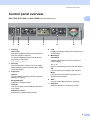
Control panel overview
1
1
DCP-7030, DCP-7040 and DCP-7045N have the same keys.
1
Print key
Job Cancel
Cancels a programmed print job and clears it
from the machine’s memory.
To cancel multiple print jobs, hold down this
key until the LCD shows
Job Cancel (All).
2
Scan key
Puts the machine in Scan mode. (For details
about scanning, see the Software User’s Guide
on the CD-ROM.)
3
Copy keys:
Options
You can quickly and easily choose temporary
settings for copying.
Enlarge/Reduce
Reduces or enlarges copies.
Contrast
You can increase or decrease the contrast of
your copies.
Number of Copies
Use this key to make multiple copies.
4
LCD
Displays messages to help you set up and use
your machine.
5
Menu keys:
Clear/Back
Deletes entered data or lets you cancel the
current setting.
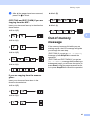
a + or b Press to scroll through the menus and options.
OK
Lets you store your settings in the machine.
Menu
Lets you access the Menu to program your
settings in this machine.
6
Start
Lets you start making copies or scanning.
7
Stop/Exit
Stops an operation or exits from a menu.
5