1
OPERATION
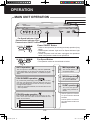
MAIN UNIT OPERATION
F
P
P
C
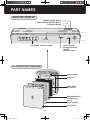
Fan Speed Indicator Lights
Plasmacluster Indicator Light
Plasmacluster ON/OFF Indicator Light
Power ON/OFF Button
•Press to start operation (short beep) and stop operation (long
beep)
•Plasmacluster Indicator Light and Fan Speed Indicator Light
turn on/off.
•Unless the power cord has been unplugged, the operations
starts in the previous mode it was operated in.
Fan Speed Button
•The operation mode can be switched as below.
AUTO operation
The fan speed is automatically switched (MEDIUM,
LOW) depending on the amount of impurities in the air.
The sensors detect the impurities for efficient air purification.
MAX operation
The unit will operate at a
fan speed of MAX.
MEDIUM operation
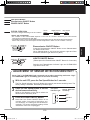
ION SHOWER operation
By continuously discharging strong airflow for 15 minutes the unit effectively removes airborne dust, pollen, mold and allergens from the air as they are drawn
through the filter system.
•When the operation finished, the unit will return to the
AUTO operation.
POLLEN mode operation
The unit will operate at HIGH* fan speed for 10 minu t e s , t h e n w i l l a l t e r n a t e b e t w e e n MEDIUM and
HIGH* for 20 minutes.
10 minutes: HIGH fan speed
20 minutes: MEDIUM fan speed
The unit will operate at a
fan speed of MEDIUM.
SILENT operation
The unit will operate
quietly using minimal air
intake.
*HIGH fan speed is an intermediate speed between MEDIUM
and MAX.
*LOW fan speed is an intermediate speed between SILENT and
MEDIUM.
20 minutes: HIGH fan speed
E-8
FU-W28E.eng.indd 10
08.11.13 3:45:53 PM