1
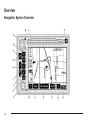
If a route has been planned, pressing this key will
display the map screen and the following information:
• Number of miles/kilometers between current
vehicle position and the destination. See “Route
Overview Menu” under Destination on page 2-16 for
more information.
• Estimated travel time to the destination. See “Route
Overview Menu” under Destination on page 2-16 for
more information.
• Highlighted route or turn-by-turn instructions. See
“Map Appearance” under Navigation Menu on
page 2-7 for more information.
You will find more information on each feature found on
a map screen later in this manual.
BAND: Press the BAND key to access the BAND
screen and switch between AM, FM1, FM2, XM1, or
XM2, if equipped. See “Finding a Station” under
Navigation Audio System on page 3-2.
x SEEK w: Press the SEEK up or down arrows to
go to the next or previous radio station and stay
there. See “Finding a Station” under Navigation Audio
System on page 3-2.
B (CD):
Press the CD key to play a CD. The CD
screen will be displayed. See “Playing a CD” under
Navigation Audio System on page 3-2.
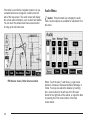
e (Audio):
Press the audio key to access the Audio
menu. See Navigation Audio System on page 3-2.
CONFIG (Configure): Press the CONFIG key to access
the Configure menu. See Configure Menu on page 2-30
for more information.
Tuning Knob: Turn the tuning knob to go to the next
or previous radio station and stay there. See “Finding a
Station” under Navigation Audio System on page 3-2.
X (Eject):
Press the eject key located above the
DVD/CD slot to eject a map DVD or CD.
2-3