1
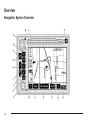
P Power/Volume Knob. See “Hard Keys” under
Using the Navigation System on page 2-2.
B. Directional Indicator. See Symbols on page 2-6.
C. DVD/CD Loading Slot
A.
D.
X DVD/CD Eject Key
E. NAV (Navigation) Key. See “Hard Keys” under
Using the Navigation System on page 2-2.
F. NAV RPT (Navigation Repeat) Key. See “Hard
Keys” under Using the Navigation System on
page 2-2.
G. BAND Key. See “Playing the Radio” under
Navigation Audio System on page 3-2.
H.
I.
w SEEKx Key. See “Finding a Station” under
Navigation Audio System on page 3-2.
B CD Key. See “Playing a CD” under Navigation
Audio System on page 3-2.
e Audio Key. See Navigation Audio System
on page 3-2.
K. CONFIG (Configure) Key. See “Hard Keys” under
Using the Navigation System on page 2-2.
J.
L. Tuning Knob. See “Finding a Station” under
Navigation Audio System on page 3-2.
V Zoom In Screen Button. See “Touch Sensitive
Screen Buttons” under Using the Navigation System
on page 2-2.
N. Dest (Destination) Screen Button. See “Touch
Sensitive Screen Buttons” under Using the
Navigation System on page 2-2.
M.
O. Nav y (Navigation) Options Screen Button. See
“Touch Sensitive Screen Buttons” under Using
the Navigation System on page 2-2.
P. Nav (Navigation Menu) Screen Button. See “Touch
Sensitive Screen Buttons” under Using the
Navigation System on page 2-2.
U Zoom Out Screen Button. See “Touch Sensitive
Screen Buttons” under Using the Navigation
System on page 2-2.
R. Clock. See “Clock” under Configure Menu on
page 2-30.
Q.
1-3