1
3
Connecting A PC
Your TV can be used to display output from a personal computer.
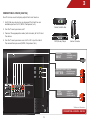
To use your TV as a PC display:
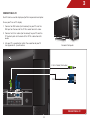
1. Connect an RGB cable (not included) to your PC and the
RGB port on the back of the TV. This cable transmits video.
2. Connect a 3.5mm cable (not included) to your PC and the
PC Audio In port on the back of the TV. This cable transmits
audio.
3. Set your PC’s resolution to match the resolution of your TV.
See Appendix B - Specifications.
Personal Computer
3.5mm Cable (For Audio)
RGB Cable (For Video)
CONNECTING A PC
14