1
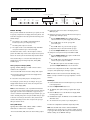
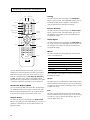
REMOTE CONTROL OPERATION
Info
TEST
PATTERNS
POWER
INFO
1
2
3
4
5
6
7
8
9
CURTAIN
Curtain
Config
Test Patterns
Power
OUTPUT
SETUP
Output Setup
This button has the same functionality as the Configuration
button on the front panel. (See Configuration Control, page 14.)
It activates the OSD. Use the navigation control buttons to
select the desired function and adjust the settings.
CONFIG
Config
Picture Control
PICTURE
CONTROL
Picture Control
INPUT
ADJUST
Input Adjust
Numeric
buttons
0
MENU
EXIT
Menu
Navigation
buttons
ENTER
ZOOM
Zoom
PAN
Pan
INPUT
ASPECT RATIO
4:3
LBX
16:9
PRESET
SDI
VID 2
S-VID 2
COMP 2
PASSTHRU
VID 1
S-VID 1
COMP 1
DVI
AUTO
INPUT SELECT
Aspect Ratio
Input Adjust
This button has the same functionality as the Input Adjust button on the front panel. (See Input Adjust Control, page 12.) Use
the navigation control buttons to select the desired function
and adjust the settings.
Menu
Inputs
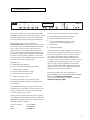
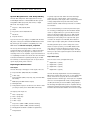
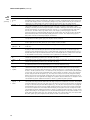
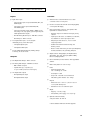
The iScan HD Infrared Remote Control (IRC) offers more functionality and convenience than the front panel control buttons.
Unlike the front panel controls, the remote control has a complete set of navigation buttons: Left, Right, Up, Down, Enter,
and Exit. The remote control buttons have slightly different
behavior than the corresponding front panel buttons. The remote
control buttons and their control actions are described below.
On-Screen Display (OSD)
The on-screen display (OSD) of the iScan HD is self-explanatory.
It is activated from the remote control or from the front panel.
We have designed the OSD’s behavior to be consistent with the
front panel and commands issued from the remote control.
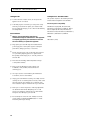
Output Setup
This button has the same functionality as the Output Control
button on the front panel. (See Output Control, page 9.) Use the
navigation control buttons to select the desired function and
adjust the settings.
16
This button has the same functionality as the Picture Control
button on the front panel. (See Picture Control, page 11.) Use
the navigation control buttons to select the desired function
and adjust the settings.
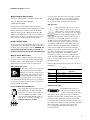
This button activates the top level OSD menu, which lists the
controls in the table below.
Controls
FPD shows
Input Select
INPT
Input Aspect Ratio
I_AR
Input Adjust
IADJ
Picture Control
PICT
Configuration
CNFG
Output Control
OSET
Use the navigation control buttons to select the desired function
and adjust the settings.
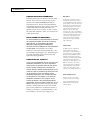
Zoom
This button puts the iScan HD into Zoom mode. Unlike the Zoom
function activated from the front panel, you can use the navigation buttons to zoom up, down, left and right. There is currently
no OSD for this mode.
Pan
This button puts the iScan HD into Pan mode. Unlike the Pan
function activated from the front panel, you can use the navigation buttons to pan up, down and left and right. There is currently no OSD for this mode.