1
ENGLISH
Camera User Guide
• Please read the “Read this First” section (p. 5).
• Please refer to the Quick Start section for a simple explanation of
shooting, replaying and erasing (p. 12).
• Please refer to the Software Starter Guide for information on
installing the software and downloading images.
• Please also read the Printer User Guide included with your
Canon printer.
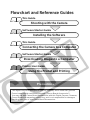
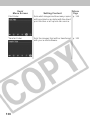
Flowchart and Reference Guides
This Guide
Shooting with the Camera
Software Starter Guide
Installing the Software
This Guide
Connecting the Camera to a Computer
Software Starter Guide
Downloading Images to a Computer
Printer User Guide
Using the Printer and Printing
Precautions
This digital camera is designed to perform optimally when used with genuine
Canon brand digital camera accessories (“Canon Brand Accessories”).
You may use non Canon Brand Accessories with this Digital Camera. However,
Canon Makes no warranties concerning, and is not responsible for damages
resulting from, use of non Canon Brand Accessories.
Camera Body Temperature
If your camera is used for prolonged periods, the camera body may become
warm. Please be aware of this and take care when operating the camera for an
extended period.
About the LCD Monitor
The LCD monitor is produced with extremely high-precision manufacturing
techniques. More than 99.99% of the pixels operate to specification. Less than
0.01% of the pixels may occasionally misfire or appear as red or black dots.
This has no effect on the recorded image and does not constitute a
malfunction.
Video Format
Please set the camera’s video signal format to the one used in your region
before using it with a TV monitor ( p. 134).
Please read through the “Read This First” section (p. 5) before using your
camera.
Disclaimer
¡ While every effort has been made to ensure that the information
contained in this guide is accurate and complete, no liability can be
accepted for any errors or omissions. Canon reserves the right to
change the specifications of the hardware and software described herein
at any time without prior notice.
¡ No part of this guide may be reproduced, transmitted, transcribed,
stored in a retrieval system, or translated into any language in any form,
by any means, without the prior written permission of Canon.
¡ Canon makes no warranties for damages resulting from corrupted or lost
data due to a mistaken operation or malfunction of the camera, the
software, the CompactFlash™ cards (CF cards), personal computers,
peripheral devices, or use of non-Canon CF cards.
¡ Canon and PowerShot are trademarks of Canon, Inc.
¡ CompactFlash is a trademark of SanDisk Corporation.
¡ iBook and iMac are trademarks of Apple Computer, Inc.
¡ Macintosh, PowerBook, Power Macintosh and QuickTime are trademarks of
Apple Computer, Inc, registered in the United States and other countries.
¡ Microsoft, Windows, and Windows NT are either registered trademarks or
trademarks of Microsoft Corporation in the United States and/or other
countries.
¡ Other names and products not mentioned above may be registered
trademarks or trademarks of their respective companies.
Copyright © 2002 Canon Inc. All rights reserved.
i
About this Camera User Guide
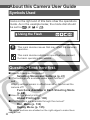
Symbols Used
Icons on the right end of title bars show the operations
mode. As in the example below, the mode dial should
, ,
or
.
be set to
Using the Flash
: This mark denotes issues that may affect the camera’s
operation.
: This mark denotes additional topics that complement
the basic operating procedures.
Question? Look here first.
3 How do I navigate the menus?
Selecting Menus and Settings (p. 41)
3 What settings are available under each function?
and
Will my settings remain in effect even after I’ve turned the
camera off?
Functions Available in Each Shooting Mode
(p. 82)
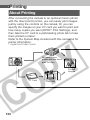
3 How do I go about printing?
About Printing (p. 100)
3 What functions are available through the menus?
Rec. Menu (p. 130)
Replay Menu (p. 135)
ii
The above sections are shaded on the r ight edges to make them
easy to find.
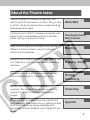
About the Thumb Index
A quick introduction intended for new users who
want to shoot first and lear n more later. Tells you how
to get the camera running and how to begin shooting
and playing back images.
Introduces you to all of the camera components, and
explains how to load batteries and use the shutter
button, among other basic functions.
Quick Start
Preparing the Camera,
Basic Functions
Describes shooting with the camera, from the five
different shooting modes to using the camera’ s
various shooting features.
Shooting
Explains how to review recorded images one at a time
or in index form, how to protect them or erase them,
and more.
Replaying, Erasing
Explains how to print and make print settings, and
how to select images for transferring to e-mail.
Explains how to transfer recorded images to a
computer. Also explains how you can connect the
camera to a TV set for shooting and reviewing
images.
Shows the Rec. and Replay menus at a glance and
error messages. Also explains how to replace the date
battery and how to use various separately sold
accessories, such as the Batter y and Charger Kit and
lenses.
Printing,
Transferring
Connecting
Appendix
1
Table of Contents
: Functions and operations tables. These pages are
shaded on the right edges to make them easy to find.
Read this First
5
Quick Start
12
Components Guide
14
Preparing the Camera
18
Installing the Batter y Pack ..................................................... 18
Installing a CF Card ............................................................... 22
Setting the Date/Time ............................................................ 25
Setting the Language ............................................................ 27
Attaching the Strap ................................................................ 29
Basic Functions
30
Turning the Power On ............................................................ 30
Using the LCD Monitor .......................................................... 32
Using the Viewfinder to Shoot ............................................... 37
Pressing the Shutter Button .................................................. 38
Using the Zoom (Focal Length) ............................................. 40
Selecting Menus and Settings ............................................... 41
Shooting-Letting the Camera Select Settings 46
Auto Mode ..................................................................... 46
Reviewing an Image Right After Shooting ............................ 48
Changing the Resolution and Compression ......................... 50
Using the Flash .................................................................. 52
/ / Using the Macro/Snapshot/Infinity Modes ............. 55
Digital Zoom ........................................................................... 57
Continuous Mode .............................................................. 59
Self-Timer .......................................................................... 60
Stitch Assist Mode ................................................................. 62
Movie Mode ........................................................................... 65
2
Shooting-Selecting Particular Effects
67
Program AE ........................................................................... 67
Manually Setting the Shutter Speed and Aper ture ............... 69
Using the Focus Lock ............................................................ 71
Switching Between Autofocus Modes ................................... 73
Switching Between Light Metering Modes ............................ 74
Adjusting the Exposure ..................................................... 75
Setting the White Balance ............................................... 76
Switching Between Photo Effect Modes ............................... 78
Changing the ISO Speed ...................................................... 79
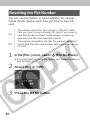
Resetting the File Number ..................................................... 80
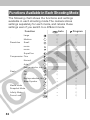
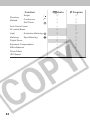
Functions Available in Each Shooting Mode ......................... 82
Replaying
86
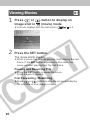
Displaying Images Individually .............................................. 86
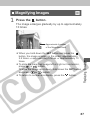
Magnifying Images ........................................................... 87
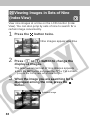
Viewing Images in Sets of Nine (Inde x View) .................. 88
Viewing Movies ...................................................................... 90
Rotating Images in the Displa y .............................................. 92
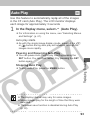
Auto Play ................................................................................ 93
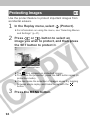
Protecting Images .................................................................. 94
Erasing
96
Erasing Images Individually ................................................... 96
Erasing All Images ................................................................. 97
Formatting a CF Card ............................................................ 98
Printing
100
About Printing ...................................................................... 100
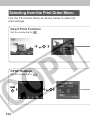
Selecting from the Pr int Order Menu .................................. 102
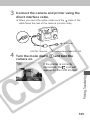
Connecting the Camer a to a Printer ................................... 104
Printing ................................................................................. 107
Print Settings (Direct Pr int Function) .................................. 109
3
DPOF Print Settings ............................................................ 114
Printing with DPOF Pr int Settings ....................................... 119
Image Transfer Settings (DPOF Transfer Order) 122
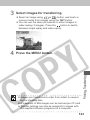
Selecting Images for Transferring ........................................ 122
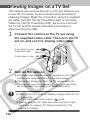
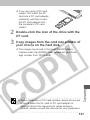
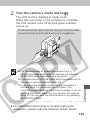
Viewing Images on a TV Set
124
Downloading Images to a Computer
126
Downloading Directly from a CF Card ................................ 126
Connecting the Camer a to a Computer
Via the USB Cable ............................................................ 128
List of Menu Options and Messages
130
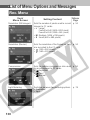
Rec. Menu ............................................................................ 130
Replay Menu ........................................................................ 135
Resetting the Settings to Def ault ......................................... 137
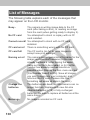
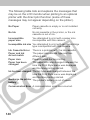
List of Messages .................................................................. 138
Appendices
142
Replacing the Date Batter y ................................................. 142
Using the Optional Batter y Kits ........................................... 144
Using the Optional Lenses and Lens Adapter .................... 148
Camera Care and Maintenance .......................................... 154
Troubleshooting ................................................................... 155
4
Specifications
161
Index
170
Canon Customer Support
174
Read this First
Please Read
Test Shots
Before you shoot images of subjects of impor tance to you, we
strongly recommend that you shoot several trial images to
confirm that you are operating the camera correctly. Please note
that Canon, its subsidiar ies and affiliates, and distributors of its
digital cameras are not liable for any consequential damages
arising from any malfunction of the Canon digital camer a or
CompactFlash™ card (CF card) resulting in the f ailure of an
image to be recorded or to be recorded in a f ormat that is
machine readable.
Warning Against Copyright Infringement
Please note that Canon digital camer as are intended for
personal use and must be used in a manner that respects
international and domestic cop yright laws and regulations.
Please be advised that in cer tain cases the copying of images
from performances, exhibitions, or commercial proper ties by
means of a camera or other device may contravene copyright or
other legal rights even if the image was recorded for personal
use.
Warranty Limitations
This camera’s warranty is only effective in the country of sale. If a
problem arises while the camer a is in use abroad, please con vey
it back to the country of sale before proceeding with a warranty
claim to a Canon Customer Suppor t Help Desk.
5
Safety Precautions
¡Before using the camer a, please ensure that you have read
and understood the safety precautions descr ibed below.
Always ensure that the camera is operated correctly.
¡The safety precautions noted on the f ollowing pages are
intended to instruct you in the safe and correct operation of the
camera and its accessor ies to prevent injuries or damage to
yourself, other persons and equipment.
¡In the next few pages, the term “equipment” refers primarily to
the camera, battery, battery charger and optional compact
power adapter.
WARNINGS
¡Do not aim the camera directly into the sun or at other intense
light sources which could damage y our eyesight.
¡Do not trigger the flash in close pro ximity to human or animal
eyes. Exposure to the intense light produced b y the flash may
damage eyesight. In particular, remain at least one meter (39
inches) away from infants when using the flash.
¡Store this equipment out of the reach of children and inf ants.
Accidental damage to the camer a or batteries by a child could
result in serious injury. In addition, placement of the strap
around a child’s neck could result in asphyxiation.
¡Be particularly careful to keep the date batter y used in the
camera away from children. Seek medical assistance
immediately if a child swallows a battery.
¡Do not attempt to disassemb le or alter any part of the
equipment that is not expressly described in this guide.
Disassembly or alteration may result in high-voltage electrical
shock. Internal inspections, alterations and repairs should be
conducted by qualified service personnel author ized by your
camera distributor or a Canon Customer Suppor t Help Desk.
6
¡To avoid the risk of high-voltage electrical shock, do not touch
the flash por tion of the camera if it has been damaged.
Similarly, never touch internal portions of the equipment that
become exposed as a result of damage . There is a risk of
high-voltage electrical shock. Please take the first oppor tunity
to consult your camera distributor or a Canon Customer
Support Help Desk.
¡Stop operating the equipment immediately if it emits smok e or
noxious fumes. Failure to do so may result in fire or electr ical
shock. Immediately turn the camera’s power off, remove the
camera batteries and unplug the power cord from the electr ical
outlet. Confirm that smoke or fume emissions have ceased.
Please consult your camera distributor or the closest Canon
Customer Suppor t Help Desk.
¡Stop operating the equipment if it is dropped or the casing is
damaged. Failure to do so may result in fire or electr ical shock.
Immediately tur n the camera’s power off, remove the camera
batteries and unplug the power cord from the electr ical outlet.
Please consult your camera distributor or the closest Canon
Customer Suppor t Help Desk.
¡Do not allow the equipment to come into contact with, or
become immersed in, water or other liquids. Do not allow
liquids to enter the inter ior. The camera has not been
waterproofed. If the exterior comes into contact with liquids or
salt air, wipe it dry with a soft, absorbent cloth. In the event
that water or other foreign substances enter the inter ior,
immediately tur n the camera’s power off and remove the
camera batteries or unplug the power cord from the electr ical
outlet. Continued use of the equipment may result in fire or
electrical shock. Please consult your camera distributor or the
closest Canon Customer Suppor t Help Desk.
¡Do not use substances containing alcohol, benz ene, thinners
or other flammable substances to clean or maintain the
equipment. The use of these substances may lead to fire.
7
¡Remove the power cord on a regular per iodic basis and wipe
away the dust and dir t that collects on the plug, the e xterior of
the electrical outlet and the surrounding area. In dusty, humid
or greasy environments, the dust that collects around the plug
over long periods of time may become saturated with humidity
and short-circuit, leading to fire.
¡Do not cut, damage, alter or place heavy items on the power
adapter cord. Any of these actions may cause an electrical
short circuit, which may lead to fire or electrical shock.
¡Do not handle the power cord if your hands are wet. Handling
it with wet hands may lead to electr ical shock. When
unplugging the cord, ensure that y ou hold the solid por tion of
the plug. Pulling on the flexible portion of the cord may
damage or expose the wire and insulation, creating the
potential for fires or electrical shocks.
¡Use of power sources not expressly recommended for this
equipment may lead to overheating, distortion of the
equipment, fire, electrical shock or other hazards. Use only the
recommended power accessories.
¡Do not place the batter ies near a heat source or e xpose them
to direct flame or heat. Neither should you immerse them in
water. Such exposure may damage the batter ies and lead to
the leakage of corrosive liquids, fire, electrical shock,
explosion or serious injury.
¡Do not attempt to disassemb le, alter or apply heat to the
batteries. There is serious risk of injury due to an explosion.
Immediately flush with w ater any area of the body, including
the eyes and mouth, or clothing, that comes into contact with
the inner contents of a batter y. If the eyes or mouth contact
these substances, immediately flush with w ater and seek
medical assistance.
¡Avoid dropping or subjecting the batter ies to severe impacts that
could damage the casings . It could lead to leakage and injur y.
8
¡Do not short-circuit the batter y terminals with metallic objects,
such as key holders. It could lead to overheating, burns and
other injuries.
¡Before you discard a batter y, cover the terminals with tape or
other insulators to prevent direct contact with other objects .
Contact with the metallic components of other mater ials in
waste containers may lead to fire or explosions. Discard the
batteries in specialized waste facilities if available in your area.
¡Use of batteries not expressly recommended for this
equipment may cause explosions or leaks, resulting in fire,
injury and damage to the surroundings . Use only
recommended batter ies and accessor ies.
¡If using AA-size NiMH batter ies, use only Canon AA-siz e
NiMH batteries and charger recommended f or use with these
batteries. Use of another charger ma y cause batteries to
overheat or deform, posing risk of fire or electric shock.
¡Disconnect the batter y charger or the compact po wer adapter
from both the camera and electrical outlet after recharging and
when the camera is not in use to avoid fires and other
hazards.
¡The camera terminal of the batter y charger cord and the
compact power cord is designed for exclusive use with your
camera. Do not use it with other products or batter ies. There is
a risk of fire and other hazards .
¡Exercise due caution when scre wing on the separately sold
wide converter, tele-converter, close-up lens and con version
lens adapter. If they loosen, fall off and shatter, the glass
shards may cause an injury. Never aim the lenses at the sun or
strong light sources. There is a risk of damage to eyesight.
9
CAUTIONS
¡Avoid using, placing or stor ing the equipment in places subject
to strong sunlight or high temper atures, such as the
dashboard or trunk (boot) of a car. Exposure to intense
sunlight and heat may cause the batteries to leak, overheat or
explode, resulting in fire, burns or other injur ies. High
temperatures may also cause deformation of the casing.
Ensure that there is good ventilation when using the compact
power adapter to charge the batter y pack or power the
camera.
¡Do not store the equipment in humid or dusty areas . Storage
in such areas could lead to fire , electrical shock or other
damage.
¡Be careful not to bang the camer a or subject it to strong
impacts or shocks that could lead to injur y or damage the
equipment when wearing or holding it by the strap.
¡Be careful not to cover the flash with your fingers when
shooting. In addition, do not touch the surf ace of the flash after
taking several pictures in rapid succession. Either action could
result in burns.
¡If your camera is used for prolonged per iods, the camera body
may become warm. Please take care when operating the
camera for an extended period as your hands may experience
a burning sensation.
10
Preventing Malfunctions
Avoid Strong Magnetic Fields
Never place the camera in close proximity to electric motors or
other equipment generating strong electromagnetic fields .
Exposure to strong magnetic fields ma y cause malfunctions or
corrupt image data.
Avoid Condensation Related Problems
Moving the equipment r apidly between hot and cold
temperatures may cause condensation (w ater droplets) to form
on its external and internal surfaces. You can avoid this by
placing the equipment in an air tight, resealable plastic bag and
letting it adjust to temper ature changes slowly before removing it
from the bag.
If Condensation Forms Inside the Camera
Stop using the camera immediately if you detect condensation.
Continued use may damage the equipment. Remove the CF card
and battery or power cord (if connected) from the camer a and
wait until the moisture evaporates completely before resuming
use.
Extended Storage
When not using the camer a for extended per iods of time, remove
the battery from the camera or battery charger and store the
equipment in a safe place. Storing the camera for extended
periods with batteries installed will run down the battery and may
damage the camera.
11
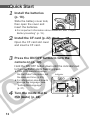
Quick Start
1 Install the batteries
(p. 18).
Slide the battery cover lock,
then open the cover and
insert the batteries.
¡For important information about batter ies, see “Proper
Battery Handling” (p. 19).
2 Install the CF card (p. 22).
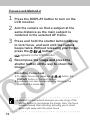
Open the CF card slot cover
and insert a CF card.
the ON/OFF button to turn the
3 Press
camera on (p. 30).
Hold the ON/OFF button down until the indicator next
to the viewfinder starts flashing green.
¡If the LCD monitor displays
the Set Date/Time menu, set
the date and time (p. 25).
¡For information about how to
change the language, see
“Setting the Language”
(p. 27).
the mode dial to
4 Turn(Auto)
(p. 46).
12
Indicator
3 4
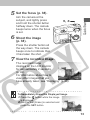
5 Set the focus (p. 38).
Aim the camera at the
subject, and lightly press
and hold the shutter button
halfway down. The camera
beeps twice when the focus
is set.
5, 6
the image
6 Shoot
(p. 38).
Press the shutter button all
the way down. The camera
beeps once to indicate that
it has taken the shot.
7 View the recorded image.
The recorded image
displays on the LCD monitor
for approximately 2 seconds
(p. 48).
For information about how to
view other images that you
have already taken, see “Replaying” (p. 86).
To Immediately Erase the Displayed Image
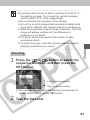
1 Press the button while the image
is displayed.
2 Confirm that [Erase] is selected and
press the SET button.
13
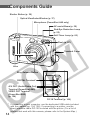
Components Guide
Shutter Button (p. 38)
Optical Viewfinder Window (p. 37)
Microphone (PowerShot A40 only)
AF-assist Beam (p. 39)
Red-Eye Reduction Lamp
(p. 52)
Self-Timer Lamp (p. 60)
Flash (p. 52)
Terminal Cover
Lens
Ring Release Button
DIGITAL Terminal*
A/V OUT (Audio/Video Out)
Terminal (PowerShot A40)
VIDEO OUT Terminal
(PowerShot A30)
(p. 124)
DC IN Terminal (p. 146)
* If connecting to your computer, use the dedicated USB cable included
with the camera (pp. 104, 128). If connecting to a printer, use the
direct interface cable DIF-100 included with the printer. (For a list of
printers that work with this camera, please r efer to the System Map.)
14
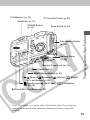
LCD Monitor* (p. 32)
CF Card Slot Cover (p. 22)
Viewfinder (p. 37)
ON/OFF Button
(p. 30)
Strap Eyelet (p. 29)
Date Battery Holder
(p. 142)
Battery Cover
(p. 18)
Battery Cover Lock (p. 18)
Tripod Socket
MENU (Menu) Button (p. 41)
(Macro)/ (Snapshot)/
AF Lock Button (p. 55)
(Continuous)/
(pp. 59, 60)
(Infinity)/
(Self-Timer)/
(Right)/
(Left)Button
(Flash)/SET (Set) Button (p. 52)
* The LCD monitor is covered with a thin plastic sheet for protection
against scratches during shipment. Remove it befor e using the
camera.
15
(Exposure)/
(White Balance)/
(Photo Effects)/ (Single Image Erase)
Button (pp. 75, 76, 78, 96)
DISPLAY (Display) Button (p. 32)
Zoom Button
(pp. 40, 57, 87, 88)
Mode Dial (p. 17)
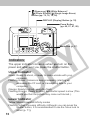
Indicators
The upper indicator comes on when you turn on the
power and whenever you press the shutter button.
Upper Indicator
Green: Ready to shoot, or ready to comm unicate with your
computer.
Flashing Green: Camera is busy processing (star ting up;
accessing the CF card, or tr ansmitting data to your
computer).
Orange: Ready to shoot, using the flash.
Flashing Orange: Ready to shoot, but shutter speed is slo w (This
warns you that the picture may come out blurred.).
Lower Indicator
Yellow: Macro/Snapshot/Infinity modes
Flashing Yellow: Focusing difficulty (Although y ou can press the
shutter button, it is recommended to use the f ocus lock to
shoot (p. 71))
16
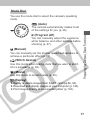
Mode Dial
You use the mode dial to select the camera’s operating
mode.
(Auto)
The camera automatically makes most
of the settings for you (p. 46).
(Program AE)
You can manually adjust the exposure,
white balance, and other settings before
shooting (p. 67).
(Manual)
You can manually set the shutter speed and aperture to
achieve a particular effect (p. 69).
(Stitch Assist)
Use this mode when taking shots that you want to stitch
into a panorama (p. 62).
(Movie)
Use this mode to shoot movies (p. 65).
(Replay)
¡Replay or delete images from the CF card (pp. 86, 96).
¡Download and display images at your computer (p. 126).
¡Print images directly to a connected printer (p. 104).
17
Preparing the Camera
Installing the Battery Pack
The camera uses four AA-size alkaline batteries supplied
with the camera. You may use optional nickel metal
hydride (NiMH) batteries.
1 Be sure that the camera power is off.
the battery cover lock, and push the
2 Slide
battery cover slightly forward. Then open
the cover.
3 Insert the batteries as shown.
Positive end (+)
Negative end (−)
4 Close the battery cover.
18
¡When the camera’s indicator flashes green, do not turn
off the power or open the batter y cover. The camera is
writing, reading, erasing or transmitting an image to or
from the CF card.
¡We recommend that you use the optional AC Adapter
Kit ACK600 to power the camera during long usage
sessions (p. 146).
¡The optional batter y charger kit lets you use rechargeable NiMH batteries to power the camera (p. 144).
¡For important information, see “Battery Performance”
(p. 164).
¡For information about the Batter y and Charger Kit and
AA-size rechargeable NiMH batter ies, see the System
Map (separate from this guide).
Proper Battery Handling
¡Use AA-size alkaline or Canon AA-siz e NiMH batteries only.
For information on handling the AA-siz e rechargeable NiMH
batteries, see “Using the Optional Batter y Kits” (p. 144).
¡Never use manganese or lithium batter ies, as these batter y
types may overheat in the camera.
¡Since the performance of alkaline batteries may differ
according to brand, the operating time of the batter ies you
purchase may not be as long as the batter ies that came with
the camera.
¡Camera operating time may shorten at low temperatures when
alkaline batteries are used. Also due to their specifications,
alkaline batteries may expire faster than NiMH batter ies. If you
are using the camera in cold areas or for a long time, we
recommend using Canon AA-size NiMH Battery Kit (a fourpiece set).
¡While it is possible to use AA-size nickel-cadmium batteries,
performance is unreliable and their use is not recommended.
19
¡Never mix unused and par tially used batteries. Always
load four fresh (or fully recharged) batteries at the same
time.
¡Never mix batteries of different types or from different
manufacturers. All four batteries should be identical.
¡Before inserting the batteries, wipe the batter y terminals well
with a dry cloth. Oil from one’s skin or other dir t may cause a
considerable reduction in the n umber of recordable images or
reduced usage time.
¡Battery performance deteriorates at low temperatures
(especially with alkaline batter ies). If you are using the camer a
in cold areas and batter ies are running down faster than they
should, you may be able to restore performance by placing
batteries in an inner pocket to warm them up prior to use. But
be careful that you don’t put the batter ies into a pocket
together with a metal key chain or other metallic objects , as
these objects may cause batter ies to shor t-circuit.
¡If you do not plan to use the camer a for a long time, remove
the batteries from the camera and store them in a saf e place.
Batteries may leak and damage the camer a if left installed
during prolonged periods of non-use.
WARNING
Never use damaged batter ies or batteries whose outer seal is
completely or par tially missing or peeled off, as there is risk
that such batter ies may leak, overheat, or burst. Always check
the seals on store-bought batter ies before loading them, as
some batteries may come with defective seals. Do not use
batteries with defective seals.
Never use batteries that look like this.
Batteries with all or part of the seal (electrical
insulation sheath) peeled off.
20
The positive electrode (plus ter minal) is flat.
The negative terminal is correctly formed (protruding
from the metal base), but the seal does not extend up
over the edge of the metal base.
Battery Status Indications
The LCD monitor displays an icon or message to let you
know when batteries are low or depleted.
Change the
batteries
Batteries are beginning to r un low. Replace (or
recharge) batteries promptly.
If the LCD monitor is off, this icon will appear
when you press any of the following buttons: ,
/ , / / , DISPLAY, /
or MENU.
Batteries are fully depleted and the camer a can
no longer operate. You should replace the
batteries immediately.
21
Installing a CF Card
Installing a CF Card
1 Be sure that the camera is turned off.
the CF card slot cover in the
2 Slide
direction of the arrow, and open it.
1
2
the CF card into the slot, in the
3 Insert
direction shown in the illustration.
¡Insert the CF card all the way into the slot, so that the CF
card eject button pops all the way out.
Arrow mark
Card label
CF card Eject Button
¡To remove the CF card, press the CF card eject b utton.
22
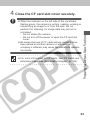
4 Close the CF card slot cover securely.
¡When the indicator on the left side of the vie wfinder
flashes green, the camera is writing, reading, erasing or
transmitting an image to or from the card. Do not
perform the following, for image data may be lost or
corrupted:
- Do not shake the camera.
- Do not turn off the power or open the CF card slot
cover.
¡Be aware that use of CF cards whose contents ha ve
been edited at another camer a or with another
company’s software may cause the camera to operate
incorrectly.
¡For more information on CF cards, see “CF Cards and
Estimated Capacities (Recordab le Images)” (p. 165).
23
About CF Cards...
¡CF cards are high-precision electronic de vices. Do not bend
them, apply force to them, or subject them to shoc ks or
vibration.
¡Do not attempt to disassemb le or alter a CF card.
¡Moving a CF card rapidly between temperature extremes will
cause condensation to form in the card and lead to a
malfunction. To avoid condensation, place the CF card in a
sealed plastic bag before moving it into a different temperature
zone and allow it to adjust slowly to the new temperature. If
condensation forms on the CF card, store it at room
temperature until the water droplets have evaporated naturally.
¡Do not use or store CF cards in the f ollowing types of location.
- Locations subject to dust or sand
- Locations subject to high humidity and high temper atures
24
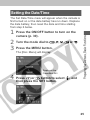
Setting the Date/Time
The Set Date/Time menu will appear when the camera is
first turned on or the date battery has run down. Replace
the date battery, then reset the date and time starting
from step 6 below.
the ON/OFF button to turn on the
1 Press
camera (p. 30).
2 Turn the mode dial to
3 Press the MENU button.
, ,
,
or
.
The [Rec. Menu] will display.
Display on the
PowerShot A40
or
button to select
4 Press
then press the SET button.
, and
25
or
button to select
5 Press
then press the SET button.
6 Set the date and time.
, and
¡Use
or
button to change the value of the
highlighted field.
¡Press the SET button to set the value and advance to the
next field.
¡The final item selects the date displa y type. Use
or
button to select, and then press the SET button.
The factory default for
the date format in
some regions may
differ from that shown.
7 Press the MENU button.
26
Setting the Language
Use this feature to select the language o
f r the LCD
monitor displays.
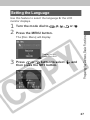
1 Turn the mode dial to
2 Press the MENU button.
, ,
,
or
.
The [Rec. Menu] will display.
Display on the
PowerShot A40
or
button to select
3 Press
then press the SET button.
, and
27
or
button to select
4 Press
press the SET button.
, and
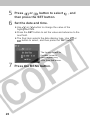
5 Select the desired language.
¡Use
and
button to select a language.
The Language menu
may appear differently
on cameras in some
regions.
6 Press the SET button.
¡If you wish to cancel, press the MENU button instead.
7 Press the MENU button.
Hint for Easy Operation
¡The Language menu can also be displayed in replay
mode by holding down the SET button and pressing the
MENU button.
28
Attaching the Strap
¡Be careful when carr ying the camera by the strap. Don’t
swing the camera on the strap, and keep the strap and
camera body clear of obstacles.
29
Basic Functions
Turning the Power On
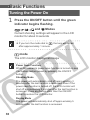
the ON/OFF button until the green
1 Press
indicator begins flashing.
, ,
,
and
Modes
Current shooting settings will appear in the LCD
monitor for about 6 seconds.
¡If you turn the mode dial to
, the lens will retract
after approximately 1 minute.
mode
The LCD monitor displays an image.
Power Save Function
When the camera’s power save function is turned on and
it activates, restore power by pressing the ON/OFF
button.
Shooting Mode
The power will automatically shut off appro ximately 3
minutes after the last function is accessed. Even if the
power save function is turned off, the LCD monitor will
shut off approximately 3 minutes after the last function is
accessed. Press any button other than the ON/OFF
button to restore the LCD monitor.
Replay Mode
The power will automatically shut off appro ximately 5
minutes after the last function is accessed.
30
While Connected to a Printer
The power will automatically shut off appro ximately 5
minutes after the last camer a function is accessed or
printer (sold separately) ceases to pr int an image.
While Connected to a Computer
A warning message will appear on the computer screen
approximately 5 minutes after the last function is
accessed. The power will automatically shut off appro ximately 1 minute later if no functions are accessed.
¡The power save function will not activate while the
camera is in auto play mode (p. 93).
¡The camera’s settings can be changed to tur n off the
power save function (p. 133).
31
Using the LCD Monitor
The LCD monitor can be used to compose images while
shooting, adjust settings menus and replay images.
¡The image in the LCD monitor ma y darken when the
monitor is used under sunlight or other strong lighting.
This is not a defect.
,
and
Modes
¡Pressing the DISPLAY button cycles the LCD monitor to the
next mode each time the button is pressed.
Standard
(No Information)
Detailed
(Information View)
Off
¡The on/off setting of the LCD monitor displa y mode is
memorized when the camera is turned off. When the
camera is turned on again it assumes the last mode .
However, when the LCD monitor is tur ned on and the
“Change the Batter y Pack” message appears, the LCD
monitor may not automatically tur n on the next time the
camera is started.
¡When the LCD monitor is set to Standard or Off ,
shooting information appears for approximately 6
seconds when you take any of the following actions.
- The power is turned on.
- The ,
/ , or
/
/
button is pressed.
- The camera settings are changed.
- The Setup menu is closed.
¡Setting the mode dial to
or
modes turns the LCD
monitor on regardless of whether it is set to on or off .
32
¡Set the flash to on or affix the camer a to a tripod when
the upper indicator flashes or ange and the camera
shake warning icon ( ) appears in the LCD monitor
after the metering preparations are complete.
Mode
¡The LCD monitor always comes on when you turn the
mode dial to .
¡You can use the DISPLAY button to switch the amount
of information shown on the display.
Single Image Replay
Standard
Detailed
No display
Index Replay (9 images)
Standard
No display
33
Information Displayed on the LCD Monitor
The LCD monitor displays information in Shooting or
Replaying mode, such as the camera settings, remaining
image capacity and shooting date / time.
, ,
,
,
Modes
The following displays in information view.
AF Frame
Spot AE Point Frame (In
Mode)
Shutter Speed
Aperture Setting
Recordable Images or
Recordable Movie Time (sec.)
-2 ⋅⋅⋅ ±0 ⋅⋅⋅ +2
LMS
ISO 50 100 200 400
2 (red)
(PowerShot A40)
×3.8 ×4.7 ×6.0 ×7.5
(PowerShot A30)
×3.8 ×4.8 ×6.0
34
Shooting Mode
Exposure Compensation
White Balance
Photo Effect
Compression
Resolution
ISO Speed
Focus Lock
Flash
Shooting Method
Macro / Snapshot / Infinity
Movie Recording Mode
p. 17
p. 75
p. 76
p. 78
p. 50
p. 50
p. 79
p. 71
p. 52
pp. 59/60
p. 55
p. 65
Digital Zoom Setting*
p. 57
Camera Shake Warning
Low Battery
p. 33
p. 21
¡The icons in the shaded bo xes above appear even when the
information view is turned off.
¡In addition to the above, the AF frame, spot light meter ing
frame ( mode), shutter speed, aper ture setting (M mode),
recordable images or recordable movie time (sec.) are
displayed as in the example to the left.
* Zoom powers reflect the combined optical and digital zoom ef fects.
These figures appear when the digital zoom is activated.
Mode
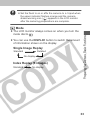
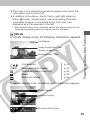
In simple display mode, the following information appears.
File Number
Image Number and Total
(Display Image/Total)
Shooting Date / Time
LMS
Compression
Resolution (Still images)
Sound annotation (wav file)
Movie
Protection Status
p. 50
p. 50
p. 66
p. 90
p. 94
In detailed display mode, the following information also appears.
Shutter Speed
Aperture Setting
Recorded Movie Time
35
-2 ⋅⋅⋅ ±0 ⋅⋅⋅ +2
ISO 50 100 200 400
Shooting Mode
Exposure Compensation
White Balance
Photo Effect
ISO Speed
Flash
Macro / Snapshot / Infinity
Light Metering Method
Resolution (Movies)
p. 17
p. 75
p. 76
p. 78
p. 79
p. 52
p. 55
p. 74
p. 50
¡In addition to the above, the shutter speed, aper ture setting
and recorded movie time are displayed as in the example on
the previous page.
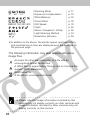
The following information may also appear with some
image files.
An audio file other than a w av file, or a file with an
unrecognized format, is attached.
A JPEG file not suppor ted by “Design rule for Camera File
system” (DCF) standards.
RAW format file
A file with an unrecogniz ed format.
¡Please note that image information recorded by this
camera may not display correctly on other cameras and
image information recorded by other cameras may not
display correctly on this camer a.
36
Using the Viewfinder to Shoot
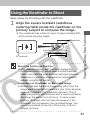
Save power by shooting with the viewfinder.
the square brackets (autofocus
1 Align
metering field) inside the viewfinder on the
primary subject to compose the image.
¡The viewfinder has a field of vision of appro ximately 80%
of the actual shooting image .
Viewfinder
AF brackets
About the Autofocus Function
¡This camera employs AiAF (artificial intelligence
autofocus) technology which uses a broad meter ing
field to calculate the focal distance with high precision.
It delivers a crisp focus even when the photographic
subject is slightly off-center.
Image Seen in Viewfinder vs. Recorded Image
¡Please note that the actual image ma y differ from the
image seen in the optical vie wfinder due to the physical
separation between the viewfinder and lens. This is
called the parallax phenomenon and is more noticeab le
the closer the subject is to the lens . In some cases,
portions of images shot up close that appear in the
viewfinder will not appear in the recorded image . You
are recommended to use the LCD monitor to shoot
images up close.
37
Pressing the Shutter Button
The shutter button features a two-stage action.
Pressing Halfway
Pressing halfway automatically sets the
exposure, focus and white balance.
The indicators shine or flash as f ollows.
Upper Indicator
¡ Green: Metering complete (two beeps
sound)
¡ Orange: Flash will fire
¡ Flashing Orange: Camera shake
warning / Insufficient exposure
Lower Indicator
¡ Yellow: Macro / Snapshot / Infinity
¡ Flashing Yellow: Focusing difficulty*
(single beep sounds)
* When the indicator flashes yellow, lock
the focus before shooting (p. 71).
The AF frame appears as follows when
the LCD monitor is on.
¡ Green: Metering complete
¡ Yellow: Focusing difficulty (When AiAF is
turned on (p. 73))
Pressing Fully
Pressing fully releases the shutter .
¡You will hear the shutter sound when
the shot is complete. Do not move the
camera until you hear this sound.
¡The upper indicator flashes g reen
while the image is recording onto the
CF card.
38
AF-Assist Beam
¡The AF-assist beam will sometimes emit when the
shutter button is pressed halfway to assist focusing in
certain conditions, i.e. dark conditions.
¡The AF-assist beam can be tur ned off (p. 132).
If animals are your subject, turn off the beam when
shooting in the dar k to avoid startling them (this may
however, make it more difficult for the camera to focus).
39
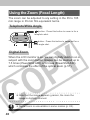
Using the Zoom (Focal Length)
The zoom can be adjusted to any setting in the 35 to 105
mm range in 35 mm film equivalent terms.
Telephoto/Wide Angle
button: Press this button to zoom in for a
telephoto shot.
button: Press this button to zoom out for a
wide-angle shot.
Digital Zoom
When the LCD monitor is on, you can digitally zoom in on a
subject with the zoom button. Images can be zoomed up to
7.5 times (PowerShot A40), or 6 times (PowerShot A30),
which combines the effect of the optical zoom (p. 57).
¡Note that the image appears g rainier, the more the
image is digitally zoomed.
¡Digital zoom is unavailable in some modes (p. 82).
40
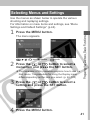
Selecting Menus and Settings
Use the menus as shown below to operate the various
shooting and replaying settings.
For information on menu items and settings, see “Menu
Settings and Default Settings” (p. 44).
1 Press the MENU button.
The menu appears.
,
,
,
, and
modes
mode
the
or
button to select a
2 Press
menu item and press the SET button.
¡The remainder of this procedure e xplains how to use the
Rec. menu. The procedure for using the Replay menu
differs depending on the item you select. (p. 42, 102)
the
or
button to select a
3 Press
setting and press the SET button.
4 Press the MENU button.
41
Selecting Menus and Settings, cont’d
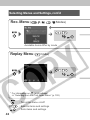
Rec. Menu (
, ,
,
,
Modes)
➔
s
Available items differ by mode
Replay Menu (
mode)
s
➔
* For information on
(print settings)
➔ “Selecting from the Print Order Menu” (p. 102)
: Turns the menu on/off
: Selects items and settings
: Sets items and settings
42
➔
(Operation complete)
(Protect),
(Rotate)
➔
(Operation complete)
(Erase all),
(Transfer)
(Images erased),
marked for
s (Image
transferring)
(Auto Play)
(Auto Play starts)
43
Menu Settings and Default Settings
This chart shows the options for each menu and the
default settings.
Rec.Menu
Menu Item
PowerShot A40
L 1600 x 1200*
M 1024 x 768
S 640 x 480
PowerShot A30
L 1280 x 960*
M 1024 x 768
S 640 x 480
Resolution
(Still picture)
Resolution (Movie)
320x240* /
160x120
Compression
(Superfine) /
(Normal)
(Fine*) /
Light Metering
Evaluative Metering* /
Spot AE point Metering
Reference
Pages
p. 50
p. 50
p. 50
p. 74
ISO Speed
50 / 100 / 200 / 400 / AUTO
p. 79
AiAF
On* / Off
p. 73
Digital Zoom
On / Off*
p. 57
Self Timer
10 sec.* / 2 sec.
p. 60
p. 49
Review
Off / 2 sec.* / 10 sec.
AF-assist Beam
On* / Off
p. 132
File No. Reset
On / Off*
p. 80
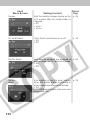
Set up
44
Available Settings
Auto Power Down On* / Off
p. 133
Date / Time
Sets the date and time
p. 25
p. 134
Video System
NTSC / PAL
Beep
On* / Off
p. 132
Format
Formats the CF card
p. 98
Language
English* / Deutsch / Français /
Nederlands / Dansk / Suomi /
Italiano / Norsk / Svenska /
Español / Japanese or Chinese
(depending on the region)
p. 27
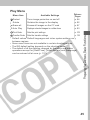
Play Menu
Menu Item
Available Settings
Reference
Pages
Protect
Turns image protection on and off
p. 94
Rotate
Rotates the image in the display
p. 92
Erase all
Erases all images on the CF card
p. 97
Auto Play
Replays selected images in a slide show
p. 93
Print Order
Sets the print settings
p. 102
Transfer Order
Sets the transfer settings
p. 122
* Default values. Default languages and video system settings var y
between regions.
• Some menu items are not available in certain shooting modes.
• The ISO default setting depends on the shooting mode.
• The default of all the settings changed by the menu and button
operations except for [Date/Time], [Video System] and [Language]
can be restored all at once (p. 137).
45
Shooting - Letting the Camera Select Settings
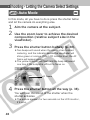
Auto Mode
In this mode, all you have to do is press the shutter button
and let the camera do everything else.
1 Aim the camera at the subject.
the zoom lever to achieve the desired
2 Use
composition (relative subject size in the
viewfinder).
3 Press the shutter button halfway (p. 38).
¡Two beeps will sound when the camer a has finished
metering, and the indicator beside the vie wfinder will
shine green or orange. If the LCD monitor is on, the AF
frame will appear green.
¡The yellow indicator will flash and the beep will sound
one time if the subject is difficult to f ocus on.
AF Frame
4 Press the shutter button all the way (p. 38).
You will hear the sound of the shutter when the
shutter activates.
¡The picture appears for two seconds on the LCD monitor,
if it is on.
46
¡For information on the settings you can change, see
“Functions Available in Each Shooting Mode” (p. 82).
¡With the Review function, you can change the length of
time images show on the LCD monitor after shooting,
or set it so they do not show at all (p. 49).
47
Reviewing an Image Right
After Shooting
After a photo is taken, the image displays on the LCD
monitor for two seconds (To change, see “Changing the
Image Display Duration” (p. 49)). There are two ways to
display the image for longer.
¡ Keeping the Shutter Button Pressed
¡ Press the SET button while the image is
displayed in the LCD monitor.
¡Press the shutter button halfway again to stop
displaying it.
¡You can perform the following while images are
displayed.
– Erasing Images Individually (p. 96)
– Magnifying Images (p. 87)
48
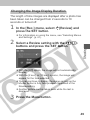
Changing the Image Display Duration
The length of time images are displayed after a photo has
been taken can be changed from 2 seconds to 10
seconds or turned off.
the [Rec.] menu, select
1 Inpress
the SET button.
[Review] and
¡For information on using the men u, see “Selecting Menus
and Settings” (p. 41).
a Review setting with the
2 Select
buttons and press the SET button.
/
¡With the [Off] option, the image will not automatically
display.
¡With the [2 sec.] or [10 sec.] options , the image will
appear for the time selected.
¡You can continue to display the image as long as the
shutter button is fully held pressed regardless of the
Review setting.
¡Another picture can be tak en even while the last is
displayed.
3 Press the Menu button.
49
Changing the Resolution
and Compression
You can change the resolution and compression (excluding movies) settings to suit the purpose of the image you
are about to shoot. The resolution gets higher in the order
S (Small), M (Medium), and L (Large). Use a higher
resolution if you wish to make a large print. Conversely,
use a lower resolution if you wish to print on small
objects, such as labels, to send images electronically, or
to fit more images on a CF card.
The compression gets higher in the order (Superfine),
(Fine) and (Normal). Select (Superfine) for a higher
quality image, or (Normal) if you wish to fit more images
on a CF card. The (Fine) setting provides adequate
quality for standard shots.
Resolution (excluding
(Large)
(Medium)
(Small)
Resolution (
)
PowerShot A40
1600 × 1200 pixels
1024 × 768 pixels
640 × 480 pixels
PowerShot A30
1280 × 960 pixels
1024 × 768 pixels
640 × 480 pixels
)
Compression (excluding
320 × 240 pixels
160 × 120 pixels
Superfine
Fine
Normal
¡ Common to PowerShot A40 and PowerShot A30
50
)
In the [Rec.] menu, select
(Resolution)
1 or
(Compression), and press the SET
button.
¡For information on using the men u, see “Selecting Menus
and Settings” (p. 41).
or
button as necessary to
2 Press
adjust the setting and press the SET
button.
(Resolution)
(Compression)
Display on the PowerShot A40
3 Press the MENU button.
¡For more information, see “Functions Available in Each
Shooting Mode” (p. 82).
¡For information on necessar y space per image
(approximate), types of CF cards and the n umber of
images per card see, “Specifications” (p. 165).
51
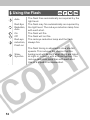
Using the Flash
Auto
Red-Eye
Reduction,
Auto
On
Off
Red-eye
reduction,
Flash on
SlowSynchro
52
The flash fires automatically as required b y the
light level.
The flash may fire automatically as required b y
the light level. The red-eye reduction lamp fires
with each shot.
The flash will fire.
The flash will not fire.
The red-eye reduction lamp and the flash
always fire.
The flash timing is adjusted to slo w shutter
speeds. This reduces the chance that the
background will be dark when shots are taken
at night or in rooms with ar tificial lighting. The
red-eye reduction lamp fires with each shot.
Use of a tripod is recommended.
the button as necessary to select
1 Press
the desired flash mode.
䡬
䡬*
ⴑ
䡬
ⴑ
ⴑ
䡬
䡬*
䡬
䡬
ⴑ
䡬
ⴑ
ⴑ
䡬
䡬*
䡬
ⴑ
ⴑ
ⴑ
J
䡬*
ⴑ
J
ⴑ
ⴑ
ⴑ
䡬*
ⴑ
ⴑ
* : Default
嘷 : Available
J : Available, but cannot be changed after taking the first shot
ⴑ : Not available
2 Shoot the image.
¡The flash can be fired when the upper indicator glo ws a
steady orange.
¡When shooting with a high ISO sensitivitiy and using
the built-in flash, there is more of a chance of o verexposure the closer you are to the subject.
¡Please note that a slow shutter speed will be selected
in dark places when the flash is set to off or slo wsynchro. Be careful to avoid camera blur under these
conditions.
– Shooting in
Mode
Be careful to hold the camer a still to avoid camera
Shake.
– Shooting in (when ISO Speed is set to AUTO) or
Mode
Fix the camera to a tripod to shoot in the or
mode since the shutter speed will be slo wer than in
the
mode. If an image is dar k in
mode,
reshooting it in mode will make it brighter.
53
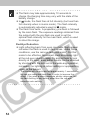
¡The flash may take approximately 10 seconds to
charge. Recharging time may vary with the state of the
battery charge.
¡In
mode, the flash fires at full intensity (b ut less than
full intensity when in macro mode). The flash intensity
is automatically adjusted e xcept in
mode.
¡The flash fires twice. A preparatory pre-flash is followed
by the main flash. The exposure readings obtained from
the subject with the pre-flash are used to set the
optimal flash intensity for the main flash, which is used
to shoot the image.
Red-Eye Reduction
¡Light reflecting back from eyes can make them appear
red when the flash is used in dar k areas. Under these
conditions, use the red-eye reduction mode*. For this
mode to be effective, the subject must be looking right
at the red-eye reduction lamp. Try asking them to look
directly at the lamp. Even better results can be obtained
by shooting with the lens set to the wide-angle position,
increasing the lighting in indoor settings or approaching
closer to the subject.
* The shutter will not activate for approximately 1 second after
the red-eye reduction lamp fires in order to improve the
effect. If you wish a more immediate shutter response, set
the flash setting to any setting other than the r ed-eye
reduction auto setting.
54
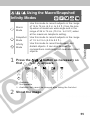
/ / Using the Macro/Snapshot/
Infinity Modes
Macro
Mode
Snapshot
Mode
Infinity
Mode
Use this mode to record subjects in the r ange
of 16 to 76 cm (6.3 in. to 2.5 ft.) from the lens
tip when at maximum wide angle and in the
range of 26 to 76 cm (10.2 in. to 2.5 ft.) when
at the maximum telephoto setting.
Use this mode to record subjects in the r ange
of 1.5 to 2.5 m (4.9 to 8.2 ft.).
Use this mode to record landscapes and
distant objects. It can also be used for
compositions combining both near and distant
objects.
the
1 Press
that ,
嘷
–
–
/ / button as necessary so
or
appears.
嘷
嘷
嘷
嘷
嘷
嘷
J
J
J
嘷
嘷
嘷
嘷 : Available
– : Not available
J : Available, but cannot be changed after taking the first shot
2 Shoot the image.
55
¡Use the LCD monitor to compose close-ups in macro
mode since the parallax phenomenon may cause
images composed with the optical vie wfinder to be offcenter.
¡The exposure may not be optimal when the flash is
used in macro mode in the r ange of 16 to 26 cm (6.3 to
10.2 in.).
¡When the lens is zoomed out to the maximum wideangle position, the recordab le area is approximately
162 × 120 mm (6.4 in. × 4.7 in.) at the closest focal
distance, and at maximum telephoto, it is approximately
92 × 69 mm (3.6 in. × 2.7 in.).
56
Digital Zoom
When the LCD monitor is on, images can be zoomed with
the combined optical and digital zoom functions as follows
(figures are approximate).
PowerShot A40: 3.8 times, 4.7 times, 6.0 times, and 7.5 times
PowerShot A30: 3.8 times, 4.8 times, and 6.0 times
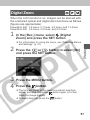
In the [Rec.] menu, select
(Digital
1 Zoom)
and press the SET button.
¡For information on using the men u, see “Selecting Menus
and Settings” (p. 41).
the
or
button to select [On]
2 Press
and press the SET button.
3 Press the MENU button.
4 Press the button.
¡The lens will zoom to the maximum optical telephoto
setting and stop. Press the
button again to fur ther
zoom the image digitally.
¡To zoom back out, press the
button.
57
5 Shoot the image.
×3.8
The combined magnifications of the
optical zoom and digital zoom are
displayed.
¡Digital zoom is unavailable in some modes (p. 82).
¡Images become coarser the more the y are digitally
zoomed.
58
Continuous Mode
The camera will shoot continuously at the speed of
approx. 2.5 images per second* (When the LCD monitor
is OFF in Large/Fine mode).
* The figures reflect standard shooting conditions established by Canon.
Actual figures may vary according to the subject and shooting
conditions.
Press the
1 that
the
/ button as necessary so
appears on the LCD monitor.
2 Shoot the image.
¡If internal memory becomes full, the inter val between
shots may lengthen slightly.
¡If you are using the flash, shots are tak en more slowly
to allow time for the flash to recharge.
59
Self-Timer
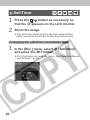
Press the
1 that
the
/ button as necessary so
appears on the LCD monitor.
2 Shoot the image.
¡The self-timer star ts and the self-timer lamp flashes
when you press the shutter button down all the way.
Changing the self-timer countdown time
In the [Rec.] menu, select
1 and
press the SET button.
[Self-timer]
¡For information on using the men u, see “Selecting Menus
and Settings” (p. 41).
60
[
2 Select
the
/
(10 sec.)] or [ (2 sec.)] with
buttons and press the SET
button.
¡When [
(10 sec.)] is selected, the self-timer sounds
and the flashing gets faster 2 seconds before the shutter
activates.
¡When [
(2 sec.)] is selected, the self-timer sounds at
the same time the shutter b utton is pressed. The shutter
activates in 2 seconds.
3 Press the MENU button.
61
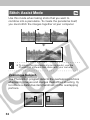
Stitch Assist Mode
Use this mode when taking shots that you want to
combine into a panorama. To create the panorama itself,
you must stitch the images together at your computer.
¡To create the panorama at your computer, use the
PhotoStitch software that came with your camera.
Framing a Subject
The PhotoStitch program detects the overlapping portions
of adjoining images and merges them.When shooting, try
to include a distinctive item (landmark) in the overlapping
portions.
62
¡Compose each frame so that it overlaps 30 to 50 % of
the adjoining image. Try to keep the vertical misalignment to within 10 % of the image height.
¡Do not include moving items in the overlap.
¡Do not try to stitch images that include both distant and
close items. Objects may appear warped or doubled up.
¡Make the brightness in each image consistent. The final
image will appear unnatur al if the difference in
brightness is too great.
¡For good results, pan (swivel) the camera to take
successive shots.
¡To shoot close-ups, slide the camera over the subject,
keeping it parallel as you move.
Shooting
the
or
button to select the
1 Press
sequence direction, and then press the
SET button.
: Left to right horizontally.
: Right to left horizontally.
¡You can take the first shot immediately b y pressing the
shutter button instead of the SET button.
2 Take the first shot.
63
the next shot, taking care to
3 Compose
overlap the previous image.
¡Minor discrepancies in the o verlapping por tions can be
corrected when the images are stitched together .
¡If you are not satisfied with the pre vious shot, you can
use
or
button to return to that shot and reshoot
it.
additional shots for the panorama in
4 Take
the same way.
¡You can take as many as 26 images.
taking the final image, press the SET
5 After
button.
¡For information on the settings you can change, see
“Functions Available in Each Shooting Mode” (p. 82).
¡The settings in place for the first image are locked in
and cannot be changed f or subsequent shots.
¡It is not possible to display the images that appear on
the LCD monitor on a TV monitor when shooting in
Stitch Assist mode.
64
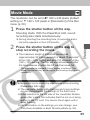
Movie Mode
The resolution can be set to
320 x 240 pixels (default
setting) or
160 x 120 pixels in [Resolution] of the Rec.
menu (p. 50).
1 Press the shutter button all the way.
Shooting starts. With the PowerShot A40, sound
recording also starts simultaneously.
¡During shooting the recording time (in seconds) and a
red circle appears in the LCD monitor .
the shutter button all the way to
2 Press
stop recording the movie.
¡The maximum length of individual mo vie clips
(approximately 20 frames/second) is about 10 seconds*
at the (320 × 240) setting and about 30 seconds* at the
(160 × 120) setting. The clip will end automatically after
this time elapses or when the CF card becomes full.
* The data reflects standard Canon testing conditions. The
actual figures will vary according to the shooting objects and
conditions.
¡Be careful not to touch the microphone while shooting
(PowerShot A40 only).
¡The exposure, focus, white balance and z oom settings
are set and locked to the settings of the first fr ame.
¡If the indicator on the left side of the vie wfinder flashes
green after a shot, this indicates that the mo vie is being
written to the CF card. You cannot shoot again until it
stops flashing.
¡For information on the settings you can change, see
“Functions Available in Each Shooting Mode (p . 82).
65
¡Sound is recorded monaur ally (PowerShot A40 only).
¡There is no shutter sound in mo vie mode.
¡QuickTime 3.0 or higher is required to repla y movie
files (AVI / Motion JPEG) on a computer . QuickTime 5.0
is included on the Canon Digital Camer a Solution Disk.
66
Shooting-Selecting Particular Effects
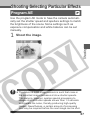
Program AE
Use the program AE mode to have the camera automatically set the shutter speed and aperture settings to match
the brightness of the scene. Some settings such as
exposure compensation and white balance can be set
manually.
1 Shoot the image.
¡The nature of CCD image sensors is such that noise in
the recorded image increases at slo w shutter speeds.
This camera, however, applies special processing to
images shot at shutter speeds slo wer than 1.3 seconds
to eliminate the noise, thereby producing high-quality
images. Nevertheless, a certain amount of processing
time may be required before the next image can be shot.
67
Differences and Similarities between the
and
Modes.
¡Both modes automatically select the shutter speed and
aperture settings.
¡The following settings can be adjusted in
mode, but
not in
mode.
¡ Exposure Compensation
¡ White Balance
¡ Flash (Red-Eye Reduction, Flash On, Slo w-Synchro)
¡ Continuous Mode
¡ Snapshot/Infinity
¡ Photo Effects
¡ ISO Speed
¡ Change of Light Meter ing Method
¡ Focus Lock
¡ Change of AF frame (Center only)
68
Manually Setting the Shutter Speed and Aperture
You can manually set the shutter speed and aperture to
achieve a particular effect. This is convenient for shooting
fireworks and other images where it is difficult to set the
correct exposure automatically.
1 Press the
/
button once.
The Exposure menu appears.
the shutter speed with the
2 Select
buttons.
/
an aperture setting with the
3 Select
DISPLAY button.
4 Shoot the image.
69
¡For information about noise reduction, see “Program
AE” (p. 67).
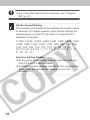
Shutter Speed Display
The numbers in the table below indicate the shutter speed
in seconds. For slower speeds, quote marks indicate the
decimal place, so that 0"3 indicates 0.3 second and 2"
indicates 2 seconds.
1/1500 1/1250 1/1000 1/800 1/640 1/500 1/400 1/320
1/250 1/200 1/160 1/125 1/100 1/80 1/60 1/50 1/40
1/30 1/25 1/20 1/15 1/13 1/10 1/8 1/6 1/5 1/4
0”3 0”4 0”5 0”6 0”8 1” 1”3 1”6 2” 2”5 3”2 4” 5” 6”
8” 10” 13” 15”
Aperture Setting Display
¡At any given zoom setting, only two aperture settings,
from F2.8 to F14, are available.
¡Available aperture settings depend on the z oom setting.
Select from the settings that appear on the LCD
monitor.
70
Using the Focus Lock
The following types of subject may not be suited to
autofocus photography. Use the focus lock in these
situations.
¡ Subjects with extremely low contrast to the surroundings
¡ Subjects with extremely bright objects at the center of the
composition
¡ Subjects that are mo ving quickly
¡ Subjects through glass
Try to shoot as close to the glass as possib le to reduce the
chances of light reflecting bac k off the glass.
Focus Lock Method 1
the camera so that a subject at the
1 Aim
same focal distance as the main subject is
centered in the brackets in the optical
viewfinder or LCD monitor.
and hold the shutter button halfway,
2 Press
and wait until the camera beeps twice.
Without releasing your finger, re-aim the
camera to compose the shot as desired
and press the shutter button all the way.
71
Focus Lock Method 2
the DISPLAY button to turn on the
1 Press
LCD monitor.
the camera so that a subject at the
2 Aim
same distance as the main subject is
centered in the selected AF frame.
and hold the shutter button halfway
3 Press
to lock focus, and wait until the camera
beeps twice. Without releasing your finger,
press the / / button.
appears in the LCD monitor.
the image and press the
4 Recompose
shutter button all the way to shoot the
image.
Cancelling Focus Lock
¡To cancel focus lock, press the / / button, the
DISPLAY button or the zoom button.
¡Focus lock can also be cancelled b y changing the
position of the mode dial.
¡Method 2 is convenient because you can let go of the
shutter button to recompose the image . Also, the focus
remains locked after shooting, allowing you to shoot
again right away with the same focus.
72
Switching Between Autofocus Modes
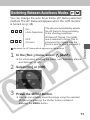
You can change the auto focus frame (AF frame) selection
method. The AF frame will appear when the LCD monitor
is turned on (p. 38).
The camera automatically selects
On
the AF frame to focus according
(Auto Selection)
to the shooting conditions.
Of three AF frames, the middle
OFF
one is selected to focus. This is
(Center)
convenient for making sure the
focus is exactly where you want it.
indicates the AF frame which appears on the monitor
1 In the [Rec.] menu, select
(AiAF).
¡For information on using the men u, see “Selecting Menus
and Settings” (p. 41).
2 Select [On] or [Off].
3 Press the MENU button.
¡You can immediately shoot the image using the selected
AF frame by pressing the shutter b utton instead of
pressing the MENU button.
73
Switching Between Light Metering Modes
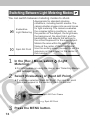
You can switch between metering modes to shoot.
Evaluative
Light Metering
Spot AE Point
Appropriate for standard shooting
conditions, including backlit scenes. The
camera divides images into several zones
for light metering. The camera evaluates
the complex lighting conditions, such as
the position of the subject, the br ightness,
the background, the direct light, and the
backlighting, and adjusts the settings to
the correct exposure for the main subject.
Meters the area within the spot AE point
frame at the center of the LCD monitor.
Use this setting when y ou want to set the
exposure on the subject in the center of
the monitor.
the [Rec.] Menu, select
1 InMetering).
(Light
¡For information on using the men u, see “Selecting Menus
and Settings” (p. 41).
2 Select [Evaluative] or [Spot AE Point].
¡If you have selected [Spot AE Point], the spot AE point
frame will appear in the center of the LCD monitor .
Spot AE Point Frame
e.g. Spot AE Point
3 Press the MENU button.
74
Adjusting the Exposure
If you are shooting against a bright background or strong
backlight, you may need to correct the exposure so that
the subject doesn’t come out too dark.
1 Press the
/
button once.
2 Adjust the compensation.
¡You can set the adjustment from –2 to +2, in 1/3-step
increments.
¡If the LCD monitor is on, y ou can check the results of the
compensation by viewing the image on the LCD monitor .
¡A shot can be taken immediately after by pressing the
shutter button. The menu will reappear after the shot,
allowing you to adjust the setting.
3 Press the SET button.
¡If you wish to tur n compensation off, repeat this
procedure and set the compensation v alue to [0].
75
Setting the White Balance
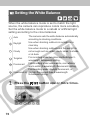
When the white balance mode is set to match the light
source, the camera can reproduce colors more accurately.
Set the white balance mode to a natural or artificial light
setting according to the circumstances.
The camera sets the white balance automatically
according to shooting conditions.
Use when shooting outdoors in sunlight on a
Daylight
clear day.
Use when shooting outdoors and the sunlight is
Cloudy
not enough such as under cloudy skies , in shade
or at dusk.
For recording under tungsten and bulb-type 3Tungsten
wavelength fluorescent lighting .
For recording under warm-white, cool-white or
Fluorescent
warm-white (3-wavelength) fluorescent lighting.
For recording under daylight fluorescent, or
Fluorescent H daylight fluorescent-type 3-wavelength
fluorescent lighting.
Auto
1 Press the
76
/
button one or more times.
2 Select the white balance.
¡If the LCD monitor is on, y ou can check the results by
viewing the image on the LCD monitor .
¡A shot can be taken immediately by pressing the shutter
button. The menu will reappear after the shot, allo wing
you to adjust the setting.
3 Press the SET button.
¡The white balance cannot be set when
(B/W) photo effect is selected.
(sepia) or
77
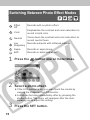
Switching Between Photo Effect Modes
Effect
Off
Records with no photo effect.
Vivid
Emphasizes the contrast and color saturation to
record in bold color.
Neutral
Tones down the contrast and color satur ation to
record neutral hues.
Low
Records subjects with softened outlines .
Sharpening
Sepia
Records in sepia tones .
B/W
Records in black and white.
1 Press the
button one or more times.
2 Select a photo effect.
¡If the LCD monitor is on, y ou can check the results by
viewing the image on the LCD monitor .
¡A shot can be taken immediately after by pressing the
shutter button. The menu will reappear after the shot,
allowing you to adjust the setting.
3 Press the SET button.
78
Changing the ISO Speed
Change the ISO speed when shooting in dark places or
when you want to shoot with a faster shutter speed.
1 In the [Rec.] menu, select
(ISO Speed).
¡For information on using the men u, see “Selecting Menus
and Settings” (p. 41).
2 Select an ISO speed.
3 Press the MENU button.
¡The ISO [AUTO] setting is available only in
mode.
¡Higher ISO speeds increase the image noise . To take
clean images, use as low an ISO speed as possible.
¡When ISO [AUTO] is selected, the camer a automatically adjusts ISO betw een 50 and 150.
79
Resetting the File Number
You can use this feature to select whether the camera
resets the file number each time you insert a new CF
card.
On
Off
The camera resets the file number to 100-0001 each
time you inser t a new (unused) CF card. If you inser t a
card that already contains some images , numbering
resumes from the next available number.
The camera remembers the last file n umber, and starts
numbering from the next number when you insert a new
CF card.
1 In the [Rec.] menu, select
(File No. Reset).
¡For information on using the men u, see “Selecting Menus
and Settings” (p. 41).
2 Select [On] or [Off].
3 Press the MENU button.
80
¡The [Off ] setting helps ensure that file n umbers remain
unique over multiple CF cards. This is useful if you are
planning to download images from the cards to y our
computer, since it helps avoid accidental overwrites
that may occur if filenames are duplicated.
About file numbering...
¡Image files are assigned n umerical file names over the
range 0001 to 9900. The camera stores these files into
folders, which are assigned folder numbers from 100 to
998 (except that numbers ending in 99 are not used).
¡In most cases the camera stores exactly 100 files into
each folder. Because the camer a cannot switch to a
new folder when taking shots in
or
mode,
however, some folders may have more than 100
images.
81
Functions Available in Each Shooting Mode
The following chart shows the functions and settings
available in each shooting mode. The camera stores
settings separately for each mode, and retains these
settings even if you switch to a different mode.
Function
Resolution
82
Program
䡬*
䡬*
䡬
Medium
䡬
Small
䡬
䡬
movie
ⴑ
ⴑ
movie
ⴑ
ⴑ
SuperFine
䡬
䡬
䡬*
䡬*
Compression Fine
Flash
Auto
Large
Normal
䡬
䡬
Auto
䡬
䡬
Red-eye reduction, Auto
䡬*
䡬*
On
ⴑ
䡬
Off
䡬
䡬
Red-eye reduction, On
ⴑ
ⴑ
Slow-Synchro
ⴑ
䡬
Macro Mode
䡬
䡬
Snapshot Mode
ⴑ
䡬
Infinity Mode
ⴑ
䡬
Focus Lock
ⴑ
䡬
* : Default,
: Available,
: Available, but cannot be changed
after taking the first shot, – : Not available
: Setting is retained even after power off.
(1) The ISO speed is automatically set between the equivalent of 50
and 150.
(2) [AUTO] cannot be selected.
Manual
Stitch Assist
Movie
䡬*
J*
ⴑ
䡬
J
ⴑ
䡬
J
ⴑ
ⴑ
ⴑ
䡬*
ⴑ
ⴑ
䡬
䡬
J
ⴑ
䡬*
J*
ⴑ
䡬
J
ⴑ
ⴑ
ⴑ
ⴑ
ⴑ
ⴑ
ⴑ
䡬
J
ⴑ
䡬*
J*
䡬
䡬
ⴑ
ⴑ
ⴑ
J
ⴑ
䡬
J
䡬
䡬
J
䡬
䡬
J
䡬
䡬
ⴑ
ⴑ
Reference page
p. 50
p. 50
p. 52
p. 55
p. 71
83
Function
Shooting
Method
Program
䡬*
䡬*
Continuous
ⴑ
䡬
Self-Timer
䡬
䡬
ⴑ
䡬
Auto Focus Frame
84
Auto
Single
AF-assist Beam
䡬
䡬
Light
Evaluative Metering
䡬
䡬*
Metering
Spot Metering
ⴑ
䡬
Digital Zoom
䡬
䡬
Exposure Compensation
ⴑ
䡬
White Balance
ⴑ
䡬
Photo Effect
ⴑ
䡬
ISO Speed
ⴑ (1)
䡬
Manual
Stitch Assist
Movie
Reference page
䡬*
J*
䡬*
䡬
ⴑ
ⴑ
䡬
J
䡬
p. 60
䡬
ⴑ
ⴑ
p. 73
p. 132
䡬
䡬
䡬
ⴑ
䡬
䡬
ⴑ
ⴑ
ⴑ
p. 59
p. 74
䡬
ⴑ
ⴑ
p. 57
ⴑ
J
䡬
p. 75
䡬
J
䡬
p. 76
䡬
J
䡬
p. 78
䡬(2)
ⴑ (1)
ⴑ (1)
p. 79
85
Replaying
Displaying Images Individually
Use this feature to view recorded images one at a time on
the LCD monitor (Single Image Replay).
1 Turn the mode dial to
.
The LCD monitor displays the last recorded image.
Use
and
button to display
2 different
images.
¡Hold down
86
or
button to cycle continuously.
Magnifying Images
1 Press the
button.
The image enlarges gradually by up to approximately
10 times.
Approximate Location
of the Magnified Area
¡When you hold down the SET button and press the
button, the image enlarges in the order : approximately
2.5 times ➞ approximately 5 times ➞ approximately 10
times.
¡To slide the magnified image left or r ight on the monitor,
press
or
button.
To slide the image up or down, hold down the SET button
and press
or
button.
¡To return to normal-size display, press the
button.
87
Viewing Images in Sets of Nine
(Index View)
View nine images at a time on the LCD monitor (Index
View). You can also jump by sets of nine to search for a
certain image conveniently.
1 Press the
button twice.
Nine images appear at a time.
or
button to change the
2 Press
displayed images.
The previous or next set of nine images appears.
¡Hold the SET button and press the
or
jump to the first or last set of nine images .
button to
the image you are searching for is
3 When
displayed among the nine, press the
button.
Selected image
88
the
or
button to select the
4 Press
image and press the
button.
The selected image displays in Single Image Replay.
¡Hold the SET button and press the
jump to the first or last image .
or
button to
89
Viewing Movies
or
1 Press
image shot in
button to display an
(movie) mode.
¡A movie displays with the instr uction
on it.
2 Press the SET button.
The movie starts playing.
¡When a movie has finished playing, it will display the last
frame. If the SET button is pressed in this state , the
movie will star t playing from the first frame.
Pausing and Resuming Play
¡Press the SET button to pause the movie.
Press it again to resume .
Fast Forwarding / Rewinding
¡Press
or
button to stop the movie and display
the previous or next image or movie.
90
¡You may experience frame dropping and audio breakup
when replaying a movie on a computer with insufficient
system resources.
¡You can hear the audio when a mo vie is played on a TV.
Adjust the volume on the TV set (PowerShot A40 only)
(p. 124).
91
Rotating Images in the Display
You can rotate an image by 90° or 270° clockwise in the
LCD monitor.
0° (Original)
90°
1 In the Replay menu, select
270°
(Rotate).
¡For information on using the men u, see “Selecting Menus
and Settings” (p. 41).
or
button to select the
2 Press
image you want to rotate and press the
SET button.
¡Press the SET button to rotate the image 90°, 270° and
back to original orientation.
3 Press the MENU button.
¡Movie images cannot be rotated.
¡If an image has been rotated in the camer a before
being loaded onto a computer , the particular software
in use will determine whether or not the rotation
settings are retained.
92
Auto Play
Use this feature to automatically replay all of the images
in the CF card (Auto Play). The LCD monitor displays
each image for approximately 3 seconds.
1 In the Replay menu, select
(Auto Play).
¡For information on using the men u, see “Selecting Menus
and Settings” (p. 41).
Auto play starts.
¡As with the single image displa y mode, pressing the
or
button during auto play will advance through the
images more rapidly.
Pausing and Resuming Auto Play
¡You can pause Auto Play at any time by pressing the
SET button. You can then restar t it by pressing the SET
button again.
Stopping Auto Play
¡To stop Auto Play, press the MENU button.
¡The display interval may vary for some images.
¡Movie images play for the length of time that the y were
recorded.
¡The power save function is disabled during Auto Play
(p. 30).
93
Protecting Images
Use the protect feature to protect important images from
accidental erasure.
1 In the Replay menu, select
(Protect).
¡For information on using the men u, see “Selecting Menus
and Settings” (p. 41).
or
button to select an
2 Press
image you wish to protect, and then press
the SET button to protect it.
Protected Icon
¡The
icon appears on protected images .
¡To remove the protection, press the SET button again (in
protection mode).
¡You can make the selection of images easier b y toggling
between single replay and Index replay with the
button.
3 Press the MENU button.
94
¡Please note that even protected images are erased
when a CF card is reformatted (p. 98).
95
Erasing
¡Remember that erased images cannot be reco vered.
Be careful to avoid accidental erasures.
¡This function will not er ase protected images (p. 94).
Erasing Images Individually
or
button to select the
1 Press
image you want to erase and press the
button.
or
button to select [Erase]
2 Press
and press the SET button.
¡If you decide you don’t want to erase the image, select
[Cancel] instead of [Erase].
96
Erasing All Images
Replay menu, select
1 Inandthepress
the SET button.
(Erase all)
The LCD monitor asks for confirmation.
Press
or
button to select [OK],
2 and
then press the SET button.
¡If you decide you don’t want to erase all unprotected
images, select [Cancel] instead of [OK].
97
Formatting a CF Card
You should format new CF cards before using them.
¡Formatting a CF card will per manently erase all data
already on the card, including all of its protected
images. Before formatting a card that has already been
used, be sure to check its contents.
1 In the [Rec.] menu, select
(Setup) and
press the SET button.
or
button to select
2 Press
(Format), and then press the SET button.
98
Press
or
button to select [OK],
3 and
press the SET button.
¡To cancel formatting instead, select [Cancel] instead of
[OK].
¡If the camera is not operating correctly, the CF card
may be corrupted. Formatting the card may solve the
problem.
¡If you are using a CF card from another man ufacturer
and the card is not functioning correctly, you may be
able to correct the problem by formatting the card.
¡CF cards that were formatted by another camera or by
a computer may not operate correctly until you format
them in the camera as described above. If formatting in
the camera doesn’t work properly, turn the camera off
and re-insert the CF card. Then turn the camera back
on and format again.
99
Printing
About Printing
After connecting the camera to an optional Canon printer
with the direct print function, you can easily print images
just by using the controls on the camera. Or, you can
specify the images on your CF card you want to print and
how many copies you want (DPOF* Print Settings), and
then take the CF card to a participating photo lab to have
them printed out later.
Refer to the System Map included with this camera kit for
printer information.
* Digital Print Order Format
Optional Canon
printer with the direct
print function
Printed
images
CF Card
100
Photo lab
Print Settings for Direct Print Function
¡Select how many copies you want (p.109)
d
¡Select the print style (p.110)
¡Standard / Multiple
¡Bordered / Border less
¡Date On / Off
d
¡Select the print area (p.112)
DPOF Print Settings
¡Select the image you want to print (p. 114)
d
¡Select how many copies you want (p. 114)
d
¡Select the print style (p. 116)
¡Standard / Index
¡Date On / Off
¡File Numbers On / Off
Transfer Settings
¡Select the image you want to send through e-mail* (p. 122)
* The DPOF-compliant software is needed for actually transferring
the images.
101
Selecting from the Print Order Menu
Use the Print Order Menu as shown below to select all
print settings.
Direct Print Function
Set the mode dial to
➔
s
DPOF Settings
Set the mode dial to
s
102
➔
s
: Turns the menu on/off
: Selects items and settings
: Sets items and settings
Image (p. 110)
Style
➔
Borders (p. 110)
Date (p. 110)
Number of copies (p. 109)
Printing area (p. 112)
Order
Number of copies
(p. 114)
Print Type (p. 116)
➔
Set up
Date (p. 116)
File No. (p. 116)
Reset (p. 118)
103
Connecting the Camera to a Printer
Two direct interface cables are included with Canon
printers having the direct print function. Use DIF-100
mark on the connector when connecting
cable with the
to this camera.
¡If you plan to print out many prints in a single session, it
is recommended that you power the camera with AC
power (p. 146) or else load fully charged NiMH
batteries (p. 144) or unused alkaline batter ies before
you begin.
¡Refer to the System Map included with this camer a kit
for printer information.
¡Please see your printer’s user guide for instructions on
loading paper and installing ink car tridges.
1 Turn off the Camera.
the power cable to the printer and
2 Attach
plug the other end into power supply. Or,
install the printer’s rechargeable battery.
¡Depending on the type of pr inter you have, it may or may
not use rechargeable batteries. Refer to your printer’s
user guide.
104
the camera and printer using the
3 Connect
direct interface cable.
¡When you insert the cable, make sure the
mark of the
cable faces the rear of the camer a (monitor side).
to Printer
DIGITAL Terminal
the mode dial to
4 Turn
camera on.
Direct Interface Cable DIF-100
and turn the
If the printer is correctly
icon will
connected, the
appear on the LCD monitor.
105
¡When disconnecting the cab le from the camera’s Digital
terminal, be sure to hold the connector at its sides and
pull it straight out.
¡Movies cannot be played when the camera is
connected to a pr inter.
¡When the printer is disconnected, the
symbol will
disappear from the LCD monitor and the camer a will
revert to standard replay mode.
106
Printing
An image can be printed when displayed in single replay
or selected in index replay.
or
button to select the
1 Press
image you wish to print, and then press
the SET button.
the number of prints, the print style
2 Set
and printing area settings as required.
¡Selecting the number of copies (p. 109)
¡Setting the Print Style (p. 110)
¡Selecting the printing area (p. 112)
3 Select [Print].
The image will start to print and, when it is
completely finished, the display will revert to
standard replay mode.
¡Movies cannot be pr inted.
107
Cancel Printing
¡To cancel printing between images, press the SET
button. A confirmation dialog appears. Select [OK]
using
or
button and press the SET button.
¡A print in progress cannot be stopped. Wait until the
current image is pr inted and then cancel before the
next one starts. The display will revert to standard
replay mode.
Printing Errors
¡An error message appears if an error occurs f or some
reason during the printing process (p. 140). Select
[Stop] or [Resume] using
or
button and press
the SET button.
¡The [Resume] option may not appear with some error
messages. Select the [Stop] option in that case.
108
Print Settings (Direct Print Function)
You can specify print settings while the camera is
connected to the printer.
Selecting the Number of Copies
displaying the image, press the SET
1 While
button. Press
or
button to select
[copies], and press the SET button.
the
or
button to specify the
2 Press
desired number of copies.
¡You can specify from 1 to 99 pr ints.
109
Setting the Print Style
You can select from among the following print styles.
Standard
Prints one image per page .
Prints eight copies of the same image on
Multiple*
one page.
Borderless Prints right to the edges of the page .
Borders
Bordered
Prints with a border.
Date
Prints the image’s creation date.
Image
* This setting is only available for Card Size paper.
displaying the image, press the SET
1 While
button. Press
or
button to select
[Style], and press the SET button.
Press
or
button to select [Image],
2 [Borders],
or [Date], and press the SET
button.
110
or
button to select the
3 Press
desired setting, and press the SET button.
Image
Choose [Standard]
or [Multiple].
Borders
Choose [Borderless]
or [Bordered].
Date
Choose [On] or [Off].
4 Press the MENU button.
¡If [Borderless] or [Multiple] is selected as the pr int style,
the center por tion of the recorded image (the image
displayed on the LCD monitor) is pr inted at an enlarged
size. As a result, the image’s top, bottom and sides may
be cropped slightly. The area of the image that will be
printed will appear lighter than the rest of the image
allowing you to check the portion that will be cropped.
Print Area Frame
¡The date and borders settings cannot be selected when
the [multiple] option is selected. (The image will be
printed with the Date set to [Off] and the Borders set to
[Borderless].)
¡With the [Bordered] option, the border is pr inted in
practically the same space as the recorded image .
111
Specifying the Printing Area
Choose from three printing area options.
Before specifying the printing area
¡Please set the Pr int Style (Image, Borders and Date)
first before setting the pr inting area (p. 110).
¡Printing area can only be specified with the border less
print style.
displaying the image, press the SET
1 While
or
button to select
button. Press
[Printing area], and press the SET button.
The BA marks appear, indicating that you can now
set the printing area for that image.
2 Press
[1]
or
button to select [1], [2] or [3].
[2]
[3]
¡When printing on L Size paper, or when [Order] is set to
[Multiple], the selectable print area may move left or right.
112
¡The printing area setting only applies to one image .
¡The printing area setting is cancelled with the f ollowing
operations.
- Printing
- When you set the printing area setting for another
image.
- When you close the Print mode, i.e.
• turn the camera off
• change the camera mode
• after setting the pr inting area, you select [Cancel]
and don’t print
• detach the DIF-100 direct interf ace cable
113
DPOF Print Settings
On your CF card, select which image or images you want
to print and how many copies you want. This is convenient
for printing on optional Canon printers with the direct print
function or at participating photo labs.
Selecting Images for Printing
1 Display the [Print Order] menu.
¡For selecting from the men u, see “Selecting from the
Print Order Menu” (p. 102).
Press
or
button to select [Order],
2 and
then press the SET button.
or
button to select an
3 Press
image, and then press the SET button.
¡The selection method will vary according to the pr int type
( )(p. 116).
(Standard) /
(Both)
The BA marks appear,
indicating that you can now set
the number of copies for that
image.
Press
or
button to
select the number of copies (up
to 99).
114
(Index)
A check mark appears at the
upper left.
Pressing the SET button once
selects the image for printing.
Pressing the SET button again
deselects the image, so that the
check mark disappears.
4 Press the MENU button.
¡The
mark appears on images that ha ve had print
marks set by another DPOF-compliant camer a. These
settings will be overwritten by any print marks set by
your camera.
¡The output of some digital pr inters or photo lab
services may not reflect the specified pr int settings.
¡Movies cannot be pr inted.
¡Images are printed in order from oldest to ne west by
the shooting date.
¡A maximum of 998 images can be mar ked per CF card.
¡Press the zoom button in step 3 to switch between
single and 3-image index replay for selecting an image.
¡When [Print Type] is set to [Both], the n umber of copies
can be set. When it is set to [Index], the number of
copies cannot be set (only one cop y will be printed).
¡Print settings can also be assigned to images with the
supplied software programs on a computer.
115
Setting the Print Style
You can set up the print style as follows.
Print Type
Standard
Print one image per sheet.
Index
Print index prints (multiple
reduced-size images per page).
Both
Print selected images both in
standard and index format.
Date
Include the date on the pr int.
File No.
Include the file number on the
print.
1 Display the [Print Order] menu.
¡For selecting from the men u, see “Selecting from the
Print Order Menu” (p. 102).
the setting and then press the SET
2 Select
button.
3 Press
style (
or
button to select the print
,
, or
), and then press the
SET button.
116
or
button to make the
4 Press
desired setting, and then press the SET
button.
(Print Type)
Select [Standard], [Index],
or [Both].
(Date)
Select [On] or [Off].
(File No.)
Select [On] or [Off].
5 Press the MENU button.
¡If you have chosen [Index] as the print type, you cannot
set [Date] and [File No.] to [On] at the same time .
¡If you have chosen [Both] as the pr int type, you can set
both [Date] and [File No.] to [On]. However, only the file
numbers will be pr inted on index prints.
¡If you include the date, the date will be pr inted in the
format you selected at the Set Date/Time men u (p. 25).
117
Resetting the Print Settings
The Reset feature clears all print selections, and resets
Print Type to [Standard], Date to [On], and File No. to
[Off].
1 Display the [Print Order] menu.
¡For selecting from the men u, see “Selecting from the
Print Order Menu” (p. 102).
Press
or
button to select [Reset],
2 and
then press the SET button.
Press
or
button to select [OK],
3 and
press the SET button.
¡If you decide you don’t want to reset the settings , select
[Cancel] instead of [OK].
118
Printing with DPOF Print Settings
You can use the DPOF print settings to print with an
optional printer with the direct print function.
1 Display the [Print Order] menu.
¡For selecting from the men u, see “Selecting from the
Print Order Menu” (p. 102).
Press
or
button to select [Print],
2 and
then press the SET button.
3 Set the print style settings as required.
¡See Setting the Pr int Settings (p. 116).
¡A print style cannot be set if the pr int type is set to
[Index] in the DPOF print setting.
119
Press
or
button to select [OK],
4 and
press the SET button.
The image will start to print and, when it is
completely finished, the display will revert to the
standard replay mode.
¡To print the date, set the [Date] setting in the pr int order
menu in Step 2 on the previous page to [On]. You
cannot set the date to pr int with the [Style] men u in
Step 3 on the previous page (p. 116). If the print type is
set to [Index], the date will not pr int even if the [Date]
setting is set to [On] in Step 2.
120
¡When the Print Type is set to [Index], the number of
images that will be pr inted depends on the siz e of the
paper.
- Card Size: 20 images
- L Size: 42 images
- Postcard Size: 63 images
Cancel Printing (p. 108)
Restarting Printing
¡In the Print Order menu, select [Resume] using
or
button and press the SET button. The remaining
images can be printed.
¡Printing cannot be restar ted under the following
circumstances.
- If the print settings have been changed before
restarting.
- If the image for which the print settings were set has
been deleted before restarting.
- If there was very little free space on the CF card
when the printing was cancelled.
If these circumstances apply, you can select [OK] in the
Print Order menu and reprint starting from the first
image. If printing was cancelled because the camer a
batteries became too low on charge, you are
recommended to either power the camera with a
household power source or switch to AA size fully
charged nickel metal hydride (NiMH) or unused alkaline
batteries. If you must use a batter y pack, ensure that it
is fully charged for printing (p. 144). After replacing the
spent battery pack, turn the camera power on again.
Printing Errors (p. 108)
121
Image Transfer Settings (DPOF Transfer Order)
Using the camera, you can make marks on images you
wish to transfer and attach to e-mails. (Please use the
supplied software for actually transferring images.) These
settings are compatible with the Digital Print Order Format
(DPOF) standards.
¡The
mark will display on images that have had
transfer marks set by another DPOF-compliant camer a.
These settings will be o verwritten by any marks set by
your camera.
Selecting Images for Transferring
1 In the [Rec.] menu, select
(Transfer Order).
¡For information on using the men u, see “Selecting Menus
and Settings” (p. 41).
2 Select [Order] and press the SET button.
¡You can remove all the transfer marks at once by
selecting [Reset].
122
3 Select images for transferring.
¡Select an image using
or
button, and mark or
remove marks from images using the SET button.
¡You can use the same procedures to select images in
index replay (3 images). Press the
button to switch
between single replay and index replay.
4 Press the MENU button.
¡Images are transferred in order from oldest to ne west
by the shooting date.
¡A maximum of 998 images can be mar ked per CF card.
¡Transfer settings can also be assigned to images with
the supplied software programs on a computer.
123
Viewing Images on a TV Set
The camera can connect directly to a TV set, allowing you
to use the TV screen as your monitor when shooting or
replaying images. Make the connection using the supplied
AV Cable AVC-DC100 (for PowerShot A40) or the Video
Cable VC-100 (for PowerShot A30). Be sure to turn both
the TV set and the camera off before connecting or
disconnecting the cable.
the camera to the TV set using
1 Connect
the supplied video cable. Then turn the TV
set on, and set it to display video input.
To the Audio In Jack
(PowerShot A40)
(Black Plug)
To the Video In Jack
(Yellow Plug)
2 Turn on the camera.
¡The image display that normally appears on the LCD
monitor now appears on the TV monitor instead.
¡If the image disappears from the TV screen while the
camera is in one of the shooting modes , you can bring
the image back by pressing the DISPLAY button.
¡The LCD monitor does not displa y images while the TV
is connected.
¡A TV monitor cannot be used in
mode.
¡You can plug the AV cable into either the left or r ight
input jack on a stereo TV. Please consult the TV’s
manual for details.
124
¡The video output signal can be s witched (NTSC or PAL)
to accommodate different regional standards (p. 134).
The default setting will vary between regions.
NTSC: Japan, U.S. A., Canada, Taiwan, etc. PAL:
Europe, Asia (excluding Taiwan), Oceania, etc.
125
Downloading Images to a Computer
Download images taken with the camera to a computer in
one of the following ways:
¡ Directly from the CF card
¡ Connect the camera to a computer with the
USB cable
After installing the supplied softw are, download images
automatically by simply connecting the camer a to a computer
with the supplied USB cab le.
* For information about system requirements and for more details
about how to download images, refer to the Software Starter Guide.
Downloading Directly from a CF Card
the CF card from the camera, and
1 Eject
insert it into a CF card reader connected
to the computer.
126
¡If you are using a PC card
reader, first insert the CF
card into a PC card adapter
(optional), and then inser t
the PC card adapter into
the computer’s PC card
reader.
the icon of the drive with the
2 Double-click
CF card.
images from the card into a folder of
3 Copy
your choice on the hard disk.
¡The images are stored in the [xxxCANON] f olders
located under the [DCIM] f older (where xxx is a threedigit number from 100 to 998).
¡Some computers or PC card readers require the po wer
to be off when the CF card or PC card adapter is
inserted. Since this requirement varies between
models, please consult the man ual for your equipment.
127
Connecting the Camera
to a Computer Via the USB Cable
the supplied USB interface cable
1 Connect
to the computer’s USB port and the
camera’s Digital terminal.
¡You do not need to tur n off the computer or camer a when
making this connection.
¡Please refer to your computer manual for information
regarding the location of the USB por t.
USB port
USB cable
Digital terminal
1. Open the terminal cover
with your fingernail.
2. Insert the connector
until it clicks.
USB cable
128
2 Turn the camera’s mode dial to
.
The LCD monitor displays in replay mode.
When the connection to the computer is complete,
the LCD monitor turns off and the green indicator
comes on.
To disconnect the cable from the camera: Hold the cable
connector fir mly at both sides and pull it str aight out.
¡It is recommended to po wer the camera from a
household power outlet with the optional AC Adapter
Kit ACK600 when connected to a computer .
¡If you disconnect the USB cab le while the camera is on,
the camera will automatically tur n off.
¡If you leave the camera unused for approximately 5
minutes while it is connected the computer , the
computer screen displays a warning message. If you do
not take any action within the next minute, the camera
turns off. You can turn the camera back on by pressing
the ON/OFF button.
¡For information about what to do after making the
connection, please refer the Software Starter Guide.
129
List of Menu Options and Messages
Rec. Menu
Item/
Menu Screen
Setting Content
Reference
Page
Resolution (Still images)
Sets the number of pixels used to record
images to CF cards.
• L Large*
PowerShot A40 (1600 x1200 pixels)
PowerShot A30 (1280 x 960 pixels)
• M Medium (1024 x 768 pixels)
• S Small (640 x 480 pixels)
p. 50
Resolution (Movies)
Sets the resolution of the frames as they
are recorded to the CF card.
(320 x 240 pixels)*
•
(160 x 120 pixels)
•
p. 50
Compression
Sets the relative compression ratio used
to record images to CF cards.
•
Superfine
•
Fine*
•
Normal
p. 50
Light Metering
Switches between two metering options.
• Evaluative*
• Spot
p. 74
130
Item/
Menu Screen
Setting Content
Reference
Page
ISO Speed
Sets the sensitivity at which images are p. 79
recorded. The ISO default setting
depends on the shooting mode.
• 50
• 100
• 200
• 400
• AUTO
AiAF
Sets the AiAF to on (the camera
automatically selects the AF frame when
taking a picture) or off (AF frame is set to
the middle frame).
• On*
• Off
p. 73
Digital Zoom
Turns the digital zoom on (the digital
zoom combines with the optical zoom to
zoom images) or off.
• On
• Off*
p. 57
Self-timer
Sets the self-timer countdown time.
• 10 sec.*
• 2 sec.
p. 60
131
Item/
Menu Screen
Setting Content
Reference
Page
Review
Sets the duration images display on the
LCD monitor after the shutter button is
released.
• Off
• 2 sec.*
• 10 sec.
p. 49
AF-assist Beam
Turns the AF-assist beam on or off.
• On*
• Off
p. 39
File No. Reset
Sets how file numbers are assigned to
images when new CF cards are inserted.
• On
• Off*
p. 80
Set up...
Beep
Sets whether or not the beep sounds
when the shutter button is pressed or
when a menu operation is performed.
• On*
• Off (Still beeps to warn of an error even
when set to Off)
p. 38
132
Item/
Menu Screen
Setting Content
Reference
Page
Set up...
Auto Power Down
Sets whether or not the camera
automatically powers down after a
specified period of time elapses without
something being pressed.
• On*
• Off
p. 30
Set up...
Date/Time
Sets the date, time and date format.
p. 25
Set up...
Format
Formats (initializes) a CF card.
p. 98
Set up...
Language
Sets the language used in the menus and
messages on the LCD monitor. The menu
may appear differently in some regions.
• English
• Deutsch • Français
• Nederlands • Dansk
• Suomi
• Italiano
• Norsk
• Svenska
• Español
• Japanese or Chinese
p. 27
133
Item/
Menu Screen
Set up...
Video System
* Default setting
134
Setting Content
Sets the video output signal standard.
• NTSC
• PAL
Reference
Page
p. 125
Replay Menu
Item/
Menu Screen
Setting Content
Reference
Page
Protect
Protects images from accidental erasure.
p. 94
Rotate
Rotates images 90 or 270 degrees
clockwise in the display.
p.92
Erase all
Erases all images from a CF card
(excluding protected images).
p. 97
Auto Play
Plays images automatically one after the
other.
p. 93
135
Item/
Menu Screen
Setting Content
Reference
Page
Print Order
Sets which images and how many copies
will be printed on a printer with the direct
print function or at a photo lab service.
p. 114
Transfer Order
Sets the images that will be transferred
with your e-mail software.
p. 122
136
Resetting the Settings to Default
You can reset all of the menu and button operation
settings to default except for [Date/Time], [Language], and
[Video System].
1 Turn on the camera.
¡The mode dial can be tur ned to any setting.
the MENU button for longer than 5
2 Press
seconds.
The message “Reset settings to default?” appears on
the LCD monitor.
Press
or
button to select [OK],
3 and
press the SET button.
The screen below appears while resetting. The
normal screen resumes when resetting is complete.
¡To cancel resetting, select [Cancel] instead of [OK].
137
List of Messages
The following table explains each of the messages that
may appear on the LCD monitor.
Busy...
The camera is writing image data to the CF
card (after taking a shot), or reading an image
from the card (when getting ready to displa y it).
No CF card
You attempted to shoot or repla y with no CF
card installed.
Cannot record! You attempted to shoot with no CF card
installed.
CF card error! There is something wrong with the CF card.
CF card full
The CF card is too full to store images or
accept new print settings.
Naming error! The camera cannot generate a file name for the
image you have shot because (a) the card
already contains a folder having the same
name as the file to be created, or (b) the file
number has already reached maxim um
possible value. Display the Rec. menu and set
[File Number Reset] to [On]. Save all images
you wish to keep into your computer, and
reformat the CF card (Please note that
formatting will erase all data in the card.).
Change the
The batteries are dead, and the camer a can no
batteries
longer function. Replace with new AA-size
alkaline batteries (p.18) or fully recharged
batteries (Be sure to replace all batter ies at the
same time.).
No image
No images recorded on CF card.
138
Image too large You attempted to replay an image whose file
size was too large or whose
resolution exceeded 3200 × 2400 pixels.
Incompatible
You attempted to replay an incompatible JPEG
JPEG format
file.
Corrupted data You attempted to replay an image with
corrupted data.
RAW
You attempted to replay an image recorded in
the RAW format.
Unidentified
You attempted to replay an image file recorded
image
in a unrecognized format (file recorded b y a
different camera in a proprietary format, etc.).
Cannot magnify! The image you attempted to magnify w as
recorded by another camera, or recorded in a
format that cannot be magnified, or edited on a
computer.
Cannot rotate! The image you attempted to rotate w as
recorded by another camera, or recorded in a
format that cannot be rotated, or edited on a
computer.
Protected!
You attempted to erase a protected image.
Too many
Too many images have been marked for
marks!
printing or transferring. Cannot process any
more.
Cannot mark
You attempted to set the pr int settings for a
image
non-JPEG file.
Exx
Camera malfunction (where xx is the tw o-digit
error code). Try turning the camera off and back
on. If this message recurs frequently, note down
the error and call a Canon Customer Suppor t
Help Desk. If this message appears immediately
after you have taken a shot, it is possible that the
camera failed to record the image—so y ou may
want to switch into Replay mode to check
whether the image was actually recorded.
139
The following table lists and explains the messages that
may be on the LCD monitor when printing to an optional
printer with the direct print function (some of these
messages may not appear depending on the printer).
No Paper
Paper cassette is empty or is not installed
correctly.
No Ink
No ink cassette in the pr inter, or the ink
cassette is out of ink.
Incompatible
You attempted to pr int with a paper size
paper size
incompatible with this camera.
Incompatible ink size You attempted to pr int with an ink car tridge
type incompatible with this camera.
Ink Cassette Error There is a problem with the ink cassette .
Paper and ink
The paper size and ink type are from
do not match
different sets.
Paper Jam
Paper jammed dur ing printing.
Paper has been
The paper size was changed between the
changed
time the Print Style menu was displayed
and the time printing started.
Ink has been changed The ink type was changed between the
time the Print Style menu was displayed
and the time printing started.
Recharge the printer The printer's battery is out of power.
battery
Communication Error A communication error has occurred.
140
Cannot Print!
Could not print
xx images
You attempted to pr int an image shot by a
different camera, or in an incompatible
format, or downloaded to and edited on a
computer.
You attempted to pr int xx number of
images with DPOF settings that w ere shot
by a different camera, or in an incompatible format, or downloaded to and edited
on a computer.
141
Appendices
Replacing the Date Battery
The camera uses a special Date battery to power its
internal clock. If the LCD monitor displays the Set Date/
Time menu when you turn on the camera, this means that
the Date battery has run down and the clock has stopped
running. Please purchase a replacement battery (battery
type CR2016) and install it as follows. (The date battery
is preinstalled at the factory and may therefore expire
earlier than its rated lifespan after the camera has
been purchased.)
¡Be particularly careful to keep the date batteries out
of the reach of children. Seek medical assistance
immediately if a child swallows a battery since
corrosive battery fluids could damage the stomach
or intestinal wall.
1 Be sure that the camera is turned off.
2 Open the CF card slot cover.
3 Pull out the date battery holder.
142
the battery out of the holder, as
4 Pull
shown.
1
2
Negative terminal (-)
the new date battery into the holder,
5 Insert
with the negative terminal (–) facing up.
the date battery holder back into
6 Replace
its original position, and close the CF card
slot cover.
the LCD monitor displays the Set
7 When
Date/Time menu, proceed to set the
current date and time (p. 25).
¡The LCD monitor also displays the Set Date/Time
menu the very first time you turn on the camera. This is
normal, and does not mean that the date batter y is
depleted.
If you should dispose of your camera, first
remove the date battery for recycling
according to the recycling system of y our
country.
Bij dit produkt zijn batterijen
geleverd. Wanneer deze leeg
zijn, moet u ze niet weggoolen
maar inleveren als KCA
143
Using the Optional Battery Kits
Using Rechargeable Batteries
(Battery and Charger Kit CBK100)
Included are the battery charger and four rechargeable
AA-size NiMH (nickel metal hydride) batteries. Charge
batteries as shown below.
Indicator
To an electrical
outlet
¡The indicator flashes while charging, then comes on
solid when charging is finished.
¡This charger can be used only to charge Canon AAsize NiMH batter ies. Please do not attempt to charge
any other type of batter ies with this charger.
¡Never mix new batteries together with batter ies that
have been used in other devices.
¡When recharging batter ies from the camera, always
recharge all four of them at the same time .
¡All batteries you place in the charger should be at
approximately the same charge state , and should have
been purchased at the same time . Don’t mix batteries
with different purchase dates or different charge states.
¡Do not attempt to recharge fully charged batter ies, as
doing so may reduce or impair batter y performance.
¡Do not recharge batter ies in enclosed areas that tend
to retain heat.
¡Repeatedly recharging batter ies before they become
fully depleted may cause batteries to lose capacity. Do
144
not recharge the batter ies until the LCD monitor
displays the “Change the batteries” message.
¡Wipe the batter y terminals well with a dry cloth in the
following situations, as the ter minals may be soiled with
oil from one’s skin or other dir t:
- If the battery usage time has consider ably diminished
- If the number of recordable images has considerably
diminished
- When charging the batter ies (insert and remove the
batteries two or three times before charging)
- When charging completes in a matter of a f ew
minutes (the batter y charger indicator remains lit)
¡You may not be able to fully charge the batter ies due to
their specifications r ight after purchase or after long
periods of non-use. If this happens, use the batter ies
until their charge is depleted bef ore charging them
again. After doing this several times, battery
performance will be restored.
¡If battery usage time is consider ably low despite their
terminals’ being wiped and the batter y charger’s
indicator remaining lit, it is possib le that the batteries
have reached the end of their lifespan. Switch to
different, unused batteries. If you are purchasing new
batteries, look for Canon’s AA-size NiMH batteries
(four-piece set).
¡Leaving batteries in the camera or charger may
damage it causing batter y leakage.
Remove batteries from the camera or charger and store
in a dry cool location when not in use .
¡It takes approximately 220 minutes for the charger to
fully recharge the batter ies (as determined by testing at
Canon facilities). Please do not charge batter ies in
areas where the temper ature is outside the range of 0
to 35 °C (32 to 104 °F).
¡Charging time varies according to ambient temper ature
and to the batter ies’ initial charge state.
145
Using the Household Power Source
(AC Adapter Kit ACK600)
This optional adapter kit allows you to operate the camera
continuously without worrying about having to stop and
replace the batteries. Use of the kit is recommended
when you are planning long sessions with the camera,
and whenever you connect the camera to a computer.
¡Be sure that the camera is turned off before connecting
or disconnecting the compact po wer adapter.
the power cord to the compact
1 Connect
power adapter, and then plug the other
end into the electrical outlet.
To an electrical outlet
the Terminal cover, and connect the
2 Open
adapter’s DC plug into the camera’s DC IN
terminal.
¡Please unplug the adapter from the po wer outlet when
you have finished using the camera.
146
¡Please do not attempt to use an y AC adapter other
than AC Adapter Kit ACK600 with your camera. Use of
a different adapter may result in damage to the camer a
or to the adapter.
147
Using the Optional Lenses and Lens Adapter
The camera supports use of the optional Wide Converter
WC-DC52, Tele-converter TC-DC52 and Close-up Lens
250D (52 mm). In order to attach any of these lenses, you
also need to use the optional Conversion Lens Adapter
LA-DC52B.
¡When attaching the wide con verter, tele-converter
or close-up lens, be sure to screw it on securely. If
the wide converter or close-up lens comes lose it
may fall from the camera, posing risk of injury
from shattered glass.
¡Never look into the sun or into strong light through
the wide converter, tele-converter or the close-up
lens, as this can result in blindness or impair ment
of vision.
Wide Converter WC-DC52
Use this converter for taking wide-angle shots. The wide
converter changes the focal length of the camera body’s
lens by a factor of 0.7 (The thread diameter is 52 mm.).
148
Tele-converter TC-DC52
This 52 mm-threaded diameter magnifying conversion
lens is for taking telephoto shots. The lens changes the
focal length of the camera body’s lens by a factor of 2.4x.
¡It is not possible to attach a lens hood or filter to the
wide converter or tele-converter.
¡If you use the flash when shooting with the wide
converter, the outer area of the recorded image (and
especially the lower right corner) will come out
relatively dark.
¡The wide converter blocks part of the view through the
viewfinder.
¡When using the wide converter, please set the camer a
to maximum wide angle.
¡When using the tele-converter, please set the focal
length to maximum telephoto. At other zoom settings,
the image will appear as if its cor ners have been cut
off.
149
Close-Up Lens 250D (52 mm)
This lens makes it easy to take macro shots. With the
camera set to Macro mode, you can use this option to
shoot subjects that are 10 to 25 cm (3.9 to 9.8 in.) at
maximum wide angle and 13 to 25 cm (5.1 to 9.8 in.) at
maximum telephoto from the lens tip.
¡Please do not use the flash when shooting with this
lens.
Shooting Ranges in Macro Mode
At maximum
telephoto
At maximum
wide angle
150
Distance between
Lens tip and Subject
13 cm
(5.1 in.)
25 cm
(9.8 in.)
10 cm
(3.9 in.)
25 cm
(9.8 in.)
Shooting Range
48
(1.9
82
(3.2
106
(4.2
230
(9.1
×
×
×
×
×
×
×
×
36 mm
1.4 in.)
61 mm
2.4 in.)
80 mm
3.2 in.)
173 mm
6.8 in.)
Conversion Lens Adapter LA-DC52B (52 mm)
This optional adapter is required for attaching the wide
converter, tele-converter and close-up lens (all optional).
Attaching a Lens
1 Be sure that the camera is turned off.
the ring release button and hold it
2 Press
down, and turn the ring in the direction of
the arrow.
2
1
Ring
Ring Release Button
the ¡ marks on the ring and the
3 When
camera are aligned, lift off the ring.
151
the ¡ marks on the Conversion
4 Align
Lens Adapter and the camera, and turn the
adapter in the direction of the arrows as
far as the C mark on the camera.
➔
the lens on the adapter, and attach it
5 Set
securely by turning it in the indicated
direction.
152
¡Completely remove all dust and dirt from conversion
lenses with a lens blower brush before use. The camera
may focus on any dirt that remains.
¡Exercise due caution when handling the lenses since it
is easy to dir ty them with finger pr ints.
¡Be careful not to drop the camer a or adapter when
removing the ring.
¡When shooting with these attachments , please use the
LCD monitor to compose y our shots. The attachments
block part of the view through the viewfinder, and the
area shown in the viewfinder does not match the area
of the shot that is actually recorded.
¡You should not shoot images in
mode when using
these attachments. Although it is possible to select this
mode at the camera, the PhotoStitch softw are will not
be able to stitch the images together at the computer .
153
Camera Care and Maintenance
When the camera becomes dirty, clean it as follows.
Camera Body: Wipe the camera body with a soft cloth or
eyeglass lens wiper.
Lens:
Clean the lens with a lens b lower brush, then
wipe lightly with a soft cloth.
¡ Never wipe the camera body or lens with organic
solvents or other synthetic cleaning solutions. If you
are unable to remove the dirt from the lens, contact
Canon Customer Suppor t Help Desk.
Viewfinder:
LCD Monitor :
Clean with a lens blower brush. If necessar y,
wipe lightly with a soft cloth or e yeglass lens
wiper.
Clean with a lens blower brush. If necessar y,
wipe lightly with a soft cloth or e yeglass lens
wiper.
¡ Don’t press strongly on the monitor or r ub it forcefully.
Strong pressure or rubbing may cause scratches on
the surface.
¡Never use water, paint thinner, benzene, or detergents
to clean the camera, as these may cause damage or
deformation.
154
Troubleshooting
Problem
Cause
Solution
The camera
doesn’t
function
(no power).
The camera is turned
off.
Press the ON/OFF
button for a few
moments.
Be sure these covers
are closed securely.
The battery cover or
CF card slot cover is
open.
Batteries are loaded in
the wrong direction.
Batteries are depleted.
Batteries are not the
right type.
Batteries are not
making good electr ical
contact with the
camera.
Reload the batter ies in
the correct direction.
• Replace with unused
alkaline or fully
recharged batteries
(four AA-size
batteries).
• Use a household
power source.
Use only unused AAsize alkaline batteries
or Canon AA-size NiMH
batteries. (For the
information about
alkaline batteries, see
“Proper Batter y
Handling” (p. 19).)
Wipe the batter y
terminals with a clean
dry cloth.
155
Problem
Cause
The mode dial is set to
The camera
(Replay).
doesn’t shoot.
The flash is charging.
The CF card is full.
The CF card is not
formatted correctly.
The power is
off but the
lens did not
retract.
156
You opened the batter y
cover or CF card slot
cover while the camera
was on.
You opened the batter y
cover or CF card slot
cover while recording
to the CF card
(warning beep
sounds).
Solution
Turn the mode dial to
(Auto), (Program),
(Manual),
(Stitch
Assist), or
(Movie).
Wait until the flash
charges. You can press
the shutter button
when the indicator
glows a steady orange.
• Insert a new CF card.
• Download images to
your computer, then
erase them from the
card to free up more
space.
• Format the card
(p. 98).
• The card may be
defective (its
physical format may
be corrupted).
Contact Canon
Customer Help
Desk.
Close the covers, and
then use the ON/OFF
button to turn the
power off correctly.
Close the covers, and
then use the ON/OFF
button to turn the
power off correctly.
Problem
Cause
The batteries Batteries are not the
are consumed right type.
quickly.
The batteries are cold.
Battery terminals are
dirty.
The batteries have not
been used for over a
year.
If rechargeable
batteries: The batteries
have lost their
effectiveness.
Solution
Use only unused AAsize alkaline batteries
or Canon AA-size NiMH
batteries. (For the
information about
alkaline batteries, see
“Proper Batter y
Handling” (p. 19).)
Battery performance
deteriorates at low
temperatures. If
shooting in a cold area,
keep the batteries
warm (by placing them
in an inner pocket, etc.)
until ready to use them.
Wipe them well with a
dry cloth before use.
If batteries are
rechargeable:
Performance should
return to normal after
several charging
cycles.
Discard all 4 batter ies
and replace with new
ones.
157
Problem
Cause
Solution
If using
rechargeable
batteries:
Batteries do
not charge.
Batteries were placed
in the charger in the
wrong direction.
Poor electrical contact.
Put batteries back into
the charger in the
correct direction.
• Be sure to set
batteries firmly into
the charger.
• Be sure that the
power cable is firmly
connected to the
charger, and is firmly
plugged in to the
electrical outlet.
Wipe them well with a
dry cloth before
charging.
Replace all 4 batter ies
with new ones.
Hold the camera
steady when shooting.
Battery terminals are
dirty.
Battery life exceeded.
Shots are
blurry or
unfocused.
158
The camera was
moving when you took
the shot.
Autofocus function
hampered by
obstruction to AFassist beam.
The AF-assist beam
has been set to [Off]
through the menu.
Be careful not to block
the AF auxiliar y light
emitter with your finger
or other items.
Set the AF-assist beam
to [On].
Cause
Solution
Shots are
blurry or
unfocused.
Problem
The subject was
outside the range over
which the camera can
focus.
The subject
comes out
underexposed
(too dark).
Insufficient light for
shooting.
The subject is dar ker
than the surroundings.
• Ensure that there is at
least 76 cm (2.5 ft.)
between the camera
lens and subject.
• Use the macro mode
to shoot close-ups
between 16 to 76 cm
(6.3 in. to 2.5 ft.)
from the lens when
set to wide angle
and between 26 to
76 cm (10.2 in. to 2.5
ft.) when set to
telephoto.
• When shooting
distant subjects, set
the camera to infinity
mode.
Set the flash on.
The subject is beyond
the range of the flash.
Set exposure
compensation to a
positive value or use
spot AE point light
metering.
When flash is used, the
distance between lens
and subject should not
exceed 4.2 m (13.8 ft.)
at maximum wide
angle or 2.5 m (8.2 ft.)
at maximum telephoto
setting.
159
Problem
The subject
comes out
overexposed
(too bright).
Cause
The subject is too
close to the flash.
The subject is br ighter
than the surroundings.
The flash
doesn’t fire.
Image not
showing on
TV.
Zoom does
not operate.
160
Light is shining or
reflecting into the
camera.
The flash mode is set so
that the flash always fires.
The flash mode is set
to Off.
Incorrect video system
setting.
The mode dial is
turned to
(stitch
assist).
Zoom button was
pressed while shooting
in movie mode.
Solution
When flash is used, the
distance between lens
and subject should be
no less than 26 cm
(10.2 in.).
Set exposure
compensation to a
negative value.
Adjust the camera
angle.
Set the flash to any
other mode except On.
Set the flash to any
other mode except Off.
Set the video system to
the appropriate setting,
NTSC or PAL, for your
TV. Or, use spot AE
point light metering.
Turn the mode dial to
any mode other than
.
Operate the zoom
before shooting in
movie mode.
Specifications
All data is based on Canon’s standard testing methods.
Subject to change without notice.
PowerShot A40 / PowerShot A30
Camera
A40
effective pixels
A30
A40
Image
Sensor
A30
Lens
Digital Zoom
: Approx. 2 million
: Approx. 1.2 million
: 1/2.7 in. CCD (Total number of pixels: approx. 2.1
million)
: 1/2.7 in. CCD (Total number of pixels: approx. 1.3
million)
: 5.4 (W) – 16.2 (T) mm
(35 mm film equivalent: 35 – 105 mm), F 2.8 (W) – 4.8 (T)
A40 : Maximum 2.5× (Maximum 7.5× with optical zoom)
A30 : Maximum 2.0× (Maximum 6× with optical zoom)
Optical Viewfinder : Primary imaging real-image optical zoom viewfinder
LCD Monitor
Autofocus
Focusing Range
: 1.5-inch low-temperature polycrystalline silicon TFT
color LCD, approx. 120,000 pixels
: TTL 3 point AiAF/TTL 1 point center AF Focus lock
possible
: Normal : 76 cm (2.5 ft.) – ∞
Macro : 16 – 76 cm (6.3 in. – 2.5 ft.) (W)/
26 – 76 cm (10.2 in. – 2.5 ft.) (T)
Shutter
: Mechanical + electronic
Shutter Speed
: 15 – 1/1500 sec.
• 15 – 1.3 sec. in manual mode with the flash off or
in slow synchro mode.
• Noise reduction processing on speeds slower
than 1.3 sec.
: Evaluative metering (linked to focusing point) /
Spot metering
Light Metering
Method
Exposure Control
Exposure
Compensation
: Program AE (Auto and Program modes only)
: ±2 EV (1/3 steps)
(W): wide angle
(T): telephoto
161
Sensitivity
: ISO 50/100/200/400 equivalent and Auto
(In Auto mode, camera automatically adjusts
sensitivity in the range of ISO 50 to ISO 150
equivalent)
White Balance
: TTL auto/preset (daylight, cloudy, tungsten,
fluorescent, fluorescent H)
Flash
: Auto/red-eye reduction auto/on/off/red-eye
reduction on/slow-synchro
Flash Range
: Normal Mode: 76 cm – 4.2 m (2.5 – 13.8 ft.) (W),
76 cm – 2.5 m (2.5 – 8.2 ft.) (T)
Macro Mode: 26 – 76 cm (10.2 in. – 2.5 ft.) (W/T)
Shooting Modes
: Auto/program/manual/stitch assist/movie
Continuous Shooting : Approx. 2.5 images/sec.
(Large/Fine mode, LCD monitor off)
Self-Timer
PC Connected
Shooting
: Shoots after approx. 2 sec. or approx.10 sec.
: Available (USB connection only. Exclusive software
program “RemoteCapture” is included in the camera
kit.)
Recording Media
: CompactFlash card (Type I)
File Format
: Design rule for Camera File System, DPOF compliant
Image
Still images : JPEG (Exif 2.2)* 1
Recording
Movies : AVI (Image data : Motion JPEG,
Format
Audio data:WAVE [monaural], A40 only)
Compression
: Superfine/fine/normal
Number of Still images : Large: (A40)
Recording
(A30)
Pixels
Medium:
Small:
Movies
Replay Modes
162
1600
1280
1024
640
× 1200 pixels
× 960 pixels
× 768 pixels
× 480 pixels
: 320 × 240 pixels (Approx. 10 sec.)*2
160 × 120 pixels (Approx. 30 sec.)*2
Approx. 20 frames/sec.
*2 The data in parentheses refer to the maximum
movie length per shooting
: Single image replay/index replay (9 thumbnails)/
zoomed view (LCD monitor zooms images up to
maximum of approx. 10×)/auto play/printing with
Card Photo Printer CP-100 or CP-10 (Direct Print
Function)
Display languages : English, Deutsch, Français, Nederlands, Dansk,
Suomi, Italiano, Norsk, Svenska, Español, Chinese
or Japanese (depending on the region)
Interface
A40 : Universal Serial Bus (USB) (mini-B), Audio/Video
Output (NTSC or PAL selectable, monaural audio)
A30 : Universal Serial Bus (USB) (mini-B), Video Output
(NTSC or PAL selectable)
Power Source
: Four AA alkaline batteries (included)
Four AA rechargeable NiMH batteries (optional)
Compact Power Adapter CA-PS500 (optional)
Operating
: 0 – 40 °C (32 – 104 °F)
Temperatures
Operating Humidity : 10 – 90 %
Dimensions
(w × h × d)
Weight
: 110.3 × 71.0 × 37.6 mm (4.3 × 2.8 × 1.5 in.)
(excluding protrusions)
: Approx. 250 g (8.8 oz.)
(excluding batteries and CF card)
*1 This digital camera suppor ts Exif 2.2 (also called “ Exif Print” ). Exif Print
is a standard for enhancing the communication between digital
cameras and printers. By connecting to an Exif Print-compliant printer,
the camera’s image data at the time of shooting is used and optimized,
yielding extremely high quality prints.
163
Battery Performance
Number of Shots
LCD Monitor ON LCD Monitor OFF
AA Alkaline
Batteries
(included with
the camera)
AA NiMH
Battery NB-1AH
Replay
Time
Approx.
200 shots
Approx.
500 shots
Approx.
240 min.
Approx.
350 shots
Approx.
1000 shots
Approx.
240 min.
<Test Conditions>
Shooting: Room temperature (23 °C, 73 °F), alternating between
wide angle and telephoto every 20 seconds, flash used
one in four shots, power turned off and on again after
every eighth shot.
Replay:
Room temperature (23 °C, 73 °F), continuous replay at 3
seconds per image.
¡ For information on handling batter ies, see “Proper Battery
handling” (pp. 19, 144).
164
CF Cards and Estimated Capacities
(Recordable Images)
PowerShot A40
L
M
S
FC-8M
FC-16M
FC-32M
FC-64M
FC-128M
7
15
31
64
128
11
24
24
48
49
99
100
200
200
401
16
32
67
135
271
24
49
102
205
412
46
35
92
70
189
143
379
288
760
577
50
99
206
415
831
87
172
353
707
1417
18
48
36
97
75
198
152
399
305
799
FC-8M
10
FC-16M
21
FC-32M
43
FC-64M
88
FC-128M
177
16
32
67
135
271
32
64
131
263
528
16
24
32
49
67
102
135
205
271
412
46
92
189
379
760
35
70
143
288
577
S
50
87
99
172
206
353
415
707
831
1417
Movie
(in seconds)
18
36
75
152
305
48
97
198
399
799
Movie
(in seconds)
PowerShot A30
L
M
165
¡
(Superfine),
(Fine),
(Normal) indicate the
compression setting.
¡In the previous tables, L (Large), M (Medium), S (Small),
and
refer to the following image resolutions (in pix els).
L (Large)
PowerShot A40
PowerShot A30
1600 ×1200 pixels 1280 × 960 pixels
M (Medium) 1024 × 768 pixels 1024 × 768 pixels
S (Small)
640 × 480 pixels
640 × 480 pixels
320 × 240 pixels
160 × 120 pixels
320 × 240 pixels
160 × 120 pixels
Approximate File Size for One Image
PowerShot A40
L (1600 × 1200)
957KB
611KB
302KB
M (1024 × 768)
450KB
294KB
155KB
S ( 640 × 480)
208KB
141KB
79KB
PowerShot A30
L (1280 × 960)
693KB
450KB
228KB
M (1024 × 768)
S ( 640 × 480)
450KB
208KB
294KB
141KB
155KB
79KB
166
,
NiMH Battery NB-1AH
Supplied with the optional NiMH Batter y NB4-100 set and the Batter y/
Charger Kit CBK100.
Type
Nominal Voltage
Typical Capacity
Cycle Life
Operating
Temperature
Dimensions
Weight
Rechargeable nickel metal hydride batter y
1.2 V DC
1600 mAh
Approx. 300 times
0 – 35 °C (32 – 95 °F)
Diameter: 14.5 mm (0.6 in.)
Length: 50 mm (2 in.)
Approx. 27 g (0.95 oz.)
Battery Charger CB-3AH
Supplied with the optional Batter y and Charger Kit CBK100.
Rated Input
Rated Output
Charging Time
Operating
Temperature
Dimensions
Weight (body)
100 – 240 V AC (50/60 Hz), 8 W
1.6 V DC/2 A
Approx. 220 minutes*
0 – 35 °C (32 – 95 °F)
113 × 74 × 27.5 mm
(4.4 × 2.9 × 1.1 in.)
Approx. 100 g (3.5 oz.)
* To charge four NB-1AH NiMH Batteries
Compact Power Adapter CA-PS500
Supplied with the optional AC Adapter Kit ACK600.
Rated Input
Rated Output
Operating
Temperature
Dimensions
Weight (body)
100 – 240 V AC (50/60 Hz), 0.17 A
4.3 V DC/1.5 A
0 – 40 °C (32 – 104 °F)
42.5 × 104.4 × 31.4 mm
(1.7 × 4.1 × 1.3 in.)
Approx. 180 g (6.4 oz.)
167
CompactFlash™ Card
Card Slot Type
Dimensions
Weight
Type I
36.4 × 42.8 × 3.3 mm
(1.4 × 1.7 × 0.1 in.)
Approx. 10 g (0.4 oz.)
Wide Converter WC-DC52 (optional)
Magnification
Focusing Range
(from tip of lens)
Thread Diameter
Dimensions
Weight
Approx. 0.7× (35 mm film equivalent at
maximum wide angle: approx. 24.5 mm)
Approx. 60 mm (2.4 in.) – ∞
(when mounted on PowerShot A40 or A30, at
maximum wide angle)
52 mm standard filter thread
(Conversion Lens Adapter LA-DC52 is
required for mounting to PowerShot A40 or
A30)
Diameter: 58 mm (2.3 in.)
Length: 30.5 mm (1.2 in.)
Approx. 74 g (2.6 oz.)
Tele-converter TC-DC52 (optional)
Magnification
Focusing Range
(from tip of lens)
Thread Diameter
Dimensions
Weight
168
Approx. 2.4× (35 mm film equivalent at
maximum telephoto: approx. 252 mm)
Approx. 200 mm (Approx. 7.9 in.) – ∞
(when mounted on PowerShot A40 or A30, at
maximum wide angle)
52 mm standard filter thread
(Conversion Lens Adapter LA-DC52 is
required for mounting to PowerShot A40 or
A30)
Diameter: 67 mm (2.6 in.)
Length: 57 mm (2.2 in.)
Approx. 74 g (2.6 oz.)
Close-Up Lens 250D 52mm (optional)
Focal Length
Focusing Range
(from tip of lens)
Thread Diameter
Dimensions
Weight
250 mm
100 – 250 mm (3.9 – 9.8 in.) (W)/130 – 250
mm (5.1 – 9.8 in.) (T) (when mounted on
PowerShot A40 or A30)
52 mm standard filter thread
(Conversion Lens Adapter LA-DC52 is
required for mounting to PowerShot A40 or
A30)
Diameter: 54 mm (2.1 in. )
Length: 10.2 mm (0.4 in.)
Approx. 55 g (1.9 oz.)
Conversion Lens Adapter LA-DC52B (optional)
Thread Diameter
Dimensions
(from tip of lens)
Weight (body)
52 mm standard filter thread
Diameter: 55.7 mm (2.2 in.)
Length: 23 mm (0.9 in.)
Approx. 13 g (0.5 oz.)
169
Index
A
Adjusting the Exposure .............................................................. 75
AF-Assist Beam .......................................................................... 39
Aperture Setting ............................................................. 34, 35, 69
Autofocus .................................................................................... 73
B
Batteries ...................................................................................... 18
Battery Cover ........................................................................................ 18
Change .................................................................................................. 21
Handling ................................................................................................ 19
Installing ................................................................................................ 18
Performance ........................................................................................ 164
Possible to Use ..................................................................................... 19
Rechargeable Batteries ...................................................................... 144
Status .................................................................................................... 21
C
Care .......................................................................................... 154
CF Cards .................................................................................... 22
About CF Cards .................................................................................... 24
CF Card Reader .................................................................................. 126
Downloading Images .......................................................................... 126
Formatting a CF Card ........................................................................... 98
Installing ................................................................................................ 22
Slot Cover .............................................................................................. 22
Components Guide ..................................................................... 14
Compression ............................................................................... 50
Computer, Downloading Images to a ....................................... 126
Connecting the Camera to a Computer ............................................. 128
From a CF Card .................................................................................. 126
D
Date Setting ................................................................................ 25
Date Battery .............................................................................. 142
DC IN Terminal ......................................................................... 146
Default Settings .......................................................................... 44
DIGITAL Terminal ........................................................................ 14
Digital Zoom ......................................................................... 40, 57
DPOF ................................................................................ 100, 114
E
Erasing ........................................................................................ 96
170
All Images ............................................................................................. 97
Single Image ......................................................................................... 96
F
File Number ................................................................................ 35
About File Numbering ........................................................................... 81
Resetting ............................................................................................... 80
Flash ...........................................................................................
Focal Length ...............................................................................
Focus Lock ..................................................................................
Functions Available .....................................................................
52
40
71
82
I
Image Number ............................................................................ 35
Image Transfer Setting ............................................................. 122
Remove All .......................................................................................... 122
Selecting Images ................................................................................ 122
Indicator ...................................................................................... 16
Infinity ......................................................................................... 55
ISO Speed .................................................................................. 79
L
Language .................................................................................... 27
LCD Monitor ................................................................................ 32
Lens .................................................................................... 14, 148
Close-Up Lens ....................................................................................
Conversion Lens Adapter ...................................................................
Tele-converter .....................................................................................
Wide Converter ...................................................................................
150
151
149
148
Light Metering Modes ................................................................. 74
Evaluative Light Metering ..................................................................... 74
Spot AE Point ........................................................................................ 74
M
Macro .......................................................................................... 55
Maintenance ............................................................................. 154
Menu ........................................................................................... 41
Rec. Menu ........................................................................................... 130
Replay Menu ....................................................................................... 135
Microphone ................................................................................. 14
Mode Dial .................................................................................... 17
Movie .......................................................................................... 65
171
O
ON/OFF button ........................................................................... 30
P
Photo Effect ................................................................................ 78
Power Save Function .................................................................. 30
Power Source ............................................................................. 30
Household Power Source ................................................................... 146
Rechargeable Batteries ...................................................................... 144
Printing .............................................................................. 100, 107
Connecting to Printer .......................................................................... 104
DPOF Print Settings ........................................................................... 114
Print Style .................................................................................... 110, 116
Print Type ............................................................................................ 116
Printers with the Direct Pr int Function ............................................... 100
Printing with DPOF Print Settings ...................................................... 119
Resetting the Print Settings ................................................................ 118
Selecting from the Print Order Menu ................................................. 102
Selecting Images ................................................................................ 114
Setting ......................................................................................... 109, 116
Specifying the Printing Area ............................................................... 112
Program AE ................................................................................ 67
Protecting Images ...................................................................... 94
R
Recordable Images ....................................................................
Recordable Movie Time ..............................................................
Recorded Movie Time ................................................................
Red-Eye Reduction ....................................................................
Red-Eye Reduction Lamp ..........................................................
Replaying ....................................................................................
34
34
35
54
52
86
Auto Play ...............................................................................................
Index View .............................................................................................
Magnifying Images ................................................................................
Movies ...................................................................................................
Reviewing an Image Right After Shooting ...........................................
Rotating Images ....................................................................................
Single Image Replay .............................................................................
View Individually ...................................................................................
View Nine Images .................................................................................
93
88
87
90
48
92
86
86
88
Resolution ................................................................................... 50
Ring Release Button .......................................................... 14, 151
172
S
Self-Timer ................................................................................... 60
Setting ......................................................................................... 44
Date ....................................................................................................... 25
Language .............................................................................................. 27
Resetting the Settings to Default ........................................................ 137
Time ....................................................................................................... 25
Shoot Continuously .................................................................... 59
Shooting ...................................................................................... 46
Camera Select Settings ........................................................................ 46
Selecting Particular Effects ................................................................... 67
Shooting Date/Time .................................................................... 35
Shooting Modes .......................................................................... 82
Functions Available ............................................................................... 82
Shooting on a TV Set ............................................................... 124
Shutter Button ............................................................................. 38
Shutter Speed ................................................................. 34, 35, 69
Snapshot ..................................................................................... 55
Stitch Assist ................................................................................ 62
Framing a Subject ................................................................................. 62
Shooting ................................................................................................ 63
Strap ........................................................................................... 29
T
Telephoto ....................................................................................
Terminal Cover ............................................................................
Time Setting ................................................................................
Tripod Socket ..............................................................................
40
14
25
15
V
Viewfinder ................................................................................... 37
Auto Focus Metering Field .................................................................... 37
Parallax ................................................................................................. 37
Viewing Images on a TV Set .................................................... 124
W
White Balance ............................................................................ 76
Wide Angle ................................................................................. 40
Z
Zoom ..................................................................................... 40, 57
Zoom Button ............................................................ 40, 57, 87, 88
173
Canon Customer Support
Canon Inc.
30-2 Shimomar uko 3-chome, Ohta-ku, Tokyo
146-8501, Japan
NORTH AMERICA
Canon U.S.A., Inc.
Canon Customer Care Center
Phone (US): 1-800-828-4040 (Available Mon. - Fri., 9 AM to 8 PM
Eastern Time)
www.powershot.com
Canon Canada Inc.
Phone (Canada): 1-800-OK-CANON (1-800-652-2666)
(24 hours/day, 7 days/week)
EUROPE
Europe, Africa & Middle East
Canon Europa N.V.
PO Box 2262, 1180 EG Amstelv een,
The Netherlands
Canon (UK) Ltd.
Helpdesk
Tel.: 08705 143 723 (Calls may be recorded.)
Fax.: 08705 143 340
Canon Communication & Image France S.A.
Tél : 01.41.99.70.70
Fax : 01.41.99.79.50
Canon Deutschland GmbH
Customer Hotline: (02151) 349-555
174
Canon Italia S.p.A.
Pronto: Canon: 02 8249 2000
E-mail: [email protected]
Canon Belgium N.V. / S.A.
Helpdesk: 0900-10627
Tel.: (02) 722.04.11
Fax: (02) 721.32.74
Canon Luxembourg S.A.
Tel.: (352) 48 47 961
Fax: (352) 48 47 96232
Canon Nederland N.V.
Helpdesk: 023 - 5 681 681
Tel.: 023 - 5 670 123
Fax: 023 - 5 670 124
Canon Danmark A/S
Phone: +45 44882400
e-mail: [email protected]
Canon España S.A.
Help Desk: 906 301 255
Fax: (91) 411 54 48
E-mail: [email protected]
Canon Norge as
Tlf. 22 62 93 21
Faks: 22 62 06 15
E-mail: [email protected]
Finland
Canon OY
Puhelin: 010 54420 Fax: 010 544 4571
Help Desk: 0600 0 22606 (14,80 mk/min+pvm)
Help Desk: 0600 0 22666 (enint. 40mk/puhelu+pvm)
Sähköposti: [email protected]
175
Canon (Schweiz) AG
Tel. 01-835-6161
Fax: 01-835-6526
Hotline 0900 57 55 20
Canon Svenska AB
Helpdesk: 08-7448620
Austria
Canon GmbH
Zetschegasse 11, A-1230 Wien Vienna
Helpdesk Tel: 01 66 146 412
Fax: 01 66 146 308
OCEANIA
Canon Australia Pty. Ltd.
Info-Line: (02) 9805 2864
www.canon.com.au
Canon New Zealand Ltd.
Info-Line: 0900-522666
www.canon.co.nz
ASIA
Canon Singapore Pte. Ltd.
79 Anson Road, #09-01 / 06,
Singapore 079906
Phone: (65) 532 4400
Fax: (65) 221 7577
Canon Hongkong Co., Ltd.
9/F, The Hong Kong Club Building,
3A Chater Road, Centr al, Hong Kong
Phone: 852-2739-0802
Fax: 852-2369-7701
176
Canon Marketing Services
No.1 Jalan Kilang Timor, #09-00,
Pacific Tech Centre, Singapore 159303
Phone: (65) 799 8888
Fax: (65) 273 3317
Canon Marketing (Malaysia) Sdn. Bhd.
Wisma General Lumber, Block D, Peremba Square, Saujana
Resort, Section U2, 40150,
Shah Alam, Selangor Dar ul Ehsan, Malaysia
Phone: (60) 3 744 6000, (60) 3 745 0055
Fax: (60) 3 745 0505
Canon Marketing (Thailand) Co., Ltd.
10th Floor, Bangkok City Tower, 179/34-45 South Sathor n Road,
Bangkok 10120, Thailand
Phone: (662) 344 9999
Fax: (662) 344 9910
Canon Marketing (Hongkong) Co., Ltd.
10/F, Mirror Tower, 61 Mody Road, Tsimshatsui East , Kowloon
HongKong
Phone: 852-2170-2828
Fax: 852-2723-9684
177
FCC Notice
(Digital Camera, Model PC1019 and PC1020)
This device complies with Part 15 of the FCC Rules. Operation is subject to the following
two conditions;
(1) this device may not cause harmful interference, and
(2) this device must accept any interference received, including interference that may
cause undesired operation.
Note: This equipment has been tested and found to comply with the limits for Class B
digital devices, pursuant to Part 15 of the FCC rules. These limits are designed to
provide reasonable protection against harmful interference in a residential installation.
This equipment generates, uses and can radiate radio frequency energy and, if not
installed and used in accordance with the instructions, may cause harmful interference
to radio communications. However, there is no guarantee that interference will not occur
in a particular installation. If this equipment does cause harmful interference to radio or
television reception, which can be determined by turning the equipment off and on, the
user is encouraged to try to correct the interference by one or more of the following
measures:
• Reorient or relocate the receiving antenna.
• Increase the separation between the equipment and receiver.
• Connect the equipment into an outlet on a circuit different from that to which the
receiver is connected.
• Consult the dealer or an experienced radio/TV technician for help.
The cables with the ferrite core provided with the digital camera must be used with this
equipment in order to comply with Class B limits in Subject B of Part 15 on the FCC
rules.
Do not make any changes or modifications to the equipment unless otherwise specified
in the manual. If such changes or modifications should be made, you could be required
to stop operation of the equipment.
Canon U.S.A. Inc.
One Canon Plaza, Lake Success, NY 11042, U.S.A.
Tel No. (516) 328-5600
Canadian Radio Interference Regulations
THIS CLASS B DIGITAL APPARATUS MEETS ALL REQUIREMENTS OF THE
CANADIAN INTERFERENCE CAUSING EQUIPMENT REGULATIONS.
Réglementation canadienne sur les interférences radio
CET APPAREIL NUMERIQUE DE LA CLASSE B RESPECTE TOUTES LES
EXIGENCES DU REGLEMENT SUR LE MATERIEL BROUILLEUR DU CANADA.
CDI-E047-010
XXXXXXXXX
© 2002 CANON INC. PRINTED IN JAPAN