1
DAP-1155
Quick Installation Guide
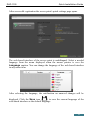
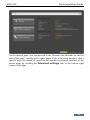
The page displays general information on the access point and its software (the
version and the date of the firmware, the IP address of the device, the name of
the WLAN, etc.).
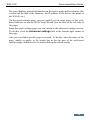
On the quick settings page, you can quickly get to some pages of the webbased interface or run the Wi-Fi Setup Wizard (use the link on the left side of
the page).
From the quick settings page you can switch to the advanced settings section.
To do this, click the Advanced settings link in the bottom right corner of
the page.
Also you can find a specific page via search. To do this, enter the name of the
page, wholly or partly, in the search bar in the top part of the web-based
interface page, and then select a needed link in the search results.
18