1
Operating Your Wave® Radio
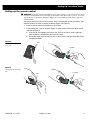
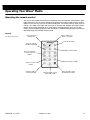
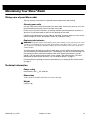
Setting the alarms
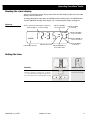
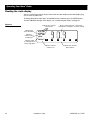
Note: There are two alarms indicated on the clock display as ALARM (primary) and ALARM 2
(secondary). You can set the wakeup time for either alarm with the radio on or off. The indicator for the selected alarm flashes when setting time or mode. The ALARM 2 indicator continues flashing for 10 seconds after setting ALARM 2.
Alarm
Set
Clock
Set
Alarm Mode
Time
Tuning
1
2
Alarm
Sleep
Tuning
Station
3
Presets
1
4
5
2
3
6
Presets
4
5
6
Volume
AUX
AM/FM
On/Off
Mute
Volume
Sleep/Snooze
AUX
Function
Control panel
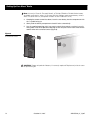
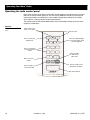
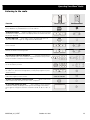
To select which alarm to set
– On the control panel, press and hold
Alarm Set. Press Alarm Mode to select ALARM or ALARM 2. The indicator
flashes for the alarm you are setting.
On the remote, press Time. Press Alarm
to select ALARM 2 or to return
to ALARM. The indicator flashes for the alarm you are setting.
Alarm
Set
Alarm Mode
Time
Alarm
Tuning
Tuning
Alarm Mode
Sleep/Snooze
Sleep
To cancel the alarm mode
– Follow the directions for setting the alarm
mode. Press Alarm Mode (control panel) or Alarm
(remote) until the
display shows no alarm mode indicators.
Alarm Mode
To check the alarm setting
– On the control panel, press and hold
Alarm Set to see the ALARM wakeup time and the preset station. While holding Alarm Set, press Alarm Mode to see the ALARM 2 wakeup time and the
preset station.
On the remote, press Time to see the ALARM wakeup time. Press Alarm
to see the ALARM 2 wakeup time. Press Time again to return the display to the current time. ALARM 2 flashes for 10 seconds.
October 22, 2001
Remote control
Alarm
Set
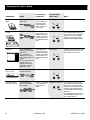
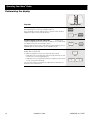
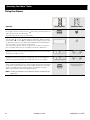
To set the alarm mode
– On the control panel, after selecting the alarm,
release Alarm Set and press Alarm Mode to select one of the following alarm
modes (Press Alarm
on the remote):
For tone only, press until you see the
indicator.
For radio only, press until you see the
indicator.
For tone and radio, press until you see both indicators
.
When the alarm tone sounds, press Sleep/Snooze to turn the radio on. Press
Sleep/Snooze to pause the radio for 10 minutes.
AM255380_01_V.PDF
On
Off
Time
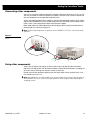
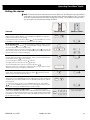
To set the alarm time
– On the control panel, hold down Alarm Set and
press Tuning up ( ) or down ( ). The time display changes slowly at first,
then more quickly. Release Tuning to stop.
On the remote, press Time. Press Tuning up ( ) or down ( ). The time display changes slowly at first, then more quickly. Release Tuning to stop. Press
Time to return to the current time display.
To wake to a preselected radio station
– On the control panel,
ONLY, select ALARM or ALARM 2. Press and hold Alarm Set, and then press
one of the six station Presets buttons (you can change between AM and FM
if needed). To clear the preset, press and hold Alarm Set and press the button for that preset again.
AM
FM
Wave Radio
Wave Radio
Alarm
Set
Alarm Mode
Time
1
Alarm
Set
2
3
Use the control panel to
select this feature.
Presets
4
5
6
21