1
Contents
5.3
5.4
6
6.1
6.2
6.3
6.4
6.5
6.6
5.2.4 Adding a dial plan rule on the Acano solution ......................................................... 32
Media Encryption for SIP Calls ........................................................................................ 33
IVR Configuration ............................................................................................................ 33
Dial Plan Configuration – Integrating Lync Clients ........................................................... 34
Lync Clients Dialing into a Call on the Acano solution ..................................................... 34
6.1.1 Lync Front End Server configuration ...................................................................... 34
6.1.2 Adding a dial plan rule on the Acano solution ......................................................... 34
Integrating SIP Endpoints and Lync Clients ..................................................................... 35
Web Admin Interface Configuration Pages that Handle Calls .......................................... 35
6.3.1 Outbound Calls page ............................................................................................. 36
6.3.2 Incoming Call page: call matching .......................................................................... 37
6.3.3 Call forwarding ....................................................................................................... 37
Adding Point-to-Point Calls between Lync Clients and SIP Video Endpoints ................... 38
6.4.1 Lync Front End Server configuration ...................................................................... 39
6.4.2 VCS configuration .................................................................................................. 39
6.4.3 Acano solution configuration .................................................................................. 39
Integrating Acano Clients with SIP and Lync Clients ....................................................... 40
Lync Edge Server Integration .......................................................................................... 40
6.6.2 Configuration for using Lync Edge ......................................................................... 41
7
7.1
7.2
7.3
LDAP Configuration......................................................................................................... 44
Why use LDAP? .............................................................................................................. 44
Acano Solution Settings .................................................................................................. 44
Example .......................................................................................................................... 47
8
8.1
8.2
8.3
Web Admin Interface Settings for XMPP ......................................................................... 49
Network Topology ........................................................................................................... 49
XMPP Settings ................................................................................................................ 50
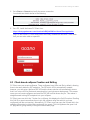
Client-based coSpace Creation and Editing .................................................................... 51
9
9.1
9.2
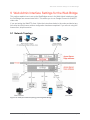
Web Admin Interface Settings for the Web Bridge ........................................................... 53
Network Topology ........................................................................................................... 53
Web Bridge Settings........................................................................................................ 54
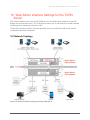
10 Web Admin Interface Settings for the TURN Server ........................................................ 56
10.1 Network Topology ........................................................................................................... 56
10.2 TURN Server Settings ..................................................................................................... 57
11
11.1
11.2
11.3
11.4
Customization, Troubleshooting, API and Logs ............................................................... 58
Customization ................................................................................................................. 58
Diagnostics and Troubleshooting .................................................................................... 58
Application Programming Interface.................................................................................. 58
Call Detail Record Support .............................................................................................. 58
Appendix A DNS Records Needed for the Acano Solution .................................................... 60
DNS A Records ........................................................................................................................ 60
DNS SRV Records ................................................................................................................... 60
Acano solution: Deployment Guide R1.2 76-1006-06-K
Page 3