1
Initial setup
2.5
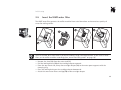
Insert the WMF water filter
The WMF water filter protects the coffee machine from scale formations and ensures best quality of
water for making coffee.
There is no need for a water filter if the water hardness range is between 0 and 4. If you insert a water
filter, set the coffee machine accordingly (see „water filter being used?“ on page 16).
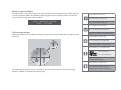
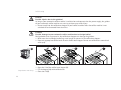
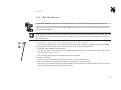
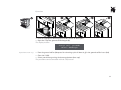
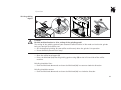
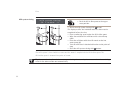
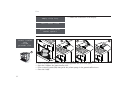
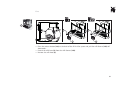
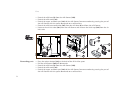
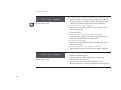
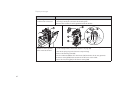
> Remove the sieve (7a) from the water tank (7).
> Pull the locking device (7b) of the cartridge adapter upwards.
> From the top lateral side, clamp the cartridge adapter (7c) to the water spout supports with the
clamping ring.
> Press the locking device on the cartridge adapter downwards.
> Attach the new water filter cartridge (7d) to the cartridge adapter.
10