1
System expansions
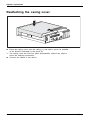
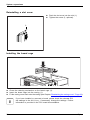
Closing the drive cage
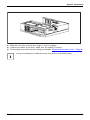
Drive cage
Take care not to trap any cables when folding the drive cage into the closed position.
Make sure that the retaining mechanism on the memory module is closed.
1
► Fold the drive cage to the closed position (1).
► Fit the casing cover back onto the casing (see Chapter "Reattaching the casing cover.", Page 38).
Overview of drive bays and drives in your device
The casing can accommodate several accessible and non-accessible drives:
•
•
•
one drive bay for an accessible 5 1/4 inch drive
one drive bay for an accessible 3 1/2 inch drive
one drive bay for an non-accessible 3 1/2 inch drive (hard disk)
"Accessible drives" are e.g. DVD or CD ROM drives, into which a data medium can be
inserted from outside. "Non-accessible drives" are for example hard disk drives.
40
Fujitsu