1
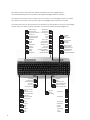
Hotkeys und KeyM@n-Taste
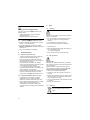
In Kombination mit der sog. KeyM@n-Taste (neben der strg-Taste) haben manche Tasten Mehrfach-Funktionen. Sie erkennen
diese Tasten an den umrahmten Symbolen. Um diese Funktionen nutzen zu können, ist es erforderlich, die beiliegende KeyM@nSoftware zu installieren (die mit * markierten Tasten funktionieren auch ohne KeyM@n-Software).
Hotkeys and KeyM@n key
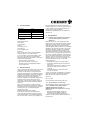
When used in combination with the KeyM@n key (beside the Ctrl key), many keys can have several functions. You can recognise
these keys by their framed symbols. In order to use these functions, you must first install the KeyM@n software included in delivery.
The keys marked * can also function without the KeyM@n software.
Touches d'accès direct et touche KeyM@n
En combinaison avec la touche KeyM@n (placée à côté de la touche Ctrl), certaines touches ont des fonctions multiples. Ces touches
sont reconnaissables à leurs symboles encadrés. Pour avoir accès à ces fonctions, il est nécessaire d'installer le logiciel KeyM@n
fourni (les touches suivies du symbole * ne nécessitent pas l'installation du logiciel KeyM@n).
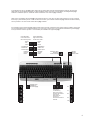
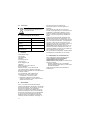
Linke Maustaste...
Left mouse button...
Dé de souris gauche...
Rechte Maustaste...
Right mouse button...
Dé de souris droite...
...klicken
...click
...cliquer
...doppelklicken
...double-click
...double-cliquer
...doppelklicken
...double-click
...double-cliquer
...festhalten
...depress
...retenir
...festhalten
...depress
...retenir
KeyM@n-Taste
KeyM@n key
Touche KeyM@n
Nach oben scrollen
Scroll up
Défiler vers le haut
Nach unten scrollen
Scroll down
Défiler vers le bas
Ausschneiden
Cut
Couper
Einfügen
Paste
Coller
Kopieren
Copy
Copier
Pause*
...klicken
...click
...cliquer
F11*
F12*
NumLOCK-Status*
NumLOCK status*
Le statut NumLOCK*
Rollen*
Scroll*
Défiler*
Pos1*
Home*
Pos1*
Ende*
End*
Fin*
Bewegung des Mauszeigers
in Pfeilrichtung
Move of the mouse pointer in
the direction of the arrow
Mouvement du pointeur de
souris dans le sens de la flèche
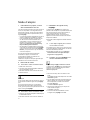
KeyM@n-Lock
Durch die sog. KeyM@n-Lock Funktion können Sie die
Ebenen der seitlichen XPress-Tasten tauschen.
D. h. die Funktionen Kopieren, Einfügen... sind direkt
zu erreichen. Drücken Sie hierzu gleichzeitig die
KeyM@n-Taste und die Feststell-Taste.
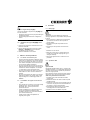
Using the KeyM@n lock function, you can exchange
the levels of the XPress keys on the side. This will
allow you to access functions such as Copy, paste
etc. directly. To do this, press the KeyM@n key and
the Caps Lock key simultaneously.
La fonction de verrouillage KeyM@n permet d'inverser
les fonctions des touches Xpress placées sur le côté,
de façon à ce que les fonctions Copier, Coller… soient
directement accessibles. Pour cela, appuyer
simultanément sur la touche KeyM@n et la touche
de verrouillage.
XPressList 1
XPressList 2
XPressList 3
Wiederholen
Repeat
Répéter
Rückgängig
Undo
Annuler
3