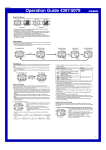
1
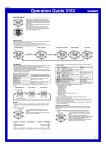
Operation Guide 5216
Digital Time and Date
Use the Timekeeping Mode to set and view a digital display of the current time and
date.
When setting the digital time, you can also configure settings for summer time
(Daylight Saving Time or DST), your Home City code (the code for the city where you
normally use the watch), the 12/24-hour format, and the illumination duration.
x This watch is preset with a number of city codes, each of which represents the time
zone where that city is located. When setting the digital time, it is important that you
select the correct city code for your Home City. If your location is not included in the
preset city codes, select the preset city code that is in the same time zone as your
location.
x Note that all of the times for the World Time Mode city codes (page E-19) are
displayed in accordance with the digital time and date settings you configure in the
Timekeeping Mode.
x After you correctly set your Home City time and date, you can set the watch up for
timekeeping with a different city code simply by changing the Home City code in the
Timekeeping Mode.
To set the digital time and date
1. In the Timekeeping Mode, hold down A until “ADJ”
appears on the display. Release A and the city code
of your currently selected Home City will flash on the
display, which indicates the setting screen.
2. Use B and D to scroll through the city codes until the
one you want is displayed.
x Make sure you select your Home City code before
changing any other setting.
x For full information on city codes, see the “City Code
Table” at the back of this manual.
E-10
E-11
3. Press C to move the flashing in the sequence shown below to select the other
settings.
C
C
Home City Code
C
DST
12/24-Hour
Format
C
Seconds
Button Operation Tone
Day
C
Month
C
Year
Do this:
Use D (east) and B (west).
Toggle between Daylight Saving Time (
Standard Time (
)
Hour
Toggle between 12-hour (
(
) timekeeping
Minutes
C
To do this:
Change the Home City code
C
C
Illumination Duration
C
Screen
) and Press D.
) and 24-hour
Reset the seconds to
C
Change the hour or minutes
4. When the setting you want to change is flashing, use B and D to change it as
described below.
Use D (+) and B (–).
Change the year
Change the month or day
/
Toggle the button operation tone between
(on) and
(off)
Press D.
Select one second (
) or three seconds
(
) as the illumination duration
E-12
5. Press A to exit the setting screen.
x The analog time will automatically change so it is synchronized with the digital time
settings you configured.
x See “Digital Time Daylight Saving Time (DST) Setting” below for details about the
DST setting.
x The 12-hour/24-hour timekeeping format you select in the Timekeeping Mode is
applied in all modes.
x For details about illumination duration, see “Illumination” on page E-32.
Digital Time Daylight Saving Time (DST) Setting
Daylight Saving Time (summer time) advances the digital time setting by one hour
from Standard Time. Remember that not all countries or even local areas use Daylight
Saving Time.
E-13
To toggle the Timekeeping Mode digital time between DST and Standard Time
1. In the Timekeeping Mode, hold down A until “ADJ”
appears on the display. Release A and the city code
of your currently selected Home City will flash on the
display, which indicates the setting screen.
2. Press C to display the DST setting screen.
3. Press D to toggle between Daylight Saving Time (
displayed) and Standard Time (
displayed).
4. Press A to exit the setting screen.
x The DST indicator appears on the Timekeeping, Alarm,
$34INDICATOR
and Hand Setting Mode to indicate that Daylight Saving
Time is turned on.
E-14
Analog Timekeeping
The analog time of this watch is synchronized with the digital time. The analog time
setting is adjusted automatically whenever you change the digital time.
Note
x The hands for the analog timepiece move to adjust to a new setting whenever any
of the following occurs.
When you change the digital time setting manually
When you change the Home City code and/or DST setting
x If the analog time does not match the digital time for any reason, use the procedure
described under “To adjust home positions” (page E-17) to match the analog setting
to the digital setting.
x Whenever you need to adjust both the digital and the analog time settings manually,
make sure you adjust the digital setting first.
x Depending on how much the hands have to move in order to adjust to the digital
time, it may take some time before they stop moving.
E-15
Adjusting Home Positions
Strong magnetism or impact can cause the hands of the watch to be off. If this
happens, perform the applicable home position adjustment procedures in this section.
x Hand home position adjustment is not required if the analog time and digital time are
the same in the Timekeeping Mode.
To adjust home positions
1. In the Timekeeping Mode, hold down A for about five
seconds. You can release the button after “H-SET”
appears on the display.
x Though “ADJ” will appear on the display after about
two seconds, do not release the button yet. Keep it
depressed until “H-SET” appears.
x “0:00” will flash on the display and the hour, minute,
and left dial hands should move to 12 o’clock (their
home positions).
#ORRECTHOURAND
MINUTEHANDPOSITIONS
E-16
x If the hour and minute hands are not in the correct positions, use D (+) and B
(–) to adjust them.
x If the left dial hand is not in the correct position, use C to adjust it.
x Holding down D, B, or C for a few seconds will start high-speed movement
of each hand (which will continue even if you release the button). To stop highspeed hand movement, press any button.
x D, B and C high-speed hand movement will also stop automatically as
described below.
− D : After 12 revolutions of the minute hand
− B : After one revolution of the minute hand
− C : After one revolution of the left dial hand
2. After everything is the way you want, press A to return to the Timekeeping Mode.
x After performing home position adjustment, enter the Timekeeping Mode and check
to make sure that the analog hands and the digital display indicate the same time. If
they do not, perform home position adjustment again.
E-18
E-17
World Time
#URRENTTIMEFORTHE
SELECTEDCITYCODE
World Time digitally displays the current time in 48 cities
(31 time zones) around the world.
x All of the operations in this section are performed in
the World Time Mode, which you enter by pressing C
(page E-6).
#ITYCODE
E-19