1
Main outs
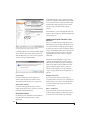
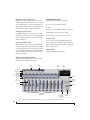
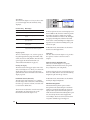
The main outputs serve as independent outputs.
The main out volume is controlled by the volume
knob on the front panel. Push the knob to toggle
between phone and main out volume control. In a
standard studio configuration, the main outs are
intended for a pair of studio monitors, but they can
also be used as additional outputs for any purpose.
Optical
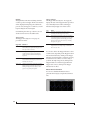
The 8pre USB provides 8-channel digital input and
output at 44.1, 48, 88.2 and 96 kHz. The 8pre USB
rear panel provides two sets of ADAT optical
(“lightpipe”) connectors: a top row and a bottom
row.
Reminder: optical goes OUT to IN and IN to OUT.
Input and output are independent. For example,
you could connect ADAT optical input from your
digital mixer and connect the output to an audio
interface connected to your computer.
Optical operation at 44.1 or 48 kHz
When connected to an ADAT “lightpipe”
compatible device, the two optical connectors in
the top row provide eight channels of digital input
and output at 44.1 and 48 kHz.
In addition, when operating the 8pre USB at a 1x
sample rate (either 44.1 or 48 kHz), optical output
is duplicated on the second (lower) optical output.
This lets you send the 8pre USB’s 8-channel ADAT
optical output to two separate destinations in your
studio, if needed.
Optical operation at 88.2 or 96 kHz
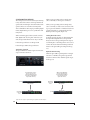
When operating the 8pre USB at the 2x sample
rates (88.2 or 96 kHz), the top row of optical
connectors provides channels 1-4 (in and out) and
the bottom row provides channels 5-8 (in and out)
when connected to another optical device that
supports 88.2/96 kHz optical sample rates.
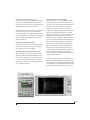
When operating the optical ports at a 2x sample
rate, be sure to choose either Type I or Type II
operation, as explained in “Setting the 2x optical
mode” on page 31.
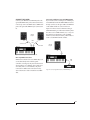
Using optical I/O when operating the 8pre USB as
an audio interface
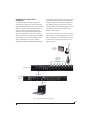
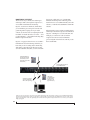
When the 8pre USB is connected to a computer
(Figure 4-3 on page 22), these optical ports
provide digital input and output to and from the
computer.
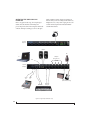
Using optical I/O to operate the 8pre USB as an
8-channel expander
When the 8pre USB is not connected directly to a
computer via USB, the optical input is disabled and
the eight optical output channels mirror any
incoming signal on the 8pre USB’s eight XLR/TRS
combo jack analog inputs. By connecting the 8pre
USB optical output to another device, such as
another ADAT-optical equipped interface or a
digital mixer, you add an additional eight mic
inputs to your system, as demonstrated in
Figure 4-4 on page 23. This can be done at any
sample rate up to 96 kHz.
To set the sample rate (or clock mode) when
operating as an 8-channel optical expander, see
“Setting the clock source in converter mode” on
page 31.
20
INSTALLING THE 8PRE USB HARDWARE