1
P95f-Complete.fm Page 4 Wednesday, July 26, 2000 5:47 PM
Quick Installation
E
N
G
L
I
S
H
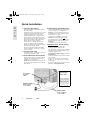
1 Connect video cable(s)
Make sure both the monitor and computer
are powered OFF.
The monitor can be connected to one or two
computers using either the DB-15 video
cable (included) or a BNC video cable
(purchased separately). To toggle between
two computers: connect the DB-15 video
cable to the monitor and first computer, and
then connect the BNC video cable to the
monitor and the second computer.
Macintosh users: Models older than G3
require a ViewSonic Macintosh adapter.
Attach the adapter to the computer and plug
the video cable into the adapter.
To order a ViewSonic® Macintosh adapter,
contact ViewSonic. See Customer Support
in this user guide.
2 Connect power cord
Connect the power cord from the monitor to
a properly grounded AC outlet.
3 Power-ON monitor and computer
Power-ON the monitor, then power-ON the
computer. This sequence (monitor before
computer) is very important.
NOTE: At this point Windows 98 users may
receive a message asking them to install the
P95f INF file.
4 Install Display Optimization files
(1) Insert the ViewSonic wizard CD-ROM
into your computer’s CD-ROM drive.
NOTE: if your computer does not have a
CD-ROM drive, see the Customer Support
section of this user guide.
(2) Wait for the CD-ROM to auto-start.
NOTE: if the CD-ROM does not autostart: double-click on the CD-ROM icon in
Windows Explorer, then double-click on
Install.exe.
(3) Follow the on-screen instructions.
5 Windows users: Set the Timing
Mode (resolution and refresh rate)
Example: 1600 X 1200 @ 85 Hz.
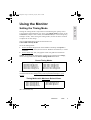
For instructions on changing the resolution
and refresh rate, see the user guide for your
computer's graphics card.
Installation is complete. Enjoy your new
P95f monitor!
To be best prepared for any future customer
service needs:
Write the serial number (see back of the
monitor) in “For your Records” on page 1
of this guide.
Register the warranty of your monitor on the
Internet at: www.viewsonic.com
Ports for
optional BNC
video cable
Port for DB15 video
cable
Power Cord
from monitor
to AC outlet
Power Cord
from computer
to AC outlet
4
ViewSonic
P95f