1
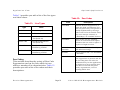
SPECTRUM Enterprise Manager
Device Management
Titlepae
Cisco MC3810 Management Module
Supports Management Module SM-CIS1005
Notice
Restricted Rights Notice
Aprisma Management Technologies, Inc. (Aprisma), reserves the right to make
changes in specifications and other information contained in this document without
prior notice. The reader should in all cases consult Aprisma to determine whether
any such changes have been made.
(Applicable to licenses to the United States Government only.)
The hardware, firmware, or software described in this manual is subject to change
without notice.
1. Use, duplication, or disclosure by the Government is subject to restrictions as
set forth in subparagraph (c) (1) (ii) of the Rights in Technical Data and
Computer Software clause at DFARS 252.227-7013.
Aprisma Management Technologies, Inc., 121 Technology Drive Durham NH 03824
2. (a) This computer software is submitted with restricted rights. It may not be
used, reproduced, or disclosed by the Government except as provided in
paragraph (b) of this Notice or as otherwise expressly stated in the contract.
IN NO EVENT SHALL APRISMA, ITS EMPLOYEES, OFFICERS, DIRECTORS,
AGENTS, OR AFFILIATES BE LIABLE FOR ANY INCIDENTAL, INDIRECT,
SPECIAL, OR CONSEQUENTIAL DAMAGES WHATSOEVER (INCLUDING BUT
NOT LIMITED TO LOST PROFITS) ARISING OUT OF OR RELATED TO THIS
MANUAL OR THE INFORMATION CONTAINED IN IT, EVEN IF APRISMA HAS
BEEN ADVISED OF, KNOWN, OR SHOULD HAVE KNOWN, THE POSSIBILITY
OF SUCH DAMAGES.
(b) This computer software may be:
(1) Used or copied for use in or with the computer or computers for which
it was acquired, including use at any Government installation to which
such computer or computers may be transferred;
Printed in the United States of America.
(2) Used or copied for use in a backup computer if any computer for which
it was acquired is inoperative;
Order Number: 9033287-01
(3) Reproduced for archival or backup purposes;
Aprisma Management Technologies, Inc.
121 Technology Drive
Durham NH 03824
(4) Modified, adapted, or combined with other computer software, provided
that the modified, combined, or adapted portions of the derivative
software incorporating restricted computer software are made subject
to the same restricted rights;
SPECTRUM, the SPECTRUM IMT/VNM logo, DCM, IMT, and VNM are registered
trademarks, and SpectroGRAPH, SpectroSERVER, Inductive Modeling
Technology, Device Communications Manager, and Virtual Network Machine
are trademarks of Aprisma or its affiliates.
(5) Disclosed to and reproduced for use by support service contractors in
accordance with subparagraphs (b) (1) through (4) of this clause,
provided the Government makes such disclosure or reproduction
subject to these restricted rights; and
Copyright © June 2000 by Aprisma Management Technologies. All rights reserved.
Ethernet is a trademark of Xerox Corporation.
(6) Used or copied for use in or transferred to a replacement computer.
(c) Notwithstanding the foregoing, if this computer software is published
copyrighted computer software, it is licensed to the Government, without
disclosure prohibitions, with the minimum rights set forth in paragraph (b) of
this clause.
Virus Disclaimer
Aprisma makes no representations or warranties to the effect that the Licensed
Software is virus-free.
Aprisma has tested its software with current virus checking technologies. However,
because no anti-virus system is 100% reliable, we strongly caution you to write
protect and then verify that the Licensed Software, prior to installing it, is virus-free
with an anti-virus system in which you have confidence.
(d) Any other rights or limitations regarding the use, duplication, or disclosure
of this computer software are to be expressly stated in, or incorporated in,
the contract.
(e) This Notice shall be marked on any reproduction of this computer software, in
whole or in part.
Device Management
Page 2
Cisco MC3810 Management Module
Contents
INTRODUCTION
6
Purpose and Scope ........................................................6
Required Reading ...........................................................6
Supported Devices..........................................................7
The SPECTRUM Model ..................................................7
EVENTS
DEVICE VIEW
10
TASKS
12
Launch CiscoView ........................................................12
Monitor Performance ....................................................12
Set Thresholds ..............................................................12
Create Messages ..........................................................12
Configure a Port ............................................................12
View IF/Port/App Statistics............................................12
View/Change Interface IP Address ...............................12
View Current Interface/Port Status ...............................13
Configure the Device ....................................................13
Enable or Disable a Port ...............................................13
Port Route Settings .......................................................13
Set Connections............................................................13
Identify Applications Supported ....................................13
15
Interface Device View ................................................... 15
Interface Icons...........................................................16
Interface Icon Subviews Menu............................... 17
Interface Status View ................................................18
Interface Configuration - Information View ................ 18
Secondary Address Panel View ................................ 19
9
CISCOVIEW
SPECTRUM Enterprise Manager
Update the Ping Request List ....................................... 13
Set Environment Variables ........................................... 13
Enable or Disable Redundant Addresses ..................... 13
Create LANs ................................................................. 14
Manage the Buffers.......................................................14
DEVICE TOPOLOGY VIEW
20
APPLICATION VIEW
21
Application Icons ...........................................................22
Supported Applications ................................................. 23
Generic Routing Applications........................................ 23
Routing Protocol Comparison View........................... 24
AppleTalk Routing Application .................................. 24
RTMP Table View .................................................. 24
Kinetics Internet Protocol Table View .................... 25
Name Binding Protocol Table View ....................... 26
ZIP Table View ...................................................... 27
Page 3
Cisco MC3810 Management Module
Contents
Contents
LocalTalk Interface Table View ..............................27
ATPORT Table View..............................................28
ARP Table View .....................................................29
AppleTalk Echo View .............................................30
DECnet Routing Application ......................................30
Host Table View .....................................................30
Area Table View.....................................................31
Interface Cost Table View ......................................31
DECnet Routing Level 1 View................................32
DECnet Routing Level 2 View................................32
DECnet Routing Hello View ...................................32
IP Routing Application ...............................................33
Cisco IP Accounting Table View ............................33
BGP4 Application ......................................................34
Peer Table .............................................................34
Path Attribute Table ...............................................36
Novell Routing Application.........................................37
Novell Service Advertisement Protocol (SAP) View37
Novell Internet Packet Exchange (IPX) View .........37
Check Point Information .....................................37
IPX Accounting Information ................................37
Check Point Accounting Table ...........................38
Accounting Table................................................38
Vines Routing Application..........................................39
Vines Routing Echo View.......................................39
Vines Routing ICP View .........................................39
Vines Broadcast Detail View ..................................40
Vines Rx View ........................................................41
Vines Tx View ........................................................41
XNS Routing Application ...........................................42
SPECTRUM Enterprise Manager
Page 4
Cisco BSTUN Application ......................................... 42
BSTUN Groups View............................................. 42
BSTUN Ports View ................................................ 43
BSTUN Routes View ............................................. 44
Cisco STUN Application............................................ 44
STUN Group View ................................................. 45
STUN Port View .................................................... 45
STUN Route View ................................................. 46
Optional Applications.................................................... 47
Cisco Chassis Application......................................... 47
Cisco Chassis Card View ...................................... 47
Cisco Chassis General Information View .............. 48
Chassis Information ........................................... 48
ROM Information ............................................... 48
RAM Information ................................................ 49
Cisco Modem Application ......................................... 49
Modem System Information View.......................... 49
Modem Line Status Table View............................. 51
Modem Line Configuration Table View ................. 55
Modem Line Statistics Table View ........................ 57
Modem Line Speed Statistics Table View ............. 58
Cisco Flash Application............................................. 59
Cisco Flash Configuration View ............................ 59
Flash Directory................................................... 60
Flash Device Chip Properties Table View ............. 60
Flash Copy Operations Table View ....................... 61
Flash Device Properties Table View ..................... 61
Flash File Properties Table View........................... 62
Flash Miscellaneous Operations Table View ........ 62
Flash Device Partition Properties Table View ....... 62
Cisco MC3810 Management Module
Contents
Flash Partitioning Operations Table View ..............63
Cisco Ping Application...............................................63
Ping Request Table View.......................................63
Cisco Queue Application ...........................................65
Queue Interface View ............................................65
Queue Statistics View ............................................66
Queue Rotation Interface View ..............................66
ATM Client Application ..............................................67
VCL Table ..............................................................67
ATM Link Modeling Options ...................................68
EnvMon Application...................................................69
Enable Notifications ...............................................69
Fan Status..............................................................69
Power Supply Status..............................................69
Temperature Status ...............................................70
Voltage Status........................................................70
FDDI Application........................................................71
MAC Table View ....................................................71
SMT Table View.....................................................72
Discovery Application ................................................73
Discovery Cache Table View .................................73
Interface Discovery Status Table ...........................73
Cisco DS1APP1406 Application................................74
DS1 Configuration Table........................................74
DS1 Fractional Table .............................................79
Ethernet Application ..................................................80
Interface Ethernet Application ...................................80
Cisco Interface Application ........................................80
Cisco RFC1317 Application.......................................80
RS232 Port Table ..................................................80
SPECTRUM Enterprise Manager
Contents
Cisco RFC1317 Async Application ........................... 81
RS232 Asynchronous Port Table .......................... 81
Cisco Terminal Server Application............................ 82
Line Configuration View ........................................ 82
Cisco Terminal Server Line View .......................... 83
Cisco Terminal Server Session View .................... 84
PERFORMANCE VIEWS
86
Device Performance View ............................................ 86
Performance View ........................................................ 87
Port Performance View ................................................ 87
CONFIGURATION VIEW
89
Device Configuration View ........................................... 89
Interface Configuration Table.................................... 90
Redundancy and Model Reconfiguration
Options View ........................................................ 91
Interface Address Translation Table View............. 92
Cisco Buffer Management View ............................ 93
Buffer Elements ................................................. 93
Buffer Management Buttons .............................. 93
Network/Host Configuration View.......................... 96
MODEL INFORMATION VIEW
98
INDEX
99
Page 5
Cisco MC3810 Management Module
Introduction
Purpose and Scope
Introduction
This section introduces the SPECTRUM Device Management documentation for Cisco MC3810 devices.
This introduction to the Device Management
documentation for Cisco MC3810 devices
contains the following information:
•
•
•
•
Purpose and Scope on Page 6
Required Reading on Page 6
Supported Devices on Page 7
The SPECTRUM Model on Page 7
Purpose and Scope
management using SPECTRUM and for
explanations of basic SPECTRUM functionality
and navigation techniques, refer to the
documentation listed under Required Reading.
Required Reading
To use this documentation effectively, you must
be familiar with the information covered by the
other SPECTRUM online documentation listed
below.
Use this documentation as a guide for managing
the Cisco MC3810 device with the SPECTRUM
management module SM-CIS1005. The
documentation describes the icons, menus, and
views that enable you to remotely monitor,
configure, and troubleshoot the Cisco MC3810
device through software models in your
SPECTRUM database.
• Getting Started with SPECTRUM for
Operators
• Getting Started with SPECTRUM for
Administrators
• How To Manage Your Network with
SPECTRUM
• SPECTRUM Views
Only information specific to the supported
management module is included in this
document. For general information about device
Device Management
• SPECTRUM Menus
• SPECTRUM Icons
Page 6
Cisco MC3810 Management Module
Introduction
Supported Devices
Supported Devices
The SPECTRUM Model
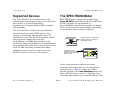
The Cisco MC3810 is a multiservice access
concentrator that integrates data, voice, and video
onto public or private Frame Relay,
Asynchronous Transfer Mode (ATM), or leased
line networks.
SPECTRUM uses a single device model type,
Cisco_MC3810, for modeling the Cisco MC3810.
MC3810 models are represented in
SpectroGRAPH views by Device icons. As shown
below, the Device icon varies slightly depending
on the kind of view in which it appears.
The Cisco MC3810 connects to any standard
private branch exchange (PBX) switch, key
system, or telephone, and provides up to 30
channels of voice. The MC3810 supports tie-line
and ring-down modes and dual tone
multifrequency (DTMF) digit-based per-call
switching, using dialed digits to select destination
sites and network calls. It may even eliminate the
need for PBX switching at small sites when
telephones and trunks are connected to the
MC3810 and it is used as a voice switch.
Model Name
Small Device icon appears in
Topology, Device Topology,
Application Views
MC3810
Model Name
Large Device icon
appears in Device Topology,
Location, and Interface
Device views.
MC3810
Device icons provide access to the views,
subviews, and tables that let you manage the
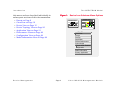
modeled device. Figure 1 shows the modelspecific portion of the Icon Subviews menu for a
Cisco_MC3810 Device icon in a Topology view.
The views listed below are accessible directly from
Device Management
Page 7
Cisco MC3810 Management Module
Introduction
this menu and are described individually in
subsequent sections of this documentation.
•
•
•
•
•
•
•
•
The SPECTRUM Model
Figure 1: Device Icon Subviews Menu Options
Events on Page 9
CiscoView on Page 10
Device View on Page 15
Device Topology View on Page 20
Application View on Page 21
Performance Views on Page 86
Configuration View on Page 89
Model Information View on Page 98
Model Name
MC3810
Model Name
MC3810
Zoom - >
CiscoView
Device
DevTop
Application
Device Performance
Acknowledge
Flash Green Enabled
Configuration
Model Information
Primary Application
Device Management
Page 8
Cisco MC3810 Management Module
Events
Events
This section provides the range of event messages that are specific to the Cisco MC3810.
The Cisco MC3810 has several event and alarm
messages that are specific to its devices. If these
messages are not sufficient and you wish to
create your own messages, or view the existing
messages for the MC3810, you can do so using
the ECEditor.
The event messages for the MC3810, which range
from Event03250000 to Event03250002, can
be found in the following directory:
<install area>/SG-Support/CsEvFormat
Device Management
Page 9
Cisco MC3810 Management Module
CiscoView
CiscoView
This section describes how to access Cisco’s CiscoView management software from SPECTRUM.
CiscoView is management software specific to
Cisco Routers.
The Cisco_MC3810 model type provides a menu
option from the Device icon that is used to launch
CiscoView.
In order for this menu option to function you
must update your .profile file to map this
menu selection to where CiscoView is located on
your system.
#CiscoView 3.0
export CVIEW =<path_to_ciscoview>
For Windows NT and Window 2000
From the Start>Run window, type
regedit (registry editor)
Navigate to
HKEY_LOCAL_MACHINE>SOFTWARE> Aprisma
Management Technologies> Spectrum60>
Environment
MC3810
Zoom - >
CiscoView
Device
DevTop
Application
Device Performance
Acknowledge
Device Management
For HP-UX and Solaris
Add the following information to the
/opt/SPECTRUM/spectrum60.env file:
Choose Edit>New>String Value
Type CVIEW for the name, and
<path_to_ciscoview> as the string value.
Page 10
Cisco MC3810 Management Module
CiscoView
Note:
Note:
CiscoView 3.0 will appear as
“Cisco View” on your device menu
after the above steps have been
followed. This should not be confused
with “CiscoView”, which denotes the
CiscoWorks 2000 CiscoView. The
CiscoWorks 2000 menu picks will
only appear in the device menu if the
SPECTRUM Adapter script has been
run. See the CiscoWorks 2000
documentation for further
information.
Device Management
Page 11
Cisco MC3810 Management Module
Tasks
Tasks
This section identifies various management and troubleshooting tasks that can be performed for the MC3810
using the views, icons, and labels referenced in this document.
Launch CiscoView
Configure a Port
• Update .profile file (Page 10)
•
•
•
•
Monitor Performance
• Interface Device View (Page 15)
• Device Performance View (Page 86)
• Port Performance View (Page 87)
View IF/Port/App Statistics
• Interface Device View (Page 15)
• Interface Icons (Page 16)
• Interface Status View (Page 18)
Set Thresholds
• Interface Thresholds (Page 18)
• IPX Accounting Information (Page 37)
• Model Information View (Page 98)
Create Messages
View/Change Interface IP
Address
• Secondary Address Panel (Page 19)
• Event Messages (Page 9)
Device Management
IP Address Label (Page 17)
Interface Configuration View (Page 18)
Interface Configuration Table (Page 90)
Interface Address Translation Table View
(Page 92)
Page 12
Cisco MC3810 Management Module
Tasks
View Current Interface/Port
Status
• Interface Device View (Page 15)
• Gauge Label (Page 17)
• Administrative Status (Page 18)
Configure the Device
•
•
•
•
•
•
•
Secondary Address Panel (Page 19)
Chassis Information View (Page 48)
Modem Application (Page 49)
Flash Application (Page 60)
Device Configuration View (Page 89)
Reconfigure Model (Page 92)
Network/Host Configuration View (Page 96)
Enable or Disable a Port
• Interface Status View (Page 18)
• Admin Status (Page 18)
• Peer Table - Admin Status (Page 34)
Port Route Settings
View Current Interface/Port Status
Set Connections
• BGP4 Peer Admin Status (Page 34)
• Local ACK-BSTUN Connection (Page 43)
• Terminal Server Line View (Page 83)
Identify Applications
Supported
• Common Applications (Page 23)
• Generic Routing Applications (Page 23)
• Optional Applications (Page 47)
Update the Ping Request List
• Ping Request Table View (Page 63)
Set Environment Variables
• EnvMon Application (Page 69)
Enable or Disable Redundant
Addresses
• Redundancy and Model Reconfiguration
Options View (Page 91)
• Default Peer Serial Interface STUN Route
(Page 45)
Device Management
Page 13
Cisco MC3810 Management Module
Tasks
Create LANs
Create LANs
• Discover LANs (Page 92)
Manage the Buffers
• Buffer Management View (Page 93)
Device Management
Page 14
Cisco MC3810 Management Module
Device View
Interface Device View
Device View
This section describes the Device view and its associated subviews for models of Cisco MC3810 devices in
SPECTRUM.
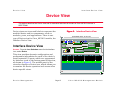
Device views use icons and labels to represent the
modeled device and its components, such as
modules, ports, and applications. There is one
type of Device view for Cisco_MC3810 models, the
Interface Device View.
Figure 2:
SpectroGRAPH: Device: 132.127.118.24
File
View
Tools
Bookmarks
Help
i
Model Name
Contact
Description
Location
Interface Device View
Interface Device View
Primary Application
Model Name
Access: From the Icon Subviews menu for the Interface
icon, select Device.
System Up Time
Manufacturer
Device Type
Serial Number
Network Address
Find Phy Addr
3810
Interface Description
MC3810
This view provides dynamic configuration and
performance information for each of the device’s
serial/network I/O ports, which are represented
by Interface icons in the bottom panel of the view,
as shown in Figure 2. The middle panel of the
view also displays a Device icon, which allows you
to monitor the device operation and access other
device-specific views.
1
OFF
2
OFF
3
ON
T1
T10
T1
T1 1
ethernet
Ethernet0
0.0.0.0
0.0.0.0
0:50:73:B:AA:FE
134.141.134
134.
132.127.118.24
0
0
0
4
OFF
5
OFF
frameRelay frameRelay
Serial0
Serial1
0.0.0.0
0
0.0.0.0
0
6
ON
7
ON
other
Null0
e Over ATM Peer
0.0.0.0
0.0.0.0
0
aal5
0
MC3810 of Type Cisco_MC3810 of Landscape X: Primary
Device Management
Page 15
Cisco MC3810 Management Module
Device View
Interface Device View
Interface Icons
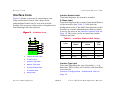
Figure 3 shows a closeup of an Interface icon
from an Interface Device view. Most of the
informational labels on the icon also provide
double-click access to other views, as explained in
the following label descriptions.
Figure 3:
Interface Icon
(a)
Interface Number Label
This label displays the interface number.
IF Status Label
This label displays the current Operational Status
of the interface (see Table 1). Note that the
background color of the label also depends on the
interface’s current Administrative Status, which
is set by the user in the Interface Status View on
Page 18. This view can be accessed by doubleclicking the label.
(b)
3 ON
Ethernet
Ethernet0
0:0:30:68:6F:1B
132.127.118.24
0
Table 1:
a
Interface Number Label
b
IF Status Label
c
Interface Type Label
d
Network Type Label
e
Physical Address Label
f
IP Address Label
g
Gauge Label
Device Management
Color
(c)
(d)
(e)
(f)
(g)
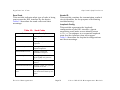
Interface Status Label Colors
Operational
Status
Administrative
Status
Label
Text
Green
ON
ON
ON
Blue
OFF
OFF
OFF
Yellow
OFF
ON
OFF
Red
Testing
Testing
Test
Interface Type Label
This label identifies the type of interface — e.g.,
Ethernet, FDDI, Other, etc. Double-click this label
to access the
Interface Configuration - Information View on
Page 18.
Page 16
Cisco MC3810 Management Module
Device View
Interface Device View
Network Type Label
This label identifies the type of network this
interface is connected to. Double-click the label to
open the Model Information view for the interface.
SPECTRUM Views documentation for more
information). Double-click this label to open the
Port Performance View on Page 87.
Physical Address Label
This label displays the physical address of the
Cisco MC3810 interface. Double-click the label to
open the Interface Address Translation table. This
table cross-references device IP addresses to
device MAC (Ethernet) addresses for selected
nodes between networks. Double-clicking on any
column entry opens an address-specific Address
Translation Table Information view. This view
provides the same information as the
corresponding row for the IF Address Translation
table, but allows you to modify field values.
Interface Icon Subviews Menu
IP Address Label
This label displays the IP address for this
Interface. Double-click this label to open the
Secondary Address panel. This panel provides
name, network address, and subnet mask
information for the interface. Any of the network
information entries from this panel can be
displayed on this label of the Interface icon.
Gauge Label
This label displays whichever performance
statistic has been selected in the Gauge Control
panel for this device’s interfaces (see the
Device Management
Table 2 lists the Icon Subviews menu options
available for the Interface icon.
Table 2:
Option
Interface Menu Options
Opens the . . .
Performance Filter
Port Performance View on Page 87.
Detail
Interface Detail view, which displays
Packet, Error, and Discard
Breakdown pie charts.
IF Status
Interface Status View on Page 18.
IF Configuration
Interface Configuration - Information
View on Page 18.
Model Information
Model Information View on Page 98.
IF Address
Translation Table
Interface Address Translation Table
view, which shows the Physical and
Network address for each interface.
Secondary Address
Panel
Secondary Address Panel View on
Page 19.
Thresholds
Interface Threshold view, which
allows you to set the thresholds for;
load, packet rate, error rate, and %
discarded.
Page 17
Cisco MC3810 Management Module
Device View
Interface Device View
Interface Status View
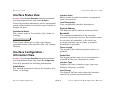
Interface Index
Refers to this interface’s number in sequential
order of interfaces.
Access: From the Icon Subviews menu for the Interface
icon in the Interface Device view, select IF Status.
This view provides information on the operational
status of the interface and allows you to enable or
disable the port.
Operational Status
The current state of the interface (Up, Down, or
Testing).
Administrative Status
This button allows you to select the desired
operational state of the interface (On, Off, Testing,
Default).
Interface Configuration Information View
Physical Address
The Ethernet (MAC) address of the interface.
Bandwidth
The estimated bandwidth of the interface,
measured in bits per second. For interfaces that
do not vary in bandwidth, or for which no
accurate estimate can be made, a nominal
bandwidth is provided.
Queue Length
The length of the outbound packet queue, in
packets.
Packet Size
The largest packet that can be transmitted or
received by the port, displayed in octets.
Access: From the Icon Subviews menu for the Interface
icon in the Interface Device view, select IF Configuration.
This view provides the following information.
Admin Status
The desired operational state of the interface (Up,
Down, or Testing).
Device Management
Local Description
User configurable interface description.
Interface Type
Displays the device interface type; types are
PPSerial, Ethernet, or FDDI.
Last Change
The System UpTime value when the interface
entered its current operational state.
Page 18
Cisco MC3810 Management Module
Device View
Interface Device View
Change Reason
The reason for the last operational change for the
interface.
Secondary Address Panel View
Access: From the Icon Subviews menu for the Interface
icon in the Interface Device view, select Secondary
Address Panel.
This panel provides a table of IP addresses and
masks obtained from the Address Translation
table within the device’s firmware. You can
change the current address displayed in the IP
Address field by selecting an entry from the table
in this panel and clicking the Update button.
Device Management
Page 19
Cisco MC3810 Management Module
Device Topology View
Interface Device View
Device Topology View
This section provides a brief description of the Device Topology view available for models of Cisco MC3810
devices in SPECTRUM.
Figure 4: DevTop View
Access: From the Icon Subviews menu for the
Cisco_MC3810 Device icon, select DevTop.
The lower panel of the Interface Device Topology
view (Figure 4) uses interface icons to represent
the device’s serial/network I/) ports. These icons
provide the same information and menu options
as those described in the Interface Device View on
Page 15. If there is a device connected to a
particular interface, a device icon appears on the
vertical bar above the interface icon along with an
icon representing the network group that
contains the device.
For further information on Device Topology views,
refer to the SPECTRUM Views documentation.
SpectroGRAPH: Device Topology: 132.127.118.24
File
View
Tools
Bookmarks
Help
i
3810
3810
MC3810
Model Name
MC3810
1
0.0.0.0
2
0.0.0.0
3
132.127.118.24
4
0.0.0.0
MC3810 of Type Cisco_MC3810 of Landscape X: Primary
Device Management
Page 20
Cisco MC3810 Management Module
Application View
Interface Device View
Application View
This section describes the Application view and the associated application-specific subviews available for
models of Cisco MC3810 devices in SPECTRUM.
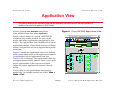
Figure 5: Cisco_MC3810 Application View
Access: From the Icon Subviews menu for the
Cisco_MC3810 Device icon, select Application.
When a device model is created, SPECTRUM
automatically creates models for each of the
major and minor applications supported by the
device. The Application view identifies all of these
application models, shows their current condition
status, and provides access to application-specific
subviews.
Figure 5 shows an Application view in its default
mode (Icon) where each of the application models
is represented by an Application icon (see
Figure 6 for a closeup.) The Application icons are
arranged hierarchically under a Device icon, with
major applications in the top row and their
respective minor applications stacked directly
below.
SpectroGRAPH: Application: MC3810
File
View
Tools
Help
Bookmarks
i
Model Name
Network Address
System Up Time
Manufacturer
Contact
Device Type
Description
Primary Application
Location
Serial Number
Cisco_MC3810
Server_Routing
Bridge App
M IB-II
SN MP2_Agent
GenRtrApp
Bridge_App
IP R outing
Static
Cis coIPApp
Static_App
SN MP2_Agent
C hassis
CiscoChapApp
CiscoChas App
ICM P
IC MP_App
N ovell
IC MP_App
Sy stem
System2_App
C iscoNovellApp
AppleTalk
System2_App
TC P
TC P2_App
ApplTlk RtrApp
T CP2_App
If you prefer to see applications displayed by
name only, in a single vertical list, select View >
Mode > List.
Device Management
MC3810 of type Cisco_MC3810 of Landscape tulip: Primary
Page 21
Cisco MC3810 Management Module
Application View
Application Icons
Application Icons
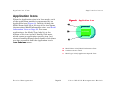
When the Application view is in Icon mode, each
of the application models is represented by an
Application icon (Figure 6). Double-clicking the
Model Name label (a) at the top of the icon opens
the associated Model Information view - see Model
Information View on Page 98. For some
applications, the Model Type label (c) at the
bottom of the icon is also a double-click zone,
which opens an application-specific view. Any
views accessible through these double-click zones
are also accessible from the Application icon’s
Icon Subviews menu.
Device Management
Page 22
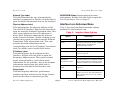
Figure 6: Application Icon
(a)
Chassis App
(b)
CiscoChasApp
CiscoChasApp
(c)
a
Model Name Label/Model Information View
b
Condition Status Label
c
Model type Label/Application-Specific View
Cisco MC3810 Management Module
Application View
Supported Applications
Supported Applications
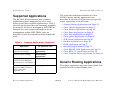
The MC3810 devices support both common
applications (those supported by all or most
devices) and device-specific applications. Table 3
lists the applications that are commonly available
for many or all devices managed by SPECTRUM.
Because they are common throughout device
management within SPECTRUM, they are
described in the documentation listed within the
table.
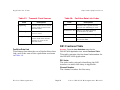
Table 3:
The views and subviews available for Cisco
MC3810 device-specific applications are
described in the rest of this section, grouped by
major application as listed below:
•
•
•
•
•
•
•
•
•
•
•
•
•
Common Applications Supported
Application
For more info, see...
Routing (GenRtrApp)
(includes IP Routing)
Miscellaneous
Applications
Ethernet (EthernetApp)
Miscellaneous
Applications
Bridging (GenBridgingApp)
Bridging Applications
(includes Static Bridging,
Spanning Tree, Transparent)
MIB-II (SNMP2_Agent)
(includes ICMP, System2,
TCP2, and UDP2
Applications)
Device Management
MIB-II Applications
Generic Routing Applications on Page 23
Cisco Chassis Application on Page 47
Cisco Modem Application on Page 49
Cisco Flash Application on Page 59
Cisco Ping Application on Page 63
Cisco Queue Application on Page 65
ATM Client Application on Page 67
EnvMon Application on Page 69
FDDI Application on Page 71
Discovery Application on Page 73
Cisco DS1APP1406 Application on Page 74
Cisco RFC1317 Application on Page 80
Cisco Terminal Server Application on Page 82
Generic Routing Applications
This major application has one menu option that
provides access to the following view:
Page 23
Cisco MC3810 Management Module
Application View
Generic Routing Applications
Routing Protocol Comparison
View
AppleTalk Routing Application
This major application (model type
ApplTlkRtrApp) provides the following
application-specific subviews. The Detail option
provides access to pie charts that display
standard Packet Breakdown, Error Breakdown,
and Discard Breakdown information.
This view displays pie charts that present the
following performance statistics for each routing
application.
•
•
•
•
•
Frames Forwarded
Frames Delivered
Frames Transmitted
Errors
Discards
• RTMP Table View on Page 24
• Kinetics Internet Protocol Table View on
Page 25
• Name Binding Protocol Table View on Page 26
• ZIP Table View on Page 27
• LocalTalk Interface Table View on Page 27
• ATPORT Table View on Page 28
• ARP Table View on Page 29
• AppleTalk Echo View on Page 30
The following Generic Routing major applications
are available.
•
•
•
•
•
•
•
•
AppleTalk Routing Application on Page 24
IP Routing Application on Page 33
BGP4 Application on Page 34
Novell Routing Application on Page 37
Vines Routing Application on Page 39
XNS Routing Application on Page 42
Cisco BSTUN Application on Page 42
Cisco STUN Application on Page 44
RTMP Table View
Access: From the Icon Subviews menu for the
ApplTlkRtrApp Application icon, select RTMP Table.
This view displays the following information for
the Routing Table Management Protocol.
RTMP Hops
The number of hops required to reach the
destination network for this entry.
Device Management
Page 24
Cisco MC3810 Management Module
Application View
Generic Routing Applications
Kinetics Internet Protocol Table View
RTMP Next Hop
The IP address of the next hop in the route to this
entry’s destination network.
Access: From the Icon Subviews menu for the
ApplTlkRtrApp Application icon, select KIP Table.
RTMP Type
The type of this network entry.
This view displays the following information for
the Kinetics Internet Protocol.
RTMP State
The state of this network entry.
Kip Broadcast Add
The form of the IP address used to broadcast on
this network.
Start Net.Node
The first AppleTalk network address in the range
for this routing entry. This address is a two-octet
DDP network address in network byte order.
END Net.Node
The last AppleTalk network address in the range
for this routing entry. This address is a two-octet
DDP network address in network byte order.
RTMP Port
The network address configured for this port.
Kip Next Hop
The IP address of the next hop in the route to this
entry’s destination network.
Kip Type
The type of this network entry.
Kip State
The state of this network entry.
Kip Net Start
The first AppleTalk network address in the range
for this routing entry. This address is a two octet
DDP network address in network byte order.
Kip Net End
The last AppleTalk network address in the range
for this routing entry. This address is a two octet
DDP network address in network byte order.
Device Management
Page 25
Cisco MC3810 Management Module
Application View
Generic Routing Applications
Name Binding Protocol Table View
Kip Share
If the information in this entry is propagated to
other routers as part of a routing protocol, the
value of this variable is equal to “shared.”
Otherwise its value is “private.”
Access: From the Icon Subviews menu for the
ApplTlkRtrApp Application icon, select NBP Table.
Kip Core
The status of this network as a Kip Core network.
Kip Hop Count
The number of hops required to reach the
destination network for this entry.
This view displays the table of NBP services
registered on this entity.
Name Binding Index
The index of this NBP entry. This value ranges
from 1 to the number of NBP entries currently
registered on this entity.
Name Binding Object
The name of the service described by this entity.
Name Binding Type
The type of service described by this entity.
Name Binding Zone
The zone the service described by this entity is
registered in.
Name Binding State
The state of this NBP entry.
Device Management
Page 26
Cisco MC3810 Management Module
Application View
Generic Routing Applications
ZIP Table View
LocalTalk Interface Table View
Access: From the Icon Subviews menu for the
ApplTlkRtrApp Application icon, select ZIP Table.
Access: From the Icon Subviews menu for the
ApplTlkRtrApp Application icon, select LLAP Table.
This view displays the relationship between
network numbers and zone names.
This view displays the following information for
the LocalTalk Link Access Protocol (LLAP).
Zone Name
The ASCII zone name for this entry.
Interface Index
The LLAP interface to which this entry pertains.
Zone State
The state of this ZIP entry.
In Packets
The total number of good packets received on this
LocalTalk interface.
Zone Net Start
The network that starts the range for this entry.
This address is a two-octet DDP network address
in network byte order.
Zone Net End
The network that ends the range for this entry.
This address is a two-octet DDP network address
in network byte order. If the network to which this
zip entry pertains is a Phase 1 network or a nonextended network, the value for Zone Net End will
be two bytes of zero.
Zone Index
An integer that is unique to the Zone Name that is
present in this table entry. For any given zone
name, every entry that has an equal Zone Name
will have the same Zone Index.
Device Management
Out Packets
The total number of packets transmitted on this
interface.
No Handler
The total number of good packets received for
which there was no protocol handler.
Length Errors
The total number of packets received whose
actual length did not match the length in the
header.
Total In Errors
The total number of packets containing errors
received.
Page 27
Cisco MC3810 Management Module
Application View
Generic Routing Applications
Total Collision
The total number of collisions assumed due to the
lack of a lapCTS reply.
Total Defer
The total number of times this interface deferred
to other packets.
ATPORT Table View
Access: From the Icon Subviews menu for the
ApplTlkRtrApp Application icon, select ATPORT Table.
This view displays the following AppleTalk port
information.
No Data Errors
The total number of times this interface received a
lapRTS packet and expected a data packet, but
did not receive any data packet.
Random CTS Errors
The total number of times this interface received a
lapCTS packet that was not solicited by a lapRTS
packet.
FCS Errors
The total number of times this interface received a
packet with an FCS (Frame Check Sequence)
error.
Port Index
A unique value for each AppleTalk port. Its value
is between 1 and the total number of AppleTalk
ports. The value for each port must remain
constant at least from the re-initialization of the
entity’s network management system to the next
re-initialization.
Port Description
A text string containing printable ASCII
characters providing information about the port.
Port Type
The type of port, distinguished by the protocol
immediately below DDP in the protocol stack.
Start Net.Node
The first AppleTalk network address in the range
configured for this port. This is a two-octet DDP
network address in network byte order.
Device Management
Page 28
Cisco MC3810 Management Module
Application View
End Net.Node
The last AppleTalk network address in the range
configured for this port.
Port Net Address
The network address configured for this port.
Port Status
The configuration status of this port.
Generic Routing Applications
ARP Table View
Access: From the Icon Subviews menu for the
ApplTlkRtrApp Application icon, select ARP Table.
This view displays information about the
equivalence of AppleTalk Network Address to the
link layer physical address for AppleTalk Address
Resolution.
Port Net Config
The network configuration for this port.
ARP Interface Index
The interface on which this entry’s equivalence is
effective.
Port Zone Config
The configuration status of the zone information
for this port.
ARP Physical Address
The media-dependent physical address.
Port Zone
The port zone configured for this AppleTalk port.
ARP Network Address
The AppleTalk Network Address corresponding to
the media-dependent physical address.
Port If Index
The physical interface associated with this
AppleTalk port.
Device Management
Page 29
Cisco MC3810 Management Module
Application View
Generic Routing Applications
AppleTalk Echo View
DECnet Routing Application
Access: From the Icon Subviews menu for the
ApplTlkRtrApp Application icon, select Echo.
This application (CiscoDNApp) has seven Icon
Subviews menu options. The Detail option
provides access to pie charts that display
standard Packet Breakdown, Error Breakdown,
and Discard Breakdown information. The other
options provide access to the following views:
This view displays a single AppleTalk Echo
Packets pie chart that shows the number of
AppleTalk Echo packets from a network device
that transmitted an Echo Request and the
number of AppleTalk Echo packets from a
network device that transmitted an Echo Reply.
•
•
•
•
•
•
Host Table View on Page 30
Area Table View on Page 31
Interface Cost Table View on Page 31
DECnet Routing Level 1 View on Page 32
DECnet Routing Level 2 View on Page 32
DECnet Routing Hello View on Page 32
Host Table View
Access: From the Icon Subviews menu for the
CiscoDNApp Application icon, select Host Table.
This view provides the following information.
Host
The DECnet address of the host forwarding
DECnet packets.
Cost
The aggregate cost to reach the destination node.
Device Management
Page 30
Cisco MC3810 Management Module
Application View
Generic Routing Applications
Cost
The aggregate cost to reach the destination area.
Hops
The number of hops to reach the destination
node.
Hops
The number of hops to reach the destination area.
Interface
The port number of the interface forwarding
DECnet packets.
Interface
The port number of the interface forwarding
DECnet packets.
Next Hop
The node number of the next node to forward
DECnet packets.
Next Hop
The node number of the next node to forward
DECnet packets.
Age
The maximum time a DECnet packet can exist if
not forwarded before being discarded.
Priority
The priority value for determining the default
router. The DECnet protocol selects the router
with the highest priority value for routing DECnet
packets.
Area Table View
Access: From the Icon Subviews menu for the
CiscoDNApp Application icon, select Area Table.
This view provides the following information.
Host
The DECnet address of the host forwarding
DECnet packets.
Device Management
Age
The maximum time a DECnet packet can exist if
not forwarded before being discarded.
Priority
The priority value for determining the default
router. The DECnet protocol selects the router
with the highest priority value for routing DECnet
packets.
Interface Cost Table View
Access: From the Icon Subviews menu for the
CiscoDNApp Application icon, select Interface Cost.
This view displays the DECnet circuit cost for
each interface. Double-clicking on a column entry
allows you to access the entry-specific Interface
Cost Table view.
Page 31
Cisco MC3810 Management Module
Application View
Generic Routing Applications
• Sent Hellos
• Received Hellos from another area
• Received Hellos that contained errors
DECnet Routing Level 1 View
Access: From the Icon Subviews menu for the
CiscoDNApp Application icon, select Level 1 Routing.
This view displays a color-coded pie chart of the
following DECnet Level 1 routing statistics:
•
•
•
•
Received Packets
Sent Packets
Received Packets from another area
Received Packets that contained errors
DECnet Routing Level 2 View
Access: From the Icon Subviews menu for the
CiscoDNApp Application icon, select Level 2 Routing.
This view displays a color-coded pie chart of the
following DECnet Level 2 routing statistics.
• Received Packets
• Sent Packets
• Received Packets from another area
DECnet Routing Hello View
Access: From the Icon Subviews menu for the
CiscoDNApp Application icon, select Hellos.
This view displays a color-coded pie chart of the
following DECnet Hello statistics:
• Received Hellos
Device Management
Page 32
Cisco MC3810 Management Module
Application View
Generic Routing Applications
IP Routing Application
Checkpoint Accounting
This application, with exception of the IP
Accounting Table view described below, is
described in detail in Miscellaneous
Applications.
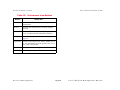
This button allows you to access the Cisco
Checkpoint Accounting Table. Table 4 provides
definitions for the fields presented in the
Accounting Table.
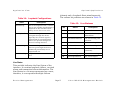
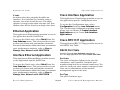
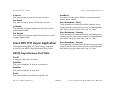
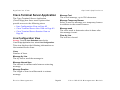
Table 4: Checkpoint View Information
Cisco IP Accounting Table View
Access: From the Icon Subviews menu for the CiscoIPApp
Application icon, select Accounting.
This view provides information about the network
traffic flow between devices and includes a list of
IP addresses. The IP Accounting Table view
provides the following information.
Source
The source IP address for data transmitted to the
destination IP address.
Destination
The destination IP address for data transmitted
from the source IP address.
Field
Definition
Source
The source IP address for data transmitted
to the destination IP address in the
checkpoint matrix.
Destination
The destination IP address for data
transmitted from the source IP address in
the checkpoint matrix.
Packets
The number of IP packets transmitted from
the source IP address to the destination IP
address in the checkpoint matrix.
Bytes
The total number of bytes transmitted from
the source IP address to the destination IP
address in the checkpoint matrix.
Packets
The total number of IP packets transmitted from
the source IP address to the destination IP
address.
Bytes
The total number of bytes transmitted from the
source IP address to the destination IP address.
Device Management
Page 33
Cisco MC3810 Management Module
Application View
Generic Routing Applications
BGP4 Application
This application (CiscoRouter_BGP4) provides the
following application-specific subviews:
Local Port
The local port for the TCP connection between the
BGP peers.
• Peer Table on Page 34
• Path Attribute Table on Page 36
Remote Addr
The remote IP address of this entry’s BGP peer.
Peer Table
Access: From the Icon Subviews menu for the BGP4_App
Application icon, select Peer Table.
The BGP Peer Table contains information about
the BGP peer.
Identifier
The BGP Identifier of the BGP peer.
State
The BGP peer connection state.
Admin Status
The desired state of the BGP connection. A
transition from “stop” to “start” will cause the
BGP Start Event to be generated. A transition
from “start” to “stop” will cause the BGP Stop
Event to be generated. This parameter can be
used to restart BGP peer connections.
Negotiated Ver.
The negotiated version of BGP running between
the two peers.
Device Management
Local Addr.
The local IP address of this entry’s BGP
connection.
Remote Port
The remote port for the TCP connection between
the BGP peers.
Remote As
The remote autonomous system number.
In Updates
The number of BGP UPDATE messages received
on this connection. This object should be
initialized to zero (0) when the connection is
established.
Out Updates
The number of BGP UPDATE messages
transmitted on this connection. This object
should be initialized to zero (0) when the
connection is established.
In Total Message
The total number of messages received from the
remote peer on this connection. This object
Page 34
Cisco MC3810 Management Module
Application View
Generic Routing Applications
should be initialized to zero when the connection
is established.
Keep Alive
Time interval in seconds for the Keep Alive timer
established with the peer.
Out Total Message
The total number of messages transmitted to the
remote peer on this connection. This object
should be initialized to zero when the connection
is established.
Hold Time
Hold Time Configured. Time interval in seconds
for the Hold Time configured for this BGP speaker
with this peer.
Last Error
The last error code and subcode seen by this peer
on this connection. If no error has occurred, this
field is zero.
Keep Alive
Keep Alive Configured. Time interval in seconds
for the Keep Alive timer configured for this BGP
speaker with this peer.
Established Tran
The total number of times the BGP FSM
transitioned into the established state.
Min ASOrig. Int.
Time interval in seconds for the MinASOrigination
Interval timer. Suggested value for this timer is 15
seconds.
Established Time
This timer indicates how long (in seconds) this
peer has been in the Established state or how
long since this peer was last in the Established
state. It is set to zero when a new peer is
configured or the router is booted.
Retry Interval
Time interval in seconds for the ConnectRetry
timer.
Min Route Advert
Time interval in seconds for the
MinRouteAdvertisementInterval timer. Suggested
value for this timer is 30 seconds.
In Update Elapse
Elapsed time in seconds since the last BGP
UPDATE message was received from the peer.
Hold Time
Time interval in seconds for the Hold Timer
established with the peer.
Device Management
Page 35
Cisco MC3810 Management Module
Application View
Generic Routing Applications
Path Attribute Table
Access: From the Icon Subviews menu for the BGP4_App
Application icon, select Path Attribute Table.
The BGP4 Received Path Attribute Table contains
information about paths to destination networks
received by all BGP peers.
Peer
The IP address of the peer where the path
information was learned.
Ip Prefix Len
Length in bits of the IP address prefix in the
Network Layer Reachability Information field.
Ip Addr Prefix
An IP address prefix in the Network Layer
Reachability Information field.
Origin
The ultimate origin of the path information.
Multi Exit Disc
This metric is used to discriminate between
multiple exit points to an adjacent autonomous
system.
Local Pref
The originating BGP4 speaker’s degree of
preference for an advertised route.
Atomic Aggregate
Determines if the local system has selected a less
specific route without selecting a more specific
route.
Aggregator AS
The AS number of the last BGP4 speaker that
performed route aggregation.
Aggregator Addr
The IP address of the last BGP4 speaker that
performed route aggregation.
ASPath Segment
The sequence of AS path segments.
Calc Local Pref
The degree of preference calculated by the
receiving BGP4 speaker for an advertised route.
Next Hop
The address of the border router that should be
used for the destination network.
Best
Indicates if this route was chosen as the best
BGP4 route.
Device Management
Page 36
Cisco MC3810 Management Module
Application View
Generic Routing Applications
Novell Routing Application
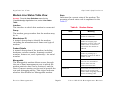
This application (CiscoNovellApp) has three menu
options. The Detail selection provides access to
pie charts that display standard Packet
Breakdown, Error Breakdown, and Discard
Breakdown information. The SAP/IPX selection
opens a submenu that accesses the following
views:
• Novell Service Advertisement Protocol (SAP)
View on Page 37
• Novell Internet Packet Exchange (IPX) View on
Page 37
Novell Service Advertisement Protocol
(SAP) View
Access: From the Icon Subviews menu for the
CiscoNovellApp Application icon, select SAP/IPX > SAP
Chart.
The view displays a color-coded pie chart of the
following Novell SAP statistics:
•
•
•
•
SAP
SAP
SAP
SAP
Request Packets Transmitted
Reply Packets Transmitted
Request Packets Received
Reply Packets Received
Device Management
Novell Internet Packet Exchange (IPX)
View
Access: From the Icon Subviews menu for the
CiscoNovellApp Application icon, select SAP/IPX > IPX
Chart.
This view includes the Check Point Accounting
table, Accounting table, and additional Check
Point Accounting and IPX Accounting information
described below.
Check Point Information
This section of the Novell (IPX) view provides the
following information.
Check Point
The check point for the IPX accounting database.
This MIB variable must be read and then set with
the same value for the check point to succeed.
The value read and then set will be incremented
after a successful set request.
Check Point Age
The age of the data in the IPX checkpoint matrix.
IPX Accounting Information
This section of the Novell (IPX) view provides the
following information:
Page 37
Cisco MC3810 Management Module
Application View
Generic Routing Applications
Accounting Table
Threshold
The threshold of IPX accounting records in use
before IPX traffic will be unaccounted.
This table displays the list of IPX accounting
entries. The fields in the Accounting Table are
described below.
Age
The age of the data in the IPX data matrix.
Source Address
The IPX Source address for host in the checkpoint
traffic matrix.
Lost Bytes
The total bytes of lost IPX packets.
Destination Address
The IPX Destination address for host in the
checkpoint traffic matrix.
Lost Packets
The lost IPX packets due to memory limitations.
Check Point Accounting Table
The list of IPX check point accounting entries. The
fields for this table are described below.
Source Address
The IPX Source address for host traffic matrix.
Destination Address
The IPX Destination address for host traffic
matrix.
Number Packets
The number of IPX packets sent from source to
destination in the checkpoint matrix.
Number Bytes
The total number of bytes in IPX packets from
source to destination in the checkpoint matrix.
Number Packets
The number of IPX packets sent from source to
destination.
Number Bytes
The total number of bytes in IPX packets from
source to destination.
Device Management
Page 38
Cisco MC3810 Management Module
Application View
Generic Routing Applications
Vines Routing Application
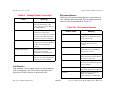
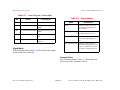
Table 5:
This application (CiscoVinesApp) has six menu
options. The Detail selection provides access to
pie charts that display standard Packet
Breakdown, Error Breakdown, and Discard
Breakdown information. The Vines Specifics
selection opens a submenu that accesses the
following views:
•
•
•
•
•
Vines
Vines
Vines
Vines
Vines
Statistic
Routing Echo View on Page 39
Routing ICP View on Page 39
Broadcast Detail View on Page 40
Rx View on Page 41
Tx View on Page 41
Vines Echo Statistics
Definition
MAC In
The total number of Vines MAC level
Echo packets received.
MAC Out
MAC level Echo packets transmitted.
Echo In
The total number of Vines Echo packets
received.
Echo Out
The total number of Vines Echo packets
transmitted.
Vines Routing ICP View
Vines Routing Echo View
Access: From the Icon Subviews menu for the
CiscoVinesApp Application icon, select Vines Specifics >
Echos.
This view displays a color-coded pie chart
displaying a breakdown of Vines Echo statistics.
Table 5 provides definitions for the statistics
presented by the pie chart.
Device Management
Access: From the Icon Subviews menu for the
CiscoVinesApp Application icon, select Vines Specifics >
ICP.
This view displays a color-coded pie chart of Vines
Interprocess Communications Protocol (ICP)
statistics. Table 6 provides definitions for the
statistics presented by the pie chart.
Page 39
Cisco MC3810 Management Module
Application View
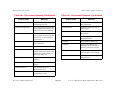
Table 6:
Generic Routing Applications
Vines ICP Statistics
Statistic
Table 7:
Definition
Statistic
Vines Broadcast Statistics
Definition
ICP In
The total number of Vines ICP packets
received.
Forward
The total number of Vines broadcast
packets forwarded.
ICP Out
The total number of Vines ICP packets
transmitted.
Received
The total number of Vines broadcast
packets received.
Metric
Out
The total number of Vines ICP Metric
Notification packets transmitted.
Transmitted
The total number of Vines broadcast
packets transmitted.
Not LAN
The total number of Vines broadcast
packets not forwarded to all interfaces
because the LAN ONLY bit was set.
Not Forward
The total number of Vines broadcast
packets not forwarded to all interfaces
because the OVER 4800 BPS bit was set.
No Charge
The total number of Vines broadcast
packets not forwarded to all interfaces
because the NO CHARGES bit was set.
Vines Broadcast Detail View
Access: From the Icon Subviews menu for the
CiscoVinesApp Application icon, select Vines Specifics >
Broadcasts.
This view displays a color-coded pie chart of Vines
Broadcast statistics. Table 7 provides definitions
for the statistics presented by the pie chart.
Device Management
Page 40
Cisco MC3810 Management Module
Application View
Generic Routing Applications
Vines Rx View
Vines Tx View
Access: From the Icon Subviews menu for the
CiscoVinesApp Application icon, select Vines Specifics >
Rx Table.
Access: From the Icon Subviews menu for the
CiscoVinesApp Application icon, select Vines Specifics >
Tx Table.
This view provides the following information.
This view provides the following information.
Forwarded
The total number of incoming Vines packets
forwarded to another interface.
Forwarded
The total number of outgoing Vines packets
forwarded to another interface.
Format Error
The total number of incoming Vines packets
containing header errors.
Proxy Count
The total number of Proxy packets sent by this
interface.
Local Destination
The total number of incoming Vines packets
destined for this router.
Unicasts
The total number of unicast packets generated by
this interface.
Encapsulation Type
The Vines protocol default encapsulation type.
IPC Count
The total number of IPC output messages sent by
this interface.
Echo Count
The total number of incoming IPC Echo messages.
IPC Error Count
The total number of IPC Error messages sent by
this interface.
Broadcasts
The total number of broadcast packets generated
by this interface.
Device Management
Page 41
Cisco MC3810 Management Module
Application View
Generic Routing Applications
B-casts Forwarded
The number of broadcast packets forwarded from
another interface.
XNS Routing Application
This application (CiscoXNSApp) has two menu
options that provide access to pie charts that
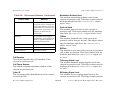
display XNS statistics. Table 8 provides
definitions for the statistics presented by the pie
charts available for the Echos selection. The
Detail selection provides access to pie charts that
display standard Packet Breakdown, Error
Breakdown, and Discard Breakdown information.
Table 8:
XNS Echo Statistics
Statistic
Definition
Replies Rec
The total number of XNS Echo reply
packets received.
Replies Sent
The total number of XNS Echo reply
packets transmitted.
Request Rec
The total number of XNS Echo request
packets received.
Request Out
The total number of XNS Echo request
packets transmitted.
Device Management
Cisco BSTUN Application
This application (CiscoBSTUNApp) has three
menu options that provide access to the following
views:
• BSTUN Groups View on Page 42
• BSTUN Ports View on Page 43
• BSTUN Routes View on Page 44
These views provide configuration and operational
information on the blocked tunneling
implementation.
BSTUN Groups View
Access: From the Icon Subviews menu for the
CiscoBSTUNApp Application icon, select BSTUN Groups.
This view identifies the group number and
protocol type that Cisco A and Cisco B use to
route BSC (Binary Synchronous Communication)
traffic over the IP network. The group number
must be the same in Cisco A and Cisco B to route
traffic from one router to the other.
The following information is available from this
view.
Index
The configured BSTUN (Block Serial Tunneling)
group number. The significance of this number is
that it must match the BSTUN Group number
Page 42
Cisco MC3810 Management Module
Application View
Generic Routing Applications
configured in the router at the other end of the
BSTUN tunnel.
BSTUN Ports View
Access: From the Icon Subviews menu for the
CiscoBSTUNApp Application icon, select BSTUN Ports.
Type
The protocol type for this BSTUN group.
This view identifies the serial interface to the BSC
line for which the router is providing serial
tunneling. It also identifies the BSTUN group that
the interface is in and the default routing for
unrecognized BSC addresses.
Local Ack
Indicates whether the BSTUN connection is
locally acknowledged (True) or not locally
acknowledged (False).
Unroutable Transmit
The number of unroutable frames received by this
group from the remote partner. They were
unroutable because the address was not
recognized; that is, there is no BSTUN route
command configured for this address. This
indicates that the configuration in this router is
incompatible with the peer router.
Unroutable Receive
Count of frames received from a serial interface
with an unsupported poll address. Note that there
may be several ports configured within this
BSTUN group; a non-zero value in this field
indicates that at least one of these ports is
receiving frames for which there are no BSTUN
route commands configured. This indicates that
the configuration in this router is incompatible
with the configuration in at least one of the
attached devices.
Device Management
The following information is available from this
view.
Group
The group number to which the BSTUN port
belongs. Frames will only be routed to other ports
(on this or another router) in the same BSTUN
group.
Default Peer Type
The type of identification of the remote default
partner.
Default Peer IP
The IP address of the remote default BSTUN
partner, for unrecognized addresses.
Page 43
Cisco MC3810 Management Module
Application View
Generic Routing Applications
BSTUN Routes View
Rx Packets
Count of frames received from the serial interface
with this station’s address.
Access: From the Icon Subviews menu for the
CiscoBSTUNApp Application icon, select BSTUN Routes.
This view displays an entry for each address
device for routing within the BSTUN group and an
entry for default routing if the “bstun route all”
command is configured. The following
information is available for this view.
Group
The index of the BSTUN Group owning this
station.
Address
The poll address of the station. A value of “256”
indicates the presence of the ALL parameter on
the STUN ROUTE command, which is the route
for all unrecognized addresses.
Type
The type of identification of the remote partner.
IP
The IP address of the remote BSTUN partner.
Tx Packets
Count of frames transmitted at the serial
interface with this station’s address.
Rx Bytes
Count of bytes received from the serial interface
with this station’s address.
Tx Bytes
Count of bytes transmitted at the serial interface
with this station’s address.
Cisco STUN Application
This application (CiscoSTUNApp) has three menu
options that provide access to the following views.
These views provide configuration and operational
information on the blocked tunneling
implementation.
• STUN Group View on Page 45
• STUN Port View on Page 45
• STUN Route View on Page 46
Priority
The priority with which this station’s traffic will
be routed across the network.
Peer State
The state of the peer connection through the
BSTUN tunnel.
Device Management
Page 44
Cisco MC3810 Management Module
Application View
Generic Routing Applications
STUN Group View
STUN Port View
Access: From the Icon Subviews menu for the
CiscoSTUNApp Application icon, select STUN Group Table.
Access: From the Icon Subviews menu for the
CiscoSTUNApp Application icon, select STUN Port Table.
This view identifies the STUN (Serial Tunneling)
group number and protocol type that Cisco A and
Cisco B use to route SDLC traffic over the IP
network. The table contains an entry for each
STUN group defined on the router.
This view identifies the serial interface to the
SDLC line for which the router is providing serial
tunneling. It also identifies the STUN group that
the interface is in and the default routing for
unrecognized SDLC addresses.
Group Index
The configured STUN group number.
Protocol Type
The protocol type for this STUN group.
Group Index
The group number to which the STUN port
belongs. Frames will only be routed to other ports
(on this or another router) in the same STUN
group.
STUN IP Address
The configured IP address used for all serial
tunnelling in this router.
Default Peer Type
The type of identification of the default partner for
unrecognized addresses.
Default Peer IP
The IP address of the remote default STUN
partner, for unrecognized addresses.
Default Peer Serial IF
If the STUN Route Type is “serial” then this is the
serial interface index of the point-to-point link to
the remote partner; if STUN Route Type is
“serialDirect” then the partner is in the local
STUN; if STUN Route Type is “ip” then this field is
“0.”
Device Management
Page 45
Cisco MC3810 Management Module
Application View
Generic Routing Applications
STUN Route View
Access: From the Icon Subviews menu for the
CiscoSTUNApp Application icon, select STUN Route Table.
This view displays a table with information about
specific Synchronous Data Link Control (SDLC)
addresses. There is one table entry for each SDLC
address configured by the STUN ROUTE
command.
Station Addr
The poll address of the station. The variable “256”
indicates the ALL parameter on the STUN Route
command, which is the route for all unrecognized
addresses.
Type
The type of identification of the remote partner.
Local Ack
Indicates if the STUN connection is locally
acknowledged.
Rx Packets
Count of frames received from the serial interface
with this station’s address.
Tx Packets
Count of frames transmitted at the serial
interface with this station’s address.
Rx Bytes
Count of bytes received from the serial interface
with this station’s address.
Tx Bytes
Count of bytes transmitted at the serial interface
with this station’s address.
Remote IP
The IP address of the remote STUN partner.
Serial IF
The local interface index to the remote partner.
Priority
The priority with which this station’s traffic will
be routed across the network.
Peer State
The state of the peer connection through the
STUN tunnel.
Device Management
Page 46
Cisco MC3810 Management Module
Application View
Optional Applications
Optional Applications
Cisco Chassis Application
The following device-specific applications
supported by the MC3810 devices are described
in this section:
This application (CiscoChasApp) has two menu
options that provide access to the following views.
•
•
•
•
•
•
•
•
•
•
•
•
Cisco Chassis Application on Page 47
Cisco Modem Application on Page 49
Cisco Flash Application on Page 59
Cisco Ping Application on Page 63
Cisco Queue Application on Page 65
ATM Client Application on Page 67
EnvMon Application on Page 69
FDDI Application on Page 71
Discovery Application on Page 73
Cisco DS1APP1406 Application on Page 74
Cisco RFC1317 Application on Page 80
Cisco Terminal Server Application on Page 82
• Cisco Chassis Card View on Page 47
• Cisco Chassis General Information View on
Page 48
Cisco Chassis Card View
Access: From the Icon Subviews menu for the
CiscoChasApp Application icon, select Card Information.
This view provides information on the cards
contained in the chassis.
Slot
The slot number in which this card is installed. If
the slot number is not applicable or not
determinable, this field will display “-1.”
Type
The functional type of the card installed in this
slot.
Description
A textual description of this card.
Software Ver.
The version number of the firmware installed on
this card. If no version number is available, this
field will remain empty.
Device Management
Page 47
Cisco MC3810 Management Module
Application View
Optional Applications
Hardware Ver.
The hardware revision level of this card. If no
revision level is available, this field will remain
empty.
c3000, c4000, c7000, cs-500, c7010,
c2500, and c4500.
Serial No.
The serial number of this card. If no serial
number is available, this field will contain a zero.
Cisco Chassis General Information
View
Chassis ID/Serial No.
A unique identifier for this chassis. The default
value is the serial number of the chassis. If no
serial number is available and no alternative ID
has been set for the chassis, this field will remain
empty.
Number of Chassis Slots
The number of slots in this chassis model.
Access: From the Icon Subviews menu for the
CiscoChasApp Application icon, select General.
ROM Information
This view displays information on the chassis in
which the router is installed. This view is divided
into the three sections described below.
This section of the Chassis General Information
view provides the following information about the
ROM installed in the chassis:
Chassis Information
ROM Monitor Version
The version number of the ROM monitor.
This section of the Chassis General Information
view provides the following physical information
about the chassis.
Hardware Revision Level
The version number of the chassis hardware. If
the version number is not available, this field will
remain empty.
Chassis Type
The type of chassis. Possible chassis types are:
Unknown, Multibus, Agsplus, Igs, c2000,
Device Management
ROM Software Version
The version number of the ROM system software.
If no version number is available, this field will
remain empty.
Config Register
The current value of the configuration register.
Page 48
Cisco MC3810 Management Module
Application View
Optional Applications
RAM Information
Cisco Modem Application
This section of the Chassis General Information
view provides the following information about the
RAM installed in the chassis:
This application (CiscoModemApp) has five menu
options that provide access to the following views.
• Modem System Information View on Page 49
• Modem Line Status Table View on Page 51
• Modem Line Configuration Table View on
Page 55
• Modem Line Statistics Table View on Page 57
• Modem Line Speed Statistics Table View on
Page 58
System CPU RAM (bytes)
The amount of RAM available to the CPU, in
bytes.
Non-volatile RAM Used (bytes)
The amount of non-volatile configuration memory
in use, in bytes.
Non-volatile RAM Size (bytes)
The total size, in bytes, of non-volatile
configuration memory.
Modem System Information View
Access: From the Icon Subviews menu for the
CiscoModemApp Application icon, select System Info.
Installed Modem
The actual number of modems that are currently
installed within this system.
Configured Group
The actual number of modem groups that are
currently configured within this system.
Watchdog Time
A passive software watchdog timer value will be
used to recover a modem that enters into an
unexpected state and hangs. When this watchdog
timer times out, the modem associated Call
Device Management
Page 49
Cisco MC3810 Management Module
Application View
Optional Applications
Processing state will be set back to “IDLE,” all
related Time Division Multiplexing (TDM) paths
will be restored to default configurations, and all
call processing related actions will stop for the
modem.
than the following: connected, offHook,
loopback, or downloadFirmware.
Modems Offline
The number of modems in the system that have
been held administratively offline.
Status Poll Time
The ideal time interval between modem status
polling via the out-of-band management port.
Modems Dead
The number of modems in the system with the
state equal to bad or downloadFirmwareFailed.
Max Retries
A reply event is expected to be received for every
message sent to the modem through the out-ofband management port. If an expected reply event
is not received, the message will be sent to the
modem again. This object specifies the maximum
number of retries that will be executed.
Modems In Use
The number of modems in the system that are in
the following states: connected, offHook,
loopback, or downloadFirmware.
Modems Available
The number of modems in the system that are in
the onHook state, that is, they are ready to accept
a call.
Modems Unavailable
The number of modems in the system that cannot
accept calls. These modems are in a state other
Device Management
Page 50
Cisco MC3810 Management Module
Application View
Optional Applications
Modem Line Status Table View
State
Indicates the current state of the modem. The
meaning of each state code is explained in the
Table 9.
Access: From the Icon Subviews menu for the
CiscoModemApp Application icon, select Line Status
Table.
Interface
The interface to which this modem is connected.
Table 9: Modem States
Group
The modem group number that the modem may
be in.
State
Manufacturer ID
A textual description to identify the modem,
including the manufacturer’s name and type of
modem.
Product Details
A textual description of the modem, including
hardware revision number, firmware revision
number, feature set, and—optionally— its serial
number.
Manageable
The Manageable modem allows access through
the out of band management port in which the
modem statistic data can be retrieved, and the
Direct Connect session can be used to provide the
test and debugging ability. This object indicates
whether this modem is a Manageable modem.
Device Management
Page 51
Meaning
unknown
The current state of the
modem is unknown.
onHook
The modem is in a state
similar to hanging up a
telephone receiver. The call
cannot enter a connected
state when the modem is
onHook.
offHook
The modem is in a state
similar to picking up a
telephone receiver to dial or
answer a call.
connected
The modem is in a state
where it can transmit or
receive data over the
communications line.
busiedOut
The modem is busied out (i.e.,
taken out of service) and
cannot make outgoing calls or
receive incoming calls.
Cisco MC3810 Management Module
Application View
Table 9:
Optional Applications
Modem States (Continued)
State
disabled
bad
Meaning
The modem is in a reset state
and non-functional. This
state can be set and cleared
via cmHoldReset.
Disconnect Reason
Indicates the reason that the last connection or
call attempt disconnected. The meaning of each
reason code is explained in Table 10.
Table 10:
The modem is suspected or
proven to be bad. The
operator can take the modem
out of service and mark the
modem as “bad” via cmBad.
loopback
The modem is in a state
where it is currently running
back-to-back loopback
testing.
downloadFirmware
The modem is in a state
where it is currently
downloading the firmware.
Reason Code
downloadFirmwareFailed The modem is not operational
because the downloading of
firmware to it has failed.
Call Direction
The modem can be used either as an incoming
call or outgoing call. This object specifies the
direction of the current or previous call.
Device Management
Disconnect Reasons
Meaning
unknown
The failure reason is
unknown or there has been
no previous call.
lostCarrier
The call was disconnected
because of the loss of a
carrier.
noCarrier
The dial out attempt has
failed because the modem
detects no carrier.
noDialTone
The dial out attempt has
failed because modem failed
to detect a dial tone.
busy
The call attempt failed
because the modem detected
a busy signal.
modemWatchdogTimeout The modem internal
watchdog timer has expired.
dtrDrop
Page 52
DTR has been turned off
while the modem is
disconnected on DTR drop.
Cisco MC3810 Management Module
Application View
Table 10:
Optional Applications
Disconnect Reasons (Continued)
Reason Code
Table 10: Disconnect Reasons (Continued)
Meaning
Reason Code
Meaning
userHangup
Normal disconnect where the
user hangs up call.
remoteHangup
The remote side hangs up
the connection.
compressionProblem
The call is disconnected due
to a problem detected during
compression in the modem.
trainupFailure
Failure to train up with a
remote peer.
fallbackTerminate
retrainFailure
The modem did not
successfully train and reach
data mode on the previous
connections.
User has EC fallback set to
disconnect.
excessiveEC
Link loss due to excessive EC
retransmissions.
hostDrop
Host initiated link drop.
terminate
Lost Carrier Microcom
HDMS product relating to
password security issues.
autoLogonError
An autologon sequence did
not complete successfully.
ccpNotSeen
The Credit Card Prompt was
not detected.
remoteLinkDisconnect
The remote link disconnected
the connection.
abort
The call was aborted.
inactivityTimeout
The modem automatically
hangs up because data is not
sent or received within the
inactivity time out.
dialStringError
The dialed phone number is
invalid.
linkFailure
The modem detects a link
failure.
modulationError
The modem detects a
modulation error.
dialTimeout
The modem times out while
attempting to dial.
Device Management
Page 53
Cisco MC3810 Management Module
Application View
Table 10:
Optional Applications
Disconnect Reasons (Continued)
Reason Code
callbackFailed
Meaning
A switched line dialback
occurred due to a leased line
connection failure, thus the
switched line connection also
failed and a connection can
still not be made on the
leased line.
blacklist
In countries that support
blacklisting, an attempt was
made to go off hook with a
null dial string (ATD).
mnp10ProtocolError
MNP10 Protocol Error
lapmProtocolError
LAPM Protocol Error
faxClass2Error
Fax Class 2 Error
Call Duration
This object specifies the call duration of the
current or previous call.
Modulation Scheme Used
The modem modulation scheme used in the
current or previous call. This object exists only for
modems which have the cmManageable object
set to “true.”
Protocol Used
The modem protocol used in the current or
previous call. This object exists only for modems
that have the cmManageable object set to “true.”
TXRate
The modem transmit rate of the current or
previous call in bits per second. This object exists
only for modems that have the cmManageable
object set to “true.”
RXRate
The modem receive rate of the current or previous
call in bits per second. This object exists only for
modems that have the cmManageable object set
to “true.”
Call Phone Number
The dialed outgoing telephone number of the
current or previous call.
TXAnalog Signal Level
The modem transmit analog signal level in the
current or previous call. This object exists only for
modems that have the cmManageable object set
to “true.”
Caller ID
The incoming caller identification of the current
or previous call.
RXAnalog Signal Level
The modem receive analog signal level in the
current or previous call. This object exists only for
Device Management
Page 54
Cisco MC3810 Management Module
Application View
modems that have the cmManageable object set
to “true.”
Optional Applications
Modem Line Configuration Table View
Access: From the Icon Subviews menu for the
CiscoModemApp Application icon, select Line
Configuration Table.
This table shows objects that describe
configuration information for the modem.
Index
Sequential number identifying a particular
modem.
AT Mode Permit
Direct Connect session is used for testing and
debugging purposes by using the modem AT
commands through the out-of-band management
port when cmManageable is set to “true.” This
object specifies whether the Direct Connect
session is permitted to be used at this modem. If
cmManageable is “true” (1), Direct Connect
session via the out of band port is allowed; if
“false” (2), Direct Connect session is not allowed
for the modem.
Status Polling
Modem status and events can be polled through
the out of band management port when the
cmManageable is set to “true.” This object
specifies whether this status polling feature is
enabled at this modem. If cmManageable is “true”
Device Management
Page 55
Cisco MC3810 Management Module
Application View
Optional Applications
(1), status polling will occur for the modem; if
“false” (2) no status polling will occur.
Busy Out Request
This object is used to put the modem out of
service, i.e. modem cannot make calls or answer
calls. If the modem to be busyout is handling a
call, the busyout action will be taken after the
current call is disconnected. After the modem is
in the busyout state, the following commands can
be applied to those modems: reset, bad modem,
download modem firmware, etc. This is called
“nice” or “graceful” busyout. The value of “true”
(1) indicates the busyout request has been issued
to the modem, but the busyout could be pending.
The management entity needs to query the
cmState to see if the modem is successfully
busied out. The value of “false” (2) indicates the
modem has not been given the busyout
command.
Shutdown
This object is used to put the modem out of
service — i.e., modem cannot make calls or
answer calls. This is a “hard” busyout command
to bring the modem out of service immediately
without waiting for the call to be ended normally.
After the modem is shut down, the following
commands can be applied to those modems:
reset, bad modem, download modem firmware,
etc. The value of “true” (1) indicates the hard
Device Management
busyout has been issued to the modem. The value
of “false” (2) indicates the modem has not been
given a hard busyout command.
Hold Reset
A command hold-reset will put the state of
modem into reset mode until an inverse command
is given to bring the modem out of RESET mode.
During the period of reset mode, the modem
cannot be used. This object is only valid when
cmState is onHook, busiedOut, or disabled. The
value of “true” (1) attempts to put the modem in
reset mode, and the value of “false” (2) takes the
modem out of reset.
Bad
This object can hold the modem out of service and
marks the modem as suspected or proven to be
bad. During the router start-up initialization
sequence, modem back-to-back tests will test
modems and mark those modems failing tests as
bad modems. The management entity also can
use this command to lock out the suspect modem
or unlock the modem to further debug or test.
This object is only valid when cmState is onHook
or busiedOut. The value of “true” (1) indicates the
modem is suspected to be bad and its state is set
to bad. The value of “false” (2) indicates the
modem has not been suspected to be bad or has
been remarked as good.
Page 56
Cisco MC3810 Management Module
Application View
Optional Applications
Modem Line Statistics Table View
Out Connect Failures
The number of outgoing calls from this modem
that successfully went off hook and dialed, but for
which it could not train with the other DCE. This
object exists only for modems that have the
cmManageable object set to “true.”
Access: From the Icon Subviews menu for the
CiscoModemApp Application icon, select Line Statistics
Table.
This table contains objects that describe the
status of the modem.
Out Connect Completions
The number of outgoing calls from this modem
that resulted in successfully training with the
other DCE. This object exists only for modems
that have the cmManageable object set to “true.”
Index
Sequential number identifying a single modem.
Ring No Answers
The number of calls where ringing was detected
but the call was not answered at this modem.
In Connect Failures
The number of incoming connection requests that
this modem answered but for which it could not
train with the other Data Communications
Equipment (DCE). This object exists only for
modems that have the cmManageable object set
to “true.”
In Connect Completions
The number of incoming connection requests that
this modem answered and successfully trained
with the other DCE. This object exists only for
modems that have the cmManageable object set
to “true.”
Failed Dial Attempts
The number of call attempts that failed because
the modem did not go off hook, or because there
was no dial tone.
No Dial Tones
The number of times the dial tone was expected
but was not received. This object exists only for
modems that have the cmManageable object set
to “true.”
Dial Timeouts
The number of times the dial time-out occurred.
This object exists only for modems that have the
cmManageable object set to “true.”
Watchdog Timeout
The number of times the Call Processing
watchdog timer has expired.
Device Management
Page 57
Cisco MC3810 Management Module
Application View
Optional Applications
2400 Or Less Connections
The number of connections initially established at
a modulation speed of 2400 bits per second or
less. This object exists only for modems that have
the cmManageable object set to “true.”
2400 To 14400 Connections
The number of connections initially established at
a modulation speed of greater than 2400 bits per
second and less than 14400 bits per second. This
object exists only for modems that have the
cmManageable object set to “true.”
More Than 14400 Connections
The number of connections initially established at
a modulation speed of greater than 14400 bits per
second. This object exists only for modems that
have the cmManageable object set to “true.”
No Carriers
The number of times the disconnect reason is no
carrier. This object exists only for modems that
have the cmManageable object set to “true.”
Link Failures
The number of times that the disconnect reason
is link failure. The object exists only for modems
that have the cmManageable object set to “true.”
Device Management
Protocol Errors
The number of times that the out of band protocol
error occurred. This object exists only for modems
that have the cmManageable object set to “true.”
Polling Timeouts
The number of times that the out of band protocol
time-out error occurred. This object exists only
for modems that have the cmManageable object
set to “true.”
Modem Line Speed Statistics Table
View
Access: From the Icon Subviews menu for the
CiscoModemApp Application icon, select Line Speed Stats
Table.
This table displays a collection of objects that
describe the initial modem line speeds and
connections.
Index
Sequential number identifying a single modem.
Line Connections
The number of connections initially established at
a given modulation speed. An instance of this
object will only be present for those speeds where
one or more connections have occurred.
Page 58
Cisco MC3810 Management Module
Application View
Optional Applications
Tx Line Connections
The number of Transmit connections initially
established at a given modulation speed. An
instance of this object will only be present for
those speeds where one or more connections have
occurred.
Cisco Flash Application
This application (CiscoFlashApp) supports the
flash memory used by the Cisco MC3810. It has
eight options that provide access to the following
views:
• Cisco Flash Configuration View on Page 59
• Flash Device Chip Properties Table View on
Page 60
• Flash Copy Operations Table View on Page 61
• Flash Device Properties Table View on
Page 61
• Flash File Properties Table View on Page 62
• Flash Miscellaneous Operations Table View
on Page 62
• Flash Device Partition Properties Table View
on Page 62
• Flash Partitioning Operations Table View on
Page 63
Rx Line Connections
The number of Receive connections initially
established at a given modulation speed. An
instance of this object will only be present for
those speeds where one or more connections have
occurred.
Cisco Flash Configuration View
Access: From the Icon Subviews menu for the
CiscoFlashApp Application icon, select Flash
Configuration.
This view provides the following information.
Flash Size (Bytes)
Total size, in bytes, of flash memory.
Device Management
Page 59
Cisco MC3810 Management Module
Application View
Optional Applications
Available (Bytes)
Unused size, in bytes, of flash memory.
Flash Device Chip Properties Table
View
Flash write
The current write permission is “Disabled” or
“Enabled.”
Access: From the Icon Subviews menu for the
CiscoFlashApp Application icon, select Chip Properties.
Flash Directory
Description
The flash chip name corresponding to the chip
code.
This table within the Flash Configuration view,
provides the following information.
Name
The flash device name.
Size
The total size of the flash device.
Status
The status of the flash device.
This view displays the following flash device chip
information for each initialized flash device.
Write Retries
A cumulative count of write retries done on this
chip.
Erase Retries
A cumulative count of erase retries done on this
chip.
There are also seven buttons that access the
additional Flash views or you can access these
views from the Icon Subviews menu for the
CiscoFlashApp Application. The buttons are:
Copy Operations, Misc Operations, Device
Properties, Chip Properties, Partition Properties,
Partitioning Operations, and File Properties.
Device Management
Page 60
Cisco MC3810 Management Module
Application View
Optional Applications
Flash Copy Operations Table View
Entry Status
The status of this table entry.
Access: From the Icon Subviews menu for the
CiscoFlashApp Application icon, select Copy Operations.
Flash Device Properties Table View
This view displays the following information.
Access: From the Icon Subviews menu for the
CiscoFlashApp Application icon, select Device Properties.
Command
The copy command to be executed.
This view displays the following information.
Protocol
The protocol to be used for any copy. Default is
tftp.
Name
The Flash device name.
Partitions
Number of partitions present.
Server Address
The server address for any copy. Default is
255.255.255.255.
Descriptions
System Flash (primary) and Boot Flash
(secondary).
Source Name
The source file name, either flash or on a server.
Controller
The card that controls Flash read/write/erase.
Destination Address
The destination address for any copy.
Card
Index for the card in the card table.
Remote User
The remote user name for copy through rcp
protocol.
Copy Status
The status of the specified copy operation.
Notify On Completion
Whether a notification should be generated on the
completion of the copy operation.
Device Management
Jumper
The state of the jumper that controls the
programming voltage to the Flash device. Possible
values include: “unknown”(3) where a
programming jumper is not present or not
required or, “Installed”(1), or “notInstalled”(2)
Page 61
Cisco MC3810 Management Module
Application View
Optional Applications
where the programming jumper state can be read
back via a hardware register.
Command
The command to be executed.
Init Time
The time (system time) the device was initialized.
Destination
The destination file.
Flash File Properties Table View
Status
The status of the specified operation.
Access: From the Icon Subviews menu for the
CiscoFlashApp Application icon, select File Properties.
Notify On Completion
Whether a notification should be generated on the
completion of the copy operation.
This view displays the following information for
the files in a flash partition.
Name
The name for the file specified by the user copying
in the file.
Size
The size of the file in bytes.
Flash Miscellaneous Operations Table
View
This view displays the following information.
Device Management
Time
The time taken for the operation.
Flash Device Partition Properties
Table View
Status
The status of the file.
Access: From the Icon Subviews menu for the
CiscoFlashApp Application icon, select Miscellaneous
Operations.
Entry Status
The status of this table entry.
Access: From the Icon Subviews menu for the
CiscoFlashApp Application icon, select Partition
Properties.
This view displays the following information.
Name
The name for this partition used by the system.
Start Chip
The chip sequence number for the first chip in the
partition.
Page 62
Cisco MC3810 Management Module
Application View
Optional Applications
End Chip
The chip sequence number for the last chip in the
partition.
Size
The flash partition size.
Checksum Algorithm
The identifier for the checksum method used by
the file system. When a file system writes a file to
flash, it checksums the data written.
Access: From the Icon Subviews menu for the
CiscoFlashApp Application icon, select Partitioning
Operations.
Status
The status of the specified partitioning process.
Notify On Completion
Whether a notification should be generated on the
completion of the copy operation.
File Count
The number of files in the partition.
Flash Partitioning Operations Table
View
Partition Sizes
The size of each partition to be created.
Entry Status
The status of this table entry.
Time
The time taken for the operation.
Cisco Ping Application
This application (CiscoPingApp) provides access
to the Ping Request Table View.
This view displays the following information.
Ping Request Table View
Command
The partitioning command to be executed.
Access: From the Icon Subviews menu for the
CiscoPingApp Application icon, select Ping Request Entry
Table.
Destination
The destination device name.
Partition Count
The number of partitions to be created.
Device Management
This view allows you to update the ping request
list for this device. The following information is
available for this view:
Owner
The user who configured this entry.
Page 63
Cisco MC3810 Management Module
Application View
Optional Applications
Protocol
The protocol to use once an instance of this object
is created e.g., Novell, Apple Talk, Vines, etc.
Address
The address of the device to be pinged.
Status
The status of this table entry. Possible states are:
active, notInService, notReady,
createAndGo, createAndWait, and destroy.
Pkt Cnt
Specifies the number of ping packets to send to
the target device in this sequence.
Pkts Sent
The number of ping packets that have been sent
to the target.
Pkts Rcvd
The number of ping packets that have been
received from the target in this sequence.
Min RTT
The minimum round trip time in milliseconds of
all the packets that have been sent in this
sequence.
Pkt Sz
Specifies the size of ping packets to send to the
target device in this sequence.
Avg RTT
The average round trip time in milliseconds of all
the packets that have been sent in this sequence.
Pkt Timeout
Specifies the amount of time to wait for a
response to transmitted packet before declaring
the packet dropped.
Delay
Specifies the minimum amount of time to wait
before sending the next packet in a sequence after
receiving a response or declaring a timeout for a
previous packet.
Device Management
Trap On
Specifies whether or not a ciscoPingCompletion
trap should be issued on completion of the
sequence of pings.
Max RTT
The maximum round trip time in milliseconds of
all the packets that have been sent in this
sequence.
Completed
Indicates (true) that all the packets in this
sequence have been either responded to or timed
out.
Page 64
Cisco MC3810 Management Module
Application View
Optional Applications
Cisco Queue Application
Add an Entry
This button opens the Add Ping Request dialog
box. Enter the following information and click the
Add Request button to add an entry to the Ping
Request Entry Table:
•
•
•
•
•
•
•
•
Address
Owner
Packet Count
Packet Size
Packet Timeout
Delay
Protocol
Trap on Completion
This application (CiscoQueueApp) has three
menu options that provide access to the
information used to manage interface queuing
within this device.
• Queue Interface View on Page 65
• Queue Statistics View on Page 66
• Queue Rotation Interface View on Page 66
Queue Interface View
Access: From the Icon Subviews menu for the
CiscoQueueApp Application icon, select Queue Interface.
This view provides the following information on
the queues for a particular Cisco interface.
IF
The IF index for this interface.
Type
The type of queuing used in the hold queue.
Maximum Number of Msgs
The maximum number of messages placed in the
hardware transmission queue.
Number of Sub-Queues
The number of sub-queues from which the hold
queue is built.
Device Management
Page 65
Cisco MC3810 Management Module
Application View
Optional Applications
Queue Statistics View
Queue Rotation Interface View
Access: From the Icon Subviews menu for the
CiscoQueueApp Application icon, select Queue Statistics.
Access: From the Icon Subviews menu for the
CiscoQueueApp Application icon, select Rotation
Interface.
This view provides the following statistical
information on the queues for a particular Cisco
interface.
Sub-Queue Attrs
A list of sub-queue attributes for an interface.
Number of Msgs
The number of messages in the sub-queue.
Maximum Permitted Msgs
The maximum number of messages permitted in
the sub-queue.
This view provides the following information on
the rotation of custom queues for a particular
Cisco interface.
Statistics Queue Number
Custom queuing sub-queue attributes for an
interface.
Number of Transmitted Octets
The number of octets that may be transmitted
from a custom queuing sub-queue before it must
yield to another queue.
Number of Msgs Discarded
The number of messages discarded from this
queue since restart.
Device Management
Page 66
Cisco MC3810 Management Module
Application View
Optional Applications
ATM Client Application
This application (ATMClientApp) has four menu
options that provide access to the following views:
Last Change
The value of MIB II’s System Up Time object at the
time this VCL entered its current operational
state. If the current state was entered prior to the
last re-initialization of the agent, then this object
contains a zero value.
• VCL Table on Page 67
• ATM Link Modeling Options on Page 68
VCL Table
Access: From the Icon Subviews menu for the
ATMClientApp Application icon, select VCL Table.
Rcv Descr Index
The value of this object identifies the row in the
ATM Traffic Descriptor Table that applies to the
receive direction of this VCL.
This view opens the ATM Client Application
Virtual Channel Link (VCL) view with the
following information.
If Index
An entry in the VCL Table.
VPI
The Virtual Path Identifier (VPI) value of the VCL.
VCI
The Virtual Channel Identifier (VCI) value of the
VCL.
Admin Status
This object is implemented only for a VCL that
terminates a VCC (i.e., one that is not crossconnected to other VCLs). Its value specifies the
desired administrative state (up or down) of the
VCL.
Device Management
Oper Status
This object indicates the current operational
status (up, down, or unknown) of the VCL.
Xmit Descr Index
The value of this object identifies the row of the
ATM Traffic Descriptor Table that applies to the
transmit direction of this VCL.
AAL Type
The type of AAL used on this VCC. An instance of
this object only exists when the local VCL
endpoint is also the VCC endpoint, and AAL is in
use.
Transmit Size
The maximum AAL5 CPCS SDU size in octets that
is supported on the transmit direction of this
VCC. An instance of this object only exists when
Page 67
Cisco MC3810 Management Module
Application View
Optional Applications
the local VCL end-point is also the VCC endpoint,
and AAL5 is in use.
Receive Size
The maximum AAl5 CPCS SDU size in octets that
is supported on the receive direction of this VCC.
An instance of this object only exists when the
local VCL end-point is also the VCC endpoint, and
AAL5 is in use.
Encaps Type
The type of data encapsulation used over the
AAL5 SSCS layer. An instance of this object only
exists when the local VCL endpoint is also the
VCC end-point, and AAL5 is in use.
ATM Link Modeling Options
Access: From the Icon Subviews menu for the
ATMClientApp Application icon, select ATM Link Modeling
Options.
This view provides you with two fields; Create
Link Models and Config Interval and two
buttons; Reconfigure Now and Option
Explanations.
Select Option Explanations for a brief
explanation of Create Link Models, Config
Interval, and Reconfigure Now.
Cross Connect Id
This object is implemented only for a VCL that is
cross-connected to other VCLs that belong to the
same VCC.
Row Status
This object is used to create, delete, or modify a
row in this table. To create a new VCL, this object
is initially set to “createAndWait” or
“createAndGo.”
Row Status Procedure
This procedure provides step-by-step instructions
to create or remove channel information.
Device Management
Page 68
Cisco MC3810 Management Module
Application View
Optional Applications
EnvMon Application
This application (CiscoEnvMonApp) has five menu
options that provide access to the following views:
•
•
•
•
•
Enable Notifications on Page 69
Fan Status on Page 69
Power Supply Status on Page 69
Temperature Status on Page 70
Voltage Status on Page 70
Enable Notifications
Access: From the Icon Subviews menu for the
CiscoEnvMonApp Application icon, select Enable
Notifications.
This view allows you to enable or disable system
notifications.
Shutdown
This variable indicates whether the system
produces the Shutdown Notification.
Voltage
This variable indicates whether the system
produces the Voltage Notification.
Redundant Supply
This variable indicates whether the system
produces the Redundant Supply Notification.
Device Management
Temperature
This variable indicates whether the system
produces Temperature Notification.
Fan
This variable indicates whether the system
produces the Fan Notifications.
Fan Status
Access: From the Icon Subviews menu for the
CiscoEnvMonApp Application icon, select Fan Status.
This table provides the fan status maintained by
the environmental monitor. The Description
identifies the fan being instrumented and the
State identifies the current state of the fan being
instrumented.
Power Supply Status
Access: From the Icon Subviews menu for the
CiscoEnvMonApp Application icon, select Power Supply
Status.
This table provides the power supply status
maintained by the environmental monitor card.
The Description identifies the power supply
being instrumented and the State identifies the
current state of the power supply being
instrumented.
Page 69
Cisco MC3810 Management Module
Application View
Optional Applications
Temperature Status
Voltage Status
Access: From the Icon Subviews menu for the
CiscoEnvMonApp Application icon, select Temperature
Status.
Access: From the Icon Subviews menu for the
CiscoEnvMonApp Application icon, select Voltage Status.
This table provides the ambient temperature
status maintained by the environmental monitor.
Description
The testpoint being instrumented.
Lo Threshold
The lowest value that the associated instance of
the object Voltage Status Value may obtain before
an emergency shutdown of the managed device is
initiated.
Threshold
The highest value that the associated instance of
the object Status Value may obtain before an
emergency shutdown of the managed device is
initiated.
@ Last Shutdown
The value of the associated instance of the object
Status Value at the time an emergency shutdown
of the managed device was last initiated. This
value is stored in non-volatile RAM and is
therefore able to survive the shutdown.
Device Management
Description
The testpoint being instrumented.
Value
The current measurement of the testpoint being
instrumented.
Value
The current measurement of the testpoint being
instrumented.
State
The current state of the testpoint being
instrumented.
This table provides the voltage status maintained
by the environmental monitor.
Hi Threshold
The highest value that the associated instance of
the object Voltage Status Value may obtain before
an emergency shutdown of the managed device is
initiated.
@ Last Shutdown
The value of the associated instance of the object
Voltage Status Value at the time an emergency
shutdown of the managed device was last
initiated. This value is stored in non-volatile RAM
and hence is able to survive the shutdown.
Page 70
Cisco MC3810 Management Module
Application View
State
The current state of the testpoint being
instrumented.
Optional Applications
FDDI Application
This application (FddiApp) has two menu options
that provide access to the following views.
• MAC Table View on Page 71
• SMT Table View on Page 72
MAC Table View
Access: From the Icon Subviews menu for the FDDIApp
Application icon, select MAC Table.
This view provides a table displaying FDDI MAC
(Media Access Control) information. A MAC
Count field displays the number of MACs on the
FDDI ring. The table provides the following
information.
SMT Index
The value of the SMT index associated with this
MAC.
MAC Index
A unique value for each MAC on the device. This
value must remain constant from one reinitialization of SPECTRUM to the next.
T-Req
The Target Token Rotation Time (TTRT) bid made
by the Cisco Router.
Device Management
Page 71
Cisco MC3810 Management Module
Application View
T-Neg
The winning TTRT bid on the ring displayed in
milliseconds.
T-Max
The maximum TTRT time interval.
TvxValue
The current value of the TVX counter
(transmission time).
T-Min
The minimum TTRT time interval.
Frame_Ct
The number of MAC frames.
Error_Ct
The number of MAC errors.
Lost_Ct
The number of lost MACs.
Chip Set
Identifies the hardware chips principally
responsible for the implementation of the MAC
function. This object identifier follows Internet
Assigned Numbers Authority (IANA) conventions.
An unknown chip set has a value of 00.
Optional Applications
SMT Table View
Access: From the Icon Subviews menu for the FDDIApp
Application icon, select SMT Table.
This view provides a table displaying FDDI SMT
information. An SMT Count field displays the
number of SMTs on the FDDI ring. The table
provides the following information.
Index
A unique number identifying each SMT. This
value must remain constant from one reinitialization of SPECTRUM to the next.
Station ID
The code uniquely identifying the FDDI station.
Version ID
The version of SMT the station is using for its
operation.
Hi Version
The highest version of SMT that the station
supports.
Low Version
The lowest version of SMT that the station
supports.
State
The current attachment configuration for the
station. Possible values are: Isolated, Wrap_S,
Wrap_A, Wrap_B, Wrap_AB, and Thru.
Device Management
Page 72
Cisco MC3810 Management Module
Application View
Optional Applications
Discovery Application
This application (CiscoCDPApp) has two menu
options that provide access to the following views.
• Discovery Cache Table View on Page 73
• Interface Discovery Status Table on Page 73
Platform
The device’s hardware platform as reported in the
most recent CDP message. The zero-length string
indicates that no Platform field was reported in
the most recent CDP message.
Discovery Cache Table View
Access: From the Icon Subviews menu for the
CiscoCDPApp Application icon, select Cache.
This table contains the cached information
obtained by receiving Cisco Discovery Protocol
(CDP) messages.
Type
An indication of the type of address contained in
the corresponding instance of cdpCacheAddress.
Address
The (first) network-layer address of the device’s
SNMP-agent as reported in the most recent CDP
message.
Device ID
The Device-ID string as reported in the most
recent CDP message. The zero-length string
indicates no Device-ID field was reported in the
most recent CDP message.
Device Management
Device Port
The Port-ID string as reported in the most recent
CDP message. This will typically be the value of
the ifName object (e.g., ‘Ethernet0’.) The zerolength string indicates no Port-ID field was
reported in the most recent CDP message.
Capabilities
The device’s functional capabilities as reported in
the most recent CDP message. For the latest set
of specific values, see the latest version of the
CDP specification. The zero-length string
indicates no Capabilities field was reported in the
most recent CDP message.
Interface Discovery Status Table
Access: From the Icon Subviews menu for the
CiscoCDPApp Application icon, select Interfaces.
This table contains the status of Cisco Discovery
Protocol (CDP) on the device’s interfaces.
IF
The interface index value of the local interface.
Page 73
Cisco MC3810 Management Module
Application View
Optional Applications
Cisco DS1APP1406 Application
Discovery
An indication of whether the Cisco Discovery
Protocol is currently running on this interface.
This application (DSIAPP1406) has two menu
options that provide access to the following views.
Group
This object is only relevant to interfaces that are
repeater ports on 802.3 repeaters; it indicates the
RFC1516 group number of the repeater port that
corresponds to this interface.
• DS1 Configuration Table on Page 74
• DS1 Fractional Table on Page 79
DS1 Configuration Table
Port
This object is only relevant to interfaces that are
repeater ports on 802.3 repeaters; it indicates the
RFC1516 port number of the repeater port that
corresponds to this interface.
Access: From the Icon Subviews menu for the
DS1APP1406 Application icon, select DS1 Configuration
Table.
Interval
The interval at which CDP (Cisco Discovery
Protocol) messages are to be generated on this
interface. The default value is 60 seconds.
DS1 Index
This object is the identifier of a DS1 Interface on a
managed device.
This table contains the configuration information
for the DS1 Application.
If Index
The value for this object is equal to the value of
Interface Index from the Interfaces table of MIB II
(RFC1213).
Line Type
This variable indicates the variety of DS1 Line
implementing this circuit. The type of circuit
affects the number of bits per second that the
circuit can reasonably carry, as well as the
interpretation of the usage and error statistics.
Device Management
Page 74
Cisco MC3810 Management Module
Application View
Optional Applications
Table 11 provides you with a list of the line types
and their values.
Code
Table 11: Line Types
Type
Table 12:
Extended SuperFrame DS1
dsx1D4
AT&T D4 format DS1
dsx1E1
CCITT Recommendation
G.704 (Table 4a)
dsx1E1-CRC
CCITT Recommendation
G.704 (Table 4b)
dsxE1-Mf
G.704 (Table 4a) with TS16
multiframing enabled
dsx1E1-CRC-MF G.704 (Table 4b) with TS16
multiframing enabled
Zero Coding
This variable describes the variety of Zero Code
Suppression used on the link, which in turn
affects a number of its characteristics. Table 12
provides you with a list of the codes and their
descriptions.
Device Management
Page 75
Description
dsx1JBZS
Jammed Bit Zero Suppression, in
which the AT&T specification of at
least one pulse every 8 bit periods is
literally implemented by forcing a
pulse in bit 8 of each channel. Thus,
only seven bits per channel, or
1.3444 Mbps, are available for data.
dsx1B8ZS
Refers to the use of a specified
pattern of normal bits and bipolar
violations that are used to replace a
sequence of eight zero bits.
ANSI Clear
Channels
May use dsx1ZBTSI, or Zero Byte
Time Slot Interchange.
E1 links
With or without CRC, use dsx1HDB3
or dsx1AMI.
dsx1AMI
Refers to a mode wherein no zero
code suppression is present and the
line encoding does not solve the
problem directly. In this application,
the higher layer must provide data
that meets or exceeds the pulse
density requirements, such as
inverting HDLC data.
Value
dsx1ESF
Zero Codes
Cisco MC3810 Management Module
Application View
Optional Applications
Send Code
This variable indicates what type of code is being
sent across the DS1 interface by the device.
Table 13 describes the send codes and their
meanings.
Table 13:
Code
Send Codes
Description
dsx1SendNoCode
Sending looped or normal
data.
dsx1SendLineCode
Sending a request for a line
loopback.
Vendor ID
This variable contains the transmission vendor’s
circuit identifier, for the purpose of facilitating
troubleshooting.
Loopback Config
This variable represents the loopback
configuration of the DS1 interface. Agents
supporting read/write access should return
badValue in response to a requested loopback
state that the interface does not support.
Table 14 describes the loopback configurations
and their meanings.
dsx1SendPayloadCode Sending a request for a
payload loopback.
dsx1SendResetCode
Sending a loopback
termination request.
dsx1SendQRS
Sending a Quasi-Random
Signal (QRS) test pattern.
dsx1Send511Pattern
Sending a 511 bit fixed test
pattern.
dsx1Send3in24Pattern Sending a fixed test pattern
of 3 bits set in 24.
dsx1SendOtherTestPat Sending a test pattern other
tern
than those described by this
object.
Device Management
Page 76
Cisco MC3810 Management Module
Application View
Optional Applications
Table 14: Loopback Configurations
Value
dsx1NoLoop
(alarms) and a Loopback State simultaneously.
The various bit positions are shown in Table 15.
Description
Table 15:
Not in the loopback state. A device
that is not capable of performing a
loopback on the interface shall
always return this as its value.
Bit
Line Statuses
Status
Description
1
dsx1NoAlarm
No Alarm Present
dsx1PayloadLoop The received signal at this interface
is looped through the device.
Typically the received signal is
looped back for retransmission
after it has passed through the
device’s framing function.
2
dsx1RcvFarEndLOF
Far end LOF (a.k.a.,
Yellow Alarm
4
dsx1XmtFarEndLOF
Near end sending LOF
Indication
8
dsx1RcvAIS
Far end sending AIS
dsx1LineLoop
The received signal at this interface
does not go through the device
(minimum penetration) but is
looped back out.
16
dsx1XmtAIS
Near end sending AIS
32
dsx1LossOfFrame
Near end LOF (a.k.a.,
Red Alarm)
Loopbacks that are not defined
here.
64
dsx1LossOfSignal
Near end Loss Of Signal
128
dsx1LoopbackState
Near end is looped
dsx1OtherLoop
Line Status
This variable indicates the Line Status of the
interface. It contains loopback, failure, received
alarm and transmitted alarm information. The
Line Status is a bit map represented as a sum;
therefore, it can represent multiple failures
Device Management
Page 77
Cisco MC3810 Management Module
Application View
Table 15:
Bit
Optional Applications
Line Statuses (Continued)
Status
256
dsx1T16AIS
512
dsx1RcvFarEndLOMF Far End Sending TS16
LOMF
1024
dsx1XmtFarEndLOMF Near End Sending TS16
LOMF
2048
4096
dsx1RcvTestCode
dsx1OtherFailure
Table 16: Signal Modes
Description
Mode
E1 TS16 AIS
Near End detects a test
code
Any line status not
defined.
Description
none
Indicates that no bits are
reserved for signaling on
this channel.
robbedBit
Indicates that T1 Robbed
Bit Signaling is in use.
bitOriented
Indicates that E1 Channel
Associated Signaling is in
use.
messageOriented Indicates that Common
Channel Signaling is in use
either on channel 16 of an
E1 link or channel 24 of a
T1.
Signal Mode
The following table (Table 16) describes the signal
modes that are available.
Transmit Clock
The following table (Table 17) describes the
sources for the Transmit Clock.
Device Management
Page 78
Cisco MC3810 Management Module
Application View
Table 17:
Optional Applications
Transmit Clock Sources
Code
Table 18:
Description
loopTiming
Indicates that the recovered
receive clock is used as the
transmit clock.
localTiming
Indicates that a local clock
source is used.
throughTiming
Indicates that recovered
receive clock from another
interface is used as the
transmit clock.
Facilities Data Link Codes
Code
other
Description
Indicates that a protocol other
than the one following is used.
dsx1Ansi-T1-403 Refers to the FDL exchange
recommended by ANSI.
dsx1Att-54016
Refers to ESF FDL exchanges.
dsx1Fdl-none
Indicates that the device does
not use the FDL.
DS1 Fractional Table
Facilities Data Link
This bitmap describes the use of the facilities data
link, and is the sum of the capabilities as shown
in Table 18.
Access: From the Icon Subviews menu for the
DS1APP1406 Application icon, select Fractional Table.
This table contains the fractional information for
the DS1APP1406 Application.
DS1 Index
The index value uniquely identifying the DS1
interface to which this entry is applicable.
Channel Number
The channel number for this entry.
Device Management
Page 79
Cisco MC3810 Management Module
Application View
Optional Applications
Cisco Interface Application
If Index
An index value that uniquely identifies an
interface. If no interface is currently using a
channel, the value should be zero. If a single
interface occupies more than one time slot, that
ifIndex value will be found in multiple time slots.
This application (CiscoIfceApp) provides access to
the application-specific Configuration view.
Ethernet Application
This application (EthernetApp) provides access to
the application-specific Detail view.
To access the Detail view, select Detail from the
Icon Subviews menu. This view provides access
to three pie charts with performance statistics.
For more information about the frame or transmit
error performance statistics, refer to How to
Manage Your Network with SPECTRUM.
Cisco RFC1317 Application
This application (RFC1317App) provides access to
the RS232 Port Table.
RS232 Port Table
Access: From the Icon Subviews menu for the
RFC1317App Application icon, select RS232 Port Table.
Interface Ethernet Application
This application (EthernetIfApp) provides access
to the application-specific Detail view.
To access the Detail view, select Detail from the
Icon Subviews menu. This view provides access
to three pie charts with performance statistics.
For more information about the frame or transmit
error performance statistics, refer to How to
Manage Your Network with SPECTRUM.
Device Management
To access the Configuration view, select
Configuration from the Icon Subviews menu.
The CiscoIfceApp Configuration window opens
where you can choose to Create Interface
Applications and/or Create Sub Interface
Applications.
Port Index
The value of Interface Index for the port. By
convention, and if possible, hardware port
numbers map directly to external connectors. The
value for each port must remain constant at least
from one re-initialization of the network
management agent to the next.
Port Type
The port’s hardware type.
Page 80
Cisco MC3810 Management Module
Application View
Optional Applications
AutoBaud
A control for the port’s ability to automatically
sense input speed.
In Speed
The port’s input speed in bits per second.
Out Speed
The port’s output speed in bits per second.
Error Breakdown - Parity
Total number of characters with a parity error
input from the port since system re-initialization
and while the port state was “up” or “test.”
In Signals
The number of input signals for the port in the
input signal table.
Error Breakdown - Framing
Total number of characters with a framing error
input from the port since system re-initialization
and while the port state was “up” or “test.”
Out Signals
The number of output signals for the port in the
output signal table.
Cisco RFC1317 Async Application
This application (RFC1317AsyncApp) provides
access to the RS232 Asynchronous Port Table.
Error Breakdown - Overrun
Total number of characters with an overrun error
input from the port since system re-initialization
and while the port state was “up” or “test.”
RS232 Asynchronous Port Table
Port ID
A unique value for each port.
Data Bits
The port’s number of bits in a character.
Stop Bits
The port’s number of stop bits.
Parity
The port’s sense of a character parity bit.
Device Management
Page 81
Cisco MC3810 Management Module
Application View
Optional Applications
Cisco Terminal Server Application
The Cisco Terminal Server Application
(CiscoTSApp) has three menu options that
provide access to the following views:
• Line Configuration View on Page 82
• Cisco Terminal Server Line View on Page 83
• Cisco Terminal Server Session View on
Page 84
Line Configuration View
Message Text
The actual message, up to 256 characters.
Message Temporary Banner
Select to use the message as a temporary banner
in addition to the normal banner.
Message send
The value used to determine what is done after
the message is sent.
Clear tty Line
The last line cleared.
Access: From the Icon Subviews menu for the
CiscoTSApp Application icon, select Line Configuration.
This view displays the following information on
the terminal server lines.
Lines
Number of lines.
Message tty Line
The tty line to send the message to.
Message Interval time
The interval in milliseconds between reissuing
message.
Message Duration
The length of time in milliseconds to reissue
message.
Device Management
Page 82
Cisco MC3810 Management Module
Application View
Optional Applications
Cisco Terminal Server Line View
Software-Both, Hardware-Input, HardwareOutput, and Hardware-Both.
Access: From the Icon Subviews menu for the
CiscoTSApp Application icon, select Line Table.
This view displays the following information on
each terminal server line connected to the Cisco
MC3810.
Status
The current state of this line. Possible states are:
“Active” and “Inactive.”
Length in Lines
Length, in lines, of the terminal screen attached
to this line.
Autobaud
Indicates whether or not the line will autobaud.
Width in Char
Width, in characters, of the terminal screen
attached to this line.
Speed In
The input speed of this line, displayed as a baud
rate.
Speed Out
The output speed of this line, displayed as a baud
rate.
Device Management
Location
The physical location of this line.
Term Type
The type of terminal on this line.
Type
The type of line. Possible types are: Unknown,
Console, Terminal, Line-Printer,
Virtual-Terminal, and Auxiliary.
Flow Control
The type of flow control in use on this line.
Possible flow control types are: Unknown, None,
Software-Input, Software-Output,
Modem Control
The type of modem control in use on this line.
Possible modem control types are: Unknown,
None, Call-In, Call-Out, CTS-Required,
RI-IS-CD, and InOut.
Escape Char
Escape character used to breakout the active
sessions.
Idle Time out
The amount of idle time allowed on this line
before the line times out.
Page 83
Cisco MC3810 Management Module
Application View
Optional Applications
Cisco Terminal Server Session View
Session Time out
The amount of idle time allowed in this session
before the session times out.
Access: From the Icon Subviews menu for the
CiscoTSApp Application icon, select Session Table.
Rotary
The rotary group number the line belongs to.
# of Connections
The number of times a connection has been made
to or from this line.
Current Session
The current number of sessions in use on this
line.
Type
Identifies session type as Pad, Stream, Rlogin,
Telnet, TCP and Unknown.
Direction
The direction of this session. Possible directions
are: Unknown, Incoming, and Outgoing.
User
Terminal Access Controller Access Control
System (TACACS ) user name, if TACACS is
enabled.
Addr
The remote host address of the session.
Noise
Count of garbage characters received when the
line is inactive.
Name
The remote host name of the session.
State
Indicates whether this session is the currently
“Active” or “Inactive.”
Line Number
The number (listed in sequential order) for this
terminal server line.
Time Active
The time, in seconds, since the line was activated.
Device Management
This view displays the Terminal Server (TS)
Session Table, which provides information about
each terminal server session connected to the
Cisco MC3810.
Idle
Time in seconds that the session has been idle.
Line
The index value that identifies this line.
Page 84
Cisco MC3810 Management Module
Application View
Optional Applications
Session
A second index value that identifies this session.
Device Management
Page 85
Cisco MC3810 Management Module
Performance Views
Device Performance View
Performance Views
This section provides brief descriptions of the Performance views available for models of Cisco MC3810 devices
in SPECTRUM.
Performance views for the Cisco MC3810 provide
statistical information about the operation of the
device and packet information for the device and
its ports. The following performance views are
described in this section:
• 1 Minute Average
• 5 Minute Average
The view also provides button access to the
Enterprise Alarm Manager and the Event Log.
• Device Performance View on Page 86
• Performance View on Page 87
• Port Performance View on Page 87
Figure 7: Device Performance View
SpectroGRAPH: MC3810
For more information on Performance views, refer
to the SPECTRUM Views documentation.
Device Performance View
File
View
Tools
Bookmarks
Help
i
Cisco Device Performance View
System Up Time
Network Address
Model Name
Contact
Description
Location
Manufacturer
Hardware Type
Device Type
Primary Application
Serial Number
Primary Address
Access: From the Icon Subviews menu for the
Cisco_MC3810 Device icon, select Device Performance.
Log
Value
Average
Peak Value
100.0
10.00
This view (Figure 7) includes both a graph and a
table that show current, average, and peak values
for the following performance statistics:
1.00
0.10
0.01
0:40:0 0:30:0 0:20:0
0
CPU Utilization
1 Minute Average
5 Minute Average
Graph Properties
Scroll to Date-Time
0
Alarms
Events
• CPU Utilization
Orchid of Type Cisco_MC3810 of Landscape tulip: Primary
Device Management
Page 86
Cisco MC3810 Management Module
Performance Views
Performance View
Performance View
Port Performance View
Access: From the Icon Subviews menu for the
Cisco_MC3810 Interface icon, select Performance.
Access: From the Icon Subviews menu for a selected Port
Label in either the Device view or the Device Topology view,
select Performance.
This view provides performance information
about the packets being passed through the
device. The following packet statistics for the
entire device are displayed in this view:
•
•
•
•
•
% Delivered
% Forwarded
% Transmitted
% Error
% Discarded
This view provides performance information
about the packets being passed through a
particular interface. The following packet
statistics for the selected interface are displayed
in this view:
•
•
•
•
Load
Packet Rate
% Error
% Discarded
Table 19 lists the Port Performance view buttons
and the views they open.
Device Management
Page 87
Cisco MC3810 Management Module
Performance Views
Table 19:
Port Performance View
Performance View Buttons
Button
Opens the...
Transmit
Detailed Port Performance view for packets
transmitted.
Receive
Detailed Port Performance view for packets
received.
Detail
Interface Detail view, which displays packet,
error, and discarded breakdown statistics.
Config
Interface Configuration - Information View on
Page 18.
Threshold
Interface Threshold view, which allows you to
set the thresholds for load, packet rate, error
rate, and % discarded.
Alarms
Enterprise Alarm Manager.
Events
Event Log.
Device Management
Page 88
Cisco MC3810 Management Module
Configuration View
Device Configuration View
Configuration View
This section describes the Configuration view and subviews accessible from the Cisco MC3810 Device icon.
Configuration views allow you to view and modify
current settings for the modeled device and its
interfaces, ports, and applications.
Figure 8: Device Configuration View
SpectroGRAPH: MC3810
File
View
Tools
Bookmarks
Help
i
Cisco MC3810 Configuration View
Model Name
Contact
Description
Location
Network Address
Primary Address
Contact Status
Number of Interfaces
System Up Time
Interface Type
Interface Index
Serial Number
Primary Application
Full Description
Cisco Internet Operating System Software
IOS (tm) 4000 Software (XX-BPX), Version 10.2(2). Release Sftwre
Domain Name
Why Last Reload
Authentication Fail
Host Name
Boot Host
Bootstrap Revision
Discover/Reconfigure Control
Sort
Find
Update
IF Address Translation
Buffer Management
Interface Configuration Table
MC3810 of Type Cisco_MC3810 of Landscape X: Primary
Device Management
Device Configuration View
Access: From the Icon Subviews menu for the
Cisco_MC3810 Device icon, select Device Configuration.
The Device Configuration view for the Cisco
MC3810 (Figure 8) provides status and
configuration information about the device as a
whole as well as on a port-by-port basis. It also
provides access to Redundancy and Model
Reconfiguration Options, the Interface Address
Translation Table, the Cisco Buffer Management
View, and the Network/Host Configuration view.
Primary Address
The IP Address for the modeled device.
Contact Status
The status of the Cisco MC3810. Possible values
are: Established, Lost, or Initial.
Network/Host Config
Number of Interfaces
The number of ports on the Cisco MC3810.
Page 89
Cisco MC3810 Management Module
Configuration View
Domain Name
An ASCII text string displaying the domain
portion of the domain name of the host.
Device Configuration View
IF Address Translation
Host Name
An ASCII text string displaying the name of the
host.
The button opens the Interface Address
Translation Table View on Page 92.
Why Last Reload
An ASCII text string explaining why the system
was last restarted.
This button opens the Cisco Buffer Management
View on Page 93, which provides data information
for network traffic to the Cisco MC3810. It counts
IP Packets received and tracks activity for the
various buffers.
Boot Host
The IP address of the host that provided the
currently running software.
Authentication Fail
The IP address of the last SNMP authorization
failure.
Buffer Management
Network/Host Config
This button opens the Network/Host
Configuration View on Page 96.
Interface Configuration Table
Discover/Reconfigure Control
This button opens the Redundancy and Model
Reconfiguration Options View on Page 91.
This section of the Cisco MC3810 Configuration
view provides the following port configuration
information for each of the Cisco MC3810’s ports.
Index
The port number on the Cisco MC3810.
Description
A textual description of the interface, which may
include the name of the manufacturer, the
Device Management
Page 90
Cisco MC3810 Management Module
Configuration View
Device Configuration View
product name, and version number of the
hardware interface.
Queue Length
The length of the outbound packet queue in
packets.
Type
The type of interface for the port.
Bandwidth
The estimated bandwidth of the interface
measured in bits per second. For interfaces that
do not vary in bandwidth or for which no accurate
estimate can be made, a nominal bandwidth is
provided.
Packet Size
The largest Maximum Transmission Unit (MTU)
that can be transmitted or received by the port
measured in octets.
Redundancy and Model
Reconfiguration Options View
Physical Address
The Ethernet (MAC) address of the port.
Access: In the Device Configuration View, click the
Discover/Reconfigure Control button.
Operation Status
The current operational state of the port (On, Off,
or Testing).
This view allows you to enable redundant
addresses, have SPECTRUM notify you of a
redundancy update, and reconfigure aspects of
your network connections.
Admin Status
The desired operational state of the port (On, Off,
or Testing).
Last Change
The System UpTime value when the port entered
its current operational state.
Change Reason
An ASCII text string explaining why the system
was last restarted.
Device Management
Preferred Addresses
This button opens the Preferred Addresses dialog
box which allows you to select the redundant
preferred address for the device.
Redundancy Administrative Status
Set this button to “Enabled” to cause SPECTRUM
to update this model with an address from the
Redundant Preferred Address list when the
primary address is not accessible.
Page 91
Cisco MC3810 Management Module
Configuration View
Device Configuration View
Generate Redundancy Alarms
Set this button to “True” to cause SPECTRUM to
generate an alarm when a redundant address is
selected.
Device Discovery after Reconfiguration
Set this button to “True” to cause SPECTRUM to
verify the interfaces displayed after a model
reconfiguration occurs.
Automatically Reconfigure Interfaces
Set this button to “True” to cause SPECTRUM to
monitor the number of interfaces for this device.
If a change is detected by SPECTRUM, the
interfaces displayed in SPECTRUM are updated to
reflect the change.
Create Sub-Interfaces
Set this button to determine if SPECTRUM should
model the devices sub-interfaces. If set to “True,”
these models will be displayed in the SubInterface view of the Physical Interface model.
Reconfigure due to LINK UP/Down events
Set this button to “True” to cause SPECTRUM to
verify the interfaces displayed when a LINK UP or
LINK DOWN event is received.
Topologically Relocate Model
Set this button to “True” to allow SPECTRUM to
relocate the model to a different topological
location as part of the AutoDiscovery process.
Reconfigure Model
This button does a complete re-read of the device
and its ports. The SpectroSERVER information
for this device will be updated if any of the port
addresses have been changed or removed, or if
the port type has been changed.
Discover LANs
This button discovers the devices that are
connected to the ports for this device. Clicking on
this button will create all LANS which are defined
for each port.
Interface Address Translation Table
View
Access: In the Configuration view, click the IF Address
Translation button.
This view cross-references device IP addresses to
device MAC addresses for selected nodes between
networks. Double-clicking on any column entry
opens an address-specific Address Translation
Device Management
Page 92
Cisco MC3810 Management Module
Configuration View
Device Configuration View
Table Information view allowing you to modify
each of the three fields for that entry.
the total interval since first poll and the rate
interval between polls (Delta).
Cisco Buffer Management View
Buffer Elements Free
The number of buffer elements available.
Access: In the Configuration view, click the Buffer
Management button.
Buffer Element Hits
The number of successful requests for buffer
elements.
This view provides the following information:
Free Memory
The amount of available memory in bytes.
Buffer Element Misses
The number of unsuccessful requests for buffer
elements.
Buffer Failures
The number of packets discarded due to no
memory. An attempted packet buffer allocation
failed.
Buffer Element Creates
The number of new buffer elements created by
the Cisco MC3810.
Buffer No Memory
The number of buffer creation failures due to no
memory.
Buffer Management Buttons
These five buttons located in the Cisco Buffer
Management view allow you to access additional
buffer management information according to
buffer size. Each attribute is summarized for the
total interval since first poll and the rate interval
between polls (Delta).
Max Buffer Elements
The maximum number of buffer elements the
Cisco MC3810 may create.
Buffer Elements
This area of the Cisco Buffer Management view
displays statistics on buffer “elements” (data
structures used to enqueue buffers in multiple
output queues). Each attribute is summarized for
Device Management
Small Buffers
This button opens the Small Buffer Management
view. Table 20 provides descriptions for the fields
presented in the Small Buffer Management view.
Page 93
Cisco MC3810 Management Module
Configuration View
Device Configuration View
Medium Buffers
Table 20:
Small Buffers View Fields
Field
Description
Small Buffer Size
The maximum size of a small
buffer.
Max Small Buffers
The maximum number of small
buffers the Cisco MC3810 can
create.
Small Buffer Total
The total number of enqueued
small buffers.
Small Buffer Free
The number of small buffers
available.
Small Buffer Hits
The number of successful requests
for small buffers.
Small Buffer Misses
The number of unsuccessful
requests for small buffers.
Small Buffer Creates The number of new small buffers
created by the Cisco MC3810.
Small Buffer Trims
The number of small buffers
returned to the free buffer pool.
Device Management
This button opens the Cisco Medium Buffer
Management view. Table 21 provides descriptions
for the fields in the Medium Buffer Management
view.
Table 21: Medium Buffers View Fields
Field
Medium Buffer Size
Description
The maximum size of a medium
buffer.
Max Medium Buffers The maximum number of medium
buffers the Cisco MC3810 can create.
Medium Buffer Total The total number of enqueued
medium buffers.
Medium Buffer Free
The number of medium buffers
available.
Medium Buffer Hits
The number of successful requests for
medium buffers.
Medium Buffer
Misses
The number of unsuccessful requests
for medium buffers.
Medium Buffer
Creates
The number of new medium buffers
created by the Cisco MC3810.
Medium Buffer
Trims
The number of medium buffers
returned to the free buffer pool.
Page 94
Cisco MC3810 Management Module
Configuration View
Device Configuration View
Big Buffers
Large Buffers
The button opens the Big Buffers view. Table 22
provides descriptions for the fields presented in
the Big Buffer Management view.
Table 22:
This button opens the Cisco Large Buffer
Management view. Table 23 provides descriptions
for the fields presented in the Large Buffer
Management view.
Big Buffers View Fields
Table 23:
Field
Large Buffers View Fields
Description
Big Buffer Size
The maximum size of a big buffer.
Max Big Buffers
The maximum number of big
buffers the Cisco MC3810 can
create.
Field
Description
Large Buffer Size
The maximum number of bytes in a
large buffer.
Max Large Buffers
The maximum number of large
buffers the Cisco MC3810 can
create.
Large Buffer Total
The total number of enqueued large
buffers.
Big Buffer Total
The total number of enqueued big
buffers.
Big Buffer Free
The number of big buffers available.
Big Buffer Hits
The number of successful requests
for big buffers.
Large Buffer Free
The number of large buffers
available.
Big Buffer Misses
The number of unsuccessful
requests for big buffers.
Large Buffer Hits
The number of successful requests
for large buffers.
Big Buffer Creates
The number of new big buffers
created by the Cisco MC3810.
Big Buffer Trims
The number of big buffers returned
to the free buffer pool.
Large Buffer Misses The number of unsuccessful
requests for large buffers.
Large Buffer Creates The number of new large buffers
created by the Cisco MC3810.
Large Buffer Trims
Device Management
Page 95
The number of large buffers
returned to the free buffer pool.
Cisco MC3810 Management Module
Configuration View
Device Configuration View
Network/Host Configuration View
Huge Buffers
This button opens the Cisco Huge Buffer
Management view. Table 24 provides descriptions
for the fields presented in the Huge Buffer
Management view.
Table 24:
Huge Buffers View Fields
Field
Description
Huge Buffer Size
The maximum number of bytes in
a huge buffer.
Max Huge Buffers
The maximum number of huge
buffers the Cisco MC3810 can
create.
This view displays the following information.
Network Configuration
The network configuration file contains
commands that apply to all network servers and
terminal services on a network.
Previous Host Addr
Provides the address of the host that supplied the
network configuration file for the managed device.
Previous File Name
Provides the name of the network configuration
file that resides on the managed device.
Huge Buffer Total
The total number of enqueued
huge buffers.
Huge Buffer Free
The number of huge buffers
available.
Huge Buffer Hits
The number of successful requests
for huge buffers.
Huge Buffer Misses
The number of unsuccessful
requests for huge buffers.
Huge Buffer Creates
The number of new huge buffers
created by the Cisco MC3810.
Huge Buffer Trims
The number of huge buffers
returned to the free buffer pool.
Device Management
Access: In the Configuration view, click the Network/Host
Config button.
New Host Addr
This field replaces the Previous Host Addr field
when the Upload Net Config file is selected.
New File Name
This field replaces the Previous File Name field
when the Upload Net Config file is selected.
Upload Net Config File
Initiates the transfer of configuration file from
host to server.
Page 96
Cisco MC3810 Management Module
Configuration View
TFTP Server Addr
Address used to send the configuration file from
server to a host.
File Name
The file name where you are storing the
configuration.
Device Configuration View
Upload Host Config File
Initiates the transfer of configuration file from
host to server.
Copy Config to NVRAM
Copy Config to Net
Initiates the transfer of configuration file from
server to host.
Clicking this button writes the current (running)
server configuration into Non-Volatile Random
Access Memory (NVRAM) where it can be stored
and retained even if the server is reloaded.
Host Configuration
The host configuration file contains commands
that apply to one network server in particular.
Previous Host Addr
The address of the host that provided the host
configuration file for the managed device.
Clear NVRAM
Clicking this button erases whatever was in NonVolatile Random Access Memory (NVRAM) on the
server.
Previous File Name
The name of the last host configuration file used
by the device.
New Host Addr
This field replaces the Previous Host Addr field
when the Upload Host Config file is selected.
New File Name
This field replaces the Previous File Name field
when the Upload Host Config file is selected.
Device Management
Page 97
Cisco MC3810 Management Module
Model Information View
Device Configuration View
Model Information View
This section provides a brief description of the Model Information views available for models of Cisco MC3810
devices in SPECTRUM.
Figure 9:
Access: From the Icon Subviews menu for the
Cisco_MC3810 Device icon, select Model Information.
Model Information views provide descriptive and
configuration information about SPECTRUM
models of individual devices, interfaces, and
applications. Figure 9 shows an example of the
Model Information view for a Cisco MC3810
interface. Model Information views are also
available for each of the Interface icons in the
Interface Device and Interface Device Topology
views, and for each of the Application icons in the
Application view. Although these views may vary
slightly depending on the particular entity being
modeled, their basic layout and content are
similar for most SPECTRUM management
modules. Therefore these views are described in
more detail in the SPECTRUM Views
documentation.
Device Management
Page 98
Model Information View
SpectroGRAPH: MC3810
File
View
Tools
Help
Bookmarks
i
Cisco MC3810 Model Information View
Network Address
Model Name
Contact
Description
Location
Hardware Type
Primary Application
Primary Address
General Information
System Up Time
Manufacturer
Device Type
Serial Number
Communication Information
MM Name
DCM TimeOut
MM Part Number
DCM Retry
MM Version Number
Community Name
Model Type
Mgmnt Protocol
Model Creation Time
Model Created By
Poll/Log Information
Model State
Poll Interval
Security String
Polling Status
orchid of type Cisco_MC3810 of Landscape tulip: Primary
Cisco MC3810 Management Module
Index
A
B
Add an Entry button 65
Administrative Status 16
Age 31
AppleTalk Routing Application
Views 24
Application
Bridging (GenBridgingApp) 23
Ethernet (EthernetApp) 23
MIB-II (SNMP2_Agent) 23
Routing (GenRtrApp) 23
Application icons 22
Applications Supported
Common Applications 13
Generic Routing Applications 13
Optional Applications 13
Area Table 31
ARP Interface Index 29
ARP Network Address 29
ARP Physical Address 29
ARP Table 29
ATM Client Application 67
ATM Link Modeling Options 68
VCL Table 67
ATM Link Modeling Options 68
ATPOR T Table 28
Available 60
B-casts Forwarded 42
BGP Peer Table 34
BGP4 Application 34
Big Buffers button 95
Binary Synchronous
Communication 42
Bridging
Application Views 85
Broadcasts 41
BSC 42
BSTUN
Groups View 42
Ports View 43
Routes View 44
Buffer Elements 93
Buffer Management button 90,, 93
Bytes 33
C
Change Reason 19
Chassis
ID/Serial No. 48
Information 48
Type 48
SPECTRUM Enterprise Manager
Page 99
Chassis Application 47
Chassis Card View 47
Chassis General Information
View 48
RAM Information 49
ROM Information 48
Checkpoint
Accounting
Button 33
Table 33
View Information 33
Chip Set 72
Cisco
Chassis
Application Views 47
Card View 47
General Information View 48
Flash
Application Views 59
IP Accounting Table 33
Terminal Server
Line View 82
Session View 84
Cisco Buffer Management View 93
Cisco Chassis Card View 47
Cisco Chassis General Information
View 47
Cisco Interface Application 80
Cisco MC3810 Management Module
Index
Cisco STUN Application 44
CiscoChasApp 47
CiscoFddiApp 71,, 73
CiscoFlashApp 59
CiscoPingApp 63
CiscoTSApp 82
CiscoXNSApp 42
Config Register 48
Configuration View 89
Configure a Port 12
Configure the Device 13
Cost 30,, 31
Create Messages 12
Creating LANs 14
CsEvFormat 9
D
DECnet
Address 30,, 31
Circuit 31
Packets 30,, 31
Protocol 31
Routing
Hello View 32
Level 1 View 32
Level 2 View 32
Description 47
Destination 33
Disconnect Reasons 52
Discover LANs 92
Discover/Reconfigure Control
button 90
Discovery Application
Cache Table View 73
Interface Discovery Status
Table 73
DSIAPP1406 74
DSIAPP1406 Application 74
DSI Fractional Table 79
E
ECEditor 9
Echo
Count 41
In 39
Out 39
Echo View 30
Enable or Disable a Port 13
Enable/Disable Redundant
Addresses 13
Encapsulation
Type 41
END Net.Node 25
End Net.Node 29
EnvMon Application 69
Power Supply Status 69
Temperature Status 70
Voltage Status 70
Error_Ct 72
Ethernet Address 17,, 18
SPECTRUM Enterprise Manager
Page 100
Ethernet Application 80
event messages 9
F
Facilities Data Link Codes 79
FCS Errors 28
FDDI
MAC Information 71
Ring 72
SMT Information 72
Station 72
FDDI Application 71
MAC Table View 71
SMT Table View 72
Flash
Memory 59
Size 59
Flash Application 59
Flash Configuration View 59
Flash Copy Operations Table
View 61
Flash Device Chip Properties Table
View 60
Flash Device Partition Properties
Table View 62
Flash Device Properties Table
View 61
Flash File Properties Table View 62
Flash Miscellaneous Operations
Table View 62
Cisco MC3810 Management Module
Index
Flash Partitioning Operations Table
View 63
Flow Control 83
Format Error 41
Forward 40
Forwarded 41
Frame_Ct 72
G
Gauge Label 17
H
Hardware
Chips 72
Revision Level 48
Ver. 48
Hello
Statistics 32
Hi Version 72
Hops 31
Host 30,, 31
Table 30
Huge Buffers button 96
Icon
Application 22
ICP
In 40
Out 40
Idle Time out 83
IF Address Translation button 90
In Packets 27
Index 72
Interface 31
Address Translation Table 17
Cost
Table 31
Detail view 17
Interface Address Translation Table
View 92
Interface Configuration 17
Interface Configuration Table 90
Interface Ethernet Application 80
Interface Icon Subviews Menu 17
Interface Index 27
Interface Status 17
IP
Accounting Table 33
IP Address Label 17
IPC
Count 41
Error Count 41
Isolated 72
I
IANA Conventions 72
SPECTRUM Enterprise Manager
Page 101
K
Kinetics Internet Protocol
information 25
Kip
Broadcast Add 25
Core 26
Hop Count 26
Net Start 25
Next Hop 25
Share 26
State 25
Type 25
Kip Net End 25
KIP Table 25
L
Large Buffers button 95
Last
Change 18
Launching CiscoView 12
Length Errors 27
Line Statuses 77
Line Type 74
LLAP Table 27
Local Destination 41
LocalTalk Link Access Protocol
(LLAP) information 27
Location 83
Loopback Configurations 76
Cisco MC3810 Management Module
Index
Lost_Ct 72
Low
Version 72
M
MAC
Address 18
Count 71
In 39
Index 71
Out 39
Table 71
MAC Address 17
managing the Buffers 14
Medium Buffers button 94
Metric Out 40
Model Information 17
Model Information View 98
Modem Control 83
Modem Line Configuration Table
View 55
Modem Line Speed Statistics Table
View 58
Modem Line Statistics Table
View 57
Modem Line Status Table View 51
Modem States 51
Monitor Performance 12
N
Name Binding
Index 26
Object 26
State 26
Type 26
Zone 26
Name Binding Protocol Table 26
Network
Traffic
Flow 33
Network Type Label 17
Network/Host Config button 90
Network/Host Configuration
View 96
Next Hop 31
No Charge 40
No Data Errors 28
No Handler 27
Non-volatile RAM
Size (bytes) 49
Used (bytes) 49
Not
Forward 40
LAN 40
Novell
Accounting Table 38
Check Point Accounting
Table 38
Check Point Information 37
IPX Accounting Information 37
SPECTRUM Enterprise Manager
Page 102
Routing
Application Views 47
Service Advertisement Protocol
View 37
Novell Internet Packet Exchange
View 37
Novell Routing Application 37
Number
of Chassis Slots 48
O
Operational Status 16,, 18
Optional Applications 47
Out Packets 27
P
Packet Size 18
Packets 33
Path Attribute Table 36
Performance Filter 17
Performance View 86,, 87
Physical Address 18
Physical Address Label 17
Ping Application 63
Ping Request Table View 63
Port
Description 28
Disable 18
Cisco MC3810 Management Module
Index
Enable 18
If Index 29
Index 28
Net Address 29
Net Config 29
Status 29
Type 28
Zone 29
Zone Config 29
Port Performance View 87
Port Route Settings 13
Power Supply Status 69
Preferred Addresses 91
Priority 31
Proxy Count 41
Purpose 6
Q
Queue
Queue
Queue
Queue
Application 65
Interface View 65
Rotation Interface View 66
Statistics View 66
R
RAM Information 49
Random CTS Errors 28
Received 40
Reconfigure Model 92
Redundancy and Model
Reconfiguration Options 91
Re-Initialization 71
Replies
Rec 42
Sent 42
Request
Out 42
Rec 42
Required Reading 6
Restricted Rights Notice 2
RFC1317 Application 80
RS232 Port Table 80
RFC1317 Async Application 81
RS232 Asychronous Port
Table 81
RFC1317App 80
RFC1317AsyncApp 81
ROM
Information 48
Monitor Version 48
Software Version 48
Routing
Statistics 32
Routing Protocol Comparison
View 24
RS232 Asynchronous Port Table 81
S
Secondary Address Panel 17
SPECTRUM Enterprise Manager
Page 103
Send Codes 76
Serial Number 48
Session
Table 84
View 84
Set Connections 13
Set Environment Variables 13
Set Thresholds 12
Signal Modes 78
Slot 47
SMT
Count 72
Index 71
Table 72
SMT Table View 72
Software
Version 47
Source 33
SPECTRUM Model 7
SPECTRUM Views
documentation 17
Speed
In 83
Out 83
Start Net.Node 28
State 72
Station ID 72
Status 83
STUN
Groups View 45
Ports View 45
Routes View 46
Cisco MC3810 Management Module
Index
Supported Devices 7
System
CPU RAM (bytes) 49
T
Target
Token Rotation Time 71
Task
Configure a Port 12
Configure the Device 13
Create Messages 12
Creating LANs 14
Enable or Disable a Port 13
Enable or Disable Redundant
Addresses 13
Identify Applications
Supported 13
Launch CiscoView 12
Manage the Buffers 14
Monitor Performance 12
Port Route Settings 13
Set Connections 13
Set Environment Variables 13
Set Thresholds 12
Update the Ping Request List 13
View Current Interface/Port
Status 13
View IF/Port/App Statistics 12
View/Change Interface IP
Address 12
Temperature Status 70
Term Type 83
Terminal Server
Line View 83
Session View 84
Terminal Server Application 82
Line Configuration View 82
Terminal Server Line View 83
Terminal Server Session View 84
Thresholds 17
Thru 72
T-Max 72
T-Min 72
T-Neg 72
Total Collision 28
Total Defer 28
Total In Errors 27
Trademarks 2
Transmission
Time 72
Transmit Clock Sources 78
Transmitted 40
T-Req 71
TS Session Table 84
TTRT 71
TVX Counter 72
TvxValue 72
Type 47,, 83
SPECTRUM Enterprise Manager
Page 104
U
Unicasts 41
Update Ping Request List 13
V
VCL Table 67
Version ID 72
View Current Interface/Port
Status 13
View IF/Port/App Statistics 12
View/Change Interface IP
Address 12
Vines
Broadcast
Detail View 40
Packets 40
Statistics 40
Echo
Packets 39
Statistics 39
ICP 39
Metric Notification 40
Packets 40
Statistics 40
Interprocess Communications
Protocol 39
Routing
Echo View 39
ICP View 39
Cisco MC3810 Management Module
Index
Rx View 41
Tx View 41
Vines Routing Application 39
Voltage Status 70
Net End 27
Net Start 27
State 27
W
Wrap
A 72
AB 72
B 72
S 72
X
XNS
Echo
Reply 42
Echo Statistics 42
Routing
Application Views 42
Z
Zero Codes 75
ZIP Table 27
Zone
Index 27
Name 27
SPECTRUM Enterprise Manager
Page 105
Cisco MC3810 Management Module