1
Bendix/King
KMA28
Audio Amplifier/Intercom/Marker Beacon Receiver
Section III KMA28 OPERATION
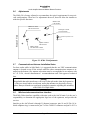
GENERAL INFORMATION
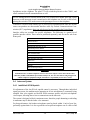
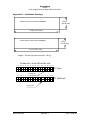
KMA28 controls
3.1
Audio Selector
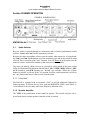
Receiver audio is selected through two momentary and six latched, push-button, backlit
switches. Com 1 and Com 2 are the momentary switches.
Because the rotary microphone selector switch controls what transceiver is being heard,
the Com l and Com 2 push-buttons are of the momentary type and do not remain in when
selected. This is also part of the "auto” function. You will always hear the audio from the
transceiver that is selected for transmit by the rotary mic selector switch.
The users can identify which receivers are selected by noting which of the green switch
LEDs are illuminated. Push buttons labeled Nav 1, Nav 2, DME, MKR (Marker), ADF,
AUX (auxiliary), and SPR (Speaker) are "latched" type switches. When one of these
buttons is pressed, it will stay in the "in" position. Press the switch again and it will be in
the "out" position and remove that receiver from the audio.
3.1.1.1 Key “click”
The KMA28 is equipped with an electronic “click” to provide additional feedback for
button operation. To activate the key click, push and hold BOTH COM 1 and COM 2 receiver buttons for five seconds, and release. Repeat to defeat the click.
3.1.2 Speaker Amplifier
The "SPR" in the push-button section stands for speaker. This switch will place all selected audio on the cockpit speaker when this switch is selected.
006-10565-0000
3-1
Rev. 0, Sept. 00