1
Table of Contents
Chapter 1: The MAC-4R......................................................................................................................................... 5
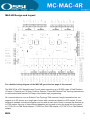
MAC-4R Design & Layout........................................................................................................................................ 5
Compatible Readers................................................................................................................................................ 6
Installation Considerations....................................................................................................................................... 6
Wire Terminations.................................................................................................................................................... 7
Network Cable Guidelines....................................................................................................................................... 7
Chapter 2: Wiring Topologies............................................................................................................................... 9
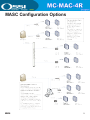
MASC Configuration Options.................................................................................................................................. 9
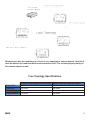
Free Topology Star................................................................................................................................................. 10
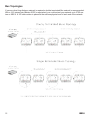
Free Topology Loop................................................................................................................................................ 11
Bus Topology.......................................................................................................................................................... 12
Doubly Terminated Bus Topology........................................................................................................................... 12
Singly Terminated Bus Topology............................................................................................................................. 12
Bus Topology, Specific Rules................................................................................................................................. 13
SLTA-10 Settings.................................................................................................................................................... 14
Chapter 3: Connections........................................................................................................................................15
Network Connection............................................................................................................................................... 15
Connecting Power.................................................................................................................................................. 15
Panel Grounding.................................................................................................................................................... 15
System Battery....................................................................................................................................................... 17
Panel Tamper Switch.............................................................................................................................................. 17
RAM Battery........................................................................................................................................................... 17
Card Readers..........................................................................................................................................................18
Panel Provided Power............................................................................................................................................ 19
Typical Door Wiring................................................................................................................................................ 19
Auxiliary Outputs.................................................................................................................................................... 20
Panel Wiring Layout................................................................................................................................................21
Typical Switch Hookup........................................................................................................................................... 22
Chapter 4: Panel Guidelines and Information.................................................................................................... 23
Chapter 5: Troubleshooting Guide...................................................................................................................... 25
Chapter 6: Quick Start Guides..............................................................................................................................29
Installing and Configuring the MASC Server Software............................................................................................29
Installing MAC-4R Drivers...................................................................................................................................... 29
Installing the Driver for the Echelon LT-USB Adapter............................................................................................. 30
Installing the Hardware Driver for the iLon-10 (LT-EA-10) Adapter........................................................................ 30
Adding a MAC-4R Driver........................................................................................................................................ 31
Adding Control Panels............................................................................................................................................ 32
Turn Driver On-Line................................................................................................................................................ 32
Set the Address of the Controller............................................................................................................................ 32