1
Epson Stylus Pro 4000
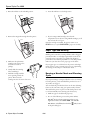
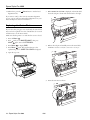
4. Place the used tank in the plastic bag included with the new
tank.
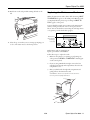
5. Insert the new tank.
6. If you removed any ink cartridges, replace them after
inserting the new maintenance tank.
Updating Driver and Firmware
To ensure that you have the most up-to-date firmware and
driver for your new printer, please visit
www.prographics.epson.com. Select Drivers & Support from
the left menu, then navigate to the Epson Stylus Pro 4000 to
see if there are any updates posted. Check back regularly to
maintain compatibility with existing and future applications.
When your printer is set up and READY appears on the LCD,
download and install the Printer Service Utility from
www.prographics.epson.com. Then run the Printer Service
Utility to check your printer’s firmware ROM version and
update it if necessary.
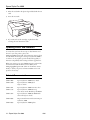
Related Documentation
CPD-17009
Epson Stylus Pro 4000 Printer Guide
CPD-17010
Epson Stylus Pro 4000 Quick
Reference Guide
CPD-17011
Epson Stylus Pro 4000 Start Here sheet
CPD-17136
Epson Stylus Pro 4000 Mastering
Your Printer Video Workshop CD-ROM
CPD-17012
Epson Stylus Pro 4000 CD-ROM with
electronic Reference Guide
CPD-18058
Important Information About Your Epson
Stylus Pro 4000
CPD-18059
Epson Stylus Pro 4000 Update
12 - Epson Stylus Pro 4000
4/04