1
English
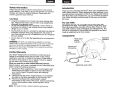
Wearing the headphones
Basic functions
Put on the headphones using the markings which identify the left
(L) and right (R) earcups. Adjust the headband so it rests gently
on top of your head and the earcup cushions fit comfortably
around your ears.
Connecting to your Apple device
Ensure the smaller 2.5 mm plug is securely inserted into the left
earcup. Plug the other end of the cable securely into the audio
output jack of the Apple audio device.
Using the headphones with your Apple device
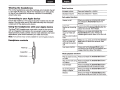
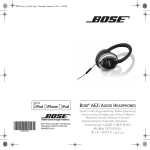
The Bose® AE2i headphones come with a small in-line remote
with an integrated microphone for convenient control of select
Apple products. Easily control volume, track selection and voice
applications, plus switch between your calls and music.
Note: Full controls may not be available for some Apple products.
Headphone controls
Volume up
'ffiPl'f'i'
----Q
,
Increase volume
Decrease volume
IPress and release the+ button.
IPress and release the- button.
Call-related functions
Answer a call
I When you receive an incoming call, press
and release the Answer/End button to
answer.
End a call
Press and release the Answer/End button.
Decline an incoming
call
Press and hold the Answer/End button for
about two seconds, then release.
Switch to an incom- While on a call, press and release the
Answer/End button once. Press and
ing or on-hold call
release again to switch back to the first call.
and
put the current call on
hold
Switch to an incoming or on-hold call
and end the current
call
While on a call, press and hold the Answer/
End button for about two seconds, then
release.
Use Voice Control
Press and hold the Answer/End button.
See iPhone User Guide for compatibility and
usage information about this feature.
Answer/End
Media playback functions
~
Volume down
~
I
Play or pause a song IPress and release the Answer/End button.
or video
I
Skip to the next song Press and release the Answer/End button
twice quickly.
or chapter
Fast-forward
IPress and release the Answer/End button
twice quickly and hold the second press.
3
Go to the previous
song or chapter
Press and release the Answer/End button
three times quickly.
Rewind
Press and release the Answer/End button
three times quickly and hold the third press.
4