1
Welcome
The Vodafone Mobile Wi-Fi R210 creates a personal portable Wi-Fi
zone which allows several Wi-Fi enabled devices (for example
PCs, Apple® iPhone, iPad or iPod touch, or mobile gaming devices
such as Nintendo® DSi, Android devices including the Samsung®
Galaxy Tab) to share a secure mobile internet connection.
System
requirements
The device is battery, mains or USB powered, and this flexibility
allows the device to be positioned for best mobile coverage and
then share this coverage between several devices via Wi-Fi.
To use the Vodafone
Mobile Wi-Fi R210
you need a device
with Wi-Fi capability.
Advanced configuration using Wi-Fi
To perform advanced configuration of the device browse to the
web UI http://VodafoneMobile.wifi or http://192.168.0.1 from a
computer running Microsoft® Windows® 7 (SP1 recommended),
Windows Vista™ (SP2 recommended), or Windows® XP (SP3
recommended), a computer running Linux or an Apple Mac
running Mac OS® X 10.5 (Intel®), 10.6 or 10.7 (all with latest
updates).
Advanced configuration for iPhone / iPad / iPod Touch /
smartphone / tablet users
Apple device users should use the Safari browser to browse to
the web UI http://VodafoneMobile.wifi or http://192.168.0.1 , or
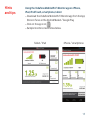
download the Vodafone Mobile Wi-Fi Monitor app. Smartphone
and tablet users can check the device status by downloading the
Vodafone Mobile Wi-Fi Monitor app from the App Store in iTunes
or the Android Market / Google Play. See Page 15 for sample app
screenshots.
1