1
Owner's Manual
for Vehicle
The Ultimate
Driving Machine
Contents
A-Z
Online Edition for Part no. 01 41 0 013 316 - © 02/07 BMW AG
Online Edition for Part no. 01 41 0 013 316 - © 02/07 BMW AG
750i
750Li
760i
760Li
Owner's Manual for Vehicle
Congratulations, and thank you for choosing a BMW.
Thorough familiarity with your vehicle will provide you with
enhanced control and security when you drive it. We therefore
have this request:
Please take the time to read this Owner's Manual and familiarize
yourself with the information that we have compiled for you
before starting off in your new vehicle. It contains important data
and instructions intended to assist you in gaining maximum use
and satisfaction from your BMW's unique range of technical features. The manual also contains information on maintenance
designed to enhance operating safety and contribute to maintaining the value of your BMW throughout an extended service
life.
This manual is supplemented by a Service and Warranty Information Booklet for US models or a Warranty and Service Guide
Booklet for Canadian models.
We wish you an enjoyable driving experience.
BMW AG
Online Edition for Part no. 01 41 0 013 316 - © 02/07 BMW AG
© 2007 Bayerische Motoren Werke
Aktiengesellschaft
Munich, Germany
Reprinting, including excerpts,
only with the written consent of
BMW AG, Munich.
Order No. 01 41 0 013 316
US English II/07, 07 03 450
Printed in Germany
Printed on environmentally friendly paper,
bleached without chlorine, suitable for recycling.
Online Edition for Part no. 01 41 0 013 316 - © 02/07 BMW AG
At a glance
10
16
23
Cockpit
iDrive
Voice command system
Controls
30
43
54
57
75
86
Opening and closing
Adjusting
Transporting children safely
Driving
Everything under control
Technology for comfort, convenience
and safety
100 Lamps
103 Climate
111 Practical interior accessories
Mobility
198
200
207
211
213
219
Refueling
Wheels and tires
Under the hood
Maintenance
Replacing components
Giving and receiving assistance
226 Technical data
230 Short commands of the voice command
system
232 Everything from A to Z
122 Things to remember when driving
Navigation
Starting navigation system
Destination input
Route guidance
What to do if …
Entertainment
152
156
163
165
169
170
At a glance
Reference
Driving tips
130
131
144
149
Controls
189 BMW Assist
On/off and settings
Radio
CD player
CD changer
External audio device
DVD changer
Online Edition for Part no. 01 41 0 013 316 - © 02/07 BMW AG
Navigation
Notes
Communications Entertainment
4
178 Telephone overview
181 Getting started
184 Using the phone
Mobility
Using this Owner's Manual
Communications
Reference
The fastest way to find specific topics is to use
the index, refer to page 232.
Driving tips
Contents
Notes
Notes
Using this Owner's Manual
Symbols used
In compiling this Owner's Manual we have
made every effort to furnish you with a convenient reference source affording quick access
to all the essentials. The fastest way to find
detailed information on any specific subject is
to turn to the comprehensive index at the back
of the manual. For a brief initial overview, please
refer to the first chapter.
Indicates precautions that must be followed precisely in order to avoid the possibility of personal injury and serious damage to
the vehicle.<
Should the day come when you decide to sell
your BMW, please remember to make certain
that the new owner receives this Owner's Manual; it is an important part of the vehicle.
Additional sources of information
If you have any additional questions, your
BMW center will be glad to advise you.
You can find information on BMW, e.g. on technology, on the Internet at www.bmwusa.com.
Indicates information that will assist you
in gaining the optimum benefit from your
vehicle and enable you to care more effectively
for your vehicle.<
Refers to measures that can be taken to
help protect the environment.<
< Marks the end of a specific item of information.
* Indicates special equipment, country-specific equipment and optional extras, as well as
equipment and functions not yet available at the
time of printing.
"..." Identifies Control Display texts used to
select individual functions.
These sections contain information on
using the voice command system.
{...} Verbal instructions to use with the voice
command system.
{{...}} Identifies the answers generated by the
voice command system.
Symbols on vehicle components
Indicates that you should consult the relevant section of this Owner's Manual for
information on a particular part or assembly.
4
Online Edition for Part no. 01 41 0 013 316 - © 02/07 BMW AG
Editorial notice
BMW pursues a policy of continuous, ongoing
development that is conceived to ensure that
our vehicles continue to embody the highest
quality and safety standards combined with
advanced, state-of-the-art technology. For this
reason, the features described in this Owner's
Manual may in rare cases differ from those on
your vehicle.
For your own safety, use genuine parts
and accessories approved by BMW.
When you purchase accessories tested and
approved by BMW and Genuine BMW Parts,
you simultaneously acquire the assurance that
they have been thoroughly tested by BMW to
ensure optimum performance when installed
on your vehicle.
BMW warrants these parts to be free from
defects in material and workmanship.
BMW will not accept any liability for damage
resulting from installation of parts and accessories not approved by BMW.
BMW cannot test every product made by other
manufacturers to verify if it can be used on a
BMW safely and without risk to either the vehicle, its operation, or its occupants.
Genuine BMW Parts, BMW Accessories and
other products approved by BMW, together
with professional advice on using these items,
are available from all BMW centers.
Installation and operation of non-BMW
approved accessories such as alarms, radios,
amplifiers, radar detectors, wheels, suspension
components, brake dust shields, telephones,
including operation of any mobile phone from
within the vehicle without using an externally
mounted antenna, or transceiver equipment, for
instance, CBs, walkie-talkies, ham radios or
similar accessories, may cause extensive damage to the vehicle, compromise its safety, interfere with the vehicle's electrical system or affect
5
Online Edition for Part no. 01 41 0 013 316 - © 02/07 BMW AG
At a glance
Controls
Driving tips
Parts and accessories
Navigation
If equipment in your BMW is not described in
this Owner's Manual, please refer to the accompanying Supplementary Owner's Manuals.
Advanced technology, e.g. the use of
modern materials and high-performance
electronics, requires specially adapted maintenance and repair methods. Therefore, have corresponding work on your BMW performed only
by your BMW center or a workshop that works
according to BMW repair procedures with correspondingly trained personnel. If this work is
not carried out properly, there is a danger of
subsequent damage and related safety hazards.<
Communications Entertainment
Please bear in mind that the manual may contain information on accessories and equipment
that you have not specified for your own vehicle.
Sections describing options and special equipment are marked by asterisks * to assist you in
identifying possible differences between the
descriptions in this manual and your own vehicle's equipment.
Maintenance and repairs
Mobility
In purchasing your BMW, you have decided in
favor of a model with individualized equipment
and features. This Owner's Manual describes
the entire array of options and equipment available with a specific BMW model.
For your own safety
Reference
Your individual vehicle
Notes
the validity of the BMW Limited Warranty. See
your BMW center for additional information.<
Maintenance, replacement, or repair of
the emission control devices and systems may be performed by any automotive
repair establishment or individual using any certified automotive part.<
California Proposition 65 Warning
California laws require us to issue the following
warning:
Engine exhaust and a wide variety of
automobile components and parts,
including components found in the interior furnishings in a vehicle, contain or emit chemicals
known to the State of California to cause cancer
and birth defects and reproductive harm. In
addition, certain fluids contained in vehicles and
certain products of component wear contain or
emit chemicals known to the State of California
to cause cancer and birth defects or other
reproductive harm.
Battery posts, terminals and related accessories contain lead and lead compounds. Wash
your hands after handling. Used engine oil contains chemicals that have caused cancer in laboratory animals. Always protect your skin by
washing thoroughly with soap and water.<
Service and warranty
We recommend that you read this publication
thoroughly.
Your BMW is covered by the following warranties:
> New Vehicle Limited Warranty
> Rust Perforation Limited Warranty
> Federal Emissions System Defect Warranty
> Federal Emissions Performance Warranty
> California Emission Control System Limited
Warranty
Detailed information about these warranties is
listed in the Service and Warranty Information
Booklet for US models or in the Warranty and
Service Guide Booklet for Canadian models.
Reporting safety defects
For US customers
The following only applies to vehicles owned
and operated in the US.
If you believe that your vehicle has a defect
which could cause a crash or could cause injury
or death, you should immediately inform the
National Highway Traffic Safety Administration
(NHTSA) in addition to notifying BMW of North
America, LLC, P.O. Box 1227, Westwood,
New Jersey 07675-1227, Telephone
1-800-831-1117.
If NHTSA receives similar complaints, it may
open an investigation, and if it finds that a safety
defect exists in a group of vehicles, it may order
a recall and remedy campaign. However,
NHTSA cannot become involved in individual
problems between you and your dealer or
BMW of North America, LLC.
To contact NHTSA, you may call the Vehicle
Safety Hotline toll-free at 1-888-327-4236
(TTY: 1-800-424-9153); go to
http://www.safercar.gov; or write to:
Administrator, NHTSA, 400 Seventh Street,
SW., Washington, DC 20590. You can also
obtain other information about motor vehicle
safety from http://www.safercar.gov
6
Online Edition for Part no. 01 41 0 013 316 - © 02/07 BMW AG
At a glance
For Canadian customers
7
Online Edition for Part no. 01 41 0 013 316 - © 02/07 BMW AG
Reference
Mobility
Communications Entertainment
Navigation
Driving tips
Controls
Canadian customers who wish to report a
safety-related defect to Transport Canada,
Defect Investigations and Recalls, may call
1-800-333-0510 toll-free from anywhere in
Canada or 1-613-993-9851 from the Ottawa
region and from other countries, or contact
Transport Canada by mail at: Transport
Canada, ASFAD, Place de Ville, Tower C,
330 Sparks Street, Ottawa, ON, K1A 0N5.
You can also obtain other information about
motor vehicle safety from http://www.tc.gc.ca
Online Edition for Part no. 01 41 0 013 316 - © 02/07 BMW AG
At a glance
This overview of buttons, switches and displays
is intended to orient you in your vehicle's
operating environment. It will also assist you
in becoming acquainted with the control
concepts and options available for
operating the various systems.
Online Edition for Part no. 01 41 0 013 316 - © 02/07 BMW AG
Cockpit
Cockpit
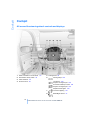
All around the steering wheel: controls and displays
1
Roller sun blind for rear window* 112
5
2
Rear window safety switch 40
6
3
Power windows 40
4
Exterior mirrors 50
Parking brake 58
Parking lamps 100
Low beams 100
Daytime running lamps* 100
Automatic headlamp control 100
Daytime running lamps* 100
Adaptive Head Light* 100
7
Instrument lighting 101
8
BMW Night Vision* 97
10
Online Edition for Part no. 01 41 0 013 316 - © 02/07 BMW AG
11
Rain sensor 65
Turn signals 65
High beams,
headlamp flasher 101
Roadside parking lamps 101
Computer 76
Check Control 80
18
21
Opening luggage compartment
lid 36
22
Programmable cruise control 67
12 Buttons on steering wheel
Entertainment volume,
increasing/decreasing 152
Volume of hands-free unit,
increasing/decreasing 179
Steering wheel heater* 52
Steering wheel adjustment 51
Computer 76
Voice command system*
activation/deactivation 23
PDC Park Distance Control* 86
19 Horn, the entire surface
20
Active cruise control* 69
23 Fog lamps 101
Front fog lamps
Mobile phone:
24 Unlocking hood 207
Communications Entertainment
Calling, redialing, accepting call or
ending call 184
At a glance
Windshield wipers 65
Controls
17
10 Steptronic: downshifting 63
Driving tips
Steptronic: upshifting 63
Navigation
9
Sport program and manual
operation of the automatic
transmission 63
Selecting radio station 156
Selecting music track 163, 166
Skipping chapter* 172
Programmable button 52
13 Info Display 12
14 Automatic transmission 62
15 Ignition lock 57
Mobility
Switching ignition on/off 57
and Starting/stopping engine 57
11
Online Edition for Part no. 01 41 0 013 316 - © 02/07 BMW AG
Reference
16
Cockpit
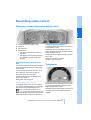
Info Display
9
1
Resetting trip odometer to zero 75
2
Speedometer with display for
> Outside temperature 75
> Programmable cruise control 67
> Clock 75
> Active cruise control* 69
> Speed limit 82
Display for
> Indicator and warning lamps 80
10 Display for
3
Indicator and warning lamps 13
> Computer with fuel gauge 76
4
Tachometer 75
Route guidance of navigation
system* 144
> Remaining driving distance for service
requirements 78
5
Display for
11 Fog lamps 101
> Flat Tire Monitor* 91
> Tire Pressure Monitor* 93
6
Display for
> Voice command system* 23
> Odometer and trip odometer 75
> Text messages in Check Control 80
> Computer 76
7
Transmission range selection 62
8
Automatic transmission program
display 62
12
Online Edition for Part no. 01 41 0 013 316 - © 02/07 BMW AG
The concept
In urgent cases, this information will be shown
as soon as the corresponding lamp comes on.
Indicator lamps without text messages
At a glance
Indicator and warning lamps
With parking brake released 59
With parking brake set 58
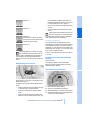
Control and warning lamps can light up in various combinations and colors.
Warning lamp on Canadian models
When the engine is started or the ignition is
switched on, some lamps are checked for
proper operation and light up briefly in the process.
Front fog lamps 101
Driving tips
Turn signals 65
Controls
The following indicator lamps indicate that the
particular functions are active:
High beams/headlamp flasher 101
DSC Dynamic Stability Control,
flashes 88
You can view additional information, e.g.
regarding the cause of a malfunction and the
corresponding action to take, in the Check Control, refer to page 80.
13
Online Edition for Part no. 01 41 0 013 316 - © 02/07 BMW AG
Reference
Mobility
Text messages on Info Display explain the
meaning of the indicator and warning lamps
shown.
Communications Entertainment
Explanatory text messages
Navigation
DTC Dynamic Traction Control 88
Cockpit
Comfort area: controls and displays
14
Online Edition for Part no. 01 41 0 013 316 - © 02/07 BMW AG
Reading lamps 102
4
Interior lamps 101
5
Passenger airbag status lamp 96
6
Initiating an emergency call* 219
7
Control Display 16
8
Temperature, left side of passenger compartment: turn,
maximum cooling: press 106
9
Air volume, left side of passenger compartment: turn 106
Defrosting windows and removing condensation: press 106
10 Hazard warning flashers
11 Air volume, right side of passenger
compartment 106
12 Temperature, right side of passenger compartment: turn,
residual heat: press 106
13 Rear window defroster
14 Air conditioner mode 107
At a glance
3
Heated seats* 49
Active seat ventilation* 50
Active seat for driver* 50
Seat, mirror and steering wheel
memory 46
25 Glasses compartment 115
26 Storage compartments 115
27 Switching audio sources on/off and
adjusting volume 153
Controls
Memory buttons for integrated universal
remote control* 111
Driving tips
2
24 Seat adjustment 43
28 Retracting telephone keypad 179
29 Automatic air distribution and airflow
as well as intensity of the AUTO program,
left side of passenger compartment 104
30 Outside air/AUC Automatic recirculated-air
control/recirculated air 105
31 Switching off automatic climate
control 105
15 Opening the glove compartment 113
16 Automatic air distribution and airflow
as well as intensity of the AUTO program,
right side of passenger compartment 104
17 Starting scan
> for stations 152
> for tracks 152
18 Central locking system 34
19 Selecting AM or FM waveband
20 Selecting radio, CD player, and CD changer
Navigation
Glass sunroof, electric* 41
Communications Entertainment
1
21 Controller 16
Mobility
button and programmable
button 16
23 Snap-in adapter 181
15
Online Edition for Part no. 01 41 0 013 316 - © 02/07 BMW AG
Reference
22
iDrive
iDrive
iDrive combines the functions of a multitude of
switches. This allows these functions to be
operated from a central position. The following
introduction illustrates how easy iDrive is to
use. The control of individual functions is
described in connection with the relevant
equipment.
Controls
1
Control Display
Switching Control Display off/on
2
Programmable button 52
3
button
Opening start menu
1. Press the
menu.
4
Controller
You can use the controller to select menu
items and make settings:
button to open the start
2. Press the controller.
Press the controller again to switch the screen
back on.
> move in four directions, arrows 5
> turn, arrow 6
> press, arrow 7
To avoid becoming distracted and posing
an unnecessary hazard, both to your own
vehicle's occupants and to other road users:
never attempt to use the controls or make
entries unless traffic and road conditions
allow.<
16
Online Edition for Part no. 01 41 0 013 316 - © 02/07 BMW AG
BMW Assist* 189
2
Communication*
At a glance
> Destination input 131
> Route guidance 144
5
> Using the phone 184
3
Navigation* 130
Help
> Brief help text displays 21
Car Data
> Menu name for menu change 19
> Computer 76
6
Entertainment
> Trip computer 78
> Radio 156
> Speed limit 82
> CD player* 163
> Stopwatch 83
> CD changer* 165
> Assistance window for onboard data 83
> External audio device 169
> Engine oil level 208
Mobility
1
4
> DVD changer* 170
> Service required 78
> Check Control messages 80
17
Online Edition for Part no. 01 41 0 013 316 - © 02/07 BMW AG
Reference
You can select from an extended range of functions and setting options:
Communications Entertainment
Navigation
Driving tips
Controls
Menus on Control Display
iDrive
7
DVDs can only be played on the rear
seat screen, refer to Rear seat
screen* on page 21.<
The message automatically disappears after
approx. 25 seconds.
Settings
Start menu
> Parking brake 58
> PDC Park Distance Control 86
> EDC Electronic Damping Control 89
> Programmable buttons 52
> FTM Flat Tire Monitor* 90
> TPM Tire Pressure Monitor* 91
> Time and date 84
> Language 84
> Units of measure and display format 84
> Brightness 85
> Rear seat screen* 21
> Pairing mobile phone with vehicle 182
8
You can access all functions of iDrive via eight
menu items.
Opening start menu
Press the
button.
Climate
Opening the start menu from a menu:
> Intensity of AUTO program 104
> Move the controller toward the currently
active menu.
> Air volume 106
> Heated seats* 49
> Parked car ventilation 109
> Move the controller twice in one direction.
Selecting menu
> Extra, e.g. rear air conditioner 108
Basic operation
Once the radio ready position is reached, the
following message appears on the Control Display:
From the start menu, eight menus can be
accessed by moving the controller in the appropriate directions.
To clear the message:
Press the controller.
This displays the start menu.
In a menu, you can change directly into a
new menu by moving in the corresponding direction, without having to open the start
menu first.
Moving in the direction that corresponds to the
last menu used brings you back to the last item
used in this menu.<
18
Online Edition for Part no. 01 41 0 013 316 - © 02/07 BMW AG
Displaying and hiding menu name
To edit a function, select the corresponding
menu item. Menu items shown in white can be
selected.
You can program the system to display the
menu name each time you proceed to a new
menu.
button to open the start
2. Move the controller toward "Help".
The highlight moves.
To change between the menu
items on the left and right side of
the Control Display, continue to turn the controller at the beginning or end of a list. The highlight moves to the other side of the Control Display.
Activating menu item
Press the controller.
The
symbol indicates the menu that is currently activated. The menu name is displayed.
Symbols
Some functions and information are displayed
in the form of symbols:
The function is switched on.
Changing settings
Back.
The function is switched on.
"Split": to show the current display in the
assistance window.
Communications Entertainment
Turn the controller
Navigation
Driving tips
3. Select "Menu name" and press the controller.
Controls
1. Press the
menu.
At a glance
Selecting menu items
2. Press the controller to adopt the setting.
19
Online Edition for Part no. 01 41 0 013 316 - © 02/07 BMW AG
Reference
Mobility
1. Turn the controller to change the setting.
iDrive
Status lines
6
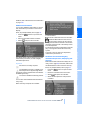
There is a Check-Control message 80
You can have the Control Display show
additional information using the menu "Car
Data" under "CHECK" 81
Status service required 78
Red:
At least one service interval has been
exceeded. You can have more precise information about the maintenance procedure
displayed by using the "Car Data" menu
under
79
7
Temperature selection and intensity of the
AUTO program, right side of passenger
compartment
8
Air volume, right side of passenger compartment
9
Entertainment
Display for radio, CD, and DVD
With compressed audio files, the track
information is displayed 167
1
Hands-free mode active
2
A call has come in while you were away
3
Signal strength, mobile radio network*
4
Here, you will see:
> the name of the paired mobile phone
> the entered/selected phone number
5
Phone status:
10 Air volume, left side of passenger compartment
11 Temperature selection and intensity of the
AUTO program, left side of passenger compartment
Assistance window
> Green, yellow and red flashing:
Pairing of a mobile phone
> Green:
Incoming or outgoing call
> Red:
No network available
> Yellow:
Partner network* active, the network of
another provider is being used
> Flashing yellow:
Visited network* active, the network of
another provider is being used, visited
network*
Additional information appears in the assistance window:
Roaming in a partner or external network incurs higher call charges than
in your home network.<
> A function selected from the "Car Data"
menu, refer to page 83.
> Short help and supplementary information
texts about selected menu items.
> The route with a navigation system, refer to
page 130.
20
Online Edition for Part no. 01 41 0 013 316 - © 02/07 BMW AG
1. Press the
menu.
button to open the start
2. Move the controller toward "Help".
3. Select "Help text" and press the controller.
Rear seat screen*
Some of the functions of iDrive can also be
operated via the rear seat screen. Certain functions are only available via iDrive. These functions can only be operated to a limited degree
on the rear screen, e.g. the speed limit can only
be displayed. The settings are made via iDrive.
Deploying rear seat screen
1. Swing pivoting arm upward until it engages.
At a glance
You can display help texts and supplementary
information on selected menu items in the
assistance window.
Controls
Showing/hiding help texts
Status lines
The rear seat screen is ready for operation.
Stowing rear seat screen
1. Align rear seat screen so that it is straight.
2. Fold rear seat screen downward until pivoting arm unlocks.
Pivoting arm swings downward.
The rear seat screen is switched off.
Pivot the rear seat screen completely
downward when the ski bag is being
used; otherwise, it could be damaged.
Do not pivot the rear seat screen up or down
with the cup holders open, as this can damage
it.<
Communications Entertainment
The
symbol indicates the menu that is currently activated.
Navigation
Driving tips
2. Fold rear seat screen upward.
Switching off rear seat screen
2. Press the controller.
1
Outside temperature or town/city of destination of the navigation system
2
Time
3
Date
Press the controller again to switch the screen
back on.
21
Online Edition for Part no. 01 41 0 013 316 - © 02/07 BMW AG
Mobility
button to open the start
Reference
1. Press the
menu.
iDrive
Controller/buttons
Headphones
The controller and buttons are located on the
center armrest.
Rear lock
The available functions are operated with the
respective controller.
You can use iDrive to restrict operation in the
rear or to switch off the rear seat screen.
iDrive, for principle details, refer to page 16.
1. Press the
menu.
button to open the start
2. Move the controller toward "Settings".
1
Headphone jack
2
Adjusting volume
3
Station scan/track search
3. Select "Rear" and press the controller.
> Station scan
4. Select "Unlock" and press the controller
repeatedly until the desired enabling of the
rear iDrive is set.
> Search track for CD, search chapter for
DVD changer
With headphones connected, the sound
output for the Control Display and the rear
seat screen are played back separately. For
example, a radio station can be listened to while
a DVD is being played in the rear.<
Headphones are only intended for passengers
in the rear seats. Please check with local regulations regarding use of headphones.
> "menu"
You can switch the offered menus on or off
by turning and pressing the controller.
The
symbol indicates the menus that
are currently activated.
> "None"
Switches the rear screen off.
> "Full"
Releases all function locks.
> "Limited"
You disable the functions that are used on
the front Control Display.
22
Online Edition for Part no. 01 41 0 013 316 - © 02/07 BMW AG
Note
Use iDrive to set the language that will be used
so that the voice command system will be able
to identify the commands spoken. Setting the
language of iDrive, refer to page 84.
Symbols used
These sections contain information on
using the voice command system.
An acoustic signal and the display "SVS active"
on the Info Display, refer to page 24, indicate
that the system is ready for operation. The system automatically starts in the main menu.
From here, you can call up all the equipment
that can be operated.
Canceling voice command
Briefly press the
wheel
button on the steering
or
{Cancel}.
In dialogs in which any text can be spoken, e.g.
names, notes, canceling is only possible using
the
button.
{...} Verbal instructions to use with the voice
command system.
The system automatically switches over
to its telephone mode if you receive a call
during voice input. "SVS active" appears on the
Info Display, refer to page 24.<
{{...}} Identifies the answers generated by the
voice command system.
Voice commands
Systems available for use with voice
command
> {Navigation}, refer to page 130
> {Radio}, refer to page 156
> {Telephone}, refer to page 184
> {CD}, refer to page 163
> {CD changer}, refer to page 165
> {Notepad}, refer to page 25
At a glance
button on the steering
The voice command system operates on the
basis of specific, predefined commands; these
commands should be spoken precisely as indicated. You can have the possible commands
read aloud at any point. To do so, say the command {Options}.
In addition to the commands described, there
are often other commands that run the same
function. Instead of {Options}, you can, for
example, also say {What now}. In addition,
> {DVD}, refer to page 170
23
Online Edition for Part no. 01 41 0 013 316 - © 02/07 BMW AG
Driving tips
Briefly press the
wheel.
Navigation
Please take the time to acquaint yourself
with how a particular system operates
before proceeding to control it using the voice
command system.<
Voice command system activation
Communications Entertainment
The voice command system transforms your
oral commands and dialog answers into control
signals for the selected systems.
Voice commands
Mobility
The voice command system allows you to control operation of various vehicle systems without ever removing your hands from the steering
wheel. The system operates on the basis of
voice commands that you will learn easily after
using them a few times. In many cases, the
voice command system assists you with
announcements or questions while you are
making your entries.
The Info Display, refer to page 24, will display
either the equipment that you are now operating or any current error messages.
Reference
The concept
Controls
Voice command system*
Voice command system
numerous options are often available, such as
{Scale 100 miles} instead of {Scale}.
Displays on Info Display
Short commands
In the {Main menu} level, you can run certain
functions directly with brief commands, refer to
page 230, without having to open an equipment
level first.
For example, if you want to dial a phone number, you can directly
1. {Dial number}.
2. Enter the phone number.
without previously opening
{Telephone}
Identification in Owner's Manual
The Info Display shows you what the voice
command system has understood in line 2,
while also indicating which voice command or
question is currently active in line 1.
In addition, any error messages are also displayed.
Special commands are available for specific
systems. In this Owner's Manual you will find
these commands in the sections describing the
individual systems.
Operation with the voice command system
is always indicated with this symbol.
Changing map scale for navigation: an example
Starting the dialog
Briefly press the
wheel.
You say
button on the steering
The voice command system replies
Shown on Info Display
"SVS active"
{Change scale}
{Scale 400 feet}
{{Please enter the desired scale}}
"scale?
change scale"
"ok
400 ft"
24
Online Edition for Part no. 01 41 0 013 316 - © 02/07 BMW AG
Instructions/announcements from the voice
command system will continue at this volume
level, even if the other audio sources are set to
minimum volume.
Recording a note
The volume setting is stored for the remote
control currently in use.
{Record note}.
You can store roughly ten minutes of spoken
text, either as a single entry or as multiple
entries of any desired length.
To stop recording:
Press the
Notes
Do not use the voice command system to
make emergency calls. Your voice and
habitual tone could be affected by stressful situations, as a result of which the process of
establishing the telephone connection could be
unnecessarily delayed. Instead, use the emergency call button near the interior rearview mirror, refer to page 219.<
Environmental conditions
The voice command system uses a special
hands-free microphone located in the front of
your vehicle's headliner. Although the system is
designed to filter out ambient noise, you can
help ensure that your commands will be understood by observing the following instructions:
> Speak smoothly and clearly, at a normal volume. Avoid excessive emphasis and
pauses.
> Do not speak while the voice command system is itself speaking.
button longer.
When recording a note, the voice command system does not hear the command {Cancel} or {Exit}. The text checking
function for command words is deactivated in
this case so that you can speak any desired text
for your notes. This feature saves you from having to concentrate on avoiding any command
words.<
Listening to a notepad entry
To listen to recorded notepad entries:
1. {Read out}.
Approximately the first 3 seconds of
the first note are read aloud.
2. After the request {{Record note, read
out note, delete note.}} select the
desired function.
> To listen to the entire note:
{Read out}.
> To listen to the next note:
{Next}.
> To listen to the note again:
{Back} or {Repeat}.
25
Online Edition for Part no. 01 41 0 013 316 - © 02/07 BMW AG
At a glance
Navigation
The notepad
Communications Entertainment
Turn the knob during an instruction/announcement to select the desired volume.
Driving tips
> The hands-free microphone is aimed
toward the driver. This means that the system might not be able to register the voices
of other vehicle occupants properly.
Controls
> Avoid other sources of noise in the vehicle
while speaking, and ask other vehicle occupants to refrain from talking while you are
using the system.
Mobility
You can adjust the volume for the instructions
from the voice command system:
> Keep the doors, windows and glass sunroof
closed to prevent interference from ambient noise.
Reference
Adjusting volume
Voice command system
Deleting notes
1. {Edit}.
2. {Delete}.
Clearing notepad
To delete all contents from the notepad:
1. {Notepad}.
2. {Delete}.
Standard commands
The standard commands available for use with
all controlled systems are the same.
On delivery, the {Standard dialog} is set
so as to simplify familiarization with the
voice command system.<
Function
Command
To repeat last message issued by the voice
command system
{Repeat}
To switch off the voice command system
{Cancel}
To set comprehensive instructions and error
reports
{Standard dialog}
To set brief instructions and error reports
{Short dialog}
To call up information on individual items of
equipment
{Help}
To have the system read aloud a list of the
commands available for the selected system.
This list simultaneously appears on the Info
Display, refer to page 24
{Options}
To open the main menu
{Main menu}
26
Online Edition for Part no. 01 41 0 013 316 - © 02/07 BMW AG
27
Reference
Online Edition for Part no. 01 41 0 013 316 - © 02/07 BMW AG
Mobility
Communications Entertainment
Navigation
Driving tips
Controls
At a glance
Online Edition for Part no. 01 41 0 013 316 - © 02/07 BMW AG
Controls
This chapter is intended to provide you with
information for complete control of your vehicle.
Its extensive array of features and accessories,
provided both for driving and for your own
safety, comfort and convenience,
are described here.
Online Edition for Part no. 01 41 0 013 316 - © 02/07 BMW AG
Opening and closing
Opening and closing
Remote control/key
Integrated key
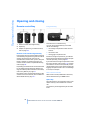
Press button 1 to release the key.
1
Remote control with integrated key
2
Spare key
You can use the integrated key to lock and
unlock the following:
3
Adapter for spare key, in onboard tool kit,
refer to page 213
> the storage compartment under the front
armrest
Remote control with integrated key
Each remote control contains a battery which is
automatically charged in the ignition lock while
driving. Use each remote control for an
extended drive at least twice a year to keep the
battery charged. For Comfort Access*, the
remote control contains a replaceable battery,
refer to page 39.
Depending on which remote control is detected
by the vehicle during unlocking, different settings are called up and carried out in the vehicle,
refer to Key Memory on page 31.
Information on the required maintenance is also
stored in the remote control, refer to CBS Condition Based Service, page 211.
> the driver's door
> the luggage compartment lid
Inside the storage compartment, you will also
find the switch for locking the luggage compartment lid separately, refer to page 35.
If you then lock the storage compartment under
the center armrest, refer to page 114, and only
surrender the remote control, this will prevent
unauthorized access to the vehicle through the
luggage compartment lid. This is an advantage
in a hotel, for example.
New remote controls
New remote controls, additional or when lost,
can be obtained from your BMW center.
Spare key
Store the spare key in a safe place such as your
wallet. This key is not intended for constant
use.
The spare key and integrated key fit the same
locks.
30
Online Edition for Part no. 01 41 0 013 316 - © 02/07 BMW AG
> Settings for the displays on the Control Display:
> Units of measure for fuel consumption,
distance traveled, distances to go, temperature, and pressure, refer to page 84.
> Language on Control Display, refer to
page 84.
At a glance
You will need the adapter to activate the ignition
and to start the vehicle with the spare key.
> Air distribution, temperature, and intensity
of the Automatic climate control, refer to
page 105.
Controls
Adapter for spare key
You can set a number of functions of your BMW
individually according to your preferences. Key
Memory ensures that most of these settings are
stored for the remote control currently in use
without you having to do anything. When the
vehicle is unlocked, the corresponding remote
control is detected and the settings stored for it
are called up and carried out.
This means that your BMW will return to your
personal settings even if it has in the meantime
been driven by another person with his/her own
remote control and settings. The individual settings are stored for a maximum of four remote
controls.
> Personal settings for the volume of the
hands-free telephone operation, refer to
page 179.
Central locking system
The concept
The central locking system is ready for operation whenever the driver's door is closed. This
simultaneously engages and releases the locks
on the following:
> Doors
> Luggage compartment lid
> Fuel filler door
The central locking system can be operated
from the outside:
Key Memory
> via the remote control
> Personal temperature distribution for seat
heating*, refer to page 49.
> via the driver's door lock
> Personal setting for the programmable button on the steering wheel, refer to page 52.
and from inside via the button for the central
locking system.
> Personal setting of PDC Park Distance
Control*, refer to page 86.
When the system is locked from inside, the fuel
filler door remains unlocked. Refer to page 34.
> with Comfort Access* via the door handles
31
Online Edition for Part no. 01 41 0 013 316 - © 02/07 BMW AG
Navigation
> Personal settings for the stored stations of
the radio, refer to page 158.
Communications Entertainment
The concept
> Personal settings for volume and tone of
the Entertainment sound output, refer to
page 153.
Mobility
Key Memory
> Brightness of Control Display, refer to
page 85.
Reference
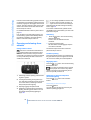
Take the adapter from the onboard tool kit, refer
to page 213.
Press lock button 1, slide the cover open and
insert the spare key 2 into the adapter. Close
the cover and insert the adapter into the ignition
lock.
Driving tips
> Display format of date and time, refer to
page 84.
Opening and closing
Each time the central locking system is locked
or unlocked from outside the vehicle, this simultaneously engages or disengages the anti-theft
system. The alarm system is also armed or disarmed. The remote control also switches the
interior lamps on and off.
For additional details on alarm system refer to
page 37.
In an accident of corresponding severity, the
central locking system automatically unlocks
the vehicle. In addition, the hazard warning
flashers and interior lamps switch on.
If it is no longer possible to lock the vehicle with a remote control, its battery is
discharged. Use this remote control during an
extended drive; this will recharge the battery,
refer to page 30.
In the event of malfunctions, please contact
your BMW center. which is also your source for
replacement keys.<
Unlocking
1.
Press the
button. The hazard warning
flashers blink twice.
Driver's door and fuel filler door are
unlocked.
Opening and closing: from
outside
2. Press the
button again.
All other doors and the luggage compartment lid are unlocked.
Using remote control
The interior lamps and the door-mounted
perimeter lamps come on.
Persons or animals left unattended in a
parked vehicle can lock the doors from
the inside. For this reason, bring the remote
control with you whenever you leave the vehicle
so that you will always be able to unlock the
vehicle from outside.<
Comfort opening
Press the
button longer. The windows and
the glass sunroof open. The glass sunroof will
not move if it is already in its raised position.
Engaging locks
Press the
button. The hazard warning
flashers blink once.
Do not lock the vehicle from the outside
when people are in it since they will be
unable to unlock it from inside if they do not
know the special procedure.<
1
Unlocking, comfort opening, and deactivating alarm system
2
Locking and securing, arming alarm system, switching off tilt alarm sensor and interior motion sensor, switching on interior
lamps and perimeter lighting
3
Opening luggage compartment lid
4
Switching on interior lamps and pathway
lighting, activating panic mode*. You can
find details about pathway lighting on
page 100.
Switching on interior lamps and
perimeter lighting
Press the
locked.
button if the vehicle is
Switching on interior lamps
Press the
button.
You can also use this function to locate your
vehicle in parking garages etc.
32
Online Edition for Part no. 01 41 0 013 316 - © 02/07 BMW AG
Opening luggage compartment lid
If it is no longer possible to lock the vehicle with
a remote control, then its battery is discharged.
Use this remote control during an extended
drive; this will recharge the battery, refer to
page 30.
During opening, the luggage compartment lid pivots back and up. Make sure
there is adequate clearance available before
opening.
To avoid being inadvertently locked out, never
set the remote control down in the luggage
compartment. A previously locked luggage
compartment lid is also locked again after closing.<
Automatic luggage compartment lid
operation*
Opening luggage compartment lid
Press the
button for approx. one second.
The luggage compartment lid opens all the way,
regardless of whether it was previously locked
or unlocked.
For US owners only
The transmitter and receiver units comply with
part 15 of the FCC/Federal Communication
Commission regulations. Operation is governed by the following:
FCC ID:
> LX8766S
> LX8766E
> LX8CAS
> LX8CAS2
Compliance statement:
This device complies with part 15 of the FCC
Rules. Operation is subject to the following two
conditions:
> This device may not cause harmful interference, and
> this device must accept any interference
received, including interference that may
cause undesired operation.
During opening, the luggage compartment lid pivots back and up. Make sure
there is adequate clearance available before
opening.
To avoid being inadvertently locked out, never
set the remote control down in the luggage
compartment. A previously locked luggage
compartment lid is also locked again after closing.<
Any unauthorized modifications or
changes to these devices could void the
user's authority to operate this equipment.<
Mobility
To interrupt the opening process:
Press the button again while opening is in
progress.
Navigation
The luggage compartment lid opens, regardless of whether it was previously locked or
unlocked.
Communications Entertainment
button for approx. one second.
33
Online Edition for Part no. 01 41 0 013 316 - © 02/07 BMW AG
Reference
Press the
At a glance
Local radio waves can cause the remote control
to malfunction.
Should the remote control fail to operate due to
interference of this kind, the vehicle can be
opened and closed with a key via the door lock.
Controls
Malfunction
You can trigger the alarm system in case of
danger:
Press the
button for at least 3 seconds.
To deactivate the alarm: press any button
Driving tips
Panic mode*
Opening and closing
Using the door lock
Do not lock the vehicle from the outside
when people are in it since they will be
unable to unlock it from inside if they do not
know the special procedure.<
1. Turn key.
Driver's door and fuel filler door are
unlocked.
2. Turn key again.
All other doors and the luggage compartment lid are unlocked.
Convenience operation
You also have the option of operating the windows and the glass sunroof from the driver's
door lock.
> To open:
With the door closed, turn the key to the
Unlock position and hold it there.
> To close:
With the door closed, turn the key to the
Lock position and hold it there.
Watch during the closing process to
be sure that no one is injured. Releasing the key stops the operation.<
Manual operation
If an electrical malfunction occurs, you can
unlock or lock the driver's door with the key in
the end positions of the door lock.
Opening and closing: from
inside
When the front doors are closed, use this button to unlock the doors and luggage compartment lid or to lock them without arming their
anti-theft sensors. The fuel filler door remains
unlocked.
If the remote control, refer to page 32, or
Comfort Access, refer to page 38, have
been used to unlock only the driver's door and
you press the
button, then this unlocks all of
the other doors, the luggage compartment lid,
and the fuel filler door.
You can lock a closed driver's door by pressing .<
Unlocking and opening doors
> Either unlock the doors together with the
button for the central locking system and
then pull the release handle above the armrest
> or pull the release handle for each door
twice: the first pull unlocks the door, and the
second one opens it.
When the low beams are switched on, the
interior door handles are also lit. The
intensity of the lighting is adjusted using the
instrument lighting control, refer to page 101.<
Engaging locks
> Use the central locking button to lock all of
the doors simultaneously
> or press down the individual lock buttons of
the doors.
34
Online Edition for Part no. 01 41 0 013 316 - © 02/07 BMW AG
Automatic soft closing*
Apply gentle pressure to the door to close it.
The closing process will then be carried out
automatically.
To avoid injuries, make sure that the
door's travel path is completely free and
clear before closing.<
Luggage compartment lid
Opening from outside
Insert the key into the luggage compartment
lid's lock and turn it all the way to the right – the
lid opens.
To avoid being inadvertently locked out,
never set the key or the remote control
down in the luggage compartment. The luggage compartment is locked again as soon as
you close the lid.
If you use the lock to unlock the luggage compartment lid while the alarm system is armed,
the alarm will be triggered. To avoid this, you
should unlock the vehicle first. If the alarm has
been triggered accidentally, switch off the
alarm, refer to page 37.<
Locking separately
Press the button on the luggage compartment
lid or the
button on the remote control for
approx. 1 second: the luggage compartment lid
opens.
During opening, the luggage compartment lid pivots back and up. Make sure
there is adequate clearance available before
opening.<
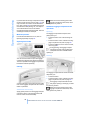
The location of the switch varies, depending on
the individual vehicle's equipment.
1
Luggage compartment lid locked
2
Luggage compartment lid unlocked
Push the switch into position 1. This locks the
luggage compartment lid and disconnects it
from the central locking system.
35
Online Edition for Part no. 01 41 0 013 316 - © 02/07 BMW AG
Controls
At a glance
Opening separately
Driving tips
Doors
Navigation
All of the vehicle's keys fit the luggage compartment lid lock located in the license plate recess.
Communications Entertainment
Persons or animals left unattended in a
parked vehicle can lock the doors from
the inside. For this reason, bring the remote
control with you whenever you leave the vehicle
so that you will always be able to unlock the
vehicle from outside.<
Mobility
The lock
Reference
To prevent the driver from being inadvertently
locked out of the vehicle, the lock button on the
driver's door automatically extends again after a
brief period if the door remains open.
Opening and closing
If you then lock the storage compartment under
the front center armrest, refer to page 114, and
only surrender the remote control without the
key, refer to page 30, for example when leaving
the vehicle for valet parking, etc., this will prevent unauthorized access to the vehicle
through the luggage compartment lid. This is an
advantage in a hotel, for example.
Make sure that the closing path of the
luggage compartment lid is clear; otherwise, injuries may result.<
Automatic luggage compartment lid
operation*
Opening
Manual operation
The luggage compartment lid opens completely when you:
If an electrical malfunction occurs, refer to
Opening separately on page 35.
> Press the button next to the steering column.
Opening from inside
> Press the button on the outside of the luggage compartment lid, refer to page 35.
> Press the
button on the remote control,
refer to page 33.
During opening, the luggage compartment lid pivots back and up. Make sure
there is adequate clearance available before
opening.<
Closing
You can use this button to open the luggage
compartment lid when the vehicle is stationary.
This is not possible if the luggage compartment
lid has been locked separately.
Closing
The luggage compartment lid closes automatically when you:
> Press the button.
> Press the button on the outside of the luggage compartment lid, refer to page 35.
A recess has been incorporated into the inside
trim on the luggage compartment lid to make it
easier to pull down.
Automatic soft closing
The luggage compartment lid immediately stops opening or closing if you hold
it in place by hand.<
Make sure that the closing path of the
luggage compartment lid is clear; otherwise, injuries may result.<
Apply gentle pressure to the luggage compartment lid to close it. The closing process will
then be carried out automatically.
36
Online Edition for Part no. 01 41 0 013 316 - © 02/07 BMW AG
> Insert the remote control into the ignition
lock.
Indicator lamp displays
Alarm system
The concept
The vehicle alarm system responds to:
> opening of a door, the hood or the luggage
compartment lid
> movement in the vehicle interior: interior
motion sensor, refer to page 38
> changes in the vehicle's tilt if someone
attempts to steal the wheels or tow the
vehicle
> interruptions in battery voltage
The alarm system briefly indicates unauthorized tampering:
> with an acoustic alarm
> by switching on the hazard warning flashers
> by flashing the high beams
Arming and disarming alarm system
When you lock or unlock the vehicle, either with
the remote control or at the door lock, the alarm
system is armed or disarmed at the same time.
When the alarm system is armed, you can also
open the luggage compartment lid with the
At a glance
Navigation
Pull the lever inside the luggage compartment.
This unlocks the luggage compartment lid.
Controls
> Unlock the vehicle using the remote control,
refer to page 32.
Driving tips
Switching off alarm
> The indicator lamp below the interior rearview mirror flashes continuously: the system is armed.
> The indicator lamp flashes after the vehicle
is locked: the doors or luggage compartment lid are not properly closed. Even if you
do not close the door involved, the system
begins to monitor the remaining areas, and
the indicator lamp flashes continuously
after 10 seconds. However, the interior
motion sensor is not activated.
> After the vehicle is unlocked, the indicator
lamp goes out: no manipulation or
attempted intrusions have been detected in
the period since the system was armed.
> After the vehicle is unlocked, the indicator
lamp flashes until the remote control is
inserted into the ignition lock, but for no
more than roughly 5 minutes: an attempted
entry has been detected in the period since
the system was armed.
37
Online Edition for Part no. 01 41 0 013 316 - © 02/07 BMW AG
Communications Entertainment
Emergency release
Unlocking via the door lock will trigger the
alarm on some national-market versions.
Pressing the 'Panic mode' button for a longer
period also triggers the alarm, refer to
page 33.<
Mobility
In the case of an electrical malfunction, you can
unlock the luggage compartment lid with the
key, refer to page 35, and slowly open and close
it without sudden movements.
button on the remote control, refer to
page 33. When the luggage compartment lid is
closed, it is relocked and monitored again.
Reference
Manual operation
Opening and closing
Tilt alarm sensor
Functional requirements
The tilt of the vehicle is monitored. The alarm
system reacts, e.g. in case of an attempted
wheel theft or towing.
> The vehicle can only be locked if the remote
control is outside the vehicle.
Interior motion sensor
In order for the interior motion sensor to function properly, the windows and glass sunroof
must be completely closed.
Avoiding unintentional alarms
> The next unlocking and locking cycle is not
possible until after approx. 2 seconds.
> The engine can only be started if the remote
control is inside the vehicle.
Comparison to conventional remote
control
> In duplex garages
You can control the functions mentioned previously with the Comfort Access or by pressing
the buttons on the remote control. Therefore
please first familiarize yourself with the instructions for opening and closing, starting on
page 32.
> During transport on car-carrying trains,
boats/ships or on a trailer
The specific features involved in the use of
Comfort Access are described below.
> When animals are to remain in the vehicle
If a short delay occurs when opening or
closing the windows and the glass sunroof, then this indicates that the system is
checking whether a remote control is located in
the vehicle. Please repeat opening or closing if
necessary.<
The tilt alarm sensor and interior motion sensor
may be switched off at the same time. This prevents unintentional alarms, e.g. in the following
situations:
Switching off tilt alarm sensor and
interior motion sensor
Press the
button on the remote control
again as soon as the vehicle is locked.
The indicator lamp lights up briefly and then
flashes continuously. The tilt alarm sensor and
the interior motion sensor are switched off until
the next time the vehicle is unlocked and subsequently locked again.
Comfort Access*
With Comfort Access, you can have access to
your vehicle without having to hold the remote
control in your hand. It is sufficient to carry the
remote control on your person, e.g. in a jacket
pocket. The vehicle automatically detects the
associated remote control inside the vehicle or
in its immediate vicinity.
Comfort Access supports the following functions:
> Locking/unlocking the vehicle
> Unlocking the luggage compartment lid
separately
Unlocking
Pull a door handle. This corresponds to pressing the
button.
Only the door of the door handle you have
pulled is unlocked.
You unlock the other doors from the inside,
using the central locking system button, refer to
page 34.<
Locking
Push a door handle. This corresponds to pressing the
button.
Before locking, make sure that the ignition and all current-consuming devices
are switched off in order to minimized the drain
on the battery.
If a remote control is detected in the interior, the
vehicle is unlocked again or not locked in the
first place.<
> Starting the engine
38
Online Edition for Part no. 01 41 0 013 316 - © 02/07 BMW AG
2. Press in the detent catch, refer to arrow 1,
e.g. with the key.
Radio ready state
When doing so, do not depress the brake
pedal; otherwise, the engine will start.<
Starting the engine
You can start the engine or switch on the ignition, as long as a remote control is in the passenger compartment. The remote does not
have to be inserted into the ignition lock, refer to
page 57.
Before driving into a car wash
3. Remove the cover of the battery compartment, refer to arrow 2.
4. Insert a battery of the same type with the
positive side facing upwards.
5. Press the cover to close it.
Return used battery to a recycling collection point or to your BMW center.<
1. Insert remote control into ignition lock.
2. Shift transmission into position N.
3. Switch engine off.
4. Leave the remote control in the ignition
lock.
The vehicle can roll.
Malfunction
At a glance
Driving tips
By briefly pressing the Start/Stop button, you
switch on the radio ready state, refer to
page 57.
Controls
1. Remove the integrated key from the remote
control, refer to page 30.
Windows
To prevent bodily injuries, watch the window as it closes. Always take along the
remote control when you leave the vehicle; otherwise, children could, for example, operate the
windows and injure themselves.<
Mobility
Local radio waves can disrupt the function of
Comfort Access. Should the remote control fail
to operate due to interference of this kind, you
can respond by using the buttons on the remote
control or by using a key to unlock or lock your
vehicle at one of the doors. To start the engine
after this, insert the remote control into the ignition lock.
Navigation
If a remote control accidentally left in the
luggage compartment is detected in the
locked vehicle, then the luggage compartment
lid opens again.<
The remote control for Comfort Access contains a battery that must be replaced when it
becomes discharged.
Communications Entertainment
Press the button on the outside of the luggage
compartment lid, refer to page 35. This corresponds to pressing the
button.
Changing battery
39
Online Edition for Part no. 01 41 0 013 316 - © 02/07 BMW AG
Reference
Unlocking the luggage compartment
lid separately
Opening and closing
Opening, closing
When you close the windows they will
slow down as they approach the end of
their travel; this is to allow the pinch protection
system to respond more precisely to any
obstructions encountered in this critical
range.<
Closing without the pinch protection
system
> Press the switch down to the resistance
point:
The window continues to open as long as
you continue to hold the switch.
> Press the switch beyond the resistance
point:
The window opens automatically. Press the
switch again to stop the opening movement.
You can close the windows in the same manner
by pulling the switch.
After switching off ignition
If danger outside the vehicle or a frozen window
prevents you from closing the windows normally, proceed as follows:
1. Pull the switch past the resistance point and
hold it there. The pinch protection system is
restricted and the window opens slightly
once the closing force exceeds a certain
value.
2. Pull the switch again beyond the resistance
point within approx. 4 seconds and hold it
there. The window closes without the pinch
protection system.
Safety switch
You can still operate the power windows:
> For an extended period in radio ready state.
> For approx. 1 minute when the ignition is
switched off or with the remote control disengaged.
To open, press the switch beyond the resistance point.
Pinch protection system
If the closing force exceeds a specific value as a
window closes, the closing action is interrupted
and the window reopens slightly.
Despite the presence of the pinch protection system, make sure to inspect the
window's travel path prior to closing it, as the
safety system might fail to detect certain kinds
of obstructions, such as very thin objects, and
the window would continue closing.
Do not install any accessories in the range of
movement of the windows; otherwise, the pinch
protection system will be impaired.<
With the safety switch, you can prevent the rear
windows from being opened or closed via the
switches in the rear passenger area, by children, for example.
The same is true for:
> the adjustment of the electrical rear seats,
refer to page 45
> the adjustment of the electrical head
restraints in the rear, refer to page 47
> the operation of the roller sun blind from the
rear, refer to page 112
The LED lights up when this safety feature is
activated.
40
Online Edition for Part no. 01 41 0 013 316 - © 02/07 BMW AG
Close the glass sunroof in the same way by sliding the switch toward the front. The sliding visor
remains open and can be closed by hand.
In order to deactivate the function again,
you must insert the remote control into
the ignition lock or, with Comfort Access, you
must switch into radio ready state.<
For convenience operation using the remote
key or the door lock, refer to page 32 or 34.
The following movements are also automated:
If the glass sunroof meets with resistance during closing after approximately the middle of the
roof opening or when closing from the raised
position, then the closing operation is interrupted and the glass sunroof opens again
somewhat.
Press the switch.
The closed glass sunroof is raised and the sliding visor opens slightly.
Do not use force to close the sliding visor
when the sunroof is in its raised position,
as this could damage the mechanism.<
Opening, closing
> Slide switch back to the resistance point.
The glass sunroof and the sliding visor continue to open together for as long as you
maintain pressure on the switch.
> Press the switch back briefly past the resistance point.
The glass sunroof and the sliding visor open
automatically. Pressing the switch again
briefly stops the operation.
Despite the presence of the pinch protection system, inspect the sunroof's travel
path prior to closing it, as the safety system
might fail to detect certain kinds of obstructions, such as very thin objects, and the sunroof
would continue closing.<
Closing without the pinch protection
system
If there is danger outside, push the switch
beyond the resistance point and hold it there.
The roof closes without the pinch protection
system.
Following interruptions in electrical
power supply
After a power supply interruption, it may only
be possible to raise the sunroof. If this has
occurred, have the system reinitialized. BMW
recommends having this work carried out by
your BMW center.
41
Online Edition for Part no. 01 41 0 013 316 - © 02/07 BMW AG
Navigation
Pressing the switch again briefly stops the
operation.
Communications Entertainment
> With the sunroof raised, press the switch
briefly in the opening direction: the sunroof
is opened completely.
Driving tips
> Press the switch when the roof is open: the
sunroof is completely raised.
Pinch protection system
Raising
Controls
Press the switch briefly beyond the resistance
point.
Mobility
To prevent bodily injuries, watch the
glass sunroof as it closes.
Always take along the remote control when you
leave the vehicle; otherwise, children could, for
example, operate the roof and injure themselves.<
Automatic opening and closing
Reference
Glass sunroof, electric*
At a glance
Press the safety switch when children
ride in the rear; otherwise, unsupervised
closing of the windows could lead to injuries.<
Opening and closing
Moving manually
In the event of an electrical malfunction, you can
move the glass sunroof manually:
1. Take out the interior lamp, reach behind the
opening, press out the cover.
2. Insert the Allen wrench supplied with the
onboard tool kit, refer to page 213, into the
opening provided. Turn to slide the glass
sunroof in the desired direction.
42
Online Edition for Part no. 01 41 0 013 316 - © 02/07 BMW AG
Always maintain an adequate distance
between yourself and the airbags. Always
hold the steering wheel by its rim with hands at
the 9 o'clock and 3 o'clock positions to minimize the risk of injuries to your hands and arms
in the event of airbag deployment. No one and
nothing is to come between the airbags and the
seat occupant.
Do not use the cover of the front airbag on the
front passenger side as a storage area. Make
sure that the front passenger is sitting correctly
and does not rest feet or legs on the dashboard;
otherwise, leg injuries can occur if the front airbag is triggered. Make sure that occupants do
not rest their head against the side or head airbag; otherwise, injuries can occur if the airbags
are triggered.<
Even if you follow all of the instructions, injuries
resulting from contact with airbags cannot be
entirely ruled out, depending on the circumstances. The ignition and inflation noise may
provoke a mild – usually temporary – hearing
loss in extremely sensitive individuals.
For airbag locations and additional information
on airbags, refer to page 95.
Head restraint
A correctly adjusted head restraint reduces the
risk of injury to cervical vertebrae in the event of
an accident.
Fasten safety belts on all occupied seats before
every trip. Although airbags enhance safety by
providing added protection, they are not a substitute for safety belts.
Your vehicle has five seats that are each
equipped with a safety belt.
Never allow more than one person to
wear a single safety belt. Never allow
infants or small children to ride on a passenger's lap. Make sure that the belt lies low around
the hips in the lap area and does not press on
the abdomen. The safety belt must not lie
across the neck, rub on sharp edges, be routed
over solid or breakable objects or be pinched.
Wear the safety belt without twisting, snugly
across the lap and shoulders, as close to the
body as possible. Otherwise, the belt can slip
over the hips in the lap area in a frontal impact
and injure the abdomen. Avoid wearing clothing
that prevents the belt from fitting properly and
pull the shoulder belt periodically to readjust
the tension across your lap in order to avoid a
reduction in the retention effect of the safety
belt.<
For instructions on operating safety belts, refer
to page 48.
At a glance
Controls
Driving tips
Airbags
Safety belt
Navigation
For additional information on transporting children safely, refer to page 54.
Adjusting the head restraint, refer to page 46.
Seats
Note before adjusting
Never attempt to adjust your seat while
operating the vehicle. The seat could
respond with unexpected movement and the
ensuing loss of vehicle control could lead to an
accident.
43
Online Edition for Part no. 01 41 0 013 316 - © 02/07 BMW AG
Mobility
The ideal sitting position can make a vital contribution to relaxed driving that is as fatigue-free
as possible. Together with the safety belts and
airbags, the sitting position plays an important
role in the event of an accident. To ensure that
the safety systems operate with optimized efficiency, we strongly urge you to follow the
instructions contained in the section below.
Adjust the head restraint so that its center
is approx. at ear level. Otherwise, there is
increased danger of injury in the event of an
accident.<
Reference
Sitting safely
Communications Entertainment
Adjusting
Adjusting
Also on the passenger side, do not recline the
backrest too far to the rear while the vehicle is
being driven; otherwise, there is a danger in the
event of an accident of 'sliding under' the safety
belt, eliminating the protection normally provided by the belt.<
Please note the information on damage to
safety belts provided on page 49 and the information on the active head restraints on
page 47.
The concept
please follow the adjustment instructions on
page 43.<
3
Forward and back:
Height:
Backrest:
This button is basically always active.
4
Thigh support:
Height:
Tilt:
5
Lumbar support*, refer to Lumbar support
adjustment
6
Height of the head restraint:
Front comfort seat* adjustment
With this seat, you can also adjust:
You adjust the seat in two stages:
1
Preselect the function: the button lights up
brightly
2
Adjustments: control knob
> slide forward or back
> slide up or down
> turn
Seat adjustment
5
Backrest width: increase or decrease lateral
support
6
Shoulder support, refer to Shoulder support
adjustment
Backrest:
Automatic backrest width adjustment
The backrest automatically moves to the widest
possible position to make it easier to enter and
exit the vehicle, before then returning to the
standard position or the stored memory setting.
This automatic system is influenced on each of
the two seats by their respective door, as well
as on the driver's seat, by the ignition and on the
front passenger's seat, by the safety belt
buckle.
Lumbar support adjustment
5
Lumbar support
You can also adjust the contour of the backrest
to obtain additional support in the lumbar
region.
You can use the control knob to adjust the settings after selecting the desired function with
the buttons.
To ensure that the safety systems continue to provide optimized protection,
The upper hips and spinal column receive supplementary support to help you maintain a
relaxed, upright sitting position.
>
Increase or decrease curvature
>
Shift curvature up or down
44
Online Edition for Part no. 01 41 0 013 316 - © 02/07 BMW AG
You can use the control knob to adjust the settings after selecting the desired function with
the buttons.
You can use the control knob to adjust the settings after selecting the desired function with
the buttons.
1
Forward and back:
Height:
Tilt:
1
2
Height of head restraint:
Backrest:
Forward and back:
Tilt:
Backrest:
This button is basically always active.
2
Lumbar support, refer to Lumbar support
adjustment
3
Shoulder support:
Height of head restraint:
Backrest:
Press the button again, refer to arrow, to deactivate this function.
Resetting to standard position
It is not possible to adjust the comfort
seats if the safety switch for the power
windows has been pressed, refer to page 40.<
You can use this button to return the rear seats
to their standard positions. Maintain pressure
on the button until the system completes the
adjustment.
The rear seats must be returned to their
standard position before using a child
restraint system, refer to page 54.<
45
Online Edition for Part no. 01 41 0 013 316 - © 02/07 BMW AG
At a glance
Controls
The front passenger's seat can be adjusted
from the rear sitting positions, for instance,
when a rear passenger desires more legroom.
Press the button to activate this function, refer
to arrow.
Driving tips
Rear comfort seat* adjustment
Navigation
The shoulder support provides support to your
back in the shoulder region as well. This provides a relaxed driving position and helps
relieve stress on the shoulder muscles.
Communications Entertainment
Adjusting passenger seat from rear
Adjustment of the tilt angle of the shoulder
support:
Mobility
6
Reference
Shoulder support adjustment
Adjusting
Seat, mirror and steering
wheel memory
The adjusting procedure is immediately interrupted when you touch a seat adjustment
switch or one of the memory buttons.
Safety mode
1. With driver's door closed and ignition
switched either on or off.
2. Press the desired memory button 1 or 2
and maintain pressure until the adjustment
process has been completed.
If you press the MEMORY button accidentally:
Press the button again; the LED goes out.
You can store and select two different adjustment settings for the driver's seat, exterior mirrors and steering wheel.
With comfort seats, you can also use the memory to store and recall two seat positions for
each additional seat.
The adjustment of the lumbar support is not
stored in the memory.
Storing
1. Switch on radio ready state or ignition, refer
to page 57.
2. Set desired seat position; for driver's seat
also set the exterior mirror and steering
wheel position.
3. Press MEMORY button:
The LED in the button lights up.
Head restraints
A correctly adjusted head restraint reduces the
risk of injury to cervical vertebrae in the event of
an accident.
Adjust the head restraint so that its center
is approx. at ear level. Otherwise, there is
increased danger of injury in the event of an
accident. Only remove the head restraint if no
one will be sitting on the seat in question. Reinstall the head restraint before transporting anyone in the seat. Otherwise, the protective function of the head restraint is unavailable.<
Front: height adjustment
4. Press the desired memory button 1 or 2:
The LED goes out.
Requesting
Do not request a position from the memory while the vehicle is moving. There is a
risk of accident from unexpected movement of
the seat or steering wheel.<
1. Select head restraint, button 1.
Comfort mode
2. Adjust height, arrow 2.
1. With driver's door open after unlocking or
with radio ready state switched on.
Removing
2. Briefly press the desired memory button 1
or 2.
1. Raise head restraint all the way.
2. Pull out the head restraint all the way out
with a firm tug.
46
Online Edition for Part no. 01 41 0 013 316 - © 02/07 BMW AG
2. Insert the head restraint and press down
until you hear and feel it engage on both
sides.
Mechanically
Removing:
1. Pull the head restraint upward till it reaches
the stop.
2. Press the button, arrow 1, and pull the head
restraint all the way out.
Electrically*
You can fold the side extensions on the head
restraint forward for increased lateral support in
the resting position.
Front head restraints, active*
The comfort seats are equipped with an active
head restraint.
In the event of a rear-end collision of corresponding severity, the active head restraint
reduces the distance from the head.
The head restraints at the outer sitting positions extend automatically whenever a passenger in the rear seat fastens his safety belt. You
can also adjust the height of the head restraint
electrically.
47
Online Edition for Part no. 01 41 0 013 316 - © 02/07 BMW AG
Communications Entertainment
Front: side extensions adjustment
> To lower: press the button, arrow 1, and
slide the head restraint downward.
Mobility
With the comfort seat, adjust the distance
to the back of the head via the shoulder
support adjusting button, refer to page 45.<
> To raise: pull.
Reference
Tilt the head restraint.
Navigation
Driving tips
Front: tilt angle adjustment
Rear: height adjustment
At a glance
1. Press the button upward, refer to arrow 2,
for a maximum of approx. 10 seconds, but if
possible, only until the humming sound
changes, indicating that the mounting
socket has reached the top.
Do not use seat or head restraint covers
and do not hang objects, e.g. clothes
hangers, on the head restraints or attach any
accessories to the seat or head restraint. Otherwise, the protective function of the active head
restraint will be impaired and personal safety
endangered.<
Controls
Installing
Adjusting
To prevent possible personal injury and
property damage, always ensure that the
area above the head restraints is clear and
unobstructed before extending them upward.<
You can use the safety switch, refer to
page 40, to deactivate the height adjustment of the head restraints.<
Removal and installation: the same as with the
front head restraints.
Middle head restraint
Pull out the lowered head restraint until it
engages before the center rear seat is
occupied. Otherwise, the level of occupant protection can be reduced.<
Rear: side extension adjustment*
Fastening
Make sure you hear the latch plate engage in
the belt buckle.
Releasing
1. Hold the belt firmly.
You can fold the side extensions on the head
restraint forward for increased lateral support in
the resting position.
Safety belts
To ensure that the safety systems continue to provide optimized protection,
please follow the adjustment instructions on
page 43.<
Fasten safety belts on all occupied seats before
every trip. Although airbags enhance safety by
providing added protection, they are not a substitute for safety belts.
2. Press the red button in the belt buckle.
3. Guide the belt back into its reel.
The shoulder strap's anchorage point will be in
the correct position for adults of every build if
the seat is correctly adjusted, refer to page 43.
The two rear safety belt buckles integrated into
the rear seat are for passengers sitting on the
left and right. The belt buckle embossed with
the word CENTER is intended exclusively for
use by passengers riding in the center position.
Safety belt reminder for front seats
The indicator lamp flashes or lights up.
In addition, a signal sounds. Please
make sure that the safety belts are
positioned correctly.
The safety belt reminder is active at speeds
above approx. 5 mph/8 km/h. It can also be activated if objects are placed on the passenger's
seat.
48
Online Edition for Part no. 01 41 0 013 316 - © 02/07 BMW AG
Seat heating*
Front
At a glance
Controls
In case of strain due to an accident or
damage, replace the belt system including the safety belt tensioners and have the belt
anchor points checked. Have this work done
only by your BMW center or at a workshop that
works according to BMW repair procedures
with correspondingly trained personnel. Otherwise, there can be no guarantee that the safety
devices will function properly.<
3. If need be, select the symbol and press
the controller to switch to the second page
of the menu.
4. Select "Seat temp." and press the controller.
The temperature setting progresses one step
through its control sequence each time you
press the button.
The maximum temperature is supplied when
three lights are lit.
6. Turn to adjust the temperature distribution
in the seat cushion and backrest and press
the controller.
To switch off:
Press and hold the button.
The setting is stored for the remote control currently in use.
Temperature distribution
Rear
The heating action in the seat cushion and
backrest can be distributed in different ways.
iDrive, for principle details, refer to page 16.
1. Press the
menu.
Communications Entertainment
Navigation
5. Select "Left" or "Right" and press the controller.
Driving tips
Damage to safety belts
button to open the start
49
Online Edition for Part no. 01 41 0 013 316 - © 02/07 BMW AG
Reference
Operates the same as front seat heating, but
without temperature distribution.
Mobility
2. Move the controller toward "Climate".
Adjusting
Active seat ventilation*
Active seat for driver*
Front
The system progresses one step through the
control sequence each time you press the button.
To switch off:
Press and hold the button.
Active adjustment of the seat cushion's contours reduces muscular tension and fatigue to
help prevent lower back pain.
Press the button to switch on; the LED lights
up.
The maximum setting with three lights is
used for rapid cooling, e.g. if the vehicle
has been parked in the sun. After a short time,
the system automatically shifts down one step
in order to prevent excessive cooling.<
Mirrors
Rear
Objects reflected in the mirror are closer
than they appear. Do not estimate the distance of following traffic based what you see in
the mirror, as this will increase your risk of accident.<
Exterior mirrors
The mirror on the passenger's side is more
curved than the driver's mirror.
The operating concept is the same as for the
front seat ventilation.
1
Adjusting
2
Switching to the other mirror or automatic
curb monitor, refer to Tilting down passenger-side exterior mirror on page 51
3
Folding mirrors in and out*
Storing the mirror positions, refer to Seat, mirror and steering wheel memory on page 46.
50
Online Edition for Part no. 01 41 0 013 316 - © 02/07 BMW AG
You can also adjust the mirrors manually by
pressing against the outer edges of their mirror
glass.
Interior and exterior mirrors,
automatic dimming feature*
At a glance
Adjusting manually
Tilting down passenger-side exterior
mirror – automatic curb monitor
Activating
1. Push the mirror selector switch into the
driver's mirror position, arrow 1.
2. Engage transmission position R.
The mirror glass tilts downward somewhat
on the passenger's side. This allows the
driver to see the area immediately adjacent
to the vehicle – such as a curb – when parking, etc.
Deactivating
Push the mirror selector switch into the passenger's mirror position, arrow 2.
Illuminated vanity mirror in rear
1. Press button 1. The vanity mirror folds
down.
2. Pull the mirror downward slightly before
pivoting it.
3. Before folding mirror in, straighten it out and
then press upward.
Steering wheel adjustment
In order to prevent the risk of accident
due to an unexpected movement, do not
adjust the steering wheel while the vehicle is
moving.<
51
Online Edition for Part no. 01 41 0 013 316 - © 02/07 BMW AG
Driving tips
Navigation
Both exterior mirrors are automatically heated
whenever the ignition is switched on.
For trouble-free operation, keep the photocells
clean and do not cover the area between the
interior rearview mirror and the windshield. Do
not attach any kind of stickers to the windshield
in front of the mirror either.
Communications Entertainment
Automatic heating
Two photocells in the interior rearview mirror
control this function. One is integrated into the
mirror's lens, the other is located offset from
this on the rear of the mirror housing.
Mobility
Before entering an automatic car wash,
fold in the exterior mirrors by hand or with
button 3, to prevent them from being damaged
due to the width of the vehicle.<
Reference
At driving speeds up to approx. 15 mph/
20 km/h, you can fold the mirrors in and out by
pressing button 3. This is an advantage, e.g. in
car washes and narrow streets, or for moving
mirrors that were manually folded in back into
the correct position.
Controls
Folding mirrors in and out*
Adjusting
3. Select "Vehicle" and press the controller.
4. Select " button" or "
button". Continue to press the controller until the
desired function appears.
The steering wheel can be adjusted in four
directions.
To save steering wheel positions, refer to Seat,
mirror and steering wheel memory on page 46.
Assistance getting in and out
To make it easier to enter and exit the vehicle,
the steering wheel temporarily moves into the
top and front position.
This automatic feature is governed by the
driver's door and the ignition switch.
Steering wheel heater*
> "Recirc. air"
The supply of outside air is shut off continuously, refer to Automatic recirculated air
control/recirculated air mode on page 105.
> "Navi info"
To repeat the most recent navigation system instruction, refer to Route guidance by
voice instructions on page 146.
> "Short info"
Display of the help and supplementary texts
of the active menu for approx. 10 seconds,
refer to page 21.
The " button" can also be programmed with
the following functions:
> "AUTO P"
Activation/deactivation, refer to page 59.
> "NIGHT VISION"
BMW Night Vision activation and deactivation, refer to page 98.
Press the button.
When the steering wheel heater is operating,
the LED in the button lights up.
Programmable buttons
You can individually program the button on the
steering wheel and the button next to the controller.
iDrive, for principle details, refer to page 16.
1. Press the
menu.
Rear seat screen*:
> "Mode"
You can choose between the output
sources radio, CD player, and CD changer.
It is necessary for one of these sources to
have been activated.
> "FM" and "AM"
Switching between the FM and AM wavebands, also refer to page 152.
button to open the start
2. Move the controller toward "Settings".
52
Online Edition for Part no. 01 41 0 013 316 - © 02/07 BMW AG
At a glance
Operating function
Press the
button on the steering wheel or the
button next to the controller.
Controls
If you program the button on the steering
wheel with "AUTO P", you can conveniently activate and deactivate Automatic Hold
with the button, e.g. during parking. Details on
Automatic Hold are provided starting on
page 59.<
53
Online Edition for Part no. 01 41 0 013 316 - © 02/07 BMW AG
Reference
Mobility
Communications Entertainment
Navigation
Driving tips
The setting of the button on the steering wheel
is stored for the remote control currently in use.
Transporting children safely
Transporting children safely
The right place for children
Do not leave children unattended in the
vehicle; otherwise, they could endanger
themselves and other persons, e.g. by opening
the doors.<
Children always in the rear
Accident research shows that the safest place
for children is in the back seat.
Children younger than 13 years of age or
with a height under 5 ft/150 cm may only
be transported in the rear in child restraint systems which correspond to the age, weight and
height of the child. Otherwise, there is an
increased danger of injury in an accident.<
Children 13 years of age or older must wear a
safety belt as soon as a suitable child restraint
system can no longer be used due to their age,
size, and weight.
In the front passenger seat
Before installing a child restraint system
in the front passenger seat, make sure
that the front, knee, and side airbags on the
passenger side are deactivated. Otherwise,
there is an increased risk of injury when the airbags are triggered.<
Backrest width*
The passenger seat backrest width setting must be open all the way. After
installing the child's seat, no memory position
may be called up; otherwise, the stability of the
child's seat on the front passenger seat is
reduced.<
1. Open backrest width completely, refer to
Front comfort seat adjustment on page 44.
2. Mount child's seat.
Child seat security
Exception for front passenger seat
Should it be necessary to use a child
restraint system on the front passenger
seat, the front, knee and side airbag on the front
passenger side must be deactivated. Otherwise, there is an increased risk of injury for the
child if the airbags are triggered, even with a
child restraint system. <
More information on Automatic deactivation of
front passenger airbags, refer to page 95.
Installing child restraint
systems
Follow the child restraint system manufacturer's instructions when selecting,
installing and using child restraint systems.
Otherwise the protective effect may be diminished.<
All rear safety belts and the safety belt for the
front passenger can be locked against pulling
out to secure child restraint systems.
Locking safety belt
1. Secure the child restraint system with the
belt.
2. Pull out the belt webbing completely.
3. Allow the belt webbing to be pulled in and
pull taut against the child restraint system.
The safety belt is locked.
54
Online Edition for Part no. 01 41 0 013 316 - © 02/07 BMW AG
For installation and use of LATCH child
restraint systems, follow the operating
and safety instructions of the system manufacturer.<
If the vehicle is equipped with power seats in
the rear, return these to their standard positions
before using LATCH child restraint systems,
refer to page 45.
Before installing the LATCH child's seat, pull
the belt away from the region of the child
restraint fixing system.
Make sure that the LATCH anchors have
properly engaged and that the child
restraint system is resting snugly against the
backrest.<
Rear seats
The anchor points for the LATCH anchors are
provided at the locations indicated by the
arrows, in the gap between the bottom seat
cushion and backrest.
Pull the installation guide to remove.
Child restraint system with tether strap
The attachment points for the top tethers
are only intended for attachment of child
restraint systems; other uses can damage the
attachment points.<
There are three additional attachment points for
child restraint systems with a tether strap, refer
to arrows.
55
Online Edition for Part no. 01 41 0 013 316 - © 02/07 BMW AG
At a glance
Controls
LATCH: Lower Anchor and Tethers for CHildren.
Firmly press the installation guide into the gap
between the upholstery on seat cushion and
backrest, continuing until the two funnelshaped guides snap into place in the LATCH
child restraint fixing system in the seat.
Driving tips
LATCH child restraint fixing
system*
The installation guide is available at your
BMW center. Always follow all instructions for operation and use provided by the
manufacturer in the installation guide.<
Navigation
3. Allow the belt webbing to be pulled in completely.
Communications Entertainment
The installation guide makes it easier to install
the LATCH child restraint systems and at the
same time protects the surface of the seats.
2. Remove the child restraint system.
Mobility
Installation guide
1. Open the belt buckle.
Reference
Unlocking safety belt
Transporting children safely
Routing of the tether strap
During trips
Make sure that the tether strap is not
routed over sharp edges and does not
twist on its way to the attachment point; otherwise, the belt can fail to properly secure the
child restraint system in the event of an accident.<
If the vehicle is equipped with rear side
airbags, make sure that children riding in
the rear do not lean out of the child's seat
toward the door panels. Otherwise, injuries can
occur if the side airbags are triggered.<
Child-safety locks for rear doors
1
Direction of travel
2
Head restraint
Slide down the safety levers on the rear doors:
3
Tether strap hook
4
Attachment point
The door can now be opened from the outside
only.
5
Rear shelf
6
Backrest
7
Tether strap of child restraint system
Safety switch for power windows and
rear seats
Fold upward before using the mounting points.
1. Pull the head restraint upward.
2. Guide the tether strap between the supports of the head restraint.
3. Attach the tether strap hook to the attachment point.
4. Slide the head restraint into the bottom
position.
5. Pull tether strap tight.
If the vehicle is equipped with power seats in
the rear, return these to their standard adjustment setting before using a child restraint fixing
system, refer to page 45.
When children are riding in the back, press the
safety switch for the power windows, refer to
page 40.
This switch also disables the power rear seat
adjustment.
Incorrect or unsupervised adjustment of
the power seats in the rear could lead to
bodily injury or damage to the child restraint
system.<
56
Online Edition for Part no. 01 41 0 013 316 - © 02/07 BMW AG
All of the indicator lamps on the Info Display go
out. Only the selector lever indicator of the
automatic transmission is still briefly displayed.
Starting engine
Insert the remote control all the way into the
ignition lock. Radio ready state is switched on.
Individual electrical devices are ready for use.
Start/Stop button
Briefly pressing the Start/Stop button several
times switches the radio ready state or the ignition on and off.
Do not run the engine in closed rooms;
otherwise, the inhalation of toxic exhaust
gases can cause unconsciousness and death.
The exhaust gases contain carbon monoxide,
an odorless and colorless, but highly toxic gas.
Never leave an unattended vehicle with the
engine running, as such a vehicle represents a
potential safety hazard.
To prevent the vehicle from rolling, always
move the selector lever into position P and
engage the parking brake before leaving the
vehicle with the engine running.<
Avoid frequent starts in rapid succession
or repeated starting attempts in which the
engine does not start. Otherwise, the fuel is
either left unspent or is insufficiently burned
and there is a risk of overheating and damaging
the catalytic converter.<
Briefly pressing the Start/Stop button
with the brake pedal depressed starts the
engine.<
At a glance
Controls
Ignition off
Driving tips
current-consuming devices in order to minimize the drain on the battery.<
Navigation
Ignition lock
Communications Entertainment
Driving
1. Depress brake pedal.
Ignition switched on
2. Briefly press the Start/Stop button.
All vehicle systems are ready for operation.
When starting the engine, do not press the
accelerator pedal.
When the engine is not running, please
switch off the ignition and nonessential
57
Online Edition for Part no. 01 41 0 013 316 - © 02/07 BMW AG
Reference
Individual electrical devices are ready for use.
The time and outside temperature appear on
the Info Display.
Mobility
Radio ready state
Driving
Do not allow the engine to warm up by leaving it
running while the vehicle remains stationary.
Instead, start driving right away, at a moderate
engine speed.
Parking brake
Switching off engine
The parking brake is primarily intended to prevent the vehicle from rolling while parked.
When leaving the vehicle, always take the
remote control with you.<
With the vehicle stationary, briefly press the
Start/Stop button. Radio ready state is switched
on.
The transmission automatically shifts to position P: interlock.
Before driving into a car wash
To permit the vehicle to roll, take the following
steps:
1. With Comfort Access: insert remote control
into ignition lock.
The concept
Your BMW is equipped with an electromechanical parking brake.
You can use the parking brake in two ways:
> Manually, by briefly pressing the button
> Automatically, by activating the Automatic
Hold mode, refer to page 59
An electrohydraulic mechanism then engages
the parking brake to prevent the rear wheels
from turning whenever you switch off the
engine.
When the engine is running, parking brake
engagement is controlled by the brake system's hydraulic circuits, which act on the disc
brakes in the front and rear wheels.
2. Shift transmission into position N.
Brake pedal feel
3. Switch engine off.
The hydraulic brake system can produce a
slightly different braking feel. Engagement may
also be accompanied by activation noise – this
is normal.
4. Leave the remote control in the ignition
lock.
The transmission will shift into position P:
> automatically after approx. 30 minutes
Manual engagement
> if you remove the remote control from the
ignition lock
Pay attention to the messages on the Info Display.
Removing remote control from ignition
lock
Press in the remote control briefly; it pops partway out. This procedure will also switch off the
ignition if it is on.
Comfort function
To switch off the engine when the vehicle is stationary, press the Start/Stop button for longer
than approx. 2 seconds. The remote control
pops partway out.
Briefly press the button, the word PARK
appears on the Info Display.
When the parking brake is engaged, the indicator lamp
on the Info Display lights up red,
refer to page 12.
The remote control does not have to be
inserted into the ignition lock for the parking
brake to be set.
58
Online Edition for Part no. 01 41 0 013 316 - © 02/07 BMW AG
iDrive, for principle details, refer to page 16.
button to open the start
2. Move the controller toward "Settings".
3. Select "Vehicle" and press the controller.
When leaving the vehicle, always bring
the remote control with you; this precaution prevents children from disengaging the
parking brake, for example.<
Automatic Hold
You can activate the system after starting the
engine; it then remains operational until the
next time the engine is switched off.
This feature provides additional assistance during vehicle operation by automatically engaging
and releasing the parking brake during stops at
traffic lights, in stop-and-go traffic, etc. The
vehicle is automatically held in place so as to
suppress the tendency to creep when the
transmission is in drive.
It also prevents the vehicle from rolling backward during uphill starts.
The parking brake engages automatically when
you stop the vehicle and switch off the engine.
> Automatic Hold is activated.
The green AUTO P status message on the
Info Display indicates that the system is
ready for operation.
> Automatic Hold is deactivated.
The green AUTO P status message disappears from the Info Display.
You can program the programmable button on the steering wheel with the Automatic Hold function, refer to page 52. This gives
you the option of being able to quickly activate
or deactivate Automatic Hold without distracting your attention from the road.<
Driving
The parking brake engages automatically when
the vehicle comes to a stop.
The indicator lamp
on Info Display lights up
green.
To start off again, simply press the accelerator
pedal. The parking brake is released automatically; the indicator lamp goes out.
Do not drive through an automatic car
wash with the Automatic Hold on and the
engine running. Otherwise, the system will
59
Online Edition for Part no. 01 41 0 013 316 - © 02/07 BMW AG
Communications Entertainment
Briefly press the button with the ignition
switched on.
The indicator lamp
on the Info Display goes
out.
Navigation
Driving tips
4. Select "AUTO P". Press the controller to
activate/deactivate the desired function.
Controls
1. Press the
menu.
Manual release
As long as the remote control is inserted
into the ignition lock, you can also release
the parking brake after the engine has been
switched off. This function is useful, for example, in automatic car washes, refer to
page 123<
At a glance
Activation/deactivation
Mobility
If exceptional circumstances should make it
necessary to engage the parking brake while
the vehicle is in motion, maintain pressure on
the button.
The indicator lamp on the Info Display lights up
in red, a chime sounds, and the brake lamps
light up.
The vehicle continues to brake forcefully for as
long as you maintain pressure on the button.
When you brake the vehicle almost to a stop,
i.e., down to a speed of approximately 2 mph/
3 km/h or below, the parking brake remains
engaged.
You can activate or deactivate Automatic Hold
via the "Settings" menu in iDrive.
Reference
It is only possible to disengage the parking
brake with the ignition on.
Driving
engage the parking brake the moment the vehicle comes to a stop.<
Parking
The parking brake engages automatically when
you stop the vehicle and switch off the engine.
The indicator lamp
changes from green to
red.
You can also release the parking brake
manually after the engine is switched off,
as long as the remote control is in the ignition
lock, refer to page 59. You can use this function,
for example, in a car wash.
Automatic Hold is deactivated.<
When leaving the vehicle, release the
remote control from the detent in the ignition lock; this precaution prevents children from
disengaging the parking brake etc.<
For your safety
Automatic Hold is automatically deactivated
when:
> the engine is switched off
> the system detects that the driver's seat is
not occupied while the engine is running
> the hood is opened while the engine is running
> the luggage compartment is opened while
the engine is running and the transmission
is in reverse
> and when the parking brake is used to brake
the vehicle to a stop during driving
The indicator lamp
changes from green to
red, and the indication AUTO P on the Info Display disappears.
Automatic Hold is automatically deactivated whenever the system detects any
tendency for the wheels to spin in response to
slippery road surfaces.
Pay attention to the messages on the Info Display. For additional information, refer to Check
Control on page 80.<
Releasing parking brake manually
In the event of an electrical power loss or electrical malfunction, you can release the parking
brake manually.
Before manually releasing the parking
brake and each time you park the vehicle
without engaging the parking brake, make sure
that the automatic transmission is in position P,
refer to page 62. Be sure to pay attention to the
information on the Info Display.
If circumstances should force you to park on a
steeply inclined road surface, it is essential to
take additional precautions against inadvertent
rolling, e.g. by using the chock, refer to
page 216. Otherwise, there is the danger of the
vehicle rolling, depending on the incline.<
If it becomes necessary to also unlock the
transmission lock of the automatic transmission, follow this sequence:
1. If necessary, start by releasing the parking
brake manually.
2. Then release the automatic transmission's
transmission lock manually, refer to
page 64.
Jump starting and tow starting information,
refer to section starting on page 220.
Before starting off again, briefly press the button to disengage the parking brake manually,
refer to page 59, or reactivate Automatic Hold,
refer to page 59.
Before leaving the vehicle with the engine
running, always move the automatic
transmission's selector lever to position P and
make sure that the parking brake is engaged.
The vehicle could start to roll if you fail to take
these precautions.<
60
Online Edition for Part no. 01 41 0 013 316 - © 02/07 BMW AG
feel a significant increase in the force of the
resistance.
To prevent possible damage to the
rear brakes, always make sure that
the parking brake is completely released
before driving the vehicle.<
At a glance
What you will need
10 mm open-end wrench
You will find the required tools in the onboard
tool kit mounted on the inside of the luggage
compartment lid, refer to page 213.
Insert the release tool into the screwdriver handle as shown in the illustration.
Releasing
Following manual release, the actual status of the parking brake may deviate from
that displayed by the indicator lamp.<
Reinitializing after a power supply
interruption
The parking brake can only be used again
if it was manually released due to an interruption in the supply of electrical power. Otherwise, the function of the parking brake is not
guaranteed and there is a danger of the vehicle
rolling despite the parking brake being
engaged.<
1. Remove the floor mat and the cover above
the spare tire.
2. With the attached screwdriver handle,
insert the release tool into the opening,
arrow 1.
3. Fit the open-end wrench onto the hexagonal section of the release tool.
Insert the release tool counter to the spring
force until the stop is reached, press and
rotate in the arrow direction 2 until it noticeably engages and meets a perceptible
resistance.
4. Without releasing, continue to turn counter
to the mechanical resistance of the drive
unit in the arrow direction 2 until you can
Once the electrical power supply has been
restored, you can again use the parking brake:
With the ignition on and the vehicle
stationary, briefly press the button
three times at intervals of approx.
5 seconds. This executes the following initialization sequence:
Driving tips
Unlocking tool
3
Navigation
2
Have a malfunction corrected only by a
BMW center or a repair shop that works in
accordance with BMW guidelines and uses
appropriately trained personnel. Only technicians can return the parking brake to normal
operational status after it has been released
manually in response to a malfunction.<
> Initializing the disengaged setting.
> Engaging: the system registers the new
status and the brake setting is initialized.
The indicator lamp
on Info Display lights
up green.
> Releasing: the parking brake is ready for
operation.
The indicator lamp
on the Info Display
goes out.
61
Online Edition for Part no. 01 41 0 013 316 - © 02/07 BMW AG
Mobility
Screwdriver handle
Reference
1
Communications Entertainment
6. Return the spare tire cover and the floor mat
to their original locations.
Controls
5. Return the tools to their places.
Driving
Automatic transmission with
Steptronic
In addition to fully automatic operation, you can
also shift manually using the buttons on the
steering wheel, refer to page 63.
Transmission range selection
PRND
Displays on Info Display
P R N D S or M1 to M6
The transmission range is indicated, and in the
manual mode, the gear currently engaged.
Selecting transmission range
The engaged position is indicated on the Info
Display.
Selecting D, R or N
Lightly pull selector lever and engage desired
position:
> Only engage transmission positions D, R,
or N when the engine is running: interlock.
> N Neutral:
To resistance point, arrows N.
> With the vehicle stationary, depress the
brake pedal before shifting out of P or N;
otherwise, the shift command will not be
executed: shiftlock.
> D Drive:
Downward past resistance point, arrow D.
To prevent the vehicle from creeping
after you select a driving position,
maintain pressure on the brake pedal until
you are ready to start off. Activate Automatic Hold to suppress the tendency to
creep, refer to page 59.<
> R Reverse:
Upward past resistance point, arrow R.
The selector lever immediately returns to the
center position when released.
Selecting P
Press button P.
P Park
Select only when the vehicle is stationary. The
rear wheels are locked.
Transmission automatically shifts into P
as soon as you switch off the engine
unless N is selected and the remote control is in
the ignition lock, refer to page 58.<
62
Online Edition for Part no. 01 41 0 013 316 - © 02/07 BMW AG
Sport program and manual operation
Select only when the vehicle is stationary.
N Neutral
At a glance
R Reverse
You can select this position, for example, in car
washes. The vehicle can roll.
Kick-down
The kick-down mode provides you with maximum acceleration.
Press the accelerator pedal beyond the fullthrottle resistance point.
Press button 1 on the steering wheel.
The sport program is activated and S appears
on the Info Display. This program is recommended for a performance-oriented driving
style.
Press button 1 again to switch into the manual
mode and then into the automatic program
again.
In the manual mode, the Steptronic changes
gears when one of the buttons 2 on the front or
back of the steering wheel is briefly pressed.
The Info Display shows the manual ranges M1
through M6.
Upshifts and downshifts are executed only
when they will result in a plausible combination
of engine and vehicle speed; thus, for example,
the system will not execute a downshift that
would cause the engine to overrev. In this case,
the requested gear appears briefly on the Info
Display, followed by the current gear.
Press button 1 again to switch back into the
automatic program.
63
Online Edition for Part no. 01 41 0 013 316 - © 02/07 BMW AG
Communications Entertainment
Under normal operating conditions, the fuel
consumption is lowest when driving in
position D.
Mobility
This is the mode recommended for normal
vehicle operation. All forward gears are available.
Reference
D Drive, automatic position
Navigation
Driving tips
Controls
Transmission remains in N even after the
ignition is switched off whenever you
leave the remote control in the ignition lock.
This function is useful in automatic car washes,
etc.
After approx. 30 minutes the system automatically shifts into position P. Pay attention to the
messages on the Info Display.
Switching off engine, refer to page 58.<
Driving
Manually unlocking and locking the
transmission lock
In the event of a power supply interruption, e.g.
when the battery is dead or disconnected or
when there is an electrical malfunction, the
transmission lock must be released manually;
otherwise, the rear wheels are locked and the
vehicle cannot be towed.
2. Pull out the release lever with the loop 1
until it locks into place: the transmission
lock is unlocked.
Step on the brake when manually unlocking the transmission lock; otherwise,
there is a danger of the vehicle rolling.<
The transmission lock should only be released
for towing. Reengage the transmission lock
after parking the vehicle at its destination.
If it also becomes necessary to manually
release the parking brake, follow this sequence:
1. Start by manually releasing the parking
brake, refer to page 60.
2. Then proceed to manually releasing the
transmission lock.
Reengage the transmission lock after
parking the vehicle at its destination. Otherwise, there is a danger of the vehicle rolling.<
Engaging locks
1. Disengage the release lever by pressing it
together with the red locking lever, refer to
arrow.
Releasing
1. Use the vehicle key to release the cover
panel beneath the instrument panel by turning the lock counterclockwise, then fold
down the cover.
2. Guide the release lever all the way back into
its original position – the transmission lock
is engaged once more.
3. Fold up and lock the cover panel again. Now
– and not before – the key may be removed.
Jump starting and tow starting information,
refer to section starting on page 220.
64
Online Edition for Part no. 01 41 0 013 316 - © 02/07 BMW AG
At a glance
Wiper system
1
Switching on wipers
1
High beams
2
Switching off wipers or for brief wipe
2
Headlamp flasher
3
Activating/deactivating rain sensor
3
Turn signals
4
Cleaning windshield, headlamps and
BMW Night Vision camera*
5
Adjusting rain sensor sensitivity level
Using turn signals
Driving tips
Controls
Turn signals/
headlamp flasher
Switching on wipers
The lever automatically returns to its initial position when released.
Atypically rapid flashing of the indicator
lamps signals the failure of a turn signal
lamp, possibly in the trailer when towing.<
Normal wiper speed
Temporarily signaling
The system reverts to operation in the intermittent mode when the vehicle is stationary.
Push the lever to the resistance point and hold it
there for as long as you wish to signal.
Fast wiper speed
Triple turn signal activation
Press twice or press beyond the resistance
point.
Press the lever to the resistance point and
release; the turn signal flashes three times.
The system reverts to normal speed when the
vehicle is stationary.
Press once.
Rain sensor
65
Online Edition for Part no. 01 41 0 013 316 - © 02/07 BMW AG
Reference
Mobility
The rain sensor controls the wiper operation as
a function of the rain intensity. It is located on
the windshield, directly in front of the inside
rearview mirror.
Communications Entertainment
If you wish to manually control the shut-off of
the turn signal, then only push the lever to the
resistance point.
Navigation
Move the lever beyond the resistance point.
Driving
Activating rain sensor
heated automatically when the ignition is
switched on.
Pivoting wipers into folded-out
position
This position is important for changing wiper
blades or when folding wiper arms away from
windshield to prevent blades from sticking in
the event of frost.
Briefly press the button, arrow, the wipers move
once across the windshield. The LED lights up.
Adjusting rain sensor sensitivity level
Turn the knurled wheel 5.
Deactivating rain sensor
Briefly press the button again, arrow. The LED
goes out.
Deactivate the rain sensor when passing
through an automatic car wash. Failure to
do so could result in damage caused by undesired wiper activation.<
Cleaning windshield, headlamps and
BMW Night Vision camera*
The system sprays washer fluid against the
windshield and activates the wipers for a brief
period.
With the vehicle lighting switched on, the headlamps and the BMW Night Vision camera are
also cleaned simultaneously at suitable intervals.
Do not use the washers if there is any
danger that the fluid will freeze on the
windshield. If you do so, your vision could be
obscured. To avoid freezing, use a washer fluid
antifreeze, refer to Washer fluid.
Avoid using the washer when the reservoir is
empty. Otherwise, you could damage the
pump.<
Windshield washer nozzles
1. Switch off the engine and remove the
remote control from the ignition lock.
2. Press the wiper lever upward past the resistance point and maintain pressure for about
3 seconds until the wipers stop in a roughly
vertical position: pivot into the folded-out
position.
After folding the wipers back against the windshield you will need to reactivate the wiper system:
1. Switch on radio ready state.
2. Briefly press wiper lever downward. The
wipers return to their retracted position and
are ready for normal operation.
To prevent damage to the wipers, always
fold them back against the windshield
before switching on either the radio ready state
or the ignition.<
Washer fluid
Washer fluid antifreeze is flammable.
Always keep it well away from sparks and
open flames, and store it in tightly closed containers well out of the reach of children. Always
follow the instructions for use provided on the
containers.<
Wiper fluid filler neck
Only refill wiper fluid when the engine is
cool in order to prevent contact with hot
engine components. Otherwise, there is a risk
of burns and personal injury if the fluid spills.<
The windshield washer nozzles and the windshield itself in the area around the wipers are
66
Online Edition for Part no. 01 41 0 013 316 - © 02/07 BMW AG
Capacity
Approx. 6.3 US quarts/6 liters.
Programmable cruise control
The concept
The programmable cruise control is available
for use at speeds of approx. 20 mph/30 km/h
and higher. The vehicle maintains and stores
the speed that you set using the lever mounted
on the steering column.
You can also use the multilevel preset mode to
store six desired speeds for later selection with
the lever, refer to page 67.
This feature assists you in quickly adapting the
vehicle speed to specific road conditions, e.g.
changes in speeds limits.
Do not use the programmable cruise control when unfavorable conditions do not
permit you to drive at a constant speed, e.g.
when driving on winding roads, in heavy traffic
or under poor road conditions such as snow,
rain, ice, or a loose road surface. If you do, you
could lose control of the vehicle and cause an
accident.<
3
Interrupt or deactivate cruise control
4
Resuming stored speed
Maintaining speed, storing, and
accelerating
Press lever to resistance point, arrow 1:
The system maintains and stores the current
vehicle speed. The pointer 5 in the speedometer indicates this speed, refer to Displays in
speedometer on page 68. Each time the lever is
pressed again briefly, the speed is increased by
approx. 1 mph or 1 km/h.
Push the lever to the resistance point for a
longer time:
The vehicle accelerates without pressure on
the accelerator pedal. The system maintains
and stores your current speed as soon as you
release the lever.
Press the lever past the resistance point if no
desired speeds 6 are stored:
The pointer 5 jumps to the next multiple of
5 mph or 10 km/h and then further, as long as
the lever is held. The speed then indicated is
reached and stored.
The vehicle may accelerate beyond the preset
speed on steep downhill stretches where the
engine's braking action alone may not be sufficient to slow the vehicle. Speed can drop on
uphill grades if the engine output is insufficient.
67
Online Edition for Part no. 01 41 0 013 316 - © 02/07 BMW AG
At a glance
Controls
Maintaining speed, storing, and decelerating
Driving tips
2
Navigation
In order to maintain the mixture ratio, mix
the washer fluid before filling.<
Maintaining speed, storing, and accelerating
Communications Entertainment
Fill with water and – if required – with a washer
antifreeze, according to manufacturer's recommendations.
1
Mobility
All of the washer jets are supplied from a single
tank.
Reference
One lever for all functions
Driving
Maintaining speed, storing, and
decelerating
lever until you have reached your desired
speed:
Pull the lever, arrow 2:
Functions in the same way as 1, except that the
vehicle speed is decreased.
> Press or pull the lever to the resistance
point again: the pointer slowly moves.
Interrupting the cruise control
Briefly press the lever up or down, arrow 3.
In addition, cruise control is interrupted automatically:
> when you apply pressure to the brake pedal
> when you shift the automatic transmission
into position N
> when the DSC control is operative
Resuming stored speed
Briefly press the button 4:
The vehicle accelerates back to and maintains
the stored speed.
Displays in speedometer
> Press or pull the lever past the resistance point again: the pointer jumps to
the next multiple of 5 mph or 10 km/h
and then further, as long as the lever is
held.
3. Press the button 4 for approx. 3 seconds.
The stored desired speed is indicated by a
mark 6.
If six desired speeds have already been stored,
please delete at least one of them before adding
another.
While driving
1. Press, arrow 1, or pull, arrow 2, the lever
past the resistance point.
2. Press the button 4 for approx. 3 seconds.
The current speed is applied as the desired
speed and displayed with 6.
If all of the marks 6 flash twice, this indicates
that six desired speeds have already been
stored. You must then delete at least one of
them before adding another.
Deleting desired speeds
1. Select corresponding desired speed 6,
refer to section below.
5
6
Pointer for stored speed
2. Press button 4 for approx. 3 seconds.
>
Cruise control activated
>
Cruise control deactivated
Activating multilevel preset mode
Mark for stored desired speed in the multilevel function
Storing desired speeds
With vehicle stationary
1. Switch on the ignition.
2. Press, arrow 1, or pull, arrow 2, the lever
past the resistance point:
Now you can move the pointer 5 with the
Press, arrow 1, or pull, arrow 2, the lever past
the resistance point.
The current driving speed is maintained, stored
and displayed by the pointer 5.
Selecting desired speed
Press, arrow 1, or pull, arrow 2, the lever past
the resistance point:
The next desired speed is selected.
68
Online Edition for Part no. 01 41 0 013 316 - © 02/07 BMW AG
With active cruise control you can select a
desired speed which is not only automatically
maintained when driving on open roadways, but
also varied to maintain a selected distance setting as slower traffic is encountered.
Active cruise control represents a technological
advance over the familiar cruise control and is a
welcome relief from the constant adjustment of
speed that can accompany driving in traffic on
highways or other high-speed thoroughfares.
Especially on longer trips, the system can
reduce fatigue and tension, while increasing
your enjoyment of driving. Please use it safely
and responsibly.
In addition to maintaining a steady cruising
speed, if you encounter slower vehicles ahead,
active cruise control will, within the scope of
given possibilities, adjust your vehicle's speed
automatically, permitting you to flow with the
traffic without having to frequently intervene.
If, for example, while cruising at the selected
speed, you begin to approach a slower vehicle
ahead of you in the same lane, the system will
reduce your vehicle's speed to the same as that
of the vehicle ahead to maintain your selected
following distance between your vehicle and
the vehicle ahead. You can vary the distance,
which is additionally speed-dependent. Based
on your selected distance setting, the system
automatically decreases the throttle setting and
lightly applies the brakes if necessary. The vehicle brake lamps will automatically illuminate to
signal a following driver to take action. In addition, it may be necessary for the vehicle to
downshift to maintain the distance setting
selected. If the vehicle ahead speeds up or
Brake pedal feel
> When the system brakes and you also
depress the brake pedal, a somewhat different braking feeling results.
> Any noises produced during automatic
braking are normal.
Applications
As with conventional cruise control systems,
active cruise control in no way diminishes or
substitutes for the driver's own personal
responsibility, alertness, and awareness in
adjusting speed, braking, or otherwise controlling the vehicle. The driver should decide when
to use the system on the basis of road, traffic,
visibility, and weather conditions. Active cruise
control is intended for use on highway-type
roadways where traffic is moving relatively
smoothly. Do not use this system in city driving;
heavy traffic such as during rush hour; on curvy,
winding roads, slippery roads or roads with
sharp curves such as highway off-ramps; during
inclement weather such as snow, strong rain or
fog; or when entering interchanges, service/
parking areas or toll booths. It is also important
to regulate your vehicle's speed and distance
setting within applicable legal limits. Adapt the
69
Online Edition for Part no. 01 41 0 013 316 - © 02/07 BMW AG
At a glance
Controls
Since this active cruise control system is
a new technology and operates differently from conventional cruise control systems
to which you may be accustomed, you are
strongly urged to read all of the pages relating
to this system before use. Pay special attention
to the information contained in the Things to
know about active cruise control section beginning on page 72.<
Driving tips
The concept
Navigation
> or switch off the ignition.
Communications Entertainment
Active cruise control*
Active cruise control is not and must not
be used as a collision avoidance/warning
system.<
> Press the lever up or down, arrow 3 for
approx. 3 seconds
Mobility
The stored speed 5 is deleted, however the
stored marks 6 are retained.
when the lane ahead becomes clear, your vehicle will accelerate to the speed you have
selected by increasing the throttle setting and
shifting gears as needed. This setting is also
maintained on steep stretches, but the vehicle
speed can fall below this on uphill grades if the
engine output is insufficient to maintain speed.
Reference
Deactivating system
Driving
desired speed to traffic conditions, control both
your driving speed and safe following distance,
and remain ready to brake at all times. Always
be ready to take action or apply the brakes if
necessary, especially when the system is
actively following a vehicle in front of you. Otherwise driving situations can arise that constitute an accident hazard.
The minimum desired speed is 20 mph or
30 km/h, the maximum is 110 mph or 180 km/h.
One lever for all functions
Increasing desired speed
Press or tap the lever to the resistance point or
beyond, arrow 1, until the desired speed is displayed.
The speed then displayed is stored and
reached on clear roads.
> Each time the lever is briefly pressed to the
resistance point, the desired speed
increases by approx. 1 mph or 1 km/h.
> Each time the lever is briefly pressed past
the resistance point, the desired speed
increases to the next multiple of 5 mph or
10 km/h.
Decreasing desired speed
Pull the lever, arrow 2, until the desired speed is
displayed.
These functions are operated in the same manner as increasing your desired speed.
1
Store and increase desired speed
2
Store and decrease desired speed
3
Deactivate system, refer to page 71
4
Resume stored desired speed and distance, refer to page 71
5
Select distance to vehicle driving ahead,
refer to page 70
Selecting distance
Storing current speed
Briefly press, arrow 1, or briefly pull, arrow 2,
lever.
> Up:
To increase distance
> Down:
To decrease distance
The selected distance is displayed in the
speedometer.
The current driving speed is stored and briefly
displayed on the speedometer, refer to arrow.
70
Online Edition for Part no. 01 41 0 013 316 - © 02/07 BMW AG
Deactivating cruise control
To do so, press the lever up or down for approx.
1 second.
Resuming stored desired speed and
distance
Press button 4:
The displays appear in the speedometer.
When you switch off the ignition, the stored
desired speed is deleted.
Info Display screen contents
Press the lever up or down. The displays in the
speedometer go out.
In addition, the system is automatically deactivated:
> when the speed is reduced to below 20 mph
or 30 km/h due to a traffic situation
> when DTC is activated or DSC is deactivated
> when the system does not recognize any
objects for an extended period of time, e.g.
1
Stored desired speed display
2
Lights up: vehicle detected ahead
3
Selected distance to vehicle driving ahead
4
The selected desired speed is displayed for
a short time, refer to page 70
71
Online Edition for Part no. 01 41 0 013 316 - © 02/07 BMW AG
Controls
Driving tips
You can switch off the backlighting of the
speedometer and tachometer when the system
is deactivated if no other functions are being
displayed, e.g. the advance warning field in the
tachometer, refer to page 75, or the route guidance of the navigation system.
Navigation
Use good judgment to select the appropriate following distance given road conditions, traffic, applicable laws and driving recommendations for safe following distance;
failure to do so can constitute an accident hazard.<
Background lighting
Communications Entertainment
Distance 4
If the system is deactivated, then it is necessary for the driver to actively intervene
by braking and possibly swerving. Otherwise,
there is the danger of an accident.<
Mobility
Distance 3
This distance is always set when
the system is used for the first time
after starting the engine.
> when you shift the transmission into position N
Reference
Distance 2
> when you actuate the parking brake during
driving
At a glance
on infrequently traveled roads without a
shoulder or guard rails, or if the radar sensor
is covered with dirt, refer to page 72
Distance 1
Driving
If the display ACC --- mph/ACC --- km/h
appears briefly in the speedometer, then
conditions required for operation may not currently be fulfilled. Retrieving Check Control
messages, refer to page 81.<
Radar sensor
Warning lamps
The display flashes and a chime
sounds.
The system asks you to intervene
by braking or with an evasive
maneuver. The active cruise control cannot
automatically restore the distance to the vehicle
driving ahead.
The display does not relieve you of the responsibility for adapting desired speed and driving
style to traffic conditions.
Heavy rain and also dirt, snow, or ice can limit
the detection of vehicles ahead. If needed,
clean the radar sensor under the front bumper.
When doing so, be particularly careful in removing layers of snow and ice.
If the sensor is not aligned properly, the active
cruise control cannot be activated.
Automatic intervention by ABS or
DSC. The active cruise control
intervenes by braking until you
actively intervene.
Things to know about active cruise control
As with conventional cruise control systems, active cruise control in no way
diminishes or substitutes for the driver's own
personal responsibility, alertness, and awareness in adjusting speed, braking, or otherwise
controlling the vehicle. The driver should
decide when to use the system on the basis of
road, traffic, visibility, and weather conditions.
Active cruise control is intended for use on
highway-type roadways where traffic is moving
relatively smoothly. Do not use this system in
city driving; heavy traffic such as during rush
hour; on curvy, winding roads, slippery roads or
roads with sharp curves such as highway off-
ramps; during inclement weather such as snow,
strong rain or fog; or when entering interchanges, service/parking areas or toll booths.
It is also important to regulate your vehicle's
speed and distance setting within applicable
legal limits. Always be ready to take action or
apply the brakes if necessary, especially when
the system is actively following a vehicle in front
of you.<
Always remember that the range and ability of the system do have physical limitations. It will not apply the brakes or decelerate
your vehicle when there is a slow-moving vehicle, stopped vehicle or stationary object ahead
72
Online Edition for Part no. 01 41 0 013 316 - © 02/07 BMW AG
Also, vehicles traveling in a staggered manner
on a highway may cause a delay in the system's
reaction to a vehicle in front of you or may cause
the system to react to a vehicle actually in the
lane next to you. Always be ready to take action
or apply the brakes if necessary.
When a vehicle moves from an adjacent lane
into your lane, active cruise control will not
detect this vehicle until it is fully in your lane
ahead of your vehicle.
Behavior in curves
Active cruise control can only decelerate the
vehicle to approx. 20 mph/30 km/h. If the system reduces vehicle speed below 20 mph/
30 km/h or if DSC/ABS is engaged while driving,
the system will automatically deactivate.
Remember, the system cannot stop your
vehicle. In addition, the system is deactivated whenever the driver applies the vehicle
brakes, shifts the transmission from drive/D to
neutral/N, or deactivates DSC. After any deactivation, the system will no longer automatically
activate the vehicle brakes, which means the
driver must intervene and resume manual braking. You should then reactivate the system only
when you are fully aware of the prior speed and
distance settings.<
Because of the limited range of the system, it is
possible that in curves or on the peaks and valleys of hilly roads, a vehicle ahead may be recognized late, or not at all. Therefore, it is up to
the driver to select a speed that is prudent in
view of the curves and terrain of the roadway.
73
Online Edition for Part no. 01 41 0 013 316 - © 02/07 BMW AG
At a glance
Controls
Navigation
Driving tips
Swerving vehicles
Communications Entertainment
Be certain to deactivate the system when
you pull into an exit lane for a highway offramp.<
When you switch off the engine or ignition,
active cruise control is fully switched off, too,
and any settings you have selected are canceled.
Mobility
When your vehicle is actively following a vehicle
in front of you, if the vehicle ahead speeds up or
the lane ahead becomes clear, then your vehicle will accelerate to the speed you have
selected. Be aware that changing to a clear,
unobstructed lane may also result in acceleration of your vehicle.
Active cruise control may brake when you
reduce the stored desired speed; however, the
driver must constantly monitor traffic and intervene if necessary.
Reference
of you, for example when approaching a traffic
light or a parked vehicle. Also, the system does
not react to oncoming traffic, pedestrians or
other types of potential traffic such as a rider on
horseback. It is also possible that the system
may not detect smaller moving objects such as
motorcycles or bicycles. Be especially alert
when encountering any of these situations as
the system will neither automatically brake, nor
provide a warning to you. Also, be aware that
every decrease in the distance setting allows
your vehicle to come closer to a vehicle in front
of you and requires a heightened amount of
alertness.<
Driving
In approaching a curve, it is possible that active
cruise control might react briefly to a vehicle in
the adjacent lane. In addition, the system can
sense if your vehicle is in a curve and may not
accelerate. If your vehicle decelerates in either
case, you can choose to overcome the deceleration by briefly pressing the accelerator pedal.
Driver interventions
Anytime the driver presses down on the
accelerator pedal, any automatic braking
action by the system is interrupted until the
pedal is fully released. After doing this, release
the accelerator and the system again controls
your cruising speed and distance setting. While
driving with the system activated, resting your
foot on the accelerator pedal will cause the system not to brake even if necessary. Be certain
that floormats or other objects on the vehicle
floor do not interfere with movement of the
accelerator pedal.<
While active cruise control is capable of
braking your vehicle automatically when
you approach a slower vehicle ahead, it is
important to be aware that the ability of the system to apply the brakes is also limited, e.g.
when you reduce your desired speed sharply.
The system cannot stop your vehicle. It uses
only a portion of braking system capacity and
does not utilize the full capacity of the vehicle
braking system. Therefore, the system cannot
decrease your speed for large differences in
speed between your vehicle and the vehicle
ahead. Examples: when you approach a vehicle
traveling at a much lower speed than your own
speed such as approaching a toll booth or when
a much slower vehicle cuts in front of you at
close range.<
74
Online Edition for Part no. 01 41 0 013 316 - © 02/07 BMW AG
At a glance
Everything under control
Trip odometer
4
Press button:
> with ignition switched on to reset trip
odometer
> with ignition switched off to briefly display odometer, outside temperature,
and time
Outside temperature display, clock,
date
The outside temperature and the time displays
are active with the ignition lock in radio ready
state or higher.
Regardless of the current display, you can
briefly display the odometer for a short time by
briefly pressing button 4.
Pressing the button again resets the trip odometer to zero.
Check Control, refer to page 80.
Computer, refer to page 76.
Tachometer
You can change the units of measure, 7/6,
in the "Settings" menu, refer to page 84.
Setting the clock, refer to page 84.
The date is displayed in the assistance window*, refer to page 21.
Setting date, refer to page 84.
Outside temperature warning
If the display drops to +377/+36, a signal
sounds and a message appears on the Info Display. There is an increased danger of ice.
Even at temperatures above +37 7/
+36, ice can form. Therefore, drive carefully, e.g. on bridges and shaded roadways; otherwise, there is an increased accident risk.<
The orange advance warning field, arrow, is displayed as a function of the engine temperature.
The segments disappear in sequence as the
engine temperature increases.
Avoid allowing the engine speed to rise as far as
the orange advance warning field whenever
possible.
75
Online Edition for Part no. 01 41 0 013 316 - © 02/07 BMW AG
Navigation
3
The display area is also used for the computer
and the Check Control.
Communications Entertainment
Odometer and trip odometer
Odometer
Mobility
Outside temperature display, clock
2
Reference
1
Driving tips
Controls
Odometer, outside temperature display, clock
Everything under control
Coolant temperature
Should the coolant, and with it the engine
become too hot, a warning lamp lights up. In
addition, a message appears on the Control
Display.
Checking coolant level, refer to page 210.
Computer
The display sequence:
> Odometer
> Energy Control/current fuel consumption
> Average fuel consumption
> Average speed
> Time of arrival
Hiding messages
Requesting functions
You can use the buttons in the turn signal lever
to display the computer information on the Info
Display.
1
Info Display on left
2
Info Display on right
A new function appears each time you briefly
press the button.
Displays on Info Display
Maintain pressure on button 1 to hide the computer display. Briefly press the button again to
return to the last display.
It is not possible, though, to hide a Check
Control message.<
Fuel gauge
The fuel gauge mode appears automatically
once the fuel level falls into the reserve range.
The tanks still contains the following quantities
of fuel:
> 750i/Li: approx. 2.6 US gal/10 liters.
> 760i/Li: approx. 3.1 US gal/12 liters.
If the tilt of the vehicle varies, when you are driving in mountainous areas, for example, the indicator may fluctuate slightly.
After reaching the reserve quantity, the
Info Display can no longer be hidden.
However, you can still display the remaining
range.<
The display sequence:
> Fuel gauge
> Range and distance to destination
Fuel tank capacity: approx. 23.2 US gal/
88 liters. You can find information on refueling
on page 198.
Refuel well before the tank is empty. If
you drive down to the last drop, engine
functions are not assured and damage can
occur.<
76
Online Edition for Part no. 01 41 0 013 316 - © 02/07 BMW AG
For different route segments
Displays the estimated cruising range available
with the remaining fuel. It is projected by taking
into account the driving style over the last
20 miles/30 km.
You can display the average speed and average
fuel consumption for two different route segments:
When your cruising range falls below
30 miles/50 km, be sure to refuel. Otherwise, engine functions are not assured and
damage can occur.<
> refer to Trip computer on page 78
When you enter a destination into the
navigation system, any manual distance
entries will be overwritten once the vehicle has
traveled approx. 1,640 ft/500 m of the calculated distance.<
Displays on Control Display
You can also access the computer via iDrive, for
principle details, refer to page 16.
1. Press the
menu.
button to open the start
2. Move the controller toward "Car Data".
3. Select "BC" and press the controller.
Energy Control/current fuel
consumption
Shows the current fuel consumption. This
allows you to see whether your current driving
style is conducive to fuel economy with minimum exhaust emissions.
Average fuel consumption
> Anticipated arrival time at destination and
remaining distance:
The average fuel consumption is determined
for the time during which the engine is running.
> To enter a distance into the computer
manually, refer to Entering a distance
manually
Average speed
> To enter a destination into the navigation system, refer to page 131
Periods with the vehicle parked and the engine
off are not included in the calculations of average speed.
You can reset value for average fuel consumption and average speed, refer to Resetting values, page 78.
> Cruising range
> Average fuel consumption
Controls
Driving tips
A prerequisite for this is that you have the
time set correctly, refer to page 84.<
Navigation
The system automatically adopts the distance
to your destination on the route recommended
by the navigation system.
A display of your estimated time of arrival is
available whenever you enter a destination into
the navigation system, refer to page 131, or
enter the distance manually into the computer,
refer to page 78, prior to departure.
Communications Entertainment
When you enter a destination into the navigation system, refer to page 131, or manually
enter a distance in the computer, refer to
page 78, prior to departure, then the system
displays the remaining distance to your destination.
Time of arrival
Mobility
Distance to destination
> refer to Displays on Control Display below
> Average speed
77
Online Edition for Part no. 01 41 0 013 316 - © 02/07 BMW AG
Reference
The computer only registers refueling amounts
greater than approx. 1.3 US gal/5 liters.
At a glance
Cruising range
Everything under control
Resetting values
3. Select "BC
" and press the controller.
You can reset values for the average speed and
average fuel consumption:
1. Activate the relevant menu item and press
the controller.
2. Press the controller again to confirm your
selection.
This also resets the information currently
shown on the Info Display.
Entering a distance manually
> Departure time
1. Select "To dest." and press the controller.
> Driving time
> Distance traveled
> Average fuel consumption
> Average speed
To switch trip computer on/off and reset all values:
Select "START / RESET" and press the controller.
2. Turn the controller to set the distance to the
destination.
3. Press the controller to save the setting.
To deactivate trip computer:
Select "STOP" and press the controller.
Service required
The distance to the destination is automatically
predetermined when using the navigation system route guidance, refer to page 144.
Using voice command system
{On-board computer}.
Trip computer
The trip computer can be used, e.g. for a vacation trip.
iDrive, for principle details, refer to page 16.
1. Press the
menu.
button to open the start
2. Move the controller toward "Car Data".
The distance or time period remaining until your
next service briefly appears when you switch on
the ignition.
Your Service Advisor will determine your
vehicle's current service requirements by
reading out the data stored in the remote control.<
With BMW Assist enabled, information about
maintenance status of your vehicle or information about legally mandated inspections is
automatically transmitted before the relevant
78
Online Edition for Part no. 01 41 0 013 316 - © 02/07 BMW AG
At a glance
deadline, refer to Automatic service notification
on page 190.
Additional information
2. Move the controller toward "Car Data".
3. Select
and press the controller.
To exit the menu:
The arrow is selected. Press the controller.
Condition Based Service does not continue counting down to the next service
during periods when the vehicle is stored with
the battery disconnected or the battery switch
in the OFF position.
It is therefore important, independent of the display, to change the brake fluid at least every
2 years.
The same is true for other time-dependent
maintenance procedures.<
The display shows a list of selected service and
maintenance procedures, as well as legallymandated inspections.
Deadlines for scheduled legally
mandated inspections, displaying and
entering
Symbols
Make sure the date and time are always set correctly, refer to page 84; otherwise, CBS Condition Based Service cannot function correctly.
No service is currently required.
iDrive, for principle details, refer to page 16.
The deadline for service or a legally-mandated inspection is approaching. Please
arrange for a service appointment at the earliest
available opportunity.
The service deadline has already passed.
You can view more detailed information about
every entry:
1. Press the
menu.
button to open the start
2. Move the controller toward "Car Data".
3. Select
and press the controller.
4. Select "State inspection" and press the
controller.
Driving tips
button to open the start
Navigation
1. Press the
menu.
Communications Entertainment
iDrive, for principle details, refer to page 16.
Controls
You can view additional information on service
and maintenance procedures on the Control
Display.
79
Online Edition for Part no. 01 41 0 013 316 - © 02/07 BMW AG
Reference
Mobility
Select the entry and press the controller.
Everything under control
5. Turn the controller to select appointment
input.
Check Control
6. Press the controller.
The month is selected.
The concept
7. Turn the controller to adjust the setting.
Check Control monitors functions in the vehicle
and generates a message if a malfunction
occurs in the monitored systems. A Check Control message of this kind includes indicator or
warning lamps on the Info Display and possibly
an acoustic signal and text messages on the
Info Display.
Indicator and warning lamps
8. Press the controller to save the setting.
The year is selected.
9. Turn the controller to adjust the setting.
10. Press the controller to save the setting.
11. "STORE DATE" is selected. Press the controller to save the setting.
The date entry is saved.
The list of entries is resorted by date.
Control and warning lamps can light up in various combinations and colors.
Display on Info Display
Explanatory text messages
If the deadline for your next state vehicle
inspection is approaching, the remaining distance and time will appear briefly when you
switch on the ignition.
Text messages on the Info Display explain the
meaning of the indicator and warning lamps
shown.
Your Service Advisor will determine your
vehicle's current service requirements by
reading out the data stored in the remote control.<
80
Online Edition for Part no. 01 41 0 013 316 - © 02/07 BMW AG
Using CHECK button
At a glance
Viewing stored Check Control
messages
You can view additional information about most
Check Control messages, e.g. regarding the
cause of a malfunction and action required,
refer to Viewing additional information on
page 81.
Navigation
To exit the menu:
The arrow is selected. Press the controller.
2. Briefly press the button:
A new message appears each time you
press the button.
Hiding Check Control messages
Viewing additional information
iDrive, for principle details, refer to page 16.
Press the button on the turn signal lever.
Some Check Control messages are displayed
until the related malfunction is rectified: they
cannot be hidden. If several malfunctions occur
simultaneously, then the Check Control messages are displayed in sequence.
1. Press the
menu.
button to open the start
2. Move the controller toward "Car Data".
3. Select "CHECK" and press the controller.
Mobility
Other Check Control messages are hidden after
roughly 20 seconds, but remain stored in memory.
Communications Entertainment
An acoustic signal sounds at the same time.
The stored status reports appear on the
display.
81
Online Edition for Part no. 01 41 0 013 316 - © 02/07 BMW AG
Reference
In urgent cases, this information will be shown
as soon as the corresponding lamp comes on.
Driving tips
Controls
1. Press the button longer:
The first stored message is displayed.
Everything under control
4. Select a message and press the controller.
Speed limit
You can enter a speed and a Check Control
message will indicate when you have reached
this speed. This enables you, for example, to
receive warnings if you exceed a speed limit in
an urban area.
You are only warned of reaching this speed a
second time if your speed has dropped to at
least 3 mph/5 km/h slower than this speed limit
since the last warning.
To exit the menu:
The arrow is selected. Press the controller.
Displaying, adjusting, or changing limit
iDrive, for principle details, refer to page 16.
Display of malfunction urgency
Depending on the status of the monitored
systems, the symbol in the status line is displayed in different colors.
1. Press the
menu.
button to open the start
2. Move the controller toward "Car Data".
3. Select "Limit" and press the controller.
4. Select "SET" and press the controller.
Yellow or red
Malfunctions are present in the monitored systems. Depending upon how serious the problem is, a supplementary message may also
appear on the Control Display.
The symbol also indicates the status of the service requirements, refer to Symbols on
page 79.
Displays after trip completion
Selected malfunction reports generated during
the trip are shown again consecutively when
you switch off the ignition.
5. Turn the controller to adjust the limit.
Even with the ignition and display off, you can
display the messages on the Info Display:
Applying your current speed as limit
Press the CHECK button for approx. 8 seconds,
refer to page 81. The stored status reports
appear again in the display. If several messages
are present, you can continue to briefly press
the CHECK button to view them in succession.
The Check Control function is terminated:
> automatically after a brief period
6. Press the controller to save the setting.
Select
and press the controller.
The system applies your current speed as the
limit.
Activating/deactivating limit
Select "ON / OFF" and press the controller.
When the speed limit is switched on, "ON /
OFF" is highlighted.
> if you press the CHECK button again for
approx. 8 seconds.
82
Online Edition for Part no. 01 41 0 013 316 - © 02/07 BMW AG
Assistance window for
onboard data
Starting and stopping
iDrive, for principle details, refer to page 16.
1. Press the
menu.
button to open the start
You can select any of the following computer
functions for display in the assistance window:
> Computer
> Trip computer
2. Move the controller toward "Car Data".
> Speed limit
3. Select
> Stopwatch
and press the controller.
4. Select and press the controller. The stopwatch is reset to 0 and starts.
Adopting display
iDrive, for principle details, refer to page 16.
1. Press the
menu.
button to open the start
2. Move the controller toward "Car Data".
3. Select "BC" and press the controller.
4. Select " Split" and press the controller.
The function appears in the assistance window.
You can also choose to view brief help texts
explaining selected menu items, refer to
page 21, or the travel route with a navigation
system, refer to page 130.
Mobility
5. Select
and press the controller.
This stops the timer.
Press the controller again to reset the stopwatch to zero.
Communications Entertainment
Stopwatch
Navigation
Driving tips
If, for instance, the advance warning field in the
tachometer is activated, refer to page 75, then
the speed limit will be indicated by a warning
field in the speedometer, refer to arrow.
At a glance
Select "INTERM. TIME" and press the controller. This intermediate time appears below the
ongoing primary stopwatch count.
Controls
Taking an intermediate time reading
All of the remaining functions remain
available at all times while the stopwatch
is running. The stopwatch continues to run in
the background.<
83
Online Edition for Part no. 01 41 0 013 316 - © 02/07 BMW AG
Reference
Limit on Info Display
Everything under control
Settings on Control Display
3. Select "Language" and press the controller.
Setting units of measure and display
format
You can change the units of measure used in
the displays of fuel consumption, distances and
temperatures as well as the display format for
the time and date.
iDrive, for principle details, refer to page 16.
1. Press the
menu.
button to open the start
4. Select and activate the desired language.
2. Move the controller toward "Settings".
3. Select "Units" and press the controller.
The setting is stored for the remote control currently in use.
Time and date
iDrive, for principle details, refer to page 16.
1. Press the
menu.
button to open the start
2. Move the controller toward "Settings".
3. Select "Clock" and press the controller.
4. Select the menu item that you wish to
adjust. Press repeatedly to view a listing of
your selection options.
The setting is stored for the remote control currently in use.
Setting language
You can select a different language for the text
displays.
iDrive, for principle details, refer to page 16.
1. Press the
menu.
button to open the start
2. Move the controller toward "Settings".
Setting time
1. Select "Time" and press the controller.
The first time setting is activated.
2. Turn to adjust the setting.
3. Press the controller to adopt the setting.
The next setting is selected.
4. Adjust the remaining settings. After the last
adjustment, the time is stored.
Setting date
1. Select "Date" and press the controller.
The first date display setting is activated.
2. Turn to adjust the setting.
84
Online Edition for Part no. 01 41 0 013 316 - © 02/07 BMW AG
At a glance
3. Press the controller to adopt the setting.
The next setting is selected.
4. Adjust the remaining settings. After the last
adjustment, the date is stored.
The setting is stored for the remote control currently in use.
Controls
Hour signal activation
You will hear four tones just before the top of
each hour.
Driving tips
Select "Memo" and press the controller.
The
symbol indicates the menu that is currently activated.
Setting brightness
You can set the brightness of the screen.
iDrive, for principle details, refer to page 16.
Navigation
button to open the start
2. Move the controller toward "Settings".
3. Select "Screen" and press the controller.
Communications Entertainment
4. Select "Brightness" and press the controller.
5. Turn the controller until you reach the
desired setting and press the controller to
accept the setting.
Mobility
Under unfavorable conditions, e.g. in
bright surroundings, the brightness control of the screen might not be immediately recognizable.<
The setting is stored for the remote control currently in use.
85
Online Edition for Part no. 01 41 0 013 316 - © 02/07 BMW AG
Reference
1. Press the
menu.
Technology for comfort, convenience and safety
Technology for comfort, convenience and
safety
PDC Park Distance Control*
The concept
The PDC assists you when you are parking.
Audible signals and an optical display indicate
that you are approaching an object in front of or
behind your vehicle. To measure the distance,
four ultrasonic sensors are provided in each
bumper. The range of these sensors is approx.
6 ft/2 m. However, an acoustic warning begins
to sound for the sensors at the front and at the
two rear corners at approx. 24 in/60 cm, and for
the center rear sensors at approx. 5 ft/1.50 m.
PDC is a parking aid that can indicate
objects when they are approached
slowly, as is usually the case when parking.
Avoid approaching an object at high speed; otherwise, the system may sound the warning of
physical obstacles too late.<
Automatically activating
The system is activated approx. 1 second after
you engage the transmission position R with
the engine running or the ignition switched on.
Wait this short period before proceeding.
Manual activation
After driving approx. 165 ft/50 m or at over
approx. 20 mph/30 km/h, the system switches
off and the LED goes out. You can reactivate the
system manually as needed.
Signal tones
An intermittent signal indicates the distance of
the vehicle from an object being approached.
Thus, an object detected to the left rear of the
vehicle will be indicated by a signal tone from
the left rear speaker, etc. As the distance
between vehicle and object decreases, the
intervals between the tones become shorter.
The signal tone becomes continuous once the
distance to the nearest object falls below
roughly 1 ft/30 cm.
An intermittent tone is interrupted after approx.
3 seconds:
> if you remain in front of an object that was
only detected by one of the corner sensors
> if you drive parallel to a wall
Malfunction
The LED in the button flashes and a message
appears on the Info Display. PDC has failed.
Have the system checked.
To prevent this problem, keep the sensors
clean and free of ice or snow in order to ensure
that they will continue to operate effectively.
When using high-pressure washers, do not
spray sensors for long periods and keep the
sprayer at least 4 in/10 cm away from the sensors.
PDC with visual warning
Press the button, the LED lights up.
Manual deactivation
Press the button again; the LED goes out.
You can also have the system show distances
to objects on the Control Display. Objects that
are farther away are displayed there before a
signal tone begins to sound.
iDrive, for principle details, refer to page 16.
86
Online Edition for Part no. 01 41 0 013 316 - © 02/07 BMW AG
Your BMW is equipped with an extended array
of systems designed to enhance and maintain
vehicle stability under extreme conditions.
ABS Antilock Brake System
The display appears as soon as PDC is activated.
ABS prevents the wheels from locking during
braking. Safe steering response is maintained
even during hard braking. This increases active
driving safety.
ABS is operational every time you start the
engine. For information on safe braking, refer to
page 123.
CBC Cornering Brake Control
This system provides further enhancements to
vehicle stability and steering response when
braking while cornering or when braking during
a lane change.
The setting is stored for the remote control currently in use.
Electronic brake-force distribution
To exit the menu:
Select the
arrow and press the controller.
The system controls the brake pressure in the
rear wheels to ensure a stable braking behavior.
System limits
Brake assistant
Even with PDC, final responsibility for
estimating the distance between the
vehicle and any objects always remains with the
driver. Even when sensors are involved, there is
a blind spot in which objects cannot be
detected. The system's detection of objects is
also subject to the physical limits that apply to
all forms of ultrasonic measurement, such as
those encountered with tow bars and trailer
couplings, as well as thin or wedge-shaped
objects. Low objects already indicated, such as
curb edges, may enter the blind spot of the sensors before or after a continuous audible signal
When you apply the brakes rapidly, this system
automatically produces the maximum braking
force boost and thus helps to achieve the shortest possible braking distance during full braking. This system exploits all of the benefits provided by ABS.
Do not reduce the pressure on the brake pedal
for the duration of the full braking.
DSC Dynamic Stability Control
DSC prevents traction loss in the driving wheels
when starting off and accelerating. The system
also detects unstable driving conditions such
87
Online Edition for Part no. 01 41 0 013 316 - © 02/07 BMW AG
At a glance
Controls
Driving stability control
systems
Driving tips
4. Select "PDC pic." and press the controller.
This activates the PDC display.
Navigation
3. Select "Vehicle" and press the controller.
Communications Entertainment
2. Move the controller toward "Settings".
is given. Higher, protruding objects, such as
wall ledges, may not be detectable.
Loud noises from outside and inside the vehicle
may also prevent you from hearing the PDC's
signal tone.<
Mobility
button to open the start
Reference
1. Press the
menu.
Technology for comfort, convenience and safety
as fishtailing or sliding of the vehicle's front
wheels. In these cases, DSC helps the vehicle
safely stay on course within the physical limits
by reducing the engine output and by applying
the brakes in the individual wheels.
The laws of physics cannot be repealed,
even with DSC. An appropriate driving
style always remains the responsibility of the
driver. Do not squander your added margin of
safety by driving dangerously; otherwise you
run the risk of causing an accident.<
Deactivating DSC
1. Press the
menu.
button to open the start
The indicator lamp comes on:
DSC is deactivated.
DTC Dynamic Traction Control
DTC is a version of DSC that is optimized for
forward momentum in special road conditions.
The system ensures maximum forward
momentum, but with limited driving stability.
Therefore, drive with appropriate caution.
You may find it useful to briefly activate DTC
under the following special circumstances:
> When driving on snow-covered uphill
grades, in slushy snow or on uncleared,
snow-covered roads
2. Move the controller toward "Settings".
> When rocking a stuck vehicle free or when
starting off in deep snow or on loose ground
3. Select "DTC" and press the controller for at
least 3 seconds.
> When driving with snow chains
Activating DTC
iDrive, for principle details, refer to page 16.
1. Press the
menu.
button to open the start
2. Move the controller toward "Settings".
3. Select "DTC" and press the controller.
The LED for "DTC" and the DSC indicator lamp
on the Info Display light up. DTC Dynamic Traction Control and DSC Dynamic Stability Control
are deactivated together. Interventions promoting stability and forward momentum will no
longer be carried out.
To promote enhanced operating stability, reactivate DSC again as soon as possible.
Activating DSC
Select "DTC" and press the controller.
The LED on the Control Display and the DSC
indicator lamp on the Info Display go out.
For control purposes
The indicator lamp flashes:
DSC is controlling the drive forces and
brake forces.
The LED for "DTC" and the DTC indicator lamp
on the Info Display light up.
For control purposes
The indicator lamp flashes:
DTC is controlling the drive forces and
brake forces.
The indicator lamp comes on:
DTC is activated.
88
Online Edition for Part no. 01 41 0 013 316 - © 02/07 BMW AG
> The vehicle is considerably lower at the rear
than at the front, possibly also on one side,
at the rear left compared to the rear right.
Active stabilizers at the front and rear axles form
the basis for Dynamic Drive. Suspension compliance adapts to suit driving conditions, varying from performance-oriented during cornering to smooth and comfort-oriented when the
vehicle is traveling in a straight line. During vehicle operation, the system continuously runs
through closed-loop control cycles lasting only
fractions of a second.
> The ground clearance is reduced or the
driving comfort is noticeably reduced.
Malfunction
Drive to the nearest BMW center or a workshop
that works in accordance with BMW guidelines
and uses appropriately trained personnel. Drive
with appropriate caution in the meantime.
EDC Electronic Damping
Control*
The warning lamp lights up yellow and
a message appears on the Info Display.
A malfunction has occurred in the
Dynamic Drive system. Have the system
checked as soon as possible.
If the influencing variables such as road surface
quality or operating conditions such as steering, braking etc. change, the damping automatically adjusts to the new conditions.
If a malfunction occurs, please remember
to adapt your speed accordingly, especially in curves.
The suspension will be noticeably softer and
the vehicle will display a greater tendency to tilt
during cornering and in crosswinds.<
1. Press the
menu.
iDrive, for principle details, refer to page 16.
button to open the start
2. Move the controller toward "Settings".
3. Select "Vehicle" and press the controller.
4. Select "EDC" and press the controller.
Mobility
If a Check Control message indicates an oil loss,
stop as soon as possible at a suitable location
and switch off the engine. Do not continue driving, contact your BMW center.
89
Online Edition for Part no. 01 41 0 013 316 - © 02/07 BMW AG
Reference
The system assumes operational status each
time you start the engine.
> The position of the vehicle is normal, but a
malfunction is indicated.
At a glance
Dynamic Drive minimizes body roll and optimizes vehicle stability during cornering and
evasive maneuvers.
Dynamic Drive
Controls
The concept
The warning lamp for self-leveling suspension lights up yellow and a message
appears on the Info Display.
A malfunction has occurred in the level control
system.
Stop driving and check the vehicle:
Driving tips
Malfunction
Navigation
Self-leveling suspension*
Select "DTC" and press the controller.
The LED on the Control Display and the DTC
indicator lamp on the Info Display go out.
Communications Entertainment
Deactivating DTC
Technology for comfort, convenience and safety
There are two programs.
With each press of the controller, you can
switch back and forth between "Comfort" and
"Sport".
Comfort program
The Comfort program is suitable for use
throughout the vehicle's entire speed range and
regardless of load.
Sport program
You should select the Sport program for consistently performance-oriented response from
shock absorbers and steering.
FTM Flat Tire Monitor*
The concept
> When driving on snow-covered or slippery
road surfaces.
> Performance-oriented style of driving: slip
in the drive wheels, high lateral acceleration.
> When driving with snow chains*.
Initializing system
The initialization is completed during driving, which can be interrupted at any time.
The initialization automatically continues when
driving resumes. Do not initialize the system
when driving with snow chains*.<
iDrive, for principle details, refer to page 16.
1. Select "Settings".
2. Select "Vehicle" and press the controller.
3. Select "Tires: FTM" and press the controller.
The Flat Tire Monitor keeps track of the inflation pressures in the four mounted tires as you
drive. The system triggers an alert whenever
the inflation pressure drops significantly in relation to the pressure in another tire.
When a loss of pressure occurs, the rolling
radius changes and with it, the rotational speed
of the wheels. This change is detected and signaled as a flat tire.
The initialization menu appears.
Functional requirements
4. Start the engine, but do not begin to drive.
To ensure the reliable signaling of a flat tire, the
system must be initialized at the correct tire
inflation pressure.
5. Select "Reset tire pressure" and press the
controller.
The initialization must be repeated after
every correction of the tire inflation pressure and after every tire or wheel change.<
System limits
The Flat Tire Monitor cannot indicate
sudden severe tire damage caused by
outside factors and does not detect a natural,
even pressure drop in all four tires.<
In the following situations, the system could be
delayed or malfunction:
> When the system has not been initialized.
During the initialization, "Reset will be completed while driving. A tire pressure loss
cannot be detected while resetting. Status:
resetting FTM…" appears on the Control
Display.
90
Online Edition for Part no. 01 41 0 013 316 - © 02/07 BMW AG
The warning lamp lights up red and a
message appears on the Info Display. In
addition, a signal sounds. A flat tire or a
major air loss has occurred.
1. Reduce speed and stop the vehicle carefully. Avoid sudden braking and steering
maneuvers.
2. Identify the damaged tire.
If identification is not possible, contact your BMW center.<
3. Replace the damaged tire, refer to Changing wheels on page 215.
Run-flat tires*
1. Cautiously reduce the vehicle speed to
below 50 mph/80 km/h. Avoid hard braking
and steering maneuvers and do not exceed
50 mph/80 km/h.
If the vehicle is not equipped with runflat tires, refer to page 205, do not
continue to drive. Continued driving after a
flat tire can result in serious accidents.<
2. Check the air pressure in all four tires at the
next opportunity.
If the tire inflation pressure in all four
tires is correct, the Flat Tire Monitor
may not have been initialized. The system
must then be initialized.<
3. In the event of a total loss of inflation pressure, 0 psi/kPa, or obvious tire damage, you
can estimate the possible distance for continued driving on the basis of the following
guide values:
> With low load:
1 to 2 persons without luggage:
approx. 155 miles/250 km.
Drive reservedly and do not exceed a
speed of 50 mph/80 km/h. In the event of
pressure loss, vehicle handling changes. This
includes reduced tracking stability in braking,
extended braking distances, and altered natural
steering characteristics.
If unusual vibrations or loud noises occur while
the vehicle is being driven, this can indicate final
failure of the damaged tire. Reduce speed and
stop at a suitable location as soon as possible;
otherwise, pieces of the tire could come off and
cause an accident. Do not continue driving,
contact your BMW center.<
Malfunction
The warning lamp lights up yellow and
a message appears on the Info Display.
The Flat Tire Monitor has failed. Have
the system checked as soon as possible.
TPM Tire Pressure Monitor*
The concept
TPM checks the tire inflation pressure in the
four mounted tires. The system indicates if the
tire inflation pressure has dropped considerably
in one or several tires.
Functional requirement
In order to assure the reliable reporting of a flat
tire, the system must have been reset with the
correct tire inflation pressure.
Always use wheels with TPM electronics; otherwise, the system cannot be assured of functioning properly.
Reset the system again after each correction of the tire inflation pressure and after
every tire or wheel change.<
91
Online Edition for Part no. 01 41 0 013 316 - © 02/07 BMW AG
At a glance
Controls
Indication of a flat tire
Driving tips
To exit the menu:
Select the
arrow and press the controller.
Navigation
> With full load:
4 or more persons, luggage compartment full:
approx. 30 miles/50 km.
Communications Entertainment
The initialization is completed during driving.
Mobility
> With medium load:
2 persons, luggage compartment full, or
4 persons without luggage:
approx. 95 miles/150 km.
Reference
6. Start driving.
It takes at least 10 minutes before the Flat
Tire Monitor is once again able to detect
and report a flat tire.
Technology for comfort, convenience and safety
System limits
Resetting system
TPM cannot warn you of sudden serious
tire damage caused by external influences.<
Reset the system again after each correction of the tire inflation pressure and after
every tire or wheel change.<
The system does not work correctly if it has not
been reset; for example, a flat tire may be indicated even though the tire inflation pressures
are correct.
The reset process is completed during driving
and can be interrupted at any time. When driving resumes, the process resumes automatically.
If a wheel without TPM electronics has been
mounted or if the TPM experiences temporary
interference from other systems or devices that
use the same radio frequency, then the system
is inactive and unable to report a flat tire.
iDrive, for principle details, refer to page 16.
Status display on Control Display
4. Select "Tires: TPM" and press the controller.
The tire and system status is indicated by the
color of the tires.
1. Press the
menu.
button to open the start
2. Move the controller toward "Settings".
3. Select "Vehicle" and press the controller.
TPM takes into account the fact that the tire
pressure changes during driving. A correction is
only required if the color of the TPM display
indicates that it is necessary.
Green
The tire pressure matches the learned set state.
"Status: TPM active" appears on the Control
Display.
One wheel is yellow
5. Start the engine, but do not begin to drive.
6. Select "RESET" and press the controller.
There is a flat tire or a major drop in inflation
pressure in the indicated tire. A message
appears on the Control Display.
All wheels are yellow
There is a flat tire or a major drop in inflation
pressure in several tires. A message appears on
the Control Display.
Gray
7. Select "YES" and press the controller.
The system cannot detect a flat tire.
8. Start to drive.
The tires are shown in gray and "Status:
Resetting TPM..." is displayed.
Reasons for this can include:
> TPM is in the process of being reset
> Temporary interference due to systems or
devices that use the same radio frequency
> Malfunction
After a few minutes of driving, the newly corrected inflation pressures in the tires are
adopted as the set-point values to be monitored. The resetting process is completed dur-
92
Online Edition for Part no. 01 41 0 013 316 - © 02/07 BMW AG
2. Check whether your vehicle is equipped
with standard tires or run-flat tires.
You will recognize run-flat tires by a
circular symbol containing the letters
RSC on the side of the tire, refer to
page 205.<
Standard tires
1. If all four wheels are shown in yellow, identify the damaged tire on the vehicle.
2. Replace the damaged wheel or wheels,
refer to Changing wheels on page 215.
The spare wheel is equipped with the necessary TPM electronics and when mounted, will
also be monitored once the system has been
reset.
Have the tire replaced by a BMW center or a
workshop that is familiar with handling TPM and
works according to BMW repair procedures
with correspondingly trained personnel.
Run-flat tires*
1. Cautiously reduce speed to below 50 mph/
80 km/h. Avoid hard braking and steering
maneuvers and do not exceed 50 mph/
80 km/h.
If the vehicle is not equipped with runflat tires, refer to page 205, do not
continue to drive. Continued driving after a
flat tire can result in serious accidents.<
Drive reservedly and do not exceed a
speed of 50 mph/80 km/h. In the event of
pressure loss, vehicle handling changes. This
includes reduced tracking stability in braking,
extended braking distance and altered natural
steering characteristics.
If unusual vibrations occur while the vehicle is
being driven, this can indicate final failure of the
damaged tire. Reduce speed and stop as soon
as possible; otherwise, pieces of the tire could
come loose and cause an accident. Do not continue driving, contact your BMW center.<
Malfunction
The yellow warning light flashes and
then lights up continuously. The tires
are shown in gray on the Control Display and a message is displayed. No flat tire can
be detected. Have system checked.
A message like this is displayed in the following
situations:
> When a malfunction is occurring.
Have the system checked.
> When a wheel without TPM electronics is
mounted.
> When TPM is experiencing temporary interference from other systems or devices that
use the same radio frequency.
93
Online Edition for Part no. 01 41 0 013 316 - © 02/07 BMW AG
At a glance
Controls
Driving tips
1. Reduce speed and stop the vehicle carefully. Avoid sudden braking and steering
maneuvers.
> With a full load:
4 or more persons, luggage compartment full:
approx. 30 miles/50 km
Navigation
The warning lamp lights up yellow. A
message appears on the Control Display. In addition, a signal sounds. A flat
tire or a major air loss has occurred.
> With a medium load:
2 persons, luggage compartment full, or
4 persons without luggage:
approx. 95 miles/150 km
Communications Entertainment
Low tire pressure message
> With a light load:
1 to 2 persons without luggage:
approx. 155 miles/250 km
Mobility
If a flat tire is detected during the resetting and adoption of the tire inflation pressures, all tires are shown in yellow on the Control Display. The message "Status: Tire low!" is
displayed.<
2. In the event of complete tire pressure loss,
0 psi/0 kPa, you can estimate the possible
distance for continued driving on the basis
of the following guide values:
Reference
ing driving. The tires are displayed in green on
the Control Display.
Technology for comfort, convenience and safety
Declaration according to NHTSA/
FMVSS 138 Tire Pressure Monitoring
Systems
Each tire, including the spare, should be
checked monthly when cold and inflated to the
inflation pressure recommended by the vehicle
manufacturer on the vehicle placard or tire inflation pressure label. If your vehicle has tires of a
different size than the size indicated on the
vehicle placard or tire inflation pressure label,
you should determine the proper tire inflation
pressure for those tires. As an added safety feature, your vehicle has been equipped with a tire
pressure monitoring system TPMS that illuminates a low tire pressure indicator lamp when
one or more of your tires are significantly
under-inflated. Accordingly, when the low tire
pressure indicator lamp comes on, you should
stop and check your tires as soon as possible,
and inflate them to the proper pressure. Driving
on a significantly under-inflated tire causes the
tire to overheat and can lead to tire failure.
Underinflation also reduces fuel efficiency and
tire tread life, and may affect the vehicle's handling and stopping ability. Please note that the
TPMS is not a substitute for proper tire maintenance, and it is the driver's responsibility to
maintain correct tire pressure, even if underinflation has not reached the level to trigger illumination of the TPMS low tire pressure indicator
lamp.
and wheels allow the TPMS to continue to function properly.
Brake force display
Left: normal braking.
Right: heavy braking.
The TPMS malfunction indicator is combined
with the low tire pressure indicator lamp. When
the system detects a malfunction, the indicator
lamp will flash for approximately one minute and
then remain continuously lit. This sequence will
continue upon subsequent vehicle startups as
long as the malfunction exists. When the malfunction indicator is illuminated, the system
may not be able to detect or signal low tire pressure as intended. TPMS malfunctions may
occur for a variety of reasons, including the
installation of replacement or alternate tires or
wheels on the vehicle that prevent the TPMS
from functioning properly. Always check the
TPMS malfunction indicator lamp after replacing one or more tires or wheels on your vehicle
to ensure that the replacement or alternate tires
94
Online Edition for Part no. 01 41 0 013 316 - © 02/07 BMW AG
At a glance
3
Side airbags in front and rear*
4
Knee airbags
Protective action
To ensure that the safety systems continue to provide optimized protection,
please follow the adjustment instructions on
page 43.<
The front airbags help protect the driver and
front passenger by responding to frontal
impacts in which safety belts alone cannot provide adequate restraint. When needed, the
head and side airbags help provide protection in
the event of side impact. The relevant side airbag supports the side upper body area. The
head air bag supports the head. The knee airbags help protect the legs against impact
against the cockpit.
The airbags are deliberately not triggered in
every impact situation, e.g. less severe accidents or rear-end collisions.
Do not apply adhesive materials to the
cover panels of the airbags, cover them or
modify them in any other way.
Do not attempt to remove the airbag retention
system from the vehicle. Never modify or
tamper with either the wiring or the individual
components in the airbag system. This category includes the upholstery in the center of the
steering wheel, on the instrument panel, the
doors and the roof pillars along with the sides of
Warnings and information about the airbags is
also provided on the sun visors.
Automatic deactivation of front
passenger airbags
The occupation of the seat is detected by evaluating the impression on the occupied seat surface of the front passenger seat. The system
appropriately activates or deactivates the front,
knee, and side airbag on the front passenger
side.
The current status of the front passenger
airbag, i.e. deactivated or activated, is
indicated by the indicator lamp over the interior
rearview mirror, refer to Operating state of front
passenger airbags in the following.<
Before transporting a child on the front
passenger seat, pay attention to the
safety information and follow the handling
instructions under Transporting children safely,
95
Online Edition for Part no. 01 41 0 013 316 - © 02/07 BMW AG
Navigation
Head airbags
Communications Entertainment
Front airbags
2
Mobility
1
the headliner. Do not attempt to remove or dismantle the steering wheel.
Do not touch the individual components
directly after the system has been triggered,
because there is a danger of burns. In the event
of malfunctions, deactivation, or triggering of
the airbag restraint system, have the testing,
repair, removal, and disposal of airbag generators executed only by a BMW center or a workshop that works according to BMW repair
procedures with correspondingly trained personnel and has the required explosives
licenses. Unprofessional attempts to service
the system could lead to failure in an emergency or undesired airbag activation, either of
which could result in personal injury.<
Reference
The following airbags are located under the
marked covers:
Driving tips
Controls
Airbags
Technology for comfort, convenience and safety
refer to page 54.
In certain sitting positions, teenagers and adults
can deactivate the front, knee and side airbag
on the front passenger side; when this occurs,
the indicator lamp for the front passenger airbags lights up. In these cases, change the sitting position so that the front passenger airbags
are activated and the indicator lamp goes out.
If the desired status cannot be produced by
changing the sitting position, have the person
ride in the back. Do not place slip covers, seat
cushions, beaded mats, or other objects on the
passenger seat that are not specifically recommended by BMW. Do not lay objects under the
seat which could press against the seat from
below. Otherwise, a correct evaluation of the
occupied seat surface cannot be assured.<
Operating state of front passenger
airbags
The indicator lamp for the front passenger airbags indicates the operational status of the
front, knee and side airbag on the front passenger side depending on whether the seat is
occupied. The indicator lamp shows whether
the front passenger airbags are activated or
deactivated.
> The indicator lamp lights up when a child
properly seated in a child restraint system
intended for the purpose is detected on the
seat.
Front, knee and side airbag on the front
passenger side are deactivated.
indicator light for the front passenger airbags is illuminated. This indicates that the
system has detected the child's seat and
has deactivated the front passenger airbags.<
> The indicator lamp does not light up when,
for example, a correctly seated person of
sufficient height is detected on the seat.
Front, knee and side airbag on the front
passenger side are activated.
> The indicator lamp does not light up when
the seat is empty.
The front, knee, and side airbags on the
front passenger side are not activated in
this case either.
Operational readiness of the airbag
system
Once the radio ready position is reached, the
warning lamp lights up briefly, thus indicating
the operational readiness of the entire airbag
system and the safety belt tensioners.
Airbag system malfunction
> Warning lamp does not light up from radio
ready state.
> Warning lamp lights up continuously.
Have the airbag system checked immediately in case of a malfunction; otherwise,
there is a danger that the airbag system may not
respond in the expected manner in an accident
despite an impact of corresponding intensity.<
Most child seats are detected by the
system. It is particularly advisable to
use child seats approved by NHTSA at the
time that the vehicle was produced. After
installing a child's seat, make sure that the
96
Online Edition for Part no. 01 41 0 013 316 - © 02/07 BMW AG
Any improvement in detection depends on
many factors such as the object size and temperature compared to the surroundings, or
other nearby objects, the visual recognition
skills of the driver, weather conditions, and
other factors.
Driving hints
With the system active, periodically but briefly,
glance at the thermal image on the Control Display to notice objects that could be people or
larger animals. The glance should be similar to
glancing at the rear view mirror. Do not stare at
the image for long periods while driving, as this
will take your attention away from the road. If
At a glance
Controls
Driving tips
The system is designed to supplement but not
replace forward vision through the windshield.
The driver is responsible for safe driving at
night. BMW Night Vision is not designed to be
used as a continuous viewing window for driving at night.
No system, no matter how sophisticated, can
operate without limitations. BMW Night Vision
operation is subject to physical and environmental limitations that will reduce the ability of
the system to detect and display a clear thermal
image. Some of the situations in which these
limitations can occur are:
> on steep hilltops or depressions and in tight
curves
> in tunnels, as the contrast is inherently low
> when the camera lens is dirty
> in dense fog, heavy rain or snowfall
> when displaying very hot objects such as
transformers, car exhausts etc.
> when the image briefly freezes during normal system adjustment.
BMW Night Vision's potential benefits
can be limited by the driving style of the
driver, the size and relative temperature of the
detected objects, dirt or contamination on the
camera lens, adverse weather like snow, rain, or
fog, and other factors not mentioned here. It will
always be the driver's responsibility to drive at a
speed and in a manner that recognizes potential
hazards and to adjust accordingly.
97
Online Edition for Part no. 01 41 0 013 316 - © 02/07 BMW AG
Navigation
A certain area in front of the vehicle is viewed by
an infrared camera and a generated image is
shown on the Control Display. The resulting
thermal image shows the relative heat radiation
of the objects present in the camera's field of
view. Warmer objects appear brighter and
cooler objects appear darker. Contrast is
dependent on the temperature difference
between the objects and the background and
on the amount of heat radiation of the object
itself. As a result, it is quite possible that a person is not continually recognizable as a person
in shape, since the thermal radiation can be
affected by different clothing which blocks heat
loss. Objects with little temperature difference
to the surrounding area, or little heat radiation
are less noticeable, for example in cold weather.
System limits
Communications Entertainment
BMW Night Vision is a driver assistance system
that is designed to provide enhanced vision for
certain objects at night. This can be especially
helpful for detecting people and larger animals.
When objects are detected, the driver may be
able to take appropriate action sooner. For
example, the driver may identify and detect the
presence of persons or animals in the road
ahead or off to the sides and can be more alert,
slow down or stop, blow the horn, etc. The
driver can decide which actions are appropriate
and then react accordingly.
Mobility
The concept
you notice an object of interest ahead, be prepared to slow down or stop, blow the horn, or
take other appropriate action.
Reference
BMW Night Vision*
Technology for comfort, convenience and safety
BMW Night Vision is not a substitute or replacement for driver responsibility or for adapting to
the visibility conditions and the traffic situation.
The forward view illuminated by the headlamps
must always be the basis for making safe driving decisions; otherwise, a safety risk will
result.<
Activating BMW Night Vision
1. Turn the light switch to position 2 or 3, refer
to page 100.
2. When the low beams are switched on:
> Press the
button.
> Press the
button.
Programming button on the steering
wheel, refer to page 52.
Display is only shown when the low beams are
on.
BMW Night Vision is not available on the
rear screen. When the system is active,
neither the navigation system nor BMW Assist
can be started from the rear screen.<
Deactivating BMW Night Vision
> Press the
button.
> Press the
button.
> Press the
button.
> Make a selection with the controller, i.e.:
change the radio station or make a phone
call. For iDrive details, refer to page 16.
Selecting settings
1. Activate BMW Night Vision.
2. Press the controller to display the menu
items.
The image will be displayed on the Control Display after a few seconds. Depending on the last
mode selected, either the normal or full screen
image will be displayed.
3. Select the menu item and press the controller:
> "Zoom":
At higher speeds, the image is zoomed
in.
Due to the system's need to adjust periodically,
a still image is displayed at certain intervals for
fractions of a second. This is normal and not an
indication of a problem.
To prevent driving without headlamps, at a
speed of more than approx. 3 mph/5 km/h and
when dark, the thermal image on the Control
> "Curve mode":
Depending on the steering angle and
other parameters, the image section follows the course of the road to some
degree.
> "Full screen":
The image is shown on the entire Control Display.
> "Contrast":
The contrast of the screen can be
adjusted, refer to page 172.
98
Online Edition for Part no. 01 41 0 013 316 - © 02/07 BMW AG
At a glance
> "Brightness":
The brightness of the screen can be
adjusted, refer to page 172.
The settings are stored for the remote control
currently in use.
Controls
To exit the menu:
The image will automatically disappear after
approx. 5 seconds, or select the
return arrow
and press the controller to exit sooner.
Navigation
Driving tips
Cleaning camera
Communications Entertainment
The function of the camera may be affected by
heavy rain and fog, dirt, snow or ice on the lens.
When this occurs, the displayed image on the
Control Display may become gray.
To minimize icing the camera lens is automatically heated. However, it may be necessary to
clean the camera lens manually under severe
weather conditions. When doing so, cautiously
remove any debris, ice or snow. To avoid damage to the lens, do not use sharp or abrasive
instruments to clean ice, snow, or dirt off the
lens.
99
Online Edition for Part no. 01 41 0 013 316 - © 02/07 BMW AG
Reference
Mobility
When the windshield is cleaned with the headlamps on, the camera lens area is automatically
sprayed as well. Refer to page 65.
Lamps
Lamps
Parking lamps/low beams
symbol is illuminated when the low beams are
on.
The low beams may be switched on when the
sun is low on the horizon in a clear sky.
The low beams remain switched on
regardless of the ambient light when you
switch on the front fog lamps.<
0
Lamps off and daytime running lamps*
1
Parking lamps and daytime running lamps*
2
Low beams
3
Automatic headlamp control, daytime running lamps* and Adaptive Head Light*
If you open the driver's door when the ignition is
switched off, then the exterior lighting is
switched off if the light switch is in position 0, 2
or 3.
Parking lamps
In switch position 1, the front, rear and side
vehicle lighting is switched on. You can use the
parking lamps for parking.
The parking lamps drain the battery. Do
not leave them switched on for long periods of time; otherwise, it may no longer be possible to start the engine. It is preferable to
switch on the left-hand or right-hand roadside
parking lamps, refer to page 101.<
Low beams
The low beams light up when the light switch is
in position 2 and the ignition is on.
Automatic headlamp control
In the switch position 3, the system activates
the low beams and switches them on or off in
response to changes in ambient light conditions, for example in a tunnel, at dawn and dusk,
and in case of precipitation. The LED next to the
The automatic headlamp control cannot
serve as a substitute for your personal
judgment in determining when the lamps
should be switched on in response to ambient
lighting conditions. For example, the sensors
cannot detect fog or hazy weather. To avoid
safety risks, you should always switch on the
lamps manually under these conditions.<
Pathway lighting
After parking the vehicle and switching off the
headlamps, you can use the headlamp flasher
control to activate the low beams for a period of
roughly 40 seconds.
Pressing the
button on the remote control,
refer to page 32, also switches on the low
beams for approx. 40 seconds. In addition, the
door handle and interior lamps are switched on
for approx. 10 seconds.
Daytime running lamps*
The daytime running lamps light up in position 0, 1 or 3. The light output is lower than with
the low-beam headlamps.
If the light switch remains in position 1, then the
parking lamps are lit after the ignition is
switched off.
Adaptive Head Light*
The concept
Adaptive Head Light is a variable headlamp
control system that enables dynamic illumination of the road surface. Depending on the
steering angle and other parameters, the light
100
Online Edition for Part no. 01 41 0 013 316 - © 02/07 BMW AG
At a glance
from the headlamp follows the course of the
road.
Front fog lamps
Activating Adaptive Head Light
Controls
In switch position 3, the Adaptive Head Light is
activated and Automatic headlamp control is
switched on.
In order not to blind oncoming traffic, the Adaptive Head Light is not active when driving in
reverse and only points toward the passenger
side when the vehicle is stationary.
High beams
2
Headlamp flasher
3
Roadside parking lamps
Roadside parking lamps, left and right*
You also enjoy the option of lighting up just one
side of your vehicle when parking:
After parking the vehicle, press the lever in the
desired direction 3, past the resistance point.
The roadside parking lamps drain the battery. Do not leave them switched on for
long periods of time; otherwise, it may no longer
be possible to start the engine.<
You can adjust the lighting intensity with the
knurled wheel.
Interior lamps
The interior lamps, footwell lamps, door entry
lighting, the perimeter lighting, and the luggage
compartment lamps are controlled automatically.
101
Online Edition for Part no. 01 41 0 013 316 - © 02/07 BMW AG
Navigation
Instrument lighting
Communications Entertainment
1
If the automatic headlamp control is activated, the low beams will come on automatically when you switch on the fog lamps.<
Mobility
High beams/
roadside parking lamps
The parking lamps or low beams must be
switched on for the fog lamps to operate. The
green indicator lamp on the Info Display lights
up whenever the fog lamps are on.
Reference
The LED above the symbol for automatic headlamp control flashes. Adaptive Head Light is
malfunctioning or has failed. Have the system
checked as soon as possible.
Driving tips
Briefly press the button to switch on/off.
Malfunction
Lamps
Switching interior lamps on and off
Briefly press the button.
If you wish the interior lamps, footwell lamps,
door entry lighting, and the perimeter lighting to
stay off, press and hold the button for approx.
3 seconds.
To revert to normal operation, briefly press the
button.
The button for the interior lamps in the rear passenger area only switches these lamps on and
off.
Reading lamps
Reading lamps are provided in the front and
rear, adjacent to the interior lamps. They can be
switched on and off with the respective button
located next to the them.
To avoid discharging the battery, all of the
vehicle's interior lamps are automatically
extinguished approx. 15 minutes after the ignition is switched off.<
102
Online Edition for Part no. 01 41 0 013 316 - © 02/07 BMW AG
At a glance
Air directed toward the windshield and side
windows
3
Air for upper body area
The knurled wheels in the center open and
close through an infinitely variable range to
control air supply while also adjusting the
air's direction, like the lower knurled wheels.
You can find more information on adjusting
for draft-free ventilation on page 107.
4
Air to footwell
Mobility
Automatic climate control
2
103
Online Edition for Part no. 01 41 0 013 316 - © 02/07 BMW AG
Reference
1
Communications Entertainment
Navigation
Driving tips
Controls
Climate
Climate
Automatic climate control
1
AUTO program, left side of passenger
compartment, refer to section below
9
2
Outside air/AUC Automatic recirculated-air
control/recirculated air 105
10 Residual heat mode 106
3
Switching off automatic climate
control 105
12 Switching cooling function on and off
manually 107
4
Temperature, left side of passenger
compartment 105
13 AUTO program, right side of passenger
compartment, refer to section below
5
Maximum cooling 106
6
Air volume, left side of passenger
compartment 106
14 Air grille for interior temperature sensor –
please keep clear and unobstructed
7
Defrosting windows and removing
condensation 106
8
Air volume, right side of passenger
compartment 106
Temperature, right side of passenger
compartment 105
11 Rear window defroster 107
15 Parked car ventilation 109
>
>
lights up: activation time activated
flashes: parked car ventilation
switched on
The current setting for air distribution appears
on the Control Display, refer to page 106.
A congenial climate
For almost all conditions, the AUTO program 1
offers the optimal air distribution and air volume. Select an interior temperature that you
find pleasant.
The following section contains more detailed
information on the available setting options.
The settings are stored for the remote key currently in use.
AUTO program
The AUTO program handles the
adjustment of air distribution to the
windshield and side windows, in
the direction of the upper body, and in the footwell, as well as the adjustment of the air volume.
It also adapts your instructions for the temperature to outside influences throughout the year.
The cooling is switched on automatically with
the AUTO program. At the same time, a condensation sensor controls the program so as to
prevent window condensation as much as possible.
Intensity of AUTO program
You can adjust the intensity of the AUTO program by repeatedly pressing the AUTO button.
Press the button to have the current setting
briefly displayed on the lower status line of the
Control Display.
You can also adjust the intensity of the AUTO
program via iDrive.
104
Online Edition for Part no. 01 41 0 013 316 - © 02/07 BMW AG
5. Press the controller repeatedly until the
desired program is displayed:
Automatic climate control, switching
on and off
The air volume, the heater, and the
air conditioner mode are all
switched off.
You can restart the automatic climate control by
pressing any of its buttons except the REST
button.
> "low"
> "medium"
> "high"
Temperature adjustment
Automatic recirculated air control/
recirculated air mode
You can respond to unpleasant
odors or pollutants in the immediate environment by temporarily
suspending the supply of outside air. The system then recirculates the air currently within the
vehicle. In AUC mode, a sensor detects pollutants in the outside air and controls the shut-off
automatically.
Press the button repeatedly to run through the
following control sequence:
Adjust the desired temperature
individually on the driver's side and
passenger side. Your settings
appear on the status line of the
Control Display.
The automatic climate control achieves this
temperature as quickly as possible at any time
of year, if necessary with the maximum cooling
or heating capacity, and then keeps it constant.
When switching between different temperature settings in rapid succession, the
automatic climate control does not have sufficient time to achieve the set temperature.<
The highest setting switches on the maximum
heat output regardless of the outside temperature. The lowest setting activates maximum air
conditioning.
> LEDs off: outside air flows into the vehicle
continuously.
Using iDrive
> Left LED on, AUC mode: the system
detects pollutants in the outside air and
responds by blocking the supply of outside
air when required.
2. Open "Climate".
> Right LED on, recirculated-air mode: the
supply of outside air into the vehicle is continuously blocked.
At a glance
Controls
4. Turn the controller to select the field.
Driving tips
3. Turn the controller to select driver's side or
passenger side.
Navigation
2. Move the controller toward "Climate".
Communications Entertainment
button to open the start
1. Open the start menu.
3. Turn the controller to select driver's side or
passenger side.
4. Turn the controller to select the field and
press the controller.
105
Online Edition for Part no. 01 41 0 013 316 - © 02/07 BMW AG
Mobility
1. Press the
menu.
If the windows fog over in recirculated-air
mode, then press the AUTO button or
switch off the recirculated-air mode and
increase the air quantity as needed.
The recirculated-air mode should not be used
over a longer period of time, as the air quality
inside the vehicle deteriorates continuously.<
Reference
iDrive, for principle details, refer to page 16.
Climate
5. Turn the controller to adjust the temperature:
4. Select the desired field and press the controller.
> Turn toward the left, toward blue: colder
> Turn toward the right, toward red:
warmer
6. Press the controller to save the setting.
Maximum cooling
Maximally cooled air is obtained as
quickly as possible at an outside
temperature of approx. 32 7/0 6
and with the engine running.
1
Air directed toward the windshield and side
windows
2
Air to the upper body
3
Air to footwell
You can only use the condensation sensor in
the AUTO program. Press the AUTO button
when you notice condensation on windows and
wish to take advantage of the condensation
sensor.
The automatic climate control
changes over to the lowest temperature and
switches into the recirculated-air mode. The
maximum air quantity only flows out of the vents
for the upper body. So open these vents for
maximum cooling.
Defrosting windows and removing
condensation
Air volume
Residual heat
You can vary the air volume by
turning. You can reactivate the
automatic air supply mode by
pressing the AUTO button.
Manual air distribution
You can adapt the air distribution to your own
personal preferences:
Quickly remove ice and condensation from the windshield and front
side windows.
Also switch on the air conditioner.
The system uses the warmth
stored in the engine to heat the
interior when the ignition is off, e.g.
while the vehicle is stopped at a
school to pick up a child.
The function can be switched on when the following conditions are met:
1. Open the start menu.
> up to 15 minutes after switching off the
engine
2. Open "Climate".
> with the engine at operating temperature
3. Turn the controller to select driver's side or
passenger side.
> with sufficient battery voltage
> at an outside temperature below 777/
256
The LED lights up when the function is
switched on.
106
Online Edition for Part no. 01 41 0 013 316 - © 02/07 BMW AG
Draft-free ventilation
Switching cooling function on and off
manually
Ventilation in rear
Set the vent outlets so that the air flows past
you and is not directed straight at you.
Knurled wheel for smoothly opening and
closing the air vents
1
Knurled wheels for smoothly opening and
closing the air vents
2
Levers for changing airflow direction
3
Knurled wheels* for setting temperature:
Rear window defroster
> Turn toward blue: colder
> Turn toward red: warmer
Microfilter/activated-charcoal filter
1
Knurled wheels for smoothly opening and
closing the air vents
2
Knurled wheels for changing airflow direction
Ventilation for cooling
Adjust the vents to direct the flow of cool air in
your direction, for instance, if the interior has
become too warm, etc.
The microfilter removes dust and pollen from
the incoming air. The activated-charcoal filter
provides additional protection by filtering gaseous pollutants from the outside air. Your BMW
center replaces this combined filter as a standard part of your scheduled maintenance.
You can select a display of more detailed information in the service required display, refer to
page 78.
107
Online Edition for Part no. 01 41 0 013 316 - © 02/07 BMW AG
Mobility
Front ventilation
Communications Entertainment
Navigation
The rear window defroster
switches off automatically after a
while. Depending on your equipment package, the upper wires are used as an
antenna and are not part of the rear window
defroster.
Driving tips
1
Reference
The cooling function is switched on automatically with the AUTO program. The passenger
compartment can only be cooled with the
engine running.
Controls
When activated, the air conditioner
mode cools and dehumidifies the
incoming air, reheating it as
required, depending on the temperature setting. Depending on the weather, the windshield
may fog over briefly when the engine is started.
At a glance
The interior temperature, air volume, and air
distribution can be set starting from the radio
ready state.
Climate
Rear climate control*
The following settings and operating modes
can be selected and adjusted separately on the
left and right sides:
flows from the ventilation grilles. So open these
vents for maximum cooling.
Switching off
The system is switched off.
Press the button again to switch
back on.
Switching on/off via iDrive
iDrive, for principle details, refer to page 16.
1. Press the
menu.
button to open the start
2. Move the controller toward "Climate".
1
Adjusting cooling
2
Maximum cooling
3
Air volume
4
Switching off
3. If need be, select the symbol and press
the controller to switch to the other side of
the menu.
4. Select "Extra" and press the controller.
5. Select "Rear climate control" and press the
controller.
Switching on
> Select maximum cooling 2
> Press the OFF button 4
> Via iDrive, refer to Switching on/off via iDrive
Adjusting cooling
You can also set the system to the
desired level of cooling by turning.
We recommend setting the system for moderate cooling. When
you start the vehicle, this system
ensures that the selected setting is achieved as
quickly as possible. It then maintains this temperature, regardless of the season.
The maximum cooling mode is automatically activated when you switch on the
rear climate control via iDrive.<
To switch off, select "Rear climate control"
again and press the controller.
Air volume
You can vary the air volume by
turning.
Maximum cooling
This program quickly provides
maximum cooling.
The system automatically switches to the recirculated-air mode and the maximum air volume
108
Online Edition for Part no. 01 41 0 013 316 - © 02/07 BMW AG
Switching on and off directly
iDrive, for principle details, refer to page 16.
1. Press the
menu.
button to open the start
At a glance
Ventilation in rear
The parked car ventilation blows air into the
passenger compartment to reduce interior temperatures.
You can set two different times for the system
to start. The system is operated via iDrive.
It remains switched on for 30 minutes.
Since the system uses a substantial amount of
electrical current, you should refrain from activating it twice in succession without allowing
the battery to be recharged in normal operation
between uses.
With a preselected switch-on time, the parked
car ventilation is switched on at an outside temperature of 59 7/15 6 or greater. When operated manually, it is ready for use at any outside
temperature, but not during driving.
The air enters the passenger compartment
through the air vents for the upper body in the
dashboard, which can be adjusted for both
direction and airflow. These vents must be
open for the system to operate.
The parked car ventilation is switched
on.
LED on the automatic climate control
flashes.
6. Select "Indep. ventil." again and press the
controller to switch off.
Preselecting activation time
iDrive, for principle details, refer to page 16.
1. Press the
menu.
button to open the start
2. Move the controller toward "Climate".
3. If need be, select the symbol and press
the controller to switch to the other side of
the menu.
4. Select "Parked car" and press the controller.
5. Select "Set time 1" or "Set time 2" and
press the controller.
109
Online Edition for Part no. 01 41 0 013 316 - © 02/07 BMW AG
Driving tips
Parked car ventilation
Navigation
5. Select "Indep. ventil. " and press the controller.
Communications Entertainment
For additional information on rear ventilation
options, refer to page 107.
Mobility
Use the lever 1 to vary the airflow direction.
4. Select "Parked car " and press the controller.
Reference
3. If need be, select the symbol and press
the controller to switch to the other side of
the menu.
Controls
2. Move the controller toward "Climate".
Climate
6. Enter the desired time:
> Turn to change the setting.
> Press the controller to adopt the setting.
Activating timer
iDrive, for principle details, refer to page 16.
1. Press the
menu.
button to open the start
2. Move the controller toward "Climate".
3. If need be, select the symbol and press
the controller to switch to the other side of
the menu.
4. Select "Parked car" and press the controller.
5. Select "Time 1" or "Time 2" and press the
controller.
The activation time is activated.
LED on the automatic climate control lights
up.
LED on the automatic climate control flashes
when the system has switched on.
The parked car ventilation is only available for activation within the next
24 hours. After this, the time will have to be
reconfirmed.<
110
Online Edition for Part no. 01 41 0 013 316 - © 02/07 BMW AG
HomeLink is a registered trademark of
Johnson Controls, Inc.<
Controls
Programming
To prevent possible damage or injury,
during programming or before each use
of the programmed device by the integrated
universal remote control, always inspect the
immediate area to make certain that no people,
animals or objects are within the swiveling and
movement range of the device. Also, comply
with the safety precautions of the original handheld transmitter.<
Checking compatibility
If you see this symbol on the packaging
or in the manual supplied with the original hand-held transmitter, then it is
safe to assume that it is compatible with the
integrated universal remote control.
If you have additional questions, please
contact your BMW center or call:
1-800-355-3515.
Information is also provided on the Internet at:
www.bmwusa.com or
www.homelink.com.
Memory buttons
2
LED
Fixed-code hand-held transmitters
1. Switch on the ignition, refer to page 57.
2. When using for the first time: Press the left
and right memory buttons 1 for approx.
20 seconds until the LED 2 flashes rapidly.
All stored programs are deleted.
3. Hold the original hand-held transmitter at a
distance of approx. 4 in/10 cm to 12 in/
30 cm from the memory buttons 1.
The required distance between the
hand-held transmitter and memory
buttons 1 depends on the relevant system
of the original hand-held transmitter used.<
4. Simultaneously press the transmit button
on the original hand-held transmitter and
the desired memory button 1 of the integrated universal remote control. The LED 2
flashes slowly at first. As soon as the LED 2
flashes rapidly, release both buttons. If the
LED 2 does not flash rapidly after approx.
15 seconds, alter the distance and repeat
the step.
5. To program other original hand-held transmitters, repeat steps 3 and 4.
111
Online Edition for Part no. 01 41 0 013 316 - © 02/07 BMW AG
Navigation
Should you sell your vehicle one day, be sure to
delete the stored programs beforehand for your
security, refer to page 112.
1
Communications Entertainment
The signal of an original hand-held transmitter
can be programmed into one of the three memory buttons 1. After this, the programmed
memory button 1 will operate the system in
question. The LED 2 flashes to confirm transmission of the signal.
Driving tips
The integrated universal remote control can
replace as many as three hand-held transmitters for various radio-controlled accessories,
such as garage doors, entrance gates, or lighting systems. The integrated universal remote
control registers and stores signals from the
original hand-held transmitters.
Mobility
The concept
Reference
Integrated universal remote
control*
At a glance
Practical interior accessories
Practical interior accessories
The corresponding memory button 1 is now
programmed with the signal of the original
hand-held transmitter.
5. Press the programmable memory button 1
on the integrated universal remote control
three times.
You can operate the system when the engine is
running or when the ignition is switched on.
The corresponding memory button 1 is now
programmed with the signal of the original
hand-held transmitter.
If the device cannot be used after
repeated programming, check whether
the original hand-held transmitter uses an alternating-code system. To do so, either read the
instructions of the original hand-held transmitter or press and hold down the programmed
memory button 1 of the integrated universal
remote control. If the LED 2 on the integrated
universal remote control flashes rapidly for a
short time and then remains lit for approx.
2 seconds, then this indicates that the original
hand-held transmitter is equipped with an alternating-code system. In the case of an alternating-code system, program the memory buttons 1 as described in the Alternating-code
hand-held transmitters section below.<
If you have any additional questions,
please contact your BMW center.<
Deleting stored programs
Press the left and right memory buttons 1 for
approx. 20 seconds until the LED 2 flashes rapidly:
All stored programs are deleted.
It is not possible to delete individual programs.
Roller sun blinds*
Rear window blind
Alternating-code hand-held
transmitters
Consult the operating instructions of the unit
you wish to set when programming the universal remote control. You will find information
there on the possibilities for synchronization.
When programming hand-held transmitters
that employ an alternating code, please follow
the supplementary instructions below:
Programming will be easier with the aid of
a second person.<
1. Park your vehicle within the range of the
remote-controlled device.
Briefly press the button on the driver's door with
the ignition in radio ready state or higher.
Roller sun blinds for rear side windows
2. Program the integrated universal remote
control as described above in the Fixedcode hand-held transmitters section.
3. Locate the button on the receiver of the
device you want to set up, e.g. on the upper
section of its drive unit.
4. Press the button on the receiver of the
device you want to set up. After step 4, you
have approx. 30 seconds for step 5.
1
Quarter window blind
2
Side window blind
3
Rear window blind
112
Online Edition for Part no. 01 41 0 013 316 - © 02/07 BMW AG
Automatically extending and retracting
sun blinds
You can run the sun blinds up and down
together when you press and hold the button 3
longer.
Rechargeable flashlight
The flashlight is located on the left side of the
glove compartment.
The flashlight can remain plugged in continuously. Remove the flashlight from the socket
when needed.
Be sure that the flashlight is switched off
when it is inserted into its holder. Failure
to comply with this precaution could lead to
overcharging and damage.<
Glove compartment
Front center armrest
Releasing
Press button. The glove compartment opens
automatically and the light comes on.
At a glance
Controls
To prevent injury in the event of an accident while the vehicle is being driven,
close the glove compartment immediately after
use.<
Driving tips
To avoid injuries, make sure that the closing region of the roller blind is clear.
Press the safety switch on the driver's door,
refer to page 40. The LED must light up. This
precaution prevents children from operating
the sun blinds using the rear switches, etc.
When leaving the vehicle parked, remove the
remote control from the ignition lock and close
the doors; this precaution prevents children
from operating the roller sun blinds and injuring
themselves.<
Fold the cover up.
A storage compartment is located in the center
armrest between the front seats. Briefly press
the buttons to open.
1
Open the right cover
2
Open the left cover
The mat inside the compartment can be
removed for cleaning.
113
Online Edition for Part no. 01 41 0 013 316 - © 02/07 BMW AG
Navigation
The side window blind can not be
extended unless the side window is
closed. If the side window is open, the blind will
rise slightly prior to immediately retracting to its
original position.<
Closing
Communications Entertainment
Briefly press the corresponding button with the
ignition in radio ready state or higher.
Mobility
Switching to the other side
Reference
4
Practical interior accessories
Depending upon your equipment package, any
of the following may be located in the storage
compartment:
Center armrest, rear
> Removable CD holder*
> Folding, removable storage compartment*,
e.g. for glasses or mobile phone
> Folding, removable waste receptacle*
Locking storage compartment
Before folding down the armrest, adjust
the head restraint to its lowest position,
refer to page 48.<
To open the storage compartment:
Press the button in the handle recess and fold
up the cover.
You can use the key to lock the storage compartment in the armrest.
For example at a hotel, if you want to lock
the luggage compartment lid separately,
refer to page 35. Then lock the armrest storage
compartment and surrender only the remote
control without the key, refer to page 30. This
prevents unauthorized access to the armrest
storage compartment and the luggage compartment.<
Ventilating storage compartment
You can use the knurled wheel in the storage
compartment to open and close the vent.
Depending on the automatic climate control setting, the temperature in the storage compartment may be higher than in the rest
of the passenger compartment. Close the vent
as required.<
The temperature in the storage compartment
depends on the setting for the upper body area,
refer to page 105.
Connection for external audio device
You can connect an external audio device such
as a CD or MP3 player and play the sound over
the vehicle's speaker system, refer to page 169.
Rear comfort seat*
Before folding down the armrest, adjust
the head restraint to its lowest position,
refer to page 48.<
To open the storage compartment:
Press the button and fold up the cover.
Storage compartments
Clothes hooks
Clothes hooks are located near the grab handles in the rear.
When suspending clothing from the
hooks ensure that it will not obstruct the
driver's vision. Do not hang heavy objects on
the hooks. If you do so, they could cause personal injury to occupants during braking or evasive maneuvers.<
114
Online Edition for Part no. 01 41 0 013 316 - © 02/07 BMW AG
At a glance
Briefly press the button to open.
In the front of the rear seat cushion's center.
You can remove the insert tray for cleaning.
Briefly press to open; slide back to close.
Storage compartment in center
console
Ashtray, front
Controls
Rear
Driving tips
Glasses compartment
To extinguish a cigarette, tap off the ash and
gently press the tip into the funnel.
Front
Emptying
Below the sliding covers.
Do not place glass containers in the cup
holders; otherwise, there is a danger of
injury in an accident.<
Press the button, refer to arrow. The ashtray
lifts up and can be removed.
115
Online Edition for Part no. 01 41 0 013 316 - © 02/07 BMW AG
Mobility
Push cover on recess toward front.
Cup holders
Reference
Briefly press the button to open.
Communications Entertainment
Navigation
Opening
Practical interior accessories
Cigarette lighter, front
Power socket
Push down.
An additional power socket is located in the
front passenger's footwell.
The lighter can be removed as soon as it pops
back out.
Hold or touch the hot cigarette lighter by
the knob only. Holding or touching it in
other areas could result in burns.
The cigarette lighter works even if the remote
control has been removed from the ignition. For
this reason, do not leave children unattended in
the vehicle; otherwise, there is a chance they
could injure themselves.<
To gain access, fold the cover cap up.
Ashtray, rear
Emptying
Power socket
With the ignition switched on, the cigarette
lighter socket can be used to plug in hand flashlights, car vacuum cleaners, etc. with power ratings of up to approx. 200 W at 12 V. Avoid damaging the socket by inserting plugs that are the
wrong shape or size.
When the ignition is switched off, the
power supply to all electrical sockets is
switched off after approx. 1 hour.<
Press the cover entirely open. The ashtray lifts
up and can be removed.
Cigarette lighter, rear
Refer to Cigarette lighter, front.
116
Online Edition for Part no. 01 41 0 013 316 - © 02/07 BMW AG
At a glance
Rear refrigerator*
Releasing
The rear refrigerator is located behind the rear
seats' center armrest.
Switching on/off via iDrive*
2. Move the controller toward "Climate".
3. Select "Extra" and press the controller.
4. Select "Rear refrigerator" and press the
controller.
When a low voltage is reached, it is automatically switched off to protect the vehicle battery.
The LED in the button flashes.
High temperatures in the luggage compartment can affect the temperature in
the rear refrigerator.<
With rear climate control
When switched on, the rear refrigerator is controlled by the rear climate control.
To adjust the cooling capacity and increase the
airflow volume, refer to page 108.
Select "Rear refrigerator" again and press the
controller to switch off.
Without rear climate control
Ski bag*
When switched on, the rear refrigerator is controlled by the automatic air conditioning system.
To adjust the temperature and increase the airflow volume, refer to pages 105, 106.
Navigation
When the ignition is switched off, this also
switches off the rear refrigerator.
button to open the start
Communications Entertainment
3. Press the button again to switch off the rear
refrigerator.
1. Press the
menu.
Designed for safe, convenient transport of up to
4 pairs of standard skis or up to 2 snowboards.
With the ski bag you can stow skis with a length
of up to 6 ft 10 in/2.10 m. When skis of 6.9 ft/
2.10 m in length are loaded, the ski bag will tend
to contract, reducing its overall capacity.
117
Online Edition for Part no. 01 41 0 013 316 - © 02/07 BMW AG
Mobility
2. Press button.
The LED in the button lights up.
iDrive, for principle details, refer to page 16.
Reference
1. Switch on the ignition.
Driving tips
Pull on the opener and fold the refrigerator forward.
Controls
Switching on/off
Practical interior accessories
Loading
Securing cargo
1. Fold down the center armrest in the rear
backrest.
2. Pull on the handle and open the cover panel.
After loading, secure the ski bag and its contents. Tighten the retaining strap on the tensioning buckle for this purpose.
3. Remove the cover panel* and place it on
the controller in the rear.
Failure to secure the ski bag with the
retaining strap could endanger occupants
during braking or evasive maneuvers.<
Stowing ski bag
1. To close the cover panel in the luggage
compartment:
Press the handle and slide it to the left.
2. Fold the ski bag and store it in the compartment.
4. To open the cover panel in the luggage
compartment:
Press the handle and slide it to the right.
3. Snap the cover into place as shown.
5. Place the ski bag between the front seats
and load it. The zipper gives you easy
access to the stowed items and facilitates
drying of the ski bag.
Only place clean skis in the ski bag. Wrap sharp
edges so that no damage occurs.
4. Close the cover panel.
118
Online Edition for Part no. 01 41 0 013 316 - © 02/07 BMW AG
At a glance
Luggage compartment
Net*
You can use the net to stow smaller objects
against the bulkhead separating the luggage
compartment from the rear seats.
119
Online Edition for Part no. 01 41 0 013 316 - © 02/07 BMW AG
Reference
Mobility
Communications Entertainment
Navigation
Driving tips
Controls
Do not stow objects behind the side trim
panels on the left and right in the luggage
compartment; otherwise, this could cause overheating and damage to the electrical parts
inside.<
Online Edition for Part no. 01 41 0 013 316 - © 02/07 BMW AG
Driving tips
This chapter is designed to provide you
with extra support by supplying information
useful in dealing with specific driving
and operating conditions.
Online Edition for Part no. 01 41 0 013 316 - © 02/07 BMW AG
Things to remember when driving
Things to remember when driving
Breaking-in
Moving parts need time to adjust to one
another. To ensure that your vehicle continues
to furnish optimized economy of operation
throughout an extended service life, we request
that you devote careful attention to the following information.
Engine and differential
Always obey all official speed limits.
General driving notes
Closing luggage compartment lid
Operate the vehicle only when the luggage compartment lid is completely
closed. Otherwise, exhaust fumes could penetrate into the passenger compartment.<
If special circumstances should make it absolutely necessary to operate the vehicle with the
luggage compartment lid open:
1. Close all windows and the glass sunroof.
Up to 1,200 miles/2,000 km
Drive with changing engine and vehicle speeds,
but do not exceed:
4500 rpm or 100 mph/160 km/h
Avoid full-throttle operation and use of the
transmission's kick-down mode during these
initial miles.
After 1,200 miles/2,000 km
The engine and vehicle speed can gradually be
increased.
Tires
Due to technical factors associated with their
manufacture, tires do not achieve their full traction potential until after an initial break-in
period. Therefore, drive reservedly during the
first 200 miles/300 km.
Brake system
Brakes require an initial break-in period of
approx. 300 miles/500 km to achieve optimized
contact and wear patterns between brake pads
and rotors.
Following component replacements
Follow the break-in sequence again if components addressed above must be replaced again
during subsequent driving.
2. Adjust the automatic climate control's
blower to supply a high rate of airflow, refer
to page 106.
Hot exhaust system
As in all vehicles, extremely high temperatures are generated in the exhaust system. Do not remove the heat shields installed
adjacent to it, and never apply undercoating to
them. When driving, standing at idle, and parking, take care to avoid possible contact
between the hot exhaust system and any highly
flammable materials such as hay, leaves, grass,
etc. Such contact could lead to a fire, accompanied by the risk of serious property damage and
personal injury.<
Mobile communications devices in
vehicle
BMW does not recommend using mobile
communications devices, e.g. mobile
phones, inside the vehicle without a direct connection to an outside antenna. Otherwise, the
vehicle electronics and mobile communications
device can interfere with each other. In addition,
there is no assurance that the radiation which
results during transmission will be discharged
from the vehicle interior.<
122
Online Edition for Part no. 01 41 0 013 316 - © 02/07 BMW AG
Your BMW is equipped with ABS as standard
equipment. In situations that require it, it is best
to apply the brakes fully. Since the vehicle
maintains steering responsiveness, you can
nevertheless avoid possible obstacles with a
minimum of steering effort.
Pulsation at the brake pedal combines with
sounds from the hydraulic circuits to indicate to
the driver that ABS is in its active mode.
Driving in wet conditions
When driving in wet conditions and in heavy
rain, it is a good idea to apply light pressure to
the brake pedal every few miles. Monitor traffic
conditions to ensure that this maneuver does
not endanger other road users. The heat generated helps dry the pads and rotors to ensure
that full braking efficiency will then be available
when you need it.
Hills
To prevent overheating and reduced efficiency of the brake system, drive long or
steep downhill grades in the gear that requires
the least amount of braking. Otherwise, even
light but consistent pedal pressure can lead to
high temperatures, brake wear, and possibly
even failure of the brake system.<
When the vehicle is driven only occasionally,
during extended periods when the vehicle is not
used at all, and in operating conditions where
brake applications are less frequent, there is an
increased tendency for corrosion to form on
rotors, while contaminants accumulate on the
brake pads. This occurs because the minimal
pressure that must be exerted by the pads during brake applications to clean the rotors is not
reached.
Should corrosion form on the brake rotors, the
brakes will tend to respond with a pulsating
effect that even extended application will fail to
cure.
When vehicle is parked
Condensation forms in the automatic climate
control during operation, and then exits under
the vehicle. Traces of condensed water under
the vehicle are therefore normal.
Before driving into a car wash
1. Fold in the exterior mirrors, refer to page 50;
otherwise, they could be damaged due to
the width of the vehicle.
To permit the vehicle to roll, follow the
instructions on page 58.
2. Release the parking brake, especially when
you have activated Automatic Hold. Refer to
page 59.
123
Online Edition for Part no. 01 41 0 013 316 - © 02/07 BMW AG
At a glance
Controls
Driving tips
Safe braking
Corrosion on brake rotors
Navigation
Only drive through water with a maximum
depth of 1 ft/30 cm and then, at no more
than walking speed. Otherwise, you run the risk
of damaging the vehicle's engine, electrical systems, and transmission.<
Communications Entertainment
Driving through water
Do not drive in idle or with the engine
switched off; otherwise, there will be no
engine braking action or power-assist for the
brakes and steering.
Never allow floor mats, carpets or any other
objects to protrude into the area of movement
of the pedals and impair their operation.<
Mobility
When driving on wet or slushy roads,
reduce road speed. If you do not, a wedge
of water can form between tires and road surface. This phenomenon is referred to as hydroplaning, and is characterized by a partial or
complete loss of contact between tires and
road surface, ultimately undermining your ability to steer and brake the vehicle.<
You can further enhance the engine's braking
action by selecting a lower gear in the automatic
transmission's manual mode, downshifting as
far as first gear on extremely steep stretches,
refer to page 63. This strategy helps you avoid
placing excessive loads on the brake system.
Reference
Hydroplaning
Things to remember when driving
Cargo loading
To avoid loading the tires beyond their
approved carrying capacity, never overload the vehicle. Overloading can lead to overheating of the tires and increases the rate at
which damage develops inside them. The ultimate result can come in the form of a sudden
blow-out.<
6. If your vehicle will be towing a trailer, part of
the load from your trailer will be transferred
to your vehicle. Consult the manual for
transporting a trailer to determine how this
may reduce the available cargo and luggage
load capacity of the vehicle.
Load
Determining loading limit
1. Locate the following statement on your
vehicle's placard*:
The combined weight of occupants
and cargo should never exceed
XXX lbs. or YYY kg; otherwise, the vehicle
may be damaged and unstable driving conditions may result.<
The permissible load is the total of the weight of
occupants and cargo/luggage. The greater the
weight of occupants, the less cargo/luggage
can be transported.
Stowing cargo
2. Determine the combined weight of the
driver and passengers that will be riding in
your vehicle.
3. Subtract the combined weight of the driver
and passenger from XXX lbs. or YYY kg.
4. The resulting figure equals the available
amount of cargo and luggage load capacity.
For example, if the XXX amount equals
1400 lbs. and there will be five 150-lb. passengers in your vehicle, the amount of available cargo and luggage load capacity is
650 lbs.:
1400 lbs. minus 750 lbs. = 650 lbs.
> Place heavy cargo as far forward and as low
as possible, placing it directly behind the
bulkhead behind the rear seats.
> Cover sharp edges and corners.
> For very heavy cargo when the rear seat is
not occupied, secure each outside rear
safety belt in the opposite buckle.
5. Determine the combined weight of luggage
and cargo being loaded into the vehicle.
This weight may not safely exceed the available cargo and luggage load capacity calculated in step 4.
124
Online Edition for Part no. 01 41 0 013 316 - © 02/07 BMW AG
A special rack system is available as an option
for your BMW. Please comply with the precautions included with the installation instructions.
At a glance
Roof-mounted luggage rack*
Securing cargo
Because roof racks raise the vehicle's center of
gravity when loaded, they have a major effect on
its handling and steering response.
You should therefore always remember not to
exceed the approved roof load capacity, the
approved gross vehicle weight or the axle loads
when loading the rack.
You can find this information under Weights on
page 228.
The roof load must be uniformly distributed and
should not be too large in area. Always load the
heaviest pieces on the bottom. Be sure that
adequate clearance is maintained for raising the
glass sunroof, and that objects do not project
into the opening path of the luggage compartment lid.
Secure roof-mounted cargo correctly and
securely to prevent it from shifting or falling off
as you drive.
Drive smoothly. Avoid sudden acceleration and
braking maneuvers. Take corners gently.
125
Online Edition for Part no. 01 41 0 013 316 - © 02/07 BMW AG
Navigation
Always position and secure the load as
described above. If you do not, it can
endanger the passengers, for example during
braking or evasive maneuvers.
Attach heavy-duty straps only to the lashing
eyes, refer to illustration, otherwise, the heavyduty straps could come loose or the vehicle
could be damaged.
Never exceed either the approved gross vehicle
weight or either of the approved axle loads, refer
to page 228, as excessive loads can impair the
operational safety of the vehicle and may also
put you in violation of highway safety laws.
You should never transport unsecured heavy or
hard objects in the passenger compartment, as
they could fly around and pose a safety hazard
to the vehicle's occupants during abrupt braking or evasive maneuvers.<
Loading roof rack
Communications Entertainment
> Please follow the special instructions supplied with the heavy-duty straps.
The anchorage points are located inside the
door openings.
Mobility
> Heavy-duty straps* for securing larger and
heavier objects are available at your BMW
center. Four lashing eyes for attaching
these heavy-duty straps are provided in the
luggage compartment, refer to illustration.
Reference
> Use the luggage net* or securing straps to
secure small and lightweight luggage and
cargo.
Driving tips
Controls
Anchorage points
Things to remember when driving
Entry/pass tags
Infrared windshield technology has been used
on your vehicle to minimize solar heating of the
vehicle interior. This technology also reduces
the ability of electronic devices to transmit and
receive through the windshield, which will
impair their performance and operating range.
If you want to place an electronic toll collection
device or entry/pass tags behind the windshield, please use the area marked in the illustration. This area is clearly visible from inside
the vehicle.
126
Online Edition for Part no. 01 41 0 013 316 - © 02/07 BMW AG
127
Reference
Online Edition for Part no. 01 41 0 013 316 - © 02/07 BMW AG
Mobility
Communications Entertainment
Navigation
Driving tips
Controls
At a glance
Online Edition for Part no. 01 41 0 013 316 - © 02/07 BMW AG
Navigation
This section contains various examples that
illustrate how the navigation system provides
you with reliable guidance to your destination.
Online Edition for Part no. 01 41 0 013 316 - © 02/07 BMW AG
Starting navigation system
Starting navigation system*
Your navigation system can use satellites to
ascertain the precise position of your vehicle
and guide you reliably to any destination you
enter.
Navigation CD/DVD
Installation location navigation drive
Removing navigation CD/DVD
1. Press the
button.
2. Remove navigation CD/DVD.
Display in assistance
window*
You can also view the route guidance in the
assistance window; it then remains visible when
you select a new menu.
iDrive, for principle details, refer to page 16.
1. Press the
menu.
button to open the start
2. Move the controller toward "Navigation".
3. Press the controller as needed.
4. Select "Split" and press the controller.
Behind the left side panel in the luggage compartment.
You can use navigation CDs, versions 2001-1
and later, and navigation DVDs in your navigation computer.
To ensure that your vehicle's navigation system
has access to the latest highway system information, always load the most recent CD/DVD
version of the digital road map.
As is the case with conventional road maps, the
navigation CDs/DVDs are subject to periodic
updates to ensure that they reflect the latest
information and surveys.
Navigation CDs/DVDs are available at
your BMW center.<
Inserting navigation CDs/DVDs
The route is shown in various views in the
assistance window during route guidance,
refer to Displaying route, page 145:
> North orientation
> Direction of travel
> Perspective
> Arrow display
Navigation CDs/DVDs are to be inserted into
the navigation player.
1. Insert the navigation CD/DVD with the
labeled side up.
2. Wait a few seconds until the CD/DVD contents are read.
130
Online Edition for Part no. 01 41 0 013 316 - © 02/07 BMW AG
When entering your destination, you can select
from among the following options:
1. Select "Dest. input" and press the controller.
At a glance
Destination input
> Entering destination manually, see below.
> Selecting destination using information,
refer to page 135.
> Selecting from among recent destinations,
refer to page 137.
2. Select "New dest." and press the controller.
3. Select "ABC..." and press the controller.
iDrive, for principle details, refer to page 16.
1. Press the
menu.
button to open the start
2. Move the controller toward "Navigation".
Entering destination
manually
The system relies on a wordmatch principle to
make it easier for you to enter the names of
towns or streets. It supports various spellings
as well as automatic name completion, refer to
page 142.
The system also assists you with the following
features:
> If you do not enter a street, the system will
guide you to the downtown area of a town or
city.
> Depending on the data stored on your navigation CD/DVD, you can also enter the
house or building number on some streets.
131
Online Edition for Part no. 01 41 0 013 316 - © 02/07 BMW AG
Communications Entertainment
Enter data only when the vehicle is stationary, and always give priority to the
applicable traffic regulations in the event of any
contradiction between traffic and road conditions and the instructions issued by the navigation system. If you do not comply with this precaution, you can endanger vehicle occupants
and other road users.<
Navigation
After selecting your destination you can proceed to start the route guidance, refer to
page 144.
Mobility
> Selecting home address, refer to page 141.
Reference
> Selecting destination from address book,
refer to page 139.
Driving tips
Controls
> Selecting destination using a map, refer to
page 135.
Destination input
> You can skip the entry of country and city if
the existing entries should be retained for
your new destination.
Using the voice command system:
1. {Navigation}.
2. {Destination input}.
Selecting country
When the name of a country appears in white
letters on the Control Display, this indicates that
data for more than one country is stored on the
navigation CD/DVD.
1. Select "State / Province" or the country displayed and press the controller.
Entering name
You do not absolutely have to enter a name to
use route guidance or to store an address in the
list, but assigning each address a name can
make it easier for you to recognize the
addresses in a list.
1. Select "Name" and press the controller.
2. Turn to select the letters, then confirm your
selections by pressing.
> To enter a blank space:
Select the
symbol and press the
controller.
> To delete the last letter entered:
Select the
symbol and press the controller.
> To cancel selection:
Select the
arrow and press the controller.
A list of available countries appears on the
display.
2. Select country of destination of state and
press the controller.
In order to be able to start the route guidance,
you must at least enter the town/city of destination.
Entering town/city of destination via
town/city name
1. Select "Town/City" or the town/city displayed and press the controller.
2. Select the first letters and press the controller.
A list of all towns/cities starting with this letter appears on the Control Display.
3. Select the name shown in the lower half of
the Control Display and press the controller.
3. Enter additional letters if necessary.
The list gradually grows smaller each time
you enter a new letter.
> To enter a blank space:
Select the
symbol and press the
controller.
> To delete the last letter entered:
Select the
symbol and press the controller.
132
Online Edition for Part no. 01 41 0 013 316 - © 02/07 BMW AG
Entering street, house number, and
intersection
Entering street
At a glance
> To cancel selection:
Select the
arrow and press the controller.
2. Enter in the same way as described under
Entering town/city of destination via town/
city name.
You can enter the zip code if the navigation CD/
DVD supports this function.
1. Select "City / Postal Code" and press the
controller.
2. Enter the zip code:
Select numbers individually and press the
controller each time.
> To enter a blank space:
Select the
symbol and press the
controller.
> To delete last digit or letter:
Select the
symbol and press the controller.
> To cancel selection:
Select the
arrow and press the controller.
Entering a street without entering
town/city of destination
You can also enter a street without entering a
town/city of destination if the navigation CD/
DVD supports this function. In this case, all
streets of the entered country are offered for
selection. The related town/city is displayed
after the street name.
If a town/city has already been entered, you can
cancel this entry. This may be practical if the
desired street does not exist in the entered
town/city of destination, because, for example,
it belongs to another part of the town/city.
1. Turn the controller until the top field is
selected.
3. Select the zip code and press the controller.
The corresponding town/city of destination
is displayed.
Communications Entertainment
Entering town/city of destination with
zip code*
Navigation
Driving tips
4. Turn the controller to select place names in
the list and press the controller.
Controls
1. Select "Street" or the street displayed and
press the controller.
Mobility
4. Turn the controller to select place names in
the list and press the controller.
133
Online Edition for Part no. 01 41 0 013 316 - © 02/07 BMW AG
Reference
2. Press the controller.
Destination input
3. Enter the street.
You can change to the entered town or city
in the same way again to enter a street.
Starting route guidance with manual
destination input
Entering intersection
The intersection is entered in the same way as
the street.
Entering house number
You can enter the house number if the navigation CD/DVD supports this function.
1. Select "House number" and press the controller.
Select "ROUTE GUIDE" and press the controller.
2. Enter the house number:
Select numbers individually and press the
controller each time.
Route guidance starts immediately.
> To delete last digit or letter:
Select the
symbol and press the controller.
> To cancel selection:
Select the
arrow and press the controller.
If the house number entered is not stored
on the navigation CD/DVD, then the system
displays the closest possible number.
If the route guidance cannot be started, at least
one entry must be deleted from the destination
list, refer to page 138.
If you do not wish to start route guidance
immediately, you can store the address in
the address book, refer to page 139, and import
it into the route guidance later.<
Displaying information about
destination
3. Select "Enter" and press the controller.
Select the
symbol and press the controller.
Additional instructions about the information,
refer to page 135.
134
Online Edition for Part no. 01 41 0 013 316 - © 02/07 BMW AG
1. Select "Dest. input" and press the controller.
> "Location" selects the current position
as the center point of the map.
> "Destin." selects the active destination
or the last town/city of destination as the
center point of the map.
> "Save dest." imports the address
marked by the cursor into the destination input.
> With the route guidance deactivated, the
map is centered around the last destination entered
4. Select the destination with crosshairs.
> Changing scale: turn controller
> Moving map: move the controller in the
corresponding direction.
The street name or town name of the point
in the crosshairs is displayed as soon as the
map stops moving.
You can display selected destinations, e.g.
hotels, points of interest, or hospitals, and
adopt them into the route guidance.
"General destination" and "Travel information"
are essentially the same; the difference is that
"Travel information" offers a greater selection
of possible destinations.
General destination
1. Select "Dest. input" and press the controller.
2. Select "New dest." and press the controller.
135
Online Edition for Part no. 01 41 0 013 316 - © 02/07 BMW AG
Communications Entertainment
> During route guidance, the map is centered around the current destination
Selecting destination via
information
Mobility
A section of a map appears on the Control
Display:
If the navigation system is unable to identify a
street or town/city, your current map coordinates will appear. A street name in the vicinity of
the selected destination will be displayed.
In order to be able to select this position as a
destination or to store it in the address book as
an address, a name must first be entered, refer
to page 132.
Reference
3. Select "With map" and press the controller.
Navigation
Driving tips
2. Select "New dest." and press the controller.
> "Next" changes back to "With map".
At a glance
If you only know the street or location of the
town/city of destination, then you can enter the
destination using a map. You can select the
destination on the map using crosshairs and
then adopt it into the route guidance:
5. Press the controller to view other menu
items:
Controls
Map-guided destination
selection
Destination input
3. Select "Information" and press the controller.
7. Make a different selection, e.g. industrial
centers.
4. Select "General destination" and press the
controller.
5. Select "On location" and press the controller.
The destinations are displayed on the Control Display, sorted by distance, and are provided with orientation arrows that point
toward the destination.
When selecting information "On
dest.", "On country", and "On town/
city", the destinations are displayed sorted
alphabetically.<
8. Select the destination and press the controller.
Using the voice command system:
1. {Navigation}.
2. {Information location}.
6. Select from the individual categories of
information, e.g. select "Public places, business and shopping" and press the controller.
When selecting information "On
dest.", "On country" and "On town/
city", enter destination, country, and town/
city as needed. If destinations have already
been entered, information about the destination is displayed at the top of the destination list.<
3. Enter the desired destination category:
> {Hotels}.
> {Parking}.
> {Gas stations}.
Travel information
1. Select "Dest. input" and press the controller.
2. Select "New dest." and press the controller.
3. Select "Information" and press the controller.
4. Select "Travel information" and press the
controller.
136
Online Edition for Part no. 01 41 0 013 316 - © 02/07 BMW AG
At a glance
To display the icons, select a category again
under "General destination" or "Travel information".
5. Select the desired category and press the
controller.
Importing destination into route
guidance
1. Select "Dest. input" and press the controller.
2. Select "New dest." and press the controller.
7. Select the destination and press the controller.
To exit the menu:
Select the
arrow and press the controller.
Hiding icons in the map view
In the map view, the destinations of the
selected category are displayed in the form of
icons as a function of the map scale and category. You can hide them.
Select "Hide map icons" and press the controller.
4. Select the desired destination and press
the controller.
5. "ROUTE GUIDE" is selected. Press the
controller.
Route guidance starts.
Editing recent destinations
You can edit the last destinations in the same
way as the destination list, refer to Editing destination list on page 138.
137
Online Edition for Part no. 01 41 0 013 316 - © 02/07 BMW AG
Mobility
The destinations in the surrounding area
are displayed, sorted by distance to the
destination and the other information.
A list of the destinations last reached
appears on the right side of the Control Display.
Reference
6. Limit the selection with additional information, e.g. enter the maximum distance to the
desired destination or the name of the destination. In addition, optional entries can be
made, e.g. displaying BMW partner hotels.
Communications Entertainment
Navigation
3. Select "Last dest." and press the controller.
Driving tips
Different categories are shown depending
on the map DVD, e.g. hotels and restaurants.
The system stores the last ten destinations
entered. You can import these destinations into
the route guidance and edit the entries and the
list.
Controls
Recent destinations
Destination input
Destination list
The destination list includes the last 25 destinations entered. The most recently entered destination appears at the top of the list.
The system guides you to the destinations in
the sequence in which they appear in the destination list. You are thus guided first to the destination in the top or first position of the destination list.
You can edit individual destinations and their
sequence in the list and delete the destination
list, refer to Editing destination list on page 138.
In order, for example, to plan a longer route, you
can store all of the destinations to which you
wish to drive in the destination list, refer to
Entering destination manually on page 131.
If the destination list is full, then you must
delete at least one entry in order to be
able to store a new destination in the destination list.<
Editing destination list
1. Select the desired destination in the destination list and press the controller.
2. The selected destination can be edited:
> Change entry:
Select "CHANGE" and press the controller.
> Delete entry:
Select "DELETE" and press the controller.
> Move the address up or down in the destination list:
Select the
symbols and press the
controller.
This changes the order of the destination list.
> Change back to "Dest. list":
Select the
arrow and press the controller.
1. Select "Dest. input" and press the controller.
2. Select "Dest. list" and press the controller.
Deleting destination list
1. Select the
symbol and press the controller to delete all existing entries.
Importing destination into route
guidance
1. Select desired destination from destination
list and move to top or first position of destination list, refer to Editing destination list.
2. Select "Route guid." and press the controller.
Route guidance starts.
Using the voice command system:
{Route guidance on}.
2. Select "YES" and press the controller to
delete the destination list.
138
Online Edition for Part no. 01 41 0 013 316 - © 02/07 BMW AG
You can store destinations in the address book
and adopt them directly into the route guidance.
You can store the addresses in two separate
address books:
2. Enter name and address if necessary, refer
to page 132.
3. Select "AS ADDRESS" and press the controller.
Controls
> the address book of the navigation system
At a glance
Address book
> the address book of the voice command
system
The current position can be imported into the
address book.
1. Select "Dest. input" and press the controller.
2. Select "Location" and press the controller.
The current position can be provided with a
name and any specified name can be
changed, refer to page 132.
3. Select "AS ADDRESS" and press the controller.
Storing destinations in address book
You can enter the addresses manually or import
the most recent destinations. You can store
approx. 100 addresses in the address book.
1. Enter the desired destination manually or
select from the destination list:
> Entering destination manually:
Refer to page 131.
> Selecting destination from among
recent destinations:
Refer to page 137.
Navigation
3. Select "Address book" and press the controller.
A list of the stored addresses appears on
the right side of the Control Display.
Storing current position
Communications Entertainment
2. Select "New dest." and press the controller.
The entry is stored in the address book.
The current address is stored in the address
book.
You can also import your current position into
the address book if you have left the sector covered by the navigation DVD. In this case, you
must enter a name.
> Selecting destination from destination
list:
Refer to page 138.
139
Online Edition for Part no. 01 41 0 013 316 - © 02/07 BMW AG
Mobility
1. Select "Dest. input" and press the controller.
Reference
The entries in the address book are sorted
alphabetically.
Driving tips
Navigation system address book
Destination input
Selecting destinations from address
book
Deleting all destinations from address
book
1. Select "Address book" and press the controller.
A list of the stored addresses appears on
the right side of the Control Display.
1. Select "Address book" and press the controller.
2. Select the address and press the controller.
3. To start the route guidance:
Select "ROUTE GUIDE" and press the controller.
A list of the stored addresses appears on
the right side of the Control Display.
2. Select the
symbol and press the controller to delete all existing entries.
3. Select "YES" and press the controller to
delete the address book.
Changing destinations in address book
1. Select "Address book" and press the controller.
A list of the stored addresses appears on
the right side of the Control Display.
2. Select the address and press the controller.
Change entry, refer to Entering destination
manually, page 131.
When an entry is changed, a copy of the
entry is stored.<
Deleting destinations individually from
address book
Home address
Storing home address
You can store your current position or the current destination as the home address in the
address book.
1. Select the
ler.
symbol and press the control-
2. To store the current position as your home
address:
> Select "LOC." and press the controller.
1. Select "Address book" and press the controller.
A list of the stored addresses appears on
the right side of the Control Display.
2. Select the address and press the controller.
3. Select "DELETE" and press the controller.
4. Select "YES" and press the controller to
delete the address.
To store a destination already current as
your home address in the address book:
> Select "ACCEPT" and press the controller.
140
Online Edition for Part no. 01 41 0 013 316 - © 02/07 BMW AG
You can import your home address stored in the
address book into the route guidance system.
symbol and press the control-
2. Select "ROUTE GUIDE" and press the controller.
Route guidance starts.
To exit the menu:
Select the
arrow and press the controller.
Using the voice command system:
1. {Navigation}.
2. {Home}.
> To scroll forward: {Next}.
> To scroll back: {Back}.
> To repeat: {Repeat}.
> To apply in destination list: {Select}.
Deleting destinations from address
book
To delete individual destinations:
1. {Navigation}.
2. {Delete}.
3. Say the name.
To delete all existing entries:
Voice command system address book
1. {Navigation}.
The house number is not stored in the
address book of the voice command system.<
2. {Delete address book}.
Storing destinations in address book
The first entry of the destination list can be
stored. To save other addresses, change the
destination list accordingly, refer to page 138.
Using the voice command system:
1. {Navigation}.
2. {Save destination}.
You can influence the calculated route by
choosing certain route criteria.
The route is planned according to fixed rules,
taking the road type into account, e.g. whether
the route involves highways or winding roads.
The road types are stored on the navigation
DVD. As a result, the routes recommended by
the navigation system may not always be the
same ones that you would choose based on
personal experience.
Mobility
3. Say the name that is associated with
the destination coordinates.
Route selection
141
Online Edition for Part no. 01 41 0 013 316 - © 02/07 BMW AG
Reference
1. Select the
ler.
2. {Read out}.
Controls
or
1. {Navigation}.
Selecting home address
At a glance
3. Say the name.
Driving tips
To exit the menu:
Select the
arrow and press the controller.
1. {Navigation}.
2. {Select destination}.
Navigation
Entering or editing your home address occurs
in the same way as entering a destination,
page 131.
Selecting destinations from address
book
Communications Entertainment
The entered address or current position
is applied as your home address.
Destination input
Changing route criteria
1. Select "New route" and press the controller.
2. Select "Route preference" and press the
controller.
4. Choose additional route criteria if need be
and press the controller:
> "Avoid tolls"
Tollroads are avoided where possible.
> "Avoid ferries"
Ferries are avoided where possible.
The supplemental criterion is selected.
To exit the menu:
Select the
arrow and press the controller.
You can change the route selection as often as
you like while entering a destination or during
route guidance.
Using the voice command system:
The various criteria are listed on the Control
Display.
3. Select one of the four route criteria of the
route and press the controller.
1. {Navigation}.
2. {Route selection}.
3. Enter the desired priority for your travel
route:
> {Via freeway}.
> {Without freeway}.
> {Fastest}.
> {Shortest}.
Wordmatch principle
> "With highway"
Highways and major traffic arteries
receive top priority.
> "Avoid highway"
Highways are avoided where possible.
> "Fastest route"
Takes the shortest amount of time by
combining the shortest possible distance and the fastest roads.
> "Shortest route"
Takes the shortest distance, without
taking time into consideration.
The route criterion is selected.
The system relies on a wordmatch principle to
make it easier for you to enter the names of
towns or streets. The system runs ongoing
checks, comparing your destination entries
with the data stored on the navigation DVD as
the basis for instant response. The user benefits include:
> Names of specific locations can also vary
from the official versions, provided that the
spelling of the entry corresponds to a standard form used in another country.
> When you are entering the names of cities
and streets, the system will complete them
automatically as soon as enough letters are
available to ensure unambiguous identification.
Example:
If you want to drive to Iowa Ave NW in
Washington, D.C., by the time "o" is
142
Online Edition for Part no. 01 41 0 013 316 - © 02/07 BMW AG
At a glance
entered, the system has already identified
the street name and displayed it in the lower
half of the Control Display.
143
Online Edition for Part no. 01 41 0 013 316 - © 02/07 BMW AG
Reference
Mobility
Communications Entertainment
Navigation
Driving tips
Controls
> The system only gives you the option of
entering letters for names that are stored on
the navigation DVD. It is therefore impossible to enter incorrect names or to enter
address data that are not included on the
DVD.
Route guidance
Route guidance
Starting route guidance
The route guidance is started for the first destination in the destination list, refer to page 138.
There must be at least one destination in the
destination list.
iDrive, for principle details, refer to page 16.
1. Press the
menu.
button to open the start
Terminating/continuing
route guidance
Terminating route guidance
1. Press the controller as needed.
2. Select "Route guid." and press the controller.
2. Move the controller toward "Navigation".
3. Press the controller as needed.
4. Select "Route guid." and press the controller.
Route guidance is switched off.
Using the voice command system:
1. {Navigation}.
2. {Route guidance off}.
Route guidance starts. As the navigation computer determines the route to your destination,
the distance and the true compass direction to
your destination will appear on the upper right
of the Control Display – not in all display modes.
After calculation of the route, the selected view
of route guidance appears on the display. The
town/city of destination is displayed on the status line.
Continuing route guidance
If the destination was not reached before the
end of the last trip or it was reached and there is
still another destination on the destination list,
the following question will be displayed at the
beginning of the next trip when navigation is
activated: "Continue route guidance?".
To start the route guidance immediately:
Select "YES" and press the controller.
During route guidance, you can operate other
equipment via iDrive at any time. You are notified well in advance of a necessary change of
direction by voice instructions.
Using the voice command system:
{Route guidance on}.
144
Online Edition for Part no. 01 41 0 013 316 - © 02/07 BMW AG
You can have your current position displayed on
a map. After starting the route guidance, the
planned route is shown on the map.
Selecting arrow display
1. Press the controller as needed.
1. Press the controller as needed.
2. Select "View" and press the controller.
2. Select "View" and press the controller.
3. Select the desired map view and press the
controller.
3. Select "Arrow display" and press the controller.
The route guidance is displayed by means
of arrows on the Control Display and on the
Info Display, refer to page 12.
At a glance
You have the option of displaying various views
of the route during route guidance.
Controls
Selecting map view
Driving tips
Displaying route
> "Perspective"
Using the voice command system:
1
Arrow to destination, as the crow flies
2
Distance to destination on the calculated
route
3
Destination
4
Street name of next change of direction
Changing scale
5
Distance to next change of direction
Turn the controller to adjust the scale.
6
Current position
7
Direction of travel
Scales on the navigation CD:
400 ft/100 m to 50 miles/100 km
Using the voice command system:
1. {Scale}.
2. Enter the desired map scale.
Mobility
In areas for which your navigation DVD
does not yet provide comprehensive coverage, a directional arrow follows the course of
the route. This feature is intended to assist you
at crossroads and intersections.<
Scales on the navigation DVD:
400 ft/100 m to 500 miles/1000 km
Using the voice command system:
1. {Navigation}.
2. {Arrow}.
145
Online Edition for Part no. 01 41 0 013 316 - © 02/07 BMW AG
Reference
The arrows are shown in different sizes and
forms depending on the distance to the next
change of direction.
{Map}
Shows the currently selected map view of
the navigation system.
Communications Entertainment
> "Map dir. travel"
Navigation
> "Map facing N."
Route guidance
Displaying streets or towns on the
route
Repeating voice instructions
You can have the names of the streets and
towns/cities on your route displayed whenever
the route guidance is active.
2. Select the
symbol and confirm your
selection to repeat the last route instruction
when the voice output is switched on.
The display also shows the distances to be traveled on each individual road.
It is also possible to request a repetition of
the spoken instructions via the programmable buttons on the steering wheel and next
to the controller, refer to page 52.<
1. Press the controller as needed.
2. Select "View" and press the controller.
3. Select "Route" and press the controller.
1. During route guidance, press the controller.
Adjusting volume
The volume can only be adjusted during a voice
instruction.
1. Repeat the last voice instruction if necessary.
2. Wait until the voice instruction is being
issued, then turn the knob to select the
desired volume.
To exit the menu:
Select the
arrow and press the controller.
Route guidance by voice
instructions
Switching voice instructions on/off
1. During route guidance, press the controller.
2. Select the
ler.
symbol and press the control-
This volume is independent of the volume
selected for the audio and video sources.
The setting is stored for the remote control currently in use.
Changing route
Avoiding route sections
From a list, you can select and bypass certain
sections that you do not wish to travel on the
planned route. The route is recalculated.
The setting is stored for the remote control currently in use.
Using the voice command system:
1. Press the controller.
2. Select "New route" and press the controller.
{Message on} or
{Message off}.
146
Online Edition for Part no. 01 41 0 013 316 - © 02/07 BMW AG
4. Turn the controller to input the desired
number and press the controller.
5. Select "Calculate" and press the controller.
The route is recalculated.
At a glance
3. Select "Avoid sect." and press the controller.
Select another route section and press the
controller.
1. Select "Dest. input" and press the controller.
2. Select "Location" and press the controller.
Navigation
5. To exit the route list and calculate a new
route:
Select the
arrow and press the controller.
Bypassing route sections
During route guidance, you can revise the navigation system's route recommendations to
bypass particular stretches of road. Enter the
number of miles/kilometers that you want to
travel before returning to the original route.
You can bypass a particular distance of up to
32 miles/50 km.
The current position of your BMW is displayed.
3. Select "AS ADDRESS" and press the controller.
1. Press the controller.
2. Select "New route" and press the controller.
3. Select "Avoid route" and press the controller.
To exit the menu:
Select the
arrow and press the controller.
147
Online Edition for Part no. 01 41 0 013 316 - © 02/07 BMW AG
Communications Entertainment
To correct an incorrect entry:
Storing current position
Mobility
4. Select one or more route sections to be
avoided and press the controller.
Reference
The route list appears on the Control Display.
You can have your current position displayed
even when the route guidance is switched off.
Driving tips
Displaying current position
Controls
To leave the route without changing it:
Select the
arrow and press the controller.
Route guidance
Correcting current position
If the navigation system cannot place the current position, e.g. if you are currently in a parking structure, then in addition to the country and
city, only longitude and latitude are displayed.
You can then correct your current position, e.g.
by entering the name of the adjacent street or
intersection.
1. Select "Dest. input" and press the controller.
2. Select "Location" and press the controller.
3. Select "Street" or "Intersection" and press
the controller.
A list of possible street names is displayed.
4. Select the desired street and press the controller.
5. Select "ACCEPT" and press the controller.
6. Select "AS ADDRESS" as needed and
press the controller to import the position
into the address book.
To exit the menu:
Select the
arrow and press the controller.
You can also have the current position displayed on a map, refer to Selecting map view on
page 145.
148
Online Edition for Part no. 01 41 0 013 316 - © 02/07 BMW AG
> the navigation system does not react to
entries?
If the battery was disconnected, it then
takes up to 10 minutes before the system is
once again operational.
At a glance
Controls
> you request the current position of your
vehicle, but do not receive a precise display?
The system is unable to receive enough
GPS signals at your current position due to
obstructions, your position is not yet available on your navigation DVD, or the system
is in the process of calculating your position. Please wait and then try again a little
later.
> the system stops furnishing directions on
which way to turn as you approach intersections?
You are driving in an area that has not yet
been completely recorded on the navigation DVD. Instead of an arrow indicating a
turn, you will see an arrow which indicates
the general direction of your planned route.
Or you have left the recommended route
and the system requires a few seconds to
calculate a new recommended route.
Navigation
> a navigation DVD is inserted, but an instruction to insert the DVD appears on the Control Display?
The navigation DVD may not be the right
DVD for the navigation system. The DVD is
labeled accordingly.
Communications Entertainment
> the route guidance does not accept a destination?
The data of the destination is not stored on
the navigation DVD that is loaded. Select a
destination that is as close as possible to
the original.
> the route guidance does not accept a destination without the street?
On the navigation DVD, no downtown area
can be determined for the city or town
entered. Enter any street, or a destination
such as the railway station etc., then start
the route guidance.
Mobility
> you want to enter a destination for the route
guidance, but it is not possible to select the
letters for your desired entry?
The data of the destination is not stored on
the navigation DVD that is loaded. In this
case, the system will not offer you any letters to choose from. Select a destination
that is as close as possible to the original.
149
Online Edition for Part no. 01 41 0 013 316 - © 02/07 BMW AG
Reference
What to do if …
Driving tips
What to do if …
Online Edition for Part no. 01 41 0 013 316 - © 02/07 BMW AG
Entertainment
The chapter ensures your enjoyment when
receiving radio stations or playing CDs or DVDs.
Online Edition for Part no. 01 41 0 013 316 - © 02/07 BMW AG
On/off and settings
On/off and settings
The following audio and video sources share
the same controls and adjustment options.
4
5
> Radio
CD slot
button
Eject CD
> CD player*
6
> CD changer*
> DVD changer*
The CD changer can play CDs with compressed audio files, such as MP3s.<
Controls
button
Station scan/track search
> Select radio station
> Fast forward/reverse
> Change track for CD player,
change chapter for DVD changer
Operating via iDrive
The audio and video sources can be operated
using:
> Buttons on the CD player
> iDrive
> Buttons on steering wheel, refer to page 11
iDrive, for principle details, refer to page 16.
1. Press the
menu.
button to open the start
2. Move the controller toward "Entertainment".
Buttons on the CD player
3. You have the choice of:
1
Entertainment sound output on/off, volume
> Press: switching on/off
When switching on, the most recently
selected radio station or CD track is
selected.
> Turn: adjusting volume
2
> "WB": select Weather Band.
> "SAT": select satellite radio.
> "CD" and "CDC": select CD player or
CD changer.
> "AUX": select external audio device
> "DVD": select DVD changer*.
button
Selecting radio, CD player, and CD changer
3
> "FM" and "AM": select radio reception.
button
> Press briefly: selecting AM or FM waveband
> Press and hold: Autostore, updating
selection of stations in range
> "Picture": adjust picture*.
> "Tone": tone control, e.g. treble and
bass.
You can also control the radio, CD player, CD
changer, external audio devices, and the DVD
changer using the buttons on the steering
152
Online Edition for Part no. 01 41 0 013 316 - © 02/07 BMW AG
Tone control
{Radio} or {Audio off}.
Using with ignition off
The audio and video functions remain available
for use for a period of approx. 30 minutes after
you switch off the ignition.
Switch the sound output back on to enjoy this
function.
iDrive, for principle details, refer to page 16.
1. Press the
menu.
button to open the start
2. Move the controller toward "Entertainment".
3. Select "Tone" and press the controller.
Adjusting volume
Mobility
4. Select desired tone settings.
Navigation
Using the voice command system:
Tone adjustment
Communications Entertainment
The system selects the most recently used
audio or video source, radio, CD, external audio
device, or DVD.
The setting is stored for the remote control currently in use.
Turn the knob to the desired volume level.
The sound system automatically reverts
to its mute mode whenever you initiate or
accept a phone call.<
153
Online Edition for Part no. 01 41 0 013 316 - © 02/07 BMW AG
Reference
In order to switch the Entertainment sound output on/off: press the knob.
You can change various tone settings, e.g. treble and bass or the speed-dependent volume
control. The tone settings are set globally for all
of the audio sources.
Speakers, headsets in the rear, and external
audio devices can be adjusted separately. The
sound settings of the headphones are made on
the rear seat screen with the headphones connected. Only treble, bass and balance can be
adjusted.
At a glance
Switching on/off
Controls
The setting is stored for the remote control currently in use.
Driving tips
wheel, refer to page 11, and via the voice command system*, refer to page 23.
On/off and settings
Treble and bass
LOGIC7*
1. Select "Treble" or "Bass" and press the
controller.
sets the spatial sound effect between the values 0 and 10. The best possible spatial sound
lies at the values 5 and 6. At 0, the spatial sound
effect is switched off. This setting is suitable for
radio plays, for example.
1. Select "LOGIC7" and press the controller.
2. Turn the controller until you reach the
desired setting.
3. Press the controller to save the setting.
Balance and fader
1. Select "Balance" or "Fader" and press the
controller.
2. Turn the controller until you reach the
desired setting.
3. Press the controller to save the setting.
LOGIC7 and the LOGIC7 logo are registered trade marks of Lexicon, Inc., a company of the Harman International Group.<
Equalizer
You can adjust individual audio frequency
ranges.
1. Select the
troller.
2. Turn the controller until you reach the
desired setting.
3. Press the controller to save the setting.
symbol and press the con-
2. Turn the controller to the left or right to
select the desired frequency range and
then press the controller.
Speed-dependent volume control
The speed-dependent volume control automatically increases the volume as the speed
increases. You can set various stages for the
volume increase.
1. Select "Speed Vol." and press the controller.
2. Turn the controller until you reach the
desired setting.
3. Press the controller to save the setting.
3. Turn the controller until you reach the
desired setting.
4. Press the controller to save the setting.
154
Online Edition for Part no. 01 41 0 013 316 - © 02/07 BMW AG
At a glance
Resetting tone settings
You can reset all tone settings except "Speed
Vol." to the standard default settings.
155
Online Edition for Part no. 01 41 0 013 316 - © 02/07 BMW AG
Reference
Mobility
Communications Entertainment
Navigation
Driving tips
Controls
Select "RESET" and press the controller.
Radio
Radio
Your radio is equipped to receive the FM and
AM wavebands.
Using iDrive
FM waveband:
1. Select "FM" and press the controller.
Listening to radio
Switch on audio or video sources, refer to
page 153.
iDrive, for principle details, refer to page 16.
1. Press the
menu.
button to open the start
2. Move the controller toward "Entertainment".
3. Select "FM" or "AM" and press the controller.
2. Choose the selection criterion and press
the controller.
> "Autostore list":
Selection of "FM" stations within reception range during the last autostoring
procedure, refer to page 158.
> "Presets":
Display of up to twelve stations that you
have previously stored, refer to
page 158.
Stations are shown on the Control Display on
the basis of various selection criteria, e.g. "Presets".
Using the voice command system:
1. {Radio}.
2. {FM} or {AM}.
Changing station
Using buttons in center console
Press the
button for the corresponding
direction until you reach the next station.
Using the voice command system:
3. Turn the controller to select a station and
press the controller.
AM waveband
1. Select "AM" and press the controller.
2. Choose the selection criterion and press
the controller.
> "Presets":
Display of up to twelve stations that you
have previously stored, refer to
page 158.
> "Autostore list":
Selection of stations in the "AM" waveband within reception range during the
last autostoring procedure.
1. {Radio}.
2. {Next station} or {Station back}.
156
Online Edition for Part no. 01 41 0 013 316 - © 02/07 BMW AG
Controls
At a glance
1. Select "FM" or "AM" and press the controller.
Select "SCAN" and press the controller.
Scan is interrupted and the currently selected
station is played.
Selecting frequency manually
You can use the manual search in order to
select a frequency directly.
1. Select "FM" or "AM" and press the controller.
2. Select " MANUAL" and press the controller.
2. Select "MANUAL" and press the controller.
3. Select the frequency display and press the
controller.
Driving tips
The system automatically plays a brief sample
from each of the stations on the current waveband.
To end scan:
Navigation
Sampling stations, scan
Scan starts.
Communications Entertainment
3. Turn the controller to select a station and
press the controller.
Mobility
3. Select "SCAN" and press the controller.
5. Press the controller to save setting.
157
Online Edition for Part no. 01 41 0 013 316 - © 02/07 BMW AG
Reference
4. Turn the controller until you reach the
desired frequency.
Radio
Using the voice command system:
1. {Radio}.
3.
Select the desired direction and
press the controller.
2. {Frequency 88...107 (Point 1...9)}.
Updating selection of stations in
receiving range
In the course of longer trips, when you travel
outside the transmission range of the originally
selected stations, you can update the selection
of stations in receiving range.
1. Select "AM" and press the controller.
2. Select "MANUAL" and press the controller.
3. Select "AUTOSTORE" and press the controller.
The system switches to the next station. The
frequency is shown on the Control Display.
Storing a station
The station you are currently listening to can be
stored.
You can also manually store stations in the
"Autostore list" if this selection has been made
before storing.
iDrive, for principle details, refer to page 16.
The selection of stations in receiving range is
updated and the frequencies or names of the
stations are displayed.
Station scan
You can tune in to stations that are received in
addition to those on the display.
The frequency of the station is displayed in the
bottom status line and also on the Control Display.
1. Press the
menu.
button to open the start
2. Move the controller toward "Entertainment".
3. Select "FM" or "AM" and press the controller.
4. Choose the selection criterion and press
the controller.
5. Select "MANUAL" and press the controller.
Using buttons in center console
Press and hold the
button for the corresponding direction.
The system switches to the next station.
Using iDrive
1. Select "FM" or "AM" and press the controller.
6. Select "STORE" and press the controller.
2. Select " MANUAL" and press the controller.
158
Online Edition for Part no. 01 41 0 013 316 - © 02/07 BMW AG
Switching RDS on/off
1. Select "FM" and press the controller.
2. Choose the selection criterion and press
the controller.
3. Select "MANUAL" and press the controller.
4. Select "RDS" and press the controller.
The stations are stored for the remote control
currently in use.
Using the voice command system:
1. {Radio}.
2. {Station 1...12}.
Changing memory position
1. Select the desired station and press the
controller.
RDS is available in the FM waveband.<
2. Turn the controller until you reach the
desired memory position.
3. Press the controller.
The station is now stored.
Weather reports*
Weather Radio is a service of the National Oceanic and Atmospheric Administration (NOAA)
of the US Department of Trade. Weather
reports are repeated every 4 to 6 minutes and
are routinely updated at intervals of 1 to
3 hours, more often when necessary. Most stations operate 24 hours a day. In case of a storm,
the National Weather Service interrupts the
routine weather news and transmits special
warning messages instead. Should you have
questions regarding NOAA Weather Radio,
159
Online Edition for Part no. 01 41 0 013 316 - © 02/07 BMW AG
At a glance
Controls
Driving tips
8. Press the controller.
> If the reception conditions are good, the
station names are shown on the Control
Display. With weaker reception or when
there is interference, it can take a while for
the station names to appear.
Navigation
7. Turn the controller until you reach the
desired memory position.
Communications Entertainment
> In broadcasting companies that broadcast
over several frequencies, the system automatically switches to the frequency with the
best reception quality.
Mobility
RDS also broadcasts information on the VHF/
FM waveband. RDS stations have the following
properties for this purpose:
Reference
RDS Radio Data System*
Radio
please contact the nearest office of the National
Weather Service or write to the National
Weather Service at: W/OM1, National Oceanic
and Atmospheric Administration, 1325 EastWest Highway, Silver Spring, MD 20910.
Using the voice command system:
Calling up weather reports
iDrive, for principle details, refer to page 16.
iDrive, for principle details, refer to page 16.
1. Press the
menu.
1. Press the
menu.
button to open the start
2. Move the controller toward "Entertainment".
3. Select "WB" and press the controller.
A list of the available channels is displayed.
1. {Satellite Radio} or {SDARS}.
2. {Turn on}.
Enabling or disabling channels
button to open the start
2. Move the controller toward "Entertainment".
3. Select "SAT" and press the controller.
4. Select "Channels" and press the controller.
4. Turn the controller until the desired channel
is selected and press the controller.
The channels that can be received are
shown in the list.
The display shows a list of weather band stations
In some regions, only one or two channels
can be received or Weather Band channels are unavailable.<
Using the voice command system
1. {Weatherband}.
2. {Channel 1...7}.
5. Select channel and press the controller.
A phone number and the electronic serial
number, ESN, are displayed.
The electronic serial number is
required to enable or disable.<
6. Dial the displayed telephone number to
have the channel enabled or disabled.
During the enabling or disabling process,
leave the ignition switched on.
These channels are enabled.
Satellite radio*
Channel selection
You can receive approx. 100 different channels
with high sound quality.
Using buttons in center console
The channels are offered to you in predefined
packages. To listen to the channels of your
choice, you must have these channels enabled.
With this new technology the signal may fail,
causing interruptions in reception.
Press the
button for the corresponding
direction until you reach the next station.
Using the voice command system:
1. {Satellite Radio} or {SDARS}.
2. {Previous station} or {Next station}
160
Online Edition for Part no. 01 41 0 013 316 - © 02/07 BMW AG
> "Channels":
All channels are displayed.
> "Categories":
All channels are displayed, sorted
according to categories.
> "Presets":
Up to twelve channels that you have previously stored are displayed.
Notes
At a glance
2. Choose the selection criterion and press
the controller.
If no signal can be received for more than 4 seconds, a message appears on the Control Display.
Reception may not be possible for certain
reasons, e.g. environmental influences or
topographical conditions. The satellite radio
has no influence on this.
The signal may not be available in tunnels or
underground garages, next to tall buildings,
near trees, mountains or other powerful
sources of radio interference.
Reception is usually possible again as soon as
the signal is available once more.<
Controls
1. Select "SAT" and press the controller.
The name of the station, the name of the artist,
and the title of the track are displayed.
Driving tips
Using iDrive
1. Select "SAT" and press the controller.
2. Select "Channels" and press the controller.
3. Select the desired station.
3. Select channel and press the controller.
4. Select "STORE" and press the controller.
Navigation
Storing a station
{Satellite Radio} or {SDARS}.
> {Previous station} or {Next station}
> {Previous} or {Next}.
Select a stored channel:
1. {Satellite Radio} or {SDARS}.
2. {Station 1...12}.
Displaying additional information
Select the channel currently being played and
press the controller.
The list of stored stations appears on the
display.
5. Select the desired station.
161
Online Edition for Part no. 01 41 0 013 316 - © 02/07 BMW AG
Reference
Mobility
6. Turn the controller until you reach the
desired memory position.
Communications Entertainment
Using the voice command system:
Radio
7. Press and hold the controller.
Some digital stations broadcast several programs on their frequency. The analog radio
allows you to access these programs and the
following functions:
> Selecting frequency manually, page 157
> Station search, page 158.
The lower status line indicates the program currently selected.
High Definition Radio*
Many stations transmit both analog and digital
signals. You can receive these stations digitally
and with improved sound quality.
Activating and deactivating digital
radio reception
iDrive, for principle details, refer to page 16.
1. Press the
menu.
button to open the start
2. Move the controller toward "Entertainment".
3. Select "FM" or "AM" and press the controller.
With some stations the digital signals are not
transmitted simultaneously with the analog signals. If you are in an area in which the selected
station is not continuously received digitally,
playback switches between analog and digital
reception. This can result in repetitions or interruptions. In this case it may be advisable to
deactivate digital radio reception.
Displaying additional information
With the digital stations, additional information
on the current track is displayed, e.g. the name
of the album or the artist.
Select the channel currently being played and
press the controller.
"HD" must appear in the status line and
the system must currently be receiving a
digital station.<
4. Select "MANUAL" and press the controller.
5. Select "HD" and press the controller.
The reception of digital stations is activated.
"HD" is shown in the status line when a station
is received digitally.
162
Online Edition for Part no. 01 41 0 013 316 - © 02/07 BMW AG
At a glance
CD player*
1. Switch Entertainment sound output on,
refer to page 153.
Using iDrive
Turn the controller to select the track and press
to confirm.
Controls
Listening to CDs
2. Insert the CD with the labeled side up.
The CD is automatically pulled in.
To start playback when a CD is already in
the player:
button to open the start
Using the voice command system:
Sampling tracks, Scan
The system automatically plays a series of brief
samples from each of the tracks on the current
CD.
Select "SCAN" and press the controller.
Using the voice command system:
1. {CD}.
2. {CD on}.
Selecting tracks
Using buttons in center console
Press the
button repeatedly, continuing
until you reach the desired track on the current
CD.
Using the voice command system:
1. {CD}.
2. {Next} or {Back}.
Navigation
1. {CD}.
2. {Track 1...30}.
Communications Entertainment
3. Select "CD" and press the controller.
Scan starts.
To end scan:
Press the controller or press the
button.
Scan is interrupted and the currently selected
track is played.
163
Online Edition for Part no. 01 41 0 013 316 - © 02/07 BMW AG
Mobility
2. Move the controller toward "Entertainment".
Reference
1. Press the
menu.
Driving tips
iDrive, for principle details, refer to page 16.
CD player
Random play sequence
All of the tracks on the current CD are played at
least once in a random sequence.
Select "RND" and press the controller.
General malfunctions
The BMW CD player is optimized for operation
in the vehicle. It may react more sensitively to
defective CDs than devices intended for stationary use.
If a CD cannot be played back, first check to
make sure it has been correctly inserted.
Humidity
High humidity can fog the CD or the focusing
lens for the laser beam, temporarily preventing
playback.
Malfunctions with individual CDs
Cancel random playback:
Select "RND" and press the controller.
If malfunctions occur only with particular CDs,
this can be due to one of the following causes.
Home-recorded CDs
Fast forward/reverse
Press and hold the
button for the corresponding direction.
The tracks can be heard, but the sound is distorted.
Malfunction sources in home-recorded CDs
include, for example, inconsistent data origination and recording processes as well as low
quality or pronounced aging of the blanks used.
Only write on CDs with a marker especially
designed for this purpose.
Damaged CDs
Notes
The BMW CD player is a Class 1 laser
product. Never remove the cover from the
housing. Do not operate with a damaged cover
panel as this can lead to severe eye injury.
Never play CDs or DVDs with stick-on labels.
They can come loose during playback due to
the heat buildup and cause irreparable damage
to the system.
Only use round CDs with a standard diameter of
4.7 in/12 cm and do not play CDs with an
adapter, e.g. CD singles; otherwise, the CDs or
the adapter can jam and may no longer eject
properly.<
Avoid finger prints, dust, scratches, and moisture.
Store CDs in a sleeve.
Do not expose CDs to temperatures above
1227/50 6, high humidity or direct sunlight.
CDs with copy protection
Manufacturers often provide CDs with copy
protection. This can prevent or limit the playback of these CDs.
Care instructions
You can find everything you need to know about
this topic by consulting the separate Caring for
your vehicle brochure.
164
Online Edition for Part no. 01 41 0 013 316 - © 02/07 BMW AG
The BMW CD changer for six CDs is installed
above the glove compartment.
> To insert: insert the CD into a CD slot with
the label side up.
> To remove: pull out the desired tray, refer to
arrow, and remove the corresponding CD.
Compressed audio files
The CD changer can play CDs with compressed
audio files, such as MP3s.
Inserting CD magazine
At a glance
Installation location
Controls
CD changer*
1. Press button 1.
The lid opens.
2. Slide the magazine 2 in as far as possible in
the direction of the arrow.
The lid closes automatically.
1. Press button 1.
The lid 2 opens and the magazine is
ejected.
The CD changer automatically reads in the
loaded CDs and is then ready for operation.
2. Remove magazine.
For CDs with compressed audio files, it can take
up to approx. 1 minute per CD to read in the
data, depending on the directory structure.
Inserting/removing CDs into/from
CD magazine
Listening to CDs
1. If necessary, switch on the Entertainment
sound output, refer to page 153.
2. If necessary, fill and insert the CD magazine.
3. Press the
menu.
button to open the start
Communications Entertainment
To insert CDs into the CD magazine or remove
them from it, you must first remove the magazine from the CD changer:
Navigation
Driving tips
Removing CD magazine
When inserting or removing CDs always
remember to grasp them by the edges only,
taking care to avoid touching the reflective data
side.
165
Online Edition for Part no. 01 41 0 013 316 - © 02/07 BMW AG
Reference
Mobility
4. Move the controller toward "Entertainment".
CD changer
5. Select "CDC" and press the controller.
Using iDrive
Turn the controller to select the track and press
to confirm.
6. Select the desired CD and press the controller.
CD playback starts on the first track. At the end
of the last track, the next CD will be selected.
The CD magazine's load status is indicated on
the Control Display.
If the display fails to detect a CD that you
have loaded into the magazine, make sure
that the CD has been inserted correctly and
inspect it for signs of defects.
If simultaneously equipped with a DVD changer,
up to twelve CDs can be played back.<
Using the voice command system:
1. {CD changer}.
2.
{CD Track 1...30}.
Compressed audio files
CDs with compressed audio files such as MP3s
are identified with a star.
1. Select directory if need be and press the
controller.
Using the voice command system:
1. {CD changer}.
2. {CD on}.
Selecting tracks
Using buttons in center console
Press the
button repeatedly, continuing
until you reach the desired track on the current
CD.
2. Select the track and turn the controller to
start playback.
Using the voice command system:
1. {CD changer}.
2. {Next} or {Back}.
To change directories:
Select directory and press the controller.
166
Online Edition for Part no. 01 41 0 013 316 - © 02/07 BMW AG
1. {CD changer}.
Random play sequence
2. {CD on}.
All of the tracks on the current CD are played at
least once in a random sequence.
3. {CD 1...6}.
Select "RND" and press the controller.
At a glance
Using the voice command system:
Displaying track information
Controls
With compressed audio files, you can display
any additional stored information about the current track, e.g. the name of the artist and title of
the album.
Sampling tracks, Scan
The system automatically plays a series of brief
samples from each of the tracks on the current
CD.
Select "SCAN" and press the controller.
To end scan:
Press the controller or press the
button.
Scan is interrupted and the currently selected
track is played.
2. To interrupt the fast forward/reverse function, release the button.
The system will continue play at the point
on the CD at which the button was released.
Notes
The BMW CD changer is a Class 1 laser
product. Never remove the cover from the
housing. Do not operate with a damaged cover
panel as this can lead to severe eye injury.
Never play CDs or DVDs with stick-on labels.
They can come loose during playback due to
the heat buildup and cause irreparable damage
to the system.
Only use round CDs with a standard diameter of
4.7 in/12 cm and do not play CDs with an
adapter, e.g. CD singles; otherwise, the CDs or
the adapter can jam and may no longer eject
properly.<
167
Online Edition for Part no. 01 41 0 013 316 - © 02/07 BMW AG
Navigation
This displays additional stored information
about the current track, also refer to Status lines
on page 20.
1. Select the direction.
Press the
button longer.
The tracks can be heard, but the sound is
distorted.
Communications Entertainment
Fast forward/reverse
Mobility
Select "RND" and press the controller.
Reference
Cancel random playback:
Driving tips
During playback, press the controller.
CD changer
General malfunctions
The BMW CD changer is optimized for operation in the vehicle. It may react more sensitively
to defective CDs than devices intended for stationary use.
If a CD cannot be played back, first check to
make sure it has been correctly inserted.
Humidity
High humidity can fog the CD or the focusing
lens for the laser beam, temporarily preventing
playback.
Malfunctions with individual CDs
If malfunctions occur only with particular CDs,
this can be due to one of the following causes.
Home-recorded CDs
Malfunction sources in home-recorded CDs
include, for example, inconsistent data origination and recording processes as well as low
quality or pronounced aging of the blanks used.
Only write on CDs with a marker especially
designed for this purpose.
Damaged CDs
Avoid finger prints, dust, scratches, and moisture.
Store CDs in a sleeve.
Do not expose CDs to temperatures above
1227/50 6, high humidity or direct sunlight.
CDs with copy protection
Manufacturers often provide CDs with copy
protection. This can prevent or limit the playback of these CDs.
Care instructions
You can find everything you need to know about
this topic by consulting the separate Caring for
your vehicle brochure.
168
Online Edition for Part no. 01 41 0 013 316 - © 02/07 BMW AG
You can connect an external audio device, for
instance an MP3 player, and output the sound
to vehicle's speaker system. You can adjust the
tone using iDrive.
Starting audio playback
It is recommended that the external audio
device be set to a mid-level volume and neutral
tone settings. The tone may depend on the
quality of the audio data.
1. Press the
menu.
The audio device must be switched on.
The volume at which the sound from the external audio device is played back in the vehicle
depends on the audio device. If this volume differs sharply from that of the other audio and
video sources, then it makes sense to adjust the
volumes.
1. Select "AUX level" and press the controller.
1
Power supply for your external audio
device:
Socket with removable cap
2
Connection for audio playback:
Jack 0.14 in/3,5 mm
For audio playback over the vehicle's speaker
system, connect the headset or line-out port of
the external device to connection 2.
2. Turn the controller to adjust the volume and
press the controller.
169
Online Edition for Part no. 01 41 0 013 316 - © 02/07 BMW AG
Reference
Mobility
The volume setting is saved when the device is
disconnected from the vehicle.
Driving tips
Adjusting volume
Fold the cover of the center armrest upward.
Navigation
2. Move the controller toward "Entertainment".
Communications Entertainment
button to open the start
Controls
iDrive, for principle details, refer to page 16.
3. Select "AUX" and press the controller.
Connecting
At a glance
External audio device
DVD changer
DVD changer*
Installation location
The BMW DVD changer for six DVDs or audio
CDs is mounted behind the left side trim panel
in the luggage compartment.
Removing DVD magazine
To insert DVDs into the DVD magazine or
remove them from it, you must first remove the
magazine from the DVD changer:
Inserting/removing DVDs/CDs into/
from DVD magazine
When inserting or removing DVDs or CDs,
always remember to grasp them by the edges
only, taking care to avoid touching the reflective
data side.
> To insert: insert the DVD or CD into a magazine slot with the label side up.
> To remove: pull out the desired tray and
remove the corresponding DVD or CD, as
shown in the illustration.
Inserting DVD magazine
1. Slide the door to the right.
2. Slide the magazine in until it reaches the
stop, refer to arrow.
1. Push the door to the right, refer to arrow 1.
2. Press the button, arrow 2.
The magazine is ejected.
3. Close the door again.
The DVD changer automatically reads in the
loaded DVDs or CDs and is then ready for operation.
170
Online Edition for Part no. 01 41 0 013 316 - © 02/07 BMW AG
3
Southeast Asia
4
Australia, Central and South American,
New Zealand
5
Northwest Asia, North Africa
6
China
DVDs with the Code 0 can be played on
all devices.<
Playing DVDs
Playback is only possible on the rear seat
screen, refer to Rear seat screen* on page 21.
1. If necessary, switch on the Entertainment
sound output, refer to page 153.
2. If necessary, fill and insert the DVD magazine.
3. Press the
menu.
button to open the start
Using the voice command system:
1. {DVD on}.
2. {DVD 1...6}.
DVD control
With the DVD controller, you can select the
track and chapter, open the DVD-specific menu
and operate functions such as Language, Fast
forward and Reverse or Freeze frame.
A DVD can briefly deactivate functions of the
DVD control, under certain circumstances even
during playback of the entire DVD. It is not possible to operate the DVD control under these
circumstances. In this case, try to make the
selection using the DVD-specific menu.
During playback:
Press the controller to display the DVD control.
4. Move the controller toward "Entertainment".
5. Select "DVD" and press the controller.
The DVD controller disappears again after a
short time if you have not selected a function.
171
Online Edition for Part no. 01 41 0 013 316 - © 02/07 BMW AG
At a glance
Controls
Japan, Europe, Near East, South Africa
Driving tips
2
Navigation
Region
USA, Canada
Communications Entertainment
Code
1
If the display fails to detect a DVD that you
have loaded into the magazine, make sure
that the DVD has been inserted correctly and
inspect it for signs of defects.
If there are audio CDs in the DVD magazine,
these will not be displayed in the DVD menu,
but instead in the CD changer menu.<
Mobility
Your DVD changer will only play back DVDs
coded for your home region, e.g. USA,
Canada = 1. The country code supported by
your DVD is indicated in the information supplied with the DVD. This coding cannot be
changed. An overview of the six coding zones:
After a few seconds, play will resume at the
point where playback was previously interrupted.
The DVD magazine's load status is indicated on
the Control Display.
Reference
DVD country codes
DVD changer
Softkey
Function
Start playback
Stop playback
Close DVD controller
Activate and deactivate freeze
frame
Skip chapter
Fast forward/reverse
DVD-specific menu:
Select functions
DVD-specific menu:
Return to previous menu
Fast forward/reverse
Forward/reverse with DVD control
1. During playback, press the controller to display the DVD control.
2. Select
Skipping chapter
You can change to the next or previous chapter
during playback.
1. During playback, press the controller to display the DVD control.
2. Select
and press repeatedly until
you reach the desired chapter.
or:
Press the
button on the left or right
repeatedly until you reach the desired chapter.
Adjusting picture
1. During playback, press the controller to display the DVD control.
2. Select
3. Select the
ler.
and press the controller.
arrow and press the control-
4. Select "Picture" and press the controller.
and press the controller.
3. To increase the fast forward/reverse speed,
press the controller several times.
The DVD playback will be distorted.
To cancel fast forward/reverse:
Select
and press the controller.
The DVD will start play at the point selected.
Forward/reverse with controller
1. During playback, turn the controller.
Fast forward/reverse is started.
5. Select "Brightness", "Color", or "Contrast"
and press the controller.
2. Turn the controller further.
The speed is increased.
6. Turn the controller until you reach the
desired setting.
3. Release the controller.
Fast forward/reverse is interrupted. The
system will continue play at the point on the
DVD at which the controller was released.
7. Press the controller to save the setting.
172
Online Edition for Part no. 01 41 0 013 316 - © 02/07 BMW AG
You can adjust the DVD format to your screen.
The picture format is a DVD-specific function
and is not available on all DVDs.
1. During playback, press the controller to display the DVD control.
2. Select
3. Select the
ler.
1. During playback, press the controller to display the DVD control.
2. Select "FULL MENU" and press the controller.
and press the controller.
arrow and press the control-
4. "Picture" and press the controller.
3. Make the desired selection and press the
controller:
> "TITLE"
Displaying DVD title.
5. Select "Pict.format" and press the controller.
At a glance
Controls
Many DVDs offer dialogue and subtitles in various languages or scene descriptions for the
hearing impaired. In addition, with some DVDs,
the film can be viewed from different camera
angles. These functions are stored on the DVD.
Driving tips
Selecting picture format
Selecting language, subtitles
and viewing angle
Navigation
3. Select
or
and press the controller to
cancel the freeze frame.
DVD playback is continued at the point at
which it was interrupted.
> "AUDIO"
Selecting different languages.
> "SUBTITLE"
Selecting language of subtitles.
> "ANGLE"
Selecting camera viewing angle.
Notes or symbols that appear during the
playback of a film generally point out different camera angles. They usually only
appear briefly.
With some DVDs, it is only possible to
select language, subtitles, camera angle,
or track by using the DVD-specific menu.
173
Online Edition for Part no. 01 41 0 013 316 - © 02/07 BMW AG
Communications Entertainment
2. Select
at the desired point and press the
controller.
The film is stopped.
Color settings can be adjusted separately
for the Control Display and the rear seat
screen.<
Mobility
1. During playback, press the controller to display the DVD control.
6. Select the desired picture format and press
the controller.
Reference
Freeze frame
DVD changer
Refer to the information on your DVD for possible selections.<
Opening DVD-specific menu
Additional functions may be available on DVDs.
For example, the viewer can select from several
possible plots or display information on the film.
1. During playback, press the controller to display the DVD control.
2. Select "MENU" or "TOP" and press the
controller.
Selecting "MENU" generally takes you to
the DVD-specific main menu. On some
DVDs, "TOP" takes you to another menu in
which you can select music scenes, for
example.
To make a selection:
3. Select
.
4. Select "OK" and press the controller.
To return to a previous menu:
Select
troller.
or the
arrow and press the con-
You can also select language, subtitles,
camera angle, or track in the DVD-specific menu.
Refer to the information on your DVD for possible selections.<
DVDs are usually divided into tracks and chapters and can contain different subtitles, camera
angles or sound tracks, languages and sound
formats. Depending on the version of the DVD,
these functions can be selected either directly
with the DVD control system or only via the
DVD-specific menu. Refer to the information on
your DVD for possible selections.
Dual-sided DVDs available from retail suppliers
are coated on both sides and bear no markings.
This means both sides are information carriers.
To play back the information on the other side,
remove the magazine and turn the DVD over.
Safety note
The BMW DVD changer is a Class 1 laser
product. Do not operate with a damaged
cover panel as this can lead to severe eye injury.
Never play CDs/DVDs with stick-on labels.
They can come loose during playback due to
the heat buildup and cause irreparable damage
to the system.
Only use round CDs/DVDs with a standard
diameter of 4.7 in/12 cm and do not play CDs/
DVDs with an adapter, e.g. CD singles; otherwise, the CD/DVD or the adapter can jam and
may no longer eject properly.
Do not use combined CD/DVDs, e.g. DVDPlus;
otherwise, the CD/DVD can jam, preventing it
from being ejected properly.<
General malfunctions
Notes
The DVD changer can play the following formats:
> Video DVD
> CD-DA (audio CD)
The DVD Audio format is not supported by the
DVD changer. However, many audio DVDs
available in stores also contain a video track in
the DVD Video format in addition to the audio
track. These DVDs can be played back by the
DVD changer. Please refer to the information on
your DVD to determine whether your audio DVD
contains an additional video track.
The BMW DVD changer is optimized for operation in the vehicle. It may react more sensitively
to defective CDs/DVDs than devices intended
for stationary use.
If a CD/DVD cannot be played back, first check
to make sure it has been correctly inserted.
Humidity
High humidity can fog the CD/DVD or the focusing lens for the laser beam, temporarily preventing playback.
174
Online Edition for Part no. 01 41 0 013 316 - © 02/07 BMW AG
At a glance
Malfunctions with particular CDs/DVDs
If malfunctions occur only with particular CDs/
DVDs, this can be due to one of the following
causes.
Home-recorded CDs/DVDs
Controls
Malfunction sources in home-recorded CDs/
DVDs include, for example, inconsistent data
origination and recording processes as well as
low quality or pronounced aging of the blanks
used.
Driving tips
Only write on CDs/DVDs with a marker especially designed for this purpose.
Damaged CDs/DVDs
Navigation
Avoid finger prints, dust, scratches, and moisture.
Store CDs/DVDs in a sleeve.
Do not expose CDs/DVDs to temperatures
above 1227/50 6, high humidity or direct
sunlight.
CDs/DVDs with copy protection
Communications Entertainment
Manufacturers often provide CDs/DVDs with
copy protection. This can prevent or limit the
playback of these CDs/DVDs.
Care instructions
175
Online Edition for Part no. 01 41 0 013 316 - © 02/07 BMW AG
Reference
Mobility
You can find everything you need to know about
this topic by consulting the separate Caring for
your vehicle brochure.
Online Edition for Part no. 01 41 0 013 316 - © 02/07 BMW AG
Communications
This chapter describes the extensive array of
options available for mobile communications
with family, friends, business associates
and service providers.
Online Edition for Part no. 01 41 0 013 316 - © 02/07 BMW AG
Telephone overview
Telephone overview*
The concept
Your BMW is equipped with a mobile phone
preparation package. After a suitable mobile
phone has been paired with the vehicle once,
you can operate the mobile phone via iDrive, via
the button on the steering wheel, via the phone
keypad and by voice*.
Avoid operating a mobile phone detected by
the vehicle with the keypad of the mobile
phone; otherwise, malfunctions can occur.
The mobile phone can be operated by means
of:
> the button on the steering wheel, refer to
page 11
A mobile phone that has been paired with the
vehicle once is automatically detected again
with the engine running or the ignition switched
on as soon as it is brought inside the vehicle.
The logon data of up to four mobile phones can
be stored simultaneously. If several mobile
phones are detected simultaneously, then the
vehicle can be used to operate the mobile
phone that was most recently paired with it.
> the retracting telephone keypad, refer to
page 179
Using a phone in your vehicle
For your safety
Using snap-in adapter*
The so-called snap-in adapter, a cradle for your
mobile phone, is inserted into the center armrest. If the mobile phone is inserted into the
snap-in adapter, the battery is charged and the
mobile phone is connected to the external
antenna of the vehicle whenever the ignition
key is in the radio ready state or higher. This
assures better network reception and uniform
sound quality. Ask your BMW center which
mobile phones snap-in adapters are offered for.
To use the snap-in adapter, refer to page 181.
BMW discourages the use of mobile
phones or other mobile communications
devices inside the vehicle without a direct connection to an outside antenna. Otherwise, the
vehicle electronics and mobile communications
device can interfere with each other. In addition,
there is no assurance that the radiation generated during transmission will be discharged
from the vehicle interior.<
> iDrive, refer to Initiating communication,
page 184
> the voice command system*, refer to
page 23
For information on operating your mobile
phone, please consult the separate operating
instructions.
Only make entries when the traffic situation allows you to do so. Do not hold the
mobile phone in your hand while you are driving;
use the hands-free system instead. If you do
not comply with this precaution, your being distracted can endanger vehicle occupants and
other road users.<
Suitable mobile phones
Ask your BMW center which mobile phones
with a Bluetooth interface are supported by the
mobile phone preparation package or which
mobile phones snap-in adapters are available
for. These mobile phones support the functions
described in this Owner's Manual with a certain
software version. Malfunctions can occur with
other mobile phones.
178
Online Edition for Part no. 01 41 0 013 316 - © 02/07 BMW AG
Sliding out
Press telephone keypad 1.
It slides out.
> the retracting telephone keypad
> iDrive, refer to Initiating communication,
page 184
> the voice command system*, refer to
page 23, except for incoming calls
It is not possible to remove the telephone
keypad.<
Controls
Volume adjustment
You can set the volume for the hands-free system and the ring tone separately:
> Turn knob during a call.
2
Rejecting call or terminating connection.
3
Press briefly: the last digit entered
is deleted.
> Turn knob during an incoming call.
The volume can also be adjusted using
the buttons on the steering wheel.<
This volume is maintained, even if the other
audio sources are set to minimum volume.
Press and hold: the entire number
is deleted.
4
Accepting call or establishing connection.
The setting is stored for the remote control currently in use.
179
Online Edition for Part no. 01 41 0 013 316 - © 02/07 BMW AG
Communications Entertainment
> the button on the steering wheel, refer to
page 11
Mobility
The hands-free system is activated whenever
you establish or receive a call using the following:
Navigation
Driving tips
The hands-free microphone is located on the
left-hand side on the headliner.
At a glance
The telephone keypad allows you to use all of
the basic mobile phone functions without ever
picking up the handset.
Calls are automatically routed through the
hands-free system.
Controls
Retracting telephone keypad
Reference
Hands-free system
Telephone overview
5
Entering digits 1-9.
6
Entering special characters.
7
Entering the digit 0.
8
Press briefly: entering special
characters.
Press and hold*: pause for touch
tone dialing.
Touch tone dialing
You can use the touch tone dialing to access
network services or to control devices, e.g. for
remotely checking the messages on a telephone answering machine. This requires the
corresponding digits or number combination,
the touch tone code.
You can use the touch tone dialing during a
connection.
1. Enter the phone number.
2. Press the
nection.
button to establish the con-
3. Press the
button longer.
4. Enter the desired digits or number combinations according to the touch tone code.
Each digit or number is transmitted immediately, which is indicated by a tone.
Sliding in
Slide telephone keypad in until it engages.
Emergency call*
Initiating an emergency call and prerequisites
for an emergency call, refer to page 219.
180
Online Edition for Part no. 01 41 0 013 316 - © 02/07 BMW AG
Controls
The so-called snap-in adapter, a cradle for your
mobile phone, is inserted into the center armrest. If the mobile phone is inserted into the
snap-in adapter, the battery is charged and the
mobile phone is connected to the external
antenna of the vehicle whenever the ignition
key is in the radio ready state or higher. This
assures better network reception and uniform
sound quality. Ask your BMW center which
mobile phones snap-in adapters are offered for.
3. Insert top of snap-in adapter, arrow 3, and
press lower region forward, arrow 4.
Removing
Inserting
Press area around button, arrows 1, and take
out snap-in adapter, arrow 2.
2. Press area around button, arrows 1, and
take out the cover, arrow 2.
Inserting mobile phone
If you insert the mobile phone into or remove it
from the snap-in adapter during a call, the call
may be interrupted, depending on the mobile
phone model.
181
Online Edition for Part no. 01 41 0 013 316 - © 02/07 BMW AG
Reference
Mobility
1. Press buttons to open cover of center armrest.
Communications Entertainment
Navigation
1. Press buttons to open cover of center armrest.
Driving tips
Snap-in adapter*
At a glance
Getting started
Getting started
2. Remove the protective cap from the mobile
phone's antenna connector if necessary, so
that the mobile phone can engage in the
snap-in adapter.
3. Push the mobile phone downward toward
the electrical connections, arrow 1, and
press forward, arrow 2, until it engages.
> The Bluetooth connections in the vehicle
and the mobile phone are activated.
> Depending on the mobile phone model,
certain presets are required on the mobile
phone, e.g. detecting, connecting or pairing
Bluetooth unit, refer to the operating
instructions of your mobile phone.
Only pair the mobile phone with the vehicle stopped; otherwise, the passengers
and other road user can be endangered due to a
lack of attentiveness on the part of the driver.<
Preparation via iDrive
iDrive, for principle details, refer to page 16.
1. Press the
menu.
The battery is charged starting from radio ready
state of the vehicle, refer to charge indicator on
mobile phone.
Removing mobile phone
To remove mobile phone, depending on model:
> Press the button.
> Push the button upward.
Pairing mobile phone with
vehicle
To pair your mobile phone with the vehicle, you
need a special Bluetooth passkey. This is
included in the information kit.
The following prerequisites must be met:
> The ignition is switched on.
> The mobile phone is ready for operation.
button to open the start
2. Move the controller toward "Settings".
3. Select "Phone" and press the controller.
4. Select "PAIRING" and press the controller.
The three LEDs in the status line flash, refer
to page 20.
The mobile phone can also be paired
with the vehicle via "Communication". When pairing, follow the instructions
that appear in the Control Display.<
Establishing connection between
mobile phone and vehicle
5. Additional operations must be carried out
on the mobile phone and differ depending
on the model, refer to the operating instructions of your mobile phone, e.g. under
searching for, connecting to, or linking to a
Bluetooth device.
6. Enter and confirm Bluetooth passkey using
your mobile phone keypad.
Following successful logon, the name of
182
Online Edition for Part no. 01 41 0 013 316 - © 02/07 BMW AG
1. Press the
menu.
button to open the start
2. Move the controller toward "Settings".
3. Select "Phone" and press the controller.
Unpairing mobile phone from
vehicle
4. Select "BLUETOOTH" and press the controller.
If you no longer want to operate a particular
mobile phone via the vehicle, you can delete the
pairing data of the mobile phone.
iDrive, for principle details, refer to page 16.
1. Press the
menu.
button to open the start
2. Move the controller toward "Settings".
3. Select "Phone" and press the controller.
4. Select the desired mobile phone and press
the controller.
5. Select "YES" and press the controller.
The unpaired mobile phone is deleted from
the list. The phone book entries for this
phone stored in the vehicle will also be
Driving tips
Bluetooth technology is not approved in
all countries. Observe the applicable local
regulations. Temporarily deactivate the Bluetooth link between the vehicle and the mobile
phone if necessary.<
Navigation
Up to four mobile phones can be paired one
after the other. If you want to pair a fifth mobile
phone, the logon data of one mobile phone
must first be deleted, refer to Unpairing mobile
phone from vehicle.
Activating/deactivating
Bluetooth link
Communications Entertainment
During each connection, the phone book
entries present in the vehicle are calibrated with
the phone book entries currently stored in the
mobile phone. The entries in the vehicle are
added to or deleted as needed in the process of
this.
> The LED next to "BLUETOOTH" lights up
in green:
The Bluetooth connection is activated.
> The LED next to "BLUETOOTH" does not
light up:
The Bluetooth connection is deactivated.
183
Online Edition for Part no. 01 41 0 013 316 - © 02/07 BMW AG
Mobility
As soon as the vehicle detects a mobile phone,
the phone book entries stored on the SIM card
and/or in your mobile phone are transmitted to
your vehicle. This transfer is dependent on your
mobile phone, refer to the operating instructions of your mobile phone if necessary, and
can take several minutes.
Controls
The next time you use the mobile phone within
Bluetooth range of the vehicle, it will be
detected within a short time with the ignition
switched on.
At a glance
deleted in the process of unpairing the
phone.
Reference
your mobile phone will appear on the Control Display.
Using the phone
Using the phone
You have the option of controlling the phone
using various parts of the vehicle equipment:
> the button on the steering wheel, refer to
page 11
> the retracting telephone keypad, refer to
page 179
Receiving calls
If you have the phone number of the caller
stored in the phone book and the phone number has been transmitted, the name of the entry
is displayed.
> iDrive, refer to Initiating communication
Accepting a call
> the voice command system*, refer to
page 23
> Press the
The phone number appears on the upper status
line, refer to page 20.
With the ignition switched off, you can continue
an ongoing call for a maximum of 16 minutes via
the hands-free system.
Requirements
> The logon data of the mobile phone are
stored in the vehicle and the mobile phone
is ready to operate.
> The ignition is switched on.
> The mobile phone is detected by the vehicle.
Initiating communication
iDrive, for principle details, refer to page 16.
1. Press the
menu.
button on the steering wheel.
> Press the
button on the retracting telephone keypad.
> Select the
symbol on the Control Display and press the controller.
The phone number or name are shown in the
status line.
Rejecting a call
> Press the
button on the retracting telephone keypad.
> Select the
symbol on the Control Display and press the controller.
Ending a call
> Press the
button on the steering wheel.
> Press the
button on the retracting telephone keypad.
> Select the
symbol on the Control Display and press the controller.
button to open the start
2. Move the controller toward "Communication".
Making calls
Dialing a phone number and
establishing a connection
Retracting telephone keypad
1. Enter the phone number.
2. Press the
button.
184
Online Edition for Part no. 01 41 0 013 316 - © 02/07 BMW AG
1. {Correction}.
2. Correct the phone number.
With {Delete number} all digits previously
entered are deleted:
1. {Delete Number}.
2. Phone number is deleted.
Redialing
> Press the
button on the steering wheel.
> Press the
button on the retracting telephone keypad.
Using the voice command system:
{Redial}.
Dialing a number from phone book or
from numbers stored in a list
Phone numbers you have called, missed calls,
and the entries of the phone book of the SIM
card or of the mobile phone are stored in lists
when the mobile phone is connected to the
vehicle via Bluetooth. If the caller is listed in the
phone book, the name of the entry is displayed
instead of the phone number.
The following lists are available:
> "TOP 8":
The eight phone numbers in the phone
book that are called most frequently are
automatically stored in the Top 8 list. The
number called most often appears at the
top of the list.
Dialing phone numbers from phone
book
The list "A-Z" is available for you phone book
entries. The Control Display shows the entries
in the phone book of the SIM card or mobile
phone in alphabetical order.
1. Select "A-Z" and press the controller.
An alphabetical listing of all the entries in
the phone book appears on the right side of
the Control Display.
2. Select the desired entry and press the controller.
3. Select the
ler.
symbol and press the control-
The system dials the number. The phone number is displayed in the top status line.
The connection can also be established
via the button on the steering wheel or the
telephone keypad.<
185
Online Edition for Part no. 01 41 0 013 316 - © 02/07 BMW AG
At a glance
Controls
> "Missed":
The phone numbers of the last eight calls
not accepted are stored, provided that the
phone numbers of the callers were transmitted. A missed call is indicated by an
envelope symbol in the top status line.
Driving tips
3. {Dial}.
After the last spoken sequence of digits has
been repeated by the system, you can delete
this sequence of digits:
Navigation
2. Say the phone number.
Communications Entertainment
1. {Dial number}.
> "A-Z":
The entries in the phone book of the SIM
card or of the mobile phone, including name
and phone number, are displayed in alphabetical order.
Mobility
The system recognizes digits from zero to nine.
You can say each digit individually or group
them into a sequence to speed up the entry
process:
> "Last":
The last eight phone numbers you have
dialed are automatically stored. The last
number dialed is at the top of the list.
Reference
Voice command system*
Using the phone
Dialing numbers stored in a list
Voice-command phone book*
To select an entry and establish a connection:
You can use the voice command system to create a separate voice command phone book with
up to 50 entries. You must first input all entries
by voice command. It is not possible to access
iDrive phone book entries by voice command.
but you do have the option of importing your
phone book entries into the voice command
phone book.
1. Select the list and press the controller.
> "TOP 8"
> "Last"
> "Missed"
2. Select the desired entry and press the controller.
3. Select the
ler.
symbol and press the control-
The system dials the number.
Making a new entry in voice-command
phone book
The phone number is displayed in the top status line as this happens.
Say the phone number in blocks of three to six
digits. An entry always consists of a name and
phone number.
The connection can also be established
via the button on the steering wheel or the
telephone keypad.<
2. Speak name and repeat entry upon
request.
Deleting entries in lists
You can delete the lists of the most frequently
called phone numbers, missed calls and the last
subscribers called.
1. Select the desired list and press the controller.
The stored entries are shown on the right
side of the Control Displays.
2. Select the
symbol and press the controller to delete all existing entries.
3. Select "YES" and press the controller.
1. {Save name}.
3. Say the phone number.
4. {Save}.
Transferring phone book entries and
updating voice command phone book*
You can import your phone book entries into
the voice command phone book and update it:
1. {Telephone}.
2. {Telephone book}.
3. {Update telephone book}.
Each phone number is sent to the voice command phone book individually. The phone number and the name appear on the Control Display. {{Should the entry be saved in the
telephone book?}} or {{Save entry?}}:
> {No}.
The next name is displayed.
> {Yes}:
Say the desired name aloud and repeat
it.
All entries are deleted.
You must assign a specific name to each number that you wish to import into the voice-command phone book. These numbers will no
longer be requested during updates.
186
Online Edition for Part no. 01 41 0 013 316 - © 02/07 BMW AG
> To scroll back:
{Previous}
> To repeat entry:
{Repeat}
> To call:
{Dial}
Dialing from voice-command phone
book
You can recall a saved entry by the name and
dial the phone number:
1. {Dial name}.
2. Say the name.
3. {Dial}.
Deleting entry of voice-command
phone book
You can delete individual entries from the
voice-command phone book:
1. {Telephone}.
2. {Delete entry}.
3. Say the name.
4. Confirm the prompt with {Yes}.
Deleting all entries of voice-command
phone book
You can delete all entries in the phone book:
1. {Telephone}.
From mobile phone to hands-free
system
You can continue calls begun outside the Bluetooth range of the vehicle via the hands-free
system when the motor is running or the ignition is switched on.
To do so, place your mobile phone that has
already been paired with the vehicle into the
snap-in adapter, refer to page 181.
Depending on your mobile phone, the switch to
hands-free mode occurs automatically.
At a glance
Controls
> To scroll forward:
{Next}
You can switch back and forth from the mobile
phone to the hands-free system during a call.
Driving tips
{Read out}.
Switching between mobile
phone and hands-free system
With mobile phones that do not switch over
automatically to hands-free operation:
> Press the
button in the upper area of
the snap-in adapter.
> Depending on the mobile phone model
used, the conversation can also be continued via the hands-free system if necessary.
Follow the instructions given on the mobile
phone display, refer to the operating
instructions of your mobile phone.
From hands-free system to mobile
phone
When you telephone via the hands-free system,
you can also continue the call via the mobile
phone if necessary.
iDrive, for principle details, refer to page 16.
1. Press the
menu.
button to open the start
Navigation
You can have all the entries of your voice-command phone book read aloud in the order of
their input and select a certain entry to establish
a connection:
Communications Entertainment
Having entries read
2. Move the controller toward "Communication".
3. Confirm the prompt twice with {Yes}.
187
Online Edition for Part no. 01 41 0 013 316 - © 02/07 BMW AG
Reference
Mobility
2. {Delete telephone book}.
Using the phone
3. Select the
ler.
symbol and press the control-
4. Remove the mobile phone from the snap-in
adapter, refer to page 182.
You can continue the call via the mobile phone.
188
Online Edition for Part no. 01 41 0 013 316 - © 02/07 BMW AG
BMW Assist offers you various services; for
example, the position data of your vehicle can
be transmitted to the BMW Assist Response
Center if an emergency call* has been initiated.
Services offered
Many BMW Assist services depend on the individual contract.
> Emergency call, refer to page 219:
When you press the SOS button, a connection is established to the BMW Assist
Response Center. The BMW Assist
Response Center contacts you and takes
further steps to help you.
> To transmit position data, the vehicle must
be able to determine the current position.
> A GPS signal must be available in order for
BMW Assist to be activated and updated.
> You have signed a BMW Assist subscriber
contract at the BMW center or the BMW
Assist Response Center. Activation must
be completed.
> BMW Assist is activated, refer to page 193.
> BMW Hotline:
For information relating to your vehicle, you
can be connected to the BMW Hotline.
> TeleService:
Information about the service status of your
vehicle or required inspections is transmitted to your BMW center either automatically before a service due date or when you
request a BMW service appointment.
> Vehicle unlocking:
Contact the BMW Assist Response Center
if you have lost your remote control, for
example, and would like to have the vehicle
unlocked.
> Vehicle search:
After you have reported the theft of your
vehicle to the police, the BMW Assist
Response Center can determine its location.
189
Online Edition for Part no. 01 41 0 013 316 - © 02/07 BMW AG
Controls
Driving tips
Navigation
> The installed BMW Assist system is logged
on to a mobile phone network. This network
must be capable of transmitting the services.
> Roadside Assistance:
You can call the Roadside Assistance* of
the BMW Group should you require help in
the event of a breakdown. If possible, the
vehicle data and position data are transmitted during this time.
Communications Entertainment
You can use BMW Assist when the following
requirements are met:
> Automatic emergency call:
Once the BMW Assist Response Center
has received your emergency call, the BMW
Assist Response Center contacts you and
takes further steps to help you. Even if you
are unable to reply, under certain conditions, the BMW Assist Response Center
can still take additional steps to assist you.
Mobility
Requirements
The following services are available via
BMW Assist:
Reference
After your contract has expired, the BMW
Assist system will be deactivated by the BMW
Assist Response Center without your visiting a
BMW center. After the BMW Assist system has
been deactivated, no BMW Assist service will
be available. The BMW Assist system can be
reactivated by a BMW center after a new contract has been signed.
At a glance
BMW Assist*
BMW Assist
In addition, other services can be provided to
you, such as the information service or route
planning, traffic conditions and weather.
Press the SOS button in order to contact the
BMW Assist Response Center, see below.
3. Select "BMW center" and press the controller.
4. Select "Roadside Assistance" and press
the controller.
Special features of the services offered
The following special features apply to the services:
> The services offered are country-specific.
> Voice contact is established or data are
transferred, depending on the equipment
and the country. In some countries, it is
possible to do both.
> The data transmitted can be vehicle data,
for example, your current position or the
data of the CBS Condition Based Service.
If the current position can be determined,
the current vehicle location is displayed.
5. Select "START" and press the controller.
Using services
Contacting the BMW Assist Response
Center
You can establish contact with the BMW Assist
Response Center by pressing the SOS button.
1. Briefly press the cover flap to open.
The BMW Assist Response Center connects
you to the BMW Group's Roadside Assistance.
TeleService
Automatic service notification*
Information about the service status of your
vehicle or required inspections is automatically
transmitted before the relevant deadline. You
can check when the BMW center was notified.
2. Press the button for at least 2 seconds.
Contact will be established with the BMW
Assist Response Center.
Roadside Assistance
iDrive, for principle details, refer to page 16.
1. Press the
menu.
button to open the start
iDrive, for principle details, refer to page 16.
1. Press the
menu.
button to open the start
2. Move the controller toward "BMW Assist".
3. Select "BMW center" and press the controller.
2. Move the controller toward "BMW Assist".
190
Online Edition for Part no. 01 41 0 013 316 - © 02/07 BMW AG
3. Select "BMW center" and press the controller.
Controls
4. Select "Your BMW center" and press the
controller.
At a glance
4. Select "Service Status" and press the controller.
For information related to your vehicle, you can
call BMW Customer Relations.
iDrive, for principle details, refer to page 16.
1. Press the
menu.
button to open the start
2. Move the controller toward "BMW Assist".
3. Select "BMW center" and press the controller.
4. Select "Customer Relations" and press the
controller.
6. Select the
arrow and press the controller
to blank out the display.
Manual service notification
You can transmit information about your vehicle's service status to your BMW center when
you wish to arrange a service appointment.
iDrive, for principle details, refer to page 16.
1. Press the
menu.
button to open the start
2. Move the controller toward "BMW Assist".
The current vehicle position is displayed.
5. Select "START" and press the controller.
The BMW Assist Response Center will connect
you with BMW Customer Relations.
191
Online Edition for Part no. 01 41 0 013 316 - © 02/07 BMW AG
Navigation
Your BMW dealer will be informed if necessary.
Communications Entertainment
Contacting BMW Customer Relations
Mobility
The service-relevant data is transmitted. Your
BMW center will contact you to arrange a service appointment.
Reference
The current vehicle position is displayed.
5. Select "START" and press the controller.
Driving tips
5. Select "Status" and press the controller.
BMW Assist
Info service*
When you call BMW Assist's info service, you
can obtain information, for example about current events, gas stations or hotels, as well as
receive the relevant telephone numbers and
addresses. Many hotels can be reserved
directly from the BMW info service.
The info service must be enabled separately by
the BMW Assist Response Center.
Calling up information
iDrive, for principle details, refer to page 16.
1. Press the
menu.
button to open the start
2. Move the controller toward "BMW Assist".
3. Select "Concierge" and press the controller.
Selecting phone number or adopting
address into route guidance
> Use "CALL" to make a telephone call. A
prerequisite for this is that your Bluetooth
mobile phone is paired with the vehicle.
> With "AS DEST.", you can adopt the
address into the navigation system's route
guidance.
Customizing BMW Assist
Displaying services
iDrive, for principle details, refer to page 16.
1. Press the
menu.
button to open the start
2. Move the controller toward "BMW Assist".
3. Select "Status" and press the controller.
4. Select "New information" and press the
controller.
4. Select "Services" and press the controller.
The BMW Assist Response Center connects
you to the Info Service.
The current services of BMW Assist are displayed.
Displaying transmitted data
Select a received message, if appropriate, and
press the controller.
192
Online Edition for Part no. 01 41 0 013 316 - © 02/07 BMW AG
BMW Assist services can only be used if BMW
Assist is activated.
iDrive, for principle details, refer to page 16.
Requirements
1. Press the
menu.
> Make sure that the vehicle can determine its
current position. Reception is best when
you have an unobstructed view of the sky.
2. Move the controller toward "BMW Assist".
3. Select "Status" and press the controller.
4. Select "BMW Assist" and press the controller.
5. Select "UPDATE" and press the controller.
> Leave ignition switched on while connecting to the system.
Activating
iDrive, for principle details, refer to page 16.
1. Press the
menu.
button to open the start
2. Move the controller toward "BMW Assist".
Driving tips
button to open the start
At a glance
Activating BMW Assist
You will be notified of any changes in the services offered by BMW Assist. If this occurs, you
should update the services.
Controls
Updating services
The updating process takes a few minutes.
Terminating services
iDrive, for principle details, refer to page 16.
1. Press the
menu.
button to open the start
4. Select "BMW Assist" and press the controller.
2. Move the controller toward "BMW Assist".
3. Select "Status" and press the controller.
4. Select "BMW Assist" and press the controller.
5. Select "DEACTIV." and press the controller.
Mobility
BMW Assist is blocked from use, and your vehicle's current position will not be transmitted
during an emergency call*. To unblock the service, reactivate BMW Assist, see below. The
contractual agreement is not affected by this.
Reactivate BMW Assist, if necessary, to log on
again.
193
Online Edition for Part no. 01 41 0 013 316 - © 02/07 BMW AG
Reference
When you terminate services, the connection to
BMW Assist is deactivated.
Communications Entertainment
Navigation
3. Select "Status" and press the controller.
BMW Assist
5. Select "INITIALIZE" and press the controller.
Activation takes a few minutes. The status
appears on the Control Display. If you open
another menu, the activation process continues
to run in the background.
During initialization, please do not turn off
the system, i.e. leave the ignition
switched on.
The services of BMW Assist can only be dialed
up after initialization.
In order to assure the transmission of data, the
initialization must be carried out while the vehicle is stationary.<
Displaying vehicle data
When BMW Assist is activated, the license
plate and the vehicle identification number of
your vehicle can be displayed.
iDrive, for principle details, refer to page 16.
1. Press the
menu.
button to open the start
2. Move the controller toward "BMW Assist".
3. Select "Status" and press the controller.
4. Select "Profile" and press the controller.
194
Online Edition for Part no. 01 41 0 013 316 - © 02/07 BMW AG
195
Reference
Online Edition for Part no. 01 41 0 013 316 - © 02/07 BMW AG
Mobility
Communications Entertainment
Navigation
Driving tips
Controls
At a glance
Online Edition for Part no. 01 41 0 013 316 - © 02/07 BMW AG
Mobility
This section helps you maintain your mobility
by supplying important information on vital
topics including fuels and lubricants,
wheels and tires, service, maintenance
and Roadside Assistance.
Online Edition for Part no. 01 41 0 013 316 - © 02/07 BMW AG
Refueling
Refueling
Switch off the engine before refueling;
otherwise, no fuel can be dispensed into
the tank and a message is displayed.<
When handling fuel, take all applicable
precautionary measures and follow all
applicable regulations. Never transport reserve
fuel containers in the vehicle. These can leak
and cause an explosion or a fire in an accident.<
Simple and environmentally friendly
When handling fuels, always follow any
safety guidelines posted at the gas station.<
Fuel filler door
Put the filler cap in the bracket attached to the
fuel filler door.
When refueling, insert the filler nozzle completely into the filler pipe. Avoid raising the filler
nozzle during refueling; otherwise, this
> results in premature pump shutoff
To open and close: briefly press the rear edge of
the fuel filler door.
Manual release
In the event of a malfunction, you can release
the fuel filler door manually:
1. Lift the handle to remove the cover panel on
the right side of the luggage compartment.
2. Take the knob with the fuel pump symbol
from the bracket and pull it to unlock the
fuel filler door.
> can lead to reduced efficiency in the fuelvapor recovery system
The fuel tank is full when the filler nozzle clicks
off the first time.
Fuel tank capacity
Approx. 23.2 US gal/88 liters, including a
reserve of:
> 750i/Li: approx. 2.6 US gal/10 liters.
> 760i/Li: approx. 3.1 US gal/12 liters.
Refuel as soon as possible once your
cruising range falls below 30 miles/
50 km; otherwise, engine functions are not
assured and damage can occur.<
Closing fuel filler cap
Fit the cap and turn it clockwise until you clearly
hear a click.
Do not crush the cap leash between the
fuel filler cap and the vehicle. A message*
is displayed if the cap is loose or missing.<
198
Online Edition for Part no. 01 41 0 013 316 - © 02/07 BMW AG
At a glance
Fuel specifications
Controls
Do not use leaded gasoline; otherwise,
you will damage the catalytic converter.
Do not fill the tank with E85, i.e. fuel consisting
of 85Ξ ethanol or flex fuel. Otherwise the
engine and fuel supply system will be damaged.<
Required fuel
Super Premium Gasoline/AKI 91
Driving tips
This gasoline is highly recommended.
However, you may also use gasoline with a
lower AKI rating. The minimum AKI rating is 87.
If you use gasoline with this minimum AKI rating, the engine may produce knocking sounds
when starting at high outside temperatures.
This has no effect on the engine life.
Navigation
Do not use any gasoline below the minimum specified fuel grade. Otherwise the
engine could be damaged.<
Use high-quality brands
Communications Entertainment
Field experience has indicated significant differences in fuel quality: volatility, composition,
additives, etc., among gasolines offered for sale
in the United States and Canada. Fuels containing up to and including 10 Ξ ethanol or other
oxygenates with up to 2.8Ξ oxygen by weight,
that is, 15 Ξ MTBE or 3Ξ methanol plus an
equivalent amount of co-solvent, will not void
the applicable warranties with respect to
defects in materials or workmanship.
199
Online Edition for Part no. 01 41 0 013 316 - © 02/07 BMW AG
Reference
Mobility
The use of poor-quality fuels may result in
drivability, starting and stalling problems,
especially under certain environmental conditions such as high ambient temperature and
high altitude.
Should you encounter driveability problems
which you suspect could be related to the fuel
you are using, we recommend that you respond
by switching to a recognized high-quality brand
such as gasoline that is advertised as Top Tier
Detergent Gasoline.
Failure to comply with these recommendations
may result in unscheduled maintenance.<
Wheels and tires
Wheels and tires
Tire inflation pressure
Information for your safety
The condition of the tires and the maintenance
of the specified tire pressure are crucial not only
to the tire's service life, but also to driving comfort and most importantly, driving safety.
Checking pressure
Only check tire inflation pressure when the tires
are cold. This means after a maximum of
1,25 miles/2 km driving or when the vehicle has
been parked for at least 2 hours. When tires are
warm, the tire inflation pressure increases.
Check the tire inflation pressure regularly
and correct it as needed, including the
spare wheel: at least twice a month and before
starting long trips. If you fail to take this precaution, you may be driving on tires with incorrect
tire pressures, a condition that can not only
compromise your vehicle's driving stability, but
also lead to tire damage and the risk of an accident. Do not drive with deflated, i.e. flat tires,
except run-flat tires. A flat tire will seriously
impair your vehicle's handling and braking
response. Attempts to drive on a flat tire can
lead to loss of control over the vehicle.<
After correcting the tire inflation pressure,
reinitialize the Flat Tire Monitor, refer to
page 90, or reset the Tire Pressure Monitor,
refer to page 92.<
Pressure specifications
The tables below provide all the correct inflation
pressures for the specified tire sizes at ambient
temperature.
The inflation pressures apply to the tire
sizes and tire brands respectively
approved and recommended by BMW; a list of
these is available from your BMW center.<
For correct identification of the right inflation
pressure for your tires, pay attention to the following:
> Tire sizes for your vehicle
> Load conditions
> Maximum allowable driving speed
Tire inflation pressures for driving
up to 100 mph/160 km/h
For normal driving up to 100 mph/160 km/h
adjust pressures to the respective tire inflation
pressures listed on the following pages in the
column for traveling speeds up to a max. of
100 mph/160 km/h to achieve optimum driving
comfort.
These pressure specifications can be found on
the door post when you open the driver's door.
The permissible top speed for these tire
inflation pressures is 100 mph/160 km/h.
Do not exceed this speed; otherwise, tire damage and accidents may result.<
Tire inflation pressures for driving
above 100 mph/160 km/h
In order to drive at maximum speeds in
excess of 100 mph/160 km/h, please
consult the relevant table on the following
pages and adjust tire pressures as necessary to
the specified pressures for speeds exceeding
100 mph/150 km/h. Otherwise, tire damage
and accidents could occur.<
Observe all national and local maximum speed
limits; otherwise, violations of the law could
occur.
200
Online Edition for Part no. 01 41 0 013 316 - © 02/07 BMW AG
At a glance
Tire inflation pressures for 750i/Li
Pressure specifications in psi/kPa
Traveling speeds
up to a max. of
100 mph / 160 km/h
All traveling speeds
including those exceeding
100 mph/160 km/h
32/220
32/220
32/220
33/230
32/220
38/260
245/50 R 18 100 V M+S A/S
245/50 R 18 100 W
245/50 R 18 100 H M+S
245/50 R 18 104 V M+S XL
32/220
35/240
32/220
36/250
35/240
42/290
Front: 245/45 R 19 98 W
32/220
-
32/220
-
33/230
-
Rear: 275/40 R 19 101 W
-
33/230
-
35/240
-
39/270
Front: 245/45 R 19 98 Y
32/220
-
32/220
-
32/220
Rear: 275/40 R 19 101 Y
-
33/230
-
32/220
Front: 245/40 R 20 95 Y
32/220
-
32/220
-
Rear: 275/35 R 20 98 Y
35/240
33/230
-
-
36/250
-
35/240
-
39/270
Front: 245/35 ZR 21 96 Y XL
33/230
-
35/240
-
36/250
-
Rear: 285/30 ZR 21 100 Y XL
-
39/270
-
36/250
-
42/290
201
Online Edition for Part no. 01 41 0 013 316 - © 02/07 BMW AG
Reference
Mobility
More details on the permissible load and weights can be found on page 228.
Navigation
245/55 R 17 102 H M+S
Driving tips
Controls
All pressure specifications in
the table are indicated in psi/
kilopascal with cold tires.
Cold = ambient temperature
Communications Entertainment
Tire size
Wheels and tires
Tire inflation pressures for 760i/Li
Tire size
Pressure specifications in psi/kPa
Traveling speeds
up to a max. of
100 mph / 160 km/h
All traveling speeds
including those exceeding
100 mph/160 km/h
All pressure specifications in
the table are indicated in psi/
kilopascal with cold tires.
Cold = ambient temperature
245/50 R 18 100 V M+S A/S
245/50 R 18 100 W
245/50 R 18 100 H M+S
245/50 R 18 104 V M+S XL
32/220
33/230
33/230
38/260
35/240
41/280
Front: 245/45 R 19 98 Y
32/220
-
32/220
-
33/230
-
Rear: 275/40 R 19 101 Y
-
32/220
-
32/220
-
33/230
Front: 245/40 R 20 95 Y
33/230
-
35/240
-
36/250
-
Rear: 275/35 R 20 98 Y
-
35/240
-
35/240
-
38/260
Front: 245/35 ZR 21 96 Y XL
38/260
-
39/270
-
41/280
-
Rear: 285/30 ZR 21 100 Y XL
-
38/260
-
39/270
-
41/280
More details on the permissible load and weights can be found on page 228.
202
Online Edition for Part no. 01 41 0 013 316 - © 02/07 BMW AG
Temperature A
Aspect ratio in Ξ
Radial tire code
DOT Quality Grades
Rim diameter in inches
Tread wear
Load rating,
not for ZR tires
Traction AA A B C
Speed rating,
before R on ZR tires
All passenger car tires must conform to
Federal Safety Requirements in addition
to these grades.<
Temperature A B C
Speed rating
Q = up to 105 mph/160 km/h
T = up to 118 mph/190 km/h
H = up to 131 mph/210 km/h
V = up to 150 mph/240 km/h
W = up to 167 mph/270 km/h
Y = up to 186 mph/300 km/h
Tire Identification Number
Tires with DOT codes meet the guidelines of
the U.S. Department of Transportation.
DOT code:
e.g.
DOT xxxx xxx 1007
Manufacturer code
for tire makes
Tire size and tire design
Tire age
Tire age
The tire's date of manufacture is indicated on
the sidewall:
DOT...1007 means that the tire was manufactured in the 10th week of 2007.
BMW recommends that you replace all tires –
including the spare – after a maximum of
Tread wear
The tread wear grade is a comparative rating
based on the wear rate of the tire when tested
under controlled conditions on a specified government test course.
For example, a tire graded 150 would wear one
and one-half, 1 γ, times as well on the government course as a tire graded 100. The relative
performance of tires depends upon the actual
conditions of their use, however, and may deviate significantly from the norm due to variations
in driving habits, service practices and differences in road characteristics and climate.
Traction
The traction grades, from highest to lowest, are
AA, A, B, and C.
Those grades represent the tire's ability to stop
on wet pavement as measured under controlled
conditions on specified government test surfaces of asphalt and concrete. A tire marked C
may have poor traction performance.
The traction grade assigned to this tire is
based on straight-ahead braking traction
tests, and does not include acceleration, cornering, hydroplaning, or peak traction characteristics.<
203
Online Edition for Part no. 01 41 0 013 316 - © 02/07 BMW AG
At a glance
Controls
Tread wear 200 Traction AA
Driving tips
245/50 R 18 100 V
Nominal width in mm
Navigation
e.g.
Quality grades can be found where applicable
on the tire sidewall between tread shoulder and
maximum section width. For example:
Communications Entertainment
Tire size
Uniform Tire Quality Grading
Mobility
Knowledge of the labeling on the side of the tire
makes it easier to identify and choose the right
tires.
6 years, even though the tires may have a theoretical service life of up to 10 years.
Reference
Tire coding
Wheels and tires
Temperature
Minimum tread depth
The temperature grades are A, B, and C, A
being highest, and represent the tire's resistance to the generation of heat and its ability to
dissipate heat when tested under controlled
conditions on a specified indoor laboratory test
wheel.
Sustained high temperature can cause the
material of the tire to degenerate and reduce
tire life, and excessive temperature can lead to
sudden tire failure. The grade C corresponds to
a level of performance which all passenger car
tires must meet under the Federal Motor Vehicle Safety Standard No. 109. Grades B and A
represent higher levels of performance on the
laboratory test wheel than the minimum
required by law.
The tread depth should not fall below 0.12 in/
3 mm, although, for example, European legislation only specifies a minimum tread depth of
0.063 in/1.6 mm.
At tread depths below 0.12 in/3 mm, there is an
increased risk of high-speed hydroplaning,
even when only small amounts of water are
present on the road surface.
Winter tires display a noticeable loss in their
ability to cope with cold-weather driving conditions once the tread wears to below 0.16 in/
4 mm. To ensure continued safety, you should
always have such tires replaced.
The temperature grade for this tire is
established for a tire that is properly
inflated and not overloaded. Excessive speed,
underinflation, or excessive loading, either separately or in combination, can cause heat
buildup and possible tire failure.<
RSC Run-flat tires
You will recognize run-flat tires by a circular
symbol containing the letters RSC on the side
of the tire, refer to page 205.
M+S
Winter and all-season tires.
These have better winter properties than summer tires.
XL
Indicates specially reinforced tires.
Tire condition
Inspect your tires frequently for tread depth,
signs of damage and for foreign objects lodged
in the tread. Check the tread depth.
Wear indicators at the tread-groove base, refer
to arrow, are distributed over the tire's circumference and are marked on the side of the tire
with TWI – Tread Wear Indicator. If the tire tread
has been driven down to the wear indicators, a
tread depth of 0.063 in/1.6 mm has been
reached.
Wheel/tire damage
Please note that low profile tires make wheels,
tires, and suspension parts more susceptible to
road hazards and consequential damages.
Unusual vibrations encountered during normal
vehicle operation can indicate tire failure or
some other vehicle defect. This can, for example, be caused by driving over curbs. These
kinds of problems may also be signaled by other
changes in vehicle response, such as a strong
tendency to pull to the left or right.
In these cases, reduce speed immediately and have wheels and tires thoroughly checked. Drive carefully to the nearest
BMW center or tire shop that works according
to BMW repair procedures with correspond-
204
Online Edition for Part no. 01 41 0 013 316 - © 02/07 BMW AG
To continue driving with a damaged tire:
> When equipped with Flat Tire Monitor, refer
to Indication of a flat tire on page 91.
> When equipped with Tire Pressure Monitor,
refer to Low tire pressure message on
page 93.
New wheels and tires
Only have new wheels and tires mounted
by a BMW center or a tire specialist that
works in accordance with BMW guidelines and
uses appropriately trained personnel. If this
work is not carried out properly, there is a danger of subsequent damage and related safety
hazards.<
You can ask your BMW center for the right
wheel and tire combination.
The correct wheel and tire combination affects
various systems whose function would otherwise be impaired, such as ABS or DSC.
To maintain good handling and vehicle
response, use only tires of a single tread configuration from a single manufacturer. After a flat
tire, always remember to have the original
wheel and tire combination remounted on the
vehicle as soon as possible.
Wheels with electronics for
TPM Tire Pressure Monitor*
When mounting new tires or changing over
from summer to winter tires, or vice versa, only
use wheels with TPM electronics; otherwise the
Tire Pressure Monitor may not be able to detect
a flat tire, refer to page 91. Your BMW center
will be glad to advise you.
205
Online Edition for Part no. 01 41 0 013 316 - © 02/07 BMW AG
At a glance
Controls
Driving tips
You will recognize run-flat tires by a circular
symbol containing the letters RSC on the side
of the tire.
The run-flat tires consist of special rims and
tires that are self-supporting to a limited
degree. The tire reinforcement ensures that the
tire retains some residual safety in the event of
pressure drop and driving remains possible to a
restricted degree.
BMW recommends that you use only
wheel and tire combinations that BMW
has tested and approved for your particular
vehicle. Variations in factors such as manufacturing tolerances mean that even wheels and
tires with identical official size ratings could
actually have different dimensions than the
approved units – these differences could lead to
body contact, and with it, the risk of severe accidents. If non-approved wheels and tires are
used, BMW cannot evaluate their suitability,
and therefore cannot be held liable for driving
safety.<
Navigation
The right wheels and tires
Communications Entertainment
BMW does not recommend the use of
retreaded tires; otherwise, driving safety
may be reduced. Possible variations in the
design and the age – which could be substantial
– of the tire casing structures can lead to unusually rapid wear.<
Mobility
Run-flat tires*
Retreaded tires
Reference
ingly trained personnel. If necessary, have the
vehicle towed there.
Tire damage can be extremely dangerous for
vehicle occupants and other road users.<
Wheels and tires
Recommended tire sizes and brands
Storage
Always store wheels or tires in a cool, dry place
with as little exposure to light as possible.
Always protect tires against all contact with oil,
grease and fuels.
Do not exceed the maximum tire inflation pressure indicated on the side wall of the tire.
Wheel changing between axles
BMW recommends particular tire brands for
each tire size. You will recognize them by the
clearly visible BMW identification on the tire
sidewall.
With proper use, these tires meet the highest
standards for safety and handling characteristics.
Run-flat tires
When installing new tires or when changing
from summer tires to winter tires or vice versa,
for your own safety, use run-flat tires. No spare
wheel is provided in the event of a flat. Your
BMW center will be glad to advise you.
For safety reasons, BMW recommends
that you not have damaged run-flat tires
repaired; they should be replaced.<
BMW does not recommend changing the front
wheels to the rear or vice versa as this can damage handling characteristics.
Snow chains*
Only certain fine-link snow chains are tested,
classified as road-safe, and recommended by
BMW. Consult your BMW center for more information. Use on winter tires is only permissible in
pairs on the rear wheels. Follow the manufacturer's instructions when installing snow
chains. Do not exceed 30 mph/50 km/h with the
chains mounted.
Do not initialize the Flat Tire Monitor after
mounting snow chains. When you are
driving with snow chains, it can be beneficial to
activate DTC briefly, refer to page 88.<
Special characteristics of winter tires
BMW recommends winter tires for use in cold
winter driving conditions. Although so-called
all-season M+S tires provide better winter traction than summer tires, they generally fail to
provide the same levels of cold-weather performance as winter tires.
Observing speed ratings
Never exceed the maximum speed for
which the winter tires are rated.<
206
Online Edition for Part no. 01 41 0 013 316 - © 02/07 BMW AG
At a glance
Under the hood
Hood
Unlocking
Communications Entertainment
Take the same precautions that apply to
all closing operations by ensuring that the
hood's travel range is clear and unobstructed
before allowing the hood to fall into position.
If you see any signs that the hood is not completely closed while you are driving your vehicle,
you should stop at once and close it securely.<
Navigation
Close the hood with force. It must be clearly
heard to engage.
Driving tips
Controls
Closing
Pull the lever located under the left side of the
instrument panel.
Mobility
Opening
Pull the release handle and open the hood.
207
Online Edition for Part no. 01 41 0 013 316 - © 02/07 BMW AG
Reference
Never attempt to perform any service or
repair operations on your vehicle without
the required, professional technical training.
If you are unfamiliar with the regulations to be
observed, only have work on your vehicle carried out by a BMW center or a repair shop that
works in accordance with BMW guidelines and
uses appropriately trained personnel. If this
work is not carried out properly, there is a danger of subsequent damage and related safety
hazards.<
Under the hood
Engine compartment
1
Wiper fluid filler neck 66
3
2
Engine oil filler neck, refer to Adding engine
oil
4
Coolant expansion tank 210
5
Jump starting terminal 220
Body ground, negative terminal 220
Engine oil
The engine oil consumption depends on driving
style and driving conditions.
Checking oil level
Your vehicle is equipped with an electronic oil
level control.
1. Press the
menu.
button to open the start
2. Move the controller toward "Car Data".
3. Select
and press the controller.
To obtain the most accurate possible oil level
reading, the measurement should be taken
when the engine is at operating temperature,
i.e. following an uninterrupted drive of at least
6 miles/10 km. You can display the oil level
while driving or when stopped on a level surface
with the engine running.
The current oil level can be viewed on the Control Display.
The oil level is displayed.
iDrive, for principle details, refer to page 16.
Turn the controller to exit the list.
208
Online Edition for Part no. 01 41 0 013 316 - © 02/07 BMW AG
> "Oil level under min.! Add 1 quart engine
oil": add a maximum of 1 quart/1 liter of
engine oil at the earliest opportunity, refer
to Adding engine oil.
> "Engine oil level too high".
Have vehicle checked immediately;
otherwise, overfilled oil can lead to
engine damage.<
> "No measurement possible at this time".
Adding engine oil
Use only approved BMW High Performance
Synthetic Oil.
If BMW High Performance Synthetic Oil is
unavailable, you can add small quantities of
other synthetic oils between oil changes. Use
only oils of the specification API SH or higher.
Your BMW center will be happy to answer
detailed questions on BMW High Performance Synthetic Oil or approved synthetic
oils.<
You can also call BMW of North America at
1-800-831-1117 or visit the website at
www.bmwusa.com to obtain this information.
Never use oil additives as they can damage your engine under some circumstances.<
Viscosity grades
The viscosity is a measure of the thickness of
the oil and is specified in SAE grades.
Do not add oil until a Check Control message
appears.
Add oil within the next 125 miles/200 km;
otherwise, the engine could be damaged.<
Keep oil, grease, etc. out of reach of children and heed warnings on the containers to avoid health risks.<
The choice of the right SAE grade is based on
the climatic conditions in the region in which
you normally drive your BMW.
Approved oils belong to the SAE grades
5W-40 and 5W-30.<
These oils can be used for driving at all outside
temperatures.
At a glance
Controls
> "Oil level at minimum! Add 1 quart engine
oil": add a maximum of 1 quart/1 liter of
engine oil at the earliest opportunity, refer
to Adding engine oil.
Driving tips
The quality of the engine oil selected has critical
significance for the operation and service life of
an engine. BMW continuously approves specific engine oils after confirming their suitability
for use in its vehicles with extensive testing.
> "Engine oil level O.K.".
Navigation
Approved engine oils
> "Update of engine oil level in process".
Communications Entertainment
Possible displays
Oil changing
209
Online Edition for Part no. 01 41 0 013 316 - © 02/07 BMW AG
Reference
Mobility
Only have an oil change carried out by a BMW
center or a repair shop that works in accordance
with BMW guidelines and uses appropriately
trained personnel.
Under the hood
Coolant
Do not open the cooling system when the
engine is hot. Escaping coolant can cause
burns.<
Coolant consists of water and supplemental
antifreeze and anticorrosion agents. Not all
commercially available additives are suitable for
your BMW. Ask your BMW center for suitable
additives.
Only use suitable additives; otherwise,
engine damage may result. The additives
present a health hazard; follow the instructions
on the containers.<
Always follow all applicable environmental laws and regulations when disposing
of used coolant additives.<
Checking coolant level
1. Allow engine to cool.
2. Turn the cap of the expansion tank counterclockwise to allow any accumulated pressure to escape, then continue turning to
open.
3. The coolant level is correct when the coolant extends to between the MIN and MAX
marks on the filler neck, refer to the diagram
adjacent to the filler neck.
4. If the coolant is low, slowly add coolant up to
the specified level – do not overfill.
5. Twist closed the cap and tighten firmly.
6. Have the reason for the coolant loss eliminated as soon as possible.
210
Online Edition for Part no. 01 41 0 013 316 - © 02/07 BMW AG
At a glance
Maintenance
BMW Maintenance System
> Vehicle check
CBS Condition Based Service
Sensors and special algorithms take the different driving conditions of your BMW into
account. As a result, Condition Based Service
determines the current and future maintenance
requirements. By letting you define a service
and maintenance regimen that reflects your
own individual requirements, the system forms
the basis for trouble-free driving.
On the Control Display, you can have the
remaining times and distances for selected
maintenance procedures and any legally mandated deadlines displayed, refer to page 78:
> Engine oil
> Brakes, separate for front and rear
> Microfilter
> Brake fluid
> Spark plugs
Service and Warranty Information
Booklet for US models and
Warranty and Service Guide Booklet
for Canadian models
Please consult your Service and Warranty Information Booklet for US models and Warranty
and Service Guide Booklet for Canadian models
for additional information on service requirements.
BMW recommends that you have service
and repair operations performed at your
BMW center.
Take the time to ensure that these service procedures are confirmed by entries in your vehicle's Service and Warranty Information Booklet
for US models and Warranty and Service Guide
Booklet for Canadian models. These entries
verify that your vehicle has received the specified regular maintenance.<
211
Online Edition for Part no. 01 41 0 013 316 - © 02/07 BMW AG
Driving tips
Navigation
Communications Entertainment
Should the day come when you decide to sell
your BMW, you will find that a complete dealer
service history is an asset of inestimable value.
Storage periods with the battery disconnected are not taken into account by the
CBS maintenance system. If this occurs, have a
BMW center update the time-dependent maintenance procedures, such as checking brake
fluid and if necessary engine oil and the micro/
activated charcoal filter.<
Mobility
The BMW Maintenance System serves to
retain the operating and road safety of your
BMW. The service schedule also includes operations related to the vehicle's comfort and convenience features, such as replacement of the
filters for the inside air. The aim is to optimize
maintenance procedures with a view to reducing the cost of running the vehicle.
Your vehicle continuously stores servicerequirement information in the remote control
while you are driving. After accessing the data
stored in the vehicle key, your BMW Service
Advisor can suggest precisely the right array of
service procedures for your own individual vehicle. This is why it is important when you take
your vehicle in for service to give the BMW Service Advisor the last remote control you used
for driving.
Reference
Service data in the remote control
Controls
> Legally prescribed inspections depending
on national regulations
Maintenance
Socket for OBD Onboard
Diagnostics
Event Data Recorders
Your vehicle may be equipped with one or several measuring and diagnosis modules, or with a
device for recording or transmitting certain
vehicle data or information. If you have also
signed a contract of participation for BMW
Assist, certain vehicle data can be transmitted
or recorded to enable corresponding services.
Care
Components which are decisive for the
exhaust-gas composition can be checked via
the OBD socket with a device.
You can find useful information on caring for
your BMW in the Caring for your vehicle brochure.
This socket is located to the left on the driver's
side, on the underside of the instrument panel
under a cover.
Emissions values
The warning lamp lights up. The emissions values are deteriorating. Have the
vehicle checked as soon as possible.
Display of the previously described
malfunction on Canadian models.
Under certain circumstances, the warning lamp
will flash. This is a sign of excessive misfiring of
the engine. In this case you should reduce
speed and drive to the nearest BMW center as
soon as possible. Serious engine misfiring,
even for only a short period of time, can seriously damage emission control components,
especially the catalytic converter.
If the fuel filler cap is not properly tightened, the OBD system can detect the
vapor leak and the indicator lamp will light up. If
the cap is then tightened, the display should go
out within a few days.<
212
Online Edition for Part no. 01 41 0 013 316 - © 02/07 BMW AG
Loosen the wingnut to open.
The adapter for the spare key can be stored
beneath the open-ended wrenches.
Windshield wiper blades
To replace the blades, start by folding the wipers out and away from the windshield, refer to
page 66.
Lamps and bulbs
Lamps and lights contribute significantly to
road safety. Therefore, comply fully with the following instructions during bulb replacement.
BMW recommends that you entrust corresponding procedures to your BMW center if
you are unfamiliar with them or they are not
described here.
Never touch the glass of new bulbs with
your bare fingers, as even minute traces
of contamination will burn into the bulb's surface and reduce its service life. Use a clean
cloth, napkin, etc., or hold the bulb by its metal
socket.<
Light-emitting diodes installed behind translucent lenses serve as the light source for many of
the controls and displays in your vehicle. These
light-emitting diodes, which operate using a
concept similar to that applied in conventional
lasers, are officially designated as Class 1 lightemitting diodes.
Do not remove the covers, and never
stare into the unfiltered light for several
hours, as irritation of the retina could result.<
Xenon lamp*
The service life of these bulbs is very long and
the probability of a failure is very low, provided
that they are not switched on and off an unusual
number of times. In the unlikely event that one
of these lamps should fail, you can respond by
switching on your fog lamps and proceeding
carefully, where allowed by law.
Only have work on the xenon lighting system including bulb changes carried out by
a BMW center or a repair shop that works in
accordance with BMW guidelines and uses
appropriately trained personnel. Due to the high
voltage involved, there is a danger to life and
limb when work is carried out improperly.<
For checking and adjusting headlamp
aim, please contact your BMW center.<
You can obtain a selection of replacement bulbs
at your BMW center.
213
Online Edition for Part no. 01 41 0 013 316 - © 02/07 BMW AG
At a glance
Controls
Driving tips
Light-emitting diodes LEDs
The onboard toolkit is located in the luggage
compartment lid.
Navigation
When maintaining the headlamps, please follow
the instructions in the separate Caring for your
vehicle brochure.
Communications Entertainment
When working on the lighting system, you
should always switch off the lights
affected to prevent short circuits.
To avoid possible injury or equipment damage
when replacing bulbs, follow any instructions
provided by the bulb manufacturer.<
Mobility
Onboard tool kit
Reference
Replacing components
Replacing components
Turn signals, front
Tail lamps
The illustration shows the left side of the engine
compartment.
> Turn signals:
21-watt bulb, P21W or PY21W*
Two 21-watt bulbs: P21W or PY21W*
> Backup lamp:
16-watt bulb, W16W
1. Turn the bulb holder to the left and remove.
2. Apply gentle pressure to the bulb while
turning it to the left for removal and replacement.
1
Brake lamp
2
Rear lamp
3
Backup lamp
Side-mounted turn signals
4
Reflector
5-watt bulb, W5W
5
Turn signals
1. Press against the front edge of the lamp
with the tip of your finger, then push it to the
rear and release the detent at the front.
Tail and brake lamps
These lights are made using LED technology. If
a defect occurs, please contact your BMW center or a repair shop that works in accordance
with BMW guidelines and uses appropriately
trained personnel.
Fender-mounted lamps
Rear turn signals
2. Turn the lamp by 903 and remove.
3. Turn the bulb holder to the left and remove.
4. Extract the bulb for replacement.
Side marker lamps, front and rear
The illustration shows the left part of the luggage compartment.
21-watt bulb, P21W or PY21W*
1. Use the handle at the top to fold down the
side trim panel.
2. Turn the bulb holder to the left and remove.
Please contact your BMW center for replacement.
214
Online Edition for Part no. 01 41 0 013 316 - © 02/07 BMW AG
1
Backup lamp
The illustration shows the left luggage compartment lid cutout.
To avoid rattling noises, note the positions of
the tools before removing them, then return
them to their initial positions after completing
work.
Remove the trim panel from the luggage compartment lid.
Backup lamp
16-watt bulb, W16W
1. Pull the bulb holder out.
2. Extract the bulb for replacement.
> Lug wrench
Changing wheels
Located beside the spare wheel.
At a glance
Controls
Driving tips
Mobility
Safety precautions to take in the event of
a flat and during all tire changes:
Park the vehicle as far as possible from passing
traffic. Park on a firm, flat, surface. Switch on the
hazard warning flashers.
Engage the parking brake and shift the transmission selector lever into P.
Have all vehicle occupants get out of the vehicle
and ensure that they remain outside the imme-
Navigation
What you will need
Communications Entertainment
Lamps in luggage compartment lid
diate area in a safe place, such as behind a
guardrail.
If a warning triangle* or portable hazard warning
lamp* is required, set it up on the roadside at an
appropriate distance from the rear of the vehicle. Comply with all safety guidelines and regulations.
Change the wheel only on a level, firm surface
which is not slippery. The vehicle or the jack
could slip to the side if you attempt to raise the
vehicle on a soft or slippery surface such as
snow, ice, tile, etc.
Position the jack on a firm support surface.
Do not use a wooden block or similar object as a
support base for the jack, as this would prevent
it from extending to its full support height and
reduce its load-carrying capacity.
To avoid serious or fatal injury, never lie under
the vehicle and never start the engine while it is
supported by the jack.<
215
Online Edition for Part no. 01 41 0 013 316 - © 02/07 BMW AG
Reference
3. Apply gentle pressure to the bulb while
turning it to the left for removal and replacement.
Replacing components
Spare tire
1. Loosen the wing nut 1.
2. Remove the washer 2 from the side.
3. Completely unscrew the threaded rod 3.
> Wheel chock
Located next to the spare wheel, or behind
the trim panel on the left side of the luggage
compartment on vehicles equipped with a
trailer coupling.
Remove the floor mat and the cover above
the spare tire.
Unscrew the wingnut and remove the wheel
chock.
4. Remove the spare tire.
Preparing for a wheel change
1. Read carefully and comply with the safety
precautions on page 215.
2. Secure the vehicle to prevent it from rolling:
Place the wheel chock against the rear surface of the front tire on the side opposite the
side being raised. If the vehicle is parked on
a downward slope, place the wheel chock
securely in front of the tire. On a steep
grade, take additional precautions to secure
the vehicle against rolling.
3. Loosen the lug bolts a half turn.
> Vehicle jack
Located in the luggage compartment
behind the right-hand side panel.
Grasp the handle in the upper panel and fold
it down.
Loosen the wingnut and remove the jack.
After use, screw the jack all the way back
down and snap the handle back into place.
Lifting vehicle
1. Position the jack at the jacking point closest
to the wheel so that the entire jack base
makes contact vertically under the jacking
point.
The vehicle jack is designed for
changing wheels only. Do not attempt
to raise another vehicle model with it or to
raise any load of any kind. To do so could
cause accidents and personal injury.<
216
Online Edition for Part no. 01 41 0 013 316 - © 02/07 BMW AG
3. Jack the vehicle up until the wheel you are
changing is raised from the ground.
Mounting a wheel
1. Unscrew the lug bolts and remove the
wheel.
2. Remove accumulations of mud or dirt from
the mounting surfaces of the wheel and
hub. Clean the lug bolts.
3. Position the new wheel or spare tire on the
hub and screw in at least two bolts diagonally.
When you mount wheels other than Genuine BMW light-alloy wheels, different lug
bolts may also be required.
Driving with spare tire
On certain wheel-tire combinations, the
size of the spare tire differs from that of
the rest of the tires. The spare tire is fully capable of running in all load and speed ranges.
However, to recreate the original conditions,
the tire should be replaced as soon as possible.<
Vehicle battery
Maintenance
4. Screw in the remaining lug bolts. Tighten all
the bolts securely in a diagonal pattern.
The battery is 100% maintenance-free, i.e., the
electrolyte will last for the life of the battery
when the vehicle is operated in a temperate climate. Your BMW center will be happy to advise
you on all questions concerning the battery.
5. Lower the vehicle and remove the jack from
beneath the vehicle.
Charging battery
1. Tighten the lug bolts in a diagonal pattern.
To ensure safety, always have the
lug bolts checked with a calibrated
torque wrench as soon as possible to
ensure that they are tightened to the specified torque. The tightening torque is
100 lb ft/140 Nm.<
Charge the battery in the vehicle only via the
terminals in the engine compartment and with
the engine off. Connections, refer to Jump
starting on page 220.
At a glance
Mobility
After mounting
Controls
5. Replace the damaged tire as soon as possible and have the new wheel/tire balanced.
Driving tips
4. Reinitialize the Flat Tire Monitor, refer to
page 90, or reset the Tire Pressure Monitor,
refer to page 92.
Navigation
Use valve stem seal caps to protect
valve stems from dirt and contamination. Dirt in valve stems is a frequent source
of gradual air loss.<
Communications Entertainment
3. Check and correct the tire inflation pressure
at the earliest opportunity.
2. Reverse the removal sequence when storing the wheel and tools in the vehicle.
217
Online Edition for Part no. 01 41 0 013 316 - © 02/07 BMW AG
Reference
2. Guide the jack head into the rectangular
recess of the jacking point when cranking
up the jack, refer to section of illustration.
Replacing components
Fuses
Battery switch
Never attempt to repair a blown fuse, and
do not replace a defective fuse with a substitute of another color or amperage rating, as
this could lead to a circuit overload, ultimately
resulting in a fire in the vehicle.<
Spare fuses and plastic tweezers are stored in
the fuse box in the luggage compartment.
Before storing the vehicle for an extended
period of several weeks or more, slide the battery switch located behind the trim panel on the
right side of the luggage compartment to OFF.
This reduces the current flow from the battery
for the period during which the vehicle remains
parked. A message appears on the Info Display.
Please take note of the supplementary information provided on the Control Display.
Disposal
Have old batteries disposed of following
replacement at your BMW center or bring
them to a collection point. Maintain the battery
in an upright position for transport and storage.
Always secure the battery to prevent it from tipping over during transport.<
In glove compartment
Press the tab on the cover to the front, then fold
down the cover.
Additional information about fuse allocations is
provided on the fuse card in the compartment.
In the luggage compartment
Power failure
After a temporary interruption in electrical
power, the functioning of some equipment may
be limited and must be reinitialized. Individual
settings are also lost and must be updated
again:
> Seat, mirror, and steering wheel memory
The positions must be stored again, refer to
page 46.
> Time and date
These must be reset, refer to page 84.
Pull the handle to fold down the trim on the right
wall.
Additional information about fuse allocations is
provided on the side panel.
> Radio
Stations must be stored again, refer to
page 158.
> Navigation system
You must wait until it becomes operational
again, refer to Inserting navigation CDs/
DVDs on page 130.
218
Online Edition for Part no. 01 41 0 013 316 - © 02/07 BMW AG
> Radio ready state or ignition must be
switched on.
> The BMW Assist system is logged on to a
mobile phone network.
> The emergency call system is operable.
Once your service contract for BMW Assist
expires, the BMW Assist system can be deactivated by a BMW center without you having to
visit a workshop. Once the BMW Assist system
has been deactivated, emergency calls are not
possible. The BMW Assist system can be reactivated by a BMW center after a new contract
has been signed.
Initiating an emergency call
1. To open the protective cover:
Briefly press the protective cover.
2. Press the emergency call button for at least
2 seconds.
If the current location of your vehicle can be
determined, it will be transmitted to the
BMW Assist Response Center.
If the LED is flashing but you cannot hear the
BMW Assist Response Center over the handsfree system, then the hands-free system may
be malfunctioning. You may, however, still be
audible to the BMW Assist Response Center.
Under certain conditions, an emergency call is
initiated automatically immediately after a
severe accident. An automatic emergency call
is not affected by the emergency call button
being pressed.
For technical reasons, the emergency call
cannot be guaranteed under unfavorable
conditions.<
In order to transmit the vehicle location, a
navigation CD/DVD must be inserted and
the system must be currently receiving a GPS
signal.
If the navigation system is inoperative, the current position of the vehicle is not transmitted.<
Roadside Assistance*
The BMW Group's Roadside Assistance service is there to assist you around the clock in
the event of a breakdown, including on weekends and public holidays.
The LED in the button lights up. As soon as the
voice connection to the BMW Assist response
center has been established, the LED flashes.
The phone numbers of the Roadside Assistance Center in your home country can be
found in the Contact brochure.
219
Online Edition for Part no. 01 41 0 013 316 - © 02/07 BMW AG
At a glance
Controls
Driving tips
> BMW Assist is activated. BMW Assist activation, refer to page 193.
If circumstances permit, remain in the vehicle
until the voice connection has been established. You will then be able to provide a
detailed description of the situation.
Navigation
> Full preparation package mobile phone.
This equipment package makes it possible
to initiate an emergency call even if no
mobile phone is paired with the vehicle.
Communications Entertainment
Conditions for an emergency call:
Once the BMW Assist Response Center has
received your emergency call, the BMW Assist
Response Center contacts you and takes further steps to help you.
Mobility
Emergency call*
Reference
Giving and receiving assistance
Giving and receiving assistance
Select "BMW Assist" if you have applied for this
information service, refer to Roadside Assistance on page 190.
Warning triangle*
Preparing
1. Check whether the battery of the other
vehicle has a voltage of 12 Volts and
approximately the same capacitance in Ah.
This information is listed on the battery.
2. Switch off the engine of the assisting vehicle.
3. Switch off any electrical systems and components in both vehicles.
Make sure that there is no contact
between the bodywork of the two vehicles; otherwise, there is a danger of short circuits.<
Connecting jumper cables
The warning triangle is conveniently stored in
the onboard tool kit mounted on the inside of
the luggage compartment lid.
To avoid personal injury from sparks, follow this sequence when connecting jumper cables.<
First-aid kit*
In your BMW, the so-called jump starting terminal in the engine compartment functions as the
positive battery terminal. The symbol + is
embossed on the cover.
The first-aid kit is also located in the container
of the onboard tool kit.
Some of the articles contained in the first-aid kit
have a limited service life. Check the expiration
dates of the contents regularly and replace the
contents concerned in a timely fashion as
needed.
Jump starting
When your battery is discharged, you can use
two jumper cables to start your vehicle with
power from the battery in a second vehicle. You
can also use the same method to help start
another vehicle. Use only jumper cables with
fully-insulated terminal clamps.
To avoid the risk of potentially fatal injury,
always avoid all contact with electrical
components while the engine is running. Carefully adhere to the following sequence, both to
prevent damage to one or both vehicles, and to
guard against possible personal injury.<
1. Remove the cover of the BMW jump starting terminal, refer to arrow 1.
2. Attach one terminal clamp of the plus/+
jumper cable to the positive terminal of the
battery or a jump starting terminal of the
vehicle providing assistance.
3. Attach the second positive/+ clamp of the
jumper cable to the positive battery terminal
or to a jump starting terminal on the vehicle
to be started.
4. Attach one negative/– clamp of the jumper
cable to the negative battery terminal or to
an engine or body ground of the assisting
vehicle.
220
Online Edition for Part no. 01 41 0 013 316 - © 02/07 BMW AG
Controls
Press the arrow symbol to push out the cover.
Starting engine
If need be, have the battery checked and
recharged.
Never use spray fluids to start the
engine.<
Towing and tow starting
Observe applicable laws and regulations
for tow starting and towing.<
Do not transport any passengers other
than the driver in a vehicle that is being
towed.<
Using tow fitting
The threaded tow fitting is stored in the
onboard tool kit and must always remain in the
vehicle. It can be screwed in at the front or rear
of the BMW.
Only use the tow fitting that comes with
the vehicle and screw it in as far as it will
go. Use the tow fitting for towing only on roads.
Avoid lateral loading of the tow fitting, e.g. do
Do not tow the vehicle by the rear axle;
because there is no steering lock, the
wheels could turn to an extreme angle during
towing. There is no power assist with the
engine stopped. This then requires increased
effort for braking and steering.<
Switch on the hazard warning flashers depending on the local regulations. If the electrical system fails, mark the vehicle to be towed, e.g. with
a sign or warning triangle in the rear window.
Selector lever in position N. Releasing
shiftlock manually, refer to page 64. To
avoid damaging the automatic transmission, do
not exceed a towing speed of 45 mph/70 km/h
and a towing distance of 95 miles/150 km.<
Towing methods
In some countries, towing with tow bars or
ropes in public traffic is not permitted.
Familiarize yourself with the regulations on towing in the respective country.
Navigation
4. Disconnect the jumper cables again in the
reverse sequence.
Being towed
Communications Entertainment
3. Allow the engines to run for several minutes.
Driving tips
1. Start the engine of the assisting vehicle and
allow it to run for several minutes at a fast
idle.
2. Start the engine on the other vehicle in the
usual way.
If the first start attempt is not successful,
wait a few minutes before another attempt
in order to allow the discharged battery to
recharge.
At a glance
Access to screw thread
With tow bar
The towing vehicle must not be lighter
than the vehicle to be towed; otherwise,
it will no longer be possible to control vehicle
response.<
221
Online Edition for Part no. 01 41 0 013 316 - © 02/07 BMW AG
Mobility
5. Attach the second negative/– clamp of the
jumper cable to the negative battery terminal or to an engine or body ground on the
vehicle to be started.
not lift the vehicle by the tow fitting. Otherwise,
damage to the tow fitting and the vehicle can
occur.<
Reference
Your BMW has a special nut that serves as a
body ground or negative terminal, refer to
arrow 2.
Giving and receiving assistance
The tow fittings used should be on the same
side on both vehicles. Should it prove impossible to avoid mounting the tow bar at an offset
angle, please be aware of the following:
> Clearance and maneuvering capability will
be strictly limited in corners.
> When mounted at an angle, the tow bar will
exert lateral forces, tending to push the
vehicle sideways.
Only secure the tow bar to the tow fitting;
otherwise, damage can occur when it is
secured to other parts of the vehicle.<
With tow rope
When starting off in the towing vehicle, make
sure that the towrope is taut.
To avoid jerking and the associated
stresses on vehicle components when
towing, always use nylon ropes or nylon straps.
Only secure the tow rope on the tow fitting; otherwise, damage can occur when it is secured on
other parts of the vehicle.<
With tow truck
Have the BMW transported with a tow truck
with a so-called lift bar or on a flat bed.
Do not lift vehicle by tow fitting or body
and chassis parts; otherwise, damage
may result.<
Tow starting
It is not possible to start the motor by tow starting.
Starting assistance, refer to page 220.
Have the cause of the starting difficulties remedied.
222
Online Edition for Part no. 01 41 0 013 316 - © 02/07 BMW AG
223
Reference
Online Edition for Part no. 01 41 0 013 316 - © 02/07 BMW AG
Mobility
Communications Entertainment
Navigation
Driving tips
Controls
At a glance
Online Edition for Part no. 01 41 0 013 316 - © 02/07 BMW AG
Reference
This chapter contains the technical data, the
short commands of the voice command system
and the index, which is the quickest way to find
the information you are looking for.
Online Edition for Part no. 01 41 0 013 316 - © 02/07 BMW AG
Technical data
Technical data
Engine specifications
Displacement
Number of cylinders
cu in/cmµ
Maximum output
at engine speed
hp
rpm
Maximum torque
at engine speed
lb ft/Nm
rpm
750i/Li
760i/Li
292.8/4,799
8
364.4/5,972
12
360
6,300
438
6,000
360/488
3,400
444/600
3,950
226
Online Edition for Part no. 01 41 0 013 316 - © 02/07 BMW AG
At a glance
227
Online Edition for Part no. 01 41 0 013 316 - © 02/07 BMW AG
Reference
All dimensions given in inches/mm. Value marked with * and lower side view: L models.
Min. turning circle diam.: 39.7 ft/12.1 m; L models: 41.3 ft/12.6 m.
Mobility
Communications Entertainment
Navigation
Driving tips
Controls
Dimensions
Technical data
Weights
750i
750Li
Curb weight
lbs./kg
4,486/2,035
4,452/2,065
Approved gross vehicle weight
lbs./kg
5,545/2,515
5,611/2,545
Load
lbs./kg
1,058/480
1,058/480
Approved front axle load
lbs./kg
2,579/1,170
2,602/1,180
Approved rear axle load
lbs./kg
3,075/1,395
3,108/1,410
Approved roof load capacity
lbs./kg
220/100
220/100
cu ft/l
17.7/500
17.7/500
760i
760Li
lbs./kg
4,762/2,160
4,905/2,225
Approved gross vehicle weight
lbs./kg
5,820/2,640
5,930/2,690
Load
lbs./kg
1,058/480
1,025/465
Approved front axle load
lbs./kg
2,778/1,260
2,833/1,285
Approved rear axle load
lbs./kg
3,109/1,410
3,109/1,410
Approved roof load capacity
lbs./kg
220/100
220/100
cu ft/l
17.7/500
17.7/500
Luggage compartment capacity
Curb weight
Luggage compartment capacity
Never exceed either the approved axle loads or
the gross vehicle weight.
228
Online Edition for Part no. 01 41 0 013 316 - © 02/07 BMW AG
Fuel tank
including a reserve of:
750i/Li
760i/Li
US gal/liters
US gal/liters
approx. 2.6/10
approx. 3.1/12
US quarts/liters
approx. 6.3/6.0
Fuel specification: page 199
For details: page 66
229
Online Edition for Part no. 01 41 0 013 316 - © 02/07 BMW AG
Reference
Mobility
Communications Entertainment
Navigation
Driving tips
Windshield and headlamp
washer system
US gal/liters approx. 23.3/88
At a glance
Notes
Controls
Capacities
Short commands of the voice command system
Short commands of the voice command
system*
You can use short commands to execute certain functions directly, independent of which
menu item is currently selected.
This listing contains important short commands of the voice command system.
Notepad
Function
Command
To record a note 25
{Record note}
To listen to notepad entry 25
{Read out note}
Navigation
Function
Command
To start route guidance 144
{Route guidance on}
To display map view 145
{Map}
To change scale 145
{Scale}
To switch on the voice instructions 146
{Message on}
To switch off the voice instructions 146
{Message off}
Entertainment
Function
Command
Entertainment sound output on/off 153
{Radio} or {Audio off}
To select FM waveband 156
{FM}
To select AM waveband 156
{AM}
To select frequency 157
{Frequency 88...107 (Point 1...9)}
To call up a stored station, refer to Storing a
station 158
{Station 1...12}
To activate weather reports 160
{Weatherband}
To call up weather reports 160
{Channel 1...7}
To switch on satellite radio 160
{Turn on}
Station selection 160
{Previous station} or {Next station}
Channel selection 161
{Previous channel} or {Next channel} or {Previous} or {Next}
To select a stored station 161
{Station 1...12}
To start a CD 163
{CD on}
To select a CD track 163
{Track 1...30}
To start the CD changer 165
{CD changer}
230
Online Edition for Part no. 01 41 0 013 316 - © 02/07 BMW AG
Command
{CD 1...6}
To start a DVD 171
{DVD on}
To select a DVD 171
{DVD 1...6}
At a glance
Function
To select a CD 166
To redial 185
{Redial}
To make a new entry in voice-command phone
book 186
{Save name}
To dial from voice-command phone book 187
{Dial name}
To have voice-command phone book entries
read aloud 187
{Read out}
Driving tips
Command
{Dial number}
231
Online Edition for Part no. 01 41 0 013 316 - © 02/07 BMW AG
Reference
Mobility
Communications Entertainment
Navigation
Function
To dial from phone book 185
Controls
Communications
Everything from A to Z
Everything from A to Z
Index
A
"ABC...", navigation 131
ABS Antilock Brake
System 87
ACC, refer to Active cruise
control 69
"ACCEPT",
navigation 140, 148
Accessories, refer to Your
individual vehicle 5
Accident, refer to
– Initiating an emergency
call 219
– Roadside
Assistance 190, 219
Activated-charcoal filter 107
Activating
– BMW Assist 193
– High Definition Radio 162
Active cruise control 69
– indicator lamp 71
– malfunction 72
– radar sensor 72
– sensor, refer to
Malfunction 72
Active head restraints,
front 47
Active seat 50
Active seat ventilation 50
Adapter for spare key 31
Adaptive brake lamp, refer to
Brake force display 94
Adaptive Drive
– refer to Dynamic Drive 89
– refer to EDC Electronic
Damper Control 89
Adaptive Head Light 100
Address
– deleting 140
– displaying 141
– storing 139
– storing current position 147
"Address book",
navigation 139
Adjusting cooling action of
rear climate control 108
Adjusting interior
temperature 105
Adjusting tone in audio mode,
refer to Tone control 153
Adjusting volume 153
– ring tone of telephone 179
– voice command system 25
– voice instructions 146
Airbags 95
– safe sitting position 43
Air conditioning 103
– in rear 108
– in the rear 108
– while parked 109
Air distribution
– automatic 104
– manual 106
Airing, refer to Ventilation 107
Air jets, refer to
Ventilation 107
Air pressure, refer to Tire
inflation pressure 200
Air recirculation, refer to
Recirculated-air mode 105
Air vents, refer to
Ventilation 107
Air volume
– automatic climate
control 106
– rear climate control 108
AKI, refer to Fuel
specifications 199
Alarm system 37
– avoiding unintentional
alarms 38
All around the steering
wheel 10
All-season tires, refer to
Winter tires 206
Altering route, refer to
Changing route 146
Alternate route, refer to
Changing route 146
"AM", radio 156
AM, refer to Radio 156
"ANGLE", DVD changer 173
Antifreeze
– coolant 210
– washer fluid 66
Antilock Brake System
ABS 87
Anti-theft system
– refer to Alarm system 37
– refer to Central locking
system 32
Approved engine oils 209
Armrest, refer to Center
armrest
– front 113
– rear 114
"Arrow display",
navigation 145
"AS ADDRESS",
navigation 139, 147
Ashtray
– front 115
– rear 116
Assist, refer to
BMW Assist 189
Assistance getting in and
out 52
– backrest width 44
Assistance systems, refer to
Driving stability control
systems 87
Assistance window 20
AUC Automatic recirculatedair control 105
232
Online Edition for Part no. 01 41 0 013 316 - © 02/07 BMW AG
233
Online Edition for Part no. 01 41 0 013 316 - © 02/07 BMW AG
At a glance
Controls
Driving tips
Backrest contour, refer to
Lumbar support
adjustment 44
Backrests, refer to Seat
adjustment 44
Backrest width adjustment,
refer to Front comfort seat
adjustment 44
Backup lamp, replacing
bulbs 215
"Balance", balance and
fader 154
Bar, refer to Tow bar 221
Bass, refer to Tone
control 154
"Bass", treble and bass 154
Battery 217
– jump starting 220
– switch 218
Battery change, remote
control in Comfort
Access 39
"BC", computer 77
Belts, refer to Safety belts 48
Beverage holder, refer to Cup
holders 115
Blower, refer to Air
volume 106, 108
"BLUETOOTH" 183
Bluetooth link, activating/
deactivating 183
BMW Assist 189
– activating 193
– "BMW Assist" 193
– "BMW center" 190
– "Concierge" 192
– info service 192
– "Roadside Assistance" 190
– services offered 189
Navigation
B
Communications Entertainment
"Avoid route", navigation 147
"Avoid sect.", navigation 147
"Avoid tolls", navigation 142
Avoid tolls, navigation 142
Axle loads, refer to
Weights 228
"A-Z", telephone 185
Mobility
Automatic lighting
– refer to Automatic headlamp
control 100
– refer to Daytime running
lamps 100
– refer to Interior lamps 101
– refer to Pathway lighting 100
Automatic recirculated-air
control AUC 105
Automatic soft closing
– doors 35
– luggage compartment lid 36
Automatic station search 157
Automatic transmission with
Steptronic 62
– buttons on steering
wheel 63
– interlock 62
– manually unlocking and
locking transmission lock 64
– shiftlock 62
– towing 221
– tow starting 222
"AUTO P"
– activating/deactivating
Automatic Hold 59
– programmable buttons 52
AUTO program, automatic
climate control 104
– adjusting intensity 104
"Autostore list", radio 156
"AUX", external audio
device 169
AUX-In
– port 114
– refer to External audio
device 169
"AUX level", external audio
device 169
Average fuel consumption 77
– setting units 84
Average speed 77
– setting units 84
"Avoid ferries",
navigation 142
"Avoid highway",
navigation 142
Avoiding unintentional
alarms 38
Reference
Audio 152
– controls 152
– switching on/off 153
– tone control 153
– volume 153
"AUDIO", DVD changer 173
Audio device, external 114
Audio mode 152
Automatic
– air distribution 104
– air volume 104
– cruise control 67, 69
– headlamp control 100
– luggage compartment lid
operation 33, 36
– service notification 190
– station storage 158
– steering wheel adjustment,
refer to Assistance getting in
and out 52
Automatic car wash, refer to
Caring for your vehicle
brochure
Automatic climate control
– adjusting temperature 105
– AUTO program 104
– defrosting windows and
removing condensation 106
– maximum cooling 106
– rear climate control 108
– rear refrigerator 117
– residual heat 106
– settings on Control
Display 104
– switching cooling function
on and off manually 107
– switching on and off 105
Automatic closing of doors
and luggage compartment
lid, refer to Automatic Soft
Close 35
Automatic curb monitor 51
Automatic garage door
opener 111
Automatic Hold 59
– activation/deactivation 59
– parking 60
– programmable buttons 52
Everything from A to Z
BMW homepage 4
BMW Maintenance
System 211
BMW Night Vision 97
– activating/deactivating 98
– cleaning camera 99
– making settings 98
Boot, refer to Luggage
compartment 119
Bottle holder, refer to Cup
holders 115
Brake assistant 87
Brake force display 94
Brake lamp, adaptive, refer to
Brake force display 94
Brake lamps
– brake force display 94
– replacing bulbs 214
Brake rotors, refer to
Corrosion on brake
rotors 123
Brakes 123
– ABS 87
– brake force display 94
– breaking-in 122
– parking brake 58
Brake system
– BMW Maintenance
System 211
– breaking-in 122
– refer to Braking safely 123
Breakdown service, refer to
Roadside
Assistance 190, 219
Breaking-in 122
Breaking-in differential, refer
to Engine and
differential 122
"Brightness"
– BMW Night Vision 99
– DVD changer 172
– on Control Display 85
Bulbs, replacing 213
"button", programmable
buttons 52
Buttons
– next to the controller 16
– on steering wheel 11
C
"Calculate", refer to
Bypassing route
sections 147
Calculating distance to
destination 77
California Proposition 65
Warning 6
"CALL" 192
Call
– accepting 184
– automatically accepting,
refer to Hands-free
system 179
– rejecting 184
– touch tone dialing 180
– while away, refer to Dialing
numbers stored in a list 186
Call back list, refer to Dialing a
number from phone book or
from numbers stored in a
list 185
Calling
– from phone book 185
– from Top 8 list 186
– redialing 185
– with retracting telephone
keypad 179
Can holder, refer to Cup
holders 115
Capacities 229
– luggage compartment 228
Car battery, refer to Vehicle
battery 217
Car care, refer to Caring for
your vehicle brochure
Car-care products, refer to
Caring for your vehicle
brochure
"Car Data" 79, 81
Care, refer to Caring for your
vehicle brochure
Caring for the upholstery, refer
to Caring for your vehicle
brochure
Caring for the vehicle finish,
refer to Caring for your
vehicle brochure
Car key, refer to Remote
control/key 30
Carpet care, refer to Caring for
your vehicle brochure
Car radio, refer to Radio 156
Car wash 123
– also refer to Caring for your
vehicle brochure
– with Comfort Access 39
Catalytic converter, refer to
Hot exhaust system 122
"Categories", radio 161
CBC Cornering Brake
Control 87
CBS Condition Based
Service 211
"CD", CD player 163
"CDC", CD changer 166
CD changer 165
– compressed audio files 166
– controls 152
– fast forward, reverse 167
– installation location 165
– random sequence 167
– sampling 167
– selecting a CD 166
– selecting track 166
– starting 165
– tone control 153
– volume 153
CD player 163
– controls 152
– fast forward, reverse 164
– random sequence 164
– sampling 163
– selecting tracks 163
– starting 163
– tone control 153
– volume 153
Center armrest
– front 113
– rear 114
Center console, refer to
Comfort features 14
Central locking system 31
– Comfort Access 38
– from the inside 34
"CHANGE", navigation 138
234
Online Edition for Part no. 01 41 0 013 316 - © 02/07 BMW AG
235
Online Edition for Part no. 01 41 0 013 316 - © 02/07 BMW AG
At a glance
Controls
Driving tips
Navigation
Communications Entertainment
Condition Based Service
CBS 211
Connecting car vacuum
cleaner, refer to Power
socket 116
Consumption, refer to
Average fuel
consumption 77
Consumption statistics, refer
to Average fuel
consumption 77
"Continue route guidance?",
navigation 144
"Contrast"
– BMW Night Vision 98
– DVD changer 172
Control Center, refer to
iDrive 16
Control Display
– rear seat screen 21
– refer to iDrive 16
– setting brightness 85
Controller
– programmable button 52
– rear seat screen 21
– refer to iDrive 16
Controls and displays 10, 14
Coolant 210
– level 210
– temperature 76
Cooler, refer to Rear
refrigerator 117
Cooling
– maximum 106, 108
– refer to AUTO program 104
– refer to Rear climate
control 108
– refer to Rear refrigerator 117
– refer to Switching cooling
function on and off
manually 107
Copyright 2
Cornering Brake Control
CBC 87
Cradle for mobile phone, refer
to Using snap-in
adapter 178
Mobility
Climate comfort
windshield 126
Clock 75
– 12/24-hour mode 84
– also refer to Assistance
window 21
– display format 84
– setting 84
"Clock", settings 84
Closing
– from inside 34
– from outside 32
Clothes hooks 114
Cockpit 10
Cold start, refer to Starting
engine 57
"Color", DVD changer 172
Combined instrument, refer to
Info Display 12
"Comfort", EDC Electronic
Damper Control 90
Comfort Access 38
– before driving into a car
wash 39
– changing battery 39
Comfort features 14
Comfort program, EDC
Electronic Damper
Control 90
Comfort seat 44
– in rear 45
"Communication", phone 184
Compact Disc
– refer to CD changer 165
– refer to CD player 163
Compartments, refer to
Storage compartments 113
Compressed audio files,
CD changer 166
Computer 76
– displays on Control
Display 77
– units of measure and display
format 84
"Concierge", BMW Assist 192
Condensation, refer to When
vehicle is parked 123
Reference
Changes, technical, refer to
For your own safety 5
Changing scale, map view in
navigation 145
Changing settings on Control
Display 84
Changing time display 84
Changing units of measure on
Control Display 84
Changing wheels 215
– run-flat tires 205
"Channels", radio 160
Check Control 80
– "CHECK" 81
– CHECK button 81
Child's seats, refer to
Installing child restraint
systems 54
Child restraint fixing system
LATCH 55
Child restraint systems 54
Child-safety lock 56
Chrome parts, refer to Caring
for your vehicle brochure
Chrome-plated parts, care,
refer to Caring for your
vehicle brochure
Cigarette lighter 116
"City / Postal Code",
navigation 133
Cleaning, vehicle, refer to
Caring for your vehicle
brochure
Cleaning headlamps, tank
capacity, refer to Wiper fluid
filler neck 66
Cleaning windshield 65
"Climate"
– activating activation time for
parked car ventilation 110
– preselecting activation time
for parked car
ventilation 109
– rear climate control 108
– rear refrigerator 117
– switching parked car
ventilation on and off
directly 109
Everything from A to Z
Creating voice address
book 141
Cruise control 67, 69
– refer to Active cruise
control 69
– refer to Programmable
cruise control 67
Cruising range 77
Cup holders 115
Curb weight, refer to
Weights 228
Current consumption, refer to
Energy Control 77
Currentness of Owner's
Manual 5
Current position
– displaying 147
– storing 139
Cursor for navigation, refer to
Selecting destination via
map 135
"Curve mode", BMW Night
Vision 98
Customizing settings, refer to
Key Memory 31
D
Dashboard, refer to
Cockpit 10
Data 226
– dimensions 227
– engine 226
– filling capacities 229
– weights 228
Date, refer to Assistance
window 20
– display format 84
– setting 84
"Date", setting 84
Daytime running lamps 100
"DEACTIV.", BMW Assist 193
Deactivating front passenger
airbags 54
Defroster, rear window 107
Defrosting windows 106
Defrosting windows and
removing condensation 106
Dehumidifying air, refer to
Cooling function, switching
on and off manually 107
"DELETE", navigation 140
Deleting address book 140
Deleting entire list, refer to
Deleting entries in lists 186
Deleting entries in lists 186
Destination for navigation 131
– selecting using voice 141
– selecting via information 135
Destination list in navigation
system, deleting 138
"Dest. input", navigation 131
"Dest. list", navigation 138
Dialed numbers, refer to
Redialing 185
Diamond button 52
Digital clock 75
Dimensions 227
Directional indicators, refer to
Turn signals 65
Direction announcements,
refer to Route guidance by
voice instructions 146
Direction instructions, refer to
Voice instructions 146
Directory, refer to
– Address book 139
– Phone book 186
Displacement, refer to Engine
specifications 226
Display, refer to
– iDrive 16
– Info Display 12
Display illumination, refer to
Instrument lighting 101
Displaying track information,
CD changer 167
Display lighting, refer to
Instrument lighting 101
Display of malfunctions, refer
to Check Control 80
Disposal
– remote control battery 39
– vehicle battery 218
Distance to destination 77
– refer to Remaining
distance 77
– units of measure 84
Distance warning, refer to
PDC Park Distance
Control 86
Door entry lighting, refer to
Interior lamps 101
Door key, refer to Remote
control/key 30
Door lock 34
Doors
– unlocking and locking from
inside 34
– unlocking and locking from
outside 32
DOT Quality Grades 203
Draft-free ventilation 107
Driving lamps, refer to Parking
lamps/low beams 100
Driving notes 122
Driving route, refer to
Displaying route 145
Driving stability control 87
Driving tips, refer to Driving
notes 122
Dry air, refer to Cooling
function 107
DSC Dynamic Stability
Control 87
– indicator lamp 13
"DTC" 88
DTC Dynamic Traction
Control 88
– indicator lamp 13
"DVD", DVD changer 171
236
Online Edition for Part no. 01 41 0 013 316 - © 02/07 BMW AG
237
Online Edition for Part no. 01 41 0 013 316 - © 02/07 BMW AG
At a glance
Controls
Driving tips
Navigation
Communications Entertainment
"EDC" 89
EDC Electronic Damping
Control 89
Eject button, refer to Buttons
on CD player 152
Electrical malfunction
– door lock 34
– driver's door 34
– fuel filler door 198
– glass sunroof, electric 42
– luggage compartment lid 36
– parking brake 60
Electric steering wheel
adjustment 51
Electronic brake-force
distribution 87
Electronic Damping Control
EDC 89
"Engine oil level O.K." 209
"Engine oil level too high" 209
Engine output, refer to Engine
specifications 226
Engine overheating, refer to
Coolant temperature 76
Engine speed 226
"Enter", navigation 134
Entering activation time of
parked car ventilation 109
– "Time 1" 110
– "Time 2" 110
Entering destination
address 133
Entering house number or
intersection, navigation 133
Entering intersection,
navigation 133
Entering name, destination in
navigation 132
Entering street,
navigation 133
"Entertainment", tone
control 153
Entertainment sound output
on/off 153
Entry/pass tags 126
Entry for current position and
destination, refer to Entering
destination manually 131
Environmentally friendly
driving, refer to Energy
Control 77
Erasing entire list, refer to
Deleting entries in lists 186
ESP Electronic Stability
Program, refer to DSC
Dynamic Stability
Control 87
Event Data Recorders 212
Exhaust system, refer to Hot
exhaust system 122
Mobility
E
Electronic Stability Program
ESP, refer to DSC Dynamic
Stability Control 87
Electronic toll collection
device, refer to Entry/pass
tags 126
Emergency actuation, refer to
Manual operation
– door lock 34
– driver's door 34
– fuel filler door 198
– glass sunroof 42
– luggage compartment lid 36
– parking brake 60
– transmission lock for
automatic transmission with
Steptronic 64
Emergency call 219
Emergency release of luggage
compartment lid from inside
the luggage
compartment 37
Emergency services, refer to
Roadside
Assistance 190, 219
Energy-conscious driving,
refer to Energy Control/
current fuel consumption 77
Energy Control 77
Engine
– breaking-in 122
– data 226
– overheated, refer to Coolant
temperature 76
– speed 75, 226
– starting 57
– switching off 58
Engine compartment 208
Engine coolant 210
Engine oil
– additives, refer to Approved
engine oils 209
– approved oils 209
– checking oil level 208
– electronic oil level check 208
– oil types, also refer to
Approved engine oils 209
– possible displays of oil level
check 209
Reference
DVD changer 170
– adjusting picture 172
– adjusting volume 153
– controls 152
– country codes 171
– DVD controller 171
– fast forward 172
– freeze frame 173
– opening specific menu 174
– playing DVD 171
– reverse 172
– searching for chapter 172
– selecting language 173
– selecting picture format 173
– selecting subtitles 173
– starting 171
– tone control 153
DVD multimedia changer,
refer to DVD changer 170
Dynamic Drive 89
Dynamic Stability Control
DSC 87
– indicator lamp 13
Dynamic Traction Control
DTC 88
– indicator lamp 13
Everything from A to Z
Exterior mirrors 50
– adjusting 50
– automatic dimming
feature 51
– automatic heating 51
– folding in and out 51
– tilting down passenger-side
mirror 51
External audio
device 114, 169
"Extra"
– rear air conditioner 108
– rear refrigerator 117
Eyes for lashing, refer to
Securing cargo 125
F
"Fader", balance and
fader 154
Failure messages, refer to
Check Control 80
Failure of an electrical device,
refer to Fuses 218
False alarm, refer to Avoiding
unintentional alarms 38
Fastening safety belts 48
"Fastest route",
navigation 142
Fast forward
– CD changer 167
– CD player 164
– DVD changer 172
Filter, refer to Microfilter/
activated-charcoal filter 107
First-aid kit 220
Fittings for towing and tow
starting 221
Flashlight, refer to
Rechargeable flashlight 113
Flat tire
– Flat Tire Monitor 90
– refer to Changing
wheels 215
– refer to Tire condition 204
– run-flat tires 91, 93, 205
– spare tire 216
– Tire Pressure Monitor 91
Flat Tire Monitor 90
– initializing system 90
– show chains 206
– system limits 90
– warning lamp 91
Flooding, refer to Driving
through water 123
Floor coverings, carpet, refer
to Caring for your vehicle
brochure
Floor mat, refer to Caring for
your vehicle brochure
Fluid reservoir for washing
systems, refer to Wiper fluid
filler neck 66
"FM", radio 156
FM, refer to Radio 156
Fog lamps, refer to Front fog
lamps 101
Following distance cruise
control, refer to Active cruise
control 69
Footbrake, refer to Braking
safely 123
Footwell lamps, refer to
Interior lamps 101
For specified oil grades, refer
to Approved engine oils 209
Fresh air vents, refer to
Ventilation 107
Front airbags 95
Front fog lamps, indicator
lamp 11, 13
Fuel 199
– average fuel
consumption 77
– gauge 76
– quality 199
– refer to Average fuel
consumption 77
– reserve, refer to Fuel
gauge 76
– tank capacity 229
Fuel consumption display,
refer to
– Average fuel
consumption 77
– Displays on Info Display 76
– Energy control/current
consumption 77
Fuel filler door 198
– manually unlocking 198
Fuel level, refer to Fuel
gauge 76
Fuel-saving driving, refer to
Energy Control 77
"Full", rear screen 22
"FULL MENU", DVD
changer 173
"Full screen", BMW Night
Vision 98
Fuses 218
G
Garage door opener, refer to
Integrated universal remote
control 111
Gas
– display, refer to Fuel
gauge 76
– fuel quality 199
Gear changes, refer to
Automatic transmission with
Steptronic 62
Gear display, refer to Displays
on Info Display 62
"General destination",
navigation 136
General driving notes 122
Glasses compartment 115
Glass sunroof, electric 41
– convenience operation 32
– moving manually 42
Glove compartment 113
Grilles, refer to Ventilation 107
Gross weight, refer to
Weights 228
238
Online Edition for Part no. 01 41 0 013 316 - © 02/07 BMW AG
239
Online Edition for Part no. 01 41 0 013 316 - © 02/07 BMW AG
At a glance
Controls
Driving tips
Navigation
ID3 tag, refer to Displaying
track information 167
iDrive 16
– assistance window 20
– automatic climate
control 104
– changing date and time 84
– changing language 84
– changing settings 84
– changing units of measure
and display format 84
– confirming selection or
entry 19
– controller 16
– controls 16
– displays, menus 17
– menus 17
– rear seat screen 21
– selecting menu item 19
– setting brightness 85
– showing help text 21
– start menu 18
– status lines 20
– symbols 19
Ignition key 30
Ignition lock 57
Illuminated vanity mirror 51
Imitation leather, refer to
Caring for your vehicle
brochure
"Indep. ventil.", automatic
climate control 109
Indicator/warning lamps 13
– airbags 96
– alarm system 37
– DSC 88
– DTC 88
– Flat Tire Monitor 91
– fog lamps 101
– safety belt warning 48
– Tire Pressure Monitor 93
Individually programmable
buttons 11, 52
Individual settings, refer to
Key Memory 31
Communications Entertainment
I
Mobility
Handbrake, refer to Parking
brake 58
– Automatic Hold 59
– manual operation 58
Hands-free system 179
Hazard warning flashers 15
"HD", High Definition
Radio 162
Head airbags 95
Headlamp control,
automatic 100
Headlamp flasher 65
– indicator lamp 13
Headlamps 100
– care, refer to Caring for your
vehicle brochure
– cleaning, refer to Wiper
system 65
– replacing bulbs 213
Head light, refer to Adaptive
Head Light 100
Headphones 22
Head restraints 46
– front head restraints,
active 47
– installation, front 47
– removal, front 46
– sitting safely 43
Heating 103
– exterior mirrors 51
– mirrors 51
– rear window, refer to Rear
window defroster 107
– residual heat 106
– seats 49
– steering wheel 52
– when parked, refer to
Residual heat 106
– windshield, refer to
Defrosting windows and
removing condensation 106
– windshield washer
nozzles 66
Heating and ventilation 103
Heavy cargo, refer to Stowing
cargo 124
Height, refer to
Dimensions 227
Height adjustment
– seats 44
– steering wheel 51
"Help"
– assistance window 21
– menu guidance 19
"Help text", assistance
window 21
Help text on Control
Display 21
"Hide map icons",
navigation 137
"high", automatic climate
control 105
High beams 101
– headlamp flasher 101
– indicator lamp 11
High Definition Radio 162
Hills 123
Holder for cups 115
Home address
– selecting 141
– storing 140
Hood 207
Horn 11
Hotel function, refer to
Locking separately 35
Hot exhaust system 122
Hour signal activation 85
"House number",
navigation 134
Hydraulic brake assistant,
refer to Brake assistant 87
Hydroplaning 123
Reference
H
Everything from A to Z
Inflation pressure, refer to Tire
inflation pressure 200
Inflation pressure monitoring
– refer to Flat Tire Monitor 90
– refer to Tire Pressure
Monitor 91
Info Display 12
"Information", navigation 136
Information, navigation
– "On country" 135
– "On dest." 135
– "On location" 135
– "On town/city" 135
Info service 192
Infrared windshield, refer to
Entry/pass tags 126
"INITIALIZE", BMW
Assist 194
Inserting navigation CD/
DVD 130
Installation location
– CD changer 165
– DVD changer 170
– mobile phone, refer to
Inserting mobile phone 181
– navigation drive 130
Instructions, navigation
system, refer to Route
guidance by voice
instructions 146
Instrument cluster, refer to
Info Display 12
Instrument lighting 101
Instrument panel, refer to
Cockpit
– all around the steering
wheel 10
– comfort features 14
Integrated universal remote
control 111
Interior lamps 101
– switching on with remote
control 32
Interior motion sensor 38
– switching off 38
Interior rearview mirror,
automatic dimming
feature 51
Interlock, refer to Switching
off engine 58
"INTERM. TIME",
stopwatch 83
Interval Display, refer to
Service requirements 78
J
Joystick, refer to iDrive 16
Jump starting 220
K
Keyless-Go, refer to Comfort
Access 38
Keyless opening and closing,
refer to Comfort Access 38
Key Memory 31
Keys 30
– adapter for spare key 30
– key-related settings, refer to
Key Memory 31
Kick-down 63
Knock control 199
L
Lamps and bulbs 213
"Language", settings 84
Lashing eyes, refer to
Securing cargo 125
"Last", phone 186
"Last dest.", navigation 137
Last destination driven to,
refer to Destination list 138
Last numbers on mobile
phone, refer to Dialing
numbers stored in a list 186
LATCH child restraint fixing
system 55
Leather care, refer to Caring
for your vehicle brochure
LEDs light-emitting
diodes 213
"Left", seat heating 49
Length, refer to
Dimensions 227
Level control system 89
Light, refer to Parking lamps/
low beams 100
Light alloy wheels, care and
maintenance, refer to Caring
for your vehicle brochure
Light-emitting diodes
LEDs 213
Lighter 116
Lighter socket, refer to Power
socket 116
Lighting
– of instruments 101
– of vehicle 100
Light switch 100
"Limit" 82
Limit, refer to Speed limit 82
"Limited", rear screen 22
Load, refer to Loading 124
Loading
– securing cargo 125
– vehicle 124
"LOC.", navigation 140
"Location",
navigation 139, 147, 148
Lock buttons in the doors,
refer to Locking 34
Locking
– from inside 34
– from outside 32
Locking without key, refer to
Comfort Access 38
Locking without remote
control, refer to Comfort
Access 38
"LOGIC7", tone control 154
Longlife oils, approved
oils 209
"low", automatic climate
control 105
Low beams 100
– automatic 100
– replacing bulbs, refer to
Xenon light 213
Lower back support, refer to
Lumbar support
adjustment 44
240
Online Edition for Part no. 01 41 0 013 316 - © 02/07 BMW AG
M+S tires, refer to Winter
tires 206
Maintenance 211
– refer to Service required 78
Maintenance System 211
241
Online Edition for Part no. 01 41 0 013 316 - © 02/07 BMW AG
At a glance
Controls
Driving tips
Navigation
Communications Entertainment
Microfilter, automatic climate
control 107
Microphone for voice
command 179
Mirror dimming feature 51
Mirrors 50
– automatic curb monitor 51
– folding in and out 51
– heating 51
– memory, refer to Seat, mirror
and steering wheel
memory 46
"Missed", phone 186
Missed calls, refer to Dialing
numbers stored in a list 186
Mobile phone
– changing from hands-free
system to mobile phone 187
– changing from mobile phone
to hands-free system 187
– dialing a number from Top 8
list 186
– hands-free system 179
– initiating an emergency
call 219
– inserting 181
– inserting phone cradle 181
– missed calls 186
– operating 181
– operating via retracting
telephone keypad 179
– operating with buttons on
steering wheel 11
– overview 178
– pairing with vehicle 182
– phone book 185
– redialing 185
– refer to Telephone
overview 178
– removing 182
– removing phone cradle 181
– snap-in adapter 178
– unpairing from vehicle 183
– volume adjustment 179
Modifications, technical, refer
to For your own safety 5
Monitor, refer to
– iDrive 16
– rear seat screen 21
Mobility
M
Make-up mirror, refer to
Illuminated vanity mirror 51
Malfunction
– door lock 34
– fuel filler door 198
– glass sunroof 42
– luggage compartment lid 37
Malfunction displays, refer to
Check Control 80
"MANUAL",
radio 157, 159, 162
Manually unlocking and
locking the transmission
lock 64
Manual operation
– door lock 34
– driver's door 34
– fuel filler door 198
– glass sunroof 42
– luggage compartment lid 36
– parking brake 60
– transmission lock for
automatic transmission with
Steptronic 64
Manual station scan 157
Map CD, refer to Navigation
CD/DVD 130
"Map dir. travel",
navigation 145
"Map facing N.",
navigation 145
Map for navigation
– changing scale 24, 145
– destination entry 135
Map view facing north 145
Master key, refer to Remote
control/key 30
Maximum cooling 106, 108
"medium", automatic climate
control 105
"Memo", hour signal 85
Memory, refer to
– Key Memory 31
– Seat, mirror and steering
wheel memory 46
"MENU", DVD changer 174
"menu", rear screen 22
"Menu name" 19
Menus, Control Display 17
Reference
Lug bolts
– refer to Preparing for a wheel
change 216
– tightening torque, refer to
After mounting 217
– wrench, refer to What you
will need 215
Luggage compartment 119
– capacity 228
– convenient access 39
– locking separately 35
– net 119
– opening/closing, refer to
Luggage compartment
lid 35
– opening from inside 36
– opening from outside 35
– opening with remote
control 33
– refer to Luggage
compartment lid 35
Luggage compartment lid
– automatic operation 33, 36
– Comfort Access 39
– emergency actuation, refer
to Manual operation 36
– emergency release 37
– locking separately 35
– opening from inside 36
– opening from outside 35
– opening separately 35
– opening with remote
control 33
– remote control 33
– unlocking manually, refer to
Opening separately 35
Luggage rack, refer to Roofmounted luggage rack 125
Lumbar support
adjustment 44
Everything from A to Z
Mounting for vehicle jack,
refer to Lifting vehicle 216
MP3, refer to Compressed
audio files 166
Multi-function steering wheel,
refer to Buttons on steering
wheel 11
Multifunction switch
– refer to Turn signals/
headlamp flasher 65
– refer to Wiper/washer
system 65
N
"Name", navigation 132
"Navigation" 130, 144
Navigation announcements,
refer to Switching voice
instructions on/off 146
Navigation destination
– manual entry 131
– selecting via map 135
Navigation drive, installation
location 130
Navigation system 130
– address book 139
– adjusting volume 25, 146
– changing route 146
– current position 147
– destination input 131
– destination list 138
– displaying route 145
– manually entering
destination address 131
– navigation CD/DVD 130
– recent destinations 137
– route guidance in assistance
window 130
– route list 146
– selecting destination via
information 135
– selecting destination via
map 135
– selecting route criteria 141
– starting route guidance 144
– terminating/continuing route
guidance 144
– voice instructions 146
"Navi info", programmable
buttons 52
Neck supports, refer to Head
restraints 46
Nets, refer to Securing
cargo 125
"New dest.",
navigation 131, 135
"New information", BMW
Assist 192
New remote control, for
vehicle 30
"New route",
navigation 142, 146
"Next", navigation 135
Night vision device, refer to
BMW Night Vision 97
"No measurement possible at
this time", checking engine
oil level 209
"None", rear screen 22
Non-smokers' equipment
package, refer to Power
socket 116
Notepad of voice command
system 25
Nozzles, refer to
Ventilation 107
Number of cylinders, refer to
Engine specifications 226
Nylon rope, refer to Towing
and tow starting 221
O
OBD socket 212
Octane numbers, refer to Fuel
specifications 199
Odometer 75
Oil
– additives, refer to Approved
engine oils 209
– approved engine oils 209
– consumption, refer to
Engine oil, checking 208
– level 208
– topping up, refer to Adding
engine oil 209
– viscosity ratings 209
Oil change interval, refer to
Service requirements 78
Oil consumption, refer to
Checking engine oil 208
"Oil level at minimum! Add
1 quart engine oil", checking
engine oil level 209
"Oil level under min.! Add
1 quart engine oil", checking
engine oil level 209
"OK", DVD changer 174
"ON / OFF", speed limit 82
Onboard computer, refer to
iDrive 16
Onboard tool kit 213
"On country", navigation 136
"On dest.", navigation 136
Online help, refer to Roadside
Assistance 190
"On location", navigation 136
"On town/city",
navigation 136
Opening and closing
– from inside 34
– from outside 32
– via door lock 34
– with remote control 32
Oral note 25
Orientation menu, refer to
Opening start menu 18
Outlet slits, refer to
Ventilation 107
Outside air, refer to Automatic
recirculated-air control
AUC/recirculated-air
mode 105
Outside temperature
display 75
– changing units of
measure 84
Overview
– all around the steering
wheel 10
– comfort area 14
– iDrive 16
– radio control 152
242
Online Edition for Part no. 01 41 0 013 316 - © 02/07 BMW AG
R
Radiator, refer to Coolant 210
Radiator fluid, refer to
Coolant 210
Radio 156
– Autostore 158
– controls 152
– High Definition Radio 162
– sampling stations 157
– satellite radio 160
– selecting the waveband 156
– storing stations 158
– switching on/off 153
– tone control 153
– updating selection of
stations in receiving
range 158
– volume 153
– weather reports 159
Radio Data System RDS 159
243
Online Edition for Part no. 01 41 0 013 316 - © 02/07 BMW AG
At a glance
Controls
Driving tips
Navigation
Communications Entertainment
Power rear backrests 45
Power seat, rear 45
Power socket 116
Power windows 39
– convenience operation 32
– safety switch 40
Precious wood, refer to Caring
for your vehicle brochure
Preparedness services, refer
to Roadside Assistance 219
"Presets", radio 156, 161
Pressure, tires 200
Pressure monitoring, tires
– refer to Flat Tire Monitor 90
– refer to Tire Pressure
Monitor 91
"Profile", BMW Assist 194
Programmable
– buttons 52
– cruise control 67
Protective function
– glass sunroof, electric 41
– power windows 40
"Public places, business and
shopping", navigation 136
Publishers 2
Puncture, Flat Tire Monitor 90
Mobility
"PAIRING", phone 182
Panic mode 33
Park Distance Control PDC 86
"Parked car", parked car
ventilation 109
Parked car ventilation 109
– activating activation
time 110
– preselecting activation
time 109
– switching on and off
directly 109
Parking, vehicle 58
Parking aid, refer to PDC Park
Distance Control 86
Parking assistant, refer to
PDC Park Distance
Control 86
Parking brake 58
– Automatic Hold 59
Parking lamps 100
Parking lamps/low beams 100
Parking with Automatic
Hold 60
Park lock, refer to Parking 62
Partial distance odometer,
refer to Trip odometer 75
Parts and accessories, refer to
Your individual vehicle 5
Passenger airbag status
lamp 96
Passenger-side exterior
mirror, tilting down 51
Pathway lighting 100
PDC Park Distance Control 86
"PDC pic." 87
Pen tray, refer to Storage
compartment in center
console 115
Perimeter lighting, refer to
Interior lamps 101
Permissible axle load, refer to
Weights 228
Permissible gross weight,
refer to Weights 228
"Perspective", navigation 145
"Phone" 182
Phone book 185
– deleting all entries 186
– deleting entry 186
– displaying entry 185
– on the Control Display 185
– select entry 186
– via iDrive 185
Phone book, refer to Voice
command phone book 186
– creating entry 186
– deleting all entries 187
– deleting entry 187
– reading entry aloud 187
– selecting entry 187
– updating 186
Phone number
– deleting individual entry 187
– dialing from phone book 185
– dialing via retracting
telephone keypad 179
– redialing 185
– Top 8 list 186
Phone preparation package,
refer to Preparation package
mobile phone 178
"Pict.format", DVD
changer 173
"Picture", DVD
changer 172, 173
Pinch protection system
– glass sunroof, electric 41
– power windows 40
Plasters, refer to First-aid
kit 220
Plastic, refer to Caring for your
vehicle brochure
Playing music tracks in
random sequence
– CD changer 167
– CD player 164
Pollen, refer to Microfilter/
activated-charcoal filter 107
Position, refer to
– Displaying current
position 147
– Saving current position 139
Power failure 218
Power output, refer to Engine
specifications 226
Reference
P
Everything from A to Z
Radio key, refer to Remote
control/key 30
Radio ready state 57
– with Comfort Access 39
Rain sensor 65
"RDS", radio 159
RDS Radio Data System 159
Reading lamps 102
"Rear", rear screen 22
Rear air conditioner
– cooling adjustment 108
– switching off 108
– switching on/off via
iDrive 108
Rear armrest, refer to Center
armrest 114
Rear climate control 108
– rear refrigerator 117
"Rear climate control", rear
climate control 108
Rear lamps
– refer to Tail lamps 214
– replacing bulbs 214
Rear lock, rear seat screen 22
"Rear refrigerator" 117
Rear refrigerator 117
Rear-seat area ventilation 107
Rear seat backrests, electric,
refer to Rear comfort seat
adjustment 45
Rear seats
– adjusting 45
– adjusting passenger seat
from rear 45
– head restraint adjustment 47
– heating 49
Rear seat screen 21
Rearview mirror 50
Rear window blind, refer to
Sun blinds 112
Rear window defroster 107
Rear window safety switch 40
Reception, radio
– refer to Changing
station 156
– refer to Updating stations in
receiving range 158
Rechargeable flashlight 113
"Recirc. air", programmable
buttons 52
Recirculated-air mode,
automatic climate
control 105
Reclining seat, refer to Seat
adjustment 44
Recording time, refer to
Stopwatch 83
Reflectors, refer to Tail
lamps 214
Refueling 198
Remaining distance
– for service required 78
– refer to Cruising range 77
Remaining distance to
destination 77
Remote control 30
– changing battery 39
– Comfort Access 38
– garage door opener 111
– luggage compartment lid 33
– malfunction 33
Removing fog on the
windows 106
Removing head restraints,
rear seats 47
Replacement fuses 218
Replacement key, refer to
New remote controls 30
Replacement of tires 205
– changing wheels 215
– tire replacement 205
Replacing bulbs, refer to
Lamps and bulbs 213
Reporting an accident, refer
Initiating an emergency
call 219
Reserve, fuel, refer to Fuel
gauge 76
"RESET"
– Tire Pressure Monitor 92
– tone control 155
Resetting tone settings 155
"Reset tire pressure", Flat Tire
Monitor 90
Residual heat 106
Restraint systems
– for children 54
– refer to Safety belts 48
Retaining straps, refer to
Securing cargo 125
Retracting telephone
keypad 179
Reverse
– CD changer 167
– CD player 164
– DVD changer 172
Reverse gear, automatic
transmission with
Steptronic 63
"Right", seat heating 49
"RND"
– CD changer 167
– CD player 164
Road map 135
Roadside Assistance 219
Roadside parking lamps 101
Roadside service, refer to
Roadside Assistance 190
Roaming display, refer to
Status lines 20
Roller sun blind, refer to Sun
blinds 112
Roof load capacity 228
Roof-mounted luggage
rack 125
Rope, refer to Towing
methods 221
Rotary pushbutton, refer to
iDrive 16
Route
– bypassing sections 147
– changing criteria 142
– changing route 146
– displaying 145
– displaying streets or towns/
cities 146
– selecting 141
– selecting arrow display 145
– selecting map view 145
"Route guid.", navigation 144
244
Online Edition for Part no. 01 41 0 013 316 - © 02/07 BMW AG
245
Online Edition for Part no. 01 41 0 013 316 - © 02/07 BMW AG
At a glance
Controls
Driving tips
Navigation
Communications Entertainment
Sack for skis, refer to Ski
bag 117
Safe braking 123
Safety 5
Safety belts 48
– care, refer to Caring for your
vehicle brochure
– sitting safely 43
– warning lamp 48
Safety belt tensioners
– refer to Airbags 95
– refer to Safety belts 48
Safety systems, refer to
– Airbags 95
– Driving stability control
systems 87
– Safety belts 48
Safety tires, refer to Run-flat
tires 205
Selecting menu 17
Selecting transmission
range 62
Selector lever, automatic
transmission with
Steptronic 62
Selector lever interlock, refer
to Selecting transmission
range 62
Service, refer to Roadside
Assistance 190, 219
Service and Warranty
Information Booklet for
US models 211
Service car, refer to Roadside
Assistance 190, 219
Service required 78
"Services", BMW Assist 192
"Service Status", BMW
Assist 191
"SET", setting speed limit 82
"Set time 1", parked car
ventilation 109
"Set time 2", parked car
ventilation 109
Setting button, refer to
iDrive 16
Setting language on Control
Display 84
"Settings"
– activating/deactivating
Bluetooth link 183
– pairing mobile phone with
vehicle 182
Settings
– assistance window 20
– BMW Night Vision 98
– data and time 84
– entertainment 152
– Key Memory 31
– language 84
– units of measure 84
Setting time, refer to
Preselecting activation
time 109
Setting volume, speeddependent 154
Mobility
S
Sampling, Scan
– CD changer 167
– CD player 163
– radio 157
Sampling a music track, Scan
– CD changer 167
– CD player 163
"SAT", radio 160
SAT, waveband 160
"SCAN"
– CD changer 167
– CD player 163
– radio 157
Scan, sampling
– CD changer 167
– CD player 163
– radio 157
"Screen", adjusting
brightness 85
Screw thread for tow
fitting 221
Seats 43
– adjusting 44
– automatic backrest width
adjustment 44
– comfort seat 44
– heating 49
– in rear 45
– lumbar support 44
– memory, refer to Seat, mirror
and steering wheel
memory 46
– shoulder support 45
– storing adjustments 46
– thigh support 44
– ventilation, refer to Active
seat ventilation 50
"Seat temp.", seat heating 49
Seat ventilation, refer to
Active seat ventilation 50
Securing cargo 125
Selecting
– menu items with iDrive 19
– route for navigation 141
Selecting audio source 152
Selecting country 132
Selecting functions, refer to
iDrive 16
Selecting map view 145
Reference
Route guidance 144
– by voice instructions 146
– changing route
specifications 141
– continuing 144
– displaying driving route 130
– distance and arrival 77
– selecting new route 146
– starting 144
– terminating 144
– volume of voice
instructions 146
"ROUTE GUIDE",
navigation 134, 140
Route instructions, refer to
Route guidance by voice
instructions 146
"Route preference",
navigation 142
RSC Run-flat System
Component, refer to Runflat tires 205
Run-flat tires 205
– flat tire 91, 93
– tire inflation pressure 200
– tire replacement 205, 206
– winter tires 206
Everything from A to Z
Shifting, for automatic
transmission with
Steptronic 62
Shiftlock, refer to Selecting
transmission range 62
Short commands of the voice
command system 230
"Shortest route",
navigation 142
"Short info", programmable
buttons 52
Shoulder support
adjustment 45
Side airbags 95
Side-mounted turn signals,
replacing bulbs 214
Side window blind, refer to
Sun blinds 112
Signal horn, refer to Horn 11
Sitting safely 43
– with airbags 43
– with head restraint 43
– with safety belts 43
Ski bag 117
Sliding/tilt sunroof, refer to
Glass sunroof, electric 41
Smokers' package, refer to
Ashtray 115
Snap-in adapter 181
Snow chains 206
Socket
– for Onboard
Diagnostics 212
– for remote control, refer to
Ignition lock 57
Soft closure aid
– doors, refer to Automatic
soft closing 35
– luggage compartment lid,
refer to Automatic soft
closing 36
SOS, refer to Initiating an
emergency call 219
Spare fuses 218
Spare key 30
– adapter 30
Spare tire 216
Spare wheel, refer to Spare
tire 216
Special oils, refer to Approved
engine oils 209
Speed
– average 77
– limit 82
Speed-dependent
volume 154
Speed limit 82
Speedometer 12
"Speed Vol.", speeddependent volume
control 154
"Split"
– assistance window for
onboard data 83
– navigation, refer to Display in
assistance window 130
Split screen view, refer to
Assistance window 20
"Sport", EDC Electronic
Damper Control 90
Sport program
– automatic transmission with
Steptronic 63
– EDC Electronic Damper
Control 90
Stability control, refer to
Driving stability control
systems 87
Star button, refer to
Programming button
function 52
"START", BMW Assist 190
"START / RESET", trip
computer 78
Start/Stop button 57
Starting, refer to Starting
engine 57
Starting difficulties, jump
starting 220
Starting engine 57
"State / Province",
navigation 132
"State inspection" 79
Stations
– refer to Radio 156
– storing for radio 158
"Status", BMW
Assist 191, 193
"Status: Resetting TPM...",
Tire Pressure Monitor 92
"Status: Tire low!", Tire
Pressure Monitor 93
"Status: TPM active", Tire
Pressure Monitor 92
Status lines 20
– in the assistance window 21
Steering wheel
– adjustment 51
– assistance getting in and
out 52
– buttons on steering
wheel 11
– heating 52
– memory 46
– programmable button 52
– with multi-function
buttons 11
Steptronic, refer to Automatic
transmission with
Steptronic 63
"STOP", trip computer 78
Stopwatch
– starting and stopping 83
– taking an intermediate time
reading 83
Storage, tires 206
Storage
compartments 114, 115
– refer to Center armrest,
front 113
– refer to Center armrest,
rear 114
"STORE", radio 158
"STORE DATE", deadlines for
state vehicle inspections 80
Storing current position 147
Storing desired speeds, refer
to Programmable cruise
control 68
Storing destination by
voice 141
Storing numbers, refer to
Phone book 186
Storing sitting position, refer
to Seat, mirror and steering
wheel memory 46
246
Online Edition for Part no. 01 41 0 013 316 - © 02/07 BMW AG
247
Online Edition for Part no. 01 41 0 013 316 - © 02/07 BMW AG
At a glance
Controls
Driving tips
Navigation
Communications Entertainment
Tachometer 75
Tail lamps 214
– replacing bulbs 215
Tank capacity 198
– also refer to Capacities 229
Technical changes, refer to
For your own safety 5
Technical data 226
Telematics, refer to
BMW Assist 189
Tire Pressure Monitor 91
– resetting system 92
– system limits 92
– warning light 93
Tire Quality Grading 203
Tires
– age 203
– breaking-in 122
– changing 215
– condition 204
– damage 204
– flat tire 215
– inflation pressure 200
– pressure monitoring, refer to
Flat Tire Monitor 90
– pressure monitoring, refer to
TPM Tire Pressure
Monitor 91
– replacing 205
– run-flat tires 205
– size 203
– size, refer to New wheels and
tires 205
– storage 206
– tread 204
– winter tires 206
"Tires: FTM", Flat Tire
Monitor 90
"Tires: TPM", Tire Pressure
Monitor 92
"TITLE", DVD changer 173
Tone 153
– adjusting 153
– resetting settings 155
"Tone", tone control 153
Tools, refer to Onboard tool
kit 213
"TOP", DVD changer 174
"TOP 8", telephone 186
Top 8 on phone 186
– deleting entire list 186
– dialing phone number 186
Torque
– engine 226
– lug bolts, refer to After
mounting 217
Touch tone dialing 180
Tow fitting 221
Mobility
T
Telephone
– accepting calls 184
– refer to Telephone
overview 178
Telephoning,
requirements 184
Temperature
– adjusting with automatic
climate control 105
– changing units of
measure 84
– outside temperature
warning 75
– refer to Hot exhaust
system 122
Temperature display
– interior temperature 105
– outside temperature 75
– setting units 84
Temperature distribution,
seat heating 49
Temperature of coolant, refer
to Coolant temperature 76
Thawing windows, refer to
Defrosting windows and
removing condensation 106
The right tires 205
Thigh support adjustment,
refer to Seat adjustment 44
Third brake lamp, refer to Tail
and brake lamps 214
Three-point belt 48
Through loading system 117
Tightening torque for lug
bolts, refer to After
mounting 217
Tilting down passenger-side
exterior mirror 51
"Time", setting 84
Time of arrival 77
Timer, refer to Preselecting
switch-on times 109
Tire inflation pressure 200
– loss, refer to Indication of a
flat tire 91
– loss, refer to Low tire
pressure message 93
Reference
Storing vehicle, refer to Caring
for your vehicle brochure
Straps, refer to Loading 124
"Street", navigation 133
"SUBTITLE", DVD
changer 173
Summer tires, refer to Wheels
and tires 200
Sun blinds 112
Sunglasses compartment 115
"SVS active", voice command
system 23
Switches
– all around the steering
wheel 10
– in the comfort area 14
Switch for battery 218
Switching cooling function on
and off manually 107
Switching ignition on and
off 57
Switching off engine 58
Switching off tilt alarm
sensor 38
Switching on
– audio 153
– CD changer 165
– CD player 163
– DVD changer 171
– radio 156
Symbols 4
– indicator and warning
lamps 13
Everything from A to Z
Towing 221
– tow fitting 221
"Town/City", navigation 132
Town/city of destination,
entering 132
Tow starting 222
Track, refer to
Dimensions 227
Traction aid, refer to DSC 87
Traction control, refer to DSC
Dynamic Stability
Control 87
Traffic congestion, bypassing
route sections 147
Transmission, refer to
Automatic transmission with
Steptronic 62
Transporting children
safely 54
"Travel information",
navigation 136
Tray for pens 115
Tread depth, refer to Minimum
tread depth 204
"Treble", treble and bass 154
Treble and bass 154
Trip computer 78
Triple turn signal activation 65
Trip odometer 75
Trunk, refer to Luggage
compartment 119
Trunk lid, refer to Luggage
compartment lid 35
Turning circle, refer to
Dimensions 227
Turn signals 65
– indicator lamp 13
– replacing bulbs 214
TV
– controls 152
– switching on 153
– volume 153
Twist-and-press button, refer
to iDrive 16
U
V
Undercoating, refer to Caring
for your vehicle brochure
Uniform Tire Quality
Grading 203
"Units", changing settings 84
Units of measure
– average fuel
consumption 84
– average speed 84
– consumption 84
– distance 84
– temperature 84
Universal remote control, refer
to Integrated universal
remote control 111
"Unlock", rear screen 22
Unlocking
– from inside 34
– from outside 32
– hood 207
– luggage compartment
lid 33, 39
Unlocking without key, refer to
Comfort Access 38
"UPDATE", BMW Assist 193
"Update of engine oil level in
process" 209
Used batteries, refer to
Disposal 218
Using the phone 184
Valve screw caps, refer to
After mounting 217
Vanity mirror, illuminated 51
Vehicle
– battery 217
– breaking-in 122
– care, refer to Caring for your
vehicle brochure
– dimensions 227
– loading 124
– locking from inside 34
– locking from outside 32
– parking 58
– position, refer to Current
position 147
– storage, refer to Caring for
your vehicle brochure
– washing, refer to Caring for
your vehicle brochure
– weight 228
"Vehicle", menus on Control
Display 17
Vehicle jack, refer to What you
will need 216
Vehicle jack mountings, refer
to Lifting vehicle 216
Ventilation 107
– draft-free 107
– refer to Parked car
ventilation 109
– refer to Rear ventilation 109
Video, refer to DVD
changer 170
"View", navigation 145
Viscosity 209
Voice-command phone
book 186
Voice command system 23
– short commands 230
Voice instructions for
navigation system
– muting 146
– repeating 146
– switching on/off 146
– volume 146
Volume distribution, refer to
Balance and fader 154
248
Online Edition for Part no. 01 41 0 013 316 - © 02/07 BMW AG
Z
At a glance
Communications Entertainment
Navigation
"Zoom", BMW Night Vision 98
Controls
"YES", navigation
– deleting address book 140
– deleting destination list 138
– deleting individual
destinations from address
book 140
"YES", Tire Pressure
Monitor 92
Your individual vehicle 5
Driving tips
Y
X
Xenon lamp, replacing
bulbs 213
Mobility
Warning and indicator
lamps 13
Warnings, refer to Check
Control 80
Warning triangle 220
Warranty and Service Guide
Booklet for Canadian
models 211
Washer fluid 66
Washer jets, refer to
Windshield washer
nozzles 66
Washing systems, refer to
Wiper fluid filler neck 66
Washing the vehicle, refer to
Caring for your vehicle
brochure
Waste receptacle, refer to
– Ashtray, front 115
– Center armrest, front 114
Water on roads, refer to
Driving through water 123
Waveband 156
– High Definition Radio 162
"WB", radio 160
WB, weather reports 159
Wear indicators in tires, refer
to Minimum tread depth 204
Weather reports 159
Weights 228
Wheel/tire combination, refer
to New wheels and tires 205
Wheelbase, refer to
Dimensions 227
Wheel change, spare
wheel 216
Wheel changing between
axles 206
Wheel chock, refer to What
you will need 216
Wheel replacement 205
Wheels and tires 200
Width, refer to
Dimensions 227
Windshield
– cleaning, refer to Windshield
cleaning 66
– defrosting, refer to
Defrosting windows and
removing condensation 106
Windshield washer system
– refer to Wiper system 65
– washer fluid 66
– windshield washer
nozzles 66
Windshield wipers, refer to
Wiper system 65
– care, refer to Caring for your
vehicle brochure
– changing wiper blades 213
Winter tires 206
– changing 215
– condition 204
– run-flat tires 206
– speed limit selection 82
– storage 206
Wiper blade replacement 213
Wiper fluid, filler neck 66
Wiper system 65
"With highway",
navigation 142
"With map", navigation 135
Without freeway, refer to
Changing route criteria 142
Wood decoration, refer to
Caring for your vehicle
brochure
Wordmatch principle for
navigation 142
Wrenches/screwdrivers, refer
to Onboard toolkit 213
249
Online Edition for Part no. 01 41 0 013 316 - © 02/07 BMW AG
Reference
W
Online Edition for Part no. 01 41 0 013 316 - © 02/07 BMW AG
Online Edition for Part no. 01 41 0 013 316 - © 02/07 BMW AG
More about BMW
The Ultimate
Driving Machine
01 41 0 013 316 ue
bmwusa.com
*BL001331600G*
Online Edition for Part no. 01 41 0 013 316 - © 02/07 BMW AG