1
1.5 LED Behavior
1.5
4
LED Behavior
Ubee Interactive
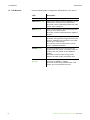
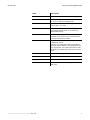
Use the following table to interpret the LED behavior of the device.
LED
Description
Power (Green)
On when device power plug is connected.
USB Host (Green)
Flashes then Off during device initialization. On if a
USB device is connected to the cable modem.
Slow Flash if there is data traffic between the cable
modem and a USB device.
Sync (Green)
On for normal operations. Slow Flash during initial
power-up of the cable modem.
Slow Flash if a device software/firmware upgrade in
progress.
Ready (Green)
Flashes then Off during device initialization.
Slow Flash during upstream ranging and Fast Flash
during IP initialization and registration of the cable
modem to the cable network.
On if network access is enabled. Off if network
access is disabled/unavailable.
WLAN (Green)
On during initialization of the device and if the
wireless radio and network are available. Off if the
wireless radio and network are unavailable/not
working.
Slow Flash if wireless traffic is being passed
between the cable modem and wireless client.
Eth 1 to Eth 4
(Green)
Flash then Off during device initialization. On, if
connected at 100Mbps or 10Mbps.
Slow Flash if traffic being passed between cable
modem and connected Ethernet device.
DDW2600 Wireless Cable Modem - FAQ • May, 2010